Support for participation in electronic paper prototyping
DEARDEN, Andy <http://orcid.org/0000-0002-5706-5978>, NAGHSH, A. and
OZCAN, M. B.
Available from Sheffield Hallam University Research Archive (SHURA) at:
http://shura.shu.ac.uk/12/
This document is the author deposited version. You are advised to consult the
publisher's version if you wish to cite from it.
Published version
DEARDEN, Andy, NAGHSH, A. and OZCAN, M. B. (2002). Support for participation
in electronic paper prototyping. In: Proceedings of the Participatory Design
Conference (PDC 2002), Malmö, Sweden, June 23-25, 2002. Palo Alto, CA, CPSR,
105-108.
Copyright and re-use policy
See http://shura.shu.ac.uk/information.html
Sheffield Hallam University Research Archive
Support for participation in electronic paper prototyping
Andy Dearden, Amir Naghsh & Mehmet Ozcan
Cultural, Communications & Computing Research Centre (C
3RI)
Sheffield Hallam University
Howard Street
Sheffield, S1 1WB, UK
Tel: +44 (0) 114 225 2916
Fax: +44 (0) 114 225 3161
email: {a.m.dearden, a.naghsh, m.b.ozcan}@shu.ac.uk
ABSTRACT
In this paper, we examine a range of tools for early prototyping of interactive systems that might be described as enabling 'electronic paper prototyping'. We then introduce Gabbeh, a prototype that we are developing to re-enable participatory design when using such tools.
Paper-prototyping is an established approach to the creation of early prototypes in the participatory design of computer systems. Recent years have seen the rapid development of new interaction devices in which a display screen is combined with pen-based input to allow users to create sketches or hand-written notes in an interaction that is similar to writing with a pen on paper. Research with such devices has shown how this capability can be used to rapidly create simple prototypes of interactive systems such as websites. However, previous systems have not considered how end-users and other stakeholders could contribute to design dialogues around such prototypes.
Categories and Subject Descriptors
D.2.2 Design tools and techniques
General Terms
Design
Keywords
Interactive systems design, paper-prototyping, pen-based interaction, Gabbeh, DENIM
1.
INTRODUCTION
Enabling users to envisage or make sense of design proposals (whether those proposals originate with ‘professional designers’ or from the users themselves) is an essential element of all participatory approaches to design. Users can only make informed choices when the proposals being discussed are meaningful to them. Prototyping is one way of helping users (and designers) to understand the alternatives that are possible. Paper-prototyping is an established participatory approach for designing interactive systems (Ehn & Kyng, 1991; Preece et al., 2002) which allows users and designers to create and evaluate early prototypes of interactive systems. Whilst paper-prototyping has many advantages in promoting user participation, it also has some limitations. In particular:
whilst paper prototypes may help users and designers to understand proposals for screen layouts, users may have difficulty in understanding and revising the dynamic behaviour being proposed (O’Neill et al., 1999);
it is difficult to review a paper-prototype when users and designers are not able to arrange a face-to-face meeting; and
paper-prototypes may be difficult to relate to other representations being used within design such as detailed specifications of behaviour and functionality. As pen-based interaction devices have become more widely available, some systems have applied pen-based interaction in interactive systems design. Examples include SILK and DENIM (Landay, 1996; Lin et al., 2000; Newman et al. 2003) and FreeForm (Plimmer & Apperley, 2003). These systems might be described as supporting a form of ‘electronic-paper prototyping’. Other work has also explored ways in which the benefits of paper-prototyping might be realised in software prototyping environments, without relying on pen-based interaction (van de Kant et al., 1998; Nixon, 2001). These approaches overcome some of the limitations of paper-prototyping. In particular, these systems can make the dynamic behaviour of the proposed system easier for users to perceive and can permit the prototype to be distributed electronically. However, the designs of these existing tools are primarily oriented towards the needs of people
Permission to make digital or hard copies of all or part of this work for personal or classroom use is granted without fee provided that copies are not made or distributed for profit or commercial advantage and that copies bear this notice and the full citation on the first page. To copy otherwise, or republish, to post on servers or to redistribute to lists, requires prior specific permission and/or a fee.
Participatory Design Conference’04, July27 - 30, 2004, Toronto, Canada.
directly involved in creating designs, rather than considering how other stakeholders can provide inputs to design.
In this paper, we review three existing tools. We then introduce the Gabbeh prototype, which we are using to explore how users and other stakeholders could participate more actively in ‘electronic paper prototyping’.
2.
EXISTING TOOLS
In this section we review three different tools that could be described as supporting ‘electronic paper prototyping’.
2.1
DENIM
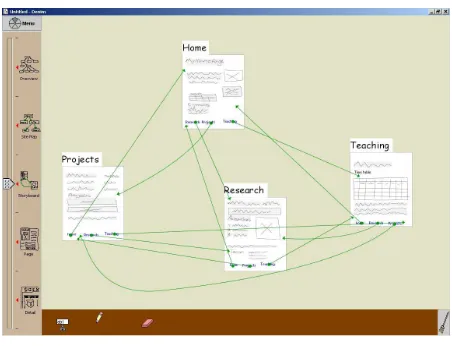
[image:3.612.58.284.293.466.2]DENIM (Lin et al., 2000) is a sketching tool for designing web-sites. DENIM is usually run on a graphics tablet such as a TabletPC or a Wacom Cintiq. In DENIM users can sketch out the overall structure of a site (a collection of pages); sketch the contents of the pages as a set of ‘scribbles’; define hyperlinks from scribbles in one page to another page; and then execute the resulting hypertext in a reduced functionality browser.
Figure 2: The DENIM sketching environment (Lin et al., 2000)
Figure 2 presents a screenshot from DENIM. The slider bar to the left of the screen allows the site to be viewed at different levels of detail – varying from a site overview that simply identifies the pages included, through a navigation view where the overall navigation can be examined; down to a detailed view where fine details of individual pages can be manipulated. In the run mode DENIM uses a reduced functionality browser where users can navigate using the defined links, and can backtrack using a standard ‘back’ button. However, the user cannot modify the designs in any way whilst in run mode. Concequently, DENIM cannot be used to feedback comments to the designers.
2.2
FreeForm
FreeForm (Plimmer & Apperley, 2003) is a tool for designing Visual Basic forms by interacting with an electronic whiteboard. Users draw their designs using specialised whiteboard pens, and (when a specific button is pressed) the marks may be recognised and replaced by Visual Basic user interface widgets.
FreeForm has two design views, a form view, in which individual forms are created, and a ‘storyboard’ view in which navigational links can be made between screens (Figure 3). In FreeForm’s run mode, these navigable links are indicated by specially coloured target areas.
FreeForm emphasises the evolution of the design by enabling the conversion of pen-based marks into Visual Basic interaction components such as check-boxes, drop-down menus, text fields etc.
[image:3.612.329.538.432.612.2]In its run mode FreeForm allows a user to add pen marks onto an overlay of each screen. Plimmer & Apperley (2003) suggest using this facility to simulate the user filling in text fields etc. However, the marks are held on a single overlay, and one button press clears the overlay. Therefore, the marks cannot be treated as separate 'comments'. Also, the marks are not visible when FreeForm returns to the 'design' mode. Hence, FreeForm does not provide a facility for recording the outcomes of the review.
Figure 3: The storyboard view in FreeForm
2.3
InDesign
Figure 4a: The navigational view in InDesign
InDesign with two target areas highlighted. The area to the left of the screen in figure 4a shows a list of all the available images within the currently selected directory. These images can be added to create new states. InDesign can be used with mouse and keyboard, it does not rely on pen-based interaction devices.
[image:4.612.48.297.334.537.2]Figure 4b: Using InDesign to prototype modifications to DENIM
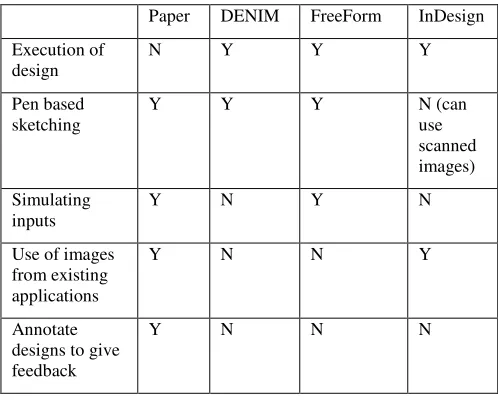
Table 1 summarises the differences between these three systems and compares them to traditional paper based media.
Paper DENIM FreeForm InDesign Execution of
design
N Y Y Y
Pen based sketching
Y Y Y N (can use scanned images) Simulating
inputs
Y N Y N
Use of images from existing applications
Y N N Y
Annotate designs to give feedback
Y N N N
Table 1: A comparison of existing approaches
3.
ENHANCING PARTICIPATION
A striking common feature of DENIM, InDesign & FreeForm is that all of the marks or notes made in these environments are treated as part of the design (or as user input in the case of FreeForm) and it is not possible to add any additional notes as commentary on the design.
This contrasts with the authors’ experience of paper-prototyping where post-it notes and hand written comments are common means for recording design issues (e.g. a comment that certain screens form a related group), indicating the status of parts of a design (e.g. to be developed further), or for noting user feedback. Green & Blackwell (1998) suggest that ‘secondary notation’ which includes such annotation, is important in
exploration or modification of a design. Annotation is also a common feature in modern document editing software.
The lack of the ability to annotate the design may severely limit the ability of these ‘electronic paper prototyping’ systems to support communication between different stakeholders in the design process. None of the tools listed above permits users or other stakeholders to give feedback directly through the medium of the prototype. Instead, any comment or feedback must be held separately (for example in an audio recording or minutes of a meeting), resulting in a difficulty in identifying the items to which any comment refers. This problem will be particularly acute if some stakeholders are not co-located with the designers. By limiting the opportunity for users and other stakeholder to communicate with the designers by reference to the prototype, these systems appear to have overlooked one of the primary benefits of paper-prototyping.
3.1
Gabbeh
Gabbeh is a prototype tool that extends the capabilities of existing tools by supporting dialogues between different designers, or between designers and other stakeholders. The core innovation in Gabbeh is in allowing users to add arbitrary comments either when the system is being designed, or when the prototype is being executed.. Gabbeh is developed as an extension of the DENIM environment.
[image:4.612.324.557.421.611.2]Figure 5a shows an example of comments in the design view of Gabbeh. The user can add arbitrary scribbles to a comment using the same free-hand writing tool as is used to create elements in a web page. A comment in the design view of Gabbeh can be related to an arbitrary number of pages or to elements within a page.
Figure 5a: The Gabbeh design view
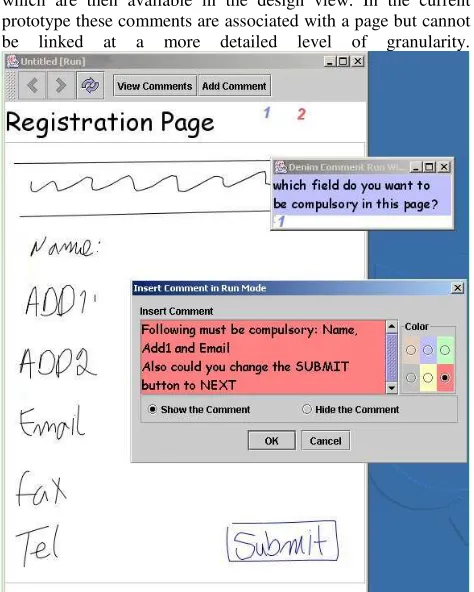
Figure 5b shows how a user reviewing a design can view existing comments related to a page. When the user selects an existing comment, the points to which that comment refers are marked by colour-coded numbers. s
[image:5.612.53.290.135.431.2]Users reviewing the design can also add their own comments, which are then available in the design view. In the current prototype these comments are associated with a page but cannot be linked at a more detailed level of granularity.
Figure 5b: Reviewing & adding comments at run time
At the time of writing, Gabbeh is at an early stage of prototyping. The design concepts have been developed from discussions with designers of websites, desktop applications and video games. Future possible enhancements will include being able to import images of existing appliations so that the tool can be used to support design evolution and redesign.
Once the basic functionality has been completed, we plan to conduct evaluations using observational and co-operative evaluation techniques to explore the use of the commenting facilities in the context of both simulated and real design practice.
4.
ACKNOWLEDGEMENTS
We would like to thank the Group for User Interaction Research of the University of Berkeley for releasing DENIM under an open-source licence, without which this work would not have been possible. This work is supported by the UK EPSRC grant number GR/ R87918, paperCHASTE.
5.
REFERENCES
Ehn, P. & Kyng, M., 1991. Cardboard Computers: Mocking-it-up or Hands-on the Future. In, Greenbaum, J. & Kyng, M. (Eds.)
Design at Work, pages 169 – 196. Hillsdale, NJ: Laurence Erlbaum Associates.
Green, T. & Blackwell, A. 1998. Cognitive Dimensions, A Tutorial. Available at:
http://www.cl.cam.ac.uk/~afb21/CognitiveDimensions/
Landay, J., 1996. Interactive Sketching for the Early Stages of User Interface Design. Technical Report CMU-CS-96-201, Carnegie Mellon University, Pittsburgh, PA. 1996. Lin, J., Newman, M.W., Hong, J.I. & Landay J.A., 2000. DENIM: Finding a tighter fit between tools and practice for web site design. In Proceedings of CHI 2000, pages 510 - 517. The Hague, Netherlands: ACM Press.
Newman, M.W., Lin, J., Hong, J.I. & Landay J.A., DENIM: An Informal Web Site Design Tool Inspired by Observations of Practice. In Human-Computer Interaction, 2003. 18(3): pages 259-324.
Nixon, B., 2001. Design and Implementation of a Software Paper Prototyping Application. BSc. Final year project, School of Computing & Management Sciences, Sheffield Hallam University.
O'Neill, E., Johnson, P. & Johnson, H., 1999. Representations and user-developer interaction in cooperative analysis and design, Human-Computer Interaction, 14 (1 & 2), pages 43 - 91. Plimmer, B. & Apperley, M., 2003. FreeForm: A tool for sketching form designs. In Gray, P., Johnson, H. & O’Neill, E (Eds.) Proceedings of HCI 2003, Volume 2. Research Press International, Bristol, UK. pages 183 – 186.
Preece, J., Sharp, H. & Rogers, Y., 2002. Interaction Design. John Wiley & Sons.