A Concept-Based Approach
Dhananjay M. Dhamdhere
Published by McGraw-Hill, a business unit of The McGraw-Hill Companies, Inc., 1221 Avenue of the Americas, New York, NY 10020. Copyright © 2009 by The McGraw-Hill Companies, Inc. All rights reserved. No part of this publication may be reproduced or distributed in any form or by any means, or stored in a database or retrieval system, without the prior written consent of The McGraw-Hill Companies, Inc., including, but not limited to, in any network or other electronic storage or transmission, or broadcast for distance learning.
Some ancillaries, including electronic and print components, may not be available to customers outside the United States. This book is printed on acid-free paper.
1 2 3 4 5 6 7 8 9 0 DOC/DOC 0 9 8 ISBN 978–0–07–295769–3 MHID 0–07–295769–7
Global Publisher:Raghothaman Srinivasan Director of Development:Kristine Tibbetts Freelance Developmental Editor:Melinda Bilecki Project Coordinator:Melissa M. Leick Lead Production Supervisor:Sandy Ludovissy Designer:Laurie B. Janssen
(USE) Cover Image:S. Solum/PhotoLink/Getty Images, RF Compositor:Newgen
Typeface:10/12 Times
Printer:R. R. Donnelley Crawfordsville, IN
Library of Congress Cataloging-in-Publication Data
Dhamdhere, Dhananjay M.
Operating systems : a concept-based approach / Dhananjay M. Dhamdhere. – 1st ed. p. cm.
Includes bibliographical references and index.
ISBN 978–0–07–295769–3 — ISBN 0–07–295769–7 (hard copy : alk. paper) 1. Operating systems (Computers) I. Title.
QA76.76.O63D5 2009
005.43–dc22 2007041510
Preface
xvi
• P a r t
1
•Overview
1
1
Introduction 52
The OS, the Computer, and User Programs 253
Overview of Operating Systems 514
Structure of Operating Systems 80• P a r t
2
•Process Management
107
5
Processes and Threads 1116
Process Synchronization 1657
Scheduling 2288
Deadlocks 2779
Message Passing 31510
Synchronization and Scheduling in Multiprocessor Operating Systems 336• P a r t
3
•Memory Management
361
11
Memory Management 36312
Virtual Memory 410• P a r t
4
•File Systems and I/O Management
477
13
File Systems 47914
Implementation of File Operations 54315
Security and Protection 605• P a r t
5
•Distributed Operating Systems
649
16
Distributed Operating Systems 65317
Theoretical Issues in Distributed Systems 69318
Distributed Control Algorithms 71419
Recovery and Fault Tolerance 743Preface
xvi
• P a r t
1
•Overview
1
C h a p t e r
1
•
Introduction
5
1.1 Abstract Views of an Operating System 5 1.2 Goals of an OS 8
1.2.1 Efficient Use 8 1.2.2 User Convenience 9 1.2.3 Noninterference 10 1.3 Operation of an OS 10
1.3.1 Program Management 12 1.3.2 Resource Management 12 1.3.3 Security and Protection 14 1.4 Preview of the Book 15
1.4.1 Introduction to Operating Systems 16
1.4.2 Managing User Computations 17
1.4.3 Management of Memory 19 1.4.4 Management of Files and I/O
Devices 20
1.4.5 Distributed Operating Systems 21
1.5 Summary 22
Test Your Concepts 23 Exercises 23
Bibliography 24
C h a p t e r
2
•
The OS, the Computer,
and User Programs
25
2.1 Fundamental Principles of OS
Operation 25
2.2 The Computer 26 2.2.1 The CPU 27
2.2.2 Memory Management Unit (MMU) 30
2.2.3 Memory Hierarchy 30 2.2.4 Input/Output 34 2.2.5 Interrupts 36
2.3 OS Interaction with the Computer and
User Programs 39
2.3.1 Controlling Execution of Programs 39
2.3.2 Interrupt Servicing 40 2.3.3 System Calls 44
2.4 Summary 47
Test Your Concepts 48 Exercises 49
Bibliography 49
C h a p t e r
3
•
Overview of Operating Systems
51
3.1 Computing Environments and Nature of
Computations 51
3.2 Classes of Operating Systems 54 3.3 Efficiency, System Performance, and User
Service 56
3.5.1 Priority of Programs 61 3.6 Time-Sharing Systems 65
3.6.1 Swapping of Programs 67 3.7 Real-Time Operating Systems 68
3.7.1 Hard and Soft Real-Time Systems 69
3.7.2 Features of a Real-Time Operating System 70
3.8 Distributed Operating Systems 71 3.8.1 Special Techniques of Distributed
Operating Systems 72 3.9 Modern Operating Systems 73 3.10 Summary 74
Test Your Concepts 75 Exercises 76
Bibliography 78
C h a p t e r
4
•
Structure of Operating Systems
80
4.1 Operation of an OS 80
4.2 Structure of an Operating System 82 4.2.1 Policies and Mechanisms 82 4.2.2 Portability and Extensibility of
Operating Systems 82 4.3 Operating Systems with Monolithic
Structure 84
4.4 Layered Design of Operating
Systems 85
4.5 Virtual Machine Operating Systems 88 4.6 Kernel-Based Operating Systems 92
4.6.1 Evolution of Kernel-Based Structure of Operating Systems 94
4.7 Microkernel-Based Operating
Systems 95
4.8 Case Studies 97
4.8.1 Architecture of Unix 98 4.8.2 The Kernel of Linux 99 4.8.3 The Kernel of Solaris 100 4.8.4 Architecture of Windows 101
Test Your Concepts 103 Exercises 104
Bibliography 104
• P a r t
2
•Process Management
107
C h a p t e r
5
•
Processes and Threads
111
5.1 Processes and Programs 111 5.1.1 What Is a Process? 111 5.1.2 Relationships between Processes
and Programs 113 5.1.3 Child Processes 114 5.1.4 Concurrency and
Parallelism 116 5.2 Implementing Processes 117
5.2.1 Process States and State Transitions 119
5.2.2 Process Context and the Process Control Block 123
5.2.3 Context Save, Scheduling, and Dispatching 125
5.2.4 Event Handling 127 5.2.5 Sharing, Communication, and
Synchronization between Processes 131
5.2.6 Signals 132 5.3 Threads 134
5.3.1 POSIX Threads 138 5.3.2 Kernel-Level, User-Level, and
Hybrid Threads 139
5.4 Case Studies of Processes and
Threads 146
5.4.1 Processes in Unix 146 5.4.2 Processes and Threads in
Linux 152
5.4.3 Threads in Solaris 154 5.4.4 Processes and Threads in
5.5 Summary 160
Test Your Concepts 161 Exercises 161
Class Project: Implementing a Shell 162 Bibliography 163
C h a p t e r
6
•
Process Synchronization
165
6.1 What Is Process Synchronization? 165 6.2 Race Conditions 166
6.3 Critical Sections 170
6.3.1 Properties of a Critical Section Implementation 172 6.4 Control Synchronization and Indivisible
Operations 172
6.5 Synchronization Approaches 175 6.5.1 Looping versus Blocking 175 6.5.2 Hardware Support for Process
Synchronization 177 6.5.3 Algorithmic Approaches,
Synchronization Primitives, and Concurrent Programming Constructs 180
6.6 Structure of Concurrent Systems 181 6.7 Classic Process Synchronization
Problems 183
6.7.1 Producers−−Consumers with Bounded Buffers 183 6.7.2 Readers and Writers 186 6.7.3 Dining Philosophers 187 6.8 Algorithmic Approach to Implementing
Critical Sections 190
6.8.1 Two-Process Algorithms 190 6.8.2 n-Process Algorithms 194 6.9 Semaphores 197
6.9.1 Uses of Semaphores in Concurrent Systems 198
6.9.2 Producers−−Consumers Using Semaphores 201
6.9.3 Readers−−Writers Using Semaphores 204
6.9.4 Implementation of Semaphores 205 6.10 Monitors 208
6.10.1 Monitors in Java 213 6.11 Case Studies of Process
Synchronization 213
6.11.1 Synchronization of POSIX Threads 213
6.11.2 Process Synchronization in Unix 215
6.11.3 Process Synchronization in Linux 216
6.11.4 Process Synchronization in Solaris 217
6.11.5 Process Synchronization in Windows 218
6.12 Summary 220
Test Your Concepts 221 Exercises 222
Class Project 1: Interprocess Communication 224
Class Project 2: Disk Scheduler 225 Bibliography 226
C h a p t e r
7
•
Scheduling
228
7.1 Scheduling Terminology and
Concepts 228
7.1.1 Fundamental Techniques of Scheduling 231
7.1.2 The Role of Priority 232 7.2 Nonpreemptive Scheduling Policies 233
7.2.1 FCFS Scheduling 233 7.2.2 Shortest Request Next (SRN)
Scheduling 234
7.2.3 Highest Response Ratio Next (HRN) Scheduling 236 7.3 Preemptive Scheduling Policies 236
7.3.1 Round-Robin Scheduling with Time-Slicing (RR) 237 7.3.2 Least Completed Next (LCN)
Scheduling 241 7.4 Scheduling in Practice 242
7.4.1 Long-, Medium-, and Short-Term Schedulers 243
7.4.2 Scheduling Data Structures and Mechanisms 246
7.4.3 Priority-Based Scheduling 246 7.4.4 Round-Robin Scheduling with
Time-Slicing 247
7.4.5 Multilevel Scheduling 248 7.4.6 Fair Share Scheduling 249 7.4.7 Kernel Preemptibility 250 7.4.8 Scheduling Heuristics 250 7.4.9 Power Management 251 7.5 Real-Time Scheduling 252
7.5.1 Process Precedences and Feasible Schedules 252
7.5.2 Deadline Scheduling 254 7.5.3 Rate Monotonic Scheduling 257 7.6 Case Studies 259
7.6.1 Scheduling in Unix 259 7.6.2 Scheduling in Solaris 262 7.6.3 Scheduling in Linux 263 7.6.4 Scheduling in Windows 264 7.7 Performance Analysis of Scheduling
Policies 266
7.7.1 Performance Analysis through Implementation 266 7.7.2 Simulation 267
7.7.3 Mathematical Modeling 268 7.8 Summary 272
Test Your Concepts 272 Exercises 273
Bibliography 275
C h a p t e r
8
•
Deadlocks
277
8.1 What is a Deadlock? 277
8.2 Deadlocks in Resource Allocation 279 8.2.1 Conditions for a Resource
Deadlock 280
State 281
8.3 Handling Deadlocks 285
8.4 Deadlock Detection and Resolution 286 8.4.1 A Deadlock Detection
Algorithm 288
8.4.2 Deadlock Resolution 290 8.5 Deadlock Prevention 291
8.5.1 All Resources Together 293 8.5.2 Resource Ranking 294 8.6 Deadlock Avoidance 295
8.7 Characterization of Resource Deadlocks by
Graph Models 301
8.7.1 Single-Instance, Single-Request (SISR) Systems 301
8.7.2 Multiple-Instance, Single-Request (MISR) Systems 302
8.7.3 Single-Instance, Multiple-Request (SIMR) Systems 303
8.7.4 Multiple-Instance, Multiple-Request (MIMR) Systems 304
8.7.5 Processes in Deadlock 305 8.8 Deadlock Handling in Practice 306
8.8.1 Deadlock Handling in Unix 307 8.8.2 Deadlock Handling in
Windows 308 8.9 Summary 309
Test Your Concepts 310 Exercises 310
Bibliography 313
C h a p t e r
9
•
Message Passing
315
9.1 Overview of Message Passing 315 9.1.1 Direct and Indirect Naming 317 9.1.2 Blocking and Nonblocking
Sends 318
9.1.3 Exceptional Conditions in Message Passing 319
9.2 Implementing Message Passing 320 9.2.1 Buffering of Interprocess
9.2.2 Delivery of Interprocess Messages 321 9.3 Mailboxes 323
9.4 Higher-Level Protocols Using Message
Passing 325
9.4.1 The Simple Mail Transfer Protocol (SMTP) 325
9.4.2 Remote Procedure Calls 326 9.4.3 Message Passing Standards for
Parallel Programming 327 9.5 Case Studies in Message Passing 328
9.5.1 Message Passing in Unix 328 9.5.2 Message Passing in
Windows 332 9.6 Summary 334
Test Your Concepts 334 Exercises 334
Bibliography 335
C h a p t e r
10
•
Synchronization and Scheduling in
Multiprocessor Operating Systems
336
10.1 Architecture of Multiprocessor
Systems 336
10.1.1 SMP Architecture 341 10.1.2 NUMA Architecture 342 10.2 Issues in Multiprocessor Operating
Systems 343
10.3 Kernel Structure 345 10.4 Process Synchronization 347
10.4.1 Special Hardware for Process Synchronization 350
10.4.2 A Scalable Software Scheme for Process Synchronization 351 10.5 Process Scheduling 352
10.6 Case Studies 354 10.6.1 Mach 354 10.6.2 Linux 355
10.6.3 SMP Support in Windows 356 10.7 Summary 358
Test Your Concepts 358
Exercises 359 Bibliography 359
• P a r t
3
•Memory Management
361
C h a p t e r
11
•
Memory Management
363
11.1 Managing the Memory Hierarchy 363 11.2 Static and Dynamic Memory
Allocation 365
11.3 Execution of Programs 367 11.3.1 Relocation 369 11.3.2 Linking 371
11.3.3 Program Forms Employed in Operating Systems 373
11.4 Memory Allocation to a Process 376 11.4.1 Stacks and Heaps 376 11.4.2 The Memory Allocation
Model 378
11.4.3 Memory Protection 380 11.5 Heap Management 380
11.5.1 Reuse of Memory 380
11.5.2 Buddy System and Power-of-2 Allocators 386
11.5.3 Comparing Memory Allocators 389 11.5.4 Heap Management in
Windows 390
11.6 Contiguous Memory Allocation 390 11.7 Noncontiguous Memory Allocation 392
11.7.1 Logical Addresses, Physical Addresses, and Address Translation 393
11.7.2 Approaches to Noncontiguous Memory Allocation 394 11.7.3 Memory Protection 395 11.8 Paging 396
11.9 Segmentation 398
11.13 Summary 405
Test Your Concepts 406 Exercises 407
Bibliography 408
C h a p t e r
12
•
Virtual Memory
410
12.1 Virtual Memory Basics 410 12.2 Demand Paging 413
12.2.1 Demand Paging Preliminaries 414
12.2.2 Paging Hardware 423 12.2.3 Practical Page Table
Organizations 428 12.2.4 I/O Operations in a Paged
Environment 433 12.3 The Virtual Memory Manager 435
12.3.1 Overview of Operation of the Virtual Memory Handler 437 12.4 Page Replacement Policies 438
12.4.1 Practical Page Replacement Policies 444
12.5 Controlling Memory Allocation to a
Process 447
12.6 Shared Pages 451
12.6.1 Copy-on-Write 453 12.7 Memory-Mapped Files 454
12.8 Case Studies of Virtual Memory Using
Paging 456
12.8.1 Unix Virtual Memory 456 12.8.2 Linux Virtual Memory 459 12.8.3 Virtual Memory in Solaris 461 12.8.4 Virtual Memory in
Windows 462
12.9 Virtual Memory Using Segmentation 465 12.9.1 Management of Memory 466 12.9.2 Sharing and Protection 467 12.9.3 Segmentation with Paging 468 12.10 Summary 469
Test Your Concepts 470
Class Project: Simulation of Virtual Memory Manager 473
Bibliography 474
• P a r t
4
•File Systems and I/O
Management
477
C h a p t e r
13
•
File Systems
479
13.1 Overview of File Processing 479 13.1.1 File System and the IOCS 481 13.1.2 File Processing in a Program 482 13.2 Files and File Operations 483
13.3 Fundamental File Organizations and Access
Methods 484
13.3.1 Sequential File Organization 485
13.3.2 Direct File Organization 485 13.3.3 Index Sequential File
Organization 486 13.3.4 Access Methods 488 13.4 Directories 488
13.4.1 Directory Trees 490 13.4.2 Directory Graphs 492 13.4.3 Operations on Directories 493 13.4.4 Organization of Directories 493 13.5 Mounting of File Systems 495
13.6 File Protection 497
13.7 Allocation of Disk Space 498 13.7.1 Linked Allocation 499 13.7.2 Indexed Allocation 500 13.7.3 Performance Issues 502 13.8 Interface Between File System and
IOCS 503
13.9 File Processing 506
13.9.1 File System Actions atopen 506 13.9.2 File System Actions during a File
13.9.3 File System Actions at
close 509
13.10 File Sharing Semantics 510 13.11 File System Reliability 513
13.11.1 Loss of File System Consistency 513 13.11.2 Approaches to File System
Reliability 515
13.12 Journaling File System 523 13.13 Virtual File System 524
13.14 Case Studies of File Systems 526 13.14.1 Unix File System 526 13.14.2 Linux File System 530 13.14.3 Solaris File System 531 13.14.4 Windows File System 531 13.15 Performance of File Systems 534
13.15.1 Log-Structured File System 536 13.16 Summary 537
Test Your Concepts 538 Exercises 539
Bibliography 541
C h a p t e r
14
•
Implementation of File Operations
543
14.1 Layers of the Input-Output Control
System 543
14.2 Overview of I/O Organization 545 14.3 I/O Devices 547
14.3.1 Magnetic Tapes 550 14.3.2 Magnetic Disks 552
14.3.3 Data Staggering Techniques 554 14.3.4 Disk Attachment
Technologies 559 14.3.5 RAID 561 14.3.6 Optical Disks 565 14.4 Device-Level I/O 566
14.4.1 I/O Programming 567 14.5 The Physical IOCS 569
14.5.1 Logical Devices 569 14.5.2 Physical IOCS Data
Structures 570
14.5.3 Organization of Physical IOCS 571
14.5.4 Implementation of Physical IOCS 572
14.6 Device Drivers 574 14.7 Disk Scheduling 576 14.8 Buffering of Records 579 14.9 Blocking of Records 584 14.10 Access Methods 587 14.11 Disk and File Caches 588 14.12 Unified Disk Cache 591 14.13 Case Studies 592
14.13.1 Unix 592 14.13.2 Linux 595
14.13.3 File Processing in Windows 596 14.14 Summary 599
Test Your Concepts 600 Exercises 601
Bibliography 602
C h a p t e r
15
•
Security and Protection
605
15.1 Overview of Security and Protection 605 15.1.1 Goals of Security and
Protection 609 15.1.2 Security and Protection
Threats 609 15.2 Security Attacks 610
15.2.1 Trojan Horses, Viruses, and Worms 611
15.2.2 The Buffer Overflow Technique 613 15.3 Formal Aspects of Security 615 15.4 Encryption 617
15.4.1 Attacks on Cryptographic Systems 619
15.4.2 Encryption Techniques 620 15.5 Authentication and Password Security 623 15.6 Protection Structures 625
15.6.4 Capability Lists (C-lists) 628 15.6.5 Protection Domain 629 15.7 Capabilities 630
15.7.1 Capability-Based Computer Systems 631
15.7.2 Software Capabilities 633 15.7.3 Problem Areas in the Use of
Capabilities 635
15.8 Classifications of Computer Security 636 15.9 Case Studies in Security and
Protection 638
15.9.1 MULTICS 638 15.9.2 Unix 639 15.9.3 Linux 640
15.9.4 Security and Protection in Windows 641
15.10 Summary 643
Test Your Concepts 644 Exercises 644
Bibliography 645
• P a r t
5
•Distributed Operating
Systems
649
C h a p t e r
16
•
Distributed Operating Systems
653
16.1 Features of Distributed Systems 653 16.2 Nodes of Distributed Systems 655 16.3 Integrating Operation of Nodes of a
Distributed System 656
16.4 Reliable Interprocess Communication 659 16.4.1 Naming of Processes 660 16.4.2 IPC Semantics 661 16.4.3 IPC Protocols 662
16.5 Distributed Computation Paradigms 665 16.5.1 Client−−Server Computing 667 16.5.2 Remote Procedure Calls 668
16.5.4 Case Studies 671 16.6 Networking 672
16.6.1 Types of Networks 672 16.6.2 Network Topology 674 16.6.3 Networking Technologies 675 16.6.4 Connection Strategies 678 16.6.5 Routing 680
16.6.6 Network Protocols 681 16.6.7 Network Bandwidth and
Latency 684
16.7 Model of a Distributed System 685 16.8 Design Issues in Distributed Operating
Systems 687
16.9 Summary 689
Test Your Concepts 690 Exercises 691
Bibliography 691
C h a p t e r
17
•
Theoretical Issues in Distributed
Systems
693
17.1 Notions of Time and State 693 17.2 States and Events in a Distributed
System 694
17.2.1 Local and Global States 694 17.2.2 Events 695
17.3 Time, Clocks, and Event Precedences 695 17.3.1 Event Precedence 696
17.3.2 Logical Clocks 697 17.3.3 Vector Clocks 700 17.4 Recording the State of a Distributed
System 702
17.4.1 Properties of a Consistent State Recording 703
17.4.2 An Algorithm for Consistent State Recording 706
17.5 Summary 710
Test Your Concepts 711 Exercises 712
C h a p t e r
18
•
Distributed Control Algorithms
714
18.1 Operation of Distributed Control
Algorithms 714
18.2 Correctness of Distributed Control
Algorithms 717
18.3 Distributed Mutual Exclusion 718 18.3.1 A Permission-Based
Algorithm 718
18.3.2 Token-Based Algorithms for Mutual Exclusion 720 18.4 Distributed Deadlock Handling 723
18.4.1 Problems in Centralized Deadlock Detection 724
18.4.2 Distributed Deadlock Detection 724 18.4.3 Distributed Deadlock
Prevention 728
18.5 Distributed Scheduling Algorithms 728 18.6 Distributed Termination Detection 732 18.7 Election Algorithms 735
18.8 Practical Issues in Using Distributed Control
Algorithms 736
18.8.1 Resource Management 736 18.8.2 Process Migration 738 18.9 Summary 739
Test Your Concepts 740 Exercises 740
Bibliography 741
C h a p t e r
19
•
Recovery and Fault Tolerance
743
19.1 Faults, Failures, and Recovery 743 19.1.1 Classes of Faults 745 19.1.2 Overview of Recovery
Techniques 746 19.2 Byzantine Faults and Agreement
Protocols 747
19.3 Recovery 748
19.4 Fault Tolerance Techniques 750
19.4.1 Logs, Forward Recovery, and Backward Recovery 750 19.4.2 Handling Replicated Data 751 19.4.3 Handling Distributed Data 753 19.5 Resiliency 754
19.6 Summary 756
Test Your Concepts 757 Exercises 757
Bibliography 758
C h a p t e r
20
•
Distributed File Systems
760
20.1 Design Issues in Distributed File
Systems 760
20.1.1 Overview of DFS Operation 762 20.2 Transparency 763
20.3 Semantics of File Sharing 764 20.4 Fault Tolerance 765
20.4.1 Availability 766 20.4.2 Client and Server Node
Failures 768
20.4.3 Stateless File Servers 769 20.5 DFS Performance 770
20.5.1 Efficient File Access 770 20.5.2 File Caching 771 20.5.3 Scalability 774 20.6 Case Studies 774
20.6.1 Sun Network File System 774 20.6.2 Andrew and Coda File
Systems 777 20.6.3 GPFS 779 20.6.4 Windows 781 20.7 Summary 781
Test Your Concepts 782 Exercises 783
Bibliography 783
C h a p t e r
21
•
Distributed System Security
785
Policies 786
21.1.2 Security Attacks in Distributed Systems 787
21.2 Message Security 788
21.2.1 Distribution of Encryption Keys 791
21.2.2 Preventing Message Replay Attacks 793
21.2.3 Mutual Authentication 794 21.3 Authentication of Data and Messages 795
21.3.1 Certification Authorities and Digital Certificates 795
Digital Signatures 796 21.4 Third-Party Authentication 797
21.4.1 Kerberos 797
21.4.2 Secure Sockets Layer (SSL) 801 21.5 Summary 803
Test Your Concepts 803 Exercises 804
OBJECTIVE
•
The main objective of a first course in operating systems is to develop an understanding of the fundamental concepts and techniques of operating systems. Most of the students are already exposed to diverse information on operating sys-tems as a result of practical exposure to operating syssys-tems and literature on the Internet; such students have a lot of information but few concepts about oper-ating systems. This situation makes teaching of operoper-ating systems concepts a challenging task because it is necessary to retrofit some concepts to the informa-tion possessed by these students without boring them, yet do it in a manner that introduces concepts to first-time learners of operating systems without intimi-dating them. This book presents operating system concepts and techniques in a manner that incorporates these requirements.
GENERAL APPROACH
•
The book begins by building a core knowledge of what makes an operating system tick. It presents an operating system as an intermediary between a computer system and users that provides good service to users and also achieves efficient use of the computer system. A discussion of interactions of an operating system with the computer on one hand and with user computations on the other hand consolidates this view and adds practical details to it. This approach demystifies an operating system for a new reader, and also relates to the background of an experienced reader. It also emphasizes key features of computer architecture that are essential for a study of operating systems.
The rest of the book follows an analogous approach. Each chapter identi-fies fundamental concepts involved in some functionality of an operating system, describes relevant features in computer architecture, discusses relevant operat-ing system techniques, and illustrates their operation through examples. The highlights of this approach are:
• Fundamental concepts are introduced in simple terms.
• The associations between techniques and concepts are readily established. • Numerous examples are included to illustrate concepts and techniques. • Implementation details and case studies are organized as small capsules
acterization, kernel memory allocation, synchronization and scheduling in multiprocessor systems, file sharing semantics, and file system reliability. The key benefit of this approach is that concepts, techniques, and case studies are well integrated, so many design and implementation details look “obvious” by the time the reader encounters them. It emphasizes the most important message an operating systems text can give to students: A concept-based study of operating systems equips a computer professional to comprehend diverse operating system techniques readily.
PEDAGOGICAL FEATURES
• Preview of the Book The last section of the first chapter is a brief preview of the
book that motivates study of each chapter by describing its importance within the overall scheme of the operating system, the topics covered in the chapter, and its relationships with other chapters of the book.
Part Introduction Each part of the book begins with an introduction that des-cribes its contents and provides a road map of the chapters in the part.
Chapter Introduction The chapter introduction motivates the reader by des-cribing the objectives of the chapter and the topics covered in it.
Figures and Tables Each chapter has concept-based figures that illustrate fun-damental concepts and techniques of a specific OS functionality. These figures are a vital part of the book’s pedagogy. Other figures are used for traditional pur-poses such as depicting practical arrangements or stepwise operation of specific techniques. Tables play a crucial role in the pedagogy by providing overviews and summaries of specific topics.
Examples Examples demonstrate the key issues concerning concepts and tech-niques being discussed. Examples are typeset in a different style to set them apart from the main body of the text, so a reader can skip an example if he does not want the flow of ideas to be interrupted, especially while reading a chapter for the first time.
Program Code Program code is presented in an easy-to-understand pseudocode form.
Snapshots of Concurrent Systems Students have difficulty visualizing concur-rent activities in a software system, which leads to an inadequate understanding of process synchronization. A snapshot depicts the state of different activities and their data to provide a holistic view of activities in a concurrent system.
and Windows, respectively, except when features of a specific version such as Linux 2.6 or Windows Vista are being discussed.
Tests of Concepts A set of objective and multiple-choice questions is provided at the end of each chapter so that the reader can test his grasp of concepts presented in the chapter.
Exercises Exercises are included at the end of each chapter. These include numerical problems based on material covered in the text, as well as challenging conceptual questions that test understanding and also provide deeper insights.
Summaries The summary included at the end of each chapter highlights the key topics covered and their interrelationships.
Instructor Resources A detailed solutions manual and slides for classroom usage are provided.
ORGANIZATION OF THE BOOK
•
The study of conventional operating systems is organized into four parts. The fifth part is devoted to distributed operating systems. The structure of the first four parts and interdependency between chapters is shown overleaf. Details of the parts are described in the following.
• Part 1: Overview Part 1 consists of four chapters. The introduction discusses how user convenience, efficient use of resources, and security and protection are the fundamental concerns of an operating system and describes the tasks involved in implementing them. It also contains a preview of the entire book. Chapter 2 describes how an OS uses features in a computer’s hardware to organize execution of user programs and handle requests made by them. Chapter 3 describes the different classes of operating systems, discusses the fundamental concepts and techniques used by each of them, and lists those of their techniques that are employed in modern operating systems as well. Chapter 4 describes operating system design methodologies that enable an OS to adapt to changes in computer architecture and the computing environment in which it is used.
File Systems
Implementation of File Operations
Security and Protection Part 1
Overview
Introduction
The OS, the Computer, and User Programs
Overview of Operating
Systems
Structure of Operating
Systems
Part 3 Memory Management
Memory Management
Virtual Memory
Part 4 File Systems Part 2
Process Management Processes and Threads
Process
Synchronization Scheduling
Synchronization and Scheduling in Multiprocessor OSs Message
Passing Deadlocks
• Part 3: Memory Management Two chapters are devoted to allocation and sharing of memory between processes. Chapter 11 deals with the funda-mentals of memory management—the problem of memory fragmentation, which is a situation in which an area of memory is unusable because it is too small, and techniques that address memory fragmentation. Chapter 12 discusses implementation ofvirtual memory, which overcomes the problem of memory fragmentation and also supports execution of large programs. • Part 4: File Systems This part consists of three chapters. Chapter 13
describes facilities for creation, access, sharing and reliable storage of files. Chapter 14 discusses I/O devices and describes how operations on files are implemented in an efficient manner. Chapter 15 discusses how security and file protection techniques together prevent illegal forms of access to files. • Part 5: Distributed Operating Systems A distributed operating system
Distributed System Security
Distributed File Systems Distributed
Control Algorithms
Distributed Operating Systems
Theoretical Issues in Distributed
Systems
Recovery and Fault Tolerance
Part 5
Distributed Operating Systems
USING THIS BOOK
•
Apart from an introduction to computing, this book does not assume the reader to possess any specific background, so instructors and students are likely to find that it contains a lot of introductory material that students already know. This material has been included for one very important reason: As mentioned at the start of the preface, students know manythings on their own, but often lack concepts. So it is useful for students to read even familiar topics that are presented in a concept-based manner. For the same reason, it is essential for instructors to cover Chapters 2 and 3, particularly the following topics, in class:
• Section 2.2: Memory hierarchy, input/output and interrupts • Section 2.3: Interrupt servicing and system calls
• Section 3.5: Multiprogramming systems, particularly program mix and priority.
p a r t
1
Overview
A
n operating system controls use of a computer system’s resources suchas CPUs, memory, and I/O devices to meet computational requirements of its users. Users expect convenience, quality of service, and a guaran-tee that other persons will not be able to interfere with their activities; whereas system administrators expect efficient use of the computer’s resources and good performance in executing user programs. These diverse expectations can be char-acterized asuser convenience,efficient use, andsecurityandprotection; they form the primary goals of an operating system. The extent to which an operating system provides user convenience or efficient use depends on itscomputing environment, i.e., the computer system’s hardware, its interfaces with other computers, and the nature of computations performed by its users.Different classes of operating systems were developed for different computing environments. We discuss the fundamental concepts and techniques used in each class of operating systems, and the flavor of user convenience and efficient use provided by it. A modern operating system has elements of several classes of operating systems, so most of these concepts and techniques are found in modern operating systems as well.
Road Map for Part 1
The OS, the Computer, and User Programs
Overview of Operating
Systems
Structure of Operating
Systems Introduction
A modern operating system has to be used on computer systems with dif-ferent architectures; it also has to keep pace with evolution of its computing environment. We discuss operating system design methodologies that enable an operating system to be implemented on different computer architectures, and to evolve with its computing environment.
Chapter 1: Introduction
This chapter discusses how users perceiveuser convenience, how an operating sys-tem achievesefficient useof resources, and how it ensuressecurityandprotection. It introduces the notion ofeffective utilizationof a computer system as the com-bination of user convenience and efficient use that best suits a specific computing environment. It also describes the fundamental tasks involved in management of programs and resources, and in implementing security and protection. The last section of this chapter is a preview of the entire book that describes the concepts and techniques discussed in each chapter and their importance in the operating system.
Chapter 2: The OS, the Computer, and User Programs
This chapter presents hardware features of a computer system that are relevant for operation and performance of an operating system (OS). It describes how an OS uses some of the hardware features to control execution of user programs and perform I/O operations in them, and how user programs use features in the hardware to interact with the OS and obtain the services they need.
Chapter 3: Overview of Operating Systems
This chapter deals with the fundamental principles of an operating system; it is a key chapter in the book. It discusses the nature of computations in different kinds of computing environments and features of operating systems used in these environments, and follows up this discussion with the notions of efficiency, sys-tem performance, and user service. Later sections discuss five classes of operating systems—batch processing, multiprogramming, time-sharing, real-time, and dis-tributed operating systems—and describe the principal concepts and techniques they use to meet their goals. The last section discusses how a modern OS draws upon the concepts and techniques used in these operating systems.
Chapter 4: Structure of Operating Systems
C h a p t e r
1
Introduction
T
he way you would define an operating system probably depends on what you expect from your computer system. Each user has his own personal thoughts on what the computer system is for. In technical language, we would say that an individual user has anabstract viewof the computer system, a view that takes in only those features that the user considers important.The operating system, or OS, as we will often call it, is the intermediary between users and the computer system. It provides the services and fea-tures present in abstract views of all its users through the computer system. It also enables the services and features to evolve over time as users’ needs change.
People who design operating systems have to deal with three issues: effi-cient use of the computer system’s resources, the convenience of users, and prevention of interference with users’ activities. Efficient use is more impor-tant when a computer system is dedicated to specific applications, and user convenience is more important in personal computers, while both are equally important when a computer system is shared by several users. Hence, the designer aims for the right combination of efficient use and user convenience for the operating system’s environment. Prevention of interference is mandatory in all environments.
We will now take a broad look at what makes an operating system work— we will see how its functions ofprogram managementandresource management
help to ensure efficient use of resources and user convenience, and how the functions of security and protection prevent interference with programs and resources.
1.1
ABSTRACT VIEWS OF AN OPERATING SYSTEM
•
A question such as “What is an OS?” is likely to evoke different answers, depend-ing on the user’s interest. For example,
• To a school or college student, the OS is the software that permits access to the Internet.
• To a user of an application package, the OS is simply the software that makes it possible to use the package.
• To a technician in, say, a computerized chemical plant, the OS is the invisible component of a computer system that controls the plant.
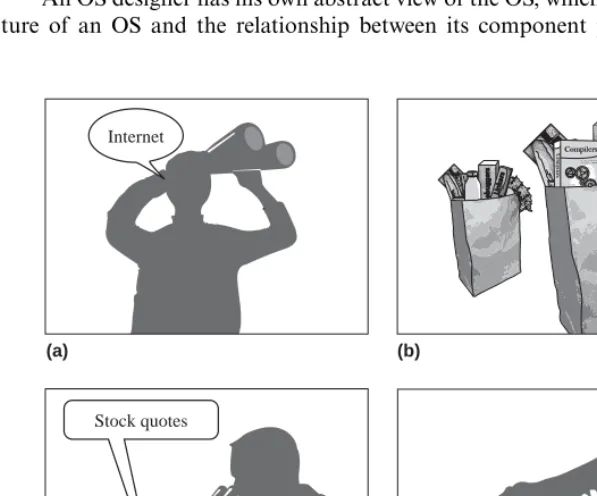
A user perceives an OS as simply a means of achieving an intended use of a computer system. For the student, the sole purpose of the computer system is to get onto the Internet; the OS helps in achieving this. Hence the student thinks of the operating system as the means for Internet browsing. The programmer, the user of a package, and the technician similarly identify the OS with their particular purposes in using the computer. Since their purposes are different, their perceptions of the OS are also different.
Figure 1.1 illustrates the four views of an OS we have just considered. They areabstract views, because each focuses on those characteristics considered essen-tial from the perspective of the individual viewer—it includes some elements of reality but ignores other elements. The student, the application user, and the tech-nician are end users of the OS; their views do not contain any features of the OS. The programmer’s view is that of a software developer. It includes features of the OS for software development.
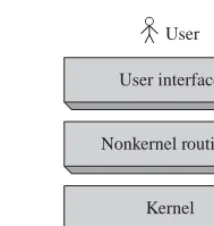
An OS designer has his own abstract view of the OS, which shows the struc-ture of an OS and the relationship between its component parts. Figure 1.2
(a) (b)
(c) (d)
Internet
[image:27.601.149.448.336.584.2]Stock quotes
Computer hardware Kernel Nonkernel routines
[image:28.601.176.283.61.174.2]User interface
Figure 1.2 A designer’s abstract view of an OS.
illustrates this view. Each part consists of a number of routines. The typical functionalities of these parts are as follows:
• User interface: The user interface accepts commands to execute programs and use resources and services provided by the operating system. It is either a command line interface, as in Unix or Linux, which displays a command prompt to the user and accepts a user command, or is a graphical user inter-face (GUI), as in the Windows operating system, which interprets mouse clicks on icons as user commands.
• Nonkernel routines:These routines implement user commands concerning execution of programs and use of the computer’s resources; they are invoked by the user interface.
• Kernel:The kernel is the core of the OS. It controls operation of the computer and provides a set of functions and services to use the CPU, memory, and other resources of the computer. The functions and services of the kernel are invoked by the nonkernel routines and by user programs.
Two features of an OS emerge from the designer’s view of an OS shown in Figure 1.2. The OS is actually a collection of routines that facilitate execution of user programs and use of resources in a computer system. It contains a hierar-chical arrangement of layers in which routines in a higher layer use the facilities provided by routines in the layer below it. In fact, each layer takes an abstract view of the layer below it, in which the next lower layer is a machine that can understand certain commands. The fact that the lower layer is a set of routines rather than a whole computer system makes no difference to the higher layer. Each higher layer acts as a more capable machine than the layer below it. To the user, the user interface appears like a machine that understands commands in the command language of the OS.
Throughout this book, we will use abstract views to present the design of OS components. This has two key benefits:
organizes execution of user programs (Figure 1.3 illustrates such a view later in this chapter), focuses only on handling of programs; it simplifies a study of this aspect of the OS bynotshowing how the OS handles other resources like memory or I/O devices.
• Presenting a generic scheme: An abstraction is used to present a generic scheme that has many variants in practice. We see two examples of this use in the designer’s abstract view of Figure 1.2. The user interface is an abstrac-tion, with a command line interface and a graphical user interface (GUI) as two of its many variants. The kernel typically presents an abstraction of the computer system to the nonkernel routines so that the diversity of hardware, e.g., different models of CPUs and different ways of organizing and accessing data in disks, is hidden from view of the nonkernel routines.
1.2
GOALS OF AN OS
•
The fundamental goals of an operating system are:
• Efficient use:Ensure efficient use of a computer’s resources.
• User convenience:Provide convenient methods of using a computer system. • Noninterference:Prevent interference in the activities of its users.
The goals of efficient use and user convenience sometimes conflict. For exam-ple, emphasis on quick service could mean that resources like memory have to remain allocated to a program even when the program is not in execution; how-ever, it would lead to inefficient use of resources. When such conflicts arise, the designer has to make a trade-off to obtain the combination of efficient use and user convenience that best suits the environment. This is the notion ofeffective utilizationof the computer system. We find a large number of operating systems in use because each one of them provides a different flavor of effective utilization. At one extreme we have OSs that provide fast service required by command and control applications, at the other extreme we have OSs that make efficient use of computer resources to provide low-cost computing, while in the middle we have OSs that provide different combinations of the two.
Interference with a user’s activities may take the form of illegal use or mod-ification of a user’s programs or data, or denial of resources and services to a user. Such interference could be caused by both users and nonusers, and every OS must incorporate measures to prevent it.
In the following, we discuss important aspects of these fundamental goals.
1.2.1
Efficient Use
may have a snowballing effect: Since the resource is allocated to a program, it is denied to other programs that need it. These programs cannot execute, hence resources allocated to them also remain idle. In addition, the OS itself consumes some CPU and memory resources during its own operation, and this consump-tion of resources constitutes anoverheadthat also reduces the resources available to user programs. To achieve good efficiency, the OS must minimize the waste of resources by programs and also minimize its own overhead.
Efficient use of resources can be obtained by monitoring use of resources and performing corrective actions when necessary. However, monitoring use of resources increases the overhead, which lowers efficiency of use. In practice, oper-ating systems that emphasize efficient use limit their overhead by either restricting their focus to efficiency of a few important resources, like the CPU and the mem-ory, or by not monitoring the use of resources at all, and instead handling user programs and resources in a manner that guarantees high efficiency.
1.2.2
User Convenience
User convenience has many facets, as Table 1.1 indicates. In the early days of computing, user convenience was synonymous with bare necessity—the mere ability to execute a program written in a higher level language was considered adequate. Experience with early operating systems led to demands for better service, which in those days meant only fast response to a user request.
Other facets of user convenience evolved with the use of computers in new fields. Early operating systems hadcommand-line interfaces, which required a user to type in a command and specify values of its parameters. Users needed substantial training to learn use of the commands, which was acceptable because most users were scientists or computer professionals. However, simpler inter-faces were needed to facilitate use of computers by new classes of users. Hence
graphical user interfaces (GUIs) were evolved. These interfaces used icons on a screen to represent programs and files and interpreted mouse clicks on the icons and associated menus as commands concerning them. In many ways, this move can be compared to the spread of car driving skills in the first half of
Table 1.1 Facets of User Convenience
Facet Examples
Fulfillment of necessity Ability to execute programs, use the file system Good Service Speedy response to computational requests
User friendly interfaces Easy-to-use commands, graphical user interface (GUI) New programming model Concurrent programming
Web-oriented features Means to set up Web-enabled servers
the twentieth century. Over a period of time, driving became less of a spe-cialty and more of a skill that could be acquired with limited training and experience.
Computer users attacked new problems as computing power increased. New models were proposed for developing cost-effective solutions to new classes of problems. Some of these models could be supported by the compiler technology and required little support from the OS; modular and object-oriented program design are two such models. Other models like the concurrent programming model required specific support features in the OS. Advent of the Internet moti-vated setting up of Web-enabled servers, which required networking support and an ability to scale up or scale down the performance of a server in response to the amount of load directed at it.
Users and their organizations invest considerable time and effort in setting up their applications through an operating system. This investment must be protected when new application areas and new computer technologies develop, so operating systems need to evolve to provide new features and support new application areas through new computer technologies.
1.2.3
Noninterference
A computer user can face different kinds of interference in his computational activities. Execution of his program can be disrupted by actions of other persons, or the OS services which he wishes to use can be disrupted in a similar manner. The OS prevents such interference by allocating resources for exclusive use of programs and OS services, and preventing illegal accesses to resources. Another form of interference concerns programs and data stored in user files.
A computer user may collaborate with some other users in the development or use of a computer application, so he may wish to share some of his files with them. Attempts by any other person to access his files are illegal and constitute interference. To prevent this form of interference, an OS has to know which files of a user can be accessed by which persons. It is achieved through the act of
authorization, whereby a user specifies which collaborators can access what files. The OS uses this information to prevent illegal accesses to files.
1.3
OPERATION OF AN OS
•
The primary concerns of an OS during its operation are execution of programs, use of resources, and prevention of interference with programs and resources. Accordingly, its three principal functions are:
devices when a program needs them. When the program terminates, it deal-locates these resources and aldeal-locates them to other programs that need them.
• Security and protection:The OS implements noninterference in users’ activ-ities through joint actions of the security and protection functions. As an example, consider how the OS prevents illegal accesses to a file. The secu-rityfunction prevents nonusers from utilizing the services and resources in the computer system, hence none of them can access the file. Theprotection function prevents users other than the file owner or users authorized by him, from accessing the file.
Table 1.2 describes the tasks commonly performed by an operating system. When a computer system is switched on, it automatically loads a program stored on a reserved part of an I/O device, typically a disk, and starts executing the program. This program follows a software technique known asbootstrappingto load the software called theboot procedurein memory—the program initially loaded in memory loads some other programs in memory, which load other programs, and so on until the complete boot procedure is loaded. The boot procedure makes a list of all hardware resources in the system, and hands over control of the computer system to the OS.
A system administrator specifies which persons are registered as users of the system. The OS permits only these persons to log in to use its resources and services. A user authorizes his collaborators to access some programs and data. The OS notes this information and uses it to implement protection. The OS also performs a set of functions to implement its notion of effective utilization. These functions include scheduling of programs and keeping track of resource status and resource usage information.
Table 1.2 Common Tasks Performed by Operating Systems
Task When performed
Construct a list of resources During booting
Maintain information for security While registering new users Verify identity of a user At login time
Initiate execution of programs At user commands
Maintain authorization information When a user specifies which collaborators can acces what programs or data Perform resource allocation When requested by users or programs Maintain current status of resources During resource allocation/deallocation Maintain current status of programs
and perform scheduling
The following sections are a brief overview of OS responsibilities in managing programs and resources and in implementing security and protection.
1.3.1
Program Management
Modern CPUs have the capability to execute program instructions at a very high rate, so it is possible for an OS to interleave execution of several programs on a CPU and yet provide good user service. The key function in achieving interleaved execution of programs is scheduling, which decides which program should be given the CPU at any time. Figure 1.3 shows an abstract view of scheduling. The
scheduler, which is an OS routine that performs scheduling, maintains a list of programs waiting to execute on the CPU, and selects one program for execution. In operating systems that provide fair service to all programs, the scheduler also specifies how long the program can be allowed to use the CPU. The OS takes away the CPU from a program after it has executed for the specified period of time, and gives it to another program. This action is calledpreemption. A program that loses the CPU because of preemption is put back into the list of programs waiting to execute on the CPU.
The scheduling policy employed by an OS can influence both efficient use of the CPU and user service. If a program is preempted after it has executed for only a short period of time, the overhead of scheduling actions would be high because of frequent preemption. However, each program would suffer only a short delay before it gets an opportunity to use the CPU, which would result in good user service. If preemption is performed after a program has executed for a longer period of time, scheduling overhead would be lesser but programs would suffer longer delays, so user service would be poorer.
1.3.2
Resource Management
Resource allocations and deallocations can be performed by using a resource table. Each entry in the table contains the name and address of a resource unit and its present status, indicating whether it is free or allocated to some program. Table 1.3 is such a table for management of I/O devices. It is constructed by the boot procedure by sensing the presence of I/O devices in the system, and updated by the operating system to reflect the allocations and deallocations made by it. Since any part of a disk can be accessed directly, it is possible to treat different parts
Completed program Preempted program
CPU Scheduler
Selected program . . .
New program
Programs waiting for the CPU
Resource name Class Address Allocation status
printer1 Printer 101 Allocated to P1
printer2 Printer 102 Free
printer3 Printer 103 Free
disk1 Disk 201 Allocated to P1
disk2 Disk 202 Allocated to P2
cdw1 CD writer 301 Free
of a disk as independent devices. Thus the devices disk1 and disk2 in Table 1.3 could be two parts of the same disk.
Two resource allocation strategies are popular. In theresource partitioning approach, the OS decidesa priori what resources should be allocated to each user program, for example, it may decide that a program should be allocated 1 MB of memory, 1000 disk blocks, and a monitor. It divides the resources in the system into manyresource partitions, or simplypartitions; each partition includes 1 MB of memory, 1000 disk blocks, and a monitor. It allocates one resource partition to each user program when its execution is to be initiated. To facilitate resource allocation, the resource table contains entries for resource partitions rather than for individual resources as in Table 1.3. Resource partitioning is simple to implement, hence it incurs less overhead; however, it lacks flexibility. Resources are wasted if a resource partition contains more resources than what a program needs. Also, the OS cannot execute a program if its requirements exceed the resources available in a resource partition. This is true even if free resources exist in another partition.
In the pool-based approach to resource management, the OS allocates resources from a common pool of resources. It consults the resource table when a program makes a request for a resource, and allocates the resource if it is free. It incurs the overhead of allocating and deallocating resources when requested. However, it avoids both problems faced by the resource partitioning approach— an allocated resource is not wasted, and a resource requirement can be met if a free resource exists.
Virtual Resources Avirtual resource is a fictitious resource—it is an illusion supported by an OS through use of a real resource. An OS may use the same real resource to support several virtual resources. This way, it can give the impression of having a larger number of resources than it actually does. Each use of a virtual resource results in the use of an appropriate real resource. In that sense, a virtual resource is an abstract view of a resource taken by a program.
Table 1.3 could be two virtual disks based on the real disk, which are allocated to programs P1 and P2, respectively. Virtual devices are used in contemporary
operating systems as well. A print server is a common example of a virtual device. When a program wishes to print a file, the print server simply copies the file into the print queue. The program requesting the print goes on with its operation as if the printing had been performed. The print server continuously examines the print queue and prints the files it finds in the queue. Most operating systems provide a virtual resource calledvirtual memory, which is an illusion of a memory that is larger in size than the real memory of a computer. Its use enables a programmer to execute a program whose size may exceed the size of real memory.
Some operating systems createvirtual machines(VMs) so that each machine can be allocated to a user. The advantage of this approach is twofold. Allocation of a virtual machine to each user eliminates mutual interference between users. It also allows each user to select an OS of his choice to operate his virtual machine. In effect, this arrangement permits users to use different operating systems on the same computer system simultaneously (see Section 4.5).
1.3.3
Security and Protection
As mentioned in Section 1.2.3, an OS must ensure that no person can illegally use programs and resources in the system, or interfere with them in any manner. Thesecurityfunction counters threats of illegal use or interference that are posed by persons or programs outside the control of an operating system, whereas the protection function counters similar threats posed by its users. Figure 1.4 illustrates how security and protection threats arise in an OS.
In a classical stand-alone environment, a computer system functions in com-plete isolation. In such a system, the security and protection issues can be handled easily. Recall that an OS maintains information that helps in implementing the security and protection functions (see Table 1.2). The identity of a person wish-ing to use a computer system is verified through a password when the person logs in. This action, which is calledauthentication, ensures that no person other
Computer system
Internet
Authentication
Protection threats
Programs Resources
Users Intruder
Security threats
do not arise in the system if the authentication procedure is foolproof. In this environment, the forms of interference mentioned earlier in Section 1.2.3 are all protection threats. The OS thwarts disruption of program executions and OS services with the help of hardware features such asmemory protection. It thwarts interference with files by allowing a user to access a file only if he owns it or has been authorized by the file’s owner to access it.
When a computer system is connected to the Internet, and a user downloads a program from the Internet, there is a danger that the downloaded program may interfere with other programs or resources in the system. This is a security threat because the interference is caused by some person outside the system, called anintruder, who either wrote the downloaded program, or modified it, so that it would interfere with other programs. Such security threats are posed either through aTrojan horse, which is a program that has a known legitimate function and a well-disguised malicious function, or a virus, which is a piece of code with a malicious function that attaches itself to other programs in the system and spreads to other systems when such programs are copied. Another class of security threats is posed by programs calledworms, which replicate by themselves through holes in security setups of operating systems. Worms can replicate at unimaginably high rates and cause widespread havoc. The Code Red worm of 2001 spread to a quarter of a million computer systems in 9 hours.
Operating systems address security threats through a variety of means—by using sophisticated authentication techniques, by plugging security holes when they are discovered, by ensuring that programs cannot be modified while they are copied over the Internet, and by using Internetfirewallsto filter out unwanted Internet traffic through a computer system. Users are expected to contribute to security by using passwords that are impossible to guess and by exercising caution while downloading programs from the Internet.
1.4
PREVIEW OF THE BOOK
•
A computer system, the services it provides to its users and their programs, and its interfaces with other systems all make up thecomputing environment. Operating systems are designed to provideeffective utilizationof a computer system in its computing environment, which is the appropriate combination of efficient use of resources and good user service in the computing environment, and to ensure noninterference in the activities of its users. Parts 1–4 of this book primarily dis-cuss operating systems for conventional computing environments characterized by use of a single computer system having a single CPU; only Chapter 10 discusses operating systems for the multiprocessor computing environment. Operating sys-tems for the distributed computing environment are discussed in the chapters of Part 5.
1.4.1
Introduction to Operating Systems
Part 1 of the book consists of Chapters 1–4, of which the present chapter is Chapter 1. We begin the study of operating systems in Chapter 2 with a discussion of how an operating system interacts with the computer and with user programs.
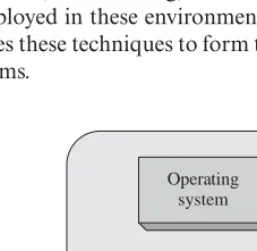
Events and Interrupts An OS interleaves execution of several user programs on the CPU. While a user program is in execution, some situations concerning its own activity, or concerning activities in other programs, may require attention of the OS. Hence, occurrence of anevent, which is any situation that requires attention of the OS, causes control of the CPU to be passed to the operating system. The operating system uses the CPU to execute instructions that analyze the event and perform appropriate actions. When an event has been attended to, the OS schedules a user program for execution on the CPU. Hence operation of the OS is said to beevent driven. For example, if an I/O operation ends, the OS informs the program that had requested the I/O operation and starts another I/O operation on the device, if one is pending; if a program requests a resource, the OS allocates the resource if it is available. In either case, it performs scheduling to select the program to be executed next. Figure 1.5 is an abstract view, also called alogical view, of the functioning of an operating system.
The end of an I/O operation or the making of a resource request by a program actually causes an interrupt in the computer system. The CPU is designed to recognize an interrupt and divert itself to the OS. This physical view, which is the foundation for a study of operating systems, is developed in Chapter 2.
Effective Utilization of a Computer System Computing environments evolved in response to advances in computer architecture and new requirements of computer users. Each computing environment had a different notion of effective utilization, so its OS used a different set of techniques to realize it. A modern comput-ing environment contains features of several classical computcomput-ing environments, such as noninteractive, time-sharing, and distributed computing environments, so techniques employed in these environments are used in modern OSs as well. Chapter 3 discusses these techniques to form the background for a detailed study of operating systems.
Computing environment
Event Event
Operating system
Computer system
[image:37.601.235.364.467.593.2]User programs
were developed for specific computer systems, so they were tightly integrated with architectures of specific computer systems. Modern operating systems such as Unix and Windows pose two new requirements—the operating sys-tem has to beportable, that is, it should be possible to implement it on many computer architectures, and it should be extensible so that it can meet new requirements arising from changes in the nature of its computing environment. Chapter 4 discusses the operating system design techniques for portability and extensibility.
1.4.2
Managing User Computations
Chapters 5–10, which constitute Part 2 of the book, discuss various facets of the program management function. Chapter 5 lays the foundation of this study by discussing how the operating system handles execution of programs.
Processes and Threads Aprocessis an execution of a program. An OS uses a process as a unit of computational work—it allocates resources to a process and schedules it for servicing by the CPU. It performsprocess switchingwhen it decides to preempt a process and schedule another one for servicing by the CPU (see Figure 1.3). Process switching involves saving information concerning the preempted process and accessing information concerning the newly scheduled process; it consumes some CPU time and constitutes overhead of the operat-ing system. The notion of a thread is introduced to reduce the OS overhead. Switching between threads requires much less information to be stored and accessed compared with switching between processes. However, processes and threads are similar in other respects, so we use the termprocessas a generic term for both a process and a thread, except while discussing the implementation of threads.
Process Synchronization Processes that have a common goal must coordinate their activities so that they can perform their actions in a desired order. This requirement is calledprocess synchronization. Figure 1.6 illustrates two kinds of process synchronization. Figure 1.6(a) shows processes namedcreditanddebit
that access the balance in a bank account. Their results may be incorrect if both processes update the balance at the same time, so they must perform their updates strictly one after another. Figure 1.6(b) shows a process named generate that
Balance (a)
Credit Debit
Generate
Sample (b)
Analyze
produces some data and puts it into a variable namedsample, and the process namedanalyze that performs analysis on the data contained in variable sam-ple. Here, processanalyzeshould not perform analysis until processgeneratehas deposited the next lot of data insample, and processgenerateshould not produce the next lot of data until processanalyzehas analyzed the previous data. Program-ming languages and operating systems provide several facilities that processes may use for performing synchronization. Chapter 6 describes these facilities, their use by processess and their implementation in an OS.
Message Passing Processes may also interact throughmessage passing. When a process sends some information in a message to another process, the operating system stores the message in its own data structures until the destination process makes a request to receive a message. Unlike the situation in Figure 1.6(b), syn-chronization of sender and destination processes is performed by the operating system—it makes the destination process wait if no message has been sent to it by the time it makes a request to receive a message. Details of message passing are described in Chapter 9.
Scheduling The nature of a computing environment decides whether effective utilization of a computer system implies efficient use of its resources, high user convenience, or a suitable combination of both. An OS realizes effective utiliza-tion through a scheduling policy that shares the CPU among several processes. This way, many processes make progress at the same time, which contributes to quick service for all users, and hence to high user convenience. The manner in which the CPU is shared among processes governs the use of resources allocated to processes, so it governs efficient use of the computer system. In Chapter 7, we discuss the classical scheduling policies, which aimed either at efficient use of a computer system, or at high user convenience, and scheduling policies used in modern operating systems, which aim at suitable combinations of efficient use and user convenience.
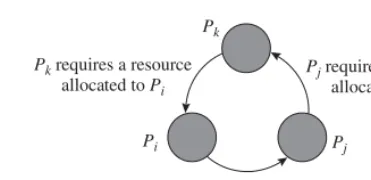
Deadlocks User processes share a computer system’s resources. If a resource requested by some processPiis currently allocated to processPj,Pihas to wait until Pj releases the resource. Such waits sometimes cause a deadlock, which is a situation in which processes wait for other processes’ actions indefinitely. Figure 1.7 illustrates such a situation. The arrow drawn from processPi toPj indicates that processPi is waiting because it requested a resource that is cur-rently allocated to processPj. ProcessesPj andPk similarly wait for resources that are currently allocated to processesPkandPi, respectively. Hence the three processes are in a deadlock. A deadlock adversely affects performance of a sys-tem because processes involved in the deadlock cannot make any progress and resources allocated to them are wasted. We discuss deadlock handling techniques used in operating systems in Chapter 8.
Pirequires a resource
allocated to Pj
Pi Pkrequires a resource
allocated to Pi
Pj
Pjrequires a resource
[image:40.601.137.323.61.151.2]allocated to Pk
Figure 1.7 A deadlock involving three processes.
operating system has to use special scheduling and synchronization techniques to ensure that processes can operate efficien