®
TURBO C®
Borland's No-Nonsense License Statement!
This software is protected by both United States copyright law and international treaty provisions. Therefore, you must treat this software just like a book, with the following single exception. Borland
International authorizes you to make archival copies of the software for the sole purpose of backing-up our software and protecting your investment from loss.
By saying, "just like a book," Borland means, for example, that this software may be used by any number of people and may be freely moved from one computer location to another, so long as there is no possibility of it being used at one location while it's being used at another. Just like a book that can't be read by two different people in two different places at the same time, neither can the software be used by two different people in two different places at the same time (unless, of course, Borland's copyright has been violated).
Programs that you write and compile using the Turbo C language compiler may be used, given away or sold without additional license or fees, as long as all copies of such programs bear a copyright notice. By "copyright notice" we mean either your own copyright notice or, if you prefer, the statement, "Created using Turbo C, Copyright © Borland 1987, 1988." Included in the Turbo C diskettes are several support files that contain encoded hardware and font information used by the standard graphics library (GRAPHICS.LIB). These files, which can be listed by typing DIR * .CHR and DIR * .BGI, are proprietary to Borland International. You may use these files with the programs you create with Turbo C for your own personal use. In addition, to the extent the programs you write and compile using the Turbo C language compiler make use of these support files, you may distribute these support files in combination with such programs, provided that you do not use, give away, or sell the support files separately, and all copies of such programs bear a copyright notice.
The sample programs included on the Turbo C diskettes provide a demonstration of how to use the various features of Turbo C. They are intended for educational purposes only. Borland International grants you (the registered owner of Turbo C) the right to edit or modify these sample programs for your own use, but you may not give away or sell them, alone or as part of any program, in executable, object or source code form. You may, however, incorporate miscellaneous sample program routines into your programs, as long as your resulting programs do not substantially duplicate all or part of a sample program in appearance or functionality and all copies of such programs bear a copyright notice.
Limited Warranty
With respect to the physical diskette and physical documentation enclosed herein, Borland International, Inc. ("Borland") warrants the same to be free of defects in materials and workmanship for a period of 60 days from the date of purchase. In the event of notification within the warranty period of defects in material or workmanship, Borland will replace the defective diskette or documentation. If
you need to return a product, call the Borland Customer Service Department to obtain a return authorization number. The remedy for breach of this warranty shall be limited to replacement and shall not encompass any other damages, including but not limited to loss of profit, and special, incidental, . consequential, or other similar claims.
Borland International, Inc. specifically disclaims all other warranties, expressed or implied, including but· not limited to implied warranties of merchantability and fitness for a particular purpose with respect to defects in the diskette and documentation, and the program license granted herein in particular, and without limiting operation of the program license with respect to any particular application, use, or purpose. In no event shall Borland be liable for any loss of profit or any other commercial damage, including but not limited to special, incidental, consequential or other damages.
Governing Law
This statement shall be construed, interpreted, and governed by the laws of the state of California. Use, duplication, or disclosure by the U.S. Government of the computer software and documentation in this package shall be subject to the restricted rights under DFARS 52.227-7013 applicable to commercial computer software.
Turbo C®
Reference Guide
Version 2.0
Copyrigh til:> 1988 All rights reserved
All Borland products are trademarks or registered trademarks of
Borland International, Inc. Other brand and product names are trademarks or registered trademarks of their respective holders.
Copyright4=' 1988 Borland International.
Printed in the U.S.A.
10987654321
Table of Contents
Introduction 1
Volume II: The Reference Guide . . . .. 1
Typographic Conventions ... 3
Borland's No-Nonsense License Statement ... 3
Acknowledgments ... 4
How to Contact Borland ... 4
Chapter 1 Using Turbo C Library Routines 5 In This Chapter ... 5
The Library Routine Lookup Section . . . .. 6
Why You Might Want to Access the Turbo C Run-Time Library Source Code ... 7
The Turbo C Include Files ... 8
Library Routines by Category ... 10
The main Function ... 17
The Arguments to main ... 17
An Example Program Using argc, argv and env ... 18
Wildcard Command-Line Arguments to main ... 19
When You Compile Using -p (Pascal Calling Conventions) ... 20
The Value main Returns ... 21
Global Variables ... 22
_argc ... 22
_argv ... 22
daylight ... 22
directvideo ... 23
_8087 ... 23
environ ... ... 24
errno, _doserrno, sys_errlist, sys_nerr ... 24
Jrnode ... 27
_heaplen ... . . . .. 28
_osmajor, _osminor ... 29
-psp ... 29
_stklen ... 30
timezone ... 31
tzname ... 31
Chapter 2 The Turbo C Library 33
function name ... 33
abort ... 35
abs ... 35
absread ... 36
abswrite ... 37
access ... ~ ... 37
acos ... 39
allocmem ... 39
arc ... 40
asctime ... 43
asin ... 44
assert ... 45
atan ... 46
atan2 ... 46
atexit ... 47
atof ... 48
atoi ... 49
atol ... 50
bar ... 50
bar3d ... 51
bdos ... 52
bdosptr ... 53
bioscom ... 54
biosdisk . . . .. 57
biosequip ... 60
bioskey ... 61
biosmemory ... 63
bios print ... . . . .. 64
biostime ... 64
brk ... 65
bsearch ... 66
cabs ... 67
calloc ... 68
ceil ... 69
cgets ... 69
chdir ... 71
_chmod ... 71
chmod ... 72
chsize ... 73
circle ... 74
_clear87 ... 75
clearerr ... 76
clearviewport . . . .. 76
clock ... 77
_close ... 78
close ... 78
closegraph ... 79
clreol ... 79
clrscr ... 80
_control87 . . . .. 80
coreleft ... 82
cos ... 82
cosh ... 83
country ... 83
cprintf ... 85
cputs ... 85
_creat ... 86
creat ... 87
creatnew ... 88
creattemp ... 89
cscanf ... 90
ctime ... 91
ctrlbrk ... 91
delay ... 93
delline ... 93
detectgraph ... 94
difftime ... 96
disable ... 96
div ... 97
dosexterr . . . .. 98
dostounix ... 98
dra wpoly ... 99
dup ... 100
dup2 ... 101
ecvt ... 101
ellipse ... 102
__ emit __ ... 103
enable ... 105
eof ... 105
exec ... 106
_exit ... 109
exit ... 110
exp ... 110
fabs ... 111
farcalloc ... 111
farcoreleft ... . . . .. 112
farfree ... 113
farmalloc . . . . .. . . .. 113
farrealloc . . . .. 115
fclose ... 116
fcloseall . . . .. 116
fcvt ... 117
fdopen ... 117
feof ... 119
ferror ... 120
fflush ... 120
fgetc ... 121
fgetchar . . . .. 121
fgetpos ... 122
fgets ... 122
filelength . . . .. 123
fileno ... 123
fillellipse ... . . . .. 124
fillpoly . . . .. 124
find first ... '. . . . .. 125
findnext ... 127
floodfill ... . . . .. 127
floor ... 129
flushall ... 129
fmod ... 130
fnmerge . . . .. 130
fnsplit ... 132
fopen ... 134
FP_OFF ... 136
_fpreset . . . .. 136
fprintf ... r. • • • • • •• 137 FP_SEG ... 138
fputc ... 138
fputchar ... 139
fputs ... 139
fread ... 140
free ... 140
freemem ... 141
freopen ... 141
frexp ... 142
fscanf ... 143
fsetpos ... 145
fstat ... 146
ftell. . . .. 147
ftime ... 148
£Write ... 149
gcvt ... 149
geninterrupt . . . .. 150
getarccoords ... 150
getaspectratio . . . .. 151
getbkcolor . . . .. 152
getc ... 153
getcbr k ... 153
getch ... 154
getchar ... 154
getche ... 155
getcolor . . . .. 155
getcurdir . . . ... . . .. 156
getcwd ... 157
getda te ... 158
getdefaultpalette ... 159
getdfree . . . .. 159
getdisk ... 160
getdrivername . . . .. 160
getdta ... 161
getenv ... 161
getfat ... 163
getfatd . . . .. 163
getfi1lpattern ... 164
getfillsettings ... 165
getftime . . . .. 167
getgraphmode ... 168
getimage . . . .. 169
getlinesettings ... 170
getmaxcolor ... . . . .. 172
getmaxmode ... 172
getmaxx ... 173
getmaxy ... 173
getmodename ... 174
getmoderange ... 175
getpalette ... 175
. getpalettesize . . . .. 177
getpass ... 178
getpixel . . . .. 178
getpsp ... 179
gets ... 179
gettext ... 180
gettextinfo ... 181
gettextsettings ... 182
gettime ... 183
getvect . . . .. 184
getverify ... 185
getviewsettings ... 186
getw ... 187
getx .' ... 187
gety ... , ... 188
gmtime ... 188
gotoxy ... 190
graphdefaults . . . .. 191
grapherrormsg . . . .. 191
...graphfreemem ... 192
-Sl'a phgetmem . . . .. 193
graph result ... 194
harderr ... 196
hardresume ... 198
hardretn ... 198
highvideo ... 199
hypot ... 199
imagesize ... 200
initgra ph . . . .. 201
inport ... 205
inportb ... 206
insline ... 206
installuserdriver ... 207
installuserfont ... 209
int86 ... 209
int86x ... 211
intdos ... 212
intdosx ... 213
intr ... 215
ioctl ... 216
isalnum . . . .. 218
isalpha . . . .. 218
isascii ... 219
isatty ... 219
iscntrl ... 220
isgraph ... 221
islower ... 221
isprint ... 222
ispunct ... 222
isspace . . . .. 223
isupper ... 223
isxdigit ... 224
itoa ... 224
kbhit ... 225
keep ... 225
labs ... 226
ldexp ... 226
ldiv ... 227
lfind ... 228
line ... 228
linerel ... 229
lineto ... 229
localtime . . . .. 230
lock ... 231
log ... 232
log10 ... 232
longjmp . . . .. 233
lowvideo . . . .. 234
_Irotl ... ~ ... 235
_lrotr ... 235
lsearch . . . .. 236
lseek ... 238
Itoa ... 238
malloc ... 239
_matherr ... 241
ma therr . . . .. 242
max ... 245
memccpy ... 246
memchr ... 247
memcmp ... 247
memcpy ... 248
memicmp ... 248
memmove . . . .. 249
memset ... 249
min ... 250
mkdir ... 250
MK_FP ... 251
mktemp ... 251
modf ... 252
movedata ... ~ . . . .. 252
moverel . . . .. 253
movetext . . . .. 253
moveto ... 254
movrnem ... 254
normvideo ... 255
nosound ... 255
_open ... 256
open ... 257
outport ... 259
outportb ... 259
outtext . . . .. 260
outtextxy . . . .. 261
parsfnm . . . .. 261
peek ... 262
peekb ... 262
perror ... 263
pieslice ... 264
poke ... 265
pokeb ... 265
poly ... 266
pow ... 266
pow10 ... 267
printf ... 267
putc ... 279
putch ... 280
putchar ... 280
putenv ... 281
putimage . . . .. 281
putpixel . . . .. 282
puts ... 283
puttext . . . • . . . .. 283
putw ... 284
qsort ... 284
raise ... 286
rand ... 287
randbrd ... 288
randbwr ... 288
random ... 289
randomize ... 290
_read ... 290
realloc ... 292
rectangle . . . .. 293
registerbgidriver ... 293
registerbgifont ... . . . .. 294
remove ... 295
rename ... 296
restorecrtmode . . . .. 296
rewind ... 297
rmdir ... 297
_rotl ... ; . . . .. 298
_rotr ... 299
sbrk ... 299
scanf ... 300
searchpath ... 310
sector ... 311
segread ... 312
setactivepage ... 312
setallpalette ... 313
setaspectratio ... 315
setbkcolor ... 315
setblock ... 316
setbuf ... 317
setcbrk . . . .. 318
setcolor ... 318
setdate ... 320
setdisk . . . .. 320
setdta ... 321
setfillpattem ... 321
setfillstyle ... . . . .. 322
setftime . . . .. 323
setgraphbufsize ... 324
setgra phmode ... 325
setjmp ... 325
setlinestyle ... 326
setmem ... 328
setmode ... 328
setpalette . . . .. 329
setrgbpalette . . . .. 330
settextjustify . . . .. 331
settextstyle ... 332
settime . . . .. 334
setusercharsize . . . .. 334
setvbuf ... 336
setvect . . . .. 338
setverify ... 338
setviewport ... 339
setvisualpage ... 339
setwritemode ... 340
signal ... 341
sin ... 347
sinh ... 347
sleep ... 348
sopen ... 348
sound ... 350
spawn ... 352
sprintf ... . . . .. 357
sqrt ... 357
srand ... 358
sscanf ... 358
stat ... 359
_status87 . . . .. 361
stime ... 361
stpcpy ... 362
strcat ... 362
strchr ... 362
strcmp ... 363
strcmpi ... 364
strcpy ... 364
strcspn ... 365
strdup ... 365
_strerror ... ,... 365
s trerror ... 366
stricmp ... 367
strlen ... 367
strlwr ... ~ . . . .. 368
strncat ... . . . .. 368
strncmp . . . .. 368
strncmpi ... 369
strncpy ... 370
strnicmp ... 370
strnset ... 371
strpbrk ... 371
strrchr ... 372
strrev ... 372
strset ... 372
strstr ... . strtod ... . strtok ... . strtol ... . strtoul ... . stTtlpr ... . swab ... . system ... . tan ... . tanh ... . tell ... . textattr ... . textbackground ... . textcolor ... . textheight ... . textmode ... . textwidth ... . time ... . tmpfile ... . tmpnam ... . toascii ... . _tolower ... . tolower ... . _toupper ... . toupper ... . tzset ... . ultoa ... . ungetc ... . ungetch ... . unixtodos ... . unlink ... . unlock ... . va_ ... . vfprintf ... . vfscanf ... . vprintf ... . vscanf ... . vsprintf ... . vsscanf ... . wherex ... . wherey ... . window ... .
write ... 407
Appendix A
The Turbo C Interactive Editor 409 Introduction ... 409Turbo In, Turbo Out ... . . . .. 409
The Edit Window Status Line ... 410
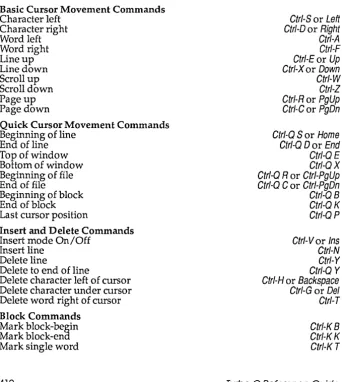
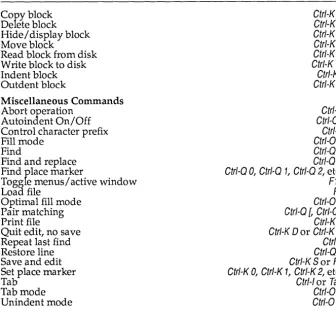
Editor Commands . . . .. 411
Basic Cursor Movement Commands ... 413
Quick Cursor Movement Commands ... 414
Insert and Delete Commands ... 415
Block Commands ... 416
Miscellaneous Editing Commands ... 417
The Turbo C Editor Vs. WordStar ... 421
Appendix B
Compiler Error Messages 423 Fatal Errors ... 424Errors ... 424
Warnings ... 437
Appendix C
TCC Command-Line Options 443 Turning Options On and Off . . . .. 445Syntax ... 445
Compiler Options ... 446
Memory Model ... 447
#defines ... 447
Code Generation Options ... 448
Optimization Options. . . .. 449
Source Code Options ... 452
Error-Reporting Options ... 452
Segment-Naming Control ... 454
Compilation Control Options ... 455
Linker Options . . . .. 455
Environment Options . .. . . .. 455
Implicit vs. User-specified Library Files ... 457
The Include and Library File-Search Algorithms . . . .. 457
Using -L and -I in Configuration Files ... 458
An Example With Notes ... 458
Appendix D
Turbo C Utilities 461 CPP: The Turbo C Preprocessor Utility ... . . . .. 461CPP as a Macro Preprocessor ... 462
An Example ... . . . .. 463
The Standalone MAKE Utility. . . .. 463
Crea ting a Makefile ... '. . . .. 466
U sing a Makefile ... 467
Stepping Through ... . . . .. 467
Creating Makefiles ... 468
Components of a Makefile ... 469
Comments ... 469
Explicit Rules .... . . .. 470
Special Considerations ... 471
Examples ... 471
Implicit Rules . . . .. 472
Special Considerations ... 475
Examples ... 475
Command Lists ... 476
Prefix ... 476
Command body. . . .. 477
Examples ... 478
Macros ... 478
Defining Macros ... 479
Using Macros ... 480
Special Considerations ... 480
Predefined Macros ... 480
Directives ... 483
File-Inclusion Directive ... 483
Conditional Execution Directives ... . . . .. 484
Error Detection Directive . . . .. 486
Macro Undefinition Directive ... 487
Using MAKE ... 487
Command-Line Syntax ... 487
A Note About Stopping MAKE ... 488
The BUlL TINS.MAK File . . . .. 488
How MAKE Searches for BUlL TINS.MAK and Makefiles . . . .. 489
MAKE Command-line Options ... 489
MAKE Error Messages . . . .. 490
Fatal Error Messages ... 490
Errors ... 491
The TOUCH Utility. . . .. 493
Turbo Link ... . . . .. 493
Invoking TLINK ... 493
Using Response Files ... 495
Using TLINK with Turbo C Modules ... 496
Initialization Modules ... 497
Libraries ... 497
Using TLINK with TCC ... 498
TLINK Options ... 499
The / x, / m, / s Options ... 499
The /1 Option . . . .. 501
The /i Option. . . .. 501
The /n Option ... 501
The /c Option ... 501
The / d Option ... 502
The / e Option ... 502
The / t Option. . . .. 503
The /v Option ... 503
The /3 Option ... 503
Restrictions ... 504
Error Messages ... 504
Fatal Errors ... 504
N onfa tal Errors ... 507
Warnings. . . .. 507
TLIB: The Turbo Librarian . . . .. 508
The Advantages of Using Object Module Libraries ... 509
The Components of a TLIB Command Line ... 509
The Operation List ... 510
File and Module Names . . . .. 511
TLIB Operations ... 511
Creating a Library ... 512
Using Response Files ... 513
Creating an Extended Dictionary: The /E Option ... 513
Advanced Operation: The /C Option ... 514
Examples ... 514
GREP: A File-Search Utility . . . .. 515
The GREP Options ... 515
Order of Precedence ... . . . .. 517
The Search String ... 517
Operators in Regular Expressions ... 518
The File Specification ... 519
Examples with Notes ... 519
BGIOBJ: Conversion Utility for Graphics Drivers and Fonts ... 522
Adding the New .OBJ Files to GRAPHICS.LIB ... 523
Registering the Drivers and Fonts ... 523
The /F option. . . .. 525
Ad vanced BGIOBJ Features. . . .. 526
OBJXREF: The Object Module Cross-Reference Utility. . . .. 528
The OBJXREF Command Line ... 529
The OBJXREF Command-Line Options. . . .. 530
Report Options ... 530
Response Files ... 531
Freeform Response Files ... 531
Project Files ... 532
Linker Response Files . . . .. 532
The /0 Command ... 532
The /N Command ... 533
Sample OBJXREF Reports ... 533
Report by Public Names (/RP) ... 534
Report by Module (/RM) . . . .. 534
Report by Reference (/RR) (Default) ... 535
Report by External References (/RX) .. . . .. 535
Report of Module Sizes (IRS) ... 536
Report by Class Type (/RC) ... 536
Report of Unreferenced Symbol Names (/RU) ... 537
Verbose Reporting (/RV) ... 537
Examples of How to Use OBJXREF ... 537
OBJXREF Error Messages and Warnings . . . .. 539
Error Messages ... 539
Warnings ... 539
Appendix E Language Syntax Summary 541 Lexical Grammar ... 541
Tokens ... 541
Keywords . . . .. 542
Identifiers ... 542
Constants ... 542
String Literals . . . .. 544
Operators ... 545
Punctua tors ... 545
Phrase Structure Grammar ... 545
Expressions ... 545
Declara tions ... . . . .. 548
Statements ... 551
External Definitions ... 552
Preprocessing Directives ... 552
Appendix F TCINST: Customizing Turbo C 555 Running TCINST . . . .. 556
The TCINST Installation Menu . . . .. 557
The Compile Menu . . . .. 558
The Project Menu ... 558
Project Name ... 558
Auto Dependencies ... 559
Clear Project . . . .. 559
The Options Menu ... 559
The Compiler Menu ... 559
Model ... 559
Defines ... 559
The Code Generation Menu ... 559
The Optimiza tion Menu . . . .. 560
The Source Menu. . . .. 560
The Errors Menu ... . . . .. 560
The Names Menu ... 561
The Linker Menu ... 561
Map File ... 561
Initialize Segments ... 561
Default Libraries ... 561
Graphics Library ... 562
Warn Duplicate Symbols ... 562
Stack Warning ... 562
Case-Sensitive Link . . . .. 562
The Environment Menu . . . .. 562
Message Tracking ... 562
Keep Messages. . . .. 563
Config Auto Save ... 563
Edit Auto Save ... 563
Backup Source Files ... 563
Zoomed Windows. . . .. 563
Full Graphics Save ... 563
The Screen Size Menu. . . .. 563
The Options for Editor Menu ... 564
The Directories Menu . . . .. 565
Include Directories ... 565
Library Directories ... 566
Output Directory ... 566
Turbo C Directory . . . .. 566
Pick File Name . . . .. 566
Arguments ... 567
The Debug Menu. . . .. 567
Source Debugging . . . .. 567
Display Swapping ... 567
The Editor Commands Option ... 567
Allowed Keystrokes ... 571
The Mode for Display Menu . . . .. 572
Resize Windows ... 574
Quitting the Program ... 574
Appendix G MicroCa1c 577 About MicroCalc . . . .. 577
How to Compile and Run MicroCa1c . . . .. 578
With TC.EXE ... 578
With TCC.EXE . . . .. 578
How to use MicroCa1c ... 579
The MicroCa1c Parser ... . . . .. 582
Index 583
List of Figures
List of Tables
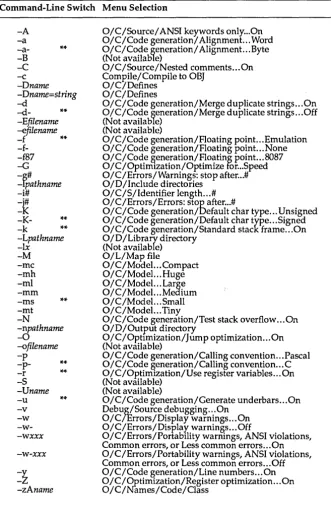
Table Aol: Summary of Editor Commands ... .412 Table Col: Correlation of Command-Line Options and Menu Selections .444
N T R
o
Du
c
To
NThis is the second volume of documentation in the Turbo C package. This volume, the Turbo C Reference Guide, contains definitions of all the Turbo C library routines, common variables, and common defined types, along with example program code to illustrate how to use many of these routines, variables, and types.
If you are new to C programming, you should first read the other book in your Turbo C package-the Turbo C User's Guide. In that book you'll find instructions on how to install Turbo C on your system, an overview of Turbo C's window and menu system, and tutorial-style chapters designed to get you started programming in Turbo C. The user's guide also summarizes Turbo C's implementation of the C language and discusses some advanced programming techniques. For those of you who are Turbo Pascal and Turbo Prolog programmers, the user's guide provides information to help you integrate your understanding of those languages with your new knowledge of C.
You should refer to the UIntroduction" in the User's Guide for information on the Turbo C implementation, a summary of the contents of Volume I, and a short bibliography.
Volume II: The Reference Guide
The Turbo C Reference Guide is written for experienced C programmers; it provides implementation-specific details about the language and the run-time environment. In addition, it provides definitions for each of the Turbo C functions, listed in alphabetical order.
These are the chapters and appendixes in the programmer's reference guide:
Chapter 1: Using Turbo C Library Routines summarizes Turbo C's input/ output (I/O) support, lists and describes the #include (.h) files, and lists the Turbo C library routines by category. Then it explains the Turbo C main function and its arguments, and concludes with a lookup section describing each of the Turbo C global variables.
Chapter 2: The Turbo C Library is an alphabetical reference of all Turbo C library functions. For each function it gives the function prototype, the include file(s) containing the prototype, an operative description of what the function does, return values, portability information, and a list of related functions.
Appendix A: The Turbo C Interactive Editor gives a more thorough explanation of the editor commands-for those who need more infor-mation than that given in Chapter 5 of the Turbo C User's Guide.
Appendix B: Compiler Error Messages lists and explains each of the error messages and summarizes the possible or probable causes of the problem that generated the message.
Appendix C: Options describes each of the Turbo C user-selectable compiler options.
Appendix D: Turbo C Utilities discusses the standalone MAKE utility, the CPP preprocessor, the Turbo Linker TLINK, TLIB the Turbo Librarian, the file-searching utility GREP, BGIOBl, a conversion utility for graphics drivers and fonts, and the object module cross-referencer OBJXREF.
Appendix E: Language Syntax Summary uses modified Backus-Naur Forms to detail the syntax of all Turbo C constructs.
Appendix F: Customizing Turbo C guides you through the customization program (TCINST), which lets you customize your keyboard, modify default values, change your screen colors, resize your Turbo C windows, and more.
Typographic Conventions
All typefaces used in this manual were produced by Borland's Sprint: The Professional Word Processor on an Apple LaserWriter Plus. Their special uses are as follows:
Monospaced type This typeface represents text as it appears on the screen or in your program and anything you must type (such as command-lIne options).
[ 1
Square brackets in text or DOS command lines enclose optional input or data that depends on your system, which snould notoe typed verbatim.<>
Boldface
Italics
Keycaps
Angle brackets in the function reference section enclose the names of include files.
Turbo C function names (such as printf) are shown in boldface when mentioned within text (but not in program examples). This typeface represents Turbo C keywords (such as char, switch, near, and cdec1).
Italics indicate variable names (identifiers) within sections of text and to emphasize certain words (especially new terms).
This special typeface indicates a key on your keyboard. It is often used when describing a particular key you should type; for example, "Press Esc to cancel a menu."
Borland's No-Nonsense License Statement
This software is protected by both United States Copyright Law and International Treaty provisions. Therefore, you must treat this software
just
like a book with the following single exception: Borland International authorizes you to make archival copies of Turbo C for the sole purpose of backing up your software and protecting your investment from loss.
By saying, "just like a book," Borland means, for example, that this software may be used by any number of people and may be freely moved from one computer location to another, so long as there is no possibility of its being used at one location while it's being used at another. Just like a book that can't be read by two different people in two different places at the same time, neither can the software be used by two different people in two different places at the same time. (Unless, of course, Borland's copyright has been violated.)
Acknowledgments
In this manual, we refer to several products:
• Turbo Pascal, Turbo Prolog and Sprint: The Professional Word Processor are registered trademarks of Borland International, Inc.
• WordStar is a trademark of MicroPro, Inc.
• IBM PC, XT, and AT are trademarks of International Business Machines, Inc.
• MS-DOS is a registered trademark of Microsoft Corporation.
• UNIX is a registered trademark of American Telephone and Telegraph.
How to Contact Borland
The best way to contact Borland is to log on to Borland's Forum on CompuServe: Type GO BOR from the main CompuServe menu and choose "Borland Programming Forum B (Turbo Prolog & Turbo C)" from the Borland main menu. Leave your questions or comments there for the support staff to process.
If you prefer, write a letter detailing your comments and send it to:
Technical Support Department Borland International
1800 Green Hills Road
P.O. Box 660001
Scotts Valley, CA 95066-0001, USA
You can also telephone our Technical Support department at (408) 438-8400.
Please have the following information handy before you call:
c
H A p T E R1
Using Turbo C Library Routines
Turbo C comes equipped with over 450 library routines-functions and macros that you call from within your C programs to perform a wide variety of tasks, including low- and high-level I/O, string and file manipulation, memory allocation, process control, data conversion, mathematical calculations, and much more.
Turbo C's routines are contained in the library files (Cx.LIB, MATHx.LIB, and GRAPHICS.LIB). Because Turbo C supports six distinct memory models, each model except the tiny model has its own library file and math file, containing versions of the routines written for that particular model. (The tiny model shares the small library and math files.)
Turbo C supports the draft ANSI C standard which, among other things, allows function prototypes to be given for the routines in your C programs. All of Turbo C's library routines are declared with prototypes in one or more header files (these are the .h or "include" files that were copied from the distribution disks into your INCLUDE directory during installation).
In This Chapter
This first part of the
Turbo
CReference Guide
provides an overview of the Turbo C library routines and include files.In this chapter, we
• explain why you might want to obtain the source code for the Turbo C runtime library
• list and describe the include files
II describe the arguments to function main, and its return value
• summarize the different categories of tasks performed by the library routines
• describe (in lookup fashion) common global variables implemented in many of the library routines
The Library Routine Lookup Section
The second part of this reference guide is an alphabetical lookup; it
contains a description of each of the Turbo C routines.
A few of the routines are grouped by "family" (the exec ... and spawn ... functions that create, load, and run programs, for example) because they perform similar or related tasks.
Otherwise, we have included an individual entry in the lookup for every routine. For instance, if you want to look up information about the free routine, you would look under free; there you would find a listing for free that
II summarizes what free does
II gives the syntax for calling free
EI tells you which header file(s) contains the prototype for free
II gives a detailed description of how free is implemented and how it
relates to the other memory-allocation routines
IS lists other language compilers that include similar functions
c refers you to related Turbo C functions
II if appropriate, gives an example of how the function is used, or refers
you to a function entry where there is such an example
The last part of this reference guide contains several appendices designed to give you detailed reference and usage information about some of Turbo C's special features:
III the TCC command-line options
III the Turbo C standalone utilities
II the Turbo C language syntax summary
II TCINST, the Turbo C customization program
II MicroCalc, a sample spreadsheet application
Why You Might Want to Access the Turbo C
Run-Time Library Source Code
The Turbo C run-time library contains over 300 functions, covering a broad range of areas: low-level control of your IBM PC, interfacing with DOS, input/output, process management, string and memory manipulations, rna th, sorting and searching, and so on. There are several good reasons why you may wish to obtain the source code for these functions:
C You may find that a particular Turbo C function you want to write is similar to, but not the same as, a function in the library. With access to the run-time library source code, you can tailor the library function to your own needs, and avoid having to write a separate function of your own.
II Sometimes, when you are debugging code, you may wish to know more
about the internals of a library function. Having the source code to the run-time library would be of great help in this situation.
D When you can't figure out what a library function is really supposed to
do, it's useful to be able to take a quick look at that function's source code.
Il You may dislike the underscore convention on C symbols, and wish you
had a version of the libraries without leading underscores. Again, access to the source code to the run-time library will let you eliminate leading underscores.
[] You can also learn a lot from studying tight, professionally written library source code.
For all these reasons, and more, you will want to have access to the Turbo C run-time library source code. Because Borland believes strongly in the concepts of "open architecture," we have made the Turbo C run-time library source code available for licensing. All you have to do is fill out the order form distributed with this documentation, include your payment, and we'll ship you the Turbo C run-time library source code.
The Turbo C Include Files
Header files provide function prototype declarations for library functions. Data types and symbolic constants used with the library functions are also defined in them, along with global
variables defined by Turbo C and by the library functions. The Turbo C library follows the ANSI C draft standard on names of header files and their contents. Header files defined by ANSI C are marked with an asterisk (*) in the list below.
alloc.h
assert.h*
bios.h
conio.h
ctype.h*
dir.h
dos.h
errno.h*
fcntl.h
float.h*
graphics.h
io.h
limits.h*
math.h*
Declares memory management functions (allocation, deallocation, etc.).
Defines the assert debugging macro.
Declares various functions used in calling IBM-PC ROM BIOS routines.
Declares various functions used in calling the DOS console I/O routines.
Contains information used by the character classification and character conversion macros (such as isalpha and toascii).
Contains structures, macros, and functions for working with directories and path names.
Defines various constants and gives declarations needed for DOS and 8086-specific calls.
Defines constant mnemonics for the error codes.
Defines symbolic constants used in connection with the library routine open.
Contains parameters for floating-point routines.
Declares prototypes for the graphics functions.
Contains structures and declarations for low-level input/ output routines.
Contains environmental parameters, information about compile-time limitations, and ranges of integral quantities.
mem.h
process.h
seljmp.h*
share.h
signa1.h*
stdargs.h*
stddef.h*
stdio.h*
stdlib.h*
string.h*
sys\stat.h
sys\timeb.h
sys \ types.h
time.h*
values.h
Declares the memory-manipulation functions. (Many of these are also defined in string.h.)
Contains structures and declarations for spawn ... and exec ... functions.
Defines a type
jmp_buf
used by the longjmp and setjmp functions and declares the routines longjmp and setjmp.Defines parameters used in functions that make use of file-sharing.
Defines constants and declarations for use by the signal and raise functions.
Defines macros used for reading the argument list in functions declared to accept a variable number of argu-ments (such as vprintf, vscanf, etc.).
Defines several common data types and macros.
Defines types and macros needed for the Standard I/O Package defined in Kernighan and Ritchie and extended under UNIX System V. Defines the standard I/O pre-defined streams
stdin, stdout, stdprn,
andstderr,
and de-clares stream-level I/O routines.Declares several commonly used routines: conversion routines, search/ sort routines, and other miscellany.
Declares several string-manipulation and memory-manipulation routines.
Defines symbolic constants used for opening and creating files.
Declares the function ftime and the structure timeb that ftime returns.
Declares the type
time_t
used with time functions.Defines a structure filled in by the time-conversion routines asctime, localtime, and gmtime, and a type used by the routines ctime, difftime, gmtime, localtime, and stime; also provides prototypes for these routines.
Defines important constants, including machine depen-dencies; provided for UNIX System V compatibility.
Library Routines by Category
The Turbo C library routines perform a variety of tasks. In this section, we list the routines, along with the include files in which they are declared, under several general categories of task performed. For complete information about any of the functions below, see the function entry in Chapter 2 of this manual.
Classification Routines
These routines classify ASCII characters as letters, control characters, punctuation, uppercase, etc.
isalnum isalpha isascii iscntrl
(ctype .h) (ctype.h) (ctype.h) (ctype.h)
Conversion Routines
isdigit isgraph is lower isprint
(ctype. h) (ctype. h) (ctype. h) (ctype.h)
ispunct isspace isupper isxdigit
(ctype. h) (ctype.h) (ctype.h) (ctype.h)
These routines convert characters and strings from alpha to different numeric representations (floating-point, integers, longs) and vice versa, and from uppercase to lowercase and vice versa.
atof (stdlib. h) itoa (stdlib.h) toascii (ctype. h) atoi (stdlib.h) ltoa (stdlib. h) tolower (ctype.h) atol (stdlib.h) strtod (stdlib.h) _toupper (ctype.h) ecvt (stdlib.h) strtol (stdlib.h) toupper (ctype.h) fcvt (stdlib.h) strtoul (stdlib. h) ultoa (stdlib.h) gcvt (stdlib.h) to lower (ctype.h)
Directory Control Routines
These routines manipulate directories and path names.
chdir (dir.h) getcurdir (dir.h) mktemp (dir. h) findfirst (dir.h) getcwd (dir.h) rmdir (dir .h) findnext (dir.h) getdisk (dir.h) searchpath (dir .h) fnmerge (dir .h) mkdir (dir. h) setdisk (dir.h) fnsplit (dir.h)
Diagnostic Routines
These routines provide built-in troubleshooting capability.
Graphics Routines
These routines let you create onscreen graphics with text.
arc (graphics .h) graphresult (graphics.h)
bar (graphics.h) imagesize (graphics.h)
bar3d (graphics .h) initgraph (graphics. h)
circle (graphics.h) installuserdriver (graphics.h) cleardevica (graphics.h) insta11userfont
clearviewport (graphics. h) line (graphics.h)
closegraph (graphics.h) linerel (graphics.h)
detect graph (graphics.h) lineto (graphics.h)
drawpoly (graphics.h) moverel (graphics.h)
ellipse (graphics.h) moveto (graphics.h)
fi11ellipse (graphics.h) out text (graphics.h)
fi11poly (graphics.h) outtextxy (graphics.h)
£1oodfi11 (graphics .h) pies lice (graphics. h)
getarccoords (graphics .h) put image (graphics.h) getaspectratio (graphics. h) putpixel (graphics. h)
gatbkcolor (graphics.h) rectangle (graphics.h)
getcolor (graphics.h) registerbgidriver (graphics. h) getdefaultpalette (graphics.h) registerbgifont (graphics. h) getdrivernama (graphics. h) restorecrtmode (graphics. h) get fil lpattern (graphics. h) sector (graphics.h) gatfillsattings (graphics. h) sotactivepaga (graphics .h) getgraphmode (graphics.h) seta11palette (graphics. h) get image (graphics .h) setaspectratio (graphics .h) getlinesettings (graphics. h) setbkcolor (graphics. h) getmaxcolor (graphics. h) aetcolor (graphics. h) getmaxmoda (graphics.h) aetfillpattern (graphics .h) getmaxx (graphics .h) setfillstyla (graphics. h) getmaxy (graphics.h) setgraphbufsize (graphics. h) getmodename (graphics.h) setgraphmode (graphics.h) getmoderange (graphics.h) setlinestyle (graphics. h) getpa1ette (graphics .h) setpalette (graphics.h) getpalettesize (graphics. h) setrgbpalette (graphics. h) getpixel (graphics. h) settextjustify (graphics. h) gettextsettings (graphics. h) settextstyle (graphics. h) getviewsettings (graphics. h) setusercharsize (graphics .h)
gatx (graphics.h) set viewport (graphics .h)
gety (graphics.h) setvisualpage (graphics. h)
graphdefaults (graphics. h) satwritemode (graphics. h) grapharrormsg (graphics. h) textheight (graphics .h) _graphfreemem (graphics.h) textwidth (graphics.h) _graphgebnem (graphics .h)
Input/Output Routines
These routines provide stream-level and DOS-level I/O capability.
access (io.h) fputc (stdio.h) putw (stdio.h)
cgets (conio.h) fputchar (stdio.h) read (io.h)
chmod (io.h) fputs (stdio.h) read (io.h)
chmod (io.h) fread (stdio.h) remove (stdio.h)
chsize (io.h) freopen (stdio.h) rename (stdio.h)
clearerr (stdio.h) fscanf (stdio.h) rewind (stdio.h)
close (io.h) fseek (stdio.h) scanf (stdio.h)
close (io.h) fsetpos (stdio.h) setbuf (stdio.h)
cprintf (conio.h) fstat (sys\stat.h) setftime (io.h)
cputs (conio.h) ftell (stdio.h) setmode (io.h)
creat (io.h) fwrite (stdio. h) setvbuf (stdio.h)
creat (io.h) getc (stdio.h) sopen (io.h)
creatnew (io.h) getch (conio.h) sprintf (stdio.h)
creattemp (io.h) get char (stdio.h) sscanf (stdio.h)
cscanf (conio.h) getche (conio.h) stat (sys\stat.h)
dup (io.h) getftime (io.h) strerror (string.h ,
dup2 (io.h) getpass (conio.h) stdio.h)
eof (io.h) gets (stdio.h) strerror (stdio.h)
fclose (stdio.h) getw (stdio.h) tell (io.h)
fcloseall (stdio.h) gsignal (signal.h) tmpfile (stdio.h)
fdopen (stdio.h) ioctl (io.h) tmpnam (stdio.h)
feof (stdio.h) batty (io.h) ungetc (stdio. h)
ferror (stdio.h) kbhit (conio.h) ungetch (conio.h)
fflush (stdio. h) lock (io.h) unlock (io.h)
fgetc (stdio.h) lseek (io.h) vfprintf (stdio.h)
fgetchar (stdio.h) _open (io.h) vfscanf (stdio.h)
fgetpos (stdio.h) open (io.h) vprintf (stdio.h)
fgets (stdio.h) perror (stdio.h) vscanf (stdio.h)
filelength (io.h) printf (stdio.h) vsprintf (stdio.h)
fileno (stdio.h) putc (stdio.h) vsscanf (io.h)
flushall (stdio.h) putch (conio.h) write (io.h)
fopen (stdio.h) put char (stdio.h) write (io.h)
Interface Routines (DOS, 8086, BIOS)
These routines provide DOS, BIOS and machine-specific capabilities.
absread (dos.h) geninterrupt (dos.h) keep (dos.h)
abswrito (dos.h) getcbrk (dos.h) MK FP (dos .h)
bdos (dos.h) getdfreo (dos.h) outport (dos.h)
bdosptr (dos.h) getdta (dos .h) outportb (dos.h)
bioscom (bios.h) got fat (dos.h) parsfnm (dos.h)
biosdisk (bios .h) gotfatd (dos.h) peek (dos.h)
bios equip (bios .h) getpsp (dos.h) peokb (dos.h)
bioskey (bios .h) getvect (dos.h) poke (dos.h)
biosmamory (bios.h) getvorify (dos.h) pokeb (dos.h)
biosprint (bios .h) harderr (dos.h) randbrd (dos.h)
biostima (bios .h) hardresume (dos.h) randbwr (dos.h)
country (dos.h) hardretn (dos.h) segroad (dos.h)
ctrlbrk (dos.h) inport (dos.h) setcbrk (dos.h)
disable (dos.h) inportb (dos .h) setdta (dos .h)
dosoxterr (dos.h) int86 (dos.h) sotvect (dos.h)
enable (dos.h) int86x (dos.h) sotverify (dos.h)
FP OFF (dos.h) intdos (dos.h) sloep (dos.h)
FP SEG (dos.h) intdosx (dos.h) unlink (dos.h)
freomam (dos.h) intr (dos .h)
Manipulation Routines
These routines handle strings and blocks of memory: copying, comparing, converting, and searching.
mamccpy (mem.h, string. h) strchr (string.h) strncmpi (string .h)
memchr (mem.h, string.h) strcmp (string.h) strncpy (string .h)
memcmp (mem.h, string.h) stricmpi (string.h) strnicmp (string .h)
mamcpy (mem.h, string. h) strcpy (string .h) strnset (string.h)
memicmp (mem.h, string. h) strcspn (string.h) strpbrk (string.h)
mommove (mem.h, string .h) strdup (string.h) strrchr (string.h)
memset (mem.h, string.h) strorror (string.h) strrev (string .h)
movadata (mem.h, string. h) stricmp (string.h) strset (string .h)
movmem (mem.h, string.h) strlon (string.h) strspn (string .h)
setmem (mem.h) strlwr (string.h) strstr (string .h)
stpcpy (string.h) strncat (string.h) strtok (string .h)
strcat (string.h) strncmp (string.h) strupr (string .h)
Math Routines
These routines perform mathematical calculations and conversions.
abs (stdlib.h) fcvt (stdlib.h) poly (math.h)
acos (math.h) floor (math.h) pow (math.h)
asin (math.h) fmod (math.h) powlO (math.h)
atan (math.h) _fpreset (float.h) rand (stdlib.h)
atan2 (math.h) frexp (math.h) randan (stdlib.h)
atof (stdlib.h , gcvt (stdlib.h) randomize (stdlib.h)
math.h) hypot (math.h) rotl (stdlib.h)
atoi (stdlib.h) itoa (stdlib.h) rotr (stdlib.h)
atol (stdlib. h) labs (stdlib.h) sin (math.h)
cabs (math.h) ldexp (math.h) sinh (math.h)
ceil (math.h) ldiv (math) sqrt (math.h)
clear87 (float.h) log (math.h) srand (stdlib.h)
contro187 (float. h) 10g10 (math.h) status87 (float. h)
cos (math.h) lrotl (stdlib.h) strtod (stdlib.h)
-cosh (math.h) lrotr (stdlib.h) strtol (stdlib.h)
div (math.h) ltoa (stdlib.h) strtoul (stdlib. h)
ecvt (stdlib.h) _matherr (math.h) tan (math.h)
exp (math.h) matherr (math.h) tanh (math.h)
fabs (math.h) modf (math.h) ultoa (stdlib.h)
Memory Allocation Routines
These routines provide dynamic memory allocation in the small-data and large-da ta models.
allocmem (dos.h) farmalloc (alloe.h)
brk (alloe.h) farrealloc (alloe. h)
calloc (alloe.h) free (alloe. hi stdlib.h)
coreleft (alloe.h , stdlib.h) malloc (alloe.h , stdlib. h) farcalloc (alloe.h) realloc (alloe.h , stdlib.h)
farcoreleft (alloe.h) sbrk (alloe.h)
farfree (alloe.h) setblock (dos.h)
Miscellaneous Routines
These routines provide nonlocal goto capabilities and sound effects.
delay longjmp nosound
(dos.h) (setjmp.h) (dos.h)
setjmp sound
Process Control Routines
These routines invoke and terminate new processes from within another.
abort (process. h) raise (signal. h)
execl (process. h) signal (signal.h)
execle (process. h) spawnl (process .h)
exoclp (process.h) spawnlo (proces s . h)
oxoclpo (process. h) spawnlp (process .h)
oxecv (process. h) spawnlpo (process. h)
oxocvo (process.h) spawnv (process. h)
oxocvp (process.h) spawnvo (process. h)
oxocvpo (process.h) spawnvp (process. h)
oxit (process.h) spawnvpe (process. h)
oxit (process.h) system (proces s . h)
Standard Routines
These are standard routines.
abort (stdlib.h) fcvt (stdlib.h) putonv (stdlib.h)
abs (stdlib. h) frao (stdlib.h) qsort (stdlib.h)
atoxit (stdlib. h) gcvt (stdlib.h) rand (stdlib.h)
atof (stdlib.h) gotonv (stdlib.h) roalloc (stdlib.h)
atoi (stdlib.h) itoa (stdlib.h) srand (stdlib.h)
atol (stdlib.h) labs (stdlib.h) strtod (stdlib.h)
bsoarch (stdlib.h) Hind (stdlib.h) strtol (stdlib.h)
calloc (stdlib.h) lsoarch (stdlib.h) swab (stdlib.h)
ecvt (stdlib. h) ltoa (stdlib.h) system (stdlib.h)
oxit (stdlib.h) malloc (stdlib.h) ultoa (stdlib .h)
oxit (stdlib. h)
Text Window Display Routines
These routines output text to the screen.
clrool (conio.h) inslino (conio.h) toxtbackground (conio.h)
clrscr (conio.h) lowvidoo (conio.h) toxtcolor (conio.h)
dollinG (conio.h) movotoxt (conia.h) toxtmode (conia.h) got ton (conia.h) normvidoo (canio.h) whorox (canio.h)
gottoxtinfo (cania.h) puttoxt (cania.h) whorey (conia.h)
gotoxy (conio.h) toxtattr (conia.h) window (cania.h)
highvidoo (conia.h)
Time and Date Routines
These are time conversion and time manipulation routines.
asctime (time.h) getdate (dos.h) settime
ctima (time.h) gettime (dos.h) stime
difftime (time.h) gmtime (time.h) time dostounix (dos.h) local time (time.h) tzset ftima (sys\timeb.h) setdate (dos.h) unixtodos
Variable Argument List Routines
These routines are for use when accessing variable argument lists (such as with vprintf, etc).
(stdarg .h) va end (stdarg .h) va start
(dos.h) (time.h) (time. h) (time.h) (dos.h)
The main Function
Every C program must have a main function; where you place it is a matter of preference. Some programmers place main at the beginning of the file, others at the very end. But regardless of its location, the following points about main always apply.
The Arguments to main
Three parameters (arguments) are passed to main by the Turbo C startup routine: argc, argo, and env.
e argc, an integer, is the number of command-line arguments passed to main.
e argo is an array of pointers to strings.
o Under 3.x versions of DOS, argv[O] is defined as the full path name of
the program being run.
o Under versions of DOS before 3.0, argv[O] points to the null string ("").
o argv[l] points to the first string typed on the DOS command line after the program name.
o argv[2] points to the second string typed after the program name.
o argv[argc -1] points to the last argument passed to main.
o argv[argc] contains NULL.
e env is also an array of pointers to strings. Each element of envIl holds a string of the form ENVVAR=value.
o ENVVAR is the name of an environment variable, such as PATH or 87.
oval ue is the value to which an ENVVAR is set, such as
c:
\DOS;c: \
TURBOC (for PATH) or YES (for 87).The Turbo C startup routine always passes these three arguments to main; you have the option of whether to declare them in your program. If you declare some (or all) of these arguments to main, they are made available as local variables to your main routine.
Note, however, that if you do declare any of these parameters, you must
declare them exactly in the order given: argc, argo, env.
For example, the following are all valid declarations of main's arguments:
main ()
main (int argc) /* legal but very unlikely */ main(int argc, char * argv[])
main(int argc, char * argv[], char * env[])
Note: The declaration main (int argc) is legal, but it's very unlikely that you would use argc in your program without also using the elements of argv.
Another Note: The argument env is also available via the global variable environ. Refer to the environ lookup entry (in this chapter) and the putenv and getenv lookup entries (in Chapter 2 of this manual) for more information. argc and argv are also available via the global variables _argc and_argv.
An Example Program Using argc, argv and env
Here is an example program, ARGS.EXE, that demonstrates a simple way of using these arguments passed to main.
finclude <stdio.h> #include <stdlib.h>
/* Program ARGS.C */
void main (int argc, char *argv[], char *env[])
(
int i;
printf("The value of argc is %d \n\n",argc);
printf("These are the %d command-line arguments passed to main:\n\n",argc); for (i = 0; i <= argci itt)
printf(" argv[%d]: %s\n", i, argv[i])i
printf("\nThe environment string(s) on this system are:\n\n"); for (i = 0; env[i] != NULLi itt)
printf(" env[%d]: %s\n", i, env[i])i
Suppose you run ARGS.EXE at the DOS prompt with the following com-mand line:
c:> args first_argument "argument with blanks" 3 4 "last but one" stop!
The output of ARGS.EXE (assuming that the environment variables are set as shown here) would then be like this:
The value of argc is 7
These are the 7 command-line arguments passed to main: argv[O]: C:\TURBOC\TESTARGS.EXE
argv[l]: first_argument argv[2]: argument with blanks argv[3]: 3
argv[4]: 4
argv[5]: last but one argv[6]: stop! argv[7]: (null)
The environment string(s) on this system are: env[O]: COMSPEC=C:\COMMAND.COM
env[l]: PROMPT=$p $g
env[2]: PATH=C:\SPRINTiC:\DOSiC:\TURBOC
Note: The maximum combined length of the command-line arguments passed to main (including the space between adjacent arguments and the name of the program itself) is 128 characters; this is a DOS limit.
Wildcard Command-Line Arguments to main
Command-line arguments containing wildcard characters can be expanded to all the matching file names, much the same way DOS expands wildcards when used with commands like COPY. All you have to do to get wildcard expansion is to link your program with the WILDARGS.OBJ object file, which is included with Turbo C.
Once WILDARGS.OBJ is linked into your program code, you can send wildcard arguments of the type
*. *
to your main function. The argument will be expanded (in theargv
array) to all files matching the wildcard mask. The maximum size of theargv
array will vary, depending on the amount of memory available in your heap.If no matching files are found, the argument is passed unchanged. (That is, a string consisting of the wildcard mask is passed to main.)
Arguments enclosed in quotes (" ... ") are not expanded.
An Example: The following commands will compile the file ARGS.C and link it with the wildcard expansion module WILDARGS.OBJ, then run the resulting executable file ARGS.EXE:
tee args wildargs.obj args C:\TC\INCLUDE\*.H "*.e"
When ARGS.EXE is run, the first argument is expanded to the names of all the *.H files in the C:\ TC\INCLUDE directory. Note that the expanded argument strings include the entire path (for example, C: \ TC\INCLUDE\ ALLOC.H). The argument *.C will not be expanded, as it is enclosed in quotes.
In the Integrated Environment (TC.EXE), you simply specify a project file on the project menu, which contains the following lines:
ARGS WILDARGS .OBJ
Then use the Options/ Args option to set the command-line parameters.
Note: If you prefer the wildcard expansion to be the default so that you won't have to link your program explicitly with WILDARGS.OB], you can modify your standard C?LIB library files to have WILDARGS.OB] linked automatically. In order to accomplish that, you have to remove SETARGV from the libraries, and add WILDARGS. The following commands will invoke the Turbo librarian to modify all the standard library files (assuming the current directory contains the standard C libraries, and WILDARGS.OBJ):
tlib cs -setargv +wildargs tlib cc -setargv +wildargs tlib em -setargv +wildargs tlib cl -setargv +wildargs tlib ch -setargv +wildargs
When You Compile Using -p (Pascal Calling
Conventions)
If you compile your program using Pascal calling conventions (described in detail in Chapter 12 of the Turbo C User's Guide), you must remember to explicitly declare main as a C type.
You do this with the cdecl keyword, like this:
The Value main Returns
The value returned by main is the status code of the program: an into If,
however, your program uses the routine exit (or _exit) to terminate, the value returned by main is the argument passed to the call to exit (or to _exit).
For example, if your program contains the call exit (1)
the status is 1.
If you are using the Integrated Environment version of Turbo C (TC.EXE) to run your program, you can display the return value from main by selecting the Get Info item on the Compile menu (AIt-C, G).
Global Variables
Function
Syntax
Declared in
Remarks
Function
Syntax
Declared in
Remarks
daylight
Function
Syntax
Declared in
Remarks
Keeps a count of command-line arguments.
extern int _argc;
dos.h
_argc has the value of argc passed to main when the program sta~ts.
An array of pointers to command-line arguments. extern char
*
_argv[J;dos.h
_argv points to an array containing the original command-line arguments (the elements of argvn) passed
to main when the program starts.
Indicates whether Daylight Savings Time is in effect.
extern int daylight;
time.h
directvideo
Function
Syntax
Declared in
Remarks
Function
Syntax
Declared in
Remarks
Flag that controls video output.
extern int directvideo;
conio.h
directvideo
directvideo controls whether your program's console output (from cputs, for example) goes directly to the video RAM (directvideo = 1) or goes via ROM BIOS calls (directvideo
=
0).The default value is directvideo
=
1 (console output goes directly to video RAM). In order to use directvideo = I, your system's video hardware must be identical to IBM display adapters. Setting directvideo = 0 allows your console output to work on any system that is IBM BIOS-compa tible.Coprocessor chip flag.
extern int _8087;
dos.h
The _8087 variable is set to a nonzero value
0,
2, or 3) ifthe startup code autodetection logic detects a floating-point coprocessor (an 8087, 80287, or 80387, respectively). The _8087 variable is set to 0 otherwise.
The autodetection logic can be overridden by setting the 87 environment variable to YES or NO. (The commands are SET 87=YES and SET 87=NO; it is essential that there be no spaces before or after the equal sign.) In this case, the _8087 variable will reflect the override, and be set to 1 or
O.
Refer to Chapter 12 in the Turbo C User's Guide for more information about the 87 environment variable.
You must have floating-point code in your program for the _8087 variable to be defined properly.
environ
.
envtron
Function
Syntax
Declared in
Remarks
Accesses DOS environment variables.
extern char
*
environ[ ];dos.h
environ is an array of pointers to strings; it is used to access and alter the DOS environment variables. Each string is of the form
envvar = varval ue
where envvar is the name of an environment variable (such as PATH), and varvalue is the string value to which envvar is set (such as
c:
\BIN;c:
\DOS). The string varvalue may be empty.When a program begins execution, the DOS envi-ronment settings are passed directly to the program. Note that env, the third argument to main, is equal to the initial setting of environ.
The environ array can be accessed by getenv; however, the putenv function is the only routine that should be used to add, change or delete the environ array entries. This is because modification can resize and relocate the process environment array, but environ is automatically adjusted so that it always points to the array.
errno, _doserrno, sys_errlist, sys_nerr
Function
Syntax
Declared in
Remarks
Enable perror to print error messages.
extern int errno; extern int _doserrno; extern char
*
sys_errlist[ ]; extern int sys_nerr;errno.h, stdlib.h (errno, _doserrno, sys_errlist, sys_nerr) dos.h (_doserrno)
errno, _doserrno, sys_errlist, sys_nerr
accomplish their appointed tasks. _doserrno is a variable that maps many DOS error codes to errno; however,
perror does not use _doserrno directly.
_doserrno: When a DOS system call results in an error, _doserrno is set to the actual DOS error code. errno is a parallel error variable inherited from UNIX.
errno: When an error in a system call occurs, errno is set to indicate the type of error. Sometimes errno and _doserrno are equivalent. At other times, errno does not contain the actual DOS error code, which is contained in _doserrno. Still other errors might occur that set only errno, not _doserrno.
sys_errlist: To provide more control over message formatting, the array of message strings is provided in sys_errlist. errno can be used as an index into the array to find the string corresponding to the error number. The string does not include any newline character.
sys_nerr: This variable is defined as the number of error message strings in sys_errlist.
The following table gives mnemonics and their mean-ings for the values stored in sys_errlist.
errno, _doserrno, sys_errlist, sys_nerr Mnemonic E2BIG EACCES EBADF ECONTR ECURDIR EDOM EEXIST EINVACC EINVAL EINVDAT EINVDRV EINVENV EINVFMT EINVFNC EINVMEM EMFILE ENMFILE ENODEV ENOENT ENOEXEC ENOFILE ENOMEM ENOPATH ENOTSAM ERANGE EXDEV EZERO Meaning
Arg list too long Permission denied Bad file number
Memory blocks destroyed Attempt to remove CurDir Domain error
File already exists Invalid access code Invalid argument Invalid data
Invalid drive specified Invalid environment Invalid format
Invalid function number Invalid memory block address Too many open files
No more files No such device
No such file or directory Exec format error No such file or directory Not enough memory Path not found Not same device Result out of range Cross-device link Error 0
Jmode
Function
Syntax
Declared in
Remarks
Mnemonic
EINVAL E2BIG EACCES EACCES EACCES EBADF EFAULT EINVAL EMFILE ENOENT ENOEXEC ENOMEM ENOMEM ENOMEM EXDEV EXDEV
errno, _doserrno, sys_errlist, sys_nerr
DOS error code
Bad function Bad environ Access denied Bad access Is current dir Bad handle Reserved Bad data Too many open
No such file or directory Bad format
Mcb destroyed Out of memory Bad block Bad drive Not same device
Refer to the Microsoft MS-DOS Programmer's Reference Manual for more information about DOS error return codes.
Determines default file-translation mode.
extern int Jmode;
fcntl.h
Jmode determines in which mode (text or binary) files will be opened and translated. The value of Jmode is a_TEXT by default, which specifies that files will be read in text mode. If Jmode is set to a_BINARY, the files are opened and read in binary mode. (a_TEXT and a_BINARY are defined in fcntl.h.)
In text mode, on input carriage-return/linefeed (CR/LF) combinations are translated to a single linefeed character
_heaplen
Function
Syntax
Declared in
Remarks
(LF). On output, the reverse is true: LF characters are translated to CR/LF combinations.
In binary mode, no such translation occurs.
You can override the default mode as set by Jmode by specifying a t (for text mode) or b (for binary mode) in the argument type in the library routines fopen, fdopen, and freopen. Also, in the routine open, the argument access can include either a_BINARY or a_TEXT, which will explicitly define the file being opened (given by the open pathname argument) to be in either binary or text mode.
Holds the length of the near heap.
extern unsigned _heaplen;
dos.h
_heap len specifies the size of the near heap in the small data models (tiny, small, and medium). _heaplen does not exist in