$3.00
December-January 1987
Low Level Projects
From Boots To Device Drivers: Secrets Of MS-DOS
. ...
6
A clean, in-depth look at making MS-DOS work for you.
De
bugging
A Disk ... 12
This companion to "Secrets of MS-DOS" uses DEBUG to poke around in MS-DOS.
Professionalize Your Programs Using
Turbo Pascal's Built-in System Procedures . ... . 16
Turbo Pascal gives you assembly language style access to MS-DOS interrupts
.
Controlling The Real World With Your PC:
Intro To Electronics Step 2 ... 22
This
is
the second part of Bruce's fine series. A great hardware primer.
PD-32: Messages From The Board . ... . 28
The
Public Domain 32000 system is hot. The latest developments.
Selecting Subsets From Sets:
N
The Formula For Combinations In Prolog
. ... .
34
,.,
Real-life solutions to. real-life problems.
0000 r<"I
0-
Introduction To Fractals
-
. ... . 36
.-0
I'-~
If you haven't watched a fractal eat its way across
your screen, you've missed something.
~
/'
. Switch-selectable . compatibility ...
with IBM, PC; XT, AT,' PCjr, AT&T and all .' compatibles.
IBM's new Enhanced Keyboard runs only on their newXTs,ATs and ignores their installed base which . probably
in-- '/r
Borland's Turbo Lightning FREE
-. " "~ ,~
, '~ ,: -:' .', .,\;;; : .... ,.
-Extra~wide,easy~to
find Rf!tum key ... ' .. ' ..•
•...
~., ~e~~r~te·t'
---;:::.:;::::' : -, ~ '<.":~.; ;:~. ::: .' .... ;<; .; ... :~: ~:::. ,-, ;~
' ...
,CiiPSr;N¥~'agd.
. Scroll.Lock '.
. IBM changed Sizes'
again by shrinking their ... Return key. - -.... ----..;
,dedicated
NiiineiiCPad
with enlargeq '. £nre; key,foilr
• Arithmetic -....;...;..-.- Function keys . . indicator lights;.
.. IBM has no lights
. orfthelr
xr.
c/iJdes you . ... ---..:...
DESK'S
101 ENHANCED KEYBOARD
for the 10 million PC users IBM just ignored!
Switch allows you -. to swap position of
Ctrl and Caps lock.
IBM moved Ctrl to bottom row, you have nochoicet
IBM just announced their new
redesigned "standard" keyboard for per-sonal computers. There's only one problem:
it won't work on your IBM computer if it was purchased priortoJune 19860ron any PC compatible purchased at any time! Not to worry. Our new Turbo-101 Enhanced Keyboard gives you the layout and en-hancements of the IBM with some logical improvements (see above photo). And it works on your existing PC, XT, AT, PCjr, AT&T, Epson and virtually all compatibles!
Get Borland's Turbo Lightning ™
For FREE!
To really turbocharge /
I
your productivity, we are·/ .. . .'
including, tree-ot-charge, ~. .. ."
B?rlan.d's red-hot 7i..
ur~o
. . .. ' .i.;"' ..~
. • . :.H.: ... , .•.Llghtnmg sottware with .' /
···r:
each keyboard. Now,
when using SideKick, WordPerfect, Micro-soft Word, 1-2-3 or most popular programs, our Turbo-101 Keyboard will check your spelling as you type, gives you instant access to Random House's 80,000-word Concise Dictionary and 60,000-word Thesaurus and much, much more!
"Lightning's good enough to make programmers and 'users cheer, executives of other software companies weep," says Jim Seymour of PC Week. Sold separately, fThrbo Lightning retails for '99.951
I N T E R N A T I O N A L
7650 Haskell Avenue
Van Nuys, California 91406 (818) 780-1673
Turbo-l0l is a trademark of DataDesk International. Turbo Lightning is a trademark of Borland International. IBM and IBM AT are registered trade-marks of International Business Machines, Inc.
The Turbo-101 Is the best data entry tool since the pencil!
For users of spreadsheets like 1-2-3, the Turbo-101's separate cursor controls and numeric keypad makes entering numeric data into cells and moving from cell to cell as natural as moving your fingers. And for
word-processing, the 'Selectric' typewriter layout makes the Turbo-101as easy to use as a pencil; and with the extra large \ Enter, Shift & Control Keys, you'll make so few mistakes, you won't even need an eraser!
SPECIAL OFFER!
ONLY
$149.95* FOR BOTHKEYBOARD & SOFTWARE
Includes 30-day money back guarantee and 2 year full warranty. To prove that we don't ignore you or your pocketbook, you get our Turbo-101 Enhanced Keyboard and Borland's Turbo Lightning for an astounding $149.95.* No, you didn't read it wrong. During this amazing
Introductory Offer you get both keyboard and software for Jess than most software programs ; by themselvesl Now, if you're still feeling ignored, you can always do what you-know-who wants you to do, .. and buy a new computer to get their keyboard!
credit card orders call
(800) 826-5398
in CA ca/l (800) 592-9602
'Price does not include adaptor cables required by certain compat· ibles • A limited offer-price subject to change without notification.
Up to now, DataDesk International may be one of the best kept secrets, but here's what's being said about our first end-user Keyboard/Borland software bundle:
"Wbo Can Pass up a Deal? Department. Talk about an aggressive product!" Jobn C. Dvorak,
InfoWorld Mar 86 "It solves all oftbe problems exblblted by tbelr regular PC/XT keyboard ... It's a great bargain!" PC Productivity Digest May 86
"DataDesk Inti. bas designed a sturdy and bandsome key-board tbat bas tactile re-sponse ... is tbe bardware bargain oftbe year" says Cbarles Humble, Oregonian Jan 86
"It's a good keyboard. Good feel: tbe keys have tactile feedback. No musb at all. This is about as good a key-board deal as you're likely toflnd ... 1 bave absolutely no besltatlon In recommend-Ing tbe Model PC8700." Jerry Pournellf:.
Byte Magazine Sept. 86 "This keyboard Is neat to type on and feels solid. It bas tactilefeedback keys ... 1 can type m~chfaster on It."
• Separate Compilation
• Native Code Generation
• Large Memory Model Support
• Multitasking
III
Powerful DebuggingTools
• Comprehensive Module
Library
NEW,
improved Turbo
Pascal to ModuIa-2
Translator!
Call for information about our VAX/VMS version, Site License, University Discounts, Dealer & Distributor pricing.
To place an order call our special toll free number:
• Available for the PC
and the VAX
Move up to LOGITECH
MODULA-2/86. Whether
MODULA-2/86
800-231-7717
In California:
800-552-8885
you're a single programmer or part of a team, with LOGITECH MODULA-2/86 you'll decrease your overall development cycle and produce more reliable, more main-tainable code. Build your program using our extensive library modules, your own modules or those from a growing list of available third-party software vendors. If you're a Turbo Pascal user you can even take your existing code along with you with the help of our new Translator!
NEW & IMPROVED!
Turbo Pascal to Modula-2 Translator
Now it's even easier for Turbo users to step up to Modula-2/86. Our improved Trans-lator changes your Turbo source code into Modula-2/86 source, solving all the incom-patibilities, and translating the function calls of Turbo into Modula-2/86 procedures. Implements the complete Turbo library!
LOGITECH MODULA-2/86 589 Complete with Editor, Run Time System, Linker, 8087 Software Emulation, Binary Coded Decimal (BCD) Module, Logitech's comprehensive lihrary, Utility to generate standard .EXE files. AND more!
• LOGITECH MODULA-2/86 .
with 8087 Support 5129 • LOGITECH MODULA 2/86 PLUS 5189 For machines with 512K of RAM. Takes advantage of larger memory to increase compilation speed by 50%.
Turbo Pascal is a registered trademark of Borland International.
RUN TIME DEBUGGER (Source level!)
The ultimate professional's tool! Display source code, data, procedure call chain and raw memory. Set break points, assign values to variables, pinpoint bugs in your source.
UTILITIES PACKAGE 549 Features a post-mortem debugger (PMD). If your program crashes at run time the PMD freezes the situation so you can pin-point, in the source, the cause of the error and the status of the data. Also includes a disassembler, cross reference utility and ver-sion that allows conditional compilation.
LIBRARY SOURCES
Source code for our major library modules is now available for customization or exem-plification.
WINDOW PACKAGE
Now you can build true windowing into your Modula-2 code. Powerful, though only 15K in size. Features virtual screens, color support, overlapping windows and a variety of borders.
MAKE UTILITY 829
Automatically selects modules affected by code changes to minimize recompilation and relinking. Even figures out dependen-cies for you!
CROSS RUN TIME DEBUGGER AND ROM PACKAGE 5199 Now available at an introductory price!
1 . : - - - ,
YES
I want to move up toLOG ITECH MODULA-2!86!
Here's the configuration I'd like:
D Logitech Modula-2!86
D with 8087 support
D Plus Package
D Turbo to Modula Translator
D Run Time Debugger
D Utilities Package
D
Library SourcesD Window Package
D Make Utility
D ROM Package
S89 S129 S189 S49 S69 S49 S99 S49 S29 S199
Total Enclosed $, _ _ _ _
o
Visa 0 Mastercard 0 Check Enclosed Card Numher Expiration DateSignature
Name
Address
City. State
Zip Phone
~
LOGITECH
Logitech. Inc.
805 Veterans Blvd. Redwood City. CA 94063
Telephone 415-365-9852
For European pricing please colltact:
Logitech SA
Box 32. CH-1l43 Apples. Switzerland
2 MICRO CORNUCOPIA, #33, Dec-Jan 1987
AROUND THE BEND
High Places
Up In The Air
I just got back from a quick trip to Florida, and the part I liked best was the plane ride.
It wasn't the scenery
-Sure, all those mountains, rivers, and deserts are fascinating and I haven't gotten tired of the plains with its checkerboard of 80-acre fields and 6-acre towns. I always ask for a window seat so I can make nose impressions on the plexiglass.
It was dusk as we departed Chicago so I watched as small towns were swallowed up in the deepening twilight. Soon, however, they reappeared below us, twinkling like reflected stars.
The travel was the best part because I had nothing to do but sit in my seat and nod as stewardesses came around with beverages, meals, magazines, and pillows.
There were no phone calls, no "Should we stay with 16,000 copies on this run?" or "Have you finished your talk for this evening?" or "Have you looked over the press release we just sent you?" (Someone's been hiring PR people away from the boiler rooms.)
It's nice to have an enforced rest once in a while.
Professional Travelers
If you spend much time in a plane you discover that professional travelers have an unwritten conduct code. "Pretend your neighbor isn't there."
All around me, the sports-coat and tie types wore the . bored expressions of veterans. Great, it would be the dullest, quietest possible trip. A chance to put some thoughts together. After nodding for an hour (ginger ale, peanuts, and a pillow) some ideas started bubbling to the surface. I dug out my Kaypro 2000.
That was a mistake.
By the time I had extracted the 2000 from its case, a stewardess had asked me if it was a computer and the guy in the next seat was insisting that I tell him how a computer could help his business.
By the time I had the lid open and the system booted, I had the undivided attention of three attendants and the entire non-smoking section.
Doggedly I fired up the editor and tried to get my thoughts down before they were overwhelmed by audience participation.
It was impossible.
The fellow in the next seat was determined to read every word I entered (if you know anything about the 2000, you know where he had his head), and I'm sure he would have gladly read it aloud for everyone -in the cabin.
Hey folks, this ain't prose 'til I say it's prose.
December-January 1987
Issue No. 33
Features
6
12
16
22
28
34
36
48
50
Earl Hinrichs
From Boots To Device Drivers:
Secrets Of MS-DOS
From Earl's standing-room-only talk at SOG V. Poke around in the engine room with one of the best.
Earl Hinrichs
Debugging A Disk
Uncomfortable with DEBUG? Read this companion article to "Secrets of MS-DOS. "
Rick Ryall
Professionalize Your Programs
Using Turbo Pascal's Built-in
System Procedures
Turbo gives you handles into the operating system that most folks never grab. Great fun.
Bruce Eckel
Controlling the Real World With
Your PC: Intro To Electronics Step 2
If schematics read like Martian poetry, prop up your feet, grab some chips, and let Bruce shed some light on hardware.
Larry Fogg
PD-32: Messages From The Board
Last issue we published schematics on the world's cheapest UNIX system. This is some of the reaction.
Ramachandran Bharath
Selecting Subsets From Sets: The
Formula For Combinations In Prolog
Here's a look at combinations, recursion, and Prolog.
Larry Fogg
Introd uction
To Fractals
What do you get when you cross graphics with
mathematics? Graphematics? Nope. Fractals.
Larry Fogg
The Bulletin Board Blues
Micro C's move to a clone-based bulletin board gave murphy a great chance to dabble. Joill Larry as he arms himself with Pascal and does battle.
Gary Entsminger
CONVERTing: Pattern Matching
&
List Processing For
Turbo Pascal Programmers
CONVERT is an incredible lallguage: incredibly powerful and incredibly opaque. This is Gary's gentle
in trod uction.
64
74
88
CONTENTS
David Thompson
PC Pursuit: Cheap Communications
If those free boards aren't so free when you get your phone bill, you need the down-load on PC Pursuit.
Gary Entsminger
Super Chips
&
Parallel Architectures:
Designs For The Future
Afraid your shiny new turbo-clone is already outdated? Then you really shouldn't read this.
Andy Bakkers
A
256K
Upgrade For The
Big Board II
You can't do just one 256K upgrade.
Columns
44
56
60
66
70
78
82
84
85
On Your Own
Consulting from a consultant's point of view.
Kaypro
7MHz upgrade for 83 Kaypros.
86 World
Modula-2 and setting PC step rates.
C'ing Clearly Write your own printfO.
Pascal Procedures
John covers queues, stacks, and TSRs. Great stuff.
The 5-100 Bus
Controlling solid-state relays.
In The Public Domain·
The usual collection of exciting Ilew software.
Technical Tips Culture Corner
Future Tense
By Gary Entsminger86
TidbitsInside a supercomputer book.
96
The Last PageVersion 1.1 of Turbo Prolog "as mallY Ilew features.
MICRO CORNUCOPIA, #33, Dec-Jan 1987
3
MS-DOS Isn't PC-DOS
Regarding liThe Last Page" in issue #32: AARRGH!! (with a long, dwin-dling scream). Interrupt 16 (10H) DOES NOT EXIST in MS-DOS. The flavor known as "PC-DOS" for the
IBM line of microcomputers has this interrupt. Let us remember that MS-DOS is not a synonym for the total IBM environment of microcomputer operating systems.
By using interrupt 16 you become hardware dependent on a machine which emulates PC-DOS and ROM BIOS (or is IBM).
Michael M. McDaniel P.O. Box 1010
Beaverton, OR 97075
Program Corrections
I initially subscribed to your fine magazine on the recommendation of a friend. His statement was, liThe pro-grams work." I wish he had qualified that a little.
I direct your attention to Micro C, issue #32, page 66, "Recover A Direc-tory By Reading & Writing Disk Sec-tors." The following bugs keep the program from working:
1. ERRMSG delimited with apos-trophe and has aposapos-trophe within the message. Neat trick. Bet it won't as-semble correctly.
2. Probably typo ... WRITSEC rou-tine has 2 consecutive JNC's ... second one probably should be JC rather than JNC.
And if I could be picky, I would like to quibble with these:
3. ASSUME directive for Code, Ex-tra, and Data. Why Extra? Why NOT Stack?
4. MOV DH, MOV DL, MOV CH, MOV CL ... gads, doesn't he know how to MOV DX .:. CX?
5. DISPLAY PROC ... ye gads. Has the man never heard of INT 21H, function 09?
To end this letter on a positive note, after correcting the apostrophe and JNC instruction, the program does what Gary says it will do. It copies a directory.
David E. Michener Custom Computer Service 7466 S.E. 112th Ave. Portland, OR 97266
New Hard Drive Products
Here is another hard drive manufac-turer deserving of mention. And, a surprising new product you'll find closely related to that topic.
I've been using a Tulin TL-340 for several months now. I'm not exactly certain where this company came from. I was told Qume had something to do with it. It is on Qume Drive (cute, huh?) in San Jose. Somebody out there can check it out.
Anyway, Tulin has two note-worthy hard drives. The TL-326 (at 26.7 Meg unformatted) and the TL-340· (at 40 Meg unformatted). They both use a plated disk. RLL controllers generally require plated media.
Both drives utilize 640 cylinders, with 10 spare (640-649). Both recom-mend parking on cylinder 656. The 326 has 2 platters (4 heads), the TL-340 has three platters (6 heads).
Maximum access times are quoted at 95ms, about the same as the predeces-sor TL-226/TL-240. These drives are faster. The earlier ones would not work reliably on the AT. These do. Also, as before, average access times are quoted as 40ms. This time it may be true.
I've been using the Tulin in an 8MHz XT clone (rice rocket), running 1:1 interleave on an Omti 5510 control-ler. No trouble yet. Seems quick.
Tulin sells almost exclusively to the O.E.M. market. They seem reluctant to. deal with little guys. My feelings on this score would make for 2 or 3 articles. Anyway, if you want to try one of their drives, ~nd run into trouble, contact me and maybe we can work out something.
The TL-340 costs $425 at lea. The TL-326 is around $300.
Hard Disk Controller
There is a company in Tempe, AZ, you will be hearing more about. It is called the Konan Corporation. They seem like nice people. They have come up with a hard disk controller that is a little unusual. You may find several interesting features. Patent pending.
* Compression algorithm - trans-parent within the controller, to squeeze data by as much as EIGHT TIMES! Typical is 1.5 to 2x.
* Significantly greater error
correc-4
MICRO CORNUCOPIA, #33, Dec-Jan 1987tion ability - 64K. Yes!
* Disk caching - storing data that's accessed repeatedly in RAM.
* Fragmentation control - storing as much data contiguously as possible.
* Works with system clock speeds up to 16MHz. Yet fails at 1:1. Why???
When you get down to the specifics, things get fuzzy. You mayor· may not hit some bug. They are doing so much with the program in the EPROM. But maybe all the little details haven't been worked out yet.
But if you ever did a low level format (as in Ig ... c800:5 or 6') this
controller has more surprises for you. Menu driven, FDISK is built in, you only need to add FORMAT, from your DOS. Such Menus! You can configure everything.
There's more. When you first install this board, IT WILL BOOT! Not the hard drive. I mean the BOARD! It comes in as your B: drive, and has programs on it to initialize and set up the hard drive. You will then set a DOS partition to boot from. You will also set up one or more non-DOS partitions as 'E-Disks'. Useful in breaking up a large drive into sub-DOS-limited sizes. The 'E' disk (yes, can be 'd:', etc.) is the partition where compressed files get stored.
This controller is NOT an RLL. It works at the standard 5-Megabit rate, and does not require you to replace your present drive. Now, you can get 30 Meg out of a 10 to 20, and by the time you read this, probably exceed the DOS 32 Meg limit without having to install a driver. You need DOS 3.0 or later. Something coming out of that EPROM, no doubt.
You probably think I this has got to
be expensive'. Nope. The cost to deal-ers is currently $125, one off. They think 10,000 controllers a month would be nice. I think they could sell ten times as many.
So who is Konan? Where'd they come from? What else do they make?
~
...
~•
•
•
•
:
A TTENTION MODEM OWNERS:
:
•
•
•
•
•
•
•
•
:
.
: Introducing:
:
-
.
•
•
-
E
™ •
·
.
-
m ·
•
•
·
.
•
•
·
.
·
.
•
•
•
•
·
.
·
.
•
•-
.
•
•
•
•
: Easiest MODEM PROGRAM POWERFUL :
: in the world to use I TIME-SAVING :
: F E A T U R E S :
: • Menu and F-key driven :
The SLR SuperLinker Plus
is 3 - 10 times
faster than any other linker,
and
look
at
these features:
: • Cursor/first-letter ."Batch" file transfer :
• selected .Most powerful Auto- • • link a full 64K output (COM, HEX, SPR or PRL) : .Completely "help" lined Entry Strings (script : • works with Microsoft, Fortran, Basic, Cobol
: .STATUS graphic at all macros) anywhere I : • supports 32 character externals (SLR format)
: times .Standard XMODEM and : • full drive/user support with alternate DU search
: X M O D E M ( c r c ) - :
• .Unattended file transfer • • supports 8 address spaces : only
$49.95
+ $2 SH .1200/300 baud : • fill uninitialized spaces with 0 or FF : .IBM/Hayes compatibles :•
•
•
•
• See your software dealer or •
•
•
• global cross reference
$
• DSD80/SID compatible .SYM file
195
• manual overlays• load map
•
•
: Order Direct (805)497-8054 : requires Z80 CP/M 2.2 or greater 32K TPA
•
•
•
• Cal SOFT•
•: 3609 Thous. Oaks Blvd-Ste 121 :
: Westlake Village, CA 91362 :
_ _ _
--'SLRSystems
•
•
•
•
•
•
:
B8
:
1622 N. Main St., Butler, PA 16001 (800) 833-3061 (412) 282-0864
•
•
•
•
~ ••••••• I.I.I.I.III.I.I.I ••• IIIIII.III.I.I •••• I ••••• 11II
PC bus. That was the KDC-230. With what appear to be mostly mi-nor outward changes to that board, they now also have the KXP-230. The boards are only 6 inches long, due to the extensive use of VLSI and surface mount technology. There is an 84 pin device, 256K and 64K EPROMs, an Omti 24 pin device, and a Z-80 proces-sor - plus about 22 other TTL (mostly LS) chips. The board can handle two hard drives. Worth noting, there are no jumpers soldered on to correct 'mistakes'.
Removal of a jumper between pins on the board switches the base ad-dress from C800 to D800, in case you have more than one controller.
The older KDC-230 controller sells for $70. With some minor foil cuts to correct the interrupt address and a Version 1.11 EPROM, that controller will work in the Tandy 1000.
Konan has done something else I can appreciate. They do not assemble their own boards. That means we are not paying for the equipment needed in that process. They send them out for stuffing and soldering.
If you install one of these boards, you have a piece built by DEC in your
machine. It is engineered by Konan, yes. Run off during otherwise idle time for the equipment. If it keeps my cost down, I like it.
For more information:
Tulin Corporation 2393 Qume Drive
San Jose, California 95131 ( 408)942-9025
Konan Corporation Mike Lehrer, VP-Sales 4720 South Ash Avenue Tempe, Arizona 85282 (602)345-1300
If you have questions for me, I can be reached, days, at:
Tucson Computer Products Bill Hemmings, hacker interface 2465 North Alvernon
Tucson, AZ 85712 ( 602)881-8138
More About Newport Components In issue #31 you commented ad-versely on the 1.2 meg drive from
Newport Components. I purchased one from Weltech about a month ago and, though I have not exercised it heavily, it seems to work OK.
I use it to interchange data between an IBM AT at the office and my XT clone at home. On several occasions I have used the full capacity of the disks. Upon reading your article, I rechecked some of those disks and found them to be readable.
Perhaps they have improved the drive since your review.
Charles F. Campen, Jr. 234 San Antonio Road Arcadia, CA 91006
Editor's note:
It would be great if they have. But in the meantime, I think I'll try one of those little 720K 3 112 " drives supported vy MS-DOS 3.2. That is if Microsoft can get the bugs out of 3.2.
I just bought a copy of 3.2 and now I'm afraid to use it. DISKCOPY doesn't seem to want to work between two 360K drives when the target disk is unformatted. I like to copy disks.
(continued on page 80)
From Boots To Device Drivers
Secrets Of MS-DOS
The X16's BIOS has a reputation for being one of the fastest, cleanest BIOS's around, so we were pleased as punch to have Earl, the X16's BIOS
'.., writer, take us into the heart of
MS-DOS at SOG V.
If you missed his talk (or the discussion of operating systems in the software forum), didn't make it to Bend, couldn't find the room, or didn't take notes, here's his written version - a blow by blow account of what's happening as MS-DOS gets ready to run your programs and peripherals. There's a lot here for beginners and professionals alike.
L
et's take a close look at MS-DOS. Let's look at what Micro-soft has implemented and, in the process, see if there isn't a hint of what it plans to do. For convenience, we'll divide the MS-DOS operating system into four parts:Boot BIOS DOS
Command processor
On a bootable floppy, the boot code is stored in the first sector (track 0, head 0). But on a hard disk, the first sector is the partition sector (which has the info to establish the DOS partition location); the boot code re-sides on the first sector of the DOS partition.
The BIOS and DOS reside in the hidden files, IBMIO.COM (or IO.SYS) and IBMDOS.COM (or MSDOS.SYS). The command processor is in COM-MAND.COM, which isn't hidden and will appear in directories.
BIOS
The BIOS is the link between the central processing part of the
comput-er and its pcomput-eriphcomput-erals. It can be subdi-vided
into-BIOS (resident) BIOS (initialization) system initialization
Microsoft (the maker of MS-DOS) supplies the system initialization in the file, SYSINIT. The resident and initiali-zation BIOS's are usually written by the computer manufacturer.
SYSINIT is attached to the BIOS written by the manufacturer to make the BIOS file, IBMIO.COM. Shortly after boot, the initialization part evapo-rates leaving only the resident part of the BIOS.
The resident part (of the BIOS) is a collection of device drivers, used when DOS needs to talk to some piece of hardware. I'll talk more about device drivers later.
IBMDOS.COM & COMMAND. COM IBMDOS.COM (or liDOS," for short) is the heart and soul of MS-DOS and is identical throughout all implementations of the same versions (Compaq's=IBM's ... PCTech's =Ze-nith's). It's a buffer between the pro-gram and the hardware.
Your programs can run on different systems (maintaining portability) if you let DOS handle the basic operat-ing details. Since the part of DOS the program sees doesn't change between installations, software gains machine independence, at least in theory.
But you can bypass the operating system (for speed or more direct con-trol) and program the hardware. Many programmers do it, losing that inde-pendence.
The part of DOS a user sees is the command processor, which generates the DOS prompt, reads and executes commands from the keyboard, and executes batch files. The command processor can be changed with the
6
MICRO CORNUCOPIA, #33, Dec-Jan 1987By
Earl Hinrichs
PC Tech P.O. Box 128
904 North 6th St Lake City, MN 55041
DOS shell command, but it's almost universally called COMMAND.COM.
DOS Initialization
On most PCs, on power up or after system reset, the program in the sys-tem ROM(s) is executed. This program will initialize and checkout the system and try to boot a disk.
On the IBM PC, it tries to read the first sector of the floppy in drive A. If it can't, and there's a readable hard disk, it reads the first sector of the hard disk. Either way, it loads a boot sector into memory at 0000:7COO.
The boot sector will know how to read the rest of the system files to continue the boot. This is .true for all operating systems (for example, UNIX), not just MS-DOS. Some pro-gram disks (copy-protected games, for example) have their own loader, or miniature operating system, on the first sector.
The boot sector . loads the first direc-tory sector of the boot disk into memo-ry between 0050:0000 and 0050:01FF. It checks the directory to ensure that the first two directory entries are IB-MIO.COM and IBMDOS.COM. It de-termines the length of IBMIO.COM . (the BIOS) and then loads it. (PC-DOS (the IBM version) loads the BIOS at 0070:0000; other implementations may put it elsewhere.)
The BIOS must occupy contiguous sectors starting at the first data sector (the first sector after the directory). Presumably this makes writing the boot sector easier, but it has some drawbacks. For example, the DOS
"SYS" command, which puts the
sys-tem files on a disk, may give a I I no
room" error when a disk has lots of free space, but has it in the wrong places.
pointer to reserve space for tables or buffers.)
SYSINIT then moves itself to the physical top of memory and loads IBMDOS.COM at the end of the BIOS. The remaining initialization is done with calls to DOS from SYSINIT.
The order in which items are initIal-ized is a delicate matter. For example, the DOS function call "interrupt", interrupt 21, and the disk device driv-er must be initialized before CON-FIG.SYS can be read. But installable device drivers, disk buffers, etc. can't be initialized until after CONFIG.SYS is read. So how did Microsoft get around this dilemma?
SYSINIT does the following -
lnI-tializes DOS interrupt vectors (inter-rupts 20H - 3FH) and BIOS device drivers, reads CONFIG.SYS, loads and initializes installable device driv-ers, and creates internal buffers & tables. The exact order (the tricky part) isn't clear, but it works. Finally, SYS-INIT loads and executes COM-MAND.COM.
COMMAND.COM
COMMAND.COM also has three divisions: resident, initialization, and transient.
The resident part (or code) sits in low memory, just above DOS. The initialization part is loaded immediate-ly above the resident. And the tran-sient part resides in the highest free memory.
SYSINIT transfers control to the ini-tialization code, which loads and exe-cutes AUTOEXEC.BAT if it's present. Otherwise it asks for time and date, ending the initialization (and the need for the initialization code). So COM-MAND.COM can and will load pro-grams immediately' after its resident part, overwriting the initialization code.
Programs are given control of all high memory, including the memory which contains the transient portion of
COMMAND.COM. Most won't need so much and will return to the resi-dent part of COMMAND.COM with the transient code still intact. When the resident part of COMMAND.COM regains control (from a program), it checks to see if the transient code is still intact. If it's not, the transient code is reloaded.
Device Drivers
The BIOS is a collection of resident device drivers. You can extend it by adding installable device drivers through the file CONFIG.SYS.
The BIOS must contain the CON, PRN, AUX, & CLOCK device drivers and at least one disk device driver.
PC-DOS comes with the installable device drivers ANSI. SYS (ANSI ter-minal emulation), VDISK.SYS (memo-ry or RAM disk), and DRIVERSYS (special disk formats). A~ PC Tech we provide the installable device drivers EMB.DEV (for extended memory), MEMDISK.DEV (memory disk which uses extended memory), COMX.DEV (for extra serial ports), and HARD-DISK.DEV (for more than two hard drives). Other manufacturers provide other drivers. Slicer has a driver which lets you generate IBM key codes on a serial terminal. Most specialized hard-ware add-ons for the PC come with installable device drivers.
All device drivers contain a short table called the' device header (See Figure 1). The device header consists of link, attribute, strategy, interrupt, and name fields. The link field of each device driver points to the next driver. The last driver has -1 in its link field.
Figure 1 - Device Header Table
Device Header (18 bytes) LINK 4 bytes ATTRIBUTE 2 bytes STRATEGY 2 bytes INTERRUPT 2 bytes
NAME 8 bytes
The device header must be the first item in an installable device driver. You can have more than one device driver per file, and multiple device drivers will be linked via the link field. But generally, installable device drivers come one to a file. This allows you to more easily pick and choose devices to install in CONFIG. SYS.
During initialization, DOS fills in the segment values in the link fields and links drivers from different disk files.
Attributes And Bits
Each attribute field defines specific characteristics of the device. (See Fig-ure 2.)
Device drivers are either character or block. Character drivers drive things which handle 110 a byte or two at a time - the keyboard, video display, modem, printer. Block drivers drive things which process 110 in large blocks or sectors - floppy, hard, and RAM disks, for examples. Attribute bit 15 is set (to 1) to indicate a character driver; it's 0 to indicate a block.
A character device must have a name placed in the device header's name field. Names for block devices are assigned by DOS when they're installed. DOS assigns A: to the first block device, B: to the second, and so on. Disk names can be changed with the ASSIGN and SUBST commands.
Often one block device driver may drive several devices. For example, the same driver can be used for all flop-pies. In block devices the first byte of the name field holds the number of logical units controlled by the driver. (In PC-DOS 3.xx all floppy and hard disks are controlled by the same de-vice driver.)
The strategy and interrupt fields in the device header point to two entry points in the device driver. DOS will call the strategy routine with a pointer, ES:BX, to a command description in a
(continued next page)
FROM BOOTS TO DEVICE DRIVERS
(continued from page 7)
block of data called the request packet. The strategy entry point simply stores a pointer to the request packet. DOS will .then call the interrupt entry point, which fetches the request packet and performs the indicated function.
Sometimes you need to do more than simply read or write data to a device driver. For example, you might want to set the baud rate on a serial port or ask about the physical charac-teristics of a disk.
Device drivers which handle control information like this have attribute bit 14 set. The meaning of the control strings is up to the device driver. Programs can pass control information to or from a device driver, by using the DOS IOCTL function call (44H).
One character device is designated the clock device and always handles II
o
six bytes at a time. The bytes are, in order - days since Jan 1, 1980 (word), minutes, hours, 1/100 seconds, sec-onds. The clock device is identified by attribute bit 3.Some character devices are designat-ed as standard input (attribute. bit 0), standard output (bit 1) and NUL de-vice (bit 2). Normally these dede-vices are built into the BIOS, but an installable device driver with one of these bits set overrides the setting in the BIOS. If you install ANSI.SYS, for example, it replaces CON as the standard output device.
You can designate one character de-vice for special output (attribute bit 4). Three new block device driver com-mands were introduced in DOS 3.00. Attribute bit 11 - called / I the remova-ble media bit" - is set in block devices that support the new
com-·mands. .
Device drivers offer flexibility, but
Figure 2 -A ttribute Fields
create overhead. So sometimes we can improve performance by bypassing a device driver. We can generate fast one-character output, for example, by loading the character in AL and calling interrupt 29H. On the IBM PC, and most other MS-DOS implementations, the CON device is capable of this special output.
Media Descriptor & BPB Table Some block' devices, in particular floppy disks, will have to support several formats. DOS has two ways to switch formats.
The first, a carry over from DOS 1.0, predefines several formats. The first byte of the second sector, called the FAT~D, or media descriptor byte, selects one of the predefined formats. Support is limited to the predefined formats.
In the second, the boot sector con-tains a table, called the BPB (BIOS parameter block), which holds all the necessary format information. Any number of new formats can be read off the disk.
The first method is used by IBM, the second by most other MS-DOS imple-mentors.
Attribute bit 13 is set if the driver is capable of supporting non-IBM for-mats; In the PC-DOS disk driver, this attribute bit is off, which means disk formats are determined. by the media descriptor byte. However, if the driver doesn't recognize the media descriptor byte, it will try to read the BPB from the boot sector.
One more item, just to confuse things: Microsoft carefully distin-guishes between media descriptor byte, and FAT~D byte. The media descriptor byte is in the BPB table, and the FAT --.JD byte is in the file alloca-tion table. These two bytes don't have
ATTRIBUTE bit 15
bit 14
bit 13
bit 11
=
character device, 0=
block device {disk}bits 5-10,12
bit 4 bit
3
bit 2bit 1 bit 0
1
=
supports IOCTL, 0=
does not support IOCTL {block devices} 1=
non-IBM format, 0=
IBM format1
=
supports removable media not used, or secret meanings.(character device) 1 -special output {int 29} (character device) 1
=
current clock device {character device} 1=
current NUL device (character device) 1=
current standard output (character device) 1=
current standard input8
MICRO CORNUCOPIA; #33, Dec-Jan 1987to be the same, but in all IBM formats they are.
Request Packets
The first thirteen bytes of the request packet have the same meaning for all device driver commands, Only the definition and the number of remain-ing bytes vary from command to com-mand.
The fixed fields are length, unit number, command, and status.
The length field is the length of the request packet in bytes. For block devices, where one driver may drive several devices, the unit field selects one of the devices.
Command Codes
The command code identifies the nature of the device driver request. Some commands apply to all devices; some only to character devices or only to block devices. Some other com-mands are only applicable if certain attribute bits are set. The status field is filled in by the device driver and returned to DOS, reporting the com-mand's success or failure.
The done bit (#8) is used when the operation is complete. The busy bit (#9) is used by the non-destructive input command and the two status commands. All other commands clear the busy bit before returning.
The error bit (#15) is set when an error occurs, indicating an error in the lower 8 bits.
The BPB
The init command is DOS's first call to the device driver. It's called once. The variable portion of the init com-mand has fields for number of units, ending address, BPB array pointer, and drive number.
For block devices, the drive number field has the name DOS will assign to the first unit in the device (0 = A, 1 = B, etc.). For an installable device driver the BPB array pointer points to the string following the / I = I I in
CON-FIG.SYS. This pointer can be used to pass parameters to the device driver.
start of the initialization code is re-turned. This way the memory occu-pied by the initialization code can be freed after it's executed.
A block device driver must generate a BPB table for each device it controls. A BPB describes to DOS the format of the device, and includes, among other things, the sector size, device size in sectors, and directory size. The device driver also builds up a table of point-ers to the BPB tables, one for each unit.
A pointer to this table of pointers is returned to DOS in the BPB array field. (Remembering that the BPB ar-ray pointer is a pointer to a table of pointers can save days of debugging; this is experience talking.) Block de-vices must also fill in the number of units field.
The BPB may change later, through the BUILD BPB command.
Details
DOS searches the initial tables to find the largest sector size. This be-comes the size of the DOS sector buffers. A bug in DOS 2.x would only check the block devices in the BIOS for sector size; the installable devices were not checked. Thus, an installable device may not have a sector size larger than the largest built-in block device. (I don't know whether this has been fixed in 3.1.)
In PC-DOS the largest sector is 512 bytes. 16 bits are used to pass sector numbers to a device driver. So block devices are limited to 64K sectors, or to 1/2 K * 64 K -= 32 Megabytes overall.
Media Check
DOS uses the media check com-mand to determine whether a disk has been changed. The variable portion of the request packet has fields for media descriptor byte, change code, and vol-ume ID. The current media descriptor byte is passed to the driver (which may help determine whether the disk has been changed).
The driver returns disk change infor-mation in the change code field. -1 indicates the media has been changed;
+ 1 indicates that it hasn't; 0 is re-turned when the driver isn't sure.
A driver for a hard disk (not the removable kind) or memory disk will
always return
+
1, no change. A driver for a typical floppy will usually return 0, riot sure. Some floppy disk drives can detect an open door, and so would return -1 if the door has been opened, and+
1 otherwise.There are some tricks the device driver can use in the absence of a door switch. It may keep track of the media descriptor byte, volume ID, directory checksum, or other things to help detect disk changes. Often the floppy driver will keep track of the time since the last disk access. If it's been a short time, say less than two seconds, it returns
+
I, no change. If the driver detects that the media has been changed, and the removable media attribute bit is set, then the driver also returns a pointer to the previous vol-ume name.Media Check To BUILD BPB
If ,the media check command indi-cates media change, or if the media check command returns not sure and it's ok to change disks, then DOS will call the BUILD BPB function. (It's ok to change disks when there are no dirty buffers - altered buffers which have not yet been written.)
The BUILD BPB function must some-how determine the format of the disk, create a BPB table, and return a point-er to the table. The variable portion of the request packet consists of fields for media descriptor, transfer address, 'and BPB table pointer. If the device driver has the non-IBM format bit clear, then the transfer address will point to a buffer which, holds the second disk sector.
Recall that the first byte of this sector is used to determine the disk format. If the non-IBM format bit is set then the transfer address pointer points to a one sector size scratch area. Generally this area is used to read in the boot sector of the disk, and extract the BPB table from the boot sector.
The distinction between IBM formats and non-IBM formats is no longer very important. Disks formatted with PC-DOS 3.xx have a copy of their BPB table in the boot sector. Thus disks formatted on an IBM can be used on non-IBM machines.
If PC-DOS 3.xx does not recognize the media descriptor byte on a disk, it will look in the boot sector for the BPB
table. Hence PC-DOS 3.xx can read disk formats from non-IBM machines. The variable part of the request packet for input commands consists of fields for media descriptor, transfer address, transfer count, sector number, and volume ID.
The media descriptor, sector num-ber, and volume ID fields are not used for character devices. A character de-vice will read the number of bytes set by the transfer count field into a buffer pointed to by the transfer address field.
Block devices also transfer data to the buffer pointed to by the transfer address field, but now the transfer count is a number of sectors, not bytes. The sector number field gives the starting sector.
A block device with its removable media attribute bit (11). set will know how many files are currently opened on the disk. If it detects a disk change while there are open files, it will abort the read and return an invalid disk change error. It will then set the volume ID field to point to the volume name of the disk that should be in the drive. DOS can then ask the user to put the right disk in the drive.
The IOCTL call is for reading control information.
Output Commands
The output commands are similar to the input command. For character de-vices, the transfer address points to a buffer of transfer count characters which are sent to the device. For a block device, the transfer count sec-tors, from the buffer at transfer ad-dress, are written starting at the sector number.
Block devices with attribute bit 11 set, the removable media bit, will check for illegal disk changes, and return the volume name of the re-moved disk. For block drivers, the output with verify command usually reads the data back to check for a successful write. For most character devices, the output with verify func-tion is the same as the normal output function. The IOCTL call is for send-ing control information to the device.
(continued next page)
FROM BOOTS TO DEVICE DRIVERS
(continued from page 9)
Non-destructive Input
The non-destructive input function has one field in the variable portion of the request header - the character field. The non-destructive input func-tion is used to peek at the input buffer. The next character in the input buffer. is returned in the character field.
The character isn't removed from the input buffer. A call to the input func-tion must be made to remove the character from the buffer. If the input buffer is empty, then the busy bit in the status word is set. The non-destructive input function does not wait for a character, but the busy bit indicates whether a call to the input function would wait.
DOS uses this function to check for "C from the keyboard. There is no waiting if the keyboard buffer is emp-ty, and as long as "C is not the first character, the type ahead buffer is not disturbed. This function is also used to stop console output when "5 is typed.
Because this function does not re-move characters from the input buffer, "5 will work only when the type ahead buffer is empty. If some other character is at the head of the buffer, DOS never sees the "5.
The variable portion of the status calls request packet is empty. The status calls set the busy bit in the status word if a call to the input or output functions would wait.
The flush calls tell the device driver to clear the: buffers. Some things are too important (Do you want to format your hard disk (YIN)?), or too unex-pected ( Abort, Retry, Ignore) to trust to the type ahead buffer. In these and similar situations, DOS will call the input flush function before looking for a response.
Block devices which have the remov-able media attribute bit set must know how many files are open on the disk for the input and output commands: DOS will call device open or device close whenever a file is opened or closed. This way the driver can keep a running count of the number of open . files. Character devices can use, the device open and device close calls to perform special functions. For in-stance, form feeds may be sent to a
printer.
The driver sets the busy bit in the status word if the device has remova-ble media. DOS uses this call to decide how strongly to word the warning message before formatting the disk.
Speculative Wrap Up
The double entry points, strategy and interrupt, in device drivers seem strange. Wouldn't just one call be more efficient? The recommended strategy routine is simply
-MOV REQUEST_PACKET, BX MOY REQUEST_PACKET[2], ES RET
The interrupt routine usually contains
-MOY BX, REQUEST_PACKET MOY ES, REQUEST_PACKET[2]
So, the double calls seem a waste. DOS guarantees that no other device driver calls will be made between the call to the strategy routine and the call to the interrupt routine. Therefore the reason for having two calls is not to get something done in between the calls.
What about the 'done' bit in the status word? This bit must be set whenever the interrupt routine re-turns. Doesn't a return from the inter-rupt routine imply that. the command is completed? Also, what are those eight undocumented bytes doing in the request packet?
Let's speculate. Suppose that strate-gy and interrupt calls aren't tied to-gether one for one. This would be reasonable in an operating system which wasn't so concerned about doing things sequentially.
But the strategy routine had better be re-entrant. Storing a pointer in a fixed memory location won't do.
Four of the eight unused bytes in the request packet cotild be used to make a nice linked chain of requests. Suppose the interrupt routine is called with several requests queued. The interrupt routine could look over the requests, and select one or several to start doing. Now we have a reason to use the done bit. Only the completed requests will have the done bit set on return.
Frequently the interrupt routine will have to wait for some 110 event. A good interrupt routine wouldn't wait.
10
MICRO CORNUCOPIA, #33, Dec-Jan 1987It would start the task, then return with the busy bit set and the done bit clear.
Perhaps our speculative operating system could accomplish something useful while waiting for a disk drive to seek, modem to receive a character, or a human to type a key. Would it be too poetic, or too coincidental, for an interrupt to signal to the operating system when to return to the interrupt routine?
Is Microsoft preparing a multi-task-ing version of MS-DOS, or am I dreaming?
•••
TURBO
COMMUNICATION
WITH MULTI-TASKING
• Communicate with mainframe or micros
• Mult-tasking (run up to 32 programs, all at the same time.) Compatible with most DOS software, including LOTUS, dBASE, WORDSTAR, etc.
• INTERRUPT - DRIVEN buffered communication capabilities. • X-MODEM file transfer • ASCII file transfer
• Auto answer/Auto dial (Hayes compatible)
• Menu driven
• Communicate at speed up to 9600 bps. • Written in TURBO PASCAL.
• Documented source code included for communication program.
• Manual (which teaches the
fundamentals of telecommunications.) • Manual (with source code documented
and xreferenced.)
• For IBM-PC/XT and most compatibles.
Complete Package:
$29.95
CALL LARRY AT(312) 778-3146
LARRY CHRYSIKOS
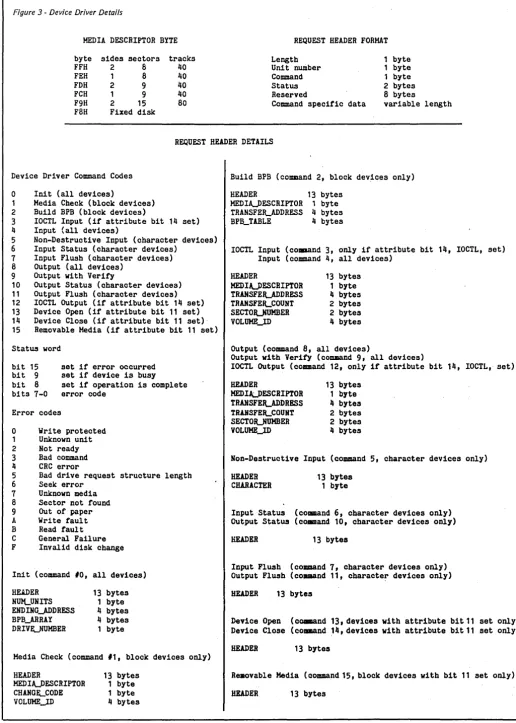
Figure 3 - Device Driver Details
MEDIA DESCRIPTOR BYTE
byte FFH FEH FDH FCH F9H FaH
sides sectors
2 8
1 8
2 9
1 9
2 15 Fixed disk
tracks 40 40 40 40 80
REQUEST HEADER FORHAT
Length Unit number Command Status Reserved
Command specific data
byte byte byte 2 bytes 8 bytes
variable length
REQUEST HEADER DETAILS
Device Driver Command Codes
o
Init (all devices) 12
3 4
Media Check (block devices) Build BPB (block devices)
IOCTL Input (if attribute bit 14 set) Input (all devices)
5 6
7 8
9 10 11 12 13 14 15
Non-Destructive Input (character devices) Input Status (character devices)
Input Flush (character devices) Output (all devices)
Output with Verity
Output Status (character devices) Output Flush (character devices) IOCTL Output (if attribute bit 14 set) Device Open (if attribute bit 11 set) Device Close (if attribute bit 11 set) Removable Media (if attribute bit 11 set)
Statws word
bit 15 bit 9 bit 8 bits 7-0
set if error occurred set if device is busy set if operation is complete error code
Error codes
o
Write protected 1 Unknown unit 2 Not ready 3 Bad command 4 CRC error5 Bad drive request structure length 6 Seek error
7 Unknown media 8 Sector not found 9 Out of paper A Write fault B Read fault C General Failure F Invalid disk change
Init (command 10, all devices)
RUDER NIDLUNITS EHDINGjDDRESS BPB_ARRAY DRIVUUHBER
13 bytes 1 byte 4 bytes 4 bytes 1 byte
Media Check (command 11, block devices only)
HEADER
HEDIUESCRIPTOR
CHANG~CODE
VOLUHEJD
13 bytes 1 byte 1 byte 4 bytes
Build BPB (command 2, block devices only)
HEADER 13 bytes HEDIA.J)ESCRIPTOR 1 byte
TRANSFE~ADDRESS 4 bytes BPB_TABLE 4 bytes
IOCTL Input (coaaand 3, only if attribute bit 14, IOCTL, set) Input (command 4, all devices)
HEADER
HEDIUESCRIPTOR
TRANSFE~ADDRESS TRAliSFE~COUNT
SECTOJLNUMBER VOLUHEJD
13 bytes 1 byte 4 bytes 2 bytes 2 bytes 4 bytes
Output (command 8, all devices)
Output with Verity (command 9, all devices)
IOCTL Output (command 12, only if attribute bit 14, IOCTL, set)
HEADER
HEDIJ,:J>ESCRIPTOR TRANSFEILADDRESS TRAHSFEILCOUHT SECTOJLNUMBER VOLUHEJD
13 bytes 1 byte 4 bytes 2 bytes 2 bytes 4 bytes
Non-Destructive Input (command 5, character devices only)
HEADER CHARACTER
13 bytes 1 byte
Input Status (command 6, character devices only) Output Status (co.mand 10, character devices only)
HEADER 13 bytes
Input Flwsh (command 7, character devices only) Output Flush (command 11, characte~ devices only)
HEADER 13 bytes
Device Open (co.mand 13. devices with attribute bit11 set only) Device Close (command 14, devices with attribute bit11 set only)
HEADER 13 bytes
Reaovable Media (command 15, block devices with bit 11 set only).
HEADER 13 bytes
[image:13.617.52.569.39.763.2]Debugging A Disk
This began as a sidebar (a short aside) for Earl's article on MS-DOS in this issue. However, it was too long to be a sidebar and too important to leave out.
It is . important for two reasons. First, it seemed like everyone knew how to poke around on CP/M disks to find' out what was' going on 'inside' the disk. Not so many are comfortable with MS-DOS disks.
Second, Microsoft included DEBUG with MS-DOS, but you won't find it documented in the standard manual. I guess they figured most people wouldn't use it.
Y
OU don't have to believeevery-thing you read about MS-DOS disks, and formats, and data, and allocations, and system· tracks, and directories, because you can fire up your computer and find out for yourself.
Start off by formatting a floppy disk with the system option. I used drive
B.
C)FORMAT B: IS
Insert new diskette for drive B:
and' strike ENTER when ready
Format oomplete System transferred
362496 bytes total disk space 69632 bytes used by system 292864 bytes available on disk
Format another (Y/N)?n
Notice 69632 bytes used by system. Got a direotory.
C)DIR B:
Volume in drive B has no label Direotory ot B:\
COMMAND COM 23791 12-30-85 12:00p
1 File(8) 292864 bytes free
COMMAND. COM accounts for' 23791 of the 69632 bytes used by the system. Where are the rest? DIR won't help us find the lost bytes. We need some-thing stronger, so dig out DEBUG.
C>DEBUG
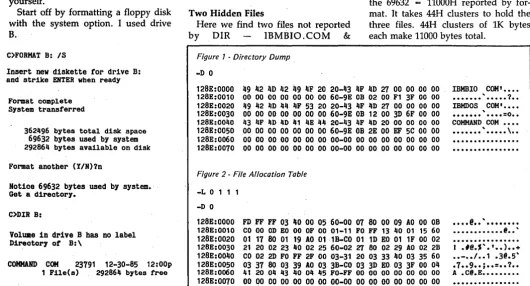
Use the DEBUG load command to read the directory. The syntax for the load command is 'L m d s n' where m ... memory location, d ... disk num-ber, s - start sector, n - ' sector count. The directory starts on sector 5 on 360K disks.
-L 0151
Use the dump command 'D' to see the directory in Figure 1.
The number at the left, 12SE, will be different when you try this. liSE is
the· first free 'segment on my system after I've loaded DOS, with a few installable device drivers and my fa-vorite memory resident programs.
Two Hidden Files
Here we find two files not reported
[image:14.615.36.577.37.760.2] [image:14.615.31.561.466.752.2]by DIR IBMBIO. COM &
Figure 1 • Directory Dump
-D 0
By
Earl Hinrichs·
PC Tech P.O. Box 128 904 North 6th St Lake City, MN 55041
IBMDOS.COM. At offset OB in each directory entry is the file attribute byte. 27 means read only, hidden, system file, archive. 20 means archive.
The archive bit is always set, unless some special backup program clears it. This disk was just created, so all files have the archive bit set.
Read only, hidden, and system bits set ~eans hands off to DIR, ERASE, COPY, and most other commands. If you're curious about the rest of the directory, the 00 60 9E OB is the time and date stamp. At offset lA is the starting cluster, IBMBIO.COM starts at cluster 0002, IBMDOS at cluster 0012, and COMMAND.COM at 002E. For 360K disks a cluster is two sectors. The last four bytes are the file size. 18-MIO.COM is 00003FFI bytes long, IBMDOS. COM is 00006F3D bytes
long, and COMMAND.COM is
00005CEF bytes long.
If you add these sizes you'll come up with a number slightly smaller than the 69632 = 11000H reported by for-mat. It takes 44H clusters to hold the three files. 44H clusters of lK bytes each make 11000 bytes total.
126E:0000 49 42 4D 42 49 4F 20 20-43 4F 4D 27 00 00 00 00 128E:0010 00 00 00 00 00 00 00 60-9E OB 02 00 F1 3F 00 00 128E:0020 49 42 4D 44 4F 53 20 20-43 4F 4D 27 00 00 00 00 128E:0030 00 00 00 00 00 00 00 60-9E OB 12 00 3D 6F 00 00 128E:0040 43 4F 4D 4D 41 4E 44 20-43 4F 4D 20 00 00 00 00 126E:0050 00 00 00 00 00 00 00 60-9E OB 2E 00 EF 5C 00 00 128E:0060 00 00 00 00 00 00 00 00-00 00 00 00 00 00 00 00 128E:0070 00 00 00 00 00 00 0000-00 00 00 00 00 00 00 00
IBMBIO COM' ••••
••••••• ' ••••• ? .
IBHDOS COM' •••• ,
• • • • • • • • • • • =0 ••
COHMAND COM ••••
...
'...
\..
Figure 2 . File Allocation Table
-L 0 1 1 1
-D 0
128E:0000 FD FF FF 03 40 00 05 60-00 07 80 00 09 AD 00 DB
128E:0010 CO 00 OD EO 00 OF 00 01-11 FO FF 13 40 01 15 60 126E:0020 01 17 60 01 19 AD 01 ,1B-CO 01 lD EO 01 IF 00 02 128E:0030 21 20 02 23 40 02 25 60-02 27 80 02 29 AO 02 2B 126E:0040 CO 02 2D FO FF 2F 00 03-31 20 03 33 40 03 35 60 128E:0050 03 37 80 03 39 AO 03 3B-CO 03 3D EO. 03 3F 00 04 128E:0060 41 20 04 43 40 04 45 FO-FF 00 00 00 00 00 00 00 126E:0070 00 00 00 0000 00 00 00-00 00 00 00 00 00 00 00
•••• @ •• ' ••••••••
•••••••••••• @ •• '
I
.I@.".' •• ) ••
+ •• - • • 1 •• 1 [email protected]'.7 •• 9 •• ; •• = •• ?.
A [email protected] •••••••••
Going Further
Let's explore further. Read sector number 1. (The L command starts numbering sectors with 0, s6 sector number 1 is actually the second sector on the disk.) See Figure 2.
This is the file allocation· table, the FAT. The first byte is the fat~d byte, OFDH for 360K floppies. The rest of the table tells DOS which clusters hold which files. Now read the first sector, the boot sector, and dump the first few bytes. See Figure 3.
EB 34 90 at offset 0000 is a jump command. Bytes 0003 - OOOB are used for OEM identification. They show that I used PC-DOS 3.2 to format the disk. The next 19 bytes are an extend-ed BPB table. They show this disk having
-0200 bytes per sector
02 sectors/alloc unit (cluster) 0001 reserved sector (boot sector)
02 FATs
0070 directory entries in root 02DO total sectors on the disk
FD media descriptor byte 0002 sectors for each FAT 0009 sectors per track 0002 heads
[image:15.615.415.572.315.395.2]0000 hidden sectors
Figure 3 -Start of Boot Sector
-L 0 1 0 -D 0 2F
Looking At Memory
Now let's leave the disk, and look at memory. The PC-DOS BIOS, IB-MIO.COM, is always at segment 0070. DOS proper is loaded at the end of the BIOS.
The size of the BIOS varies not only with DOS versions, but also on ma-chine configuration. For instance, the BIOS throws out the drivers for the hard disk on machines which do not have hard disks. On an AT the BIOS includes some patches for bugs in the AT ROM BIOS.
One way to find the start of DOS is to look at the interrupt vectors in Figure 4.
These are the interrupt vectors for interrupts 20H - 3FH, which are re-served by DOS. Each interrupt vector consists of 4 bytes - a segment:offset pointer. Remember that the lower sig-nificant byte is at the lower address.
The first few vectors are 0291:136C, 0291:138D, OE3S:02FS, OE3S:032E. Most interrupts will point to DOS. Look over the segment values in these inter-rupts, and notice that most segment values are 0291. This is the DOS
128E:0000 EB 34 90 49 42 4D 20 20-33 2E 32 00 02 02 01 00 128E:0010 02 70 00 DO 02 PD 02 00-09 00 02 00 00 00 00 00 128E:0020 00 00 00 00 00 00 00 00-00 00 00 00 00 00 00 OF
• 4.IBM 3.2 ••••• .p ••••••••••••••
Figure 4 -Interrupt Vectors 20H - 3FH
-d 0:80
0000:0080 ~c 13 91 02 8D 13 91 02-F5 02 35 OE 2E 03 35 OE 1 ••••••••• 5 ••• 5. 0000:0090 BD 02 35 OE 09 15 91 02-4C 15 91 02 FE 5D 91 02 •• 5 ••••• L •••• ] •• OOOO:OOAO 72 13 91 02 7A 01 70 00-72 13 91 02 72 13 91 02 r ••• z.p.r ••• r ••• 0000:0050 72 13 91 02 72 13 91 02-57 02 26 OD BD 1E 70 00 r ••• r ••• W.& ••• p. OOOO:OOCO EA 73 13 91 02 13 91 02-72 13 91 02 72 13 91 02 .s •••••• r ••• r ••• OOOO:OODO 72 13 91 02 72 13 91 02-72 13 91 02 72 13 91 02 r ••• r ••• r ••• r ••• OOOO:OOEO 72 13 91 02 72 13 91 02-72 13 91 02 72 13 91 02 r ••• r ••• r ••• r ••• OOOO:OOFO 72 13 91 02 72 13 91 02-72 13 91 02 72 13 91 02 r ••• r ••• r ••• r •••
Figure 5 -NUL Device Header
-d 291:48 59
0291:0040 00 00 C8 09 04 80 C6 14 0291:0050 CC 14 4E 55 4C20 20 20-20 20 •• NUL
segment.
(What are the others? BIOS is at 0070, DEBUG has been loaded at OE3S. Investigating OD26, int 2E, and 9113, int 30 is left as an exercise, because I don't know.)
Finding NUL
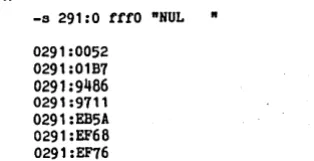
The NUL device is in DOS. Now that we know where DOS is, we can use the debug search command to find it.
-s 291:0 fffO -NUL
-0291:00520291:01B7 0291 :9466 0291:9711 0291:EB5A 0291 :EF68 0291 :EF76
The first address is the one we want. The others are from various buffers in DOS and DEBUG which process the search command and so contain the string 'NUL'. The name of the device driver is at offset OA in the header, so the NUL device header starts at 48 and is 11 bytes long. See Figure S.
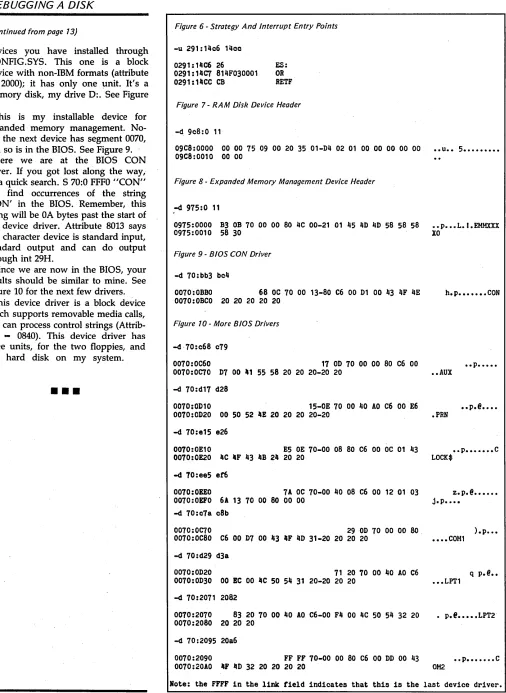
The first four bytes are the link to the next device driver. Remember that the lower part of the address is in the lower bytes. So the next device is at 09C8:0000. NUL's attribute bits are 8004, character device, NUL device . Strategy and interrupt entry points are at 14C6 and 14CC (see Figure 6). What does the NUL device do?
Not much, NUL merely sets the done bit in the status word and re-turns. Let's see what the next device is. Device headers are 11 bytes long,