
© 2012 Marty Hall
Customized Java EE Training: http://courses.coreservlets.com/
Java, JSF 2, PrimeFaces, Servlets, JSP, Ajax, jQuery, Spring, Hibernate, RESTful Web Services, Hadoop, Android.
Developed and taught by well-known author and developer. At public venues or onsite at yourlocation.
Intents, Intent Filters,
and Invoking Activities:
Part I: Using Class Name
Originals of Slides and Source Code for Examples:
http://www.coreservlets.com/android-tutorial/
© 2012 Marty Hall
Customized Java EE Training: http://courses.coreservlets.com/
Java, JSF 2, PrimeFaces, Servlets, JSP, Ajax, jQuery, Spring, Hibernate, RESTful Web Services, Hadoop, Android.
Developed and taught by well-known author and developer. At public venues or onsite at yourlocation.
For live Android training, please see courses
at http://courses.coreservlets.com/.
Taught by the author of
Core Servlets and JSP
,
More
Servlets and JSP
, and this Android tutorial. Available at
public venues, or customized versions can be held
on-site at your organization.
•Courses developed and taught by Marty Hall
–JSF 2, PrimeFaces, servlets/JSP, Ajax, jQuery, Android development, Java 6 or 7 programming, custom mix of topics
–Ajax courses can concentrate on 1 library (jQuery, Prototype/Scriptaculous, Ext-JS, Dojo, etc.) or survey several
•Courses developed and taught by coreservlets.com experts (edited by Marty)
–Spring, Hibernate/JPA, EJB3, GWT, Hadoop, SOAP-based and RESTful Web Services
Topics in This Section
•
Part I
–
Invoking Activities by class name
–
Defining dimensions in res/values
–
Sending data via the “extras” Bundle
•
Part II
–
Invoking Activities with a URI
–
Sending data via parameters in the URI
•
Part III
–
Invoking Activities with tabbed windows
–
Defining two-image icons in res/drawable
5
© 2012 Marty Hall
Customized Java EE Training: http://courses.coreservlets.com/
Java, JSF 2, PrimeFaces, Servlets, JSP, Ajax, jQuery, Spring, Hibernate, RESTful Web Services, Hadoop, Android.
Developed and taught by well-known author and developer. At public venues or onsite at yourlocation.
Idea
•
Android philosophy
–
Activities are small, single-screen units
•
Consequence
–
You need easy way to switch from one Activity to
another
•
Approach: use Intent
–
An abstract description of an operation to be performed
–
Intent can refer to class name of Activity or a URI
–
If a URI, then Activity registers as handler for the
scheme, host name, or MIME type of the URI
–
In all cases, new Activity must have entry in
AndroidManifest.xml in order to be invoked
7
Summary of Options
•
Invoke Activity by class name (Part I)
–
Exactly one Activity can match
–
New Activity must be in same project as original
–
Can send data via an “extras” Bundle
•
Invoke Activity by URI (Part II)
–
More than one Activity could match
–
New Activity need not be in the same project as original
–
Can send data via URI parameters or “extras” Bundle
•
Switch Activities via tabs (Part III)
–
Can use class name or URI to specify Activity
–
New Activity must be in same project as original
–
Can send data via URI parameters or “extras” Bundle
© 2012 Marty Hall
Customized Java EE Training: http://courses.coreservlets.com/
Java, JSF 2, PrimeFaces, Servlets, JSP, Ajax, jQuery, Spring, Hibernate, RESTful Web Services, Hadoop, Android.
Developed and taught by well-known author and developer. At public venues or onsite at yourlocation.
Example Target Activity:
Loan Payment Calculator
Example Target Activity:
Loan Calculator
•
Inputs
–
Loan amount
–
Interest rate (as a percent)
–
Loan period in months
•
Outputs
–
Monthly payment
–
Total payments over life of loan
•
Both are in same units
(e.g., dollars) as the loan amount
•
Defaults
–
Unless values are passed in from other Activity, uses
default values for all inputs
Summary of Layout
11
TableLayout
Entries in first column
are right-aligned.
Entries in second column are
left-aligned. They are also
given ids so that the Java
code can insert the text.
This is a View with
android:column_span="2"
and a fixed height.
XML: Layout File: First Row
(res/layout/loan_payment.xml)
<?xml version="1.0" encoding="utf-8"?>
<TableLayout xmlns:android="http://..."
android:layout_width="match_parent"
android:layout_height="match_parent"
android:stretchColumns="1">
<TableRow android:layout_marginTop="20dp">
<TextView android:layout_width="wrap_content"
android:layout_height="wrap_content"
android:textColor="@color/default_foreground"
android:textSize="@dimen/font_size"
android:text="@string/loan_amount_prompt"
android:gravity="right"/>
<TextView android:id="@+id/loan_amount"
android:layout_width="wrap_content"
android:layout_height="wrap_content"
android:textColor="@color/default_foreground"
android:textSize="@dimen/font_size"
android:gravity="left"/>
</TableRow>
XML: Layout File: Divider
(res/layout/loan_payment.xml)
<TableRow>
<TextView android:layout_span="2"
android:layout_width="match_parent"
android:layout_height="5dp"
android:background="@color/divider_background"/>
</TableRow>
13
XML: Strings File
(res/values/strings.xml)
<?xml version="1.0" encoding="utf-8"?> <resources>
<string name="app_name">Intent Filters and Activity Switching</string> <string name="loan_calculator_app_name">
Loan Calculator: Monthly Payments </string>
<string name="tabs_app_name">Tabbed Windows</string>
<string name="loan_amount_prompt">Loan amount:  </string> <string name="interest_rate_prompt">Interest rate:  </string> <string name="loan_period_prompt">Months:  </string>
<string name="monthly_payment_prompt">Monthly payment:  </string> <string name="total_payments_prompt">Total payments:  </string> </resources>
14
Note that   represents a non-breaking space. Regular spaces are not preserved at the beginning and end of strings in Android resource files. Note also that is notlegal here, since that is a character entity specific to HTML, not general in XML.
XML: Colors File
(res/values/colors.xml)
<?xml version="1.0" encoding="utf-8"?>
<resources>
<!-- Used inside loan_payments.xml. -->
<color name="default_foreground">#d3d3d3</color>
<color name="divider_background">#ffffff</color>
<color name="result_foreground">#ff0000</color>
</resources>
15
XML: Dimensions File
(res/values/dimensions.xml)
<?xml version="1.0" encoding="utf-8"?>
<resources>
<dimen name="font_size">20dp</dimen>
</resources>
16
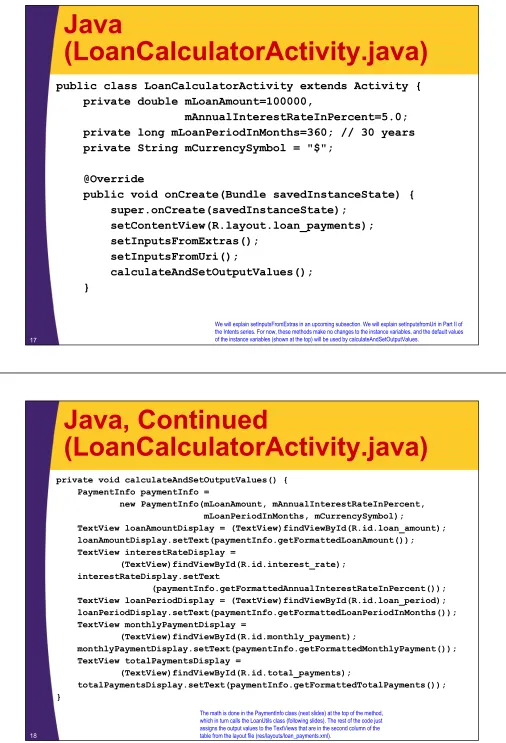
Java
(LoanCalculatorActivity.java)
public class LoanCalculatorActivity extends Activity {
private double mLoanAmount=100000,
mAnnualInterestRateInPercent=5.0;
private long mLoanPeriodInMonths=360; // 30 years
private String mCurrencySymbol = "$";
@Override
public void onCreate(Bundle savedInstanceState) {
super.onCreate(savedInstanceState);
setContentView(R.layout.loan_payments);
setInputsFromExtras();
setInputsFromUri();
calculateAndSetOutputValues();
}
17We will explain setInputsFromExtras in an upcoming subsection. We will explain setInputsfromUri in Part II of the Intents series. For now, these methods make no changes to the instance variables, and the default values of the instance variables (shown at the top) will be used by calculateAndSetOutputValues.
Java, Continued
(LoanCalculatorActivity.java)
private void calculateAndSetOutputValues() { PaymentInfo paymentInfo =
new PaymentInfo(mLoanAmount, mAnnualInterestRateInPercent, mLoanPeriodInMonths, mCurrencySymbol);
TextView loanAmountDisplay = (TextView)findViewById(R.id.loan_amount); loanAmountDisplay.setText(paymentInfo.getFormattedLoanAmount()); TextView interestRateDisplay =
(TextView)findViewById(R.id.interest_rate); interestRateDisplay.setText
(paymentInfo.getFormattedAnnualInterestRateInPercent()); TextView loanPeriodDisplay = (TextView)findViewById(R.id.loan_period); loanPeriodDisplay.setText(paymentInfo.getFormattedLoanPeriodInMonths()); TextView monthlyPaymentDisplay =
(TextView)findViewById(R.id.monthly_payment);
monthlyPaymentDisplay.setText(paymentInfo.getFormattedMonthlyPayment()); TextView totalPaymentsDisplay =
(TextView)findViewById(R.id.total_payments);
totalPaymentsDisplay.setText(paymentInfo.getFormattedTotalPayments()); }
18
[image:8.612.54.560.23.766.2]Java (PaymentInfo.java)
public class PaymentInfo {
private final double mLoanAmount, mAnnualInterestRateInPercent, mMonthlyPayment, mTotalPayments;
private final long mLoanPeriodInMonths; private final String mCurrencySymbol;
public PaymentInfo(double loanAmount, double annualInterestRateInPercent, long loanPeriodInMonths, String currencySymbol) { mLoanAmount = loanAmount;
mAnnualInterestRateInPercent = annualInterestRateInPercent; mLoanPeriodInMonths = loanPeriodInMonths;
mCurrencySymbol = currencySymbol;
mMonthlyPayment = LoanUtils.monthlyPayment(loanAmount,
annualInterestRateInPercent, loanPeriodInMonths);
mTotalPayments = mMonthlyPayment * mLoanPeriodInMonths; }
... }
19
The remaining methods are just getter methods and variations of the getter methods that return the values as formatted strings (e.g., with commas and with exactly two values after the decimal point).
Java (LoanUtils.java)
public class LoanUtils {
public static double monthlyPayment(double loanAmount,
double annualInterestRateInPercent, long loanPeriodInMonths) {
if (annualInterestRateInPercent <= 0) { annualInterestRateInPercent = 0.0000001; }
double monthlyInterestRate = annualInterestRateInPercent / 1200.0; double numerator = loanAmount * monthlyInterestRate;
double denominator =
1 - Math.pow(1 + monthlyInterestRate, -1 * loanPeriodInMonths); return (numerator / denominator);
} }
20
Example: Results
21
For now, these values are fixed to the initial values set for the instance variables of the LoanCalculatorActivity. However, the upcoming sections will show how to pass values from another Activity to this one. Computed by LoanUtils.
Formatted by PaymentInfo.
© 2012 Marty Hall
Customized Java EE Training: http://courses.coreservlets.com/
Java, JSF 2, PrimeFaces, Servlets, JSP, Ajax, jQuery, Spring, Hibernate, RESTful Web Services, Hadoop, Android.
Developed and taught by well-known author and developer. At public venues or onsite at yourlocation.
Summary
•
Idea
–
Specify class name of new Activity
•
New Activity must be in same project as original Activity
•
Syntax
–
Java (original Activity)
Intent activityIntent = new Intent(this, NewActivity.class);
startActivity(activityIntent);
–
XML (AndroidManifest.xml)
<activity android:name=".NewActivity"
android:label="@string/some_app_name">
<intent-filter>
<action android:name="android.intent.action.VIEW" />
<category android:name="android.intent.category.DEFAULT"/>
</intent-filter>
</activity>
23© 2012 Marty Hall
Customized Java EE Training: http://courses.coreservlets.com/
Java, JSF 2, PrimeFaces, Servlets, JSP, Ajax, jQuery, Spring, Hibernate, RESTful Web Services, Hadoop, Android.
Developed and taught by well-known author and developer. At public venues or onsite at yourlocation.
Example:
Example: Overview
•
Initial Activity
–
Has Button that, when pressed,
invokes the loan calculator activity
•
No data is sent to the loan calculator,
so it will use default values for the
loan amount, interest rate, etc.
•
Approach
–
Create Intent referring to LoanCalculatorActivity.class
•
Thus, the two Activities must be in same project
–
Call startActivity
–
Put entry for LoanCalculatorActivity in
AndroidManifest.xml
•
So that the initial Activity has permission to invoke the loan
calculator
25
XML: Layout File
(res/layout/main.xml)
<?xml version="1.0" encoding="utf-8"?>
<LinearLayout xmlns:android="http://..."
android:orientation="vertical"
android:layout_width="match_parent"
android:layout_height="match_parent">
<Button android:text="Calculate Loan Payments (No Data)"
android:layout_width="match_parent"
android:layout_height="wrap_content"
android:layout_gravity="center_horizontal"
android:onClick="showLoanPayments1"
/>
...
</LinearLayout>
26
XML: Manifest File Template
(AndroidManifest.xml)
<?xml version="1.0" encoding="utf-8"?>
<manifest xmlns:android="http://schemas.android.com/apk/res/android" package="com.coreservlets.intentfilter1"
android:versionCode="1" android:versionName="1.0">
<uses-sdk android:minSdkVersion="8" />
<application android:icon="@drawable/icon" android:label="@string/app_name"> <activity android:name=".IntentFilter1Activity"
android:label="@string/app_name"> <intent-filter>
<action android:name="android.intent.action.MAIN" />
<category android:name="android.intent.category.LAUNCHER"/> </intent-filter> </activity> ... </application> </manifest> 27
This part is generated automatically when you build a new Android project in Eclipse.
Other Activities will be declared here. See next slide for LoanCalculatorActivity.
Means that this is the Action that runs when you run the
project. Means that this app gets an icon on the screen of your Android device.
XML: Manifest File
Action Declaration
<?xml version="1.0" encoding="utf-8"?>
<manifest xmlns:android="http://schemas.android.com/apk/res/android" package="com.coreservlets.intentfilter1"
android:versionCode="1" android:versionName="1.0">
<uses-sdk android:minSdkVersion="8" />
<application android:icon="@drawable/icon" android:label="@string/app_name">
... <!-- Declaration for IntentFilter1Activity on previous slide --> <activity android:name=".LoanCalculatorActivity"
android:label="@string/loan_calculator_app_name"> <intent-filter>
<action android:name="android.intent.action.VIEW" />
<category android:name="android.intent.category.DEFAULT" />
... <!-- "data" entry shown later; not used in this example --> </intent-filter> </activity> ... </application> </manifest> 28
The "data" tag of the land the "activity" tag for the tabbed windows Activity are both shown later.
Means that this Action displays data to the user, but is not launched as the initial Activity of the project.
Means that this Action can be the default for certain types of data (shown later).
You virtually always set action.VIEW and category.DEFAULT for Activities that will be invoked by other Activities.
XML: Strings File
(res/values/strings.xml)
<?xml version="1.0" encoding="utf-8"?>
<resources>
<string name="app_name">
Intent Filters and Activity Switching
</string>
...
</resources>
29
Other strings shown earlier, and apply to the LoanCalculatorActivity, not to the initial Activity with the buttons that launch the loan calculator.
Java (IntentFilter1Activity.java)
public class IntentFilter1Activity extends Activity {
@Override
public void onCreate(Bundle savedInstanceState) {
super.onCreate(savedInstanceState);
setContentView(R.layout.main);
}
public void showLoanPayments1(View clickedButton) {
Intent activityIntent =
new Intent(this, LoanCalculatorActivity.class);
startActivity(activityIntent);
}
...
}
30
Example: Results
31
© 2012 Marty Hall
Customized Java EE Training: http://courses.coreservlets.com/
Java, JSF 2, PrimeFaces, Servlets, JSP, Ajax, jQuery, Spring, Hibernate, RESTful Web Services, Hadoop, Android.
Developed and taught by well-known author and developer. At public venues or onsite at yourlocation.
Summary
•
Idea
–
Attach a Bundle (like a Map – see next slides) to the Intent.
The Bundle will contain data to be used by the new Activity.
•
Syntax
–
Java (original Activity)
Intent activityIntent = new Intent(this, NewActivity.class);
Bundle newActivityInfo = new Bundle();
newActivityInfo.put
Blah
(…);
// putDouble, putString, etc.
activityIntent.putExtras(newActivityInfo);
startActivity(activityIntent);
–
Java (new Activity)
Intent intent = getIntent();
Bundle info = intent.getExtras();
if (info != null) { /*
Retrieve vals with info.getBlah(...)
*/ }
33
The Bundle Class: Details
•
Putting data in a Bundle
–
putBoolean, putBooleanArray, putDouble, putDoubleArray,
putString, putStringArray, putStringArrayList etc.
•
These all take keys and values as arguments.
The keys must be Strings. The values must be of the standard
types (int, double, etc.) or array of them.
–
You can also make a custom class that implements Serializable or
Parceleable, then store instance of that class with putSerializable or
putParceleable
•
Methods return void, so you cannot chain as with the putExtra
method of Intent.
•
Retrieving data from a Bundle
–
getBoolean, getBooleanArray, getDouble, getDoubleArray,
getString, getStringArray, getStringArrayList, etc.
•
These take keys (Strings) as arguments.
No typecast required on retrieval.
Option 1: Attaching Entire
Bundle to Intent
•
Idea
–
Make a Bundle, add it all at once to Intent.
•
Instantiate a Bundle, then use the Bundle’s put
Blah
method (one such method for each standard type). Then,
attach Bundle to Intent with Intent’s putExtras method.
•
Syntax
Bundle newActivityInfo = new Bundle();
newActivityInfo.putDouble("key1", someDouble);
newActivityInfo.putString("key2", someString);
…
yourIntent.putExtras(newActivityInfo);
–
Note that it is putExtras, not putExtra
35
Option 2: Adding One Piece of
Data at a Time to Intent
•
Idea
–
Add individual pieces of data to the Intent. No need to
explicitly create and attach a Bundle.
•
You use the overloaded “putExtra” method. The first
argument is the key (String), and the second argument is
the value, which can be of any standard type. However,
the code that retrieves the value later needs to know type.
•
Syntax
yourIntent.putExtra("key1", someDouble);
yourIntent.putExtra("key2", someString);
…
–
Unlike putBlah for Bundle, these putExtra methods return the
Intent, so you can do jQuery-like chaining:
» yourIntent.putExtra(…).putExtra(…) … .putExtra(…);
© 2012 Marty Hall
Customized Java EE Training: http://courses.coreservlets.com/
Java, JSF 2, PrimeFaces, Servlets, JSP, Ajax, jQuery, Spring, Hibernate, RESTful Web Services, Hadoop, Android.
Developed and taught by well-known author and developer. At public venues or onsite at yourlocation.
Example:
Invoking Loan Calculator
with Custom Values
Example: Overview
•
Initial Activity
–
Has Button that, when pressed,
invokes the loan calculator activity
•
Creates randomized data and
sends it to the loan calculator, which
retrieves the values and uses them
for its calculations.
•
Approach
–
Create Intent referring to LoanCalculatorActivity.class
–
Create Bundle with 3 values
•
Loan amount, interest rate, loan period
–
Attach Bundle to Intent with putExtras
–
Call startActivity
–
Put entry for LoanCalculatorActivity in manifest
XML: Layout File
(res/layout/main.xml)
<?xml version="1.0" encoding="utf-8"?>
<LinearLayout xmlns:android="http://..."
android:orientation="vertical"
android:layout_width="match_parent"
android:layout_height="match_parent">
...
<Button
android:text="Calculate Loan Payments (with Data)"
android:layout_width="match_parent"
android:layout_height="wrap_content"
android:layout_gravity="center_horizontal"
android:onClick="showLoanPayments2"
/>
...
</LinearLayout>
39
First button shown earlier
XML: Manifest File
Action Declaration
<?xml version="1.0" encoding="utf-8"?>
<manifest xmlns:android="http://schemas.android.com/apk/res/android" package="com.coreservlets.intentfilter1"
android:versionCode="1" android:versionName="1.0">
<uses-sdk android:minSdkVersion="8" />
<application android:icon="@drawable/icon" android:label="@string/app_name">
... <!-- Declaration for IntentFilter1Activity on previous slide --> <activity android:name=".LoanCalculatorActivity"
android:label="@string/loan_calculator_app_name"> <intent-filter>
<action android:name="android.intent.action.VIEW" />
<category android:name="android.intent.category.DEFAULT" />
... <!-- "data" entry shown later; not used in this example --> </intent-filter>
</activity> ...
</application> </manifest>
40
Java (IntentFilter1Activity.java)
public class IntentFilter1Activity extends Activity {
...
public void showLoanPayments2(View clickedButton) {
Intent activityIntent =
new Intent(this, LoanCalculatorActivity.class);
activityIntent.putExtras
(LoanBundler.makeRandomizedLoanInfoBundle());
startActivity(activityIntent);
}
...
}
41
Code for onCreate and first button’s event handler shown earlier.
Java (LoanBundler.java)
public class LoanBundler {
public static Bundle makeLoanInfoBundle(double loanAmount,
double annualInterestRateInPercent, long loanPeriodInMonths,
String currencySymbol) { Bundle loanInfo = new Bundle();
loanInfo.putDouble("loanAmount", loanAmount); loanInfo.putDouble("annualInterestRateInPercent",
annualInterestRateInPercent);
loanInfo.putLong("loanPeriodInMonths", loanPeriodInMonths); loanInfo.putString("currencySymbol", currencySymbol); return(loanInfo);
}
Java
(LoanBundler.java, Continued)
public static Bundle makeRandomizedLoanInfoBundle() { Random randomizer = new Random();
double loanAmount = 25000 * (1 + randomizer.nextInt(10)); double interestRate = 0.25 * (1 + randomizer.nextInt(60)); long loanPeriod = 12 * (1 + randomizer.nextInt(30));
return(LoanBundler.makeLoanInfoBundle(loanAmount,
interestRate, loanPeriod)); }
43
Java
(LoanCalculatorActivity.java)
public class LoanCalculatorActivity extends Activity {
private double mLoanAmount=100000,
mAnnualInterestRateInPercent=5.0;
private long mLoanPeriodInMonths=360; // 30 years
private String mCurrencySymbol = "$";
@Override
public void onCreate(Bundle savedInstanceState) {
super.onCreate(savedInstanceState);
setContentView(R.layout.loan_payments);
setInputsFromExtras();
setInputsFromUri();
calculateAndSetOutputValues();
}
Java (LoanCalculatorActivity,
Continued)
private void setInputsFromExtras() { Intent intent = getIntent();
Bundle loanInfo = intent.getExtras(); if (loanInfo != null) {
double loanAmount = loanInfo.getDouble("loanAmount"); double annualInterestRateInPercent =
loanInfo.getDouble("annualInterestRateInPercent"); long loanPeriodInMonths =
loanInfo.getLong("loanPeriodInMonths"); String currencySymbol =
loanInfo.getString("currencySymbol"); setInputs(loanAmount, annualInterestRateInPercent,
loanPeriodInMonths, currencySymbol); }
}
45
Java (LoanCalculatorActivity,
Continued)
private void setInputs(double loanAmount,
double annualInterestRateInPercent,
long loanPeriodInMonths,
String currencySymbol) {
if (loanAmount > 0) {
mLoanAmount = loanAmount;
}
if (annualInterestRateInPercent > 0) {
mAnnualInterestRateInPercent =
annualInterestRateInPercent;
}
if (loanPeriodInMonths > 0) {
mLoanPeriodInMonths = loanPeriodInMonths;
}
if (currencySymbol != null) {
mCurrencySymbol = currencySymbol;
}
}
Example: Results
47
© 2012 Marty Hall
Customized Java EE Training: http://courses.coreservlets.com/
Java, JSF 2, PrimeFaces, Servlets, JSP, Ajax, jQuery, Spring, Hibernate, RESTful Web Services, Hadoop, Android.
Developed and taught by well-known author and developer. At public venues or onsite at yourlocation.
More Reading
•
Tutorial: Intents and Intent Filters
–
http://developer.android.com/guide/topics/intents/
intents-filters.html
•
JavaDoc: Intent
–
http://developer.android.com/reference/android/content/
Intent.html
•
Chapters: Creating Intent Filters and
Launching Activities and Sub-Activities
–
From
The Busy Coder’s Guide to Android Development
•
http://commonsware.com/Android/
•
Chapter: Intents and Services
–
From
Android in Action
by Ableson et al
49
Summary
•
Java (original Activity)
Intent activityIntent = new Intent(this, NewActivity.class);
Bundle newActivityInfo = new Bundle();
newActivityInfo.put
Blah
(…);
// putDouble, putString, etc.
activityIntent.putExtras(newActivityInfo);
startActivity(activityIntent);
•
Java (new Activity)
Intent intent = getIntent();
Bundle info = intent.getExtras();
if (info != null) { /*
Retrieve vals with info.getBlah(...)
*/ }
•
XML (AndroidManifest.xml)
<intent-filter>
<action android:name="android.intent.action.VIEW" />
<category android:name="android.intent.category.DEFAULT"/>
</intent-filter>
© 2012 Marty Hall
Customized Java EE Training: http://courses.coreservlets.com/
Java, JSF 2, PrimeFaces, Servlets, JSP, Ajax, jQuery, Spring, Hibernate, RESTful Web Services, Hadoop, Android.
Developed and taught by well-known author and developer. At public venues or onsite at yourlocation.
![Dichloridobis[3 (4 methoxyphenyl) 2 methyl 5 (piperidin 1 yl) 2,3 dihydro 1,2,4 oxadiazole κN4]platinum(II)](data:image/gif;base64,R0lGODlhAQABAIAAAP///wAAACH5BAEAAAAALAAAAAABAAEAAAICRAEAOw==)