Abstract—Understandability is a software characteristic that helps ease software maintenance and evolution. When modifying or reusing software that is written by someone else, software developers often have difficulties in trying to understand what the existing software does and how. Such an issue is commonly found in software-developing organizations. This paper discusses an approach taken by an IT organization in Thailand which attempts to enforce coding standards within its iOS development team in order to promote software understandability and maintainability. Among coding standards, naming conventions are important but are most often violated. This paper presents the development of a naming convention checking framework that consists of tools to automatically detect naming convention violations in Objective C programs. The framework facilitates iOS developers in modifying the programs so that they adhere to the naming conventions. An experiment showed that the developers’ understanding in the programs that had been modified, as suggested by the naming convention checking framework, did improve at a statistical significance level of 0.05. This approach can enhance program understandability and can be applied to other software-developing organizations.
Index Terms—naming convention, Objective C, maintainability, understandability
I. INTRODUCTION
NDERSTANDABILITY is a software characteristic that helps ease software maintenance and evolution. It is always the case that software has to undergo change to fix errors, to handle new or changed user requirements or software environments, or to prevent future problems. This requires software developers to inspect code of existing software and try to understand what functions it performs and how. According to Boehm’s quality model [1], code possesses understandability characteristic to the extent that its purpose is clear to the inspector. To make the purpose clear and understandable, there must be consistency, structuredness, conciseness, and legibility in the code. Understandability is a subattribute of maintainability.
Manuscript received June 22, 2018; revised July 30, 2018.
R. Nundhapana was with the Department of Computer Engineering, Faculty of Engineering, Chulalongkorn University, and is currently with Krung Thai Bank, Bangkok, 10110, Thailand (email: [email protected]).
T. Senivongse is with the Department of Computer Engineering, Faculty of Engineering, Chulalongkorn University, Bangkok 10330, Thailand (corresponding author phone: +66 2 2186996; fax: +66 2 2186955; e-mail: [email protected]).
In software maintenance and evolution, it is likely that software developers have to inspect and understand code that is written by someone else. The original developers may have been transferred to other software projects, have changed positions or jobs, or have retired. It is common that software that is in use today within organizations was developed long time ago and all details might have been forgotten. Software developers have to carefully study the code in order to perform maintenance tasks.
It is often the case that software within organizations may be written using different styles and conventions. This is because organization-wide coding guidelines may not be in place, or developers have different levels of experience or are not strict with coding conventions of the computer languages of use. Software developers should be concerned with naming identifiers. Naming variables, constants, methods, functions, and classes, for example, should follow the organization’s guidelines or coding standards of the languages. Identifiers should convey meaning of what a program does and what data are used or produced. Having various naming styles for identifiers makes it difficult for software developers, who may themselves use different styles, to understand the code written by other developers.
This paper presents a case of an IT organization in Thailand. While beginning to move to Swift development, its iOS application development team have been maintaining a number of Objective C applications, adding new business requirements or modifying them when the operating system is upgraded. Initially, the team did not enforce any coding standards and they usually had to spend time trying to understand the code written by former team members. In some cases, the developers found that it was difficult to understand existing code and decided to develop the whole application anew. However, redevelopment took time and some original requirements might be missed out, making the newly developed applications incomplete. Therefore, the iOS development team recently began to enforce coding standards. The team gathered Objective C coding guidelines that are recommended by Apple [2] and by other sources [3], [4], [5], with an emphasis on naming convention as well as the use of magic numbers [6], [7] and literal strings [6], [8]. Also adding their own guidelines, the team established an Objective C naming guideline that was used in the development of a naming convention checking framework. Using the tools in the framework, the team could automatically check where naming conventions were violated in the existing Objective C applications. The team
Enhancing Understandability of Objective C
Programs Using Naming Convention Checking
Framework
Ruchuta Nundhapana and Twittie Senivongse
could revise the code to adhere to the guideline in order to improve understandability and ease future maintenance.
This paper is organized as follows. Section II discusses related work. Sections III and IV present the Objective C naming guideline and the development of the naming convention checking framework. An evaluation of the framework is shown in Section V and the paper concludes in Section VI.
II. RELATED WORK
Related work was reviewed in two aspects, i.e. coding conventions and automatic checking tools.
On coding conventions, Smit et al. [6] suggested that coding conventions may have impact on maintainability of software. For example, the use of magic numbers (i.e. literal values that appear in a program) and hard coded strings could make the code difficult to read, understand, and maintain. They conducted a survey of software engineers to identify the relative importance of 71 coding conventions to maintainability and measured the convention adherence of four open-source Java projects. The result showed that the most common violations were related to the use of magic numbers and multiple literal strings as well as naming. Butler et al. [9] argued that automatic checking of naming conventions was limited to checking of typography. They proposed a naming convention checking library for Java fileds, formal arguments, and local variables, which allowed the declarative specification of different conventions with regard to typography and the use of abbreviations and phrases (such as noun phrases and verb phrases). Another work by Wang et al. [10] used lexical analysis and regular expressions to extract identifiers in 48 open source projects written in Java, C, and C++, and match them with identifier naming conventions, i.e. Camel, Pascal, Hungarian, Underline, and Capital. The result showed that Camel was used the most frequently in these languages, and Java projects had the highest consistency in the use of naming conventions, followed by C and C++ projects.
On automatic coding convention checking tools, Objective Clean [11] can check coding styles of Objective C programs. A developer first has to take a survey to define the rules about the coding styles that are to be applied to a project. The rules are about usage of a space in a statement, method parameter prefix, brace, and empty line only, i.e. it is not for checking naming convention. At the end of the survey, a configuration file is created, and the tool can be used to set up the configuration file within a project. Then developing the project on the Xcode IDE can adhere to the rules. At build time, if the code violates one of the rules, then Xcode will throw a build error and identify the offending line. Another tool called Faux Pas [12] inspects iOS or Mac app’s Xcode projects and warns about possible bugs as well as about maintainability and style issues. With regard to naming convention, its Unidiomatic Accessor Naming rule produces a warning if the name of a getter method starts with “get”, while the Identifier Naming rule allows enforcing custom naming guidelines for different kinds of identifiers via regular expressions.
Like Objective Clean [11], this paper presents a coding
convention checking tools and framework that can set up convention rules in an Xcode project and, during code building, can identify the locations within the code which offend the rules. Unlike Objective Clean and other tools, this paper focuses on comprehensive checking of identifier naming and the use of magic numbers and literal strings as they are the most violated conventions [6].
III. OBJECTIVE CNAMING GUIDELINE
In the case of an IT organization in Thailand, its iOS development team compiled an Objective C naming guideline shown in Table I which would be used as a standard in the team. The conventions in the guideline were taken mainly from the coding guidelines for Apples’ Cocoa framework [2] which recommend general naming conventions, how to name classes, methods, functions, properties, variables, and constants, as well as acceptable abbreviations and acronyms. The guideline lists correct naming and wrong naming as examples of recommendations and violations respectively. Also, naming conventions recommended by other sources [3], [4], [5] were included. In addition, the team themselves added four conventions to this list. Among those four were the conventions about magic numbers and literal strings. A magic number is a numeric literal value buried in the code instead and should be avoided (except -1, 0, 1, and 2) [6], [7]. For example, the value 56.0 appears out of the blue in area = width * 56.0, and it is unclear what it means. Literal strings is a series of characters enclosed in double quotes [8], e.g. mail.sender = “[email protected]”. Especially multiple occurrences of the same string in the code would require change in all locations if the string pattern has to change [6]. It is better to replace magic numbers and literal strings with named constants.
IV. NAMING CONVENTION CHECKING FRAMEWORK
The overview of the naming convention checking framework for checking adherence to naming conventions of any Objective C program in an Xcode project is depicted in Fig. 1. Steps in the framework are as follows.
A. Extract Identifier Names
The framework provides a “naming list library” (i.e. RNNamingListObject.h and RNNamingListObject.m) which an iOS development team member has to import into the project and call the library by using the command [RNNamingListObject startGetListName] in the file Appdelegate.m and run. The library calls Objective C runtime methods of Cocoa (Touch) framework to get identifier names (i.e. class, method, function, variable, property, and constant names) from the program. The result is a naming list in a text file, where each entry in the file shows {identifier name, type of identifier}. This naming list is used later by the Objective C convention checker tool. B. Set Configuration
TABLEI
OBJECTIVE CNAMING GUIDELINE
that the developer wants to check violations, and 3) abbreviations that are defined by the team or by Apple [2] and allowed in a program.
C. Extract Magic Numbers and Literal Strings
Using the Objective C convention checker, the developer selects the program and the tool uses the Word Segment API of Python framework to segment the code into words. Then the tool uses the class NSRegularExpression of the Foundation framework to match the code with the regular expressions for magic number (except -1, 0, 1, 2) in Table II
and for literal string in Table III. Magic numbers and literal strings that are found in the program are stored in an SQLite database.
D. Check Naming Conventions
Fig. 1. Overview of naming convention checking framework.
TABLEII
REGULAR EXPRESSIONS FOR MAGIC NUMBER
Location Pattern Example
Digit after = or : [\:\=]([\d\.]+) originX = 15.0; setWidth:30.0 Digit before ; ([\d\.]+)[;] menuWidth = viewWidth/4.0; Digit after +, -, x,
/, <, >
[\>\<\+\-\*\/] ([\d\.]+)
salary = month*25*100; Digit before +, -,
x, /, <, >
([\d\.]+)[\+\- \*\/\>\<]
days = 7*week;
Digit after ( and before ,
[\(\[]([\d|\.]+)[,] setFrame(20, originY, width, height) Digit after , and
before )
[,]([\d|\.]+)[\)\]] setFrame(originX, originX, width,568)
Digit between , [,]([\d|\.]+)[,] setFrame(originX, origin, 185, height)
TABLEIII
REGULAR EXPRESSION FOR LITERAL STRING
Location Pattern Example
Character between "
\"([^\\\"]|\\.)*\" "Hello"
In naming convention checking, the Word Segment API is used to segment each identifier name into an array of words. Checking of naming conventions in Table I can be done based on the following four categories of checking.
1) Check number of words
This is to check if an identifier name contains a number of words according to the guideline. For example, an algorithm to check if an identifier name contains multiple words is shown below.
Convention: Name should consist of multiple words.
Input: Name (array of words) Output: Result (yes or no) 1: Declare integer variable count 2: Read name
3: Set count to number of words 4: If count > 1
5: Print “name is valid” and return yes 6: Else
7: Print “name is violating” and return no 2) Check string or character
This is to check if an identifier name contains or omits a string or character according to the guideline. For example, an algorithm to check if an instance variable name starts with an underscore is shown below.
Convention: Instance variable name should have underscore
as a prefix.
Input: Instance Variable name (array of words) Output: Result (yes or no)
3: Set char to first character of name 4: If char is equal to underscore 5: Print “name is valid” and return yes 6: Else
7: Print “name is violating” and return no 3) Check string pattern using regular expression
This is to check if an identifier name contains a string pattern according to the guideline. For example, an algorithm to check if a class name starts with a prefix that is configured to use by the team is shown below.
Convention: Class name should have prefix.
Input: Class name (array of words) and prefix Output: Result (yes or no)
1: Declare a string variable name 2: Declare a string variable regex pattern 3: Read class name
4: Read prefix
5: Set name to the class name 6: Set regex pattern with prefix to
"(?<={prefix})[A-Z][a-z].*" 7: If name matches regex pattern 8: Print “name is valid” and return yes 9: Else
10: Print “name is violating” and return no 4) Check meaning and type of word
This is to check if an identifier name consists of meaningful words and the words are of the types according to the guideline. For example, to check if a method name starts with a verb followed by a noun, the tool uses the REST Words API to obtain information about the first and second word of the method name by appending the URL
https://wordsapiv1.p.mashape.com/words/ with the requested word. If the requested word has meaning, the Words API returns information, including the part of speech. In some cases, the tool has to first obtain the present simple form of the requested word from the REST WebKnox Word API by
requesting the URL
https://webknox-words.p.mashape.com/words/{word}/simplePresent and specifying the requested {word}. After that, the part of speech of the present simple form is obtained from the Words API. The algorithm is shown below.
Convention: Method name should start with a verb followed
by a noun
Input: Method name (array of words) Output: Result (yes or no)
1: Declare a string variable word 2: Read method name
3: Set firstWord to the first word of the name 4: Set secondWord to the second word of the name 5: Add firstWord and secondWord to wordArray 6: Set authentication to access WordsAPI by Key 7: For each word in wordArray
8: Invoke WordsAPI URL passing word as argument 9: Get part of speech of word from response from
WordsAPI 10: If word == firstWord
11: If part of speech of word is not equal to verb 12: print “name is violating” and return no
13: Else
14: If part of speech of word is equal to noun 15: If word is the last word
16: Print “name is valid” and return yes 17: Else
18: Print “name is violating” and return no
All naming violations that are found are stored in the SQLite database.
E. Generate Shell Script
Using the Objective C convention checker, the developer generates a shell script from the naming, magic number, and literal string violation list in the SQLite database. The shell script is shown below.
KEYWORDS="@\"{violating identifier name}"
find "${SRCROOT}" \( name "*.h" or name "*.m" \) -print0 | xargs -0 egrep --with-filename --line-number --only-matching "($KEYWORDS).*\$" | perl -p -e "s/($KEYWORDS3)/ warning: {description of violation}/" F. Identify Naming Convention Violations
The developer has to open the program and add the shell script from Section E in the Run Script menu of Xcode. When the shell script is executed on the program, the locations of the identifier names that violate the naming convention guideline are identified.
G. User Interface of Objective C Convention Checker Some screen shots of the Objective C convention checker are shown in this section. Fig. 2 is the main input screen with a menu for the developer to follow the framework. Fig. 3 shows an example of two shell scripts that are added to Run Script for the violations regarding the properties window and dUsage. Fig. 4 shows highlights on the violations and warning messages in the program.
V. EVALUATION
To evaluate if the naming convention checking framework could enhance program understandability, the iOS development team conducted an experiment by asking four developers to study Objective C programs as detailed in Table IV.
Fig. 3. Adding shell scripts to Run Script.
Fig. 4. Highlights on naming violations in a program.
TABLEIV EXPERIMENTAL SETTING
Developer Program P1 9 classes, 3565 LOC
Program P2 14 classes, 4684 LOC
A (4-year experience)
Original before Revised Revised before Original
B (4-year experience)
Revised before Original Original before Revised
Developer Program P3 6 classes, 1060 LOC
Program P4 9 classes, 2038 LOC C (3-year
experience)
Original before Revised Revised before Original
D (3-year experience)
Revised before Original Original before Revised
Each pair of developers inspected two programs on Xcode and each program had two versions, i.e. the original version before using the framework and the revised version after revision as suggested by the framework. They studied the two versions in different order (i.e. Original before Revised or Revised before Original) to reduce bias in understanding. After studying each version, they ran that version of the program once to see how it worked. Then, they answered a test of 30 questions, such as those in Fig. 5, which assessed their understanding in that version of the program. Paired t-test was used to t-test the following hypotheses:
H0 : µ1 - µ2 = 0 H1 : µ1 - µ2 > 0
where µ1 is the average of time spent in answering all questions for the original program correctly, and
µ2 is the average of time spent in answering all questions for the revised program correctly.
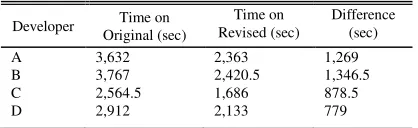
Given the experimental result in Table V, tcalculate was 7.595. At the significance level of 0.05, t.95;3 = 2.353. Since tcalculate > t.95;3, H0 was rejected and H1 was accepted. The team concluded that the framework was effective and revision of identifier names in the programs as suggested by the framework could save maintenance time and improve program understandability.
Fig. 5. Example of questions to test program understanding.
TABLEV EXPERIMENTAL RESULT
Developer Original (sec) Time on Revised (sec) Time on Difference (sec)
A 3,632 2,363 1,269
B 3,767 2,420.5 1,346.5
C 2,564.5 1,686 878.5
D 2,912 2,133 779
VI. CONCLUSION
Different software developers have different coding experiences and use different coding styles. This paper addresses an important issue in software maintenance as, for developers, it usually takes time to study and understand programs written by other people. The case of an Objective C development team of an organization in Thailand has shown that, the use of the proposed naming convention checking framework by enforcing the naming convention guideline in the team could improve program understandability. The naming list library and Objective C convention checker could facilitate the team in refactoring existing code for ease of maintenance in the future. To better support the framework, these tools could be implemented as a plugin for Xcode. The team is also planning to extend the framework to support other coding conventions for both Objective C and Swift.
REFERENCES
[1] B. W. Boehm, J. R. Brown, H. Kaspar, M. Lipow, G. McLeod, and M. Merritt, Characteristics of Software Quality. North Holland, 1978.
[2] Apple Inc., Coding Guidelines for Cocoa [Online]. Available: https://developer.apple.com/library/mac/documentation/Cocoa/Conce ptual/CodingGuidelines/
[3] NYTimes Objective-C Style Guide [Online]. Available: https://github.com/NYTimes/objective-c-style-guide
[4] The official raywenderlich.com Objective-C style guide [Online]. Available: https://github.com/raywenderlich/objective-c-style-guide [5] Cocoa Style for Objective-C: Part I [Online]. Available:
http://cocoadevcentral.com/articles/000082.php
[6] M. Smit, B. Gergel, H. J. Hoover, and E. Stroulia, “Maintainability and source code conventions: an analysis of open source projects,”
Computer Science Technical Report, TR11-06, University of Alberta,
Canada, 10 pp.
[7] Magic Number [Online]. Available:
http://c2.com/cgi/wiki?MagicNumber
[8] Literal String [Online]. Available:
https://www.computerhope.com/jargon/l/literal.htm
[9] S. Butler, M. Wermelinger, and Y. Yu, “Investigating naming convention adherence in Java references,” IEEE Int. Conf. Software
Maintenance and Evolution (ICSME), 2015, pp. 41-50.
[10] Y. Wang, S. Wang, X. Li, H. Li, and J. Du, “How are identifiers named in open source software? On popularity and consistency,” Int. J. Computer and Information Technology, volume 03, issue 03, pp. 616-625, May 2014.