Supporting Management Reporting: A Writable Web Case
Study
Timothy Miles-Board
Leslie Carr
Simon Kampa
Wendy Hall
Intelligence, Agents, Multimedia GroupUniversity of Southampton Southampton, UK
ABSTRACT
The World-Wide Web was originally developed as a shared, writable, hypertext medium, a facility that is still widely needed.
We have recently developed a Web-based management reporting system for a legal firm in an attempt to improve the efficiency and management of their overall business process. This paper shares our experiences in relating the firm’s specific writing and issue tracking tasks to existing Web, open hypermedia, and Semantic Web research, and describes why we chose to develop a new so-lution — a set of open hypermedia components collectively called the Management Reporting System — rather than employ an exist-ing system.
Categories and Subject Descriptors
H.5.4 [INFORMATION INTERFACES AND PRESENTATION]: Hypertext/Hypermedia; I.7.2 [DOCUMENT AND TEXT
PRO-CESSING]: Document Preparation; I.7.4 [DOCUMENT AND TEXT PROCESSING]: Electronic Publishing
General Terms
Human Factors
Keywords
Management Reporting, Structural Computing, Hypertext Writing, Open Hypermedia
1.
INTRODUCTION
To the casual surfer, the Web is a read-only medium. Although Tim Berners-Lee’s early graphical browsers allowed users to cre-ate arbitrary new pages and links, the NCSA Mosaic “read-only” browser later became the predominant interface to the Web, and formed the basis of modern Web browsers. However, the fact that the Mosaic browser was free, easy to use, and ran on many plat-forms arguably led to the exponential increases in online informa-tion that have been observed ever since. The Web has become the most visible manifestation of a new medium: a global, populist hypertext [19].
Copyright is held by the author/owner(s).
WWW2003, May 20–24, 2003, Budapest, Hungary. ACM xxx.
Despite the fact that material is frequently created outside the Web environment and subsequently published on a Web server, there still remain a number of applications which are made much easier if the entire information life-cycle is explicitly supported by a Web hypermedia environment. In this paper we describe one such application from the business world (management reporting) for which hypertext linking is a fundamental modelling requirement, rather than a superficial navigational aid.
Management reporting is a complex, multistage activity which takes place in the context of other business processes and makes use of the multiple information systems that may have been pro-vided for other purposes — general documentation, project man-agement, financial control, email communication and business pre-sentation. Managers treat information from these sources as “har-vestable, contextualisable data” [29], which is combined, summarised, and reinterpreted in management reports. This paper shares our ex-periences in relating the management reporting process to existing Web, open hypermedia, and Semantic Web research, and describes why we chose to develop a bespoke solution – the Management Reporting System (MRS) – rather than employ an existing system to support this process.
MRS combines elements of open hypermedia (fitting hypertext functionality to the tools and environments that the author naturally uses), document creation (rather than link or annotation creation or document storage) and knowledge reuse (instead of text reuse), to provide support for Web-based management reporting.
We start by describing the scenario presented to us by a client, a legal firm, and then present our analysis of the key activities in-volved in the management reporting process. The way in which managers within the firm carry out this process (and associated problems arising from this current approach) is described, and the key requirements for improving support for the process are iden-tified. We then use each of these requirements to relate the man-agement reporting process to existing Web, open hypermedia and Semantic Web research. A further set of “informational require-ments” for management reporting applications is derived and used to compare the different aspects of support offered by existing ap-proaches. We then describe our own bespoke system, which at-tempts to meet each of these requirements, and conclude with a discussion of the implications of our work.
2.
SCENARIO
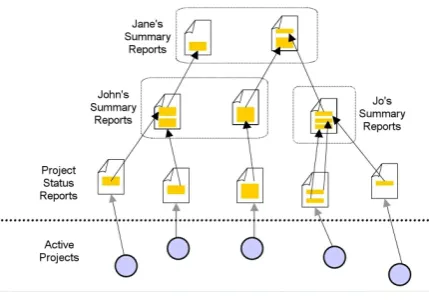
manage-Figure 1: Multilevel report scenario
ment reporting scenario described by our client. Staff in the In-formation Technology (IT) department are assigned to numerous small to medium sized projects, and must regularly produce sta-tus reports outlining the current progress of the projects (including, but not limited to, the main activities undertaken, details of staff changes, measurement of key performance indicators, and eval-uation of progress against specified targets). IT managers may oversee several projects, and may share responsibilities for some projects. The following scenario is given from the perspective of an IT manager, and illustrated by Figure 1:
As an IT manager, John is responsible for several projects (for example, research, support, administrative). John must frequently publish status reports summarising the latest achievements and is-sues emerging from the projects in his charge. The target audience for John’s status reports is John’s immediate supervisor Jane, who herself may be responsible for the management of several staff, in-cluding John.
At any particular time, John’s immediate business information space will contain the latest status reports produced by projects in his charge, and the previous summary reports that he has produced and published in the report repository. Part of John’s management task is therefore to collate and summarise the latest activities de-scribed in the project status reports, and then refocus these issues in the wider context of his project responsibilities (“Of all the projects I am responsible for, which issues will be most important to my su-pervisor?”) and previous reports he has produced (“How do the issues I will raise in this summary report follow on from issues I have raised in my previous reports?”). John may also revisit pre-vious project reports to explore how a particular issue has evolved over time (for example, “Are there any longstanding issues which require urgent attention?”), or browse summary reports published by other managers (for example, “Have similar issues been raised and subsequently solved in previous projects?”).
Jane carries out a similar management task. Her information space contains the latest status reports produced by John and the other managers for which she is responsible, as well as the previ-ous summary reports which she has produced and published for her immediate supervisor. The higher-level overview of the IT projects available to Jane through these summary reports enables her to identify areas where projects efficiency could be improved, for ex-ample identifying instances where:
• Two managers are trying to solve the same problem.
• One manager is trying to solve a problem which has already been solved in the past.
• It would be fortuitous to combine the efforts of two or more projects.
• It would be fortuitous to split a project into more focused units.
2.1
Summary of Activities
The three main managerial activities we identified from the above scenario are outlined:
Reading/Collating Information IT managers must read and
col-late information from the col-latest published project status re-ports (and perhaps previous summary rere-ports) to form the basis of summary reports targeted at their immediate super-visors.
Management Reporting IT managers must bring together collated
information to form a coherent perspective of the most im-portant aspects of projects in their charge.
Issue Tracking When an issue raised in a project status report is
summarised by an IT manager in a summary report, a hy-pertextual connection between these reports is implied. As an issue evolves over time (toward resolution), it may ap-pear (in different forms) in many different management re-ports. In order to trace the evolution of an issue, or to identify potential conflicts/solutions, IT managers must follow issue “trails” through reports.
2.2
Current Process and Problems
This section describes the management reporting process cur-rently employed by IT staff to carry out the activities listed above, highlighting problems that were identified.
Currently, project reports are created in Microsoft Word format and published in one of a number of distributed “report reposito-ries”; essentially ad-hoc shared intranet directories which can be accessed by managers and other staff.
IT managers browse these reports by loading them into Microsoft Word, and copy-and-paste material from these reports into their own “working document”, where they add notes and comments, and reformat the material to suit the target audience. This pro-cess of combining reading with critical thinking and understanding, involving not just reading per se, but also underlining, highlight-ing and commenthighlight-ing has been described as active readhighlight-ing [26]. The collated material is moulded into a coherent summary report which is emailed to supervising managers and copied into the re-port repository.
The process of sorting through relevant materials and organising them to meet the needs of the task at hand has been described as
in-formation triage [23]. IT managers not only read multiple project
reports, but they do so in parallel in an attempt to uncover po-tential conflicts and shared interests between projects; [2] has pre-viously reported the frequent occurrence of this practice in work-related reading. The “working document” is not available to any staff other than the authoring manager (being stored on the local machine rather than in the report repository), which makes it diffi-cult for managers to share their notes and comments or collaborate on the production of a summary report (such communication cur-rently takes place over email, which leaves no record connected to the document that such a discussion has taken place).
[image:2.595.54.269.55.205.2]must therefore revisit and trace implicit issue trails using contextual cues (for example, references to published reports/projects/dates) and “brute force” retrospective searches through potentially large amounts of information (“Under what circumstances did this issue
arise?”, “This issue was reported over 6 months ago; did it ever get solved?”). This process becomes especially difficult if
man-agers are trying to find out information about unfamiliar projects.
2.3
Requirements for Improved Process
The organisation was keen to move away from the ad-hoc shared “report repositories” towards an (intranet) Web-based environment, with improved, structured, access to project reports. Managers and staff would continue to use Microsoft Word as their preferred tool for report composition, but would publish these reports in the Web. The information portal, OntoPortal [18, 25], was selected as a solution for providing structured access to our client’s Web-based reports. OntoPortal is a Web portal that projects intelligently inter-linked hypertext over a particular domain (in this case, the domain of management reporting), according to an underlying domain on-tology. The domain ontology defines the concepts (for example,
Staff, Reports, Projects) and relationships (for example, Staff work on Reports), in order to provide principled and intelligent
naviga-tion of the knowledge in the domain.
However, the use of a standard Web-based infrastructure (that is, Web servers and browsers) to publish material on the corporate intranet renders the published information read-only. With knowl-edge and “ownership” of Web server space, anyone can compose and publish new information in the Web, and can link their con-tribution to any other Web document (without having to own it). However, the information repository essentially remains unalter-able (and hence “read-only”).
Publishing in the Web (or Web-based environments) is charac-terised by the addition of new content — authors cannot modify existing content. By contrast, our client’s management reporting activity is not entirely characterised by the composition of new (original) material; IT managers annotate and collate relevant in-formation from multiple sources (including latest project status re-ports, previous status rere-ports, and summary reports) which forms the basis of new content presenting this information according to a different set of constraints.
The remainder of this paper focuses on our approach to solving this problem — given our client’s requirement to provide a Web-based publishing environment, how could we support the publica-tion cycle arising from the management reporting process? Firstly, we suggest the following requirements:
Writable Web The report publication web should be a “Writable
Web” — IT managers should be able to add notes and com-ments to reports in situ as they are actively read. These notes and comments should be available for other managers to view as they read documents that have previously been an-notated (with appropriate security restrictions — comments added by top-level managers may not be intended for lower-level management and project staff). Managers who share responsibilities for projects should be able to facilitate sim-ple discussion through these annotations.
Information Foraging IT managers should be able to collate and
organise notes and comments to form the basis of new sum-mary reports. Collated notes need not belong to the collector; the comments and opinions of several managers could form the basis of a new summary report (John, on the phone to his
colleague Jill: “Could you take a look at this report and add your opinions of the issues I’ve highlighted?’’).
Linkable Web The web of hypertextual connections which is
im-plicitly woven through the publish/collate cycle (reports which summarise information collated from other reports are im-plicitly connected to the source reports) should be captured and made explicit. Connections can then be analysed to pro-vide overviews of the evolution of particular a issue and al-low managers to quickly “home in” on potential problems (for example, “Are there any issues which haven’t been
ad-dressed in the past six months?”).
3.
RELATED WORK
This section takes each of the requirements identified in the pre-vious section and discusses relevant related work in the literature that may be useful in considering how to successfully address that requirement.
3.1
Enabling a Writable Web
Our first requirement for supporting the management reporting process was that managers should be able to add ad-hoc shared notes and comments to reports. Although the World-Wide Web was originally developed as a shared, writable, hypertext medium, mod-ern browsers offer a far more restricted “read only” view. We re-port here on significant efforts to bring about a widespread Writable Web.
3.1.1
Wikis
A wiki is a Web-based tool for collaborative idea exchange and writing in the Web, and is informal, quick and accessible [21]. Wikis are freely expandable collections of interlinked pages which are easily editable by any user with a forms-capable Web browser. Indeed, wikis are not carefully crafted sites for casual visitors; in-stead they seek to involve the visitor in an ongoing process of cre-ation and collaborcre-ation that constantly changes the landscape of the site. Each wiki invites all users to edit any page or to create new pages within the site, and does so on a democratic basis — every user has exactly the same capabilities as any other user, and accounts and passwords are not required.
Wiki authoring takes place in a text environment using simple markup conventions (Figure 2). Hypertext links in wikis are de-signed to be as simple to create as possible. Every page has a ti-tle consisting of joined capitalised words (“EmbeddedCapitals”), called “WikiWords”. To create a link in edit mode, the author just types a WikiWord.
Also integral to wiki sites is a simple search mechanism. In ad-dition to searching the entire wiki for specific terms, each page title is linked to a search engine lookup which finds “backlinks” (other wiki pages that link to the current page).
3.1.2
WebDAV
WebDAV (Web Distributed Authoring and Versioning)1is a set of extensions to the HTTP protocol to allow distributed, collabora-tive sharing and creation of resources [32]. It is a technical under-pinning for web authoring tools, but is not user-oriented. It is sup-ported by the Apple’s Macintosh and Microsoft’s Windows operat-ing systems, allowoperat-ing any WebDAV-enabled website to be treated as a network file system. Unlike wiki it provides no methods for creating linked pages, only the ability to store and retrieve them.
3.1.3
BSCW
BSCW (Basic Support for Cooperative Work)2 is a Web-based
1http://www.webdav.org 2
(a)
(b)
Figure 2: Browsing (a) and editing (b) a page from the Wiki-WikiWeb (http://c2.com/cgi/wiki).
groupware tool for online collaboration using the metaphor of shared
workspaces [5], particularly suited for supporting cooperation in
locally dispersed, cross-organisational groups. Shared workspaces allow collaborating users to collect and structure any kind of infor-mation (including, but not limited to, documents, images, spread-sheets, software, and URL links to other Web pages or FTP sites) in order to achieve their goals of collaboration. The content of shared workspaces are usually arranged in a folder hierarchy based on structuring principles agreed upon by members of a workspace. Users primarily access workspaces through a normal browser (no additional software required), making the main interaction with BSCW through HTTP and HTML. BSCW workspaces therefore primarily supports asynchronous modes of communication, but also provides some synchronous collaboration user notification when other members upload, download, edit, rename or move objects in the workspace.
BSCW provides a rich set of functions specific to different tasks, mostly introduced by user request. These include: authentication (users have to identify themselves with username and password before accessing workspaces), version management and locking, threaded discussion forums, sophisticated access rights model (users can be granted full or read-only access, or denied access to specific objects in workspace), search facilities (users can search for ob-jects in the workspace by name, by content, or by properties such as modification date), annotation and rating (users may add notes to objects in the workspace), support for meetings (users can select and invite participants, and distribute meeting agendas etc.), and interfaces to third-party synchronous communication tools (such as audio/video conferencing, and shared whiteboards).
3.1.4
Annotea
A key milestone in building the Semantic Web is the association of high-quality metadata with content [7]. Automating this task is difficult due to the unstructured nature of content on the Web, and so manually annotating Web documents is an important technique for creating the metadata [15]. The World-Wide Web Consortium’s Annotea project3aims to provide such a mechanism to allow users to add shared annotations to Web documents [17], based on an in-frastructure which combines existing open W3C RDF, XPointer, and HTTP standards as part of a more general-purpose Semantic Web initiative.
The W3C’s own Amaya4 browser (or plug-ins for the Internet
3http://www.w3.org/2001/Annotea/
4
http://www.w3.org/Amaya/
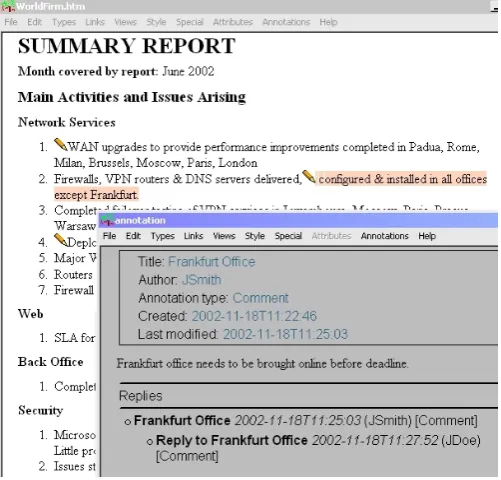
[image:4.595.313.564.350.590.2]Explorer and Mozilla browsers) can be configured to communicate with a number of annotation servers. As each document is viewed in the browser, the servers are queried for annotations that have been made on that document. Annotation ‘icons’ are inserted into the document to show annotated text — clicking on the icon causes the content of the annotation to be displayed in a separate window (Figure 3). Heavily annotated documents can be filtered according to author name, annotation type, and annotation server. Behind the scenes, a more powerful filtering mechanism allows expert queries to made to the server, for example requesting only annotations of a particular type made in the past week by a particular author.
To create an annotation, the user highlights a text span and chooses “Annotate selection” from the menu (alternatively, an entire docu-ment can be annotated by choosing “Annotate docudocu-ment”). This causes a separate window to open, in which the user’s comments can be entered, and the semantic type of the annotation specified (by default, Amaya provides the following types: Advice, Change,
Comment, Example, Explanation, Question, See Also). The id of
the user is also stored, along with the creation date and an XPointer to the location of the annotated text. The use of an RDF Schema type hierarchy for representing annotations allows authors or ap-plication developers to define new types of annotation. For exam-ple, [20] demonstrates how Annotea can be extended to support “threaded annotation discussions” by adding a reply-to property which defines which annotation or reply was the previous one in the thread, and a root-of-thread property which is the first annota-tion in the thread.
Figure 3: Annotating a Project Summary Report using the Amaya interface to Annotea.
3.2
Supporting Information Foraging in the
Web
fa-cilities [1], collection visualisation based on a book metaphor [9], and organising thumbnails of Web pages in a 3D workspace [27, 3].
However, such approaches tend to deal with the Web page as the smallest unit of consideration; our scenario requires a finer level of granularity — managers need to be able to deal with specific in-formation components from within pages. It seems that this is not a unique requirement for a Web-based environment — [28] report from Web user surveys that users have expressed a need to create collections from material within Web pages, but are limited by poor application support (those surveyed said that they created such col-lections infrequently as a result).
[29] points out that Web editors such as Microsoft Frontpage and Netscape Composer provide some support for collecting informa-tion from within Web pages, as users can drag content and images from browser to editor and arrange it in any way they wish (cf. managers dragging content from project reports to a “working doc-ument”). However, in both cases, no information about the source travels with the dragged content: managers must explicitly add this information (e.g. title, URL) by hand to maintain the implicit hy-pertext connection between a summary report and its sources.
3.2.1
Web Squirrel
Web Squirrel5is an information management tool that provides more specific support for collecting and organising information from the Web. Although the main use of the tool is to organise Web bookmarks (by dragging and dropping URLs), users can also drag (or copy and paste) information from Web pages into a large 2D workspace, where it is represented as a small rectangular ‘node’. The visual appearance of nodes can be manipulated in a variety of ways, including assigning different colours and font characteris-tics. Nodes are then dragged around the canvas to form ad-hoc spa-tial organisations. Software ‘agents’ may also be instructed to sift through the collected nodes and suggest connections that the user may have overlooked. Each node has fields for storing a name, URL, and notes as well as content (users must grab the URL of copied information to retain a reference to the source). Web Squir-rel workspaces (or “information farms” [30]) can be shared with other Web Squirrel users.
3.2.2
Hunter Gatherer
Hunter Gatherer [29] is a browser-based tool which allows users to harvest content from within Web pages into editable collections by simply highlighting the content of import and then pressing a key to add it to the current collection. The system automatically gives each piece of content a title, adds the URL as a link back to the source document, and renders the location of the selected infor-mation as an XPointer (there is no copying of content, only refer-encing of content addresses via XPointers). The browser integra-tion and subsequent transparency of the select/add process means that user can focus their main attention on the information gath-ering task rather than continually shift that focus to other appli-cations, such as a Web editor or Web Squirrel. Hunter Gatherer therefore minimises the “forced divided attention” introduced by shifting between information triage and management [29]. Collec-tions can be distributed to other Hunter Gatherer users, but are not centrally managed.
3.3
Enabling a Linkable Web
The cycle of reading and annotating, harvesting, writing and publishing weaves a web of implicit hypertextual connections be-tween the issues summarised in management reports and their sources.
5
http://www.eastgate.com/squirrel
Our third requirement is that these implicit connections be captured in order that the resulting web of connections can be analysed. As we have discussed, the Web is in essence a read-only medium. Ap-proaches to enabling a “Writable Web” have been discussed in pre-vious sections, but we have yet to consider approaches which allow users to interconnect Web pages without the restrictions of own-ership (Section 2.3). Several approaches have demonstrated how “open” hypermedia principles can be applied to the Web to allow users to create links, hyperstructures and knowledge structures over arbitrary Web pages.
“Open” hypermedia is about hypertext which is not confined to the boundaries of a single system, be it Web browser, text editor, video streamer or midi player. An open hypertext system achieves this openness or extensibility through a “link service” or (more gen-erally) “structure service”, which undertakes the management and deployment of the hypertext links independently of the documents or data which are being interconnected. Although the Web was de-veloped largely independently of the research in open hypermedia systems at the time, the ubiquity of the Web along with the prob-lems inherent in its design has motivated researchers to retro-fix their systems to it [24, 11, 4, 8], enhancing the functionality of the Web via a structure service to enable a “Linkable Web”.
Information in Web pages is distributed across the Web, con-nected by HTML links. Semantic Web research strives to aug-ment this global information network with machine-understandable metadata in order that software as well as human agents can “un-derstand” it [7]; this metadata is distributed across the Web, and must also be interlinked.
Web Annotation tools such as Third Voice [22], Annotea, and those used in the KA2initiative [6] share the idea of authors cre-ating comments on existing Web pages (Annotea goes further to allow an RDF “template” to guide these annotations) — users cre-ate simple metadata describing the page by attaching “attributes” to it (for example a comment “This is very important!” could be re-lated to an issue in a status report using an attribute hasComment), but it is more difficult to generate interconnected metadata.
3.3.1
WebVise
WebVise is an open hypermedia system which augments the Web’s limited hypertext model with a hypermedia structure service [13], allowing authors to apply shared hypertextual structures such as multi-headed links (one-to-many or many-to-many destinations), annotations, and guided tours to Web documents. These elements are grouped into hypermedia “contexts” (collections of related struc-ture, which could be used for example to represent the collaborative efforts of a small group of managers sharing responsibilities for a number of projects). WebVise integrates with the Internet Explorer browser, and with the Microsoft office applications Word and Ex-cel. As each document is displayed, the structure service is queried for hyperstructures that apply to that document; returned links and annotations (in the form of pop-up “post-it” notes) are then inserted into the document.
using a proxy service, albeit with the inherent weaknesses of this design [31].
Links, annotations, collections, and guided tours authored in We-bVise can be utilised as metadata for Web resources by using the Open Hypermedia Interchange Format (OHIF) to represent the struc-tures [12]. WebVise is extended to allow for users to create, ma-nipulate, and share OHIF structures together with Web pages and Microsoft Office documents stored on WebDAV servers, allowing fully distributed open hypermedia linking between metadata, Web pages and WebDAV aware applications.
3.3.2
CREAM
The CREAM [15] (CREAting Metadata) system provides Web annotation tools with which to create interconnected (or relational) Semantic Web metadata in accordance with a real-world model or
domain ontology. The CREAM display is typically split between
an Ontology Browser (loaded with an ontology describing the do-main of interest) and a Document Viewer. Users browse to a Web document in the Document Viewer by entering a URL. Firstly, the document as a whole is defined as an instance of a particular con-cept in the ontology (for example Project Report). The document is then annotated by dragging and dropping pieces of content into at-tribute “slots” in the Ontology Browser (for example, the title of the report, and the date it was created). The document can also be re-lated to other Web documents (according to the valid relationships for that document type in the domain ontology) by selecting ap-propriate instances from the Ontology Browser and dragging them onto the relation slots of the current instance (for example, selecting the instance which corresponds to the Project for which the Project
Report was produced and dragging it onto a reports on attribute).
This relational metadata is stored by a knowledge server, and is available to any other CREAM user (in this example, the Project instance may well have been created by different user). Each time a document is displayed in the Document Viewer, any correspond-ing metadata is retrieved from the knowledge server and displayed in the alongside the document in the Ontology Browser.
CREAM’s “authoring mode” attempts to address a major draw-back of the original design; that in order to provide metadata about the contents of a (new) Web document, users must first create the content and second annotate the content [14]. In the revised de-sign, metadata from the Ontology Browser can be dragged into a new document — dropping instances, attributes, and relationships from the Ontology Browser into the document creates content and, where possible, hypertext links.
4.
DISCUSSION OF RELATED WORK
Management report creation is a complex, multistage process which takes place in the context of other business processes and makes use of the multiple information systems that may have been provided for other purposes — general documentation, project man-agement, financial control, email communication and business pre-sentation. The three requirements laid out in Section 2.3, and sub-sequently used as a basis for the investigation of related work, can now be further broken down into more specific informational re-quirements for management reporting applications:
Document storage the ability to effectively ‘store’ and ‘retrieve’
collections of documents.
Browsing mechanisms to help an author locate and trace relevant
information.
Organisation the ability to impose one or more helpful views on
the natural storage structure to assist in information discov-ery.
Annotation the ability to mark, manipulate and comment on
in-formation that is identified as relevant.
Extraction the ability to extract specific information from the
doc-ument/annotation domain and use it as a ‘knowledge item’ with well-specified attributes for the purposes of sorting or selection.
Document authorship the ability to create new material which
forms a document in its own right.
Linking the ability to record hypertextual connections between the
newly created material and the existing content on which it is based.
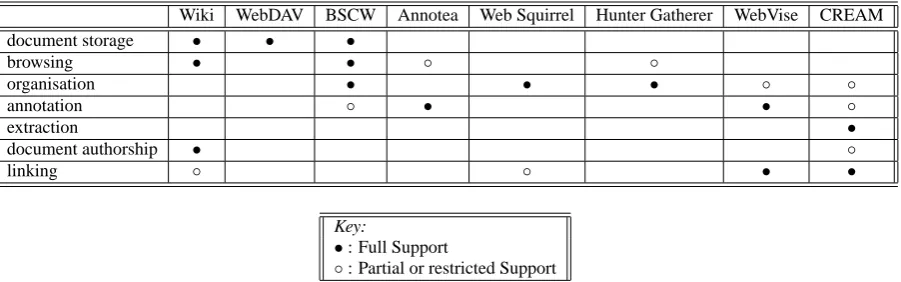
The various approaches described in this section are candidates for supporting the management reporting task and tackle some as-pects of these informational requirements (see Table 1), but a so-lution that covered all the key aspects required a bespoke system to be created. This system combines elements of the approaches described here, and is described in detail in the next section.
5.
THE MANAGEMENT REPORTING
SYS-TEM
The Management Reporting System (MRS) augments the man-agement reporting process and assists managers by enabling new project summary reports to be written and delivered (fully linked) onto the Web for other managers to read and reuse.
5.1
Architecture
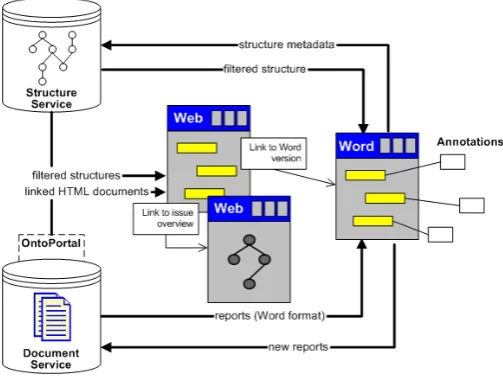
[image:6.595.316.568.495.690.2]Figure 4 illustrates the architecture of the MRS system. The Document Service is used as a centralised shared repository that stores and serves management reports. The Structure Service pro-vides a supplementary mechanism for managing issues (as refer-ences to content in documents held by the Document Server) and the network of connections between them.
Wiki WebDAV BSCW Annotea Web Squirrel Hunter Gatherer WebVise CREAM document storage • • •
browsing • • ◦ ◦
organisation • • • ◦ ◦
annotation ◦ • • ◦
extraction •
document authorship • ◦
linking ◦ ◦ • •
Key:
•: Full Support
[image:7.595.82.533.53.194.2]◦: Partial or restricted Support
Table 1: How existing approaches support management reporting
5.1.1
Document Service
The Document Service provides two main services which serve to augment the existing publication cycle. Firstly, it is responsi-ble for providing central access to a published project repository over HTTP. The Document Service represents reports internally as XML, which can be transformed into HTML or Microsoft Word format when requested by a client. The Web interface to the Docu-ment Service is through an OntoPortal [18, 25] application, which provides structured and intuitive navigation of the reports in the repository according to a simple domain model. Through the Onto-Portal interface, reports can be requested in Microsoft Word format for reading, annotation, and collation of issues. Secondly. new re-ports created in Microsoft Word can be uploaded to the Document Service, where they are stored in XML and published through the OntoPortal interface. The Document Service also serves a number of empty “template” documents for creating new reports, ensuring a standard writing practice across a department.
5.1.2
Structure Service
The Structure Service is responsible for storing and serving the issues made by IT managers over project reports. It also manages a personal “repository” of harvested issues for each IT manager to use when collating issues — this repository forms the basis of a new report. As issues are harvested and subsequently redressed in management summary reports, the Structure Service records the implicit hypertextual connections between the new summary report and its sources.
5.2
Support for Reading and Collating
Infor-mation
All reports can be viewed by any manager (with appropriate se-curity clearance) through the OntoPortal interface of the Document Service. This also provides a convenient method (using hypertex-tual connections) of viewing and navigating between reports au-thored by a particular manager or about a particular project.
When a report is viewed through this interface, the relevant is-sues are retrieved from the Structure Service and merged into the report. This allows managers to quickly identify the important points raised by a report. For managers who prefer the custom-ary Microsoft Word interface, a link is provided to open the report in Word with the issues also merged in.
In the Web interface, each issue is a hypertext link that can be followed to determine other reports that use the issue (for exam-ple, to address, solve, extend, or counter it) or other issues that are somehow related to it. This provides a unique method of explor-ing and collatexplor-ing related reports and issues and allows managers to
fully understand the provenance of a problem and make subsequent pertinent contributions.
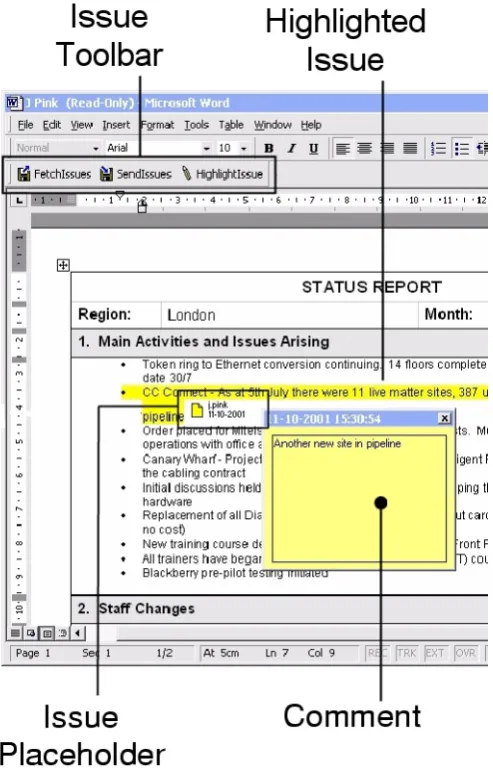
Using Microsoft Word, managers can annotate issues in reports by selecting the relevant text in the report and clicking on the “High-light Issue” button (Figure 5). The manager is then able to add comments and notes to help other managers understand the precise nature of the problem. When the manager has finished annotat-ing the report, the “Send Issues” button is clicked which forces all annotations to be sent to the Structure Service and recorded. Annotation metadata (which includes the id of manager who cre-ated the annotation, the time of creation, and an XPointer into the XML representation of the document held internally by the Docu-ment Server) is currently stored and communicated throughout the system using the Annotea RDF template (we have defined a spe-cial type of Issue annotation). We hope to incorporate an Annotea server as part of our Structure Service in future extensions of the system, in order to take advantage of the sophisticated annotation filtering mechanisms.
Any issue located through the Web or Word interfaces can be “harvested” to a manager’s personal repository (Figure 6), and sub-sequently used to help build new summary reports (Figure 7). Col-lated issues need not explicitly ‘belong’ to the collector — with appropriate security clearance, the comments and opinions of sev-eral managers could form the basis of a new summary report. Is-sues are collected by double-clicking on an ‘issue placeholder’ (see Figure 5), a mechanism informed by Hunter Gatherer’s attempts to minimise the “forced divided attention” [29] introduced by shifting between information triage and management. Further organisation of the collection (for example, Web Squirrel’s spatial canvas) is currently not supported.
5.3
Support for Writing and Publishing
Reports are authored using the familiar Word environment. Man-agers click on the “New Report” button provided by the OntoPortal interface. This launches Word using a template provided by the Document Service, thus enforcing a consistent department-wide “look and feel” for all management reports. The harvested issues are then incorporated into the report by clicking on the “Gather Is-sues” button on the custom MRS toolbar (Figure 7): the content of each issue is copied (by dereferencing its XPointer) and inserted into the new report. Behind the scenes the otherwise implicit hy-pertextual connection between the copied issue in the new report and the original issue in the source report is explicitly captured and recorded by the Structure Service.
au-Figure 5: Raising issues in a report
Figure 6: Harvesting issues from a report
(a) Web toolbar
(b) Report writing in Word
Figure 7: Importing harvested issues into a report
thors to explicitly record the relationship as would be the case with existing open hypermedia systems such as WebVise and CREAM. The process is also far more informal than an equivalent process in CREAM — MRS is a lightweight tool for supporting hypertext writing; by contrast CREAM is a more heavyweight tool for for-mal, knowledge based composition.
After the report has been edited by the manager, it is saved onto the Document Server by clicking on the “Save Report” button. This records the report in an XML format, enabling conversion back to Word and for publishing on the Web. The report subsequently becomes the source of further annotations by other (higher-level) managers and the input for other reports and summaries.
5.4
Support for Issue Tracking
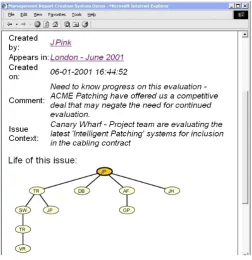
An issue’s history can be graphically viewed to allow managers to get an overview of its ‘evolution’ (Figure 8). Each node of the overview map is clickable and leads to the source report, allowing managers to quickly and easily revisit each stage in the evolution of the issue in its original context.
The Structure Service also provides filters for direct access to longstanding issues (“Which (unsolved) issues have not been
ac-tive in the last 6 months?”) and unaddressed issues (“Which is-sues have not yet been solved?”) for a particular project or
man-ager. These issue tracking facilities combine to present a web of hypertextual connections allowing managers to quickly “home in” on potential problem areas or retrospectively analyse exactly where a problem began to emerge.
6.
CONCLUSIONS
[image:8.595.55.302.82.474.2]Figure 8: Tracking issue history
for other purposes — general documentation, project management, financial control, email communication and business presentation.
Most of the activities which are employed in report creation were supported only peripherally by the IT infrastructure of the organi-sation in question. As the purchase of an integrated document man-agement system was under review at the time of this work, the only support which the management team enjoyed were in document creation (Microsoft Office) and a shared (albeit ad-hoc) storage en-vironment, where organisation and discovery was achieved by the judicious use of file naming and directory organisation. The re-maining areas were filled in by human nous, effort, memory and detective work.
Writing is a complex cognitive activity which is inextricably bound in with the reading process, and not a simple one-dimensional analogue of “content uploading”. Even the limited Web writing task described in this article has revealed the extent to which com-puter support is lacking for the author engaged in creating material which is related to and based upon an existing corpus (i.e. hypertext writing).
The various systems (Section 3) which are candidates for deploy-ment tackle some of the aspects of the writing task (see Table 1), but a solution that covered all the key aspects required a bespoke sys-tem to be created (MRS). This syssys-tem combined elements of open hypermedia (fitting hypertext functionality to the tools and envi-ronments that the author naturally uses), document creation (rather than link or annotation creation or document storage) and knowl-edge reuse (instead of text reuse).
Further work is being undertaken to adapt MRS into a general-purpose writing tool for use in the World Wide Web and to adapt Web site design methods to encompass the writing of these kinds of linked texts ([10]).
MRS is also being extended to deal with academic community ontologies (representing people, projects, publications and meet-ings) in a Semantic Web environment and so being used to track documentary evidence for Research Project Activities as part of
the Advanced Knowledge Technologies project6.
7.
ACKNOWLEDGEMENTS
This work is partly funded by the EPSRC’s Advanced Knowl-edge Technologies IRC (GR/N15764/01) in the UK.
We would like to thank the reviewers of this paper for their en-couraging comments and valuable feedback.
8.
REFERENCES
[1] D. Abrams, R. Baecker, and M. Chignell. Information archiving with bookmarks: personal Web space construction and organisation. In Proceedings of CHI ’98 Human Factors
in Computing Systems Conference, Los Angeles, California, USA, pages 41–48, 1998.
[2] A. Adler, A. Gujar, B. L. Harrison, K. O’Hara, and A. Sellen. A Diary Study of Work-Related Reading: Design
Implications for Digital Reading Devices. In Proceedings of
CHI ’98 Human Factors in Computing Systems Conference, Los Angeles, California, USA, volume 1 of Reading and Writing, pages 241–248, 1998.
[3] B. Amento, L. Terveen, W. Hill, and D. Hix. Topicshop, enhance support for evaluating and organising collections of Web sites. In Proceedings of the 13th annual ACM
symposium on User interface software and technology, pages
210–209, 2000.
[4] K. M. Anderson. Integrating Open Hypermedia Systems with the World Wide Web. In Proceedings of the ACM Hypertext
’97 Conference, Southampton, UK, pages 157–166, 1997.
[5] W. Appelt. WWW Based Collaboration with the BSCW System. In Proceedings of the 26th Annual Conference on
Current Trends in Theory and Practice of Informatics ( SOFSEM99), Milovy, Czech Republic, pages 66–78, 1999.
[6] R. Benjamins, D. Fensel, and S. Decker. KA2: Building Ontologies for the Internet: A Midterm Report. International
Journal of Human Computer Studies, 51(3), 1999.
[7] T. Berners-Lee, J. Hendler, and O. Lassila. The Semantic Web. Scientific American, May 2001.
[8] N. O. Bouvin. Unifying Strategies for Web Augmentation. In
Proceedings of the ACM Hypertext ’99 Conference, Darmstadt, Germany, pages 91–100, 1999.
[9] S. K. Card, G. G. Robertson, and W. York. The WebBook and the Web Forager: An Information Workspace for the World-Wide Web. In Proceedings of CHI ’96 Human Factors
in Computing Systems Conference, Vancouver, British Columbia, Canada, 1996.
[10] L. Carr, G. Wills, A. Woukeu, and W. Hall. Rethinking Web Design Models: Requirements for Addressing the Text. Technical Report ECSTR-IAM03-002, University of Southampton, Southampton, UK, 2001.
[11] L. A. Carr, D. DeRoure, W. Hall, and G. J. Hill. The Distributed Link Service: A Tool for Publishers, Authors and Readers. Proceedings of the Fourth International World Wide
Web Conference, Boston, Massachusetts, USA, 1:647–656,
1995.
[12] K. Grønbæk, L. Sloth, and N. O. Bouvin. Open Hypermedia as User Controlled Meta Data for the Web. In Proceedings of
the Ninth International World Wide Web Conference, Amsterdam, NL, pages 553–566, 2000.
[13] K. Grønbæk, L. Sloth, and P. Ørbæk. Webvise: Browser and proxy support for open hypermedia structuring mechanisms 6
on the world wide web. In Proceedings of the Eighth
International World Wide Web Conference, Boston, Massachusetts, USA, 1999.
[14] S. Handschuh and S. Staab. Authoring and Annotation of Web Pages in CREAM. In Proceedings of the Eleventh
International World Wide Web Conference (WWW2002), Honolulu, Hawaii, USA, May 2002.
[15] S. Handschuh, S. Staab, and A. Maedche. CREAM — Creating relational metadata with a component-based, ontology-driven annotation framework. In Proceedings of the
First International Conference on Knowledge Capture (KCAP 2001), Victoria, B.C., Canada, Oct. 2001.
[16] K. M. Hansen, C. Yndigegn, and K. Grønbæk. Dynamic use of digital library material - supporting users with typed links in open hypermedia. In European Conference on Digital
Libraries, pages 254–273, 1999.
[17] J. Kahan and M.-R. Koivunen. Annotea: An Open RDF Infrastructure for Shared Web Annotations. In Proceedings
of the Tenth International World Wide Web Conference (WWW2001), Hong Kong, May 2001.
[18] S. Kampa, T. Miles-Board, L. Carr, and W. Hall. Linking with Meaning: Ontological Hypertext for Scholars. Technical Report 0-854327-37-1, University of Southampton, Southampton, UK, 2001.
[19] J. M. Kleinberg. Hubs, authorities, and communities. ACM
Computing Surveys, 31(4es), Dec. 1999.
[20] M.-R. Koivunen and R. Swick. Metadata Based Annotation Infrastructure offers Flexibility and Extensibility for Collaborative Applications and Beyond. In Proceedings of
the First International Conference on Knowledge Capture (KCAP 2001), Victoria, B.C., Canada, Oct. 2001.
[21] B. Leuf and W. Cunningham. The Wiki Way: Quick
Collaboration on the Web. Addison Wesley Professional,
2001.
[22] M. Margolis and D. Resnick. Third Voice: Vox Populi Vox Dei? First Monday, 4(10), Oct. 1999.
[23] C. C. Marshall and F. M. Shipman, III. Spatial Hypertext and the Practice of Information Triage. In Proceedings of the
ACM Hypertext ’97 Conference, Southampton, UK, Structure
and Spatiality, pages 124–133, 1997.
[24] H. Maurer. Hyper-G now Hyperwave: the next generation
Web solution. Addison Wesley, 1995.
[25] T. Miles-Board, S. Kampa, L. Carr, and W. Hall. Hypertext in the Semantic Web. In Proceedings of the ACM Hypertext
2001 Conference, Aarhus, Denmark, pages 237–238, Aug.
2001.
[26] M. N. Price, B. N. Schilit, and G. Golovchinsky. XLibris: The Active Reading Machine. In Proceedings of CHI ’98
Human Factors in Computing Systems Conference, Los Angeles, California, USA, volume 2 of Demonstrations: Dynamic Documents, pages 22–23, 1998.
[27] G. Robertson, M. Czerwinski, K. Larson, D. C. Robbins, D. Thiel, and M. van Dantzich. Data mountain: using spatial memory for document management. In Proceedings of the
11th annual ACM symposium on User interface software and technology, pages 153–162, 1998.
[28] m. c. schraefel and Y. Zhu. Preliminary Requirements Gathering for the Design of User-determined, Within-page, Web-based Collections. Technical Report CSRG-433, Department of Computer Science, University of Toronto, Toronto, Canada, 2001.
[29] m. c. schraefel, Y. Zhu, D. Modjeska, D. Wigdor, and S. Zhao. Hunter Gatherer: Interaction Support for the Creation and Management of Within-Web-Page Collections. In Proceedings of the Eleventh International World Wide
Web Conference (WWW2002), Honolulu, Hawaii, USA, May
2002.
[30] R. M. Simpson. Experiences with the Web Squirrel: My Life on the Information Farm. In Proceedings of the ACM
Hypertext 2001 Conference, Arhus, Denmark, 2001.
[31] V. Vasudevan and M. Palmer. On Web Annotations: Promises and Pitfalls of Current Web Infrastructure. In
Proceedings of the 32nd Hawaii International Conference on Systems Sciences, Jan. 1999.
[32] E. J. Whitehead Jr and Y. Y. Goland. WebDAV: A network protocol for remote collaborative authoring on the Web. In