Communication solution for
ICU patients: a case study
Thesis for MSc. Computer Science, University of Twente,
20-5-2015
Researcher: J. Thunnissen (s0176745) Graduation Committee
Dr. Pim van den Broek
A
BSTRACT
I
NTRODUCTION
The goal of this research is to tackle a software system design problem. This is done using knowledge of the software design process, as acquired by the researcher during his master Computer Science. A problem case is introduced and this case is extensively analyzed as part of the software design process. The chosen case is communication for disabled patients on an intensive care unit (ICU). The designed software system is appropriately named CommIC . The case is chosen, because of its challenging nature and real-world demand for a solution. Going through the design process, we cooperate with doctors, patients and other stakeholders who all have different backgrounds and who often have very limited experience with computers.
Although the ICU context is the focus of the research project due its challenging environment, we aim to produce a solution that is applicable to communication problems outside of the ICU as well. In practice this means we prioritize implementation of new features not just based on demands within the ICU, but on applicability outside of the ICU as well.
Until now, the Computer Science program has only offered limited exposure to complex real-world scenarios such as this ICU problem case. Being successful requires technical engineering skills, as well as social and management skills. The development process is started by a team with two other developers, similar to most real-world software projects. Coordinating this development team to efficiently and effectively tackle the problem case is intended as an important aspect of the project. Unfortunately, quickly after the start of the project the other developers quit contributing. Only student in technical medicine J. Benistant is involved throughout the project as a minor code contributor. His involvement is quite important though, as his domain knowledge allows him to contribute many valuable insights in the problem domain.
This research proposal is structured as follows. Section 1 shortly introduces to problem case. The problem domain of this case is extensively analyzed in section 2. Here we look at the aspects of the problem domain that might be relevant for our software system. This includes creating an overview of possible patient afflictions and other limitations, an example case of patient interaction on the ICU and a description of the current use of hardware and software within hospital context. Based on our findings in section 1 and 2, section 3 identifies the main problems in the domain, followed by a preliminary requirements analysis of any solution to these problems.
In section 4 the solution domain is explored. We study existing communication technologies for people with disabilities, called Augmentative and Alternative Communication (AAC) technology. The operation and usage by existing AAC software systems is examined. We finish by determining the extent to which existing AAC solutions solve the problems identified in section 3.
The research questions are laid out and explained in section 5.
Section 7 describes the development cycles. In each cycle we address the implementation of a number of user stories, short descriptions that capture a requirement of the system without volatile detail. The selection of user stories is made based on their priority and implementation cost. Throughout implementation testing of the system is given the needed attention. The design is kept as simple and clean as possible. We rely heavily on refactoring for this. The team and stakeholders are constantly in close contact to minimize the feedback loop. At the end of each iteration, the software is evaluated together with these stakeholders. From the feedback new user stories are created and existing ones are updated.
A
CKNOWLEDGEMENTS
We thank Dr. Pim van den Broek and Prof.dr.ir. M. Aksit for their guidance and feedback during the project. Their knowledge of the software development process and research methods were valuable to improve the quality of the research. Credit is also due for Prof.dr.ir. M.J.A.M van Putten for contributing his perspective from the medical world.
Special thanks goes to J. Benistant, whose experience with both the technical and medical world has been invaluable in our communications with the stakeholders. He has contributed his domain knowledge and has helped presenting and testing the system on the ICU.
R. Damink has taken on the role of our primary contact within the ICU. He has guided the adoption of CommIC on the ICU, has overseen the systems usage in our absence and has helped to collect valuable feedback from medical personal. His involvement was key to the successful introduction of the system to the ICU.
C
ONTENTS
ABSTRACT ... 2
INTRODUCTION ... 3
ACKNOWLEDGEMENTS ... 5
CONTENTS ... 6
1 CASE DESCRIPTION ... 10
2 PROBLEM DOMAIN ANALYSIS ... 11
2.1 PATIENT COMMUNICATION DISABILITIES ... 11
2.1.1 DISEASE ... 11
2.1.2 SENSORY DEPRIVATION... 11
2.1.3 MEDICAL TREATMENT ... 11
2.1.4 MENTAL INCAPACITY ... 12
2.2 PATIENT INTERACTION ON THE ICU ... 13
2.3 SOFTWARE AND HARDWARE IN ICU CONTEXT ... 13
3 PROBLEM ANALYSIS ... 15
4 SOLUTION DOMAIN ANALYSIS ... 16
4.1 AUGMENTATIVE &ALTERNATIVE COMMUNICATION ... 16
4.1.1 ANALOG AAC PRACTICES ... 16
4.1.2 COMPUTER BASED AAC PRACTICES ...17
4.2 EXISTING AAC SOFTWARE SYSTEMS ... 18
4.2.1 GOTALK POCKET ... 19
4.2.2 VOICE ... 20
4.2.3 BRAINFINGERS ... 20
4.2.4 SIDE ... 21
4.2.5 GAZETALK ... 21
4.2.6 THE GRID 2... 22
4.2.7 TOBII COMMUNICATOR ... 22
6 METHODOLOGY ... 25
6.1 AGILE DEVELOPMENT... 25
6.2 AGILE VS WATERFALL ... 26
6.3 AGILE DESIGN PRINCIPLES ... 27
6.3.1 SINGLE RESPONSIBILITY PRINCIPLE ... 27
6.3.2 OPEN-CLOSE PRINCIPLE ... 27
6.3.3 LISKOV SUBSTITUTION PRINCIPLE ... 27
6.3.4 DEPENDENCY INVERSION PRINCIPLE ... 28
6.3.5 INTERFACE SEGREGATION PRINCIPLE ... 28
6.4 AGILE IN PRACTICE ... 28
6.4.1 PRODUCT OWNER ... 29
6.4.2 SCRUM MASTER ... 29
6.4.3 USER STORIES ... 29
6.4.4 SHORT CYCLES ... 29
6.4.5 ACCEPTANCE TESTS ... 30
6.4.6 PAIR PROGRAMMING... 30
6.4.7 TEST-DRIVEN DEVELOPMENT ... 30
6.4.8 COLLECTIVE OWNERSHIP ... 31
6.4.9 CONTINUOUS INTEGRATION ... 31
6.4.10 SUSTAINABLE PACE ... 31
6.4.11 OPEN WORKSPACE ... 31
6.4.12 THE PLANNING GAME ... 31
6.4.13 DAILY SCRUM MEETING ... 32
6.4.14 SPRINT RETROSPECTIVE ... 32
6.4.15 SIMPLE DESIGN ... 32
6.4.16 REFACTORING ... 32
6.4.17 METAPHORS ... 32
6.5 IDENTIFYING REQUIREMENTS ... 33
6.5.1 REQUIREMENTS FOR INITIAL RELEASE PLAN ... 33
6.5.2 PRODUCT EVALUATION ... 34
6.6 LANGUAGE & TOOLS ...36
7 DEVELOPMENT ...39
7.1 PROJECT START ...39
7.1.1 INITIAL REQUIREMENTS ANALYSIS ... 39
7.1.2 INITIAL DESIGN DECISIONS ... 42
7.1.3 STARTUP PROCESS EVALUATION ... 43
7.2 SPRINT 1 ... 44
7.2.1 USER STORIES ... 44
7.2.2 DESIGN ... 44
7.2.3 PROCESS EVALUATION ... 50
7.3 SPRINT 2 ... 51
7.3.1 REQUIREMENTS ... 51
7.3.2 DESIGN &PROCESS EVALUATION ... 52
7.4 SPRINT 3 ... 52
7.4.1 USER STORIES ... 52
7.4.2 DESIGN &PROCESS EVALUATION ... 53
7.5 SPRINT 4 ... 53
7.5.1 USER STORIES ... 53
7.5.2 DESIGN ... 54
7.5.3 PROCESS EVALUATION ... 70
7.5.4 FEEDBACK ... 70
7.6 SPRINT 5 ... 71
7.6.1 USER STORIES ...71
7.6.2 DESIGN ... 72
7.6.3 BLACK BOX TESTS ... 72
7.6.4 PROCESS EVALUATION ... 72
7.6.5 FEEDBACK ... 72
7.7 SPRINT 6 ... 74
7.7.1 USER STORIES ... 74
7.7.2 DESIGN ... 75
7.7.3 PROCESS EVALUATION ... 77
7.7.4 FEEDBACK ... 77
7.8 SPRINT 7 ... 78
7.8.1 USER STORIES ... 78
7.8.2 DESIGN ... 79
7.8.3 PROCESS EVALUATION ... 80
7.8.4 FEEDBACK ... 80
8 EVALUATION AND RECOMMENDATIONS ... 83
8.1 COLLECTION OF FEEDBACK ... 83
8.2 STAKEHOLDER GOAL ANALYSIS ... 84
8.3 METHODOLOGY ... 85
9 GLOSSARY ... 87
10 REFERENCES ...93
APPENDIX A. COMMUNICATION IMPEDING ILLNESSES ...95
AMYOTROPHIC LATERAL SCLEROSIS ... 95
PARAPLEGIA &TETRAPLEGIA ... 95
MUSCULAR DYSTROPHY ... 96
CEREBRAL PALSY ... 96
APPENDIX B. MATRIX ...97
APPENDIX C. GUI DESIGN ... 98
APPENDIX D. BLACK BOX TEST PLANS ... 99
APPENDIX E. USER STORY ACCEPTANCE ... 100
APPENDIX F. COMMIC MANUAL... 101
APPENDIX G. COMMIC FEEDBACK FORM... 102
107
111
1
C
ASE DESCRIPTION
This case description has been formulated based on a discussion with our contacts at the hospital Medisch Spectrum Twente. First there is our project supervisor within the MST, Prof. Dr. ir. M.J.A.M van Putten. He is clinical neurophysiologist at MST and professor of clinical neurophysiology at the University of Twente. Our main contact within the ICU is Dr. B. Beishuizen, who qualified in ICU healthcare and has a lot of experience working with patients on the ICU. He has provided us with a lot of invaluable insights into the workings of the ICU. The source for the majority of the statements made in this case description and the following domain analyses are discussions with Dr. Beishuizen and other medical personal and patients on the ICU of the MST.
On the ICU of hospitals many patients are unable to communicate in a normal way. They often cannot speak because they are mechanically ventilated and intubated. For many different reasons, such as trauma, or ICU acquired weakness, patients can have limited or no motor control. Some can only move a finger or control their eye movement. Furthermore, patients sometimes suffer from sensory deprivation. All these conditions limit their communication abilities.
This handicap in communication can have several negative effects on the patient. His wellbeing is reduced by the inability of the patient to communicate with loved ones. Communicating with loved ones can be a great comfort for IC patients in their unfortunate and often stressful state. This is even truer in end-of-life situations. ICU patients often become socially isolated and feel helpless as a result of the lack of communication. This can lead to more stress and panic attacks. Social isolation also increases the risk of the patient suffering from delirium. (T.M. Brown, 2002)
Patients are often able to communicate by alternative means, such as eye blinking, pointing to a letter board or by forming words with their mouth. These ways of communicating are very slow, often tiresome for the patient and prone to misunderstanding. This basic alternative form communication does often not allow patients to completely and clearly communicate their message. This can cause frustration. Apart from communication with other people in the room patients very often have limited ability to communicate with the rest of their environment. For example, they might not be able to control the TV, use a phone to call someone, switch the lights on or off or sound the alarm in case of emergency. This is cause for further social isolation, discomfort, boredom and might possibly endanger the patient. Of course, there are also a lot of patients who are too sick to feel the desire to communicate.
Medical staff is adversely affected by the communication problem. Communicating basic information with the patient, if possible, takes up a lot of their valuable time. The limited communication possibilities might make it difficult to help the patient to the best of their abilities. For example, they need to know whether the patient is feeling any pain, where this is located and how severe it is. To help make a
2
P
ROBLEM DOMAIN ANALYSIS
2.1
P
ATIENT COMMUNICATION DISABILITIESIn this subsection, we make an inventory of ICU patients afflictions that are a common cause of communication disabilities. There are both physical and mental conditions that negatively impact communication capacity. During a patient s stay on the )CU most of these conditions are subject to change, meaning, new disabilities can be formed or existing ones can become worse or be alleviated. We have roughly identified four causes. They are disease, sensory deprivation, medical treatment and mental incapacity.
2.1.1 Disease
Diseases are a very common cause for communication disabilities. They are normally the reason the patient lies on the ICU to begin with. In Appendix A a non-exhaustive, but varied list of example diseases is described, including the disabilities that they can cause. Based on the diseases we explored, we have made an overview of possible physical patient limitations that can cause communication difficulties. Patients can have limited motor control. Either they cannot move at all, or their muscles are very weak and movements only happen very slow, tiresome and with minimal force. It is also a possibility that the patient can move parts of his body, but has limited control over the movement. He could have spasms or reduced coordination. Muscle control can be limited in any part of the body, but facial muscles and especially the eyes are often spared or only hindered in late stages of a disease.
Often a direct result of limited muscle control is difficulty with speaking. Reduced muscle control around the throat, mouth or larynx or difficulties in controlled breathing can cause a patient to be difficult to understand. Either he can only speak very softly or has difficulty with certain sounds. Possibly, speech is completely impossible.
Diseases can also cause a reduction in cognitive abilities. Patients might have difficulty remembering, might be disoriented and can have very short attention spans. Basic mental exercises such as simple problem solving or even speaking a language can be made impossible.
2.1.2 Sensory deprivation
Sensory deprivation can also be a cause for communication difficulties. With lots of elderly patients on an ICU, it is not uncommon for patients to have difficulty hearing or seeing. Possibly, patient can only hear loud noises, low tones or nothing at all. Eyesight can be reduced to a blur, difficulty to differentiate between colors or complete darkness. Naturally, reduced eye muscle control can also contribute to reduced eye sight.
2.1.3 Medical treatment
The medical treatment that a patient receives can have certain (side) effects that limit communication capability. Here we give multiple examples.
Sedating patients against pain is very common. It can cause the patient to behave lethargic and much less receptive and responsive to external stimuli. Other medication, especially when administered in large amounts, can have similar effects on the mental state.
Mechanical ventilation is very commonly applied to prevent patients from suffocating. It can be either
applied through a mask that is placed over the patient s mouth and nose, through an endotracheal tube or a tracheostomy tube. These tubes are inserted into the patient s blowpipe respectively through the mouth or through an incision in the front of the neck. Using the vocal cords to produce specific sounds is not possible during mechanical ventilation.
2.1.4 Mental incapacity
An abnormal mental state with reduced cognitive abilities or just lacking knowledge can form a great obstacle for effective communication.
As a result of the dismal situation they are in, patients experience pain, fear, anxiety, lack of sleep, tenseness, nightmares, and loneliness. It is found that patients who are mechanically ventilated through
endotracheal tube frequently experienced spells of terror, feeling nervous when left alone and poor sleeping patterns (A.J. Rotondi, 2002). This mental stress causes patients to have very limited attention spans and to be easily exhausted.
ICU Patients often suffer from reduced functioning of the memory. After their stay, some have no recollection of their time on the ICU at all. Of [prolonged mechanically ventilated] patients … two thirds remembered the endotracheal tube and/or being in an intensive care unit (A.J. Rotondi, 2002). This reduced memory has different causes. Prescribed drugs, administered to patients in ICU, can have
effects on memory. Opiates, benzodiazepines, sedative drugs such as propofol, adrenaline, and
corticosteroids can all influence memory (C. Jones, 2000). Not only the drugs themselves, but also the withdrawal effect from previously administrated drugs can contribute to memory loss. Furthermore, the stress induced sleep deprivation reduces the ability to memorize. In addition to these causes, it is
hypothesized that there is a process that affects memory negatively for external events but enhances
memory for internal events. [This could be induced by] the physical constraints and social isolation experienced by the ICU patients and the life-threatening nature of the illness (A.J. Rotondi, 2002). These causes suggest that a communication system could reduce patients memory deficiency.
Delirium is a condition of acute confusion that commonly develops for patients in the ICU. In fact, it prevails for 80% of terminally ill patients (T.M. Brown, 2002). A major symptom is impaired cognitive functioning, including reduced functioning of memory, orientation, attention span and planning skills. Furthermore, consciousness is reduced. The patient can be variably alert and aware of his surroundings. Also his perception is disturbed, as it is not uncommon for patients to suffer from illusions or even
hallucinations. Finally the delirium can affect a patient s mood, which can result in the patient acting with
total indifference or with great anxiety.
clock and adequate lighting. Furthermore, it is important to demand as few as possible from the patient s cognitive abilities.
Finally, it is possible that the patient simply does not have the required knowledge to communicate. The IC houses patients from all backgrounds. It is possible that a patient is unable to speak Dutch or English. Another scenario is that the patient is not able to read or write. Knowhow about interacting with a computer can also not always be expected.
2.2
P
ATIENT INTERACTION ON THEICU
To form a good picture of the problems faced by patient, family and medical staff, we have visited the MST ICU during one day and has shadowed several members of the medical staff. Patients and medical staff have been observed in their activities and interviewed about their experience in order to gather requirements for the software system. The approach used to observe and interview is described in subsection 6.5. Although more thorough observations and interviews are necessary, these can already be used as an important requirement source for the first release plan.
Here we include one report of observation and interview of patient Martijn and his doctor. Martijn has been observed as he communicates with a doctor and with his wife at his bed side.
Martijn is unable to speak due to being mechanically ventilated through a tracheostomy tube. A few hours a day he has enough strength to breathe on his own and he is decoupled. During this time he is able to speak, though just a little. During the rest of the day he communicates by nodding and shaking his head, alternated with using his hands to make simple signs or just pinching someone else s hand. Martijn tries to form words with his lips, but most of the time his wife does not understand what he wants to say. All these means of communication are very tiresome for Martijn and he can only communicate very slowly, giving no more than one response every 10 seconds. After one or two minutes he needs to close his eyes for half a minute before being able to continue. He signals that pinching is still less tiresome than his other means of communication. Martijn confirms that he feels very helpless, isolated and anxious in his current condition.
His doctor says she lets the amount of communication depend on how tired Martijn is. When he is tired she limits social interaction and she only asks medically relevant questions. Ideally, she can also ask open questions, which he sometimes can answer if he has the energy to breath without the ventilator. For example, she would ask how stuffy he feels or what symptoms he has experienced.
Martijn s story illustrates some of the requirements that have been identified during the day at the ICU. All of these are included in the requirement analysis in section 3.
2.3
S
OFTWARE AND HARDWARE INICU
CONTEXTFor example, cleaning personal might guilelessly disconnect and reconnect an input device that the patient is using during cleaning. They might even forget to plug it back in altogether.
3
P
ROBLEM ANALYSIS
From the problem domain analysis and case description, we can identify the following main problems. Difficult communication between medical staff and patient related to caregiving.
Difficult communication between patient and his/her visitors. The patient is unable to call for help from medical staff. The patient is powerless, isolated and disoriented.
Furthermore, there are a number of challenges any potential solution should overcome in order to resolve these problems.
Patients often have limited cognitive abilities. The software system should thus be as simple as possible to use by the patient. The need for remembering how to perform a task, solving problems of any kind or attention should be minimal.
Patients have varying limited physical abilities and are often exhausted. This means the software system should support different means of input in such a way that each patient can control the system efficiently with minimal effort.
ICU Medical staff is very busy and most staff members have very little knowhow about computers. The software system should be very easy to learn and use for the medical personal and require little of their time.
4
S
OLUTION DOMAIN ANALYSIS
4.1
A
UGMENTATIVE&
A
LTERNATIVEC
OMMUNICATIONIn this subsection we describe methods to bypass some of the physical disabilities identified in subsection 2.1. These methods are encompassed by the term Augmentative and Alterative Communication
(AAC), which we define as all forms of direct person to person communication using speech and facial expressions. We all use AAC when we make gestures, write, type or use a computer mouse. In this project we are only interested in AAC that can be used to replace traditional oral communication for those that have lost the ability for this.
There are many forms of AAC available. Below is a comprehensive list of AAC media that can be used as an alternative to oral speech:
Eye blinks
Forming words with the mouth Lip movements (munching) Respiratory modulation Tong movements (clucking) Facial expressions
Finger, toe, arm, leg or facial movements Gaze direction
Brain activity (EEG) Muscle activity (EMG)
Hand movement (writing, pointing with a finger, forming signs)
In order to employ these communication media to practical use, a multitude of practices and technological aids have been developed. In the following subsections we discuss those that are in use today to help people with impairments.
AAC practices can be divided over two categories. There are analog practices and those supported by computers. The computer is in its very nature an AAC device, as it relies on communication other than speech, or at the very least enhances this form of communication. Although traditionally computers have been designed to aid people that do not suffer from communication impairments, over the last two decades computers have proven to be very useful as an AAC tool for the impaired as well. Today, they are widely adopted to this end, supplementing or even replacing traditionally used analog forms of AAC.
4.1.1 Analog AAC practices
4.1.1.1 Letter boards
4.1.1.2 Sign language
Sign language is also very common, yet more difficult to use. The communicating parties must agree on the meaning of signs. Signs can be anything from certain hand movements to eye blinks. The most basic of sign languages, commonly used in communication with people with locked-in syndrome, is to blink once for No and twice for Yes . Naturally, this form of communication is extremely inefficient and one sided. The second party has to guess what the patient might want to communicate in order to ask the appropriate question. For patients with more motor control, sign languages such as those adopted by the deaf-community are much more powerful. The downside of these languages is that they require a lot of effort to learn by both communicating parties.
4.1.1.3 Electrolarynx
The Electrolarynx is a small device that, when pressed to the throat, functions as mechanical vocal cords, thus allowing the user to speak. This also works for mechanically ventilated or orally intubated patients. It is an extremely powerful and efficient way to communicate, that makes almost normal conversation possible. It is not without downsides though. It takes weeks of practice to learn how to speak with an Electrolarynx. Also the patient should be able to press the device against his throat whenever he wishes to speak, which makes it unusable for patients with insufficient motor control. There is also the limitation that not all sounds are pronounceable through the Electrolarynx, so the user has to avoid words with these sounds.
4.1.2 Computer based AAC practices
There exist a great number of digital devices that leverage the alternative communication media listed at the start of this section. These devices translate the patient behavior to digital signals to control a computer. In this subsection an exhaustive list is given of the AAC devices that are used in practice.
4.1.2.1 Switches
Switches come in all forms and sizes and provide the patient with a mono-stable binary input. This means that a switch has two states. The switch is in a rest state when the patient is not pressing it and in an active state while he is pressing the switch. Switches can be controlled in many different ways. Every part of the body that the patient can freely move can be attached to a switch. This can be, amongst others, any finger, a toe, the jaw or an eyebrow. Multiple switches can be used simultaneously by independently movable body parts.
4.1.2.2 EMG
Electromyography (EMG) is a technique for evaluating and recording the electrical activity produced by skeletal muscles. It functions very similar to switches. Instead of pressing a switch, electrodes measure nervous signals to a muscle. It can be used when the patient can nervously control a muscle, but not
actually move the corresponding body part. EMG is particularly suitable for people with severe motor disabilities, for example, people with high levels of spinal cord injury or with locked-in syndrome (E. Naves, 2012).
4.1.2.3 Eye trackers
Eye trackers follow the direction of a patient s gaze based on pupil position. This is called gaze tracking. They are used in combination with a screen in order to determine where on the screen the patient is looking. In Appendix A we have listed multiple afflictions by which the patient can lose almost complete motor control, but being unable to control the eye muscles is very rare. Eye trackers can for example still be used by patient with a high lesion or with locked-in syndrome. They also form an intuitive and efficient interface, as they basically substitute the mouse. Mouse clicks are simulated by looking for a longer time at a specific spot or by using the eye tracker in combination with a switch.
4.1.2.4 Facial expression recognition
As loss of control of the facial muscles occurs less often than other muscles, patient remain capable producing complex facial expressions. These expressions come in many forms, allowing facial expression recognition software to interpret them as many different inputs. The recognition works by analyzing camera pictures to determine if the patient looks happy, sad, angry, surprised, etc.
4.1.2.5 EEG
Electroencephalography (EEG) is the recording of electrical activity along the scalp. EEG measures voltage fluctuations resulting from ionic current flows within the neurons of the brain. EEG is a form of non-invasive Brain-Computer Interface (BCI) as opposed to invasive BCI. This means it is less reliable, but does not require surgery to hook up the patient. EEG is the most studied potential non-invasive interface, mainly due to its fine temporal resolution, ease of use, portability and low set-up cost.
Obtaining reliable EEG signals in an active field of study, but different methods have yielded useful results. One team of scientists has been able to attain precise and continuous three dimensional movement of a virtual helicopter (A.J. Doud, 2011). They used different motor imaginations for different movements, for example, imagining moving the right arm upward would elevate the helicopter. Another method has yielded reliable results using the so-called P300 brainwaves, which occur involuntarily when people see or imagine something they recognize and may allow BCIs to decode categories of thoughts. Both of these methods use natural occurring brain behavior and can thus be used with little practice. It is also possible to learn how to control certain brainwaves for BCI, but this takes a lot of practice.
4.1.2.6 Pointing devices
The ubiquitous computer mouse can, off course, also function for AAC. The same counts for its many variants such as the joystick and trackball. For patients with sufficient hand motor skill, this is an excellent option. A less common pointing device is the head tracker, which translates the direction in which the head turns to (commonly) a screen position. Normally, this works by attaching a reflective dot to the head that is followed by a camera. It is also possible to attach this dot to other movable body parts to track their movement.
4.2
E
XISTINGAAC
SOFTWARE SYSTEMS4.2.2 Voice
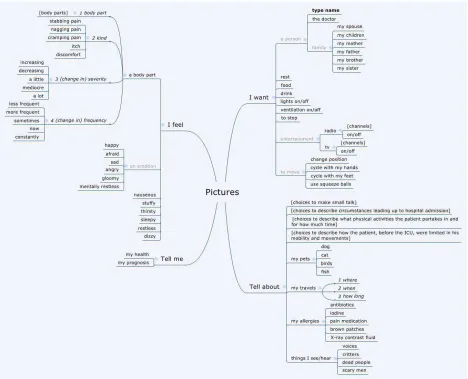
This solution is currently used on the ICU of UMC St Radboud. VoICe is an iPad app that is designed to be used through a normal tablet touch interface or with a single external button. It offers a simple intuitive interface with several output possibilities. It supports common communication scenarios built-in, such as specifying where the patient feels pain or what emotion he is feeling. This allows for relatively fast communication. There is also a virtual keyboard and drawing board for communication. Finally the app allows to send and receive (video) messages. The main limitations are:
Not usable by patients who cannot use a button.
Patients with insufficient hand motor control can only use a single button as alternative input, whilst other forms of input might be more suitable for these patients.
Difficult to use for users with limited vision.
The patient needs help to use the app, because in most cases he cannot hold the tablet himself. There are limited output possibilities.
The system does not support other languages.
4.2.3 Brainfingers
Brainfingers is a program that allows the user to control a computer, using a combination of EMG and EEG signals. The user must wear a sensor band on his forehead, which senses and responds to surface electrical signals generated from eye muscle movement, and brainwave activity detected at the forehead. Each of these signals is a binary input that can be coupled to a configurable output. It is possible to control keyboard buttons and/or control a mouse. A training program is included that teaches the patient to use the program and assesses his abilities. The main limitations are:
Does only support EEG and EMG as an input, whilst for many patients other forms of input are much more suitable.
4.2.4 SIDE
Side is targeted to patients with locked In Syndrome and allows them to type text, browse the web, send e-mails and interact external devices (television,
radio, lamps… using a single button. )t is also usable if the patient has limited eyesight or eye movement that can only see a small portion of the output screen. Options are shown one by one, centrally on the screen. Creating custom option menus for image based communication is possible. The main limitations are:
Not usable by patients who cannot reliably use a button.
For many patients other forms of input than a single button might be more suitable.
Though the system seems extendible, there are currently limited output possibilities.
4.2.5 GazeTalk
GazeTalk is a predictive text-entry system that enables the use of an eye tracker with a low spatial resolution (e.g., a web-camera based eye tracker). GazeTalk tries to be both sufficiently feature-complete to be deployed as the primary AAC tool for users whilst remaining flexible. As input it supports eye tracking, head tracking, mouse, joystick, or any other pointing device. As output it supports text-to speech, web browsing, reading and sending email, playing videos and reading documents. The main limitations are:
Not usable by patients who cannot use eye tracking or another pointing device. For many patients other forms of input than a pointing device might be more suitable.
Though the system seems extendible, many desirable output possibilities are currently not supported.
4.2.6 The Grid 2
The Grid 2 allows people to use eye gaze, switches, head pointer, touchscreen, mouse and keyboard to control a computer. It also has a number of built-in features, including voice output communication using symbols or text to build sentences, sending and receiving email and sms messages, browsing the web and listening to music. The main limitations are:
Not usable by patients who cannot a reliably use pointing device with reasonable accuracy or a switch.
The input needs to be configured before use, especially for non-basic input.
Not usable for users with limited vision.
There are limited easy to use output possibilities built-in to the application. This is somewhat made up for by the possibility to control the full computer for users that have the ability to accurately control the cursor. They can with extra effort use other programs for these features.
4.2.7 Tobii Communicator
This system allows communication through mouse, head and eye tracking, possibly in combination with a switch or keyboard to select predefined options for symbol or text based communication. Additionally it offers the possibility to control a computer by controlling the cursor. There is also support for controlling your environment by infrared switches. The user is offered a choice of tiles with conversation options for quick communication. There is also a full keyboard
available and a screen to specify the details of pain or other discomfort. The main limitations are: Difficult to use for patients who cannot reliably control a pointing device.
For many patients other methods of input than a pointing device might be more suitable. Difficult to use for users with limited vision.
There are limited easy to use output possibilities built-in to the application. This is somewhat made up for by the possibility to control the full computer for users that have the ability to accurately control the cursor. They can with extra effort use other programs for these features.
4.2.8 Conclusion
license multiple packages and it is more demanding for the medical personal to learn how to work with different solutions, especially determining when to use which software system.
None of these solutions is specifically targeted at the context of the ICU. They are designed to be used by people with long term communication disabilities. They can be carried along as they go through their daily life or assist the user at home. This context is crucially different from the ICU context, most importantly since the user s mental condition is very different. All the stress, exhaustion and confusion and anxiety form a big part of the communication problem we try to solve. This means the system should
ask very little of the patient s mental and physical abilities, should provide support for patients orienting themselves in their environment and should be very reliable. None of the existing solutions is especially suitable for these challenges.
5
R
ESEARCH QUESTIONS
The goal of this project is to design and build an AAC solution for an ICU environment that solves the problems that were identified in section 3. The limited time for this project prevents us from developing a catch-all solution that offers optimal support for all patient limitations and communication wishes. Choices have to be made. We look for a solution that can realistically be built within this projects timeframe, yet with maximum problem solving capacity.
We try to answer the following research questions:
1. Which problems do occur on the )CU as a result of patients communication disabilities?
2. How severe are these problems? (Number of patients, level of impediment for medical personal, etc.)
3. Which AAC solution can be designed and built within the timeframe of this research that reduce the severity to these problems as much as possible?
4. To what level does this new solution reduce the severity of these problems?
6
M
ETHODOLOGY
6.1
A
GILE DEVELOPMENTDuring this project, the agile development approach is used. This section describes this approach and the software development methods and techniques that are brought into practice. We have chosen for an agile approach, in favor of the more traditional Waterfall model. In the next subsection we compare the two methodologies and justify our decision. The information on agile development covered in the section
is largely based the book Agile software development (Martin, 2003).
The agile approach requires rapid iteration through short development cycles, each containing requirement analysis, design, implementation and testing. At the end of a cycle, a working product is produced; either a prototype or a partial implementation of the final system. It is used to gain quality feedback regularly and quickly during development. The intermediate tangible result makes it easy for the client to give concrete feedback. This feedback is used as a source for new requirements for the following development cycle(s). This possibility for frequent early feedback is very powerful. The MIT Management Review analyzed software development projects and found two strong correlations. The
less functional the initial delivery, the higher the quality of the final delivery and the more frequent the deliveries, the higher the final quality .
The philosophy at the basis of this approach is the realization that, in the real world, requirements are never static and misunderstandings about them between client and developer cannot completely be prevented. Stakeholders never know what they want exactly in advance. In fact, change is seen as a good thing, as every time during development the requirements are changed, the understanding of the
customer s needs is improved. Furthermore, being responsive to change gives a competitive advantage, as the software can react to the latest developments in the market. Agile embraces change as an essential part of the software life cycle.
Agile has a few other commandments. First of all extensive communication between developers and the stakeholders is very important to minimize size of the feedback loop. Face-to-face contact is the most effective and efficient medium of communication, over any form of documentation. For effective communication with the customer, ideally someone who represents the customer and his needs is present in the same room as the developers. Conversation is preferable over formal documentation or contract specifications, to facilitate the changing nature of requirements.
To foster communication within the development team, agile teams should be self-organizing. Responsibilities should be communicated to the team as a whole rather than to individuals and the team decide how best to fulfill them. Every developer is aware of what the others are doing and they all share responsibility. Frequent meetings are held to reflect on team progress and modifications are made to work more effectively.
Another believe is that the pace of development should be sustainable. Working overtime and dealing with time pressure has a negative impact on software quality. Developers that are tired make mistakes. Software design is always important for maintainability and reliability. Although agile developers allow
software design to change, they never allow it to rot. )f by changing the functionality the current design
is violated or another design is more suitable, they refactor the software. They never allow themselves
to create a mess. The practice of cleaning up later is not done, in favor of cleaning up right away. The
principle of simplicity is essential here. Agile programmers try the solve problems in the simplest, cleanest way possible in order to maximize the work that is not done and minimizing time spent on redesign. Simplicity also prevents the team from being vested in the initial design, postponing necessary changes. Simplicity is maintained according to a simple principle. If it is not reasonably certain that a certain abstraction or infrastructure is needed later, it is not implemented. In section 6.3 an overview is given of commonly used agile design principles to maintain simplicity and cleanliness of code, whilst maintaining expressiveness.
6.2
A
GILE VSW
ATERFALLWe have chosen for agile because we believe in its philosophy of embracing change during development. The conviction that change is inevitable and even desirable matches with our personal experience. Moreover, it is especially useful in this project. The complex nature of the product and clients that have difficulties communicating make it likely that the requirements are subject to change more than usual. Furthermore, the frequent and early feedback made possible by agile has proven to result in better software quality.
The traditional Waterfall approach, on the other hand, is not very responsive to change, because the end product is developed at once. Therefore, the inevitable changes in requirements are detected much later
and are much harder to correct. Traditional approaches assumed that if we just tried hard enough, we could anticipate the complete set of requirements early and reduce cost by eliminating change. Today,
eliminating change early means being unresponsive to business conditions (J. Highsmith, 2001).
However, there are a few advantages to the Waterfall model that should not be so discarded without thought. First, the extensive project planning that the Waterfall approach starts with, makes for a clear and predictable project. This is pleasing to customers who know in advance how much time and money the project is going to cost. This advantage over the relatively vague agile approach, is mitigated though. A successfully executed project plan often does not yield a satisfactory end product right away. Frequently extensive changes are necessary, invalidating the original estimates in time and cost. Additionally, agile uses tools to continuously measure current and estimate future progress. We therefore think that this advantage of the Waterfall model is negligible.
A final advantage of the Waterfall approach is that the extensive customer contact that agile demands is time consuming for him. It is often preferable for clients to only be involved during the planning phase of the Waterfall model, then throughout the project. If this frequent customer contact cannot be arranged, agile is not a good idea. In this project frequent contact can be arranged by having multiple contacts within the medical staff, such that always someone can be found who has time to speak. It is also very desirable to arrange a workplace at the MST hospital. From there it is also easily possible to enter the ICU for contact with another vital stakeholder, the patient. These measures are realistic and thus should form no obstruction for a successful execution of agile development.
6.3
A
GILE DESIGN PRINCIPLES6.3.1 Single Responsibility Principle
The Single Responsibility Principle (SRP) states that classes or modules contain only elements that are functionally related. If this is the case, they are called cohesive. This is a desirable property, because each responsibility is an axis of change. If responsibilities are coupled in a module it has to be modified more frequently. Each time one responsibility is changed it is risked breaking the other and the whole module needs to be recompiled. It also becomes more difficult to independently test a responsibility. Separating responsibilities is, off course, only desirable in agile development if the responsibilities are actually subject to change.
6.3.2 Open-Close Principle
The Open-Close Principle (OCP) prescribes that software should be open for extension, but closed for modification. This means that a module is designed in such a way that changes of a specific kind can be implemented by adding new code only. There should be no need to modify and recompile the existing module. In agile this means that whenever a change is made to the code, the code is refactored in such a way that similar changes in the future can be added without modification. For example, if output code that prints to the command line needs to be modified such that it can also output to a file, both output methods are made to be extensions of an abstract output class. Adding new outputs in the future will then only require the extension of this abstract output class.
Of course, introducing new abstractions later in the development cycle might be problematic. Agile tries to minimize the chance of this happening by means of extensive acceptance testing, short development cycles and intimate customer contact. Still the risk of this being necessary remains and we think this is one of the weak points of agile.
For this reason we chose to violate agiles simple design principle in this respect. We apply the open-close principle in combination with commonality/variability analysis (CV-analysis), which is conducted for each new software component. For each aspect of the problem domain that needs to be modelled, we look at which concepts are static and which are dynamic. Static entities are constant in their behavior or responsibility. Dynamic entities could have different ways of functioning, depending on the context. Differentiating between these two allows us to predict the appropriate abstractions to the software. These abstraction are immediately implemented with the new component.
6.3.3 Liskov Substitution Principle
of that type. Unexperienced programmers might be tempted to write a procedure that explicitly tests for the subtype to determine what to do. This, however, violates the OCP principle as new subtypes can now break or require extension of this function. The principle is especially important for external users of a type. If a subtype violates reasonable assumptions users can make about one of its base types, the base type might behave in ways unexpected to its users. Take as an example a Square subtype that extends a Rectangle type and overrides its SetWidth and Set(eight methods to ensure the Square s invariant of equal width and height. Now there is an external function that takes a Rectangle as input and assumes that setting its width to 2 and its height to 3 results in a rectangle with area 6. This is a very reasonable assumption but it is not valid if the passed Rectangle is in fact a Square!
A good way to avoid LSP violation is to interpret the is-a relation between a subtype and its base types as pertaining to behavior. The square example does not follow this interpretation. Although a square definitely is a rectangle, its behavior contradicts that of a rectangle.
6.3.4 Dependency Inversion Principle
The Dependency Inversion Principle (DIP) states that high-level modules should never be dependent on low-level modules. A violation would mean that a change in low-level details could influence high-level functionality. A good way to achieve this is making sure that all relationships between components never end on a concrete object, but always on an abstract interface. This so-called service interface of a low-level module is owned by the high-low-level clients that use it. They can make changes to this service interface if different low-level functionality is required, never the other way around.
6.3.5 Interface Segregation Principle
Fat classes with lots of functionality cause their clients to be coupled in undesirable ways. One client forcing a change in a fat class can affect many other clients. When it is not desirable to break the fat class into smaller more cohesive classes, functionality can be separated through multiple interfaces. For each group of clients that use a specific subset op functionality, an interface is provided. This causes those clients only to depend on the methods they actually use and makes them independent of other (groups of) clients.
6.4
A
GILE IN PRACTICEAs mentioned earlier, within every development cycle the requirements analysis, design, implementation and testing are conducted. This results in an intermediate product, which is then evaluated as part of the requirements analysis of the next development cycle. There exist different concrete agile practices for performing these tasks. Two of the most well-known and commonly used methods are Extreme Programming (XP) and Scrum. The two methods are very similar, the main difference being that Extreme Programming is more prescriptive in the practices to be used. How we implement the agile methodology in this project is based on XP and Scrum guidelines. In this section we elaborate on those practices used. If there is a difference between XP and Scrum, an argument is made for choosing between the two.
6.4.1 Product owner
The product owner is defined as the person who defines and prioritizes the user stories. The product owner is part of the development team and should work closely together with the developers. Developers and product owner are aware of each other s problems and help each other out. The product owner is someone who represents the customer within the team. He can be the client for whom the software is built, but this is not necessary. As argued in section 6.2, intensive contact with the client can be arranged, through multiple contacts within the MST. However, making (one of) them a part of the team is not realistic due to their lack of time and software engineering experience. The researcher therefore fulfills the role of product owner, backed up by close contact with the medical staff and ICU patients. The role of product owner is Scrum terminology. )n XP this role is called the customer . This name is ambiguous, thus possibly causing confusion. It is not used in this report.
Since the product owner is the link between the development team and the stakeholders, he is also responsible for keeping the stakeholders up-to-date about the status of the project.
6.4.2 Scrum master
This team role is specific to Scrum. The Scrum master makes sure the project progresses as intended. He ensures that all the agile practices are indeed used. He normally chairs team meetings where he lets the team reflect on their progress and challenges them to improve. Since developers in this project do not all have experience with the agile practices used, the role of Scrum master is especially valuable. This role is fulfilled by the researcher, who has the most experience with agile development.
6.4.3 User stories
Detailed requirements are likely to change throughout the project. Instead we use user stories to represent functional requirements. A user story describes a functional requirement in a few words. A user story is a mnemonic token of an ongoing conversation about a requirement (Martin, 2003). Based on the sense of detail perceived by the product owner while talking with the customer, the implementation cost of each user story is estimated.
A good quality user story should be implementable, testable and independent of other user stories and its implementation cost must be estimable. It this is not the case, it needs to be made less abstract, split up into smaller or merged into larger user stories. Not all functional requirements have to be immediately formulated in this way. Concretizing low priority user stories not until later in the project often makes sense, as they can better be understood in the context of a working product.
Throughout the project all not yet implemented user stories are maintained in a prioritized list. We call this list, in accordance with Scrum convention, the backlog.
It is important to realize that user stories are no replacement for non-functional requirements. These requirements cannot be perceived as an independently implementable piece of functionality. The project thus maintains a separate list of such requirements that have to be taken into account throughout development.
6.4.4 Short Cycles
their experience with previous cycles. Each user story is divided up into tasks which are implemented in any order that makes logical sense. At the end of each cycle the working product is reviewed with the stakeholders. We call each cycle a sprint in accordance with SCRUM terminology.
A release plan is made for every six iteration cycles or so, spanning three months of work. The end result is a major delivery, called a release, usually one that can be put into production. Like the iteration plan, the release plan consists of selected user stories fitting within a developer set budget. An iteration plan cannot be modified during an iteration. A release plan, on the other hand, can freely be updated at any time by the product owner.
6.4.5 Acceptance tests
The details of a requirement are captured in acceptance tests specified by the product owner. This happens directly preceding or during the implementation of a story. They are tests that can be run automatically and repeatedly to verify that that the software behaves according to the customers wishes. They make sure that once a requirement is implemented it is never again broken. Writing acceptance tests requires the system to be testable at a high architectural level, which leads to more decoupling at this level. For example, the business rules should be decoupled from the GUI in order to make them accessible for testing. Often acceptance tests are written in a special scripting language. Developing this language is probably not worth the investment for this project, since the researcher, who fulfills the role of product owner, has sufficient expertise to write the acceptance tests in plain without a software domain specific language. Also the size of the project is probably insufficient to return the investment by increased test writing efficiency.
6.4.6 Pair programming
This is an XP specific practice. All production code is written by pairs of programmers rather than individuals. This provides rapid feedback, which significantly increases the quality of the code. While one programmers writes code, the other looks for errors and improvements. These roles change frequently. The pairing of programmers is changed at least once a day, so that every programmer works on most parts of the software. This facilitates the spread of knowledge throughout the team and reduces the vulnerability for losing knowledge if losing team members. Lack of a standard shared workspace and the uneven number of developers means that pair programming is not always feasible during this project, but it should be employed given the opportunity. Studies have shown that pair programming, contrary to intuition, does not reduce efficiency. It does however significantly reduce the defect rate.
6.4.7 Test-driven development
6.4.8 Collective ownership
Every programmer shares responsibility for the whole project and no individual is responsible for a feature or module. This stimulates active involvement and communication between developers. No one is confined to a specialty, allowing everyone to broaden his skills.
6.4.9 Continuous integration
A non-blocking versioning system is used. Every hour or so developers check in their code, meaning they merge their code with the main branch. Then they run every test they just wrote to see if their new code is still working and also every other test written to check if their code does not break any existing functionality. If they broke something they fix it before finishing the check-in and publishing their changes.
6.4.10 Sustainable pace
As mentioned in our description of the agile approach, it is important for developers to conserve their energy and alertness. XP and Scrum adapt this principle. Working overtime is only allowed in the last week of a release.
6.4.11 Open workspace
This is an XP specific practice. The programmers work together in an open workspace, each within hearing distance of the other. This minimizes the gap to communicate and allows every developer to know the state of the other. This seemingly distracting environment, has surprisingly been shown to increase productivity by a factor of two (University Of Michigan, 2000). Like pair programming, working in the same workspace is not always practiced during this project. Often it is convenient to work from home.
6.4.12 The planning game
The planning game is the process of constructing the iteration and release plans. The product owner determines how important each user story is. The developers estimate how much time implementation costs. The developers also provide a budget for the customers to fit the amount of work they expect to finish. The cost of a user story is an arbitrary amount of points that has only relative meaning. A feature with a cost of 6 points is expected to take twice the implementation time than a feature worth 3 points. If it is difficult to estimate the number of points to assign to a user story, it should be split into smaller or merged into a bigger user story.
The budget of points is determined using the project velocity. The projectvelocity is a number of points implemented per unit of time and can be calculated based on previous iterations. Based on the cost and priority of the user stories and the available budget the product owner selects the user stories for the next cycle. In Scrum this works slightly different. There the developers select the user stories. In practice this makes little difference though, since always the user stories with the highest priority are selected first, as we do for this project. If at the end of an iteration cycle not all user stories are implemented, the cycle ends anyway. The velocity is adjusted accordingly and possibly the release plan as well. Due to this planning game the customer has a good idea about the duration and cost of a project.
developer knows from experience how much task points he can complete and should spent accordingly. If not all stories are divided this way, the product owner should retract user stories, or vice versa add more. Halfway through the iteration, progress is evaluated and tasks are redistributed. Possibly, user stories not yet worked on are pulled out of the iteration plan.
6.4.13 Daily Scrum meeting
This Scrum practice is a daily max 15 minute developer meeting with the goal to update each other on their work and to identify problems. Each developer answers the following questions: What have you done since yesterday? What are you planning to do today? Any impediments / stumbling blocks? Solutions to identified problems are not discussed in the meeting, but between the Scrum master and the developer in question. The daily Scrum meeting is substitute for the XP practices of pair programming and the open workspace, which both stimulate the propagation of knowledge throughout the team and provide a quick internal feedback loop. Since pair programming and the open workspace principles cannot be fully implemented, we use Scrum meetings whenever the former cannot be applied.
6.4.14 Sprint retrospective
This Scrum meeting is similar to the daily Scrum meeting, but is held at the end of each development iteration. Each developer reflects: What went well during the sprint? What could be improved in the next sprint? Like the daily meeting, this practice fits well with the project and is used.
6.4.15 Simple design
Following this agile principle, XP programmers tend to create designs that are as simple and expressive as possible. During design they only consider the user stories in the current iteration. They do not worry about user stories in following iterations. If these ask for a different design, the design is migrated. This means an XP team does not start implementing the infrastructure of a new product straight away, but only when user stories ask for it. This design philosophy is captured by three mantras: 1. Consider the simplest thing that could possibly work. 2. You are not going to need it. 3. Once and only once. The second mantra should be understood as never to implement abstraction or infrastructure that you are not reasonably certain of you need. The third mantra means that redundancy is never accepted. If the same code is needed in two places, than an abstraction can and should be introduced that captures the common functionality. This focus on eliminating redundancy results in reduced coupling.
6.4.16 Refactoring
To prevent code rot from hacks to the design and to keep the code as clean, simple and expressive as possible, the design should be continuously updated by means of refactoring. The existence of acceptance and unit tests for every feature and functionality makes it save to refactor. If refactoring breaks any functionality, it is immediately detected and fixed.
6.4.17 Metaphors
6.5
I
DENTIFYING REQUIREMENTSThere are multiple stakeholders involved in this project and we converse with all of them. The patient stakeholder group is a special case. They have to be approached with great care. In this section we explore how we go about identifying requirements from the different stakeholder groups.
Requirements have to be identified for the initial release plan after every iteration. The identification procedure in both situations is different. The requirements identified after an iteration are based on the evaluation of the latest prototype or working product. For the initial release plan we use the problem domain analyses in section 3 to extract them.
We can identify multiple stakeholders that interact with CommIC. Each of them might be faced with different problems, thus all of them should be consulted when identifying requirements. The stakeholders are the patients, their family, doctors, physiotherapists, dieticians, nurses, the hospital pastor, social workers, the hospital and its ICT department.
Agile advocates face-to-face contact as the best medium to communicate with stakeholders. However, extracting all information by talking to stakeholders is undesirable for a number of reasons. Firstly, medical personal has often very little time. Secondly, through hasty conversation, important details might be skipped and many problem scenarios might not be mentioned. Thirdly, many of the patients for whom the system is intended have great difficulty conversing about their problems. By observing the patient as he communicates, we can mitigate these problems. Therefore we use observation besides conversation as a source of requirements for both the initial release plan and intermediate product evaluations.
In some cases it is undesirable to gather requirements out of personal meetings between patient and family, due to privacy concerns. In these scenarios it is best to talk to the patient and his family after the meeting, while it is stressed that the patient or his visitor do not have to answer a question if they do not want to. As an alternative, observing the patient and the pastor is an option, as their interaction, like a family visit, is social in nature.
6.5.1 Requirements for initial release plan
To identify communication problem scenarios, firstly we observe different stakeholders as they go about their work on the ICU and interact with patients. During patient interaction, the following is the focus of our attention:
How is communicated? (With what tools?) What is communicated?
Is the communication effective? Why not?
Alongside the observations, we interview the stakeholders, about their experience with patient communication. The interviews are used mainly to identify additional (non-observed) problem scenarios and to determine the frequency and the level of discomfort experienced by the stakeholders in these scenarios. This information translates to a priority level for the related requirement.
What aspects of your communication with patients do you experience as frustrating? To what level? What are your goals during patient interaction?
What do you need from the patient to achieve these goals?
The goal-question is very important. Its purpose is to gain insight in the meaning of interaction scenarios. This allows us to systematically identify other scenarios that support each goal. For each goal that is identified, we identify the supporting interaction scenarios and for each of these scenarios we identify the experienced problems and severity:
How often do you need this?
Is it possible to communicate about this with the patient? What misunderstandings do occur during this communication? How frequently do these occur?
How problematic are the consequences of the misunderstandings?
6.5.2 Product evaluation
After each iteration the latest working product is shown to and evaluated with the relevant stakeholders. Whenever possible, this is done though trials with ICU patients. Note that it is not very feasible to test CommIC with simulated patients. The mental and physical condition of ICU patients is a crucial factor in their communication and this cannot be reliably copied to a simulation.
Stakeholders are demonstrated newly implemented functionality and, when appropriate, they are observed and interviewed as they test the functionality of CommIC in the context of problem scenarios that are relevant for testing the user stories implemented in the last iteration. Such a problem scenario always includes a stakeholder goal and obstacles (normally patient disabilities) that the software should help to overcome. We determine to what level the newly implemented features are satisfactory and possibly identify new problems and thus new requirements to avert these.
In order to take the learning aspect CommIC into account, patients receive sufficient time to acquaint themselves to CommIC until they feel confident to work with it. They receive instructions, but not full lessons, since staff would not have time to give these in real practice.