Developing a serious game
as a tool for collecting data
on food waste behavior
Christiaan Verloop
Supervisor
dr. A.M. Schaafstal
Critical observer
dr. J. Zwiers
Creative Technology, University of Twente
2
Abstract
A third of all produced food is wasted worldwide, much of which occurs at the consumer. Traditional research methods on food waste behavior have proven unreliable. Hence, new methods are being tested. The purpose of this study is to explore the possibilities of using a serious game as a tool for collecting data on food waste behavior. To this end, a game is devised, developed and evaluated to ultimately answer the questions; How can a serious game collect realistic data on food waste behavior? What data needs to be collected from the game, and how should the data be saved and formatted to be useful to the client?
3
Acknowledgements
First off, I would like to thank Camille Gruter for her diligent work on the art side of this project. Next, I want to thank our supervisor Alma Schaafstal; throughout this project she has always had a clear vision of the goals of this project, she helped us stay on track when we risked straying off. Her critical view on the project has greatly increased the completeness of the end result. I’m also grateful to Anke
Janssen and Rene de Wijk; not only did they provide us with an interesting and challenging assignment, they also took the time have regular meetings wherein we discussed and aligned our ideas with the goals of the project. Thanks also to our critical observer Job Zwiers for his feedback during the last stages of the project. Finally, I want to thank all the play testers of the game for their
participation and feedback, it has helped tremendously in evaluating the game’s success.
4
Table of contents
List of Figures ... 6
Introduction ... 8
Source of the assignment ... 8
Client goals and requirements ... 9
Scope ... 9
State of the art ... 10
Data storage ... 10
State based ... 10
Event based ... 10
Evaluation ... 10
Database type ... 11
Relational databases ... 11
Non-relational databases ... 12
Evaluation ... 12
Games with a similar topic ... 13
Food waste games ... 13
Cooking games ... 13
Evaluation ... 14
Ideation ... 15
Requirements ... 15
Brainstorm ... 15
Tamagotchi game ... 15
AR game ... 16
Restaurant game ... 16
Mother earth game ... 16
King game ... 16
Family game... 17
Narrowing down ... 17
Specification ... 19
Game format ... 20
Data collection ... 21
5
Users ... 22
Savefiles ... 22
Events ... 23
DayStats ... 23
ProductInstances ... 23
ProductTypes ... 23
Settings ... 23
Realization ... 24
Game ... 24
Database ... 44
Documentation ... 47
Evaluation ... 48
User test 1 ... 48
Results ... 48
User test 2 ... 49
Results ... 49
Behavior ... 49
Data ... 52
Conclusion ... 54
Future work ... 56
Recommendations ... 56
Known bugs ... 57
Future possibilities ... 58
References ... 59
Appendices ... 60
Appendix A ... 60
Appendix B ... 62
Appendix C... 63
Appendix D ... 64
Appendix E ... 74
6
List of Figures
Figure 1: Tamagotchi ... 15
Figure 2: Database overview ... 22
Figure 3: Login screen ... 24
Figure 4: Introduction screen ... 25
Figure 5: Dining room ... 25
Figure 6: Kitchen ... 26
Figure 7: Catapult ... 26
Figure 8: Recipe book ... 27
Figure 9: Statistics overview ... 27
Figure 10: Help screen ... 28
Figure 11: Village ... 28
Figure 12: Supermarket lane 1 ... 29
Figure 13: Supermarket lane 2 ... 29
Figure 14: Inside of a shelf ... 30
Figure 15: More product information ... 30
Figure 16: Basket ... 31
Figure 17: Supermarket cash register ... 31
Figure 18: Shopping bag ... 32
Figure 19: Street with greengrocer ... 32
Figure 20: Greengrocer ... 33
Figure 21: Greengrocer cash register ... 33
Figure 22: Street with butcher ... 34
Figure 23: Butcher ... 34
Figure 24: Butcher cash register ... 35
Figure 25: Castle entrance ... 35
Figure 26: Shopping bag in kitchen ... 36
Figure 27: Products in fridge ... 36
Figure 28: Recipe choice menu ... 37
Figure 29: More product information ... 37
Figure 30: Products on kitchen counter ... 38
Figure 31: Cooking part of the kitchen... 38
Figure 32: Products in pans... 39
Figure 33: King and guests eating ... 39
Figure 34: Finished dinner ... 40
Figure 35: Food waste in the catapult ... 40
Figure 36: Catapult being emptied ... 41
Figure 37: Food waste in village ... 41
Figure 38: More food waste in village ... 42
Figure 39: Decreasing satisfaction ... 42
Figure 40: Most food waste in village ... 43
Figure 41: Expired products ... 43
Figure 42: EventTable ... 44
Figure 43: DayTable ... 45
Figure 44: ProductInstances ... 45
7
Figure 46: Savefiles ... 45
Figure 47: Users ... 46
Figure 48: Settings ... 46
Figure 49: 'Buitenbeentjes' - misshaped fruits and vegetables sold by Albert Heijn. ... 58
Table 1: Unnormalized database. ... 11
Table 2: Normalized database. ... 11
Table 3: Normalized database. ... 11
Graph 1: Average number of shop visits per day. ... 50
Graph 2: Time until dinner was served. ... 50
8
Introduction
A third of all produced food is wasted worldwide, much of which occurs at the consumer (FAO, 2011). Much research has been done as to what foods are wasted, and how to decrease the amount of wasted food. One such research institution is the Wageningen University & Research.
Source of the assignment
The department Food and Bio-based Research at the Wageningen University
& Research
conducts extensive researchon food waste. One of their projects is
‘Houdbaarheid begrepen’
(Wageningen University & Research, 2016), which focusses on expiration-date related food
waste. The goal of this project is to reduce spoilage in shops and at the consumer. To achieve
this goal, new interventions need to be developed to decrease food waste in households.
Additionally, people need to be educated about the possibilities of saving leftovers, and the
meaning of TGT/THT dates.
Before interventions can be developed, it needs to be known what kinds of products are currently being wasted, when they are wasted and why they are wasted. There are several methods for acquiring such information. One of the most common ways is through surveys. These are quick to perform and easy to distribute across a large amount of people. They are also very cheap. The main downside is that the answers given by the participants are self-reported. This can be problem depending on the subject of the survey. When asked about their behavior, people can feel
embarrassed, or they can feel like they have to conform with societal norms. This was found to be the case when using surveys to gather data on food waste behavior. People tended to give socially desired answers, rather than accurately reporting their food waste behavior. In some cases, the survey can also make people aware of their food waste behavior, which can cause a desire in the participants to improve their behavior. This may sound like a good thing, however, people tended to fill in the survey as if they had already improved their behavior. While in reality, they often forget about their good intentions within the week.
For these reasons, surveys have been found to be unreliable for gathering data on food waste behavior. That’s why other methods have been considered. One of these is to make people keep a diary in which they write what products they buy, what the expiration date was, where they stored the product, when they used the product, and whether they wasted the product. This is a lot of effort on the participants side, which means that a monetary incentive needs to be offered. This makes this type of research very costly, especially since such a diary would need to span several weeks. On top of that, the main problem of surveys is also present in this method; the behavior is self-reported, so people can sugarcoat the truth.
Another way to gather data about food was is to dig through garbage bins. This is dirty work, but it avoids the problem of self-reported behavior. This method can give insight as to what products are
wasted most, however, it doesn’t reveal much information about when the products were wasted, where they were stored, and why they were wasted.
9
Since none of the aforementioned methods suffice for collecting data on food waste behavior, a new method had to be devised. The project leader Anke Janssen, and two of her colleagues Rene de Wijk and Hilke Bos-Brouwers came up with a new idea: To put participants in a simulated environment in which they perform all the actions that make up the food cycle in households. This simulation could be
in the format of a serious game. The game then automatically collects data on people’s actions. This
idea eliminates much of cost- and privacy-concerns of the other ideas. Additionally, the behavior is
measured unobtrusively, which means people don’t feel constantly watched. The researchers (from
now on ‘the client’) contacted the University of Twente to see if two students could explore the possibilities of such a game.
Client goals and requirements
The client defined two goals for the serious game. The first and primary goal is to collect realistic data
on food waste behavior. The secondary goal is to improve people’s food waste behavior. The target
audience for the game are people involved in the provisioning, storing, preparation, consumption and wasting of food in a household. The client is mostly interested in the behavior of people who go grocery shopping once or twice a week. Additionally, the data needs to be collected remotely.
Scope
This game will be made by Camille Gruter and Christiaan Verloop for their graduation project. The timespan of this project is 5 months, half of which will be used to come up with a clear vision for the game. The other half will be spent on creating the prototype and evaluating it. In this project, Camille will focus on the art and design of the game, while Christiaan will be responsible for programming of the game and the data collection. Therefore, this paper will focus on the programming and data collection of the game.
During the development of this game, both students will try to answer the question ‘How can a serious game collect realistic data on food waste behavior?’ The prototype that will be developed
10
State of the art
With the aforementioned goals and requirements in mind, the next step is to look at what already exists in terms of data storage, and games in general. The first section will describe the different ways in which game data can be stored. The second section will look at the type of database the data could be stored in. Finally, the last section will investigate existing games with a similar topic to the one that will be developed.
Data storage
This section will look into the different ways of storing game data, to find out what methods are most suitable for this project. In general, there seem to be three main ways of storing data; state-based, event-based, and artifact-based (Allen & March, 2006). Only the former two will be described in more detail below, since the later has grown out of fashion.
State based
When a change happens to an object in the game, the game stores the new state of this object in the database. For example, if a player had 50 euro, and bought something for 20 euro, the new entry in the database will show 30 euro, which is the current balance of the player. This type of data storage makes it easy to see what the current state of the game is. It does not show however, what the 20 euro was lost, or where it was spent on. Therefore, this type of data is most useful in situations where variables can only change for one reason, for example, in a game like snake, your length can only increase by eating a block. In the money example however, the money could have been spent on many different things. These details are lost in state-based data storage.
Event based
In event-based storage, the game saves events, rather than states. So, when looking at the same money example, the new entry in the database will say -20 instead of 30. These events are stored in an event table and allow more detail about the properties of the event to be saved. For example, there could be a column specifying what type of event happened, in this case a purchase event. Furthermore, an item ID could be specified to see what item was purchased. The main downside to event-based data storage is that it is harder to see the current state of the game. To find this out, the starting state needs to be known, after which all the events need to be reconstructed. Nevertheless, people familiar with queries are on average more accurate in formulating queries in event-based data representations than in state-based representations (Allen & March, 2006).
Evaluation
Both state-based and event-based data storage have their advantages and disadvantages. For this project however, it is very important to know what actions lead to a result. For this reason, event-based data seems most appropriate. The downside of having to reconstruct all actions to retrieve a variable at specific time could be mitigated by combining the two; in addition to storing the change, the new value could also be stored. This would make the table very superfluous however, so a possible solution is to only store the new value infrequently, for example at the end of the day, since for most
11
Database type
Once data has been collected, it needs to be stored. This section will explore the various ways of doing this. Nowadays there are two main categories of database systems; relational, and non-relational. Each come with their advantages and disadvantages.
Relational databases
Relational databases have been the standard for many decades now. They often consist of multiple tables with a fixed number of columns and a variable number of rows. Within a row, there can be information about different properties (the columns), or there can be a reference ID. This reference ID can be looked up in a different table to view more information about it. A relational database that
doesn’t follow this pattern is not normalized. An example can be seen in table 1. This table stores the
customer information in every purchase. This creates a lot of duplicate data. Instead, the table can be normalized as seen in graph 2 and 3. Each purchase now has a reference ID, which can be looked up in another table to view more information about the customer.
Item Price Amount Date Time
Customer name
Customer
phone number Customer email Apple 0.4 1 7/7/2018 1:23 PM John 612345678 [email protected]
Banana 0.32 2 10/7/2018 10:28 AM Peter 687654321 [email protected]
Peach 0.5 4 20/7/2018 3:13 PM John 612345678 [email protected]
Pear 0.22 3 20/7/2018 3:15 PM John 612345678 [email protected] Table 1: Unnormalized database.
Items Price Amount Date Time Customer ID
Apple 0.4 1 7/7/2018 1:23 PM 1
Banana 0.32 2 10/7/2018 10:28 AM 2
Peach 0.5 4 20/7/2018 3:13 PM 1
Pear 0.22 3 20/7/2018 3:15 PM 1
Table 2: Normalized database.
Customer ID name phone number email
1 John 612345678 [email protected]
2 Peter 687654321 [email protected] Table 3: Normalized database.
Relational databases have a predefined structure; there is a fixed number of columns, each of which can hold a predefined data type. Because of this, the database it is known exactly what data is held in each column. The predefined structure allows for complex actions, like joining tables bases on values in certain columns. Tables can even be rolled back to a previous state. The downside to the predefined structure however, is that data with a different, or no structure cannot be saved in a relational
12
Non-relational databases
Before relational databases became the standard, non-relational databases were used. However, with the introduction of relational databases, these quickly became irrelevant for the majority of tasks. Recently, they have been making a comeback however (Solid IT, 2018). This is because certain applications, particularly ones with a high data velocity, unknown, or rapidly changing data structure cannot be handled well using relational databases. Furthermore, relational databases tend to slow down when dealing with huge volumes of data. (Győrödi, Győrödi, Pecherle, & Olah, 2015) Non-relational databases are able to store semi-structured and even unstructured data. This gives great possibilities, but it means that the database will not verify if the structure of the data is correct. This means that the application which reads and writes to the database is responsible for delivering data in a useable format. Non-relational databases are generally faster for extremely big databases. This is because they do not support computationally heavy functionalities like joining tables and rolling back tables to a previous state. There are different types of non-relational database, three of which are outlined below (Győrödi, Győrödi, Pecherle, & Olah, 2015).
One of the simplest types of non-relational databases is the key-value store. This database can only store pairs of keys and values. When a key is known, a value can be retrieved. Values can either be all of the same type, in which case no extra type information needs to be attached, or of different types, in which case each value comes with type information. The simplicity of key-value stores is often inadequate for complex applications, however, the simplicity also allows for very high performance. The most notable example of a key-value store is Redis.
Another type of non-relational database is the wide column store. This type of database does not have a fixed number of columns, in fact, the data type of a column can be different for each row. This brings great flexibility. For example, graphs 1-3 currently only support one phone number. A wide column store however, allows you to add multiple columns, to store multiple phone numbers per customer. The most popular examples of wide column stores are Cassandra and HBase.
Document oriented databases are the most flexible of the three. These store information similarly to key-value stores. They store a key, but instead of a simple value, they store a document as a value. This document can consist of multiple other values of various types. Documents can even have other documents nested within them. The most popular example of this type of database is MongoDB.
Evaluation
For this project, a relational database seems most suitable, since the structure of the data will be easy to predefine, and the size of the database will reach nowhere near the amounts at which slowdowns occur. Furthermore, relational databases are more well-known, which helps the client in using the system. Of the most popular relational database management systems, MySQL is the most accessible since it has an open source license, and it runs on virtually all platforms and is thoroughly
13
Games with a similar topic
Before starting development, it’s important to know what games with similar topics already exist, to
find out what parts may be relevant for this project.
Food waste games
There are several ‘games’ about food waste, however all of these are closer to quizzes than actual games. They test your knowledge and bring awareness about food waste. Because of this they have a very low replay value.
‘Food savers’ is an online board game developed by the project ‘Food Waste Effect’. (Food Waste Effect, 2017) Players all start at the beginning of a path consisting of 64 tiles. The goal of the players is to be the first one to reach the end of the path. To do this, players have to answer questions on each tile they land on. If a question is answered correctly, the player can take a few steps. The path goes through four different area each of which has questions about a different topic related to food waste. The game was made to educate people about food products, processes, traditions, food poverty and food waste. The target audience for this game is families, so both adults and kids.
‘Zero waste’ is a game developed to teach kids about food waste and recycling (Jim Metzner Productions, 2014). This game takes place in a dirty city. The city consists of 10 areas each with a question related to waste or recycling. Every correct answer makes that area of the city cleaner. The goal is to get as many questions correct as you can. The target audience for this game is kids from primary schools.
‘Rethink waste’ is a game developed by the city of Surrey to educate its inhabitants about recycling (City of Surrey, 2018). The player has to sort all kinds of waste (some of which is food waste) into 4 different bins. There are 5 levels, each of which has six items to sort. If the player puts an item in the wrong bin, the player can retry without any penalty. Once a level has been completed, the player can add a decoration to their park. The more decorations in the park, the more visitors it attracts.
Cooking games
Since not many games are about food waste specifically, cooking games were also looked into, since they have an overlapping element with food waste. The following games were evaluated to see whether they provide relevant aspects to the subject of food waste.
• Overcooked (Ghost town games, 2018)
• Order up!! (SVS Games, 2008)
• Cooking dash (Glu games, 2016)
• Yummy Yummy Cooking Jam (Virtual toys, 2008)
• Food Truck Chef (Nukebox studios, 2017)
• Cooking Joy (Google Play, 2017)
• Cooking fever (Nordcurrent, 2014)
• Cooking Mama 5 (Office Create, 2013)
14
have levels which have a target amount of money that the player needs to reach to complete the level. These games are usually targeted towards kids, mostly girls.
Only two of these games stand out in terms of having added mechanics. Overcooked is the only multiplayer game in the list. Players need to cooperate to finish the meals in time. In contrast to all the other games, this is not a point and click game, but one where the player moves around a character. This, combined with the multiplayer aspect can make this game quite chaotic. The developer
embraces this and further amplifies the chaos by having different levels with different challenges, such as splitting the kitchen up into difficult to cross parts. This makes for an engaging couch experience that even many adults enjoy.
The other game that stands out is Cooking Mama 5. Unlike all other games, this game does not focus on customers, players can just make meals that they want to make. The cooking in this game is probably the most detailed of all the games in this list. Additionally, the game also has different modes, one of which is a minigame wherein the player must harvest food from trees, or catch food fallen off a truck. In another mini game, the player has to try and fit all kinds of products into the fridge.
Evaluation
The games about food waste discussed in this section were made to create awareness about food waste. All of them do so by testing your knowledge. This can be an effective way of creating awareness, however, no real-life or simulated behavior is measured.
The cooking games discussed do simulate a part of the food cycle, so behavior can be measured. Most
of the games listed take place in a restaurant. This setting is different from the client’s needs, since
food waste is handled differently in restaurants than in households. Furthermore, all but one game
don’t include the provisioning and storing or products, and none of the games take due dates and
food waste into account. The game that stood out most is Cooking Mama 5, since it takes place in a household, rather than in a restaurant. Furthermore, this game includes 3 aspects of the food cycle in households; provisioning, storing and preparing.
15
Ideation
Requirements
The client had specified some initial goals and requirements for the game, but before ideas can be generated, more in depth information about the requirements needs to be acquired. After consulting the client, it became clear that the game must function as a research tool. This implies that the client
can tweak the input variables to see what the effects are on people’s behavior. This is necessary to gain insight in the questions the client wants to discover:
• Are people money driven, health driven, or convenience driven?
• How much do these factors (money, health, convenience) affect food waste?
• In which steps of the food cycle in households is food wasted, and why?
In order to acquire accurate data for these questions, it is important that the action in the game are similar to the actions in the real world. In other words: if a person would do a certain action in the real world, the person should also be tempted to perform the same action in the game. This means that all the actions in the food cycle in households must be present in the game: provisioning, storing,
preparation, consumption and wasting. Furthermore, aspects that play a role in these actions should be present in this game.
The secondary goal of the game is to improve people’s food waste behavior. To achieve this, players need to be made aware of the food waste they make, and they need to feel the downsides of this.
The client further specified that the game needs to be in Dutch. This is because the target audience will be exclusively Dutch.
Brainstorm
With the requirements in mind, many ideas were conceived. All of them include a way for the player to see the impact their food waste is making. This is to satisfy the secondary goal. To satisfy the primary goal, all the games contain the steps of the food cycle in households.
Tamagotchi game
One of the most abstract ideas was a Tamagotchi-like game wherein the player needs to feed a critter by buying food and giving it to the critter. If too much food is given, the critter refuses to eat it and the food would drop down to the ground. This food waste piles up until it engulfs the critter at which point the player loses the game.
This game didn’t focus enough on expiration date, and the purchasing and storing was too far removed from reality. Additionally, the food waste was too visible. It must be visible to satisfy the secondary goal of the game, but if the food waste is too visible, it can affect the data.
16
AR game
The most true-to-life game was one wherein the user uses the camera of their mobile phone to take a picture of the products in their shopping cart. Then, a puzzle game would be generated based on that photo. Similarly, for the other stages in the foodcycle (storing, preparing, consuming, wasting),
another photo is taken, and a new puzzle is generated based on it. The photos would give great insight into what people buy, use and waste, however, some crucial elements, like expiration date are missing in the photos. Furthermore, analyzing photos to recognize products is time consuming work. This could be automated by the game using artificial intelligence, however, after looking into the feasibility
of this, it was quickly found that it would be very technologically challenging. Additionally, players’
privacy is at risk in such a game, because there could be sensitive information in the pictures taken, either in the background, or in the products themselves.
Restaurant game
Another idea was a game wherein the player manages a restaurant. The player must buy, store, and prepare food, and any food not eaten is thrown away. Guests would reserve tables in advance to allow the player to buy enough food. Any food wasted in the restaurant would pile up either within the restaurant, or near the entrance. This is to make people more aware of their food waste.
This idea was quickly abandoned, since food waste is handled very differently in restaurants than in households, because of the large number of eaters, the freshness that customers demand, and the
fact that you need to have all ingredients for all recipes in stock, because you don’t know what
customers will chose. For these reasons, the restaurant seemed least appropriate.
Mother earth game
Focusing more on small-scale cooking, was the ‘mother earth game’. This game takes place in a small village. In the middle of this village is a mythical being called ‘mother earth’ who protects and
conserves the village. ‘Mother earth’ receives money from donations of the village. The player is allowed to use this money to feed ‘mother earth’ by buying food in the village, storing it, preparing it, and serving it to ‘mother earth’. Any food waste gathers around mother earth.
The mother earth idea had a mythical vibe to it, which can be an interesting style for a game, but the mythical nature also caused some mental steps and illogicalities, like ‘How exactly does mother earth
protect the village, and from what?’ and ‘If mother earth is so important, why does the food waste gather around her?’ These mental steps remove the player further from the real world, rather than staying close to it, this is likely to cause people to behave less like in the real world, since the setting is alien to them.
King game
The king game is similar to the ‘mother earth game’ idea, except it takes place in a world more like the
real one. The player is the cook of a king. The king gives the player a weekly budget which the player can use to buy food in the village of the king. The player can then store the food, prepare the food, and serve the food to the king. Any food that is thrown away is catapulted into the village. The objective of the player is to keep both the king happy by making good dishes and to keep the village happy by not catapulting too much food into the village.
This idea stays closer to the real world than the ‘mother earth game’, however, there are still some
17
village to the country is easily made. There is still an element of fun in the game while staying close to the real world.
Family game
The family game takes place in a world much like ours. The player is responsible for the food of their family. The player must buy food, store food and prepare food for their family. The food is then eaten by the family. Any leftover food is throw away. This idea stays closest to the real world, however, it also is the least appealing as a game, since people already do these activities for their families in real
life. This idea was discarded because it was considered ‘too boring’.
Narrowing down
After all ideas were considered, the king game was chosen to be developed further because it stays close to the real world, while staying fun and interesting as a game. To further define and shape the game, a list of 100 factors that affect the actions in the food cycle was conceived. This list can be found in appendix A. Together with the client, a selection of factors was made that were interesting and relevant for the game. These factors were then integrated into the game as follows.
• Price – Products have a price reflective of real life. Products in the fresh stores are more expensive than in the supermarket.
• Quality – All products are of high quality, but products in the fresh stores are slightly better.
• Health – Will not be implemented in detail yet, but products from the fresh stores are healthier.
• Freshness – Products from the fresh stores are fresher than products from the supermarket.
• Use-by-date – In the shop, products have a predetermined due date. This due date indicates how many more days it can be used if the product is stored in its current location. For example, an apple might have a due date of 5 days uncooled. If it is placed in the fridge however, the due date is higher. Products that have a due date below zero are expired and no longer taste good.
• What do I still have? – This factor is implemented by having storages in the kitchen; cupboard, fridge and freezer.
• Number of eaters –The king’s family will often join him, however, not everyone is always
present. The number of eaters each week is constant, however, the distribution per day can be different. This is to keep it fair to the player, who receives the same budget every week.
• Money Available – At the start of each week, the player gets a predetermined budget.
• Portion size – Each product in the shops has a specified number of grams. For this version, no different portion sizes are available for the same product. However, the engine will allow it.
• Packaging exterior – Each product in the shops has a picture of the product. For this version, no variations in packaging exterior are available for the same product. However, the engine will allow it.
• 35% discount sticker – For this version no discounted products are available, however, the engine will allow it.
• Distance from shop to home – The supermarket is on the village square, which is closest to the castle, the fresh stores are in the streets adjacent to the village square and require an extra click to get to.
• When should dinner be ready? –The player has a time limit each day. If it’s already late on the
18
• Storage size at home – The storages in the kitchen have limited capacity. If a storage is full, a product either needs to be moved to another storage, used, or thrown away.
• Planning – The player can choose a recipe from the recipe book and go shopping to get those ingredients. If the player did not plan ahead, they might forget a product. Planning can also be used to save time, for example, by shopping for multiple days on one day, the player will have enough time to prepare a good meal the next few days.
• How much of each storage type do I have? – Each storage has its own capacity. If the freezer is full, a product can be moved to the fridge, however, this does impact the due date.
• Use, move or waste? – If a storage is full, the player can choose to use a product, move it to another storage, or waste it.
• Is product expired? – If a product has expired, the player can throw it away, or use it, but it will not taste good anymore.
• What do I want? – The player is free to choose what recipe they want to make. The king has no preference.
• What do I have? – Before cooking, it is wise to check if the player has all the products required for the meal.
• Number of eaters – The amount of food to prepare depends on the number of eaters. If too much is made, the remains are wasted, if too little is made, the king will be dissatisfied.
• How much do eaters eat? – Each eater has a minimum and maximum amount of food that will satisfy them.
• I’m full – If an eater gets too much food, the remains are not eaten. These leftovers need to be thrown away.
• The food wasn’t prepared well – If ingredients are raw or burnt the eaters will not eat the food. The remains need to be thrown away.
19
Specification
The next step was to prepare work on the prototype. For the development part of this project, this meant making a class diagram showing all the properties and interactions of objects in the game, see appendix C. This class diagram was discussed with the client to make sure the idea of the game aligned
with the clients’ needs. After further discussion with the clients, the game and the data collection were specified as follows.
• The player is responsible of making dinner for the king and his guests.
• The player can buy food in the shops in the village.
• The village contains a supermarket and fresh stores.
• The supermarket is more easily accessible than the fresh stores.
• Products in the supermarket are cheaper than products in the fresh stores.
• Products in the fresh stores are tastier than products in the supermarket.
• All shops are open every day of the week.
• The prices of the products should be in euros and should reflect real life prices.
• The use-by-date of a product is expressed in days left.
• The use-by-date is always the same for a certain product in the shop.
• The use-by-date should reflect real life use-by-date.
• Products should be dry, cooled, or frozen, reflective of real life.
• The use-by-date of a product is based on the type of storage it is in (dry, cooled, frozen).
• There is a limit on the number of products the player can carry.
• The player cannot spend more money than they have.
• There is time limit each day, which indicates when the king wants to eat.
• Bought products must be stored in one of the storages of the kitchen.
• The kitchen has dry, cooled, and frozen storages, each with their own capacity.
• The use-by-date of a product increases if it is stored colder than in the supermarket.
• The use-by-date of a product decreases if it is stored warmer than in the supermarket.
• The use-by-date of a product decreases by one day per in-game day.
• If a product has expired, it is made visually clear that this is the case.
• Products in the storages can be thrown away at all times.
• The player has recipes available in the form of a recipe book.
• The recipe specifies the amounts for each ingredient for a 4-person dish.
• For each ingredient, the player can choose how many grams to add.
• If a recipe is followed properly, the dish tastes good.
• If an ingredient is missing, or was added at the wrong time, the dish tastes less good.
• If one or more expired ingredients were used, the dish tastes less good.
• If a dish is prepared for too short, or too long, the dish tastes less good.
• A bar above the pan indicates the progress of the dish.
• The king is satisfied when a dish tastes good, if it is enough to feed all eaters, and is in time.
• All eaters have the same minimum and maximum required amount of food per dish.
• If the king is satisfied about a dish, the player receives bonus points.
• If too much food is prepared for the number of eaters, the extra food is to be thrown away.
20
• The catapult costs money to fire.
• Food waste that has been catapulted lands in the village.
• The food waste in the village is made visual.
• Food waste is measured in grams.
• The more food waste in the village, the less satisfied the village is.
• At the start of each in-game week, it is made clear how many eaters there will be on each day.
• The number of eaters each week is predefined.
• The distribution of eaters per day can vary between weeks.
• At the start of each in-game week, the player receives a predefined budget.
• At the start of each in-game week, money not spent in the previous week is lost.
• Bonus points can be gained by making good meals for the king.
• Bonus points can be used to unlock new recipes and ingredients.
• The skill level of the player is determined by the satisfaction of the king + the satisfaction of the village.
• The client needs to be able to easily tweak the following values: o Capacity of each storage
o Weekly budget of the player o Number of eaters per week o Cost of the catapult
o Scale factor for the village food waste o Duration of a day
o Penalties and bonusses in a dish
o Minimum and maximum amount of food eaten per guest
• Products and recipes need to be able to be added and edited without having to change the game code.
Game format
The game will be a 2D game. This was chosen because the target audience is more familiar with 2D games than 3D games, and because the addition of a third dimension does not add much value in terms of gameplay or data collection.
21
Data collection
The client indicated that the following data were important to be collected:
• What has been bought + expiration date
• What is used + expiration data
• What is not used and when is it thrown away + expiration date
• How much money is spent per shop visit and per week
• How much food is prepared (for how many people)
• Was the recipe followed? Are all ingredients present?
• Is the preparation time correct, too short or too long?
• How often is the catapult used?
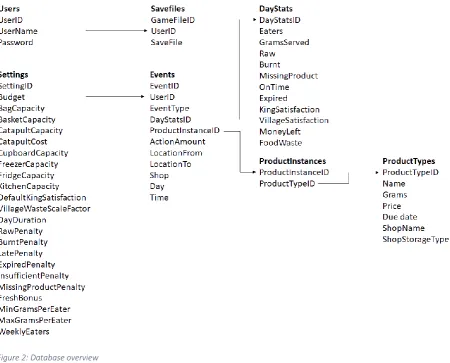
The data required to answer these questions could be saved literally, which would make it very easy to retrieve the information. However, this would result in a very unorganized and superfluous database. For this reason, the use of a relational database was proposed. The retrieval of data in a relational database requires queries to gather information from multiple tables at the same time. The client was comfortable enough with this to agree on the usage of a relational database. The following structure was conceived, note that not all the data that answer the questions of the client are saved literally; some things need to be derived.
• All properties of products, including: o Name
o Grams o Price o Due date o Shop
• Each interaction with a product and the expiry date at the time of interacting, this includes: o Moving
o Using o Wasting
• An overview of statistics per day, this includes: o Properties of the meal
▪ Grams served
▪ Was the food still raw ▪ Was the food burnt ▪ Was an ingredient missing ▪ Was an expired product used ▪ Was the meal served on time o Satisfaction of king and village o Food waste made
o Number of eaters o Money left
22
Data format
[image:22.595.74.525.155.518.2]The client has indicated that the data should be readable and processable by Excel or SPSS. The data will be stored on the server in an SQL database, where the tables can be exported to a CSV format (Comma Separated Values). This format is supported by both Excel and SPSS. The database will use the following seven tables.
Figure 2: Database overview
Users
The users table stores a user ID, a username and a password. The user ID functions a unique identifier for each player. (Currently the system does not allow users with the same name to register, so the username could function as a unique identifier as well, however, in the future the game could use email-based registration which could allow non-unique usernames.) This ID can be used to look up data about the player in other tables. The username and password are used to login to the game. The passwords are currently stored in plain text. This is not an appropriate solution for a public game, since all users could lose their accounts if the database got hacked. The game is currently still closed to the public, and the clients will only ask small groups of people to play the game for their first tests, so non-encrypted passwords suffice for now.
Savefiles
23
The SaveFile is a JSON string which stores all the variables that determine the current state of the game. This table is not relevant for the client but is necessary to save player’s progress between play
sessions.
Events
The events table stores all relevant events for the client. This includes all interactions with a product, shooting the catapult, visiting a shop, and ending the day. Each event is signified by an EventID. The EventType indicates what type of event happened. The DayStatsID column is only relevant in the case
of an ‘endDay’ event. It is a reference to the DayStats table which saves the details of the day that just
ended. ProductInstanceID is used to signify which productInstance a certain event happened to.
Examples of such events are ‘using a product’, ‘moving a product’, and ‘wasting a product’. The
ActionAmount indicates how much of a product was moved, used, or wasted. LocationFrom saves where a product was moved or wasted from, while LocationTo saved where a product was moved to. Shop saves which shop was visited in the case of a shopVisit event. Each event is accompanied by a Day and Time. Days are measured in terms of in-game days, while Time is measured in frames.
DayStats
The DayStats table stores the properties of a certain day. This includes the number of eaters that day, how much food was served, and was there anything wrong with the meal? E.g. Raw, burnt, late, expired, missing product. Furthermore, it stores the satisfaction of the king and the village at the end of the day. Lastly, it stores how much money the player has left, and how much food waste has been made.
ProductInstances
This table exists to look up what type of product a certain product instance is. The reason a distinction needs to be made between productTypes and productInstances is because there can be many
instances of a certain product type. For this reason, the ProductInstances table has a
ProductInstanceID that matches with a ProductTypeID. This ProductTypeID can then be looked up in the ProductTypes table to view more details.
ProductTypes
The productTypes table stores all information about products. This includes the name, the amount, the price, the due date, the store it is sold in, and the storage type it is sold in (dry, cold or frozen).
Settings
The final table is the settings table, unlike the other tables, this table acts as an input for the game. The client can change variables in the table which directly affect users who log in afterwards. This is crucial to the usefulness of this game as a research tool. If the client wants to know how people’s
24
Realization
The next step was to start developing the game. Unity was chosen as the programming environment to build the game in because of its focus on game development and for its multi-platform
compatibility. Within unity, games can be programmed using C# or using UnityScript, which is similar to JavaScript. While C# is more verbose, it is less prone to ambiguity errors than UnityScript, hence C# was chosen for this project.
The game can be played at http://christiaanverloop.000webhostapp.com/.
Game
[image:24.595.71.525.270.531.2]Next will be a description of all the scenes of the game and the functionalities within them.
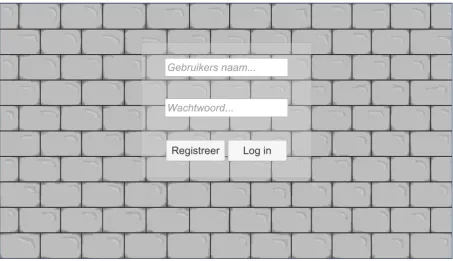
Figure 3: Login screen
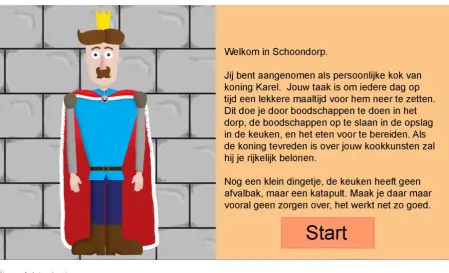
25 Figure 4: Introduction screen
This is the introduction screen. This explains the setting of the game to the player. When the player is
ready, they can start the game by clicking ‘Start’. This screen is only shown to first time players.
Figure 5: Dining room
[image:25.595.70.524.364.623.2]26 Figure 6: Kitchen
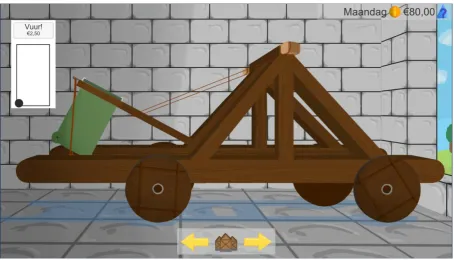
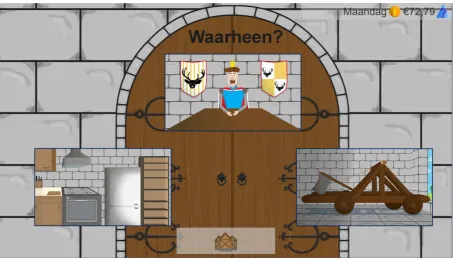
This is the kitchen, where players can store products and make food. In this scene the player can click on arrow left to go to the dining room (figure 5), the village button (figure 11), and arrow right to go to the catapult (figure 7). On the top right there is an extra button available compared to the previous scene; the recipebook. Clicking this opens a recipebook (figure 8), which shows the required
ingredients for each recipe. The storages (fridge, cupboard, freezer) can be clicked to see their content (figure 27). The bag icon in the bottom right corner can be clicked to view its content (figure 26).
Figure 7: Catapult
27 Figure 8: Recipe book
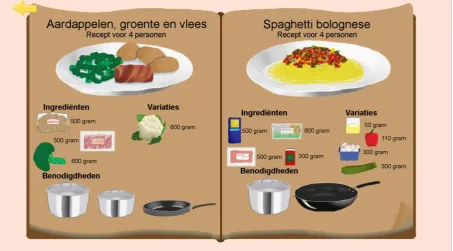
[image:27.595.72.526.46.297.2]When the recipe button is clicked, this window pops up. It shows what ingredients are required or possible to use in all the recipes. The recipes are suitable for 4 persons. This means that the player has to adjust the amounts to match the number of eaters that day. The folded corner of the page is clickable and takes the player to the next page of the book. The arrow on the top left closes the recipe book.
Figure 9: Statistics overview
When the information button is clicked, this window pops up. In here, the player can check how many eaters there are on each day of the week, as well as the satisfaction of the king and the village. In the
middle, from top to bottom are the player’s balance, the weekly budget, and the number of
28 Figure 10: Help screen
The questionmark button opens this window, which shows a short explantion of the icons. The arrow closes the window again. By clicking on the ‘Opslaan en afsluiten’ button, the player can save the
game, to later continue where they left of.
Figure 11: Village
29 Figure 12: Supermarket lane 1
This is one of two shop lanes. On the left is a dry shelf, and on the right is a cooled shelf. The player can click on the shelf quadrants to view the products on that quadrant (figure 14). By clicking on the button on the top left, the player is taken to the cash register (figure 17). The arrow to the right leads to the second shop lane (figure 13). The basket icon in the bottom right can be clicked to show the contents of the basket (figure 16).
Figure 13: Supermarket lane 2
30 Figure 14: Inside of a shelf
When the player clicks on a shop section, the products can be viewed from closerby. The player can either buy the product directly from here, or view more information about the product by clicking on it (figure 15). The arrow on the top left takes the player back to the appropriate shop lane.
Figure 15: More product information
31 Figure 16: Basket
This popup shows the content of the basket. Products can be clicked to view more information (figure
15). Products can also be removed from the basket by clicking the ‘terugzetten’ button. This popup
can be closed again by clicking on the basket icon in the bottom right. The player can also go to the cash register from here by clicking the button on the center bottom (figure 17).
Figure 17: Supermarket cash register
32 Figure 18: Shopping bag
When the player pays for the products, they are transferred to the shopping bag. In here, the player can view the products. This window can be closed again by clicking on the shopping bag icon.
Figure 19: Street with greengrocer
33 Figure 20: Greengrocer
In the greengrocer, the player can click on products to view more information about them (figure 15). The player can pay for the products by clicking on the employee or by clicking on the button on the top left. This leads to the checkout window (figure 21).
Figure 21: Greengrocer cash register
[image:33.595.71.526.378.640.2]34 Figure 22: Street with butcher
On the right side of the village square is this street which contains a butcher (figure 23). The player can go back to the village square by clicking the arrow.
Figure 23: Butcher
[image:34.595.71.526.361.625.2]35 Figure 24: Butcher cash register
In this scene, the player can pay for the products bought in the butcher. This functions the same as the cash register in the supermarket (figure 17).
Figure 25: Castle entrance
[image:35.595.71.526.364.624.2]36 Figure 26: Shopping bag in kitchen
After the player has bought products in the village, the products can be dragged from the bag to one of the storages; fridge, cupboard or freezer. The products expire faster in warmer storages and slower in colder storages.
Figure 27: Products in fridge
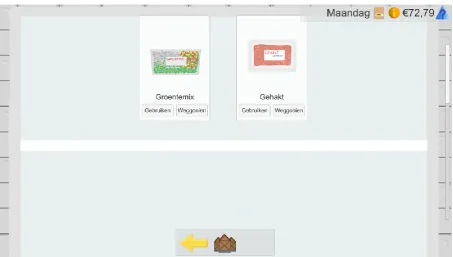
In the storages, the player can view the content of the storage. Like in the supermarket, the product picture can be clicked to view more information about the product (figure 29). The player can decide
to use a product by clicking the ‘gebruiken’ button (figure 30), or waste a product by clicking the ‘weggooien’ button (figure 35).
[image:36.595.72.526.377.634.2]37 Figure 28: Recipe choice menu
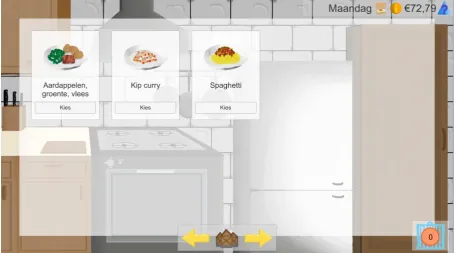
After clicking the ‘Kies recept’ button in the kitchen, this window pops up. The player can choose the
recipe they want to make by clicking ‘kies’ on the desired recipe.
Figure 29: More product information
[image:37.595.71.524.367.627.2]38 Figure 30: Products on kitchen counter
When products are used, they are put on the kitchen counter. The player can then start cooking by clicking on the cooking area (figure 31).
Figure 31: Cooking part of the kitchen
[image:38.595.70.525.364.625.2]39 Figure 32: Products in pans
When a product is dragged to a pan, a text input field pops up. The player enters how many grams they want to put into the pan. For this they can check the recipebook (figure 8) or come up with their own amount. When the first product enters a pan, a progress bar appears. A purple triangle indicates how ready the dish is. The player can stop the progress of a pan, by clicking on it. Once the player is
ready to serve, the ‘Serveren’ button can be clicked. This will serve the meal to the king (figure 33).
Figure 33: King and guests eating
[image:39.595.70.524.407.668.2]40 Figure 34: Finished dinner
Once the meal has been finished (or discarded as unedible), the ‘Tafel afruimen’ button appears. If
there were no leftovers, this button will only clear the plates form the table, but if there are leftovers, these leftovers are transferred to the catapult (figure 35). When this button is clicked, the next day starts.
Figure 35: Food waste in the catapult
From the second day on, there is a timelimit to each day, indicated at the center top. If there is food in
[image:40.595.72.525.393.654.2]41 Figure 36: Catapult being emptied
When the catapult is fired, the food waste is catapulted into the village (figure 37).
Figure 37: Food waste in village
[image:41.595.71.524.348.607.2]42 Figure 38: More food waste in village
If the village gets very dirty, the satisfaction of the villagers decreases, this can be seen in the villager’s
expression or in the overview (figure 39).
Figure 39: Decreasing satisfaction
[image:42.595.72.519.366.625.2]43 Figure 40: Most food waste in village
This is the maximum visual dirtyness of the village.
Figure 41: Expired products
44
Database
The data structure in figure 2 was used to construct the database as can be seen in figures 42 through 48. The database is hosted on a server to allow multiple game clients to write data to it
simultaneously. The main events are stored in the event table. This is event-based data; the actions in the game can be reconstructed from this list. One of the events is ‘ending a day’. This action has a
DayStatsID which points to another table; the DayTable. In this table are some state-based data is stored, like the budget of the player at the end of the day, the amount of food waste, and the king’s
satisfaction level.
This structure was chosen because it can be very tricky to gather this information using event-based
data only; one would have to calculate every change in the player’s balance from a point at which it
was known in order to find out how much money the player currently has.
Some questions are still difficult to answer with the current table structure. Like ‘what products are in the storages right now’. This question requires you to trace every product that moved in and out of a storage. However, the client is more interested in overall trends rather than specific snapshots.
The combination of event-based data and a relational database does cause some columns to be empty, since not all the event properties apply to every event, however, as long as the number of columns is not very large, this is not a problem. If the game is developed further, and many more types of events are added, it could be considered to switch to a non-relational database to avoid the large number of empty columns.
[image:44.595.70.528.435.653.2]The raw data can be viewed using the phpMyAdmin GUI on the server. The tables can be exported to a variety of formats including CSV. Specific queries can be retrieved using MySQL, some examples of which can be seen in the next chapter. These query results can also be exported to CSV.
45
Figure 43: DayTable
Figure 44: ProductInstances
Figure 45: ProductTypes
46
Figure 47: Users
Figure 48: Settings
47
Documentation
In order to make the end product useable for the client it is important that there are instructions on how to use the tool. For this reason a user guide has been made. This can be found in appendix D. The user guide described how to set up the game on a server, what instructions to give to the user, how to retrieve information from the server as well as how to change settings using the SettingsTable. It also describes how to make changes within unity, and how to reupload the game to the server. Finally, it contains a list of tested compatibilities.
48
Evaluation
In order to evaluate the game, two user tests were conducted. One to discover any bugs or unclarities, and one to see if the game collects realistic data, as well as to see if the unclarities have been resolved after the improvements based on the first test.
User test 1
User test 1 was held when the greengrocer and the butcher didn’t exist yet. There were still only two
recipes. The game was still played locally, and the data was also saved locally. The king’s voice lines
were very basic, and there were no visible guests. There was a time limit even on the first day.
Four students were asked to play the game for about 20 minutes while thinking out loud. During the gameplay, notes were taken about unclarities, comments, and noteworthy behavior. After the gameplay, the participants had opportunity to give more comments about the game, and to explain
what aspects weren’t clear yet.
Results
It became obvious that the goal of the game wasn’t immediately clear. It wasn’t explained well to the
player what they should do. Many buttons were unclear; for example, many people took a long time to find the village button, the overview button, and the recipe book button. In the village, many
people didn’t know how to get back to the castle. Furthermore, some people didn’t understand what
the timer bar was for, whereas in other participants, the timer bar created stress, especially in the first day. None of the participants noticed how many people they should be cooking for. Additionally, a point of frustration was the fact that pans and their content would disappear when going from the zoomed in kitchen view to the full kitchen view. People were also frustrated that they could only make two recipes. Lastly, when users entered a storage, the scrollbar would start half way. Products are filled from the top however, so people would have to scroll up in the storage to find the products, which created some confusion.
Based on these comments and observations, the following improvements were made:
• The king now has voice lines that guide the player through the first day.
• The time limit isn’t present in the first day.
• The timer was visually changed to be more recognizable as a timer bar.
• More recipes, and variations within recipes were added to allow more freedom in cooking
• The icon of the overview button was changed.
• A help button was added, which shows the meaning of the buttons and the time bar.
• Pans now save their content when leaving the scene.
• The scrollbar in the storages starts at the top.
• There are guests in the dining room indicative of how many people the player should cook for.
Furthermore, the following things were changed:
• The game is played online, and data is stored on a server.
• A greengrocer and a butcher were added to increase people’s options.
49
User test 2
After changes had been made based on the first user test, the second user test was conducted in the version described in the previous chapter. The goal of this user test is to see if changes resolved the unclarities found in the first user test, and to see if the behavior shown in the game is representative of behavior in the real world. To do this test accurately, the participants need be in the target audience this time. Hence, 4 adults were asked to play the game for about 40 minutes. Before the gameplay, they were asked to fill in a survey, see appendix F. The goal of this survey is to establish the real-life behavior of the participant, such that the behavior measured by the game could be compared against it. (Critical note: the client found surveys about food waste behavior to be unreliable, so it is possible that the results of the survey do not accurately reflect their real-life behavior, however, surveys are currently the best tool available to compare the game against.) During the gameplay, notes were written down about comments made by the participants, unclarities, and noteworthy behavior.
Results
In contrast with the first user test, the timer bar was understood by all participants. The overview icon was clicked more often, and the village button was found more quickly, however, people also clicked the village button when they wanted to go back to kitchen. Multiple participants explained that the village button looked a bit like a castle. The bag icon also caused some confusion; one participant thought it looked like a prison.
Overall, the goal of the game remained unclear in the beginning, and some buttons were still confusing. The participants expressed great frustration about the limited number of recipes, and the freedom within them. They wanted to make their meals unrestricted of any recipes. Another point of frustration was that leftovers could not be saved for the next day, but had to be thrown away. This point was particularly made by one participant who intentionally always makes too much food, and eats the leftovers for lunch the next day.
Behavior
50 Graph 1: Average number of shop visits per day.
In 40% of these shop visits, nothing was bought. When asked about this behavior, the participants admitted that this behavior was not representative of their real-life shopping behavior. Some
participants reported that this was caused because they had to remember the products for the recipe by heart, rather than being able to make a shopping list, or take the recipe book to the shop.
Graph 2: Time until dinner was served.
0
1
2
3
4
5
6
7
1
2
3
4
shop
vis
its
In-game day
Shop visits per day
0
100
200
300
400
500
600
700
800
900
1000
1
2
3
4
5
6
7
8
R
eal
-lif
e
sec
ond
s
In-game day
51
Graph 1 and Graph 2 show that the game has a very significant learning curve. In the beginning, people are displaying highly unrealistic behavior, however, after a few in-game days, the behavior does start to become more realistic.
After a few days though, the catapult starts to get full. When people fire the catapult, there is visible food waste the next time they visit the village. Some participants noticed this immediately, while others only noticed a few days later. Either way, once it is clear to the player that keeping the village clean is another goal of the game, they change their behavior. The sample size was too small to see this in the data, but all players did make verbal comments about the village getting dirty, and
recognizing that this is a bad thing. The question is of course; is the changed behavior still reflective of real-life behavior once people recognize this secondary goal of the game? It could be that the act of making people aware that food waste is bad changes their real-life behavior too, however, it seems more likely that they will only change their behavior in the game, without changing their real-life behavior.
After the first user test, guests were added in the dining room to make it more clear how many people the player should cook for, nevertheless, most participants still didn’t take the number of eaters in
consideration. In the data, a weak upward trend can be seen, see Graph 2. However, due to the small sample size, this is not of statistical significance.
Graph 3: Grams served per number of eaters
Perhaps one of the most fundamental sources of unrealistic behavior was in the recipes. People were not able to make the dishes they wanted to make, because there were only three recipes available. Because of this, comments like “I would never buy this in real life” and “This is not fair, because I put very different things in this recipe” were made. This is a big concern for the data integrity, since
people are not buying what they would buy in real life. Therefore, the data isn’t representative of their real-life behavior.
Some aspects of the game did generate realistic behavior though; in the survey two of the participants indicated that they never visit fresh stores, while two others claimed they often visited fresh stores. The ones who never visit fresh stores only went to the fresh stores in the game 2-3 times, while the participants who often visited fresh stores did so in game 5-7 times.
0
200
400
600
800
1000
1200
52
Some behaviors couldn’t be measured accurately given the small sample size and the short playing time. These include expired products, the effects of the villager satisfaction, whether the weekly budget and the daily time limit are feasible once players are more familiar with the game, and in general how people behave after the first week of playing.
Data
To evaluate the effectiveness of the data collection, it needs to be seen whether the collected data helps answer the questions of the client, and how the data can be retrieved. The information the client wanted to collect was the following:
1. What has been bought + expiration date 2. What is used + expiration data
3. What is not used and when is it thrown away + expiration date 4. How much money is spent per shop visit and per week
5. How much food is prepared (for how many people) 6. Was the recipe followed? Are all ingredients present? 7. Is the preparation time correct, too short or too long? 8. How often is the catapult used?
Below are MySQL queries that answer the corresponding questions. In these queries, the username is
“x”. This needs to be replaced with the username of interest. The ‘AND `UserID` IN (SELECT `UserID` FROM `users` WHERE `UserName` = "x")’ part can also be omitted to view
the information of all users, rather than a specific one.
1.
SELECT
`EventID`,`ProductInstanceID`,`ActionAmount`,`ActionDue`,`Day`,`Time ` FROM `eventtable` WHERE `EventType` = "moveProduct" AND
`LocationTo` = "Basket" AND `UserID` IN (SELECT `UserID` FROM `users` WHERE `UserName` = "x")
2.
SELECT `EventID`,
`ProductInstanceID`,`ActionAmount`,`ActionDue`,`Day`,`Time` FROM `eventtable` WHERE `EventType` = "useProduct" AND `UserID` IN (SELECT `UserID` FROM `users` WHERE `UserName` = "x")
3.
SELECT
`EventID`,`ProductInstanceID`,`ActionAmount`,`ActionDue`,`LocationFr om`,`Day`,`Time` FROM `eventtable` WHERE `EventType` =
"wasteProduct" AND `UserID` IN (SELECT `UserID` FROM `users` WHERE `UserName` = "x")
4.
SELECT `UserID`,`EventID`,`ActionAmount`,`Shop`,`Day`,`Time` FROM `eventtable` WHERE `EventType` = "shopVisit" AND `UserID` IN (