Anafora: A Web-based General Purpose Annotation Tool
Wei-Te Chen
Department of Computer Science University of Colorado at Boulder [email protected]
Will Styler
Department of Linguistics University of Colorado at Boulder [email protected]
Abstract
Anafora is a newly-developed open source web-based text annotation tool built to be lightweight, flexible, easy to use and capa-ble of annotating with a variety of schemas, simple and complex. Anafora allows se-cure web-based annotation of any plaintext file with both spanned (e.g. named entity or markable) and relation annotations, as well as adjudication for both types of annota-tion. Anafora offers automatic set assignment and progress-tracking, centralized and human-editable XML annotation schemas, and file-based storage and organization of data in a human-readable single-file XML format.
1 Introduction
Anafora1 is a new annotation tool designed to be
a lightweight, flexible annotation solution which is easy to deploy for large and small projects. Previ-ous tools (such as Protege/Knowtator (Ogren, 2006) or eHost) have been written primarily with local an-notation in mind, running as native, local applica-tions and reading complex file or folder structures. This limits cross-platform deployment and requires the annotated data to be stored locally on machines or run in X-Windows, complicating data-use agree-ments and increasing data fragmentation.
Anafora was designed as a web-based tool to avoid this issue, allowing multiple anntators to ac-cess data remotely from a single instance running
1Anafora is free and open-source, and is available (along with documentation and sample projects) for public use on https://github.com/weitechen/anafora
on a remote server. Designed for WebKit-based browsers, annotators can work from nearly any mod-ern OS, and no installation, local storage, or SSH logins are required. All data is regularly autosaved, and annotations are saved to cache for restoration in the event of a connectivity interruption.
In addition, avoiding the complex schemas and filetypes associated with many current solutions, Anafora was built to maintain simple, organized rep-resentations of the data it generates. Annotation schemas and stored data are both saved as human-readable XML, and these are stored alongside plain-text annotated files in a simple, database-free, static filesystem. This allows easy automated assignment and organization of sets and offers ease of adminis-tration and oversight unmatched by other tools.
Most importantly, though, Anafora has been de-signed to offer an efficient and learnable means for annotation and adjudication using even com-plex schemas and multi-step workflows (such as UMLS (medical named entity tags), Coreference, and THYME Temporal Relations annotation, de-scribed in (Albright et al., 2013)). This allows Anafora to a single-source solution for whole-text annotation across all of your projects.
2 Comparisons with existing tools
Anafora has been designed from the ground up with some key advantages over existing whole-text an-notation solutions such as eHost/Chartreader (South et al., 2012), Protege/Knowtator (Ogren, 2006), and BRAT (Stenetorp et al., 2012).
Both Protege and eHost are locally-run Java soft-ware (although eHost also relies on a remote
stall of Chartreader). Although they are available for all major platforms, they require annotators to install the applications locally and upgrade the in-stallations as major issues come up. More impor-tantly, both store the texts being annotated locally on the machine used for annotation, which is prob-lematic under many data-use agreements for medical or otherwise sensitive data. Anafora addresses this shortcoming by its web-based design, allowing easy software update and eliminating local data storage, while also enabling automatic and centralized set as-signment.
Another of Anafora’s strengths over existing tools is flexibility and complex schema support. At last review, eHost/Chartreader offered only rudimen-tary between-annotation relations (primarily for co-reference), lacking the flexibility needed for more complex relation sets. BRAT does offer an effec-tive relation annotation tool, but doesn’t support the more complex schemas and property types that Anafora does (e.g. multi-slot relations, relation properties, pointers as properties of entities, etc). So, although both BRAT and eHost/Chartreader are ex-cellent solutions for simple annotation schemas, for complex schemas and workflows, Anafora is a more flexible and capable choice.
Finally, Anafora’s biggest strength is its lightweight implementation. Unlike Pro-tege/Knowator’s folder model where each assigned annotation task contains a separate copy of the schema, document, and project, Anafora’s folders-containing-XML model of document and schema storage means that each document and schema is stored only once in one easily accessible place, and unlike eHost/Chartreader, administration can be done by changing and moving files from SFTP or a command line, rather than by logging in to a separate program. This central storage means that schema modification is as easy as changing one XML file, which will be used for all subsequent annotations, and the file-based model eliminates the need to back up large databases.
In short, although many annotation tools exist, Anafora’s combination of light weight, web-based UI, centralized file storage and complex schema sup-port make Anafora unique and an excellent choice for any annotation project.
Figure 1: Anafora Schema Example
3 Schema and Data Format
In Anafora, annotations are divided into two types:
EntityandRelation. AnEntityannotation associates a certain span in the text with a type and list of prop-erties. Relation annotations specify a relationship between multipleEntities. The nature of these En-tityandRelationannotations (as well as their prop-erties) are stored in an XML Schema file, while data files store theEntitiesandRelationsspecified by an-notators for each file.
3.1 Schema
The schema file defines the data type and attributes of the annotations. Our schema format is defined in XML form, which is a simple and human-readable markup file. A Temporal schema is shown in Fig. 1. The first part of the schema file is “defaulttribute” element in which the schema’s overall at-tributes are defined. Another part is the “definition” element which defines the hierarchy of the schema tree, the annotation types, and the associated proper-ties for each type. The schema is in the form of a tree structure. The “entities” and “relations” tags rep-resent subgroupings of annotation types, while the “entity” and “relation” tags each define a different
an-Figure 2: Anafora Data File Example
notation in Anafora.
For each type, the properties to be annotated are listed under “Property”, where the “type” attribute indicates the name of the property, while the “input” attribute specifies the manner of attribute selection or entry. The value of the “Property” is a list of ac-cepted choices. For example, the “Type” property in the “Event” entity limits the value to “N/A” or “ASPECTUAL”, where “N/A” is the default. Please refer to the Guidelines for further detail.
One great advantage of this XML-based schema format is greater flexibility than existing tools both in schema and modification. To make any modi-fication to the schema, one simply edits the XML and the revised schema will apply to any new data files. Another advantage is human-readability, al-lowing schemas to be easily understood and ported from other tools.
3.2 Data File
The Anafora data file (see Fig. 2) stores the anno-tation instances for each annotated file. It, like the Schema file, uses an XML format.
The “info” section provides the basic information for the file, such as the save time and annotation completion status. The “schema” tag specifies the path to the schema file used for annotation. Fol-lowing is the “annotation.” Each “entity” and “re-lation” element represents an annotation instance. Every annotation has a unique “id”, and the anno-tation “type” and “parentType”. ForEntity
annota-tions, the text’s span is given using character offsets in the source file. For all annotations, the “property” section specifies the values for properties listed in the schema, and, forRelations, properties are used (“Source” and “Target” above) to point to the unique IDs of the annotations being linked.
4 System Overview
Anafora is a web-based tool, developed using Django (a Python framework on server side) and jQuery (a JavaScript library on client side). On the server side, our system manages file storage and user access control. By avoiding the use of any database, Anafora is very agile and flexible, and most of the computing work is executed by the user’s browser. And, because modern browsers have done an ex-cellent job tuning JavaScript execution, Anafora is lightweight on the user’s machine as well. Anafora’s browser-based design also allows the tool to run well on any OS with a web browser, alleviating the cross-platform issues common with other tools.
Anafora allows both keyboard- and mouse-based annotation, improving both efficiency and imme-diate familiarity, rather than relying primarily on mouse-clicks.
Anafora also assists project supervisors in several ways. First, all data management is file-based, and the project hierarchy is reflected in the OS level file system’s directory structure. Secondly, Anafora as-signs tasks to annotators automatically, saving su-pervisors the time and hassle of task assignment. Fi-nally, Anafora makes pre-annotation extremely easy. By running the document text through a shallow parser and generating a file which marks all noun phrases (for example), annotators could start their work on a named entity task with this information ready at hand.
Anafora allows users to customize their own user interface by overriding the CSS file on the client side. By changing the CSS file, users can modify the apperance, e.g., color, font, and page layout.
5 Project Creation and Administration
and annotation properties needed in the schema (see Section 3). Then, a folder is created for the project, containing folders for any subcorpora, and then fi-nally each document is placed into its own folder as a plaintext file. At this point, annotators with the necessary permissions may select the new schema and documents and begin annotating.
A given document’s assignments and completion status is read entirely from the filenames generated by the program. To re-assign a set manually, sim-ply change the annotator’s name in the existing an-notation file’s name, or delete the previous annota-tion file, allowing Anafora to reassign it automati-cally. Administrators can view any annotator’s work through the tool’s interface, and can edit the XML at any time. When a document is fully annotated or ad-judicated, preparing for release is as easy as copying the .gold. file and source text into the final destina-tion.
6 Annotation using Anafora
When an annotator opens Anafora in any webkit-based browser and logs in, they are greeted with a file-choosing interface which allows them to pick which corpus, annotation schema and annotation type (EntityorRelation) they’d like to work on for the session (allowing one annotator to easily work with more than one project or schema). Previously completed and in-progress sets are shown in sepa-rate columns for easy access, and only documents which have fewer than the maximum number of an-notators are displayed. Anan-notators are not able to open or view any annotations other than their own.
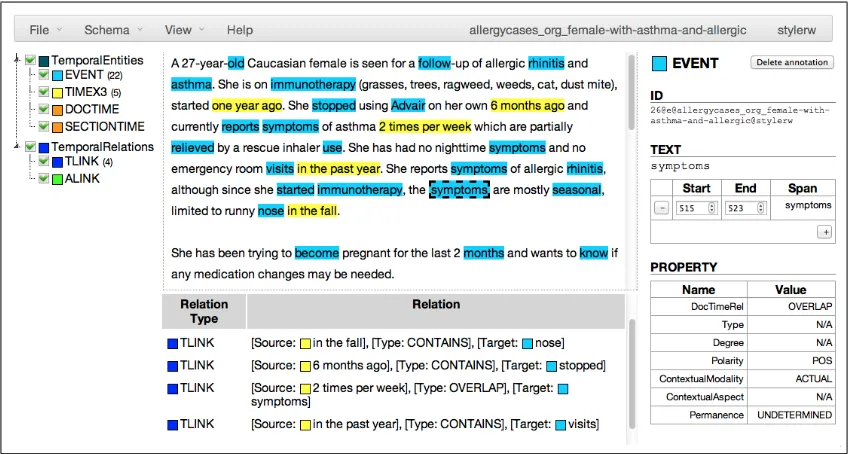
Once a document is opened, the annotator is pre-sented with Anafora’s 3-pane view (in Fig. 3): on the left, the annotation schema, in the center, the source text, and on the right, annotation details. To proceed with anEntityannotation, the annotator se-lects a word or portion of text and hits a pre-defined hotkey, triggering the creation of a new annotation of a specified type, using the selected span.
The properties of the annotation are then automat-ically filled in with the default values specified in the schema files, and the annotator can then go back in to modify these properties (by drop-down menu, ra-dio buttons, relation or free-text entry) as needed. The annotator can also use the span editing tools to
either modify the span character-by-character, or to add a second, disjoint span by selecting more text and using the “+” button.
ForRelationannotation, the annotator will enable the Relation grid, displaying a list of relations in or-der of occurrence in the text. To create a new re-lation, the annotator strikes the proper hotkey, and then Anafora hides all entities which are not allowed to fill slots in this relation. Clicking an entity after pressing “1” fills the first slot, and pressing “2” be-fore a click fills the second slot. As withEntity anno-tations, properties are filled in according to default values in the schema and can be edited as needed.
Annotators can choose to manually save and log out at any point, and when an annotator has com-pleted a document, he or she selects “Mark as Com-pleted”, which changes the file’s status and queues it up for adjudication.
6.1 Adjudication
When a designated adjudicator logs into Anafora, they’re presented with the “Adjudication” annota-tion type opannota-tion in the initial document selecannota-tion screen. When this is selected, only documents with two completed annotator-copies are displayed as available for adjudication.
Once an available document is opened, Anafora will automatically merge the two annotators’ work into a new, adjudication datafile (preserving the sep-arate annotations), and then mark as gold any an-notations matching for both span and properties. In addition, Anafora will mark as conflicting any anno-tation pairs with either 1) matching properties and overlapping spans or 2) identical spans and different properties. Anafora then displays the schema and source documents as before along with two anno-tation detail panes, one for each annotator in a con-flicting annotation. A progress bar displays the num-ber of gold annotations out of the total numnum-ber in the document, and again, progress is automatically saved.
Figure 3: Anafora Annotation Window
or right annotation as Gold, which will delete the other. For single-annotator annotations, the adjudi-cator can choose to simply delete or mark as Gold.
Once no unadjudicated annotations remain in the document and any necessary edits or additions are made, the adjudicator can mark the document as completed, which changes all annotations’ status to “Gold” and, where required, makes the document available to the next round of annotation.
7 Conclusion and Future Work
Anafora can be extended readily to offer other clas-sification tasks such as part-of-speech tags or sense tags. However, there are a couple of limitations. First, tree-based annotation, much like constituent-based semantic role labeling, is not currently sup-ported in Anafora. Additional text information (e.g. Frame files and WordNet ontologies) is difficult to display in the same page as the annotations, as the tool was designed for whole-text annotation. Some complicated schema definitions, such as relations (or relation properties) linking to relations, are also not provided.
We are continuing active development (focusing on annotation efficiency and UX design) as more projects with varied needs use Anafora. Perfor-mance studies and comparisons are currently in progress. Furthermore, an administrator interface,
including annotator management, task status man-agement, and schema editor, will be supplied. In addition, automated pre-annotation is being incor-porated into Anafora-based workflows. We will also allow comparison of annotators’ work to extracted annotation characteristics from gold data and from each annotator’s prior work. We would also like to include active learning and allow annotators to compare their completed annotations to gold stan-dard data. These features should help to improve the learning and annotation efficiency of the annotators. Anafora is a lightweight and efficient tool for text annotation, easily adaptable to fit even the most complex of annotation tasks and schemas. Source code is available at our GitHub page,
https://github.com/weitechen/anafora.
Acknowledgments
References
Daniel Albright, Arrick Lanfranchi, Anwen Fredrik-sen, William Styler, Collin Warner, Jena Hwang, Jinho Choi, Dmitriy Dligach, Rodney Nielsen, James Martin, Wayne Ward, Martha Palmer, and Guergana Savova. 2013. Towards comprehensive syntactic and semantic annotations of the clinical narrative. Jour-nal of the American Medical Informatics Association. 2013;0:1-9. doi: 10.1136/amiajnl-2012-001317. Philip V. Ogren. 2006. Knowtator: A prot´eg´e
plug-in for annotated corpus construction. InProceedings of the NAACL-HLT, Companion Volume: Demonstra-tions, pages 273–275, New York City, USA, June. As-sociation for Computational Linguistics.
Brett R. South, Shuying Shen, Jianwei Leng, Tyler B. Forbush, Scott L. DuVall, and Wendy W. Chapman. 2012. A prototype tool set to support machine-assisted annotation. In Proceedings of the 2012 Workshop on Biomedical Natural Language Processing, BioNLP ’12, pages 130–139, Stroudsburg, PA, USA. Associa-tion for ComputaAssocia-tional Linguistics.