18
Securing Mobile Devices in a Wireless Network using
Improved Application Whitelisting Technique
Nantomah Ibrahim
Tutor
Department of Information Technology
Gambaga College of Education
Gambaga, Ghana
ABSTRACT
Mobile devices have fast become tools used for various business transactions these days. What many do not know is that these mobile devices are more prone to attacks than the desktop and laptop computers. This research work proposes application whitelisting as the surest way of minimizing these attacks and malware infections to the barest minimum. To this end, a system has been designed to implement whitelisting where only trusted applications are allowed to run while blocking any other application (which may include malware). A detailed description of how the proposed system works has be discussed. A test was conducted after developing the system. From the test conducted, applications that were listed under the whitelist were permitted to run. However, an attempt to run an application outside the whitelist showed a message on the screen indicating that the application is not permitted to run which is an indication that the proposed application is working perfectly. The proposed application is also easy to install and configure and comes with just one setup unlike other whitelisting applications such as Bit9 Parity and McAfee Application Control. From all indications, whitelisting seem to be the better solution to securing these unsecured mobile devices against the overwhelming malware.
General Terms
Security, mobile security.Keywords
Whitelisting, application whitelisting.
1.
INTRODUCTION
Institutions, banks, government and non-governmental agencies and all other people who use networks these days spend so much just to protect their networks against the overwhelming malware and attacks but the number of threats continue to increase drastically everyday of every month of the year.
Unfortunately, traditional defense mechanisms such as antivirus software and firewalls seem not to be very effective against many of these attacks nowadays especially with mobile devices. Firewalls and antiviruses are becoming less effective as many attackers use servers and ports that are already allowed in the network. Employees or users of the system are mostly the first targets of a bigger attack and just by these clients visiting a website that host malware can put the entire network at risk. An employee can put the entire organization’s network at risk just by logging on to even the world’s trusted websites such as the US army [1]. It is very difficult for vendors of signature-based antiviruses to match with the large quantities of malware that are being released almost everyday. “Security software testing firm NSS Labs completed another controversial test of how the major
anti-virus products fared in detecting malware in malicious websites. Most of the products took an average of more than 45 hours, that is, nearly two days to detect the latest threats” [2]. These difficulties indicate that there is the need for better techniques in protecting mobile device users against these malware. One of such approaches could be application whitelisting.
The objective or principle of application whitelisting is very simple. Application whitelisting will only allow good known files to execute instead of trying to block malicious and untrusted files and activities as in blacklisting. Application whitelisting basically turns over all executable files from “default allow” which is an antivirus model to “default deny”. The objectives are achieved through the system administrator defining a set of approved known file hashes and also allowing the files with the approved hashes only to be executed. Even if a malware takes the form of a trusted application, whitelisting will still detect it because since the hash of the original application has been added to the whitelist, it is permitted to run. The hash will however change following the alteration of the original hash which will ensure that the “supposed” trusted application does not run.
2.
INCREASING THREATS TO
MOBILE DEVICES
Mobile phones or smartphones with superior capabilities and functionalities which can be likened to personal computers are appearing everywhere. The popularity and the relatively sloppy security of smartphones have made them good targets for hackers. There is no doubt that the number of smartphones outnumber that of computers and attackers have been exploiting this expanding market by using old techniques along with new ones [3].
Mobile devices such as Personal Digital Assistants (PDAs) and smartphones enable users’ access to the Internet, email, mobile banking, GPS navigation and many other applications. Mobile phone security however, cannot keep pace with the traditional computer security. Technical security measures, such as firewalls, antivirus, and encryption, are uncommon on mobile phones, and mobile phone operating systems are not updated as frequently as those on personal computers [4]. Mobile social networking applications sometimes lack the detailed privacy controls of their PC counterparts. Unfortunately, many smartphone users do not recognize these security shortcomings. Many users fail to enable the security software that comes with their phones, and they believe that surfing the internet on their phones is as safe as or safer than surfing on their computers [5].
19 sensitive and important data such as passwords, contact
information, personal documents, calendars, and emails on these mobile devices. Mobile applications for social networking keep a wealth of personal information and recent innovations in mobile commerce have enabled users to conduct many transactions from their smartphone, such as purchasing goods and applications over wireless networks, redeeming coupons and tickets, banking, processing point-of-sale payments, and even paying at cash registers [6].
3.
WHY USE APPLICATION
WHITELISTING?
There continues to be an increase in the volume and variety of malware every day on the Internet. Vendors of antivirus and malware developers continue to be in a never-ending arms race. The malware developers constantly modify their codes so as not to be detected whereas antivirus vendors frequently update their software on daily basis so that they can always detect new and current malware. Using a technique known as blacklisting to defend against these threats by blocking all known malware is a reactive approach that does not scale well to the ever increasing variety and volume of malware. Blacklisting does not also protect us against unknown malware. Many attackers use previously unknown vulnerabilities, also known as zero-day vulnerabilities, which cannot be prevented with blacklisting techniques [7].
Unauthorized applications have the potential to cause great harm to a computer and to the network to which it is connected. All applications have inherent security risks that must be accepted by the organization. Use of unauthorized applications can introduce unknown and unacceptable additional security risks. Application Whitelisting prevents the use of unauthorized applications, thereby limiting the attack surface to only security risks that the organization has chosen to accept [7].
The modern smartphones have many new features and functionalities which provides both computer and mobile services to users. The excessive use of smartphones especially in wireless networks makes these devices susceptible to various malware attacks. For the attacker, these smartphone users have been made easy targets to launch an assault, and to also obtain the private and personal information about the user. Current phones provide three functionalities, that is, computation, sensing functionalities and communications. Even though these functionalities facilitate the work of the user, they raise the security concerns as well. Every smartphone has sensors like camera, GPS receiver and microphone. [8], are of the view that the mobile phone sensors can be used by hackers to carryout sniffing attacks.
Though enterprises use different technologies and solutions, but such technologies seem useless against attacks known as zero-day malware attacks [9]. The existing anti-malware solutions which are signature based blacklisting solutions have proven to be unsuccessful in dealing with these threats. One of the major setbacks of this solution is its high false negative rates and also high false positive rates. With the setbacks in mind, organizations are shifting towards the whitelisting technology that brings on board the best security to counter sophisticated zero-day malware attacks. A client-server structural design which is common whitelisting architecture is proposed in [9].
The activity log of any application that the user wants to be executed is normally sent to the server which maintains a whitelist, for granting execution permission. It checks if the
requested program to be executed is within the database of the whitelist. If the program is found, then the permission is granted otherwise the server will not grant the permission for the application to be executed.
4.
ATTACK TECHNIQUES EMPLOYED
BY ATTACKERS
There are many different ways that hackers my employ to attack a network in today’s work environment and this section tries to test application whitelisting against these attach techniques.
4.1
Binders
“Binders are utilities that allow the user to bind one application to another, in essence creating a Trojan application. The idea is that the carrier application will entice the user to launch it; examples include games and other executable files. When the affected application is launched by the victim, the application runs smoothly for him or her, and it looks like there is no problem. All this time however, without the victim’s knowledge, the Trojan application is being run behind the scene.” [10].
Application whitelisting seem to be very effective against this kind of attack. The original application may or may not be listed in the whitelist, for the sake of this study, it is assumed that it does. Since the hash of the original application has been added to the whitelist, it is permitted to run. The hash will however change following the binding of the original application to the malicious program thus ensuring that the combined application formed does not run. It is however worth noting that application whitelisting is very effective against these kinds of attacks.
4.2 Fake or Rogue Antivirus
This method of attacking is one of the most dangerous and common methods of attacking over the past few years. These kinds of attacks are very simple and easy because attackers just need to convince the unsuspecting users to click on a link which supposedly is an anti-virus. These so called anti-viruses normally will pretend to find an issue or security threat to your computer but in the process of installing it to clean your computer, you may not be able to use your computer again unless you pay for the perceived solution. These attacks are very costly in an enterprise’s standpoint in terms of lost of employee data to downtime and clean up. But for the attacker’s standpoint, this kind of attack is very simple yet very successful. “The two settling defendants were part of a massive deceptive advertising scheme that tricked more than a million consumers into buying “rogue” computer security products, including WinFixer, WinAntivirus, DriveCleaner, ErrorSafe, and XPAntivirus, according to the FTC’s complaint.” [11]
4.3 Drive-by Download Attacks
20 poisoning, malicious forum posts, and malicious flash ads.”
[13].
The best protection against these attacks is application whitelisting. The ordinary user can be very gullible especially when they are on the Internet and application whitelisting will not allow them to launch any application at all whether it is enticing to them or not unless it is permitted by the administrator.
5.
DESIGN AND DEPLOYMENT
PROCESS OF PROPOSED
WHITELISTING APPLICATION
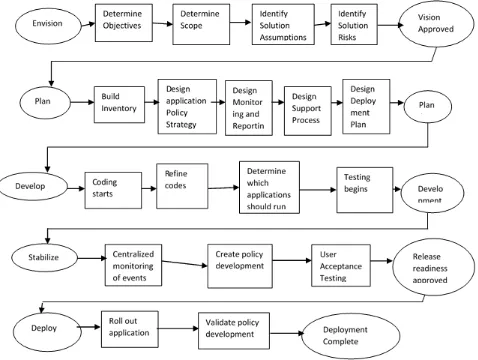
The process for deploying the application whitelisting into an organization follows the Microsoft Solutions Framework (MSF) methodology. This describes a five phase process progressing from solution envisioning and requirements gathering through design, testing and into deployment. As the actual “deployment” of the application is trivial but the
ongoing maintenance of the application is so critical to its success.
These phases are summarized below and are described in detail in figure 1.
5.1
Proposed Whitelisting Application
Blacklisting as a security measure in a network has been around for some time now and it uses the default allow approach. This approach tries to prevent or block the running of untrusted and malicious programs and code. The emergence of whitelisting is not to entirely replace blacklisting but to complement it. It is for this reason that recognition was given to blacklisting when this proposed whitelisting application was being developed. [image:3.595.67.545.285.645.2]The system was developed to cater for both whitelisting and blacklisting. It was designed in such a way that even a whitelisted application can be blacklisted in the process of updating the whitelist, that is, if the administrator does not want to remove the application from the whitelist entirely.
Figure 1: Whitelisting Design and Deployment Process
5.2 Drawbacks of Existing Whitelisting
Applications
There are a number of Whitelisting Applications already on the market to choose from. Some of these include Microsoft AppLocker, Bit9 Parity, McAfee Application Control and Coretrace Bouncer.
There are however some gabs left by these existing Whitelisting Applications on the market. This research work has identified these gaps. This proposed application was developed to fill those gaps which include;
21 All the whitelisting applications that have been
researched into come in two or more packages. This means that one has to do many installations for the same application. For instance, one must have McAfee ePolicy Orchestrator (ePO) installed before McAfee Application Control can be configured. This issue has been taken care of by this application because it comes in just one package.
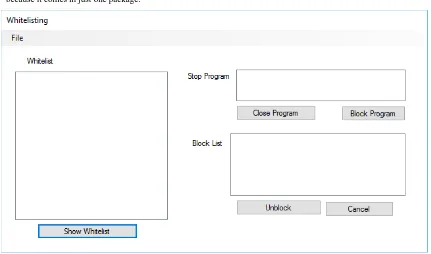
[image:4.595.84.515.151.405.2] Installation and configurations are complex with other whitelisting applications and not all administrators can do it without problems. This application is very easy to install and configure and administrators do not need any special training before they can install it.
Figure 2: Interface of Proposed Whitelisting Application
5.3
Functions of proposed Whitelisting
Application
Whitelisting is all about selecting the trusted applications and allowing them to run on the system while blocking everything else that is not among the whitelisted applications (this includes malicious code and programs). This application was made to implement this in the simplest way ever.
From the research that has been done about whitelisting, it is realized that whitelisting is all about “TRUST”. No administrator will whitelist an application if he does not trust that application. Before an application is whitelisted, it must be trusted and accepted by all within the organization.
The best way to ensure that people do not attempt to run unapproved programs within the network is by blocking every
opportunity that the user may have to gain access to that program. In view of this, the administrator should not even install an application if that application is not trusted. This is the surest way to ensuring that when whitelisting is eventually implanted, loose ends will be tied as much as possible.
To this end, whoever is going to install this application should ensure that only trusted applications are installed on your system.
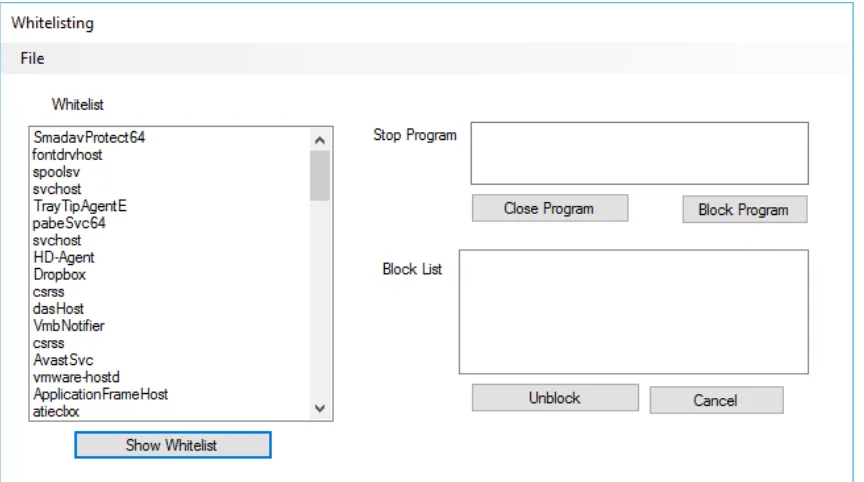
Just a click on “Show Whitelist” is enough to display all the programs installed into the system which means that those applications are whitelisted by default as illustrated in figure 3. This is the simplest way of whitelisting ever. No need for any complex configurations.
22
Figure 3: Whitelisted Applications Displayed
One other unique feature about this application is that, even a whitelisted application can be blocked if the administrator does not want to uninstall it. The simplest way to do this is just by selecting such a program from the list and then block it through the “Block Program” button. This means that the proposed Whitelisting Application has both whitelisting and blacklisting functionalities.
It is also very easy to add an application to the whitelist. An application can be added just by installing such an application and refreshing the whitelist. This this the easiest way ever. Also, a whitelisted application that has been blocked or blacklisted by mistake can be unblocked through the “Unblock” button.
A message will always be displayed if a user tries to run an application that is not whitelisted as in figure 4.
Figure 4: Trying to run an application that is not whitelisted
6.
CONCLUSION
The problem of malware threats is worrying and there is no sign of the numbers coming down any time soon. While heuristic techniques and new signatures are being developed every day, the traditional security protection techniques are struggling to keep up. Though there is not a technology especially in computer security that can pride itself as a universal remedy, undoubtedly, application whitelisting is not a misinformation.
In this research work, an application has been developed which can easily be used to implement whitelisting as compared to other existing whitelisting applications. This was
successfully done and tested and from all indications, application whitelisting seem to be the better solution. The complex and rigorous configuration of other whitelisting applications such as McAfee Application Control is absent with this application, the time taken to install and configure other whitelisting applications has been cut down considerably, and the application also comes in just one package unlike others such Application Control which comes in more than one package.
Though application whitelisting is still not very popular, it has a future going forward. Organizations will prefer whitelisting to blacklisting even though, it is not meant to entirely replace blacklisting.
7.
REFERENCES
[1] Sophos. (2010, May 24). Retrieved February 10, 2015, from http://www.flickr.com/photos/50473116@N05/.
[2] Brian, K. (2010, August 5). crimepack-packed with hard
lessons. Retrieved from
http://krebsonsecurity.com/2010/08/crimepack-packedwith-hard-lessons/
[3] PandaLabs. (2011). Anual Security Report. Califonia: The Sacramento Bee.
[4] NIST. (2013). Guidelines for managing the security of mobile devices in the enterprise. .
[5] Micro, T. (2013, January 28). Repeating history.
Retrieved March 7, 2015, from
http://www.trendmicro.com/cloud- content/us/pdfs/security-intelligence/reports/rpt-repeating-history.pdf
[6] Ruggiero, P., & Foote, J. (2011). Cyber threats to mobile phones . United States Computer Emergency Readiness Team.
23 [8] Liang, C., Machiraju, s., & Chen, H. (2009, August 17).
Defending against sensor-sniffing attacks on mobile phones. Mobiheld, 31-36.
[9] Pareek, H., Romana, S., & Eswari, P. (2012). Application whitelisting approaches and challenge. International Journal of Computer Science Engineering and Information Technology, 13-18.
[10]Carvey, H. (2007). Windows forensic analysis toolkit. Burlington, MA: Syngress Publishing Inc.
[11]Federal Trade Commission. (2009, June 25). Ftc settles with two defendants in bogus computer scan case.
Retrieved from
http://www.ftc.gov/opa/2009/06/winsoftware.shtm
[12]Egele, M., Kirda, E., & Kruegel, C. (2009). Mitigating drive-by download attacks: chanllenges and open problems. Open research problems in network security (p. seclab.nu/static/publications/inetsec2009dbd.pdf). Berlin: Springer.
[13]Liston, K. (2010, November 3). SANS ISE InfoSec
Forums. Retrieved from
https://isc.sans.edu/forums/diary/Defeating+Driveby+Do wnloads+in+Windows/9880/