Making Web-based Learning Adaptive
Muan Hong Ng1, Pat Maier2, Ray Armstrong3 and Wendy Hall1
1Intelligence, Agents and Multimedia Research, University of Southampton, SO17 1BJ Southampton, United Kingdom.
E-mail: {mhn99r, wh}@ecs.soton.ac.uk 2 Center of Learning and Teaching, University of Southampton,
SO17 1BJ Southampton, United Kingdom. E-mail: [email protected]
3 Rheumatology Unit, Mail Point 78, Southampton General Hospital, SO16 6YD, Southampton, United Kingdom.
E-mail: [email protected]
Abstract: This work stems from a project funded by the Arthritis Research Campaign
(ARC) to develop a web site, JointZone, for the study of Rheumatology for both undergraduate medical students and practicing doctors. The educational application incorporates both declarative and procedural knowledge, providing students with a chance to acquire knowledge on rheumatic disorders as well as develop clinical reasoning skills through a series of graded case studies. In order to enhance learning and reduce cognitive overload, which can be associated with hypermedia environments, adaptive hypermedia techniques (Brusilovsky 2001) have been integrated into the core of a web-based learning environment. This paper discusses the adaptive features employed and the pedagogical rationale involved in developing the web site.
1. Introduction
disorientation. Since we are using a closed corpus of information, we are able to collect information from the user on entry which is used to develop a supportive learning environment through adaptive hypermedia techniques.
Three major roles have been involved in the development of this project to encourage effective web-based learning. There is the web author, whose major responsibility is to develop a coherent information model employing adaptive hypermedia techniques, changing a static website into a dynamic one with tailored links and navigational aids to enhance orientation and reduce cognitive load. There is the domain expert, whose role is to provide information (declarative knowledge) on various topics within the domain, and learning material that encourage readers to structure this knowledge by constructing relations between pieces of information (structural knowledge). In addition, an opportunity is provided for readers to interpret various elements within a virtual clinical interview (procedural knowledge), emulating the activity of an expert practitioner (Jonassen 1991). Finally, there is the education expert, whose role is to understand the structure of the domain, anticipate the needs of readers and their potential understanding of the content at any given point. This role offers advice on learning support and scaffolding strategies that enhance readers’ ability to develop their current schemas, construct new ones and develop cognitive skills that allow them to apply the knowledge they have within their professional context.
In this paper we shall first outline the implementation of JointZone and our pedagogical approach in developing readers’ procedural knowledge through a cognitive apprenticeship model. Then we shall explain the adaptive mechanism employed in JointZone.
2. Implementation
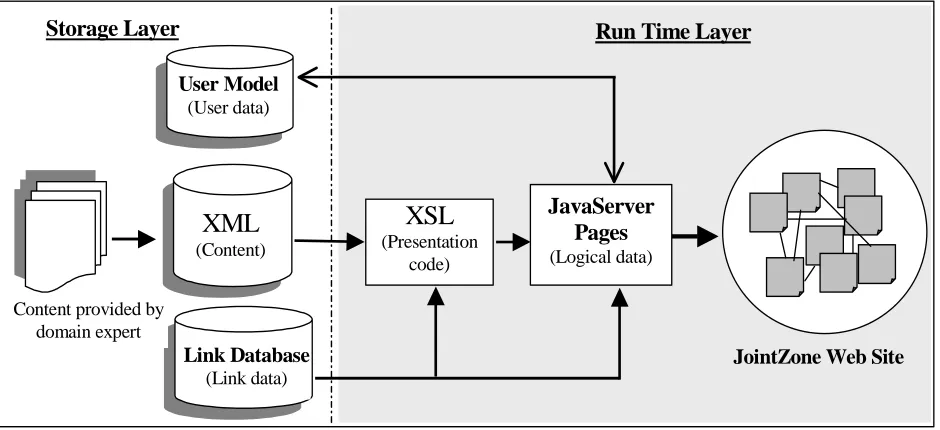
When constructing a framework for the JointZone application, an information model (see Fig. 1) was developed to feature three types of ’separation’ (as described in (Lowe & Hall 1999, p.67)) namely: the separation of presentation code from information (content), the separation of links from content, and the separation of logic from information.
[image:2.612.68.538.403.618.2]These threefeatures were taken into consideration in the design in order to reduce the authoring effort by re-using the resources and to facilitate the maintenance of the application. As shown in Fig. 1, the information model outlines the different entities in the application (content, user data, link data, presentation code and logical data) and they are implemented using different web technology to emulate the notion of separation of concerns.
Figure 1: The information model of the JointZone application
The latest web technologies such as XML1, XSL2 and JavaServer Pages have been used to implement the model. XML is used to store and structure the content while XSL is responsible for its presentation style. This allows data to be separated from information and encourages information re-use. For example, the same copy of XSL style sheet
[1] XML (Extensible Markup Language) is the markup language that provides a mechanism for inventing new elements.
[2] XSL (Extensible Stylesheet Language) is the style sheet that renders the presentation of XML on a web browser.
XML
(Content)
XSL
(Presentationcode)
JavaServer
Pages
(Logical data)
User Model
(User data)
Link Database
(Link data)
Storage Layer
Run Time Layer
JointZone Web Site
can be used to display more than one XML page. Likewise, only one copy of XML content is maintained even if it is presented in different ways in the browser. On the other hand, the logical bits of the web site, i.e. session tracking of users’ activity, the adaptivity engine and the search mechanism have been implemented using JavaServer Pages (JSP). The JSP technology allows the integration of Java codes into HTML pages to facilitate dynamic content generation, which makes the adaptation of links and contents possible. In short, all the components described above contribute to the notion of separation of concern, which facilitates maintenance.
We employ link databases or linkbases (Hall et al. 1996) to store links separately from the documents to which they refer. This implies the separation of links from content. Links are not only a means to traverse the web site but also embody the semantic relationship between the nodes (web pages). Proper link management therefore is essential for the orientation and usability of the application. From the perspective of learning, good management of links can reduce users’ cognitive overload that can result from poor orientation and navigation facilities. Hence we employ the use of different types of links to better manage the linking of information pieces. We adopted the following link taxonomy from (Lowe 1996, p. 33):
Structural links illustrate the structural layout of the web site. These include ‘jump’ links within a page to provide direct access to page fragments, ‘next’ and ‘previous’ page links that ensure coherency between the documents, and the provision of the ‘table of contents’ to give a meaningful overview of the information site.
Referential links are essentially glossary links that relate a word in context to its definition. The main difference between structural links and referential links is in their linking mechanism. Referential links are abstracted from the idea of generic linking (Hall et al. 1996) where links are not embedded inside the documents but stored in the link databases. They can appear anywhere in any document where a glossary word exists. Hence these links are not handcrafted but automatically generated using an offline pre-processing mechanism, another feature that eases authoring effort. The glossary links are highlighted in green and are resolved in real time from the link database once followed by the users. The effect will be a pop up window explaining the word that a user has selected. From the learning perspective, the glossary links are useful for learners to expand their knowledge of the terminology within the knowledge domain.
The idea of generating associative links comes from the usual phenomenon of users browsing in the current context to find more information about a particular concept. For example, when users are reading a document or solving a problem that concerns concept ‘X’, links to other documents are suggested, which they could find out more about ‘X’ in other documents (Lowe & Hall 1999). Hence, these links are called associative links because they associate two or more documents based on a common concept. Associative links are stored in a linkbase where each of them is indexed or retrieved based on a keyword or concept. From a learning perspective, this link type is used for goal directed learning where the user will search on a concept to find a series of related documents.
3. Learning
Issues
JointZone provides a rich source of material to enrich users' domain (declarative) knowledge in: basic science, rheumatic disorders, approach to patient, investigation and disease management. This network of information can be used by all readers in a browsing or goal-directed learning mode and is suitable for medical students and practising doctors. Information can be found using the site's internal search engine or selecting sections from the side menu bar to reveal documents, and as documents are selected, their linked structure becomes visible on the side menu. However, domain competence is more than domain knowledge, it also comprises a whole range of skills and for medicine, skills based competence is vital. These skills are: a) physical, e.g. equipment and procedures and, b) cognitive, e.g. analysis, interpretation and decision-making. It is the cognitive skills that demand a more sophisticated learning process if they are to develop (Kinshuk 2001) and with adaptive hypermedia mechanisms we are able to match the content level with the student's knowledge through interactive case studies. A case study approach was adopted for JointZone as it can holistically represent the complexity of clinical reasoning. Students are then able to develop their procedural knowledge, which elaborates how doctors approach problems, interpret clinical information and make decisions (DesCoteaux & Harasym 1998).
3.1 Developing Cognitive Skills through Procedural Knowledge
in JointZone provide clinical medical education that develops students’ clinical reasoning skills within the domain of Rheumatology.
The advanced case studies were developed to encompass a wide range of information available in the clinical context. These were generated following a heuristic analysis of the clinical decision making process by an expert practitioner. Our analysis reflects the cognitive skills identified by Nkanginieme (Nkanginieme 1997), namely that physicians: a) obtain and recognise symptoms in the patient, b) identify the appropriate system involved, c) speculate on the pathological processes, d) differentiate pathological processes, e) identify the possible causes of the pathology, f) evaluate all pieces of information and make a clinical diagnosis. To support student development of these cognitive skills, explicit procedural steps for the clinical interview were presented: the referral letter, patient history, the examination, investigations, diagnosis and clinical management. On working through these stages, students are confronted with a wide range of options, such as results from investigations: diagnostic imaging, haematology, immunology, microbiology, serology, and synovial fluid aspiration, which give students information pertinent to the case under study. The clinical observations they gather by working through the case study are recorded so the student has ongoing access to this information as they proceed. At the diagnostic stage, students are given a complete record of the examination findings and investigations. If the system feels insufficient or inappropriate information has been gathered this will be pointed out to the student. From a list of possible diagnoses, students select their preference based on their interpretation of clinical information gathered. They then obtain subsequent feedback on why that diagnosis is likely to be appropriate. This feedback, and the feedback across all case studies, makes explicit the expert’s heuristics of clinical reasoning. This is an attempt to share that clinical expertise through a modelling or a cognitive apprenticeship (Collins et al. 1989) approach, and it displays the underlying principles and rationale of the clinical diagnosis and completes the process. This enables students to develop their cognitive skills, providing a framework for problem solving and hence clinical reasoning.
Case studies for beginners and intermediate level students are much narrower in scope and the choices are more restricted. However, as with the advanced case studies, the feedback mechanism serves to model expert thinking in how to solve these problems. The goal for beginner case studies is to recognise the value of particular pieces of clinical information, identify the pertinent investigations and make a diagnosis. For the intermediate students, the goal is to reassess a case in which the original diagnosis is under question. For both these levels, students are given scores on their performance in reaching a diagnosis. A random selection of items is penalised. Through these case studies, students learn to recognise and interpret the value and relevance of disparate pieces of information that are integral to any clinical scenario. In this way students construct their own understanding of the relationship between the pieces of information rather than having it imposed upon them. This encourages a cognitive flexibility (Spiro et al. 1992) that is vital for the complex world of the physician.
3.2 Bridging the Declarative and Procedural Knowledge Adaptively
At the end of all case studies, students have access to an ’adaptive reading room’ (see section 4) where links to pertinent domain knowledge are made available. This adaptivity feature gives advanced users a wider range of pertinent documents than those with less knowledge. An example of this is for the concept ’osteoporosis’, advanced students have access to the following sub-concepts: osteoporosis, crush fracture, densitometry, bone scan, and corticosteriod while intermediate students have access to osteoporosis, crush fracture and densitometry, and beginners have access simply to osteoporosis. However, there is no restriction to information for any user group should they wish to investigate further. The list of suggested reading titles is identified for each case study and presented adaptively. Each document title in the list will indicate the amount of attention that reader has already paid to the particular document through a green icon indicator alongside the title, (see Section 4). Hence, the ‘adaptive reading room’ and the textual glossary links throughout all cases act as a bridge between declarative and procedural knowledge in the application.
4. Integrating Adaptive Features
We have briefly mentioned adaptive case studies (for beginner, intermediate and advanced level) and the adaptive reading room in the previous section. For some background, adaptive hypermedia (AH) (Brusilovsky 2001) systems essentially revolve around the idea of adapting information to users' differences (knowledge, background, interest etc). One of its aims is to protect users from getting lost in hyperspace by limiting their browsing space or providing advice. In our case, the integration of adaptive hypermedia will hopefully counteract some of the negative effects of self-exploratory learning on the web.
several ways. Firstly, their knowledge level, where information is presented based on users’ current level of knowledge. Each user’s knowledge level is evaluated by means of either a prior knowledge test upon initial entry to the application or a self-selecting level based on registration details. Secondly, the user's browsing history provides personalized browsing aids for individuals, so that they can concentrate on pages they have not read adequately. The browsing history is a record kept by the system to keep track of pages that have been read by the users and how much time they have spent on those pages. The system estimates the degree of effort a user has spent on a particular page by comparing an optimal reading time (set by the system on each page) with the actual time spent by the user on the page. In order to make the estimation more accurate, the system will consider the individual’s effective reading speed (Jackson & McClelland 1979) and the length of the page when estimating the effort that has been spent on each page (Ng et al. 2001). Thirdly, the goal of the user is employed, by pointing users to pages based on their selected reading goals. These short-term goals are captured explicitly from the users’ input, when they select a reading goal. From a learning perspective, short-term goals provide guidance in a self-exploratory learning environment where the user’s declarative knowledge of the domain can be enhanced. Instead of free browsing, users can therefore focus on a topic or goal.
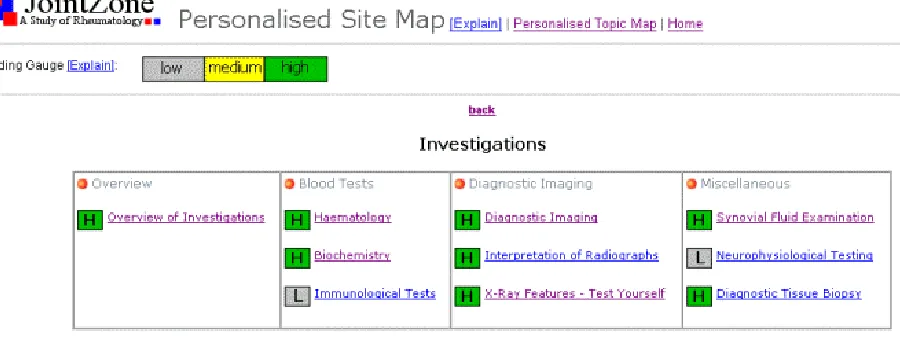
[image:5.612.89.539.438.609.2]In JointZone we have used adaptive features based on users’ knowledge level, browsing history and reading goals mentioned above. In adaptive case studies (as explain in Section 3.1), users are directed to the graded case study section based on their current knowledge level. The personalised site map (see Fig. 2) provides an overview of the web site showing all the web pages and their physical layout (headings, subheadings) on the site. Once a user has registered with the system, their browsing history and time spent on each document is logged, enabling this personalised site map to be presented. Pages are annotated with a three-color-band code to indicate their reading gauge – a visual representation of the amount of time a user has spent reading individual pages. The personalised topic map is similar to the personalised site map, but instead of showing all pages on the site, it shows only the pages that are related to the current reading topic. To initiate this, a user is required to choose a reading topic from a pull down menu, for example ‘gout’. A topic-based map will then be presented showing only pages that are related to the reading topic and the pages are highlighted adaptively according to the user’s browsing history. Finally, the adaptive reading room supports user-driven tasks. Unlike the two navigational maps mentioned above, which apply to general free browsing, adaptive reading hints are integrated with the interactive case studies. When a user has finished working on a case study, he or she might want to know more about the concepts related to that case study. The adaptive reading room hence offers a reading list that is adapted to the user’s knowledge level, as described in section 3.2.
Figure 2: A partial screen shot of the personalised site map
6. Conclusion and Work
• provide a personalised information delivery system that through adaptive hypermedia technique, allowed users to maintain an overview of the documents they had read or not read. We have also linked the procedural and declarative knowledge in the application adaptively, to prevent cognitive overload and facilitate the process of learning.
• design learning materials that develop medical students’ cognitive skills in clinical reasoning via, graded interactive case studies.
• reduce authoring effort and increase maintainability of the application through the separation of concerns in authoring.
• increase the usability and accessibility of information through various linking strategies.
A comprehensive evaluation of the adaptive features is currently being undertaken to scrutinize their effectiveness in terms of learning and information access. This evaluation will give us some insights into whether adaptive web-based learning really benefits the students or whether it is a mere technology-driven technique in a learning paradigm.
References
1. Brusilovsky, P. (2001). Adaptive Hypermedia. User Modeling and User Adapted Interaction, Kluwer Academic Publishers, vol 11, 87-110.
2. Collins, A., Brown, J. S., & Newman, S. (1989). Cognitive Apprenticeship: Teaching the Craft of Reading, Writing & Mathematics. In L. B. Resnick (Ed.), Knowing, Learning and Instruction: Essays in honor of Robert Glaser. Hillsdale, New Jersey: Erlbaum.
3. DesCoteaux, J. G. & Harasym, P.H. (1998). Procedural Knowledge! How important is it to converting novices to experts? The Bulletin, available from: http://www.med.ucalgary.ca/education/ume/thought-exchange/Procedural.htm 4(6), March. 4. Duchastel, P. (1989). Formal and Informal Learning with Hypermedia. In D. H. Jonassen and H. Mandl (Eds). Designing
Hypermedia for Learning, Springer-Verlag, Berlin, Heidelberg, New York.
5. Duchastel P. (1992). Towards Methodologies for Building Knowledge-Based Instructional Systems. Instructional Science, v20 n5-6, 349-58.
6. Garzotto, F. & Paolini, P. (1997). Systematic Evaluation of Hypermedia Applications. The Eighth ACM Conference on Hypertext, Southampton, UK.
7. Greening, T. (1998). Scaffolding for Success in Problem-Based Learning. Med Educ Online. Available at http://www.med-ed-online.org/issue2.htm#v3, 3(4).
8. Hall, W., Davis, H. & Hutchings, G. (1996). Rethinking Hypermedia The Microcosm Approach, Kluwer Academic Publishers, Dordrecht, Netherland.
9. Jackson, M. D. & McClelland, J.L. (1979). Processing Determinants of Reading Speed. Journal of Experimental Psychology: General, 108, 151-181.
10. Jonassen D. (1991). Objectivism versus constructivism: Do we need a new philosophical paradigm? Educational Technology, Research and Development, 39, 3, 5-14.
11. Kinshuk. (2001). Intelligent Learning Systems for Cognitive Skills Development. Paper presented at the Informing Science: Challenges to Informing Clients: A Transdiciplinary Approach, Krakow, Poland. Available from: http://ecommerce.lebow.drexel.edu/eli/pdf/KinshukEBKIntelLearn.pdf
12. Lowe, D. & Hall, W. (1999). Hypermedia and the Web – An engineering Approach, John Wileys & Sons
13. Mayes,T., Kibby, M., & Anderson, T. (1990). Learning about Learning from Hypertext. In D.H. Jonassen and H. Mandl (Eds.) Designing Hypertext /Hypermedia for Learning, Heidelburg, Springer-Verlag.
14. Ng, M., Hall, W., Maier, P. & Armstrong, R. (2002). Using Effective Reading Speed to Integrate Adaptivity into Web-based Learning. To be published at the 2nd International Conference on Adaptive Hypermedia and Adaptive Web Based Systems, Malaga, Spain.
15. Nkanginieme, K. E. O. (1997). Clinical Diagnosis as a Dynamic Cognitive Process: Application of Bloom’s Taxonomy for Educational Objectives in the Cognitive Domain. Med Educ Online. Available from: URL http://www.med-ed-online.org/issue2.htm#v2, 2(1).
16. ReadingSoft.com available at http://www.readingsoft.com
17. Spiro, R. J., Feltovich, P. J., Jacobson, M. J., & Coulson, R. L. (1992). Cognitive flexibility, constructivism and hypertext: Random access instruction for advanced knowledge acquisition in ill-structured domains. In T. Duffy & D. Jonassen (Eds.), Constructivism and the Technology of Instruction, Hillsdale, NJ: Erlbaum.
18. Thuring, M., Hannemann, J. & Haake, J. M. (1995). Hypermedia and Cognition: Designing for Comprehension. Communication of ACM, Vol.38, No.8, August.