1
Integrating Second Life into a Masters’ distance learning programme in Applied
Linguistics and TESOL
Abstract
This is a case study of incorporating Second Life (SL) into a MA distance learning programme in Applied Linguistics and TESOL at the School of Education, the University of Leicester, UK. The purpose of this innovation was to enable staff and students to consider the applicability of SL to their own language teaching situations. The activities that students undertook in SL involved training in-world and observing language teaching classes offered by Languagelab.com (http://www.languagelab.com/en). Students also shared and reflected on their experiences on a Blackboard discussion board, moderated by an Education tutor. Six Education students took part in this pilot. The research was conducted as part of the JISC-funded project called DUCKLING (Delivering University Curricula: Knowledge, Learning and Innovation Gains, http://www.le.ac.uk/duckling). We found that SL enabled the students to apply theory in a practical setting and encouraged them to consider issues in applying SL to their own teaching contexts. The small group of distance learning students also enjoyed the opportunities to interact in SL with their tutors and peers.
The programme
The School of Education at the University of Leicester started delivering a Masters’ distance learning programme in Applied Linguistics and TESOL in 1995. The programme is aimed at graduate teachers with at least two years of English Language Teaching (ELT) experience, who want to further their academic and professional development. It involves three 30-credit modules, two options modules (30 credits in total) and a 60-credit dissertation. It attracts about 90 part-time students per year, and can be completed in 2.5 to 5 years. Almost all students are in employment throughout their studies.
In September 2008, the Education course team began to deliver course materials online via Blackboard, the University of Leicester’s Virtual Learning Environment (VLE). Blackboard’s discussion board has been used since that date. Each module has a forum where students can raise generic questions and discuss the module. Discussions are facilitated by an e-moderator.
Through consultation with staff, students and employers at the beginning of DUCKLING in early 2009, the Education team identified five key challenges in curriculum design and delivery, most of which are common in distance and work-based learning:
Improving learner engagement with materials by bringing the materials to life and offering a variety of teaching approaches
Improving learner support by offering enhanced guidance, support and feedback in a variety of media formats
Enhancing flexibility and mobility in programmes aimed primarily at time-poor, work-based learners
2
Reducing learner isolation through the provision of additional opportunities for student-student and student-student-tutor interactions
Enabling skills development and transferring theory into practice for work-based learners The Education team has focused on enhancing the overall learning experience of distance and work-based learners on this MA programme through incorporating appropriately four technologies: podcasting, Second Life (SL), e-book readers and Wimba Voice Board. In this DUCKLING case study, we report on the experience for staff and students to incorporate SL into this MA programme.
The Second Life pilot
Purpose of using Second LifeAn interview with an Education tutor showed that the team had three purposes in integrating SL into this MA programme:
1. To generate more interactions with distance learners 2. To use a variety of teaching approaches to engage learners
3. To enable students to transfer theories into practice by exposing them to a new technology which they can adopt in their own teaching contexts
Design of a SL-tivity
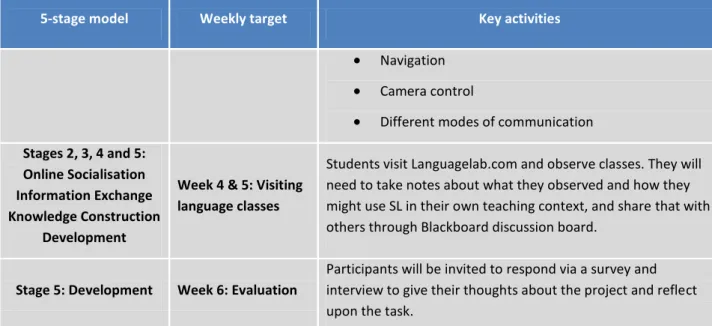
A structured activity in SL (SL-tivity) was designed by the Education team using Salmon’s (2002) 5-stage model to enable students to consider the applicability of SL to their own teaching situations. The SL-tivity involved students in observing language teaching classes in SL that were offered by Languagelab.com (http://www.languagelab.com/en), and in sharing and reflecting on their experiences. This SL-tivity was trialled between October and November 2009 with six Education students studying this MA programme. The SL-tivity is shown in Table 1 (also available from DUCKLING website http://tinyurl.com/ygjxfz2).
5-stage model Weekly target Key activities
Stage 1 & 2: Access and Motivation
Online Socialisation
Week 1: Preparation
Sharing useful information/resources/ links about Second Life through Blackboard discussion board
Sharing information on our experiences in SL and questions if students have no experience of SL
At the end of this stage students can decide whether they want to proceed or not.
Week 2: Getting started
Students using the training guide and resources to acquaint themselves with SL and learning how to: log in, choose an avatar name, create an avatar, teleport, move and communicate. Week 3: Acquiring competence, improving confidence and motivation
A group training session in SL for students and staff led by DUCKLING learning technologists, aiming to assist in the acquisition of the following skills:
3
5-stage model Weekly target Key activities
Navigation Camera control
Different modes of communication Stages 2, 3, 4 and 5:
Online Socialisation Information Exchange Knowledge Construction
Development
Week 4 & 5: Visiting language classes
Students visit Languagelab.com and observe classes. They will need to take notes about what they observed and how they might use SL in their own teaching context, and share that with others through Blackboard discussion board.
Stage 5: Development Week 6: Evaluation
Participants will be invited to respond via a survey and interview to give their thoughts about the project and reflect upon the task.
Table 1: A SL-tivity developed for the Education students SL training
We provided training to students at two levels. Level 1: Learning individually
At Level 1, the focus is on helping individuals to gain access to SL, create an avatar and choose its avatar name, log on, teleport, and use movement and chatting tools. We developed a DUCKLING training guide for participants, including YouTube videos that demonstrate the basic skills, and another guide for participants to set up audio and video systems in SL. Both guides (available from DUCKLING website http://tinyurl.com/ygjxfz2), were sent to students via email before the SL pilot. In the SL-tivity, Level 1 was built into activities in Week 2: Getting started.
Level 2: Learning in a group in-world
At Level 2, the focus is on acquiring competence in more sophisticated in-world skills such as movement, gestures, navigation, camera control, private chat and searching. We provided a one-hour training session for the Education students, delivered in-world by a DUCKLING technologist. In the SL-tivity, Level 2 was built into activities in Week 3: Acquiring competence, improving
confidence and motivation.
4
Picture 1: Practising movements and navigation in the in-world training
Picture 2: Practising sit-down and stand-up in the in-world training
Research methodology
Data collection methods
A questionnaire (see Appendix 1) was sent to six Education students via email after the SL-tivity, to collect details of their experience throughout the SL pilot. Four of them completed and returned it.
Interviews with four of the Education students and a tutor about their use of SL were conducted using cognitive mapping (Bryson et al., 2004) after the survey.
Additionally, staff views on SL were collected with another Education tutor after the pilot through informal discussions.
Data analysis methods 1) Descriptive statistics
Quantitative data collected from the survey were transferred into an Excel spreadsheet and descriptive statistics were compiled for answers to closed questions.
5
Qualitative data gathered from the survey were coded using data-driven (inductive) coding (Boyatzis, 1998) and analysed using thematic analysis (Boyatzis, 1998; Joffe and Yardley, 2004) to identify categories and combine categories into themes.
3) Cognitive mapping
This method is based on Kelly’s (1955) theory of personal constructs; its rationale is that “People make sense of their lives and situations by constructing, elaborating, revisiting and re-revising a system of interconnected concepts (more formally called ‘constructs’)” (Bryson et al., 2004, p.21). It was used to capture a causal map of a student’s or tutor’s views, perceptions and experiences in SL. In a causal map, ideas and actions are linked with one another through the use of arrows that indicate how one idea or action leads to another. The maps were created using Decision Explorer software
(http://www.banxia.com/demain.html).
Figure 1 shows a fragment of a causal map created from an interview with an Education student regarding her experience in SL. The arrow from Concept 140 to 143 can be interpreted as, ‘people look for alternatives for learning English’ so‘SL provides a quite viable alternative for some people’.
Figure 1: A fragment of a causal map developed from an interview with an Education student regarding her views about SL
In this SL study, interviews with students focused on one question: ‘In what aspects did you find this SL activity useful and relevant to your study of this MA programme?’ For each interview, a causal map was developed that summarised their views, perceptions and experiences in SL. See Appendix 2 for a complete causal map based on an interview with a student about SL. Additionally, using the same method, a causal map was developed based on an interview with an Education tutor.
The Domain and Central analyses provided by Decision Explorer were applied to the four students’ causal maps. In cognitive mapping, the Domain analysis calculates “the total number of in arrows and out arrows from each node” (Bryson et al. 2004, p. 324). The result of the Domain analysis indicates the richness of meaning of each node. A node with the highest score indicates that it is the “nub of the issue” (Bryson et al. 2004, p. 324) of that map. The Central analysis calculates the centrality of a node within the map. A higher Central analysis score implies that the node is of structural significance to the map. Both Domain and Central analyses are used to detect the most important or ‘busiest’ concepts. These concepts were compared and contrasted with the themes that emerged from the SL survey. Summary of research methods
6
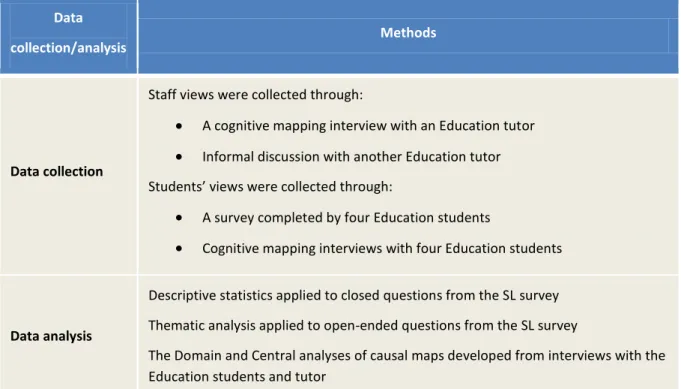
Data collection/analysis
Methods
Data collection
Staff views were collected through:
A cognitive mapping interview with an Education tutor Informal discussion with another Education tutor Students’ views were collected through:
A survey completed by four Education students
Cognitive mapping interviews with four Education students
Data analysis
Descriptive statistics applied to closed questions from the SL survey Thematic analysis applied to open-ended questions from the SL survey
The Domain and Central analyses of causal maps developed from interviews with the Education students and tutor
Table 2: Summary of research methods adopted in this SL study
Results
The findings that we discuss were indicative, as they were generated from a small-scale pilot, in which six Education students and two tutors were involved.
Transferring theories into practice
All six Education students considered this SL activity useful and relevant to their study. They valued the opportunity to gain understanding of teaching EFL in a virtual world. In response to the SL survey, four students agreed that they gained understanding of teaching EFL in a virtual world which could be helpful for their career; three students agreed that SL offered them an opportunity to become familiar with a new technology which they could adopt in their own teaching.
All six students reflected deeply and extensively in the survey and interviews about the advantages and disadvantages of using SL for language teaching and learning, and the difficulties in and barriers to using SL for their own teaching. One student concluded in the survey:
I was introduced to this technology that I wouldn’t have otherwise been introduced to. It got my creative juices flowing about the future of ESL and the myriad of tools out there that a practising teacher (reliant on texts and traditional mediums of teaching) would rarely be exposed to.
These findings suggest that this SL activity enabled skills development and transfer of theory into practice, one of the challenges faced by the students and course team.
Enabling interactions
All six Education students considered that this SL-tivity enabled interactions with tutors and peers. In response to the survey, four students agreed that the activityenabled interaction with other students on the course; and three students agreed that this activity enabled interaction with the tutors, through the Blackboard discussion board.
7
In the survey, students offered ideas about how SL can be used to support this distance learning programme in future. One suggested,
Some social events such as those run in the recent Learning Futures conference would have been a good idea.
Interviews with two Education students offered additional insight into SL’s potential for distance learning: SL offers distance learners a virtual place to meet other students and discuss course related issues SL enables social networking
SL combined with Blackboard discussion plays a role in pacing student learning
These findings indicate that this SL pilot addressed the need for generating more student-student and student-tutor interactions, another challenge faced by the Education students and staff.
Training
All six Education students had never used SL before this project; and four of them had never played computer games. The in-world training was considered useful by four Education students. In response to the survey, three of them valued the opportunities for furtherpractice, enhancing basic skills, learning in a group and interacting and having fun with the trainer and peers. These three students also found that having an expert guiding them in what to do and how to do it was a lot easier than learning on their own by reading the training guide.
Three students reported in the survey that they used the training guide before the in-world training and found it useful. One commented, “As a beginner, it’s important to know where to start.”
In response to the survey, students also offered suggestions on how we might improve the training were we to run this SL-tivity again. Some student quotes are given below:
Multi-level workshops for participants – gamers wouldn’t need as much training as someone such as myself. Perhaps they could then be assigned to other students in their geographical areas to interact with.
I found it useful, but during my session one or two learners seemed to be having technical problems that meant the whole session was held up. I think perhaps we need to separate those who are not very computer literate from those that are for any training sessions.
I think further sessions would have been helpful so that we could get to more technical aspects of SL. The problem is always the issue of time difference. Divide learners into levels (basic,
intermediate, advanced) and have training sessions.
I don’t think I needed that much help but it was a good way to make sure of the basics and have a few tips on important skills such as teleporting. However, I’m not sure I really needed a training session as such. If we had just met for a virtual party or something I think that could have worked as well for practising some of the basic skills.
As these quotes suggested, students came with different technological backgrounds. Some were computer literate and didn’t find the training very helpful in term of improving technical skills. But some struggled with basic skills and demanded for more training. Providing training to learners of different levels, as students suggested, might be the solution for future training.
8
Challenges and limitations
Low take-up
The six Education students that we engaged throughout the project did not report any significant problems when using SL. They all considered SL relatively easy to learn in the survey or interviews. However, we had a low take-up rate for this pilot. At the beginning of the project, 18 students expressed interest, but only six students participated throughout the project. An email was sent to the 12 non-participating students to find out their reasons for not taking part. Eight students responded to this mail and their reasons were grouped into five categories:
Lack of time: six students mentioned causes such as having a huge workload at the time the project was running; being away on holiday during the project period; or the timing of the project
conflicted with other commitments in life
Technical problems: three students mentioned problems such as the audio system not working; access to SL being banned from the workplace as this student was working for the government in Saudi Arabia; technical problem experienced by another student in Oman
Discomfort with SL features: two students mentioned either difficulty in orienting in SL or having negative perceptions about SL after seeing some TV programmes
Logistic issues: one student had a time zone difference that prevented him/her from attending any of the training sessions.
Anxiety
Additionally, in response to the SL survey, some students expressed anxiety or nervousness when using an unfamiliar environment for the first time and had difficulties in using some functions in SL.
For me it was anxiety with such an unfamiliar area and getting around the fact that people use SL to escape from life (although this wasn’t our purpose – every time I signed on and looked at the number of users it bothered me) I am sure this would be solved with continued use of SL and increased familiarity.
Mainly feeling a bit nervous and finding the experience of having people you don’t know or can’t see suddenly talking to you in real time. I didn’t find this so much of an issue in the Media Zoo but when I ventured into other parts of SL I found it a bit odd.
The main difficulties that I experienced was customising my avatar, I found it to be awkward and confusing.
Another interesting finding from the survey was that one student used local support.
I didn’t have problems because I have technical support in my house and I relied on that support to set me up. If I didn’t have this help, I may well have ticked YES.
These findings suggest that technical problems and discomfort with SL are major barriers that may prevent some students from using SL.
Student use SL at their own time
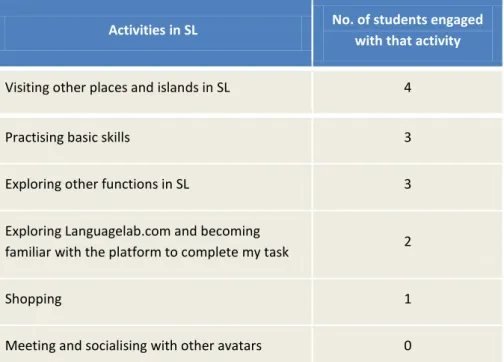
Other than participating in this SL-tivity, students did not use SL much in their own time. Only one student reported in the SL survey that he/she used SL a couple of times a week in his/her own time, and between
9
30 to 60 minutes each time. Three others reported that they had used SL in their own time but not often (a few times in total), and under 30 minutes each time, during the project period.
Table 3 summarised the activities that students were engaged with when they used SL in their own time.
Activities in SL No. of students engaged with that activity
Visiting other places and islands in SL 4
Practising basic skills 3
Exploring other functions in SL 3
Exploring Languagelab.com and becoming
familiar with the platform to complete my task 2
Shopping 1
Meeting and socialising with other avatars 0
Table 3: Summary of students’ activities students when using SL in their own time
One student told us in the survey that she lost interest in exploring SL as she couldn’t see its relevance to her study and profession.
I lost interest in visiting because I couldn’t really connect the usefulness of SL to my real life. I saw people wandering around but didn’t engage with them (Why would I?) In the end, I found it very time consuming and more of a pass time that anything that had academic or professional benefit to me. You can see why I need further training.
Another student offered suggestions in the survey about how we might link this SL-tivity more tightly to the course to sustain student use of SL throughout the programme.
It seems there’s a low take-up rate for this SL activity. Perhaps for future sessions, you might want to include SL activity as one of the structured activities in one of the modules of the MA to
encourage higher participation. As an incentive, you might even want to structure the SL activity being equivalent to two structured activities as I find that I’m spending quite a fair bit of time learning, using, and providing feedback about the activity.
These findings suggest that in order to sustain the use of SL for this MA programme, SL-tivities need to be designed and linked closely to the course materials or assessment.
Access issues
There are still considerable access barriers to effective use of SL for learning and teaching purposes. Examples include:
Access to SL within the university: Currently SL is not supported across the institution. As a result, staff and students can only use the tool at home or in the University of Leicester’s Media Zoo.
10
Access restricted by the organisation’s firewall: Access can be restricted by the organisation’s firewall which means students studying at a distance can experience access problems if they want to use SL during work hours.
Technical competence and confidence: Staff and students need a level of technical competence and confidence to use SL effectively.
Broadband and a high-specification graphics card: SL requires a broadband connection and a relatively high-specification graphics card, which puts it outside the reach of many of our distance learners.
Technical support and training: Using SL for learning and teaching purposes requires both staff and students to have considerable support, training and induction from learning technologists before staff and students are able to function effectively in the environment.
Recommendations
Exploiting existing resources
Our experience of collaborating with Languagelab.com on this pilot shows that it is feasible to use the affordances of SL without expending any resources on building new resources.
Using SL flexibly for distance learning
Our students valued the interaction and collaboration opportunities enabled by the SL activity, but they are distance learner: the synchronous nature of SL presented a challenge for managing all students together for the activity at any given time. For this reason, we think that SL can be effectively used in combination with an asynchronous communication platform (such as Blackboard). SL can be used as a resource for students to carry out study-related tasks in their own time, without requiring synchronous meetings in SL. In this example, the Education students went into SL individually, and could select from a wide range of times on a 24-hour schedule to observe EFL classes at Languagelab.com. All communication within the cohort took place asynchronously on the Blackboard discussion board. This approach makes SL a very flexible resource for distance learning.
Impact and sustainability
Some of the Education members of the team found it difficult to see the added value that SL offers to language teaching. The team considers SL to be an emerging technology, with a lot of future potential. However, the Education team plans to continue using SL for delivery of part of the optional Computer-Assisted Language Learning (CALL), and offering the SL-tivity as part of that module for future cohorts. However the use of SL in this module will create a requirement for support. In the trial, the DUCKLING teaching fellow provided the support. Without a teaching fellow, the team is considering recruitment an associate or e-moderator with the expertise.
Conclusions
This case study demonstrated integrating SL into a MA distance work-based programme in Applied Linguistics and TESOL, to widen the variety of teaching approaches. Indicative evidence showed that SL is an effective way of creating simulated environments that students would otherwise not experience. SL enabled the students to apply theory in a practical setting in a safe non-threatening way. The small group of students participating in the simulation enjoyed learning in this way and felt that it offered opportunities for distance learners to interact with their tutors and peers. The Education team’s approach to using SL in
11
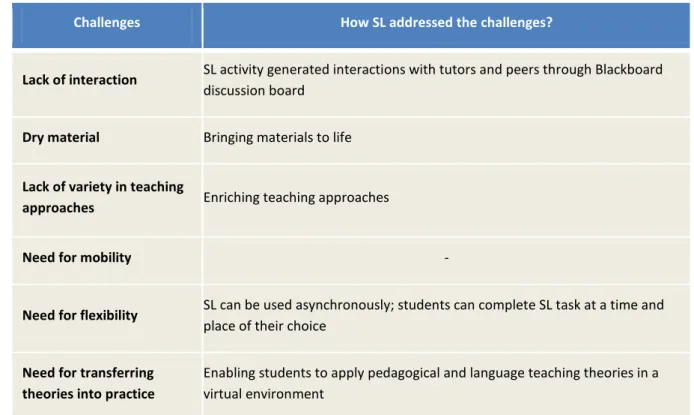
combination with an asynchronous communication platform (such as Blackboard) has proved to be effective and flexible for distance learning, but technical problems, discomfort with SL features and the need for technical support and training are challenges to sustained use of SL within this MA programme. Table 4 summarises how this SL intervention addressed the challenges faced in curriculum design and delivery that were identified by the Education team at the beginning of DUCKLING.
Challenges How SL addressed the challenges?
Lack of interaction SL activity generated interactions with tutors and peers through Blackboard discussion board
Dry material Bringing materials to life
Lack of variety in teaching
approaches Enriching teaching approaches
Need for mobility -
Need for flexibility SL can be used asynchronously; students can complete SL task at a time and place of their choice
Need for transferring theories into practice
Enabling students to apply pedagogical and language teaching theories in a virtual environment
12
References
Boyatzis, R. E. (1998). Transforming qualitative information: thematic analysis and code development. London: Sage.
Bryson, J. M., Ackermann, F., Eden, C. and Finn, C. B. (2004). Visible thinking: Unlocking causal mapping for practical business results. England: John Wiley & Sons, Ltd.
Joffe, H. and Yardley, L. (2004). Content and thematic analysis. In Research methods for clinical and health psychology, eds. D. F. Marks and L. Yardley, L., 56-68. London: Sage.
Kelly, G.(1955). The Psychology of Personal Constructs. New York: Norton.
13
Appendix 1: SL survey
1a. Had you used Second Life (SL) before this project?
Yes
No
1b. If you answered ‘Yes’, can you briefly tell us about your previous experience in SL? 2. Can you tell us about your engagement with computer games?
I play computer games a lot I play some computer games I never play computer games
3a. To what extent did you find this SL activity useful and relevant to your study? It was very useful and relevant
It was useful and relevant to some extent It wasn’t useful and relevant
It is potentially useful to future modules in the programme
3b. Which of the following statements were true for you? (You can choose more than one answer) It enabled interaction with the tutors
It enabled interaction with other students on the course
It offered opportunities to work collaboratively with other students It was a fun and enjoyable experience
It offered me an opportunity to become familiar with a new technology which I could adopt in my own teaching context
I gained understanding of teaching EFL in a virtual world which could be helpful for my career. Other positive aspects of the experience Please briefly explain:
3c. Do you have any suggestions about how we might improve this activity if we run it again? 3d. What do you think are the advantages of using SL for Language teaching and learning? 3e. What do you think are the disadvantages of using SL for Language teaching and learning?
3f. What do you perceive as the main difficulties or barriers to using SL in your own teaching context? 4a. How easy was it for you to learn to use SL?
14 Relatively easy
Relatively difficult Very difficult
4b. Can you tell us about any initial difficulties you experienced?
5a. Have you experienced any technical problems or difficulties when using SL?
Yes
No
5b. If you answered ‘Yes’, can you tell us about what technical problems or difficulties you experienced? 6a. Did you find the training session in SL useful?
Yes, it was useful No, it wasn’t useful
I didn’t attend the training session
6b. If you answered ‘Yes’, can you tell us about what you enjoyed the most in the training session? An opportunity to learn, practice and enhance basic skills
Having an expert guiding me what to do and how to do it is a lot easier than learning on my own and reading through the guide
I felt safe having an expert accompanying me through the learning journey (i.e. someone can rescue me if I fall into water or get lost)
I enjoyed learning in a group and having interaction and fun with the trainers and peers I enjoyed learning with other learners at the same level
I enjoyed the friendly, relaxed and supportive atmosphere Other comments, please briefly explain:
6c. If you found the training session in SL not useful, can you briefly explain why?
6d. Do you have any suggestions about how we might improve the training session if we run it again? 7a. Did you find the training guide useful?
15 No, it wasn’t useful
I didn’t use the training guide
7b. If you answered ‘Yes’, can you tell us about in what ways you found the training guide useful? (You can choose more than one answer)
As a beginner, it’s important to know where to start It is well structured. It tells me what to do step by step It tells me what the basic skills are required
I found the YouTube videos in the guide very useful for me to learn the basic skills Other comments, please briefly explain:
7c. If you found the training guide not useful, can you briefly explain why?
7d. Do you have any suggestions about how we might improve the training guide?
8a. How often do you enter SL in your own time (other than participating in the training and Languagelab sessions) since the start of this SL project?
Very often (i.e. most days)
Relatively often (i.e. a couple of times a week) Not often (i.e. a few times in total)
Other than attending the training and languagelab observation sessions, I never used SL in my own time
8b. How long do you stay in SL each time when you visit SL in your own time? Under 30 minutes
Between 30 to 60 minutes More than 60 minutes
Other than attending the training and LanguageLab sessions, I never used SL in my own time It depends Please briefly explain:
8c. When you entered SL in your own time, what activities you were engaged with? (You can choose more than one answer)
Exploring Languagelab.com, becoming familiar with the environment to complete my task Practising basic skills
16 Exploring other functions in SL
Visiting other places and islands in SL Meeting and socialising with other avatars Shopping
17