OGIP Calibration Memo CAL/GEN/92-015
How to Manage a Calibration Database
Michael F. Corcoran Code 662, NASA/GSFC, Greenbelt, MD 20771 Version: 2005 Nov 16SUMMARY
This document describes how to include new files into an existing Calibra-tion Database (CALDB). DocumentaCalibra-tion on how to install a local Caldb is covered in OGIP Calibration Memo “How to Install a Calibration Database” CAL/GEN/94-004.
Log of Significant Changes to this document
Release Sections Changed Brief Notes Date
1997 Jun 20 First Draft by Lorraine Breedon 2005 Nov 16 All Completely re-written by MFC
2006 Feb 08 4.2.1, 4.2.2 added example showing the explicit depen-dence of udcifconflict checking on the order of the CBDkeywords
Contents
1 Introduction 1
2 Including CALDB Keywords in a Calibration File 1
3 Placing the File in the CALDB Directory Structure 2
4 Including the Calibration File in the caldb.indx 3
4.1 An Example . . . 3
4.2 Understanding and Handling Conflicts . . . 4
4.2.1 Understanding Boundary Value Conflicts . . . 4
4.2.2 Avoiding or Overriding Conflicts . . . 7
5 Verifying the Update 8
6 Notification 10
1
Introduction
This document describes the steps needed to include new files in the calibration database (CALDB) for a given mission and instrument. In order to update the CALDB to include a new calibration file, these steps must be followed:
1. The file must be updated with the mandatory CALDB FITS keywords;
2. The file must be moved to the appropriate directory in the CALDB for this mission and instru-ment;
3. The caldb.indx file for this mission and instrument must be updated to include the new file (perhaps to replace existing files in the caldb.indx)
4. The update to the CALDB should be announced and documented in a publicly accessible way; at the HEASARC this is done via the CALDB RSS feed and the CALDB News Archive page, among other locations
Typically, missions will control the structure and content of their CALDBs and will be responsible for keeping their CALDBs current and correct. Usually missions will communicate with the HEASARC CALDB manager that a CALDB update has been performed; in such cases the HEASARC CALDB manager will incorporate and make the update publicly available from the HEASARC CALDB (see “Automated Delivery of Calibration Data to the CALDB”, Cal/gen/03-001, for a discussion of data delivery by a mission to the HEASARC CALDB).
2
Including CALDB Keywords in a Calibration File
Calibration files which are listed in the CALDB are identified by a set of “calibration parameters”. These parameter are:
1. the mission (given by the FITS TELESCOP header keyword);
2. the the instrument (given by the FITS INSTRUME header keyword);
3. (optionally) a detector on the instrument (given by the FITS DETNAM header keyword); 4. (optionally) a filter which may be inserted into the light path before the instrument or detector
(given by the FITS FILTER header keyword);
5. A date (given by the FITS CVSD0001 header keyword) and time (given by the FITS CVST0001 header keyword) after which the calibration file is considered appropriate or “valid”;
6. the “type” of calibration file (given by the file’s “CALDB name”, or “CAL CNAM”; see “Required and Recommended FITS keywords for Calibration Files”, Section 3A, Cal/gen/92-011);
7. (optionally) a set of “calibration parameters” (or “calibration boundaries”) which can specify the dependence of the calibration on non-standard parameters (temperature, SAA, earth elevation, or other variables), given by the FITS CBDN0001 header keywords.
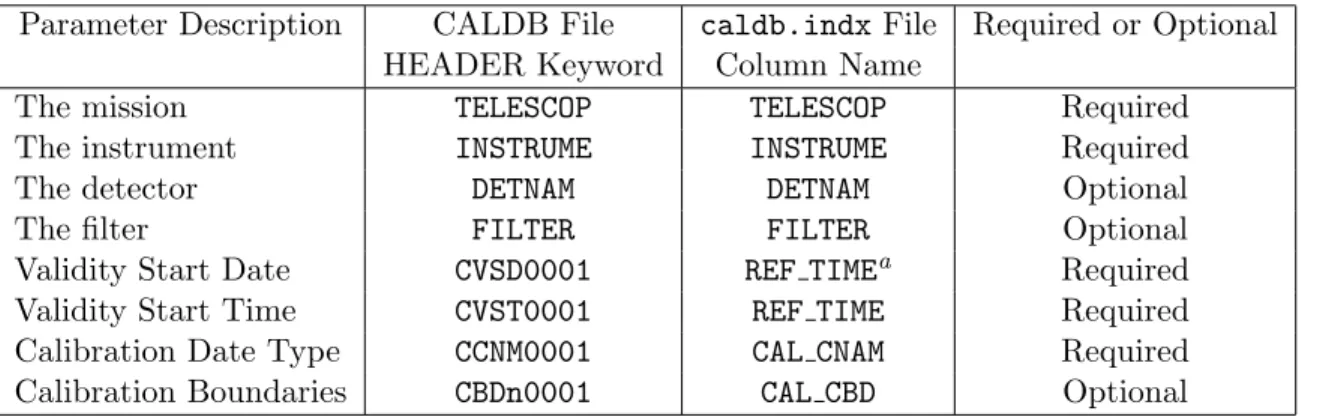
The implementation of these parameters in the CALDB is summarized in Table 1. Table 1: The CALDB Calibration File Parameter Set
Parameter Description CALDB File caldb.indx File Required or Optional HEADER Keyword Column Name
The mission TELESCOP TELESCOP Required
The instrument INSTRUME INSTRUME Required
The detector DETNAM DETNAM Optional
The filter FILTER FILTER Optional
Validity Start Date CVSD0001 REF TIMEa Required Validity Start Time CVST0001 REF TIME Required Calibration Date Type CCNM0001 CAL CNAM Required Calibration Boundaries CBDn0001 CAL CBD Optional
a
REF TIME is the MJD corresponding toCVSD0001andCVST0001.
These parameters are specified in FITS calibration files by header keywords for each FITS extension. The full list of CALDB header keywords is given in cal/gen/92-011, “Required and Recommended FITS keywords for Calibration Files”. If there are questions about use of these keywords please contact the HEASARC Caldb Manager for assistance. For the rest of this document we’ll assume that all required keywords are present in the new CALDB file.
3
Placing the File in the CALDB Directory Structure
The CALDB software relies on a specific directory structure to enable users to find calibration data appropriate to their observing setup. The directory structure has the form:
$CALDB/data/<mission>/<instrument>/<class>
where$CALDBis an environment variable which defines the top-level location of the CALDB,<mission> is the name of the mission, and <instrument> is the name of the instrument. For largely historical reasons,class is either cpf, bcf, or pcf which distinguishes “calibration product files” from “basic calibration files” from “primary calibration files”, respectively. This progression is supposed to repre-sent distance from the raw calibration data: Calibration products are derived from basic calibration files, which in turn are derived from primary calibration data. In practice CALDB access software will
only be able to retrieve and usecpfor bcffiles; pcffiles, as raw calibration files, do not necessarily even need to be in FITS format, whilecpfand bcf files do. For more information on the differences between classes see CAL/GEN/92-003.
For example, the filepspcb gain2 256.rmf, which contains the spectral response file (usually consid-ered a “calibration product”) for the ROSAT PSPC-B instrument is located in
$CALDB/data/rosat/pspc/cpf/matrices/pspcb_gain2_256.rmf
in the HEASARC CALDB. Missions should define the appropriate directory structure for their CALDBs within these conventions.
4
Including the Calibration File in the
caldb.indx
Access to calibration files in the CALDB is accomplished through thecaldb.indxfile (which is located
at$CALDB/<mission>/<instrument>), which contains a summary of files in the CALDB, along with
their calibration parameter sets. In order for a file to be retrieved by the standard CALDB access software1, the file must be included in thecaldb.indxfile.
A file may be included in the caldb.indx file by using the udcif tool included with the caltools distribution. For a given calibration file,udcifreads information from the file (specifically the manda-tory CALDB keywords from the files FITS extension headers) then, for each valid FITS extension, creates an entry in thecaldb.indx table.
4.1 An Example
As an example, suppose the file$CALDB/data/suzaku/hxd/cpf/ae hxd pinxinom 20051104.rspneeds to be added to the caldb.indx file for the SUZAKU HXD instrument. This file contains 2 exten-sions, containing the response matrix for the HXD (CCNM0001= ’SPECRESP MATRIX’) along with an extension containing the energy boundaries for the HXD (CCNM0001= ’EBOUNDS ’), as described in “The Calibration Requirements for Spectral Analysis”2. Both extensions are to be considered “good” (CAL QUAL=0) for their specified calibration parameter set.
% cd $CALDB/data/suzaku/hxd/cpf % udcif
Name of file containing dataset[-] ae_hxd_pinhxnom_20051104.rsp
1
a subroutine calledgtcalf, included as part of thecallibsoftware library distributed in the standardFTOOLSrelease, is usually used to retrieve files from the CALDB.
2
Name of Calibration Index File[../caldb.indx] ../caldb.indx
Dataset: SPECRESP MATRIX
Quality value for the dataset being entered[0] 0
Dataset: EBOUNDS
Quality value for the dataset being entered[0] 0
In general it’s better to runudcifin the directory in which the calibration file is located, and to specify the path to the caldb.indx file; this has the benefit of including the full path to the file (relative to
$CALDB) in the caldb.indx column CAL DIR, and the filename (without any directory path) in the
CAL FILEcolumn. An alternative is to runudcifin the directory where thecaldb.indxfile is located
(namely$CALDB/data/<mission>/<instrument>); in this case the resultingCAL FILE column will contain the directory path (relative to$CALDB/data/<mission>/<instrument>) in addition to the file name. In practice the CALDB access software will transparently handle either case.
4.2 Understanding and Handling Conflicts
The CALDB works best when there’s a one-to-one correspondence between calibration files and cal-ibration parameter sets (mission, instrument, detector, filter, validity date and time, and calcal-ibration boundary parameters), i.e. when one particular parameter set corresponds to one and only one file (really, an extension in a FITS calibration file). In many cases this simple situation holds, but other more complex cases may arise.
Aconflict is a situation in which two or more calibration file extensions (hereafter called “calibration units”) overlap for a given set of calibration parameters. Table 2 lists the criteria for which udcif considers a file to be ingested in conflict with a file already listed in thecaldb.indx file.
Theudciftool tries to avoid situations where 2 or more calibrations may conflict, since in such cases
ambiguities may arise in determining which of the calibrations should be used for the observation in question. Avoiding such conflicts is especially important for the CALDB, since the assumption which underpins the CALDB is that the end user should not have to know the details of which instrument calibrations are needed to properly interpret an observation. In other words, situations in which the end user may need to choose between two or more calibration files should be avoided as much as possible.
4.2.1 Understanding Boundary Value Conflicts
After determining that the file to be added to thecaldb.indxfile the matches criteria 1−6 in table 2,
theudciftool then looks at the boundary keywords to determine if a calibration boundary keyword
conflict exists. Recall that calibration boundaries are specified by the syntax
Table 2: Conflict Criteria Used by UDCIF
A Conflict exists if All these Conditions are True
Criteria # File Value Value from CALDB.INDX file Entry 1 TELESCOP matches TELESCOP
2 INSTRUME matches INSTRUME
3 DETNAM matches DETNAM
4 FILTER matches FILTER
5 CCNM0001 matches CAL CNAM 6 REF TIMEa matches REF TIME
7 And if a calibration boundary keyword conflict exists
a
REF TIME for the file is calculated from theCVSD0001andCVST0001header keywords
(see Section B.3 of CAL/GEN/92-011 for more information about this syntax). PARAMis a parameter name (for example, TEMPERATURE), VALUE is the value of the parameter (for example (100)), or an allowed parameter range (for example (100:110)), and UNIT3 is the unit of the VALUE (for example, ’DEGREES’).
The udcif tool looks for boundary conflicts by examining the first PARAMETER entry in the
CAL CBD array for the first row in the caldb.indx file that satisfies criteria 1−6. The tool then compares this CAL CBD parameter name to the names of the parameters in the CBDN0001 keywords in the file to be ingested. If the names match, then udcif checks the value of the parameter. If the parameter values are the same (or the range overlaps) then udcif considers that these two files are in conflict. If the parameter names are the same but the values are different (or the ranges do not overlap) then the files are considered to be not in conflict.
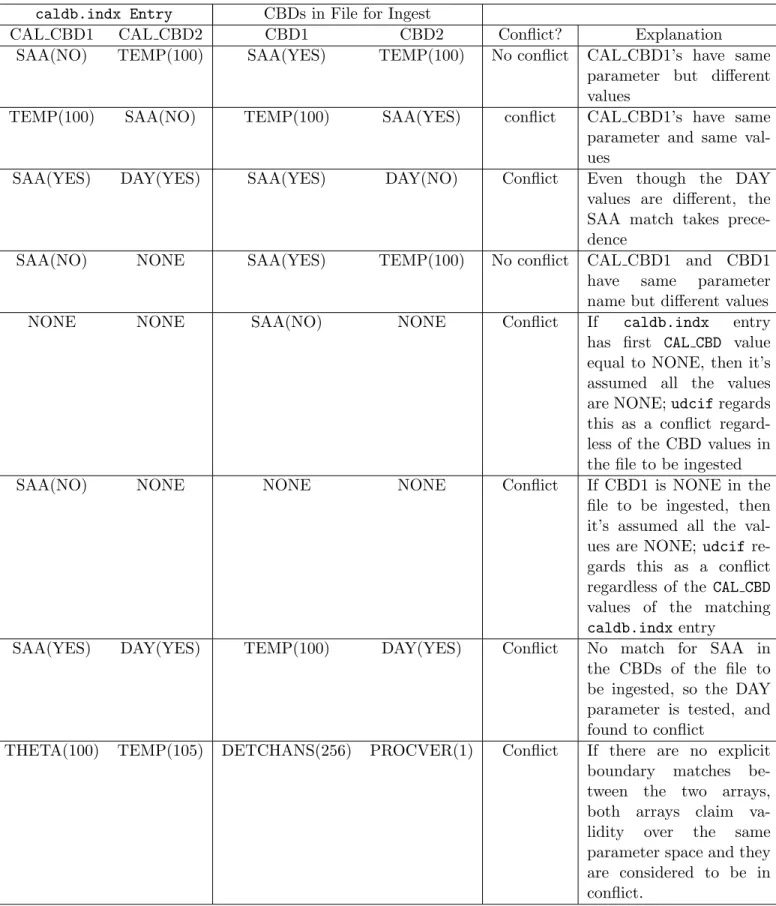
Table 3 shows some permutations of the calibration boundaries, and the resulting determination (CONFLICT or NO CONFLICT) of udcif, for an example where the file to be ingested into the
caldb.indxfile meets criteria 1−6 for some row in thecaldb.indxfile, and the file has 2 calibration
boundary keywords. Table 3 shows the first two CAL CBD keywords for the matching row in the
caldb.indxfile, and the rest of the nineCAL CBDvalues are ’NONE’.
It’s important to note the first and second cases in table 3. These cases cover exactly the same calibration boundary parameter space, but the conflict checking used byudcifyields different results (in the first case udcif doesn’t consider the two files to be in conflict; in the second case it does). This is because, once udcif finds a calibration boundary keyword parameter name that matches, it stops checking the rest of the calibration boundary parameters. Thus it’s important to realize that the conflict checking performed byudcif issensitive to the orderof the CBDkeywords.
Table 3: Permutations of Boundary Values
caldb.indx Entry CBDs in File for Ingest
CAL CBD1 CAL CBD2 CBD1 CBD2 Conflict? Explanation
SAA(NO) TEMP(100) SAA(YES) TEMP(100) No conflict CAL CBD1’s have same parameter but different values
TEMP(100) SAA(NO) TEMP(100) SAA(YES) conflict CAL CBD1’s have same parameter and same val-ues
SAA(YES) DAY(YES) SAA(YES) DAY(NO) Conflict Even though the DAY values are different, the SAA match takes prece-dence
SAA(NO) NONE SAA(YES) TEMP(100) No conflict CAL CBD1 and CBD1 have same parameter name but different values
NONE NONE SAA(NO) NONE Conflict If caldb.indx entry
has first CAL CBD value equal to NONE, then it’s assumed all the values are NONE;udcifregards this as a conflict regard-less of the CBD values in the file to be ingested
SAA(NO) NONE NONE NONE Conflict If CBD1 is NONE in the
file to be ingested, then it’s assumed all the val-ues are NONE;udcif re-gards this as a conflict regardless of the CAL CBD values of the matching
caldb.indxentry
SAA(YES) DAY(YES) TEMP(100) DAY(YES) Conflict No match for SAA in the CBDs of the file to be ingested, so the DAY parameter is tested, and found to conflict
THETA(100) TEMP(105) DETCHANS(256) PROCVER(1) Conflict If there are no explicit boundary matches be-tween the two arrays, both arrays claim va-lidity over the same parameter space and they are considered to be in conflict.
4.2.2 Avoiding or Overriding Conflicts
Conflicts can be avoided if files which satisfy criteria 1−6 have the same PARAMETER NAMES in their calibration boundary array (i.e. the values of the CBD keywords in the extension header) with well-defined boundary constraints, but this may not always be practical or even possible. Furthermore, it’s necessary to put the boundary parametersin the same orderin the file as in the matching entry in thecaldb.indxfile for accurate conflict checking.
If a conflict is identified, udcif presents the user with the choice of changing the “quality” of the conflicting dataset (i.e. the CAL QUAL value of the file that is already tabulated in the caldb.indx file) to a value of 5 (“bad”). This would make the file inaccessible via normal CALDB access methods (since by default the CALDB access routine returns only “good” files, withCAL QUAL=0). This would be appropriate if the file that’s being ingested into the CALDB is meant to replace the existing file; the new file would then be considered the “good” version and the old file the “bad” version.
There are times whenudcif might identify a potential conflict between two files which in practice is not a conflict, and the retrieval software is written such that by specifying the appropriate parameter a unique file name (and FITS extension number) can be retrieved. If it is certain that there is no conflict even though udcif claims that there is, the user has the option of overriding udcif and including the file in the caldb.indx file, without flagging the matching udcif entry as bad, as shown in the example below:
% udcif
Name of file containing dataset[-] ae_hxd_pinxinom_20051104.rsp Name of Calibration Index File[../caldb.indx]
Dataset: SPECRESP MATRIX
Quality value for the dataset being entered[0]
Another dataset has been found which is valid for the same conditions as the dataset being indexed
The conflicting dataset:
---Instrument: HXD
Code Name: SPECRESP MATRIX
File: ae_hxd_pinhxnom_20051104.rsp[ 1]
Description: RESPONSE MATRIX
---Change conflicting dataset’s Quality value to 5 (Y/N)?[N] n Include new data file in CALDB.INDX (Y/N)> Y
Quality value for the dataset being entered[0]
Another dataset has been found which is valid for the same conditions as the dataset being indexed
The conflicting dataset:
---Instrument: HXD
Code Name: EBOUNDS
File: ae_hxd_pinhxnom_20051104.rsp[ 2]
Description: EBOUNDS
---Change conflicting dataset’s Quality value to 5 (Y/N)?[no] N Include new data file in CALDB.INDX (Y/N)> Y
and extensions 1 & 2 for both the new file (ae hxd pinxinom 20051104.rsp) and the old file (ae hxd pinhxnom 20051104.rsp) are retained in thecaldb.indx file withCAL QUAL=0.
Including such “conflicts” in the caldb.indx file might pose difficulties in the future for users who might want to unambiguously retrieve a specific file from the CALDB and so should be used with caution. It is often the case that judicious choice of CBD keyword values can help avoid such conflicts. The burden is on the instrument team to adequately describe the calibration files using appropriate calibration boundary parameters and values in each calibration file of a give calibration type.
5
Verifying the Update
After a file is ingested into the CALDB, the user should try to verify that the file has been included properly in the caldb.indx, file. Probably the easiest way to do this is to use a FITS table viewer
likefv. After opening thecaldb.indx in the FITS viewer, look to see if all the entries for the new
file appear correct in theEXTNAME= ’CIF’ binary extension table.
Users should also verify that the correct file is returned from the CALDB by using the FTOOL
quzcif. For example, SUZAKU response matrices are stored in the first extension of the files
ae hxd pinhxnom 20051104.rsp and ae hxd pinxinom 20051104.rsp. These matrices are used for
simulations of the HXD instrument response. They differ becauseae hxd pinhxnom 20051104.rsp is
used when the SUZAKU pointing is “nominal” for the HXD instrument, whileae hxd pinxinom 20051104.rsp is used for simulations of the HXD response for nominal pointings of the XIS instrument. They can be
distinguished by their CDB keywords: ae hxd pinhxnom 20051104.rsphasCBD30001= ’NOMINAL("HXD")’ while ae hxd pinxinom 20051104.rsp has CBD30001= ’NOMINAL("XIS")’. Some sample calls to
NO BOUNDARY CONDITIONS SPECIFIED: =============================
[corcoran:data/suzaku/hxd] corcoran% quzcif Name of Mission[-] suzaku
Name of Instrument[-] hxd
Name of Detector (- if not required)[-] Name of Filter (- if not required)[-]
Calibration Dataset Codename[-] SPECRESP MATRIX Requested Date in yyyy-mm-dd format[-] NOW Requested Time in hh:mm:ss format[-] NOW
Boolean selection expression for Boundary params(- if not required)[-]
/caldb/test/staging/data/suzaku/hxd/cpf/ae_hxd_pinhxnom_20051104.rsp 1
/caldb/test/staging/data/suzaku/hxd/cpf/ae_hxd_pinxinom_20051104.rsp 1
Extensions in both files are identified byquzcifsince these particular extensions are distinguished by the values in their calibration boundary arrays, and no boundary condition was specified.
BOUNDARY = DETCHANS.EQ.256 ========================
[corcoran:data/suzaku/hxd] corcoran% quzcif Name of Mission[suzaku]
Name of Instrument[hxd]
Name of Detector (- if not required)[-] Name of Filter (- if not required)[-]
Calibration Dataset Codename[SPECRESP MATRIX] Requested Date in yyyy-mm-dd format[NOW] Requested Time in hh:mm:ss format[NOW]
Boolean selection expression for Boundary params(- if not required)[-] DETCHANS.EQ.256
/caldb/test/staging/data/suzaku/hxd/cpf/ae_hxd_pinhxnom_20051104.rsp 1
/caldb/test/staging/data/suzaku/hxd/cpf/ae_hxd_pinxinom_20051104.rsp 1
Extensions in both files are identified by quzcif since these particular extensions are valid for the same values of DETCHANS in their calibration boundary arrays.
BOUNDARY= NOMINAL.EQ.HXD
[corcoran:data/suzaku/hxd] corcoran% quzcif Name of Mission[-]suzaku
Name of Instrument[-]hxd
Name of Detector (- if not required)[-] Name of Filter (- if not required)[-]
Calibration Dataset Codename[-]SPECRESP MATRIX Requested Date in yyyy-mm-dd format[-] NOW Requested Time in hh:mm:ss format[-] NOW
Boolean selection expression for Boundary params(- if not required)[-] NOMINAL.EQ.HXD
/caldb/test/staging/data/suzaku/hxd/cpf/ae_hxd_pinhxnom_20051104.rsp 1
BOUNDARY= NOMINAL.EQ.XIS ======================
[corcoran:data/suzaku/hxd] corcoran% quzcif Name of Mission[-] suzaku
Name of Instrument[-] hxd
Name of Detector (- if not required)[-] Name of Filter (- if not required)[-]
Calibration Dataset Codename[-]SPECRESP MATRIX Requested Date in yyyy-mm-dd format[-] NOW Requested Time in hh:mm:ss format[-] NOW
Boolean selection expression for Boundary params(- if not required)[-] NOMINAL.EQ.XIS
/caldb/test/staging/data/suzaku/hxd/cpf/ae_hxd_pinxinom_20051104.rsp 1
One extension is selected since the files differ in the value of the “NOMINAL” boundary condition.
6
Notification
Once files have been successfully added to the mission’s CALDB, users should be notified. If the files are to be included in the HEASARC CALDB, the HEASARC CALDB manager should be notified. Instructions concerning the inclusion of calibration files in the HEASARC CALDB are available from CAL/GEN/2003-001, “Automated Delivery of Calibration Data to the CALDB”.
7
Error Messages
Sometimes the following errors are encountered as given in table 4: Table 4: Error Messages
Error Meaning
Cannot get directory from CGDR This usually means the$CALDBis undefined.
Error calculating the REF TIME value One of the REF TIME values can’t be
calcu-lated because of trouble parsing the CVSD or CVST values.