Mastering 2D & 3D Computer
Graphics Pipelines
Introduction to 2D and 3D
Computer Graphics
What are pipelines?
What are the fundamental components of
pipelines?
Example pipelines...
– ...2D graphic object pipeline
– ...3D graphic object pipeline
– ...raster pipeline
– ...bitmapped, HLHSR, illumination implications
Mastering 2D & 3D Graphics
Overview of 2D & 3D Pipelines
What are Pipelines?
Are the fundamental concept around which
graphics systems are based
Represent conceptual models
Describe the interaction and the flow of data
for all functions
Illustrate how applications can create
pictures
Illustrate the use of functions to set up the
environment
Illustrate how the environment affects
pictures being created
Illustrate the interactions and the
relationships between functions
Overview of 2D & 3D Pipelines
Overview of 2D & 3D Pipelines
What are the fundamental components?
Common components:
– Attribute Association
– Display-List Storage
– Bundled Attribute Association
– Modeling
– Viewing & Clipping
CS447 3-6
Overview of 2D & 3D Pipelines
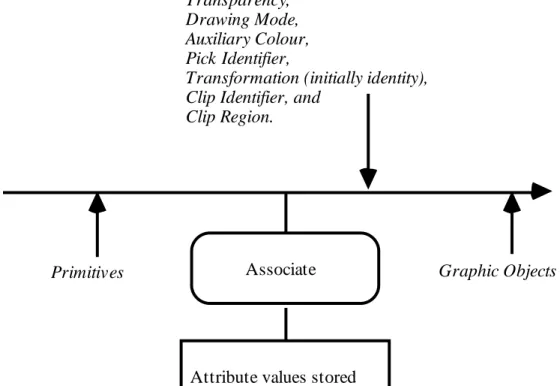
Attribute Association: pipeline illustration
Primitives Associate
Attribute values stored
Graphic objects with associated attributes;
for example: Primitive Attributes, ASF Bundle Indicators, Bundle Indices,
Width/Size Specification Mode, Object Clipping Mode,
Transparency, Drawing Mode, Auxiliary Colour, Pick Identifier,
Transformation (initially identity), Clip Identifier, and
Clip Region.
Overview of 2D & 3D Pipelines
Bundled Attribute Association
Attributes set and accessed through tables...
– ...are called bundled attributes
– ...are grouped into bundle tables
– ...can change the attributes associated with a
CS447 3-8
Overview of 2D & 3D Pipelines
Display-List Storage
Segment models...(e.g., CGI, GKS)
– ...describe the mechanism for saving graphic objects
Structure models...(e.g., PHIGS)
– ...describe the mechanism for saving primitive and
complex elements
Macro & procedure models...(e.g.,
POSTSCRIPT®)
– …describe the mechanism for saving macros,
Attribute Association Bundled Attribute Association Segment Storage Segment Open No Segment Open Segment Transform- ation Objects Being Copied Objects Being Displayed Without Segment Transform Apply Inheritance Filters Attributes Associate Segment
One Approach to Display Lists
Application Program:
Workstation Independent
...these functions cause elements to flow along the pipeline and into centralized structure storage:
set polyline colour index (red) set linewidth scale factor (wide) set linetype (dashed)
polyline 3 ( ) ...functions that create elements:
SET POLYLINE COLOUR INDEX (Red) SET LINEWIDTH SCALE FACTOR(Wide) SET LINETYPE(Dashed)
POLYLINE 3 ( )
Or, with Structures...
Display Process... workstation independent Display Process... workstation dependent Data Defini-tion Process Centralized Structure Store
Modeling Viewing &
View Clipping AssociateAttributes
Associate bundled attributes
Rendering
Overview of 2D & 3D Pipelines
Modeling transformations...
– ...allow objects to be defined in their own
coordinate system
Through modeling...
– ...objects are transformed into world
coordinates by scaling, rotation, and/or translation
Overview of 2D & 3D Pipelines
This allows all objects to initially be defined
as centered around the origin...
– ...and then modeling transformations can
position, orient, and scale them into their correct geometric relationships
This stage in the pipeline is independent of
the display characteristics
Overview of 2D & 3D Pipelines
The modeling transformation...
– ...maps modeling coordinates into world
coordinates
– ...is defined by transformation matrices
inserted into a structure network
– ...allows the picture to be composed of
separate parts, each defined within its own modeling coordinate system
– ...supports relative positioning of these parts
when they are mapped to world coordinates
Overview of 2D & 3D Pipelines
Modeling Coordinates (called MC) are.
– ...3D right-handed device-independent
coordinates
– ... specified by a homogeneous
transformation matrix
When modeling transformations are not
inserted into a structure...
Overview of 2D & 3D Pipelines
2D transformations are represented by 3X3
matrices using homogeneous coordinates...
3D transformations are represented by 4x4
matrices using homogeneous coordinates in
3-space
Mastering 2D & 3D Graphics
What are homogeneous coordinates?
Well...instead of representing a point as
(x,y,z)...
– ...we represent it as (x,y,z,W) ...but we most
commonly refer to it as (x/W, y/W, z/W, 1)
When we transform a point to this form...
– ...it is called homogenizing
Mastering 2D & 3D Graphics
This means...that each point in 3-space is
represented by a line through the origin in
4-space!
So...homogenizing allows us to use points
that form a 3D subspace of 4-space (i.e.,
W=1)
Mastering 2D & 3D Graphics
Most graphics systems use the right-handed
coordinate system for the definition of
objects
In right-handed systems...
– ...positive rotations occur when looking from
the positive axis to the origin
– ...a 90˚ counterclockwise rotation will
Mastering 2D & 3D Graphics
For example, to rotate around the x axis...
...the positive rotation is from y to z
Or, to rotate around the y axis...
– ...the positive rotation is from z to x
And lastly, to rotate around the z axis...
– ...the positive rotation is from x to y
Mastering 2D & 3D Graphics
Some graphics systems use the left-handed
coordinate system for viewing objects...
– Left-handed systems may seem more natural...
...as larger z values appear further from the operator
In left-handed systems...
– ...positive rotations occur when looking from
the positive axis to the origin
Mastering 2D & 3D Graphics
Z X Y Right-Handed Z X Y Left-Handed
Z is coming out of the display towards you
Z is heading into the display (or away from you)
Mastering 2D & 3D Graphics
A set of vertices or 3D points belonging to
an object...
– ...can be transformed into another set of points
...using linear transformations
Mastering 2D & 3D Graphics
Translation:
1 0 0 0
[x' y' z' 1] = [x y z 1] 0 1 0 0
0 0 1 0
Tx Ty Tz 1
Translation means...
– x' = x + Tx y' = y + Ty z' = z + TzMastering 2D & 3D Graphics
Scaling: Sx, Sy, and Sz are scaling factors
Sx 0 0 0
[x' y' z' 1] = [x y z 1] 0 Sy 0 0
0 0 Sz 0
0 0 0 1
When Sx = Sy = Sz, there is uniform scaling...
– ...otherwise scaling occurs only along the axes
Mastering 2D & 3D Graphics
To rotate an object in three-dimensional
space, an axis of rotation must be
specified...
– ...it is best to use one of the coordinate axes
Counterclockwise rotation about each of the
axes uses (around X, Y, Z respectively)
1 0 0 0 cos˚ 0 -sin˚ 0 cos˚ sin˚ 0 0 0 cos˚ sin˚ 0 0 1 0 0 -sin˚ cos˚ 0 0 0 -sin˚ cos˚ 0 sin˚ 0 cos˚ 0 0 0 1 0
0 0 0 1 0 0 0 1 0 0 0 1
Mastering 2D & 3D Graphics
Around the Z axis, this means:
– x' = xcos˚-ysin˚
– y' = xsin˚+ycos˚
– z' = z
Mastering 2D & 3D Graphics
When objects are not at the origin...
– ...a simple rotation will not rotate the object in
place
Instead, we must...
– ...first translate the object to the origin,
– ...apply the desired rotation, and
– ...translate the object back to its original
position
Mastering 2D & 3D Graphics
This means for a rotation around the Z axis
(when the Z axis passes through the point
(Tx, Ty, 0))...
– x' = xcos˚ - ysin˚ - Txcos˚ + Tysin˚ + Tx
– y' = xsin˚ + ycos˚ - Txsin˚ - Tycos˚ + Ty
– z' = z
Mastering 2D & 3D Graphics
CS447 3-30
Useful in describing objects that have a
natural hierarchy
For example, a stylization of a human
figure used in animation would...
– ...have a set of local coordinate systems
based on limb joints
– ...describe a hierarchy based on these joints
– ...allow the hand to move with respect to the
wrist joint and the lower arm to move with respect to the elbow joint
Mastering 2D & 3D Graphics
With Preconcatenate...
– ...the specified transformation is applied to the
object first
– ...if you preconcatenate a rotation, that rotation
will be applied to the object before the other transformations
Current xform x New (L'=LxM)
Modeling Transformations
With Postconcatenate...
– ...the specified transformation is applied to the
object after the current existing local transformation
New x Current Xform (L'=MxL)
Modeling Transformations
Inheritance of modeling transformations
means...
– ...a parent's composite modeling
transformation becomes the initial child's global modeling transformation
– ...a child's initial local modeling transformation
is the identity matrix
Modeling Transformations
CS447 3-34
Modifications...
– to the global transformation only have effect
within the structure in which they are encountered
– This allows structure hierarchies to be built
with movable parts...
– ...since the motion of the parent structure is
passed to its children via inheritance of the composite modeling transformation, the parts are kept connected
Modeling Transformations
Inheritance...
A B D E F I• Initial identity local & global transformations
• When B, D, or F are called, these transformations are saved • When control is returned to A, these transformations are
restored • When B is called, A's composite
transformation becomes B's global transformation
• B's initial local transformation is identity
•When D, C, or E are called, these transformations are saved • When control is returned to B, these transformations are
View orientation transformation...
– ...defines the position and orientation of view
reference coordinates relative to world coordinates
2D Viewing Transformations
View Orientation Transformation
Y
X
V U
View Reference Point View
Up Vector
View mapping transformation...
– ...defines the mapping of view reference
coordinates to normalized projection coordinates, allowing for distortion...
2D Viewing Transformations
View Mapping Transformation
Allows dynamic horizontal and vertical
panning...
– ...by continuously adding to both sides of the
view window, or
– ...by changing the view reference point and
leaving the view window unchanged
Remember, panning is achieved by
changing the window location!
2D Viewing Transformations
2D Viewing Transformations
Allows dynamic zooming...
– ...by continuously changing
the view window by a uniform percentage in the horizontal and vertical directions
2D Viewing Transformations
Allows dynamic rotation...
– ...by continuously changing the
view up vector
– The effect is as if you were
rotating a camera used to view your picture
2D Viewing Transformations
CS447 3-42
Overview of 2D & 3D Pipelines
3D Viewing & Clipping
Three operations are associated with 3D
viewing...
– ...view orientation
– ...view mapping ...XYZ clipping
View orientation...
– ...maps world coordinates to view reference
coordinates
– ...transforms and defines the position and
orientation of the VRCs relative to world coordinates
Overview of 2D & 3D Pipelines
3D Viewing & Clipping
View mapping...
– ...maps view reference coordinates to
normalized projection coordinates
...specifies a 3D volume of VRC to be mapped to a 3D volume of NPC (a unit cube extending from 0.0 to 1.0 in X,Y,Z)
Overview of 2D & 3D Pipelines
Rendering
Is the general process for changing a 2D or
3D graphic object to a shaded 2D projection
onto a drawing surface
Rendering involves...
– ...setting up data structures for polygon mesh
models to ensure that they will contain all of the information required in the shading process
Overview of 2D & 3D Pipelines
Rendering
Rendering also involves...
– ...setting up data structures for polygon mesh
models to ensure that they will contain all of the information required in the shading process
– ...culling back-facing polygons (3D Only)
– ...applying a hidden surface removal
algorithm(3D Only) ...scan converting or rasterizing polygons: converting an object's vertices into a set of pixel coordinates &
Apply VDC-to-Device Mapping Render Abstractly Apply Associated Transformation Apply Associated Clipping Apply Drawing Surface Clipping Render Physically Apply Colour Table Drawing Surface Point Set in Real-Valued
VDC Space, with associated: Transformation, Clip Indicator, Clip Rectangle,
Object Clipping Mode Colour Attributes, Transparency, and Point Set in Real-Valued DC Space with associated: Colour Attributes, Transparency, and Drawing Mode Device-Specific Rendered Picture Representation with associated: Colour value Apply Implicit Display Transformation Drawing Surface Clip Rectangle and Clip Indicator
Colour Table
Echo
Overview of 2D & 3D Pipelines
Example: 2D graphic object pipeline
Viewing and Rendering