G00268445
Magic Quadrant for Enterprise File
Synchronization and Sharing
Published: 22 July 2015
Analyst(s): Monica Basso, Charles Smulders, Jeffrey Mann
Today's EFSS market offers a range of maturing options to IT leaders as well
as mobile and collaboration planners. New capabilities for corporate system
integration and enhanced content collaboration continue to add to standard
EFSS functionality.
Strategic Planning Assumptions
By 2018, any ECM, collaboration, MFT, backup and recovery, storage, and EMM offerings will embed natively basic EFSS features.
By 2018, any EFSS deployment will require back-end integration with multiple content repositories, federation and management, and data governance capabilities.
By 2018, less than 10% of today's stand-alone EFSS offerings will exist.
Market Definition/Description
Enterprise file synchronization and sharing (EFSS) refers to a range of on-premises or cloud-based capabilities that enables individuals to synchronize and share documents, photos, videos and files across mobile devices, such as smartphones, tablets and PCs. Sharing can happen between people (for example, partners and customers) within or outside the organization, or on a mobile device, as data sharing among apps. Access to files in enterprise repositories (such as file servers and content platforms) from mobile devices or remote PCs extends user productivity and
collaboration to modern use cases. Security and collaboration support are critical aspects for enterprises to adopt EFSS.
Beyond file synchronization, sharing and access, EFSS offerings may have different levels of support for:
■ Mobility, with native apps for a variety of mobile devices, notebooks and desktops, as well as
■ Security for data protection on devices, in transit and in cloud services (or servers). It includes
password protection, remote wipe, data encryption, data loss prevention (DLP), digital rights management (DRM), document protection, encryption key management and access tracking.
■ Administration and management, including integration with an Active Directory and
Lightweight Directory Access Protocol (LDAP) policy enforcement.
■ Back-end server integration through connectors to main corporate servers (for example,
SharePoint) and cloud services; also, support for Content Management Interoperability Services (CMIS) and APIs.
■ Content manipulation, such as file editing, file annotations and note taking.
■ Collaboration, such as cooperative editing on a shared document using change tracking and
comments; and document-based workflow process support with basic (but incomplete) compatibility with Microsoft Office.
■ Simplicity and usability with optimized user interfaces (UIs) and interactions, such as file
drag-and-drop and file open in applications.
■ Storage for the central data repository of the EFSS systems or services. It is an optional
component and can be cloud-based, on-premises or hybrid. Cloud EFSS services are bundled with cloud storage. Software EFSS products may or may not have one main repository. Some products integrate with existing third-party repositories that are deployed on-premises or in the cloud.
Typical architectures for EFSS offerings are:
■ Public cloud: Corporate files are uploaded and stored in the provider's cloud storage for
access and sharing. This architecture is preferred by organizations that need agility to support external use cases and modern productivity for employees, without restrictions on the actual geographical location of files.
■ Hybrid: The user and device authentication, security and search mechanisms are implemented
in the provider's cloud. Files and documents are in the original location, on-premises or in third-party clouds; a central EFSS repository may be present. A mix of repositories can be adopted. This architecture is preferred by organizations that want to enable smooth access to corporate data from mobile devices, without creating data replicas in someone else's cloud.
■ Private cloud: The EFSS platform is entirely deployed within a private data center. This
architecture is preferred by organizations that want to control data location and have data privacy constraints.
■ On-premises: The remote access, synchronization and sharing component is deployed
on-premises and integrates with corporate data repositories, without file replicas. This method is preferred by organizations that are under strict regulations about data storage.
There are two substantially different types of EFSS offerings in the market (see "Destinations and Wraparounds Will Reshape the Enterprise File Synchronization and Sharing Market"):
■ Destinations: These are stand-alone products with file sync and share as a core capability, and
they represent a new purchase for an organization.
■ Extensions: These are file sync and share capabilities added and wrapped around established
products or applications, such as those for collaboration, content management or storage. Organizations can use extensions as part of the broader platform.
The market for EFSS offerings has grown rapidly since 2010, with more than 140 players originating from a variety of markets and technology backgrounds having different approaches and business models. Destination vendors focus on EFSS, adding complementary content collaboration features for users and back-end integrations with IT systems. Extension vendors belong to adjacent
markets, such as collaboration, enterprise content management (ECM), managed file transfer (MFT), storage, backup, virtual workspaces and enterprise mobility management (EMM).
Both types of EFSS offerings are subject to buyer consideration in EFSS evaluations. However, the relevance of EFSS extensions is limited to use cases or user categories that rely heavily on the "extended" IT product (for example, companies looking for mobile access to their ECM platforms for a selected workforce). Organizations with more complex requirements — in terms of multiple use cases, integrating many data repositories, data governance, collaboration and business processes — tend to consider EFSS destination offerings. In this second case, decisions tend to be more complex, as most often they imply investments on new products or services, from a new supplier. Companies may end up using a combination of EFSS extensions and destinations (see "How to Build EFSS Plans to Address Current and Future Business Requirements"). This Magic Quadrant focuses only on EFSS destination offerings.
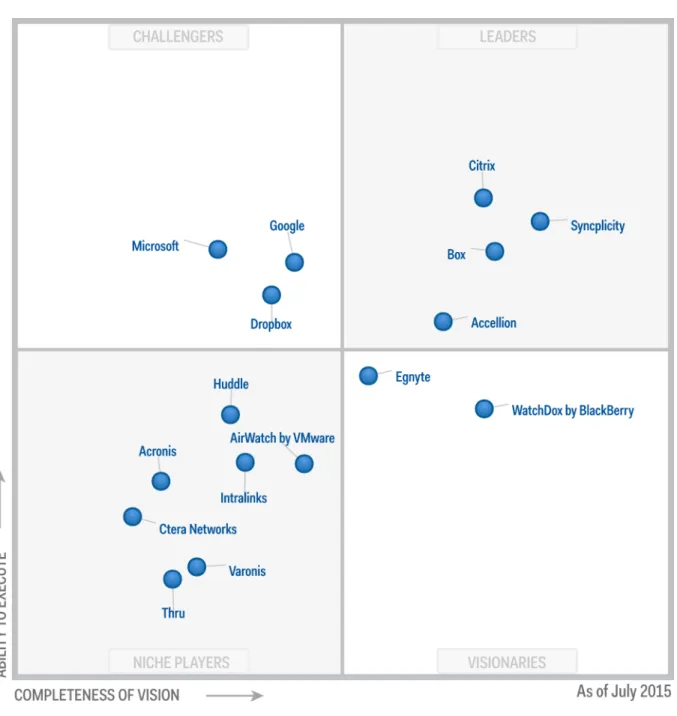
Magic Quadrant
Figure 1. Magic Quadrant for Enterprise File Synchronization and Sharing
Source: Gartner (July 2015)
Vendor Strengths and Cautions
Accellion
Accellion is a private company based in Palo Alto, California. Founded in 1999, it operates internationally, with offices in London, Singapore and Ukraine. The company originally served the
traditional file sharing and MFT market. Since 2010, it has refocused on mobile file synchronization, sharing and collaboration. Accellion has a track record with midsize to large regulated or security-conscious organizations, particularly in the government, technology and professional services sectors. It is recognized for its flexible approach in addressing customers' requirements in their product roadmaps, as indicated by reference customers. Its EFSS product, kiteworks, offers broad support for back-end integration, security and management. The user experience is optimized for mobile users, being the first design point. The architecture employs a multitier model that separates the Web, application and data layers. The product kiteworks can be deployed on-premises, as a private cloud on-premises (virtual appliance on-premises), as a hosted cloud (via Amazon Web Services [AWS]) or hybrid cloud (mixing on-premises and hosted), or as a public cloud. The hybrid model can combine the on-premises component with public and private cloud services.
Accellion is a good fit for organizations that are prioritizing their EFSS initiatives for mobile access to back-end corporate data repositories, and that require customized mobile apps to support
document-centric business workflows, while ensuring data protection and compliance, particularly in regulated markets.
Strengths
■ A proprietary mobile container is available to protect content through policies, without a
separate EMM product. Also, kiteworks integrates with Good Technology, Symantec and MobileIron for organizations that employ those EMM products or need enhanced policy
enforcements. RESTful APIs and software development kits (SDKs) are available to build secure mobile apps on the kiteworks content platform.
■ Compliance and certifications are available for highly regulated markets, including FIPS PUB
140-2, the Health Insurance Portability and Accountability Act (HIPAA), the U.S. Federal Information Security Management Act (FISMA) and the Sarbanes-Oxley Act.
■ Accellion supports the sharing of unlimited-size files (1 terabyte and beyond). This feature is
critical for engineering groups, graphics shops and video/audio production houses, which deal with large media files, such as videos, source code or computer-aided design (CAD).
■ Accellion offers broad support for back-end integration — for content access and copy — with
a variety of systems and services, including Microsoft SharePoint, SharePoint Online, Windows file shares, EMC Documentum, OpenText, Microsoft OneDrive for Business, Dropbox, Box, and Google Drive for Work.
Cautions
■ Accellion's direct presence is limited outside the U.S., compared with some competitors.
However, multiple distributors and resellers are present, including Dimension Data, Compuware and Accuvant.
■ Occasionally, references indicated issues with the implementation of Active Directory; it is not
■ Collaborative editing capabilities are not yet available within the kiteworks mobile application,
but they are being developed for future releases. Annotations are supported only for PDF files.
■ Back-end integration with IBM products is not available. APIs to modify metadata for files are
limited (but available for folders). References indicate that the kiteworks interface is not very intuitive, and that migrating to kiteworks from the old product is very difficult; however, improvements to the kiteworks interface were recently released.
Acronis
Acronis, founded in 2003, is a private company with U.S. headquarters in Burlington,
Massachusetts, and operations in Europe, Asia/Pacific, North America and South America. Its core business is enterprise backup and recovery software. Its mobility business unit originates from its 2012 acquisition of GroupLogic. Its EFSS product, Acronis Access, supports file sharing and access from mobile devices into specific enterprise content servers. It is normally deployed on-premises, but also can be in private and public cloud models. Acronis Access is delivered to the market in two forms: Acronis Access Advanced for on-premises deployments and Acronis Files Cloud for cloud deployment by service providers. Acronis is expanding integration with enterprise servers and cloud services, including Acronis' MassTransit MFT product, to support ad hoc file-sending workflows. Acronis is a viable option for organizations that invest in EFSS to raise mobile employees'
productivity, and that want to keep data on-premises for security and control. In particular, Acronis Access should be considered by organizations that already have deployed other Acronis' products, or that are interested in backup/recovery capabilities beyond EFSS.
Strengths
■ Acronis has strong mobile support, with a secure container and policy enforcement; it also has
a proprietary encrypted file system and database on top of the native device encryption. It supports audit logs for control and compliance, and is certified for HIPAA and FISMA compliance.
■ Acronis has back-end integration support through connectors for access and copy to
on-premises SharePoint, file servers and network file shares, as well as cloud repositories. It also has support for REST and SOAP-based APIs to access and manage files.
■ Acronis has a large base of global resellers and distributors to meet the needs of enterprise
customers. Its customer feedback on support continues to be positive.
■ Acronis is often found in regulated industries, such as financial services, legal, retail, energy and
government, and also in the education sector.
Cautions
■ Acronis' integration capabilities are limited. Connectors with most traditional enterprise systems
are missing, with the exception of Microsoft SharePoint, network drives and Salesforce. OpenID, WebDAV and CMIS support for broad back-end integration is not available.
■ Content management capabilities are limited, missing support for metadata management,
content analytics and native e-discovery.
■ Acronis does not support BlackBerry. Enhanced security features are missing, such as
geofencing and Security Assertion Markup Language (SAML) support.
■ No DRM capability is supported (yet) to protect shared documents once they are downloaded
on an unmanaged device (for example, to revoke permissions to open, view and edit a document).
AirWatch by VMware
VMware's AirWatch was founded in 2003 and is headquartered in Atlanta. With a worldwide presence and offices in all regions, AirWatch is a leading vendor in the EMM market. VMware, a public company founded in 1998, with headquarters in Palo Alto, California, acquired AirWatch in 2014. AirWatch's EFSS destination product, Content Locker, is a core element of VMware's vision on end-user computing. Content Locker is available on-premises or in cloud instances, and can integrate with heterogeneous back-end data repositories (on-premises and cloud-based). Content Locker can be deployed within AirWatch's Container, and often is part of AirWatch's EMM
deployments. VMware incorporated Content Locker in its VMware Workspace Suite, replacing Horizon Files, and plans further product integrations. Content Locker is also integrated with VMware's Socialcast. Content Locker's adoption is strongly driven by mobility priorities; however, the uptake for broader end-user computing scenarios, including PCs and virtual desktops, is still limited.
AirWatch is viable for organizations that consider EFSS requirements to be part of enterprise mobility initiatives, and that are making EMM decisions — or, more broadly, end-user computing initiatives — via VMware products. AirWatch also is viable for organizations that have AirWatch's Mobile Device Management in place and plan to add EFSS capabilities for employees on managed mobile devices.
Strengths
■ AirWatch's operations are mature, and its own cloud services (SaaS) run in the company's data
centers in Atlanta (in addition, they are implemented in different countries by local management service providers [MSPs]). AirWatch is a Leader in the EMM market.
■ AirWatch's customer base is global. The company has a strong presence in markets outside the
U.S. through local sales teams, channel partners and resellers. VMware's acquisition of the company is contributing to scale up AirWatch's capabilities in sales, operations and local support.
■ Mobility support is extensive with geofencing, DRM with policies, and remote wipe through
integration with AirWatch's EMM. Content Locker benefits from rich administration and user management capabilities.
■ Content Locker supports dynamic content watermark management. IT administrators can set
rules for applying watermarks to specific documents before sharing or editing the content, based on users, groups or document types.
Cautions
■ Enhanced content management capabilities are not supported yet (for example, built-in support
for e-discovery, archiving, integration with third-party search tools, user-defined metadata). Integration with third-party apps for content editing and co-authoring is limited.
■ Although back-end integration is good, connectors to IBM Domino, Dropbox, Salesforce,
Oracle and SAP are missing — as well as most APIs to support activities with folders, metadata and activity streams.
■ References indicate that the vendor is still too focused on mobile enablement rather than
broader EFSS use cases. They continue to report issues with Content Locker's maturity and performances and with the UI's friendliness; they also report a lack of central administration for the EFSS capability only.
■ The integration of Content Locker with VMware Workspace Suite is available only for the
Enterprise Edition license, and not in the Horizon 6 editions.
Box
Box is a public company based in Los Altos, California. Founded in 2005, the company has an international presence, with offices in Europe and Asia, and it is among the most well-known of the EFSS players in the market today. The company completed its initial public offering (IPO) in January 2015. Box provides secure cloud-based file sync, share and collaboration as "freemium" and
premium services. Box operates as public cloud in its data centers, which are based in the U.S. Box is an EFSS destination offering that is available only in the public cloud. It focuses on balancing a simple user experience with the security and administrative needs of the organization. On top of the secure cloud-based EFSS and storage core, Box has built a platform for enterprise content and collaboration, business process, and workflow support. In June 2015, Box announced a strategic partnership with IBM to implement the service on IBM cloud, and to integrate with IBM products, including mobile and content management products (but it is still too early to assess the real value). Box is a viable option for public cloud-friendly organizations that want to integrate file sync and share services into re-engineered business processes; it also is a viable option for stand-alone use cases, particularly when they involve external-facing collaboration scenarios.
Strengths
■ It provides APIs for application integration and customization of the UI, and an improved
developer program. Microsoft Office 365's productivity apps have been integrated with Box. The vendor aims to become the data backbone in the cloud for business system applications.
■ Box has numerous partners — including application developers and software, service, and
AirWatch and Microsoft. Box has a strong channel program as well, with a large number of partners that resell and build Box solutions globally.
■ Data protection is supported by recognizing and quarantining data containing sensitive
information, and by identifying aberrant downloading behavior. Box rolled out an optional Enterprise Key Management (EKM) add-on feature that allows enterprise control of encryption keys in order to address data sovereignty and security concerns.
■ Enhanced image sharing and 3D imaging technologies, originating from some recent
acquisitions, are integrated with the Box platform. They address specific requirements in the healthcare, media, architecture, engineering and construction sectors.
Cautions
■ Despite implementations in proprietary data centers, Box's offering is available only in a public
cloud model. There is no hybrid model that adds data storage on-premises. The movement or replication of corporate content in Box's cloud repository is not a viable option for some IT organizations.
■ Native mobile support for content manipulation is limited — in particular, it is missing full
annotation capabilities across multiple file formats (it is PDF-only) and content editing; however, these can be added via third-party products, including Microsoft's. Synchronization optionsalso are limited — they are missing "sync any folder," differential sync and LAN sync support.
■ The freemium model may create problems when an organization decides to purchase Box as a
corporate service. If employees have associated a personal Box account to a corporate email address, then the corporate Box account may create management issues. If a personal account is migrated to a corporate account, then it's the employee's responsibility to migrate personal content to an alternative service in order to retain that data.
■ According to Box's annual report, in 2014, total revenue grew to $216 million (a net loss of $168
million) versus 2013's revenue of $124.2 million (a net loss of $169 million). The company has reduced its sales and marketing costs as a percentage of operations; however, at 96% of revenue, they are still high enough to concern some investors and make profitability a distant prospect (a pattern that is not uncommon among growing cloud companies).
Citrix
Citrix is a public company with headquarters based in Santa Clara, California, and in Fort
Lauderdale, Florida. Founded in 1989, it has approximately 10,000 employees, revenue of $3.14 billion in 2014, and offices in North America, South America, EMEA and Asia/Pacific. Citrix is a leading player in mobility, client desktop virtualization, networking, workspaces and collaboration. Citrix ShareFile is a destination EFSS product supporting a hybrid architecture — that is,
synchronization and sharing capabilities are provided as a service, while corporate files can be kept either in the ShareFile cloud repository, on third-party clouds or on-premises (through Citrix
StorageZones). ShareFile is available as a stand-alone product, or sold in conjunction with other Citrix product suites, including XenMobile Enterprise (EMM), XenDesktop (desktop virtualization),
XenApp (app virtualization) and NetScaler (mobile and Web application delivery controller). Although ShareFile is a stand-alone product, it is also included as an entitlement of Citrix XenMobile
Enterprise Edition, Citrix Workspace Suite and Citrix Workspace Cloud.
Citrix is a viable option for organizations seeking to enable EFSS capabilities across a broad end-user computing scenario, from mobile devices to virtual desktop clients (based on Citrix
XenDesktop and XenApp), and for organizations undertaking EMM investments.
Strengths
■ There is good integration between Citrix ShareFile and other Citrix offerings, such as Citrix
XenMobile, Citrix Receiver and Citrix XenDesktop. This is a differentiator for companies that are embracing broader business mobility initiatives with technologies such as desktop virtualization, EMM and secure mobile productivity apps.
■ Citrix ShareFile offers extensive support for back-end integration, enabling a hybrid EFSS
architecture for organizations that want to keep content in their original locations — in particular, connectors for copy and access to on-premises and online SharePoint files. ShareFile has connectors to cloud data repositories, such as Microsoft OneDrive for Business, Dropbox, Box and Google Drive. Custom integration can be built with the StorageZone Connectors SDK. REST-based and SOAP-based APIs are broadly supported as well. In addition, the ecosystems of third-party vendors, such as Point.io and CloudFuze, extend ShareFile functionality for enterprises.
■ Citrix ShareFile has a track record in highly regulated markets, such as healthcare and financial
services, and is HIPAA-compliant and Financial Industry Regulatory Authority
(FINRA)-compliant. A ShareFile Archiving feature modifies the standard ShareFile account so that files, folders, sent messages and notifications are archived rather than deleted.
■ Europe also is a key market for the product as a result of the flexibility afforded by
StorageZones. The Citrix ShareFile Restricted StorageZones capability ensures that file and folder metadata is encrypted with the customer's private key before being written to the ShareFile cloud, so Citrix has no visibility of file and folder names.
Cautions
■ Despite the rich set of policy management and security features, a DRM capability to protect
shared documents once they are downloaded on an unmanaged device is still missing — for example, to revoke permissions to open, view and edit a document.
■ The procurement process can be an issue for some enterprises. Some customers have had
difficulty clearly understanding what features are included in different offerings.
■ The support service level is not optimal for customers outside the U.S. for enhanced technical
support. Level 2 support is available only 24 hours a day, five days a week.
Ctera Networks
Ctera Networks is a private company based in Petach Tikvah, Israel. It was founded in 2008 and maintains an office in the U.S. Ctera is a product company that sells enterprise data cloud services through a network of channel partners (not directly to clients). Ctera's platform offers a centralized approach to integrate and manage remote-office storage, backup, file access and sharing, data protection, and governance. Ctera's platform federates enterprise data repositories on-premises and in the cloud, with security and management. It supports complex file-centric workflows with IT and user controls. Ctera's Enterprise Data Services Platform is available as a cloud service offering via a number of partnering MSPs. It can be deployed in hybrid topologies, within a customer's virtual private cloud or by leveraging on-premises infrastructure. Ctera is not a service provider, but rather provides its platform to enterprises or service providers that can launch their own branded solutions — for example, Telefónica and Telecom Italia.
Ctera is a viable option for enterprises that focus on data sovereignty and data governance, and that want to deploy EFSS capabilities in a local data center or virtual private cloud.
Strengths
■ A Ctera appliance provides a local copy of files in the cloud; the files are accessible from each
gateway and users see the managed files as part of the local network, while Ctera syncs them between different locations. Appliance-enabled EFSS users get access to files without having the client on their devices.
■ Multiprofile support is available (one person can connect via single sign-on to multiple accounts
in order to see different sets of folders).
■ Ctera offers multiple deployment options (on-premises, private cloud, hybrid cloud and public
cloud) with flexible models for enterprises and service providers.
■ References indicate that Ctera offers strong administration features that are customizable for
different types of IT users.
Cautions
■ The Enterprise Data Services Platform's collaboration capabilities are limited; it is missing
enhanced features, such as collaborative editing, likes, ratings, tasks, workflows, doc stats, comments, video comments, recommendations, activity streams, file comparisons and modifications.
■ The product's content management capabilities are limited, lacking user-defined metadata,
tagging, metadata management and built-in e-discovery. Built-in search for metadata is available, but content search is missing (although available through third-party tools).
■ Mobile productivity capabilities (such as content editing, annotation and note taking) are not
available natively, but they can be supported through third-party tools. Integration with Office 365 is under development.
■ Ctera has a limited presence outside North America and Europe, but it has a strong channel
network (including strategic partners such as Amazon, EMC, NetApp, HP, IBM, Cisco and Parallels) and a growing range of distributors.
Dropbox
Dropbox is a private company that is based in San Francisco and was founded in 2007. It is one of the largest file sync and share companies in the world. It reports that 400 million users have brought Dropbox into 8 million businesses. Dropbox is pervasive in the enterprise market because millions of individuals use it for personal productivity and collaboration at work. Dropbox often is used by teams and departments that don't go through IT. Converting them into corporate paid users is Dropbox's big opportunity in the enterprise market. Dropbox provides a public cloud-only storage and file synchronization and shared service that is offered through a freemium model. Although initially focused on individuals, in 2013 Dropbox launched Dropbox for Business, an enterprise version of the service with specific business features; this service seeks to turn employees' massive adoption of Dropbox into regular IT services. The company devotes considerable effort to meeting evolving requirements in the enterprise market. Specific capabilities include administrator views of activity, separation of personal and business data into different accounts, and remote wiping of business data from users' devices. Dropbox for Business is an EFSS destination offering. Reference clients have given great feedback on its ease of deployment, user experience and support, and they consider Dropbox for Business to be the benchmark for best-in-class ease of use.
Dropbox is a viable offering for organizations that aim to enable modern collaboration in their workplaces, taking advantage of cloud flexibility and prioritizing user experience.
Strengths
■ People's familiarity with Dropbox's consumer services makes Dropbox for Business an
attractive option for organizations seeking broad acceptance with the EFSS deployment, while adding IT controls. This "network effect" is beneficial not only to employees, but also to support easier external collaboration scenarios (for example, with public relations agencies).
■ Fast and reliable synchronization is deployed to a large global customer base through several
methods, including LAN sync, delta sync and automatic bandwidth optimization. Dropbox continues to invest in efficient performances of file synchronization over networks.
■ Dropbox integrates natively with Microsoft Office 365, and has added a native app for Windows
Phone.
■ Dropbox offers an extensive API for integration opportunities. A robust platform ecosystem,
with more than 300,000 apps, enables Dropbox integration into corporate content workflows.
Cautions
■ Dropbox's cloud is based on U.S. data centers and does not offer local cloud implementations,
flexibility in terms of data geolocation, and data sovereignty. This may change in the future with plans to create data centers in other regions to decentralize implementation from the U.S.-centric ones.
■ Despite the growing focus on the enterprise market, Dropbox still has a relatively small channel
program, apart from some large players like Salesforce, Dell and SoftBank Group.
■ Only a public cloud architecture is available; on-premises or hybrid deployments are not
possible. Dropbox plans to expand integration with other cloud services, but does not consider broader flexibility for deployment options.
■ Enhanced security features, such as content-aware DLP and built-in DRM encryption, are not
available natively, but they are supported through partners that leverage Dropbox API. HIPAA and FISMA certifications are missing. Administrative tools are basic, but missing granular controls on file sharing (for example, whether individual files or folders can be shared, and with whom). A user cannot be on two Dropbox teams.
Egnyte
Egnyte is a private company that was founded in 2008 and is based in Mountain View, California. Its focus is totally on the enterprise market, providing a destination EFSS product based on a hybrid architecture that combines local on-premises storage with a public cloud repository. Egnyte offers full colocation cloud storage facilities in the U.S. and Amsterdam. Its offering is available as: Egnyte Cloud File Server, a public cloud-based solution that provides enterprise administrative controls combined with end-user access, file sharing and mobility; Egnyte Storage Sync, which integrates the cloud with on-premises storage, providing continuous synchronization; and Egnyte Storage Connect, which provides remote access and sharing to data held purely on-premises.
Egnyte is a viable option for enterprises that require flexibility as to where files are stored and which files can be shared — for example, distributed workforces filed and/or shared at company
headquarters, remote offices and on mobile devices, and in heterogeneous and distributed on-premises storage environments.
Strengths
■ Egnyte's Public API offers broad support for folder management, including the folder's creation,
content listing, attribute editing, rename and delete. The Public API also supports permission management for users and groups to control access and read. In addition, Egnyte offers strong support for open standards.
■ Egnyte uses content analytics for management automation and provides extensive reporting
capabilities — per users (dashboard on how content is consumed) and IT administration (dashboard on how content uses IT resources).
■ Based on references' feedback, Egnyte is simple to deploy and operate, clear to use, and
requires minimal training for deployment. The vendor is flexible and fast in reacting to client requests for support and customization.
■ Full text search on metadata and content enhances the user's productivity. Server-to-server
with Google Drive and Google Apps, and partners with Google and others to enable document editing on mobile devices.
Cautions
■ The mobile app does not have native capabilities for note taking, file annotations and content
editing, but these can be added through third-party products. Language localization is missing; only the English versions are offered.
■ Egnyte has a limited track record with and limited visibility for traditional EFSS hybrid
deployments based on a cloud control plane and an on-premises data plane. Despite
supporting this option, Egnyte's main focus has been on hybrid deployments with a cloud data plane replicating on-premises data repositories, for performance and business continuity reasons.
■ Egnyte has fewer back-end repository connectors than most of its competitors. It focuses more
on integration to storage systems than on document or business application repositories. Missing native capabilities (for example, connectors to enterprise platforms) are achieved through a rich set of partnerships.
■ References reported some stability issues (for example, with Desktop Sync client), particularly
related to scalability. Load balancing capabilities are missing.
Google is a public company that was founded in 1998 and is based in Mountain View, California. Google Drive is Google's cloud-based file storage and synchronization service, available through integration with Google Apps for Work and as stand-alone (known as Google Drive for Work). Both packages also include Google Docs, Google Sheets and Google Slides, which are the company's collaborative document, spreadsheet and presentation apps. Google Drive is available through a freemium model for consumers, or as a per-user, per-month subscription for organizations. Technical specialists, as well as a network of authorized resellers, support customers of all sizes. Small businesses are served through online self-service channels. While Google Drive for Work is available independently from Google Apps for Work, there is no difference in price.
Google is a good fit for companies that are migrating collaboration tools to the Google Apps suite, and that value the editing and collaboration facilities of Google Docs. The competitive economics make Google Drive attractive for organizations that are prioritizing on value for price.
Strengths
■ Google Drive has strong integration with the Google Apps suite — including Google Docs,
Google Calendar, Gmail and Google Hangouts — for editing and collaboration. Google
originated capabilities like co-editing and browser-based editing, which have changed the way many organizations look at collaboration.
■ Google Drive offers a range of complementary business functionality for documents through
Technology Solutions and cloudHQ. Google Vault supports search and discovery capabilities on Google Drive files.
■ Google Drive's rich APIs and SDK are available for extending existing EFSS capabilities and
building integration with business applications. A broad Google Apps Marketplace with thousands of apps completes the offering.
■ Enhanced data protection features have been added in the latest release of Google Drive, such
as external sharing controls, Information Rights Management (IRM) and Security Key; however, although DLP is not yet available. Google offers high availability through its data center
expertise.
Cautions
■ Native integration with Microsoft SharePoint and most common enterprise on-premises content
management platforms is missing (but can be built through partners such as cloudHQ). Also, native connectors to other cloud storage providers are missing. Integration with network drives is very limited when compared with some other products in this research.
■ Google Drive's administrator support is less mature than other EFSS offerings in areas such as
reporting and control, despite improvements with new features such as admin audit and alerts. Selective sync works only on root-level folders.
■ Given the prominence of Google Docs in the Drive value proposition, some references
expressed concern about Google's ability to provide 100% fidelity and compatibility with Microsoft Office formats when editing in the Google Docs editor.
■ Some advanced compliance and data sovereignty features are missing, such as regional
isolation of data centers, policy-driven storage location and native geofencing.
Huddle
Huddle is a private company that was founded in 2007, is headquartered in London and San Francisco, and has offices in New York and Washington, D.C. It provides a cloud-based
collaboration service to securely store, access, share, sync and work with files for enterprise and government clients. In addition to core EFSS capabilities, Huddle has document and project management capabilities. All delivery models are supported: Most deployments are on Huddle's public cloud, which is implemented through a multitenant-hosted cloud. Huddle offers two options for hosting locations: the U.S. (which originally was developed for the U.S. government) or in Europe. Huddle also has a stand-alone private cloud instance specifically for the U.K. government. Huddle is a good fit for enterprises and governments that want to go beyond basic file sync and share capabilities, and to empower their users with broader collaboration, project management and team features.
Strengths
■ Huddle integrates basic project management, task assignment and social features in its EFSS
product. The solution supports content management — for example, content filtering; conflict and version management; metadata; and identity and permission mapping.
■ Underpinning Huddle's platform is a recommendation engine that uses learning algorithms
based on workers' actions to select relevant files and push them to connected devices.
■ Huddle is a unique vendor that is FedRAMP-compliant. It also has capabilities with FISMA,
HIPAA and the U.K. Pan Government Security Compliance and Accreditation service.
■ Huddle has a strong presence in Europe. Its product is available in 15 languages, including
English, French, German, Italian, Spanish, Portuguese, Russian and Japanese.
Cautions
■ Huddle does not provide connectors for IBM Connections, Docs and Domino; SAP; and
Microsoft Dynamics. However, it does offer technology to transfer content from corporate data repositories (sync, copy and migrate) to Huddle's cloud repositories.
■ Huddle does not have a hybrid solution, but it offers APIs for customers to build integration with
other cloud services, such as Box, Dropbox, Microsoft OneDrive and Google Drive. In addition, it does not support the Windows Phone platform.
■ Reference customers indicate limitations in document search capabilities, but Huddle is working
on improvements.
■ Huddle's presence currently is limited to the U.S. and Europe; its hosting partners are only in
the U.S. and the U.K., which may raise data privacy or compliance concerns for organizations in other countries.
Intralinks
Intralinks is a public company that was founded in 1996 and is headquartered in New York, NY. It operates globally, with offices in North America, South America, Europe and Asia/Pacific. Intralinks enables enterprises with sensitive data and complex workflow needs to manage and share business content in external, complex use cases, such as merger and acquisition (M&A) transactions, loan syndication, asset management and life science clinical trials. Its general-purpose destination EFSS offering, Intralinks Via, can be delivered through a private cloud, with two colocated facilities that contain all data and processing (one active, one standby). Intralinks has data centers in the U.S. and the U.K., and will deploy a new data center in Germany later in 2015. A hybrid architecture is
supported with the client-attached storage, which allows data storage in alternate locations (for example, in local countries). Intralinks' EFSS capability is the core of other specialized products that offers specific vertical functionalities (for example, virtual data rooms with Dealspace), and that broadens its market reach beyond its initial sectors (finance and healthcare). Intralinks also provides specialized applications, built on top of the EFSS core, for specific use cases (for example, in the financial sector) that are focused on external content sharing. References indicate ease of use for external parties to utilize the services.
Intralinks is a viable option for organizations that want a private cloud EFSS deployment for specialized use cases requiring sensitive data sharing with external parties, particularly in the financial, legal and life science sectors.
Strengths
■ Intralinks' architecture gives customers data sovereignty and geolocation capabilities, which are
particularly valuable in regions/countries with regulations protecting data privacy.
■ Intralinks offers broad integration capabilities with enterprise application servers and content
repositories through connectors, REST APIs and integration adapters in order to establish a secure connection from on-premises to the Intralinks service.
■ DRM encryption is available through the native Intralinks IRM service (plug-in free) to protect
native Microsoft Office and PDF files, and to enforce control over download, copy, screen capture or printing. A protected view of documents in browsers also is supported. Access to shared documents can be revoked and removed; in addition, document UNshare is available to revoke all accesses.
■ Intralinks provides Customer Managed Keys (CMK) for encryption of data at rest through a
Hardware Security Module (HSM), which gives adopters full control over the management and secrecy of their data stored in the cloud.
Cautions
■ Multiple product offerings partly overlap with the stand-alone EFSS product, Intralinks Via.
References indicated that determining the appropriate product for specific use cases is not always easy. Past changes in product names, descriptions and the overall product strategy added to the confusion.
■ The contractual approach and pricing can be confusing, due to the complexity of addressed
collaborative use cases. References sometimes indicated that commercial terms were a challenge in order to configure solutions that met their needs.
■ Intralinks does not yet support embedded content editing in its application. Also, Intralinks Via
offers minimal support for back-end integration, lacking connectors for most enterprise platforms (with the exception of SharePoint access).
■ Despite Intralinks' flexibility on data location, references are reporting a limited presence and
visibility in the Asia/Pacific and Latin America regions, which makes local adoption more challenging.
Microsoft
Microsoft is a public company based in Redmond, Washington. OneDrive for Business is a separate product from OneDrive, which is targeted at consumers and does not have enterprise control
capabilities. Microsoft OneDrive for Business is available as a stand-alone cloud service (that is, an EFSS destination offering), as well as bundled within Microsoft Office 365, or as an extension of
SharePoint Server. Microsoft OneDrive for Business offers file sync and share capabilities coupled with Microsoft's cloud storage repository.
Microsoft is a good fit for companies that have invested significantly in Microsoft client devices and server platforms, such as SharePoint Server, SharePoint Online or Office 365.
Strengths
■ With a OneDrive for Business subscription, organizations are allotted for 1TB of free online
storage space per user (and moving to unlimited space). Employees can edit Office documents collaboratively with peers in real time, as well as store, sync and share files.
■ OneDrive for Business has good integration with SharePoint, on-premises and in the cloud
(Office 365), as well as with mobile and desktop Microsoft Office; and it has applications for document creation, collaboration and sharing. If deployed, OneDrive for Business also can be integrated with other Microsoft products, such as Yammer.
■ OneDrive for Business native mobile apps are available for iOS, Android and Windows Phone,
with a unified user experience. They support connections to personal and business OneDrive accounts (although references reported some glitches on mobile devices), and they integrate with Office apps on all mobile platforms.
■ The product has improved security capabilities, including regional isolation of data centers,
storage location and policies based on document metadata, and IRM for internal and external users based on Microsoft Azure Active Directory.
Cautions
■ OneDrive for Business is missing connectors for data copy and access to most of the enterprise
repositories and business applications, with the exception of Microsoft's and Salesforce's products.
■ The management console and sharing controls are not as complete as those of several other
vendors in this research. For example, they are missing policy-driven storage locations and geofencing, group management, role-based access controls, and rule-based alerts. Many mobile management features depend on Microsoft's EMM product, Intune.
■ Microsoft acknowledges that there are performance and reliability issues with the current
OneDrive for Business sync client. The company plans to merge it with the consumer OneDrive technology for a unified sync client in future releases.
■ OneDrive for Business has limitations in the number of files that users can store in a single
account (20,000), and in its ability to handle files larger than 2GB. These limits will be raised in a future release.
Syncplicity
Syncplicity is a private company headquartered in Santa Clara, California, that was founded in 2008. In 2012, it was acquired by EMC, and in 2015 sold to SkyView Capital, a global private investment firm. EMC remains a financial stakeholder and sales channel partner.
Syncplicity is a destination EFSS product with security and management capabilities. Its delivery model is hybrid, since storage can be on-premises or off-premises in the cloud, using a policy-driven hybrid cloud (StorageVaults). Syncplicity integrates with EMC's storage products Isilon, Atmos, ViPR and VNX; with third-party storage arrays that support the Network File System (NFS); and with EMC Documentum.
Syncplicity is a viable option for organizations looking for a hybrid EFSS architecture to provide secure mobile access to a combination of on-premises and cloud repositories, especially if EMC storage or content management products are present. Organizations that need "any folder" synchronization should make this option a priority.
Strengths
■ Rich policy management support is provided to control accesses, protect data, and secure file
sharing and collaboration at user and group levels. Great document-level security has been added with Secured Shared Files and the tracking features. Syncplicity's synchronization approach can be applied to any folder in the file system (not only the traditional "magic folder"), and it supports client backup scenarios.
■ EMC continues to invest heavily in its UI design for native mobile apps and desktop clients.
Content editing and annotations for Microsoft Office documents are supported via embedded functions in the mobile applications.
■ EMC has a strong go-to-market strategy and presence in the market, with more than 10,000
salespeople and 14,000 channels.
■ EMC offers a "customer success program" at no additional cost to help customers deploy
EFSS on IT's and users' sides. Predesigned collateral, videos and other materials help to raise Syncplicity's awareness and acceptance in order to replace "shadow IT." References indicated great professional services and methodology for deployment, great speed of deployment, and flexible pricing.
Cautions
■ EMC sold a majority stake in Syncplicity to Skyview Capital, a private equity firm, in July 2015.
The effects of this change on sales and support (positive or negative) could not be assessed before publication. Gartner believes this event may cause some uncertainty in the market.
■ Back-end server integration capabilities are fairly limited, compared with competitors;
connectors are available only for access to Microsoft SharePoint, EMC Documentum (through copy) and network drives. EMC offers multiple REST APIs to build integration and plug-ins for client applications (for example, Outlook).
■ Syncplicity has no journaling feature for email sent from the EFSS app. Also, there is no data
migration function yet; this created issues for some customers that had to migrate data manually between different regional implementations of the service.
■ There is a lack of market awareness about Syncplicity's offering, due to EMC's broad portfolio.
Some enterprises discounted Syncplicity from their consideration lists because they believed EMC storage was required in order to be deployed.
Thru
Thru is a private company that was founded in 2002 and is headquartered in Irving, Texas. It has offices in North America, Europe, India and Australia. Thru's origins lie in the MFT market, but it also offers EFSS products that can be deployed as pure cloud, hybrid or on-premises. Its offering is targeted only at enterprises (not consumers). Thru can be deployed as fully cloud or hybrid, where data files can reside in a third-party cloud or on-premises. The majority of Thru's customers are in North America and Europe, although it also has customers in Latin America, Asia/Pacific and the Middle East. Thru has a focused presence in the IT software, finance, oil and gas vertical industries. It also has a strong history in MFT technology, and runs its global data centers to support its
content delivery network.
Thru is a viable option for midsize to large-scale enterprise organizations that want to improve collaboration and offer a secure exchange of large files between departments, customers or partners using any device and from any location. Thru also is a good fit for enterprises that are aiming to support file exchanges across multiple applications (such as CRM, ECM and ERP), and for companies that need to send large files to geographically distributed locations with low-latency downloads and uploads.
Strengths
■ Thru offers flexibility in the deployment, supporting private, hybrid and public cloud models, as
well as on-premises deployment. Using Thru data centers, customers can take advantage of WAN acceleration, optimizing large file size transfers.
■ The product is HIPAA-compliant and FISMA-compliant. Administrators can choose where files
reside at the folder level, whether on-premises or in cloud storage, and in which geographical location.
■ Thru offers an Outlook plug-in featuring side panel integration, with drag-and-drop capabilities
between email and the desktop to the Thru virtual file system.
■ References indicate that it is easy to deploy the product, thanks to a robust and
easy-to-understand set of APIs.
Cautions
■ Thru has limited capabilities in back-end integration, and is missing connectors into most
■ The product has no in-app editing capabilities or social capabilities, and it is unable to disallow
automatically inappropriate file transfer modes for large files (although a work-around exists).
■ The product currently does not have integration with third-party EMM tools for remote wipe,
provisioning and policies, but it does offer native security and data protection controls for mobile usages.
■ Thru is a small company that is mostly focused on the U.S. and European markets, and it has a
limited market presence in other regions.
Varonis
Varonis is a public company, founded in 2005, based in New York, and with offices in the U.K., France, Germany, Russia and Israel (R&D). It is an established player in the data governance market with its DatAdvantage products, and launched its EFSS destination offering, DatAnywhere, in 2013. DatAnywhere enables file synchronization and sharing as well as mobile access on large data stores (petabytes), with no change to the existing IT data infrastructure or a need to move, with security and control. DatAnywhere supports on-premises and private cloud architectures, providing access to existing file storage while maintaining security and access restrictions that are already in place. Varonis focuses on midsize to large enterprises with massive amounts of content that are
prohibitively expensive to move from their current location on internal file shares or network-attached storage (NAS). Varonis has a presence in the financial, healthcare, energy, manufacturing, education and government sectors.
Varonis is a viable option for enterprises looking for tightly controlled access to on-premises network storage.
Strengths
■ DatAnywhere has a strong focus on data governance and controls to track and regulate access
to files. For example, administrators and users can decide which folders to sync.
■ DatAnywhere conserves and makes use of all existing permission and folder structures, with no
need to move or reorganize server structures.
■ A documented set of APIs is available to customers and partners to build custom front-end
apps and back-end integrations. The APIs provide support for REST-based APIs — for example, to manage folders, customize metadata and so on.
■ Varonis offers flexibility in deployment models running over dedicated storage repositories as
well as existing shared folders. The back end of DatAnywhere can be any Common Internet File System (CIFS) or small or midsize business-capable NFS. This includes Windows file servers and NAS. DatAnywhere can integrate specific storage systems, such as offerings from EMC and NetApp.
Cautions
■ Back-end integration capabilities are limited, missing connectors into most enterprise content
platforms and cloud storage repositories.
■ Collaboration capabilities such as collaborative editing, likes and comments are missing.
Content management support is limited, lacking metadata management and built-in e-discovery. A native mobile application is missing for BlackBerry and Windows RT.
■ DatAnywhere does not support public cloud or hybrid deployments, instead focusing on
on-premises and private cloud.
■ Some enhanced security capabilities are not supported — for example, built-in DRM,
geofencing, SAML and OpenID support. EMM integrations are not available, and neither are most certifications.
WatchDox by BlackBerry
WatchDox, part of BlackBerry, was founded in 2008, with headquarters in Palo Alto, California, and R&D offices in Israel. BlackBerry is a public company, founded in 1984, with headquarters in Waterloo, Ontario, Canada. The acquisition by BlackBerry was completed in May 2015. This acquisition promises benefits to both companies, which share strong DNA in security and mobile collaboration, and focus on regulated sectors. BlackBerry needs to demonstrate how it will pursue the integration of WatchDox in terms of products, organization and strategy, and how WatchDox will benefit from BlackBerry's scale and expertise.
Preacquisition, WatchDox had offices in Israel and the U.K. WatchDox offers an EFSS destination product with enhanced security and content collaboration features. The product can be deployed on-premises, in a public cloud or in a private cloud with multiple hybrid options through a virtual appliance, and it can be integrated with corporate applications through APIs. Some of the unique elements of WatchDox technology include the secure viewers, apps and rights management features. Due to rich security and collaboration capabilities, WatchDox has a growing presence in the enterprise market, especially in regulated sectors such as finance.
WatchDox is a viable option for midsize and large organizations that are in regulated or sensitive vertical markets, have legacy infrastructures and content repositories (for example, SharePoint), and have a relatively mature mobility strategy (that is, they have implemented EMM to some extent). WatchDox is particularly applicable in high-security use cases (for example, IP issues) within an organization.
Strengths
■ Extensive secure content editing capabilities are provided for mobile productivity, including a
local editor, a viewer with annotation support for any document type (for example, Office and PDF), search, and app streaming for more complex functions.
■ The product offers document encryption (based on DRM) and controls on shared files. Copy/
paste, open in, editing, sharing and caching/saving for offline are controllable at the level of file, folder and workspace — and can be different for separate users/groups.
■ Extensive data protection and security capabilities are available, including geofencing, policy
enforcements (with enhanced policies based on document metadata), and role-based access control certifications. WatchDox offers regional isolation of data centers and administrative control of accesses, downloads, and device locations. It also supports encryption key management (on-premises and in the cloud).
■ WatchDox's and BlackBerry's value propositions are aligned. Synergies with BlackBerry can
help in building a modern collaboration offering for digital workplace scenarios. BlackBerry's presence in regulated industries and its experience in supporting large enterprises can drive more demand for WatchDox.
Cautions
■ Back-end integration with corporate repositories is limited to a connector for access to
SharePoint (on-premises and online) and file shares. For any other enterprise content
repositories — on-premises or in the cloud — WatchDox APIs enable third-party apps to upload files, library structure and permissions into WatchDox's repository.
■ With any acquisition, there is some uncertainty. In the coming year, it will be critical to watch
how BlackBerry handles the integration and execute on its vision. BlackBerry has the
opportunity to build a strong modern mobile and nonmobile collaboration offering, and to use its broader reach to grow WatchDox's installed base.
■ Some reference customers indicated challenges in deploying WatchDox fully on-premises, as
well as lack of consistency between WatchDox's cloud and on-premises solutions. A strong quality assurance (QA) process seems to be missing, with some system fragility and frequent fix releases that often introduce new challenges.
■ The strong focus on security brings with it some challenges in terms of usability. While not
difficult to use, some clients have reported that this product is less intuitive than other solutions in the market, and, therefore, it works best when deployed in high-security use cases.
Vendors Added and Dropped
We review and adjust our inclusion criteria for Magic Quadrants and MarketScopes as markets change. As a result of these adjustments, the mix of vendors in any Magic Quadrant or
MarketScope may change over time. A vendor's appearance in a Magic Quadrant or MarketScope one year and not the next does not necessarily indicate that we have changed our opinion of that vendor. It may be a reflection of a change in the market and, therefore, changed evaluation criteria, or of a change of focus by that vendor.
Added
This year's first update of the Magic Quadrant has seen the addition of four destination vendors:
■ Ctera Networks
■ Syncplicity (It replaces EMC, as Syncplicity was spun off from EMC.) ■ Thru
■ Varonis
Dropped
This year's first update of the Magic Quadrant has seen a change in the inclusion criteria, refocusing research only on EFSS destination offerings. As such, EFSS extension players have been dropped:
■ Alfresco
■ EMC (Syncplicity was spun off as an EFSS vendor.) ■ Hightail ■ IBM ■ Novell ■ ownCloud ■ Workshare
Noticeable Absences
The EFSS market landscape is crowded, with more than 140 vendors selling EFSS destination or extension offerings. Of the vendors with EFSS offerings that did not qualify for inclusion in this Magic Quadrant, many met all but a few of our inclusion criteria. The most relevant EFSS destination vendors are the following:
■ Barracuda Networks: It offers a consumer service in which users get unlimited storage by
referring friends. The recently launched business service runs on Barracuda's data center, which is connected to its storage products. Missing criteria: availability date, total paid users, revenue and geographic coverage.
■ BitTorrent: It provides synchronization mostly for consumers, and added enterprise version.
Missing criteria: sharing capabilities, security and management features.
■ Boardvantage: Focusing on board meeting rooms, it addresses the needs of senior leadership
teams. It provides a higher value proposition and lower user volumes than other EFSS vendors. Missing criteria: total paid users and integration with LDAP and Active Directories.
■ Boole Server: Its focus is on a highly secure EFSS offering. Missing criteria: revenue and
■ Code42: It offers an EFSS destination product built on its mature backup product. Missing
criteria: revenue and required security features.
■ Cortado: Based in Europe, this vendor of print management solutions for virtual desktop
environments also offers EFSS products. Missing criteria: revenue and geographic coverage.
■ Hightail: It used to offer a public cloud-based storage and file sync and sharing service, which
is now sold as creative collaboration. Missing criteria: mandatory product offering features.
■ HighQ: It is based in Europe and provides solutions for secure file sharing, team collaboration,
data rooms, extranets and enterprise social networks to organizations worldwide. Missing criterion: geographic coverage.
■ Nomadesk: Based in Europe, it offers file synchronization and sharing capabilities with security
to the business professional services market. Missing criteria: revenue and geographic coverage.
■ Oodrive: Based in France, it offers cloud EFSS capabilities. Missing criterion: geographic split
of revenue.
■ ownCloud: It offers open-source EFSS software that is available in a free-of-charge Community
Edition and a paid-subscription-based Enterprise Edition. It's a destination product that can be deployed on-premises (or hosted in third-party clouds). Missing criterion: revenue.
■ Soonr: It is a cloud EFSS vendor with jurisdictional data centers for availability and privacy. It
offers productivity tools and built-in security. Missing criteria: revenue and maximum deployment size.
■ Vaultize: It offers EFSS and secure access to corporate data with mobile content management
and DLP. Missing criteria: revenue and total paid users.
■ Workshare: It offers an EFSS document-centric collaboration platform, and is available in
public cloud or hybrid offerings. It has a significant presence in regulated sectors. Missing criterion: revenue.
■ Other players include: Awdoc, Biscom, CloudMe, Covata, Onehub, SecureSafe, SpiderOak,
Symantec and TeamDrive.
Sample EFSS extension vendors that do not qualify (because missing a stand-alone, EFSS destination offerings) include:
■ Alfresco: Its EFSS capabilities are integrated features of the broader ECM platform.
■ Druva: With a strong focus on data backup and protection, this vendor offers an EFSS product. ■ Globo: This EMM suite vendor includes EFSS capabilities bundled into its products.
■ Good Technology: This EMM suite vendor includes EFSS capabilities bundled into its
■ Hitachi Data Systems (HDS): The enterprise storage and content management vendor
provides HCP Anywhere, an EFSS extension of the Hitachi Content Platform (HCP).
■ IBM: In June 2015, IBM and Box announced a deal in which IBM will integrate and resell Box as
part of its Connections offerings and other products. Box will make it possible to store content in one of IBM's global data centers.
■ Litéra: It is a content risk management vendor that recently launched EFSS.
■ Novell: Filr, which is part of Novell's file and networking services portfolio, is an on-premises
solution focused on accessing and sharing files stored on corporate file servers (internally and externally). It is available as an EFSS extension in Novell's broader collaboration offering, or as stand-alone.
■ OpenText: This leading content management vendor sells Tempo Box as an EFSS extension of
the ECM Software suite.
■ Oracle: It offers EFSS extensions to content management, mobility and other products (such as
WebCenter Content and WebCenter Sites). A destination product was launched in October 2014.
■ Salesforce: It offers leading cloud sales application services with bundled EFSS capabilities.
Missing criterion: product availability.
■ SAP: A leading corporate application vendor, its EFSS capabilities are part of a bundle (Mobile
Secure portfolio). Missing criterion: installed base for the broader product bundling EFSS capabilities.
Other EFSS vendors include: AeroFS, Commvault, InfoCert, Liferay, NetApp, Oxygen Cloud, PanTerra Networks, Redbooth, Soti, SugarSync, SpringCM, Symantec and TIBCO Software.
Inclusion and Exclusion Criteria
To be included in this Magic Quadrant, a vendor must meet the following criteria:
■ Offering: It has an EFSS offering for business.
■ Revenue: Its EFSS product and service revenue for 2014 must be more than $10 million. ■ Geography: It has a presence in at least two geographic regions, with some personnel
dedicated to the relevant product. No more than 70% of revenue may come from one geographic region.
■ Commercial availability: The EFSS product version has been generally available since 1
September 2014.
■ Packaging: The product must be available as a separately billed, stand-alone product
(destination). EFSS capabilities bundled with a different product (extensions) from the same vendor are optional, and are insufficient for inclusion.
■ Total users: There must be at least 400,000 active, paid users among all the organizations that
are licensed to use the product.
■ Largest deployment: At least one deployment must have 10,000 users.
■ References: Five customers must have deployed the service or product for a minimum of six
months, and have at least 1,000 paid users. Two of the references must have at least 4,000 paid users.
■ Product capabilities: Features provided by partners must be tightly integrated with the
vendor's product and invisible to the end user. Mandatory features and capabilities for the vendor's offerings are:
■ File synchronization: This is support for transparent and automatic round-trip data
synchronization between the devices and the cloud service/server. It is also synchronization support for multiple devices connected to the service or system, for selected files or
folders.
■ File sharing: This is support for multiple levels of mobile file sharing among: (1) different
devices belonging to the same person; (2) different applications on the device; and (3) people inside and/or outside the organization. Basic features for sharing include choosing the sharing destination, inviting peers, emailing links to shared files, tracking file accesses, and restricting access rights to selected users or user groups.
■ File access: This means access to files in on-premises repositories by direct access or
replication to a cloud repository. Use of third-party connectors is acceptable, but native support is rated higher.
■ Content manipulation: Document viewing in the mobile application is considered
mandatory. Editing, annotation and so on in the mobile application and/or browsers are considered optional, either through embedded native capabilities or through third-party apps. Use of third-party editing, preview and annotation technology is acceptable, but native support is rated higher. Integration with a native Microsoft Office content editing suite also is rated higher.
■ Mobile OS diversity: This is support through a local native application for iOS and Android.
Support for Windows and other platforms is optional.
■ PCs: This is support for sync on Windows PCs and Mac OS through a native stand-alone
application. Web browser or email client plug-ins, as well as support for Linux platforms, are optional.
■ Security: This includes user password authentication (requiring strong alphanumeric
passwords), lockout after a given period of inactivity, selective remote wipe of the EFSS mobile app and related files on the device (removing features or disabling access to them), data encryption at rest (files in the local folder) and data encryption on transfer (for example, with Secure Sockets Layer [SSL]).
■ Management: This is integration with LDAP and Active Directories for authentication, single
sign-on, group policies, and centralized management tools that allow administrators to manage synchronization and control the content, access rights, and user activity. Integration with mobile device management (MDM) platforms is optional.
■ Integration: This is the availability of connectors to SharePoint, or