S c a n n i n g N
e t w
o r k s
M o d u l e 0 3
M o d u le 0 3 - S c a n n in g N e tw o rk s
S c a n n i n g a T a r g e t N e t w o r k
S c a n n in g a n e tw o rk re fe rs to a s e t o f p r o c e d u re s fo r id e n tify in g h o s ts , p o /ts , a n d s e rv ic e s r u n n in g in a n e tw o rk .
L a b S c e n a r io
Vulnerability scanning determines the possibility of network security attacks. It
evaluates the organization’s systems and network for vulnerabilities such as missing
patches, unnecessary services, weak authentication, and weak encryption.
Vulnerability scanning is a critical component of any penetration testing assignment.
You need to conduct penetration testing and list die direats and vulnerabilities
found in an organization’s network and perform
p ort s c a n n in g , n e tw o r k s c a n n in g ,and
v u ln e r a b ility s c a n n in gro identify IP/hostname, live hosts, and vulnerabilities.
L a b O b j e c t iv e s
The objective of diis lab is to help students in conducting network scanning,
analyzing die network vulnerabilities, and maintaining a secure network.
You need to perform a network scan to:
■
Check live systems and open ports
■
Perform banner grabbing and OS fingerprinting
■
Identify network vulnerabilities
■
Draw network diagrams of vulnerable hosts
L a b E n v ir o n m e n t
111 die lab, you need:
■ A computer running with
W in d o w s S e r v e r 2 0 1 2 , W in d o w s S e r v e r 2 0 0 8 . W in d o w s 8or
W in d o w s 7with Internet access
■ A web browser
■ Admiiiistrative privileges to run tools and perform scans
L a b D u r a t io n
Time: 50 Minutes
O v e r v ie w o f S c a n n in g N e t w o r k s
Building on what we learned from our information gadiering and threat modeling,
we can now begin to actively query our victims for vulnerabilities diat may lead to a
compromise. We have narrowed down our attack surface considerably since we first
began die penetration test with everydiing potentially in scope.
I C O N K E Y Valuable information s Test your knowledge H Web exercise Q Workbook review ZZ7 T o o ls d e m o n s tr a te d in t h is la b a r e a v a ila b le in D :\CEH - T o o ls \ C E H v 8 M o d u le 0 3 S c a n n in g N e tw o rk s
Note that not all vulnerabilities will result in a system compromise. When searching
for known vulnerabilities you will find more issues that disclose sensitive
information or cause a denial of service condition than vulnerabilities that lead to
remote code execution. These may still turn out to be very interesting on a
penetration test.
111 fact even a seemingly harmless misconfiguration can be the
nuiiing point in a penetration test that gives up the keys to the kingdom.
For example, consider FTP anonymous read access. This is a fairly normal setting.
Though FTP is an insecure protocol and we should generally steer our clients
towards using more secure options like SFTP, using FTP with anonymous read
access does not by itself lead to a compromise. If you encounter an FTP server that
allows anonymous read access, but read access is restricted to an FTP directory that
does not contain any files that would be interesting to an attacker, then die risk
associated with the anonymous read option is minimal. On die other hand, if you
are able to read the entire file system using die anonymous FTP account, or possibly
even worse, someone lias mistakenly left die customer's trade secrets in die FTP
directory that is readable to die anonymous user; this configuration is a critical issue.
Vulnerability scanners do have their uses in a penetration test, and it is certainly
useful to know your way around a few of diem. As we will see in diis module, using
a vulnerability scanner can help a penetration tester quickly gain a good deal of
potentially interesting information about an environment.
111 diis module we will look at several forms of vulnerability assessment. We will
study some commonly used scanning tools.
L a b T a s k s
Pick an organization diat you feel is worthy of your attention. This could be an
educational institution, a commercial company, or perhaps a nonprofit charity.
Recommended labs to assist you in scanning networks:
■ Scanning System and Network Resources Using
A d v a n c e d IP S c a n n e r■ Banner Grabbing to Determine a Remote Target System Using
ID S e r v e■ Fingerprint Open Ports for Running Applications Using the
A m a pTool
■ Monitor TCP/IP Connections Using die
C u r r P o r t s T o o l■ Scan a Network for Vulnerabilities Using
G F I L a n G u a r d 2 0 1 2■ Explore and Audit a Network Using
N m a p■ Scanning a Network Using die
N e t S c a n T o o ls P ro■ Drawing Network Diagrams Using
L A N S u r v e y o r■ Mapping a Network Using the
F r ie n d ly P in g e r■ Scanning a Network Using die
N e s s u sTool
■ Auditing Scanning by Using
G lo b a l N e t w o r k In v e n to r y■ Anonymous Browsing Using
P r o x y S w i t c h e rT A S K 1
Overview
L
_/ Ensure you have
ready a copy of the
additional readings handed
out for this lab.
E th ic a l H ackin g and Counterm easures Copyright © by EC-Council AB Rights Reserved. Reproduction is Strictly Prohibited. C E H Lab M anual Page 86
M o d u le 0 3 - S c a n n in g N e tw o rk s
■ Daisy Chaining Using
P r o x y W o r k b e n c h■ HTTP Tunneling Using
H T T P o r t■ Basic Network Troubleshooting Using the
M e g a P in g■ Detect, Delete and Block Google Cookies Using
G - Z a p p e r■ Scanning the Network Using the
C o la s o f t P a c k e t B u ild e r■ Scanning Devices in a Network Using
T h e D u d eL a b A n a ly s is
Analyze and document die results related to die lab exercise. Give your opinion on
your target’s security posture and exposure duough public and free information.
P L E A S E T A L K T O Y O U R I N S T R U C T O R I F Y O U H A V E Q U E S T I O N S R E L A T E D T O T H I S L A B .
S c a n n i n g S y s t e m a n d N e t w o r k
R e s o u r c e s U s i n g A d v a n c e d I P
S c a n n e r
-A d v a n c e d IP S c a n n e r is a fr e e n e tir o r k s c a n n e r th a t g iv e s y o n v a rio u s ty p e s o f in fo r m a tio n re g a rd in g lo c a l n e tir o r k c o m p u te rs .L a b S c e n a r io
111 this day and age, where attackers are able to wait for a single chance to attack an
organization to disable it, it becomes very important to perform vulnerability
scanning to find the flaws and vulnerabilities in a network and patch them before an
attacker intrudes into the network. The goal of running a vulnerability scanner is to
identify devices on your network that are open to known vulnerabilities.
L a b O b j e c t iv e s
The objective of this lab is to help students perform a local network scan and
discover all the resources 011 die network.
You need to:
■ Perform a system and network scan
■ Enumerate user accounts
■ Execute remote penetration
■ Gather information about local network computers
L a b E n v ir o n m e n t
111 die lab, you need:
■ Advanced IP Scanner located at
Z:\\C EH v8 M o d u le 0 3 S c a n n in g N e tw o rk s \ S c a n n in g T o o ls A d v a n c e d IP S c a n n e r■ You can also download the latest version of
A d v a n c e d IP S c a n n e rfrom the link http://www.advanced-ip-scanner.com
I C O N K E Y / =־ Valuable information ✓ Test your knowledge S Web exercise C Q Workbook review l— J T o o ls d e m o n s tr a te d in t h is la b a r e a v a ila b le in D :\CEH - T o o ls \ C E H v 8 M o d u le 0 3 S c a n n in g N e tw o rk s
Q You can also
download Advanced IP
Scanner from
http
:/1
www.
advanced-ip-scanner.com.
E th ic a l H ackin g and Counterm easures Copyright © by EC-Council A ll Rights Reserved. Reproduction is Strictly Prohibited. C E H Lab M anual Page 88
M o d u le 0 3 - S c a n n in g N e tw o rk s
■ If you decide to download the
la t e s t v e r s io n ,then screenshots shown
in the lab might differ
■ A computer running
W in d o w s 8as die attacker (host machine)
■ Another computer running
W in d o w s s e r v e r 2 0 0 8as die victim (virtual
machine)
■ A web browser widi
In te rn e t a c c e s s■ Double-click
ip s c a n 2 0 .m s iand follow die wizard-driven installation steps
to install Advanced IP Scanner
■ A d m in is t ra t iv e
privileges to run diis tool
L a b D u r a t io n
Time: 20 Minutes
O v e r v ie w o f N e t w o r k S c a n n in g
Network scanning is performed to
c o lle c t in fo rm a tio nabout
liv e s y s t e m s ,open
ports, and
n e tw o rk v u ln e r a b ilitie s .Gathered information is helpful in determining
t h r e a t sand
v u ln e r a b ilitie s111 a network and to know whether there are any
suspicious or
u n a u th o riz e dIP connections, which may enable data theft and cause
damage to resources.
L a b T a s k s
1. Go to
S t a r tby hovering die mouse cursor in die lower-left corner of die
desktop
FIGURE 1.1: Windows 8 - Desktop view
2. Click
A d v a n c e d IP S c a n n e rfrom die
S t a r tmenu in die attacker machine
(Windows 8).
/
7
Advanced IP Scanner
works on Windows Server
2003/ Server 2008 and on
Windows 7 (32 bit, 64 bit).
S T A S K 1
L a u n c h in g A d v a n c e d IP
S t a r t
Admin^
Nc m WinRAR Mozilla Firefox Com m and Prompt i t t Fngago Packet b uilder2*
Sports C o m p ute rtS
M icrosoft Clip O rganizer Advanced IP Scannerm
i i i l i l i finance C ontrol Panel M icrosoft O ffice 2010 Upload... •FIGURE 1
2.
Windows 8 - Apps
3. The
A d v a n c e d IP S c a n n e rmain window appears.
FIGURE 13: The Advanced IP Scanner main window
4. Now launch die Windows Server 2008 virtual machine
(v ic tim ’s m a c h in e ).E th ic a l H ackin g and Counterm easures Copyright
O
by E C ־Coundl A ll Rights Reserved. Reproduction is Strictly Prohibitedm
With Advanced IP
Scanner, you can scan
hundreds of IP addresses
simultaneously.
You can wake any
machine remotely with
Advanced IP Scanner, if
the Wake-on־LAN feature
is supported by your
network card.
M o d u le 0 3 - S c a n n in g N e tw o rk s
O jf f lc k 10:09 FM J
iik
FIGURE 1.4: The victim machine Windows server 2008
5. Now, switch back to die attacker machine (Windows 8) and enter an IP
address range in die
S e l e c t ra n g efield.
6. Click die
S c a nbutton to start die scan.
7.
A d v a n c e d IP S c a n n e rscans all die IP addresses within die range and
displays the
s c a n r e s u lt safter completion.
L
_/ You have to guess a
range of IP address of
victim machine.
a
Radmin 2.x and 3.x
Integration enable you to
connect (if Radmin is
installed) to remote
computers with just one
dick.
The status of scan is
shown at the bottom left
side of the window.
A d v a n c e d IP Scanner
File Actions Settings View Heip
J►
Scar'J l
r=£k=3 r f t oIP c
d id 3? f i l :
Like us on ■ 1 Facebook10.0.0.1-10.0.0.10
MAC address Manufacturer R e sits | Favorites |r
Status0
w
10.0.0.1 10.0.a1 Nlctgear, Inc. 00:09:5B:AE:24CC>£*
ט WIN-MSSELCK4K41 10.0.a2 Dell Inc DO:67:ES:1A:16:36
® & WINDOWS# 10.0.03 M icrosoft Corporation 00:15:5D: A8:6E:C6
WIN*LXQN3WR3R9M 10.0.05 M icrosoft Corporation 00:15:5D:A8:&E:03
® 15 WIN-D39MR5H19E4 10.0.07 Dell Inc D4:3E.-D9: C 3:CE:2D
5 a iv*, 0 d«J0, S unknown
FIGURE 1.6: The Advanced IP Scanner main window after scanning
8. You can see in die above figure diat Advanced IP Scanner lias
detected
die
victim
machine’s IP address and displays die status as
alive
9. Right-click any of die detected IP addresses. It will list
Wake-On-LAN. Shut
down,
and
Abort Shut d o w n
A d v a n c e d IP Scanner
־
5
F ie A ctions Settings View Helo
Like us on Facebook
Wi
*sS:
ip c u u
*
I I
Scan10.0.0.1-10.0.0.10
Resuts Favorites | MAC address to r u fa c tu re rn
Name Status 00:09:5B:AE:24CC D0t67:E5j1A:16«36 □0:1 5 :צU: A8:ofc:Ot> 00:15:SD:A8:6E:03 CW:BE:D9:C3:CE:2D Netgear. In c M icroso ft Corporation M icroso ft Corporation Dell Inc10.0.011
!
Add to ‘Favorites' Rescan selected S ive selected... Wdke־O n־LAN Shut dcwn... Abort sh ut dcwn Radrnir10.0.0.1
IHLMItHMM,
—
WINDOWS8 t* p ׳ore WIN-LXQN3WR3 C opy WIN־ D39MR5HL<h i
5 alive. 0 dead, 5 unknow n
FIGURE 1.7: The Advanced IP Scanner main window with Alive Host list
10. The list displays properties of the detected computer, such as
IP
address. N a m e , M A C ,
and
N e t B I O S
information.
11. You can forcefully
Shutdown, Reboot,
and
Abort S h u t d o w n
die
selected victim machine/IP address
Lists of computers
saving and loading enable
you to perform operations
with a specific list of
computers. Just save a list
of machines you need and
Advanced IP Scanner loads
it at startup automatically.
m
Group Operations:
Any feature of Advanced
IP Scanner can be used
with any number of
selected computers. For
example, you can remotely
shut down a complete
computer class with a few
dicks.
M T A S K 2
Extract Victim’
s
IP Address Info
a
Wake-on-LAN: You
can wake any machine
remotely with Advanced IP
Scanner, if Wake-on-LAN
feature is supported by
your network card.
E th ic a l H ackin g and Counterm easures Copyright
O
by EC-Council A ll Rights Reserved. Reproduction is Strictly Prohibited C E H Lab M anual Page 92M o d u le 0 3 - S c a n n in g N e tw o rk s
״m s i *
Like us on Facebook3
MAC address jre r 00;C9;5B:AE:24;CC D0:67:E5:1A:16:36 It ion 00:15:3C:A0:6C:06 It ion 0 0:13:3D:A8:6E:03 D4:BE:D9:C3:CE:2D S h u td o w n o p tio n sr
Use Vtindcms authentifcation Jser narre:9essM ord:
rn e o c t (sec): [60 Message:
I” Forced shjtdo/vn f " Reooot &
File Actions Settings View Help
Scan
J!] .■ ]
11 0.0 .0 .1-10 0 .0 .10 Results | Favorites | Status Name ® a 1a0.0.1 WIN-MSSELCK4K41 W IN D O W S $ WIN-LXQN3WR3R9M » a WIN-D39MR5HL9E4S alive, Odcad, 5 unknown
Winfingerprint Input
Options:
■ IP Range (Netmask and
Inverted Netmask
supported) IP ListSmgle
Host Neighborhood
FIGURE 1.8: The Advanced IP Scanner Computer properties window
12. Now you have die
IP address. N am e,and
other detailsof die victim
machine.
13. You can also try Angry IP scanner located at
D:\CEH-Tools\CEHv8Module 03 Scanning Networks\Ping Sweep Tools\Angry IP Scanner
It
also scans the network for machines and ports.
L a b A n a ly s is
Document all die IP addresses, open ports and dieir running applications, and
protocols discovered during die lab.
Tool/U tility
Information Collected/Objectives Achieved
Advanced IP
Scanner
Scan Information:
■ IP address
■ System name
■ MAC address
■ NetBIOS information
■ Manufacturer
■ System status
P L E A S E T A L K T O Y O U R I N S T R U C T O R I F Y O U H A V E Q U E S T I O N S R E L A T E D T O T H I S L A B .
Q u e s t io n s
1. Examine and evaluate the IP addresses and range of IP addresses.
Internet Connection Required
es
□ Y
Platform Supported
0 Classroom
0 No
0 iLabs
Eth ica l H ackin g and Counterm easures Copyright © by EC-Council A ll Rights Reserved. Reproduction is Strictly Prohibited C E H Lab M anual Page 94
M o d u le 0 3 - S c a n n in g N e tw o rk s
B a n n e r G r a b b i n g t o D e t e r m i n e a
R e m o t e T a r g e t S y s t e m u s i n g ID
S e r v e
ID S S e rv e is u s e d to id e n tify th e m a k e , ///o d e /, a n d v e rs io n o f a n y w e b s ite 's s e rv e r s o fh v a re .
L a b S c e n a r io
111 die previous lab, you learned to use Advanced IP Scanner. This tool can also be
used by an attacker to detect vulnerabilities such as buffer overflow, integer flow,
SQL injection, and web application on a network. If these vulnerabilities are not
fixed immediately, attackers can easily exploit them and crack into die network and
cause server damage.
Therefore, it is extremely important for penetration testers to be familiar widi
banner grabbing techniques to monitor servers to ensure compliance and
appropriate security updates. Using this technique you can also locate rogue servers
or determine die role of servers within a network.
111 diis lab, you will learn die
banner grabbing technique to determine a remote target system using ID Serve.
L a b O b j e c t iv e s
The objective of diis lab is to help students learn to banner grabbing die website and
discover applications running 011 diis website.
111 diis lab you will learn to:
■
Identify die domain IP address
■
Identify die domain information
L a b E n v ir o n m e n t
To perform die lab you need:
■
ID Server is located at
D :\ C E H - T o o ls \ C E H v 8 M o d u le 0 3 S c a n n in g N e t w o r k s \ B a n n e r G ra b b in g T o o ls \ ID S e r v e I C O N K E Y Valuable informationy *
Test your knowledge Web exerciseO
Workbook review O T o o ls d e m o n s tr a te d in t h is la b a r e a v a ila b le in D :\CEH - T o o ls \ C E H v 8 M o d u le 0 3 S c a n n in g N e tw o rk s■ You can also download the latest version of
ID S e r v efrom the link
http: / / www.grc.com/id/idserve.htm
■
If you decide to download the
la t e s t v e r s io n ,then screenshots shown
in the lab might differ
■
Double-click
id s e r v eto run
ID S e r v e■ Administrative privileges to run die
ID S e r v etool
■ Run this tool on
W in d o w s S e r v e r 2 0 1 2L a b D u r a t io n
Time: 5 Minutes
O v e r v ie w o f ID S e r v e
ID Serve can connect to any
s e r v e r p o rton any
d o m a inor IP address, then pull
and display die server's greeting message, if any, often identifying die server's make,
model, and
v e r s io n ,whether it's for
F T P ,SMTP, POP, NEW’S, or anything else.
L a b T a s k s
1. Double-click
id s e r v elocated at
D :\C E H -T o o ls\C E H v 8 M o d u le 0 3 S c a n n in g N e tw o rk s \ B a n n e r G ra b b in g T o o ls\ID S e r v e2. 111 die main window of
ID S e r v eshow in die following figure, select die
S e v e r Q u e rytab
T A S K 1
Id e n tify w e b s it e s e r v e r in fo rm atio n׳ - r o
ID Serve0
Internet Server Identification Utility, vl .02
Personal Security Freeware by Steve Gibson
Copyright (c) 2003 by Gibson Research Corp
ID Serve
Background Server Query | Q&A/Help
Enter 01 copy / paste an Internet server URL 0* IP address here (example www rmcrosoft com)
ri
When an Internet URL or IP has been provided above ^ press this button to rwtiate a query of the speahed server Queiy The Server
r!
ServerThe server identified <se* as
^4
E*it goto ID Serve web page
Copy
If an IP address is
entered instead of a URL,
ID Serve will attempt to
determine the domain
name associated with the
IP
FIGURE 21: Main window of ID Serve
3. Enter die IP address 01־ URL address in
E n t e r o r C o p y / p a s te a n In te rn a l s e r v e r U R L o r IP a d d r e s s h e re :E th ic a l H ackin g and Counterm easures Copyright
O
by EC-Council A ll Rights Reserved. Reproduction is Strictly Prohibited C E H Lab M anual Page 96M o d u le 0 3 - S c a n n in g N e tw o rk s
ID Serve
r©
Internet Server Identification Utility, vl .02 Personal Security Freeware by Steve Gibson Copyright (c) 2003 by Gibson Research Corp.
ID Serve
Background Server Query I Q&A/tjelp
Entei or copy
I
paste an Internet serve* URL or IP adtfress here (example www microsoft com) ^ [www certifiedhacker com[W h e n an Internet URL 0* IP has been piovided above, piess this button to initiate a query 01 the s p e c fo d server Query T h e S w v e i
Server query processing
(%
The server identified its e l as
Ejjit G oto ID S eive web page
Copy
ID Serve can accept
the URL or IP as a
command-line parameter
FIGURE 22 Entering die URL for query
4. Click
Query The Server;
it shows server query processed information
׳
m x
־
,
ID Serve Exit Internet Server Identification Utility, vl .02Personal Security Freeware by Steve Gibson Copyright (c) 2003 by Gibson Research Cofp
ID Serve
Background Server Query | Q&A/Help
Enter or copy / paste an Internet seivef URL or IP address here (example www m»c10s0ft com) | www. certifiedhacker.com|
<T
W h e n an Internet URL 0* IP has been piovided above, press this button to initiate a queiy of the speafied server Query The Server
r2 [
Seiver query processing
Initiating server query
Looking up IP address for domain www certifiedhacker com
The IP address for the domain is 202.75 54 101
Connecting to the server on standard HTTP port: 80
Connected] Requesting the server's default page
(3
The server identrfied its e l as
M ic r o s o f t - I I S / 6 . 0 a
Goto ID Serve web page Copy
Q ID Serve can also
connect with non-web
servers to receive and
report that server's greeting
message. This generally
reveals the server's make,
model, version, and other
potentially useful
information.
FIGURE 23: Server processed information
L a b A n a ly s is
Document all die IP addresses, dieir running applications, and die protocols you
discovered during die lab.
Tool/U tility
Information Collected/Objectives Achieved
IP address: 202.75.54.101
Server Connection: Standard HT1P port: 80
Response headers returned from server:
ID Serve
■
H T T P/1.1 200
■
Server: Microsoft-IIS/6.0
■ X-Powered-By: PHP/4.4.8
■ Transfer-Encoding: chunked
■ Content-Type: text/html
P L E A S E T A L K T O Y O U R I N S T R U C T O R I F Y O U H A V E Q U E S T I O N S R E L A T E D T O T H I S L A B .Q u e s t io n s
1. Examine what protocols ID Serve apprehends.
2. Check if ID Serve supports https (SSL) connections.
Internet Connection Required
□ Yes
0 No
Platform Supported
0 Classroom
0 iLabs
Eth ica l H ackin g and Counterm easures Copyright © by EC-Council A ll Rights Reserved. Reproduction is Strictly Prohibited. C E H Lab M anual Page 98
M o d u le 0 3 - S c a n n in g N e tw o rk s
F i n g e r p r i n t i n g O p e n P o r t s U s i n g t h e
A m a p T o o l
.- b n a p d e te rm in e s a p p lic a tio n s ru n n in g o n e a c h o p e n p o r t.
L a b S c e n a r io
Computers communicate with each other by knowing die IP address in use and
ports check which program to use when data is received. A complete data transfer
always contains the IP address plus the port number required. 111 the previous lab
we found out that die server connection is using a Standard HTTP port 80. If an
attacker finds diis information, he or she will be able to use die open ports for
attacking die machine.
111 this lab, you will learn to use the Amap tool to perform port scanning and know
exacdy what
a p p lic a t io n sare running on each port found open.
L a b O b j e c t iv e s
The objective of diis lab is to help students learn to fingerprint open ports and
discover applications 11 inning on diese open ports.
hi diis lab, you will learn to:
■
Identify die application protocols running on open ports 80
■
Detect application protocols
L a b E n v ir o n m e n t
To perform die lab you need:
■ Amap is located at
D :\ C E H - T o o ls \ C E H v 8 M o d u le 0 3 S c a n n in g N e t w o r k s \ B a n n e r G ra b b in g T o o lsV A M A P■ You can also download the latest version of
A M A Pfrom the link
http: / / www.thc.org dic-amap.
■
If you decide to download the
l a t e s t v e r s io n ,then screenshots shown
in the lab might differ
I CON KEY
2 ^ Valuable information Test vour knowledgeg
Web exercise Q Workbook review C 5 T o o ls d e m o n s tr a te d in t h is la b a r e a v a ila b le in D :\CEH - T o o ls \ C E H v 8 M o d u le 0 3 S c a n n in g N e tw o rk s■ A computer running Web Services enabled for
port 80■ Administrative privileges to run die
A m a ptool
■ Run this tool on
W in d o w s S e r v e r 2 0 1 2L a b D u r a t io n
Time: 5 Minutes
O v e r v ie w o f F in g e r p r in t in g
Fingerprinting is used to discover die applications running on each open port found
0x
1 die network.
Fin g e rp rin tin gis achieved by sending
trig g e r p a c k e t sand looking
up die responses in a list of response strings.
L a b T a s k s
1. Open die command prompt and navigate to die Amap directory. 111 diis lab
die Amap directory is located at
D :\C E H -T o o ls\C E H v 8 M o d u le 0 3 S c a n n in g N e tw o rk s \ B a n n e r G ra b b in g T o o ls\A M A P2. Type
a m a p w w w .c e r t if ie d h a c k e r .c o m 8 0 ,and press
E n te r. Administrator: Command Prompt33
[D :\ C E H ~ T o o ls \C E H u 8 M o d u le 03 S c a n n i n g N e t w o r k \ B a n n e r G r a b b i n g T o o l s \ A M A P > a n a p uw [u . c e r t i f i o d h a c h e r . c o m 80
Anap 0 5 . 2 <w w w . t h e . o r g / t h c - a n a p ) s t a r t e d a t 2 0 1 2 - 0 8 - 2 8 1 2 : 2 0 : 4 2 - MAPPING modo J n i d e n t i f i e d p o r t s : 2 0 2 . ? 5 . 5 4 . 1 0 1 : 8 0 / t c p < t o t a l 1 > .
M a p 0 5 . 2 f i n i s h e d a t 2 0 1 2 - 0 8 - 2 8 1 2 : 2 0 : 5 3
D :\ C E H -T0 0 1s \C E H08 M o d u le 0 3 S c a n n i n g N e t w o r k \ B a n n e r G r a b b i n g Tool s\A M AP>
FIGURE 3.1: Amap with host name www.ce
1tifiedl
1acke
1.com with Port SO
3. You can see die specific
a p p lic a t io nprotocols running 011 die entered host
name and die port 80.
4. Use die
IP a d d r e s sto check die applications running on a particular port.
5. 111 die command prompt, type die IP address of your local Windows Server
2008(virtual machine)
a m a p 1 0 .0 .0 .4 75-81 (lo c a l W in d o w s S e r v e r 2 0 0 8 )and press
E n t e r(die IP address will be different in your network).
6. Try scanning different websites using different ranges of switches like amap
www.certifiedhacker.com 1-200
atT A S K 1
Id e n tify A p p lic a tio n P r o to c o ls R u n n in g o n P o rt 8 0Syntax: amap [-A | ־
B | -P | -W] [-1 buSRHUdqv]
[[-m] -o <file>]
[-D <file>] [־t/־T sec] [-c
cons] [-C retries]
[-p proto] [־i <file>] [target
port [port]...]
✓ For Amap options,
type amap -help.
E th ic a l H ackin g and Counterm easures Copyright
O
by E C ־Coundl A ll Rights Reserved. Reproduction is Strictly Prohibited C E H Lab M anual Page 100M o d u le 0 3 - S c a n n in g N e tw o rk s
ד
FIGURE 3.2: Amap with IP address and with range of switches 73-81
L a b A n a ly s is
Document all die IP addresses, open ports and dieir running applications, and die
protocols you discovered during die lab.
Tool/U tility
Information Collected/Objectives Achieved
Identified open port: 80
WebServers:
■
11ttp-apache2־
■ http-iis
■ webmin
Amap
Unidentified ports:
■
10.0.0.4:75/tcp
■
10.0.0.4:76/tcp
■
10.0.0.4:77/tcp
■
10.0.0.4:78/tcp
■
10.0.0.4:79/tcp
■
10.0.0.4:81/tcp
D :\ C E H - T o o l s \ C E H u 8 M od ule 03 S c a n n i n g N e t w o r k \ B a n n e r G r a b b i n g Tools\AM AP> am ap I f . 0 . 0 . 4 7 5 - 8 1
laroap v 5 . 2 <w w w . t h c . o r g / t h c - a n a p ) s t a r t e d a t 2 0 1 2 - 0 8 - 2 8 1 2 : 2 7 : 5 1 - MAPPING mode P r o t o c o l on 1 0 . 0 _ 0 . 4 : 8 0 / t c p n a t c h e s h t t p P r o t o c o l on 1 0 . 0 _ 0 . 4 : 8 0 / t c p n a t c h e s h t t p - a p a c h e - 2 W a r n i n g : C o u l d n o t c o n n e c t < u n r e a c h a b l e > t o 1 0 . 0 . 0 . 4 : 7 6 / t c p , d i s a b l i n g p o r t <EUN KN> W a r n i n g : C o u l d n o t c o n n e c t < u n r e a c h a b l e ) t o 1 0 . 0 . 0 . 4 : 7 5 / t c p , d i s a b l i n g p o r t <EUN K H > W a r n i n g : C o u l d n o t c o n n e c t < u n r e a c h a b l e > t o 1 0 . 0 . 0 . 4 : 7 7 / t c p , d i s a b l i n g p o r t <EUN
KH>
W a r n i n g : C o u l d n o t c o n n e c t ( u n r e a c h a b l e ) t o 1 0 . 0 . 0 . 4 : 7 8 / t c p , d i s a b l i n g p o r t <EUNKN>
W a r n i n g : C o u l d n o t c o n n e c t < u n r e a c h a b l e > t o 1 0 . 0 . 0 . 4 : 7 9 / t c p , d i s a b l i n g p o r t <EUN |KN> W a r n i n g : C o u l d n o t c o n n e c t < u n r e a c h a b l e > t o 1 0 . 0 . 0 . 4 : 8 1 / t c p , d i s a b l i n g p o r t <EUNKN>
P r o t o c o l on 1 0 . 0 _ 0 . 4 : 8 0 / t c p n a t c h e s h t t p - i i s P r o t o c o l on 1 0 . 0 _ 0 . 4 : 8 0 / t c p n a t c h e s webmin U n i d e n t i f i e d p o r t s : 1 0 . 0 . 0 . 4 : 7 5 / t c p 1 0 . 0 . 0 . 4 : 7 6 / t c p 1 0 . 0 . 0 . 4 : 7 7 / t c p 1 0 . 0 . 0 . 4 : 7 8 / k c p 1 0 . 0 . 0 . 4 : 7 9 / t c p 1 0 . 0 . 0 . 4 : 8 1 / t c p < t o t a l 6 > . Linap v 5 . 2 f i n i s h e d a t 2 0 1 2 - 0 8 - 2 8 1 2 : 2 7 : 5 4 b : \ C E H - T o o l s \ C E H v 8 M od ule 03 S c a n n i n g N e t w o r k N B a n n e r G r a b b i n g Tools\AMAP>Compiles on all UNIX
based platforms - even
MacOS X, Cygwin on
Windows, ARM-Linux and
PalmOS
P L E A S E T A L K T O Y O U R I N S T R U C T O R I F Y O U H A V E Q U E S T I O N S R E L A T E D T O T H I S L A B .
Q u e s t io n s
1. Execute the Amap command for a host name with a port number other
than 80.
2. Analyze how die Amap utility gets die applications running on different
machines.
3. Use various Amap options and analyze die results.
Internet Connection Required
□ No
es
0 Y
Platform Supported
□ iLabs
0 Classroom
E th ic a l H ackin g and Counterm easures Copyright © by EC-Council A ll Rights Reserved. Reproduction is Strictly Prohibited. C E H Lab M anual Page 102
M o d u le 0 3 - S c a n n in g N e tw o rk s
M o n i t o r i n g T C P / I P C o n n e c t i o n s
U s i n g t h e C u r r P o r t s T o o l
C u n P o r ts is n e tw o rk m o n ito rin g s o fh ia re th a t d is p la y s th e lis t o f a ll c u r re n tly o p e n e d T C P / IP a n d U D P p o r ts o n y o u r lo c a l c o m p u te r.
L a b S c e n a r io
111 the previous lab you learned how to check for open ports using the Amap
tool. As an
e t h i c a l h a c k e rand
p e n e t r a t io n t e s t e r ,you must be able to block
such attacks by using appropriate firewalls or disable unnecessary services
running 011 the computer.
You already know that the Internet uses a software protocol named
T C P / IPto
format and transfer data. A11 attacker can monitor ongoing TCP connections
and can have all the information in the IP and TCP headers and to the packet
payloads with which he or she can hijack the connection. As the attacker has all
die information
011 the network, he or she can create false packets in the TCP
connection.
As a
n e t w o r k a d m in is tr a to r .,your daily task is to check the
T C P / IPc o n n e c t io n s
of each server you manage. You have to
m o n ito rall TCP and
UDP ports and list all the
e s t a b lis h e d IP a d d r e s s e sof the server using the
C u r r P o r t stool.
L a b O b j e c t iv e s
The objective of diis lab is to help students determine and list all the TCP/IP
and UDP ports of a local computer.
111 in this lab, you need to:
■ Scan the system for currently opened
T C P / IPand
U D Pports
■
Gather information 011 die
p o r t sand
p r o c e s s e sthat are opened
■ List all the
IP a d d r e s s e sthat are currendy established connections
■ Close unwanted TCP connections and kill the process that opened the
ports
I CON K E Y
Valuable information Test your knowledgew
Web exercise m Workbook review C J T o o ls d e m o n s tr a te d in t h is la b a r e a v a ila b le in D :\CEH - T o o ls \ C E H v 8 M o d u le 0 3 S c a n n in g N e tw o rk sL a b E n v ir o n m e n t
To perform the lab, you need:
■ CurrPorts located at
D :\ C E H - T o o ls \ C E H v 8 M o d u le 0 3 S c a n n in g N e t w o r k s \ S c a n n in g T o o ls \ C u r r P o r t s■ You can also download the latest version of
C u r r P o r t sfrom the link
http: / / www.nirsoft.11e t/utils/cports.html
■
If you decide to download the
la t e s t v e r s io n ,then screenshots shown
in the lab might differ
■ A computer running
W in d o w s S e r v e r 2 0 1 2■
Double-click
c p o r t s . e x eto run this tool
■ Administrator privileges to run die
C u r r P o r t stool
L a b D u r a t io n
Time: 10 Minutes
a
You can download
CuuPorts tool from
http://www.nirsoft.net.
O v e r v ie w M o n it o r in g T C P / IP
Monitoring TCP/IP ports checks if there are
m u ltip le IPconnections established
Scanning TCP/IP ports gets information on all die opened
T C Pand
U D Pports and
also displays all established IP addresses on die server.
L a b T a s k s
The CurrPorts utility is a standalone executable and doesn’t require any installation
process or additional DLLs (Dynamic Link Library). Extract CurrPorts to die
desired location and double click
c p o r t s .e x eto launch.
1. Launch
C u r r p o r t s .It
a u t o m a t ic a lly d i s p l a y sthe process name, ports,
IP and remote addresses, and their states.
T A S K 1
י
*
1
״
1
־
r
C u rrP ortsFile Edit View Option* Help
x S D ® v ^ ! t a e r 4 * a - *
Process Na.. Proces... Protocol L ocal... L o c - Local Address Rem... Rem... R e rc te Address Remote Host Nam
( T enrome.ere 2 m TCP 4119 10.0.0.7 80 h ttp 173.194.36.26 bcm04501 -in ־f26.1
f <+1rome.ere 2988 TCP 4120 10.0.0.7 80 h ttp 173.194.3626 bcmOisOl -in-f26.1
chrome.ere 2988 TCP 4121 10.0.0.7 80 h ttp 173.194.3626 bom04501־in ־f26.1
f chrome.exe 2 m TCP 4123 10.0.0.7 80 h ttp 215720420 a23-57-204-20.dep
CT chrome.exe 2 m TCP 414S 10.0.0.7 443 https 173.194 3626 bom04501 -in-f26.1
^ f i r t f c x ere 1368 TCP 3981 127.0.0.1 3982 12700.1 WIN-D59MR5HL9F £ fi r « fc x « x • 1368 TCP 3982 127.0.0.1 3981 12700.1 WIN-D39MR5HL9E ( £ fir « fc x «(« 1368 TCP 4013 10.0.0.7 443 https 173.1943622 bom01t01-in-f22.1 fircfcx.cxc 1368 TCP 4163 100.0.7 443 h ttp j 173.194.36.15 bom04!01 in ־f15.1 f1rcfcxc.cc 1368 TCP 4166 100.0.7 443 h ttp j 173.194.360 bcm04501 -in-f0.1« fire f cx c<c 1368 TCP 4168 100.0.7 443 h ttp ; 74.125234.15 gra03s05in-f15.1e \s , httpd.exe 1000 TCP 1070 a a a o 0.0.0.0 \th ttp d .e x e 1800 TCP 1070 = Q lsa ss.o cc 564 TCP 1028 0.0.0.0 0.0.0.0 3 l » 5 5 a e 564 TCP 1028 = ____ »_____ <1 ■11 T >
NirSoft Freew are. ht1p;/AnrA«v.rirsoft.net 79 ~ctal Ports. 21 Remote Connections. 1 Selected
D is c o v e r T C P /IP C o n n e c tio n
C E H Lab M anual Page 104 E th ic a l H ackin g and Counterm easures Copyright © by EC-Council
M o d u le 0 3 - S c a n n in g N e tw o rk s
FIGURE 4.1: Tlie CurrPorts main window with all processes, ports, and IP addresses
2. CiirrPorts lists all die
p r o c e s s e sand their IDs, protocols used,
lo c a l a n d r e m o t e IP a d d r e s s ,local and remote ports, and
r e m o t e h o s t n a m e s .3. To view all die reports as an HTML page, click
V ie w ־> H T M L R e p o r t s ־ A ll It e m s .M °- x י
C u rrP orts
Remote Host Nam * bcmQ4s0l-in־f26.1 bcm04s0l-in-f26.1 bcm04s01 -in-f26.1 a23-57-204-20.dep S bom04501-in־f26.1 WIN-D39MR5HL9E WIN-D39MR5HL9E bem04s01-in-f22.1 bom 04i01־in*f15.1 bcm04s0l*in-f0.1< gruC3s05-1n־M5.1e Remote Address 173.1943526 173.194.3526 173.194.3526 23.5720420 173.194.3526 127.0.0.1 127.0.0.1 173.1943622 173.19436.15 173.19436.0 741252*4.15 0.0.0.0
0.0.0.0
Rem.. h ttp http http http https https https https https 443 3962 3981 443 443 443 443 Address ).7 ).7 ).7 ).7 ).7 .0.1 .0.1Show Grid Lines Show Tooltips Mark Odd/Even Rows HTML Report ־ All I'errs
F5 ---
TV.V,
0.7
10.0.0.7 10.0.0.7 100.0.7o.ao.o
a a a o File Edit I View | Options HelpX B 1 Process KJa 1 ^ I chrome. C* chromel ^ chrome. C* chrome. ^ chromc. (£ fir c fc x .c g f - e f c x e R״ fr# { h (p firc fo x .e1(c זק7ס 1 l i ( B f a e f c x u e 1368 TCP J f t f M c o t a e I368 TCP ® f r e f c x e t e 1368 TCP \h t t o d . e x e 1800 TCP V h ttp d .e x e 1800 TCP Q ls a s s e te 564 TCP 561 TCP
HTML Report - Selected terns Choose Columns A uto Size Columns
4163
4156
4158 1070 1070 1028 1028NirSoft Freeware, http.//w w w .rirs o ft.n e t 79Tct«l Ports, 21 Remote Connection!, 1 Selected
FIGURE 4.2 The CurrPorts with HTML Report - All Items
4. The HTML Report
a u t o m a t ic a llyopens using die default browser.
E<e Ldr View History Bookmarks 1001צ Hdp I TCP/UDP Ports List j j f j__
^ ( J f t e /// C;/ User 1/ Ad mini st ralo r/D esfct op/ c p0fts-xt>£,r epcriJit ml ' ־*־־־£• - Google P ^ T C P / U D P P o r t s L i s t C re a te d b v u sing C u rrP o rts י = P m « j .Nam• P r o t i t i ID P ro to co l I.o ra l P o rt I A r a l P o rt X l B t L o c a l A d d iv it Remote P o rt ׳ R cm oU P o rt . Nam e R tm v l« A d d r t i t chxame rx c 2988 TCP 4052 10 0 0 7 443 https 173 194 36 4 bo chiom e.exc 2988 TCP 4059 10.0.0.7 80 h ttp 173.194.36.17 bo ch101nc.exe 2988 TCP 4070 10.0.0.7 80 h ttp 173.194.36.31 bo
daom e.exe 2988 TCP 4071 10.0.0.7 80 h ltp 173.194.36.31 bo!
daom e.exe 2988 TCP 4073 1 00 .0.7 80 h up 173.194.36.15 boi
daom e.exe 2988 TCP 4083 10.0.0.7 80 h ttp 173.194.36.31 bo!
cfcrorae.exe 2988 TCP 4090 100.0.7 80 h np 173.194.36.4 bo!
chfom c.cxc 2988 TCP 4103 100.0.7 80 h up 173.194.36.25 bo
bo >
chrome exe 2988 TCP 4104 10 0 0 7 80 h np 173 194 36 25
FIGURE 4.3: Hie Web browser displaying CurrPorts Report - All Items
5. To save the generated CurrPorts report from die web browser, click
F ile ־> S a v e P a g e A s ...C t r l+ S .
/ / CurrPorts utility is a
standalone executable,
which doesn't require any
installation process or
additional DLLs.
Q In the bottom left of
the CurrPorts window, the
status of total ports and
remote connections
displays.
E3
To check the
countries of the remote IP
addresses, you have to
download the latest IP to
Country file. You have to
put the IpToCountry.csv״
file in the same folder as
cports.exe.
■
3 5
ד
TCP/UDP Ports List - M ozilla Firefox ק ז ו id * «1ry> Hitory Bookmaikt Took Hrlp
P *
C i f ' Google
»f1׳Dcsttop/q)D1ts-x64/rEpor: html
fJcw l i b CW*T N*w׳ ’Mnd<*1* Ctrt*N Cpen Fie.. CcrUO
S*.« Page As.. Ctr1*S Send Link- Pag* Setup-. PrmtPi&Kw E r r t .
ti*
!.o ra l P o rt I o r a l P o rt Name L o c a l A d d r v u R emote P o r i K em otc P o rt Nam e K e u io l* A d d n i t !, r o t i f j j >111• ID o to co l !'!־chiom c.exe 2988 TCP 4052 10.0.0.7 443 https 173.194.36.4 boj
cfc10me.exe 2988 TC P 4059 10.0.0.7 80 http 173.194.36.17 bo:
chrome.exe 2988 TC P 4070 10.0.0.7 80 hnp 173.194.36.31 bo:
chrome.exe 2988 TCP 4071 10.0.0.7 80 http 173.194.36.31 boi
chrome exe 2988 TCP 4073 1 0 0 0 7 80 http 173 194 36 15 boi
chrome exe 2988 TCP 4 0 8 ; 1 0 0 0 7 80 http 173 194 36 31 bo!
ch*omc exe 2988 TCP 4090 1 0 0 0 7 80 http 173 194 36 4 boi
chiom e.exe 2988 TCP 4103 10.0.0.7 80 http 173.194.36.25 boj
daom e.exe 2988 TCP 4104 10.0.0.7 80 http 173.194.36.25 b03
FIGURE 4.4: The Web browser to Save CurrPorts Report - All Items
6. To view only die selected report as HTML page, select reports and click
V ie w ־> H T M L R e p o r t s ־ S e l e c t e d It e m s .
1-1° ׳
x-C u rrP orts
Address Rem... Rem... Remote Address Remote Host Nam ).7 80 h ttp 175.19436.26 bom04s01-1n־f26.1 ).7 80 h ttp 173.1943626 bom04s01-1n-f26.1 F 80 h ttp 173.1943626 bcm04s01-in־f26.1f ■0.7 80 h ttp 215720420 323-57-204-20.dep P 7 445 h ttp : 173.1943526 bcm04s01-in-f26.1 .0.1 3982 127.0.0.1 WIN-D39MR5HL9E .0.1 3981 127JX011 WIN-D39MR5HL9E J>.7 443 https 173.1943622 bom04s01 -in-f22.1 File Edit | View | Options Help
X S (3 Show Grid Lוח א Process Na P I Show Tooltips
C
chrome. Mark Odd/Even Rows HTML Report - All Items HTML Report ■ Selected terns C c h ro m e fO' chrome “
Ctrl ♦■Plus F5 Choose Columns
® ,fir e fc x e Auto Size Columns
(gfircfcxe:
Refresh
fircf cx e<v
L f ircfox.cxc 1368 TCP 4163 1000.7 443 h ttp ; 173.194.36.15 bomOlsOl -in ־f1 5.1
fircfcx.cxc 1368 TCP 4166 1000.7 443 h ttp : 173.194360 bomOlsOI -in ־f0.1c
^ fir c fc x .c x c 1368 TCP -4168 100.0.7 443 https 74125234.15 gruC3s05 in -f 15.1c httpd.exe 1000 TCP 1070 0.0.0.0 0.0.0.0 httpd.exe 1000 TCP 1070 s Q ls a s s e x e 564 TCP 1028 00.0.0 0.0.0.0 Q b a s te x e 564 TCP 1028 « ---a .--- 14nn T r n ־ו־*׳«י ___ A AA A AAAA
Hi 1 Soft Freew are. http. ׳,׳ ,w w w .r irsoft.net
79 ~ctel Ports. 21 Remote Connections, 3 Selected
FIGURE 4.5: CurrPorts with HTML Report - Selected Items
7.
Tlie selected
r e p o r tautomatically opens using the
d e f a u lt b r o w s e r .m
CurrPorts allows you
to save all changes (added
and removed connections)
into a log file. In order to
start writing to the log file,
check the ,Log Changes'
option under the File
menu
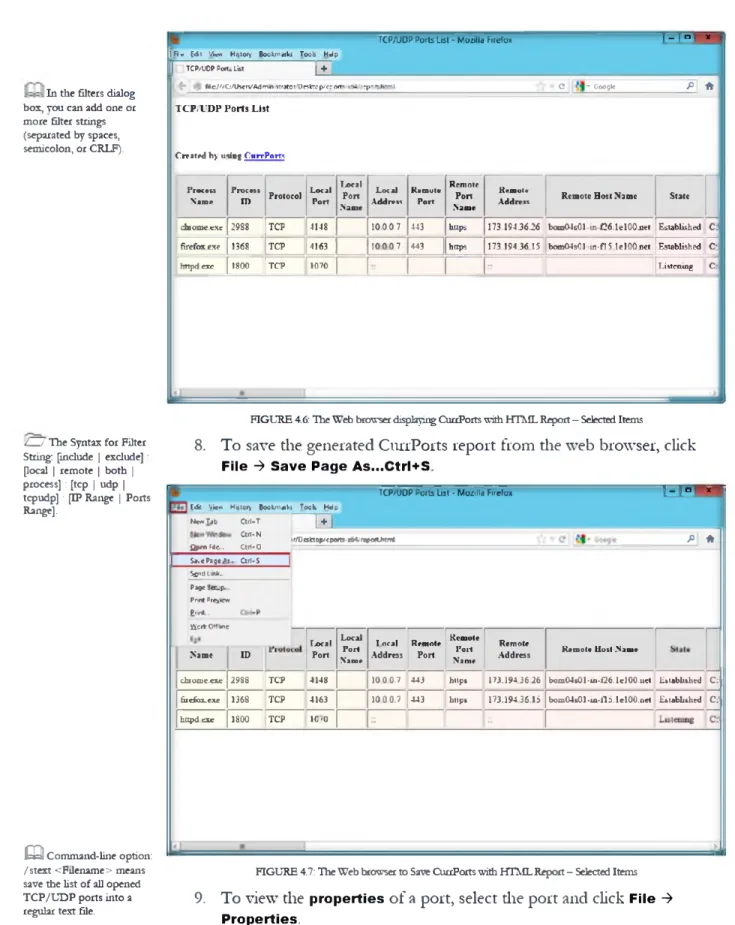
2Zy" By default, the log file
is saved as cports.log in the
same folder where
cports.exe is located. You
can change the default log
filename by setting the
LogFilename entry in the
cports.cfg file.
^ Be aware! The log file
is updated only when you
refresh the ports list
manually, or when the
Auto Refresh option is
turned on.
a
You can also right-
click on the Web page and
save the report.
E th ic a l H ackin g and Counterm easures Copyright
O
by EC-Coundl A ll Rights Reserved. Reproduction is Strictly Prohibited C E H Lab M anual Page 106M o d u le 0 3 - S c a n n in g N e tw o rk s
TCP/UDP Ports List - Mozilla Firefox I 1 ־ n J~x
ffi'g |d : Vico Hatory Bookmaiks Toob Help
[ j TCP/UDP Ports List | +
^ W c/'/C /lh erv׳Admin 1strotor/Dr5fctop/'cport5־r64/rcpoידi«0T1l (? ־ Google
P
| ,f t IT C P / V D P P o rts L i s t
C rea ted b y m in g C ii r r P o m
Process
Name ProcessID Protocol Local Port I>ocal Port .Name Local Address K«mut«Port
Remote Port Name
Kvuiotc
Address Remote Host Name State
dbiome.cxc 2988 TCP 4148 10.0.0.7 443 https 173.194.36-26 bom04sC 1 m. £26.1 e 100.net Established c: fire fo x exe 1368 TCP 4163 10 0 0 7 443 https 173 194 36 15 bom 04s01 tn - fl 5. Ie l0 0 .n e t Established C:
h ttp d
cxc
1800 TCP 1070 Listen in g C:In the filters dialog
bos, you can add one or
more filter strings
(separated by spaces,
semicolon, or CRLF).
FIGURE 4.6: The Web browser displaying CuaPorts with HTML Report - Selected Items
8. To save the generated CurrPorts report from the web browser, click
F ile ־> S a v e P a g e A s ...C t r l+ S
׳
r= > r* י
TCP/׳UDP Ports List ־ M ozilla Firefox
fi
*
1
r/Desktop/cpo»ts x6C repwthtmlEdfe Vir* Hutory Boolvfmki Took HWp N**׳T*b Clfl*T | + | an*N Open Fie... Ctrl»0 Ctrl-S P a g e A ;. S*.« Sir'd link-Established C Established C
Rem ote Ilo t l .N io it
boxu04s01 -ui-1‘26. Ie l0 0 .n e t bom 04s01-1a-115.lel00.net Remote Address 1 7 3 .1 9 4 3 6 2 6 173.19436 15 Kcm ole Po rt Nam e https https
T o ral Rem ote
Address Port 1 0 0 0 .7 443 443 100 .0.7 Local Po rt Nam e Local Pori ID Page :er.p. Pnnt Preview P rm L. fic it Offline Name 4148 TCP 2988 chtoxne.exe 4163 1368 TCP fiiefox-cxc
0
׳
10
TCP1800
h ttp d e xeFIGURE 4.7: The Web brcnvser to Saw QirrPorts with HTML Report - Selected Items
9. To view the
p r o p e r t ie sof a port, select die port and click
F i le ־>P r o p e r t ie s .
/ / The Syntax for Filter
String: [include | exclude]:
[local | remote | both |
process]: [tcp | udp |
tcpudp] : [IP Range | Ports
Range].
ש Command-line option:
/stext <F11ename> means
save the list of all opened
TCP/UDP ports into a
regular text file.
r ® C u rrP orts I - ] “ ' *m 1 File J Edit View Options Help
I P N ctln fo C trM
Close Selected TCP Connections Ctri+T Local Address Rem... Rem.. Remote Address Remote Host Nam׳י 1 Kill Processes Of Selected Ports 10.0.0.7 80 http 173.194.3626 bom04301 - in-f26.1 Save Selected Items CtiUS 10.0.0.7 80 http 1־׳3.194.3626 bom04501 ־ in-f26.1
Properties A lt^Entei 1 10.0.0.7 80 http 1^3.194.36.26 bom04s01-in-f26.1
10J3J3.7 80 http 23.57.204.20 a23*57204-20־.dep ■
Process Properties C tiU P
10.00.7 443 https 1Ti 194.36.26 bom 04s01-in-f2M
Log Changes 127.0.0.1 3982 127.aa1 W IN-D39MR5Hl9f
Open Log File 127.0.0.1 3031 127.0L0L1 WIM-D30MRSH10F
Clear Log File 10.0.0.7 443 httpc 1,־1 194.3622 bom04e01-m־f22.1
Advanced Options C trU O 10.0.0.7 443 https 173.194.3615 bom04s01-m-f15.1
10.0.0.7 443 https 173.194.360 bom04s01 m־f0.1c Exit 10.0.0.7 443 https 74.12523415 gru03s05-in־f15.1 e \ j1ttjd .e x e 1800 TCP 1070 o a a o 0 D S ) S ) \ h t t o d . e x e 1800 TCP 1070 :: □ lsass.exe 564 TCP 1028 aao.o 0 D S J J J Q lsass-exe $64 TCP 1028 r. ״ ־ T >
| 7 9 Tctel Ports, 21 Remote Connections, 1 Selected NirSoft Freeware, h ttp :'w w w .n irs o ft.n e t
b&i
Command-line option:
/stab <Filename> means
save the list of all opened
TCP/UDP ports into a
tab-delimited text file.
FIGURE 4.8: CunPoits to view properties for a selected port
10. The
P r o p e r t ie swindow appears and displays all the properties for the
selected port.
11. Click
O Kto close die
P r o p e r t ie swindow
*
Properties firefox.exe 1368 TCP 4166 10.0.0.7 443 | https________________ 1173.194.36.0 bom04s01-in-f0.1 e100.net EstablishedC:\Program Files (x
86
)\M0
zilla Firefox\firefox.exe Firefox Firefox 14.0.1 Mozilla Corporation 8/25/2012 2:36:28 PM WIN-D39MR5HL9E4\Administrator 8/25/2012 3:32:58 PM Process Name: Process ID: Protocol: Local Port: Local Port Name: Local Address: Remote Port: Remote Port Name: Remote Address: Remote Host Name: State: Process Path: Product Name: File Description: File Version: Company:Process Created On: User Name: Process Services: Process Attributes: Added On: Module Filename: Remote IP Country: Window Title:
OK
Command-line option:
/shtml <Filename> means
save the list of all opened
TCP/UDP ports into an
HTML file (Horizontal).
FIGURE 4.9: The CurrPorts Properties window for the selected port
E th ic a l H ackin g and Counterm easures Copyright
O
by EC-Council A ll Rights Reserved. Reproduction is Strictly Prohibited C E H Lab M anual Page 108M o d u le 0 3 - S c a n n in g N e tw o rk s
12. To close a TCP connection you think is suspicious, select the process
and click
F i le ־> C lo s e S e l e c t e d T C P C o n n e c t io n s(or
C trl+ T ).-_,»r
ד
C urrPorts
IPNetlnfo Ctrt+1
Close Selected TCP Connections C trl-T Local Address Rem... Rem... Remote Address Remote Host Nam
I ׳ י
Kill Processes
Of
Selected Ports 10.0.0.7 60
h ttp 173.19436.26 bom04s01-in־f26.1Save Selected Items CtH-S 10.0.0.7 80 h ttp 173.19436.26 bom04s01-in־f26.1
Properties Process Properties A H- Enter Ctrl—P 10.0.0.7 10.0.0.7 10.0.0.7 80 80
443
h ttp h ttp https 173.19436.26 23.5730430 173.19436.26 bom04sC1 in-f26.1 023-57 204 2C.dep bom04s01 in ־f26.1 =Log Changes 127.00.1 3932 127.0.0.1 WIN-D39MR5HL9e
Cpen Log File 127.00.1 3931 127.0.0.1 WIN-D39MR5HL9£
Clear Log File 10.0.0.7
443
h ttp : 173.19436.22 bom04s01 -in-f22.1A d/sn ced Options CtH+G 10.0.0.7
443
https 173.19436.15 bom04s01-in-f15.1443
https 173.19436.0 bom04s01 ■in-f0.1s Exit 10.0.0.7443
https 74.125.234.15 gru03s05-in-f151e ^ httpd.exe 1 £03 TCP 1070 0D.0.0 0.0.0.0 httpd.exe 1800 TCP 1070 r □ is a s s ^ x e 564 TCP 1028 o m o o .a a o Q toS fcC N e 564 TCP 1Q28 r ^ J III ־ r I >J
IlirS o rt fre e w a re . r-tto :׳v/Yv*/n rso tt.n e t7? Tot«! Porte, 21 Remote C onnection! 1 Selected
FIGURE 4.10: ,Hie CunPoits Close Selected TCP Connections option window
13. To
k illthe
p r o c e s s e so f a port, select die port and click
F i le ־> K ill P r o c e s s e s o f S e l e c t e d P o r ts .I ~ I ם ' *
C u rrP orts
File
j
Edit View Options HelpLoral Address Rem... Rem.. Remote Addrect Remote Host Nam * 10.0.07 80 http 173.14436.26 bom04t01*in-f26.1 10.0.0.7 80 http 173.194.3626 bomC4t01-in־f26.1 10.0.0.7 80 http 173.194.3626 bomC4j01 -in-f26.1 10.0.0.7 80 http 215720420 a23-57-204-20.dep s 10.0.0.7 443 https 173.1943636 bcmC4s01-in-f26.1 127.0.0.1 3962 127.0.0.1 WIN-D39MR5HL9E 127.0.0.1 3981 127.0.0.1 WIN-D39MR5HL9E 10.0.0.7 443 https 173.1943632 bomC4s01-in-f22.1 10.0.07 443 https 173.19436.15 bom04s01־in ־f15.1 10.0.0.7 443 https 173.19436.0 bom 04$0l־in ־f0.1e 10.0.0.7 443 https 74125334.15 gru03s05-1n-M5.1e
an♦!
C*rt*־T PNetlnfo
Close Selected TCP Connection* kin Processes Of Selected Ports
C lri-S A t-E n te r CtrKP 5ave Selected Items
P ro p e rties
Process Properties Log Changes Open Log File Clear Log file Advanced Options Exit 0.0.0.0
O.Q.Q.O
o.aao
___ / ) A A A V httod.exe 1800 TCP 1070 V h ttp d .e x e 1800 TCP 1070 □ lw s s .e r e 564 TCP 1028 □ k a tc *re 561 TCP 1028ר
IIMirSoft Freeware. http-Jta/ww.rirsoft.net
79 Tctel Ports, 21 Remote Connections, 1 Selected
FIGURE 4.11: The CurrPorts Kill Processes of Selected Ports Option Window
14. To
e x itfrom the CurrPorts utility, click
F ile ־> E x it .The CurrPorts
window
c l o s e s . S T A S K 2 C lo s e T C P C o n n e c tio nf i TASK 3
K ill P r o c e s s’
׳
1-1°
C u rrP o n s
File Edit View Options Help
P N etlnfo GH+I
Close Selected TCP Connections C trK T .. Local Address Rem.. Rem״ Remcte Address Remcte Host Nam K il Processes O f Selected Ports 10.0.0.7 80 http 173.194.36.26 bom04s01-in-f26.1
Save Selected Items Ctifc-S 10D.0.7 80 http 173.194.3626 bom04s01-in-f26.1
Properties Procccc Properties A t-E a te r CtH«־P 10.0.0.7 10.0.0.7 10.0.0.7 80 80 443 http http h ttp t 173.1943626 21 57.204.20 173.194.3626 bom04s01-in־f26.1r a23-57-204-20.de J bom04t01-in-f26.1| lo g Changes 127.0.0.1 3082 127.0.0.1 WIN-D3QMR5H19P
Open Log File 127.0.0.1 3981 127X10.1 WIN-039MR5HL9E
Clear Log File 10.0.0.7 443 https 173.19436.22 bomC4101-in-f22.1
Advanced O ption! C tH -0 10.0.0.7 443 https 173.194.36.1S bemC4i01 in ־f15.1 10.0.0.7 443 https 173.194.36i) bcmC4s01 in f0.1q Ext 1 10.0.0.7 443 https 74.125.234.15 gru03s05in-f15.1e \th ttp d .e x e 1800 TCP 1070 0.0.0.0 0.0.0.0 \th ttp d .e x e 1800 TCP 1070 = = Q ls a s & e x e 564 TCP 1028 0.0.00 0.0.0.0 H ls a is - a c 564 TCP 1028 = ־ ־ ■ r r n __ /ו a/ \a A A A A
Nil Soft free were. Mtpy/vvwvv.r it soft.net
79 ז ctal Ports. 21 Remote Connections. 1 Selected
hid
Command-line option:
/sveihtml <Filename>
Save the list of all opened
TCP/UDP ports into
HTML file (Vertical).
FIGURE 4.12: The CurrPoits Exit option window
L a b A n a ly s is
Document all die IP addresses, open ports and their running applications, and
protocols discovered during die lab.
Tool/U tility
Information Collected/Objectives Achieved
Profile Details: Network scan for open ports
Scanned Report:
■ Process Name
■ Process ID
■ Protocol
CurrPorts
■ Local Port
■ Local Address
■ Remote Port
■
Remote Port Name
■ Remote Address
■ Remote Host Name
feUI In command line, the
syntax of /close
command :/close < Local
Address> <Local Port>
< Remote Address >
< Remote Port
נ *.E th ic a l H ackin g and Counterm easures Copyright
O
by E C ־Counc11 A ll Rights Reserved. Reproduction is Strictly Prohibited C E H Lab M anual Page 110M o d u le 0 3 - S c a n n in g N e tw o rk s
P L E A S E T A L K T O Y O U R I N S T R U C T O R I F Y O U H A V E Q U E S T I O N S R E L A T E D T O T H I S L A B .
Q u e s t io n s
Analyze the results from CurrPorts by creating a filter string that displays
only packets with remote TCP poit 80 and UDP port 53 and running it.
Analyze and evaluate die output results by creating a filter that displays only
die opened ports in die Firefox browser.
Determine the use of each of die following options diat are available under
die options menu of CurrPorts:
a. Display Established
b. Mark Ports O f Unidentified Applications
c. Display Items Widiout Remote Address
d. Display Items With Unknown State
Internet Connection Required
□ Yes
0 No
Platform Supported
0 Classroom
0 !Labs
1.
כ .
Q CurrPorts allows you
to easily translate all menus,
dialog boxes, and strings to
other languages.
Lab
S c a n n i n g f o r N e t w o r k
V u l n e r a b i l i t i e s U s i n g t h e G F I
L a n G u a r d 2 0 1 2
G F I L A N g w r d s c a n s n e tw o rk s a n d p o r ts to d e te c t, a s s e s s , a n d c o rre c t a n y s e c u rity v u ln e r a b ilitie s th a t a re fo u n d .L a b S c e n a r io
You have learned in die previous lab to monitor
T C P IPand
U D Pports
011 your
local computer or network using
C u rrP o rts.This tool will automatically mark widi a
pink color suspicious TCP/UDP ports owned by
u n id e n tifie dapplications. To
prevent attacks pertaining to TCP/IP; you can select one or more items, and dien
close die selected connections.
Your company’s
w e b s e r v e ris hosted by a large ISP and is well protected behind a
firewall. Your company needs to audit the defenses used by die ISP. After starting a
scan, a serious vulnerability was identified but not immediately corrected by the ISP.
All evil attacker uses diis vulnerability and places a
b a c k d o o r on th e s e r v e r .Using
die backdoor, the attacker gets complete access to die server and is able to
manipulate the information
011 the server. The attacker also uses the server to
le a p fro g
and attack odier servers 011 the ISP network from diis compromised one.
As a
s e c u r it y a d m in is tr a to rand
p e n e tra tio n t e s t e rfor your company, you need to
conduct penetration testing in order to determine die list of
t h r e a t sand
v u ln e r a b ilitie s
to the network infrastructure you manage. 111 diis lab, you will be
using
G F I L a n G u a r d 2 0 1 2to scan your network to look for vulnerabilities.
L a b O b j e c t iv e s
The objective of diis lab is to help students conduct vulnerability scanning, patch
management, and network auditing.
111 diis lab, you need to:
■ Perform a vulnerability scan
I CON K E Y
Valuable information ✓ Test your knowledge Web exerciseQ
Workbook review Z U T o o ls d e m o n s tr a te d in t h is la b a r e a v a ila b le in D :\CEH - T o o ls \ C E H v 8 M o d u le 0 3 S c a n n in g N e tw o rk sE th ic a l H ackin g and Counterm easures Copyright © by EC-Council A ll Rights Reserved. Reproduction is Strictly Prohibited C E H Lab M anual Page 112
M o d u le 0 3 - S c a n n in g N e tw o rk s
■ Audit the network
■ Detect vulnerable ports
■ Identify security vulnerabilities
■ Correct security vulnerabilities with remedial action
L a b E n v ir o n m e n t
To perform die lab, you need:
■
GFI Languard located at
D :\C E H -T o o ls\C E H v 8 M o d u le 0 3 S c a n n in g N e tw o rk s W u ln e ra b ility S c a n n in g T o o ls\ G F I L a n G u a rd■ You can also download the latest version of
G F I L a n g u a r dfrom the
link h ttp ://www.gfi.com/la1111etsca11
■
If you decide to download the
l a t e s t v e r s io n ,then screenshots shown
in the lab might differ
■ A computer running
W in d o w s 2 0 1 2 S e r v e ras die host machine
■
W in d o w s S e r v e r 2 0 0 8 run n ingin virtual machine
■ Microsoft
■NET F r a m e w o r k 2 .0■ Administrator privileges to run die
G F I L A N g u a rd N e tw o rk S e c u r it y S c a n n e r■ It requires die user to register on the
G F I w e b s it ehttp: / / www.gfi.com/la1111etscan to get a
lic e n s e k e y■ Complete die subscription and get an activation code; the user will receive
an
e m a ildiat contains an
a c tiv a t io n c o d eL a b D u r a t io n
Time: 10 Minutes
O v e r v ie w o f S c a n n in g N e t w o r k
As an administrator, you often have to deal separately widi problems related to
v u ln e ra b ility
issues,
p a t c h m a n a g e m e n t,and network
au d itin g .It is your
responsibility to address all die viilnerability management needs and act as a virtual
consultant to give a complete picture of a network setup, provide
r is k a n a ly s is ,and
maintain a secure and
c o m p lia n t n e tw o rkstate faster and more effectively.
Security scans or audits enable you to identify and assess possible
r is k swithin a
network. Auditing operations imply any type of
c h e c k in gperformed during a
network security audit.
These
include
o p e n portchecks, missing Microsoft
p a t c h e sand
v u ln e r a b ilitie s ,service infomiation, and user or
p r o c e s sinformation.
Q You can download
GFI LANguard from
http: //wwwgfi. com.
Q GFI LANguard
compatibly works on
Microsoft Windows Server
2008 Standard/Enterprise,
Windows Server 2003
Standard/ Enterprise,
Windows 7 Ultimate,
Microsoft Small Business
Server 2008 Standard,
Small Business Server 2003
(SP1), and Small Business
Server 2000 (SP2).
C-J
GFI LANguard
includes default
configuration settings that
allow you to run immediate
scans soon after the
installation is complete.
L a b T a s k s
Follow die wizard-driven installation steps to install die GFI LANguard network
scanner on die host machine windows 2012 server.
1. Navigate to
W in d o w s S e r v e r 2 0 1 2and launch the
S t a r tmenu by
hovering the mouse cursor in the lower-left corner of the desktop
FIGURE 5.1: Windows Server 2012 - Desktop view
2. Click the
G F I L a n G u a r d 2 0 1 2app to open the
G F I L a n G u a r d 2 0 1 2window
Marager Windows Google
b m r ♦ * Nnd V e F T ־ £ S I 2)12 0
FIGURE 5.2 Windows Server 2012 - Apps
3. The GFI LanGuard 2012
m a in w in d o wappears and displays die
N e tw o rk A u d ittab contents.
B T A S K 1
S c a n n in g fo r V u ln e r a b ilitie sZenmap file installs
the following files:
■ Nmap Core Files
■ Nmap Path
■ WinPcap 4.1.1
■ Network Interface
Import
■ Zenmap (GUI frontend)
■ Neat (Modern Netcat)
■ Ndiff
/ / To execute a scan
successfully, GFI
LANguard must remotely
log on to target computers
with administrator
privileges.
E th ic a l H ackin g and Counterm easures Copyright
O
by EC-Council A ll Rights Reserved. Reproduction is Strictly Prohibited C E H Lab M anual Page 114M o d u le 0 3 - S c a n n in g N e tw o rk s
W D13CIA3 this ■י
GFI LanGuard 2012
I - | dashboard Seen Remedy ActMty Monitor Reports Configuration UtSties
W elcom e to GFI LanG uard 2012
GFI LanGuard 2012 is ready to audit your network fc* rtireta&dites
V ie w D a s h b o a rd
Inve30gate netvuor* wjinerawiir, status and audi results
R e m o d ia te S e c u rity Is s u e s
Deploy missing patches uninstaiwwuihortwd *!*rare. turn on onllvirus and more
M a n ag e A g e n ts
Enable agents to automate netooric secant? audit and to tfstribute scanning load across client machines
JP
9
%
Local Computer Vulnerability Level us• ־Nana9#*gents־or Launch a scan־ options 10,
the entile network. M<
{ ' M ow
c a f h ' e . — iim jIW - .
Cunent Vulnerability Level is: High
-I
L a u n c h a S can
Manually set-up andtnuser an aoerSess neVrxt seajrit/ audrt. LATES1 NLWS
txkul a fy n le d ID I -XI }u n jp \fe»g 1!
1־
Ttft ■mu lar ־ l w mr־»DCport for APS81? IS. Mohr.Arrvhm !) 5 2 Pro nnd Standivd tr.vi •n- kuxkI 101 APS812-1S. Mobm A uob* 10.1.4 Pro mtd St—a-0 - -M j ut V# ?4-A*j-7017 - Patch MmuxirTimri - N n pi
1 ( 74 A q 701? Patch Mfwtgnnnnl Added V*, 24-AJO-2012 - Patch M4uu«m< - Aiktod
e a
The default scanning
options which provide
quick access to scanning
modes are:
■ Quick scan
■ Full scan
■ Launch a custom scan
■ Set up a schedule scan
FIGURE 5.3: The GFI LANguard mam window
4. Click die
L a u n c h a S c a noption to perform a network scan.
GFI LanGuard 2012« t Di»e1«s thb version Doshboerd Scan Remediate AdMty Monitor Reports Configurat