Low-Cost Internet Synchronous Distance Education
Using Open-Source Software
J. Mark Pullen, Priscilla M. McAndrews
School of Information Technology and Engineering, George Mason University
Abstract
In the School of Information Technology and Engineering at George Mason University, we have integrated a suite of open-source software for teaching simultaneously in the classroom and over the Internet. The system uses five open-source components from other groups plus a master client, live server, and playback server that we have developed. All software is available at no cost to educational users and runs on low-cost Windows or Linux systems. We have presented about thirty courses using this system, with enthusiastic student response. In order to manage this growing system effectively and at low cost, we have developed a web portal and a set of
procedures for support. This paper will focus on lessons learned in eight years of operation that now enable us to combine this form of delivery effectively with standard classroom courses, using minimal resources.
Introduction
Over many generations of schooling, academia has arrived at the collective conclusion that an instructor, serving as mentor and interpreter of course materials, can enable more effective use of students’ time for learning. This paper addresses a way in which the Internet can support that teaching process directly. Recent years have seen wide use of the Internet for asynchronous distance education, consisting mostly of remote access to Web-based course materials. Such remote access saves a lot of travel to the library and also saves many trees from being sacrificed for paper. Virtually every faculty member maintains a website with course materials, and there is a trend toward providing full courses asynchronously, providing a faster means of delivery for that earlier form of distance education, the correspondence course.
However, the Internet does not invalidate the earlier conclusion that instructor-led courses are most effective; just as the Internet has made the correspondence course more accessible and flexible, synchronous distance education creates an ability to deliver instructor-presented classes to students1. The growing Internet culture makes synchronous teaching seem natural; the latest generation of students has grown up with a keyboard in hand and Internet connection the norm. Because of the pervasive use of electronic mail (email) for student assistance and mentoring, fewer students avail themselves of instructors’ office hours. Attending class over the Internet is the logical next step, allowing students to spend time studying instead of commuting.
Many educators associate synchronous distance education with television delivery. Thus, they generally assume that Internet distance education means video delivered via the Internet. However, when combined with the personal computer, the Internet offers a means of electronic delivery that can be more effective educationally than television and also cost less to deliver. Our experience shows that, in many cases, audiographics (the combination of audio, high quality prepared graphics, and dynamic graphic annotation) is more effective than video. Moreover,
audiographics requires about one-fourth as much network capacity as video and therefore reduces the cost of synchronous course delivery2.
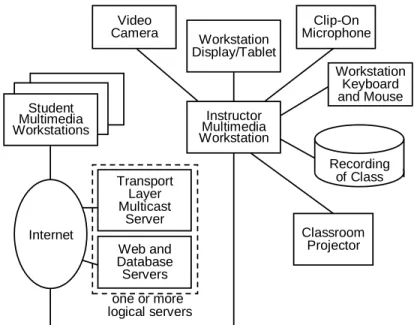
In the School of Information Technology and Engineering at George Mason University (GMU), we have developed an active program of Internet distance education with low cost of operation. We call this approach simulteaching. It consists of simultaneous synchronous audiographic delivery (with optional video) to students both in the classroom and on the Internet. Our simulteaching arrangement is shown in Figure 1. The remainder of this paper describes this technology, which is available as open-source software at no charge for all academic purposes, and the factors we have found to be critical for effective use and acceptance of the software.
LAN connected to Internet Transport Layer Multicast Server Internet Web and Database Servers Workstation Display/Tablet Workstation Keyboard and Mouse Clip-On Microphone Instructor Multimedia Workstation Recording of Class Classroom Projector one or more logical servers Student Multimedia Workstations Video Camera
Figure 1. Simulteaching Setup Software for Synchronous Internet Teaching
Our students now have options to attend a number of courses from home or office or to delay class to a more convenient time. The university pays less in added support than these students bring in tuition and saves on classroom facilities as well. Little extra effort is required to teach the online students, although their added numbers are reflected in grading and mentoring efforts just as much as if they were physically present in class. Most importantly, synchronous Internet course delivery opens up availability of higher education to a whole new sector of our society and correspondingly opens up a whole new market to the university. Furthermore, the student population reached, and the corresponding market, becomes even larger when asynchronous offering of recorded synchronous courses is considered. However, these gains have not been achieved without some pains.
The authors have supported experimental synchronous Internet access to courses at GMU for several years, starting with various cobbled-together collections of multimedia network software3 and proceeding to an early commercial product that, while technically effective, did not succeed
in a business sense4. During this process, the principles for success were determined experimentally:
• Quality software is essential
• Software must function over low-capacity Internet connections
• The entire system, from teaching to online delivery, must be designed to be simple and robust, functioning in almost any Internet environment
• To be accepted, the system must make online teaching and learning easy
Scalable network delivery:In 2001 our laboratory took on the challenge of creating a solution that meets this challenge. We have created Network EducationWare (NEW) primarily from open-source software that is available with no license fee to all. The tools with which we started were created for use with Internet multicasting5, where one station sends an identical message to many others. This approach is sometimes called peer-to-peer operation because all computers have identical ability to send to each other. It offers a simple model for scaling to large numbers of participants and has attracted talented software authors who have made some important tools available without license fee (see the next section for a description of these). However, multicast service is not a common offering in the commercial Internet. Therefore, we have made important adaptations to permit this software to be used with available Internet support.
Dealing with firewalls and NATs:Our adaptations emulate the multicasting model with a system of servers, encapsulating the User Datagram Protocol (UDP) messages used in multicasting within the more common Transmission Control Protocol (TCP) for better acceptance. The server architecture was made necessary by the need to send the same content to a group of students (multicasting) while operating over Internet connections that do not provide such a service. Our solution to this is a software component called the Transport Layer Multicaster (TLM) that accepts messages from one user and sends them to all others in the same group, producing the same effect as a multicasting network. Our Master Client used with TLM (called TLMC) is programmed to accept the UDP messages that are sent by the multicast audiographic tools and pass them through a TCP “tunnel” to the TLM. This unorthodox approach lets us deal with the fact that many students connect from behind a corporate security “firewall” or through a cable provider’s Network Address Translation (NAT) system. As neither of these situations is conducive to using UDP, we encapsulated the multicast messages in a TCP stream. While this lets us use only about eighty percent of available network capacity, it provides a general solution to NATs and makes it more likely that a connection can be arranged from behind the firewall. Authentication and floor control: Another important feature of the TLM is its login and floor control feature. Completely open Internet classrooms have two drawbacks: they fall afoul of the administration’s insistence that students should pay for the courses they attend, and they attract online interference from students with the “hacker” mentality. Therefore one of the tools that operates under the TLMC is a floor control (FC) client which accepts login information and then displays status of the online classroom “floor,” i.e. who is present and who “has the floor” and therefore is able to talk and write on the whiteboard. FC also provides a way for online students to “chat” among themselves and to send typed messages to the instructor. While the NEW
system allows any participant to send audio to the group (including the classroom), most students prefer to ask their questions by typing such notes.
Modular, Open-Source Software
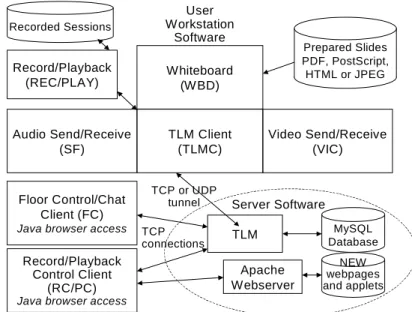
Figure 2 shows the software components of the NEW system. These all have in common the characteristics that they are available as open source and they can run on multiple computing platforms (at least Windows, Unix, Linux, and Macintosh), although the first release is configured only for Windows clients and Windows, Unix or Linux servers. Beyond this, each component is specialized to fill a particular function. Each communicates with another via the Internet Protocol (IP), with the result that they do not need to be run on the same computer, although they generally are grouped on one server computer and many user computers as shown in Figure 1. Instructors and students use identical software, configured as required by their educational role. The typical student computer is a Windows PC with sound card. We use a “Tablet PC” laptop computer for the instructor computer.
We emphasize that, although we have developed over half of the components shown, our fraction of the total software development effort is much smaller; in fact our work is surely less than ten percent of the total effort. The source code for all the software (both ours and others’) is available on our website http://netlab.gmu.edu/NEW. All components are available under open source license for academic purposes. License details vary, but in general any of the components may be modified and redistributed free of license fees, so long as the original copyright is propagated and the application is academic. Descriptions of the components follow.
Floor Control/Chat Client (FC)
Java browser access TCP connections TLM Client (TLMC) Whiteboard (W BD) Video Send/Receive (VIC) Audio Send/Receive (SF) Prepared Slides PDF, PostScript, HTML or JPEG Record/Playback (REC/PLAY) User Workstation Software Recorded Sessions Record/Playback Control Client (RC/PC)
Java browser access
TCP or UDP tunnel TLM MySQL Database Server Software Apache Webserver NEW webpages and applets
Figure 2. System Components and Interconnection
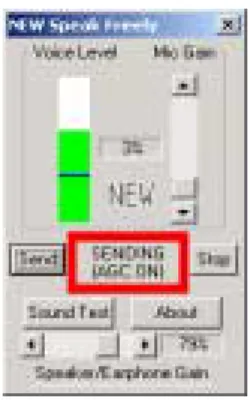
Audio (SF): This component is arguably the most important in the system, because it is essential to the students’ experience and also because conveying voice with good quality over the Internet presents a big challenge. The current NEW audio client, Speak Freely (SF), is capable of passing good voice quality over the Internet, using a standard sound interface. We have added a new user interface to SF, as shown in Figure 3. User interfaces for the other components are presented on our website; we include this one here because it illustrates aspects we have found to be critical to an effective instructor and student interface. While early adopters will endure almost anything,
we have learned that, for regular use, each tool must have clear functions, implemented by intuitive graphic elements. For example, in our SF interface:
• All needed controls are in the same interface; for example, volume controls are included so that the user need not go through a complex sequence of Windows panels to find them.
• Very clear indicators show when the user is sending audio, receiving audio, etc. and also the sound level associated.
• It is possible to do a complete, closed-loop test of the sound interface from this interface. We encourage students to do this to ensure that their speech will be received by others.
Figure 3: SF User Interface
Whiteboard (WBD): This component provides a shared graphic presentation medium. It will display a pre-composed graphic prepared in any of the open formats HTML, PostScript, JPEG, or Adobe Portable Document Format (PDF). The last of these is particularly valuable for creating lecture slides, as any document that can be printed on a Windows system can be
transformed to a relatively small PDF file. We have added to the WBD a capability to convert to PDF from common formats (Microsoft PowerPoint™ and the open-source authoring system LaTeX). The user can annotate the shared space with lines, arrows, rectangles, ellipses, and text in any color, a very useful feature for maintaining the attention of the visual learner. WBD may be scaled to cover a large or small screen area. We have found it very useful for the instructor’s workstation to have a graphic input tablet/display in order to facilitate handwriting on the WBD. The least expensive way we have found to do this is the Tablet PC. As shown in Figure 1, the classroom projector is driven by the same WBD delivery used by online students. This has built confidence in online quality, because instructor and classroom students can see that online students are receiving a quality presentation.
Video (VIC): We list video after the whiteboard because video is optional in our system, while the WBD is absolutely required. NEW uses an excellent video tool called VIC. This component sends and receives digital video, using a standard video adapter. It performs standard H.323 compression and will handle a range of sending rates from less than one per second to full-motion video. We provide video as an option from our online classroom, usable by students with Internet connections at 200 kilobits per second and up such as DSL and cable modem service. A typical delivery rate is two frames of 320 by 240 pixels per second, with transmit rate limited to 100 kilobits per second.
Floor Control (FC): This component shows which participants are in the session, controls access to the virtual “floor,” provides for text questions to the instructor and text chat among the
participants, and accepts URLs from the floorholder for browser launch at all peer participants. Participants may be treated as peers, such that any requester obtains the floor; this is good for seminars. Alternately, a two-tier model of floor control is available, based on privileges coded in the database: instructors can take the floor at any time, change the floor grant status for students among “always,” “ask me,” and “never,” and grant student floor requests made in the “ask me” status.
Transport Layer Multicaster master Client (TLMC): This component collects audio, whiteboard, and optional video transmissions from the multimedia tools, encapsulates them into a network tunnel, and sends them to the TLM. It also tests for adequate network capacity and launches the Floor Control client, Record or Playback control, Recorder or Player, and the multimedia peer-to-peer applications (SF, WBD, and VIC). It has the additional option to launch a web browser or other web-enabled software, upon receiving a request message entered through the Floor Control from any peer.The configuration of client tools is completely controlled by a file provided by the webserver (or locally, for stand-alone operation).
Transport Layer Multicaster (TLM): This component implements the multicast paradigm over the general Internet among a group of participating workstations. It provides access control using passwords and optionally using network addresses. Both TCP and UDP tunnels from TLMCs are supported. It implements floor control on the audio, whiteboard, and video streams, and login authentication via the MySQL database. We are able to support twelve courses, with as many as three simultaneous sessions, in a high-end workstation (Sun Ultra 60) that also provides all of our laboratory’s Internet services, including the webserver and database for NEW (described below) as well as a twenty-user playback server (also described below). We also have
demonstrated a single-course NEW system that uses a PC, under either Windows or Linux, as a server.
Record (REC) and Record Control (RC): The recorder captures a timestamped stream of messages as seen at a particular user’s workstation and records them to disk. They may then be played from that disk or transferred to any other computer for playback. RC provides a VCR-like start/stop/pause interface for REC with a display of status and a record counter. It can run on the same computer as REC or on another Internet-connected computer.
Playback (PLAY) and Playback Control (PC): The player regenerates the original stream of messages from a timestamped recording. It functions as a server, allowing users to play the recording over the Internet through the same client suite used for live classes (TLMC, SF, WBD, VIC). Alternately, it can run stand-alone on a user’s computer with the same clients. PC provides a VCR-like start/stop/pause/prev/next interface for PLAY with a record counter. The ability to skip backward or forward to a slide change has proved very popular with users. PC can run on the same computer as PLAY or on another Internet-connected computer.
Webserver (Apache): NEW was designed for the Web, with student access via webpage and Java applets for FC and PC plus access to lecture slides (more details on this below). We use the
Apache™ open-source webserverby Apache Digital Corporation. The web interface is fully integrated with the student database, so that student login and instructor database access is accomplished through a web browser.
Database (MySQL): This is a high quality, multiplatform, open source, network-accessible relational database that implements the Structured Query Language (SQL) developed by the Swedish company MySQL AB. It is used for authentication and usage logging, and runs just as it came from the MySQL website. The database is built at the beginning of the semester by transfer of information from the registrar, and updated during the semester by individual course
instructors.
Scaling Up Course Management
Managing courses that cater to synchronous Internet students has proved challenging. Some of the most critical lessons we have learned follow.
Internet courses need not have world wide access; a regional approach can be used. The first realization we faced was that simply providing a lecture to a distant student does not provide an entire educational solution. As set forth eloquently by Carswell6, a complete distance education system involves many functions of the university that we often take for granted, such as
registration, a bookstore, and advising. Our solution to this was to realize that, because we operate in a major urban area and have many working students, we can best serve regional students who come to campus rarely when they need services. This idea that students can and should partake of campus services is further reflected in our simulteaching approach, using the same software to teach to a group of students in the classroom and another group over the network at the same time. The students can switch back and forth from week to week. Many of the users of the recorded classes are classroom students who have missed a class.
The system must be built on scalable technologies and procedures in order to grow. The number of synchronous distance education courses at GMU has grown rapidly. In academic year
2000/2001, only Pullen taught one course per semester in this mode; in academic year 2003/2004 there were a total of 24 courses taught by 14 faculty members. Based on the simplicity and low cost to deliver courses in this mode, we expect the growth to continue. When we passed four courses per semester, it soon became apparent that the number of details to be managed between students and instructors can be overwhelming. We installed the NEW database and have
integrated it with a family of webpages that automate almost every interaction with users. Our webpages, written in HTML and PHP languages, also are available in our open-source repository online. These are the most important functions supported by webpages:
• User authentication, handled by a login page that also provides a link to have the
registered user’s password sent to his or her GMU email account; after authentication the user is taken to a “welcome” page that serves as a portal for all NEW functions
• User download and installation of the NEW client software
• Student connection to live class, with or without the ability to speak, and with or without video
• Instructor connection, using a teaching configuration, with recorder
• Student access to streaming playback of recorded sessions, downloadable recordings for offline playback, and PDF versions of lecture slides
• Instructor upload and download of slides and recordings
• Instructor access to the database for status of slide files, recordings, system usage, and to add or modify student accounts
• Administrator access for general database queries, initializing courses or semesters, and starting or stopping servers
Optional modem access is a critical component for adequate quality of delivery. While synchronous Internet delivery takes advantage of the near-ubiquity of inexpensive Internet connections, it faces the problem that the Internet today does not support a guaranteed quality of service required to ensure a quality delivery of audiographics. GMU is located in a
high-technology urban area with excellent Internet service and legendary levels of vehicle traffic congestion. We have found that network traffic congestion also reaches extreme levels in some cases. While many of our students are able to connect via their Internet Service Provider, we have found the availability of a campus modem bank is essential to guarantee that every student can obtain a quality connection to class, thus avoiding both congested roads and congested networks.
Online is not for everybody (but playback is for nearly everybody). In a typical course, at most 25 percent of the students truly want Internet delivery. More may enroll if it is the only way to take a highly sought course, but those who are not committed to participating at a distance soon will squeeze into the classroom if permitted to do so. Online delivery appeals to students who have particular schedule or commuting difficulties, and see the time saved as a good exchange for whatever sense of presence they lose. In our experience, among the network students there is an even smaller fraction who truly prefer Internet delivery because they find it avoids the
distractions of the classroom environment. Other students “time-shift” by enrolling for network delivery but not connecting regularly during class. Instead, they access the course by playing the recordings. Registered online students have turned out to be at most half of the users of the playback system. Most students will use the playback system at some time during the semester to make up a missed class or review a lecture. We have concluded that, in our environment,
simulteaching with recording can be expected to attract up to 25 percent additional students and also to make the in-classroom portion of the course more attractive (most of our simultaught sections are at maximum enrollment).
Asynchronous courses are not for everyone (but asynchronous playback is). The availability of recorded lectures has prompted us to grow in a different direction, by offering professional education classes that use the recordings. We find that less than half of the students who enroll in these courses complete them. Follow-up generally yields the response “I just got too busy to finish it.” However, we find that almost all of our part-time graduate students, online or in-classroom, are able to find time to complete their synchronous courses. The big difference seems to be the existence of a weekly lecture and assignment schedule to motivate completion. Online students who defer a lecture generally play it back within a week in order to prepare for
homework or project submission. This again underscores the value to working students of simulteaching with recording.
Even progressive faculty members resist new media. In the GMU School of Information Technology and Engineering we pride ourselves on progressive approaches. We are part of Virginia’s newest state university and are located in a leading high-technology area, the “home of the Internet.” Even so, the idea of teaching over the Internet has caught on slowly.
Simulteaching with NEW is succeeding because it adopts a paradigm the faculty already know, in that the NEW WBD interface is a great deal like an overhead projector and the other tools do not demand much attention. To get a new instructor started mostly requires heavy reminders that:
• The online student does not benefit when you point your hand at the screen; use the WBD arrow!
• The online student can’t hear the questions from the back row; repeat the question! Given such a simple environment and good support (see below), many of our faculty have become converts to simulteaching with NEW.
Online teaching requires more institutional support. The university saves money on classroom facilities for online students, but it must invest part of that savings in supporting the process. Reliability of the online teaching system must be very high; students who miss classes because something breaks will have little patience with the system, and faculty who lose class time dealing with technology problems will have even less. Systems must be tested thoroughly. Support personnel must be trained thoroughly, and imbued with the attitude to “fix the problem, quickly!” Most faculty today do have their teaching materials digitized (usually in Microsoft PowerPoint), but the slides are likely to need some revision for the first online use; for example they may entail extensive scanned-in graphics that transfer very slowly over student modem lines, or they may involve fonts that are hard to read in on a projected whiteboard in the classroom. We have settled on an arrangement where graduate assistants edit the slides for readability and convert them from the original format to PDF files ready for the WBD. They also post the slides for students to use in preparing for class. These same teaching assistants then monitor the class and stand by the phone to answer student questions. Our experience is that a teaching assistant can handle about six courses this way and can simultaneously monitor two or three classes. The average course has an enrollment of about eight synchronous students in addition to forty in-classroom students. Thus we anticipate a need for one extra teaching assistant for every fifty synchronous students.
Conclusion
Our experience in teaching online with NEW has proved very positive, because our efforts have paid off in better support for students. Despite its growing pains, our students routinely give simulteaching using NEW a strong endorsement (the average is better than four out of five on semester-end evaluations). Based on these observations, and on our growing experience with synchronous simulteaching using NEW, we conclude that there is a very large potential for this mode of distance education. However, it is important for both the supporting technology and the online course management approach to be designed for scalability if synchronous online teaching is to succeed when it grows beyond individual efforts. The software must emphasize simple, intuitive user interfaces, ease of use, and robustness. Course management requires effective automation through database and web technology in order to scale up to multiple courses. Furthermore some additional support is needed to assist the students and faculty and to monitor the network-delivered instruction for problems.
References
1. Pullen, J.M., A Software System for Cost-Effective Internet Delivery of Synchronous Distance Education, IASTED Conference on Computers and Advanced Technology in Education, Rhodes, Greece, June 2004
2. Applicability of Internet Video in Distance Education for Engineering, Proceedings of the IEEE/ASEE Frontiers in Education Conference, Reno, NV, October 2001
3. Pullen, J.M., Synchronous Distance Education and the Internet, Internet Society Annual Conference 1998, Geneva, Switzerland, July 1998
4. Pullen, J.M. and M. Benson, ClassWise: Synchronous Internet Desktop Education, November 1999 special multimedia CDROM issue of IEEE Transactions on Education Vol 42 No 4; printed abstract p 370
5. M. Macedonia and D. Brutzman, Mbone Provides Audio and Video Across the Internet, IEEE Computer, April 1994, 30-36
6. Carswell, L., The “Virtual University”: Toward an Internet Paradigm? ACM SIGCSE Bulletin, September 1998
J. MARK PULLEN is Professor of Computer Science at George Mason University. He holds BSEE and MSEE degrees from West Virginia University and the Doctor of Science in Computer Science from the George Washington University. He is a licensed Professional Engineer, Fellow of the IEEE, and Fellow of the ACM. His research covers networking for distributed virtual simulation and networked multimedia tools for distance education. PRISCILLA M. McANDREWS is the laboratory manager and a research contributor in the areas of Web-based distributed systems in the Networking and Simulation Laboratory in the School of Information Technology and Engineering at George Mason University (GMU). She holds a BA in Mathematics from Vanderbilt University, a BS in Computer Science from the University of Missouri at Kansas City, and an MS in Computer science from GMU.