INFO 3435 eCommerce
Alexander Nikov
3. eC
ommerce Infrastructure:
Internet, web and mobile platform
3-2
Teaching Objectives
• Discuss the origins of the Internet.
• Identify the key technology concepts behind the Internet. • Describe the role of Internet protocols and utility programs. • Explain the current structure of the Internet.
• Explain the limitations of today’s Internet. • Describe the potential capabilities of Internet II. • Explain how the World Wide Web works.
• Describe how Internet and Web features and services support eCommerce.
• Explain the impact of mCommerce applications
Outline
1. The Internet: Technology Background
2. The Internet Today
3. The Future Internet Infrastructure
4. The Web
5. The Internet and the Web: Features and services
The Internet: Technology Background
• Internet
– Interconnected network of thousands of networks and millions of computers
– Links businesses, educational institutions, government agencies, and individuals
• World Wide Web (Web)
– One of the Internet’s most popular services
3-5
Trends in eCommerce infrastructure 2013-2014
eCommerce infrastructure
E-commerce application Web application
World Wide Web
Internet
Data communication network
3-6
1.1. The Evolution of the Internet
1961—The Present
• Innovation Phase, 1964–1974
– Creation of fundamental building blocks • Institutionalization Phase, 1975–1994
– Large institutions provide funding and legitimization • Commercialization Phase,1995–present
– Private corporations take over, expand Internet backbone and local service
1.2. The Internet: Key Technology Concepts
•
Defined by Federal Networking Commission
as network that:
– Uses IP addressing – Supports TCP/IP– Provides services to users, in manner similar to telephone system
•
Three important concepts:
1. Packet switching
2. TCP/IP communications protocol 3. Client/server computing
3-9
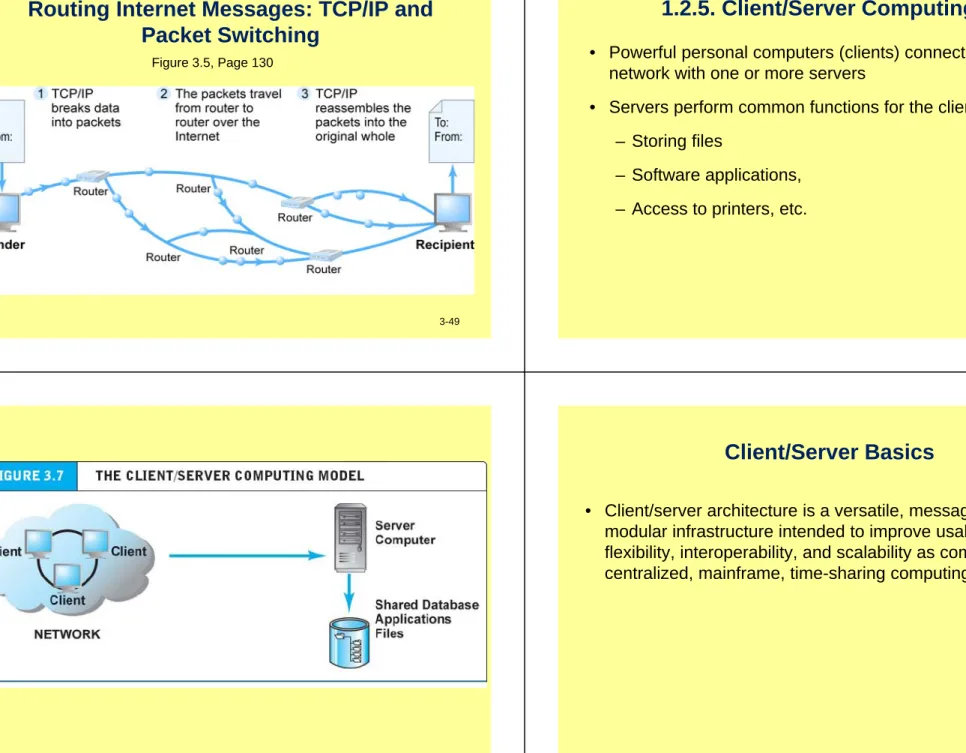
1.2.1. Packet Switching
• Slices digital messages into packets
• Sends packets along different communication paths as they become available
• Reassembles packets once they arrive at destination • Uses routers
– Special purpose computers that interconnect the computer networks that make up the Internet and route packets
– Routing algorithms ensure packets take the best available path toward their destination
• Less expensive, wasteful than circuit-switching
3-10
Packet Switching
Figure 3.3, Page 119Packet switching
• Objective: – Efficiently utilize bandwidth • Process– Break message into packets – Transmit packets independently – Multiple messages share line – Reassemble message at receiving end
Packet A1 Packet A2 Packet A3
Message A
Packet A1 Packet A2 Packet A3
Message A
Packet A3 Packet Packet Packet Packet A2 Packet Open Packet Packet
Packet A1 Packet Open Packet Packet Open Packet Packet Packet
A message’s packets can follow different paths
Router 3 Router 4 Router 6 Router 7 Router 9 Router 8 Router 1 Router 2 Router 4 Router 5 Router 5 Router 5 3-13 3-14Packets and Internet Protocols
• Protocols are pieces of software that run on every node or computer and allow every pair of computers to communicate directly without having to know much about each other, except for the IP address
• Protocols govern communication between peer processes on different systems
• Differing client browser and Web server
• Protocols used in connection with the Internet include many functions and the TCP/IP protocol suite
Packets and Internet Protocols
• Protocols are pieces of software that run on every node or computer and allow every pair of computers to communicate directly without having to know much about each other, except for the IP address
• Protocols govern communication between peer processes on different systems
• Differing client browser and Web server
• Protocols used in connection with the Internet include many functions and the TCP/IP protocol suite
3-17
Packets and Internet Protocols
• Protocols are pieces of software that run on every node or computer and allow every pair of computers to communicate directly without having to know much about each other, except for the IP address
• Protocols govern communication between peer processes on different systems
• Differing client browser and Web server
• Protocols used in connection with the Internet include many functions and the TCP/IP protocol suite
1.2.2 TCP/IP
• Transmission Control Protocol (TCP):
– Establishes connections between sending and receiving Web computers
– Handles assembly of packets at point of transmission, and reassembly at receiving end • Internet Protocol (IP):
– Provides the Internet’s addressing scheme • Four TCP/IP Layers
1. Network Interface Layer 2. Internet Layer
3. Transport Layer 4. Application Layer
3-18
The TCP/IP Architecture and Protocol Suite
Figure 3.4, Page 121
3-19
The TCP/IP model.
Application layer
Transport layer
Internet layer
Network access layer
The top two layers work with the message.
The bottom two layers work with packets and control the network.
3-21
OSI Reference Model
• Application Layer • Presentation Layer • Session Layer • Transport Layer
• Network (Internet) Layer • Data Link Layer
• Physical Layer
• A seven-layer model that defines the basic network functions
• Each layer handles a different portion of the
communications process with specific network functions
The Open Systems Interconnect (OSI) model.
OSI layer Responsibilities
Application Provides a logical link between an application program and
the lower-level protocols.
Presentation Performs necessary data representation and/or syntax conversions; e.g., encryption/decryption.
Session Establishes, maintains, and terminates a connection.
Transport Breaks the message into packets. Ensures error free,
end-to-end delivery of the complete message.
Network Determines the best route for sending a packet from the
source node to the destination node.
Data-link Formats a packet for transmission to the next node.
Physical Interfaces with the physical communication medium.
The top four layers work with the message.
The bottom three layers work with packets and control the network.
A blueprint.
3-22
The application layer protocols support
application programs.
Application layer
Transport layer Internet layer Network access layer
FTP POP telnet SNMP http SMTP Other DNS
From application program
To transport layer
Some common application layer protocols.
Acronym FTP HTTP POP SMTP SNMP Telnet
Hypertext transfer protocol File transfer protocol
Name
Post office protocol
Simple mail transfer protocol
Simple network management protocol Terminal emulation protocol
Send an e-mail message from the originator's computer to the recipient's mail server.
Function
Download a file from or upload a file to another computer.
Request and download a web page. HTTP is the standard Web surfing protocol. Deliver accumulated mail from a mail server to the recipient's computer.
Monitor the activity of a network's hardware and software components.
Log into a remote computer. System operators use telnet to remotely control a server.
The application layer FTP protocol adds a
header.
FTP request FTP header FTP request Application program Application layer 3-26Presentation and Session Layers
• Presentation Layer
– The network’s translator
– Converts data into a format for network
transmission and converts incoming data into a format the receiving application can understand • Session Layer
– Facilitates a “session” between two parties to communicate across a network
– Keeps track of the status of the exchange and ensures that only designated parties are allowed to participate
– Enforces security protocols
The next layer down is the transport layer.
Application layer
Transport layer
Internet layer
Network access layer
TCP
Other transport
protocol From application layer
To Internet layer The transport layer usually uses the TCP protocol.
TCP adds its own header.
TCP header FTP request FTP header FTP request FTP header FTP request Application program Application layer Transport layer (each packet)
The Internet layer uses the Internet protocol (IP)
Application layer
Transport layer
Internet layer Network access layer
IP
From transport layer
To network access layer ARP
3-29
IP adds its own header.
FTP request FTP header TCP header IP header TCP header FTP request FTP header FTP request FTP header FTP request Application program Application layer Transport layer (each packet) Internet layer (each packet) 3-30
The network
access layer
adds another
header.
FTP request FTP header TCP header IP header TCP header FTP request FTP header FTP request FTP header FTP request Application program Application layer Transport layer (each packet) Internet layer (each packet) FTP request FTP header TCP header IP header Network header Network access layer1.2.3 Internet (IP) Addresses
• A Web site’s address includes the name of the host computer’s link the Web site resides on
• Each host is identified by a unique host number (called an IP address) and by a name that is easier to remember than the number
• IPv4:
– 32-bit number
– Four sets of separate numbers marked off by periods • 201.61.186.227
• Class C address: Network identified by first three sets, computer identified by last set
• IPv6:
– 128-bit addresses, able to handle up to 1 quadrillion addresses (IPv4 can only handle 4 billion)
3-33
IP Address Arithmetic
• An IP address consists of 32 binary digits or bits (zeros and ones)
• Divide the 32 bits into 4 groups of 8 bits called a byte, or octet
• Each octet represents a decimal value from 0 through 255 • Write the four decimal values separated by dots
• 191.170.64.12 - computer friendly, but not human friendly • Every host on the Internet has a host number
1.2.4 Domain Names, DNS, and URLs
• Domain Name
– IP address expressed in natural language
• Domain Name System (DNS)
– Allows numeric IP addresses to be expressed in natural language
• Uniform Resource Locator (URL)
– Address used by Web browser to identify location of content on the Web
– E.g., http://www.azimuth-interactive.com/flash_test
3-34
How to Pick a Domain Name
• Pointer for picking domain names– If you sell bricks, pick a domain name containing a word like brick – Consider name length and ease of remembering the name – Hyphens to force search engines to see keywords in your domain
name
– Make sure the domain name is easy for Web users to remember and find
– The domain name should suggest the nature of your product or service
– The domain name should serve as a trademark – The domain name should be free of legal conflicts
How to Register a Domain Name
• Check if the domain name you propose has been taken • www.FasterWhois.com
• One of the most popular and reliable registration sites is
3-37
Pieces of the Internet puzzle:
names and addresses
3-38
Host Naming
• A host nameis an Internet address consisting of text labels separated by dots
• Host name is people friendly
• Host names used instead of IP addresses or host numbers
Networks and Numbers
• Host number divided into two parts– Network part - 2 octets – Local part - 2 octets
University of Virginia host number 191 . 170 . 64 . 12
network local part part
– All UVa addresses begin with 191 . 170 – 64 identifies a subnet at UVa
3-41
Zones and Domain Names
• An Internet name is decoded from right to left
• Zone name is the last (rightmost) part of a domain name preceded by a dot, specifying the type of domain name
• Zones are classified in two ways: – Three-letter zone names – Two-letter zone names
• Domain name is a Web address that contains two or more word groups separated by periods
• www.virginia.com => domain name .com => zone
A domain name consists of two to four words
separated by dots.
sbaserver1.sba.muohio.edu
Server within SBA sub-domain SBA sub-domain
Miami University domain Top-level domain
Domain: a set of nodes administered as a unit.
3-42
The parts of a
domain name are
structured as a
hierarchy.
edu 134 com org muohio 134.53 sba 134.53.40 cas 134.53.54 sbaserver1 134.53.40.2 sbadata 134.53.40.4 3-43Top-level domain names.
Domain Signifies Domain Signifies
aero Air-transport industry au Australia
biz Business organization br Brazil
com US commercial ca Canada
coop Coooeratives cn China
edu US educational de Germany
info Unrestricted fi Finland
gov US government fr France
mil US military gb Great Britian
museum Museums in India
name Individuals it Italy
net US network jp Japan
org US non-profit ru Russia
pro Professionals za South Africa
3-45
Common Geographical Two-Letter Zone Names
An IP address.
134.53.40.2
Server within SBA domain SBA domain
Miami University domain Top-level domain
3-46
A domain name and an IP address convey the
same information.
• Physical transmission requires IP address
• Domain name system converts domain name to equivalent IP address
sbaserver1.sba.muohio.edu 134.53.40.2
TCP/IP address translation
• DNS
– Domain name to IP
• ARP
– IP to MAC address
• Map logical domain name to physical device.
• MAC address
– Final node
– Not directly on Internet
Domain Name System (DNS) IP address Address Resolution Protocol (ARP) MAC address domain name
Routing Internet Messages: TCP/IP and
Packet Switching
Figure 3.5, Page 130
3-49
1.2.5. Client/Server Computing
• Powerful personal computers (clients) connected in network with one or more servers
• Servers perform common functions for the clients – Storing files
– Software applications, – Access to printers, etc.
3-50
Client/Server Basics
• Client/server architecture is a versatile, message-based, modular infrastructure intended to improve usability, flexibility, interoperability, and scalability as compared to centralized, mainframe, time-sharing computing
3-53
Client/Server Networks
• A server is simply a special-purpose computer designed to address a client’s requests
• A client is any computer or workstation connected to the server within a network
• All programs or applications reside on the server
• The client downloads software and/or data from the server • When the client finishes data may be uploaded back to the server
3-54
Client/Server Network
Pros and Cons of Client/Server Network
The New Client: The Mobile Platform
• Primary Internet access is now through: – Tablets
• Supplementing PCs for mobile situations – Smartphones
• Disruptive technology:
– Shift in processors, operating systems • 38% of all cell phones
Cloud Computing
• Firms and individuals obtain computing power and software over Internet
• Public, private, and hybrid clouds • Radically reduces costs of:
– Building and operating Web sites – Infrastructure, IT support
– Hardware, software
• Risks: Organizations become dependent on outside providers
3-57 3-58
Outline
1. The Internet: Technology Background
2. The Internet Today
3. The Future Internet Infrastructure
4. The Web
5. The Internet and the Web: Features and services
The Internet Today
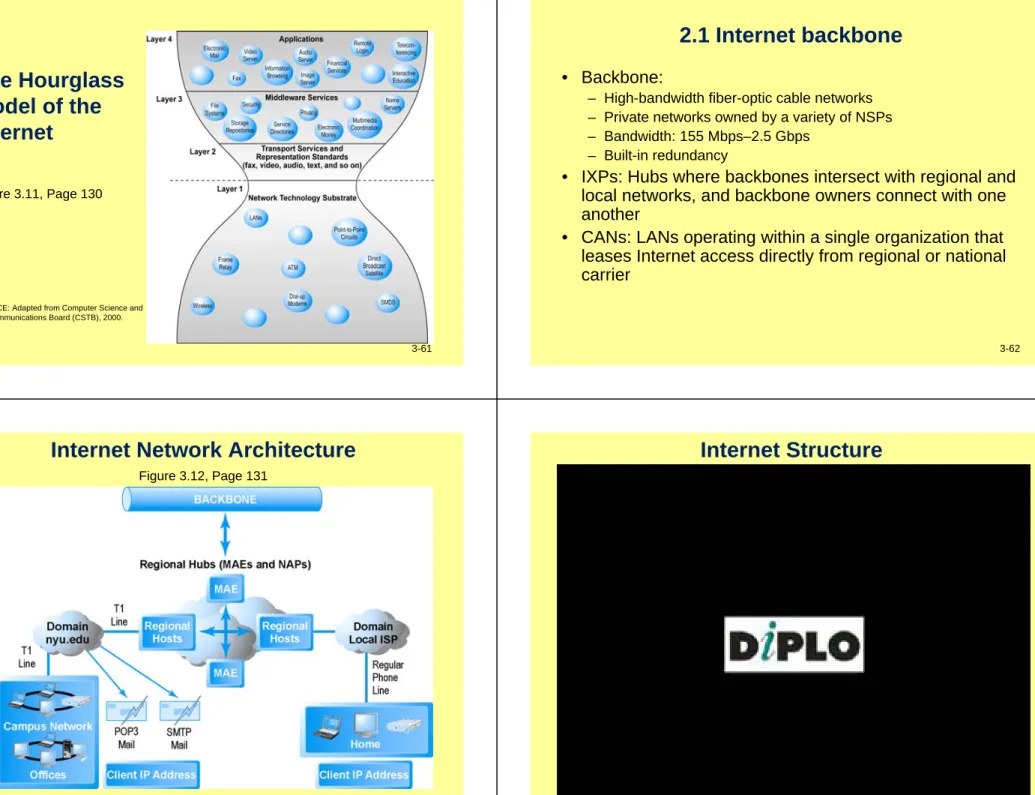
• Internet growth has boomed without disruption because it is based on:
– Client/server computing model – Hourglass, layered architecture
• Network Technology Substrate
• Transport Services and Representation Standards • Middleware Services
The Hourglass
Model of the
Internet
Figure 3.11, Page 130
3-61 SOURCE: Adapted from Computer Science and
Telecommunications Board (CSTB), 2000.
2.1 Internet backbone
• Backbone:
– High-bandwidth fiber-optic cable networks – Private networks owned by a variety of NSPs – Bandwidth: 155 Mbps–2.5 Gbps
– Built-in redundancy
• IXPs: Hubs where backbones intersect with regional and local networks, and backbone owners connect with one another
• CANs: LANs operating within a single organization that leases Internet access directly from regional or national carrier
3-62
Internet Network Architecture
Figure 3.12, Page 1313-65
Internet Basics
• The Internet is a network of networks – Network is any-to-any communications
• Each station on the network has a unique address (much like a phone number) called an IP address
• Routers and switches forward traffic between network segments • Protocols are rules that govern the way a network operates:
– How data travel in packets
– How electrical signals represent data on a network cable
3-66
Network Components
• Network Interface Card
– A card installed in a slot in the PC to allow communication between the PC and other PCs in the LAN and beyond
– To communicate over a telephone line the PC needs a modem, a device that converts digital signals into analog format for outgoing transmission and converts incoming messages from analog to digital format for computer processing
• Hubs and Switches
– Hub is a piece of hardware that operates at the OSI physical layer and acts as a connecting point
– Switch is a piece of hardware that offers a direct connection to a particular PC
Network Components
(cont'd)
• Routers
– A piece of hardware that operates at the OSI Internet layer, linking the network into little chunks called network segments
– Usually “intelligent” and evaluate the network traffic and can stop local traffic from entering and causing congestion
– Make intelligent path choices
– Filter out packets that need not be received – Expensive and difficult to operate
• Gateways
– A special-purpose computer that allows communication between dissimilar systems on the network
2.2 Internet Service Providers (ISPs)
• Provide lowest level of service to individuals,
small businesses, some institutions
• Types of service
– Narrowband (dial-up) – Broadband
• Digital Subscriber Line (DSL) • Cable modem
• T1 and T3 • Satellite
ISP service levels and bandwidth choices
3-69
Time to download a 10-MB file by
type of Internet service
3-70
2.3 Intranets and Extranets
• Intranet
– TCP/IP network located within a single organization for communications and processing
• Extranet
– Formed when firms permit outsiders to access their internal TCP/IP networks
What Is an Intranet?
• An intranet delivers collaboration and coordination to employees around the clock
– Communication system designed by technical staff – A network of people, not of wired machines – Focus is the message, not the media
• An organization-wide software and information
distribution system that applies Internet technology and standards to a closed network within the organization • Normally runs in a client/server environment and a local
area network configuration
• Separated from other networks by firewalls, a means of preventing unauthorized access to the company’s internal data or leaks of sensitive company information
3-73
Applications - Human Resources
• Employee handbook • Benefits information • Employee surveys • Internal/external recruiting • Candidate screening • Organization charts • Newsletters • Company calendar 3-74
Applications - Sales and Marketing
• Product information • Market research • Prospecting
• Managing sales contacts • Sales training
Applications - Accounting and Finance
• Financial reports • Expense reports
• Accounts receivable/payable processing • Asset management
• Policies and procedures • Payroll
Applications - Manufacturing and Operations
• Inventory control • Production schedules • Quality assurance
3-77
Other Applications for Intranets
• Real-time broadcasting of news, including medical information.
• Document management to minimize unnecessary paperwork and waste of paper.
• Customized application modules like a travel or document library.
• Complete e-mail for interoffice and intraoffice communication.
• Internal company office circulars can be routed electronically.
• Bulletin board service.
3-78
Extranets and SCM
• Intranets are localized within a firm and move data quicker than the more widely distributed extranets
• Extranets are already the backbone of the e-business future
• Extranet designers at each participating company must collaborate to make sure there is a common interface with the company they are dealing with
• The overall connectivity represents supply chain management
• Extranet-SCM and Enterprise Resource Planning (ERP)
– ERP facilitates integration of company-wide information systems with the potential to go across companies
– The Internet allows linking the Web sites to back-end systems like ERP, offering connections to a host of external parties like vendors and suppliers
Basic Extranet Layout
2.4 Who Governs the Internet?
• Organizations that influence Internet and monitor its operations include:
– Internet Corporation for Assigned Names and Numbers (ICANN)
– Internet Assigned Numbers Authority (IANA) – Internet Engineering Task Force (IETF) – Internet Research Task Force (IRTF)
– Internet Engineering Steering Group (IESG) – Internet Architecture Board (IAB)
– Internet Society (ISOC)
– Internet Governance Forum (IGF) – World Wide Web Consortium (W3C)
3-81
Limitations of current Internet
• Bandwidth limitations – Slow peak-hour service • Quality of service limitations
– Latency
• Network architecture limitations
– Identical requests are processed individually • Wired Internet
– Copper and expensive fiber-optic cables
Outline
1. The Internet: Technology Background
2. The Internet Today
3. The Future Internet Infrastructure
4. The Web
5. The Internet and the Web: Features and services
3-82
Internet2 Project
• Limitations of current Internet – Bandwidth limitations
– Quality of service limitations
• Latency
• “Best effort” QOS
– Network architecture limitations – Language development limitations
• HTML
– Wired Internet limitations
The Internet2® Project
• Consortium of 440+ institutions collaborating to facilitate revolutionary Internet technologies
• Primary goals:
– Create leading-edge very-high speed network for national research community
– Enable revolutionary Internet applications
– Distributed and collaborative computing environments for sciences, health, arts, and humanities initiatives
3-85
Internet2 100 GB network
The First Mile and the Last Mile
• GENI Initiative
– Proposed by NSF to develop new core functionality for Internet
• Most significant private initiatives – Fiber optic trunk-line bandwidth
• First mile
– Wireless Internet services • Last mile
3-86
Fiber Optics and the Bandwidth Explosion
in the First Mile
• “First mile”: Backbone Internet services that carry bulk
traffic over long distances
• Fiber-optic cable: hundreds of glass strands that use
light to transmit data
– Faster speeds and greater bandwidth – Thinner, lighter cables
– Less interference – Better data security
• Substantial investments in fiber optic by
telecommunications firms in last decade
– Enable integrated phone, broadband access, video services
Communication requires five elements.
• Message
– Information/content• Transmitter
– Source or sender• Medium
– Path or pipe• Receiver
– Sink or destinationTransmitter Medium Receiver
Message
Protocol: a set of rules for transmitting a message.
Media Types
• Cable
– Physical wire
– Twisted pair, coaxial, fiber optic • Wireless
– No physical wire
– Cellular, digital cellular, satellite
3-89
Connectivity
• Ability to operate over a connection
– Physical – medium – Logical – protocol
• Line types
– Baseband – one signal at a time
– Broadband – simultaneous signals in parallel
• Example – cable TV
– Cable can be baseband or broadband – Wireless can be baseband or broadband
3-90
Plain old telephone service.
• The cloud is a common way to visualize an infrastructure Central office Long distance connection Source Central office Destination
Network Cable Types
• Network connectivity means: – Speed of data transfer – Network size
– Ease of installation
• There are three types of cable – Twisted pair
– Optical fiber – Coaxial
3-93
The Last Mile: Mobile Internet Access
• “Last mile”: From Internet backbone to user’s computer,
smartphone, and so on
• Two different basic types of wireless Internet access:
– Telephone-based (mobile phones, smartphones) – Wireless local area network (WLAN)-based
3-94
Wireless Technology
• Data communication without physical attachments • Three types of wireless data transmission technology:– Microwavetransmission is used to connect LANs in separate buildings that must be within the line of sight of each other
– Radiotechnology by radio frequency with no distance limitations
– Infraredtransmission operates at frequencies approaching the speed of light
Wireless communication.
• Both POTS and wireless use the
samelong distance infrastructure.
Telephone A lice
Mobile switching center
M obile sw itching center
Long distance network Trunk Trunk Radio tow er Hub Base station Telephone Bob Radio tow er Hub Base station
POTS and wireless are alternative access paths to the long distance infrastructure.
• Cable and satellite Internet services use the samelong distance lines.
POTS Wireless service
Long distance infrastructure
3-97
High-speed optical bandwidth standards
2-98
The Last Mile Problem
• Speed disparity
– Local telephone line – 56 Kbps – Long-distance line – 40+ Mbps • Alternatives
– Satellite – 400 Kbps – DSL – 1.44 Mbps – Cable – 2-10 Mbps
– Fiber optic cable – up to 10 Gbps
Wi-Fi Networks
Figure 3.16, Page 1583-101
Benefits of Internet access networks
• IP multicasting:
– Enables efficient delivery of data to many locations on a network
• Latency solutions:
– diffserv (differentiated quality of service)
• Assigns different levels of priority to packets depending on type of data being transmitted
• Guaranteed service levels and lower error rates
– Ability to purchase right to move data through network at guaranteedspeed in return for higher fee
• Declining costs
3-102
Outline
1. The Internet: Technology Background
2. The Internet Today
3. The Future Internet Infrastructure
4. The Web
Development of the Web
• 1989–1991: Web invented
– Tim Berners-Lee at CERN
– HTML, HTTP, Web server, Web browser
• 1993: Mosaic Web browser w/GUI
– Andreesen and others at NCSA – Runs on Windows, Macintosh, or Unix
• 1994: Netscape Navigator, first commercial Web
browser
– Andreessen, Jim Clark
• 1995: Microsoft Internet Explorer
3-105
4.1 Hypertext
• Text formatted with embedded links
– Links connect documents to one another, and to other objects such as sound, video, or animation files
• Uses Hypertext Transfer Protocol (HTTP) and URLs to locate resources on the Web
– Example URL
http://megacorp.com/content/features/082602.html
3-106
4.2 Markup Languages
• Generalized Markup Language (GML)—1960s
• Standard Generalized Markup Language (SGML)—early GML,1986
• Hypertext Markup Language (HTML)
– Fixed set of predefined markup “tags” used to format text – Controls look and feel of Web pages
– HTML5 the newest version
• eXtensible Markup Language (XML)
– New markup language specification developed by W3C – Designed to describe data and information
– Tags used are defined by user
4.3 Web Servers and Clients
• Web server software:
– Enables a computer to deliver Web pages to clients on networks that request this service by sending an HTTP request
– Apache and Microsoft IIS
– Basic capabilities: security services, FTP, search engine, data capture
• Web server
– Can refer to Web server software or physical server – Specialized servers: database servers, ad servers, etc.
• Web client:
– Any computing device attached to the Internet that is capable of making HTTP requests and displaying HTML pages
4.4 Web Browsers
• Primary purpose to display Web pages
• Google’s Chrome (64%), Firefox (21%), and Internet Explorer (7%) dominate the market
• Other browsers include: – Safari (for Apple) 5% – Opera 2%
Source: http://www.w3schools.com/browsers/browsers_stats.asp, 10-Sep-2015
3-109
Outline
1. The Internet: Technology Background
2. The Internet Today
3. The Future Internet Infrastructure
4. The Web
5. The Internet and the Web: Features and services
3-110
Video: FiftyOne Global Ecommerce
The Internet and Web: Features
• Internet and Web features on which the foundations of e-commerce are built include:
– Instant messaging – Search engines
– Intelligent agents (bots) – Online forums and chat – Streaming media – Cookies
5.1 E-mail
Most used application of the Internet
Uses series of protocols for transferring messages
with text and attachments (images, sound, video
clips, etc.,) from one Internet user to another
Instant Messaging
Displays words typed on a computer almost
instantly, and recipients can then respond
immediately in the same way
Advanced IM systems include voice/video chat
3-113
3-114
E-mail and the Intranet
• E-mail is what intranets are best known for • 2.6 billion email users worldwide 2015
(Source: technology market research firm The Radicati Group2015)
• E-mail is becoming smarter: It now can direct specific messages to defined folders and be a place to check voice, text, and fax messages
• Intranets inherit Simple Mail Transport Protocol (SMTP) from the TCP/IP suite to operate e-mail
• E-mail is a potential threat for employers – Confidentiality breaches
– Legal liability – Lost productivity
– Damage to company reputation
• Important for a firm to create an e-mail usage policy and make sure the policy is actually implemented
Spamming and Appropriate E-mail Use
• Spamming is sending unwanted advertisements or literature through e-mail or the Internet
• Companies have been overwhelmed by e-mail traffic, and spam is out of control
• Spot checks are no longer adequate
• Trend is more toward systematic monitoring of e-mail traffic using content-monitoring software
Spamming and Appropriate E-mail Use
(Cont’d)• Spamming is nearly impossible to eliminate, but solutions exist:
– Blacklist the sender; obtain a spammer’s address and block any e-mail from that address
– Accept e-mail only from a list of approved addresses – Look for signs of spam
3-117
Personal Guidelines to Avoid Spam
• Stop giving away your e-mail address• Do not “unsubscribe,” it only confirms your e-mail address is real • Write to the Direct Marketing Association and credit bureaus • Contact your credit card companies, credit union, and mortgage
companies and tell them not to release your name, address and similar data
• Contact all organizations you belong to, schools, magazines you subscribe to, airline frequent flyer programs, your long-distance telephone carrier, and just about anyone who sends you a bill
• As a last resort, contact your phone company and change your listing in the phone book, or simply list your name with no address
5.2 Instant Messaging
• Sometimes the rapid response of e-mail is not fast enough • Instant messaging is one alternative medium• IM is an electronic communication system that involves immediate correspondence between two or more users who are all online simultaneously
• Displays words typed on a computer almost instantly, and recipients can then respond immediately in the same way
• Different proprietary systems offered by AOL, MSN, Yahoo, and Google
• Meebo, Digsby: allow users to communicate across platforms
3-118
5.3 Search Engines
• Identify Web pages that match queries based on one or more techniques
– Keyword indexes, page ranking
• Also serve as:
– Shopping tools
– Advertising vehicles (search engine marketing) – Tool within e-commerce sites
• Outside of e-mail, most commonly used Internet activity
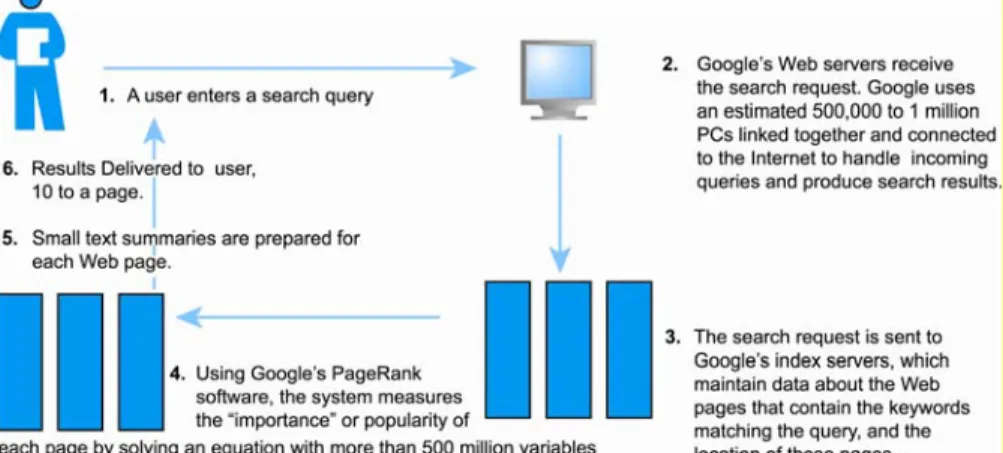
How Google Works
3-121
Figure 3.22, Page 180
5.4 Online Forums and Streaming Media
• Online forums:
– Enable Internet users to communicate with one another, although not in real time
– Members visit online forum to check for new posts • Streaming Media
– Enables music, video, and other large files to be sent to users in chunks so that the file can play uninterrupted – Allows users to begin playing media files before file is
fully downloaded
3-122
5.5 Cookies
• Small text files deposited by Web site on user’s computer to store information about user, accessed when user next visits Web site
• Can help personalize Web site experience • Can pose privacy threat
5.6 Web 2.0 Features and Services
• Online Social Networks
– Services that support communication among networks of friends, peers
• Blogs
– Personal Web page of chronological entries • Really Simple Syndication (RSS)
– Program that allows users to have digital content automatically sent to their computers over the Internet
Web 2.0 Features and Services
• Podcasting
– Audio presentation stored as an audio file and available for download from Web
• Wikis
– Allows user to easily add and edit content on Web page • New music and video services
– Videocasts
– Digital video on demand
3-125
Web 2.0 Features and Services
• Internet telephony (VoIP)
– Voice over Internet Protocol (VoIP) uses Internet to transmit voice communication
• Video conferencing, video chatting, and telepresence • Online software and Web services
– Web apps, widgets, and gadgets
3-126
Intelligent Personal Assistants
• Software that interacts with the user through voice commands
• Features
– Natural language; conversational interface – Situational awareness
– Interpret voice commands to interact with various Web services
• Examples: Siri, Google Now
Mobile Apps
•
Use of mobile apps has exploded
– Almost 75% of online shoppers are mobile shoppers as well
•
Increased use/purchasing from tablets
•
Platforms
– iPhone/iPad (iOS), Android, Blackberry
•
App marketplaces
– Google Play, Apple’s App Store, RIM’s App World, Windows Phone Marketplace