IT 11 026
Examensarbete 30 hp
Maj 2011
Study and Implementation of
Statistical Information System
for EHR System
Xuejun Xu
Institutionen för informationsteknologi
Teknisk- naturvetenskaplig fakultet UTH-enheten Besöksadress: Ångströmlaboratoriet Lägerhyddsvägen 1 Hus 4, Plan 0 Postadress: Box 536 751 21 Uppsala Telefon: 018 – 471 30 03 Telefax: 018 – 471 30 00 Hemsida: http://www.teknat.uu.se/student
Abstract
Study and Implementation of Statistical Information
System for EHR System
Xuejun Xu
Uganda is accentuating a lot of efforts to strengthen its healthcare services and provide National Electronic Health Record System. One of the core components of Electronic Health Record System is Statistical Information System. The Statistical Information System locates in the application logic in the technical architecture of the whole project. Exsiting tool, DHIS 2 is evaluated and found not proper to be used as the project's Statistical Information System. Based on the discussions above, the system is divided into 3 parts: Static Statistics, Dynamic Statistics and HMIS Reports. The static part provides powerful search for statistics. The dynamic part utilizes a flash chart, where users can see the move of statistics like watching a movie. The HMIS part is the place where the traditioncal HMIS reports can be generated.
Tryckt av: Reprocentralen ITC IT 11 026
Examinator: Anders Jansson Ämnesgranskare: Mats Daniels Handledare: Rustam Nabiev
1
1. INTRODUCTION ... 3 1.1 INTRODUCTION ... 3 1.2 BACKGROUND ... 3 1.3 MOTIVATION... 4 1.4 THESIS STRUCTURE ... 52. ICT4MPOWER TECHNICAL ARCHITECTURE ... 6
2.1 CONTEXT OF UGANDA... 6
2.2 TECHNICAL ARCHITECTURE ... 6
2.2.1 Network Topology ... 6
2.2.2 Analysis and Performance... 8
2.3 WHERE IS STATISTICAL INFORMATION SYSTEM? ... 8
3. EVALUATION OF DHIS 2 ... 10
3.1 WHAT’S DHIS2? ... 10
3.2 USE OF DHIS2 IN HMIS ... 10
3.3 DATA MODEL IN DHIS2 ... 11
3.3.1 Data Elements ... 11 3.3.2 Indicators ... 12 3.3.3 Organisation Units... 12 3.3.4 Dataset ... 12 3.3.5 User Information ... 12 3.3.6 Conclusion ... 13
3.4 IMPORT AND EXPORT DATA IN DHIS2 ... 13
3.5 IS DHIS2 GOOD TO BE USED AS OUR STATISTICAL INFORMATION SYSTEM? ... 13
4. DESIGN OF THE STATISTICAL INFORMATION SYSTEM ... 15
4.1 SUMMARY ... 15
4.2 STATIC STATISTICS ... 15
4.2.1 Why Static? ... 15
4.2.2 Basic Search ... 15
4.2.3 Advanced Search ... 16
4.2.4 Result Table and Charts... 17
4.3 DYNAMIC STATISTICS ... 17
4.3.1 Why Dynamic? ... 17
4.3.2 Dynamic Statistics ... 18
4.4 HMISREPORTS ... 19
4.4.1 Motivation ... 19
4.4.2 Generate HMIS Reports ... 19
5. IMPLEMENTATION, TESTING AND EVALUATION ... 20
5.1 TECHNICAL STRUCTURE ... 20
2
5.1.2 MVC of Statistical Information System ... 20
5.1.3 System Overview ... 21
5.2 STATIC STATISTICS ... 24
5.2.1 Basic Search ... 24
5.2.2 Advanced Search ... 28
5.3 DYNAMIC STATISTICS ... 31
5.4 GENERATE HMISREPORTS ... 40
6. CONCLUSION AND OUTLOOK ... 42
ACKNOWLEDGEMENT ... 43
3
1.
Introduction
1.1
Introduction
Karolinska University Hospital, Karolinska Institutet, Royal Institute of Technology and Ericsson Sweden AB are involved in the international project ”ICT4MPOWER” (Information and Communication ) to develop National Electronic Health Record (EHR) System in Uganda. ICT4MPOWER System resulting from the project will provide a roadmap for implementation and maintenance of low cost EHR System in developing countries.
One of the core components of Electronic Health Record System is Statistical Information System. The issue of statistical information is very crucial to monitor various aspect of the project to make important evidence based decisions at various levels in the health sector. Statistical Information System should offer a range of methods for the collection, presentation and analysis of data from different components of the EHR system.
The project “ICT4MPOWER” should end on December 2011, the writer works at Karolinska Hospital to develop the statistical information system for the EHR System.
1.2
Background
Uganda has remained consistent in its pursuit of poverty eradication as the overriding priority for national socioeconomic development. Uganda has registered significant progress in reorganizing and stabilizing its economy, improving economic growth and reducing poverty. The population of Uganda is estimated at 30 million persons with an average population growth rate of 3.4% between the 1991 and 2002 censuses. This growth rate is one of the highest in the world. Health outcomes for Uganda are poor. The Uganda Demographic and Health Survey (UDHS) 2006 recorded the Infant Mortality Rate at 75 deaths per 1,000 live births, Under-five mortality rate at 137 deaths per 1,000 live births, and the Maternal Mortality Ratio at 435 deaths per 100,000 live births[1]. To raise the country averages for the health outcomes there is need to specifically target the poor and to improve the situation for many of the disadvantaged groups in the population since the better off have higher capacity to benefit from social services and thus higher rate of improvement in health outcomes without impacting on the health of the poor[2]. The stagnation of health outcomes in the 1990s was a manifestation of underlying poverty with deprivation not only in nutrition, housing, water/sanitation and education, but also the high burden of communicable and non-communication diseases. The HIV/AIDS pandemic that peaked in the early 1990s, has led to far reaching social and economic consequences including a decline in life expectancy. Communicable diseases continue to be the
4
leading cause of morbidity and mortality in Uganda. Non-communicable diseases including hypertension, diabetes and cancer, mental illness, chronic and degenerative disorders and cardiovascular diseases are on the rise. This raises the importance of having accurate information on time to facilitate rapid response and accurate interventions.
Uganda is accentuating a lot of efforts to strengthen its healthcare services and provide National Integrated Health Management Information System. In order to succeed in these efforts, all national health units, starting from Village Health Team, and up to Mulago National Hospital must be part of this activity[3]. The Ministry of Health Uganda has done tremendous steps in coming closer to this vision. HMIS Manual has been developed, which accentuates on such issues as strengthening delivery of unified health services, models for management and constant improvements of health services, quality assurance, documentation and reporting[4]. In order to start implementation of the concepts developed in HMIS Manual, the Ministry of Health Uganda has embraced on the national project “ICT4MPOWER”, where the focus is on development and implementation of National EHR System, which would store life-long records of clients.
1.3
Motivation
The health care problems may be looked at with respect to the following thematic areas:a) The lack of patient unique id makes it difficult to facilitate data transmission or client records for second opinion before or after referral. Even when patient referral does occur it is impossible to do effective follow up or patient tracing. Accompanied with this is the inability to have an effective archival system making the whole referral process impossible to run with the increasing population. b) Management of patient records like the patient referral is a teasing problem in view to the lack of the unique patient identifier and paper based nature of the current medical records. This is further complicated by the multiple records generated on each patient for each visit to the health facility and to each department in the facility. c) Disease surveillance, poor record keeping leads to problems with the disease surveillance. In the most recent annual report it was observed that 56% of the health units submitted their reports on time due to absence of feed back or radio call network breakdown. d) Local human capacity development at all levels of healthcare chain, current staffing levels is low especially in hard to reach areas of the country though there is need for accurate data to get a national picture. e) Local decision making and responsibilities of health staff in rural communities is very low due to non functioning health facility management committees, inadequate appreciation and support for the community health workers and the poor information utilization culture at all levels.
Through ICT4MPOWER project, the project partners hope to: a) Empower the community health worker with m-learning materials. b) Facilitate communication
5
between the facility and the community health worker. c) Harmonize patient referrals procedure and feedback. d) Operationalise the concept of primary health care at community level. e) Facilitate mobility of the community health worker. f) Ensure the continuity of care throughout the health care system with Electronic Health Record (EHR) and Unique Patient ID. g) Provide for secondary opinions through telemedicine and Improve health care seeking behavior of households.
The statistical information system plays a vital role in tracking and monitoring health status of the population and of important subgroups, monitoring trends in health status and health care delivery, compiling statistical information to guide actions and policies to improve the healthcare system.
Currently in Uganda, all health workers follow the HMIS manual, recording all the statistical data manually in paper forms. If the ministry of health wants to view statistical information of patients, they will have to read through a lot of paper forms, which is quite inefficient and hard to get clear statistical information.
By developing this Statistical Information System: a) All statistical information is based on the patients’ data in the database, which is easier to maintain. b) The Ministry of Health will be able to search statistical information in whatever the way they want, for example, by location, age, indicators and so on. c) The movement and trend of statistical information will be shown in a dynamic chart. d) The traditional HMIS reports can be generated from the statistical information system as excel files.
1.4
Thesis Structure
The objective of this thesis project is to research and develop a statistical information system of EHR system of “ICT4MPOWER” project for Uganda.
Chapter 2 describes the technical architecture of the ICT4MPOWER project and in which part of the architecture will the statistical information system lies. Chapter 3 evaluates the DHIS system to see whether it’s proper for our system. Chapter 4 analyzes the data models of the system and how to get statistical information from these data models. Chapter 5 describes the design of the statistical information system, including the structures and ideas. Chapter 6 gives the implementation details and the development environment of the statistical information system. Chapter 7 tests and evaluates the developed statistical information system, the screen shots of the system will also be here. Chapter 8 gives the conclusion and outlook of the statistical information system.
6
2.
ICT4MPOWER Technical Architecture
2.1
Context of Uganda
EHR Systems are in use in many countries, including Uganda. However, these systems are limited to 1 health unit, or small geographical region, which consists of 4-5 health units. In order to achieve the vision of Integrated Health Management Information System, all health units must be connected to EHR System. This problem cannot be solved by replicating current EHR solutions, which is too expensive and difficult to maintain. Therefore, new technical architecture must be developed, which will consider the issues of low-cost implementation and affordable maintenance. Uganda has around 30 million people, of which 80% live in rural areas. There are around 30000 health professionals working in Uganda.
In urban areas, such as Kampala and Mbarara, hospitals have access to broadband network. In rural areas, health units don’t have access to broadband network. However, mobile operators are rolling out mobile networks in rural areas, and more than 80% of rural areas are covered by mobile networks, which provide GSM and GPRS connections[5].
Additionally, another challenge which is crucial for National EHR System rollout is lack of resources to maintain and provide local technical support to rural health units. Number of people living in Uganda, and number of health professionals will guide us on scalability aspects of EHR system. Mobile networks will guide us on performance and availability aspects of EHR system. Lack of local technical resources will guide us on security, reliability, and the balance of centralization and decentralization of EHR technical infrastructure and human resources to support and maintain the system.
2.2
Technical Architecture
2.2.1 Network Topology
According to the context of Uganda, we designed the technical architecture, shown in figure 2.1.
7
Figure 2.1 Network Topology of ICT4MPOWER
To provide high availability and cost-effective maintenance of National EHR System, it must be placed centrally. Central location can be provided at the Ministry of Health Uganda, or outsourced to an organization for maintaining EHR System.
As shown in Figure 2.1, health units within the country get access to the EHR System by using mobile infrastructure (GPRS) or by broadband internet connection.
Local EHR applications are installed in end-user devices, End-users will be able to use local EHR Applications without necessity of having connectivity directly to central EHR System. Any updates that end-users make (such as adding a record to the patient or registering a new patient), will be packaged and sent to the Gateway. Gateway will receive the package and identify the destination, which in this case is Central EHR System. EHR System can then download the package from the Gateway. Gateway System is divided into 2 core components: Primary Gateway (PGW) and
8
Secondary Gateway (SGW). PGW is responsible for receiving requests from end-users and from Central EHR System, and based on the nature of request, route it to SGW or process the request by itself. One can avoid having SGWs if requests are coming from small amount of end-users, therefore, architecture of PGW will allow for processing all requests by itself. However, for load balancing, SGW and indeed several SGWs are necessary to support PGW[5].
2.2.2 Analysis and Performance
By placing EHR System and other necessary components centrally, we eliminate the need for costly investments in each health facilities to have their own local systems implemented and maintained. Another advantage is that centralized EHR System can be available nationally once it is operational.
In most cases, maintenance is a big challenge in rural areas, where there is a lack of trained technical support team. High availability can be achieved by coordinating human resources (centralized technical support team) at one central location and by providing redundancy in terms of backup and restore facilities (clustering might not be necessary in the beginning, but something to investigate later). Centralized technical support team can provide 24 hours maintenance and support of EHR System, and restore from failovers in case it happens.
By providing the Gateway between end-users and Central EHR System, we managed to decentralize end-users work, and dependency on available communication links and bandwidth, which further improves availability of entire solution. Additionally we reduce the costs of GPRS connection by limiting the usage of communication links only to synchronize the data between end-users and Central EHR System.
2.3
Where is Statistical Information System?
The client EHR system is divided into 4 tiers: GUI, Controller, Application Logic (different catalyst applications and services) and Data Access Service.
The end-user is using GUI (Mozilla browser) to view relevant information. GUI is an entry point to the system.
The Controller (Apache Web Server) links GUI to Application Logic. The function of the controller is to keep track of different links and update those links accordingly. Application Logic consists of services that are visible to an end-user and those services that run in the background. Those services that are connected to the Controller are visible to the end-user, and Statistical Information System is one of them.
9
All services will be developed in Perl Language using Catalyst as web application development and implementation framework. These applications can be considered as business logic of the Client System.
10
3.
Evaluation of DHIS 2
3.1
What’s DHIS 2?
The District Health Information Software – Version 2 (DHIS 2) is Free and Open Source Software (FOSS) HMIS designed and developed under a global research and development initiative (called Health Information Systems Project – HISP) originating from the Department of Informatics, University of Oslo, Norway[6].
It is a tool for collection, validation, analysis, and presentation of aggregate statistical data, tailored (but not limited) to integrated health information management activities. It is a generic tool rather than a pre-configured database application, with an open meta-data model and a flexible user interface that allows the user to design the contents of a specific information system without the need for programming. DHIS 2 and upwards is a modular web-based software package built with free and open source Java frameworks.
DHIS 2 provides a comprehensive HMIS solution for the reporting and analysis needs of health facilities at any level. It is a tried and tested application in various countries, and also now being adopted by WHO for their HMN implementation.
3.2
Use of DHIS 2 in HMIS
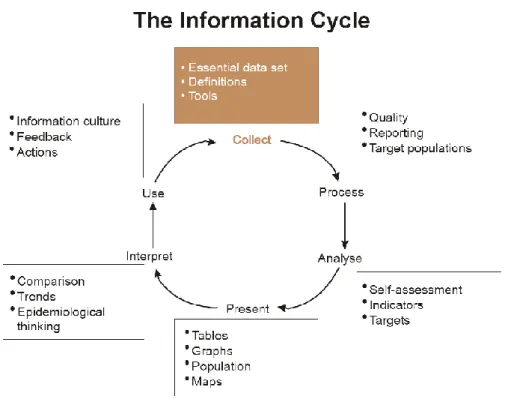
The wider context of HMIS can be comprehensively described through the information cycle presented in Figure 3.1 below. The information cycle pictorially depicts the different components, stages and processes through which the data is collected, checked for quality, processed, analyzed and used.
11
Figure 3.1 Information Cycle of HMIS
As a first step, DHIS 2 serves as a data collection, recording and compilation tool, and all data (be it in numbers or text form) can be entered into it. Data entry can be done in lists of data elements or in customized user defined forms based on the paper forms.
As a next step, DHIS 2 can be used to increase data quality. Firstly, at the point of data entry, a check can be made to see if data falls within acceptable range levels of minimum and maximum values for any particular data element. Such checking, for example, can help to identify typing errors at the time of data entry. Further, user can define various validation rules, and DHIS 2 can run the data through the validation rules to identify violations.
When data has been entered and verified, DHIS 2 can help to make different kinds of reports. The first kind are the routine reports that can be predefined, so that all those reports that need to be routine generated can be done on a click of a button. Further, DHIS 2 can help in the generation of analytical reports through comparisons of for example indicators across facilities or over time. Graphs, maps, reports and health profiles are amongst the outputs that DHIS 2 can produce, and these should routinely be produced, analyzed, and acted upon by health managers.
3.3
Data Model in DHIS 2
12
Data elements form the basis of DHIS 2. Data elements define what is actually recorded in system, for example, number of immunizations or number of cases of malaria. (An administrator will be provided with a list of standardized data elements for inclusion into the DHIS 2 system) Data elements are stored in table DataElement in DHIS 2. Each data element is some aggregated result and belongs to one or several data element groups. Data element group is some way to organize data elements. They are stored in table DataElementGroup in DHIS 2. Each group may include one or many data elements. And data element groups are organized into sets, which are stored in table DataElementGroupSet.
Each data element also has some category combination related to it. Category combos are stored in table CategoryCombo.
3.3.2 Indicators
Indicators are provided by DHIS 2. They are stored in table Indicator. And Indicator has some type (Number, Percent, etc.), which is stored in table IndicatorType. Each indicator belongs to one or several indicator groups. Indicator groups are stored in table IndicatorGroup. Each group may have one or many indicators. Indicator groups are organized into sets, which are stored in table IndicatorGroupSet.
3.3.3 Organisation Units
Organisation units are also stored in DHIS 2. They are stored in table OrganisationUnit. The units are organized hierarchically (like a tree). Each unit belongs to one or several unit groups. The groups are stored in table OrgUnitGroup. And like data elements and indicators, these groups are organized into sets, which are stored in table OrgUnitGroupSet. But each group can belong to one or several sets. When a group set is defined as “compulsory”, it means that an organisation unit must be allocated to at least one organisation unit group within that group set. When a group set is defined as exclusive, it means that an organisation unit can only be allocated to one organisation unit group within that Group Set. Different units may have different levels, and these unit levels are stored in table OrgUnitLevel.
3.3.4 Dataset
A dataset is a collection of data elements for which data is entered (register in HMIS). Values for data elements will not be able to be entered into the system if a data element is not assigned to a data set. Datasets are stored in table DataSet. Each dataset has a related period, periods have different types, 1 year, 6 months for example, they are stored in table Period and PeriodType.
Sections can be inserted into data sets to make them more comprehensible. Each data set can have one or several sections inserted. Sections are stored in table Section. Each section is related to a set of data elements.
3.3.5 User Information
13
stored in table Users. Users’ information is stored in table UserInfo. UserInfo and Users have the same primary key. Each user has a role, which indicates the authority of the user. Users’ authorities are stored in table UserRoleAuthorities. And each user has a number of datasets related, which are stored in table UserRoleDataSet. User may belong to some organization unit, which is stored in table UserMembership. Data model about patient data is also included in DHIS 2 database. But patient data is not visualized in DHIS 2.
Other tables in DHIS 2 database are about Dash board, Excel report, Data mart, Data entry and so on, which are using data stored in the tables analyzed above.
3.3.6 Conclusion
According to the data model of DHIS 2, there is no record to show who entered the data. It is impossible to find the user when someone entered rubbish data into the system. Also many tables seem to be redundant if we use DHIS 2 as our statistical information system. But the structure of the some tables can be used in our system.
3.4
Import and Export Data in DHIS 2
The import option allows different instance of DHIS 2 to receive standardized set of data in the absence of a networked system. DHIS 2 is capable of importing data from other systems that either support the DXF or IXF formats.
In an offline deployment, after the data entry is finished, it will need to be manually sent to the next level of where the application is running. The exported data values are stored in an “xml file”.
The import and export function gives the probability to use DHIS 2 together with our system. The scenario may look like this: xml file about our system, organization units, data elements, data sets and so on, is generated by our system. Then we import this xml file into DHIS 2. Data values are input into DHIS 2, this can be done either manually or automatically (requires modification of source code). After getting the data value, DHIS 2 exports xml file to give statistical reports back to our system. From this point of view, we are using just a small part of DHIS2’s functionalities to meet our requirements. Using DHIS2 means much more work than not using it.
3.5
Is DHIS2 good to be used as our Statistical Information
System?
First of all, we need to input data into DHIS2. As mentioned in “Data Model” section, DHIS 2 only takes aggregated data. We may need an adaptor which does the
14
aggregation for patients’ data that has been stored in our EHR system.
Data elements, indicators and data sets should be generated first according to HMIS manual of Uganda. Data can then be input into DHIS 2 by data entry forms. We also need to add the organization units and hierarchical structure of these units.
Standard database needs to be configured on local machine. Since we use MySQL for our EHR System, we may also use MySQL for DHIS 2. But configuration needs to be made for DHIS 2. Besides JVM needs to be installed on local machine.
The integration is the biggest problem since our EHR System and DHIS 2 are two separated systems. If we use DHIS 2 as our Statistical Information System, users should be trained to know how to generate statistical reports from DHIS 2.
It is possible to develop an adaptor that we can use to transfer statistical reports from DHIS 2 to our EHR System. However, DHIS2 should also be run at the same time with our EHR system. This may increases the system’s load.
Generally speaking, using DHIS2 means more work and more system load. It is better to develop our own statistical information system.
If we don’t use DHIS2 as our Statistical Information System, indicators need to be defined according to HMIS manual of Uganda. Then statistical reports can be generated from the database of our System. And the statistical part can be developed as a part of our system. It will be much better from the integration and configuration point of view. But efficient design of data model needs to be performed.
15
4.
Design of the Statistical Information System
4.1
Summary
Based on the discussions and conclusions of previous chapters, the statistical information system will be one of the services that are visible to end-users. It will be a separate application in the welcome screen, when users enter the statistical information system, a list of all the available applications in the system will be shown, which means users are able to get the statistical information about different parts of the system. In this report, the outpatient part of the EHR system will be taken as a design example for statistics, the others parts are more or less the same.
Generally, the statistical information system is divided into 3 function parts. a) Static Statistics, where the users will be able do the basic and advanced search of statistics, search results will be shown in a table, pie chart and line chart are also provided to view the statistics. b) Dynamic Statistics. In this part, statistics are shown in a motion chart based on locations and time period. Users will be able to see the moving trends of different statistics and compare them in a multiple dimensional way. c) HMIS reports. The traditional HMIS reports can be generated from the statistical system. Instead of filling thousands of units manually, the statistical information system gets data from database and generates exactly the same reports as defined in HMIS manual in .xls format.
These three function parts will be discussed in detail in the coming sub-chapters.
4.2
Static Statistics
4.2.1 Why Static?
The ”Static” here means the way users view the statistical information will be static. The search results will be listed in a table, users may choose pie chart or line chart to view the search results together with the table.
Since everything is stored in the database, the statistical information system allows users to do search in a very flexible way. Different search criteria is provided, users are able to get whatever statistical information they are interested.
Compare with the traditional statistical paper reports, the advantages are obvious. Users are not confusing by huge amount of data in the paper anymore. They don’t need the calculator do the weekly, monthly or annual statistical calculations. Besides, they can focus on what they are interested in, and view these statistics in a nice chart. 4.2.2 Basic Search
16
requirements on statistics, this part is enough for them to view statistics of different locations.
Before going into more detail about the basic search, the structure of the locations in Uganda need to discussed first. Uganda is divided into many districts, each district has one or more counties, each county has one or more sub-counties, each sub-county then has one or more parishes, and each parish has one or more villages.
Choosing a location here means users choose some location in any level, then the statistics of all the next level sub-locations will shown in the search result. For example, if users choose a district, all the counties of this district will be shown in the search results. The idea behind this is that users are able to view the statistical information of some location by comparing between all its sub-locations.
In outpatient part of HMIS manual [7], patients are divided into 2 groups according to the age: 0-4, 5 and above. Following this rule, users have three options about age here: 0-4, 5 and above and all, which means all the patients.
It is also necessary for the users to choose time period. In the basic search part, there will be two calendars for the users to specify start date and end date separately. The search result will then be the statistical information between these two dates.
As we discussed with doctors, gender is also interesting for users. Three options about gender are provides here: Male, Female and Any, which means both male and female patients.
The last search criterion here is indicators. Unlike indicators in DHIS 2, the indicators here mean diseases, “Yellow Fever” for example. All the indicators that are listed in outpatient part of HMIS manual are listed here for users to choose. In the search results, users can see how many occurrences of the specified indictor are.
Basic search is enough for general purpose. However, there are some limitations, for example, users can only view statistical information of sub-locations of some location, what if users want to compare statistical information between 2 districts? What if new indicators of diseases of babies that are less than 1 year old are added to the HMIS Manual, how could users choose age bellow 1 year old? Base on these considerations and investigations, advanced search come up.
4.2.3 Advanced Search
To get over the limitations of basic search and give more flexibility to users, advanced search is designed. Compare with basic search, advanced search is different at two aspects: location and age.
17
As designed in basic search, users can only choose one location to view all sub-locations of this location. More choices are given in advanced search, users are able to choose any location at any level, the number of locations users can choose are not limited either. For example, users choose a district, a county, another district and compare between them.
As for the age part, in advanced search, users can specify an age of years, months and days. For example, if user input “1y3m28d” in the age input area, it means to search patients that are 1 year, 3 months and 28 days old. Moreover, users can specify an age scope, which means to search a group of patients in a specific age scope. For example, “0d-28d” means users want to get statistical information about patients from 0 to 28 days old.
With advanced search, users are able to search almost whatever statistics they want. The idea is to use the data in the database as much as possible, the more the data is used, the more flexibility the users can get.
4.2.4 Result Table and Charts
The result table is a table to show the search results. All options specified in basic or advanced search will be shown in this table. The value of the indicators will also be shown.
Two types of chart are provided for users at Static Statistics: Pie chart and Line chart. In pie chart, the number and percentage of each location will be calculated and shown, while in line chart, users can compare the moving trends of different locations in a time period.
4.3
Dynamic Statistics
4.3.1 Why Dynamic?
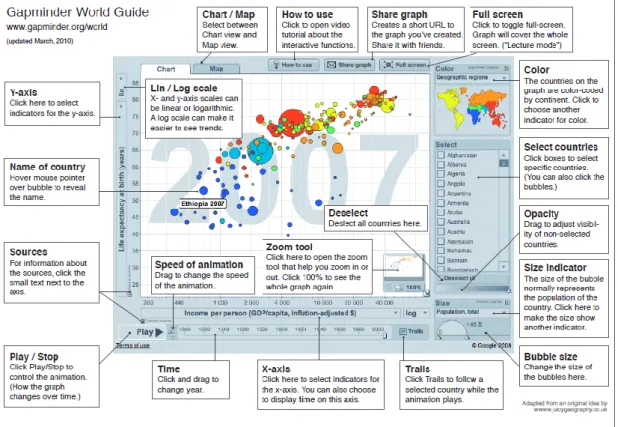
The idea of dynamic statistics actually came from Gapminder, which is a non-profit venture – a modern “museum” on the Internet – providing flexible and understandable statistical information of different areas. The flash elements are integrated into Gapminder so that users will see the move of statistical information like watching a movie. An example of Gapminder is shown in Figure 4.1.
18
Figure 5.1 Gapminder World Guide
If users in Uganda are able to have such kind of statistical tools, it will be much easier for them to view statistics since many people in developing countries are not well educated.
Google has bought this chart and provided a set of APIs to develop this chart, which makes it possible to integrate this tool into our project. Google has renamed the chart to ”Google Motion Chart”. It is a dynamic chart to explore several indicators over time, which is rendered within browser using Flash. By naming it as “dynamic”, it can be considered to watch a movie when users view statistics.
4.3.2 Dynamic Statistics
Google provides really limited APIs to render the motion chart [8]. Because of this, two options are provides in dynamic statistics for users to choose location and time period.
These two options are the same as described at section 4.2.2.
In dynamic statistics, users are able to view statistics in a multi dimensional way, which means, users can compare the statistical information according to multiple criteria: X-axis, Y-axis, color and size of the bubble. Users are also able to switch from bubble chart to bar chart and line chart. The flash of the move of different statistical information in the specified time period can be seen as well.
19
Dynamic statistics provides a graphical, simple but powerful way to view statistics.
4.4
HMIS Reports
4.4.1 Motivation
In Uganda, many people don’t know how to use computer, some old doctors, they will prefer the traditional HMIS reports. It is also good to have something printed out as back up. Besides, it takes a while for users to get used to the statistical information system, by providing the function to generate traditional HMIS Reports, users can still follow the original way to do statistics while learning how to use the new statistical information system.
4.4.2 Generate HMIS Reports
In this part, a select menu of all the available HMIS reports will be shown for the users. In outpatient part, there are four kinds of HMIS reports, all of them will be listed in the page, users choose any one of them, a save dialog will pop up to ask users where they want to save the generated reports. The reports will be generated as .xsl file, and they will be named as “report name-date”.
20
5.
Implementation, Testing and Evaluation
5.1
Technical Structure
5.1.1 Catalyst
As mentioned in Chapter 2, the statistical system is built with Catalyst and Perl. Catalyst is a web application framework[9], which is designed to make it easy to manage the various tasks you need to do to run an application on the web, either by doing them itself, or by letting you "plug in" existing Perl modules that do what you need.
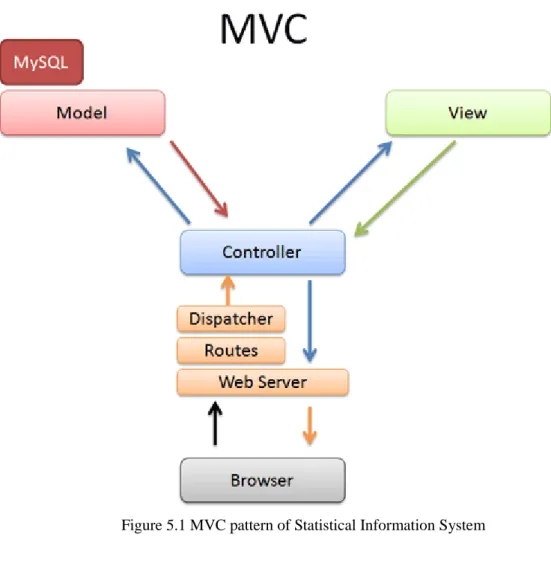
Catalyst follows the MVC pattern. MVC, or Model-View-Controller, is a model currently favored for web applications. This design pattern is originally from the Smalltalk programming language. The basic idea is that the three main areas of an application--handling application flow (Controller), processing information (Model), and outputting the results (View)--are kept separate, so that it is possible to change or replace any one without affecting the others[10].
5.1.2 MVC of Statistical Information System
The purpose of Model is to access and modify data. The Model of statistical information system is a set of perl modules (.pm file) generated from project’s relational databases. In catalyst, a perl module corresponds to a table in the database. As long as these perl modules have been generated, we will be able to perform different kind of operations to the database through these perl modules.
The purpose of the View is to present data to the user. In this statistical information system, a templating module “Template Toolkit” is used to generate HTML (.tt file). In Catalyst, the View is a small module, just gluing some other module into Catalyst; the display logic is written within the template itself.
The controller is Catalyst itself. When a request is made to Catalyst, it will be received by one of your Controller modules; this module will figure out what the user is trying to do, gather necessary data from a Model, and send it to a View for display. The MVC pattern of statistical information system is shown in Figure 5.1.
21
Figure 5.1 MVC pattern of Statistical Information System
In this statistical information system, the main controller is a module called “SIS.pm”, the other controller modules are all designed for the whole project, and reused by all the applications in the project. And as mentioned in Chapter 2, MySQL is used as the database. The project has a set of databases, all corresponding modules in catalyst are generated, these perl modules are used as Model. As for the view, only 1 file called “sis.tt” file is used.
End-users get access to statistical information system from browser (Firefox in this project). Users make request to the controller, when the controller gets request, it performs corresponding actions, accessing models or rendering views, and gets back to the browser.
5.1.3 System Overview
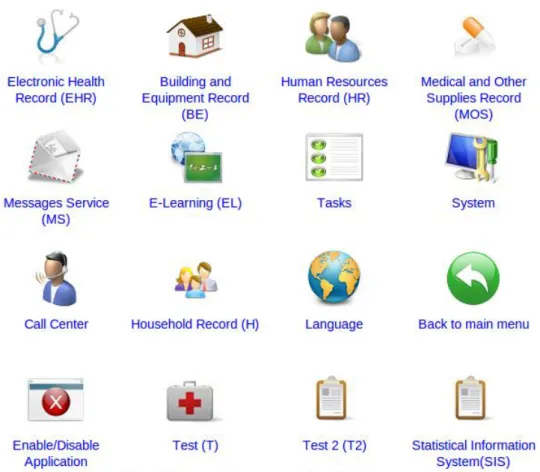
As discussed above, users get access to the system from Firefox, users enter the url of the system and come to the welcome page. The welcome page is shown in Figure 5.2.
22
Figure 5.2 Welcome Page
From Figure 5.2, we can see that all the applications available are listed here, and the last one is Statistical Information System. Click on the Statistical Information System, it goes to the page shown in Figure 5.3.
23
Figure 5.3 Index of Statistical Information System
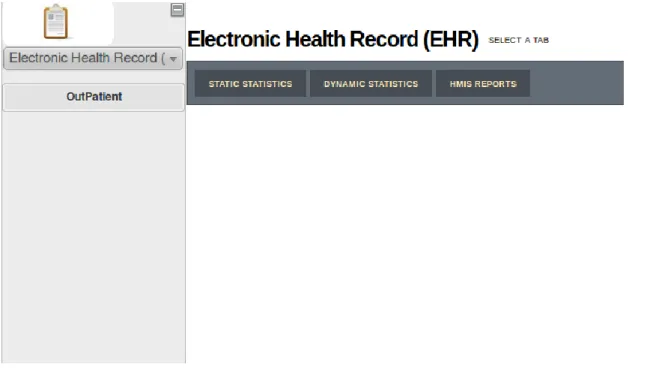
In the left menu, there's a list of all the appliactions in the project. As disscussed in Chapter 2, from Statistical Information System users are able to get statistical information about all the applications in the project. As shown in Figure 5.3, Users can go to whatever appliaction they are interested to read the statistical information. As discussed in the beginning of this chapter, we take outpatient as an example, which belongs to application ”Electronic Health Record”. Click on ”EHR” in the menu, we can enter the page shown in Figure 5.4.
Figure 5.4 EHR Part
24
is ”OutPatient”. Click on ”OutPatient”, we come to the page shown in Figure 5.5.
Figure 5.5 OutPatient of EHR
In the following chapters, all the functionalities designed at Chapter 4 will be implemented and discussed in detail.
5.2
Static Statistics
5.2.1 Basic Search
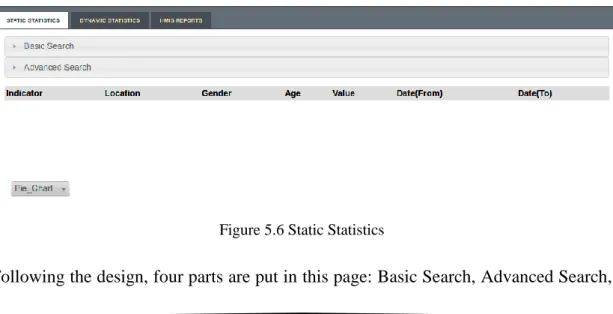
Click on ”Static Statistics” in Figure 5.5, users get into the static statistics part. According to the design ideas in Chapter 4, the static statistics is implemented as shown in Figure 5.6.
Figure 5.6 Static Statistics
25
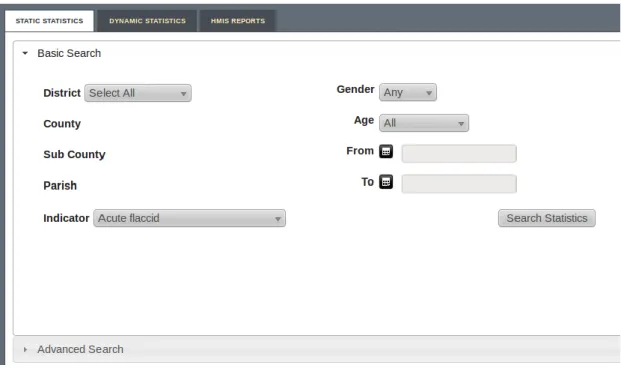
Result Table and Charts. Click on ”Basic Search”, this part will be expanded, as shown in Figure 5.7.
Figure 5.7 Basic Search
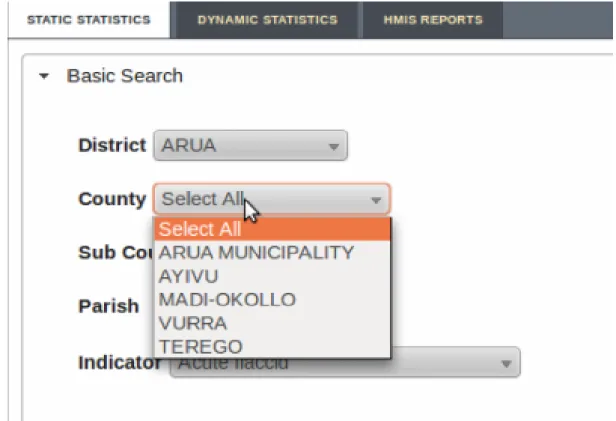
The location part works in the follwing way, when you have chosen a location in current level, all the sub-locations of this location will be shown in the next level. For example, if some district ”ARUA” is chosen here, all counties of ”ARUA” will be listed in ”County” level. This is shown in Figure 5.8.
26
Figure 5.8 Choose a Location
The date component is shown in Figure 5.9.
Figure 5.9 Choose a Date
27
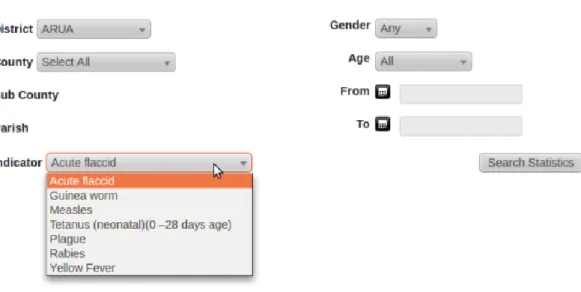
Figure 5.10 Choose an Indicator
The ”Gender” and ”Age” part are the same as described in Chapter 4. When all the search criteria are specified, click the button ”Search Statistics”, the search result is shown in Figure 5.11.
Figure 5.11 Basic Search Result
Defautly a result table and a pie chart will be shown in the page. As we can see from the pie chart, when the user move the mouse to a part of the pie chart, this part will pop up and the corresponding location name and percentage will be highlighted in the left.
28
Figure 5.12 Choose the type of the Chart
And if users choose the ”Line Chart”, the result is shown in Figure 5.13.
Figure 5.13 Line Chart
These are what users can do in the ”Basic Search”, in the next section, ”Advanced Search” will be implemented.
5.2.2 Advanced Search
29
expanded, as shown in Figure 5.14.
Figure 5.14 Advanced Search
The location part in “Advanced Search” works in the same way as the “Basic Search”, the only different is that the “Village” level is also shown in this part for users to choose. Users can choose any location, press “>>” button to add it to the right list. For example, if user choose parish “ADYEDA”, and press “>>” button, “ADYEDA” will then be added to the right list, as shown in Figure 5.15.
Figure 5.15 Add a location
Users can also remove one or more locations from the selected list on the right. Users can choose several locations by dragging the mouse or using “Ctrl” and left single click. To choose only one location, just click on this location. Press “>>” button, the chosen locations will be removed from the selected list, as shown in Figure 5.16. The remove of the locations in the controller utilizes perl’s regular expressions and list operations[11].
30
Figure 5.16 Remove locations from selected list
As discussed in Chapter 4, another part that is different from ”Basic Search” is the “Age” part. When users move the mouse to the “Age” label, an information box will pop up to give hint about the input format of the age, as shown in Figure 5.17.
Figure 5.17 Information Box of Age
For example, if users input “1y3m24d”, it means users specify the age to be 1 year 3 months and 24 days. There is also a check box called “NonScope”, if it is checked, it means that users want to specify a specific age, the second input area of “Age” will then be disabled, as shown in Figure 5.18.
31
Figure 5.18 ”NonScope” checked
If the checkbox is not checked, it means users want to specify an age scope to do the search. Users can then input the start age and end age. As shown in Figure 5.19.
Figure 5.19 Scope of Age
The other parts in “Advanced Search” are the same as “Basic Search”. When all the search criteria are specified, click on the “Search Statistics” button, the search results will be shown in the result table and charts, as shown in Figure 5.12
Once the “Search Statistics” button is clicked, whether in “Basic Search” or “Advanced Search”, all the search criteria will be sent to the controller “SIS.pm”. The Controller gets all the information to perform the search, gets access to the Model, put necessary data in the session, and goes back to the page.
32
Click on ”Dynamic Statistics” in Figure 5.5, users get into the dynamic statistics part. According to the design in Chapter 4, users can specify the location and time period here. All the statistical information will be shown in the motion chart. This page is shown as Figure 5.20.
Figure 5.20 Dynamic Statistics
The location component here works in the same way as in basic and advanced search. Users choose some location, for example, County “KWANIA”, all the sub-counties will be shown in the right-bottom list in the motion chart, as shown in Figure 5.21.
33
Figure 5.21 Choose locations for motion chart
As described in Chapter 4, users can compare data from X-axis, Y-axis, color and size of bubble. In Y-axis, all the indicators are listed, as shown in Figure 5.22.
34
Figure 5.22 Y-Axis of the motion chart
In X-axis, all the indicators, “Time” and “Order: Alphabetical” are listed, which means In X-axis users can compare not only indicator value, but also according to time and alphabetical order. This is shown in Figure 5.23.
35
Figure 5.23 X-Axis of the motion chart
The color also stands for the value. The more the color is close to red, the larger the value is. Users can also choose between “Unique Color” and “Same Color”. This is shown in Figure 5.24.
36
Figure 5.24 Color of the motion chart
As for the “Size” option, all the indicators and “Same Size” are listed here. Users can choose the way the bubble grows. For example, if the users choose indicator “Plague”, the bigger the bubble is, the larger the value is on indicator “Plague”. This is shown in Figure 5.25.
37
Figure 5.25 Bubble size of the motion chart
In the location part, users can choose one or more locations. The chosen locations will be highlighted while the others will be shown in background. This looks like Figure 5.26.
38
Figure 5.26 Location list of the motion chart
Click on the display button on left-bottom, users can see the move of bubbles as time grows.
On top-right, users can also view bar chart and line chart. Which are shown in Figure 5.27 and Figure 5.28 seperately.
39
Figure 5.27 Bar chart
40
5.4
Generate HMIS Reports
Click on ”HMIS Reports” in Figure 5.5, users get into the HMIS reports part, as shown in Figure 5.29.
Figure 5.29 HMIS Reports
All the available reports in “Outpatient” part of HMIS manual are listed in the select menu, as shown in Figure 5.30.
Figure 5.30 Available HMIS reports
Users choose any HMIS report they want, click on button “Generate Report”, a dialog will pop up to ask user the save the report. For example, if users chose to generate the report “HEALTH UNIT DAILY OUTPATIENT DIAGNOSES FOR CHILDREN 0-4 YEARS (MALE/FEMALE, Delete non-applicable)”, it will look like Figure 5.31.
41
Figure 5.31 Save dialog of HMIS Reports
From the dialog we can see that the file is named as ”DailyBelow5-05-02-2011”, which means it is the report “HEALTH UNIT DAILY OUTPATIENT DIAGNOSES FOR CHILDREN 0-4 YEARS (MALE/FEMALE, Delete non-applicable)” generated at 2 May, 2011. Open the report where it is saved, users can see that it’s exactly the same as the report in HMIS manual.
42
6.
Conclusion and Outlook
In this thesis, we did investigations about statistical requirements in Uganda, Designed the statistical information system based on these requirements and implemented it.
The thesis report starts by introducing the background of Uganda’s medical infrastructure and statistical requirements. In Chapter 2, the technical architecture of the whole project is studied to define the position of the statistical information system in the whole project. Taking the consideration of an existing statistical tool, which is DHIS 2, we did the evaluation of this tool to see whether it is good to be used as our statistical information system, if not, what could we learn from this international tool? Based on all these discussions, in Chapter 4, we started to design our own statistical information system. Following these design ideas, the statistical information system is implemented in detail. The screenshots and evaluation are also given in Chapter 5. Generally, this system is not strong enough yet to be put into real use in Uganda. But the writer believes that the design ideas of this statistical information system meet most of Uganda’s needs. To put it into real use, more refinements, refactoring and testing need to be done.
Also there are some possible improvements that have not been covered in this thesis report. The system could provide the functionality to generate not only the standard HMIS reports, but the report about the search results.
Data mining could also be done in the statistical information system, with huge amount of data in the database, we could generate rules about this data, for example, we find the characteristics of the group of patients that get the disease diabetes, for the new registered patient, from their characteristics, we can then do the prediction about who has bigger chance to get diabetes, so proper prevention can be made to these patients.
As for the motion chart, it’s still under development by Google, when there are more APIs available, the Dynamic Statistics could be made more close to Gapminder. Since Uganda in one of the typical developing countries, this statistical actually provides a roadmap for the development of statistical information system for other developing countries. Once a matura version of this system is developed, it can be reused by many other developing countries.
43
Acknowledgement
First of all, I am very grateful for my supervisor Rustam Nabiev from Karolinska Hospital, whose help, supervision and support from the very beginning to the end of this thesis research encourage me to go through any difficulties that I encountered. I am grateful to any help from Alvin Mattsson Kjellqvist, my colleague throughout the whole period, all collaborations and discussions with him worked well to smooth my work.
It is my great honour to have Mats Daniels from Uppsala University as my reviewer. Many thanks for his trust and any valuable suggestion on my thesis report.
Besides, I should give my thanks to all colleges working for the “ICT4MPOWER” at the department of Biomedical Engineering, Karolinska University Hospital, the time of working and having fun with all of you is indeed a very cherish and happy memory for me.
Finally, I own my heartily gratitude to my family, and friends both in China and Sweden. Without all their supports, my study and life would not be going so well.
44
Bibiography
[1] Orc Macro. 2006. “Uganda Demographic and Health Survey 2006”.
[2] Husein K, Adeyi O, Bryant J, Cara NB. 1993. ”Developing a primary health care management information system that supports the pursuit of equity, effectiveness and affordability”. Social Scienceand Medicine 36: 585–96.
[3] Gladwin J, Dixon RA and Wilson TD. 2003. “Implementing a new health management information system in Uganda”. Oxford University Press 18(2).
[4] Peter Kintu, Miriam Nanyunja, Amos Nzabanita, Ruth Magoola. 2005. ”Development of HMIS in poor countries: Uganda as a case study”. UMU Press 3(1): 46-53
[5] Rustam Nabiev. 2010. “Technical Architecture for Electronic Health Record System”.
[6] District Health Information Software 2. Available: http://dhis2.com/. [7] Uganda, M.o.H. Healthcare Management Information System Manual.
[8] Official Website of Google’s Visualization: Motion Chart. Available:
http://code.google.com/apis/visualization/documentation/gallery/motionchart.html.
[9] Catalyst Web Framework. Available: http://www.catalystframework.org/.
[10] Kieren Diment and Matt S Trout. “The Definitive Guide to Catalyst”. APress, 2009:12.
[11] Randal L., Schwartz, Tom Phoenix and brian d foy. “Learning Perl”. US: O’REILLY, 2008:28.