Instructions for Preparing the
MPI
Standard
Document
Message Passing Interface Forum December 9, 2020
1
Introduction
This document provides guidance on editing the MPI standard documents. The MPI standard uses LaTeX, a powerful markup language where items are marked based on the content, rather than low-level control of individual formatting options as in WYSIWYG (what you see is what you get) markup. LaTeX is a high level interface over TeX, a powerful and general purpose typesetting language. LaTeX permits the use of TeX, which gives it extra power but also makes it easy to introduce the sort of inconsistent formatting that is the bane of documents produced with WYSIWYG systems.
Section 2 covers accessing and editing the document. Section 3 covers use of markup in the document. This includes formatting the text and, in Section3.13, markup used to automate testing of code examples. Section4 covers some special considerations for creating the PDF file for the standard. Section 5 covers how to create the document. Section 6 covers the process to be followed in making changes to the document. Section 7provides some examples of whatnot to do in the document. Section8discusses some of the subtle issues in word choices in a standard, such as where to use should and where to use shall. Finally, Section 9covers topics not discussed elsewhere.
2
Accessing the Document
TheMPIstandard documents are maintained in a git repository, ingithub. com/mpi-forum. Instructions on accessing the MPI standard, identifying problems, suggesting improvements, and creating update candidates to be applied to the standard may be found in the wiki associated with that repos-itory. Those instructions will not be duplicated here. However, a few com-ments here clarify some of the procedures.
It is important, even for the master editor of the document, to follow both the workflow for updating the document and the style of using git. In particular, updates should be small and focused on a single issue. For example, if while working on an issue, you discover a mis-spelled word, do not fix that mis-spelling. That should be done as a separate change, and especially committed as a separate change. Yes, this is inconvenient and can cause useful fixes to be lost (because of that inconvenience), but hard-core git users will object if you don’t do this.
As part of the workflow, changes to the document that are ready to be applied (and have been approved by theMPIForum or are considered minor document changes under the control of the document editor) are packaged up aspull requests. A pull request is really a set of edits to theMPIstandard, usually created as a branch off of the current state of theMPI standard. In the recommended workflow, developing this change is done in a private copy of the repository. This allows the change to be tested with respect to the current state of the document. However, most users are not permitted to commit changes directly back to the repository. Instead, the workflow is to push these changes to a special repository created by the user. This repos-itory is used for nothing other than communicating the update as a pull request; in particular, there is no need for this special repository to be up-to-date, and itmust not be used to test the update. Once the pull request is made, the MPI document editor can choose to apply the pull request, and can follow steps to test the pull request before applying it. The work-flow for pull requests is documented at https://github.com/mpi-forum/ mpi-issues/wiki/Creating-Simple-Pull-Request. Note that pull re-quests must merge cleanly before an item can be brought up for a vote. Instructions for the document editor to test this pull request are still under construction.
3
Formatting the Document
For compatibility with the widest variety of editors, text should be wrapped to fit with 80 columns. Edits should avoid reflowing text as this compli-cates identifying real changes in the document. The document follows the conventions and spelling of American English.
3.1 Basic Formatting
For the most part, text should not use TeX (or LaTeX) formatting com-mands. In particular, font or size changes should not be used. Formatting
of MPInames and C and Fortran code is handled with the macros defined be-low. You may use \emphtoemphasize text, as in\emph{emphasize}. The command \mpicode may be used for miscellaneous language-independent code for which there are no appropriate MPI macros. The command\code should be used for code in a specific language, such as C or Fortran. Note that most uses of text font selection, including “face” (such as bold or sans serif), are erroneous. That is, you should use the appropriate markup for the kind of content, rather than change the font. The commands \textbf and \textsf should almost never be used. See Section 3.7 for the LaTeX commands to be used with different MPI objects.
TeX has a very sophisticated system for hyphenating words. However, it will not hyphenate a word that already contains a hyphen. If you want TeX to hyphenate such a word (e.g., implementation-dependent), use \hyphen/ instead of the hyphen, as in
implementation\hyphen/dependent
Hyphenation should never be used for MPI names. This is discussed more below.
Spacesare significant in LaTeX. Attempting to make the LaTeX source look more like a C program (some MPI document authors have done that) introduces unintended additional spacing that is jarring to the eye and can interfere with tools used to find changes in the document.
References to other parts of the standard should use only the section label; macros to make this relatively easy are described below in Section 7. They should not also include the page number, as this is often misleading, since the page number will refer to the beginning of the section but the typical use of these is to point to the entire body of the section, which almost certainly spans multiple pages, or to a specific page within the section, but not necessarily the first page of the section. See Section7for some examples of how to refer within the document in a way that permits the generation of versions with and without page numbers.
LaTeX defines many environments and many others may be added to LaTeX. To preserve a uniform appearance, use only these environments or the ones specifically defined for the MPI standard in Section 3.6. Most of these are well-known; where there is some subtle feature, this is noted (e.g., between “center” and “centering”).
array Use for a tabular layout of data in an equation.
center This environment should be used to center tables and text outside of figures.
centering This environment should be used to center figures (it does not add additional space around the figure).
description Use for labeled lists. See Section 3.4 for more on the use of this environment.
displaymath Use for displayed equations (that is, an equation that is sep-arated from the text).
enumerate Use for numbered lists.
eqnarray Use for displaying several equations in a single block, with each equation lined up with the others (typically at the =)
example This environment should be used for example program fragments. See Section 3.5for more on the use of this environment.
figure Note that captions (with the\captioncommand) go below figures. itemize Use for unnumbered lists.
obeylines Use when each newline in the source file should cause a new line in the output. This should only be used in special cases, such as a list of contributors.
tabbing This environment is discouraged; please use one of the others, such as tabular. It provides a way to line up different columns in a block of text.
table Note that captions (with the \caption command) go above tables (tables themselves are created with the tabular or tabularx envi-ronment). Table placement should use either [tb] or (only for large tables) [p]. Never use the “here” option ([h]).
tabular Used to create tables.
tabularx An enhanced version oftabular, it includes a new column type, X, that provides an automatically-sized column for a paragraph of text. Seehttp://ctan.math.utah.edu/ctan/tex-archive/macros/latex/ required/tools/tabularx.pdf for more information.
verbatim Use this for code examples (see more below on special require-ments for code) and for other fixed-width text. For example, this is often used in the text to show the code for two processes side by side. If averbatimisnot used for a code example, it must be prefixed with
%%HEADER %%SKIP %%ENDHEADER
This keeps the tool that checks the code examples from trying to com-pile the contents of the verbatim.
Verbatim An alternative form of verbatim that allows the use of TeX com-mands within the Verbatim environment. Note that this should not be used for code examples, as it interferes with the automated checks that tests that the code examples compile.
To include a graphic image, use\includegraphics. This command can rescale the size of the image. A typical use (from the Collectives chapter) is
\includegraphics[width=4in]{figures/mycoll-fig2}
Figures should be provided in PDF (pdf) format. Figures should be placed in the figuresdirectory, not in the chapter’s directory.
Explicit linebreaks should be avoided unless they are used where a line-break is always required, such as at the end of a line of declarations. Use \gb (for “good break”) to tell LaTeX where it may be better to break a line. The reason for using this is that if subsequent edits to the text change the flow of the paragraph, the line breaks will be adjusted accordingly. If \gbdoesn’t work (it uses TeX linebreak penalties to suggest a good spot at which to break the line, but does not force it), try \vlgb. This is a version of \gb that may add a larger amount of whitespace to the line, making a break there more likely.
In cases where you need to force a linebreak, use \flushline. This ensures that the line is broken at that point, and that the line is not right justified.
Because MPI names (e.g., function names, constants, objects) are long and never hyphenated or broke across a line, TeX may be unable to find a good set of line breaks and/or line spacing, resulting in either overfull lines (names extending right into the margin) or very poor spacing between words. In this case, use \flushline to force a line break; the line will not be right justified. This is not a perfect solution, but it is less ugly than the alternatives, and avoids any confusion over whether a dash (-) is part of the name of an MPI term. An example of the use of \flushlinein this case is shown below, taken from the Datatype chapter:
In Fortran, the functions
\mpifunc{MPI\_TYPE\_CREATE\_HVECTOR},\flushline % force break \mpifunc{MPI\_TYPE\_CREATE\_HINDEXED},
...
References to section, table, figure, or enumerated list items should not use the number that appears in the document. Instead, they should make use of the LaTeX command\labeland\sectionrefor\ref. The\label command creates a symbolic label for the most recent command that creates a number. For example,
\section{Communication Calls} \label{sec:onesided-putget}
creates the label sec:onesided-putget. This section can then be refered to with the\sectionrefcommand:
\sectionref{sec:onesided-putget} describes the ...
The command\sectionrefwill output the text “Section” followed by the section number, including the TeX commands to avoid splitting the section name and number across a line. The \label command may also be used after a\captioncommand to get the number of a figure or table, and after the\item command in an enumerated list to get the number of that item. This approach is used in the One-Sided Communications chapter to refer to the different RMA rules. Using the \label and \sectionref or \ref commands ensure that the references remain correct even if a new numbered item is inserted into the document.
When referencing another part of the document, refer to a section. For example, use
Consider the code fragment in Example~\ref{ex:1sided-fence}. Note the use of the tie (~) between the name and the use of \ref. This pre-vents TeX from breaking the line between the “Example” and the example number. It isincorrect to leave out the tie.
Previous versions of the standard sometimes also provided the page num-ber; while that is somewhat helpful for printed copies, the section informa-tion is adequate and many users will use on-line versions, where the secinforma-tion reference will provide a direct link to the relevant page. Rather than use inconsistent style, the text standard is to only use the Section number (and similarly for all other cross references). Do not use the section name either. To make it easy to produce the correct output and to provide the option of including page numbers, use the following macros:
Instead of Use
Section~\ref{secname} \sectionref{secname} Annex~\ref{secname} \annexref{secname} Sections~\ref{s1} to~\ref{s2} \sectionrange{s1}{s2} Example~\ref{exname} \namedref{Example}{exname} The macro\namedrefshould be used for references with other names, such as the last one in the list above that shows how to refer to an Example.
3.2 Page references in the Change-Log
The change log requires special care. Because the change log includes changes from all versions of the MPI standard, there is a real risk that references that use symbolic label names that are correct in one version will become incorrect in a subsequent version. Page references should be avoided; if necessary, they should refer to specific official version of the standard.
3.3 Describing a Change-Log entry
A change-log entry should be a short description of the change. It should not repeat the change. For example, including an “advice to implementors” in the change log is incorrect. Rather, the text should point to the change. Note that this may need to point to a specific page in line in a specific version of the standard.
Note that many entries violate this. See, for example, the entry #32, 17.1.19 on type create f90 xxx.
This is essential, as only the standard text is definitive. The change-log should only be used to provide a short summary for readers interested in the changes, not the exact details. Readers must be encouraged to read about the change in the context of the change, not the short summary in the change log.
3.4 Descriptions of Terms and MPI Objects
The description environment should be used in most cases where one or more terms orMPIobjects or constants are being described with more than a few words. For example,
\begin{description}
\item[\infokey{no\_locks}]If set to \mpicode{true} ...
\item[\infokey{accumulate\_ordering}]Controls the ordering of ... \end{description}
Note the use of the\item[name]form—it is incorrect to use \item{name} in adescriptionenvironment.
In the special case of a list of constants with very short descriptions, the constlistenvironment may be used. For example
\begin{constlist} \noconstitem{Name}{Meaning} \constitem{MPI\_MAX}{maximum} \constitem{MPI\_MIN}{minimum} \constitem{MPI\_SUM}{sum} ... \end{constlist}
\constitem is a macro that uses \const in for the first argument (thus ensuring that the item is indexed properly and in the correct font). This is built on the LaTeX list environment. While the\itemcommand can be used for list headings and other lines that don’t define a constant,\noconstitem ensures that the output is properly formatted and should be used if possible. In some cases, two or three constants are needed in the list; for these cases, use \constitemtwo and \constitemthree respectively. This is shown in this example:
\begin{constlist} ...
\constitemtwo{MPI\_MAX}{MPI\_MIN}{C integer, Fortran integer, Floating point,}
\end{constlist}
The \paragraph command should be used for topics and items that should appear in the table of contents. Do not use\paragraph*{...}—use a description environment instead.
Do not use an en- or em-dash in formatting a list of terms or names; use the description environment as shown above.
3.5 Presenting Examples
Examples should be presented in the example environment, beginning with a short description of the example. Short entries for the example should be included as well. For example:
\begin{example}
\Exindex{language}{short description}{routines} \exindex{other example index entry}
....
\end{example}
The “language” in\Exindexmay be eitherCorFortran. The “routines” may be a single routine name or a comma-separated list of routines. The “short description” should be just a few words, as it will appear in the index. \Exindex must be used within anexample environment.
The \exindex command was used for MPI versions through MPI-3.1. The\Exindexcommand has been added in preparation forMPI-4.0 in order to improve the value of the indices. You can continue to use \exindex for the cases where an entry is desired in the examples index without naming an MPI function. The\Exindex command adds entries to both the Examples index and the MPI Function index. Uses of \exindexthat just list anMPI function should be changed to use \Exindex.
See Section 3.13 for code examples (within this example environment) and Section 3.14 for language-independent examples. The example envi-ronment should be used for code examples, for examples that illustrate the behavior of MPIroutines, and for other examples within the document. Do not use \paragraphor other ad hoc LaTeX formatting for examples; unfor-tunately, there are such uses in the MPI-1 through MPI-3.2 documents.
3.6 MPI Environments
There are several environments that are used for special comments to the reader (advice to user, implementors, and rationale) and for lists of constants and functions.
constlist A list of MPIconstants.
funcdef The environment used for many MPI function definitions. There are related environments funcdef2(to force a line break in the argu-ment list between the first and second arguargu-ments) andfunddefna(for functions with no arguments). funcdef takes one argument, which is the language-independent declaration (complete with arguments), followed by one or more\funcargarguments that define each param-eter.
implementors Advice for implementers
mpi-binding This is used to describe an MPI binding. The contents of this environment are processed by a separate python program, creating a new file that contains the LaTeX commands for the function bindings. For example, pt2pt.tex is processed to creatept2pt-rendered.tex, which is used to create the MPIstandard document.
rationale Rationale for a choice in theMPI standard. users Advice for user
3.7 MPI Objects
There are special macros that aid in formatting and automatically indexing MPI items, such as functions, constants, and strings, as well as language-specific items, such as C or Fortran datatype names for types defined by MPI (such asMPI Status.
Each of these macros has a base form, which will format the argument and add it to the appropriate index. Variaions of these are defined following a regular pattern: <basename>[short][main][index|skip]. The suffix names have the following effect
short Use when the argument name is short, and when the use of the command causes an unsightly line break. These macros do not use the \gbcommand to allow linebreaks before the name.
main Use when this usedefines the name—this creates an index entry that identifies this use as the location where the name is defined.
index Use to index the name only. The term will not be formatted into the document.
skip The opposite of the index option, this does not include the name in the index. These are used to add a name without indexing the name. This is typically used to format partial names or names with XXX(used as a “wildcard” for some routine descriptions).
For example,\mpifuncis used for language-independent references to MPI funcations, such as \mpifunc{MPI_Send}. \mpifuncskip only adds the name to the MPI Function index, as in \mpifuncskip{MPI_Send}. Not all combinations are defined for all basenames, and not all combinations make sense. The suffixes index and skip are mutually exclusive, as are mainand skip. If you need a combination that is not currently supported, contact the document editor.
Table 1: Commands for fomatting and indexing MPI names. Object Type Macro Base Name Notes
MPI Function \mpifunc MPI language-independent function names. Indexes function name in the MPI Function index. Namemust be in all uppercase
C Function \cfunc Functions in the C binding for MPI Fortran Function \ffunc Functions in the Fortran binding for
MPI
MPI parameter \mpiarg Parameters used in the description of an MPI routine
C parameter \carg Parameters used in the C binding of an MPI function
Fortran parameter \farg Like \carg, for Fortran. MPI datatype \mpidtype MPI Datatype handles
MPI callback name \mpicallback For language-independent names MPI callback type \mpiccallbackdef For C function declaration typedef
for MPI callbacks, e.g., MPI Comm copy attr function MPI-defined C type \mpictype For types such asMPI Aint MPI-defined Fortran
type
\mpiftype For types such asTYPE(MPI Status) MPI-defined Fortran
kind type
\mpiftypekind For types such asINTEGER (KIND=MPI OFFSET KIND) C type \ctype For C language types, e.g.,double Fortran type \ftype For Fortran language types, e.g.,
INTEGER
MPI info key \infokey For info key strings MPI info value \infoval For info key values
MPI error code \error For predefined MPI Error codes and classes
MPI string \mpistring For string values defined by MPI Other MPI constant \mpiconst For items such as assert values
(MPI MODE NOSUCCEED), keyvals, split types, and the like
C datatype \ctype Use for C datatypes, such asdouble Fortran datatype \ftype Use for Fortran datatypes, such as
The base commands are shown in Table1.
The command\mpiconstis a special case. It takes an optional argument that specifies the font size, and can be used to specify the use of a smaller font. For example, \mpiconst[1]{MPI_SUCCESS} formats MPI SUCCESS with a font size one smaller than the default.1
Occasionally, the standard uses a shorthand to describe a number of similar functions, as inMPI FILE IXXX. Use the command\XXX/to indicate theXXXas in
\mpifunc{MPI\_FILE\_I\XXX/}
this ensures that a consistent style is used in the document. Do not use. . . for this purpose.
3.7.1 MPI Object Examples
This section provides a few examples of the use of the MPI Object macros. MPI functions in the language-independent binding are always in up-percase, as in \mpifunc{MPI\_BCAST}. To refer to an argument of an MPI function in the language-independent binding, use \mpiarg as in
\mpiarg{array\_of\_handles}. A short argument name may be refered to with\mpiargshort{n}, but should only be used when the\mpiarg com-mand caused a unsightly line break. MPI Datatypes use\mpidtype{MPI\_DOUBLE}. MPI C language types, such asMPI Aint, use\mpictype{MPI\_Aint}. MPI
Fortran language types, such asTYPE(MPI Status), use\mpiftype(MPI\_Status)}. A special case are the “kind types,” such asINTEGER(KIND=MPI OFFSET KIND). These use\mpiftypekind{OFFSET}.
3.7.2 NULL used in text
The term “NULL” is used in several different ways in the standard. Use the following for each type of use:
Null pointer Use\code{NULL}
NullMPI Object Use\constskip{NULL} 1
Defining this to use an integer for how many steps smaller avoids the use of an explicit font size, which could cause problems if the default font size were ever changed.
3.7.3 true and false used in text
When used in the context of the language-independent routines, the values true and false should be written as\mpicode{true} and\mpicode{false} respectively. It is incorrect to use any version of \const or\mpiconst for these values.
3.8 MPI Terms
The MPI document introduces a number of terms, such as “message” and “send buffer.” These should be marked as \mpitermdef{message} where the term is first used and defined, and as\mpiterm{send buffer}at subse-quent uses. These macros will generate an index entry for each use, as well as formatting the term in boldfor the definition use (\mpitermdef) and in italics for other uses (\mpiterm). Use \mpitermni where the term should not be indexed but be properly formatted in the text. Use \mpitermindex to add an index entry for a termwithout adding the term to the text; this is appropriate for adding a more specific index entry for a term. For example, this text is used in the Point-to-point chapter to add an index entry for send/receive operations:
Initiate a nonblocking communication request for a \mpitermni{send and
receive}\mpitermindex{send-receive!nonblocking} operation.
Note that the\mpitermindeximmediately follows the\mpitermnicommand— this is important, as extraneous spaces will be inserted into the PDF other-wise.
Some chapters have used bold and/or emphitalics for terms and con-cepts. These should be changed to use \mpiterm and \mpitermdef as ap-propriate.
A special case is index entries for terms that refer to section titles. These are formatted in boldfacein the index, and the commands are placed im-mediately after the section commend.
\mpitermtitleindex Add the name to the term index, with the page num-ber in bold face.
\mpitermtitleindexsubmain Adds two entries, a main entry that concate-nates the two arguments, and a second entry, with the first argument a sub-entry to the second argument. For example,
\mpitermtitleindexsubmain{Point-to-Point}{Communication} results in:
Point-to-Point Communication, 23 Communication,
Point-to-Point, 23 (page numbers are in boldface).
\mpitermtitleindexmainsub Similar to\mpitermtitleindexsubmain, but shows the second argument as a sub-entry of the first argument and as a top-level entry. For example,
\mpitermtitleindexmainsub{Message}{Envelope} results in:
Message
Envelope, 27 Envelope, 27 (page numbers are in boldface).
3.9 Standard Names
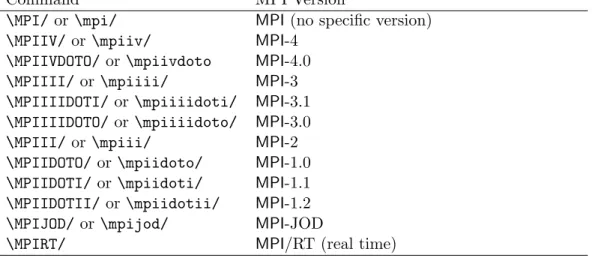
The macros in Table 2 ensure that the name “MPI” is in the proper font and size. The / that follows the name is used to ensure that spaces are preserved (otherwise, TeX removes the blanks after a TeX command from the output).
An example usage is
It is highly desirable that \MPI/ not use... will appear as
It is highly desirable thatMPI not use...
In some cases, we need to indicate future versions of MPI. These macros allow the chapter authors to indicate that version symbolically. Before pro-ducing a releasable version of the MPI document, these macros must be replaced with the specificMPIversions intended.
\MPInext/ The next release of the MPI standard. This will normally be a minor version, for example, MPI-3.2, but could be a major version if that is the next MPI version to be released.
\MPInextoh/ The next major version of the MPI standard after the next version. The reason for this macro is that this version is the first MPI version in which items deprecated in \MPInext/can be removed.
Table 2: Macros to properly format different versions of theMPI standard.
Command MPI Version
\MPI/ or\mpi/ MPI (no specific version)
\MPIIV/ or\mpiiv/ MPI-4
\MPIIVDOTO/or\mpiivdoto MPI-4.0 \MPIIII/or \mpiiii/ MPI-3 \MPIIIIDOTI/ or\mpiiiidoti/ MPI-3.1 \MPIIIIDOTO/ or\mpiiiidoto/ MPI-3.0
\MPIII/ or\mpiii/ MPI-2
\MPIIDOTO/ or\mpiidoto/ MPI-1.0 \MPIIDOTI/ or\mpiidoti/ MPI-1.1 \MPIIDOTII/or\mpiidotii/ MPI-1.2 \MPIJOD/or \mpijod/ MPI-JOD
\MPIRT/ MPI/RT (real time)
For historical reasons, a similar approach is used for RMA (remote mem-ory access): \RMA/ should be used instead of RMA.
3.10 Defining MPI Functions
The environmentfuncdef(also mentioned about in the MPIenvironments) is used to define the language-independent form of an MPI function. \begin{funcdef} takes one additional argument, like this:
\begin{funcdef}{MPI\_FOO(bd\_handle, root, comm)}
This is then followed by one more more \funcarg commands. \funcarg takes three arguments: intent of the argument, the name of the argument, and a brief description of the argument. For example
\funcarg{\IN}{root}{rank of broadcast root}
TheMPInotion of IN, OUT, and INOUT arguments is slightly different from that in some programming language descriptions. See the description in Section 2.3 (Procedure Specification) of theMPI Standard for more details, but roughly, they are
\IN Argument (or the object to which the argument refers) is not changed. \OUT Argument (or the object to which the argument refers) is an output
\INOUT Argument (or the object to which the argument refers) is both input and output.
A complete example, simplified from that of MPI BCAST, is \begin{funcdef}{MPI\_FOO(bd\_handle, root, comm)}
\funcarg{\INOUT}{bd\_handle}{Handle to buffer descriptor. On root, this is the send buffer descriptor, elsewhere, this is the receive buffer descriptor.}
\funcarg{\IN}{root}{rank of broadcast root} \funcarg{\IN}{comm}{communicator handle} \end{funcdef}
Note that if these are used in the text, they should be written as, e.g.,\IN{} if they are followed by a space. Otherwise, TeX ignores the space after the macro.
3.11 Bindings
Bindings in theMPIdocument are now managed by a source-to-source trans-lation process. This section describes the LaTeX macros that are used to render the bindings. Edits to the bindings should be done by working with thempi-bindingenvironment; see the document for examples of this envi-ronment.
Bindings specify how anMPI operation or object is expressed in a par-ticular programming language. These are best updated by following an example with a similar format. There are a few things to remember in us-ing these to ensure that the bindus-ings are formatted properly. When usus-ing \mpibind, each argument declaration must use a tie (~) instead of a space, as in
\mpibind{MPI\_Get\_elements\_x(const~MPI\_Status~*status, % MPI\_Datatype~datatype, MPI\_Count~*count)}
The ties prevent the argument from being split across two lines.
When using \mpifbind or\mpifnewbind, it is possible that one of the declaration lines will be too long to fit on a single line on the page. In that case, add \bindindent/ to force an explicit linebreak, followed an indent of the same amount used in the C bindings—do not use other spacing commands). For example,
\mpifbind{MPI\_TYPE\_CREATE\_STRUCT(COUNT, ARRAY\_OF\_BLOCKLENGTHS, % ARRAY\_OF\_DISPLACEMENTS, ARRAY\_OF\_TYPES, NEWTYPE, IERROR)\fargs %
INTEGER COUNT, ARRAY\_OF\_BLOCKLENGTHS(*), ARRAY\_OF\_TYPES(*), % NEWTYPE,\bindindent/IERROR\\ INTEGER(KIND=MPI\_ADDRESS\_KIND) % ARRAY\_OF\_DISPLACEMENTS(*)}
Note the use of \fargs to separate the list of parameters from their dec-laration. Also note the use of the TeX comment character %—while this is correct, it is more common in the document to put the entire argument on a single line. This is one of the few exceptions to the rule of no more than 80 characters per line.
There are a number of other functions to properly format function bind-ings:
\mpifsubbind Used for Fortran subroutines, for example, for the error han-dler function.
\mpifnewsubbind Used for Fortran abstract interface for a subroutine; this is the “modern” Fortran version of \mpifsubbind.
\mpifnewnonebind This is a special case and is used to provide text ex-planing that no binding was defined. It is used in the chapter on deprecated interfaces.
\mpibindnotint This is used for the few C routines that do not return an int, e.g., for MPI Wtime.
\mpiemptybindidx This is used for C routines that do not return an int, such as the handle conversion routines, and allows you to specify the indexed name as the third argument (the second argument is for the return type, e.g.,MPI Comm).
3.12 Indexing
The MPI standard has five separate indices:
Examples Index
Constant and predefined Handle Index
Declarations
Callback Functions
There is no separate “concept” index, though the examples index contains references to some importantMPI concepts.
For entries that have subitems, e.g., you want the index to look like
foo
bar 27
foobar 721
use an exclamation point, as in
\exindex{foo!bar}% ...
\exindex{foo!foobar}%
In most cases, you should not use either a hyphen or a comma in an index entry—instead, use the “!” form. Index entries should be short; do not use sentances. Index entries should be just a few words at most.
In most cases, an index entry should not include any formatting of LaTeX commands. If such formatting is necessary, for example, for a function name in the general index, the index entry should be written as
\index{sortkey@formatted entry} for example,
\index{sizeof and storagesize@\protect\cfunc{sizeof} and \protect\cfunc{storagesize}}
In this example,\protectis used to prevent expansion of the LaTeX macro until it appears in the index; this is not necessary but is good practice. Note that because the MPI standard has multiple indices, the exact form of the indexing command depends on which index the term or name should appear. See the definition of the various indexing commands inmpi-user-macs.tex or contact theMPIdocument editor for details.
Note the the buildindices script checks for unexpected characters in the index entry. If a warning is generated about invalid characters, the fix is often to use this form of the index, with a separate sort key and formatted entry.
3.12.1 Automatically Indexed MPI names
For the indices for constants, declarations, callbacks, and functions, most (if not all) of the entries are created by using the correct macros around the names. These macros are described in Section 3.7.
A few special cases are noted here.
\mpiublb The special termsub markerand lb markershould only be used as arguments to\mpiublb, which ensures that these terms are properly indexed.
Functions Environments that define functions (funcdef, funcdef2, funcdefna). \mpiemptybindidx is for C binding definitions for func-tions that do not return anint and need to be in the index.
3.12.2 Indexing the Examples
For the examples index, entries must be added explicitly with \Exindex and/or\exindex. This should normally start in the first column and have a TeX comment character immediately after it to prevent blanks from entering the document (which can mess up the formatting). For example,
\exindex{MPI\_SEND}%
3.12.3 Primary Index Entries
The “primary” or main index entry is where a term is first described or defined, or where there is a significant discussion. Many items should also have a primary index entry, particularly when the item has many in-dex entries. For MPI objects and constants, the “main” version of the macros in Section 3.7 will provide the appropriate entry. For example, \mpidtypemain{MPI_DOUBLE} adds the primary index entry for the MPI datatype MPI_DOUBLE.
There are no primary entries for the Examples index. 3.12.4 Reviewing the Indices
There are two ways to check the index entries. The best way to check the index entries for each chapter is to build the chapter separately (execute make in the chapter’s directory) and check the index that is created for that chapter to ensure that all relevant entries are included.
Setting\markindextrueinmpi-report.texwill cause text to appear in the output at the location of each index command. However, this naturally
changes the formatting of the text, so this is not the default and should be used only when reviewing the index entries.
Inspection of the LaTeX file can also help, in particular where verbatim environments are used. A final check of the full index, looking for duplicates, misspelled routines, and missing entries, can help identify other problems. Specifically, check for the following:
Each function defined in the chapter appears in the index and has the main entry marked by underlining the page number.
Each constant (including MPIhandles) defined in the chapter appears in the index has a main entry.
Each example that illustrates one or moreMPIfunctions indexes those functions in the examples index. Note that some common functions, such as MPI COMM SIZE, may be used in an example; such common uses do not need to be indexed.
3.13 Code Examples
Code examples should follow the same style that is in use in the standard. For example, use the same indentation and spacing style that the other examples use. The goal here is to avoid unnecessary differences in the ap-pearance of the examples. This style is based on the dominant use in the standard and the major features are summarized here.
1. C code should follow C99 and Fortran code should follow Fortran 2008, unless the standard is illustrating the use of MPI with other versions of the standard.
2. Fortran code should use the mpi f08 module unless it is illustrating use of the mpif.hinclude file or thempimodule.
3. In routine calls, spaces are not used before the first or after the last parameter, or before the opening parenthesis. A single space is used between parameters, as in
MPI_Get_address(u, &i);
Inforstatements in C, spaces must be used before the first parenthesis and between clauses, but not within statements, as in
4. Indentations should normally be 4 spaces. Reduced indentation should be used only to keep statements on a single line for improved read-ability. Comments should follow the indentation style (for example, Fortran comments should not be in column 1 unless that matches the rest of the surrounding code). Do not use tab (8 space) indentation or the tab character in code examples.
5. Fortran programs should use free-format rather than fixed format, and use the exclamation character (!) to begin comments. Fortran programs that use the mpif.h include file or the mpi module should have Fortran keywords andMPIroutine names should be in uppercase. Fortran programs that use the mpi f08 module should have Fortran keywords in lowercase andMPIroutine names in mixed case, matching the definitions for the corresponding Fortran bindings.
6. C blocks may use one of two forms. Preferred is this form (illustrated with an if statement) because of its conciseness
if (...) {
statements within the block }
but if readability is improved this form may be used if (...)
{
statements within the block }
The former style is particularly appropriate to keep examples on a single page.
7. Declarations should normally appear at the top of a block, and the first variable in each declaration indented to begin in the same column, as in the example below:
int a;
double b;
Some people find this easier to read, and it helps the declarations to stand out in the example.
8. In C, declarations with pointers should be of the formtype *name, as in int *count. The exception to this is void pointers—because only pointers to void make sense, usevoid* ptr. This is a recommendation but is being discussed as a required style.
9. Try to avoid language-independent examples; pick a language and use it. See Section3.14for a discussion of language-independent examples. 10. Variable names should use underscores to separate syllables, as in
int comm_cart, num_neigh;
This matches the MPI naming convention for MPI routines and con-stants.
11. Use...to indicate values that are not included to improve readability. For example, in an example, use
MPI_Init(...); instead of the incorrect
MPI_Init();
Note that the use of ...requires special handling as described below to ensure that the code can be checked for correctness.
12. The continuation style for routine call parameters is to start subse-quent lines directly under the first argument, as in
MPI_Comm_connect(port_name, MPI_INFO_NULL, 0, MPI_COMM_SELF, &intercomm); 13. Consecutive assignments may be lined up on the= as in:
foo = 1; foobar = 2;
Some readers find this easier to read as it visually ties together a group of variable assignments. This is recommended rather than required.
To reduce the number of errors in code examples, we use a tool that extracts code from the document and attempts to compile the code. Below is a code example (slightly modified) from the Point-to-point chapter. \begin{example}
\label{pt2pt-exA}
\Exindex{Fortran}{Sender and receiver specify matching types}{MPI\_SEND,MPI\_RECV}%
\exindex{Datatypes!matching}%
Sender and receiver specify matching types. %%HEADER
%%LANG: FORTRAN %%FRAGMENT
%%DECL: integer comm, rank, ierr, tag, a(2), b(2) %%DECL: integer status(MPI_STATUS_SIZE)
%%ENDHEADER \begin{verbatim}
CALL MPI_COMM_RANK(comm, rank, ierr) IF (rank .EQ. 0) THEN
CALL MPI_SEND(a, 10, MPI_REAL, 1, tag, comm, ierr) ELSE IF (rank .EQ. 1) THEN
CALL MPI_RECV(b, 15, MPI_REAL, 0, tag, comm, status, ierr) END IF
\end{verbatim}
The commands\Exindexand \exindexadds to the index of examples. MPI routine names should use the language-independent (all uppercase) name format. \Exindexis preferred as it provides more context in the index about the example. TeX comments between %%HEADER and %%ENDHEADER are used to provide extra information needed to compile the code, such as specifying the language (e.g.,%%LANG: Cor%%LANG: FORTRAN), declarations for variables (e.g., %%DECL: int a;), and whether the code is a complete routine or a fragment (with %%FRAGMENT). Look at other examples in the text or the fileREADMEin directorympicompilechk. In particular, theSUBST command is used to handle the use of ... in examples.
To check the code examples in the MPI document, run make check. Note that if there are changes or additions to the MPI standard, someone will need to build an mpi.h file that can be used to compile examples. The script mpicompilechk/getmpi can be used to extract the MPI C API declarations.
3.14 Language-Independent Examples
In some cases, you need to show language-independent code for MPI. That is, the code is neither C nor Fortran. An example is in the description of some of the collective routines, where language-independent code is used to define the behavior (in terms of data moved) of the a collective routine in terms of point-to-point routines, such as the description forMPI Gather. These examples should be formatted as follows:
1. Use thempicodeblockenvironment. Note that this environment uses the same font as is used for references to MPI functions within the text. This is not the code font used in theverbatimenvironment. 2. Use the mixed-case names forMPIfunctions, e.g., MPI Send.
3. Terminate statements with end-of-line, not a semicolon. This helps emphasize that the code is not C.
4. Expressions should be written as mathematical expressions. For ex-ample, use·($\cdot$in LaTeX) as the multiplication operator.
3.15 Mathematics
TeX was originally designed to typeset mathematics and no system is as effective at correctly handling all of the requirements of mathematical type-setting. You may use any of the usual LaTeX or TeX mathematics format-ting commands when typesetformat-ting mathematics (most of the mathematical formulas are in the Datatype sections). If you have specific questions, either consult any of the LaTeX documentation or the document master.
Ranges of integers should be written out rather than using the mathe-matical notation for an interval. For example, use
values may be between $0$ and $\mpiarg{count}-1$ rather than
values may be in $[0,count)$
3.16 Preparing the list of participants
There are two special commands to make it easier to prepare the list of participants, which is in the front mater and is typically presented in a table with three columns. An example best illustrates this:
\begin{tabular}{lll} first name \EE
second name \EE ...
name 1007 \EE
last name in list \FlushEntries \end{tabular}
“\EE” is “EndEntry”. This makes it easy to insert and move names in the list. If the number of columns is different from three, the macros (defined in mpi-user-macs.tex) will need to be changed. The command \FlushEntriesresets the counters so that a subsequent use will be properly formatted.
4
Interfacing with PDF
TheMPIdocument is created as a PDF file. The use of the standard LaTeX macros automatically generates links within the document that permit quick navigation. However, the use of LaTeX macros within these macros can create problems. For example, using a macro within the section name will cause problems for the PDF link. The solution is to use the special macro, \texorpdfstring. This macro takes two arguments. The first is used in producing the document output; the second must have no LaTeX commands and is used in the PDF link. For example, instead of this:
\section{Embedding in \MPI/} use this
\section{Embedding in \texorpdfstring{\MPI/}{MPI}}
In some cases, because of limitations in the way LaTeX constructs the tables of contents and list of figures, it may be necessary to ensure that spaces are not eliminated. An easy way to protect a space is to put\hbox{} before or after the space, depending on what is needed. This approach has been used in a few updates to section titles.
5
Building the Standard
To build the standard, simply use make. There are additional targets that may be used to build special versions of the standard. The most important of these ischecklatex; before commitiung any changes, run
make checklatex
The output of this should look like this:
./getlatex --allowpageref --noquotechk chap-*/*.tex
Any other output is a problem that you must correct before committing an update. If you have a question about the output, contact the doncument editor for a resolution.
The major make targets are:
clean Clean the directory tree of auxiliary files created by running make. veryclean Like clean, but cleans more created files, including converted
graphics files.
distclean Like veryclean, but also removes the document PDF files. check Runs the utility to check the code examples. This utility must
have been configured using the configure command in the directory mpicompilechk.
checklatex Runs the scrxipt getlatex over the LaTeX files to look for incorrect LaTeX usage. This target may be run in the top-level direc-tory, in which case it processes all of the chapter files, or in a chapter directory, in which case only the files for that chapter are checked. eachchap Builds each chapter separately. This is good for editing
indi-vidual chapters, particularly for index entries and bibliographic refer-ences.
errorsummary Searches the latest log file (mpi-report.log) for some er-rors that should be corrected, including undefined or multiply defined labels and overfull boxes (overfull boxes indicate that something has spilled into one of the page margins).
cleandoc Produce a clean version of the document with no markup about the changes in the standard (no change in font color, no changebars, not old/new text).
cleanbwdoc Like cleandoc, but in black and white only.
bookprintingdoc Almost the official version, but define the TeX \bookprintingtrue.
allversions Use this to build all of the versions of the document that are made available
HTMLVERSION Create an HTML version of the standard. This uses the tool tohtml, which must be installed from http://wgropp.cs. illinois.edu/projects/software/sowing. The better-known latex2html is (at last test) unable to handle a document of the size of the MPI standard.
When this target is used, check the file latex.err to see what prob-lems were encountered in creating the HTML version.
BWHTMLVERSION Like HTMLVERSION, but in black and white only.
5.1 Building Individual Chapters
To build a single chapter, first build the full standard. This will provide the information necessary to include the proper values for references to sections in other chapters, and the correct chapter number. Thencdto the directory of the chapter and use make.
5.2 Build Configuration
There are a number of options for the build of the document that are trolled by a configuration file. Most users need never deal with the con-figuration, as the Makefilefor the document handles all configuration file settings for building each type of document.
The builds copy predefined configuration files, stored in themaint direc-tory, to the filempi-report.cfg. Builds of individual chapters and explicit builds of the report use whatever mpi-report.cfg file is present in the di-rectory; builds of specific versions of the document (e.g., make cleandoc) replace the current mpi-report.cfg file with the appropriate choice from the maintdirectory.
6
Editing Process
The MPI Document is developed by chapter subcommittees. Each chapter has a chair and a committee of at least 4 (including the chair). The com-mittee is responsible for editing their chapter. For MPI-3.1, theMPI Forum has simplified the process of editing the official document, relying now on automated tools to compare different versions of the document rather than
requiring all changes to be marked up with special macros defined for the purpose. However, these macros are still available for use by chapter com-mittees and may be used by replacing the command \allowchangefalse with \allowchangetrue from the mpi-report.cfg file before building a file that makes use of these change macros (see Section5.2for more on the configuration files).
Changes may be introduced in two ways. The first is with the ticket system; this system is akin to a bug report system against the document. These can range from minor errors such as misspellings to the introduction of new routines. A ticket provides very specific details about the change, including the specific locations where changes are to be made.
The second way to introduce a change is for the chapter subcommittee to edit the chapter directly. This is appropriate for more extensive changes, which may range from thorough spelling and grammar corrections to intro-duction of significant new capability through new functions. The chapter committee may choose to have theMPIForum vote on parts of this process separately, for example, a new function may be brought before the Forum for a vote. However, a final decision is based on a vote for the chapter as a whole (as well as a vote on the standard as a whole).
Note that all changes must be approved with the MPI Forum’s pro-cess. At this writing, this requires a reading of the chapter, followed by two successful (majority) votes, each reading and vote held during a different meeting (this is intended to give adequate time for reflection and review).
This process differs from theMPI-2.1 andMPI-2.2 process because those versions were intended as minor edits to the standard. The process described above follows the process used for MPI-1 and MPI-2, where chapters were written by subcommittee, with frequent feedback from the MPI Forum in terms of straw votes or Forum votes on particular features, but without Forum votes for each individual change.
6.1 Update Macros
The macros in this section may be used to mark changes in the document during development of material. They mustnot be used in the final docu-ment; our experience has been that their extensive use is error prone and focuses attention on small changes rather than the broader context, leading to errors in the final document. However, they can be useful during the development of new material and are provided for that use. In addition, tools such aslatexdiffmay be used to create a version that highlights the differences between versions of theMPI standard document.
The most general form is this macro: \MPIupdateBegin{3.1}{ticket-number} ... changed text \MPIupdateEnd{3.1} A short form, \MPIupdate{3.1}{ticket-number}{update} may be used for very short changes, and
\MPIreplace{3.1}{ticket-number}{old text}{new text} for replacements of text.
Deletions should be marked (where possible) with \MPIdeleteBegin{3.1}{ticket-number}
% ... deleted text, commented out in LaTeX % % ... comment out comments as well
\MPIdeleteEnd{3.1}
Note that the text to be deleted is commented out using the TeX comment symbol. This is a pragmatic choice—it is possible to force TeX to ignore blocks of text, but if those blocks of text contain certain TeX or LaTeX commands, the deletion may not work properly. This approach, while less elegant, is more certain.
A short form,
\MPIdelete{3.1}{ticket-number}{text to delete} may be used for short deletions.
If the \MPIdelete... form cannot be used, then removed or replaced text should be commented out if at all possible
While a chapter is being developed by a chapter committee, that com-mittee may choose to mark updates, changes, or alternatives in other ways. This is acceptable as long as when the chapter is presented to the MPI Forum, the update macros described above are used.
Updates to examples are awkward to mark, and tend to make it harder, not easier, to read and verify the code. If the chapter committees are func-tioning properly, and the automated code checker is used, a better tradeoff is (as is often the case) for readability and to correct the code, adding a La-TeX comment if necessary to mark the change. More details about changes are always available through the git logs.
7
Things Not To Do and Other Common Errors
This section provides some examples of whatnot to do in theMPIdocument, with examples of the correct approach.7.1 Spaces
Spaces are significant in TeX. Do not try to make the LaTeX source look like good C code. Here is an example of incorrect use drawn from the document: \caption{
Here is my caption }
The newlines at the end of the first two lines add additional space into the caption. Instead use
\caption{Here is my caption}
An alternate correct approach is to tell LaTeX to ignore the newlines by using the LaTeX comment character:
\caption{%
Here is my caption% }
Leaving off the second comment character (at the end of the caption) is incorrect.
7.2 Font Changes
Avoid font changes as much as possible. Use the correct commands when you do need to make them. For example, toemphasize a word in a sentence by changing font style, use\emph{word} rather than {\em word\/}or the incorrect{\em word}(the latter case is incorrect because it fails to include the italic correction—a TeX command needed to ensure that the spacing between the end of the italic text and the next non-italic character is not too large).
Incorrect Correct {\tt text} \texttt{text} {\bf text} \textbf{text} {\em text} \emph{text} {\sf text} \textsf{text}
Note that in many cases, the use of \texttt or \textsf is still incorrect, because the commands that are defined for variousMPIterms or parameters should be used instead.
The macro\textTitleFontcan be used to show text in the correct font for a chapter title. This is used only to format the chapter titles for the now long out-of-date MPI Journal of Development.
Avoid changing the size of a font as well. Changes to the size of the font should normally be handled within other comamands. Foe example, the MPI object macros (Section 3.7) set the size to \small for many of the object names and constants. Explicit size changes should never be used for these terms. The \mpiconst command (and variations, such as \mpiconstmain) accept an optional numeric argument to reduce the size by that many steps. For example, \mpiconst[2]{MPI\_TAG} is two sizes smaller than \mpiconst{MPI\_TAG}.
There are a few places where a font size change is appropriate. The most common of these is for long code examples. In this case, the small environment should be used, as in
\begin{small}
... example, probably using a verbatim environment \end{small}
7.3 Spacing
Do not add vertical spacing to the document with the low-level spacing commands such as \vskip or \vspace. It is almost always wrong to add explicit spacing with these commands (this is akin to using inlined assembly instructions when programming in a higher level language). In the rare case where additional vertical space is necessary, use one of the predefined skip commands: \smallskip, \medskip, or \bigskip. However, do not use an vertical spacing, or explicit page breaks (e.g., \newpage) to address poor page breaks. For example, if the first line of a paragraph starts at the bottom of the page (called anorphan) or if the last line of paragraph starts at the top of a page (called a widow), you may be tempted to add some vertical spacing to remove these. Do not do this! The reason is that any subsequent change to the chapter (even on the page after the bad page break) can change the location of the page break. When that happens, the spacing added to address the widow or orphan now becomes at best unnecessary but most likely a mistake, making the page less, not more, attractive. In some cases, changes to the document macros can systematically address poor page breaks. Please contact the document editor to address such issues.
7.4 Dashes
There are three major dashes:
name appearance
hyphen
-en dash –
em dash —
Anen dash is used between two numbers, as in 27–32. An em dash is used as punctuation in a sentence—as used here. It is incorrect to use an en dash as punctuation, and it is incorrect to use a hyphen in a number range. In TeX, an en dash is written as -- and an em dash is written as ---. In addition, the convention in the MPI Standard is that an em dash does not have spaces on either side; the correct use is “foo—bar”, not “foo — bar”.
7.5 Using Quotes
TeX uses the characters‘and ’for open and close quotes respectively. For double quotes, use two of the appropriate quote; donot use the double quote character".
Because this document uses the standards of American English, punc-tuation after a quoted phrase is placed within the quotation. For exam-ple, “terma,” “termb,” and “termc.” An exception to this rule is string constants. Because the string constant is a value, it is incorrect to place punctuation within the quote. For example, use
... \mpistring{external32}, ... instead of
... \mpistring{external32,} ...
7.6 Commas in Lists
In a list of items, the convention in the MPI standard is to use a comma before the coordinating conjunction (which is usually and or or). This is called the serial comma, series comma, or Oxford comma. For example, “a, b, and c”. This is done for clarity; without the comma before the conjunction, the meaning of the phrase can be ambiguous. While there are examples of the Oxford comma introducing ambiguity, those cases are rarer. An example of the consequence for a legal document of not using the Oxford comma may be found in https://www.nytimes.com/2018/02/09/
us/oxford-comma-maine.html, where the lack of that comma in a law in the state of Maine cost a company $5 million.
7.7 Describing Terms
The MPI documents, at least through MPI-3.2, had no consistency in how descriptions of various MPI constants and terms were presented. These should use the “description” environment. Do not use itemize,\paragraph, explicit font choices, or en- or em-dashes. For lists with short descriptions, the constlist environment can be used.
7.8 Hyphenating “non” and other compound words
The MPI standard includes many words starting with “non” such as non-blocking, noncontiguous, nonstandardized, and nondefault. Recommended usage in American English is to not use hyphens in tbese cases and in words such as “multithreaded”. See, for example, the Chicago Manual of Style.
The term “point-to-point” is hyphenated as shown; use this instead of “point to point”.
7.9 Punctuations for Captions
Captions for figures and tables are typically sentance fragments, and as such, should not end in a period. However, if the caption includes a sentance, then any sentance fragment should also end in a period. See https://en. wikipedia.org/wiki/Wikipedia:Manual_of_Style/Captionsfor more de-tails. Captions should normally start with a capital letter. The caption should use “sentance case” rather than “title case;” that is, only proper names and the first word should be capitalized.
7.10 Referring to data representations
MPIdefines three data representations, as well as providing a way for users to define more. These are external32, internal, and native. The MPIstandard refers to these both by name and by their representation as strings. In MPI-4.0,\mpistringis used in both cases. An alternative would be to use a different format, such as that from \mpicode, for use of the name, and \mpistring for use of the actual value. This choice was made because the string representation was the most common use within the document.
7.11 And so on
The above are not the only things to avoid—the recommendation is to stick to the commands outlined in this document and to contact the document master or editor if something else is needed.
8
Chosing Words
A standard must be very careful about the use of words. For example, ISO recommends the following choices for requirements and recommendations: Requirements Use shall or shall not
Recommendations Use should or should not
Use “may” for something that is permitted but not required. Use “can” for something that is possible.
To describe something that is incorrect, use either “incorrect” or “in-valid.” Do not use “illegal” unless there is a law against the action. About the only use of “illegal” that may appear (notice that I did not write “should”) is in reference to illegal copies of documents protected by copy-right. AnMPI program can never be illegal.
See http://www.iso.org/iso/how-to-write-standards.pdf for rec-ommendations from ISO on writing standards.
9
Other Considerations
Occassionally, issues may come up that suggest an error in the standard. In some cases, the issue is not an error but something that is a subtle issue. For example, some Fortran definitions of functions that take anMPI Status argument do not provide an INTENT. It might seem that these should be INTENT(INOUT) (because the MPI STATUS IGNORE value may be provided as an input), but in fact no intent is preferable here, since an undefined value may be provided instead if the user wishes to ignore the status output, and withINOUT, the compiler could raise an error.
10
Reviewing the Document for LaTeX and
Lan-guage Usage
This section is primarily notes for the editor, but also explains the items that authors should check for, because these are common issues that the
editor must address.
The following tests and careful reviews should be performed before re-leasing a candidate or final standard. Note that some of these tests are difficult to automate, so that the output of some commands needs to be reviewed.
1. make checklatex must be clean
2. make checkusage needs to be reviewed; instructions are output with each test that this runs
3. buildindices must be clean. If problems are found, consider setting cleanupFiles = 0 in buildindices. Also consider setting
ignoreNoPrimary = 0 to flag the constants, functions, and typedefs that do not have a primary index entry.
4. Review the indices, checking in particular for formatting commands used in index entries (results in alphabetizing by the formatting com-mand rather than the item), and to check for function names in the wrong case—all functions in the function index must be in upper case (the language-independent definition). buildindices attempts to check for incorrect case in the function index. Also check the capital-ization of terms, as well as small changes in spelling or plural versus singular that generate separate index lines where there should be a single, combined line.
5. Review the output from LaTeX for:
(a) undefined or multiply-defined labels. These must be corrected. (b) overful boxes. These should be corrected; if the box is overful
by only a few pts, the editor may decide that it is acceptable. Not, however, that because these must be reviewed each time, it is best to correct them.
6. Review the BibTeX output for errors, which may be found in mpi-report.blg.
7. Review the makeindex output for errors. Because of the multiple in-dices, review the files with extensionilg, there should be six of these. Multiple “encaps” for an entry are undesirable but and should be ex-amined; note that thebuildindicesscript attempts to remove these. Watch in particular for errors about misplaced exclamation points;
these are almost certainly a malformed index entry, which will not appear in the index.
11
Final Comments
This is a relatively short guide to the use of LaTeX in editing the MPI Standard Document. Please contact the editor if you have any questions, comments, or suggestions about either this document or on the editing pro-cess for theMPI Standard Document. Keep in mind that the goal is clarity and precision in the document, which is aided by a clear and consistent style.