Clemson University Clemson University
TigerPrints
TigerPrints
All Dissertations Dissertations
December 2019
Evaluating and Enabling Scalable High Performance Computing
Evaluating and Enabling Scalable High Performance Computing
Workloads on Commercial Clouds
Workloads on Commercial Clouds
Brandon M. PoseyClemson University, [email protected]
Follow this and additional works at: https://tigerprints.clemson.edu/all_dissertations
Recommended Citation Recommended Citation
Posey, Brandon M., "Evaluating and Enabling Scalable High Performance Computing Workloads on Commercial Clouds" (2019). All Dissertations. 2497.
https://tigerprints.clemson.edu/all_dissertations/2497
This Dissertation is brought to you for free and open access by the Dissertations at TigerPrints. It has been accepted for inclusion in All Dissertations by an authorized administrator of TigerPrints. For more information,
Evaluating and Enabling Scalable High Performance
Computing Workloads On Commercial Clouds
A Dissertation Presented to the Graduate School of
Clemson University
In Partial Fulfillment
of the Requirements for the Degree Doctor of Philosophy
Computer Science
by
Brandon Michael Posey December 2019
Accepted by:
Dr. Amy Apon, Committee Chair Dr. Brian Malloy
Dr. Jim Martin Dr. Walt Ligon
Abstract
Performance, usability, and accessibility are critical components of high performance computing (HPC). Usability and performance are especially important to academic re-searchers as they generally have little time to learn a new technology and demand a certain type of performance in order to ensure the quality and quantity of their research results. We have observed that while not all workloads run well in the cloud, some workloads perform well. We have also observed that although commercial cloud adoption by industry has been growing at a rapid pace, its use by academic researchers has not grown as quickly. We aim to help close this gap and enable researchers to utilize the commercial cloud more efficiently and effectively.
We present our results on architecting and benchmarking an HPC environment on Amazon Web Services (AWS) where we observe that there are particular types of applica-tions that are and are not suited for the commercial cloud. Then, we present our results on architecting and building a provisioning and workflow management tool (PAW), where we developed an application that enables a user to launch an HPC environment in the cloud, execute a customizable workflow, and after the workflow has completed delete the HPC environment automatically. We then present our results on the scalability of PAW and the commercial cloud for compute intensive workloads by deploying a 1.1 million vCPU cluster. We then discuss our research into the feasibility of utilizing commercial cloud infrastruc-ture to help tackle the large spikes and data-intensive characteristics of Transportation Cyberphysical Systems (TCPS) workloads. Then, we present our research in utilizing the commercial cloud for urgent HPC applications by deploying a 1.5 million vCPU cluster to
process 211TB of traffic video data to be utilized by first responders during an evacuation situation. Lastly, we present the contributions and conclusions drawn from this work.
Table of Contents
Title Page . . . i
Abstract . . . ii
List of Tables . . . vii
List of Figures . . . viii
1 Introduction . . . 1
1.1 Problem Statement . . . 2
1.2 Research Questions . . . 2
1.3 Research and Contributions . . . 3
1.4 Dissertation Organization . . . 5
2 Background . . . 6
2.1 High Performance Computing (HPC) Environments . . . 6
2.1.1 Terminology . . . 6
2.1.2 Composition . . . 7
2.2 Computational Codes . . . 8
2.2.1 High Performance Computing (HPC) Applications . . . 8
2.2.2 High Throughput Computing (HTC) Applications . . . 8
2.3 Cloud Computing . . . 9
2.3.1 Terminology . . . 9
2.3.2 Major Providers . . . 9
2.4 Survey on Resource and Workflow Management Tools . . . 12
2.4.1 Resource Management Tools . . . 12
2.4.2 Workflow Management Tools . . . 16
2.4.3 Resource And Workflow Management Tools . . . 21
2.4.4 Jupyter . . . 25
2.5 Benchmarks . . . 29
2.5.1 HPC Challenge Benchmark Suite . . . 30
2.5.2 NASA Parallel Benchmark Suite . . . 35
2.6 Determining The Optimal Configuration For Parallel Computation . . . 36
2.7 Urgent Computing . . . 38
2.7.1 Building Infrastructure and Support Systems . . . 39
2.7.3 Creating Generalized Definition of Urgent Computing . . . 42
3 Evaluation of High Performance Computing Workloads In The Com-mercial Cloud . . . 43
3.1 Introduction . . . 43
3.2 Methodology . . . 45
3.3 Results . . . 46
3.3.1 HPCC Benchmark Results . . . 46
3.3.2 MPIFFT Configuration Testing . . . 48
3.4 Conclusions . . . 51
4 Dynamic Resource and Workflow Management . . . 52
4.1 Methodology . . . 53
4.2 Architecture . . . 54
4.3 Resources . . . 56
4.3.1 Environments and Environment Templates . . . 56
4.3.2 Schedulers . . . 57
4.3.3 Workflows . . . 57
4.4 Case Study . . . 58
4.5 Conclusions . . . 61
5 Considerations When Running At Scale . . . 62
5.1 Methodology . . . 64
5.2 Limitations To Scaling . . . 65
5.2.1 Shared Filesystem . . . 65
5.2.2 NAT Instance . . . 66
5.2.3 Dynamic Pricing Effects On The Spot Market . . . 67
5.2.4 Heterogeneous Instance Types With Spot Allocations . . . 68
5.2.5 Scheduler Scalability . . . 70
5.2.6 User Limits . . . 71
5.2.7 API Limits . . . 72
5.3 Execution and Evaluation . . . 73
5.3.1 Execution . . . 73
5.3.2 Cost . . . 75
5.4 Analysis . . . 78
6 Commercial Cloud Infrastructure for Transportation Cyber Physical Systems . . . 79 6.1 Introduction . . . 79 6.2 TCPS Infrastructure . . . 80 6.2.1 TCPS Networking . . . 81 6.2.2 LAMP Architecture . . . 82 6.2.3 Lambda Architecture . . . 83
6.3 Infrastructure as Code (IaC) . . . 92
6.3.1 Cloud IaC . . . 93
6.4 Conclusions . . . 96
7 On-Demand Urgent High Performance Computing Utilizing the Google Cloud Platform . . . 98
7.1 Introduction . . . 98
7.2 User Application Requirements . . . 100
7.2.1 Definition . . . 100
7.2.2 Requirements . . . 101
7.3 System Design Considerations . . . 103
7.3.1 HPC Lifecycle Technology Selection . . . 103
7.3.2 System Design . . . 105
7.4 Implementation and Scalability Evaluation . . . 108
7.4.1 API Limitations Per Project . . . 108
7.4.2 Rapid Provisioning of Instances . . . 111
7.5 Integration and System Evaluation . . . 112
7.6 Conclusions . . . 116
8 Summary . . . 118
8.1 Summary of Contributions . . . 118
8.1.1 HPC Workload Performance Evaluation . . . 118
8.1.2 Dynamic Resource and Workflow Management . . . 119
8.1.3 Considerations When Executing At Scale In The Commercial Cloud 120 8.1.4 Commercial Cloud Infrastructure Within Transportation Cyber Phys-ical Systems . . . 121
8.1.5 Utilizing Commercial Clouds For Urgent HPC . . . 122
8.1.6 Future Work . . . 122
List of Tables
3.1 Compute Node Configuration . . . 50 5.1 Scaling Limitations And Solutions . . . 65 5.2 Example of Effect of Custom Fractional Spot Fleet System Limits with
c4.8xlarge Instance Type . . . 69 5.3 Spot Fleet Details by Workflow Class . . . 69 5.4 Instance Type Classes and Average vCPU hour Costs . . . 77 7.1 Comparison of “Spare Capacity” Instance Functionality as of August 23, 2019102 7.2 Breakdown of the number of instances provisioned per GCP Region/Zone at
List of Figures
2.1 Example of a Jupyter Notebook running in a web browser [38]. . . 25 2.2 Architecture of the cyberGIS implementation of Jupyter. [106]. . . 28 2.3 The new JupyterLab user interface currently in development. Eventually
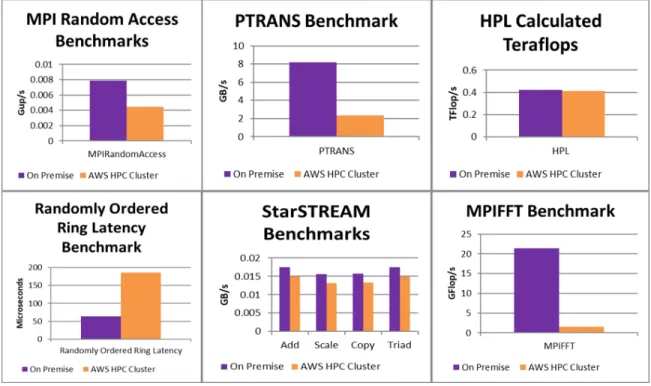
JupyterLab will replace the classic Jupyter Notebook [40]. . . 29 3.1 Results of individual HPCC benchmarks performed on an AWS HPC cluster
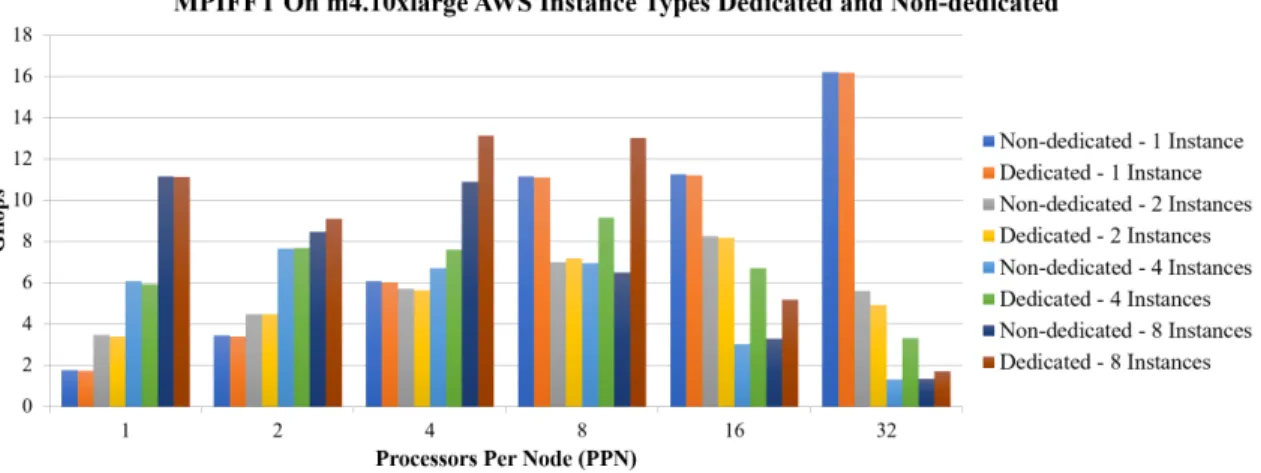
and an on premise cluster. . . 47 3.2 Results of the MPIFFT benchmark when run on a different configurations of
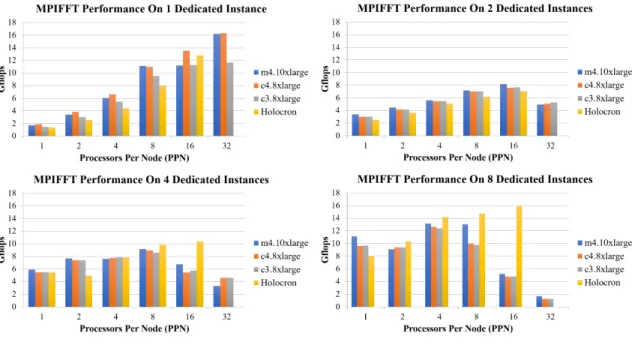
the m4.10xlarge AWS Instance type. . . 49 3.3 Results of MPIFFT benchmark performance across different configurations
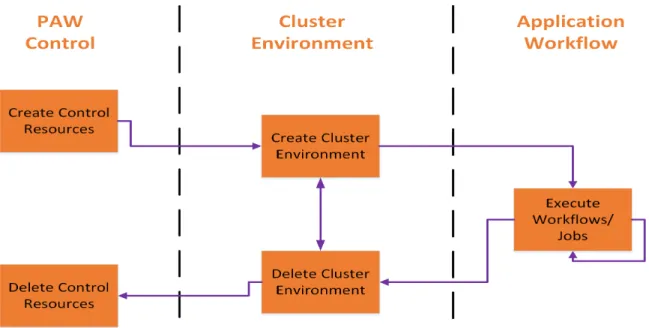
of AWS dedicated instance types, number of instances, and number of pro-cessors per node. . . 50 4.1 Simplified view of PAW’s operational stages of execution . . . 55 4.2 Experimental executions of the topic modeling workflow utilizing PAW. . . 59 5.1 Timeline of vCPU count from beginning to peak vCPU use count. . . 72 5.2 Distribution of vCPUs among the instance types utilized at peak. . . 75 5.3 The effect on the Spot Prices of the c4.8xlarge instances in each Availability
Zone. . . 76 5.4 Costs per vCPU hour of each AWS Instance Type used in the experiments.
The solid black line is the average price per vCPU hour across all instance types and the red dotted line is the target price per vCPU hour. . . 77 6.1 Overview of LAMP architecture for traditional data processing or web service
environments. . . 82 6.2 Overview of the proposed Lambda (LA) architecture for data infrastructure. 83 6.3 Spark deployment inside Hadoop infrastructure. . . 89 6.4 Sample CloudFormation Template to launch an AWS EC2 Instance [86] . . 94 7.1 Overview of the TrafficVision application workflow. . . 106
7.2 The overall view of workflow execution. In graphs B and D each line rep-resents a single GCP Zone, names are not shown for space reasons. A) A timeline of the total number of instances in all regions/zones launched during workflow execution. B)A timeline of the total number of instances launched per Zone during workflow execution. C) A timeline of the total number of vCPUs launched in all regions/zones during workflow execution. D) A timeline of the total number of vCPUs per Zone during workflow execution. 113 7.3 A timeline of the rate of instance preemption throughout the execution of
the workload. Each line represents a single GCP Zone, names are not shown for space reasons. . . 114 7.4 The overall view of GCS performance throughout workflow execution. In
both graphs each line represents a single GCS Bucket, the names are not shown for space reasons. A) A timeline of the throughput of data sent to the running instances during the workflow execution. B)A timeline of the throughput of the data sent back to GCS after being processed by our workflow.115 7.5 A timeline view of the video clips analyzed during the execution of our
work-flow. Each line represents a different GCP Region, the names are not shown for space reasons. . . 116
Chapter 1
Introduction
In recent years, commercial cloud providers such as Amazon Web Services (AWS), Microsoft Azure, and Google Cloud Platform (GCP) have been growing and maturing quickly. According to Forrester, in 2018 the global public cloud market will grow at a 22% compound annual growth rate [17]. While these commercial clouds provide the “allure” of unlimited resources, a variety of cutting edge resources, and high availability, academic researchers have been slow to adopt commercial clouds for their workloads. There are a number of reasons for this including, steep learning curves, funding challenges, and perfor-mance differences [14].
Traditionally, academic researchers are accustom to executing their workloads on a High Performance Computing (HPC) cluster. These HPC clusters are typically shared with other academic researchers and only have a finite amount of resources and resource types to offer the researcher. Utilizing these types of HPC resources generally requires minimal effort by the researcher as they do not have to have a deep understanding as to how the HPC cluster is deployed and managed. These HPC clusters are also generally highly optimized for HPC applications and parallel workloads which can increase the performance of the researcher’s applications.
In contrast, the commercial cloud is a more general purpose computing environment where not all the components are specifically optimized for HPC. As a number of studies
have shown, HPC application performance on the commercial cloud is not as good as it is on a traditional HPC cluster [57, 36, 33, 83, 93]. There are a wide variety of configuration options available to commercial cloud users, but since each commercial cloud is different, users have to spend large amounts of time learning how to properly configure each cloud to get the best performance. This is not feasible for many academic researchers as they do not have the time to take away from their research to learn how each cloud operates. Not only do they need to have an understanding of how the cloud works, they also must know how to deploy an HPC cluster environment on each cloud which only complicates the process. However, for academic researchers with certain HPC workloads the potential impact of utilizing the cloud is large. Even though the performance may not be as good as a local resource, an academic researcher can have full access to all the resources on the cloud, eliminating queue wait times and allowing them to shorten the overall time-to-science. Researchers also have the ability to scale their workloads up to a much larger scale on the commercial cloud due to the large amount of available resources.
1.1
Problem Statement
It is the goal of this work to examine how the architecture of different commercial clouds can affect the performance of different HPC workloads, explore how to better enable commercial cloud access to academic researchers, and to push the limits of the scalability of the commercial cloud.
1.2
Research Questions
We propose, evaluate, and answer the following research questions within this dis-sertation:
• What are the limitations to scaling HPC environments within a commercial cloud? • How do the architectures of different commercial cloud environments, such as AWS,
Azure, and GCP effect HPC environment performance?
• How can these architectural differences be utilized to optimize HPC environment deployment, cost, and workload performance?
• How can certain workload and data characteristics effect the ability to utilize com-mercial cloud resources?
1.3
Research and Contributions
Our first contribution in this area is to identify which types of HPC applications perform well on Amazon Web Services (AWS). In this work, we observe that many non-network intensive applications, such as High Throughput Computing applications (HTC), perform decently on AWS compared to the local resources. We also observe that one application in particular, MPIFFT, performs exceedingly poorly. We investigate this more to determine if we can find a potential configuration where MPIFFT will perform closer to that of the local resources. In performing these experiments, we find that after reaching 32 processes, in any combination of processes and nodes, the performance started to degrade quickly.
Next, we set out to create a tool to help automate the deployment of an HPC cluster environment in the commercial cloud. This tool could then be utilized to execute HPC applications that can benefit from executing on the cloud. Our work on this tool, the automated Provisioning And Workflow management tool (PAW), was presented at
MTAGS17 [75]. During the initial design phases of PAW, we find that while there are
many tools that manage either the workflow or the provisioning of the resources, there are very few tools that perform both functions outside of a few domain specific examples. For researchers to adopt the commercial cloud, a generalized end-to-end solution is required. PAW is built to fill this gap by providing a single interface for resource provisioning, workflow execution, and resource de-provisioning.
the commercial cloud. To do this, we build a cluster containing 1,119,196 vCPUs within AWS utilizing PAW. Our results, which were presented at theCCGRID 2018 [72], describe
a list of seven limitations to scaling and propose potential solutions to each limitation. We utilize this environment to execute just under a half a million CPU intensive topic modeling parameter sweep applications in just under two hours. On a traditional shared HPC resource executing a half a million jobs would have taken multiple days or even weeks. Next, we examine the usecase of migrating the expanding field of Transportation Cyberphysical System (TCPS) to the commercial cloud utilizing the same Infrastructure as Code (IaC) paradigm used in our previous work [76]. In this work, we examine in detail the different layers of the TCPS systems and how we can utilize the IaC paradigm to help simplify the deployment and management of TCPS in the commercial cloud. We also discuss the feasibility of migrating the different layers of TCPS to the commercial clouds and the cloud native options for each. We find that the most attractive candidate layer of a traditional TCPS system to be migrated to the cloud is the batch processing layer as it has no real-time processing requirements and the jobs are designed to run non-interactively.
After examining the data intensive nature of TCPS, we examine the performance and scalability of a large-scale data intensive workflow in the commercial cloud in regards to an urgent computing scenario. To do this, we utilize PAW to deploy a 1.5 million vCPU cluster and execute our custom designed workflow in GCP to process 211TB of traffic video data. This simulates the data processing required to monitor the evacuation of a large region in preparation for an impending event. Our results will be presented at the Urgent HPC
2019 Workshop at SC19 [74] and describe the architecture of our workflow and how the
commercial cloud can be utilized for urgent computing tasks on-demand. We analyze the entire 211TB of video in approximately 8 hours which includes the infrastructure creation and deletion.
1.4
Dissertation Organization
This dissertation is organized as follows. Chapter 2 discusses the background infor-mation related to this work. Chapter 3 covers the evaluation of the performance of different types of workloads in the commercial cloud. Chapter 4 introduces PAW, our resource pro-visioning and workflow management tool. Chapter 5 discusses propro-visioning and executing a 1.1 million vCPU HPC environment within the cloud utilizing PAW to execute a CPU-intensive topic modeling workload. Chapter 6 discusses the challenges of migrating different analysis layers of data-intensive Transportation Cyberphysical Systems (TCPS) workloads to the commercial cloud. Chapter 7 discusses our work addressing the challenges of utilizing the commercial cloud for urgent HPC needs and describes how to execute a data intensive traffic analysis workload utilizing 1.5 million vCPUs to process 211TB of video data. Lastly, Chapter 8 will present our conclusions and direction for future work.
Chapter 2
Background
In this section we discuss background information that is relevant to the completed research and proposed research questions.
2.1
High Performance Computing (HPC) Environments
High Performance Computing (HPC) can be defined as aggregating computing power to deliver better performance than could be achieved on a single machine. HPC environments or clusters typically consist of clusters of computers that each have their own operating system (typically a Linux distribution), memory, and storage. These computers are typically connected by a high performance low-latency network to ensure the highest performance. HPC environments are typically utilized by researchers from academia, gov-ernment, and industry to solve large complex problems that require a lot of computational power.2.1.1 Terminology
In an HPC environment, each of the computers within the environment is referred to as a node. Typically most of the nodes within an HPC environment are referred to as
submitted to the HPC environment. Ajob in the context of an HPC environment is a unit
of work to be performed. This can range from an application that executes on a single node or an application that executes across multiple nodes. The scheduling and mapping of these jobs to the available compute nodes in the environment is typically done by an HPC batch scheduler.
AnHPC batch scheduler is a piece of specialized software that handles the
distribut-ing of jobs along with monitordistribut-ing the jobs and the handldistribut-ing of the job output files. Most HPC batch schedulers accept jobs in the form ofjob scripts. Job scripts are simply scripts
that execute a set of shell (e.g. bash, sh, zsh) commands on the node or nodes that the scheduler gives it. Each HPC batch scheduler has a specific set of special scheduler direc-tives that can be included in the job script in order to instruct the HPC batch scheduler how they would like their job executed. Example parameters are number of nodes to run on, amount of memory, type of GPU, etc.
2.1.2 Composition
A typical HPC environment consists of a combination of a few different types of nodes. These nodes are typically compute nodes, storage nodes, a scheduler node, and a login nodes. As previously mentioned compute nodes are the nodes that perform the computational tasks and typically have the most robust hardware. Storage nodes typically host some type of shared filesystem that can be accessed by all of the other nodes within the cluster. The type of shared filesystem will vary from environment to environment, however typical filesystems are usually either created by utilizing the Network File System (NFS) software or a parallel filesystem such as OrangeFS or Lustre. The scheduler node runs the specialized HPC batch scheduling software that distributes the jobs to the compute nodes within the environment. The login instance is the user facing instance that users will log in to and utilize to submit their jobs.
2.2
Computational Codes
There are a wide variety of computational codes that are in use by researchers today. These codes range from single threaded applications that execute on only a single core at a time all the way to parallel applications that can be spread across multiple cores and machines. While the codes are to numerous to list, there are a few general things about computational codes that should be noted.
While there are multiple types of computational codes that are in use today, we want to discuss two particular types of computational codes: High Performance Computing (HPC) Applications and High Throughput Computing (HTC) applications.
2.2.1 High Performance Computing (HPC) Applications
HPC applications are traditionally highly parallel codes that utilize the Message Passing Interface (MPI) library to allow multiple processes to communicate with each other. HPC applications tend to be tightly coupled and rely heavily on the network infrastructure in order to exchange information. This is traditionally why many HPC environments utilize a low-latency network, because the longer that the processes take to communicate, the longer the application will take to execute. Examples of some HPC applications are LAMMPS [71], Gromacs [12], and OpenFoam [103].
2.2.2 High Throughput Computing (HTC) Applications
In contrast to HPC applications, High Throughput Computing (HTC) applications are typically loosely coupled and tend to only execute on one or two nodes within the environment. HTC applications can be parallel applications as well, however typically the parallelism is contained on a single node to enable faster processing. HTC applications generally take in multiple parameters as input and are executed with a large number of different input combinations. This allows researchers to determine how changes in the parameters can affect the outcomes of the application.
2.3
Cloud Computing
Cloud computing is referred to as the on-demand delivery of different types of IT services through a platform via the internet with a pay-as-you-go pricing model. The services offered vary quite a bit depending on which commercial cloud is being used. Along with this variation in services, different commercial cloud providers also offer different types and combinations of hardware. Commercial clouds are similar to HPC environments as they are simply a large collection of computers that are controlled by software. However, unlike HPC environments that are designed to execute parallel workloads, commercial clouds are designed to be more general purpose and typically do not utilize a low-latency network.
2.3.1 Terminology
In a commercial cloud environment, each server is called an instance instead of a
node. This is due largely in part to the fact that most commercial cloud environments are
virtual machine based, that is the user is allocated a virtual machine (VM) managed by some
hypervisor software instead of having access to the bare metal like they would in an typical
HPC environment. The additional layer of the hypervisor does introduce some overhead which can lead to a possible decrease in the performance of certain components such as the network. Another area where the commercial cloud differs from the HPC environment is that typically in an HPC environment the number of processes a node can execute is referred to as the number of “cores” whereas in the cloud this is referred to as the number of “vCPUs”. The formal definition for a vCPU is that it is a hyperthread of an Intel Xeon core [86].
2.3.2 Major Providers
When looking for a commercial cloud provider there are many different providers from which to choose and each one has certain strengths and weaknesses. For our research we have chosen to focus on two of the major commercial cloud providers Amazon Web
Services (AWS) and Google Cloud Platform (GCP).
2.3.2.1 Amazon Web Services (AWS)
Amazon Web Services (AWS) is the largest commercial cloud computing provider in the world [27]. AWS provides a number of services that cover all types of computing infrastructure from databases to machine learning to IoT. The core building block of a majority of the AWS services is their Elastic Compute Cloud (EC2) service. EC2 is a service that provides the compute infrastructure and allows users to provision instances (VMs) within AWS. EC2 is one of the services that is utilized by our research to construct our experimental HPC environments.
EC2 allows users to choose from a number of pre-configured instance types when launching their instances. There is no way to customize the amount of resources that come with each instance type so users are limited to the options that AWS provides. However, AWS does have a number of different instance type classes: General Purpose, Compute Optimized, Memory Optimized, Accelerated Computing, and Storage Optimized. Each class has different characteristics and hardware that make it more suitable for specific tasks. EC2 also has a concept of a “Spot Market” where users can bid on unused EC2 instance capacity for discounts of up to 90% of the regular On-Demand price for an instance type. Within AWS the special instance types are calledSpot instances. For Spot instances,
the pricing per instance is based upon a bid structure that can yield discounts up to 90% [86]. The user sets the maximum price that they are willing to pay for the instance to run and then if the current Spot price, which is set by AWS, is below the price set by the user the instance will launch and run. However, once the price exceeds the price set by the user, the instance will terminate with only a two minute warning. Spot instances utilize the same instance type structure as traditional On-demand instances, and as such users can not customize the number of vCPUs or RAM that the instances have beyond what AWS offers. There is no timelimit on how long a Spot instance can run and the price a user is paying for any particular Spot instance can change over the run time of the instance. This
dynamic pricing makes the overall cost planning more difficult as users can calculate the maximum that they will spend but will not know the actual cost until after the execution.
2.3.2.2 Google Cloud Platform (GCP)
Google Cloud Platform (GCP) is another large cloud provider in addition to AWS and Azure. While GCP does have a smaller marketshare than AWS and Azure, they do have a large number of services as well. Similar to AWS, GCP has services for everything ranging from database to IoT to machine learning but the implementation of these services is fundamentally different between the two clouds.
GCP has a Compute Engine service that users can utilize to launch instances (VMs) similar to AWS’s EC2. However, in GCP users are not limited to a set of instance types when launching instances. Instead users are allowed to specify the number of vCPUs, amount of memory, and type of GPU in any supported combination. This allows researchers to better tailor the resources being provisioned in the cloud to more closely match their existing resources.
GCP does not have a “Spot Market”, however they do offer a similar feature called “Preemptible Instances”. Their functionality is similar to that of AWS’s Spot instance in that they can be shutdown at any time with only a short notice. However, unlike Spot instances the pricing of preemptible instances is fixed for the duration of the instance runtime and is set by Google. This fixed discount can range up to 80% depending on the configuration of the GCP instance and the cost will not change while the instance is running. This makes it easier to calculate the actual cost of the execution which helps with cost planning. GCP preemptible instances also allow users to utilize custom instance types which can allow for even more cost savings. Users only need to request the number of vCPUs and the amount of RAM that they need for their workflow to execute effectively. Where Spot instances can run for an unlimited amount of time, GCP preemptible instances can run for a maximum of 24 hours at a time [30]. GCP preemptible instances meet our needs as they are customizable and since our workflow consists of a large number of small
independent batch jobs it does not matter if a single instance is preempted as the other running jobs are not affected.
2.3.2.3 Microsoft Azure
Microsoft Azure is another one of the large cloud providers in addition to AWS and GCP. The strength of the Azure platform lies in its inherent compatibility and interfaces with Microsoft’s other enterprise services that are already in use in many corporations. Similarly to the other large cloud providers Azure offers a large number of services that cover a wide spectrum of services. However, the implementation of these services vary from the other providers, especially with the additional tie-ins to traditional Microsoft infrastructure such as SQL Server and Microsoft Power BI.
Azure has a similar instance type to GCP’s “Preemptible Instances” instance type called Low-Priority instances, however these instances can only be utilized as a part of
Azure VM Scale Sets or Azure Batch which limits their flexibility. This also puts Low-Priority instances behind AWS and GCP which allow users to utilize these special instances with their standard compute services. Low-Priority instances also have a fixed discount that is set by Microsoft and can range from 60%-80% and the instances will only launch when there is free capacity of the requested non-modifiable instance types [58].
2.4
Survey on Resource and Workflow Management Tools
There exists a large number of resource and workflow management tools, each of which have different strengths and weaknesses. Here we present a survey of both resource management and workflow management tools.2.4.1 Resource Management Tools
There are tools that solely focus on the provisioning of HPC environment resources on the cloud such as CloudyCluster, CfnCluster, Alces Flight, StarCluster, and CycleCloud.
Each of these tools allows users to specify and create HPC environments that consist of a wide variety of components that can be customized to the user’s liking. However, these tools do not have the ability to manage or submit workflows or jobs.
2.4.1.1 CloudyCluster
CloudyCluster is a commercial available tool that provides self-service HPC in the commercial cloud through a web-based UI [68]. CloudyCluster allows users to dynamically provision an HPC environment that closely resembles traditional HPC environments found at Universities and National Labs. The created HPC environments can contain a com-bination of HPC schedulers, login instances, shared filesystems, parallel filesystems, NAT instances, and compute instances. CloudyCluster also contains a meta-scheduler called CloudyCluster Queue (CCQ) [67] that enables job-driven autoscaling within CloudyClus-ter. CCQ works by parsing the submittedjob script and determining the resources requested
to execute the job. This information is parsed directly from the supported HPC scheduler specific options (cores/memory requirements) or through CCQ specific directives specified within the job script. After determining the required resources, CCQ dynamically provi-sions the resources of the required type (GPU, large memory, etc) and once they are running submits the job to the HPC scheduler. Upon the completion of the job, if there are no other jobs to execute, the provisioned resources are de-provisioned in order to save cost.
However, CloudyCluster in its current form does not support workflow management. While it allows users to submit job scripts which themselves could contain workflows, it does not allow a way to automate both the resource creation and workflow submission. The user is still required to manually submit the job script to the HPC scheduler in order to start the workflow. This means that users cannot script their full workflow from start to finish which is not appealing for researchers with long running jobs or that have to launch and tear down multiple HPC environments for their research.
2.4.1.2 CfnCluster
CfnCluster or “cloud formation cluster” is a free framework that deploys and main-tains HPC environments on AWS [87]. CfnCluster is a commandline based utility that is driven by AWS’s CloudFormation service. CfnCluster allows users to create an HPC en-vironment within AWS that contains a “master server” and a compute fleet. The master server is the instance that runs the HPC scheduler software and the Network Filesystem (NFS) software for sharing files between instances. It is also the instance where the user will login to submit their job scripts. There is not a lot of customization that can be done to the architecture of the system as the configuration options are limited. CfnCluster does support dynamic autoscaling of the number of compute instances based upon the number of jobs in the HPC scheduler queue. However, this autoscaling can only add more instances of the same type to the environment so if a user creates an environment that utilizes non-GPU instances and then has a job that requires a GPU instance they will have to create a new environment in order to get a GPU instance.
Similarly to CloudyCluster, CfnCluster does not provide any workflow submission capabilities beyond the ability for a user to submit a job script. Users still must manually submit their job script to the HPC scheduler to start their workflow. Another possible issue that can arise for workflow management is the probability that users will need more than one type of resource during their workflow. CfnCluster does handle autoscaling of single instance types, but does not handle multiple instance types. Due to many workflows requiring different resources depending on the stage, this could be a limitation. Another limitation of CfnCluster is that since it was developed by AWS, it is vendor specific and users cannot utilize it on other commercial clouds.
2.4.1.3 Alces Flight
Similarly to both CfnCluster and CloudyCluster, Alces Flight is another commer-cially available resource management tool that allows the creation of HPC environments within the cloud [25]. Alces Flight comes in both a Community and Enterprise edition
which each have different capabilities. The Community Edition is available to users at no extra charge while the Enterprise edition costs extra but providers more features like the ability to have multiple users in an HPC environment. We will focus on the Community (Solo) edition of Alces Flight since that will be more appealing to researchers because of the cost. In the Solo edition, similar to CfnCluster, users are provided with a login instance, a shared filesystem, an HPC batch scheduler and a configurable number of compute instances. Also similar to CfnCluster, Alces Flight Solo provides autoscaling of a single instance type depending on the number of jobs in the job queue.
Alces Flight Solo does not provide any special tools for workflow management. It provides access to the HPC scheduler where the user can log in in submit a job script to begin the workflow similar to both CloudyCluster and CfnCluster. Similar to CfnCluster support for heterogeneous resource types within the same environment is not supported which can limit the effectiveness of workflow execution. Alces Flight does support more HPC scheduler options then CloudyCluster (Torque/SLURM) and CfnCluster (Torque/SLURM/SGE) by offering SLURM, SGE, OpenLava, Torque, and PBS Pro.
2.4.1.4 StarCluster
Another solution that provisions resources is StarCluster [61]. StarCluster is similar to CfnCluster as it is a free commandline driven utility that launches HPC environments on AWS. StarCluster was one of the first opensource tools for creating HPC environments in the cloud, unfortunately there have not been any updates to StarCluster since 2016. In the fast moving world of the commercial cloud that is an eternity and it means that StarCluster doesn’t support many of the new advanced features that are now offered. StarCluster also only offers one HPC scheduler, Oracle Grid Engine, whereas the other offerings all offer at least two options. Although, StarCluster does support minimal autoscaling of a single instance type based upon the number of jobs in the scheduler queue.
StarCluster additionally does not have any workflow management capabilities out-side of job submissions. It also requires that the user launch a “StarCluster Amazon Machine
Image (AMI)” which hasn’t been updated in a while. Users are able to add StarCluster capability to other AMIs but this is generally beyond the scope of many researchers abilities and time.
2.4.1.5 CycleCloud
CycleCloud is a tool utilized for creating, managing, operating, and optimizing HPC compute clusters in Microsoft Azure [99]. Utilizing CycleCloud users can dynamically provision HPC environments within Azure and orchestrate data and jobs from within a web based application. CycleCloud allows users to monitor and submit jobs to the environments and automatically scale the resources provisioned based upon job load, availability, and time requirements. It also includes cost auditing functionality and alerts that can warn users if they go over a certain billing threshold. CycleCloud requires an additional server to operate that can be run on premise or within Azure itself. This server runs the web based application and can deploy HPC environments into Azure utilizing templates that can be shared between users. These HPC environments support traditional HPC schedulers such as Grid Engine, SLURM, and HTCondor along with the Redis and Avere filesystems for shared file access across all the compute nodes.
CycleCloud is used to support multiple cloud providers, however the company was recently bought by Microsoft and support for the other cloud platforms was dropped. Now, utilizing CycleCloud requires that researchers be executing their workloads on Azure. While CycleCloud does provision resources, it does not have the ability manage workflows. Users can create the resources and then log in to the cluster in order to submit their jobs/workflows.
2.4.2 Workflow Management Tools
There are also a variety of tools that solely focus on the management and execution of workflows such as Tigres, FireWorks, QDO, Swift, Pegasus, and Cluster Flow. These tools do not provision any types of resources, but instead assume that all of the resources
have already been created and are ready for use. There are also quite a few domain specific workflow management tools that focus solely on one research area and are not translatable to other domains.
2.4.2.1 Tigres
Template Interfaces for Agile Parallel Data-Intensive Science (Tigres) is designed with the scientist in mind and utilizes concepts from the User-Centered Design (UCD) process [77]. Tigres utilizes an application programming interface (API) approach to allow users to construct a parallel/distributed scientific workflow in a programming language and have it be able to be executed across multiple platforms [35]. Tigres supports the iterative workflow development cycle of data-intensive workflows and provides a set of templates that can be utilized to compose and execute computational and data pipelines. The currently available templates are: sequence, parallel, split and merge and they can be combined to form a cohesive and efficient scientific workflow. Each template is composed of individual tasks that are the units of work from the end-user that need executed.
Tigres is designed to provide a library that will not mandate users to use a separate stand-alone tool, but instead it allows users to utilize the Tigres library in existing pro-gramming languages. Tigres workflows can execute scientific codes that are created in any language which makes it flexible and applicable to a wider variety of researchers. Although it is open-source and freely available for download, it has not been updated since 2016.
However, as with all of the tools in this category, for operation, Tigres assumes that all the computational resources already exist and are ready to use and therefore does not deal with the provisioning or de-provisioning of resources. This works well on traditional HPC resources where the nodes are known ahead of time and ready to go but requires a tool like one of the previously discussed resource provisioning tools to be effective in the cloud. This can deter a cloud seeking user as now they have to learn two separate tools in order to get their workflow running on the cloud.
2.4.2.2 FireWorks
Fireworks is another free and open source workflow management tool that is designed for defining, managing, and executing workflows [37]. Fireworks workflows consist of three main components: FireTasks, Fireworks, and Workflows. A Firetask is defined to be an atomic computing job such as a single shell script or a user defined Python function. A Firework contains that Javascript Object Notation (JSON) spec that includes all of the information required to bootstrap the job. This JSON spec can include a variety of things including the input parameters for the workflow, or an array of Firetasks to execute in sequence. A Workflow is simply a set of FireWorks that have dependencies between them. An initial FireWorks installation consists of two components: a server (LaunchPad) and one or more workers (FireWorkers). The LaunchPad is the server that manages the workflows, from the LaunchPad users can monitor or rerun their workflows. The FireWork-ers can be though of as the compute nodes in a traditional HPC environment as they are the servers that are performing the computaiton. These FireWorkers request Workflows from the LaunchPad and then simply communicate the results back to the LaunchPad when the tasks have ended. FireWorks supports multiple HPC schedulers such as PBS/Torque, Sun Grid Engine (SGE), SLURM, and IBM LoadLeveler which increases the odds that it will be able to understand a researcher’s workflow.
One downfall with FireWorks is that due to its client/server nature, it takes a user with a decent amount of system administration experience in order to configure the FireWorks system. It also requires an additional server to run the LaunchPad processes which can increase costs when executing in the cloud. This drastically raises the barrier to entry for most researchers especially considering when executing in the cloud they still have to provision the resources as well.
2.4.2.3 QDO
QDO (kew-doo) is a lightweight high-throughput queuing system for workflows that have many small tasks to perform [6]. QDO was designed by the astrophysics community
in order to manage queues of HTC jobs that otherwise may exceed the capacity of the underlying batch systems. QDO can help to combine the many small tasks found in HTC workflows into a single HPC batch job that can help to reduce the number of jobs executing on the system at once. One of the key concepts of QDO is the flexibility. Unlike other systems that have a more rigid structure, QDO allows users to add additional tasks to the queue after the initial workflow has started and even after it has divided up the tasks into larger batch jobs. It also supports the aggregate management of tasks, task dependencies, and priorities.
However, although QDO is flexible and easy to use, it is lacking the constructs that allow for the chaining of the generated batch jobs into a workflow which limits its usefulness for more complex workflows that consist of more then one stage. Also, like the other tools in this section, QDO is designed to integrate with existing resources that have already been provisioned and are ready to execute batch jobs. It does not contain any resource management component so if a researcher wants to execute a QDO workflow in the cloud, they must set up all the resources manually or through another tool.
2.4.2.4 Swift
Swift is a parallel scripting language that is designed for composing application programs into parallel applications that can be executed on parallel resources [104]. It is designed to execute many instances of ordinary application programs concurrently on distributed parallel resources. While Swift does have a limited set of data types, operators, and built-in functions it does not attempt to replicate the functionality of other scripting languages. Swift scripts utilize a C-like syntax and are written as a set of functions. Swift also allows users to express operations on datasets in terms of their logical organization utilizing XML Dataset Typing and Mapping (XDTM). Another advantage of Swift is that it is portable and the same script can execute on multiple types of resources. This makes it an excellent option for users who want to be able to execute their workflows both on premise and on the cloud.
However, while Swift is a powerful and flexible tool for orchestrating workflows in order to utilize it researchers are required to learn an entirely new domain specific pro-gramming language. Some of the propro-gramming concepts found within may be intimidating for less technical researchers. For technically proficient researchers this may not be a large hurdle, but for most academic researchers who know just enough about how to execute their workloads having to learn a programming language is outside of the scope of their research. Swift also requires that all of the resources exist before execution and does not have a resource provisioning component. This again puts researchers at a disadvantage as they have to learn both a new programming language and a resource provisioning system.
2.4.2.5 Pegasus
Pegasus is another workflow manager that was designed in a way that separates the workflow description from the description of the execution environment [20]. This separation allows workflows to be portable across multiple execution environments while also allowing certain optimizations at both compile time and runtime which can help improve both the reliability and performance of the workflow execution. Workflows within Pegasus are defined based upon the Directed Acyclic Graph (DAG) representation where the tasks to be executed are represented as nodes and the data/control flow dependencies between them are represented as the edges. By utilizing a DAG representation, Pegasus can utilize the wealth of research in graph algorithms to make the compile time and runtime optimizations to the workflow execution. Pegasus workflows are composed via Directed Acyclic graph in XML (DAX) APIs available for higher level programming languages such as Python, Java, and Perl. Pegasus also provides users with the capabilities to track and monitor their workflows automatically as well as the ability to automatically handle workload failures by retrying the failed workload, checkpointing, or retrying the specific failed tasks.
Pegasus does not have any particular resource management features, however it does integrate with HTCondor that can perform certain resource management tasks. HTCondor will be discussed in more detail in a later section. Another possible issue that new researchers
face when attempting to utilize Pegasus is that due to the different optimizations that happen at compile time/runtime the DAG that gets executed may not necessarily be the exact same as what was originally specified. Users can spend a great deal of time debugging their workflow to ensure that the DAG is output and executed correctly.
2.4.2.6 Cluster Flow
Cluster Flow is a flexible and simple pipeline tool designed for use in the bioinfor-matics domain [24]. Cluster Flow is a commandline based utility that is designed to work with an HPC environment. It currently supports the LSF, SLURM, and SGE HPC sched-ulers and utilizes them in order to submit and execute the bioinformatics pipelines. Cluster Flow was not desgined to allow for advanced features, but instead deliberately restricted the data flow patterns avaliable to the user to keep a simple pipeline syntax. This makes it easier for researchers to get started executing their pipelines and allows them to get their results faster. It comes with a large number of packaged modules and preconfigured pipelines for common bioinformatics tools making setup even easier.
Cluster Flow does not include a resource management component and requires that either an HPC environment is provisioned or that it executes locally on the machine. Cluster Flow was designed to tackle the issue of creating specific bioinformatics pipelines and as such is limited to that specific domain. Cluster Flow is not going to be able to help users execute large machine learning workflows. Our research looks to create a tool that will compliment domain specific tools like Cluster Flow and the other previously mentioned tools in order to make their transition to the cloud easier and seamless for the researchers.
2.4.3 Resource And Workflow Management Tools
There are a few examples of tools that try to manage both resource and workflow management at the same time such as AWS Batch, Galaxy CloudMan, and HTCondor. However, these tools tend be focused on a specific domain of users or are vendor locked into a specific resource provider. This takes some control away from the researcher by ensuring
that if they want to move to another platform they have either re-write their workflow or learn another tool.
2.4.3.1 AWS Batch
AWS Batch is an AWS managed service that enables users to execute batch comput-ing workloads within AWS [86]. AWS Batch dynamically provisions the optimal quantity and type of computing resources based on the specific resource requirements of the batch jobs submitted. AWS Batch eliminates the need for having to manage a traditional batch computing software or server clusters as it is all created on demand. It can take advantage of the AWS Spot Market which helps to lessen the overall cost of computing. AWS Batch also provides the ability for users to submit workflows and pipelines as well by enabling users to express interdependencies that exist between the different submitted jobs. The jobs within AWS Batch can be any job that can be executed as a Docker container. AWS Batch utilizes the concept of a job definition which can be thought of as similar to a traditional batch
job script. It defines the jobs to execute, compute requirements, environmental variables, parameters, and any other information required to execute the jobs.
If a researcher only wants to execute their specific workload on AWS, then AWS Batch would be a potential solution for them. However, if a researcher wanted to take the workflow to another cloud or even back to on premise, they would have to re-write the workflow utilizing a different tool. This may cause issues for grant funded researchers in performing their research, as they may need to move to other platforms depending on the source of their funding. Another possible stumbling point when attempting to utilize AWS Batch is that researchers will need to be able to create their own Docker containers and upload them to AWS. This additional step requires re-installing all the libraries and dependencies of their applications and understanding how running within a Docker container can affect the execution of their jobs. AWS Batch also does not allow users to SSH into their instances to troubleshoot the jobs, instead it provides the logs to users
2.4.3.2 Galaxy CloudMan
Galaxy CloudMan enables Galaxy to be quickly configured and deployed on different cloud resources [3]. CloudMan is heavily customized for use by researchers in the fields of genetics and biology by enabling the dynamic provisioning of Galaxy on cloud resources. Galaxy is a web-based platform that focuses primarily on biomedical research and each CloudMan cluster can be optionally provisioned with the Galaxy software suite. CloudMan currently supports the AWS, OpenStack, and OpenNebula clouds which allows researchers to migrate their workflow between the different providers based upon availability and cost. If the Galaxy software option is not chosen, then the cluster comes pre-configured with the SLURM HPC scheduler, NFS storage, and interactive access. However, when operating in this mode CloudMan does not support any workflow management as the Galaxy software is what is utilized for the workflow management portion. So while CloudMan works great for Galaxy based workflows, it is not really the generalized solution that most researchers are looking for as it is mainly targeted at biology and genetic researchers.
2.4.3.3 elasticHPC
Another similar tool is elasticHPC which is designed for use in the bioinformatics domain [23]. elasticHPC allows users to provision traditional looking HPC environments through a configuration file and a commandline driven interface. elasticHPC also supports the three major cloud providers: AWS, Microsoft Azure, and GCP which allows users to chose the best cloud provider for their needs and allowing users to transfer their solutions from one cloud to another. elasticHPC takes advantage of different cost saving techniques on the different cloud providers such as the Spot Market on AWS and “Sustained Usage” discounts in GCP which helps to minimize the overall costs of the workflow execution. elasticHPC also comes pre-packaged with a number of bioinformatics packages and tools already installed to help researchers get up and running quickly.
elasticHPC has very minimal workflow management system in that it allows users to submit and monitor jobs through the same interface that was utilized to launch and
create the HPC environments. While this is similar functionality to the tools that just create resources, a user does not have to log in to the cluster in order to submit jobs so this submission can be scripted more like a workflow management system. Unfortunately the images utilized by elasticHPC and their documentation have not been updated since 2014 which is an eternity in the cloud computing world so many of the features are no longer functional.
2.4.3.4 HTCondor
HTCondor is a software system that creates a high-throughput computing envi-ronment by using the power of computers/workstations that communicate over a network [96]. HTCondor, like other full-featured batch systems, features job queuing mechanisms, resource monitoring, and resource management among other things. HTCondor provides a unique framework that allows jobs to execute on workstations that are idle along with being able to execute on more traditional HPC environments as well. Although HTCon-dor is more similar to a batch scheduler then a workflow or resource management tool, we include it in our list of tools because it does have multiple annexes that allow for creating and utilizing resources in different commercial clouds.
While these annexes help increase the appeal to more researchers, they are not in-cluded with the default HTCondor installation and take some additional configuration to enable. Also on top of that researchers have to be able to manage and tune HTCondor in order to obtain the best performance possible. Typically HTCondor is configured and administered by experienced system administrators not researchers which makes the learn-ing curve to start utilizlearn-ing HTCondor steeper then some of our other tools. Also there are certain limitations that are imposed on HTCondor jobs. These limitations include that workflows cannot do interactive input and output, the jobs must not be multi-process, and the jobs are not able to have interprocess communication. These limitations also rule out HTCondor as a generalized tool for multiple types of workflows as some of those limitations are critical to certain workload types.
2.4.4 Jupyter
Project Jupyter is a non-profit, open-source project that was born out of the IPython Project in 2014 as it evolved to support interactive data science and scientific computing across all programming languages [38]. Jupyter is becoming increasingly popular in the academic research community to do its easy to use web-based interface and the ability to easily save and share the Jupyter Notebooks with other researchers. Jupyter Notebook is an open-source web based application that allows users to create and share documents that can contain equations, visualizations, and even live code. A sample of a Jupyter Notebook is shown in Fig. 2.1. These Jupyter Notebooks are designed to be utilized by a single-user, while JupyterHub [39] is another open-source project that allows for the hosting of multiple Jupyter Notebook servers which can be utilized by a group of users.
Figure 2.1: Example of a Jupyter Notebook running in a web browser [38].
Due to their interactive nature and the availability of browser based access, Jupyter Notebooks can be a valuable tool for introducing new researchers to scientific computing. There have been a number of Universities that have already made some form of Jupyter Notebooks available to their researchers by integrating it in various ways, these include
but are not limited to: University of California Berkely, Clemson University, MIT and Lin-coln Labs, Michigan State University, University of Minnesota, Texas Advanced Computing Center (TACC)/University of Texas, and the University of Illinois [39]. Along with these academic and research institutions, three of the major commercial cloud providers also pro-vide guides on how to configure JupyterHub on their resources [86, 82, 81]. However, where the academic institutions have the resources and interface pre-configured for the researchers, all the commercial cloud providers require the user to launch resources and perform some of the configuration manually which increases the learning curve for researchers.
The integration of Jupyter have varied quite a bit across the deployments. At the University of Minnesota, in order to address the issue of getting Jupyter Notebooks and JupyterHub executing on traditional HPC resources they developed a tool that would handle the integration with batch job scheduling, control of job profiles, and a central authentication service [60]. Through the use of this tool, the University was able to give researchers access to their own Jupyter Notebooks that utilize the existing HPC resources already available on campus. This tool was calledBatchSpawner and by plugging into JupyterHub it allowed
a traditional HPC batch scheduling system to launch user’s notebook servers. This is accomplished through the use of job script templating for various HPC schedulers including Torque, SLURM, Condor, Moab, and Grid Engine style schedulers. Since its initial release
BatchSpawner has been adopted by the JupyterHub developers and is now officially a
supported component of JupyterHub.
There are also a few Jupyter deployments that are mainly focused on a particular application/science domain. One of these implementations is by the Ohio Supercomputing Center which developed a interactive HPC web application on an Open OnDemand deploy-ment that can be used to launch and connect to Jupyter notebooks [66]. This application is geared more towards the deployment and utilization of Apache Spark clusters for data processing. When a user requests an instance of the Jupyter with Spark Interactive App, the App submits a job on the pre-configured OnDemand deployment that launches a Spark cluster and Jupyter Notebook server. This allows researchers to have quick and dynamic
ac-cess to the resources they need as well as the simplicity and Graphical User Interface (GUI) that Jupyter Notebooks provide. This minimizes the learning curve for new researchers as they are still able to access all the resources but are not required to know all the details.
Another domain specific implementation is CyberGIS-Jupyter (geographic informa-tion science and systems (GIS) based on advanced cyberinfrastructure) which is an innova-tive cyberGIS framework for achieving data-intensive, reproducible, and scalable geospatial analytics utilizing Jupyter Notebooks [106]. These Jupyter Notebooks can then interact with ROGER which is the first cyberGIS supercomputer for the computationally intensive tasks. The framework consists of four different stages and is shown in Fig. 2.2. As shown in Fig. 2.2, the first stage is where the users access the JupyterHub installation to request a Jupyter Notebook. The second stage is where the Jupyter Notebook is launched via Docker Swarm to a container running on the OpenStack cloud. Once the user has the Jupyter Notebook session running, they can then utilize specialized widgets within the Jupyter Notebooks to submit jobs to the ROGER HPC cluster. Similar to the other deployments mentioned, this also depends on the HPC environment already being created and ready to execute. It does support dynamic creation of more Jupyter Notebooks via adding additional instances to the OpenStack deployment but the HPC backend and resources available for batch processing are largely static and pre-configured.
Figure 2.2: Architecture of the cyberGIS implementation of Jupyter. [106].
While the classic Jupyter Notebook interface is powerful and user friendly, there is a new cleaner and more powerful user interface that is being developed called JupyterLab. JupyterLab allows users to work with documents and activities in a flexible, integrated, and extensible manner [40]. JupyterLab includes the ability to work on multiple documents and activities side by side through the use of tabs and splitters where the original interface only allowed for one task at a time. These activities and documents can include things such as Jupyter Notebooks, text editors, terminals, and other custom components enabling the user to multitask more effectively. This new interface is shown in Fig. 2.3.
Figure 2.3: The new JupyterLab user interface currently in development. Eventually JupyterLab will replace the classic Jupyter Notebook [40].
As shown in Fig. 2.3, the new JupyterLab interface looks similar to a traditional desktop interface where a user can have multiple windows or tabs open at a time. This will make new Jupyter users feel more comfortable with the layout and allow experienced users to multi-task more efficiently and effectively. While JupyterLab will eventually replace the classic Jupyter Notebook, JupyterLab is still under active, although stable, development so the transition is not yet complete.
2.5
Benchmarks
In this work, we utilize a number of different benchmarking suites in order to quan-tify and validate the performance of the HPC environments that we are creating in the different commercial cloud environments. This section provides an overview of the different benchmark suites that we utilize and an overview of the tools included in each one.
2.5.1 HPC Challenge Benchmark Suite
The first benchmark suite that we will be utilizing is the HPC Challenge (HPCC) benchmark suite developed at the University of Tennessee [49]. The HPCC suite is designed to measure a range of memory access patterns and is an open source project. HPCC consists of basically seven tests: HPL, DGEMM, STREAM, PTRANS, RandomAccess, FFT, and the Communication bandwidth and latency tests. In this section we will give a brief background on each of these tests and explain what each one is testing.
2.5.1.1 HPL
HPL or the High Performance Linpack benchmark is software that solves a (random) dense linear matrix in 64-bits double precision arithmetic on distributed computers [70]. This package quantifies accuracy and the time taken to complete the solution utilizing an included testing and timing program. HPL solves a system of linear equations of ordern:
Ax=b; A∈Rn×n; x, b∈Rn
by first computing LU factorization with partial row pivoting of then by n + 1 coefficient
matrix
PA, b] =L, U], y]
Then the solution can be obtained in one step solving the upper triangular system
U x=y
[50]. HPL is utilized within the HPCC benchmark suite to evaluate the floating point rate of execution for solving a linear system of equations. This is a “global” challenge where all the processors are working in coordination in order to solve a singular problem.
2.5.1.2 DGEMM
Double-precision general matrix multiplication (DGEMM) is another measure of the floating point arithmetic performance of an HPC environment. Within the HPCC benchmark suite, DGEMM is a level three BLAS routine that performs one of the matrix-matrix operations
C ←αAB+βC
where
A, B, C ∈Rn×n; α, β ∈Rn
In this case alpha and beta are scalars while A, B, and C are matrices. A is an m by k matrix B is a k by n matrix and C is a m by n matrix and A and B can optionally be transposed [22, 50].
DGEMM is utilized along with HPL to measure the floating point performance for the HPC environment though matrix-matrix multiplication and is executed in multiple configurations. The first configuration is the “single” configuration where DGEMM is exe-cuted on a randomly chosen processor on the system while the second configuration is the “star” configuration where a copy of DGEMM is executed across all processors concurrently. executing DGEMM in multiple configurations allows for a more complete view of system performance and can showcase any issues with contention among resources when executing concurrently.
2.5.1.3 STREAM
The STREAM benchmark is a synthetic benchmark program that measures the sustainable memory bandwidth in GB/s along with the corresponding computation rate for simple vector kernels [56]. The simple vector kernels utilized by STREAM are:
COP Y : c←a SCALE : b←αc ADD: c←a+b T RIAD: a←b+αc where: a, b, c∈Rm; α∈R [50]
STREAM is designed to work with datasets that are much larger then the cache available on any given system. This helps to provide results that more closely align with the performance of very large vector style applications. STREAM is again ran in both the “single” and “star” configurations in order to show the differences between executing on a single processor versus executing on all the processors concurrently.
2.5.1.4 PTRANS
PTRANS or parallel matrix transpose is a benchmark that measures the perfor-mance of transposing a large array. By doing this, PTRANS is exercising the communi-cations where pairs of processes have to communicate with each other simultaneously [69]. This benchmark sets a randomnbynmatrix to a sum of its transpose with another random
matrix:
A←AT +B
where:
while the data transfer rate, which is measured in Gbytes/s, is calculated by dividing the size of n2 matrix entries by the time it took to perform the transpose [50]. This is a
“global” experiment which means that all of the processes on the system are working towards solving a single problem which is what leads to the large amount of messages exchanged as each processor needs to exchange information with their neighboring processes in order to transpose the entire matrix. This is a good way to test the overall communication capacity of the network which is one area where commercial clouds have struggled in the past. This benchmark will be an area of focus for our experiments discussed later.
2.5.1.5 RandomAccess
The RandomAccess benchmark measures the rate of integer random updates from memory. This is measured in Giga updates per second (GUPS) [49]. The operation being performed on an integer array of sizem is:
x←f(x)
f :x7→(x⊗ai); ai−pseudo−randomsequence where:
f(Zm)→Zm; x∈Zm
[50]. The RandomAccess benchmarks focus on random memory access because as random memory access becomes more expensive relative to processor operations there needs to be a way to measure performance based upon the random memory access performance. Random memory performance has been found to often be a good indicator of application performance as even a small percentage of random memory access within an application can drastically affect the overall performance of the application itself [45]. GUPS is calculated by identifying the number of memory locations that can be randomly updated in one second and dividing it by one billion. Within the HPCC benchmark suite, the RandomAccess benchmarks are
executed in all three different configurations: “single”, “star”, and “global” in order to test both the overall system performance and to test the subcomponents performance as well.
2.5.1.6 FFT
FFT or Fast Fouier Transform is a benchmark that is utilized by HPCC to measure the floating point rate of execution of double precision complex one-dimensional Discrete Fourier Transform (DFT) [49]. This one-dimensional Discrete Fourier Transform (DFT) is of size m: Zk← m X j zje−2πi jk m; 1≤k≤m where: z, Z ∈Cm
[50]. Where the operation count is taken to be 5mlog2m for the calculation of the
com-putational rate in Gflops/s. The FFT benchmark is also run in the three configurations: “single”, “star”, and “global” which allows the observations about how much the network is impacting the results to be seen in the results from each configuration. Similar to PTRANS, the FFT benchmark also performed poorly in our testing due in large part to the amount of communication required between processes. This will be discussed in more detail later on.
2.5.1.7 Communication Bandwidth and Latency
The Communication Bandwidth and Latency benchmark is an MPI centric set of tests to measure both latency and bandwidth of a number of simultaneous communication patterns. These patterns are based on the b eff, effective bandwidth benchmark, however they are slightly different as the operation count is linearly dependant on the number of processors in the tested system [50]. The major results that are reported by this benchmark are: maximal ping pong latency, average latency of parallel communication in randomly or-dered rings, minimal ping pong bandwidth, bandwidth per process in the naturally oror-dered
![Figure 2.1: Example of a Jupyter Notebook running in a web browser [38].](https://thumb-us.123doks.com/thumbv2/123dok_us/1368435.2683251/35.918.135.784.517.845/figure-example-jupyter-notebook-running-web-browser.webp)
![Figure 2.2: Architecture of the cyberGIS implementation of Jupyter. [106].](https://thumb-us.123doks.com/thumbv2/123dok_us/1368435.2683251/38.918.145.777.137.463/figure-architecture-cybergis-implementation-jupyter.webp)
![Figure 2.3: The new JupyterLab user interface currently in development. Eventually JupyterLab will replace the classic Jupyter Notebook [40].](https://thumb-us.123doks.com/thumbv2/123dok_us/1368435.2683251/39.918.139.781.141.466/jupyterlab-interface-currently-development-eventually-jupyterlab-jupyter-notebook.webp)