Towards Smart Meeting: Enabling Technologies and a
Real-World Application
Zhiwen Yu, Motoyuki Ozeki, Yohsuke Fujii, Yuichi Nakamura
Academic Center for Computing and Media Studies, Kyoto University, Japan
Yoshida-Honmachi, Sakyo-ku, Kyoto 606-8501, Japan
[email protected], [email protected], [email protected]
ABSTRACT
In this paper, we describe the enabling technologies to develop a smart meeting system based on a three layered generic model. From physical level to semantic level, it consists of meeting capturing, meeting recognition, and semantic processing. Based on the overview of underlying technologies and existing work, we propose a novel real-world smart meeting application, called MeetingAssistant. It is distinctive from previous systems in two aspects. First it provides the real-time browsing that allows a participant to instantly view the status of the current meeting. This feature is helpful in activating discussion and facilitating human communication during a meeting. Second, the context-aware browsing adaptively selects and displays meeting information according to user’s situational context, e.g., user purpose, which makes meeting viewing more efficient.
Categories and Subject Descriptors
H.5.1 [Information Interface and Presentation]: Multimedia Information Systems; H.5.2 [Information Interface and Presentation]: User Interfaces – Graphical user interfaces (GUI)
General Terms
Algorithms, Design, Experimentation.
Keywords
Smart meeting, meeting browser, real-time, context-aware.
1.
INTRODUCTION
Meetings are important events in our everyday life for purposes of information distribution, information exchange, knowledge sharing, and knowledge creation. People are usually not able to attend all the meetings they need to for certain reasons. And, they often forget important information produced at a meeting even they attended it. One ordinary solution is to take notes during the meeting for later dissemination and recall. However, traditional note-taking is insufficient to store all relevant meeting events; it is subjective, often incomplete, and inaccurate [17]. This precipitates the need to automatically record the meetings on digital media content for future viewing.
Meeting recording and understanding has attracted much attention from researchers in recent years. There have been a lot of smart meeting systems developed, e.g., [40][28][5][7][18]. Building a smart meeting system relies on a variety of technologies, ranging from physical capturing and structural analysis to semantic processing. Little work has been done to give an overall framework and articulate the architectural issues towards smart meeting. In this paper, we first describe the enabling technologies to develop a smart meeting system based on a three layered generic model. It aims to give an overview of the underlying technologies so that researchers in smart meeting domain can understand the key design issues of such a system. A novel real-world smart meeting application, namely MeetingAssistant, is then presented to demonstrate the proposed model and some of the underlying technologies. Besides the basic features of a smart meeting system, the MeetingAssistant differs from previous work for its two novel features: time and context-aware. The real-time feature allows a participant to instantly view the status of the current meeting. It is useful to activate discussion and facilitate human communication during a meeting. The context-aware browsing adaptively selects and displays meeting information according to user’s situational context, e.g., user purpose, which makes meeting viewing more efficient.
The rest of this paper is structured as follows. In section 2 we identify the basic requirements in building smart meeting. In section 3 we describe the enabling technologies including meeting capturing, meeting recognition, and semantic processing. Section 4 presents the design, implementation and evaluation of our MeetingAssistant system. Finally, section 5 concludes the paper and points out future research direction.
2.
SYSTEM REQUIREMENTS
In order to accomplish efficient recording and understanding of meeting in smart environments, a generic set of system requirements need to be supported. These requirements include:
2.1
Multimodal Sensing
Meetings usually encompass a variety of modalities (e.g., speech, gesture, and handwriting), and context information (e.g., user location, room light, and temperature). As isolated sensing technologies provide limited information under the varying and dynamic scenarios, multimodal sensing scheme should be adopted. Multiple devices and different kinds of sensors need to be integrated such as camera, microphone, motion sensor, lighting sensors, pressure sensors, etc. The purpose of multimodal sensing is to collect rich and complete information of a meeting.
Permission to make digital or hard copies of all or part of this work for personal or classroom use is granted without fee provided that copies are not made or distributed for profit or commercial advantage and that copies bear this notice and the full citation on the first page. To copy otherwise, or republish, to post on servers or to redistribute to lists, requires prior specific permission and/or a fee.
ICMI’07, November 12-15, 2007, Nagoya, Aichi, Japan. Copyright 2007 ACM 978-1-59593-817-6/07/0011...$5.00.
2.2
Multimodal Recognition
With various data been recorded, different recognition mechanisms are required to analyze the data. For complicated information recognition such as person identification and activity detection, single modality recognition presents difficulties and usually with low accuracy. In such cases, the strengths of different sensors and different recognition approaches can be leveraged. Multimodal recognition results in robust and reliable smart meeting systems as it recognizes meeting objects and events from multiple aspects and combines the results.
2.3
Semantic Representation
Only semantic information is understandable and useful for the end user, e.g., who attended the meeting, what activities happened, what was discussed, etc. Furthermore, meeting data obtained from disparity sources comes in heterogeneous formats. It cannot be directly used by applications or navigated by users. Therefore, after recognition, the meeting data needs to be explicitly represented with semantic meanings. The semantic representation and storage also enables interoperability with third-party services and applications.
2.4
Interactive User Interface
The basic target of smart meeting systems is to help user understand the content. Systems should be able to provide interactive user interface for human-system interactions. Several interaction issues – for example, “how to present different data”, “how to represent different information”, and “how to guide user operation”, must be addressed. Flexible browsing, query and retrieval should be supported.
3.
ENABLING TECHNOLOGIES
A smart meeting system can be modeled with a three layered generic architecture as shown in Figure 1. The Meeting Capturing is the physical level that deals with the capturing environment, devices and methods. The Meeting Recognition serves as the structural level. It is responsible for low-level analyzing of the recorded media content. It makes the meeting content meaningful and provides support for Semantic Processing, the semantic level. The Semantic Processing handles high-level manipulations on the semantics such as meeting annotation, indexing, and browsing.
Figure 1. Three layered smart meeting model
3.1
Meeting Capturing
3.1.1
Video capturing
Video plays a major role in capturing a meeting. It can record human and any other objects including document, whiteboard, and presentation. Four different kinds of cameras can be used to capture video data: static camera, moveable camera, camera array, and omni-directional camera.
A static camera can only capture a fixed view without changes of angle and distance. The moveable camera, also called PTZ camera, can pan, tilt, and zoom. Since either a static camera or
moveable camera can only cover a limited area of view, recently most researchers tend to use camera array or omni-directional camera. Camera array is composed of multiple cameras, static or moveable. It can capture many views. FlyCam [10] uses four cameras to construct a panoramic view of the meeting room. Other systems that utilize camera array include [37], [4], [46], [16], [27], and [3]. Recent advances in omni-directional camera have inspired many researchers to adopt it in meeting capturing [33][23]. An omni-directional camera can capture 360-degree view of a meeting. For example, Rui et al [33] use a high resolution omni-directional camera to capture meeting video.
3.1.2
Audio capturing
Microphones are used to capture meeting audio data. Capturing high-quality audio in a meeting room is challenging as it needs to remove a variety of noises, remove reverberation, and adjust the gain for different levels of input signal [7]. Usually these issues can be addressed through choosing the types of microphones, locations, and number.
There are basically six types of microphones, cardioid, omni-directional, uniomni-directional, hypercardioid, supercardioid, and bidirectional microphones [26]. The system requirements determine which type of microphone should be used. For instance, if the application needs all round pick-up, pick-up of room reverberation, low sensitivity to pop (explosive breath sounds), low handling noise, and extended low frequency, it is appropriate to utilize omni-directional microphones.
In general, microphones can be placed either on the ceiling [5], on the table [1], or worn by meeting attendees [21]. Using close-up or wearable microphones is accurate and simple, but it is intrusive. Several systems integrate cameras and microphones with a single device and put it on the center of meeting table to record video and audio simultaneously. The RingCam [7] consists of a 360o camera and 8-element microphone array at the base of it
used for beamforming and sound source localization. The portable meeting recorder [23] is composed of an omni-directional camera in the center and 4 microphones positioned at the corners.
3.1.3
Other context capturing
Besides video and audio data, context is another important source for smart meeting. It is useful to generate annotations for audio-visual meeting records. Furthermore, the human memory of a meeting could be enhanced by contextual information such as the weather, the light, and the seat position [21][16]. The meeting context can be captured through other types of sensors, e.g., RFID (Radio Frequency Identification), pen-strokes, head tracking sensors, motion sensors, lighting sensors, pressure sensors, etc. The advantages of utilizing such kinds of sensors lie in their small size, low cost, and easy processing.
Kaplan [19] employs RFID to detect who is present in the meeting and who is currently making a presentation. The Conference Assistant [8] uses radio frequency-based tags with unique identities and multiple antennas to determine when users enter the meeting room. Liwicki et al [25] utilize a normal pen but in a special casing to write on an electronic whiteboard and then acquire the text written. Mimio [29] tracks the location of a pen at high frequency and infers the content of the whiteboard from the history of the pen coordinates. Equipped with a magnetic pose and position tracking mechanism, a head-mounted ISCAN system Semantic Processing
Meeting Recognition Meeting Capturing
[35] detects the subject’s head position, head orientation, eye orientation, eye blink, and the overall gaze (line of sight). To detect postures and body parts motions, Kern et al [21] deploy a network of 3 axes accelerometers distributed over the user’s body. Each accelerometer provides information about the orientation and movement of the corresponding body part.
3.2
Meeting Recognition
3.2.1
Person identification
Person identification tends to address the problem of who is doing something in a meeting, e.g., speaking or writing. Face identification, speaker identification, and writer identification are used to achieve this goal.
There are numerous face recognition algorithms introduced in recent years. The Eigenface approach [39] is one of the most widely used. The major challenges of identifying human faces in meeting room include low quality of input images, poor illumination, unrestricted head poses and continuously changing facial expressions and occlusion [14]. So Gross et al [14] propose the Dynamic Space Warping (DSW) algorithm, which combines local features under certain spatial constraints and specifically addresses the problem of occlusion.
Speaker identification aims at knowing which meeting participant is talking and where the person is located. Many systems use audio-based SSL (Sound Source Localization) to locate the speaker, e.g., [24].
Writer identification is useful to determine who is writing. Liwicki et al [25] identify the writer based on handwriting data acquired through an electronic whiteboard.
Since the accuracy of single identification method is usually not high, many researchers combine two or more approaches for the purpose of person identification. [28], [7], and [4] integrate face and speaker recognition together for robust person identification. Yang et al [45] identify meeting participants by fusing multimodal inputs including face ID, speaker ID, color appearance ID, and sound source directional ID.
3.2.2
Speech recognition
Speech recognition, also called transcription determines the content that a speaker says. Meeting speech recognition using a single microphone per person is problematic because of the occurrence of significant overlapping speech from other participants. So microphone arrays are widely used in meeting applications for their ability to discriminate between multiple competing speakers based on their location [4]. Other challenges of meeting transcription lie in highly conversational and noisy nature of meetings, and lack of domain specific training data [46]. Waibel et al [40] first develop a speech transcription engine based on the JANUS recognition toolkit. They then use Vocal Tract Length Normalization and cluster-based Cepstral Mean Normalization to compensate for speaker and channel variations [41]. Baron et al [2] adopt lexical and prosodic features to detect sentence boundaries and disfluency interruption points in meetings. To access information from the streams of audio data that result from multi-channel recordings of meetings, Renals and Ellis [32] utilize word-level transcriptions, and information derived from models of speaker activity and speaker turn patterns.
3.2.3
Summarization
There are two kinds of summarization of a meeting. One is the summarization of the whole meeting, i.e., providing a summary in a user interface [28]. It mainly involves visualization or browsing of a meeting, which will be discussed separately in Section 3.3.3. The other is about speech summarizing followed with speech transcription. Speech summarization is used to produce condensed informative summaries of a meeting based on the transcripts that are generated manually or automatically by recognition mechanisms. Waibel et al [41] propose a summarization system for meeting audio data access. It consists of five major components including disfluency detection and removal, sentence boundary detection, detection of question-answer pairs, relevance ranking with word error rate minimization, and topic segmentation.
3.2.4
Attention detection
Attention detection addresses the problem of tracking the focus of attention of participants in a meeting, i.e., detecting who is looking at what or whom during a meeting [36]. The focus of attention is useful to understand interaction among objects within a meeting and index of multimedia meeting recordings. Attention detection in nature detects head orientation, eye orientation, and who is speaking. Stiefelhagen et al [34] first employ Hidden Markov Models to characterize participants’ focus of attention by using gaze information as well as knowledge about the number and positions of people present in a meeting. They then use microphones to detect who is currently speaking, and combine the acoustic cues with the visual information for tracking the focus of attention in meeting situations [36]. This approach has been verified as a more accurate and robust estimation of participants’ focus of attention.
3.2.5
Hot spots recognition
It is significant to provide the most informative and important parts to the users who are browsing the meeting. This relies on the capability of recognizing the hot spots. Hot spots refer to regions in which participants are highly involved in the discussion (e.g., heated arguments, points of excitement, etc.) [43][44]. In [12], the authors use the concept of group interest-level to define relevance or the degree of engagement that meeting participants display as a group during their interaction. Wrede and Shriberg [44] find that there are some relationships between dialogue acts (DAs) and hot spots, and involvement is also associated with contextual features such as the speaker or type of meeting. The acoustic cues such as heightened pitch have been successfully employed for automatic detection of hot spots in meeting [43]. Gatica-Perez et al [12] propose a methodology based on Hidden Markov Models to automatically detect the segments of high-interest from a number of audio and visual features.
3.2.6
Activity recognition
Activity recognition is the most important for meeting understanding, but it is also the most complicated as it involves multiple modalities and a variety of technologies described above. Meeting activity can be mainly divided into two classes, individual activity and group activity.
Individual activity is the action or behavior about a single person. Zobl et al [47] detect and recognize single person actions in a
meeting, e.g., sit down, get up, nodding, shaking head, and raising hand based on image processing. The system consists of three processing steps, feature extraction, stream segmentation, and statistical classification. Mikic et al [28] identify three kinds of activities: a person locating in front of the whiteboard, a lead presenter speaking and other participants speaking based on voice recognition, person identification and localization. The individual activity can be also inferred through postures and body parts motions [21]. For example, a person presenting a talk is likely to be standing up, possibly slowly walking back and forth, moving his arms, and gesticulating. Actions such as entering, exiting, going to the whiteboard, getting up and sitting down can be recognized through head tracking [30]. Hillard et al [15] propose a classifier to recognize individual’s agreement or disagreement by utilizing both word-based and prosodic cues.
For the group nature of meetings, it is significant to recognize the action of the group as a whole, rather than simply detecting actions of individual participants [27]. Group activity is performed by most of the participants in a meeting. It can be recognized by directly segmenting a meeting content or indirectly deducing from individual actions. For example, [9] segments meetings into a sequence of events: monologue, discussion, group note-taking, presentation, and presentation at the white-board, among which discussion and group note-taking are group activities. Kennedy and Ellis [20] detect laughter events where a number of the participants are laughing simultaneously by using a support vector machine classifier trained on mel-frequency cepstral coefficients (MFCCs), delta MFCCs, modulation spectrum, and spatial cues from the time delay between two desktop microphones. McCowan et al [27] recognize group actions in meetings by modeling the joint behavior of participants based on a two-layer HMM framework.
3.3
Semantic Processing
3.3.1
Meeting annotation
Annotations play an important role in describing raw data from various points of view and in enhancing the querying and browsing process [3]. Meeting annotation is responsible for creating such labels for the meeting shots. It consists of acquiring annotations and then labeling them to the data. To acquire annotations, explicit and implicit approaches can be used [13]. Explicit annotation capturing refers to user manually detecting person, place, and event in the shot. Implicit capturing, on the other hand, automatically extracts annotations by using sensors [21] or media recognition [11]. To assign labels in accordance with the meeting data, Reidsma et al [31] present several annotation schemas, e.g., manual annotations, efficient interface for manual annotation (if manual annotation is inevitable, the efficiency of creating this annotation is heavily dependent on the user interface of the annotation tool), semi-automatic annotation (e.g., hand gesture labelling), and integrating annotations from third-party.
3.3.2
Meeting indexing
With the recognized data and annotations, a semantic database is needed to store them and keep links with raw data (audio and video). Indexing is required for efficient organization, management, and storage of the meeting semantics. Bounif et al [3] adopt a meta-dictionary structure to manage annotations and
create various indexes to semantics, e.g., meeting overview, participant, document, and utterance. For its importance and popularity, event is widely used as index to access meeting information. For example, Jain et al [18] propose an event-based indexing for experiential meeting system, in which events are organized at three levels, domain, elemental, and data. The AVIARY database [37] stores semantic events of associated environmental entities and uses them to retrieve semantic activities and video instances.
3.3.3
Meeting browsing
Meeting browsing acts as the interface between the smart meeting system and the end users. It consists of visualizing, navigating and querying of meeting semantics as well as media content. Tucher and Whittaker [38] present a survey of meeting browsing tools and classify them into four groups, namely audio browser, video browser, artifact browser and discourse browser according to their focus of navigation or attention. We here divide meeting browsers into two classes depending on whether they are designed with basic browsing functions (visualization and navigating) or enhanced with other functionalities, e.g., query and retrieval. From the perspective of visualization, graphically user interfaces are designed to present different information with different representations (color and shape) for easy review and browsing. Mikic et al [28] use 3D graphic representation for the events and participants in an intelligent meeting room. Ferret [42] provides interactive browsing and playback of many kinds of meeting data including media, transcripts and processing results, such as speaker segmentations. Other similar systems include [23], [41], and [13]. To enhance meeting navigating, query and retrieval functions are usually added. Rough’n’Ready [6] provides audio data browsing and multi-valued queries, e.g., specifying keywords as topics, names, or speakers. Jaimes et al [16] propose a meeting browser enhanced by human memory-based meeting video retrieval.
4.
MEETINGASSISTANT APPLICATION
Based on the overview of underlying technologies and existing work, we believe that an important factor in making a smart meeting system successful is providing support for efficient viewing and human communication. From this viewpoint, in this section, we propose a novel smart meeting application, called MeetingAssistant. We first give an overview of the application. Then the design and implementation are described in detail. Finally the evaluation of the application is presented.
4.1
MeetingAssistant Overview
The MeetingAssistant we built aims to record the process of a meeting and support a participant who attends midway to understand the current status of the meeting. The meeting is captured with multiple cameras and microphones, and then recorded as videos with a variety of indexes. The meeting browser of the system displays a summary of the meeting, e.g., the flow of the meeting and important points of the discussion to end users. Participants can select sections of interest and view the corresponding video.
Besides the basic features of a smart meeting system mentioned in Section 2, our system is distinctive from previous work for its two novel features:
Real-time While most of the current systems browse meetings after they have finished, we provide real-time displays that allows the participants to take a bird’s-eye view of the current meeting, in order to improve the efficiency of the meetings. First it helps meeting organization. For instance, knowing the current status of the meeting (e.g., did all members agree on the outcome, who was quiet, who was extroverted, how long did it take before a decision was made, etc.), the organizer can activate discussion and facilitate the conclusion generating. Second it improves the persons’ skill of participating the meeting in a balanced manner. Balanced participation is essential in properly solving a problem. Through the real-time browsing, the members are aware of their own and others behavior in the discussion (e.g., one person speaks for a long time, and two people always discuss in a subgroup), and then make some adjustments to increase the satisfaction of the group with the discussion process.
Context-aware The meeting information can be adaptively selected and displayed according to user’s situational context. Existing smart meeting systems provide the same browsing interface and content to the users. However, what a user is interested in and wants to watch largely depends on the user’s current contexts, e.g., user purpose, role, location, and seat position. For example, user purpose is an important factor in meeting viewing. If the user just wants to know what the conclusion was, he will focus on the result; but if he wants to know how the conclusion was made, he may be interested in the procedure, event, and human communication. The context-aware feature makes meeting viewing more efficient.
4.2
Design and Implementation
4.2.1
Capturing environment, device, method
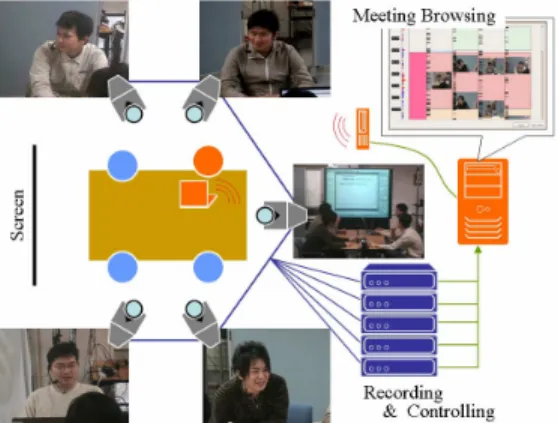
Our target is towards a typical face-to-face meeting scenario where 3-6 persons sit down around a table, and one of them presents slides projected on the screen. Figure 2 shows an example of the setting of our smart meeting room where 4 participants are captured.
Figure 2. Overview of our smart meeting room
Videos, the main content of the records, are captured in the following two kinds of shot: (1) breast shot, capturing the upper body of each participant; and (2) screen shot, capturing an overview of the meeting including all participants.
Examples of the videos are shown in Figure 2. These are elemental shots that are typically seen in talk-scene videos of movies or television programs.
A breast-shot camera is automatically controlled based on the face recognition result of its assigned participant. Face region is extracted from the image of each breast-shot camera by using a face recognition software (provided by Toshiba Ltd.). If the center of gravity of the face is outside the center of the image, the camera is adjusted until the face locates at the center of the image. If the face already exists at the center of the image, the camera is zoomed in or out so that the face becomes appropriate size in the image. To capture the audio data, a head-worn microphone is attached to each participant.
The video signal from each of the camera is input into an encoder board and stored in the format of MPEG2/PS. The audio signal is also imported into the encoder board in sync with the video signal. The computers attached with the encoder boards are synchronized with each other by NTP (Network Time Protocol).
4.2.2
Recognition
We here describe the recognition scheme of important parts, i.e., hotspots in the meeting. When participants heatedly discuss in a meeting, their utterances and gaze changes overlap frequently. Therefore, the degree of crossover of these events is a good indicator for finding hotspots in a meeting. Our system detects inter pausal unit (IPU) as an utterance section from audio signal. IPU is used as one of the typical utterance units in cognitive science field [22]. If two adjacent IPUs have an interval that is less than 200 ms, they are regarded as an utterance section. To detect gaze change sections, we first divide face directions into three classes: toward the screen, toward participants, and toward other things. The system then recognizes the participant’s face direction and detects its change from one class to another. This is useful to omit the small gaze changes within the same area, e.g., the screen. Another determinant useful for finding hotspots is the number of nods and back-channel feedbacks of participants. Nodding is recognized based on the movement distance of the bottom of face region in the captured images. Back-channel feedback is detected by extracting keywords such as “Yeah”, “Uh-huh”, etc., from speech recognition results. The utterance sections less than a second are removed.
4.2.3
MeetingBrowser
MeetingBrowser exploits user context, e.g., user purpose, to present different kinds of summary of the current status of the meeting to different users. We divide user purposes in meeting browsing into two classes: to know what the conclusion is, and to know how the conclusion is made. The user purpose can be obtained through user input or inferring from user role. For the users who just want to know what the conclusion is, the brief result in text is presented. For the users who want to know how the conclusion is made, the procedure, event, and human interaction are visualized.
Figure 3 shows the interface of the MeetingBrowser. Here the user’s purpose is determined as to know how the conclusion is made. The longitudinal direction is a temporal axes. The leftmost column displays the time. The number of nods and back-channel feedbacks is displayed as bar graphs in the second column from
the left. The right four columns show event information of the four participants with thumbnails respectively. Crossover sections of conversations and gaze changes are displayed as rectangle areas in the column of each participant. The pattern and color of the rectangle area change according to the engagement degree of the area. Through this, the end user can know whose conversations or gaze changes are overlapped. When the end user selects the area where he wants to know the details with the mouse and clicks the “Play Video” button, the corresponding video segment will be playbacked.
Figure 3. The interface of MeetingBrowser
4.3
Evaluation
We evaluate the performance of the MeetingAssistant system from two perspectives: (1) the efficacy of the hot spot recognition, and (2) the effectiveness of meeting browsing.
Before the tests, we first manually identified the hot spots and topics of interest from a meeting video (7.5 minutes) in which four persons talked about their travel plan. The topics of interest refer to the topics that the meeting participants may be interested in, e.g., where to go, when to go, how to go, and do what.
4.3.1
Evaluation of the hot spot recognition
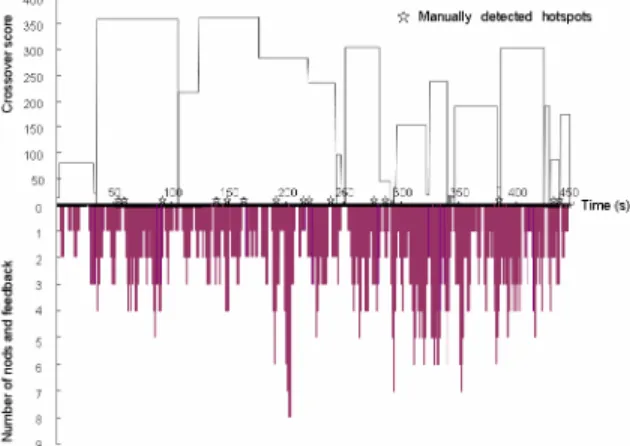
As described in Section 4.2.2, we use the degree of crossover of utterances and gaze changes, and the number of nods and feedbacks as indicators for recognizing hot spots. In this experiment, we aim to verify the approach by examining the relationship between hot spots and crossover, as well as the relationship between hot spots and nods and feedback. The crossover score and number of nods and feedbacks of the meeting video were measured in every 10 seconds. We then compared the manually detected hot spots with the indicators recognized by our method.
Figure 4 shows the results of this experiment. The distribution of crossover score is shown in the top part, while the bottom part shows the number of nods and feedbacks. The star symbols indicate where hot spots are manually identified. As shown, hot spots are really associated with crossover score (i.e., engagement degree) and number of nods and feedbacks. Most of the manually detected hot spots fall into the area with high crossover score and large number of nods and feedback. Another noteworthy finding
is that compared with the nodding and feedback, the crossover is more associated with hot spots.
Figure 4. Experiment result of hotspot recognition
4.3.2
Evaluation of the meeting browsing
11 subjects (students in the media center of Kyoto University) participated in this experiment in March, 2007. They were divided into two groups, Group A (6 persons) and Group B (5 persons). Group A was asked to observe topics of interest in the meeting by watching the raw video, while Group B using the MeetingBrowser. Both groups were required to finish the test within 5 minutes. The time limit aims at preventing a simple playback of the whole meeting to observe topics of interest. We then calculated the percentage of persons in each group who correctly identified the topics of interest.
The result is shown in Figure 5. There are totally 7 topics of interest in the meeting video. We can observe that all members of Group A and Group B successfully identified the topics 2 and 3. For the topics 4, 5, 6, and 7, the performance of Group B who used the MeetingBrowser is better than Group A who merely watched the raw video. Group A is only superior to Group B in identifying the topic 1. This result could verify the effectiveness of the MeetingBrowser in helping user understand the meeting content.
Figure 5. Experiment result of meeting browsing
5.
CONCLUSION
The contribution of this paper is twofold: (1) identifying the basic requirements and enabling technologies in building a smart
meeting system; and (2) presenting the design and implementation of a real-world application with two novel features, i.e., real-time and context-aware. For future work, we plan to conduct research on security, privacy and trust issues in smart meeting environment.
6.
ACKNOWLEDGMENTS
This work was supported by the Ministry of Education, Culture, Sports, Science and Technology, Japan under the projects of “Cyber Infrastructure for the Information-explosion Era”.
7.
REFERENCES
[1] AMI project, http://www.amiproject.org/
[2] D. Baron, et al, “Automatic punctuation and disfluency detection in multi-party meetings using prosodic and lexical cues”, In Proc. ICSLP2002, Denver, Colorado, USA, September 2002, pp. 949-952.
[3] H. Bounif, et al, “A Multimodal Database Framework for Multimedia Meeting Annotations”, In proc. of the International Conference on Multi-Media Modeling (MMM’04), January 5-7, 2004, Australia, pp. 17-25. [4] C. Busso, S. Hernanz, C.W. Chu, S. Kwon, S. Lee, P.G.
Georgiou, I. Cohen, and S. Narayanan, “Smart Room: Participant and Speaker Localization and Identification”, In Proc. of 2005 International Conference on Acoustics, Speech, and Signal Processing (ICASSP 2005), Philadelphia, PA, March 18-23, 2005, vol. 2, pp. 1117-1120.
[5] P. Chiu, et al, “Room with a Rear View: Meeting Capture in a Multimedia Conference Room”, IEEE Multimedia, Vol. 7 No. 4, October 2000, pp. 48-54.
[6] S. Colbath, and F. Kubala, “Rough’n’Ready: A Meeting Recorder and Browser”, In Proc. of the Perceptual User Interface Conference, San Francisco, CA, November 4-6, 1998, pp. 220-223.
[7] R. Cutler, Y. Rui, A. Gupta, J.J. Cadiz, I. Tashev, L. He, A. Colburn, Z. Zhang, Z. Liu, and S. Silverberg, “Distributed Meetings: A Meeting Capture and Broadcasting System”, In Proc. of the 10th ACM Conference on Multimedia, Juan-les-Pins, France, December1-6, 2002, pp. 503-512.
[8] A. K. Dey, D. Salber, G. D. Abowd, and M. Futakawa, “The Conference Assistant: Combining Context-Awareness with Wearable Computing”, In Proc. of the 3rd International Symposium on Wearable Computers (ISWC’99), October 18-19, 1999, San Francisco, CA, pp. 21-28.
[9] A. Dielmann and S. Renals, “Dynamic Bayesian Networks for Meeting Structuring”, in Proc. IEEE ICASSP 2004, Montreal, Canada, May 17-21, 2004, pp. 629-632. [10] J. Foote, and D. Kimber, “FlyCam: Practical Panoramic
Video and Automatic Camera Control”, Proc. of ICME 2000, July 30 - August 2, 2000, New York, USA, pp. 1419-1422.
[11] D. Gatica-Perez, et al, “On automatic annotation of meeting databases”, Prof. of Int. Conf. on Image Processing (ICIP 2003), Barcelona, Spain, September 14-18, 2003, vol. 3, pp. 629-632.
[12] D. Gatica-Perez, et al, “Detecting Group Interest-Level in Meetings”, in Proc. Of IEEE ICASSP 2005, Philadelphia, PA, March 18-23, 2005, vol. 1, pp. 489-492.
[13] W. Geyer, et al, “Making Multimedia Meeting Records More Meaningful”, in Proc. of the IEEE International Conference on Multimedia and Expo (ICME 2003), Baltimore, MD, July 6-9, 2003, vol. 2, pp. 669-672.
[14] R. Gross, J. Yang, and A. Waibel, “Face Recognition in a Meeting Room”, in Proc. of the Fourth IEEE International Conference on Automatic Face and Gesture Recognition, Grenoble, France, March 26-30, 2000, pp. 294 - 299. [15] D. Hillard, M. Ostendorf, and E. Shriberg, “Detection of
Agreement vs. Disagreement in Meetings: Training with Unlabeled Data”, Human Language Technology and North American Chapter of the Association for Computational Linguistics Conference (HLT-NAACL), May 27-June 1, 2003, Edmonton, Canada, vol. Comp., pp 34-36. [16] A. Jaimes, et al, “Memory Cues for Meeting Video
Retrieval”, The first ACM Workshop on Continuous Archival and Retrieval of Personal Experiences (CARPE’04), New York, NY, USA, October 15, 2004, pp. 74-85.
[17] A. Jaimes and J. Miyazaki, “Building a Smart Meeting Room: From Infrastructure to the Video Gap (Research and Open Issues)”, the 21st International Conference on Data Engineering Workshops (ICDEW 05), Tokyo, Japan, April 5-8, 2005, pp. 1173-1182.
[18] R. Jain, P. Kim, and Z. Li, “Experintial Meeting Systems”, in Proc. of ACM Workshop on Experiential TelePresence, Berkeley, California, USA, November 7, 2003, pp. 1-12. [19] J. Kaplan, “Next-Generation Conference Rooms”, Ubicomp
2005 Workshop on ubiquitous computing in next generation conference rooms, September 11-14, 2005, Tokyo, Japan. [20] L. Kennedy and D. Ellis, “Laughter Detection in Meetings”,
NIST ICASSP 2004 Meeting Recognition Workshop, Montreal, Canada, 2004, pp. 118-121.
[21] N. Kern, et al, “Wearable Sensing to Annotate Meeting Recordings”, Personal and Ubiquitous Computing, vol. 7, no. 5, October 2003, pp. 263-274.
[22] H. Koiso, Y. Horiuchi, S. Tutiya, A. Ichikawa, and Y. Den, “An analysis of turn-taking and backchannels based on prosodic and syntactic features in Japanese Map Task dialogues”, Language and Speech, 41, 1998, 295-321. [23] D. Lee, B. Erol, J. Graham, J. J. Hull, and N. Murata,
“Portable Meeting Recorder”, in Proc. of the 10th ACM Conference on Multimedia, Juan-les-Pins, France, December1-6, 2002, pp. 493-502.
[24] Z. Liu, et al, “Energy-based Sound Source Localization and Gain Normalization for Ad Hoc Microphone Arrays”, in Proc. of ICASSP07, Hawaii, April 15-20, 2007
[25] M. Liwicki, et al, “Writer Identification for Smart Meeting Room Systems”, in Proc. of 7th IAPR Workshop on Document Analysis Systems, February 2006, Nelson, New Zealand, pp. 186-195.
[27] I. McCowan, et al, “Automatic Analysis of Multimodal Group Actions in Meetings”, IEEE Transactions on Pattern Analysis and Machine Intelligence, Vol. 27, No. 3, March 2005, pp. 305-317
[28] I. Mikic and K. Huang and Mohan M. Trivedi, “Activity Monitoring and Summarization for an Intelligent Meeting Room”, IEEE Workshop on Human Motion, Austin, Texas, December 2000, pp. 107-112.
[29] Mimio, http://www.mimio.com/
[30] H. Nait-Charif and S. J. McKenna, “Head Tracking and Action Recognition in a Smart Meeting Room”, the IEEE International Workshop on Performance Evaluation of Tracking and Surveillance, Graz, Austria, March 31, 2003, pp. 24-31.
[31] D. Reidsma, et al, “Meeting Modelling in the Context of Multimodal Research”, Proc. of the First International Workshop on Machine Learning for Multimodal Interaction (MLMI’04), Switzerland, June 21-23, 2004, pp. 22-35. [32] S. Renals and D. Ellis, “Audio Information Access from
Meeting Rooms”, In Proc. of IEEE ICASSP 2003, Hong Kong, April 6-10, 2003, Vol. 4, pp. 744-747.
[33] Y. Rui, et al, “Viewing Meetings Captured by an Omni-Directional Camera”, Proc. of ACM CHI 2001, Seattle, WA, March 31-April 5, 2001, pp. 450-457.
[34] R. Stiefelhagen, J. Yang, and A. Waibel, “Modeling Focus of Attention for Meeting Indexing”, ACM Multimedia 1999, Orlando, Florida, October 30 - November 5, 1999, pp. 3-10. [35] R. Stiefelhagen and J. Zhu, “Head Orientation and Gaze
Direction in Meetings”, In Proc. Of Conference on Human Factors in Computing Systems (CHI 2002), Minneapolis, Minnesota, USA, April 20-25, 2002, pp. 858-859.
[36] R. Stiefelhagen, “Tracking Focus of Attention in Meetings”, The Fourth IEEE International Conference on Multimodal Interfaces (ICMI 2002), October 14-16, 2002, Pittsburgh, PA, USA, pp. 273-280.
[37] M. Trivedi, I. Mikic, and S. Bhonsle, “Active Camera Networks and Semantic Event Databases for Intelligent Environments”, IEEE Workshop on Human Modeling, Analysis and Synthesis (in conjunction with CVPR), Hilton Head, South Carolina, June 2000.
[38] S. Tucker and S. Whittaker, “Accessing Multimodal Meeting Data: Systems, Problems and Possibilities”, Workshop on Multimodal Interaction and Related Machine Learning Algorithms, Martigny, Switzerland, June 223, 2004, pp. 1-11.
[39] M. Turk and A. Pentland, “Eigenfaces for recognition”, Journal of Cognitive Neuroscience, 3(1), 1991, pp. 71-86. [40] A. Waibel, M. Bett, and M. Finke, “Meeting Browser:
Tracking and Summarizing Meetings”, Proc. of the Broadcast News Transcription and Understanding Workshop, Lansdowne, Virginia, February 1998, pp. 281-286.
[41] A. Waibel, et al, “Advances in Automatic Meeting Record Creation and Access”, Proc. of the International Conference on Acoustics, Speech, and Signal Processing, May 7-11, 2001, Salt Lake City, Utah, USA, pp. 597-600.
[42] P. Wellner, M. Flynn, and M. Guillemot, “Browsing Recorded Meetings with Ferret”, Proc. of the First International Workshop on Machine Learning for
Multimodal Interaction (MLMI’04), Martigny, Switzerland, June 21-23, 2004, pp. 12-21.
[43] B. Wrede and E. Shriberg, “Spotting ‘Hot Spots’ in Meetings: Human Judgments and Prosodic Cues”, in Proc. European Conf. on Speech Communication and Technology, Geneva, Switzerland, September 1-4, 2003, pp. 2805-2808. [44] B. Wrede and E. Shriberg, “The Relationship between
Dialogue Acts and Hot Spots in Meetings”, in Proc. IEEE Automatic Speech Recognition and Understanding Workshop (ASRU), Virgin Islands, November 30-December 3, 2003, pp. 180-185.
[45] J. Yang, X. Zhu, R. Gross, J. Kominek, Y. Pan, and A. Waibel, “Multimodal People ID for a Multimedia Meeting Browser”, Proc. of ACM Multimedia 99, October 30 - November 5, 1999, Orlando, FL, USA, pp. 159-168. [46] H. Yu, et al, “Progress in Automatic Meeting Transcription”,
Proc. of 6th European Conference on Speech
Communication and Technology (Eurospeech-99), Budapest, Hungary, September 5-9, 1999, Vol. 2, pp. 695-698. [47] M. Zobl, et al, “Action Recognition in Meeting Scenarios
Using Global Motion Features”, In Proc. of IEEE Intl. Workshop on Performance Evaluation of Tracking and Surveillance (PETS-CCVS), Austria, March 2003, pp. 32-36.