GUIDELINES
FOR HANDLING
IMAGE METADATA
Version 2.0
Copyrights
© Copyright 2008, 2009, 2010 by Adobe Systems Inc., Apple Inc., Canon Inc., Microsoft Corp., Nokia Corp. and Sony Corp. All rights reserved.
Terms and Conditions
This document is made available by Adobe Systems Inc., Apple Inc., Canon Inc., Microsoft Corp., Nokia Corp. and Sony Corp. (collectively, the “Authors”) and grants you (either an individual or an entity) and your affiliates (“Licensee”) this license. Licensee agrees that Licensee has read, understood and will comply with these terms and conditions.
1. Definitions
1.1 “Licensed Products” means only those specific portions of products (hardware, software or combinations thereof) that implement and are compliant with all Normative Portions of the Guidelines.
1.2 “Normative Portions” means a portion of the Guidelines that must be implemented to comply with such guidelines. If such guidelines define optional parts, Normative Portions include those portions of the optional part that must be implemented if the implementation is to comply with such optional part.
1.3 “Necessary Claims” are those claims of a patent or patent application, throughout the world, excluding design patents and design registrations, owned or controlled, or that can be
sublicensed in compliance with the requirements of this Agreement, by the party or its affiliates now or at any future time and which would necessarily be infringed by implementation of the Guidelines. A claim is necessarily infringed hereunder only when it is not possible to avoid infringing it because there is no non-infringing alternative for implementing the Normative Portions of the Guidelines. Notwithstanding the foregoing, Necessary Claims shall not include any claims other than as set forth above even if contained in the same patent as Necessary Claims; or that read solely on any implementations of any portion of the Guidelines that are not required by the Normative Portions of the Guidelines, or that, if licensed, would require a payment of royalties by the licensor to unaffiliated third parties. Moreover, Necessary Claims shall not include (i) any enabling technologies that may be necessary to make or use any Licensed Product but are not themselves expressly set forth in the Guidelines (e.g.,
semiconductor manufacturing technology, compiler technology, object oriented technology, basic operating system technology, data and voice networking technology, and the like); or (ii) the implementation of other published standards developed elsewhere and merely referred to in the body of the Guidelines, or (iii) any Licensed Product and any combinations thereof the purpose or function of which is not required for compliance with the Guidelines. For purposes of this definition, the Guidelines shall be deemed to include only architectural and interconnection requirements essential for interoperability and shall not include any implementation examples unless such implementation examples are expressly identified as being required for compliance with the Guidelines.
2. License
2.1 Copyright: Licensee must include the following on ALL copies of the Guidelines, or portions thereof that Licensee makes:
2.1.1. A link or URL to the Guidelines at this location: http://www.metadataworkinggroup.org 2.1.2. The copyright notice as shown in the Guidelines.
2.2 Patent: The Authors each will grant Licensee a royalty-free license under reasonable, non-discriminatory terms and conditions to their Necessary Claims to make, have made, use, reproduce market, import, offer to sell and sell, and to otherwise distribute Licensed Products. Licensee agrees to grant Authors and their affiliates a royalty-free license under reasonable, non-discriminatory terms and conditions to its Necessary Claims to make, have made, use, reproduce market, import, offer to sell and sell, and to otherwise distribute Licensed Products. Nothing herein shall prevent the Authors from charging a reasonable royalty for such Necessary Claims to any party who is offering their Necessary Claims on royalty bearing terms.
3. Limitations
3.1 No Warranty: THE “GUIDELINES FOR HANDLING IMAGE METADATA VERSION 2.0” GUIDELINES IS PROVIDED “AS IS,” AND THE AUTHORS MAKE NO REPRESENTATIONS OR WARRANTIES, EXPRESS OR IMPLIED, INCLUDING, BUT NOT LIMITED TO,
WARRANTIES OF MERCHANTABILITY, FITNESS FOR A PARTICULAR PURPOSE, NON-INFRINGEMENT, OR TITLE; THAT THE CONTENTS OF THE GUIDELINES ARE SUITABLE FOR ANY PURPOSE; NOR THAT THE IMPLEMENTATION OF SUCH CONTENTS WILL NOT INFRINGE ANY THIRD PARTY PATENTS, COPYRIGHTS, TRADEMARKS OR OTHER
RIGHTS.
3.2 No Liability: THE AUTHORS WILL NOT BE LIABLE FOR ANY DIRECT, INDIRECT, SPECIAL, INCIDENTAL OR CONSEQUENTIAL DAMAGES ARISING OUT OF OR RELATING TO ANY USE OR DISTRIBUTION OF THE GUIDELINES.
3.3 Trademark: The name and trademarks of the Authors may NOT be used in any manner, including advertising or publicity pertaining to the Guidelines or its contents without specific, written prior permission. Title to copyright in the Guidelines will at all times remain with the Authors.
3.4 No Other Rights: No other rights are granted by implication, estoppel or otherwise.
Normative Sections
This document attempts to conform to the keyword usage practices defined in RFC 2119. This RFC defines the use and strength of the capitalized terms MUST, MUST NOT, SHOULD, SHOULD NOT and MAY. All sections and appendixes, except the first chapter “Introduction”, are normative, unless
References
This document includes the following references to third party documents:
Metadata Specifications
Exif 2.3 http://www.cipa.jp/english/hyoujunka/kikaku/pdf/DC-008-2010_E.pdf DCF 2.0 (2010) http://www.cipa.jp/english/hyoujunka/kikaku/pdf/DC-009-2010_E.pdf IPTC-IIM 4.1 http://www.iptc.org/std/IIM/4.1/specification/IIMV4.1.pdf IPTC Core 1.0 http://www.iptc.org/std/Iptc4xmpCore/1.0/specification/Iptc4xmpCore_1.0-spec-XMPSchema_8.pdfIPTC Core 1.1 & IPTC Extension 1.1
http://www.iptc.org/std/photometadata/specification/IPTC-PhotoMetadata-201007.pdf
XMP
http://www.adobe.com/devnet/xmp/
File Format Specifications
JPEG http://www.jpeg.org/jpeg/ TIFF http://partners.adobe.com/public/developer/en/tiff/TIFF6.pdf PSD/PSIRs http://www.adobe.com/go/psir
Miscellaneous
RDF http://www.w3.org/TR/rdf-schema Dublin Core http://dublincore.org/documents/dces RFC2119 http://www.ietf.org/rfc/rfc2119.txtTABLE OF CONTENTS
1. About This Document ... 7
2. Introduction ... 8
2.1 About the Metadata Working Group ... 11
2.2 Scoping the work ... 11
2.3 Digital imaging metadata initiative ... 12
2.4 Relationship to standards organizations ... 13
2.5 Definition of terms ... 14
3. Usage and Data Model ... 15
3.1 Actor definition ... 15
3.1.1 Creator ... 15
3.1.2 Changer ... 16
3.1.3 Consumer ... 16
4. Metadata Management ... 18
4.1 Existing metadata standards ... 18
4.2 Metadata formats within image files ... 20
4.2.1 Handling a single metadata format ... 20
4.2.2 Handling multiple metadata formats ... 20
4.2.2.1 Exif and IPTC-IIM in the context of XMP ... 22
4.2.3 Metadata reconciliation guidance ... 23
4.2.3.1 Handling Exif and XMP ... 23
4.2.3.2 Handling IPTC-IIM and XMP ... 26
4.2.3.3 Handling Exif/TIFF, IPTC-IIM and XMP metadata ... 29
4.2.3.4 More complex reconciliation in popular image formats ... 30
5. Metadata Guidelines ... 35
5.1 Keywords ... 35
5.7 Creator ... 43
5.8 Location ... 45
5.8.1 Location Created (GPS Latitude/Longitude) ... 45
5.8.2 Location Created (Textual Properties) ... 46
5.8.3 Location Shown (GPS Latitude/Longitude) ... 47
5.8.4 Location Shown (Textual Properties) ... 48
5.8.5 Reconciling Location Data ... 49
5.9 Image Region Metadata ... 51
5.10 Hierarchical Keywords ... 60
5.11 Collections ... 65
APPENDIX A: References ... 69
APPENDIX B: Implementation Notes ... 71
1. ABOUT THIS DOCUMENT
The “Guidelines for Handling Image Metadata” document is being updated regularly to incorporate user feedback as well as addressing new areas that have been identified as valuable in the scope of the Metadata Working Group.
This document can be found at the following address: http://www.metadataworkinggroup.org
Document history
Version Date Description
1.0 September 2008 Initial guidance document of Metadata Working Group
1.0.1 February 2009 First update incorporating users’ feedback
2.0 October 2010 Major update and addition of new schemata for image region
metadata, hierarchical keywords and collections
New in this version
Updated document structure
Clarified text encoding section
Provided additional guidance for location based metadata
Added schema support for the following consumer metadata: - Image Region Metadata
- Hierarchical Keywords - Collections
Acknowledgments
This document is the result of a collaborative effort amongst Metadata Working Group members. We wish to thank all of those members of the metadata community who spent time and energy to review this document and provide us with valuable feedback.
2. INTRODUCTION
Metadata, often referred to as “data about data,” provides interesting information that supplements the primary content of digital documents. Metadata has become a powerful tool to organize and search through the growing libraries of image, audio and video content that users are producing and
consuming. This is especially important in the area of digital photography where, despite the increased quality and quantity of sensor elements, it is not currently practical to organize and query images based only on the millions of image pixels. Instead, it is best to use metadata properties that describe what the photo represents and where, when and how the image was taken.
Metadata is now critical in workflows ranging from consumer sharing experiences to professional-level asset management. That said, there are several complications which result from structural hierarchies required to store metadata within images:
Digital images are stored in a variety of common file formats such as TIFF, JPEG and PSD as well as proprietary formats such as RAW. Each file format has distinct rules regarding how metadata formats must be stored within the file.
Within image file formats, metadata can be stored using a variety of common metadata container formats such as Exif/TIFF IFDs, Adobe XMP, Photoshop Image Resources (PSIR) and IPTC-IIM. Each metadata container format has unique rules regarding how metadata properties must be stored, ordered and encoded within the container.
Within these metadata container formats, metadata can be stored according to various semantic groupings. Examples of these groupings are tags within Exif which relate to GPS, Dublin Core
Some metadata semantic groupings, such as IPTC’s, are intended for use in specific user workflows and some, such as Exif’s, can be stored using multiple metadata container formats.
Within metadata semantic groupings, there can be dozens of individual metadata properties. Each metadata property can require data of specific types such as strings, numbers or arrays. Some metadata properties are conventionally read-only while others can be modified by the user. Metadata properties are typically objective but some are subjective. Some useful properties, such as user ratings, have no commonly used standard storage container while others, such as copyright strings, can be stored within many containers with similar but subtly distinct semantics.
The above structural complexities have traditionally caused further complications which challenge the effective use of metadata in workflows:
Different applications and devices have chosen to handle ambiguously or weakly-defined metadata specifications in different ways.
Different applications and devices have chosen to follow different policies in cases where metadata can be stored in more than one standard location.
An application or device often stores proprietary metadata, such as maker notes, within a metadata container. This practice is fragile because such private data can easily be lost when a different application modifies a file.
Some applications and devices usurp general purpose metadata properties to address specific needs. This can cause compatibility problems for applications that correctly use those properties in accordance with the generally accepted
specification.
Some applications avoid the complexities of storing metadata within image files altogether and opt, instead, to store it in a separate file or database. This practice can easily result in the loss of metadata when a file is used across several
applications.
All of these problems have led to significant frustration for users who want consistent metadata interoperability across digital imaging products and services. Manufacturers of digital imaging hardware, software and services spend substantial development resources dealing with these problems. Until practical guidance to resolve these complexities exists, these problems will continue to cost both users and industry time and resources.
2.1 About the Metadata Working Group
Based on a 2006 proposal by Microsoft, the Metadata Working Group (MWG) organization was created in 2007 by 5 founding members: Apple, Adobe, Canon, Microsoft and Nokia. Sony joined this initiative in 2008.
The goals are:
Preservation and seamless interoperability of digital image metadata.
Interoperability and availability of metadata to all applications, devices, and services.
Enabling emerging metadata-based workflows.
The organization is based on a formal legal framework and royalty free intellectual property policy that allows member companies and other industry leaders to collaborate on a solution to the above
problems. The efforts of the MWG are organized into initiatives. The continuation of MWG’s first initiative (covered in this document) addresses issues of digital imaging metadata for typical
consumers. Future initiatives might deal with metadata for professional photography, audio and video metadata, etc.
2.2 Scoping the work
Consumer sharing of still images has exploded with the maturing of Internet services for the storage, manipulation and sharing of pictures. However, the majority of standards related to still images are oriented towards documenting the creation of an image or towards professional usage and
management of images (e.g. in print media). Little provision is made for the consumer who simply wants to share images with friends, manage their snapshots, or be creative with their photos. The intention of this document is to use and extend existing standards to address the key organizational metadata questions that most consumers have:
Who is involved with this image? (who took it, who owns it, who’s in it?)
What is interesting about this image?
Where is this image from?
When was this image created or modified?
The goal of this document is to provide best practices for solving interoperability issues in the consumer space.
When we look at the “four Ws” (who, what, where, when), it is clear that this data can range from highly precise (e.g. GPS latitude/longitude) to extremely vague or context-dependent (e.g. “In my back yard”). This document does not try to solve the difficult semantic issues around this problem; rather, it tries to ensure that semantically equivalent metadata is identified across standards, and if it exists,
2.3 Digital imaging metadata initiative
The scope of this effort is focused on the metadata of still images, with particular attention given to consumer workflows. While the guidance has been augmented to include some important new consumer use cases, the effort remains centered upon solving a specific set of problems, outlined below:
Issues addressed in this document
Interoperability and preservation of metadata between processes (devices, applications, platforms and services), file formats and metadata standards.
Overlapping fields between existing standards and schemata.
Need for guidance on emerging consumer metadata.
These issues have been addressed by the creation of:
A usage and data model based on common consumer use cases.
Actor definitions of the roles each device or application plays when interacting with metadata.
Best practices regarding how, when and where metadata should be changed in popular consumer still image file formats using existing industry metadata standards.
Rationalization of common and important consumer metadata fields between existing standards.
New schemata for emerging metadata that are not currently addressed in digital asset workflows.
Specific non-goals for this document
To define new metadata structures, storage formats, or standards where appropriate alternatives already exist.
2.4 Relationship to standards organizations
There are a number of established standards, such as Exif and IPTC, which are widely used by the digital photography industry. This effort is not intended to replace existing industry standards, but rather to build on them by providing resources to improve interoperability and metadata preservation between them. This is based on significant understanding of the industry (customers, scenarios, technologies) and experience in building the products that capture, process, store, share and transmit digital photographs.
This document, “Guidelines For Handling Image Metadata”, is designed to help guide developers by providing best practices on how to create, read and modify metadata within digital images. It’s also designed to motivate the owners of metadata standards and formats to think about preservation, interoperability, and compatibility in general terms.
2.5 Definition of terms
Digest A checksum value to help identify changes between the metadata formats Dublin Core A metadata element set. It includes all DCMI terms (i.e. refinements,
encoding schemes and controlled vocabulary terms) intended to facilitate discovery of resources.
Exif “Exchangeable image file format” – a standard for image file formats, jointly managed by Japan Electronics and Information Technology industries Association (JEITA) and Camera and Imaging Products Association (CIPA)
IPTC “International Press Telecommunications Council” – creator and maintainer of metadata standards
IPTC-IIM “Information Interchange Model” – IPTC multimedia metadata standard IPTC Core IPTC photo metadata standard based on XMP
IPTC Extension Extended IPTC photo metadata standard based on XMP JPEG A file format, widely used in image and photography workflows MWG “Metadata Working Group” – Industry consortium responsible for this
document
PSD The native Adobe Photoshop file format
RDF The “Resource Description Framework (RDF)”, described by the W3C as a “framework for representing information in the Web”, has become a
general model for representing metadata
TIFF The “Tagged Image File Format (TIFF)” is a file format to store images as well as photography.
Unicode Unicode is an industry standard to consistently represent characters and text within modern software and hardware systems
UTF-8 UTF-8 is a byte-oriented encoding form of Unicode
URI Universal Resource Identifier
3. USAGE AND DATA MODEL
For a better understanding of the proposed guidance in this document, this chapter introduces the notion of different actors that play specific roles in metadata processing. These definitions will be used throughout the document to discuss the rules on how to handle metadata across the different formats.
3.1 Actor definition
In the actor model, the flow of an image file is represented as a series of states between multiple applications (actors). It starts with the Creator actor, going through Changer actors and ending at the
Consumer actor. In this model, all actors are essentially black boxes in which the processing actions, specific to each actor, are neither known nor considered important from the model’s point of view. However, the state of the metadata in the image file is communicated between each phase.
Figure 1 - Actor state diagram
An application is defined to be compliant if it reads and writes metadata in accordance with this document. There may also be non-compliant applications modifying metadata between two actors. It is not always possible to detect such modifications, so any compliant application must also accept non-compliant metadata.
This document presents the rules on how to handle a small set of selected metadata fields in a compliant manner. The roles which are defined in this document are covered for two main reasons: firstly, to attempt to clarify the purpose of the selected fields, and secondly, to show how to apply similar metadata handling to fields not covered here. An application can function in different roles at different times but every time it touches metadata, it does so only in one of these roles.
3.1.1 Creator
A Creator application creates the first instances of metadata in a new (image) file. It is usually (though not necessarily) the same application that creates the image data, e.g. an image processing
application, a digital camera or a cell phone. One common aspect of a Creator application is that there is no old metadata to preserve.
Another scenario is an image editing application that creates a new file after consuming information from an existing one. In general, producing a new file from an existing one can be treated as a role of a Changer since metadata is not created but instead repurposed. Therefore please refer to the
Changer definition below for more guidance.
3.1.2 Changer
A Changer application first reads metadata from an image file and then writes new or modified metadata back to a file.
The rules for an application in the Changer role are:
Deletion of metadata MUST only be done with specific intent.
It SHOULD obey rules for Consumer applications when reading metadata.
It SHOULD keep all forms of metadata it modifies in sync with one another.
The first rule pertains to the preservation of metadata. Descriptive metadata, information added by a user, must only be deleted by explicit user intent. Non-descriptive metadata may however be deleted with explicit intent. It should only be modified or deleted if it is known to be inaccurate or problematic. The second rule follows from the observation that the Changer application is also a Consumer
application, so it should also observe all Consumer application rules.
Finally, the third rule states that whenever the Changer application writes new metadata fields to the file, it should keep different forms existing in the file, e.g. Exif, IPTC-IIM and XMP, in sync with one another. The first rule and third rule also apply to a changer that wishes to not write all forms of a metadata item. Writing one form and deleting other forms is a legitimate intentional deletion, done to avoid unsynchronized forms in the file.
3.1.3 Consumer
A Consumer application only reads metadata from the image file. It may use metadata for display purposes, searching, content organization, etc. but it never modifies the metadata in the file itself. General rules for Consumer application are:
It MUST reconcile between different forms of metadata in the image.
It MUST use metadata according to the semantics defined for each field.
The first rule says that a Consumer application must process metadata according to policies defined in this document and then only the reconciled data is used further before it is presented to the end-user. This may involve, for example, resolving possibly conflicting information between Exif, IPTC-IIM and XMP versions of a metadata field existing in the image file.
The second rule says that applications must understand the semantics of desired metadata fields and use them appropriately. For example, in order to reconcile different forms of metadata, the application must know the semantics of the metadata in question.
Tools designed to display technical details about the format and content of the file’s metadata, but not intended to primarily express metadata semantic meaning, are not required to be compliant
4. METADATA MANAGEMENT
Metadata is an essential part of image and photography based workflows. Cameras capture device metadata while taking pictures. Operating systems and other software subsequently read metadata to build up catalogs and offer effective search capabilities. In addition to this, the user is able to enhance this workflow with their own metadata that may be stored either inside the file or within caching or database systems.
In the context of consumer image-based workflows, the existence of different metadata standards leads to interoperability issues when using various devices, operating systems and software tools. Although the majority of metadata properties are unique, there are a number of properties which overlap across several metadata standards and cause interoperability issues as a consequence. The goal of this section is to identify those overlapping properties and provide guidance on how to handle them correctly across the different metadata formats.
After a brief overview of existing metadata standards, this chapter introduces the most common metadata properties in the context of consumer workflows. To ensure best interoperability across software and hardware systems, a general reconciliation mechanism is then discussed. Finally, the chapter will close with a detailed analysis of each focus area and discuss specific technical issues and obstacles.
4.1 Existing metadata standards
This section gives an overview of the existing metadata formats. As described in the introduction, this document will focus on photography workflows in the context of the consumer, so the choice of discussed metadata formats covers Exif, IPTC-IIM and XMP.
Exif - Exchangeable image file format
The Exif standard has been jointly managed by the Japan Electronics and Information Technology industries Association (JEITA1) and Camera and Imaging Products Association (CIPA). In particular, the Exif image interchange format defines a set of TIFF tags that describe photographic images, and is widely used by digital cameras. Exif metadata can be found in TIFF, JPEG, and PSD files.
DCF - Design rule for Camera File system
As digital still cameras (DSC) have grown enormously in popularity, there is a growing need for the direct exchange of images between cameras and other equipment, allowing pictures taken on one camera to be viewed on another, or to be sent to a printer. The DCF specification is intended to simplify the interchange of files between digital still cameras and other equipment. To this end, it specifies rules for recording, reading and handling image files and other related files used by DSC and other equipment. Among other things, DCF defines a subset of Exif where some properties are
optional in Exif but required in DCF.
IPTC – International Press Telecommunication Council
IPTC, based in London, UK, is a consortium of the world's major news agencies, news publishers and news industry vendors. It develops and maintains technical standards for improved news exchange that are used by virtually every major news organization in the world.
In 1979, the first IPTC standard was text-only and defined to protect the interest of the telecommunications industry.
http://www.iptc.org
Later, in 1991, a new standard, the “Information Interchange Model” (IIM), was created. IIM is an envelope format for transmitting news text documents and photos, and it defines the so-called “IPTC headers” which now exist in many photo files, having been inserted by Adobe Photoshop and similar software.
http://www.iptc.org/IIM
After Adobe had introduced XMP in 2001, the IPTC Core and IPTC Extension standards have adopted XMP as the successor to the IIM-based “IPTC header” used to describe millions of professional digital images.
http://www.iptc.org/photometadata
XMP - Adobe's Extensible Metadata Platform
XMP is a labeling technology that allows you to embed metadata into a file itself. With XMP, desktop applications and back-end publishing systems gain a common method for capturing, sharing, and leveraging this valuable metadata - opening the door for more efficient job processing, workflow automation, rights management and many other potential improvements. XMP standardizes the definition, creation and processing of extensible metadata.
XMP defines a metadata model that can be used with any defined set of metadata items. XMP also defines particular schemata for basic properties useful for recording the history of a resource as it is processed; from being photographed, scanned, or authored as text, through photo editing steps (such as cropping or color adjustment), to assembly into a final image. XMP allows each software program or device along the way to add its own information to a digital resource, which can then be retained in the final digital file.
XMP is serialized in XML and stored using a subset of the W3C Resource Description Framework (RDF). Therefore, customers can easily define their own custom properties and namespaces to embed arbitrary information into the file.
4.2 Metadata formats within image files
There are three metadata formats widely used in the industry:
Exif
IPTC-IIM
XMP
Within this section, guidance for reconciling and writing metadata across these metadata formats is discussed. Refer to the respective specification for details on reading, writing, or modifying metadata in each format.
4.2.1 Handling a single metadata format
In the simplest scenario, a given metadata property is only defined in a single metadata format. This is, for example, true for the rating property - this value should always be read and written into the
corresponding XMP (xmp:Rating) field. No further reconciliation is necessary. Also, there are a variety of properties defined in Exif (device properties) or in IPTC-IIM (workflow properties) that are unique to the container and won't be reconciled amongst the other formats.
4.2.2 Handling multiple metadata formats
Dealing with more than one metadata format makes it challenging to determine the correct behavior for handling the particular property values. The main difficulty is the evolution of metadata
representations and standards where older applications are not aware of newer practices. This can happen within a standard, such as the introduction of Unicode storage for IPTC-IIM. It can also happen across standards, such as with the introduction of XMP. Inconsistent implementations across software tools, encoding requirements, as well as size limitations on metadata properties cause additional challenges.
The properties described earlier have been identified as the most relevant in the consumer workflows today. However, they also serve another purpose in this document. Nearly all of them are defined in more than one metadata format, so they are good candidates for helping to understand the
reconciliation issues between the various formats. In other words, if the problems for these properties are well understood, all other metadata properties can be handled accordingly.
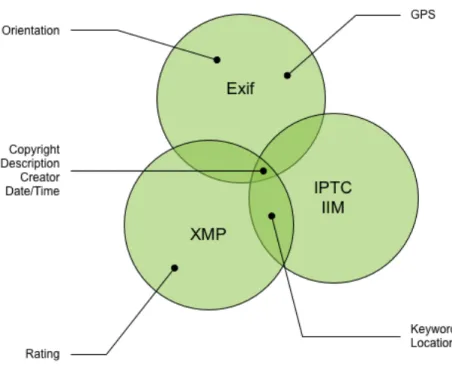
Figure 2 - Metadata defined in more than one format
It is evident that there are only a few properties defined in more than one metadata format. Actually only four are available in Exif, IPTC-IIM and XMP (Copyright, Description, Creator and Date/Time). To ensure interoperability between existing and upcoming hardware and software solutions, the following sections give you an overview of how to handle the different metadata properties in the context of the actor/role definitions.
But before going there, the next chapter will provide some more background information on the specific relationship between the metadata formats to better understand the overall picture.
4.2.2.1 Exif and IPTC-IIM in the context of XMP
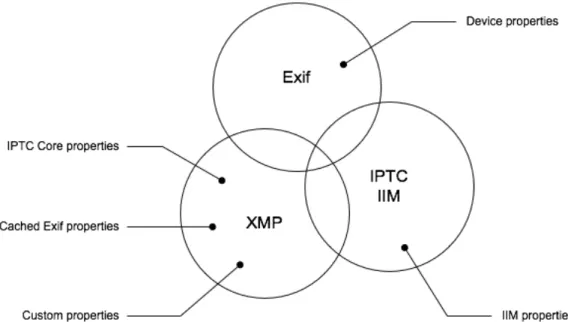
The following diagram presents a different perspective on metadata usage:
Figure 3 - Usage scenarios of Exif, IIM and XMP
Beside the fact that some native Exif and IPTC-IIM properties are mapped to corresponding XMP properties, some popular applications that pre-date this guidance also replicate a large number of other Exif properties into the XMP. To better understand the different use cases, the following two chapters will put these properties into the context of this document.
Exif within XMP
The most recent (as of mid-2010) XMP specification describes the usage of Exif/TIFF properties within XMP itself. Both Exif (http://ns.adobe.com/exif/1.0/) and TIFF (http://ns.adobe.com/tiff/1.0/)
namespaces have been defined so that corresponding Exif properties can be stored. This is
particularly useful if Exif properties need to be stored but the file format does not support native Exif (e.g. PNG).
In the case of file formats that do support Exif however, the current XMP specification describes mechanisms to reconcile data between the native Exif values and the mapped Exif properties in XMP (see “TIFF and Exif digests” under section “Reconciling metadata properties” in the XMP specification). However, this document changes this earlier XMP guidance and recommends that Exif and Tiff device properties only be mapped into XMP in the case the file format does not support Exif natively. For more details, please see section “Handling Exif and XMP” below.
IPTC within XMP
In contrast to the earlier IPTC-IIM specification, the most recent IPTC Core specification allows storing IPTC properties as XMP. Most of the properties are mapped to existing standard namespaces but for those where this was not possible, a new namespace “http://iptc.org/std/Iptc4xmpCore/1.0/xmlns/” has been introduced. The IPTC group encourages people to move from IPTC-IIM to its newer IPTC Core / IPTC Extension standard.
With that said, this document focuses on the interoperability between existing applications and is mainly concerned with the reconciliation between the earlier IPTC-IIM standard and XMP,
concentrating on the areas discussed in this document. There is no “reconciliation between XMP and IPTC Core” - everything is in XMP.
4.2.3 Metadata reconciliation guidance
The process of handling metadata values from the various metadata formats is basically divided into three different scenarios which will be discussed in the following chapters:
Read/Write Exif and XMP metadata
Read/Write IPTC-IIM and XMP metadata
Read/Write Exif, IPTC-IIM and XMP metadata
4.2.3.1 Handling Exif and XMP
This chapter discusses reconciliation guidance between Exif and XMP:
Reading Exif and XMP
Only a few properties are actually mapped between Exif and XMP and are therefore relevant for reconciliation. These are:
Date/Time
Description
Copyright
Creator
Since only a few properties are mapped between Exif and XMP, they are dealt with on a property-by-property basis. Unlike IPTC-IIM, as seen later, there is no advantage in using a checksum value to detect changes to the Exif. Especially for consumer use, there is generally no loss of fidelity when preferring Exif over XMP.
Here is a detailed look:
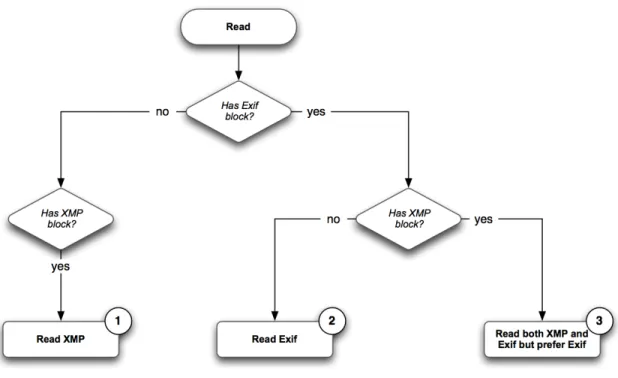
Figure 4 - Read guidance Exif/TIFF
If either Exif or XMP is available (1 & 2) reading metadata is straightforward.
Note: Today, there are two scenarios where Exif metadata is being mapped into XMP:
Exif native properties mapped to respective XMP properties (e.g. Exif Copyright XMP (dc:rights))
Exif and TIFF device properties duplicated into specific “exif:” or “tiff:” namespaces (e.g. Exif ApertureValue XMP (exif:ApertureValue))
In particular, for scenario (1), this means Exif and Tiff device properties SHOULD be read directly from the respective “exif:” and “tiff:” XMP namespaces. This is the case when the file does not natively support Exif.
The scenario “Read both XMP and Exif but prefer Exif” (3) is the most interesting one: In general, a
Consumer SHOULD prefer the values from Exif. As we'll see in more detail below, Exif can be preferred when reading because it does not have encoding or length limitations with respect to XMP. The policy for Changers ensures that newer applications write consistent values; preferring Exif when reading supports older applications.
It is, however, important to carefully read and follow the individual property mappings described in section “5. Metadata Guidelines” of this document. For example, the XMP (dc:description) value supports multiple languages, the corresponding Exif maps to a specific one of these.
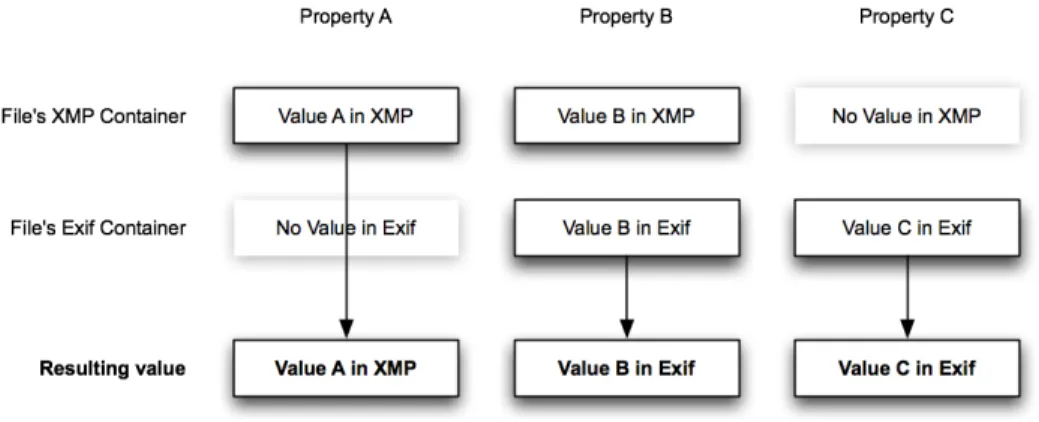
The following diagram explains how to read Exif and XMP on a per property level in more detail:
Figure 5 - Reconciling properties for Exif and XMP
For broader compatibility with non-compliant Creators and Changers, a Consumer SHOULD verify whether Exif text values are valid UTF-8. If not, a Consumer MAY assume the value is in a “local encoding” and convert it to UTF-8 as described under “Text encodings in read and write scenarios” below.
Writing Exif and XMP
In the context of the actor definitions, the following rules describe the guidance on how to write XMP and/or Exif:
Creator
XMP metadata MAY be created if a property can be written in both locations otherwise it MUST be created (which is true for file formats where Exif is not defined).
If no XMP is written, Exif metadata MUST be created.
Changer
Exif and XMP metadata SHOULD be consumed according the reconciliation guidance described earlier (see “Reading Exif and XMP” above).
When the file format supports both Exif and XMP, a Changer SHOULD update both forms of a value. If only one form is updated, an existing value in the other form MUST be removed.
Exif string values SHOULD be written as UTF-8. However, clients MAY write ASCII to allow broader interoperability2.
A checksum value for Exif/TIFF SHOULD NOT be written into the XMP.
If no existing data is in the file, the Creator guidance SHOULD be followed.
4.2.3.2 Handling IPTC-IIM and XMP
This chapter discusses reconciliation guidance between IPTC-IIM and XMP:
Reading IPTC-IIM and XMP
The use of IPTC-IIM is significant in professional workflows, and is also present in some consumer oriented tools. Although this document only directly addresses a few IPTC-IIM fields, there are several dozen in professional use. The IPTC-IIM values have length limitations and often character encoding issues that can make a conversion from XMP to IPTC-IIM be lossy.
For efficiency, and to avoid certain character encoding problems, a checksum (or digest) is used to detect overall changes to the IPTC-IIM values by non-compliant Changers - specifically those unaware of XMP. This checksum detects that something has changed in the IPTC-IIM block as a whole, but not specifically what has changed. Further checks are then required to detect individual property changes.
The checksum value is an MD5 hash of the entire IPTC-IIM block, and is stored as a 16 byte binary value in Photoshop Image Resource (PSIR) 1061 (see “Writing IPTC-IIM and XMP” for more details). The checksum MUST be computed and stored when a Creator or Changer writes XMP and IPTC-IIM simultaneously. A Consumer MUST use the checksum as described below when reading XMP and IPTC-IIM.
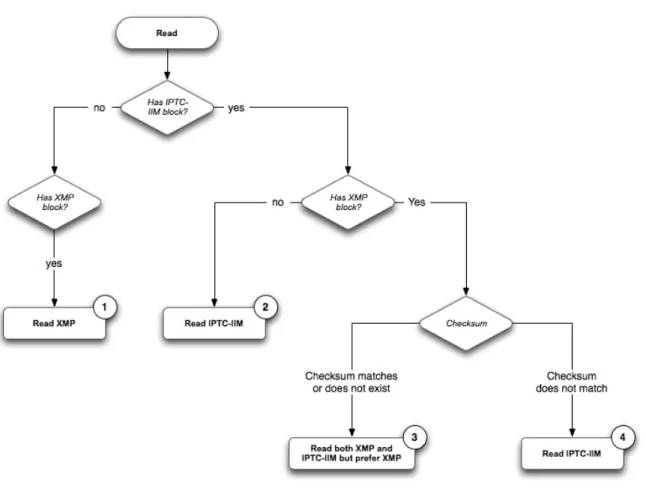
Now let's have a look at the Consumer guidance on how to read IPTC-IIM related metadata first:
Figure 6 - Read guidance IPTC-IIM
In the case when either IPTC-IIM or XMP is available the read scenario is trivial (1 & 2). However, scenarios (3) and (4) are more complex and require further explanation:
In scenario (3) either the checksum exists but matches the IPTC-IIM block or the checksum does not exist. In either case the following rules apply:
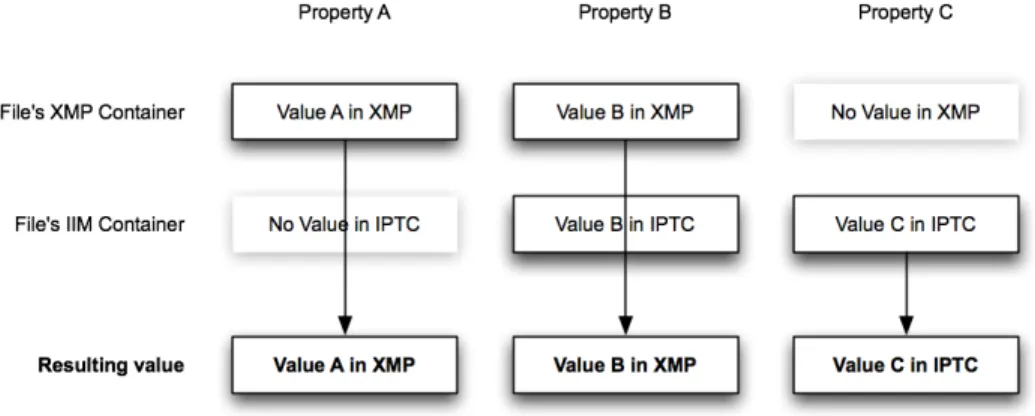
Any existing XMP value is assumed to be more relevant and SHOULD be preferred.
The following diagram explains how to read IPTC-IIM and XMP on a per property level in this scenario:
Figure 7 – Reconciling properties for IPTC-IIM and XMP
Finally, scenario (4) occurs when a non-compliant (XMP-unaware) Changer has exclusively modified the IPTC-IIM block. In this case a Consumer SHOULD check each property to decide if the IPTC-IIM or XMP value is used. This approach prevents loss of information in unchanged values due to
truncation or character encoding. To do the check, the XMP value is used to create a predicted IPTC-IIM value, taking value truncation and character encoding into account. If the predicted and actual IPTC-IIM values match, then the XMP value is used. Otherwise the IPTC-IIM value is used.
A Consumer MUST honor the encoding information provided by any IPTC-IIM Coded Character Set 1:90 DataSet that specifies UTF-8 - it SHOULD honor other 1:90 encodings. If this is not present, a
Consumer MAY assume the value is in a “local encoding” and convert it to UTF-8 as described under “Text encodings in read and write scenarios”.
Writing IPTC-IIM and XMP
The following rules describe the guidance on how to write XMP and/or IPTC-IIM:
Creator
SHOULD NOT create IPTC-IIM unless backward compatibility with non-compliant
Consumers that don't read XMP is a requirement – otherwise SHOULD write XMP.
If IPTC-IIM and XMP are both written, a Creator MUST create the checksum value as described earlier.
Changer
XMP and IPTC-IIM SHOULD be consumed according the reconciliation guidance described above.
IPTC-IIM SHOULD be written using the Coded Character Set (1:90) as UTF-8 (see “Section 1.6 Coded Character Set” in the IIM specification).
If the IPTC-IIM has not been written in UTF-8 before, a robust Changer SHOULD convert all properties to UTF-8 and write the corresponding identifier for UTF-8 to the 1:90 DataSet.
If IPTC-IIM and XMP are both present, whether changed or not, a Changer MUST create or update the checksum value as described earlier.
If no existing metadata is in the file, the Creator guidance SHOULD be followed.
IPTC-IIM checksum
In the example of IPTC-IIM, the checksum MUST be calculated over the entire IIM block after values have been converted from XMP. The checksum itself MUST be stored in the Photoshop Image Resource (PSIR) 1061 resource as a 16-byte binary value representing the MD5 hash over the whole IIM block.
Example:
PSIR (1061) = 0ED63323337C50BF1E3BA76F6BB2122F
4.2.3.3 Handling Exif/TIFF, IPTC-IIM and XMP metadata
This chapter discusses reconciliation guidance between Exif, IPTC-IIM and XMP:
There are four properties that are defined in all metadata formats being discussed. Because the reconciliation guidance is specific to each property, please see section “Metadata Guidelines” later in this document for more details. If there is a conflict between Exif and IPTC-IIM, a Consumer SHOULD prefer Exif in the case the IIM checksum matches or does not exist and SHOULD prefer IPTC-IIM in the case the checksum does not match. A string property that is comprised of only spaces or only nul characters MUST be treated as non-existent.
Upon writing Exif metadata, a Changer MUST update all formats that were originally present in the file. If not all of the formats were originally present, a Changer MAY choose to write the complete set.
4.2.3.4 More complex reconciliation in popular image formats
Finding and interpreting the metadata embedded in JPEG, TIFF, and PSD files is complicated by the fact that all three file formats contain the same kinds of metadata (XMP, Exif/TIFF, and IPTC-IIM), but store it slightly differently.
For example, all of the kinds of metadata can be contained in Photoshop Image Resources (PSIRs), and all three file formats (JPEG, TIFF, and PSD) can contain PSIRs. However, the specific contents of the PSIRs are different when contained in different image file formats. Each type of metadata is stored inside the PSIR for some file formats, and separately for others.
However, the recursive embedding of metadata formats is more a theoretical possibility, so this document will simplify this process by identifying the three most relevant places to find Exif, IPTC-IIM and XMP (highlighted below).
Here are illustrations of the various image file formats:
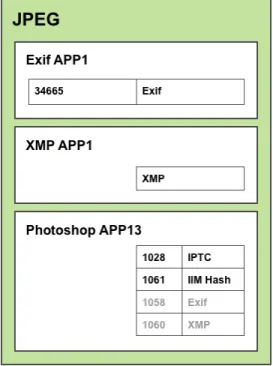
JPEG file format
Figure 8 - JPEG file format
XMP SHOULD be read from the XMP APP1 section, IPTC-IIM SHOULD be read from the image resource block in Photoshop APP13 (1028) and finally Exif SHOULD be read from the Exif APP1 section. All other occurrences SHOULD be ignored. Please note that the APP markers SHOULD be written according to the Exif specification. In particular, Exif APP1 MUST follow immediately after SOI. If this is not the case, current camera models may not show Exif metadata correctly.
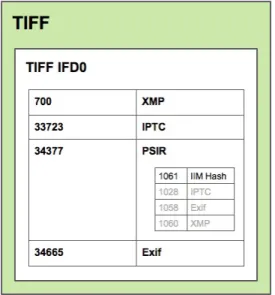
TIFF file format
Figure 9 - TIFF file format
The TIFF IFD0 contains “Exif” (34665), “IPTC” (33723) and “XMP” (700) and SHOULD be used. The IPTC-IIM checksum is stored within the “PSIR” block (34377).
PSD file format
Figure 10 - PSD file format
The respective PSIRs - “Exif” (1058), “IPTC” (1028) and “XMP” (1060) SHOULD be accessed directly to read and write the various metadata formats.
Text encodings in read and write scenarios
It is important to understand text encoding issues when reading and writing string metadata properties. The encoding defines the mapping between numerical byte values and user-readable glyphs. It also defines the limits on what glyphs of which languages a byte sequence can represent. It is critical to know the encoding of a string property in order to correctly display the string to the user. If a string is displayed with the wrong encoding it will likely appear as a nonsensical string of glyphs.
The text encoding guidelines for writing metadata are simple and provide Unicode output in all cases.
XMP metadata MUST be written as Unicode in the form appropriate to the file. For JPEG, TIFF and PSD files this is UTF-8.
IPTC-IIM metadata MUST be written as UTF-8, and MUST include a 1:90 DataSet indicating the use of UTF-8.
Exif tags documented in the Exif specification as type ASCII SHOULD be written as UTF-8. Note that bit ASCII is a proper subset of UTF-8. They MAY be written as 7-bit ASCII, with appropriate trimming for out of range bytes. These tags MUST NOT be written in some other encoding.
Exif tags such as UserComment that have an encoding prefix SHOULD be written as ASCII if all bytes fit in the 7-bit range 0..127, and MUST be written in some other encoding if any byte is outside the 7-bit range. When not using ASCII, Unicode UTF-16 SHOULD be written. The UTF-UTF-16 byte order nature SHOULD match the containing TIFF stream, big endian if the TIFF begins with “MM” and little endian if the TIFF begins with “II”.
Of course, a device or application could have a mode of operation that writes text in other encodings for compatibility with older workflows. Such older workflows are, by definition, not MWG-compliant however.
The text encoding guidelines for reading metadata recognize the desired Unicode and also accommodate other cases for IIM and Exif that might be written by non-compliant devices or applications.
XMP metadata MUST be read as Unicode in the form appropriate to the file. For JPEG, TIFF and PSD files this is UTF-8.
IPTC-IIM metadata MUST be read as UTF-8 if a 1:90 DataSet is present indicating the use of UTF-8.
IIM metadata MUST be read using the appropriate encoding if a 1:90 DataSet is present indicating the use of an encoding other than UTF-8, otherwise it MAY be ignored.
IIM metadata SHOULD be read as described below when no 1:90 DataSet is present.
Exif tags of type ASCII SHOULD be read as described below.
Exif tags such as UserComment that have an encoding prefix MUST be read as UTF-16 if the encoding is Unicode, and the UTF-UTF-16 byte order nature SHOULD be
JIS, otherwise they MAY be ignored. These tags SHOULD be ignored if the encoding is Undefined.
All Unicode characters MUST be allowed when reading or writing UTF-16. The use of 16-bit Unicode MUST NOT be restricted to the UCS-2 subset.
A leading U+FEFF byte order mark (BOM) SHOULD be written as part of a UTF-16 value for Exif tags such as UserComment. A U+FEFF BOM SHOULD NOT be written for individual UTF-8 metadata items. A U+FEFF BOM SHOULD be ignored if encountered when reading UTF-16 or UTF-8, except for use in determining UTF-16 byte order as described below. A U+FEFF BOM SHOULD be removed from the value for encoding conversion, display, and editing purposes.
The following heuristics SHOULD be applied when an 8-bit character encoding is not known. This applies to the case of IIM without a 1:90 DataSet, to Exif tags of type ASCII, and to Exif tags such as UserComment when the encoding is reported as ASCII.
If all bytes are in the range 0..127 then the encoding is ASCII.
If the entire sequence is valid UTF-8 then the encoding is UTF-8.
Otherwise assume some reasonable fallback encoding, or ignore the value.
The choice of a reasonable fallback encoding is application and workflow dependent. It can be determined by querying the locale information of the host device or the user's preference.
It is also worth mentioning that a byte sequence appearing to be valid UTF-8 is not 100% guaranteed to actually be UTF-8. There are possible edge cases where other encodings might produce such a byte sequence. Nevertheless, the UTF-8 test is highly reliable and allowing use of UTF-8 as described above is very beneficial to users.
The following heuristics SHOULD be applied when the big or little endian nature of UTF-16 text needs to be determined. These apply to a single item at a time, not uniformly to all UTF-16 text.
If a leading U+FEFF BOM is present, that indicates the byte order.
If only one of the byte orders is valid UTF-16, the valid form is the byte order. This MUST take into account surrogate pairs, and it MAY take into account specific invalid Unicode characters.
Count the number of unique values in the first and second bytes of the 16-bit storage units. The correct byte order is the one with the fewer unique values in the high order part.
Exif date/time values such as DateTimeOriginal do not contain time zone information. The camera is presumably in an appropriate local time when a photograph is taken, but there is no indication in the Exif metadata of what that time zone was. The photograph's time zone MUST NOT be presumed to be the same as that of a computer later used to process the photograph.
The XMP specification formats date/time values according to the Date and Time (W3C) document. In this standard, a time zone designator is required if any time information is present. A date-only value is allowed. The XMP specification has been recently revised to make the time zone designator be
optional.
The representation of time zone as an offset from UTC can be ambiguous with regard to daylight savings time (DST). While date information can provide a strong hint, the use of DST is not universal and the date checking is complicated by changing rules for the start and end of DST in various locations. While these issues are beyond the scope of this document, they may be addressed in a future revision.
The following general behaviors are recommended for time zone handling:
A Consumer MUST NOT arbitrarily add a time zone. E.g. when importing Exif DateTimeOriginal to XMP (xmp:CreateDate), use a zone-less form for the corresponding XMP value.
A Changer MUST NOT implicitly add a time zone when editing values. It is okay to be explicit about time zones if desired. Consider the typical case of correcting
DateTimeOriginal values for an incorrectly set camera time. This must not be implicitly done as though the new time were in the computer's time zone.
If the Exif contains the GPSDateStamp and GPSTimeStamp tags, software MAY use that information to infer a time zone. This should be done with care, e.g. verifying that the DateTimeOriginal plus inferred offset is within a few seconds of the GPS date and time.
When time zone information is available, XMP values SHOULD be stored using the local+offset form rather than the “Zulu” form (for example, use “2008-04-30T12:34:56-06:00” instead of “2008-04-30T18:34:56Z”). The local+offset form carries additional information and the Zulu value can easily be determined as required, e.g. for sorting in a UI.
A user interface MAY display time zone information if available; however, related functionality MUST NOT convert a time to the computer's local time for display.
According to the Exif specification, missing information SHOULD be filled up with spaces in the Exif values.
In summary, time-zone information MUST NOT be implicitly added and existing values should be preserved.
5. METADATA GUIDELINES
This section will discuss some of the most relevant metadata areas in the consumer workflow today. The selection will mainly serve the purpose of discussing the most important metadata fields, but due to the fact that information in these areas can be found in multiple metadata sources, it will also act as a model for other properties as defined in Exif, IPTC-IIM and XMP. Each section will provide detailed guidance on how to handle related metadata containers.
5.1 Keywords
Keywords are widely used across software applications today and are also called “tags” by some applications and services. Since so many existing applications allow for keyword display and editing it is now often misused. Keyword properties are no longer strictly for keywords; applications overload them with general-purpose information for purposes such as workflow or task management. Recent cameras also have the ability to assign tags automatically while shooting pictures. Keywords tend to be user customizable, although in the case of devices they are sometimes fixed.
Representation
Information for the keyword property is available in: IPTC Keywords (IIM 2:25, 0x0219) and XMP (dc:subject[*])
Guidance
IPTC Keywords is mapped to XMP (dc:subject).
IPTC Keywords MAY be repeated, each mapping to one of the elements in the XMP (dc:subject) array. Keyword lists SHOULD be completely replaced while reconciling.
For more information see chapter “Handling IPTC-IIM and XMP” earlier in this document.
Restrictions
Each IPTC-IIM keyword is limited to 64 bytes.
Notes
5.2 Description
This area defines the textual description of a resource's content. Also known as “user comment”, “caption”, “abstract” or “description”. Today, this information is represented in different ways;
sometimes integrated and displayed as one field – at other times revealed separately. This document combines the different sources into one overall representation, called “Description”.
Representation
Information for the description property is available in the following properties: Exif ImageDescription (270, 0x010E)
IPTC Caption (IIM 2:120, 0x0278) XMP (dc:description[“x-default”])
Guidance
Exif ImageDescription, IPTC Caption, and XMP (dc:description) are mapped together.
For more information see chapter “Handling Exif/TIFF, IPTC-IIM and XMP metadata” earlier in this document.
Restrictions
Length limitation in IPTC-IIM is 2000 bytes.
Notes
In XMP, the description can be represented in multiple languages. In this document only the “x-default” value will be discussed and used. Clients MAY support the full range of localized values.
5.3 Date/Time
There's a lot of confusion about date/time handling. In addition to a variety of date/time values stored within a file's metadata, creation and modification values are also stored by the file system - both the computer's file system and that of a camera's media card.
In general, date/time metadata is being used to describe the following scenarios:
Date/time original specifies when a photo was taken
Date/time digitized specifies when an image was digitized
Date/time modified specifies when a file was modified by the user
Date/time original and date/time digitized are usually added by the devices (cameras, scanners, etc.) but in other scenarios the user needs to define these values manually. This can happen, for example, if an old photograph is scanned-in (digitized) and the user wishes to specify in the metadata the date the original photo was taken. The date/time modified value will be changed by software and operating systems on subsequent edits of the file.
This document focuses on the date/time original value, since that is generally the most important aspect for the consumer.
Representation
Information for Date/Time (Original) is available in the following properties:
Original Date/Time – Creation date of the intellectual content (e.g. the photograph), rather than the creation date of the content being shown
Exif DateTimeOriginal (36867, 0x9003) and SubSecTimeOriginal (37521, 0x9291) IPTC DateCreated (IIM 2:55, 0x0237) and TimeCreated (IIM 2:60, 0x023C)
XMP (photoshop:DateCreated)
Digitized Date/Time – Creation date of the digital representation
Exif DateTimeDigitized (36868, 0x9004) and SubSecTimeDigitized (37522, 0x9292) IPTC DigitalCreationDate (IIM 2:62, 0x023E) and DigitalCreationTime (IIM 2:63, 0x023F) XMP (xmp:CreateDate)
Modification Date/Time – Modification date of the digital image file Exif DateTime (306, 0x132) and SubSecTime (37520, 0x9290) XMP (xmp:ModifyDate)
Restrictions
Exif DateTime does not contain time-zone information.
Notes
Changes to XMP (xmp:CreateDate), for example to fix an incorrect camera setting, SHOULD be exported to Exif. If both XMP (xmp:CreateDate) and Exif DateTimeOriginal are missing, but Exif DateTimeDigitized (36868, 0x9004) exists, Exif DateTimeDigitized SHOULD be used to create an initial XMP (xmp:CreateDate). This is also true in the case that only IPTC DateCreated is available. Exif DateTime is mapped to XMP (xmp:ModifyDate). Any change to the file SHOULD cause both to be updated.
The above guidance implies that Exif sub-second and IPTC-IIM time properties are being handled according to the corresponding main properties. DCF specification requires DateTimeOriginal and DateTimeDigitized; the Exif specification recommends DateTime.
5.4 Orientation
A major sticking point in image-based workflows is the correct handling of orientation. Today, various software tools do not follow a consistent set of rules in interpreting and changing the related metadata field in conjunction with the primary and/or thumbnail images - this leads to an incorrectly rotated display of the image. There are three scenarios of interest:
Capturing orientation information on the devices
Changing the orientation of an image by using an asset management tool
Editing the image and rotating the pixels
Representation
The Orientation is represented in Exif Orientation (274, 0x0112).
Guidance
An image Creator MUST include an orientation tag in the Primary Image if the image raster data is intended to be displayed in any orientation other than the Normal (value 1) case where the 0th row represents the visual top of the image, and the 0th column represents the visual left-hand side. An image Creator MAY include an optional Thumbnail Image in the file. In this case, the Creator
SHOULD write the Thumbnail Image in the same orientation as the Primary Image. If the Thumbnail Image is not written with the same orientation, then the creator MUST include an appropriate
orientation tag value in the thumbnail IFD.
A Consumer MAY choose to respect the orientation metadata included in a file when presenting an image or its thumbnail to the user. If a Consumer chooses to respect orientation metadata, it SHOULD:
Treat the Primary Image orientation as Normal (value 1) if the Orientation tag of the Primary Image is missing.
Treat the Thumbnail Image orientation as the same as the Primary Image if the Orientation tag of the Thumbnail Image is missing.
If a Changer alters the pixel content of the Primary Image, it SHOULD update or remove the Thumbnail Image (if previously present) so that a Consumer does not display an inappropriate thumbnail.
If a Changer alters the orientation metadata of the Primary Image, the Changer should also update the orientation metadata (if previously present) of the Thumbnail Image (if previously present) so that a Consumer does not display an inappropriate thumbnail.
Please consult the DCF specification for further details and restriction on JPEG images and thumbnails.
5.5 Rating
The rating property allows the user to assign a fixed value (often displayed as “stars”) to an image. Usually, 1-5 star ratings are used. In addition, some tools support negative rating values (such as -1) that allows for marking “rejects” without deleting files in production.
Rating also can have fractional values. For example, online communities often deal with average values of rating coming from multiple users, which inevitably leads to fractional values.
Representation
Rating values are only available in XMP (xmp:Rating). Type: Floating point number
Values: [-1.0; 0.0 … 5.0]
Guidance
The XMP (xmp:Rating) field SHOULD be read/written directly from/to the XMP.
Notes
The value -1.0 represents a “reject” rating.
If a client is not capable of handling float values, it SHOULD round to the closest integer for display and MUST only change the value once the user has changed the rating in the UI. Also, clients MAY store integer numbers.
If a value is out of the recommended scope it SHOULD be rounded to closest value. In particular, values > “5.0” SHOULD set to “5.0” as well as all values < “-1.0” SHOULD be set to “-1.0”.
5.6 Copyright
While, in the past, copyright information has principally been in the realm of the professional
photographer, with the advent of easy online photo sharing sites, copyright has become increasingly important to the consumer as well. In the context of the consumer, this document focuses on two aspects:
Copyright information
URL to more information about the copyright
To avoid storing links as part of the copyright notice description, the optional copyright URL should be used to reference related information.
Representation
The CopyrightNotice information is available in the following properties: Exif Copyright (33432, 0x8298)
IPTC CopyrightNotice (IIM 2:116, 0x0274) XMP (dc:rights).
Guidance
Exif Copyright, IPTC CopyrightNotice, and XMP (dc:rights) are mapped together.
It is a good practice to include either the word “Copyright” or the copyright symbol “©” followed by a date and a descriptive reference to the user or company. Any further guidance on the definition of the copyright string is beyond the scope of this document. Please consult your national copyright office to learn more about the potential requirements for copyright statements in your area.
The CopyrightURL SHOULD be stored in XMP (xmpRights:WebStatement)
For more information see chapter “Handling Exif/TIFF, IPTC-IIM and XMP metadata” earlier in this document.
Restrictions
Exif Copyright can contain 2 strings - creator and editor rights - separated by a nul (0x00) character.
The length limitation in IPTC-IIM is 128 bytes.
Notes
The Exif Copyright information (creator and editor rights) MAY be concatenated by a linefeed character (0x0A) when stored in other formats.
5.7 Creator
The creator, also known as “author”, defines one or more creators of an image. Some cameras allow embedding creator information on image creation.
Representation
The creator is available in the following properties: Exif Artist (315, 0x013B)
IPTC By-line (IIM 2:80, 0x0250) XMP (dc:creator)
Guidance
The semicolon-space separator suggested by Exif SHOULD be recognized when mapping between the single TIFF Artist string and the individual array items in IIM By-line and XMP (dc:creator). If recognized, individual values in the TIFF Artist form MUST be enclosed in quotes (“, U+0022) if they contain a semicolon-space or begin with a quote, and MAY be enclosed in quotes otherwise. Embedded quotes MUST be doubled when an individual value is enclosed in quotes.
For more information, see chapter “Handling Exif/TIFF, IPTC-IIM and XMP metadata” earlier in this document.
Restrictions
Length limitation in IPTC-IIM By-Line is a repeatable of 32 bytes each.
Notes
Exif Artist, IPTC By-line and XMP (dc:creator) are mapped together.
Individual names are separate items in the XMP (dc:creator) array as well as separate (repeated) IIM By-line tags.
Examples:
1. TIFF Artist from Exif specification:
Camera owner, John Smith; Photographer, Michael Brown; Image creator, Ken James
2. TIFF Artist with quoted values:
first; with;semicolon; “with; semicolon-space”; “with; semicolon-space and ““quotes”““; non-leading “quotes”; “““leading”“ and non-leading ““quotes”““; last
Corresponding IPTC-IIM or XMP array items:
1. first
2. with;semicolon
3. with; semicolon-space
4. with; semicolon-space and “quotes” 5. non-leading “quotes”
6. “leading” and non-leading “quotes” 7. last
5.8 Location
The location of an image is one of the key pieces of information that consumers want to capture. Until recently location capture was often accomplished with post-creation keyword annotation. With the advent of embedded GPS, accurate location information can now be automatically inserted into image files at creation time. The Exif, IPTC-IIM, IPTC Core, IPTC Extension and XMP specifications all specify metadata properties that capture, with varying degrees of accuracy, either the location of the camera or the location of the image subject.
When storing location based information it’s important to understand the difference between the two main concepts:
“Location Created”: This information describes the location where the image was created, the location of the camera during shot creation. The typical case is when a GPS receiver injects the current location into an image at shooting time (camera location).
“Location Shown”: This information describes the location of the main subject being shown in an image. For example, a picture of Mount Fuji would be tagged with the coordinates of where the mountain is located (subject location), although the picture may have been taken from downtown Tokyo.
In the latest specification (IPTC Extension 1.1), the IPTC has moved to a set of definitions that clearly differentiates between camera location and subject location defining both “Location Created” and “Location Shown” as a set of hierarchical properties (World Region, Country Name/ISO Country code, Province or State, City and Sublocation). The older [ambiguous] location definition (IPTC Core 1.0) is to be treated as legacy. This resolves any issues around the semantics of a textual location, and is clearly the way forward. Unlike keywords, which are unbounded, it is recommended that all location properties are being entered to form a valid hierarchy and avoid ambiguity (e.g. simply filling the City property as “Springfield”, or State/Province as “Victoria” would represent multiple locations).
While the Exif specification allows for the capture of two sets of GPS location data, the Exif specification does not clearly state the purpose of the first set of coordinates vs. the second set (destination). This has led to a certain amount of confusion in the marketplace. In the consumer context, the camera location and subject location have often been treated the same. In case a semantic differentiation is made, it is very important to maintain these separate semantics. This specification will provide guidance for the creation of a clear, two part semantic (Location Created vs. Location Shown), the relationship of the GPS coordinate properties from the Exif specification and an algorithm for reconciling existing market implementations.
5.8.1 Location Created (GPS Latitude/Longitude)
Guidance
The Exif GPS tags can be read directly without any reconciliation being required.
Notes
The Exif specification does not clearly state that the GPS tags 1 through 6 are to represent Location Created. These tags must be treated as such, with the understanding that there has been confusion in the marketplace and that reconciliation between Location Created and Location Shown may be
required.
For more details such as type information and syntax, see the respective specifications.
5.8.2 Location Created (Textual Properties)
Textual location information about where the image was created.
Representation
Iptc4xmpExt:LocationCreated, a structure using the IPTC type LocationDetails.
Guidance
When a textual representation of the Location Created is to be included, an image Creator SHOULD use the IPTC Extension format representation. It MUST represent a real place which can be identified unambiguously without additional context. Here are some examples of valid and invalid places:
Example Ambiguity Validness
Grosse Elbstrasse 27, 22767 Hamburg, Germany
Unambiguous Valid
“Jungle” Ambiguous Not valid
“My Backyard” Only specific with additional context