ASHESI UNIVERSITY COLLEGE
PAPERLESS TICKETING USING MOBILE VISON: AN ASHESI CASE
Applied Project
B.Sc. Computer Science
Japheth Terra Sedom Komla Kelly
2017
Page | 1
Branding and Identity Guide
The Ashesi brand and logo are integral parts of our worldwide image and identity. We must be careful of how and where the Ashesi is used to ensure we maintain the integrity of our
organization.
This guide has been developed to help you clearly understand our policies towards the use of the Ashesi logo in a variety of mediums, as well as type faces and a color palate to help you produce materials that maintain the brand’s integrity. We would request that you seek approval from the Ashesi University College Marketing Committee before creating any media that reproduces the Ashesi logo.
Contents
The Logo ... 2
Using the Logo ... 3
Clear Space and Logo Design ... 5
Unacceptable Logo Uses ... 6
The Ashesi Seal ... 7
Color Palette ... 8
Fonts... 8
ASHESI UNIVERSITY COLLEGE
Paperless Ticketing Using Mobile Vision: An Ashesi Case
Applied Project
Applied Project submitted to the Department of Computer Science, Ashesi
University College in partial fulfilment of the requirements for the award of
Bachelor of Science degree in Computer Science
Japheth Terra Sedom Komla Kelly
i
DECLARATION
I hereby declare that this Applied Project is the result of my own original work and that no part of it has been presented for another degree in this university or elsewhere.
Candidate’s Signature:
……… Candidate’s Name:
……… Date: ………
I hereby declare that preparation and presentation of this Applied Project were supervised in accordance with the guidelines on supervision of Applied Project laid down by Ashesi University College. Supervisor’s Signature: ……… Supervisor’s Name: ……… Date: ………
ii
Acknowledgement
Thanks to my family and friends without whom I would be unable to complete this project.
Also, special thanks to my supervisors Dr. Charles Jackson and Dr. Ayorkor Korsah, for their support and supervision without which I would not have been able to make progress.
iii
Abstract
The bus is used by most staff and faculty to get to and from school the campus daily during the weekdays. The current system for paying for fares involves paying for a paper ticket with cash and does not allow for any other payment options.
In this project, this problem has been addressed with the implementation of a Mobile Vision Android application and the accompanying Web application, which has proven useful in helping the finance team better monitor, transactions and generate reports. This project is another step to moving the Ashesi community to a cashless one.
iv
Table of Contents
i
Chapter 1: Introduction ... 1 1.1 Overview... 1 1.2 Problem Statement ... 2 1.3 Related Work ... 3 1.4 Project Objectives ... 4 1.5 Project Scope ... 51.5 Impact, Significance and Contribution ... 6
Chapter 2: Requirements ... 8
2.1.1 Requirement Gathering ... 8
2.2 Requirement Analysis ... 10
2.3 Use Cases ... 12
2.3.1 Scenario ... 12
2.3.2 Use Case Diagram ... 13
Chapter 3: Architecture and Design... 15
3.1 Systems Overview and Architecture ... 15
3.2 Software Architecture ... 17 3.3 Schematics ... 18 Chapter 4: Implementation ... 19 4.1 Required Tools ... 19 4.1.1 Software ... 19 4.1.2 Hardware ... 20 4.1.3 Libraries ... 20 4.2 Implementation ... 21 Chapter 5: Testing ... 31 5.1 Functional Testing ... 31 5.1.1 Component Testing ... 32 5.1.2 System-Level Testing ... 33
5.1.4 User Acceptance Testing ... 34
5.1.5 Analysis ... 34
Chapter 6: Conclusion ... 35
v
Table Of Figures
Figure 1.1Prototying Model ... 9
Figure 2.2Use Case Diagran ... 13
Figure 3.1Relationship between applications ... 15
Figure 3.2 MVC architecture ... 16
Figure 3.3 RESTful API Mobile App ... 17
Figure 3.4 ER Diagram ... 18
Figure 4.1 Login page ... 22
Figure 4.2 Landing page ... 23
Figure 4.4 Passenger home page ... 24
Figure 4.5 Reload page ... 25
Figure 4.6Login Activity Figure 4.7 Main Activity ... 27
Figure 4.7 SBHome Activity Figure 4.8 Scan Barcode Activity ... 28
1
Chapter 1: Introduction
1.1 Overview
In Ghana, the most preferred form of public transportation is the bus reason being that it is comparatively cheaper than any other option. Currently, the adaptation of technology in Ghana has not seen buses being augmented with utility technology e.g. CCTV, GPS Tracker etc. as we would find in other countries like Malaysia. As a result, inefficiency is rife when it comes to the bus transportation systems in Ghana, be it in collecting fares, determining routes or even exploring other revenue avenues with advertisements. In this overview, we will focus mainly on the fare collection or ticketing system used and improving that system.
In Ghana, the fare collection system works by having a conductor or colloquially “mate”, going to each individual passenger and collecting the fare. The conductor then makes a mental note of the person who has paid and where the individual would alight. In other variations, such us in the Metro Mass Transit, a ticket is issued to the individual as proof payment (Metro Mass Transit, 2013), without much regard for where the individual would alight. In other more developed countries such as again, Malaysia, there are various payment methods which are available for example, “touch and go”, Master card, Visa Card and Rapid Bus card (Lee, 2015). These cards usually implement microchip technology, RFID, or magnetic strip for authentication purposes. For our purposes, we will be using Ashesi University College’s (AUC) bus transportation system as our case study and will be using Code-39 barcodes instead of an RFID.
2
The buses used in AUC follow many of the conventions of other bus transports used in the country, hence it is ideal and is also representative. In Ashesi there are several modes of transportation to the university. They include but are not limited to walking, using bicycles and motorcycles. The main method is by bus for the staff and faculty that live further away from the school. Staff and faculty who live relatively closer (in Berekuso for example) would mostly walk or charter a taxi. The bus uses a fixed price system of currently, 3 Ghana Cedis per person per trip to the school and operates intermittently on weekdays from 5 am to 8 pm. The bus also operates if there are events or field trips being organized by the school, clubs or societies.
1.2 Problem Statement
Although there are other issues which are faced by the bus service in Ashesi, we will focus mainly on the payment system.
Paper Ticketing – Passengers on the Ashesi bus are currently required to use traditional printed paper tickets as proof of payment. The current system works as such, a conductor is selected from the pool of passengers who are mainly staff and faculty. The conductor then collects a booklet containing all the available tickets, which is valued currently at 300GHC. The tickets are then sold to the passengers until the booklet is empty. The proceeds are then sent back to the finance office for accounting and the process can begin again. Using these paper tickets are not environmentally friendly, since pieces of paper are constantly used for ticketing. Besides that, the ticket booklet also consists of one piece of unused paper which serve as the foundation of the ticket booklet. This piece of paper is sometimes not disposed properly by the staff and faculty and can contribute as rubbish in the bus or bus stop itself. According to Macia` Mut-Puigserver, the cost of production of paper tickets is low but over time the cost can
3
be significant (Mut-Puigserver 2012, p 925). In the end, these tickets are not reused and disposed to recycling bins only making the ticket a onetime use only.
Ashesi University College is, one of the best, if not the very best undergraduate university in Ghana, with a focus on technological competence. To live up to that name, the technological infrastructure should be representative of the modern times and be as advanced as possible, as can be found with our internet and computing infrastructure. However, the bus service system is not up to satisfactory levels befitting of Ashesi’s vision. To bridge that gap a system will be developed and implemented to improve the service by improving the user experience when it comes to fare collection.
1.3 Related Work
Barcode scanning to perform transactions is not an uncommon endeavor in the tech world and in fact other systems have been implemented that use this very approach. It is a system that has been shown to work with Ashesi’s cafeteria services Akorno and Big Ben and in fact in university buses such us in UTAR, Malaysia (Lee, 2015).
Research for using ID for payments reveals unsurprisingly that the technology has been in use for the past few years with high degrees of success. The approaches to the ticketing system can be a myriad of methods. However, the two most common involve using an authentication process when entering the bus or using a hands-off solution and having users pay online before entering the bus. This is the exact approach used by Oloyede et al, with the former method being used by Ibrahim et al and Haselböck et al (Haselböck & Narzt, 2015) (Ibrahim
4
& Ta'a, 2015) (Oloyede, Alaya , & Adewole, 2014). Both methods proved successul in tests and are reliable. However it seems that although the main goal for each was to digitalize payments made in the bus, the focuses were different. While Oloyede et al focused-on payments only, the other solutions proposed also focused on the billing system and returning accurate distances to calculate prices. Other focuses were on other utility services as such emergency medical care. In the case of an accident, the application contacts the nearest hospital (Manikandan, Kalaiyarasi, & Priyadharshini, 2015).
Despite these successes there were a few short-comings in the earlier stated works. The systems involved in all those approaches, all had to resort to specialist devices such as RFID readers, as can be seen with work done by Jo et al and Manikadan et al (Manikandan, Kalaiyarasi, & Priyadharshini, 2015) (Jo, Ahammed, & Lakshmi, 2015). These approaches although achieving their said goals, are not modular or portable solutions that can be applied easily without significant setup costs. In this project, we will develop a solution that is modular, cheap and readily available by using readily available smart phones.
1.4 Project Objectives
As mentioned in the problem statement, the ticketing system has a lot of room for improvement, hence the system designed for the bus service to solve that issue must include the following features which are the objectives of my project.
1) Implement a digital payment system to replace the traditional paper ticketing system by
5
bus tickets using the Ashesi Identification Cards. The IDs are unique to each individual and are possessed by all Ashesi staff and Faculty. Furthermore, the IDs have a barcode which can be utilized with a scanner to make the payment
2) To use Bluetooth Low Energy beacons to make payments- With the advent of BLE
beacons which can be placed anywhere to continually advertise and connect with capable devices. Being that most Ashesi staff and faculty use smart phones, capable of connecting to the BLE beacon, users can simply enter the bus and use their phones to make payments.
It is hoped that with these objectives the problems identified in the problem statement can be solved.
1.5 Project Scope
The system will be used by two categories of people which are the staff /faculty and finance department. Both will have different levels of authorization which allows the user to either read, write or update the information in the system. Basically, the system will have one main implementation which is digitalizing the ticketing system to replace the old ticketing system
i. The system should be able to authenticate the Ashesi ID card based on the barcode. The
user must simply flash the card on the bar code scanner and the details on the student should be displayed for authentication purpose.
6
ii. The system will allow student to use their student card to pay their rides. The system
should be able to retrieve data based on the Ashesi ID and update the data accordingly if the student uses the bus.
iii. The system should be able to record the user rides, time of usage and location. As the
staff/faculty uses the bus, the additional data are recorded together for future references.
iv. The system should include a simple user interface for the finance department to perform
reload service for the staff/faculty. The system should also include checking balance money stored in a user’s account.
1.5 Impact, Significance and Contribution
With this system which has been proposed, it stands a chance of improving the ticketing system. The university can cut costs on printing of tickets since in the long term it is costly as compared to implementing a simple system. Moreover, the elimination of using traditional paper ticket is also green to environment since used ticket ends up in the recycling bin. This also pushes Ashesi goal of being more “green” and environmentally conscious.
Furthermore, the proposed system, will also enforce the school’s policy of having members having IDs on their possession always. Besides that, staff/faculty also do not need to carry pieces of used tickets with them since it occupies space in their wallet /other hand luggage or can be easily misplaced. Users can also reload a large amount of money onto their card too, in a single instance
7
Security will also improve since non-Ashesi people will no longer able to access the bus due to the need for authentication. With the system also, the admins can mine data from the data collected from the system. For example, the admin can track how frequent a user uses a bus or whether a given staff/faculty is still using the bus service.
8
Chapter 2: Requirements
2.1.1 Requirement Gathering
Being that the target group is the staff and faculty of Ashesi, who are located on campus, the requirement gathering was split into two phases, with Phase 1 using interviews and brainstorming and Phase 2 using prototyping.
In Phase 1, my aim was to get a fair idea of the current working system from the perspectives of the stakeholders and gather ideas for how the new system should work. It also provided a way for me to clearly identify the stakeholders for the project. I decided to use interviews and brainstorming for the requirements elicitation. For interviews, I specifically decided against a closed format instead using an open format in which the information to gather was not decided in advance. I did this for two purposes, firstly this allowed for flexibility during the conversations to be able to bring in different insights and bring up other concerns pertaining to each stockholder. Secondly, it prevented me from disrupting my results using my otherwise inherent biases. Brainstorming was used, (after the stakeholders had been identified) in which an informal debate was held among various stakeholders and all inputs were recorded for further requirements analysis.
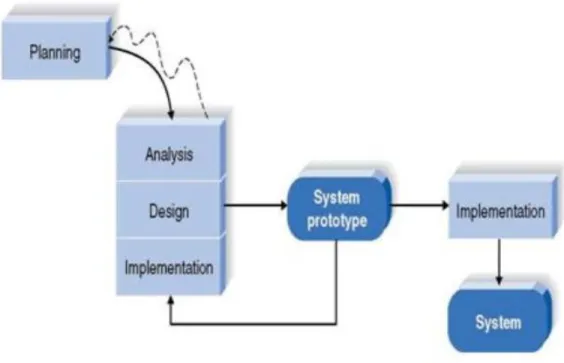
For Phase 2 prototyping was used. The process includes planning, analysis, design, implementation and system prototype.
9
The prototyping model is illustrated as follow
Figure 11 Protoyping Model (Lee, 2015)
Prototypes are built by using the know requirements, gathered from Phase 1. Through prototyping, the stakeholders will get to know the system better since they can get to test or try the system hands on, which promotes better understanding. This will lead to a more accurate approach to make the desired system.
The advantage of prototyping includes: 1. More actively involved in development
2. Working modules on the system are constantly developed and this allow testing by users which promotes better understanding on the system development
10
3. Detection of errors earlier
4. Allow quicker user feedback which lead to better solution
5. Missing features or functions can be identified
6. Problematic functions can be detected
The disadvantage of prototyping includes:
1. Implementation and repair implementation not so ideal
2. May increase the complexity of the whole system in terms of scope
3. Expanding beyond proposed plans
2.2 Requirement Analysis
With much valuable data having been gathered and analyzed I was able to identify my users (stakeholders), the functional and non-functional requirement, along with the user interface requirement.
Stakeholders
Recurring Passengers (Ashesi Staff/Faculty)
Bus Drivers
Finance Department Personnel
11
Functional Requirement
Recurring Passengers
i) Recurring users can use their Ashesi ID to make payments by scanning barcode or
using web app
ii) They must be able to check their balance
iii) They must be able to reload their balances through the finance department
iv) Receive electronic receipt after each transaction
v) See all previous transactions
vi) Allow email notifications
vii) All users must make payments before the bus departs.
viii) Allow users to set destination and view appropriate price
ix) Notify when balance is low
Finance Department Personnel
i) They must be able to reload any amount into a recurring passengers account
ii) Should be able to generate reports of all transactions
iii) Must be able to login to view balances of all recurring passengers
iv) Must be able to reload balances for all recurring passengers
Bus Driver
i) Must login into mobile app, to begin session
12
One-Time Passengers
i) Must be able to pay using cash at the finance department
For this project and our scope, I have decided to implement all functional requirements as it relates to the stakeholders except for One-Time passengers. They represent an uncommon occurrence and with consideration for time constraints, will be included in further updates to the system.
2.3 Use Cases
2.3.1 Scenario
Let us consider Maame Kor a Professor of Economics teaching at Ashesi, an average staff and faculty member in Ashesi. Upon entering the bus, she decides to pay for her ticket.
1) Kor clicks on the scan barcode button
2) A surface view pops up with camera enabled
3) Kor sans the barcode
4) Kor selects her destination and selects pay for ticket
5) The transaction proceeds and an electronic receipt is sent to her mail
Let us also look into a typical scenario for the Mr. Lee, a member of the finance department looking to perform reload for Dr. Kor
1) Mr. Lee logins into the web application
2) Selects reload balance
3) Keys in wrong Ashesi ID of Dr. Kor
4) Keys in amount to reload
13
6) Confirmation message displayed showing failure and displaying the error
7) Correct ID keyed in
8) Clicks submit and success message shown
9) Monies received from Dr. Kor.
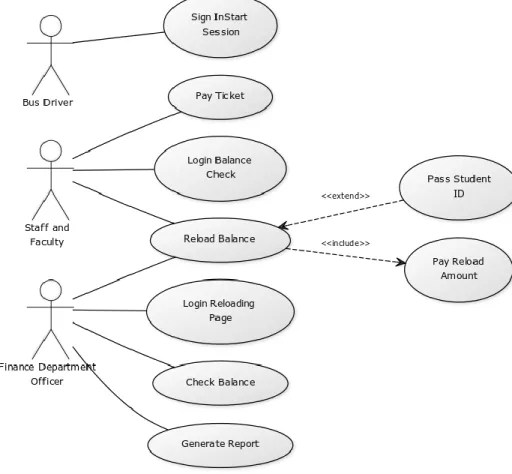
2.3.2 Use Case Diagram
Figure 2.2 Use Case Diagram
The bus driver has one use case which is logging in to start the session. A session defines a time when passengers are getting unto a bus for a trip. Hence before passengers get unto the bus the driver logs into the app and starts a new session.
14
The recurring passengers on the other hand have 3 use case which are reload balance, check balance and pay ticket. In reload balance, the staff and faculty member can go to the finance block and reload their balance informing the finance staff on the amount to be reloaded. The staff/faculty will have to pay the finance staff when the reload is done. The staff/faculty member can opt to pass the Ashesi ID card to the finance staff to reload their balance or they can also mention his/her Ashesi ID. Check balance is for staff/faculty to check their remaining balance. Staff/faculty can simply login to the web app and see their remaining balances displayed along with information on previous transactions. Pay ticket is for the staff/faculty to pay for their ticket when they board the bus. The staff/faculty just need to flash their Ashesi ID on the bar code scanner and the system will check the balance on the database server to see if the staff/faculty has enough balance to pay for the trip, then proceed with the rest of the transaction.
Finally, the finance department officer has four use cases which are login, reload balance, check balance and report generation. Before the finance department office can reload, he/she must first login. A login page will first be loaded and the finance department officer will have to key in the details and see if the details match the records. If all the details match, the login page will redirect to the check balance and reloading page. On reload balance, the finance department officer should key in the Ashesi ID on the reloading page and the amount paid by the staff/faculty on the reloading page before submitting. On check balance, the finance department officer should get the Ashesi ID and when submitting, the webpage will load on the details of the staff/faculty’s balance. On report, the finance staff can generate reports of all previous transactions for their accounting purposes, with the option of setting the periods.
15
Chapter 3: Architecture and Design
3.1 Systems Overview and Architecture
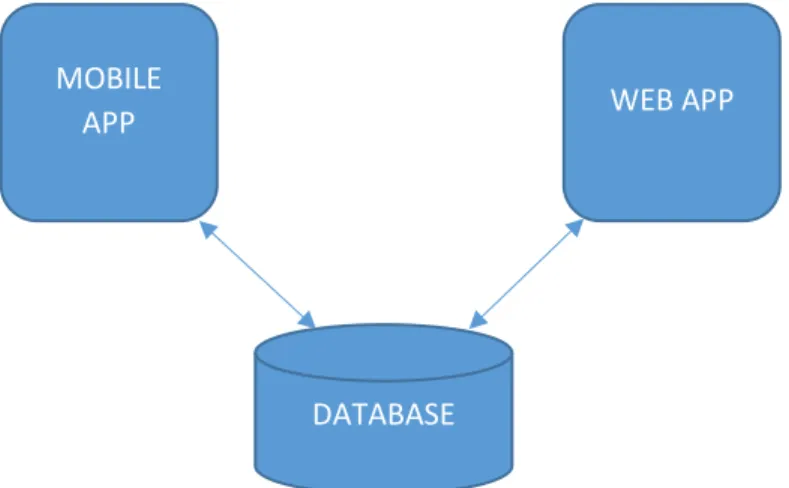
Figure 2.1 Relationship Between Applications
For our purposes in this project there will be two separate applications, both of which interact with the same database. We will look at each application respectively.
Mobile Application
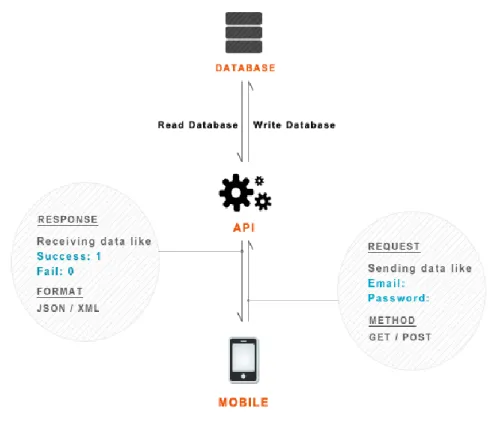
This has both the passenger ticket payment module along with the start/stop session module. With the ticket payment module, a passenger simply scans their barcode using the provided mobile device with the app preinstalled and the system uses the retrieved ID to access the database and check whether the user has enough balance to before making the transaction. If there is not enough balance a message is simply displayed indicating as such. For the start/stop session module the Bus driver logs in and then clicks a button to start the session and when the session is over the same button can be clicked to end the session. The mobile app interfaces with a RESTful web service API to communicate with the database. Web service will also be built as a helper service to enable the mobile app. REST stands for Representational State Transfer. (It is sometimes spelled "ReST".) It relies on a stateless, client-server, cacheable
MOBILE
APP WEB APP
16
communications protocol -- and in virtually all cases, the HTTP protocol is used. REST is an architecture style for designing networked applications.
Figure 3.2 RESTful API Mobile App
Web Application
For the web application, we have several modules. The login module, reload module, check balance module and generate report module. For our login module, the user’s details are keyed in and checked against the database to see if the user exists and whether the user is a staff/faculty user or finance staff personnel. Based on the user permissions they are redirected to the appropriate landing page. For the check balance module, when logged in, a passenger will see their balance immediately. A finance staff personnel will be able to see the balances off all passengers displayed in a list. For the reload module (only accessible to finance
17
personnel), the ID number of the passenger is keyed in along with the amount to be reloaded. This is queried in the database and the balance updated. Finally, for the generate report module, all the available transactions are formatted into a report and outputted as either a pdf or spreadsheet
3.2 Software Architecture
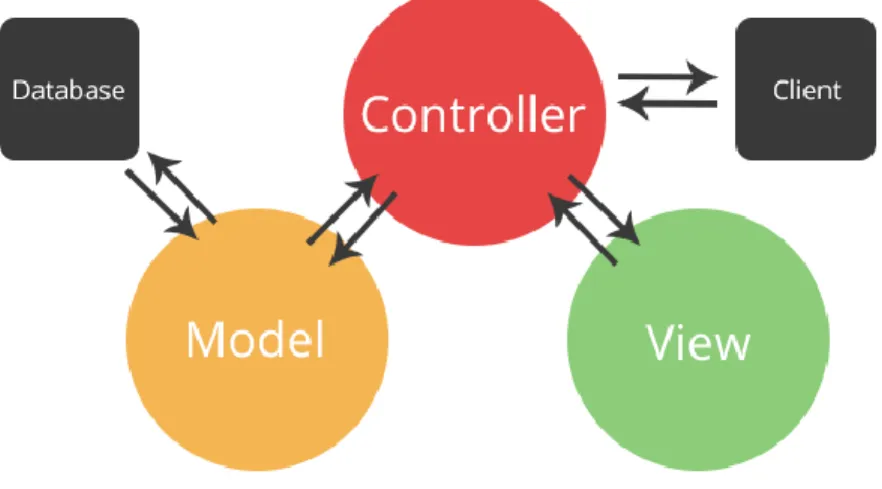
For the software architecture, a Model-View-Controller architecture as is used. The key importance of this architecture is the separation of logic and representation. This allows for a very modular approach and allows for an efficient debugging process, as errors can be more easily identified.
Figure 3.3 MVC Architecture
It is in consideration for this architecture that the Laravel framework was used for the web app. Laravel employs the MVC architecture by default, which made it a good fit for the project.
18
3.3 Schematics
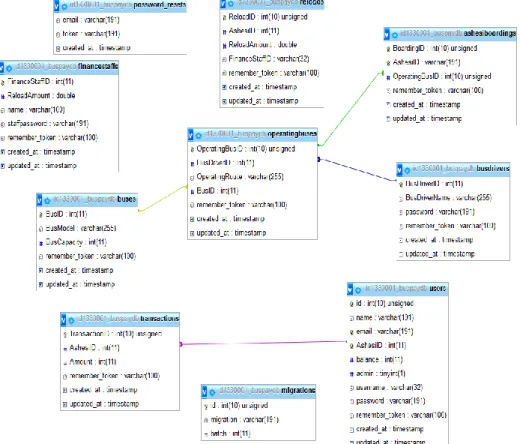
For the schematics, we have the entity relationship diagram of the database showing the relationships between the different table entities.
ERP Diagram
19
Chapter 4: Implementation
In this chapter, we will consider the implementation phase considering how the final system was built. We begin by evaluating the various tools and libraries that were used.
4.1 Required Tools 4.1.1 Software
NetBeans
NetBeans developed by Oracle foundation is used to write java codes on Windows, Mac,
or Linux environment. It is based on an integrated development environment (IDE). NetBeans is
chosen mainly because it provides various types of emulator for testing purpose.
Windows 10
Windows 10 is chosen mainly because of its availability along with it being more
user-friendly than other versions of windows. Another thing is that eclipse can easily run on Windows
10 provided there is Java runtime environment which can be readily accessed by myself.
Android OS 4.3 Jellybean
Android 4.3 Jellybean is chosen because of the selected phone use for testing will be based
on this OS. Android is chosen also because most people are using Android over another OS.
20 This provides an IDE for writing and testing Android applications, it is user friendly and
readily accessible
Kontakt.io Admin App
This app makes it easy to deliver any configuration updates you set in Web Panel or API
4.1.2 Hardware
Qualcomm Snapdragon S4Pro
The phone which will be used to test the prototype will be an Android Nexus 7 tablet
running with a Qualcomm Snapdragon S4Pro. Computer (Laptop)
A computer with a minimum specification of Intel i5 processor coupled up with 4GB ram
should be sufficient to do the coding in NetBeans and to emulate an Android environment.
Kontakt Beacon
A Bluetooth Low Energy beacon, has a 48-month battery life. This device can communicate
with both iBeacon and Eddystone enabled Bluetooth devices
4.1.3 Libraries
Google Mobile Vision API
The Mobile Vision API provides a framework for finding objects in photos and video. The framework includes detectors, which locate and describe visual objects in images or video frames, and an event driven API that tracks the position of those objects in video.
Currently, the Mobile Vision API includes face, barcode, and text detectors, which can be applied separately or together.
21 Volley
Volley is an HTTP library that makes networking for Android apps easier and most importantly, faster. Volley excels at RPC-type operations used to populate a UI, such as fetching a page of search results as structured data. It integrates easily with any protocol and comes out of the box with support for raw strings, images, and JSON.
Laravel
Laravel is a free, open-source PHP web framework, created by Taylor Otwell and intended for the development of web applications following the model–view–controller (MVC) architectural pattern. This is the same architecture the project is using hence it is a great fit. Also, Laravel provides added security out-the-box for protection against cross-site referencing, SQL injection and a plethora of other web vulnerabilities.
Beacon Management API
Robust and simple libraries designed to help developers quickly build their own beacon-enabled apps and reduce time to market.
4.2 Implementation
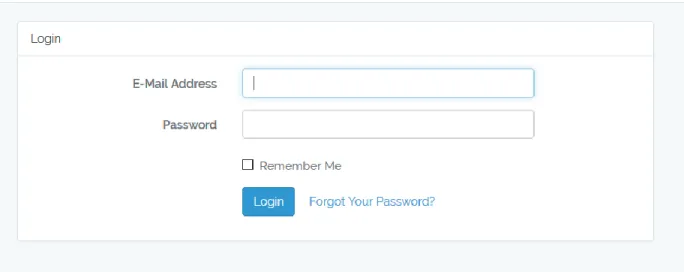
The project implementation began with the building of the web application side using Laravel, the PHP framework. The login page was the first to be set up and with Laravel this comes with a range of helper functions already working. Using the
"php artisan make: auth"
command. This created an authentication scaffold, with the login and form validation for the various fields all set-up. The login scaffold was then modified to use the emails of the users stored in the database as the username and a default password "secret" was used. To replicate
22
real life information of real users, the database's users table was filled using another of Laravel's functionality; faker. This allowed for any number of entries to be made into the table using randomly generated fake data for the respective fields. This allowed for 200 fake entries to be made into the database simulating the number of users that the system will use (since there are 147 staff and faculty members). The Login system was designed to be used by both passengers and the finance team hence depending on whether the user is an admin (as indicated in the users table) they are redirected to the Admin page else, they are taken to the Users page.
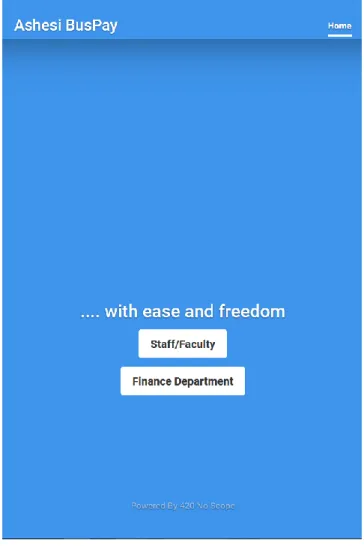
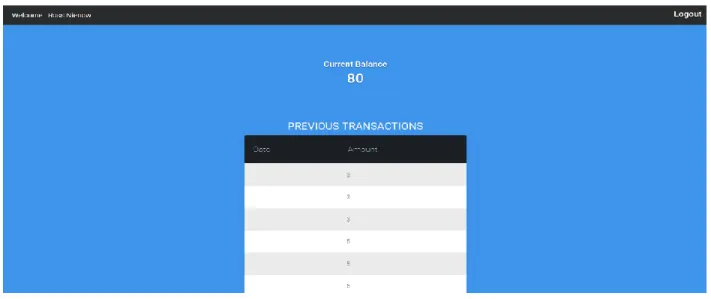
23 Figure 4.2 Landing Page
If the user is a passenger they are taken to the passenger dashboard. Upon loading the dashboard, queries are made for the all previous transactions the user had made along with all the reloads the user has made. The data queried is then shown in a paginated list with the latest data shown first. The user can also see the balance remaining in their account. Should the amount be less than 10 GHC, the figure is highlighted and text is shown recommending a reload to be performed. Finally, the user can also set whether they want notification by email on the dashboard by clicking on a Radio button. With all the information, the user will need shown on the dashboard it acts as a one-stop, quick and go experience to viewing and checking current balances and previous transactions.
24 Figure 4.4 Passenger Home Page
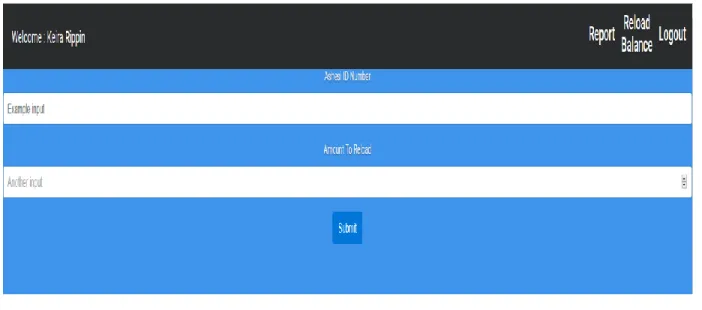
Should the user be an admin they are taken to the finance page. The finance page houses both the reload and report generation modules. The reload module is activated by the admin clicking on the reload balance link. On the page, they should only enter the user's Ashesi ID and the amount to be reloaded into the respective fields. Should the user be found and no errors occur the reloaded amount is added to the users balance and recorded in the reload table along with the timestamp. A response is then shown for notification purposes. Should the user have checked for email notifications they are sent an email, with the details of the reload transaction.
25 Figure 4.5 Reload Page
The other module available to the admin is the report module which is used to generate
reports for any specified month or range of months selected by the admin. The admin selects the start and end dates and a report is generated showing the total sales, number of trips, the average revenue for each trip and the number of times each type of ticket was purchased.
The generated file outputs as a csv, the information is then formatted and outputted as a word file to be used and viewed. The dashboard of the admin also has a paginated table showing the latest reloads that have been made.
Both dashboards of the user and admin both have the logout button as shown in the top right corner. This allows users to logout, ending the session and being redirected to the landing page.
Mobile App (AshBusPay)
The mobile app was built using Android studio, Volley and mobile vision. The architecture of the mobile app uses a RESTful web service on the backend to communicate with the MySQL database. To begin this side of the implementation the web service had to be implemented first.
26
The web service was built using native PHP. Six classes were created to connect to the database and display responses from the server. All responses are given in JSON format to allow for easier parsing in the app. The classes created handle login and transaction requests, delivering a JSON object with an error field. If the error field is false, no errors occurred if true, errors occurred and the responses are always displayed using Toast notifications. A Toast is a non-modal, unobtrusive window element used to display brief, auto-expiring windows of information to a user. The RESTFul architecture allows for us to maintain real-time database connections allowing users to immediately see changes to when a transaction is made.
With the RESTful web service having been setup, implementation for the Mobile App began using android studio. The first activity to be implemented was the login activity, which also serves as the landing page for the app. The login page is like the logic page for the Web App, with only two fields taking in the Ashesi ID of the bus driver and the password. The login credentials are taken and set as a POST request to the web service. The web service then returns the JSON object and the error field is checked to see whether errors occurred. The HTTP requests are handled by the Volley API which allows for very fast, asynchronous interaction with the web service. It also allows for efficient parsing of JSON objects, which is particularly useful for our purposes. If there were errors, the error is displayed using a Toast notification, having been parsed as a JSON. If the login is successful, the user’s information is queried and the results sent back. Also, the details of the logged in user are saved into the SQLite database on the Android device, along with the session information. The Main activity is loaded, showing the name of the logged in Driver and their Ashesi ID. On the Main activity page, there are also two buttons, the Start Session button and the Logout button. Clicking on the Logout button removes the details from the SQLite database and ends the logged in session.
27
Figure 4.6 Login Activity Figure 4.7 Main Activity
Clicking on the Begin Session button, loads SBHomeActivity intent and begins the session. This associates all transactions made on this trip to that session. The loaded activity has two buttons, one showing a Scan Barcode button and other showing the Session over dialog. Clicking the session over button ends the session and returns to the Main activity page.
28 Figure 4.7 SBHome Activity Figure 4.8 Scan Barcode Activity
Once the Scan Barcode Button is clicked, a surface view is initiated with the camera activated. The camera has been configured in the code to enable auto focus and use the back camera specifically, since the back camera on most phones is of a higher standard than the front camera, allowing for the faster scanning of barcodes. The type of barcodes used can come in several different formats, but for our purposes it is only the string retrieved that we are interested in. Hence the camera has been configured to search for any acceptable barcode format, be it 2D or 3D. The string retrieved is then sent as a POST HTTP request through volley to the web service. The server checks whether the user exists by making a query for the user's details, if a
29
user with that Ashesi ID exists then Session Activity intent is loaded. Else a Toast message is displayed showing the error_msg field of the JSON object.
Figure 4.9 Session Activity Showing User Details After Scan Figure 4.10 SBHome Activity showing success
The loaded Session Activity, loads with the scanned barcode, user's details. Showing the Name, Ashesi ID and remaining Balance. If a user's balance is less than the minimum amount needed to purchase a ticket, the user is notified and the transaction fails. Notifying the user to reload their balance with the finance department personnel. If the balance is sufficient the user can select their destination which for this project is either to Berekuso or Beyond, with prices of 1 and 3 GHC respectively. The user then clicks on Pay for Ticket and the transaction
30
is processed. The SBHomeActivity class is then loaded, showing the success message for just completed transaction. This allows for another barcode to be scanned and the process repeated until all the available barcodes are scanned and the payments transacted.
To prevent unwanted multiple scans, a list of people who have paid during the session is stored and when a barcode is retrieved, it is checked against the list, if found a notification is prompted detailing as such. However, if the barcode is not present then the application proceeds in the manner described above. When all available barcodes are scanned and the trip is over. The driver can then click on the Session Over? Button to end the session. This removes all data stored in the list and the session details sent to the database. The Main Activity class is then loaded and the Driver can click on the logout button to exit.
The last part of the application which was implemented was the BLE beacon. To begin a simple android app is created that allows the user to communicate with the BLE beacon should the user be in close proximity. The BLE beacon can however be detected from up to 20 meters away. Hence the proximity settings of the BLE was reduced to near, using Kontakt admin app. This means that the app can only communicate with the app when it is about 2 meters away which is convenient for our purposes. The Android application, will process a transaction should the device be discoverable by the BLE beacon.
31
Chapter 5: Testing
With the system having been implemented, tests were carried out to ascertain the viability of the system. To do so, separate tests were carried out for both functional and nonfunctional requirements. For our purposes, we will be using Black Box testing for both the functional and nonfunctional testing. Black Box Testing, also known as Behavioral Testing, is a software testing method in which the internal structure/ design/ implementation of the item being tested is not known to the tester. Those tests will also cover the component, system-level and user acceptance testing to ascertain that the underling code and structure performs as intended and that it meets requirements.
5.1 Functional Testing
For the functional testing, the typical users of the system could use the web and mobile application to test if the applications meet the stated functional requirement. The test was designed to check for potential bad inputs from users as well as to ascertain whether a clear mapping exists between an output/effect and the functional requirements. Under Black Box testing there a plethora of options for testing, for our purposes we will be using Test Case testing. A test case is a set of conditions or variables under which a tester will determine whether a system under test satisfies requirements or works correctly. This allows for better evaluation of the requirements as well as providing testers with clear definition of cases that do not work. An example of the test case template is given below
32
5.1.1 Component Testing
Component testing is a method where testing of each component in an application is done separately and effectively. The table below shows the results of testing on the web app. Web Application
Table 5.1 Showing results of Blackbox testing for Web Application
ID Description Expected Results Actual Results
1 Login Page – Failed Attempt Show message
detailing the failure
Message was shown
2 Login Page – Successful
Attempt Redirect to designated page based on privilege level Admin users redirected to finance page normal users redirected to passenger Page
3 Passenger Page Page loads showing
current balance along
with previous
transactions and
reloads
Page loaded showing current balance and previous reloads and transactions
4 Email Notification for Reloads User is sent an Email
notification when
account is reloaded
Email is sent
showing reload
details
5 Finance Page Page loads showing
list of previous
transactions
Page loads with
details of logged in user, showing all previous transactions
6 Reload Balance Page User can load balance
into account using Ashesi ID
User can load
balance into account
7 Report Generation User can generate
reports, based on
selected dates
Excel file generated, but fields empty
Mobile Application
Table 5.2 Showing results of Blackbox testing for Mobile Application
33
1 Login Page – Failed Attempt
Show Message Detailing the Failure
Message was shown
2 Login Page – Successful Attempt
Redirect to Main
Activity
Main Activity Page Shown
3 Barcode Scanning Barcode is scanned,
with a string
generated
representing the
barcode
Barcodes scanned
and correct values returned
4 Transaction User can select
destination and
transact payment
Ticket fare transacted and users can select, base destination
5 Transaction Session Driver can start and
start transaction
session
Session starts and stops
6 Transact Using BLE Display transaction
page with user detail
Page loads without details
5.1.2 System-Level Testing
In system level testing we are seeking to test the system and see if it meets the functional
requirements, with all components having been integrated into the system. In this test, we will cover
both functional and nonfunctional requirements. For our purposes, we tested the system for security,
load and functionality. To perform the test the mobile app was deployed and used by staff and
faculty on the morning bus for the load testing. The security test will be an appraisal of the system
performed by the IT personnel of Ashesi. Lastly the functional testing was performed to see if
requirements have been met and which other additional requirements would the users want. The
results are shown below.
5.1.2.1 Load Testing
The system is expected to handle about 150 users. Barcodes were then printed for 50 of
34 circumstance. To test for peak conditions, the app was installed on 3 different devices and then
barcodes were scanned to test if the system can handle concurrent operations, simulating an actual
scenario as there are currently 3 buses in operation. All barcodes were scanned quickly and
efficiently and along with each transaction. The system can handle peak conditions without
crashing.
5.1.3 User Acceptance Testing
In acceptance testing we test to see whether the system designed meets the requirements put
forth by users. For this project, we once again use test case testing as the preferred approach. This
test still falls under black box testing, since the users are still not aware of the underlying structure
or code. The user acceptance testing was covered during the black box testing. Being that the exact
same requirements were tested, the results of the black box testing is also our UAT.
5.1.4 Analysis
From the UAT we can see that the system fulfills all but a few of its functional and
nonfunctional requirements. The functionality that failed was the report generation module,
however closer inspection of the failure reveals a minor programming error in the code. This only
required a few corrections to fix and the report generation works. From the results of testing were
all together positive and the system can be deployed for use. The BLE app failed to display the
loaded details due to issues in connecting to Eddystone Bluetooth protocol for android devices.
Further investigation reveals an API issue that keeps returning an empty string. Hence details are
35
Chapter 6: Conclusion
This project has been intensive requiring new skills to be developed to complete it. The
project as seen from the user testing fulfills most of its functional requirements but falls short when
it comes to the non-functional requirement of security. Currently the system has not been appraised
by a third party to judge its level of security however, research from Search Mobile Computing
shows a list of known vulnerabilities when it comes to Android development (Beehler, 2016), and
the major flaw in the app is with encryption. Although it is used to store passwords, data transfer
between the server and both apps are not encrypted meaning that anyone listening in on the traffic,
using for example, Wireshark, can see the details of the transaction across the network.
Aside the security flaws, and the feedback gotten from the functional testing phase, the
system can be further improved by allowing users to send credit to other users. Furthermore, a bus
tracking functionality for the average passenger was requested to be able to pinpoint the position of
the bus in the mornings. These provide an exciting extension for the system which should be
included in further workings on the system. Also, to make the system truly hands-free, the device
can be mounted on the railing, so that passenger can self-serve eliminating the need for the
conductor.
This project although designed for the Ashesi Administration populace, shows a very modular
approach which can be easily modified to work for many other similar institutions, who still rely
on paper ticketing systems. It is with a heart full of pride and hope, that this project will be the first
36
References
Beehler, E. (2016, April). Top five mobile application vulnerabilities. Retrieved from
SearchMobileComputing: http://searchmobilecomputing.techtarget.com/tip/Top-five-mobile-application-vulnerabilities
Haselböck, S., & Narzt, W. (2015). Be-In/Be-Out with Bluetooth Low Energy: Implicit
Ticketing for Public Transportation. International Conference on Intelligent
Transportation Systems (pp. 1551-1554). Linz: ResearchGate.
Ibrahim, A. K., & Ta'a, A. (2015). MOBILE – BASED BUS TICKETING SYSTEM IN IRAQ. European Journal of Computer Science and Information Technology, 42-55.
Jo, M. B., Ahammed, A., & Lakshmi, D. (2015). RFID Based Bus Ticketing System. International Journal of Advanced Research in Electrical,, 2344-2349.
Lee, E. J. (2015, December 01). UTAR Institutional Repository. Retrieved from Eprints:
http://eprints.utar.edu.my/1838/
Manikandan, T., Kalaiyarasi, G., & Priyadharshini, K. (2015). Conductor less Bus Ticketing System Using RFID and. International Journal of Innovative Science, Engineering & Technology, 884-893.
Metro Mass Transit. (2013). Public Transport in Ghana. Retrieved from MetroMass:
http://www.metromass.com/mmt/pub_trans_gh.htm
Oloyede, M., Alaya , S., & Adewole, K. (2014). Development of an Online Bus Ticket Reservation System for a. Computer Engineering and Intelligent Systems, 9-17.