i ASHESI UNIVERSITY COLLEGE
ENHANCING PROOF OF DELIVERY SYSTEMS WITH QR CODES AND GPS
BY
FABIOLA ETORNAM AMEDO
Dissertation submitted to the Department of Computer Science, Ashesi University College
In partial fulfillment of Science degree in Management Information Systems
ii DECLARATION
I hereby declare that this dissertation is the result of my own original work and that no part of it has been presented for another degree in this university or elsewhere.
Candidate’s Signature:……… Candidate’s Name:………
Date:………..
I hereby declare that the preparation and presentation of the dissertation were supervised in accordance with the guidelines on supervision of dissertation laid down by Ashesi University College.
Supervisor’s Signature:………..
Supervisor’s Name:……….
iii ACKNOWLEDGEMENT
I would like to express my gratitude to my project supervisor, Dr. Nathan Amanquah for his valuable comments, feedback and advice which contributed significantly to the completion of this project.
I would also like to extend my gratitude to my parents, my mother most especially for her advice, motivation, support and encouragement throughout my university education.
I would also like to extend my gratitude to all my friends, colleagues and all those who supported me through difficult times either directly or indirectly.
iv ABSTRACT
Proof of delivery systems have been developed to enhance business operations in the case of businesses that carry out delivery services. Key issues that necessitate the usage of such systems include the need to enhance customer service, monitor delivery personnel, reduce the tendency of losing paper receipts as well as verifying that customers have received their goods.
The main purpose of this project is to develop a proof of delivery system to streamline service delivery for businesses. Other features include a mobile and web application for customers to place orders as well as for managers to monitor operations.
The proof of delivery system, was implemented on an Android platform for delivery personnel with managers monitoring activities from a web interface. When all modules are implemented and tested it is expected that business’ operations will be enhanced through a system that assists in rating the efficiency of delivery personnel, ensuring that customers have actually received their goods and helping managers make more informed decisions.
v
Table of Contents
DECLARATION ... ii
ACKNOWLEDGEMENT ... iii
ABSTRACT ... iv
CHAPTER 1: INTRODUCTION AND BACKGROUND ... 1
1.1 Introduction ... 1
1.2 Background ... 1
1.3 Objectives ... 3
1.4 Motivation ... 5
1.5 Expected results and potential benefits ... 6
1.6 Overview of the report ... 7
CHAPTER 2: LITERATURE REVIEW ... 8
2.1 The Impact of mobile-based proof of Delivery Systems on business operations. ... 8
2.2 Conclusions on Literature Review ... 13
CHAPTER 3: SYSTEM DESIGN ... 16
3.1 System Design and Architecture ... 16
3.2 System Requirements Specification: Functional and non-functional requirements ... 18
3.2.1 Functional Requirements of the Web Application ... 18
3.2.2 Functional Requirements of the Delivery Personnel’s Application ... 19
3.2.3 Functional Requirements of the Customer’s application ... 20
3.2.4 Non-functional Requirements of the Proof of Delivery System. . 21 3.3 User classes and characteristics ... 22
3.4 Scenarios ... 22
3. 5 Technology and Tools used ... 24
3.6 Development Environment: Using the tools. ... 28
CHAPTER 4: IMPLEMENTATION AND TESTING ... 32
4.1 Approach and Methodology ... 32
4.1.1 Implementing the customer order application ... 33
4.1.2 Implementing the proof of delivery application ... 35
4.1.3 Implementing the web application ... 39
vi 4.2.1 Unit Testing ... 41 4.2.2 Component Testing ... 42 4.2.3 System Testing ... 42 4.2.4 Compatibility Testing ... 42 4.2.5 Limitations ... 43 4.3 Challenges ... 43 5.1 Conclusion ... 45
5.2 Recommendations and Future Work ... 45
Bibliography... 47
1 CHAPTER 1: INTRODUCTION AND BACKGROUND
1.1 Introduction
The knowledge and usage of mobile technology is rapidly increasing with time in several communities all over the world and in several facets of life. In contemporary times, mobile technology has been adopted by individuals and businesses alike because of reasons such as its portability, versatility, ease of use and its pervasiveness. The interesting thing is that its usage is gaining wide acceptance from a wide range of individuals and businesses to enhance their business activities. Instead of goods just being exchanged physically, individuals and businesses rely on mobile platforms to make transactions; in the case of businesses, to inform consumers and suppliers alike, to access information and to make monetary transactions. Taking advantage of such technology promotes efficiency, saves time and enhances productivity in various regards. Another interesting development is the rapid adoption of smart phones and other smart hand-held devices which are gaining a reputation for their powerful ability to run applications, beyond basic SMS messaging.
1.2 Background
The use of mobile phones in developing countries such as Ghana has had socio-economic impact both directly and indirectly. Particularly, in Ghana, there is clear evidence of mobile phone usage to enhance business operations in several small scale businesses and trades. From one
2
perspective, mobile phones serve as virtual offices for carpenters, painters, small-scale traders in market places and so on, enabling them to optimize resources such as time and money as well as eliminating hindrances such as distance [1]. With regards to developing efficient mobile solutions to problems, the opportunities are endless. For example,
Esoko, an agricultural marketing platform deployed on mobile platforms
equips farmers and agri-businesses with market data and price alerts to make more informed decisions [2].
Considering that web and mobile technology have been proven to have significant impact on small scale businesses, there is the need to be concerned in cases where businesses do not take advantage of such technology. In the case of Araba’s Oven a small scale bakery for example, baked quantities of bread or pastries are sent in wholesale quantities to their customers who are retail shops, cafeterias, or individuals. What happens often is that goods are dispatched for delivery and delivered to only customers who are willing to buy. Goods are produced based on uncertainty and speculation unless the bakery has a contract with the customer. Delivery personnel, who are assigned by word-of-mouth to make deliveries, drive through the neighbourhood on the lookout for prospective buyers. Upon making a delivery, the transaction is mentally recorded or recorded on a piece of paper and in other cases, a receipt book is used to record the transaction to show proof of delivery. In certain instances, to determine customer orders, phone calls placed at the expense of the business are made to customers. The bakery also does not make use of any computer-based application thus relying on a less efficient paper-based system.
3
The current approach employed by such businesses introduces various problems into the business’ operations. Bread production based on speculation hampers smooth business operations and introduces the tendency of overproducing or under-producing. Resources such as ingredients, fuel and time are wasted because of uncertainty about who will buy the product. Also, surpluses imply that there will be waste in the system and this is cost to the business. Other problems that persist are the tendency for mischievous delivery personnel to pilfer items and falsify records. Poor marketing reduces the business’ chances of getting customers and making more sales. Also, tedious accounting procedures and non-existent book keeping hamper smooth decision making. Providing a platform that minimizes the occurrence of such problems will enhance the operations of the bakery significantly. Information regarding the number of customer orders, the location of delivery personnel in real-time will enable the business to make informed decisions.
1.3 Objectives
The aim of this project is to develop a mobile and web-based application that will streamline a bakery’s service delivery. The objectives of the project are as follows:
i) To build a platform that enables customers to pre-order
and enhance the customer service experience.
To control the tendency of the bakery producing more than necessary and vice-versa, a platform will be provided for customers to place their orders. This will comprise of a web-based platform where customers can register
4
to place their orders. A Java ME (Java Platform Micro Edition) application will also be built to cater for customers whose phones are not capable of accessing the web. This process improves the quality of customer service and nurtures customers’ trust for the business.
ii) To rate the efficiency of delivery personnel and ensure
proof of deliveries.
This system provides a structured platform that gives off information concerning assigned deliveries to delivery personnel. This application allows delivery personnel to view their assignments for the day and give a status report. To carry out the proof of delivery, the implementation of mobile facilities such as GPS (Global Positioning System) and QR codes will be explored. By logging their GPS coordinates and the time of delivery as well, it will be possible to track personnel’s movements. The QR (Quick Response) Code scanner allows the delivery personnel to scan codes unique to each customer. These unique customer codes will contain customer details such as their name, address and phone number. Though QR codes are not widely used in the Ghanaian business environment, they will provide advanced benefits. An Android-based application will be built to cater for these requirements.
iii) To provide a platform for effective decision making and
more structured management.
To enhance decision making and promote more structured business operations, managers or administrators will have access to a web-based application that allows them to view all customer orders that have been placed as well as have access to all the employees in the central database.
5
Managers should be able to assign orders to delivery personnel and update the system with product and employee information. Additionally, the managers or administrators should be able to view the locations that delivery personnel have visited on a map. This service will be supported by Google Maps.
1.4 Motivation
The motivation for this project stems from the existence of a digital divide in Ghana and the factors that influence achieving a sustainable livelihood in such a technological era. Bridging this digital divide implies that individuals and businesses, no matter how big or small still have the opportunity to be fully equipped with the tools they need to succeed in the business environment.
Additionally, the standards of living of people, needs to be raised. By improving on their modes of operation, businesses can grow and also impact the lives of their employees, as well as create more value for their customers in return. Small firms have huge potential to grow into medium or large scale businesses by empowering and equipping them with the tools to do so. This brings to mind what an important role technology plays in the growth of businesses, be they small or large, all over the world. Businesses that take advantage of the technological tools available to them are able to expand their horizons and eventually become better competitors in their market. Considering the prospects of new technological developments in the future, it is only better for firms to
6
incorporate technology into their operations so as to avoid the tendency of becoming obsolete in the future.
1.5 Expected results and potential benefits
After the proposed solution, ScanIt! is developed and prototyped, a number of results are expected. First of all, it is expected that customers will enjoy their relationship with the business as this fosters a stronger bond through a system where they can easily place their orders. Also, a web application which serves as a simple inventory management system will help small scale businesses and other businesses that make use of the supply chain to be more efficient in managing its inventories. This is because customer orders will be known in advance and can be prepared accordingly. By so doing, bakeries can reduce costs such as waste, study customer trends and patterns to assist them with making reliable forecasts, increase their efficiency and supply customers with their needs. The Android based proof of delivery system is designed to enable delivery personnel to be more efficient at making deliveries. Delivery personnel can act swiftly by having access to information regarding deliveries that they have to make in a day without going through any bureaucratic processes. Ideally, the success of this project provides a model that small scale businesses such as bakeries and firms that embark on deliveries can utilize to improve delivery services.
7
1.6 Overview of the report
This report gives a breakdown of the various aspects of the proof of delivery system and the necessary steps involved in developing and implementing such a system. Chapter one (1) introduces the topic of mobile technology, gives some background into the problem, the objectives of the project as well as the underlying motivation and expected results and benefits of the system proposed. Chapter two (2) contains a literature review that gives insight into related works and the impact of mobile-based applications on delivery efficiency. Chapter three (3) gives details of the system design and architecture; that is the components of the system as well as a breakdown of the system functional and non-functional requirements. It also discusses the technologies and tools used in building the system and how they were used. Chapter four (4) provides a detailed description of the major features of the system; how they are implemented and the challenges faced in development and implementation. The final chapter, Chapter five (5) provides a summary of the report, highlights the results obtained after testing, the setbacks and recommendations for future development.
8 CHAPTER 2: LITERATURE REVIEW
This chapter introduces the need for proof of delivery systems and the benefits that businesses stand to gain when they utilize such systems in carrying out delivery operations. It also points out the similarities and differences between existing proof of delivery systems and the proposed design. It outlines the flaws and setbacks that some of these proof of delivery systems have and opportunities for loop holes to be corrected and improved.
2.1 The Impact of mobile-based proof of Delivery Systems on business operations.
Several proof of delivery systems are designed to ensure that recipients of items are able to confirm the receipt of their orders after they have been delivered. These systems have been developed on various platforms and in different contexts and they utilize different technologies to carry out proof of delivery. Proof of delivery systems have been designed to revolutionize the traditional system of recording deliveries to promote efficiency and enhance the proof of delivery process. The traditional system of proof of delivery has a variety of problems associated with it. For example, in a traditional proof of delivery system, delivery personnel issue pre-printed or handwritten invoices to customers which is time-consuming and is prone to errors. In addition, there is the tendency to lose signed invoice copies. Also, this system is rigid in instances where
9
changes need to be made to the delivery [3]. To ensure that integrity exists within the supply chain and customers can reinforce their trust for such systems, different proof of delivery systems exist to address the problems outlined above. Below is a description of related work and their objectives:
DeliverIt
DeliverIt is a mobile proof of delivery system designed by NuVizz,
a technology solutions and services company which provides mobile solutions and supply chain consulting for enterprise [4]. DeliverIt is an extensive proof of delivery system that can be adapted to a wide variety of smartphone platforms. The key features of the DeliverIt proof of delivery includes dispatch management, load assignment to delivery personnel and carriers and it provides real time delivery tracking using GPS and electronic signature capture for proof of delivery [5]. DeliverIt works in such a way that the proof of delivery feature is built into the mobile delivery application. This allows delivery personnel to record an account of deliveries, and exceptions that occurred. A number of benefits accrue to stakeholders in the supply chain under DeliverIt proof of delivery. These include:
Reduced costs with regards to transporting paper work from one destination to another.
Less probability of losing paperwork.
Improved customer service as well as reduced or no training for delivery personnel.
10
DeliverIt supports a wide range of users such as fleet owners, trucking carriers, couriers, freight owners and brokers as well as individuals or businesses in the transportation or freight industry [5].
x-Pod
x-Pod is a mobile proof of delivery system developed by X-Check, a mobile solutions company. Its mantra is to facilitate and streamline dispatch and delivery processes to propel the possibility of improvements in time management, reliability and smooth cash flow. Another focus for x-Pod proof of delivery is keeping up to date information in order for a business to run efficiently. This is achieved by gathering real-time information regarding various aspects of processes such as information concerning the dispatch and delivery of goods. The x-Pod software utilizes digital signature capture technology to ensure a safe, precise proof of delivery and the information captured is stored in a database. Akin to
DeliverIt, x-Pod also seeks to do away with the inefficient paper
methods of traditional proof of delivery systems and also reduce the time spent in carrying out proof of delivery. Other features of the x-Pod system include a wireless connection to mobile printers which can be accessed via Bluetooth. With this, delivery personnel can issue accurate receipts for recipients immediately. However, x-Pod has been designed to work with only mobile computers such as the Datalogic Elf. This is one of the limitations with the x-Pod system [3].
Karmak Deliver-It
Karmak Deliver-It is another mobile application that has been
11
delivery personnel’s productivity. Just like the other mobile applications, Deliver-It by NuVizz and x-Pod, this application utilizes signature capture technology. All recipients’ signatures and information concerning the deliveries are uploaded to a database. This eliminates the need for paper invoices which could easily be lost. Through a signature capture, customers can conveniently sign for one or more deliveries. Tasks are also simplified for delivery personnel as well because of a more efficient method of ensuring proof of delivery [6]. Other features of Karmak
Deliver-It include:
Real-time view of the delivery route. A view of customers to be delivered to. Viewing returned or refused items.
Viewing of pictures of damaged items or packages. Options to email and print proof of delivery information. GPS mapping to provide directions to delivery personnel.
One of Karmak Deliver-It’s clients attested to how beneficial the system had been to his business [6]. Chris Michaels of Gateway Industrial Power mentioned that Karmak Deliver-It reduced the amount of time that inside sales force spent talking with delivery personnel, which ensures more efficient use of time. Also, his company is able to know what is left to be delivered and the order in which it will be delivered. Michaels also attested to the fact that such a system reduces the amount of paper work as well as the problem of lost invoices [6].
12
SkyMobile Proof of Delivery.
SkyMobile proof of delivery is a Microsoft-based mobile application
developed by SkyTechnologies. SkyMobile proof of delivery is a Systems Applications Products in Data Processing (SAP) mobility tool that ensures mobilization of modules without relying on middleware. SkyMobile proof of delivery enables access to real-time information on the status of a delivery after orders have been dispatched. Similar to the other applications outlined above, SkyMobile is also set out to eliminate the time that is spent doing paper work by personnel as well as the time spent rechecking data and late data entry. In an effort to solve these problems it provides real-time information concerning the status of deliveries. Additional features of SkyMobile’s proof of delivery application include the ability for payments to be received, for example via credit card; this reduces the company’s receivables to a large extent. The mobile application synchronizes with a web application where all information concerning assignments and deliveries can be viewed [7].
Nevertheless, the downside of this application is that, it runs only on a Windows Mobile platform which does not promote flexibility. Also, it lacks GPS technology to give personnel a view of the location and the possible routes that they can take in order to arrive at their designated destination and be efficient.
13
2.2 Conclusions on Literature Review
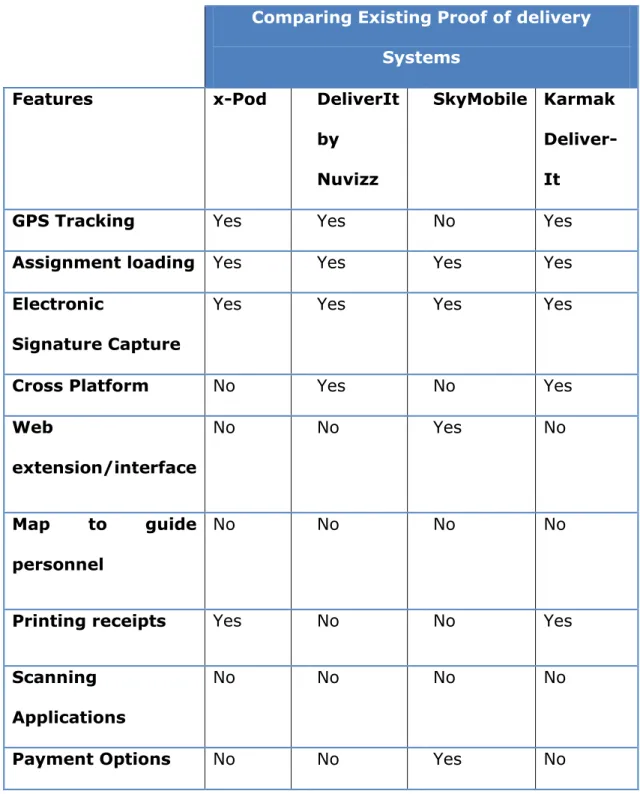
Considering the mobile applications, DeliverIt by NuVizz, Deliver-It by Karmak, x-Pod and SkyMobile proof of delivery, problems with the traditional system of proof of delivery have been identified and are being addressed. Similar technologies such as GPS and digital signature capture cut across the various mobile applications. DeliverIt by NuVizz provides assignment load for delivery personnel, real-time tracking of deliveries using GPS and electronic signature capture. An advantage with DeliverIt by NuVizz is versatility; it can run on various smart-phone platforms. X-Pod on the other hand works on only selected mobile computers such as the Datalogic Elf. This makes it rigid as compared to DeliverIt by NuVizz. X-Pod also utilizes signature capture technology and offers printing of receipts via a Bluetooth connection to mobile printers. Karmak’s Deliver-It, provides real-time information via GPS as well as a signature capture mechanism and the option of emailing or printing proof of delivery information. SkyMobile also provides real-time information and signature capture but does not provide a mapping system to help personnel locate routes. Another downside to SkyMobile’s proof of delivery is that it runs on Windows mobile. This is a limiting factor because it requires acquiring equipment at extra costs to carry out proof of delivery.
Below is a table comparing various proof of delivery systems that exist. ‘Yes’ indicates that the feature is present in the application and ‘No’ indicates otherwise.
14 Comparing Existing Proof of delivery
Systems
Features x-Pod DeliverIt
by Nuvizz
SkyMobile Karmak Deliver-It
GPS Tracking Yes Yes No Yes
Assignment loading Yes Yes Yes Yes
Electronic
Signature Capture
Yes Yes Yes Yes
Cross Platform No Yes No Yes
Web extension/interface No No Yes No Map to guide personnel No No No No
Printing receipts Yes No No Yes
Scanning Applications
No No No No
Payment Options No No Yes No
Table 2.1: A comparison of key features of existing proof of delivery system
With the proposed android application, recipients of products do not need to keep signing whenever their delivery is made. A simple scan of their QR code would save more time on both their side and that of the
15
delivery personnel. Also the proposed application is cheaper since it can be easily deployed on Android phones; there is no need to acquire specialized devices at extra costs. Considering the motivation and technologies behind the outlined mobile applications, it can be inferred that there indeed exists a problem that needs to be solved with regards to delivery processes.
16 CHAPTER 3: SYSTEM DESIGN
This chapter describes the components of the entire application and how the different applications are intertwined to produce results. It also provides detailed functional and non-functional requirements specification of the various components of the system, scenarios of the various user classes that are interacting in this system as well as the technologies and tools used in developing the components of the system.
3.1 System Design and Architecture
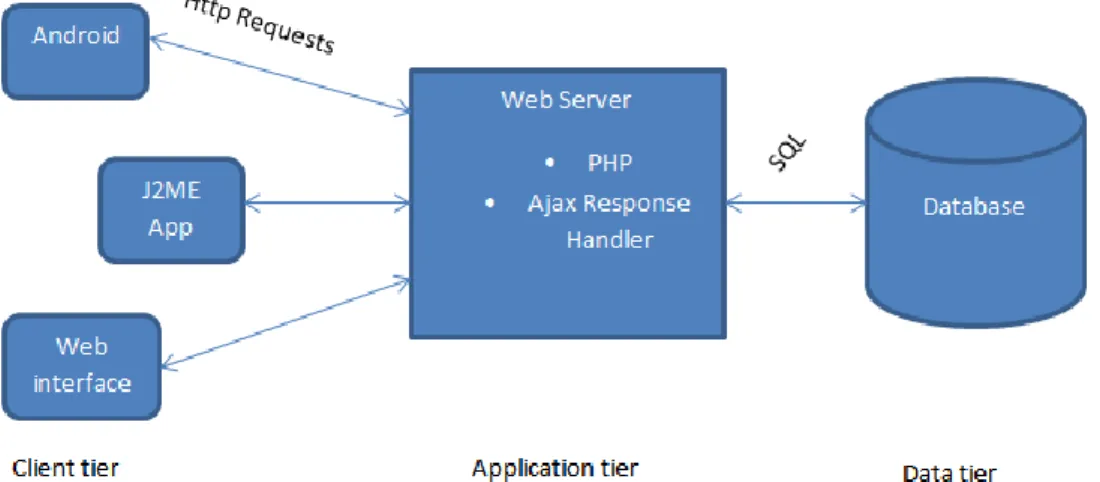
The system architecture for ScanIt! is composed of a three tier client-server design and displays the interaction between the various systems being used. This system architecture diagram shows the support structures in place for the various user interfaces which displays the results of all the background processes occurring in the application tier and the data storage tier.
17
The Data storage tier: This layer serves as a repository for all
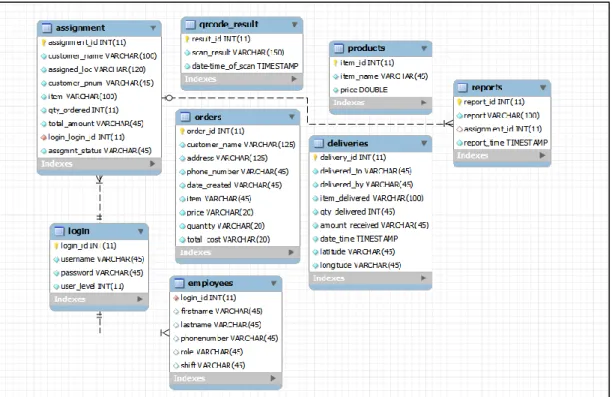
information that is necessary for the management of the various components of the system. This layer enables data to be stored and retrieved when necessary. This layer establishes itself as the foundation of the entire system since data is what the various components of the system revolve around. All data such as details of deliveries, the time, GPS coordinates, scanned information, assignments and employee information are all made accessible via the data tier. In order to access the data tier, MySQL scripts are written to insert, update, modify and delete data from the database.
The Application tier: The application tier is the layer that coordinates
and processes commands as well as makes logical decisions. The application tier accesses data from the data tier using middleware such as PHP and presents the results to the client tier in a format that can be understood. For example, through the Android application in the client tier, requests for deliveries are made to the data tier. The application tier handles these requests by using server side scripts such as PHP to fetch the information and display the results on the Android interface. With the existence of the application tier, it makes it easier for client applications to handle results without being involved with the complexity of interacting directly with the databases and other backend systems.
Client tier: This layer displays the results of the processes occurring in
the application and data storage tier. In the case of ScanIt!, this layer consists of the mobile interfaces as well as the web interface. The Android
18
mobile interface displays the delivery personnel’s assignments for the day, a map which allows personnel to trace routes to their location of delivery, a form to record delivery details and a scanning application to confirm that packages have actually been delivered. The web interface displays customer orders, employee information, and locations that delivery personnel have visited in real time on a map.
3.2 System Requirements Specification: Functional and non-functional requirements
Below is a general overview of the functional requirements of the various components of the system. This entails the functional requirements of the customer end of the application on a java platform, the functional requirements of the application used by delivery personnel and the functional requirements of the web application which will be used by the business.
3.2.1 Functional Requirements of the Web Application
Authentication: Users, which include staff, administrators and customers, should have the required authentication to access the web application.
Administrators should be able to view orders that are placed online and via SMS. This will give the business insight into the quantity of orders to produce and how to manage the tendency of overproducing or under producing in the case of manufacturing firms.
19
This application should contain details about each category of product. The product type and the prices. In the case of a bakery we have items such as brown bread, sugar bread, bread rolls and so on.
Report generation: The application should be capable of generating reports based on information fed into the database. This entails a breakdown of the quantities ordered or/and delivered over a period. QR codes: The unique feature about this system is that it will make
use of QR (Quick Response) codes which will uniquely identify various customer orders to enhance the process of delivery to customers. The QR codes will store information about the customer and this will be saved in the database; Contract customers will be given identification cards with unique QR codes imprinted on them. These will contain information peculiar to the customers. This way it can be fully confirmed that a delivery has been made to a particular customer. Also, for advertising purposes, QR codes containing information about the business such as their contacts, their location the services they offer and more can be generated using the web application.
3.2.2 Functional Requirements of the Delivery Personnel’s Application
GPS (Global Positioning System): First of all, delivery personnel should be able to view the directions to their destination on a map. This should guide them in the case where they have no idea of the
20
location as well as which routes to take. Also, delivery personnel’s GPS co-ordinates which reflect their whereabouts will be logged to the database.
QR codes: Delivery personnel use this application to view their assignments for the day, and record any evidence of a transaction by logging GPS coordinates and also by conducting a scan with a QR code scanner. The proof of delivery application runs on an Android device and will be used by delivery personnel. In place of the traditional system where customer signatures will be appended to invoice forms, a unique QR code containing customer information will be generated for each customer and scanned with an Android device to confirm the delivery. The results of the scan are stored in the central database. This allows management to keep a close eye on all the deliveries and transactions that are made within any particular day and time period. This application ensures that there is little opportunity for pilfering by staff and other employees.
3.2.3 Functional Requirements of the Customer’s application Log in Application: Customers should be authenticated through a
login application.
SMS: Using a J2ME application, clients will be able to place their orders via SMS. This will allow businesses to adequately manage their resources and efficiently supply customers’ orders. Additionally, customers receive SMS notification when their order has been placed successfully.
21
3.2.4 Non-functional Requirements of the Proof of Delivery System.
Security: The web and mobile applications will require authentication from users to ensure that the right users have access to the system.
Usability: This proof of delivery system is required to be user friendly. The user classes in this system are expected to be familiar with mobile phones as these devices are the main medium of communication in the 21st century.
Maintainability: The system should be easily maintained to easily detect and correct any imminent defects.
Testability: The system should be easily tested by user classes and inferences should be made from the test results obtained.
Extensibility: The system should be capable of being extended to support additional software functionality and the modification of existing functionality.
Scalability: The system should be capable of accommodating growth and maintain its performance even after additional hardware resources have been added as a result of expansion. Portability: This implies that the application can run in different
environments. This ensures that the same functionality runs across different platforms at lower costs.
22
3.3 User classes and characteristics
Delivery personnel: This class consists of individuals who have
basic knowledge of how a mobile phone works. With sufficient training, these users can easily implement the proof of delivery system effortlessly.
Customers: This user group consists of mostly small scale
businesses and individuals who are familiar with the use of a mobile phones and desktops.
Administrators or business managers: This group consists of
technologically competent users who possess the privilege of effecting changes and making updates to the system. These users have direct access to the database and are responsible for assigning deliveries to delivery personnel and monitoring their movements as well as viewing reports.
3.4 Scenarios
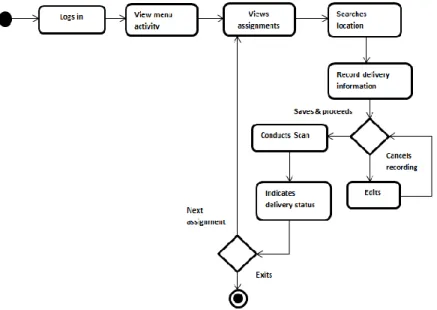
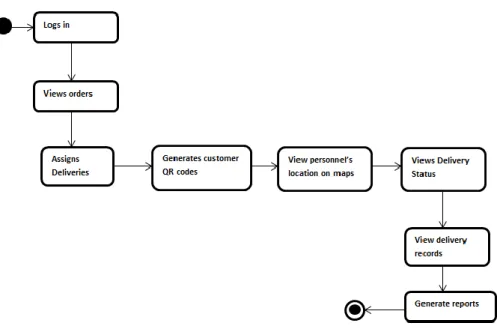
Below are activity diagrams to show the processes that the various user groups interact with. These include the processes customers, delivery personnel and the administrators go through to interact and contribute to the completeness of the entire system.
23
Fig 3.2: An Activity Diagram showing customers’ interaction with processes
24
Fig 3.4: An Activity Diagram showing the administrator’s interaction with processes
3. 5 Technology and Tools used
Various tools were utilized to build the proof of delivery system. First of all, XAMPP, a free open-source cross platform server stack, which runs services such as the Apache HTTP Server, MySQL, PHP and FileZilla, was the platform for hosting the system. Apache serves as the web server, MySQL serves as the relational database management system while PHP serves as the scripting language. XAMPP allows server side scripts to be tested without any access to the internet. It allows the developer’s localhost to act as a remote host. Other alternatives that could have been equally used are the WampServer and LAMP for Linux systems. Despite the fact that these servers are rendering similar Apache-MySQL-PHP services, the XAMPP server stack was preferred because of familiarity with it, which made it easier to implement and test scripts.
25
Moreover, XAMPP is multi-platform while WAMP runs on only windows and LAMP runs on Linux based systems.
The Java ME application was built to permit customers to order their goods via SMS. The Netbeans IDE version 7.2 was used in this instance to build the SMS application for feature phones. The Java programming language was the framework within which this application was built and compiled. For the customer ordering application, the Java platform was preferred because of the simplicity of the application and also considering that it should be capable of running on basic feature phones.
Eclipse’s IDE along with Android SDK was used to develop the proof of delivery application which runs on an Android platform. The proof of delivery system was built on an Android application because of reasons such as Android’s open source nature. Building on Android was also possible because Google provides Android developers with open source development tools to create applications. This made it easy to implement and modify open source libraries and classes into the application. Also certain features such as the QR code scanner and Maps services required an advanced operating system such as Android to be deployed.
The web application comprised of HTML, CSS, JavaScript, PHP and Ajax. These are the client and server-side scripts that were written for the web application to allow interfaces to communicate with each other. Notepad ++ was the text editor that was used to develop the server side scripts and web pages. Notepad++ was used because it is a user-friendly text editor that facilitates code formatting and uses a text-colouring
26
feature to show the differences between various script keywords, classes and methods.
QR Codes: QR Codes stand for Quick Response Codes. These are
two-dimensional barcodes that were invented in Japan by Denso Wave, a Toyota subsidiary in 1994. They were invented to track vehicles during the manufacturing process. Recently, the codes have become widespread due to their ability to be read within seconds and their ability to store large amounts of data [8]. QR codes can store much more information and are more convenient since they can be easily scanned with a smartphone-based scanning application. Traditional barcodes on the other hand cannot store as much data.
GPS: GPS stands for Global Positioning System. GPS is a U.S.-owned utility that provides users with relevant information with regards to positioning, navigation and timing [9].
Google Maps API: Google provides this service free of charge and it can
be used on any website. The Google Maps API enables web developers or users in general to invoke Google Maps into web pages. The Maps API is very adaptive since changes can be made to it in order to enhance its usage when necessary.
Google Charts API: The Google Charts API from Google is a tool that
allows web developers to include charts into their web pages easily. Various types of charts are supported by this service; QR Codes inclusive.
SMSGH API: The SMSGH API is provided by SMSGH. This allows
27
SMS gateway, developers have the ability to send messages back and forth using any application.
Database technology: The database technology that was implemented
in this system was MySQL which is provided by the XAMPP package. While other Database Management Systems such as Oracle exist, MySQL was preferred first of all, because of familiarity with the system and secondly because it is more intuitive than Oracle. The syntax deployed while using MySQL is simple as compared to that of Oracle. And Also, MySQL is robust, open-source, and can store large amounts of information; thus it is more preferable for the development of small to medium-sized applications. To access information in the database, PHP scripts connecting to the database and MySQL statements were written. These were passed to the database over the Apache HTTP web service as described in Figure 3.1.
28
3.6 Development Environment: Using the tools.
Fig 3.6: System Overview
Using SMS Gateway: To enable the SMS feature, MYTxtBOX, a service
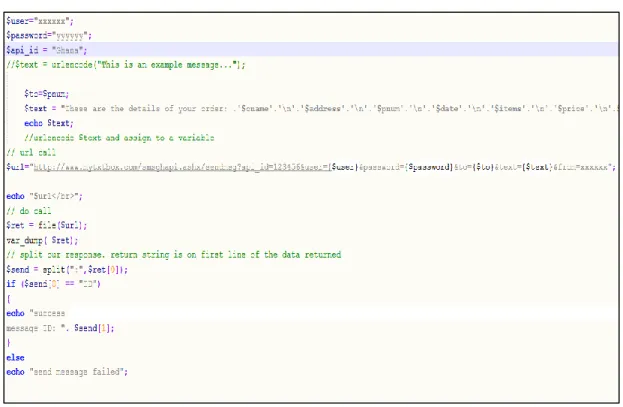
running under the SMSGH Gateway was used. Once you register with SMSGH, you receive an API key which is used in the code to activate the SMS feature. This API is integrated into the php file of the order sending application. The username, password and api key obtained are encoded into a variable. This variable is called using a file( ) method. Any response obtained is split using a split method. While testing this in the webpage, a successful message is reported; otherwise, message sending failed. Successful messages imply that customers receive a confirmation via sms that their order has been placed.
29
Fig 3.7: Code Snippet showing how to make use of SMS API
Using Google Maps in Android: Working with Google Maps or other
Google API, requires a Google API key. The following steps show how to obtain that key:
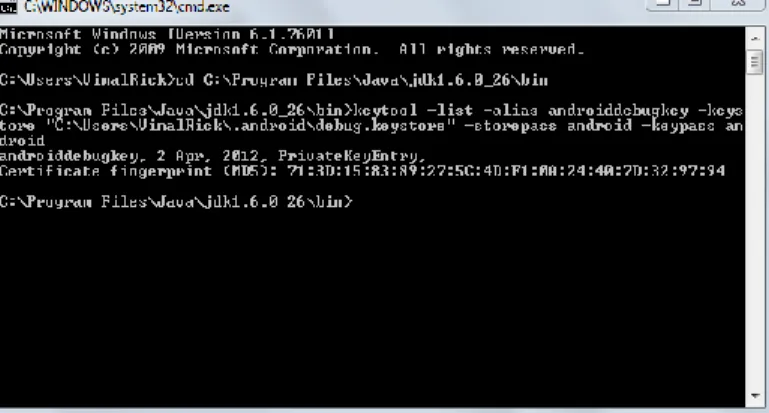
In the command terminal, change directory to the location where JDK is installed. This is usually in the Program Files folder in the C drive. Search for the keytool application in the bin folder.
Copy the path: for example (C:\Program
Files\Java\jdk1.6.0_23\bin) and paste it in the terminal. Add
this line of code to the path (keytool -list -alias androiddebugkey –keystore).
Copy the path of debug.keystore located in the user folder:
“C:\Users\Etornam\.android\debug.keystore” and add to the
previous line. This should be followed by (storepass android
30
To obtain the key sign up to the Google API page in a browser; (https://developers.google.com/maps/documentation/android/v1/m aps-api-signup). Then enter the fingerprint and accept the terms and conditions and generate the key.Fig3.8: Process of obtaining fingerprint in the command prompt.
The key obtained should be put in the xml file of the android project. To ensure the maps feature is visible in Android, first of all, the main activity should extend ‘MapActivity’ instead of ‘Activity’. Change the build target of the project to the Google API, and create a new emulator with the Google API as a build target.
Fig 3.9: Using the API Key in an Android xml file.
Using Google Maps in webpages: To integrate Google Maps into
webpages the Google Maps API is incorporated into the php script. The map is called into a section of the webpage using the <div> tag in html.
31 Markers are invoked into the maps using the MarkerImage method. Data from the database such as the longitude and latitude is also fetched into the map. Code snippets are included in the Appendix.
Using QRcodes in Android: In order to build a scanning application in
Android using QR codes, the Eclipse IDE installed with Android SDK is required. With ScanIt!, the Zxing library which supports encoding and decoding of QR codes was incorporated into the android application. This library is open source and can be easily downloaded off the internet. The Zxing library should be imported into the Android project. A simple button is created to invoke the Zxing library once it is clicked. The Manifest file should be modified to accommodate camera and internet uses-permissions.
Using QR codes in webpages: This involves creating two php files; the
first one, say index1.php contains a form to allow users to select their preferred size, encoding, error correction level and content of QR code to be generated. The second one, index2.php should request data from the Google Charts API and this file is called in the action of the form in index1.php. (View the appendix for code snippets)
QR codes are able to support various levels of error correction to permit the recovery of lost, concealed or misread data. This technique allows for greater redundancy since data can always be recovered. The default level of error correction ‘L’ allows the recovery of about 7% data loss. The ‘M’
level of error correction allows recovery of up to about 15% data loss; ‘Q’
allows recovery of about 25% data loss and ‘H’ allows for about 30% data loss [10].
32 CHAPTER 4: IMPLEMENTATION AND TESTING
This chapter describes the approaches that were used to fully implement all components of the application. It would also capture various processes that user classes and groups have to go through to access the full benefits of the system in order to achieve the objectives that were set out at the beginning of this report.
4.1 Approach and Methodology
To begin with, the customer order application can be primarily accessed via web and the secondary platform is the J2ME application. The proof of delivery system runs on an Android platform as well as the web application. These platforms share a central database and are therefore synchronized. For example, this implies that the same information from the Android and J2ME mobile applications that are fed into the database can be retrieved from the web application. Also, real-time information that is produced from the Android proof of delivery application can be accessed from the web application as well.
In comparison with the other proof of delivery systems, the approach implemented was more unique since QR codes were integrated into the application. Moreover, it is less costly because the business does not need to acquire expensive equipment that incorporates digital signature capture to ensure proof of delivery. The proof of delivery application should work once the device has access to an online database. In addition, the maps
33
display and QR code generator in the web application require internet access. It will however not be very efficient without internet connectivity.
4.1.1 Implementing the customer order application
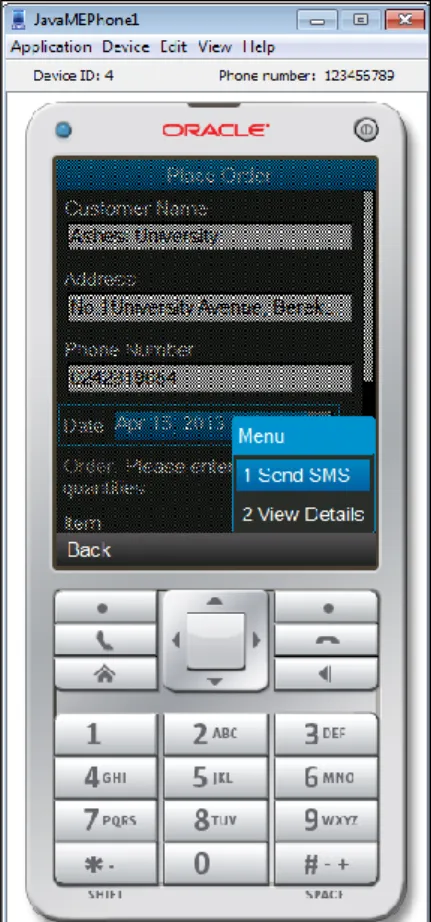
Primarily, customers can place orders for their items online via their mobile devices or from a desktop. This application is also built on a J2ME platform which implies that it can run on java enabled feature phones. This mobile application allows customers to place orders and receive feedback concerning their orders via sms.
To begin with, customers ordering via the mobile application to place orders must first log into the application to be identified and prevent illicit access. After a successful login, customers view a form with relevant fields that allow them to enter details regarding their order. The total cost is computed automatically for the customer and the “send order” button is clicked to place the order. After a successful ordering process customers receive a confirmatory sms regarding the details of their order, to show that it was actually received.
34
35
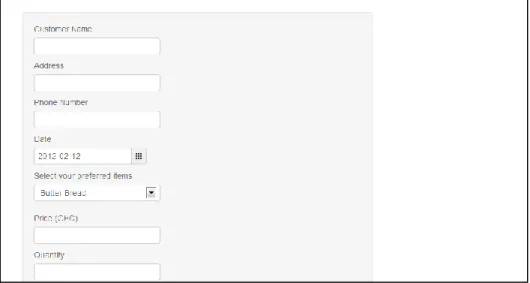
Customers ordering from the web application also go through a similar authentication process. Once logged into the system, they are redirected to a web interface that allows them to place their order. Important information that will be used to make a delivery; such as the customer’s name, address and phone number need to be provided for an order to be successful. The items and their respective prices are loaded from the database and the total cost of the order is computed automatically to facilitate the ordering process for customers.
Fig 4.2: Customer order form on webpage
All orders placed online or via sms are recorded in the central database and can be retrieved on management’s inventory portal.
4.1.2 Implementing the proof of delivery application
The proof of delivery application built on an Android platform renders the following features:
36
A login application that identifies different delivery personnel. It includes authentication to enable the rightful persons to access the application and prevent illicit access.
After personnel have been authorized to access the application, they navigate to a menu of options that is sectioned into “Deliveries”, “Reports” and “Help”. The Deliveries option when clicked pulls out from the database, specific deliveries that have been assigned to a particular person. When personnel view their assigned deliveries, they can search the customer’s location via a map that has been built into the application.
37
Fig 4.3: Screenshots showing list of deliveries, map and form to record details.
After successfully tracing the location of the customer and upon delivering the goods, delivery personnel record other details of the transaction such as their name, the name of the customer, the amount paid; while the time and date of delivery are recorded automatically using a timestamp in the database. Personnel also log their GPS coordinates.
Though delivery personnel have entered the particulars of the delivery, what makes it complete is the scanning procedure. The actual proof of delivery occurs when delivery personnel conduct a scan of the customer’s QR code. In traditional proof of delivery systems, customers need to sign a form to prove that they have indeed received the goods; however, in this system, each customer (an individual or a business) possesses a unique QR code that contains information about them, such as their name, phone number and location. On scanning the customer’s QR code, the content of the code is saved to the database and can be
38
accessed on the web interface by management to infer whether a delivery has actually been made. Delivery personnel also need to update the status of an assignment by indicating with a radio button whether a particular assignment has been completed or not.
Fig 4.4: Screenshots of the scanning process and the scanned results.
An additional feature to this proof of delivery application is a receipt generator that produces a receipt of the delivery transaction and allows delivery personnel to issue accurate receipts to customers via a Bluetooth connection to mobile printers. This revolutionizes the traditional paper system whereby receipts are handwritten for customers and can be easily misplaced.
39
Fig 4.5: Screenshots of the receipt generating process and a sample receipt.
4.1.3 Implementing the web application
The web application is a platform for management and administrators of the business to monitor and control various aspects of their business operations. In order to access the system, administrators need to sign into the application through a sign in interface. Administrators/managers have the privilege to view orders placed by customers either online, or via the sms application. From there, administrators proceed to assign deliveries to delivery personnel at their appointed shift hours.
Another important feature of the web application is the QR code generator that generates unique codes for customers. Administrators can choose the dimension of the code, the particular encoding that should be used to generate the code and also the error correction technique to be
40
used. The content that the QR code will hold is typed into the content pane in the webpage.
Fig 4.6: QR code generator in webpage
Administrators can also view the whereabouts of delivery personnel in real time on the web interface. Markers on the web page indicate where delivery personnel have been and the time and the date of delivery as well. Below is an image showing a map with the name of the personnel who visited the marked location and the time he delivered the items.
41
With a click, PDF reports can be easily generated. Administrators can generate reports for orders that have been placed, the deliveries made over a period as well as the location of delivery personnel on maps.
4.2 Testing and Results
Development testing was carried out to locate defects within the various programs. By frequently debugging the programs and applications, it became easier to identify and fix bugs in the code. Development testing comprises component testing, system testing and unit testing.
4.2.1 Unit Testing
Unit testing involves testing the individual classes, functions or objects used in the application. In the applications that required interaction with the web server, pieces of the code were run in the web browser to see if results were being obtained. Areas of the code that returned errors were debugged. In the case of the Android proof of delivery application, once changes were made to the graphical layout, the project needed to be cleaned and built for the changes to take effect.
42
4.2.2 Component Testing
Component Testing involves combining individual components of the system and testing them together rather than individually. For instance, in the android proof of delivery application, the map application and the scanner application were created in different projects outside the main project. Though these individual applications run without errors, when they were integrated into the main project, shared library errors and reference errors manifested. Likewise, in the web application script errors in one file hampers smooth flow across the entire web application when they are run as components.
4.2.3 System Testing
System testing integrates the various components of the application into one whole for testing. It is aimed at ensuring that different components are compatible with each other and that the right information is passed across interfaces. Here, test cases were developed using activity diagrams which facilitated the testing process. For example, from the delivery personnel’s activity diagram in chapter 3.4, the ‘record details’ action was tested by checking the database for saved results.
4.2.4 Compatibility Testing
The proof of delivery application was built on Android version 4.1.2 (Jelly Bean), but can however run on Ice Cream Sandwich and other lower versions of Android as well. When run on lower versions of Android such as Honeycomb, Gingerbread and Froyo, the display is distorted. This
43
implies that the application can run perfectly on Ice Cream Sandwich (version 4.0) and JellyBean without distortions.
4.2.5 Limitations
One major limitation is that the android proof of delivery system runs smoothly on only version 4.0 and higher. This would require an upgrade of android operating systems running versions lower than 4.0. Also, the application is not fully functional when offline. This is a major setback for such an application which requires mobility.
4.3 Challenges
The maps may not be effective in cases where locations cannot be found on a map. A ‘location not found’ message usually pops up to inform the user that the location cannot be found. Working with the Maps and Charts API was challenging in instances where lack of internet access hampers the ability to obtain information from the API to produce expected results. For example, when generating QR codes on the web interface, internet access is required to obtain the generated code. A lack of internet access will return no code. In addition, it was quite challenging finding certain locations in Ghana because of poor street naming conventions.
When integrating the map application into the main application the error “Installation Error: INSTALL_FAILED_MISSING_SHARED_LIBRARY” showed up. This implied that there were two different android libraries running at the same time. The error surfaced after adding the google play
44
services library. To resolve this error, a new project was created. Files were transferred from the old one into the new, the build target was changed to the Google API and the project was cleaned and run on the emulator.
Errors occurred after integrating the Zxing library into Android. To resolve the errors with the class files, the package name of the project was imported into all the class files that were producing errors and the @Override notation was removed.
Lack of an Offline mode: One flaw of the proof of delivery application is that it does not cater for an offline mode.
45 CHAPTER 5: CONCLUSION AND RECOMMENDATIONS
5.1 Conclusion
This report gives a breakdown of how various technologies such as maps, GPS and QR codes can be incorporated into a proof of delivery application for bakeries and other businesses that conduct deliveries. The objectives of this project are to enhance the customer service experience, rate the efficiency of delivery personnel and most importantly, enable management make informed decisions. To achieve these objectives, a SMS application, android application and web application were built and tested respectively. The proof of delivery application in particular borrows from existing ones with the incorporation of QR codes being a distinguishing factor. A few flaws were recorded for the android application: for instance it runs smoothly on Android version 4.0 (Ice Cream Sandwich) and higher, but is however distorted on lower versions. Also, it is not fully functional without internet access. This system serves as a blueprint for subsequent ones and opportunities exist for future development.
5.2 Recommendations and Future Work
SQLite: To further explore the functionality of the proof of delivery
application, SQL Lite which acts as a local database on the Android phone can be used to store data locally without losing it in the absence of internet connectivity.
46
Cross-platform: Also, to ensure that the application has a wider reach, it
would require developing the application to be compatible with other mobile platforms such as Windows Phone, Apple Phone IOS as well as on Blackberry phones.
Accounting Module: To further enhance the functionality of this system,
an accounting module can be incorporated into the web application for management to allow them to calculate revenue on sales made as well as profits and losses.
Routing Algorithm: Ideally, delivery personnel should have a map that
draws out routes to their destinations. The map implemented in this application only allows personnel to search for locations. For the map activity to be more efficient, it would be better for delivery personnel to have a map that shows them routes from their origin to destination.
47 Bibliography
[1] M. Kuofie, B. Ofori, R. Yellen and P. Garsombke, "Mobile Phone Providers and Economic Development in Ghana," Journal of Information Technology and Economic Development, vol. 2, no. 2, pp. 17-29.
[2] G. Moore, "One Blog," 1 February 2012. [Online]. Available:
http://www.one.org/international/blog/peering-into-ghanas-mobile-future-with-mac-jordan-degadjor/. [Accessed 16 March 2013].
[3] "Case Studies," 2010. [Online]. Available: http://www.x-check.co.uk/ProofofDelivery.php. [Accessed 20 March 2013]. [4] "About NuVizz," 2013. [Online]. Available:
http://nuvizz.com/company/nuvizz/index.html.. [Accessed 20 March 2013]. [5] "NuVizz proudly presents DeliverIt," 2013. [Online]. Available:
http://nuvizz.com/solutions/proof-of-delivery/index.html.. [Accessed 20 March 2013].
[6] "Proof of Delivery Mobile App," [Online]. Available:
http://www.karmak.com/uploads/docs/Deliver-It.pdf. [Accessed 20 March 2013].
[7] "SkyMobile SAP proof of delivery demo from Sky Technologies," 25 August 2009. [Online]. Available: http://www.youtube.com/watch?v=4qa87m8cHJk. [Accessed 21 March 2013].
[8] "QR Codes," [Online]. Available: http://mashable.com/category/qr-codes/. [Accessed 22 March 2013].
[9] "The Global Positioning System," 7 January 2013. [Online]. Available: http://www.gps.gov/systems/gps/. [Accessed 22 March 2013]. [10] "Google Chart Tools," 26 March 2012. [Online]. Available:
https://developers.google.com/chart/infographics/docs/qr_codes. [Accessed 1 April 2013].
48 Appendix
gen.php
<?php
if(isset($_REQUEST['content'])){
//capture from the form
$size = $_REQUEST['size'];
$content = $_REQUEST['content'];
$correction = strtoupper($_REQUEST['correction']);
$encoding = $_REQUEST['encoding'];
//form google chart api link
$rootUrl =
"https://chart.googleapis.com/chart?cht=qr&chs=$size&chl=$content&choe=$encoding&chld= $correction";
//print out the image
echo '<img src="'.$rootUrl.'">'; }
?>
Listing 1: Using Google Charts API to fetch QR code
<?php
$connect= @mysql_connect("localhost", "root", "root");
if(!$connect)
{
echo"<span style='color:red'> error connecting</span>";
exit();
}
if(!mysql_select_db("podsys", $connect))
{
echo "<span style='color:red'>error selecting db:" .mysql_error("Error selecting db") ."</span>";
exit(); //end script
} ?> <html> <head>
<meta http-equiv="content-type" content="text/html; charset=utf-8"/> <title>Google Map API V3 with markers</title> <style type="text/css">
body { font: normal 10pt Helvetica, Arial; }
#map { width: 430px; height: 370px; border: 0px; padding: 0px; } </style>
<script src="http://maps.google.com/maps/api/js?v=3&sensor=false" type="text/javascript"></script>
<script type="text/javascript"> var icon = new
google.maps.MarkerImage("http://maps.google.com/mapfiles/ms/micons/blue.png", new google.maps.Size(32, 32), new google.maps.Point(0, 0), new google.maps.Point(16, 32));
var center = null; var map = null; var currentPopup;
var bounds = new google.maps.LatLngBounds(); function addMarker(lat, lng, info) {
var pt = new google.maps.LatLng(lat, lng); bounds.extend(pt);
var marker = new google.maps.Marker({ position: pt,
icon: icon, map: map });
var popup = new google.maps.InfoWindow({ content: info,
maxWidth: 300 });
49
google.maps.event.addListener(marker, "click", function() { if (currentPopup != null) { currentPopup.close(); currentPopup = null; } popup.open(map, marker); currentPopup = popup; }); google.maps.event.addListener(popup, "closeclick", function() { map.panTo(center); currentPopup = null; }); } function initMap() {
map = new google.maps.Map(document.getElementById("map"), { center: new google.maps.LatLng(0, 0),
zoom: 14, mapTypeId: google.maps.MapTypeId.ROADMAP, mapTypeControl: false, mapTypeControlOptions: { style: google.maps.MapTypeControlStyle.HORIZONTAL_BAR }, navigationControl: true, navigationControlOptions: { style: google.maps.NavigationControlStyle.SMALL } }); <?
$query = mysql_query("SELECT * FROM deliveries"); while ($row = mysql_fetch_array($query)){
$name=$row['delivered_by']; $lat=$row['latitude']; $lon=$row['longitude']; $desc=$row['date_time'];
echo ("addMarker($lat, $lon,'<b>$name</b><br/>$desc');\n"); } ?> center = bounds.getCenter(); map.fitBounds(bounds); } </script> </head>
<body onload="initMap()" style="margin:0px; border:0px; padding:0px;">
<div id="map"></div> </html>
Listing 2: Using Google Maps API to draw maps in webpages
package com.example.scanit; import java.io.BufferedReader; import java.io.InputStream; import java.io.InputStreamReader; import java.net.URLEncoder; import org.apache.http.HttpResponse; import org.apache.http.client.methods.HttpGet; import org.apache.http.impl.client.DefaultHttpClient; import android.os.AsyncTask; import android.os.Bundle; import android.app.Activity; import android.content.Intent; import android.util.Log; import android.view.Menu; import android.view.View; import android.view.View.OnClickListener; import android.widget.Button; import android.widget.RadioButton; import android.widget.TextView; import android.widget.Toast;
50
public class BarcodeScanner extends Activity implements OnClickListener{
private static final int REQUEST_CODE = 0;
public RadioButton r1,r2;
public Button btn, btn1;
@Override
protected void onCreate(Bundle savedInstanceState) {
super.onCreate(savedInstanceState); setContentView(R.layout.activity_barcode_scanner); r1 = (RadioButton)findViewById(R.id.radio0); r1.setOnClickListener(this); r2 = (RadioButton)findViewById(R.id.radio1); r2.setOnClickListener(this); //tv=(TextView)findViewById(R.id.textView1); //tv.setText(Deliveries.idRes1); btn= (Button)findViewById(R.id.button2); btn.setOnClickListener(this); btn1= (Button)findViewById(R.id.button3); btn1.setOnClickListener(this); } @Override
public boolean onCreateOptionsMenu(Menu menu) {
// Inflate the menu; this adds items to the action bar if it is present. getMenuInflater().inflate(R.menu.activity_barcode_scanner, menu);
return true; }
public void scanNow(View view) {
Log.d("test", "button works!");
Intent intent = new Intent("com.google.zxing.client.android.SCAN");
intent.putExtra("com.google.zxing.client.android.SCAN.SCAN_MODE", "QR_CODE_MODE"); startActivityForResult(intent, 0); }
public void onActivityResult(int requestCode, int resultCode, Intent intent) {
if (requestCode == 0) {
if (resultCode == RESULT_OK) {
String contents = intent.getStringExtra("SCAN_RESULT"); String format = intent.getStringExtra("SCAN_RESULT_FORMAT"); Log.i("xZing", "contents: "+contents+" format: "+format);
//outputting contents of QR code in a toast
Toast.makeText(this.getApplicationContext(), "Scanned code " + contents, Toast.LENGTH_LONG).show();
DownloadWebPageTask task = new DownloadWebPageTask(); task.execute(new String[]
{"http://10.0.2.2/applied/scanresult.php?scan_result=" + URLEncoder.encode(contents)}); // Handle successful scan
}
else if (resultCode == RESULT_CANCELED) {
// Handle cancel
Log.i("xZing", "Cancelled"); }
} }