Using Virtualization to Create and Deploy
Computer Security Lab Exercises
Brian Hay, Ronald Dodge, and Kara Nance
AbstractProviding computer security laboratory exercises enables students to ex-perience and understand the underlying concepts associated with computer security, but there are many impediments to the creation of realistic exercises of this type. Virtualization provides a mechanism for creating and deploying authentic computer security laboratory experiences for students while minimizing the associated con-figuration time and reducing the associated hardware requirements. This paper pro-vides a justification for using virtualization to create and deploy computer security lab exercises by presenting and discussing examples of applied lab exercises that have been successfully used at two leading computer security programs. The ap-plication of virtualization mitigates many of the challenges encountered in using traditional computer laboratory environments for information assurance educational scenarios.
1 Introduction
Creating authentic physical computer security scenarios is a challenging undertak-ing, requiring a significant commitment of time and effort on the part of the instruc-tor and lab support personnel, but the benefits of hands-on lab experiences is an im-portant part of computer security education. Traditional computer lab environments are typically unsuitable for computer security, information assurance, and network-ing research and classwork, for a variety of reasons, includnetwork-ing a lack of network isolation, the challenges associated with the creation and deployment of scenarios, Brian Hay, Kara Nance
Department of Computer Science, University of Alaska, Fairbanks, AK 99775, e-mail: [email protected]
Ronald Dodge
Department of Electrical Engineering and Computer Science, United States Military Academy, West Point, NY 10996, e-mail: [email protected]
and the legal and ethical issues associated with computer security lab experiences [4]. Virtualization provides a mechanism to mitigate the challenges associated with traditional lab environments, allowing an instructor to easily create and deploy au-thentic and applicable computer security lab scenarios that allow students to gain practical experience of the concepts presented during classroom lectures.
2 Virtualization
Virtualization provides the ability to create and host multiple machines within one physical machine, thereby allowing the development of complex scenarios with a minimal hardware commitment [2, 17]. To be able to evaluate a student’s mastery and understanding of the underlying principles associated computer security sce-narios; typically a student demonstrate proficiency. This presents several challenges as identified above. Because the construction of the virtual environment is carefully controlled by the developer, it is possible to create isolated virtual environments within one physical host where the deployment of a virus, which could be diffi-cult to control in a traditional lab environment, can be easily controlled. Another identified challenge, recreation of scenarios, is markedly simple in a virtual envi-ronment. Virtualization includes ”the ability to create standard configurations for virtual machines, which can then be essentially cloned and used by others[4].” In addition to the great flexibility offered by the virtual machines, the target comput-ers are generally very small, offering the ability to distribute authentic scenarios in virtual environments on a DVD. This simplifies the distribution process as well as the setup time required to recreate a scenario. The use of virtual machines presents students with a full spectrum of hands-on opportunities to learn about, experiment with, analyze, build, and demonstrate competency in a wide range of scenarios.
3 Lab Exercises
The following sections describe the components of various lab exercises supported by multiple virtual machines. While a wide range of commercial and open source virtualization products exist, including Virtual PC/Server [8], VMware [20], QEMU [16], KVM [5], Xen [23], and Parallels [12], the examples presented in this paper were constructed on VMware Workstation. The four examples provide a sampling of computer security scenarios, but are by no means a comprehensive coverage of the rich arena of computer security problems that students are likely to encounter when working as professionals. They are intended to provide instructors with start-ing points from which additional scenarios can be derived and shared. For stan-dardization, the following scenarios were created using VMware Workstation and use the terminology associated with VMware technologies. The tools used in the labs, at the extent possible, are all open source, freeware tools, or demo versions.
The intent was to design labs with the least possible support overhead. The subject matter and hands-on nature of the labs is such that students will employ procedures and build, configure, and use malware with the intent of exploiting systems (in our case, virtual systems). This methodology is founded on the principle that learning how defensive technologies and practices work is facilitated by understanding the attacks first. As an example, in learning how firewalls work and are configured, it is important to understand how various scanning techniques work to map open fire-wall ports. A very important precursor to this type of exploration is the explanation of the legal and ethical obligations the student must agree to. Typically this is ac-complished through a written agreement between the student and the instructor that explicitly outlines the environment in which the student must operate within.
3.1 Lab Exercise 1 - Demonstration of Basic Security Concepts
The objective of Lab Exercise 1 is to increase students understanding of some of the basic computer security concepts that they are likely to encounter in day-to-day computer use. The target audience for most of the examples given is entry-level computer science students, although components of this lab have been used as a basis for K-12 outreach as well as an example for non-majors. Upon completion of this lab experience, students should be able to define some basic security concepts and also to make informed choices when faced with computer security decisions regarding the associated concepts.3.1.1 Introduction
Although the majority of computer science students will not focus exclusively on security in their post graduation careers, it is vital that all computer science stu-dents have an understanding of the basic concepts of computer security if many of the security failures of the past (and present) are to be avoided in the future. Pro-grammers, IT architects, and managers all need to be aware of the ways in which security vulnerabilities can be introduced into the products they will be responsible for if the state of computer security is to improve. At the University of Alaska Fair-banks (UAF) modules are incorporated into all core classes in the computer science curriculum to address some important practical computer security concepts, such as:
• Carefully validating input rather than blindly trusting it.
• Including security requirements in the initial stages of a project rather than at-tempting to add them in once the product is functional.
• Understanding the concept of least privilege. • Building more secure software.
While in-class discussion of these concepts is useful, some lab exercises using vir-tual machines have been developed at UAF to allow students to observe some classic examples of failures in computer security.
3.1.2 Configuration
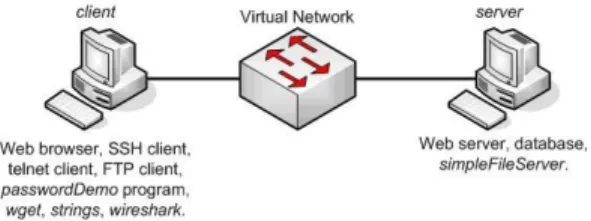
The laboratory environment consists of two virtual machines (VMs), namedclient andserver, connected by a virtual network as shown in figure 1. CentOS[24], a Linux distribution that is a Red Hat Enterprise Linux clone, was chosen as the op-erating system for both VMs, primarily because it is not only freely available, but also licensed in such a manner that the virtual machines can be easily distributed to students at UAF, and even to other institutions, without violating licensing agree-ments. However, similar environments demonstrating the same concepts could be constructed using any other mainstream operating systems. The client system in-cludes a web browser (Firefox), a secure shell client, a telnet client, an FTP client, thepasswordDemoprogram, thewgetutility, thestringsutility, and a network traffic sniffer (Wireshark). The server system includes a web server (Apache, listening on ports 80 and 443), a database (MySQL), and thesimpleFileServerprogram.
Fig. 1 Network diagram and installed programs/services for the basic security concepts exercise.
3.1.3 Lab Activity
The lab consists of the following activities which can be conducted as one lab or a sequence of lab experiences:
1. Encrypted versus unencrypted network traffic.The student starts the network packet sniffer onclient, then initiates a telnet session toserver, performs a few basic operations, such as a directory listing and the display of file contents using cat, then logs out. The student can then review the data captured by the packet sniffer, which clearly shows the contents of the session, including the login name, password, and the results of all operations performed in plaintext. The exercise is then repeated using secure shell rather than telnet, at which point the packet snif-fer does show that encrypted traffic flowed betweenclientandserver, but there is little additional information revealed, such as the plaintext user name,
pass-word, and operations performed. FTP and SFTP, or HTTP and HTTPS can also be used, and provide similar examples of the use of plaintext versus encrypted network communications. The placement of the packet sniffer onclient in this exercise rather than on a third system, which would have been more realistic, was the subject of some debate and careful consideration. Ultimately its place-ment onclientwas chosen in part to simplify the environment, but also to reduce the risk associated with demonstrating packet sniffing to students, particularly if the scenario is distributed beyond the classroom environment. In this configu-ration the concept of monitoring plaintext and encrypted network traffic can be demonstrated while not providing a system that would gather additional packets in a commonly deployed switched environment, thereby placing the student in a potentially problematic legal situation. On some occasions students have raised the question of whether these techniques only work when the monitor is placed on one of the endpoints, at which point further explanation, and even instructor led demonstrations, can be provided at a level that is appropriate for the maturity of the students in question.
2. Storing secrets.A small program namedpasswordDemois installed onclient, which ask the user to enter a password, and then responds with either ”Access granted” if the correct password is entered, or ”Access Denied” otherwise. The goal is for the student to determine the correct password, which is not provided to them, when presented with the executable but not the source code. However, through the use of thestringscommand the students can quickly find all ASCII character sequences in the password, and then use that information to determine what the correct password is. An alternative, although more complex, approach to solving this problem is to patch thepasswordDemobinary to either modify the password with the program, or even alter the execution sequence.
3. Buffer overflows. A small program named simpleFileServer is installed on server. The program allows a remote user to make a request for a file, which is then returned if it exists within a preconfigured directory, which is essentially the functionality of a very basic web server. The program was written specifi-cally for this exercise, and contains multiple vulnerabilities, including a buffer overflow resulting from a read of up to 255 bytes into a 25 byte array in the han-dleConnection() function. This vulnerability can be trivially used to cause the simpleFileServerprogram to crash, and can, with some additional effort, be used to execute remote user supplied code on server. The program also contains many other relevant problems, including a violation of the least privilege concept (it must be run with elevated privileges in order to bind to port 81, but does not drop to a lower privilege level once that has been accomplished), a time of check ver-sus time of use (TOC/TOU) issue in thehandleGet()function, and the ability for a remote user to successfully retrieve files outside the designated directory using a directory traversal attack.
4. Failure to Validate Input.The web server on server includes a page which per-forms user authentication based on a username/password combination entered by the user, and which then displays some confidential data if the user is au-thenticated. The connection between the client and server is secured using SSL,
and as such an attacker monitoring the connection would be unable to view the data, such as the password or confidential data, passed betweenclientandserver. However, the web page uses the username and password supplied by the user di-rectly in an SQL statement, which allows an attacker to perform a classic SQL injection attack which bypasses the username/password check altogether, and al-lows unauthorized viewing of the confidential material.
5. Bypassing client verification.The web server onserverincludes a second page which is very similar to the one used in the previous example, with the excep-tion that it includes JavaScript code to ensure that prior to submission to the web server the username consists of between 1 and 10 alphanumeric characters, and that the password consists of between 1 and 8 digits. These checks appear to pro-vide a defense against the SQL injection attack previously demonstrated, but the attacker can easily bypass this by either creating a modified version of the page that omits the check, by typing the page request directly into the browser’s ad-dress box, or by using an alternate client, such aswget, to send the page request. 3.1.4 Discussion
While these examples are all certainly contrived for use in the lab, there are many real world examples of all of these vulnerabilities which resulted in successful ex-ploits. While these example do not cover all of the ways in which vulnerabilities can be introduced into computer systems, the intent is that students will gain some understanding of how simple (and unfortunately all too common) programming and architectural mistakes can result in devastating exploits. While this lab can be used as an introduction to computer security issues, any of the components can be used as a starting point for a more in depth discussion of computer security topics. For example, programs often need to be able to store and use secrets, such as encryption keys, and while the demonstration showed that hard coding these secrets in executa-bles is likely to be problematic, it is interesting to work through other approaches to solving that problem with students, either as a class lecture, group discussion or individual assignment.
3.2 Lab Exercise 2 - Digital Forensics Investigation
The objective of Lab Exercise 2 is to increase students understanding of the process associated with incident response and addresses a key research area identified in the virtualization in digital forensics research agenda [14]. The target audiences for the examples are extremely varied. Note that the following lab activity description has been necessarily summarized for this paper and can be adjusted to meet the educa-tion needs of most digital forensics audiences. The labs are all part of one single larger investigation. Through the completion of the labs, the students will find con-flicting indicators and will have to separate out these factors. As an example, content
found on the machine under a given user’s profile has a created date when a different user was logged in. Upon completion of this lab experience, students should be able to respond to incidents and to help develop policy for incident response at a level consistent with the depth of the laboratory experience.
3.2.1 Introduction
The second lab explores what to do after an incident whether it is malware initiated or the result of illegal activity. Forensics exercises involve many stages of evidence recovery and analysis. To completely evaluate a students understanding of the tech-niques and requirements for all stages, typically a student needs multiple physical machines. We focus on four primary objectives for our curriculum where multiple computers are needed; chain of custody, network activity monitoring, volatile evi-dence collection, and hard drive imaging. It is hard to learn these objectives without investigator and target machines. (Typically, if the instructor provides the students with a hard drive image, only chain of custody and image analysis be done without the need for a multiple system environment.) The use of virtual machines presents students with a full spectrum of hands-on opportunities to learn and demonstrate all aspects of digital forensics. The following section describes the components of var-ious digital forensics lab exercises supported by multiple virtual machines. The vir-tual forensics environment can exist between a physical host and a virvir-tual machine or two virtual machines. Depending on the objectives, the most flexible configura-tion consists of multiple virtual machines. This setup allows for the investigator’s machine to take many forms - from a platform to use standard *nix utilities to full Windows based forensic suites or bootable platforms (for example, Helix, FIRE, or Knoppix). The use of virtual machines is also valuable for the target computer as well. Various operating systems present unique requirements for investigators from analysis of network traffic to log file analysis. As mentioned previously, the examples will use terminology based on VMware workstation. This example lab configuration combines the four objectives identified above and includes only basic tasks for the student to perform. In practice, each objective can be implemented sep-arately and expanded to evaluate tasks in detail as appropriate for varying curricula. More detailed documentation is available through contact with the authors. 3.2.2 Configuration
The laboratory environment consists of two virtual machines, a target machine that is the subject of an investigation, and an investigator’s machine. The target com-puter is configured to dual boot into Windows XP system and Ubuntu 7.2 (minimal install) and the investigator’s machine is a Windows XP system configured with a forensic tool suite and other free tools (for example windows dd.exe, Windows Forensic Toolkit, or tools from sysinternals). The virtual machines are configured to connect to a virtual network (VMnet 2). This configuration allows for many options.
First, the target system can be booted to either operating system and placed into a suspend state. The student could then un-suspend the system, presenting each stu-dent with istu-dentical target computer. Based on the scenario, evidence can be present on both operating systems, requiring the student to understand the differences in how the systems store and interact with files and memory and perform authentica-tion. Second, the investigators system could use either the installed tool suite and freeware tools or be booted into a forensics platform.
3.2.3 Lab Activity
Lab example: The target computer booted in Win XP. Based on the collection exer-cise, the investigator’s system will vary.
1. Chain of Custody.Evidence chain of custody is arguably the most important step in a digital forensics investigation. This lab requires the student to identify the objectives of an investigation, determine the support requirements, develop a case outline, and implement chain of custody documentation.
2. Network Traffic Analysis. The network activity of a computer may be very useful in determining where to start an investigation, if the incident has spread to other computers in the network, and possible attribution to the source of the compromise. In this exercise, the student may use a variety of tools including wireshark [22], tcpdump [19], SNORT [18], and Nmap [10] to capture and ana-lyze the network traffic of a compromised computer. As part of the preparation for the lab, the target machine was compromised and from the network activity the student should identify that the computer is sending out data to an IP address using UDP. Additionally from a port scan, the student should identify several open ports with established connections indicating malicious services including IRC [11].
3. Image Capture.Proper image capture is essential for a complete and valid inves-tigation. Use dd to remotely (over the virtual network) image the target system or read-only mount the virtual disk file an image locally (done using a Linux based investigation platform). Students are taught how a virtual disk can be mounted in a different virtual machine. Since the mounting will not take place using a physical write block device, part of the student instruction is how to mount a device in read only mode. As a demonstration of a capability, the students also use Liveview [6] to create VMware virtual machine from the newly acquired dd image.
4. Volatile Memory Collection.An area that is often overlooked is the capture of volatile memory. Students use a collection of tools, such as dd, pmdump [13] to collect and WinHex [21] to analyze the contents of volatile memory.
5. System Log Collection. Like virtual memory collection, system logs present on a system can provide a valuable source of information, ranging from service failures to failed/successful login-ins. In some instances, an investigator will want to extract these logs prior to shutting down a target system. The student can
use psloglist [15] or dumpel.exe [3], a tool in the Microsoft Product Support Reporting Tool Suite, to collect system logs from the Windows target system. 6. Analyze the imaged disk.The area where significant information is gained is
through direct interaction with the target data. While this could be done without the aide of virtual machines, it is an important step in the progression of labs. The student uses forensics suites, freeware tools, or booted investigation platform to complete the investigation of various file system and partition artifacts.
3.2.4 Discussion
Each of these steps could be completed using the tools indicated or others available either from a commercial or open source suites running on Windows, Linux, or a booted platform (Helix). The depth of the labs provided here is presented as an overview and provide only an example of the breadth of capability. In practice each topic within the labs is richly expanded to include additional methods to obtain the needed information or a detailed series of questions about the state of the target system, and the amount of information. The amount of detailed guidance provided to the students can be adjusted to meet the needs of the target population. Examples of extensions to the lab include activities such as mining files for information. This topic can be developed further to discuss file type obfuscation to alternative data streams to data carving. This ability to incorporate a depth component in a versatile environment provides a scalable experimentation environment for education and training.
3.3 Lab Exercise 3 - Botnets
The objective of Lab Exercise 3 is to increase student understanding of the concept of a botnet and the security measures associated with managing this threat. The target audiences for the examples are entry-level computer science students, but more advanced students also find this lab intriguing. Upon completion of this lab experience, students should understand how botnets can be created and deployed. 3.3.1 Introduction
Much like the previous example, investigation of malware from an attacker’s per-spective benefits as well from virtualization. This example details an environment to build and deploy a botnet. The exploit will start like many others; a user visits a compromised website and gets compromised. The bot will then not only allow control over the compromised computer, but it will also seek out other vulnerable systems and extend the size of the botnet. The lab exercise is configured to allow
for exploration of malware signatures of a compromise on the target system as well from the network.
3.3.2 Configuration
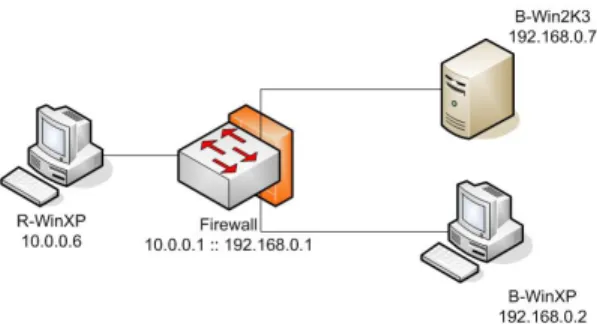
As in the previous lab environments, we can elect to use a variety of operating sys-tems for the lab based on the tools selected. The specific lab described here uses a Windows XP virtual machine for the attack computer, a Linux based firewall/router, and Windows XP and 2003 virtual machines for the target computers. The configu-ration of the laboratory environment is shown in Figure 2.
Fig. 2 Botnet lab virtual machine network
3.3.3 Lab Activity
The lab is broken down into four major phases as described below. As with the previous lab, the phases have been necessarily summarized and more information can be provided upon request.
1. Setting up the attack computer.The attack computer is set up in three stages. First, the development environment needs to be setup to compile the bot. For simplicity, we use lcc-win32 [7]. The student installs the executable (accepting all defaults). The next step is to configure the control channel using Office IRC. The student would install Office IRC and then launch the Remote Control appli-cation to configure a new IRC channel (call it ”#botc0ontrol”). in the next step the student will mIRC (an IRC client) [9] to issue commands to your army of bots. The student will configure mIRC to connect to OfficeIRC on localhost and connect to the new control channel, ”#botcontrol”.
2. Compiling sdBot.On the attack computer, start the lcc-win32 and open the sd-Bot C code file (this can be found through Google, however it is provided to the students). The students will analyze the code to understand how it works and en-sure the parameters are set to connect to the IRC server previously setup. After
the code is compiled, a new file called ”sdbot06b.err.exe” is created; this is the payload.
3. Infecting the victim(s). On the attack computer, the student verifies the file ”bot.htm” is in the c:\ Inetpub\ wwwroot directory and copys in the ”sd-bot06b.err.exe” file. On the target Windows XP virtual machine, the student opens an IE browser and navigates to the web site on the attack computer (http://10.0.0.6/bot.htm). On the victim Windows XP virtual machine, the stu-dent should run thenetstatcommand and should then see an outbound connec-tion to the IRC server and several connecconnec-tion requests on port 445 (this is the bot trying to spread!).
4. Wreaking havoc.On the firewall, the student will start monitoring traffic flowing over the firewall usingWireshark. From the attack Windows XP virtual machine, the student will use mIRC to tell the bot to ping the firewall 100 times. This should see the pings on theWiresharkmonitor on the firewall.
3.3.4 Discussion
This lab provides a brief example of how you can, in an isolated and secure envi-ronment, create, configure, and experiment with malware. As described earlier, the full labs (available from the authors) have much more detail and additional steps designed to explore techniques to prevent, discover, mitigate, and recover from ex-ploitation. The focus of the lab is for the student to understand how malware gets on a target system, installed, and what it is capable of doing. In the context of the whole course, the intent behind using and understanding the malware is to understand how to detect, mitigate, and defeat it. Once the malware (whether it be a bot or another example) is understood, the student can follow additional labs that demonstrate the effectiveness of various defensive technologies.
3.4 Lab Exercise 4 - War Games
The objective of Lab Exercise 4 is to provide students with experience with offen-sive and defenoffen-sive techniques related to computer security. The target audiences for is exercise is advanced computer science students with experience in computer se-curity. Upon completion of this lab experience, students should understand some of the steps that can be taken to defend a system against threats they may encounter. 3.4.1 Introduction
This exercise has been used on several occasions towards the end of an upper divi-sion computer security course, and it involves the use of both defensive and
offen-sive techniques. The class is divided into groups of 4-5 students, and the exercise is typically held over the course of 10-14 days near the end of the semester.
3.4.2 Configuration
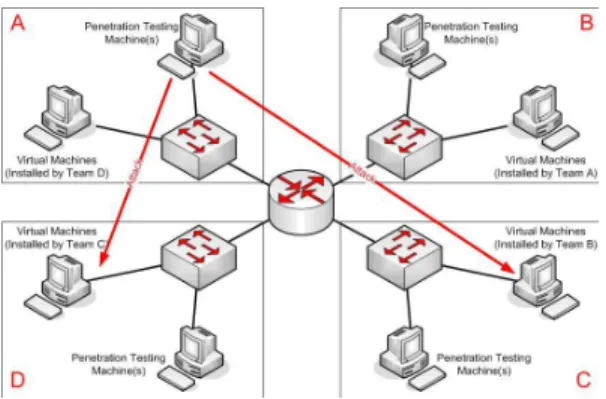
Each group of students is given access to 1 or more physical hosts, on which vir-tualization software, such as VMware Workstation, is installed. The systems are connected by a wired network which is physically isolated from any other network to ensure that any malicious traffic during the exercise cannot impact production systems. Figure 3 shows the network configuration for this exercise.
Fig. 3 War Games network configuration for example class consisting four teams.
3.4.3 Lab Activity
The exercise consists of four components, three of which are undertaken in the lab environment. The initial task is for each group of students to install and configure a small number (3-4) of virtual machines on one of their physical hosts. Students are free to select the operating system and installed applications for each VM, but they are required to include at least 5 network accessible services, which must remain accessible to all participants throughout the exercise. Groups are free to configure the operating systems, services, and applications, and can also optionally install additional services and applications, extra accounts, rootkits, scheduled tasks, etc. Routing between the subnets assigned to each of the teams is disabled at the cen-tral router during this period to ensure that teams do not begin the second and third components of the exercise prior to the scheduled start date. The second and third components of the exercise occur concurrently, and involve the teams attempting to defend their systems, while also attempting to compromise the systems assigned to other teams. This section of the exercise begins with an exchange of systems, so that each team is charged with defending a set of systems installed by another team.
Team leaders are required to meet to exchange the virtual machines, which really just involves moving to a new physical workstation rather than moving the virtual machines themselves. Administrator/root passwords for the physical workstations and virtual machines, and the list of 5 required services are also passed on at this point. For example, in an exercise with six teams Team A would pass their config-ured virtual machines, Administrator/root passwords, and required services to Team B, while receiving a set of virtual machines, Administrator/root passwords, and re-quired services from Team F. Once the exchange has occurred, the central router is reconfigured to allow network communication between the teams, and the teams are immediately responsible for defending their systems from attack, while ensur-ing that their required services remain operational. As part of this defensive effort, teams are free to modify the configurations of the services, disable unnecessary ser-vices, install additional tools or systems, and change operating system, application, or service vendors, versions or patch levels. During this process the team that in-stalled the systems can also monitor the system to ensure that the required services remain functional, as can the instructor (who can attempt to connect to the services from any of the subnets, ensuring that filtering based on source IP address is not an effective defense). Each team is also charged with penetration testing the other teams’ systems, with the exception that they are not permitted to attempt to compro-mise the systems they designed, nor are they permitted to share information about the configuration with other teams. For example, Team A will perform a penetration test on the systems being defended by Team C, Team D, Team E, and Team F. (They are not permitted to perform penetration tests on the systems defended by Team B as they designed and built that system.) They will have no information about these systems other than their subnet, and as such will begin by attempting to map the systems, followed by a vulnerability analysis, and ultimately culminating in a suc-cessful exploit if time and conditions permit. The penetration testing is conducted from one or more additional physical workstations assigned to each team, on which they were allowed to preload virtual machines for use in the penetration testing ef-fort. These active components of the exercise are typically conducted over 2 days, which allows each of the team members an opportunity to participate regardless of their class/work schedule. In addition, scheduling the exchange of systems for the start of a class period, and then immediately starting this phase of the exercise gives students a guaranteed session in which they can participate when they are most needed (i.e., when the systems they are defending and attacking are likely to be most vulnerable). The final component of the exercise is the preparation of a report and a presentation to the class by each group. The reports include:
• A description of the environment that the team installed, including the required services, known vulnerabilities, and other relevant information.
• A description of the systems they were given to defend, including the vulnerabil-ities they discovered and the steps they took to address them.
• A description of attacks that were detected. In some cases these are attacks that were prevented, and in other cases the attacks were successfully executed and only discovered at some later point.
• The results of their penetration testing efforts, including the tools used, informa-tion gathered, exploits attempted, and successful compromises (if any).
3.4.4 Discussion
While there are other approaches to running this type of exercise, such as those mod-eled around the Collegiate Cyber Defense Competition [1], this approach provides many of the same opportunities with significantly fewer people involved in running the exercise, and can essentially be organized by a single instructor. It is important that the students involved in this effort are sufficiently mature to be charged with the use of offensive tools, despite the environment being carefully controlled and physically isolated from any other network. In the past students have been encour-aged to be creative during this exercise, but also encourencour-aged to check for instructor permission prior to attempting anything they have any doubt about, and certainly prior to doing anything that involves the use of systems other than those assigned directly to their team. Examples of activities that students have requested clarifica-tion for which were subsequently disallowed include physical access to other team’s workstations, access to the core router configuration, and spoofing email messages outside the lab environment. However, on two occasions a team requested and was given permission to create a new webmail account in an attempt to acquire password information from the other teams. As a result, a hotmail account was created which contained the name of the instructor, which was then used, successfully in two inde-pendent cases, to request password information from the members of other teams. Other teams recognized the attempted attack, and in some cases changed their com-munication processes to include encryption or digital signatures to thwart further attempts. The in-class presentations often spark interesting discussion amongst the students, and in some cases the vulnerabilities found and exploited were not known to the team charged with initially configuring the environment.
4 Summary
The primary purpose of this paper was to provide examples of real labs being used in university settings to teach information assurance concepts. There has been much discussion on how to best design the physical architecture of information assurance labs, but little on the learning modules themselves. In this paper we discussed, in a summary fashion, four exercises that demonstrate the technique for applying vir-tualization in the classroom or lab. The exercises described, provide students with hands-on opportunities to learn concepts ranging from introductory to complex. It is important to note that while virtualization makes it trivial to create multiple copies of systems and distribute them with ease, that doesn’t mean it is legal. When doing this, one must ensure that the quantity of software licenses (for applications and op-erating systems) is appropriate. A further consideration is that students are working
with malware and learning techniques that may be applied maliciously and the as-sociated legal and ethical considerations should be directly addressed. The authors have implemented the exercises described in this paper with great success. Addi-tional material covering the physical infrastructure for virtual laboratories, exten-sions to the exercises described in this paper, and additional exercises are available through direct contact with the authors.
References
1. Official Collegiate Cyber Defense Competition Web site (n.d.) Retrieved December 18, 2007 from http://www.nationalccdc.org/
2. Crosby, S. and Brown, D. The Virtualization Reality. ACM Queue, December/January 2006-2007, pp.34-4
3. Dumpel.exe. Retrieved from the Microsoft Product Sup-port’s Reporting Tools web site on December 18, 2007 from http://www.microsoft.com/downloads/details.aspx?FamilyID=cebf3c7c-7ca5-408f-88b7-f9c79b7306c0displaylang=en)
4. Hay, B., K. Nance, and C. Hecker. Evolution of the ASSERT Computer Security Lab. Pro-ceedings of the 10th Colloquium for Information Systems Security Education. Adelphi, MD. June 2006.
5. Kernel based Virtual Machine. Retrieved November 18, 2007 from http://kvm.qumranet.com/kvmwiki.
6. Liveview sourceforge website retrieved December 18, 2007 from.http://liveview.sourceforge.net/
7. lcc-win32 retrieved on December 18, 2007 from http://www.cs.virginia.edu/ lcc-win32/ 8. Microsoft Virtual PC Server. Retrieved July 15 from
http://www.microsoft.com/windowsserversystem/virtualserver/ 9. mIRC retrieved on December 18, 2007 from http://www.mirc.com/ 10. Nmap website retrieved December 18, 2007 from http://nmap.org/ 11. Office IRC retrieved on December 18, 2007 from http://www.officeirc.com/ 12. Parallels. Retrieved July 25, 2007 from http://www.parallels.com/
13. Pmdump website retrieved December 18, 2007 from http://www.ntsecurity.nu/toolbox/pmdump/
14. Pollitt, M., Nance, K., Hay, B., Dodge, R., Craiger, P., Burke, P., Marberry, C., and Brubaker, B. Virtualization and Digital Forensics: A Research and Education Agenda in Journal of Digital Forensic Practice. Taylor and Francis, Philadelphia, PA.
15. psloglist retrieved from the Microsoft sysinternals web site on December 18, 2007 from http://technet.microsoft.com/en-us/sysinternals/default.aspx
16. QEMU (nd) Open Source Process Emulator. Retrieved on November 18, 2007 from http://fabrice.bellard.free.fr/qemu/.
17. Rosenblum, M. (2004) The Reincarnation of Virtual Machines. ACM Queue. July/August 2004 ACM.
18. Snort website retrieved December 18, 2007 from http://www.snort.org/ 19. TCPdump website retrieved December 18, 2007 from http://www.tcpdump.org/ 20. VMware. Retrieved November 18, 2007 from http://www.vmware.com.
21. Winhex website retrieved December 18, 2007 from http://www.winhex.com/winhex/ 22. Wireshark website retrieved December 18, 2007 from http://www.wireshark.org/ 23. Xensource. Retrieved July 27, 2007 from
http://www.xensource.com/xen/xen/nfamily/virtualpc/default.mspx 24. CentOS. Retrieved December 17, 2007 from