Master's Projects Master's Theses and Graduate Research
Spring 2018
Machine Learning Playground
Adil KhanSan Jose State University
Follow this and additional works at:https://scholarworks.sjsu.edu/etd_projects
Part of theComputer Sciences Commons
This Master's Project is brought to you for free and open access by the Master's Theses and Graduate Research at SJSU ScholarWorks. It has been accepted for inclusion in Master's Projects by an authorized administrator of SJSU ScholarWorks. For more information, please contact [email protected].
Recommended Citation
Khan, Adil, "Machine Learning Playground" (2018).Master's Projects. 647. DOI: https://doi.org/10.31979/etd.f8q5-cmfc
Writing Project
Machine Learning Playground
Final Report
Author Adil Khan CS 298 May 2018 Advisor Dr. Chris TsengA Writing Project Presented to
The Faculty of the Department of Computer Science San Jose State University
In Partial Fulfillment of the Requirements for the Degree: Master of Science
© 2018
Adil Khan
The Designated Committee Approves the Master's Project Titled Machine Learning Playground
By Adil Khan
Approved for the Department of Computer Science San José State University
May 2018
Dr. Chris Tseng
Department of Computer Science
Dr. Chris Pollett
Department of Computer Science
Dr. Jon Pearce
Acknowledgements
I would like to sincerely thank my project advisor, Dr. Chris Tseng, for his consistent support, advise and time. I would also like to thank my committee members, Dr. Chris Pollett and Dr. Jon Pearce, for their feedback and suggestions. Lastly, I would like to thank my family and friends for their unending support.
ABSTRACT
Machine learning is a science that “learns” about the data by finding unique patterns and relations in the data. There are a lot of libraries or tools available for processing machine
learning datasets. You can upload your dataset in seconds and quickly start using these tools to get prediction results in a few minutes. However, generating an optimal model is a time
consuming and tedious task. The tunable parameters (hyper-parameters) of any machine learning model may greatly affect the accuracy metrics. While most of the tools have models with default parameter setting to provide good results, they can often fail to provide optimal results for real-life datasets. This project will be to develop a GUI application where a user could upload a dataset and dynamically visualize accuracy results based on the selected algorithm and its hyper-parameters.
Table of Contents
1 Project Description ...9
1.1 Introduction ...9
1.2 Literature Review ...10
1.3 Problem Statement and Project Goal ...11
2 Project Components ...12
2.1 Bokeh ...12
2.2 Flask ...12
2.3 AWS ...12
3 Project Implementation ...14
3.1 Software Installation and Setup ...14
3.1.1 Web Application Setup ... 14
3.1.2 Storage Setup ... 18 3.1.3 Flask Application ... 21 3.2 Work Flow ...22 3.3 Algorithms ...25 3.3.1 Classification ... 26 3.3.2 Regression ... 35 4 Conclusion ...38 5 Future Work ...38 6 References ...39 7 Appendix ...42 7.1 Source Code ...42
Table of Figures
Figure 1 Choosing the AMI ...14
Figure 2 Setting Security Group Rules ...15
Figure 3 Creation of IAM Role ...16
Figure 4 Attaching the role to EC2 1 ...16
Figure 5 Attaching the role to EC2 2 ...17
Figure 6 Creation of S3 Bucket ...18
Figure 7 Encrypting the objects in our bucket ...19
Figure 8 Setting CORS Configuration ...20
Figure 9 Setting ACL for Public Reads ...20
Figure 10 Setting Life Cycle rule ...21
Figure 11 Application Workflow ...22
Figure 12 Landing Page ...23
Figure 13 Page View after Upload ...24
Figure 14 Accuracy Plot ...24
Figure 15 PR Curve Plot ...25
Figure 16 Bokeh Server for Random Forest Classifier ...27
Figure 17 Bokeh Server for SVM ...28
Figure 18 Bokeh Server for Gradient Boosting Classifier ...29
Figure 19 Bokeh Server for Decision Tree Classifier ...30
Figure 20 Bokeh Server for MLP Classifier ...31
Figure 21 Bokeh Server for KNN Classifier ...32
Figure 22 Bokeh Server for Stochastic Gradient Descent ...34
Figure 23 Bokeh Server for Logistic Regression ...35
Figure 24 Bokeh Server for Linear Regression ...36
Table 1 Tunable Parameters for Random Forest Classifier ...26
Table 2 Tunable Parameters for SVM ...27
Table 3 Tunable Parameters for Gradient Boosting Classifier ...28
Table 4 Tunable Parameters for Decision Tree Classifier ...29
Table 5 Tunable Parameters for Multi Layer Perceptron ...30
Table 6 Tunable Parameters for KNN Classifier ...32
Table 7 Tunable Parameters for Stochastic Gradient Descent ...33
Table 8 Tunable Parameters for Logistic Regression ...34
Table 9 Tunable Parameters for Linear Regression ...35
1
Project Description
1.1 Introduction
The objective for this project is to provide a Machine Learning application so that anyone could use this application to prototype a machine learning model based on the hyper-parameters selected by the user. Tuning the parameters is often the final step before presenting the results or deploying the machine learning model to production to be used. It is important to find the right mix of parameter settings to obtain the best results for your machine learning model.
The first step of applying machine learning to a dataset is to prepare the data in such a way that it can be used to generate a model for prediction purposes [1]. This step also entails
visualizing the data so that you can find any relevant relationships between different features of the dataset, as well as finding imbalances. Sometimes the data might need some kind of
manipulation or adjustment like de-duping, normalization, filling out missing values or label encoding. We might also need to convert some textual representation of features to their numeric equivalent. We can make use of a lot of open source tools & libraries that helps you through this step.
Once the data is ready to be used for under machine learning training, we can choose one or many of the machine learning models that researchers and data scientists have created over the years. These algorithms are broadly classified as classification and regression. Classification is fundamentally predicting a discrete number of values, while Regression is predicting a
continuous valued output. Choosing an appropriate algorithm for your data is often a tough step. In machine learning, there’s something called the “No Free Lunch” theorem which states that no one machine learning algorithm is best for all scenarios [2]. There are different factors at play such as the size and structure of the dataset, relationships between different features involved, skewness and noise in the data. As a result, we cant really say that Random Forest always outperforms Support Vector Machines or vice-versa.
Thus, the choice of algorithm often remains unclear unless we train and test our data using different machine learning models available. However, it is a good idea to narrow down the choices of algorithms based on the properties of each algorithm which can be used as a guide to select the correct one quickly.
This application will make it easier for machine learning enthusiasts to intuitively apply machine learning algorithms to their own datasets and visualize accuracy results as they change the parameters dynamically.
In Chapter 2, we describe the components used in the application. In Chapter 3, we discuss the steps for installation and setup of the application. In Chapter 4, we briefly describe the algorithms involved in the application. In Chapter 5, we conclude with the summarization of key features and in chapter 6, we list down some of the future work areas.
1.2 Literature Review
There are very few GUI platforms that support the dynamicity of machine learning algorithms. MLJAR is the closest application that has a similar goal and setting with respect to the proposed application [3]. It is a cloud based application that lets you upload your data securely and perform training & testing on a number of machine learning algorithms. It also has the ability to share your predicted results with others through common social platforms. This application also has pre-processing steps involved so the user does not have to worry about missing values or categorical data as opposed to the proposed application which does not possess this capability.
KNIME for Data Scientists is another project which attempted to go in the same direction [4]. It is primarily focused on data blending and aims to provide a unified platform to use your favorite machine learning tools. It is an open source tool available for download on free sign up. It allows for building extensive data analysis workflows including multiple nodes which
represent different areas of data analysis like data reading, data partitioning, data visualization, data learning & prediction, etc.
Weka is a popular software workbench that utilizes machine learning abilities to gain insightful knowledge about the data [5]. It is an open source software issued under the GNU General Public License. It supports typical data mining tasks such as data preprocessing, clustering, classification, regression, data visualization and feature selection.
1.3 Problem Statement and Project Goal
Applications of machine learning have started dominating various business markets and other corporate domains. Not just data scientists and machine learning enthusiasts, but also many individuals with no or minimal exposure to data science, have started getting involved in putting machine learning algorithms to use. However, they do not have the technical expertise to use any of the programming languages that support machine learning libraries. Hence, it becomes
difficult for them to do any sort of machine learning analysis [6].
The project goal is to provide a unified platform where anyone can upload a dataset, choose an algorithm of ones choice and get dynamic visuals on their prepared models. This application simply aims at providing a Graphical User Interface for training data and visualizing results based on the selected features and the hyper-parameters. It acts as an abstraction layer which hides the underlying implementation i.e. machine learning code, to provide easy-to-use interface that targets modern web browsers for presentation.
There’s just one caveat though: The application is primarily focused on training, optimization and evaluation, not so much on data preparation and data analysis. Hence, it is expected that the dataset being uploaded is clean and prepared to undergo training.
2
Project Components
2.1 Bokeh
Bokeh is an interactive data visualization Python library that is primarily used to provide elegant and beautiful data visualizations based on very large or real time datasets [7]. What makes it popular is its ability to interact with plot and layout fancy dashboards which can target web browsers. It uses D3.js as its frontend engine, while Tornado manages its backend
functionality. It also supports integration with Jupyter and Zeppelin notebooks [8].
Bokeh servers are nothing but Bokeh applications which can be served to multiple users [9]. In a Bokeh server, when a particular control such as an input value, a multi-select widget or a slider is changed, their new values are automatically synced in the Bokeh server. Callbacks are triggered that also update the data for the plot in the server which also updates the plot itself.
In our case, we will be building multiple Bokeh servers for each algorithm with each server having the hyper-parameters as control items and evaluation results as the plot. Note that we will be displaying Accuracy scores as well as PR curve as part of the evaluation results.
2.2 Flask
Flask is a micro framework useful for building web applications in conjunction with Python code [10]. It is simple and flexible to use and provides granule-level component control. Flask automatically detects change in the code, once the file is saved, and reloads the application. It allows for flexible URL building and routing between different web pages.
In our case, we will use Flask mainly for providing user an interface to upload a dataset and redirect requests to different Bokeh servers. We will be using Flask’s ability to embed the bokeh script tag into a static HTML page.
2.3 AWS
Amazon Web Services provides secure & scalable cloud computing services [11]. It provides a number of different services which can be used to build highly available, scalable, fault tolerant and multi-tier application servers. AWS EC2 provides compute ability for different
load & RAM sizes. We will be utilizing AWS EC2 instance to deploy our Flask application in a default VPC setting.
Besides that, AWS S3 provides a fast and efficient storage solution [12]. It is easily scalable and can virtually store unlimited amount of data. We will be leveraging AWS S3 to store CSV files temporarily in a custom bucket. We will also attach an IAM Role to the EC2 instance to access the S3 bucket in a secure way.
3
Project Implementation
This section discusses the implementation of the machine learning web application. In Section 3.1, we describe the installation and setup of software tools we used. In Section 3.2, we describe how the application works. In Section 3.3, we describe the machine learning classifiers & regressors used.
3.1 Software Installation and Setup
We have worked on the application both locally as well as on Cloud. The procedure is almost the same for both.
3.1.1 Web Application Setup
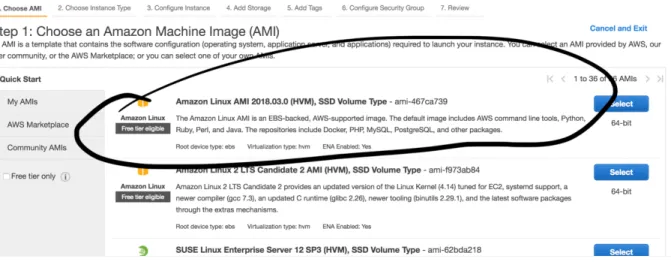
In order to implement our system, we spin a AWS EC2 instance (Amazon Linux AMI 2017.09.1.20180307 x86_64 HVM GP2). We can choose the latest Amazon Linux AMI available.
Figure 1 Choosing the AMI
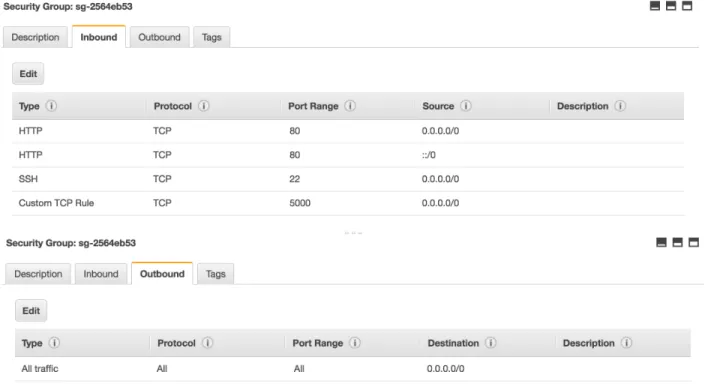
Figure 2 Setting Security Group Rules
We can go ahead and provision the EC2 instance. Once, the instance is running, we can SSH into the instance and install the following packages:
• Bokeh (0.12.5) • Flask (1.0.2) • Boto3 (1.7.15)
Make sure that the AWS EC2 instance has Python 3.5 already setup. If not, install it using the following command:
sudo yum install python35 python35-virtualenv python35-pip
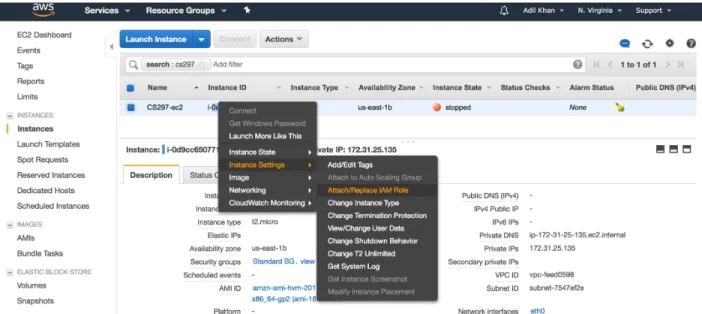
To safely communicate between S3 and AWS EC2, we create an IAM Role which has AmazonS3FullAccess policy and attach it to the EC2 instance [13].
Figure 3 Creation of IAM Role
Figure 5 Attaching the role to EC2 2
This step enables your EC2 instances to safely integrate with other AWS services on your behalf. Earlier, you had to store your AWS access keys on the EC2 instance to interface with other AWS services.
3.1.2 Storage Setup
First, we create a S3 bucket named “mlplayground” and put in a default region.
Figure 6 Creation of S3 Bucket
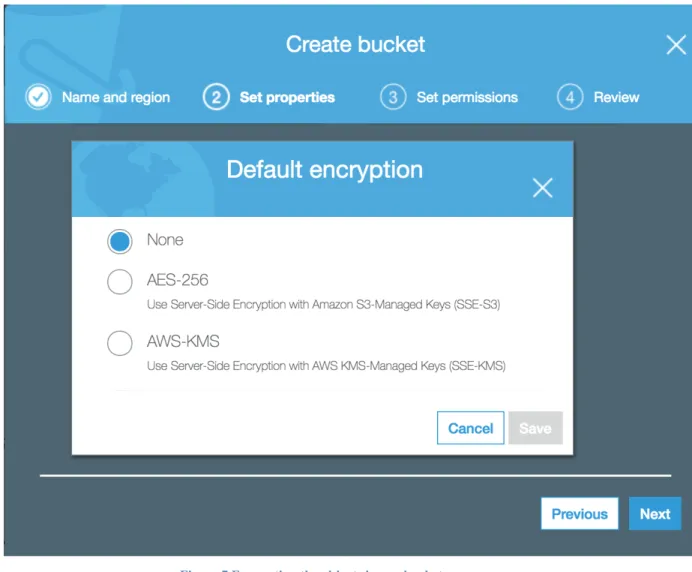
Figure 7 Encrypting the objects in our bucket
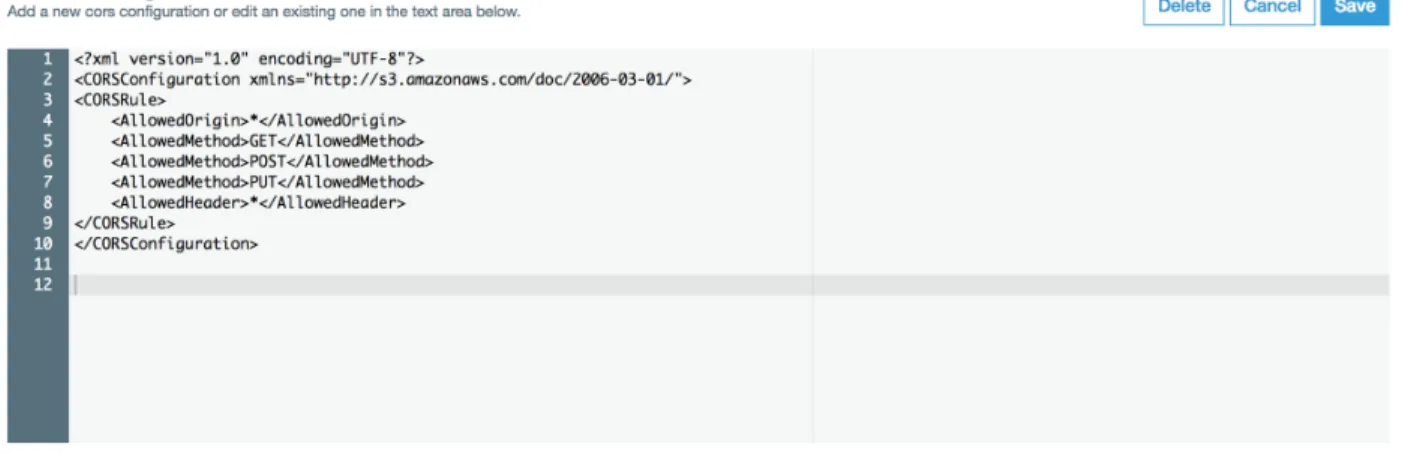
By default, the S3 bucket is private and is not world-readable. On creating of the bucket, we edit the CORS configuration in the Permissions section of the bucket to allow for requests originating from a different domain [14].
Figure 8 Setting CORS Configuration
Also, edit the Access Control List (ACL) of the bucket in the permissions section to provide read only public access.
Figure 9 Setting ACL for Public Reads
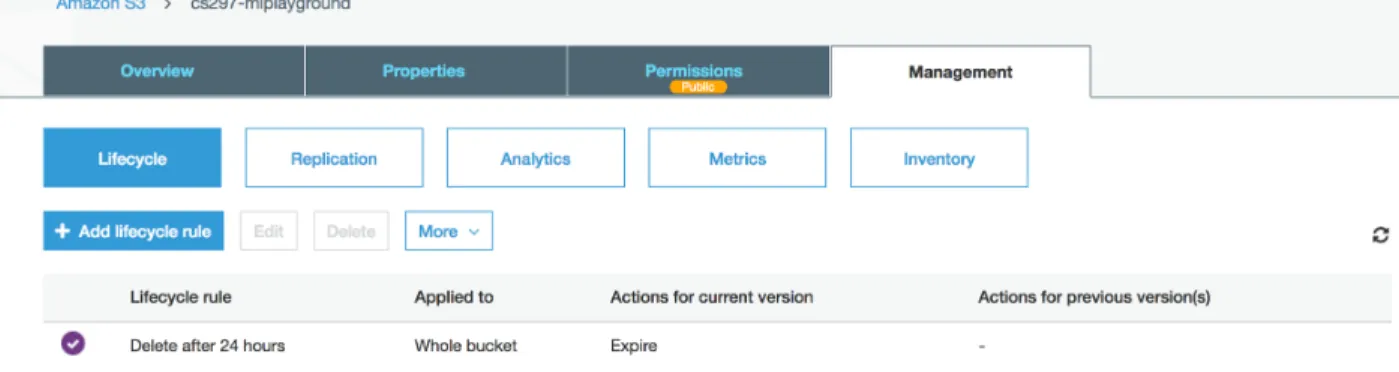
For scalability & maintenance purposes, we also configure a life cycle rule that deletes any file in the S3 bucket after 24 hours of existence in the bucket
Figure 10 Setting Life Cycle rule
3.1.3 Flask Application
Our main application logic would be under a common python code. Eg. application.py. There would be a separate folder for templates. The bokeh server scripts could be in the main directory. All the HTML templates would come under a common folder called templates. It looks something like this:
--- /MLPlayground --- Application.py --- /templates --- index.html --- classification.html --- regression.html --- rf.py --- svm.py --- ll.py
The application code initiates the start of a Python subprocess to load up bokeh servers for all the algorithms when loading the application server with no data. It routes to the landing page where a user can select either classification or regression. Once a choice is made, the application redirects the page to either classification.html or regression.html.
Now, both the pages provide an option to upload a CSV file to proceed. These HTML pages utilize JavaScript to initiate upload to S3 bucket. Note that these HTML pages have a
restriction to only upload a file with CSV extension. This code also does the job of passing the file names to the bokeh server so that the servers can pick up the same file from the S3 bucket.
3.2 Work Flow
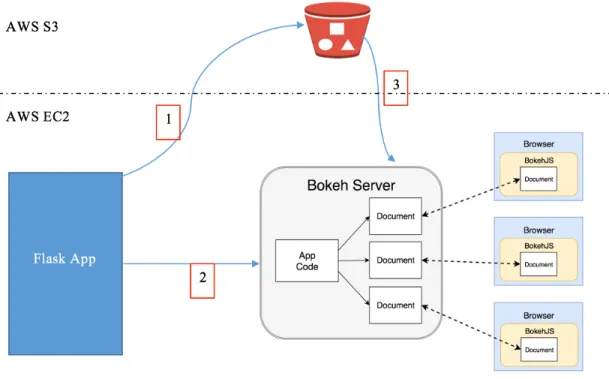
Figure 11 Application Workflow
The first phase of the project is to choose between what you want to do with your data i.e. either Classification or Regression. Each choice will take you to a different landing page. This page is called as the Upload phase where a user can upload ones cleaned CSV (dataset). We need to make sure that the data is in numerical form or is vectorized before uploading to the model. The data should not contain any textual data of any form. The application is configured in such a way that it assumes that the target feature is the first column of the dataset.
To upload a CSV file to the S3 bucket, the application uses AWS ability to provide pre-signed URL’s. The pre-pre-signed URL is a feature that allows anyone to upload objects to your S3 bucket for a specified duration without requiring them to have AWS credentials.
Figure 12 Landing Page
After a successful upload, the user can select one of the many algorithms in the dropdown and request a session of the selected algorithm which is running on a Bokeh server. While loading a new session, the file name of the dataset is passed as an argument so that it reflects the results along with the configured dataset. The initial loadout comes shows the top 5 features according to the feature selection method called SelectKBest [15] with chi2 [16] as the scoring function. The initial bokeh server page serves Accuracy scores & PR Curve with these selected features.
Figure 13 Page View after Upload
The bokeh server has the choice for features and hyper-parameters as the input controls on the left side. Once we change any part of input controls, we can dynamically see changes in the results on the right part of the page. There are currently two measures for evaluation:
• Accuracy scores [17]:
This is a vertical bar plot which shows different statistics related to the accuracy of the model. This plot shows the counts of True Positives (TP), True Negatives (TN), False Positives (FP) & False Negatives(FN). It also displays the model Accuracy.
Figure 14 Accuracy Plot
• PR Curve [18]:
In a classification scenario, Precision is the fraction of True Positives divided by Total Positive cases i.e. all positive cases. while Recall is the fraction of True Positives divided by combination of True Positive and False Negative cases i.e. actual positive cases. PR Curves are very useful in quantifying effectiveness of the model when the dataset is highly
imbalanced. PR curves return a confusion matrix which can be used to understand and penalize false negatives.
Figure 15 PR Curve Plot
The user can then interact with the graphs by changing any of the input controls provided. Every bokeh server has a common control to select the features to be included into the model. Other control inputs differ for every algorithm. By default, Bokeh plots come with a toolbar which allows us to zoom into the graph, reset the plot or save the plot locally as a PNG image.
Overall, the whole process can be summarized in the following steps: 1. Choose what you want to do with data? Either Regression or Classification. 2. Next, Upload the CSV.
3. Select your algorithm and hit “Play”.
4. Now, you’ll be able to tune parameters for your selected algorithm and see the dynamic results and interact with them.
3.3 Algorithms
3.3.1 Classification
All of the following bokeh servers are configured to use a clean version of the cancer prediction dataset [19]. These servers include hyper-parameters as defined in the sklearn documentation [20].
3.3.1.1 Random Forest Classifier
Random Forest classifier is a flavor of ensemble algorithms that creates a set of decision trees from randomly selected subsets of training data. From these set of decision trees, it aims to combine majority votes to classify the test feature. This technique is favorable for datasets which contains a high number of 1’s than 0’s or vice versa i.e unbalanced data. It also can give better results for datasets which might have missing data in some features [21].
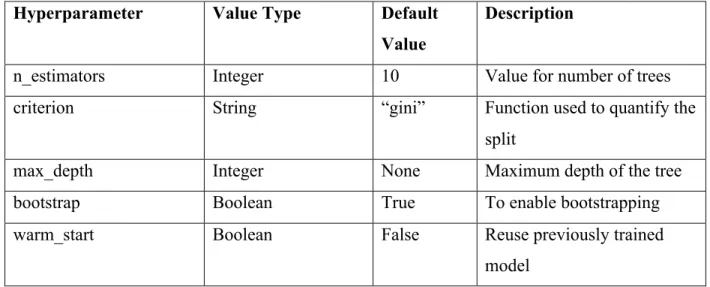
Table 1 Tunable Parameters for Random Forest Classifier
Hyperparameter Value Type Default
Value
Description
n_estimators Integer 10 Value for number of trees criterion String “gini” Function used to quantify the
split
max_depth Integer None Maximum depth of the tree bootstrap Boolean True To enable bootstrapping warm_start Boolean False Reuse previously trained
model The bokeh server for this algorithm looks like this:
Figure 16 Bokeh Server for Random Forest Classifier
3.3.1.2 Support Vector Machines
A Support Vector Machine is a supervised classification algorithm that is based on separating hyperplanes. For data that is non-linear, SVM uses a thing called kernel trick, that maps input features into a higher dimensional space. However, it might not be well suited for large datasets. It computes kernel matrix that scales tremendously with the number of observation points. Hence, training times for large datasets also scales linearly [22].
Table 2 Tunable Parameters for SVM
Hyperparameter Value Type Default
Value
Description
kernel String “rbf” Specify the kernel to be used by the algorithm
degree Integer 3 Degree of the polynomial function
probability Boolean False To enable probability estimates.
shrinking Boolean True Option to use shrinking verbose Boolean False Whether to enable verbose
output
warm_start Boolean False Reuse previous model Bokeh server for SVM:
Figure 17 Bokeh Server for SVM
3.3.1.3 Gradient Boosting Classifier
This classifier produces a prediction model by combining weak classifiers, typically decision trees. The model is built in a step-wise which facilitates generalization. It also allows
optimization with the help of a differential loss function. This classifier can be used as an alternative to Random Forest Classifier [23].
Table 3 Tunable Parameters for Gradient Boosting Classifier
Hyperparameter Value Type Default Value Description
loss String “deviance” Loss function to be used n_estimators Integer 10 Value for number of trees
max_depth Integer None Maximum depth of the tree Criterion String “friedman_mse” Function used to quantify
the split
warm_start Boolean False Reuse previous model Bokeh server for Gradient Boosting Classifier:
Figure 18 Bokeh Server for Gradient Boosting Classifier
3.3.1.4 Decision Tree Classifier
The Decision Tree Classifier makes predictions based on a series of carefully crafted questions about the observations. The construction of decision trees is generally computationally
inexpensive, making it possible to quickly construct models even when the training set size is very large. Training and testing based on this classifier is fairly fast as compared to other relevant classification techniques [24]. Separating effectively based on maximum information gain is key to Decision Tree Classifiers. However, in real-life datasets dividing into pure class is practically not feasible.
Hyperparameter Value Type Default Value
Description
criterion String “gini” Function used to quantify the split
max_depth Integer None Maximum depth of the tree splitter String “best” Strategy used to split the tree presort Boolean False Option to presort data
Bokeh server for Decision Tree Classifier:
Figure 19 Bokeh Server for Decision Tree Classifier
3.3.1.5 Multi Layer Perceptron
Multi Layer Perceptron is a type of supervised algorithm that generates a set of outputs from a set of inputs. MLP utilizes the concept of backpropagation for training, which is a method used to calculate gradients of the error function which is used to assign weights in the network [25].
Hyperparameter Value Type Default Value
Description
activation String “relu” Activation function for the hidden layer
solver String “adam” Function for weight optimization
learning_rate String “constant” Define the rate of learning. verbose Boolean False Whether to enable verbose
output
warm_start Boolean False Reuse the solution of
previous to fit and add to the model
early_stopping Boolean False Allow model to stop early if no improvement.
Bokeh Server for MLP Classifier:
3.3.1.6 K Nearest Neighbors Classification
KNN is one of the simplest classification algorithm. It classifies objects based on the majority votes of the K nearest neighbors. To prevent ties, the typical choice for K has to be odd. KNN is very simple to understand and easy to implement. One major disadvantage of KNN is that testing phase can be computationally expensive with high-dimensional data.
Table 6 Tunable Parameters for KNN Classifier
Hyperparameter Value Type Default
Value
Description
N_neigbors Integer 5 No of neighbors to be considered for voting algorithm String “auto” Algo used to compute the
nearest neighbors
Bokeh server for KNN:
3.3.1.7 Stochastic Gradient Descent
This algorithm implements linear models with Stochastic Gradient Descent (SGD) learning. It is an iterative learning model that tries to minimize the loss function. In SGD, the parameters are estimated for each sample and the model is thus updated throughout the process.
Table 7 Tunable Parameters for Stochastic Gradient Descent
Hyperparameter Value Type Default
Value
Description
fit_intercept Boolean True To allow estimation of intercept.
loss String “hinge” Loss function to be used. penalty String “l2” Penalty to be used. shuffle Boolean True To enable shuffling for
training data.
warm_start Boolean False reuse the solution of the previous call to fit as initialization
Figure 22 Bokeh Server for Stochastic Gradient Descent
3.3.1.8 Logistic Regression
Logistic Regression is a common statistical method used for binary classification. This
prediction is based on the use of one or several numerical and categorical, ratio-level variables. Table 8 Tunable Parameters for Logistic Regression
Hyperparameter Value Type Default
Value
Description
fit_intercept Boolean True To allow estimation of intercept.
solver String “liblinear” Algorithm to be used. warm_start Boolean False reuse the previous model. dual Boolean False Dual or primal formulation.
Figure 23 Bokeh Server for Logistic Regression
3.3.2 Regression
All the bokeh servers for regression examples use a clean version of the churn prediction dataset [27].
3.3.2.1 Linear Regression
Linear regression is useful for predicting continuous values. It does that by finding statistical relationship between two variables. For example, Linear Regression can be used to calculate selling price of the house based on the size of the house.
Table 9 Tunable Parameters for Linear Regression
Hyperparameter Value Type Default
Value
Description
fit_intercept Boolean True To allow estimation of intercept.
copy_X Boolean True If True, X is copied.
Bokeh Server for Linear Regression Model:
Figure 24 Bokeh Server for Linear Regression
3.3.2.2 Ridge Regression
Ridge Regression is a machine learning technique that is useful when there are a large number of features as it avoids overfitting. It uses L2 regularization that adds penalties to reduce
multicollinearity in the model [28].
Table 10 Tunable Parameters for Ridge Regression
Hyperparameter Value Type Default
Value
Description
fit_intercept Boolean True To allow estimation of intercept.
normalize Boolean True To allow for normalization to numerical values.
copy_X Boolean True If True, X is copied.
4
Conclusion
We have come up with an application that can be used by anyone to perform machine learning analysis on any dataset of his/her choice. This application provides a user-friendly, intuitive and interactive approach to solving machine learning problems. Data science students can also save images of the plots or accuracy scores on their local machine for reference.
This application makes parameter tuning painless and you can see the tuning changes results on the go. Apart from parameter tuning, it could also be a great tool for feature selection. You can synthesize the relevance for each feature in your model through the dynamic visualization of results. This application performs basic machine learning capabilities in two simple steps: First, upload the data. Second, play around hyper-parameters of the selected algorithm and visualize the results spontaneously.
5
Future Work
This is a preliminary version of the application which comes with a limited number of classification and regression algorithms. As part of future work, we can include other significant algorithms in the framework. Currently, the application does not include any pre-processing steps and expects users to upload clean CSV’s. However, there is scope to include pre-processing steps like data manipulation or data massaging. For example, imputing missing values or even removing observations with NA values. There are many strategies that can be followed to accomplish this objective [29].
The application is deployed using Flask’s built-in server which is not very good for large scale applications. For future purposes, the application can be deployed using WSGI containers like Gunicorn [30] or Gevent [31]. The application is currently deployed as an application server on a single EC2 instance. For scaling the computing ability of AWS infrastructure, we can use the same EC2 AMI and deploy multiple EC2 instances behind an AWS Elastic Load Balancer to split the requests amongst these instances.
This application can be enhanced by giving users an option to prototype models and
save/load models when needed. Persistence of model can be accomplished by using either pickle or joblib utilities from sklearn library.
6
References
[1] Towards Data Science. (2018). The 7 Steps of Machine Learning – Towards Data Science. [online] Available at: https://towardsdatascience.com/the-7-steps-of-machine-learning-2877d7e5548e [Accessed 8 May 2018].
[2] En.wikipedia.org. (2018). No free lunch theorem. [online] Available at:
https://en.wikipedia.org/wiki/No_free_lunch_theorem [Accessed 8 May 2018].
[3] MLJAR. (2018). Platform for building Machine Learning models. [online] Available at: https://mljar.com/ [Accessed 8 May 2018].
[4] Knime.com. (2018). KNIME - Open for Innovation. [online] Available at: https://www.knime.com/ [Accessed 8 May 2018].
[5] Eibe Frank, Mark A. Hall, and Ian H. Witten (2016). The WEKA Workbench. Online Appendix for "Data Mining: Practical Machine Learning Tools and Techniques", Morgan Kaufmann, Fourth Edition, 2016.
[6] Brownlee, J. (2018). 4-Steps to Get Started in Machine Learning: The Top-Down Strategy for Beginners to Start and Practice. [online] Machine Learning Mastery. Available at: https://machinelearningmastery.com/4-steps-to-get-started-in-machine-learning/ [Accessed 8 May 2018].
[7] contributors, B. (2018). Welcome to Bokeh — Bokeh 0.12.15 documentation. [online] Bokeh.pydata.org. Available at: https://bokeh.pydata.org/en/latest/ [Accessed 8 May 2018].
[8] Sicara’s blog. (2018). Bokeh vs Dash — Which is the Best Dashboard Framework for Python?. [online] Available at: https://blog.sicara.com/bokeh-dash-best-dashboard-framework-python-shiny-alternative-c5b576375f7f [Accessed 8 May 2018]. [9] contributors, B. (2018). Running a Bokeh Server — Bokeh 0.12.15 documentation.
[online] Bokeh.pydata.org. Available at:
https://bokeh.pydata.org/en/latest/docs/user_guide/server.html [Accessed 8 May 2018]. [10] Grinberg, M. (2014). Flask web development. Sebastopol, CA: O'Reilly.
[11] Amazon Web Services, Inc. (2018). Overview of Amazon Web Services - Overview of Amazon Web Services. [online] Available at: https://docs.aws.amazon.com/aws-technical-content/latest/aws-overview/introduction.html [Accessed 8 May 2018]. [12] Amazon Web Services, Inc. (2018). AWS Storage Options. [online] Available at:
https://aws.amazon.com/whitepapers/storage-options-aws-cloud/ [Accessed 8 May 2018].
[13] Amazon Web Services. (2018). IAM roles for EC2 instances – Simplified Secure Access to AWS service APIs from EC2 | Amazon Web Services. [online] Available at:
https://aws.amazon.com/blogs/aws/iam-roles-for-ec2-instances-simplified-secure-access-to-aws-service-apis-from-ec2/ [Accessed 8 May 2018].
[14] Docs.aws.amazon.com. (2018). Cross-Origin Resource Sharing (CORS) - Amazon Simple Storage Service. [online] Available at:
https://docs.aws.amazon.com/AmazonS3/latest/dev/cors.html [Accessed 8 May 2018]. [15] Scikit-learn.org. (2018). sklearn.feature_selection.SelectKBest — scikit-learn 0.19.1
documentation. [online] Available at:
http://scikit-learn.org/stable/modules/generated/sklearn.feature_selection.SelectKBest.html [Accessed 8 May 2018].
[16] Scikit-learn.org. (2018). sklearn.feature_selection.chi2 — scikit-learn 0.19.1 documentation. [online] Available at:
http://scikit-learn.org/stable/modules/generated/sklearn.feature_selection.chi2.html#sklearn.feature_s election.chi2 [Accessed 8 May 2018].
[17] Scikit-learn.org. (2018). 3.3. Model evaluation: quantifying the quality of predictions — scikit-learn 0.19.1 documentation. [online] Available at:
http://scikit-learn.org/stable/modules/model_evaluation.html [Accessed 8 May 2018].
[18] Scikit-learn.org. (2018). sklearn.metrics.precision_recall_curve — scikit-learn 0.19.1 documentation. [online] Available at:
http://scikit-learn.org/stable/modules/generated/sklearn.metrics.precision_recall_curve.html#sklearn. metrics.precision_recall_curve [Accessed 8 May 2018].
[19] Archive.ics.uci.edu. (2018). UCI Machine Learning Repository: Breast Cancer Wisconsin (Diagnostic) Data Set. [online] Available at:
https://archive.ics.uci.edu/ml/datasets/Breast+Cancer+Wisconsin+%28Diagnostic%29 [Accessed 8 May 2018].
[20] Medium. (2018). The Unreasonable Effectiveness of Random Forests – Rants on Machine Learning – Medium. [online] Available at: https://medium.com/rants-on-machine-learning/the-unreasonable-effectiveness-of-random-forests-f33c3ce28883 [Accessed 8 May 2018].
[21] Scikit-learn.org. (2018). 1. Supervised learning — scikit-learn 0.19.1 documentation. [online] Available at: http://scikit-learn.org/stable/supervised_learning.html [Accessed 8 May 2018].
[22] data?, C. (2018). Can support vector machine be used in large data?. [online] Cross Validated. Available at: https://stats.stackexchange.com/questions/314329/can-support-vector-machine-be-used-in-large-data [Accessed 8 May 2018].
[23] Z., Z. (2018). What is better: gradient-boosted trees, or a random forest? - FastML. [online] Fastml.com. Available at: http://fastml.com/what-is-better-gradient-boosted-trees-or-random-forest/ [Accessed 8 May 2018].
[24] Hacker Noon. (2018). A brief look at sklearn.tree.DecisionTreeClassifier. [online] Available at: https://hackernoon.com/a-brief-look-at-sklearn-tree-decisiontreeclassifier-c2ee262eab9a [Accessed 8 May 2018].
[25] Smith, N. and Smith, V. (2018). Multi-Layer Perceptrons and Back-Propagation; a Derivation and Implementation in Python. [online] nicholastsmith. Available at:
https://nicholastsmith.wordpress.com/2016/03/27/multi-layer-perceptrons-and-backpropagation-a-derivation-and-implementation-in-python/ [Accessed 8 May 2018]. [26] Kevinzakka.github.io. (2018). A Complete Guide to K-Nearest-Neighbors with
Applications in Python and R. [online] Available at:
https://kevinzakka.github.io/2016/07/13/k-nearest-neighbor/ [Accessed 8 May 2018]. [27] GitHub. (2018). gogowenzhang/ride-sharing-churn-prediction. [online] Available at:
https://github.com/gogowenzhang/ride-sharing-churn-prediction [Accessed 8 May 2018]. [28] Saedsayad.com. (2018). Logistic Regression. [online] Available at:
[29] Brownlee, J. (2018). How To Prepare Your Data For Machine Learning in Python with Scikit-Learn. [online] Machine Learning Mastery. Available at:
https://machinelearningmastery.com/prepare-data-machine-learning-python-scikit-learn/ [Accessed 8 May 2018].
[30] Gunicorn.org. (2018). Gunicorn - Python WSGI HTTP Server for UNIX. [online] Available at: http://gunicorn.org/ [Accessed 8 May 2018].
[31] Gevent.org. (2018). What is gevent? — gevent 1.3.0rc1.dev0 documentation. [online] Available at: http://www.gevent.org/ [Accessed 8 May 2018].
7
Appendix
7.1 Source Code
The source code for our project is publicly available at https://github.com/AdilKh4n/ML_Playground.
7.2 Starting up Application on EC2 Instance
SSH into your EC2 instance and run the following command:
The application can be accessed on port 5000 of the Public DNS name of the EC2 instance. python application.py