363
Benefits of an Electronic Plan Table in Design-build
Construction
Chris Souder, MS and Jon Re, PE
California State University, Chico Warm Springs Constructors
Chico, California
This article discusses the many benefits of an electronic plan table in design-build construction. The results are based on practical experience obtained during the construction of the $300 million design-build Warm Springs Extension Project for the San Francisco Bay Area Rapid Transit District. The article discusses multiple uses of the electronic plan table beyond communication and control of current construction drawings and specifications. Additional uses include quality control documentation, access and control of safety documents including Material Safety Data Sheets and Toolbox Meeting Minutes, real time as-building of plans, communication, and both audio and visual, via commercially available software, production related uses such as labor cost accounting and production quantity progress reporting, and work plan accessibility. The article additionally includes discussion of the commercially available hardware and software utilized to establish the electronic plan table.
Keywords: Document Control, Quality Control, Safety Documentation, As-built Plans, Communication, Hardware, Software
Introduction
Rapid advancements in both the hardware and software for an economically feasible electronic plan table have provided new options to the construction contractor for document control on all construction projects. In design-build, where construction is typically begins prior to completion of the construction documents, the criticality of having up to date documents in the hands of field construction personnel is paramount. Both the time element and the cost of providing hard copies of newly released or revised contract documents expose the construction contractor to the risk of building from old revision construction documents (Ghanem, El-Gafy, 2009). The cost and effort required controlling documents electronically in one location on the project server and providing access via Wi-Fi to the field has proven to be an effective method of document control. Once established, the hardware infrastructure used for the electronic plan table may also be utilized for a variety of other construction documentation and
communication functions. The speed in which accurate, up to date information can be accessed on the project site is especially beneficial when working in a spread out, urban environment where “round trips” back to the project office to obtain the latest plans can be costly ventures.
Project Background
The electronic plan table discussed in the article was established for the Warms Springs Extension Project (WSX) of the San Francisco Bay Area Rapid Transit District (BART). The $300 million project was awarded to Warm Springs Constructors, a joint venture of Kiewit Infrastructure West and Mass Electric Transportation Co., in July of 2011. The project consists of both the design and construction of 5.25 miles of light rail transit line, track systems and a new passenger station at Warm Springs, CA. HNTB Corporation is the project designer. Notice to proceed
364
was provided to Warm Springs Constructors in October of 2011. Construction activities began in May of 2012 with the projected operation date of December 2015.
The project ties into the existing Fremont BART station, the southernmost station of the original BART system opened in 1972. The WSX line runs through a previously constructed subway in Fremont’s Central Park, and then follows existing Union Pacific Railroad (UPRR) right of way south to the Warm Springs Station site. The project is located in an urban environment on the northern fringe of the Silicon Valley, with all the typical transportation congestion issues such sites possess. During commute traffic, a one way trip on city streets from one end of the project to the other can take over 40 minutes. The right-of-way width for the project is typically 80’ paralleling an in-use UPRR line. Adjacent properties vary from residential, business, light and heavy industrial uses along the 5.25 mile alignment.
Method: Electronic Plan Table Objective
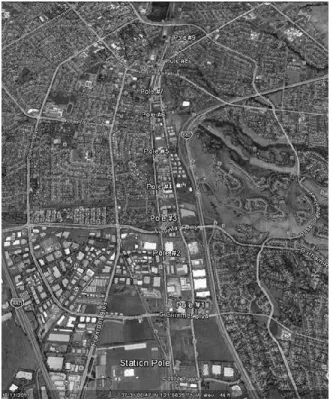
The risk of mistakenly progressing construction using old revisions of contract documents was of particular concern. As is customary in most design-build projects, construction is begun prior to design completion. With light rail construction such as BART, civil and structural work progresses while the systems design, traction power, automatic train control, communications and electrical design is completed. Concerns with the cost and time element required to log and distribute newly released and revised contract plans initiated a need for alternate methods of document control. Use of a electronic plan table (VPT), while not an original idea, was considered. The VPT had to be easily accessible and user friendly to engage its primary users, craft personnel. Plan table components, including tablets and WiFi system, had to be both economical and easy to use. To be successful, download and update times through the Wi-Fi system had to be fast so the craft personnel wouldn’t grow impatient and abandon the system. For budgetary reasons, off-the-shelf software had to be utilized to minimize the startup time and to leverage upon previous experience with the software. See Figure 1: Pole location Map.
365
Electronic Plan Table Hardware
A project “new technology” team was organized and drew upon corporate information technology professionals to determine the correct hardware solution. A standard project server was determined to have sufficient storage capacity for the project documents. This server had already been anticipated in the project budget. For project wide access to the VPT, two alternatives were explored. The first and least expensive alternative was utilizing “hot spots”. The second option was to use a Wi-Fi network.
Hot spots are basically cellular phone devices that provide connectivity to the internet via their cell service. They are as portable as a cell phone and can be carried like a phone or be vehicle mounted. They require monthly service fees and have limited connectivity. Using hotspots, download times could potentially be lengthy. For large files such as contract documents, download could take several minutes. Because of their insufficient connectivity, hot spots were ruled out as the universal solution for use over the entire project.
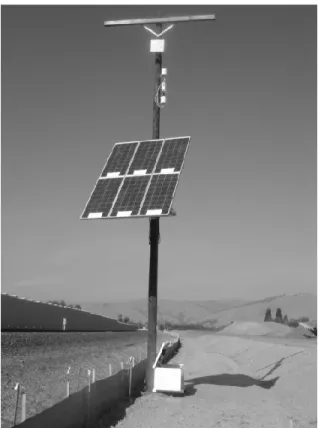
See Figure 2: Pole Configuration and Hardware.
The other alternative was to establish a Wi-Fi net over the project site. Again, the site is approximately eighty feet wide by 5.25 miles long. Near the Warm Springs Station, the right-of-way widens out to no more than a quarter of a mile. Contractually, the project right-of-way was made available to construction in stages, so there was an
opportunity for reuse of hardware as construction in areas of the alignment was completed and other areas became available. Another concern was the challenge of achieving connectivity in the subway.
366
Moon Blink Communication, a Wi-Fi design and installation specialist, was engaged to provide a site Wi-Fi coverage survey. Due to the technical challenges of establishing WiFi in the subway and the limited amount of work within it, it was quickly decided to omit the subway from Wi-Fi coverage. With the subway located on one end of the project, the area north of the subway was very limited. Hot spot access was chosen as the preferred
connectivity method there. Moon Blink’s site survey determined that 9 Wi-Fi transmitters were required to provide connectivy south of the subway for the remainder of the project site. The transmitters were situated along the project right of way at predetermined locations so they had the required line of sight between one another. The poles were configured with six solar panels so that line power was not necessary. Our WiFi uses 802.11n MIMO
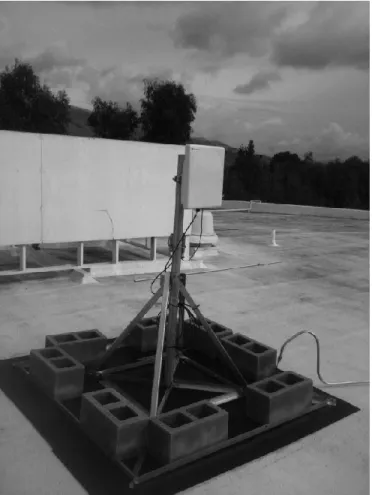
technology and takes advantage of both 2.4GHz and 5GHz frequencies. 802.11n has a maximum range of 820 feet, so the maximum pole spacing was limited to 1500 feet for optimum service. We achieved connectivity speeds back to the office of up to 300 Mbps. Distance from the office and signal strength reduce actual speeds experienced. The weak link in Network traffic was from the office to the internet. It was bottlenecked by our 20 Mbps MPLS Verizon service, however the Wi-Fi system described provided a sufficient connectivity along the right of way south of the subway. See Figure 3: Office Equipment. With a variety of communication devices available to the industry, contractors must keep up with the lasts technologies. (Chalupa, Corley and Clarke, 2009)
Figure 3: Office Equipment
Multiple tablets were considered for use by both office and field personnel. A tablet is essentially a PC shaped like a notebook (Sattineni, 2009). The main difference between tablets was whether they were iOS-based or Windows-based. At the time the system was installed, there were few available Windows-based tablets from which to choose.
367
The Apple iPad was the industry standard with which all others competed. Due to availability at system initiation, the Apple iPad was selected as the tablet of choice. Since inception of this program, Windows-based tablets have been successfully used with the system as well. Either type of tablet will work in this application. User preference and current market developments should be considered prior to making future tablet purchases.
Electronic Plan Table Software
While access to current revisions of contract documents was the primary goal, equally important was protection of the documents from unintentional modifications. One copy of each drawing file was stored on the server in PDF format for access throughout the jobsite. Then, any PDF reader can be used as software for access to the electronic plan table. One of either two commercially available programs was used – Blue Beam or Adobe Acrobat. As the files were accessible in viewer format only, no modifications to the documents were saved on the server. If an individual user desired to keep notes on the face of the contract document, the individual can download a copy of the PDF drawing on his tablet and keep notes on the document and save it to his tablet. This copy saved on the tablet would not be updated unless updated by the owner of the tablet. It remained static in terms of its updating once downloaded from the server. Modifications and updating of the plans was limited to the document control clerk. Only the document control clerk was permitted access to save new revisions of documents or newly released documents to the server.
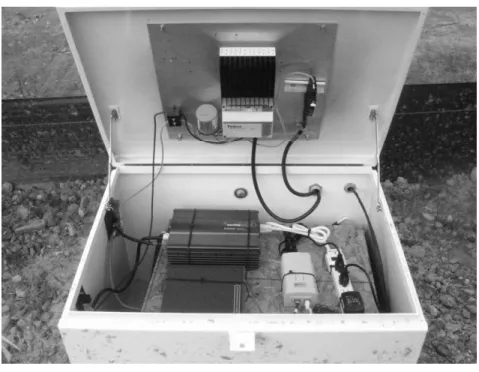
Figure 4: Pole Equipment
As new documents were released or revised, the document control clerk updated the electronic copy on the server. Once updated, all subsequent users opening the file viewed the updated version. See Figure 4: Pole Equipment.
368
The cost of a system has many variables. This project encompassed a linear, 5.25-mile long site. A similar system on a smaller site could be set up with considerably less investment in WiFi hardware. It should be noted that this system makes most sense on design-build projects when there are multiple document releases/ revisions and when the project office is not adjacent to the project site. It is recommended that an IT company is contacted for pricing. The Warm Spring Constructors asked that pricing information remain confidential.
Results and Discussion: Benefits of the Electronic Plan Table System
While the goal of having current revision construction documents in the field real time was met with the system described, there were other benefits of the project-wide Wi-Fi system. The use of commercially available video chat software, i.e. FaceTime, through the project-wide Wi-Fi system allowed real-time discussion and communication of field issues with design engineers.
Request for Information (RFIs)
Issues encountered during construction operations could be photographed or videoed and communicated with the design engineers in real time. This real time communication provides for reduced response time of RFIs. With clear communication of issues real time, design engineers could begin working on solutions even before RFIs are written. When the RFI was finally received by the design engineer, he was already aware of the situation and, in many cases, had already begun solving the problem.
QA and QC Program
The project wide Wi-Fi system allowed filing and sharing of electronic quality control inspection reports with both the Quality Assurance team and the Client’s Quality Assurance Oversight group in real time. As quality control inspection reports were completed in the field they were filed on the project server providing the entire project team access to the reports. This quality program transparency insured high client confidence in contractor’s quality control program.
As-Built Drawings
With project wide access to the server via Wi-Fi, the ability to prepare and save as-built documents in real time became available. A separate set of contract as-built drawings in PDF format were saved on the project server for recording as-built changes. The documents, accessed in the field through the WiFi system, were set up to be modified using standard Adobe Acrobat or Blue beam software and were lined via iPad. Beyond just red-lining as-built drawings, photos of the construction could be attached to them to provide additional definition of the construction modifications. Once saved onto the server, the Quality Control team verified red-lined content and approved them for incorporation into CAD formatted as-builts.
Safety and Work Plan Program
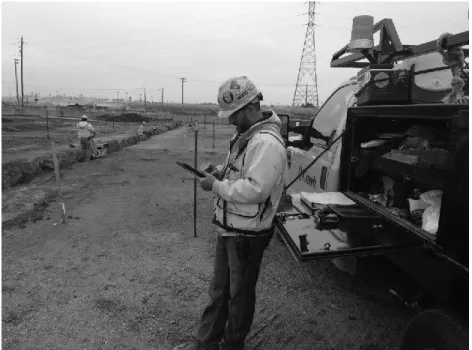
The project wide Wi-Fi system also allowed access to electronically stored safety documents. All material safety data sheets (MSDS) were scanned and stored on the project server. Tablets for craft foremen were provided desktop shortcuts to the folder which contained the MSDS sheets. This provided the craft personnel real time access to the MSDS sheets. Each foreman is responsible for holding safety toolbox meetings with their crew each morning at the beginning of the shift. These meetings have always been documented on paper tablets and turned in by the foremen at the end of the shift with their timecard. The electronic plan table system allowed the foreman to upload the
369
toolbox meeting written report and timecard to the server so management can review at their convenience on a daily basis (See Figure 5 below).
Additionally, work plans for each crew, containing construction procedures, engineering information and production goals were similarly stored on the project server in folders arranged by construction discipline. Each discipline foremen were provided shortcuts to these folders on their tablets for access in the field. Foremen quickly learned to access the work plans, and even download them to their tablets where they keep field notes directly on the
downloaded work plans
As the project cost accounting system changed to a web-based time card system, the tablets and Wi-Fi system provided craft personnel the ability to complete electronic time cards in the field and transmit to the project office without having to transport a hard copy. Once the learning curve of the new time cost accounting system was overcome, craft personnel end-of-shift sign-out procedures remained as quick as previously experienced.
Figure 5: Foreman Using Tablet and Electronic Plan Table to Upload Timecard and Toolbox Report
.
Cost Control
Prior to the web-based time card system, the contractor would fill out time cards by hand and carry a hard copy to the project office. From there the project business manager would manually input the crew, work hours and cost
370
codes into the cost control accounting software. Now this information is transmitted electronically into the
accounting system which produces the payroll and account assignment. This information is also used to determine if the operations are within their budget.
Conclusion
Initially, a electronic plan table was developed for the $300 million design-build Warm Springs Extension project to avoid errors from using out-of-date construction documents. The electronic plan table eliminated the need to log each copy of construction documents, to recover and destroy old documents, and to re-distribute current versions. Instead, construction documents were updated electronically on the project server and, through the project WiFi system, made accessible to the entire project team instantaneously. Once the infrastructure was established for this electronic plan table, many efficient alternate uses were developed. Documentation of construction processes was converted to electronic, allowing easy accessibility. Access to the project server via Wi-Fi provided craft personnel access to up-to-date contract documents, work plans, and MSDS sheets.
Additionally, Quality Control personnel converted to an all-electronic documentation system. Electronic QC checklists were completed in the field using tablets and then stored on the project server. The Quality Assurance and client Quality Assurance oversight personnel were provided access to the quality control documents in real time providing transparency in project compliance verification.
Finally, the Wi-Fi system also provided an additional means of visual communication between the design and construction operations by means of Apple’s FaceTime software. This software provided visual communication via iPhone or iPad between the designers and constructors enabling quick response to field issues arising during construction.
References
BART Warm Springs Extension Project - http://www.bart.gov/about/projects/wsx/
Ghanem, Amine and El-Gafy, Mohamed, 2009, Utility Assessment Model for Wireless Technology in Construction, ASC, Gainesville, FL
Moon Blink Wireless Communications - http://www.moonblink.com/#
Chalupa, Colin, Corley, Gregg R., Clarke, Shima I., 2009, A Cross Sectional Study of the Uses and Application of Mobile Devices in the Construction Industry, ASC, Gainesville, Fl
Sattineni, Anoop, 2009, Virtual Instruction with a Tablet PC and Student Reaction, ASC, Gainesville, FL Apple iPad - http://www.apple.com/ipad/