Abigail M. Wickes. Challenges in Image Cataloging: A Case Study of the Image Database at the North Carolina Biotechnology Center. A Master’s Paper for the M.S. in L.S degree. Mach, 2012. 51 pages. Advisor: Bradley Hemminger
This paper reviews some challenges of image cataloging, in the form of a literature review and a usability study conducted on the image database at North Carolina Biotechnology Center, hosted on Presto Inmagic software. The usability study aims to examine whether the addition of descriptive metadata detailing the conceptual aspects of images, e.g. the images’ Aboutness, has a positive effect on users' searching experience while they conduct a series of assigned searching tasks designed to generate queries that require searching for images whose subject can be considered both general and abstract. In addition to this research question, the database design and existing description are examined for effectiveness.
Headings:
CHALLENGES IN IMAGE CATALOGING: A CASE STUDY OF THE IMAGE DATABASE AT THE NORTH CAROLINA BIOTECHNOLOGY CENTER
by
Abigail M. Wickes
A Master’s paper submitted to the faculty of the School of Information and Library Science of the University of North Carolina at Chapel Hill
in partial fulfillment of the requirements for the degree of Master of Science in
Library Science.
Chapel Hill, North Carolina March 2012
Approved by
Contents
1.0 INTRODUCTION ... 2
2.0 LITERATURE REVIEW ... 3
2.1 - General Challenges ... 3
2.2 - Description of Images ... 5
2.3 - Searching for Images ... 9
2.4 - Optimal Design ... 12
2.5 - Comparing Concept-based and Content-based Retrieval Software ... 13
3.0 RESEARCH ... 18
3.1 - Introduction ... 18
3.2 - Methodology ... 19
3.3 - Hypothesis ... 21
3.4 - Results ... 22
4.0 RECOMMENDED MODIFICATION AND FURTHER RESEARCH ... 31
4.1 - Recommended Modifications based on Research Data ... 31
4.2 - Potential for further research ... 38
5.0 CONCLUSION ... 42
BIBLIOGRAPHY ... 44
APPENDICES ... 47
Appendix 1 - Initial Searching Tasks Survey ... 47
1.0 INTRODUCTION
The field of image cataloging and categorization presents many unique challenges. Unlike a book, an image does not offer any intrinsic information as to its creator or creation date, and while some subject analysis may be gleaned from viewing the image, images can hold abstract meaning that is not apparent merely through viewing. Even after assigning subject terms, the cataloger must consider whether the terms
associated with an image will be consistent with users’ search terms. The usability of an image database's interface will also affect users’ searching success. The sheer quantity of images produced in the digital age only adds to these existing challenges. Attempts to surmount the task of organizing and annotating this growing number of images have included innovations and developments in manual and automatic processing techniques, based both on the content and concept inherent within an image. All methods have their own unique pros and cons.
This paper will provide a literature review describing the challenges of image cataloging for both front and back-end users, as well as advances in cataloging theory, techniques, and technology functions, and interface design related to solving these
problems. These attributes and approaches will then be compared to the data obtained via research conducted on the usability of the image database at the North Carolina
2.0
- LITERATURE REVIEW
2.1 - General Challenges
That the number of images now available is more vast than at any previous time in history, and that every day the quantity continues to grow, is a fact acknowledged at the forefront of many critical studies related to image cataloging (Hastings, 1999; Jaimes, 2000; Rui, 1999; Shen, 2008). This growth coincides ongoing trends of relying on high quality images to do much of the footwork in marketing and advertising, making adequate organization and access of image collections crucially important for a wide variety of holding agencies. Eakins and Graham (2000) state,
...the twentieth century has witnessed unparalleled growth in the number, availability, and importance of images in all walks of life. Images now play a crucial role in fields as diverse as medicine, journalism, advertising, design, education, and entertainment. (p. 6)
A thoughtfully chosen image can convey any number of themes much more instantly and memorably than a block of text, however it is this potential to convey multiple meanings that is at the heart of many of the challenges associated with cataloging an image
collection.
Some challenges related to image cataloging have existed since before the digital era. Besser, in a 1990 article, discusses the lack of inherent information contained in an image, as compared to a book. He explains,
…most books are written with clearly defined purposes in mind, and catalogers can expect that most potential users of these books will
In other words, image catalogers do not have the benefit of information
commonly found on a book’s title page or verso, including a statement of responsibility, copyright date, or title. This information is sometimes associated with images, but its presence is not guaranteed. To take this analogy further, catalogers of books and other more traditional library materials also have the advantage of aggregate record sources from which copy catalog records may be derived, such as OCLC Connexion. There is no such aggregate resource for image catalogers, so all records are by default original and created manually. Fully describing all aspects of an image for optimal access is a valuable but time-consuming process (Enser, 2000).
Part of this process is the complex act of generating subject analysis for an image. It is important to consider the fact that a given image may have a variety of potential uses for different users, beyond what the photographer, artist, or designer had considered when the image was created. Jörgensen describes this as a conflict between the need to preserve the uniqueness of an image while still providing enough description to allow many points of access (1998).
To illustrate this point further, Besser provides the example of a historic image of a crowded city scene, which would have differing elements of interest for the
sociologists, architects, or costume designers of today, and certainly beyond the scope of what the photographer originally intended to capture (1990). Christel (2005) points out that users “often disagree on the relevance of a feature to a particular topic”, making the
cataloger must decide what level of description will provide optimal access for the needs of their user population (Jaimes, 2000).
2.2 - Description of Images
Panofsky's 1972 paper is a seminal work on image subject analysis. Although his work is from the perspective of an art historian, his theory to describe the levels of meaning in images can be applied across many different disciplines. To discuss the meanings of images, Panofsky breaks them into three levels: pre-iconography,
iconography, and iconology. Pre-iconography is defined as primary or natural subject matter, which is then further divided into factual and expressional categories (Panofsky, 1972; Shatford, 1986). In other words, primary subject matter can be interpreted as what an image conveys in a straightforward way when it is viewed (factual) and what kind of mood is evoked by the viewing of an image (expressional). Iconography is a level of meaning which requires an understanding of the culture and background from which the image comes, so that subtle nuances contained within an image can be correctly
interpreted. Iconology is the third level of meaning which gets at the inherent meaning of an image, evoking an encompassing feeling. This level of meaning is particularly difficult to include in description (Shatford, 1986).
Shatford's 1986 article, “Analyzing the Subject of a Picture” is another seminal
work in image subject analysis. The article develops upon Panofsky's distinctions and proposes to make a more binary descriptive distinction with the terms “Ofness” and “Aboutness”. Attributes of Ofness are based on what information can be gathered by
even more broadly of animals, whereas the specific of quality would specify these birds as a variety of wren, or even more specifically provide their scientific name. These would be considered factual aspects according to Panofsky's theory of image description.
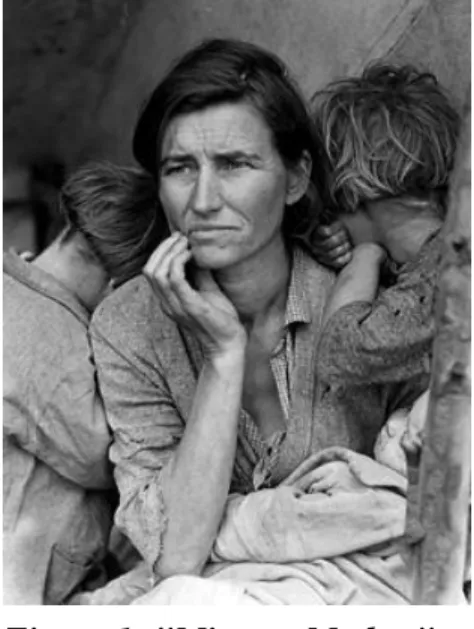
Aboutness describes more abstract qualities of an image that cannot be gleaned merely by looking at it or having existing knowledge of the subject matter, similar to Panofsky's expressional aspects. A helpful example provided by Shatford is Dorothea Lange's iconic image “Migrant Mother” (see Figure 1). The picture is generically of a woman and a child, specifically of Florence Thompson and her child, but could potentially represent, symbolize, or be about iconic concepts of poverty, resiliency, a mother's love, or The Great Depression. Aboutness terminology addresses the conceptual, abstract qualities of an image. While analyzing the Aboutness of an image is bound to be somewhat culturally subjective, it can be a highly sought after access point by users searching an image collection. Shatford also articulates concern on the potential limitations of assigning terms to images, asking whether image catalogers “...should run the risk of limiting empathetic reactions by codifying them”, and if “the advantages of providing access to pictures based on their expressional content outweigh this risk” (Shatford, 1986, p. 43). However, as Schaffner says in a 2009 study on metadata in archives and special collections, “...librarians have often focused on what
collections are made up of ... while many users prefer to learn what collections are about” (Schaffner, 2009 p. 6).
Catalogers' ability to apply a broad enough span of attributes in image description to cover all facets that might provide access to searchers is a tenet of Jörgensen's 1998 article. In order to discuss these facets clearly, Jörgensen divides potential image attributes into categories of Perceptual, Interpretive, and Reactive. Perceptual refers to attributes related to the physical content of an image (i.e. information that can be
understood merely by looking at an image), and Interpretive refers to attributes which can also be gathered perceptually but require additional intellectual knowledge for further understanding (i.e. information that can be understood by looking at an image and also having enough background knowledge to recognize that some perceptual detail indicates a further level of specificity). Reactive refers to attributes within an image that create some kind of personal, emotional response.
Jörgensen's Perceptual and Interpretive attributes are very similar to Shatford's Generic and Specific Of, and it is also easy to see parallels between Shatford's Aboutness and Jörgensen's Reactive attribute. To continue with the example of “Migrant Mother”,
Jörgensen's Perceptual attributes would describe the image as of a woman and child, Interpretive attributes would specify the image further as of Florence Thompson, in a photograph by Dorothea Lange, and Reactive attributes could include description that indicates the photo depicts sorrow, desperation, resilience, or any terminology that conveys the emotional aspects of the image.
related to “Migrant Mother” could include the fact that is black and white. Logical
features convey information about the identity of objects shown (similar to the Generic and Specific Ofness of Shatford's research, and the Perceptual and Interpretive Attributes of Jörgensen). Abstract attributes are also similar to Shatford's Aboutness and Jörgensen's Reactive attribute, in that they categorize terminology related to the significance of what is depicted in an image, rather than the visual elements of an image.
Stemming from Panofsky's, Shatford's, and Jörgensen's theories on categorization of image description, Enser (2003) provides further categories for describing images:
Documentary—General Purpose Documentary—Special Purpose Creative
Model
Documentary general purpose type images can also be described as “faithful
representations of reality” which are designed to be reproductions of actual things or “a
momentary entrapment of reality” (Enser 2003). Documentary Special Purpose type images are also reproductions of actual things, however the subject is only apparent with special knowledge or equipment (such as an ultrasound scan). The Creative type is a broad category which can include everything from documentary images which have been altered in some way, to abstract artwork. Models are images that depict processes or phenomena, such as blueprints or maps.
These categories are much broader than those described previously, and it is clear that they cover gray area. “Migrant Mother”, for example, could be placed into
“Documentary—General Purpose” for faithfully depicting a woman and a child as they were seen in real life, but it could also fall into “Creative” as an evocative piece of artful
Documentary and Creative in this era of digital editing software, when an image that began as a Documentary type can be fixed and modified by a skilled professional to the point where it could arguably also be placed in the Creative type.
2.3 - Searching for Images
Along with the myriad ways to approach the challenge of image description, understanding the searching needs and habits of your users is also important to ensure adequate access. In addition to description categories, Enser also suggests considering users according to Generalist and Specialist categories within the image types of Documentaries, Creative, and Model (2003). However, the problematic broadness of Enser's image types extends into the broadness of these searcher types.
Here is an example to illustrate the issues within such broad categorizations. If a hypothetical searcher was looking for images of birds, a searcher whom Enser would call a Documentary General Generalist might simply choose to use the search term “bird” or slightly more specifically, “wren”, whereas a Documentary General Specialist could use
terms related to the scientific name. A Model Specialist might be looking to find an illustration or model of bird anatomy, but this is a query that could be of equal interest to a Documentary Special Purpose Specialist. A Creative Generalist or Specialist could choose to search “Audobon birds”, looking for Audobon's famous artistic renditions, but
since these creative images are also so true to life, they could also be the target of a searcher looking for Documentary type images. Since these categories cannot be relied upon to provide evidence of distinct searching needs, it is hard to say why it is
With these issues in mind, it may be more useful and efficient for image catalogers to consider categorizing search queries into levels of specificity, rather than the searchers themselves. Armitage (1997) delineates queries according to the following categories:
● Image Content
● Identification/Attribution/Provenance Checking ● Accessibility of Image
● Miscellaneous
In other words, queries for images can be considered in regard to information which can be obtained by viewing the image (e.g. content), information regarding who owns the rights to the image and how these should be acknowledged (e.g. identification and attribution), and information regarding how the user may view and obtain the image (e.g. access) with all other queries falling into the miscellaneous category.
Jörgensen also categorizes queries according to a searcher's intent. These categories include:
● Request for a specific item (e.g. an official White House photo of President Jimmy Carter)
● Request for a specific instance of a general category (e.g. any campaign photo of Jimmy Carter)
● Request for a general topical or subject category of images (e.g. Presidents of the United States)
● Requests for images communicating a particular abstract concept or affective response (e.g. photographs of world leaders representing power)
(Jörgensen, 2005, p. 1347)
Analyzing queries according to this characterization will also implicitly provide
It can also be helpful to categorize formulated queries in terms of the success and failure of these queries. Hastings' 1999 article characterizes problems within formulated image queries according to Technical, Semantic, Content, and Relativity issues.
Technical issues cover problems having to do with size or resolution of image files, as well as load time, band-width, and other technical aspects that may cause image failure. Semantic, or concept-based issues deal with retrieval problems having to do with the terminology associated with an image. (These include issues described in greater detail in the “Description of Images” section of this paper). Content issues describe retrieval
problems in terms of what Eakins and Graham described as images’ Primitive Features, including the ability to retrieve based on color, texture, or shape featured in an image (Eakins & Graham, 2000). Finally, Relativity issues describe whether retrieved images are accurate according to Shatford's Aboutness attribute—whether they are conceptually and thematically relevant to what the user was searching for.
By analyzing what aspects of logged queries contributed to failure, catalogers can assess image description so it can better suit the needs of their searching population. The downside to this tactic is that it does require access to logged queries, which is a feature that is not universally available. However, if queries can be accessed they can contribute valuable information on how users interact with existing description and how description may be altered to contribute to a higher level of searching success.
of the way they think the system can handle it, rather than of what they really need (Jörgensen, 2005, p. 1347).
2.4 - Optimal Design
Studies making use of eye tracking visualizations have shown that internet users tend to view webpage content in an 'F' shaped pattern, in that they begin viewing a page's upper horizontal movement, trail off after several lines of horizontal content, and
continue down the page by vertically scanning the left-hand portion (Nielsen, 2006). What this means for interface design is that all content on a page is not fully absorbed, and that the most important areas of description should be within the first section of a database page. Another strategy to combat users’ tendency to quickly scan beyond the first section of a page is to start subsequent description sections with information carrying words users will notice as they vertically scan.
The tendency to pay less attention to information while progressing down a webpage is reiterated in the “above the fold” phenomenon (Nielsen, 2010). Above the
fold refers to content that can be immediately viewed by users without having to scroll down to content hidden from view by the parameters of the screen. This principle again shows the importance of keeping the descriptive information that is most relevant to your user population towards the top of a webpage, since it is unlikely users will take the time to scroll down and see what else is available to them. These design principles may be applied to advanced search screens, results screens, and screens for individual image records within an image collection database.
an involved process, but there are several key areas which should be covered when presenting text and images for searching, according to a report by Jakob Nielsen:
● Choose text colors for good contrast. ● Do not use very small text for body text.
● Do not use small or subtle text headings and categories. ● Always create good contrast between text and the page background.
● ...
● Make sure it is possible to magnify your site. ● Write concisely, and remove superfluous text.
● ...
● Offer a search engine that is forgiving of spelling errors.
● ...
● Do not put the search box in an unlikely spot. ● Clearly describe search results.
● Inform users when they have entered nothing in the search query (Nielsen, 2001, p. 37).
The factors to determine usability should ideally be considered from the perspective of multiple disabilities; however, knowing the potential disabilities of your own user group is a good place to start when considering the usability of your own site. Understandable, intuitive design is particularly important for users interacting with advanced and
unfamiliar retrieval software.
2.5 - Comparing Concept-based and Content-based Retrieval
Software
Over the past few decades, software designed for housing and accessing digital image collections has typically been developed with a focus on either content-based or concept-based retrieval. Content-based retrieval draws information from what Eakins and Graham (2000) describe as Primitive features. This can include attributes of color,
query which is matched against the verbal or textual description associated with an image (Enser 2000). There are advantages and disadvantages to each approach.
Development of content-based image retrieval software was especially prevalent in the 1990s, as the result of a surge of advancements in digital photography and software during that decade (Rui, 1999; Yu, 2012). An acute need existed for image retrieval programs that could provide speedy access to the ever-growing number of images, and because creating concept-based, semantic description of images is an incredibly time-consuming and inherently subjective process, a focus on automated content-based image retrieval emerged.
Content-based retrieval attempts to solve a theoretical problem shared in all image retrieval scenarios, specifically outlined in a case study at UC Berkley, that “descriptive
text is usually inadequate for finding the precise visual image for which one is
searching” (Besser, 1990). This point is also highlighted in a 1998 article by Jörgensen, which refers to the “hypothesized disjunction in cognitive modalities which arises from searching for visual media through text range” (Jörgensen, 1998, p. 163). In other
words, it feels incongruous to use words to search for something that is not composed of text. By capturing and using information gathered from a surrogate image to browse for similar images, content-based image retrieval can ideally avoid this incongruity in a time-effective and objective manner.
retrieval, and several years later Hare et. al.'s 2007 study states an outright “shift away from the idea that content-based retrieval is the solution to all multimedia retrieval needs” (p. 250).
The main reason for this shift away from content-based image retrieval is the semantic gap, or the “lack of coincidence between the information that one can extract
from the visual data and the interpretation of that same data for a user in a given situation” (Hare et. al., 2006, p. 75). In other words, relying on content-based data will
not provide as detailed a level of specific or abstract information as semantic description described by Shatford's Specific Ofness and Aboutness, Jörgensen's Interpretive and Reactive attributes, or Eakins & Graham's Logical Features and Abstract Attributes can provide for users. As Hare et. al. go on to say, “the hallmark of a good image retrieval
system is its ability to respond to queries posed by searchers, presented in the desired way” (Hare et. al., 2006, p. 78). With users demanding higher levels of search retrieval,
content-based image retrieval may not be the promising option it once seemed to be (Eakins & Graham, 2000, p. 4).
The Flamenco Image Browser is a content-based image retrieval approach that is more customizable for users (Elliott, 2001). To search with this browser, a user selects one to three similar images, then moves them to a query section of the interface and asks the system to retrieve “more like this”. The images that come up in the search results are grouped into four different categories, each corresponding with a different type of
Although the study examined a moving image collection, a 2004 paper by Yang et. al. provides an illustration of retrieval success with a hybrid concept-based and content-based system. Retrieval results showed that concept-based and the combined hybrid retrieval systems worked best for queries demanding high specificity, and all three systems did about the same for generic topics, noting that,
...concept-based indexing and retrieval methods have high expressive power, and thus might provide more accurate or precise results for more specific topics, such as proper nouns. (p. 370)
For high-level user needs however, the presence of textual, semantic searching was crucial for relevant results.
Recent research further examining the benefit of combining content-based and concept-based image retrieval aims to overcome one of the main disadvantages of semantic based retrieval—the amount of manual labor and time involved in creating semantic description. A 2008 paper by Shen and a 2012 paper by Yu describe similar studies which aim to bridge the semantic gap with systems that learn semantic description from neighborhoods of content and concept in similar images provided by an end-user. Further semantic description is then auto-annotated in related images. Stoica & Hearst describe a “nearly-automated” way to create metadata hierarchies in their 2004 paper,
which proposes to take hierarchies of synonyms from the WordNet lexical system, diagram them into related trees, and then remove the broadest and least relevant terms. In this way semantic content is auto-generated but also refined by an information specialist.
“New York City” and content-similar images include skyscrapers that are not in New
York City, the auto-annotated semantic information will be incorrect. This mistake would be difficult to detect in a large image collection, and its presence would be exponentially detrimental to retrieval success of the single image as well as other neighborhood images whose semantic information continued to be auto-annotated incorrectly.
Auto-annotation seems to already be a viable option for description encompassing the Generic Ofness of an image, but further levels of specificity seem more vulnerable to error. At this point, unfortunately, advanced content-based retrieval software is not within the budgetary reach of many smaller institutions' image collections. The collection
3.0 RESEARCH
3.1 - Introduction
After gaining an understanding of the challenges in image cataloging from both the perspective of a cataloger and an end-user, this knowledge was put to the test in a pilot usability case study of the image database at the North Carolina Biotechnology Center. NCBiotech is a state funded non-profit based in Research Triangle Park, NC, whose mission is “to provide long-term economic and societal benefits to North Carolina
through support of biotechnology research, business, education and strategic policy statewide.” (NCBC, 2012). As part of this mission, NCBiotech has a special library
which provides employees (and outside researchers willing to pay a small fee) with access to databases, market research, books, journals, videos, and other resources. Among these databases is an online image database, hosted on Presto social knowledge software from the company Inmagic.
of the library to research the usability of the image database in its current form, and to increase and facilitate use based on these observations. One way to try and achieve this goal is by supplementing existing metadata with terminology more closely related to the language used in each department, allowing for further access to the Aboutness aspects of the images.
At the start of this research, the database records' descriptions include
terminology which could be described by Shatford's Generic and Specific Ofness, in that it details what and who can be seen where and when, but records’ descriptions did not detail much in terms of Aboutness. In addition to gaining a better understanding of the usability of the database at current time, this research study proposed to assess whether the addition of description detailing Aboutness would have a positive effect on searcher's retrieval success.
3.2 - Methodology
Participants for this study were recruited via email listserv from NCBiotech’s approximately eighty-five permanent, temporary, part-time, and full-time employees, from all six of the company office locations, (which include the main location in Research Triangle Park, as well as regional offices in Greenville, Charlotte, Winston-Salem, Wilmington, and Asheville, North Carolina) all of whom have access to the Library's resources.
however only twelve responses were received in the initial portion of the study and eleven responses were received in the secondary portion.
The research study consisted of two parts, each with two designated searching tasks and a follow-up survey. In the initial portion of the research, participants were emailed a link to the homepage of the Presto Image Database with instructions to complete searching tasks and a link to the follow-up survey. The first searching tasks were as follows:
1. Search for an image of trees.
2. Search for an image representing a business agreement.
The searching tasks aimed to cover Jörgensen's query categories of “Requests for general topical or subject category of images” and “Requests for images communicating a
particular abstract concept or affective response”, and will be referred to hereon as
general and abstract searching tasks, respectively (Jörgensen, 2005, p. 1347).
In the secondary portion of the research, participants were emailed roughly two weeks later with a link to the image database homepage, two designated searching tasks, and a link to the follow-up survey. The second searching tasks were as follows:
1. Search for an image of algae.
2. Search for an image representing networking.
specifically asked for in the second searching task, was included in a controlled terminology list within the newly added field.
Figure 2: Screen shot of added "Abstract Subject" field.
3.3 - Hypothesis
The research question on which this study was designed was whether or not adding abstract subject description would have a positive effect on users ability to search for abstract concepts in the image database. Prior to examining the data gathered by the study, the following hypotheses were made in anticipation of the study results:
1. Most users will perform keyword searches rather than controlled vocabulary.
2. Users will express frustration at lack of robustness via keyword searching.
4. Users will benefit from the presence of an Abstract Subject field when conducting the secondary abstract searching task.
The actual study results confirm and conflict with some of these hypotheses and leave others unanswered.
3.4 - Results
After completing each searching task in the initial and secondary searching tasks, users were asked the following question about each of the searching tasks:
“Please describe the steps you took when searching for images of _______________
in the Presto database.”
After coding the free text responses according to whether searchers used keyword search, controlled vocabulary search, or a combination of both, the following results were
apparent:
Table 1: Keyword versus Controlled Vocabulary Search Strategies Question: “Please describe the steps you took when searching for images of _____________in the Presto Database.”
Searching Task 1
(SUBJECT) KEYWORD CONTROLLED VOCAB. BOTH
General: Trees 83% 17% 0%
Abstract: Business Partnership 67% 8% 25%
Searching Task 2
(SUBJECT) KEYWORD CONTROLLED VOCAB. BOTH
General: Algae 64% 36% 0%
Abstract: Networking 55% 27% 18%
When designing this question, the terms “trees” and “algae” were selected because they
an image. The terms “business partnership” and “networking” were selected because they
are terms that reflect an abstract concept, e.g. the Aboutness of an image. Both of these abstract Aboutness terms were included in the added “Abstract Subject” controlled
vocabulary term list for Searching Task 2.
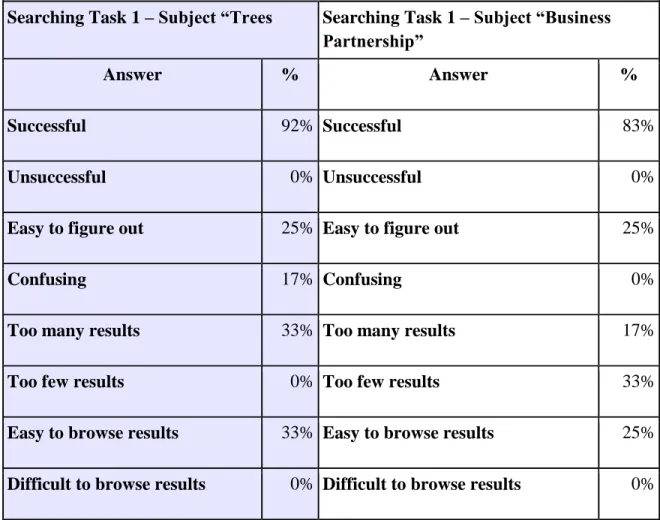
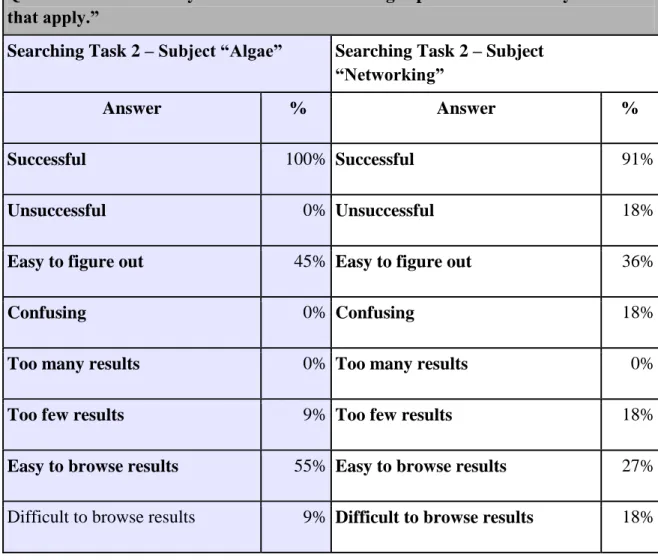
The results confirm the expectation that keyword search would be the most popular among users. They also show a tendency for users to gravitate towards controlled vocabulary searching both as time goes on and as searching tasks become more abstract. The following tables indicate users’ reported confidence levels when conducting the initial and secondary searching tasks:
Table 2: User Reported Success in Initial Searching Tasks
Question: “How would you describe this searching experience? Select any answers that apply.”
Searching Task 1 – Subject “Trees Searching Task 1 – Subject “Business Partnership”
Answer % Answer %
Successful 92% Successful 83%
Unsuccessful 0% Unsuccessful 0%
Easy to figure out 25% Easy to figure out 25%
Confusing 17% Confusing 0%
Too many results 33% Too many results 17%
Too few results 0% Too few results 33%
Easy to browse results 33% Easy to browse results 25%
Table 3: User Reported Success in Secondary Searching Tasks
Question: “How would you describe this searching experience? Select any answers that apply.”
Searching Task 2 – Subject “Algae” Searching Task 2 – Subject “Networking”
Answer % Answer %
Successful 100% Successful 91%
Unsuccessful 0% Unsuccessful 18%
Easy to figure out 45% Easy to figure out 36%
Confusing 0% Confusing 18%
Too many results 0% Too many results 0%
Too few results 9% Too few results 18%
Easy to browse results 55% Easy to browse results 27%
Difficult to browse results 9% Difficult to browse results 18%
All responses consistently show a high level of user reported success, in both the general and abstract tasks and both before and the addition of the Abstract Subject field. Reported success for the abstract searching tasks (e.g. business partnerships and
networking) rose slightly in the second searching task, along with users reporting use of controlled vocabulary search strategies. .
ways this universally reported success can be interpreted. Since this was the secondary searching task, even new users would have an increased familiarity with the database and might therefore experience higher confidence levels. Additionally, since the subject terms are in alphabetical order, “Algae” is placed high on the list and was therefore easy for users to find. This was also a fairly straightforward searching task, so with the
combination of increased exposure to the database and guaranteed results in with both keyword and controlled vocabulary searching strategies, it is not surprising that such an overwhelming success rate was reported.
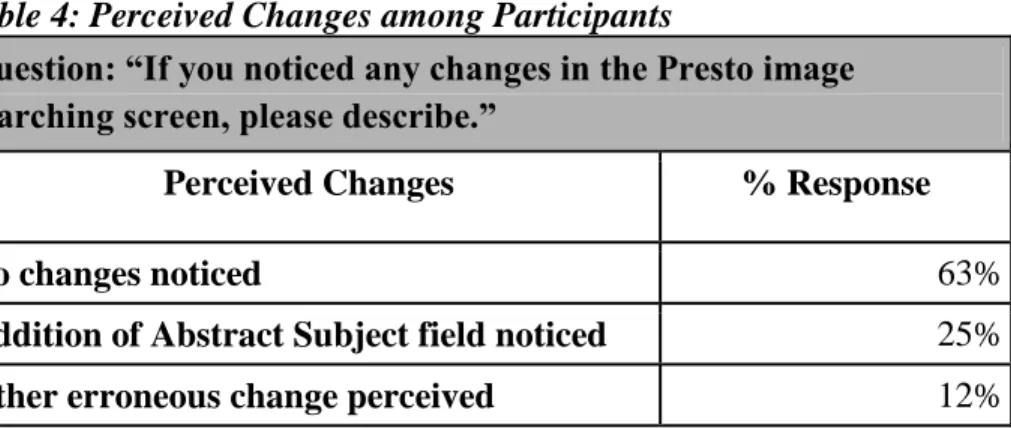
As shown in Table 4 below, most of the participants did not notice the presence of the newly added Abstract Subject field during the secondary searching task. The table details responses to a question asking whether any changes to the image searching screen were perceived, and the responses were then coded according to whether the users
noticed nothing, whether they noticed the new subject field, or other, when the user stated that they noticed a change which was not actually made.
Table 4: Perceived Changes among Participants
Question: “If you noticed any changes in the Presto image searching screen, please describe.”
Perceived Changes % Response
No changes noticed 63%
Addition of Abstract Subject field noticed 25%
Other erroneous change perceived 12%
even higher. Data from the following question which all eleven participants answered further supports this assumption, as eight participants responded that they had not noticed any changes.
Table 5: Effect of Perceived Changes on Search
Question: “Please rate whether any perceived changes had an effect on your search. Select any statements that apply.
Answer %
I did not notice any changes. 73%
I noticed changes but did not use the new fields. 9% Using the new fields made it easier to find useful results. 18% Using the new fields did not seem to have any effect on my search results. 0%
Using the new fields was confusing. 9%
Using the new fields made searching easier. 9%
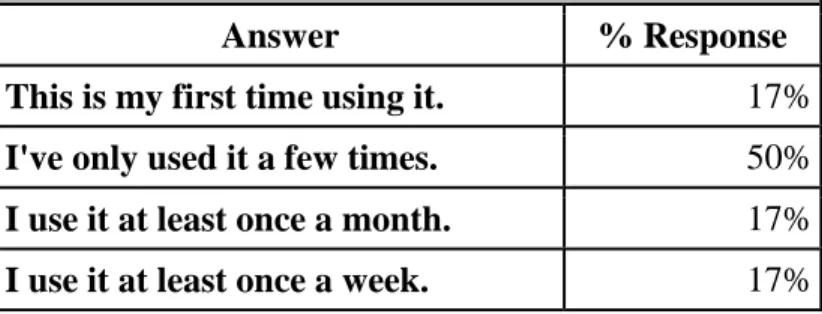
Using the new fields made searching more difficult. 0% The new fields will make me more likely to use Presto for image searching. 9% The fact that so few participants noticed the additional field could at surface level be interpreted as an indication that users are less willing to explore an interface with which they are unfamiliar, as the data also shows that most participants have not used the image database much before the study:
Table 6: Participants' Familiarity with Using Image Database
Question: “How often do you use the Presto image database? Select the answer which best applies.”
Answer % Response
It is also possible that the new field went unnoticed by so many because of the “below the fold” rule (Nielsen, 2010) pointed out in the literature review. As evidenced by a screen
shot of the Search Photos page, the new field is well below the fold:
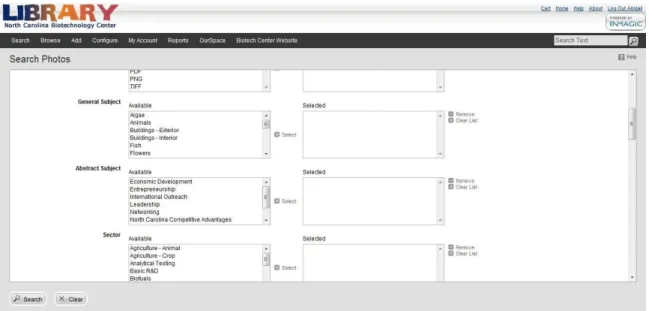
Figure 3: The Abstract Subject field is not immediately visible on the Search Photos page.
However, when the data from Table 1 is compared to the data from Tables 4 and 5, it is clear that more participants used the controlled vocabulary on the secondary abstract searching task than reported the recognition of the additional Abstract Subject field. Since there was such a highly reported success rate during the secondary abstract searching task, it is likely that users did in fact find the new field and did not recognize that it was not on the search page during their initial searching task. Several answers from the questions regarding the second abstract search seem to confirm this theory:
Question: “Please describe the steps you took when searching for images of
“networking” in the Presto Image database.”
do ya know? Networking was a choice! Chose that and brought up plenty of wonderful images”
“Search - photos - abstract subject – networking”
“...to explore more options, I went back to search again and started scanning all of the predefined categories. I was pleasantly surprised to actually find "networking" under Abstract Subject so I cleared first, then selected it by itself and hit search.”
“Go to dropdown menu under "Search" and choose "Photo". Put "networking" into keyword search. Returned 58 images. Secondarily I selected "Networking" under the General Subjects tab. Returned fewer images.”
“…typed in networking into quick search box. got only 16 results. When selected networking from topic and searched, got slightly different
selection of images, but not as many as I thought. I KNOW there are many events pics with networking in them.”
These quotations show that even though 73% of participants reported not to have noticed any changes, 46% of participants used the Abstract Subject field without realizing it was only available for the secondary searching task.
The data also seems to show that users were more likely to use controlled vocabulary terms for abstract subject searches, as shown in Table 1. In the initial
To return to the assumptions made before conducting the research, data on Table 1 and the included quotations regarding the secondary abstract subject task seem to confirm that users had more difficulty with the abstract searching task than the general. However, this is seems to be equally the case between the initial and secondary tasks. 25% of participants used both searching strategies—keyword and controlled
vocabulary—to conduct the abstract searching task of finding images representing a business partnership, and 18% of participants used both searching strategies to conduct the abstract searching task of finding images representing networking. By comparison, 0% of participants using a combination of both searching strategies for the general searching tasks. The fact that users elected to use two search strategies seems to indicate a greater level of complexity of the task at hand; when the first strategy failed to yield beneficial results, a second strategy was employed. In many cases, the second strategy involved the use of the new Abstract Subject field.
While developing the study, the placement of the new Abstract Subject field was a difficult decision to make. Placing it front and center seemed inconsistent with the existing flow of Controlled Vocabulary fields, so it was decided that the Abstract Subject field should be placed below the General Subject field in order to acknowledge the relationships between the fields. Both the existing General Subjects field and the new Abstract Subjects field may have garnered greater use if they were placed towards the top of the Search Photos page.
4.0 – RECOMMENDED MODIFICATION AND FURTHER
RESEARCH
4.1 - Recommended Modifications based on Research Data
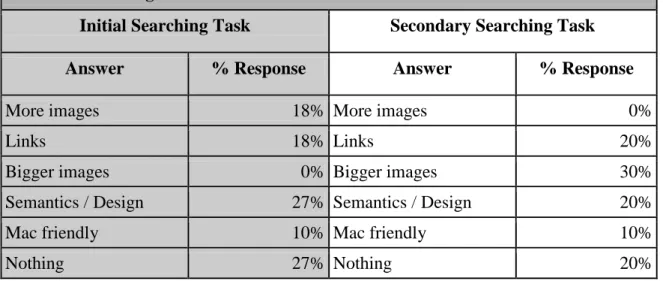
Participants were asked directly how the database could be improved. The following table indicates their coded responses for both the initial and secondary searching tasks. “More images” indicates the participant would like a larger quantity of
images to select from in the database. “Links” indicates the participant wishes the hyperlinks within the database were active. “Bigger images” indicates the participant
would like to be able to access full size, high resolution versions of the images, and may be related to the problem of the hyperlinks not being active. “Semantics/Design”
indicates the layout of the page was in some way confusing to the participant and/or the participant would like more information on the pages about what each field represents and means. “Mac friendly” indicates that the participant would like the program to work
more easily with Mac computers (as opposed to Windows computers, which are what most employees of NCBiotech work from). “Nothing” indicates that the participant
Table 6: Participants' Familiarity with Using Image Database
Question: “What kinds of changes or improvements would make you more likely to use the Presto image database?”
Initial Searching Task Secondary Searching Task
Answer % Response Answer % Response
More images 18% More images 0%
Links 18% Links 20%
Bigger images 0% Bigger images 30%
Semantics / Design 27% Semantics / Design 20%
Mac friendly 10% Mac friendly 10%
Nothing 27% Nothing 20%
It should be noted that only eleven out of twelve participants responded to this question after the initial searching tasks, and only ten out of eleven participants
responded after the secondary searching tasks. The lack of response from the remaining participants could indicate that they did not feel strongly about making any changes, but to avoid making incorrect assumptions only the recorded answers were taken into account.
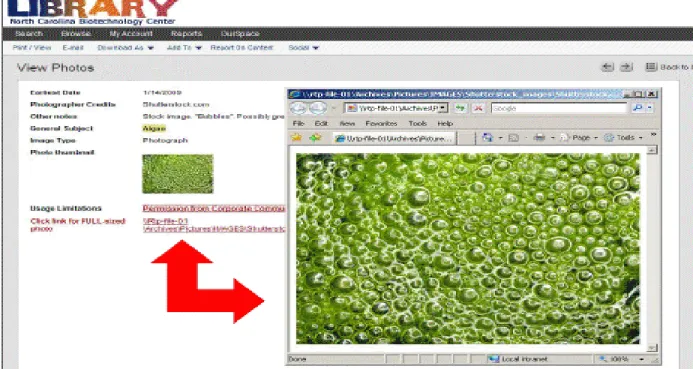
It should also be noted that there was some cross-over between the complaints coded as “Links” and “Bigger photos”. When the image database was first made
Figure 4: Active Hyperlink in Image Record
These links become inactive after a system upgrade, and the problem of reactivating them has been examined but has not yet been solved. At present users must copy and paste the file path into their browser window to access the full size, high resolution image files. It's difficult to say whether users indicating a desire for bigger images are referring to a desire for a larger thumbnail or the desire to access the full-sized images, since the process of accessing files has become much less convenient and intuitive with inactive links.
The prevalence of participants' desire for changes coded “Links” and “Bigger Images” could be solved a number of ways, if actually activating the links remains
they need to use to access high resolution, larger images. There is currently a note associated with this field which reads “NOTE: links are not currently working, so please
copy file-path into browser window to access full-size images”:
Figure 5: Note to Indicate Problem with Hyperlinks
Notes of this kind seemed to be appreciated by users, since participants requested more semantic information within the database interface. Adding more information about what fields do or links to searching procedures documents could also be beneficial for users. Several participants indicated this explicitly in their responses:
Question: “What kinds of changes or improvements would make you more likely to
use the Presto image database?”
“some additional navigation guides on the search screen, such as a 'submit' button (or did I miss it?). Perhaps an opening page with a 'welcome' message and basic description of the photo collection. although simple is great, there's no introductory information for the first time user.”
“ Brief definitions of key terms on search screen ... or links to explanations housed elsewhere”
The responses that indicate the desire for the addition of a button to push when searching are interesting, since there is a button labeled “Search” in the bottom left-hand corner of the Photos Search page (see Figure 3). The button is small and outside of the main area where users will input search terms. Since it is light gray, it does not contrast well with the light gray background against which it is set, making it easy for users to skip over when scanning the page. Adjusting the hue for a higher contrast would make this easier for users to find on the screen (Nielsen, 2001). The current positioning of the search button is also in direct opposition to Nielsen's compliancy mandate which states, “Do not put the search box in an unlikely spot” (Nielsen, 2001, p. 37). Placing the button
in a more visible area of the screen would make it easier to find and reflect users' inclination to pay more attention to information in the top portion of a screen, according to the F shaped reading patterns observed by Nielsen (2006).
The “Help” feature is also difficult for users to find. As seen in Figure 4, it is an
extremely small link in the top right hand corner of the screen, in a shade of darker gray that does not offer much contrast with its light gray background. Users' comments on the lack of Boolean searchability in the database seem to indicate that the Help button was not noticed:
Question: “What kinds of changes or improvements would make you more likely to
use the Presto image database?”
“Being able to select which boolean operators to use for the predefined categories might make it more useful. If there was a way to narrow results for predefined categories would be nice (sort of like a secondary search). I'm not sure if that is currently possible.”
find this help. In lieu of magnifying, coloring, and relocating the Help link so it is more prominent, (which would be an ideal solution but may not be immediately available from the software company) a note describing how to use the basic Boolean search functions might help users get further with the keyword search. A note directing users to the nearly invisible Help button could also be beneficial.
The suggestions in the participant's quotation above could also be mitigated by the presence of a more robust faceted search feature within the database. Users can currently narrow down search results with the use of a keyword filter located at the top right of the Search Results page:
Figure 6: Search Results Page
While this feature does allow for some faceted searching, in that users can narrow down their results based on the keywords present in retrieved records, it still requires a lot of initiative on the part of the user to come up with terms to use for narrowing, and it does not allow for users to broaden their search results directly from the page. As Hearst says in a 2008 paper, “Faceted navigation is a proven technique for supporting
would be a helpful feature and guide for searchers (Hearst, 2008, p. 1). Another issue that became apparent in the participants responses is the fact that there is no section on the Presto Database homepage that indicates where you go for image or photo searching:
Figure 7: Presto Database Home Page
Users must know to click “Search” and navigate down to “Photos” to access only photos
within a database that holds journals, metrics, and many other documents. This is not universal knowledge, as evidenced by responses to several questions:
Question: “What kinds of changes or improvements would make you more likely to use the Presto image database?”
“...I would like for Presto to ask me what I am searching for before I input my search term so that I only see the results that are relevant to my search - i.e. I don't want to see articles when I am searching for images”
Question: “Please describe the steps you took when searching for images of _________ in the Presto Database”:
“typed "trees" in quick search box and scrolled down to Photos”
“typed in 'trees' to the quick search box. looked for about 1 minute to see where i find the images section. chose drop down menu in Show box and selected 'photos'”
“typed "algae" in the Quick Search tool bar”
An additional issue with this method of photo searching is that photo results are displayed far below the fold on the Search Results page
generated by the Quick Search, so users can easily become discouraged by the fact that the results they were looking for are not seen on screen. The presence of a faceted search tool anchored on the left hand side of the page would take advantage of the F-shaped reading pattern, ensure that photo results are not lost below the fold, and be familiar to users who are used to using popular, similarly set up browsing features like Google Images. By using the Quick Search bar, users do not have access to any controlled vocabulary term lists and cannot take advantage of their levels of specificity and potential for search efficiency.
4.2 – Potential for further research
In many ways this pilot usability study was limited by the confines of the image database capacity for examination. At the point which this research was conducted, the NCBiotech was waiting on a system upgrade for the Presto image database which would
Figure 8: The Quick Search Bar is one of the most prominent features
have permitted viewing of logged user search queries. Regrettably, this upgrade did not come in time for the logged query function to play a part in this research study. When this upgrade is available, it is recommended that further research include careful examination of logged user queries. One way to analyze these queries is according to the “Panofsky-Shatford mode/facet matrix”, which was used extensively in Armitage's 1997 analysis of
user needs in image archives:
Figure 9: Panofsky-Shatford mode/facet matrix (Armitage 1997, p. 290).
By coding user queries according to the terms delineated in the above table, a better understanding of the level of specificity required in description can be reached. Understanding the level of specificity within description and its effectiveness for
insight into how users actually search within the image database, compared to how users perceived the success and failure of search terms provided to them. The fact that
searching tasks were provided to the users—instead of allowing users to come up with their own searching tasks—is one of the main limitations of this most recent pilot study.
Jörgensen's 1998 study on image attributes as noted by users employs what is called a “Descriptive Viewing Task” in which research participants were asked to
describe what they noticed first, second, third, and so on, about images within a set (Jörgensen, 1998, p. 166). This user-generated description created a working list of terminology most likely to be used by users in accordance with the available images. Recreating this study with a group of representative images from the Presto image database would be beneficial, and a comparison could be made between the existing terminology and the user-generated terms. The order in which details are noticed could also be considered when determining the placement of description fields on searching pages.
A more elaborate modification with immeasurable value would be to increase the robustness of the semantic-space within images' description, a process detailed by Hare's 2006 study on semantic retrieval systems. The semantic-space describes the range of words that can be grouped together by association, such as singular and plural forms, and varying levels of specificity for a given concept. Hare provides the example of the
5.0 – CONCLUSION
There is a high level of reported user satisfaction in the initial research study of the Presto image database at NCBiotech, and there are numerous modifications that have the potential to make the database even more user-friendly. Although the benefits of the addition of the Abstract Subject field were difficult to determine, the fact that many participants used this field when it became available for the secondary searching task suggests that it does provide subject access that is helpful to users.
Along with the addition of abstract subject access, the research study generated information about users’ habits when using the image database, namely that keyword search is prevalent and is usually the first step most users take. Only when a searching task becomes more complex are other options explored. With this information in mind, and with a general idea of which description fields are used the most when searching, several potential ways to modify the database's interface came to light. This includes the rearrangement of description fields so that highly used fields are placed prominently at the top of the page, and adding more information to the page about the description fields and their functions. Modifications regarding the design of the database pages, including the need for greater color contrast and relocation of the search and help functions were also noted as potential improvements.
There are many ways in which to further examine the database's usability. One of the main limitations of this study is that searching tasks were given to participants, so there is no way to tell how their experience might differ if they themselves were
user query logs—once this function is available—and conducting a descriptive viewing study to better understand how database users come up with terminology when searching. Creating more complicated searching tasks that require participants to take multiple steps to achieve results would also be a good way to gather more information about searching strategies and interaction with the database interface. In the meantime, this pilot study has provided a much better understanding of how employees at the North Carolina
BIBLIOGRAPHY
Armitage, Linda H. (1997). “Analysis of user need in image archives”, Journal of Information Science 4(23), p. 287-299.
Besser, Howard (1990). “Visual access to visual images: The UC Berkley Image Database Project”, Library Trends 38(4) p. 787-98.
Eakins, J. and Graham, M. (2000), “Content-based image retrieval” JISC Technology Applications Program, Report 39. p. 1-47.
Enser, Peter. (2000). “Visual image retrieval: seeking the alliance of concept-based and content-based paradigms”, Journal of Information Science 26, p. 199-210.
Enser, Peter (July 2003). “Towards a comprehensive survey of the semantic gap in visual image retrieval”, Computer Science 2728 p. 291-299.
Elliott, Ame. (2001). “Flamenco image browser: Using metadata to improve image search during architectural design”, in the Proceedings of the ACM CHI 2001 Conference Companion. Retrieved March 29, 2012 from
http://flamenco.berkeley.edu/pubs.html.
Hare, Jonathon S., Lewis, Paul H., Enser, Peter G.B., and Sandom, Christine J. (2006). “Mind the gap: Another look at the problem of the semantic gap in image retrieval”, Proceedings of SPIE. Vol. SPIE-6073, p. 75-86.
Hare, Jonathon S., Lewis, Paul H., Enser, Peter G.B., and Sandom, Christine (2007). “An in-depth analysis of a semantic image retrieval system” CIVR p. 250-257.
Hastings, Samantha (1999). “Evaluation of image retrieval systems: Role of user feedback”, Library Trends 48(2), p. 438-452.
Hearst, Marti A. (2008). “UIs for faceted navigation: recent advances and remaining open problems”, in the Workshop on Computer Interaction and Information Retrieval, HCIR 2008. Retrieved March 29, 2012 from
http://flamenco.berkeley.edu/pubs.html.
Jaimes, Alejandro (2000). “A conceptual framework for indexing visual information at multiple levels”, IS&T/SPIE Internet Imaging 3964.
Jörgensen, Corinne and Peter (2005). “Image querying by image professionals”, Journal of the American Society for Information and Science Technology 56(12) p. 1346-1359.
Lange, Dorothea (1936). Migrant Mother. Library of Congress Prints & Photographs Online Catalog. Retrieved March 23, 2012 from
http://www.loc.gov/pictures/item/fsa1998021539/PP/.
Nielsen, Jakob (2001). “Beyond ALT text: Making the web easy to use for users with disabilities”. Nielsen Norman Group. Retrieved March 25, 2012 from
http://www.nngroup.com/reports/accessibility/beyond_ALT_text.pdf. Nielsen, Jakob (April 17, 2006). “F-shaped pattern for reading web content”, Jakob
Nielsen's Alertbox. Retrieved September 20, 2011 from http://www.useit.com/alertbox/reading_pattern.html.
Nielsen, Jakob (March 22, 2010)”Scrolling and attention”, Jakob Nielsen's Alertbox. Retrieved September 20, 2011 from http://www.useit.com/alertbox/scrolling-attention.html.
North Carolina Biotechnology Center (2012). Mission & History. Retrieved March 18, 2012 from http://www.ncbiotech.org/about-us/mission-history.
Panofsky, Erwin.(1972). Chapter 1, “Introduction”. In Studies in Iconology: Humanistic Themes in the Art of the Renaissance. (pages of chapter).New York: Harper & Row.
Pu, Hsiao-Tieh (2008). “An analysis of failed queries for web image retrieval”, Journal of Information Science, 34(3) p. 275-289.
Rui, Yong (1999). “Image retrieval: current techniques, promising directions, and open issues”, Journal of Visual Communication and Image Representation 10, p. 39-62.
Schaffner, Jennifer (2009). “The metadata is the interface: Better description for better discovery of archives and special collections”, Synthesized from OCLCUser Studies Report. Retrieved January 16, 2012 from
http://www.oclc.org/research/publications/library/2009/2009-06.pdf
Shatford, Sara (1986) “Analyzing the subject of a picture: A theoretical approach”, Cataloging & Classification Quarterly, 6(3), p. 39-62.
Shatford Layne, Sara (1994). “Some Issues in the Indexing of Images”, Journal Of The American Society For Information Science,45(8), 583-588.
Stoica, Emilia and Hearst, Marti. (May 2004). “Nearly-Automated metadata hierarchy creation” from the Companion Proceedings of HLT-NAACL'04. Retrieved March 29, 2012 from http://flamenco.berkeley.edu/pubs.html.
Yang, M., Wildemuth, B., and Marchionini, G. (2004). “The relative effectiveness of concept-based versus content-based video retrieval” Proc. ACM Multimedia , p. 368-371.
Yu, Ning (2012). “A multi-directional search technique for image annotation
APPENDICES
Appendix 1 - Initial Searching Tasks Survey
1.) Please describe the steps you took when searching for images of trees in the Presto Database: (open-answer)
2.) How would you describe this searching experience? Select any that apply: ● Successful
● Unsuccessful ● Easy to figure out ● Confusing
● Too many results ● Too few results ● Easy to browse results ● Difficult to browse results
3.) What did you find useful when conducting this search? (open-answer) 4.) What did you find confusing when conducting this search? (open-answer) 5.) Please describe the steps you took when searching for images of a business partnership in the Presto Database: (open-answer)
6.) How would you describe this searching experience? Select any that apply: ● Successful
● Unsuccessful ● Easy to figure out ● Confusing
● Too many results ● Too few results ● Easy to browse results ● Difficult to browse results
7.) What did you find useful when conducting this search? (open-answer) 8.) What did you find confusing when conducting this search? (open-answer) 9.) How often do you use the Presto image database? Select the answer which best applies:
● I use it at least once a month ● I use it at least once a week
10.) What kind of projects, if any, have you used the image database for? (open-answer) 11.) Have you received any kind of training or instruction for using the Presto image database? Select all that apply:
● Attended at least one GEEK session in person ● Attended at least one GEEK session remotely ● Viewed video of one or more GEEK sessions ● Received one-on-one tutorial in person ● Received one-on-one tutorial over the phone ● Read Presto Searching Guide
● Received answers to question(s) on an as needed basis
Appendix 2 - Secondary Searching Tasks Survey
1.) Please describe the steps you took when searching for images of trees in the Presto Database: (open-answer)
2.) How would you describe this searching experience? Select any that apply: ● Successful
● Unsuccessful ● Easy to figure out ● Confusing
● Too many results ● Too few results ● Easy to browse results ● Difficult to browse results
3.) What did you find useful when conducting this search? (open-answer) 4.) What did you find confusing when conducting this search? (open-answer) 5.) Please describe the steps you took when searching for images of a business partnership in the Presto Database: (open-answer)
6.) How would you describe this searching experience? Select any that apply: ● Successful
● Unsuccessful ● Easy to figure out ● Confusing
7.) What did you find useful when conducting this search? (open-answer) 8.) What did you find confusing when conducting this search? (open-answer)
9.) If you noticed any changes in the Presto image searching screen, please describe: (open-answer)
10.) Please rate whether any perceived changes had an effect on your search. Select any statements that apply:
● I did not notice any changes
● I noticed changes but did not use the new fields
● Using the new fields made it easier to find useful results
● Using the new fields did not seem to have an effect on my search results ● Using the new fields was confusing
● Using the new fields made searching easier
● Using the new fields made searching more difficult
● The new fields will make me more likely to use Presto for image searching
11.) How often do you use the Presto image database? Select the answer which best applies:
● I've only used it for this study ● I've only used it a few times ● I use it at least once a month ● I use it at least once a week
12.) How often do you expect to use the Presto image database in the future? Select the answer which best applies:
● I do not expect my use to change. ● I will probably use it more often. ● I will probably use it less often.
13.) What kinds of changes or improvements would make you more likely to use the Presto image database? (open-answer)