Brian J Landau. Developing a Professional Networking And Job Board Web Application. A Masters Paper for the M.S. in I.S. Degree. July, 2007. 10 pages. Advisor: Paul Jones
A look at the process of developing a web application from the ground up. The web application was envisioned to be a social and professional network for LIS students and a job board. It was developed with Ruby on Rails and involved a group effort.
Headings:
Computers and Information Science -- Web Development Information Science -- Interaction Design
Databases -- Web Databases
by
Brian J Landau
A Master's paper submitted to the faculty of the School of Information and Library Science of the University of North Carolina at Chapel Hill
in partial fulfillment of the requirements for the degree of Master of Science in
Information Science.
Chapel Hill, North Carolina
July, 2007
Approved by:
In the up and coming "Web 2.0" environment social networks and community generated content is the prime focus of the largest and most successful sites. But
surprisingly there isn't yet a niche site for Library and Information Science professionals, although our field is heavily represented in out "Web 2.0" spaces. The goal of my project was to plan and bring to a working prototype stage a professional network and job board for our field.
The project as originally conceived had three main functionalities: a professional network, a job board, and a wiki-like element. The idea behind it came from a
conversation between myself and another SILS student, Megan Perez. We envisioned an idea where students across the country could connect, collaborate, and find jobs. We decided to form a group of four with two other students, and start in on the design of the site. As a group, we looked through other relevant sites and blogs on "Web 2.0", and previous research on social networks as well as interaction design. We then constructed use cases, flow charts, wireframes, and other models of what we envisioned for the site. We tried to focus in on simplifying the work flows of users, and only offering the functionality we thought would be most desired by other students. As we progressed it became clear that the integration between the network side and the job board would be one of the most important characteristics. We then needed to choose a name, for this we choose LISPr.net or Library and Information Science Professionals Network.
For the development of it we chose to go with the Ruby on Rails framework due to it's popularity in the "Web 2.0" space, it's ability to scale well, the ability to quickly develop, and it's power to customize. Also, the people who developed Ruby on Rails, 37signals have created some very popular and well design web applications, as well as writing an influential blog (Signal vs. Noise) on user centered web application design. We decided that for the wiki portion it would be great to be able to use MediaWiki the very popular and stable software that runs Wikipedia. MediaWiki though is coded in PHP and thus offers difficulties in integrating with Ruby on Rails, and so has not been
implemented at the time of this writing. We then set about constructing a prototype of the 2 other components, the job board and the professional networking sections.
for job postings. One of the things that became important was creating arrays and hashes of acceptable values for certain attributes this made validation and creating the necessary form elements easier. We also added models for tagging and skills (which we treat the same as tagging). Tagging and folksomony is a crucial element of many "Web 2.0" sites, we felt the ability to tag posts and oneself was essential. We also felt skills should be treated the same way as it would enable users to find jobs with skills matching their own, as well as employers finding candidates with the skills they want.
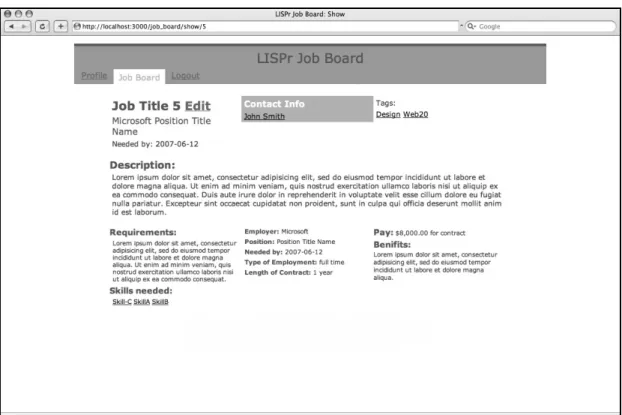
Then began the difficult work on the controllers and views, which in the case of rails are tightly coupled. Since forms are a big part of the design of any web app this was what my work centered on. But we also needed to be able to quickly and elegantly show the crucial data of each job posting or user, this involved trying to condense lots of information into a small space, as we wanted all job posting to be “above the fold.” for any user even those using smaller browser windows (see figure 1). For the forms what was needed was forms that were easy to understand allowed you to make changes quickly and easily. This mostly centered on when to use AJAX controls and when to use
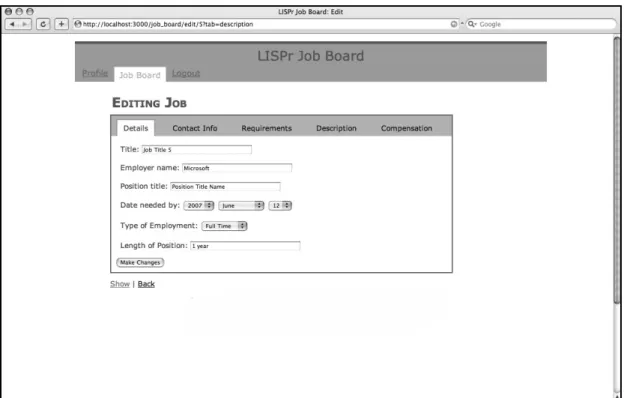
traditional controls. I chose to only use AJAX controls for the tabs of edit forms. So main navigation was all controlled by live links, submitting forms was done in the traditional manner, but moving from one section of a form to another was done by way of remote links. This allowed for quicker updating of the forms, and made sure that AJAX wasn’t overused, or used to get or send “too much” data, which would actually slow down the interaction instead of speed it up. There forms initially though were all fields on one page, but this seemed to be to cumbersome and overwhelming for the user, so I then
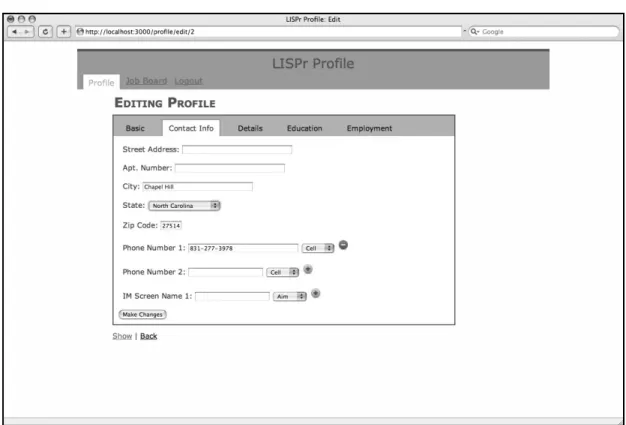
moved to using the tabbed navigation for the forms as well as the general site navigation (see figure 2 & 3). The other detail was how to handle the interaction of multi-valued attributes to models (i.e. having more than one phone number). I went with a model I've always liked of having an add and subtract AJAX image links next to the fields that allow new fields to pop-up (see figure 4 & 5). This was initially, as always difficult to construct. But actually Rails had some methods that allow for this to be done at least somewhat painlessly.
We also wanted users to readily understand when their data was being saved or not. To this effect I choose to make it intuitive when ever possible and warn the user when ever it was unclear. So when a user click a tab, they are warned that moving from tab to tab will not save their data, they have to actually submit the form.
The most impressive part of using Ruby on Rails, was often how easy it was to implement an idea. Often I'd find that doing something was often easier than I suspected. Although it did have difficulties most when trying to make it as easy as possible to save associated records. This became often quite complicated and mundane involving lots of debugging.
Appendix: Screen Shots
Fig. 1 Showing a job board listing entry
Fig. 2 Editing a job postings details
Fig. 4 Editing a users profile contact info
Fig. 5 Editing a users profile contact info, having added a new phone number
Works Cited
Ruby on Rails. 37signals. 22 July 2007 <http://www.rubyonrails.org/>
Signal vs. Noise. 37signals. 22 July 2007 <http://37signals.com/svn/>