
Department Service Integration with
e-Pramaan
How to integrate a .NET Application
.NET specific integration details are provided in this document. Read e-Pramaan Departments Integration Document before proceeding. ©CDAC Mumbai
e-Pramaan Integration Document .NET Specific v1.5
©Centre for Development of Advanced Computing 1
Contents
Revision History ... 2Abbreviations ... 2
1. Introduction ... 3
2. Process Flow... 3
1. Single Sign On ... 3
A. Login (SSO) initiated from Department Service ... 3
B. Login (SSO) Initiated at e-Pramaan ... 4
2. Single LogOut (SLO) ... 5
A. Single LogOut (SLO) Initiated by Department service ... 5
B. Single LogOut (SLO) Initiated by e-Pramaan ... 7
3. Required Steps for Integration ... 7
A. Create Resources Folder in the Application root ... 8
B. Implement Support for HTTP POST ... 8
C. Modify authentication –“ Login using e-Pramaan” ... 8
D. Processing SAML Response ... 9
E. Supporting Single LogOut (SLO) ... 11
F. Processing SLO Response ... 12
G. Web Service Handlers ... 13
i. SLO Request Handler ... 13
ii. ssofail handler ... 14
iii. logoutfail handler ... 14
H. Processing OneTimeVerification ... 15
I. Session Management ... 16
J. Modify SSO.Properties ... 16
e-Pramaan Integration Document .NET Specific v1.5
©Centre for Development of Advanced Computing 2
Revision History
Abbreviations
Version Date Author Reason for Change
1.0 (Draft) 22-05-15 e-Pramaan Integration Team
e-Pramaan Senior Project Manager
1.5 23-07-15 e-Pramaan Integration Team
e-Pramaan Project Manager
SAML Security Assertion Mark-up Language
SP Service Provider (Department)
SSO Single Sign On
e-Pramaan Integration Document .NET Specific v1.5
©Centre for Development of Advanced Computing 3
Intended Audience
The recommended audience for this document is the enterprising person (system administrator/software developer) responsible for e-Pramaan integration at Department end. This document may be useful for the project manager/Department head to assess the effort required for integration with e-Pramaan.
Prerequisite
The integrating person at Department end should be well versed in web application development using .NET framework 4.5 and familiar with the work flow of the Department Service.
1.
Introduction
This document details the steps involved in integrating Department services developed in .NET framework with e-Pramaan. It explains the process flow and the step-by-step instructional guidance for integrating .NET web application with e-Pramaan to achieve Single Sign On (SSO) and Single LogOut (SLO) functionality provided by e-Pramaan.
2.
Process Flow
1.
Single Sign On
Single Sign On (SSO) is an access control mechanism across multiple independent software systems. This allows user to log in once and gain access to all services, without being prompted for log in again at each of them. e-Pramaan allows the user to initiate SSO either from Department Service or from e-Pramaan portal. Similarly Single LogOut session can also be initiated at Department Service or at e-Pramaan portal.
SAML 2.0 is used for SSO implementation.
A.
Login (SSO) initiated from Department Service
Steps involved in SSO initiated by Department service are depicted in Figure 2.1.
1. User at Department Service initiates SSO by clicking the option to "Login Using e-Pramaan". 2. Department Service then creates SAML SSO request and forwards the user to e-Pramaan for
authentication.
3. User is authenticated by e-Pramaan using Challenge-Response mechanism. 4. User is authenticated successfully on e-Pramaan.
5. The user is redirected back to the initiating Department Service. Since the user has been authenticated at e-Pramaan, the Department Service accepts the user and allows him/her to login.
e-Pramaan Integration Document .NET Specific v1.
©Centre for Development of Advanced Computing
6. If the user fails to authenticate himself/ herself on e authentication failure.
Figure 2.
B.
Login (SSO) Initiated at
Steps involved in SSO initiated by user at e1. The user directly comes to e 2. When the user selects a service, e
3. According to the requirement of the service, e complete the authentication.
4. The user completes the authentication by
5. e-Pramaan then initiates an SSO session between 6. The user is then redirected to the selected
log in without entering his(her) Specific v1.5
©Centre for Development of Advanced Computing If the user fails to authenticate himself/ herself on e-Pramaan, the SAML response returns
Figure 2.1 : SSO initiated from SP Service
Initiated at e-Pramaan
Steps involved in SSO initiated by user at e-Pramaan portal depicted in Figure 2.2. The user directly comes to e-Pramaan portal and logs in using Login and Password
When the user selects a service, e-Pramaan checks the authentication required by the service. According to the requirement of the service, e-Pramaan uses the challenge
complete the authentication.
The user completes the authentication by providing the appropriate response.
initiates an SSO session between e-Pramaan and the selected service.
The user is then redirected to the selected Department Service where (s)he will be allowed to (her) credentials again.
4 Pramaan, the SAML response returns
using Login and Password.
checks the authentication required by the service. Pramaan uses the challenge-response to providing the appropriate response.
and the selected service.
e-Pramaan Integration Document .NET Specific v1.
©Centre for Development of Advanced Computing
Figure 2.
2.
Single LogOut (SLO)
During every user session at e-Pramaan, user may out from one service, The user is logged out LogOut (SLO) either from Department selects the option to logout, either
A.
Single LogOut (SLO)
SLO is initiated by the Department The service will Log Out the user locallyresponse from e-Pramaan) and then creates the SAML SLO request
broadcast. This will ensure that the user will be logged out from every service the user was logged in through SSO session. This is depicted in
token.
Specific v1.5
©Centre for Development of Advanced Computing Figure 2.2 : SSO initiated from e-Pramaan
Pramaan, user may log-in into multiple services. When the user is logged logged out from all active services. This is achieved b
Department service or e-Pramaan portal. SLO is triggered when the user selects the option to logout, either from the department Service or from e-Pramaan.
Initiated by Department service
by the Department Service when the user decides to logout at the Department
ut the user locally (or the service may logout the user locally after receiving the then creates the SAML SLO request to e-Pramaan to initiate SLO the user will be logged out from every service the user was logged in This is depicted in Figure 2.3. The service has an option not to
5 to multiple services. When the user is logged is achieved by initiating Single SLO is triggered when the user
the Department Service. (or the service may logout the user locally after receiving the Pramaan to initiate SLO the user will be logged out from every service the user was logged in The service has an option not to accept the SLO
e-Pramaan Integration Document .NET Specific v1.
©Centre for Development of Advanced Computing
Figure 2. Specific v1.5
©Centre for Development of Advanced Computing Figure 2.3 : SLO Initiated from Department Service
e-Pramaan Integration Document .NET Specific v1.
©Centre for Development of Advanced Computing
B.
Single LogOut (SLO)
Single LogOut (SLO) will be triggered from e
Pramaan portal. e-Pramaan portal will then broadcast the Log logged in through the current active session.
terminate the local session and notify e scenario is depicted in Figure 2.4.
Figure 2.
3.
Required Steps for Integration
The steps involved in integrating a .NET application with e this is provided in the integration kit.
• Create a folder named Resources
configuration files for e-Pramaan integration will be placed.
• Provide link “Login using
e-• Modify OnClick event of “Login using e
Modify/implement logic to consume SSO
• Modify the logout procedure to direct through e • Modify/implement logic to
Specific v1.5
©Centre for Development of Advanced Computing
Initiated by e-Pramaan
ut (SLO) will be triggered from e-Pramaan when the user selects the option to logout
Pramaan portal will then broadcast the LogOut Request to all the services which are the current active session. On receiving the Single LogOut request (SLO request) terminate the local session and notify e-Pramaan the LogOut status via logout response message. The
Figure 2.4 : SLO initiated from e-Pramaan
Required Steps for Integration
The steps involved in integrating a .NET application with e-Pramaan are listed below. kit.
Resources in the application root where the SamlConnector.dll Pramaan integration will be placed.
-Pramaan”on the login page of Department Service.
Modify OnClick event of “Login using e-Pramaan” link to authenticate using e Modify/implement logic to consume SSO Token sent by e-Pramaan.
Modify the logout procedure to direct through e-Pramaan.
to consume logout response from e-Pramaan.
7 Pramaan when the user selects the option to logout from
e-ut Request to all the services which are ut request (SLO request) may via logout response message. The
listed below. Sample code for
SamlConnector.dll and other
e-Pramaan Integration Document .NET Specific v1.5
©Centre for Development of Advanced Computing 8
• Implement a RESTful Webservice using the template provided in the Integration Kit, to receive
SLO broadcast request from e-Pramaan.
• Implement logic for OneTimeVerification as detailed further.
A.
Create
Resources
Folder in the Application
root
.NET web applications require a few DLLs for integrating with e-Pramaan. Files given in the Integration Kit are detailed in Table 3.1.
Create a folder named ‘Resources’ inside your .NET applications folder. Copy the following all these dlls & configuration file from integration kit to the ‘Resources’ folder
Table 3.1 : Integration kit contents
Serial No Component Purpose
1 SamlConnector.dll This component manages communication between
Department Service & e-Pramaan
2 SSOToken-client.dll This component maps the json to SSO Token class
2 NewtonSoft.dll This component helps in de-serializing the SSO Token
sent by e-Pramaan on successful authentication
3 Saml2.0.dll This is the SAML library for creating SAML
Requests/Response
4 SSO.properties This is the configuration file used by SamlConnector.dll.
All the configuration information goes in this file.
B.
Implement Support for HTTP POST
e-Pramaan uses SAML request/response to communicate with Department Services. These requests most likely will be signed and encrypted, making them too big to send via browser GET method. Integrating the HttpHelper.cs class will helps the Department Service to easily send the SAML requests by HTTP POST method.
C.
Modify authentication –“
Login using e-Pramaan
”
• The authentication mechanism in the service application has to incorporate a link to “ Login
using e-Pramaan”.
• In your application, add a button/link named ‘Login through e-Pramaan’.
• Using the given DLLs create an authentication request for an event generated by onclick ()and
send it to e-Pramaan for authenticating the user.
• Sample code for authentication is given below. Refer AuthnRequest/Login.aspx.cs in the
e-Pramaan Integration Document .NET Specific v1.5
©Centre for Development of Advanced Computing 9 Table 3.2 : Code Sample for Authentication
//Create Object of samlConnector
SamlConnectorComp samlConnector = new SamlConnectorComp();
//Set destination URL
//ePramaanURL – URL of the e-Pramaan portal
//SingleSignOnServiceURL – URL which accepts SSO requests from Department Service
string url = PropertiesManager.getProperty("ePramaanURL") +
PropertiesManager.getProperty("SingleSignOnServiceURL");
//Generate Saml Auth Request and maintain a log of it
string SamlAESEncrpytedRequest = samlConnector.getSamlAuthnRequest();
LogAppend.Log("Encrypted Auth Request:" + SamlAESEncrpytedRequest);
//Get seed & salt values from Property file
//EncryptionSeed – This is the Key used for encryption
//EncryptionSalt – This is the salt value used for encryption string seed = PropertiesManager.getProperty("EncryptionSeed") string salt = PropertiesManager.getProperty("EncryptionSalt");
//Decrypt the Auth Request
string dec = AES.decryptAES(SamlAESEncrpytedRequest, seed, salt);
LogAppend.Log("Decrypted Auth Request:" + dec);
//Read Service ID from config file
//Issuer – This is the unique service Id of the SP Service string ServiceId = PropertiesManager.getProperty("Issuer");
//Add the SAMLRequest & Service ID to parameters list
//SAMLRequest – This is the encrypted SAML SSO Request which should be sent to e-Pramaan
//ServiceId – This is the unique ID of the SP Service
NameValueCollection parameters = new NameValueCollection();
parameters.Add("SAMLRequest", SamlAESEncrpytedRequest); parameters.Add("ServiceId", ServiceId);
//POST the request to e-Pramaan
HttpHelper.RedirectAndPOST(this.Page, url, parameters);
D.
Processing SAML Response
After successful authentication at e-Pramaan the user is redirected to the Department service for which SAML request was initiated. This will be a HTTP POST REDIRECT and the user credentials will be provided by e-Pramaan in the SAML Response. The service has to consume the SAML Response and decide the further logic for allowing the user to access desired service.
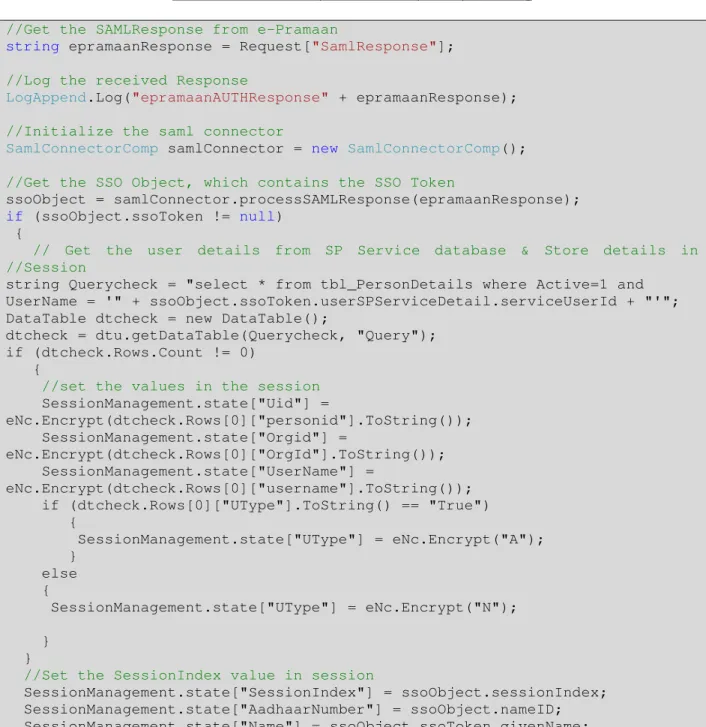
The SAML Response sent by e-Pramaan will be received by an ASP page at the Department service end, which will be decoded and processed before allowing the user to login on the service. Sample code for
e-Pramaan Integration Document .NET Specific v1.5
©Centre for Development of Advanced Computing 10 decoding/processing of the SAML Response is given ahead. Refer AuthnResponse/consume.aspx.cs in the integration kit for complete source code.
Table 3.3 : Code sample for SSO response processing
//Get the SAMLResponse from e-Pramaan
string epramaanResponse = Request["SamlResponse"];
//Log the received Response
LogAppend.Log("epramaanAUTHResponse" + epramaanResponse);
//Initialize the saml connector
SamlConnectorComp samlConnector = new SamlConnectorComp();
//Get the SSO Object, which contains the SSO Token
ssoObject = samlConnector.processSAMLResponse(epramaanResponse); if (ssoObject.ssoToken != null)
{
// Get the user details from SP Service database & Store details in //Session
string Querycheck = "select * from tbl_PersonDetails where Active=1 and UserName = '" + ssoObject.ssoToken.userSPServiceDetail.serviceUserId + "'"; DataTable dtcheck = new DataTable();
dtcheck = dtu.getDataTable(Querycheck, "Query"); if (dtcheck.Rows.Count != 0)
{
//set the values in the session SessionManagement.state["Uid"] =
eNc.Encrypt(dtcheck.Rows[0]["personid"].ToString()); SessionManagement.state["Orgid"] =
eNc.Encrypt(dtcheck.Rows[0]["OrgId"].ToString()); SessionManagement.state["UserName"] =
eNc.Encrypt(dtcheck.Rows[0]["username"].ToString()); if (dtcheck.Rows[0]["UType"].ToString() == "True") {
SessionManagement.state["UType"] = eNc.Encrypt("A"); }
else {
SessionManagement.state["UType"] = eNc.Encrypt("N"); }
}
//Set the SessionIndex value in session
SessionManagement.state["SessionIndex"] = ssoObject.sessionIndex; SessionManagement.state["AadhaarNumber"] = ssoObject.nameID; SessionManagement.state["Name"] = ssoObject.ssoToken.givenName; }
e-Pramaan Integration Document .NET Specific v1.5
©Centre for Development of Advanced Computing 11
E.
Supporting Single LogOut (SLO)
A user logged in through e-Pramaan will be able to log-out using Single LogOut (SLO) feature, which implies SLO request initiated will log out user from all the active services for that user.
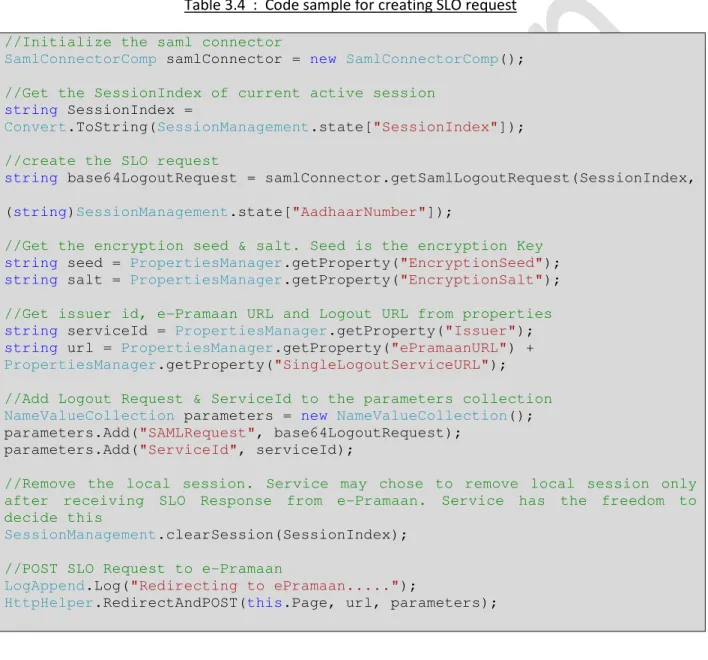
Whenever a user initiates a logout at service, a SAML SLO request will be sent to e-Pramaan by the Service. The service will have to provide the "Logout" button to incorporate this feature. Sample code for creating SAML SLO request is given in Table 3.4. Refer Logout Request/Home.aspx.cs in the integration kit for complete source code.
Table 3.4 : Code sample for creating SLO request
//Initialize the saml connector
SamlConnectorComp samlConnector = new SamlConnectorComp();
//Get the SessionIndex of current active session
string SessionIndex =
Convert.ToString(SessionManagement.state["SessionIndex"]);
//create the SLO request
string base64LogoutRequest = samlConnector.getSamlLogoutRequest(SessionIndex,
(string)SessionManagement.state["AadhaarNumber"]);
//Get the encryption seed & salt. Seed is the encryption Key string seed = PropertiesManager.getProperty("EncryptionSeed"); string salt = PropertiesManager.getProperty("EncryptionSalt");
//Get issuer id, e-Pramaan URL and Logout URL from properties string serviceId = PropertiesManager.getProperty("Issuer"); string url = PropertiesManager.getProperty("ePramaanURL") + PropertiesManager.getProperty("SingleLogoutServiceURL");
//Add Logout Request & ServiceId to the parameters collection
NameValueCollection parameters = new NameValueCollection();
parameters.Add("SAMLRequest", base64LogoutRequest); parameters.Add("ServiceId", serviceId);
//Remove the local session. Service may chose to remove local session only after receiving SLO Response from e-Pramaan. Service has the freedom to decide this
SessionManagement.clearSession(SessionIndex);
//POST SLO Request to e-Pramaan
LogAppend.Log("Redirecting to ePramaan...");
e-Pramaan Integration Document .NET Specific v1.5
©Centre for Development of Advanced Computing 12
F.
Processing SLO Response
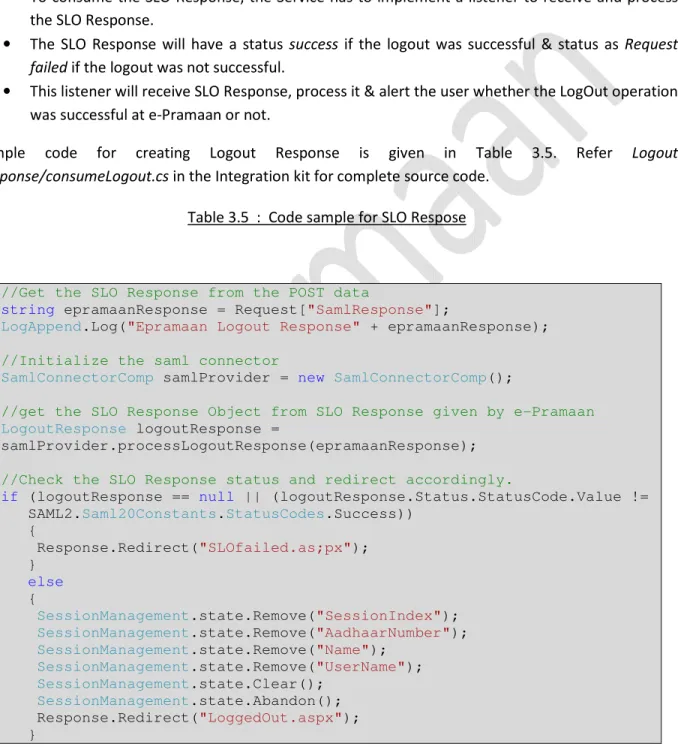
SLO Response will be sent bye-Pramaan to the initiating Department service in response to the SLO Request. It contains the status whether SLO was success/failure at e-Pramaan. This SLO Response will be sent via "POST Redirect" to the initiating Department service.
• To consume the SLO Response, the Service has to implement a listener to receive and process
the SLO Response.
• The SLO Response will have a status success if the logout was successful & status as Request failed if the logout was not successful.
• This listener will receive SLO Response, process it & alert the user whether the LogOut operation
was successful at e-Pramaan or not.
Sample code for creating Logout Response is given in Table 3.5. Refer Logout Response/consumeLogout.cs in the Integration kit for complete source code.
Table 3.5 : Code sample for SLO Respose
//Get the SLO Response from the POST data
string epramaanResponse = Request["SamlResponse"];
LogAppend.Log("Epramaan Logout Response" + epramaanResponse);
//Initialize the saml connector
SamlConnectorComp samlProvider = new SamlConnectorComp();
//get the SLO Response Object from SLO Response given by e-Pramaan
LogoutResponse logoutResponse =
samlProvider.processLogoutResponse(epramaanResponse); //Check the SLO Response status and redirect accordingly.
if (logoutResponse == null || (logoutResponse.Status.StatusCode.Value != SAML2.Saml20Constants.StatusCodes.Success))
{
Response.Redirect("SLOfailed.as;px"); }
else {
SessionManagement.state.Remove("SessionIndex"); SessionManagement.state.Remove("AadhaarNumber"); SessionManagement.state.Remove("Name");
SessionManagement.state.Remove("UserName");
SessionManagement.state.Clear();
SessionManagement.state.Abandon();
Response.Redirect("LoggedOut.aspx"); }
e-Pramaan Integration Document .NET Specific v1.5
©Centre for Development of Advanced Computing 13
G.
Web Service Handlers
i. SLO Request Handler
e-Pramaan allows user to log in to multiple services through e-Pramaan in a single user session. Suppose that the user is logging out at the e-Pramaan website, the user should logout from all the associated services for Single LogOut. This is e-Pramaan initiated Single Logout Service (SLO). e-Pramaan initiated SLO is implemented using RESTful web services.
In e-Pramaan initiated SLO, Department Service will receive a Logout Request from e-Pramaan. The service has to process and validate the request. On successful processing of the request, the service has to logout the user and terminates user session at SP Service. After this, the service has to send the status of the logout in a synchronous REST service response.
The integrating a service has to implement the RESTful web service for receiving the SLO request, process it and send the SLO Response back to e-Pramaan. Sample code for "SLO Request consumer" WebService is given in Table 3.6.
Table 3.6 : Code sample for receiving SLO Broadcast
//Get SLORequest string from the stream
string StringReq = SamlConnectorComp.StreamToString(SamlRequest);
string seed = PropertiesManager.getProperty("EncryptionSeed"); string salt = PropertiesManager.getProperty("EncryptionSalt"); //decrypt the request and log it.
string decryptedReq = AES.decryptAES(StringReq, seed, salt);
LogAppend.Log("SLODECREQ:" + decryptedReq); //initialize the SamlConnector component
SamlConnectorComp connector = new SamlConnectorComp();
//Get the LogoutRequest object from the request received
LogoutRequest logoutRequest = connector.processSLOLogoutRequest(StringReq);
//logout the user here. session management also done here
string[] sessionIndex = logoutRequest.SessionIndex;
if (sessionIndex.Length == 1)
sessionDeleted = SessionManagement.clearSession(sessionIndex[0]); if (sessionDeleted == true)
logoutStatus = SamlConnectorComp.responseStatusCode.Success; else
logoutStatus = SamlConnectorComp.responseStatusCode.Denied; //end of session management.
//create LogoutResponse to send back to e-Pramaan
string encryptedResponse = connector.createSLOLogoutResponse(logoutRequest,
logoutStatus);
LogAppend.Log("encryptedSLOResponse Rest Service:" + encryptedResponse);
//To send the LogoutResponse to e-Pramaan, write the created LogoutRequest string to the stream
nwStream = new MemoryStream(Encoding.UTF8.GetBytes(encryptedResponse));
e-Pramaan Integration Document .NET Specific v1.5
©Centre for Development of Advanced Computing 14
ii. ssofail handler
When a user tries to log-in using Pramaan from service end but fails to get authenticated on e-Pramaan, a SAML Response is initiated by e-Pramaan. This saml Response will be send via RESTful Web service.
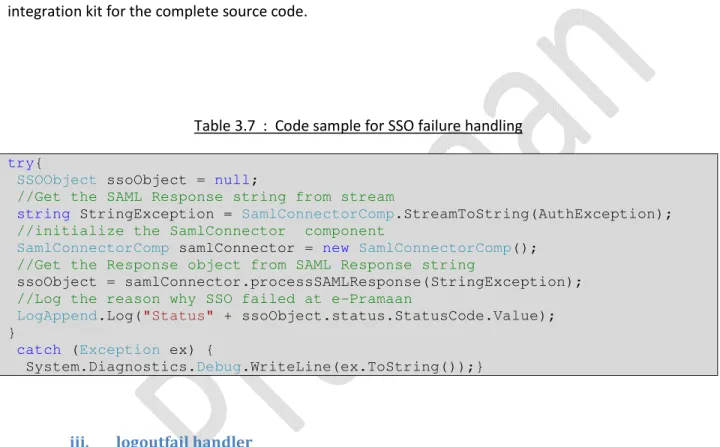
The service has to implement a RESTful web service for this. Web service may be used by the SP Service for logging/auditing purpose. Sample code for this is given in Table 3.7. Refer SLORestService.cs in the integration kit for the complete source code.
Table 3.7 : Code sample for SSO failure handling
try{
SSOObject ssoObject = null;
//Get the SAML Response string from stream
string StringException = SamlConnectorComp.StreamToString(AuthException);
//initialize the SamlConnector component
SamlConnectorComp samlConnector = new SamlConnectorComp();
//Get the Response object from SAML Response string
ssoObject = samlConnector.processSAMLResponse(StringException); //Log the reason why SSO failed at e-Pramaan
LogAppend.Log("Status" + ssoObject.status.StatusCode.Value); }
catch (Exception ex) {
System.Diagnostics.Debug.WriteLine(ex.ToString());}
iii. logoutfail handler
When the user clicks LogOut button at the Service, it redirects the user to e-Pramaan due to implemented SLO facility. When LogOut attempt is successful, the user is redirected back to the initiating Service. But, when LogOut fails at e-Pramaan, the user is not redirected back. The LogOut failure, in this case, is intimated via RESTful web service logoutfail Web Service.
The service has to implement the RESTful web service handlers as mentioned above. Sample code is given in Table 3.8. Refer WebService/SLORestService.cs in the integration kit for the complete source code.
e-Pramaan Integration Document .NET Specific v1.5
©Centre for Development of Advanced Computing 15 Table 3.8 : Code sample for SLO failure handling
try{
SSOObject ssoObject = null;
//Get the SAML Response string from stream
string StringException =SamlConnectorComp.StreamToString(LogoutException);
//Initialize the SamlConnector component
SamlConnectorComp samlConnector = new SamlConnectorComp();
//Get LogoutResponse object from the response received
LogoutResponse logoutResponse =
samlConnector.processLogoutResponse(StringException);
LogAppend.Log("Status = " + logoutResponse.Status.StatusCode.Value);
}
catch (Exception ex){
System.Diagnostics.Debug.WriteLine(ex.ToString()); }
H.
Processing OneTimeVerification
User mapping between e-Pramaan and Department Service can be done by either of the two methods explained below.
1. Adhaaar Number based – when the user is uniquely identified at the Department Service using Adhaar Number this mapping will be used. On successful authentication at e-Pramaan, the user will be redirected to the Department Service along with his Adhaar Number. Service then checks whether an existing account for this Adhaar number exists. If found, user is allowed to login & access the service. Otherwise user will have to register at the SP Service before he is allowed to login using e-Pramaan.
2. Service UserID Seeding at e-Pramaan - Service UserID is the UserID used at the Department Service, using which the user logs into the Department Service.
If at the service end, Aadhaar seeding is not done for all the users of the service, the service will go for the option SP UserID seeding at e-Pramaan. If the user is mapped at e-Pramaan using Service User-ID Seeding at e-Pramaan, then at the first login attempt the user will be prompted to do the OneTimeVerification. On successful completion of OneTimeVerification existing Service User-ID will be linked to his e-Pramaan account.
It is mandatory for the service to provide OneTimeVerification URL at the time of adding a service on portal of e-Pramaan. The logic of OneTimeVerification will validate the user for the first time at the Service end, and push the verification status along with the ServiceUserID to e-Pramaan REST WebService and complete the Service UserId – e-Pramaan account mapping.
e-Pramaan Integration Document .NET Specific v1.5
©Centre for Development of Advanced Computing 16 When a user tries to access a Service for the first time then e-Pramaan HTTP POST redirects the user to Department service’s OneTimeVerification URL with three request parameters. Request parameters are defined in Table 3.9 below:
Table 3.9 : Code sample for SSO failure handling Sr. No. Parameter name Parameter value
1 ssoToken AES encrypted JSON object of ssotoken
2 transactionId Id to uniquely identify the transaction
3 source Constant Value i.e.“ePramaan”
Once redirected to the service, the service will ask the user to enter his login credentials. The Service will verify these credentials and the status is pushed back to ePramaan via WebService. The code for this OneTimeVerification push back is provided in OneTimeVerification/OneTimeVerification.cs.
I.
Session Management
We have created a class for session management, which is given in the Integration kit (Session Management/SessionManager.cs). Kindly refer AuthnResponse/consume.cs for code sample on session handling.
J.
Modify SSO.Properties
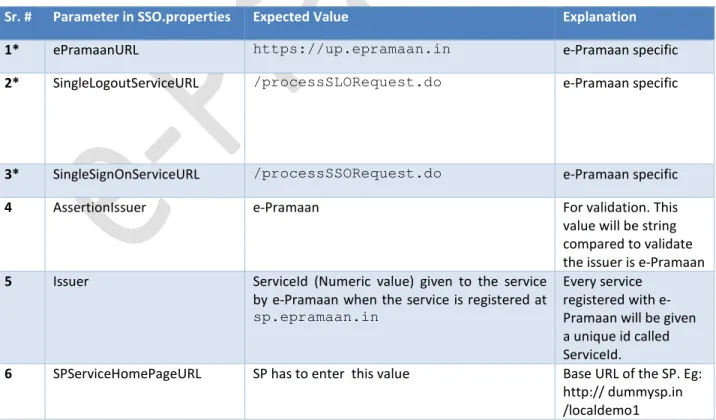
SSO.properties is the key configuration file used by the SAML Connector for integrating with e-Pramaan. The entries in the SSO.properties file are explained as given in Table 3.10 below.
Table 3.10 : SSO.properties file
Sr. # Parameter in SSO.properties Expected Value Explanation
1* ePramaanURL https://up.epramaan.in e-Pramaan specific
2* SingleLogoutServiceURL /processSLORequest.do e-Pramaan specific
3* SingleSignOnServiceURL /processSSORequest.do e-Pramaan specific
4 AssertionIssuer e-Pramaan For validation. This
value will be string compared to validate the issuer is e-Pramaan 5 Issuer ServiceId (Numeric value) given to the service
by e-Pramaan when the service is registered at sp.epramaan.in
Every service registered with e-Pramaan will be given a unique id called ServiceId.
6 SPServiceHomePageURL SP has to enter this value Base URL of the SP. Eg: http:// dummysp.in /localdemo1
e-Pramaan Integration Document .NET Specific v1.5
©Centre for Development of Advanced Computing 17
7 SPAssertionConsumerService URL
/consume.aspx Page which will receive
SSO Response from e-Pramaan
8 SPLogoutConsumerURL /consumeLogoutResponse.aspx Page which will receive LogoutResponse from e-Pramaan
9 SLOURL /SLORestService.svc/ConsumeLogoutRequest URL of the SLO RESTful Web service. Used to validate SLO Request from e-Pramaan. 10* EncryptionSeed * This value will be shared with you by
e-Pramaan
e-Pramaan mandates all request and responses be encrypted. This value will be given by e-Pramaan
11* EncryptionSalt *Service ID of the service This is the ServiceId of the service. Refer item (5) above.
12 SamlSigning True To enable/disable
signing of SAML Request.
13 SPCertificateFilePath Path to the private certificate of SP Private certificate of SP will be used for signing the SAML Request. 14 SPCertificatePassword The private key of SP certificate is protected
using this.
This password is required for signing the SAML
request/responses using SP’s private key.
* Marked values will be shared to the service by e-Pramaan administrator
K.
Register Department Service at e-Pramaan Service Portal
For integration with e-Pramaan, the URLs at Department Service have to be registered with e-Pramaan. The steps for service registration are as follows.
• Departments Admin registers the department as a Service Provider(SP) on Service Portal of
e-Pramaan.
• e-Pramaan admin gets notification of new SP registered on e-Pramaan.
• After receiving the request through proper channel, e-Pramaan admin activates the registered
Department.
• SP admin log in to e-Pramaan and adds new service. While adding service, (s)he enters the
required URLs according to Table 3.11 given below.
• e-Pramaan admin activates the newly registered service after testing of integration is
completed.
• Now, the Department Service is integrated with e-Pramaan & users can login using e-Pramaan
e-Pramaan Integration Document .NET Specific v1.5
©Centre for Development of Advanced Computing 18 Table 3.11 : URL Mapping at e-Pramaan
Sr. #
Field name at
sp.epramaan.in
Value at SP portal Value in SSO.properties
1 Service Url Home page of SP Ex:
(http://dummysp.in/local demo1)
[SPServiceHomePageURL]
2 Logout Url URL of the Servlet at SP which consumes logout response sent by e-Pramaan Ex: (http://dummysp.in/local demo1/logoutresponsecons umer) [SPServiceHomePageURL]+[S PLogoutConsumerURL]
3 SSO Url URL of the Servlet at SP which consumes logout response sent by e-Pramaan Ex: (http://dummysp.in/local demo1/ssoresponseconsume r) [SPServiceHomePageURL]+[S PAssertionConsumerService URL]
4 SLO Url URL of the REST Web Service at SP which consumes SLO request sent by e-Pramaan
Ex:
(http://dummysp.in/local demo1/ws/saml/SLO)
Not mapped
5 Logout Failure URL URL of the REST Web Service at SP Which will receive Logout Response if Logout operation failed at e-Pramaan
Not mapped
6 SSO Failure URL URL of the REST Web Service at SP Which will receive SAML Response if SSO operation failed at e-Pramaan
Not mapped
7 One time verification URL The one time verification URL must validate the user at SP Service end and push the verification status to e-Pramaan REST WebService to complete the e-Pramaan User –> Service User Id mapping.
e-Pramaan Integration Document .NET Specific v1.5
©Centre for Development of Advanced Computing 19
Contact us
Centre for Development of Advanced Computing (C-DAC), Mumbai,
Gulmohar Crossroad 9, Juhu, Mumbai Tel: +91-22-2620-1606/1574
Fax: +91-22-26232195/ 26210139 Email : [email protected]

![[P592.Ebook] Download Introduction To Social Problems 10th Edition By Thomas J Sullivan.pdf](data:image/gif;base64,R0lGODlhAQABAIAAAP///wAAACH5BAEAAAAALAAAAAABAAEAAAICRAEAOw==)