Owner’s Manual contains:
Installation, operating,
maintenance & warranty
instructions.
M55
OWNER’S MANUAL CONTENTS
1. INTRODUCTION 3
2. ADVANCED FEATURES 3
3. IMPORTANT SAFETY INFORMATION 3
4. TOOLS 4
5. GARAGE 4
6. OPERATOR PACKAGE CONTENTS 6
7. IMPORTANT INSTALLATION INSTRUCTIONS 7
8. INSTALLATION STEPS 8
8-1. MEASURE AND MARK DOOR AREA 8
8-2. INSTALL HEADER BRACKET 8
8-3. INSTALL DOOR BRACKET TO DOOR 9
8-4. ATTACH RAIL TO OPERATOR HEAD 10
8-5. ATTACH RAIL TO HEADER BRACKET 11
8-6. POSITION OPERATOR FOR MOUNTING 11
8-7. MOUNT OPERATOR TO CEILING 12
8-8. CONNECT ARM TO DOOR AND TROLLEY 12
8-9. RAIL BUMPER INSTALLATION 13
8-10. CHECK EMERGENCY RELEASE 13
8-11. INSTALL THE PHOTO EYE SENSOR SAFETY SYSTEM 14
8-12. CONTROL PANEL 14
9. CONTROL UNIT CONNECTIONS 15
10. CONNECT TO POWER 16
11. INITIAL SYSTEM SET UP 17
12. ADVANCED SETTINGS 19
13. TRANSMITTERS 23
14. OPERATION OF YOUR OPERATOR 25
15. HOMELINK® TRANSCEIVER 25 16. TEST SAFETY REVERSAL 26 17. ALIGN AND TEST PHOTO EYE SENSORS 26 18. APPLY LABELS TO INSIDE OF GARAGE 27 19. ATTACH OWNER’S MANUAL TO WALL 27 20. IMPORTANT SAFETY INSTRUCTIONS 27 21. TENSION ADJUSTMENT 28 22. RAIL LENGTH ADJUSTMENT - FOR PROFESSIONAL INSTALLERS ONLY 28 23. RAIL ASSEMBLY PARTS 29
24. ACCESSORIES 30
25. TROUBLESHOOTING - FOR PROFESSIONAL INSTALLERS ONLY 31
26. MAINTENANCE AND ADJUSTMENTS 33
27. LIMITED PARTS WARRANTY 33
28. WARRANTY LIMITATIONS, CLAIMS AND SERVICE 35
29. REGISTRATION 35
30. WARRANTY SERVICE 35
Copyright 2013 All Rights Reserved. C
Congratulations on purchasing your Marantec® Garage Door Operator System, the most innovative operator available today.
This stylishly designed digital operator with a wide range of accessories is engineered to provide the smoothest, quietest and safest operation to compliment any application. Advanced technology results in the operator being capable of easily moving almost any properly balanced sectional door, and at the same time providing state-of-the-art safety features to detect obstructions and to stop and reverse the door, thus helping to protect persons and property near the door.
1. INTRODUCTION
This manual is essential to the safe and proper installation, operation, and maintenance of your operator. Read and follow all guidelines and operating instructions before the first use of this product. Store the manual in a safe, easily accessible location.
3. IMPORTANT SAFETY INFORMATION
This operator includes numerous state-of-the-art features to provide you, the user, with years of trouble-free, convenient, and safe use of your automatic garage door operator.
Advanced Digital Operating System EOS (Easy Operating System): The EOS digital system provides an user friendly system set up. The system set up comprises of two programing levels, an “Initial Level” and an “Advanced Level”. The EOS system requires only the initial set up parameters. All other operating parameters are learned and set automatically by the system. In addition, the system optimizes all parameters with every cycle for a more efficient operation by the GDO.
This shorter parameter set up provides a quicker and more efficient installation.
New LED Lighting System: Provides a green energy efficient lighting approach to conventional incandescent lighting. Added convenience requires no light bulb replacement.
Precision Controlled DC Motor, Complete with Automatic Soft Start and Soft Stop Feature: The operator automatically detects when your door is almost fully closed or fully opened, and gradually slows the door down before it
reaches its fully closed or opened position. During start-up, the door starts moving slowly and gradually ramps up to full speed for the full travel of your door. This reduces the possible damaging effects of the sudden starts and stops associated with some other operators, and results in the smooth operation and increased service life of your door and hardward.
Built-In Safety Features: Including patented drive system that delivers only the optimum power needed to move your door safely - Every time!
Modular Antenna Concept (patented): Plug-in your choice of frequency module.
Photo Eye (Infrared) Safety System: State-of-the-art infrared beam system helps detect obstructions in the path of your door and automatically reverses closing door travel, helping to protect persons and property near the door.
Convenient Status Display: To indicate the status of your door operator at any time. Especially useful if troubleshooting is necessary.
Numeric Parameter Display Setting: Provides easier and quicker setup.
Numeric Error Code Display: Provides quicker troubleshooting.
Quiet, Smooth Operation: Precision engineering and carefully selected materials result in extremely smooth and quiet operation, unmatched by conventional garage door operators.
LCD Display System Control: Easy navigation through levels and menus.
Maintenance and Service Scheduling: Optimizes operator service life and trouble-free performance.
The EOS platform unifies all Marantec Products by design.
Meets all UL 325 requirements.
2. ADVANCED FEATURES
Operate the garage door operator at 120V, 60Hz to avoid operator damage.
Garage doors are heavy, moving objects. When coupled with an automatic operator, electrical power is also present. If not properly installed, balanced, operated, and maintained, an automatic door can become dangerous and cause serious injury or death. Please pay close attention to the WARNING and CAUTION notices that appear throughout this manual. Failure to follow certain instructions may result in damage to the door or
4. TOOLS
Fig. 1
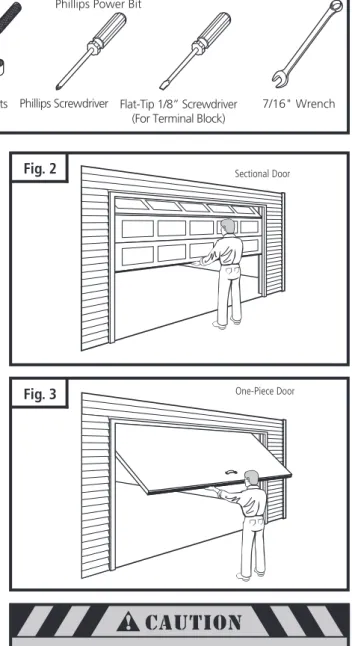
The instructions will refer to the tools shown below for proper installation, adjustment, and maintenance of the garage door operator. Additional tools may be required depending on your particular installation.
Fig. 3
Fig. 2
5. GARAGE
A garage door is a heavy moving object and can cause serious injury or death. An unbalanced door might not reverse when required, and can increase the risk of
injury. If your garage door is out of balance, or if it binds or sticks, call for professional
garage door service. Garage doors, springs, pulleys, cables, and hardware are under extreme tension
and can cause serious injury or death. Do not try to adjust them yourself. Ropes left on a garage door could cause someone to become
entangled and could kill them. Remove all ropes connected to the door before installing your operator.
To prevent damage to steel, aluminum, fiberglass or glass panel doors, always reinforce the inside of the door both vertically and horizontally with steel
or angle iron bracing. Take a moment to survey your garage and garage door.
Is there an access door besides the garage door? If not, you should install an emergency key release kit.
With the garage door closed, check alignment of door and garage floor. The gap, if any, should be no more than 1/4". If the gap is larger than this, repair floor or door before installing operator.
The operator is intended for installation on a properly balanced and adjusted garage door. DO NOT INSTALL IF DOOR IS UNBALANCED OR BROKEN.
Check balance of door in mid travel and during full range of opening and closing. Lift the door about half way, as shown in Fig. 2 & 3. Release the door. It should remain in place, supported by its springs. Raise and lower the door fully to check for binding or sticking.
If door is out of balance or needs repair, DO NOT ADJUST IT YOURSELF. CALL A QUALIFIED GARAGE DOOR SERVICE PROFESSIONAL to adjust your door.
If your door is over 7 ft. high, you will need a longer rail. See section 6 “Rail Assembly” on p. 6 of this manual for availability of longer rails.
The best solution is to follow the instructions for your particular garage door or contact the garage door manufacturer for proper reinforcement instructions.
Pencil Tape Measure Drill,Drill Bits,
Phillips Power Bit Adjustable Wrench
Wire Cutters Ratchet and Sockets
(1/2", 7/16") Phillips Screwdriver Flat-Tip 1/8” Screwdriver(For Terminal Block)
7/16" Wrench Stepladder
Sectional Door
5. GARAGE (cont’d)
Check the type of door construction you have. The information contained in the figures below will be referred to later in the manual for proper installation on the different door types.
GARAGE DOOR OPERATOR SYSTEM OVERALL DIMENSIONS (7' DOOR)
Fig. 5
8-1/2"10' 10-1/4"
18-1/4"
1/2"
Fig. 4
Check the type of door construction you have. The information contained in the figures below will be referred to later in the manual for proper installation on the different door types.
Header Wall Header Bracket
Highest Point of
Door Distance
Door Travel 1-1/4” Clearance
Header Wall
Highest Point of Door Travel Door
Jamb Hardware
Header Bracket
3-3/4” Clearance
Distance
Header Wall Highest Point of
Door Travel
Door
Pivot Header Bracket
Distance Header Wall
Highest Point of Door Travel
Door
Header Bracket
Distance
1-1/4” Clearance
Sectional Door with Curved Track
One-Piece Door with Horizontal Track
One-Piece Door with Jamb Hardware without Track
One-Piece Door with Pivot Hardware without
Track 3-3/4” Clearance
6. OPERATOR PACKAGE CONTENTS
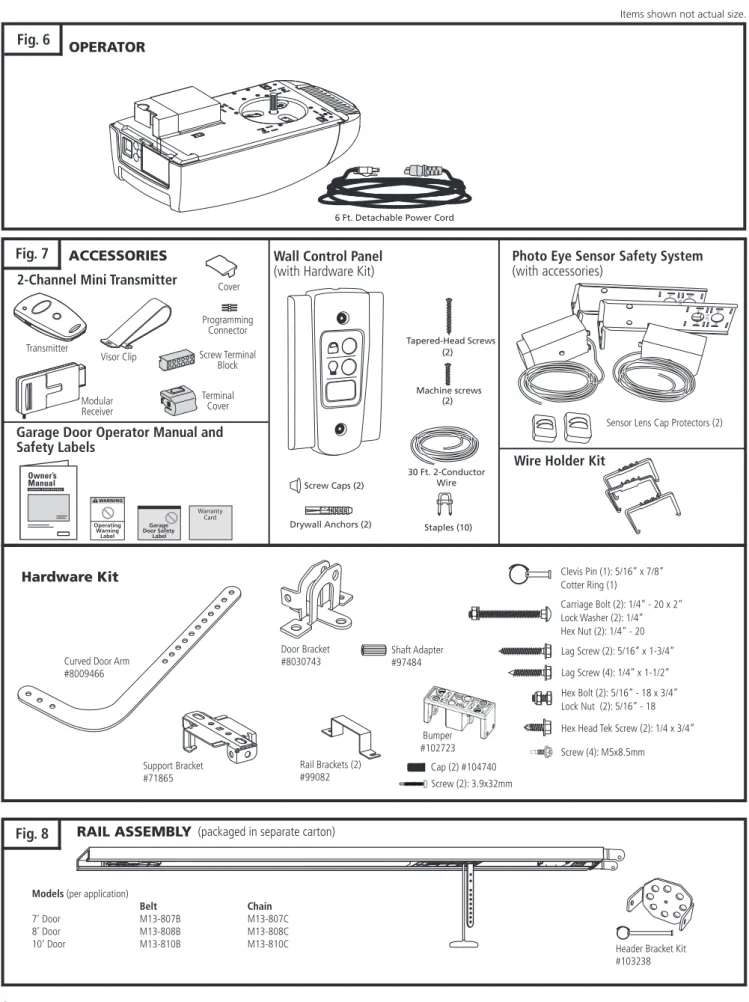
The following items are included with your Garage Door Operator (GDO). All hardware components are located in the GDO carton. The accessories are packaged with their respective hardware in separate packs for ease of identification and use.
Fig. 6
OPERATORItems shown not actual size.
Fig. 8
RAIL ASSEMBLY (packaged in separate carton)Models (per application)
Belt Chain
7’ Door M13-807B M13-807C
8’ Door M13-808B M13-808C 10’ Door M13-810B M13-810C
Fig. 7
2-Channel Mini Transmitter
Transmitter
Visor Clip
Cover Programming
Connector Screw Terminal
Block Modular
Receiver
Terminal Cover Garage Door Operator Manual and Safety Labels
ACCESSORIES Wall Control Panel
(with Hardware Kit)
Drywall Anchors (2) Staples (10) (2)
30 Ft. 2-Conductor Wire Tapered-Head Screws
Screw Caps (2)
Machine screws (2)
Warranty Card
Photo Eye Sensor Safety System (with accessories)
5“
5“
5.5” 6“
6“
5“ 5.5” 6“
Sensor Lens Cap Protectors (2) Wire Holder Kit
Lag Screw (2): 5/16” x 1-3/4”
Support Bracket #71865
Clevis Pin (1): 5/16” x 7/8” Cotter Ring (1)
Carriage Bolt (2): 1/4” - 20 x 2” Lock Washer (2): 1/4” Hex Nut (2): 1/4” - 20
Hex Bolt (2): 5/16” - 18 x 3/4” Lock Nut (2): 5/16” - 18 Hex Head Tek Screw (2): 1/4 x 3/4” Hardware Kit
Lag Screw (4): 1/4” x 1-1/2” Door Bracket
#8030743
Rail Brackets (2) #99082
Screw (4): M5x8.5mm Curved Door Arm
#8009466
Header Bracket Kit #103238 Shaft Adapter
#97484
Screw (2): 3.9x32mm 6 Ft. Detachable Power Cord
Bumper #102723
7. IMPORTANT INSTALLATION INSTRUCTIONS
Shown on the right is an overall view of a completed garage door operator system installed on a sectional door. The arrangement is similar for a one-piece door (except for differences described later in this manual).
Fig. 9
Operating Warning Label Owner’s Garage Door
Safety Label
Emergency Release Handle
1. READ AND FOLLOW ALL WARNINGS AND INSTALLATION INSTRUCTIONS.
2. Check with the door manufacturer to determine if additional reinforcement is required to support the door prior to installation of the door operator.
3. Install operator only on a properly balanced garage door. An improperly balanced door could cause serious injury. Have a qualified service person make repairs to garage door cables, spring assemblies, and other hardware before installing the operator.
4. Remove all ropes and disable all locks connected to the garage door before installing operator.
5. If possible, install the door operator 7 feet (2.1m) or more above the floor. For products having an emergency release, adjust the emergency release cord for the handle to be within reach, but at least 6 feet (1.8m) above the floor and avoiding contact with vehicles to avoid accidental release.
6. Do not connect the operator to source of power until this manual instructs you to do so.
7. Locate the wall control station: (a) within sight of door, (b) at a minimum height of 5 feet (1.5m) above the ground so small children cannot reach it, and (c) away from all moving parts of the door.
8. Place the Operating Warning Label next to the wall control panel in a prominent location. Affix Safety Label on inside of garage door. The Emergency Release markings molded on handle.
9. After installing the operator, test Safety Reversal System. Door MUST reverse when it contacts a 1-1/2 inch (40mm) high object (or a 2x4 laid flat) on the floor.
10.
SAVE THESE INSTRUCTIONS
for future safety, adjustment, and maintenance purposes.
For Important Safety Instructions see page 26.
TO REDUCE THE RISK OF SEVERE INJURY OR DEATH:
IMPORTANT INSTALLATION INSTRUCTIONS
8. INSTALLATION STEPS
8-1. MEASURE AND MARK DOOR AREA
Horizontal Reinforcement
Bracket
Header Horizontal Line forHeader Bracket Height
Door Width
See Fig. 12 See Fig. 11
Vertical Center Line Identify a sound structural support on header wall above garage
door for header bracket mounting. See Fig. 11. If appropriate header does not exist, replace or install a new support using a 2x4 or 2x6 board. Fasten it securely using lag screws (not provided) to structural supports of garage.
Before starting your installation, the door and the header above the door must be measured and marked. This way, the appropri-ate brackets can be mounted at the correct locations avoiding installation and operating difficulties later.
MARK VERTICAL CENTER LINE:
Measure door width, then locate the center point (Fig. 10). Mark a vertical line on the upper half of your door, on the top edge of your door, and on the header, through the center point.
MEASURE DOOR’S HIGHEST TRAVEL POINT: (Review Figs. on p. 5 for details)
Open door to its highest travel point and measure from the garage floor to the top of door.
Write down this distance.
FOR SECTIONAL DOORS AND ONE-PIECE DOORS WITH HORIZONTAL TRACK:
Add 1-1/4" to the door travel height (measured above). FOR ONE-PIECE DOORS WITHOUT TRACK: Add 3-3/4" to the door travel height (measured above). MARK HORIZONTAL LINE FOR HEADER BRACKET LOCATION:
Close door and measure the required distance (determined above) from the garage floor to the header.
Mark a horizontal line, intersecting the vertical center line, on header. This is the position at which the bottom of the header bracket should be installed.
In case of minimal clearance above the door, the header bracket may be mounted to the ceiling. In this case, extend the vertical center line onto the ceiling, and mark a horizontal line on the ceiling no further than 4" from the header wall. The header bracket should be mounted no farther than this distance from the header wall.
Fig. 10
If the header bracket is not rigidly fastened to a sound structural support on the header wall or ceiling, the safety reverse system may not work and could cause serious injury or death. DO NOT move or adjust springs
or garage door hardware, as these parts are under extreme tension and could cause injury or death.
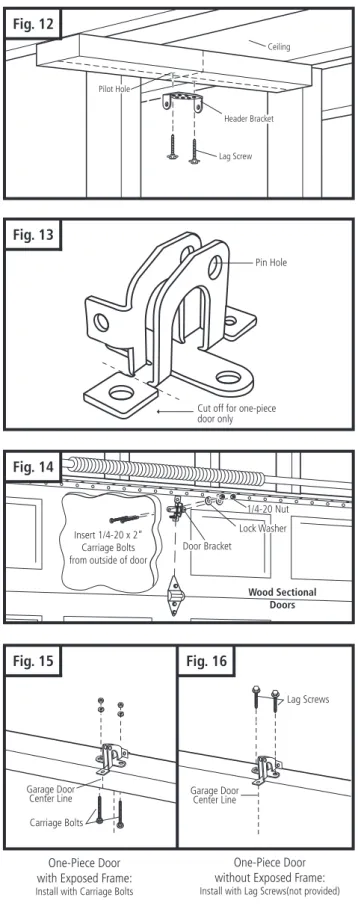
8-2. INSTALL HEADER BRACKET
Header
Lag Screw for Header installation if necessary (not provided)
Header Bracket
5/16 x 1-3/4" Lag Screw
Pilot Holes
Fig. 11
8-3. INSTALL DOOR BRACKET TO DOOR
Fig. 13
Pilot Hole
Ceiling
Header Bracket
Lag Screw
Fig. 12
Cut off for one-piece door only
Pin Hole
Fig. 14
A. FOR SECTIONAL DOORS:Wood Sectional Doors (Fig. 14)
Position door bracket (Fig. 13) along vertical center line of door with pin hole facing top of the door and top edge of the bracket 4” to 5” below top edge of the door, or roughly at the same height as top rollers on the door.
Mark locations of securement holes through door bracket. Drill two 1/4" holes through door for securement of door bracket.
Insert carriage bolts (1/4” x 2”) from the outside through door and bracket, then secure with lock washers and nuts from the inside.
Tighten nuts firmly. Metal Sectional Doors
Attach door bracket with two teck screws (provided) per Door manufacturer recommendations.
B. FOR ONE-PIECE DOORS:
Before starting the installation of the door bracket, cut off mounting leg from opposite side of pin hole.
One-Piece Doors with Exposed Frames (Fig. 15)
Position center of door bracket on the center line on the top edge of door.
Mark the position where carriage bolts will go through bracket, and drill two 1/4" holes through top frame of door. Install carriage bolts from the bottom, through door frame and bracket, and secure with lock washer and nut from top. Tighten nuts firmly.
One-Piece Doors without Exposed Frames (Fig. 16) For doors without exposed frames, use alternate method of mounting door bracket.
Mark and drill two 3/16" pilot holes into top of frame, then secure bracket with 5/16" x 1-5/8" lag screws (not provided).
8-2. INSTALL HEADER BRACKET (cont’d)
Insert 1/4-20 x 2” Carriage Bolts from outside of door
Lock Washer 1/4-20 Nut
Wood Sectional Doors
Mark pilot holes location on header through header bracket holes where lag screws will be inserted.
IMPORTANT: See Fig. 11 for which header bracket holes to use.
Drill 3/16" pilot holes into header, and install bracket with lag screws (5/16 x 1-3/4”) provided.
Tighten lag screws firmly.
NOTE: Follow the same procedure if header (shown in Fig. 11) runs vertically instead of horizontally and is the only option for mounting header bracket to header wall. In case of minimal clearance above the garage door, the header bracket may be mounted to the ceiling. Follow the same steps above to ensure a sound surface for mounting.
Carriage Bolts
Lag Screws
Garage Door
Center Line Garage DoorCenter Line
Fig. 15
One-Piece Door with Exposed Frame: Install with Carriage Bolts
One-Piece Door without Exposed Frame: Install with Lag Screws(not provided)
Fig. 16
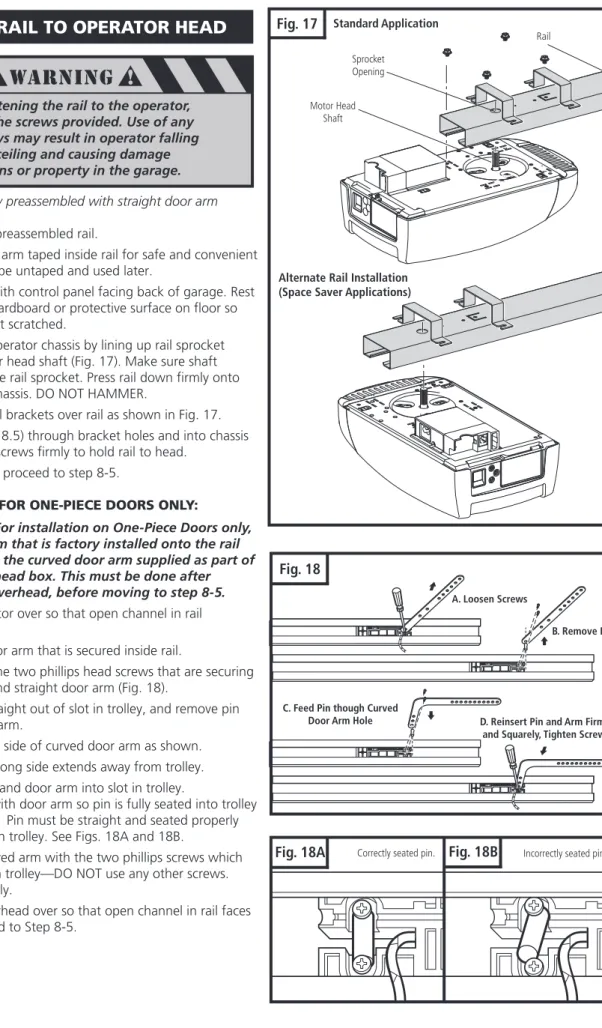
Fig. 17
Standard ApplicationAlternate Rail Installation (Space Saver Applications)
Sprocket Opening
Rail
Motor Head Shaft
8-4.
ATTACH RAIL TO OPERATOR HEAD
NOTE: Rail comes fully preassembled with straight door arm already attached.
Unpack one-piece preassembled rail.
Leave straight door arm taped inside rail for safe and convenient installation—it will be untaped and used later.
Position operator with control panel facing back of garage. Rest operator head on cardboard or protective surface on floor so opener does not get scratched.
Position rail onto operator chassis by lining up rail sprocket opening with motor head shaft (Fig. 17). Make sure shaft engages teeth inside rail sprocket. Press rail down firmly onto shaft and opener chassis. DO NOT HAMMER.
Position the two rail brackets over rail as shown in Fig. 17.
Insert screws (M5 x 8.5) through bracket holes and into chassis holes, and tighten screws firmly to hold rail to head.
For sectional doors, proceed to step 8-5.
ADDITIONAL STEP FOR ONE-PIECE DOORS ONLY:
IMPORTANT NOTE: For installation on One-Piece Doors only, the straight door arm that is factory installed onto the rail must be replaced by the curved door arm supplied as part of hardware in powerhead box. This must be done after attaching rail to powerhead, before moving to step 8-5.
Turn rail and operator over so that open channel in rail faces up.
Untape straight door arm that is secured inside rail.
Remove and save the two phillips head screws that are securing the door arm pin and straight door arm (Fig. 18).
Lift arm and pin straight out of slot in trolley, and remove pin from straight door arm.
Insert pin into short side of curved door arm as shown.
Orient arm so that long side extends away from trolley.
Carefully insert pin and door arm into slot in trolley.
Push pin into slot with door arm so pin is fully seated into trolley slot. IMPORTANT: Pin must be straight and seated properly into recessed area in trolley. See Figs. 18A and 18B.
Secure pin and curved arm with the two phillips screws which were removed from trolley—DO NOT use any other screws. Tighten screws firmly.
Turn rail and powerhead over so that open channel in rail faces down. Now proceed to Step 8-5.
When fastening the rail to the operator, use only the screws provided. Use of any other screws may result in operator falling
from ceiling and causing damage to persons or property in the garage.
Fig. 18
A. Loosen Screws
B. Remove Pin
C. Feed Pin though Curved
Door Arm Hole D. Reinsert Pin and Arm Firmly and Squarely, Tighten Screws
Correctly seated pin. Incorrectly seated pin.
Cotter Ring
1/4 x 3-1/4" Clevis Pin
Door
Stepladder
Fig. 21
Fig. 19A
Fig. 19B
Fig. 20
Door
2x4 Laid Flat
Stepladder
Fig. 19
Operator Box
8-5. ATTACH RAIL TO HEADER BRACKET
Support operator head slightly off the floor.
Lift the opposite end of the rail up to the header bracket.
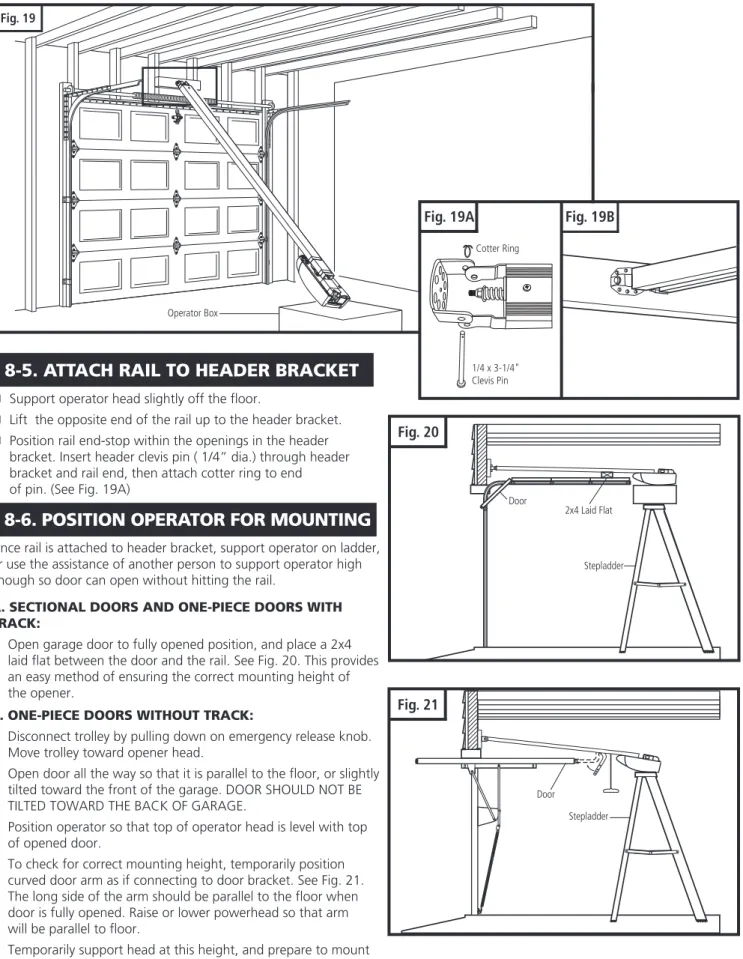
Position rail end-stop within the openings in the header bracket. Insert header clevis pin ( 1/4” dia.) through header bracket and rail end, then attach cotter ring to end
of pin. (See Fig. 19A)
8-6. POSITION OPERATOR FOR MOUNTING
Once rail is attached to header bracket, support operator on ladder, or use the assistance of another person to support operator high enough so door can open without hitting the rail.
A. SECTIONAL DOORS AND ONE-PIECE DOORS WITH TRACK:
Open garage door to fully opened position, and place a 2x4 laid flat between the door and the rail. See Fig. 20. This provides an easy method of ensuring the correct mounting height of the opener.
B. ONE-PIECE DOORS WITHOUT TRACK:
Disconnect trolley by pulling down on emergency release knob. Move trolley toward opener head.
Open door all the way so that it is parallel to the floor, or slightly tilted toward the front of the garage. DOOR SHOULD NOT BE TILTED TOWARD THE BACK OF GARAGE.
Position operator so that top of operator head is level with top of opened door.
To check for correct mounting height, temporarily position curved door arm as if connecting to door bracket. See Fig. 21. The long side of the arm should be parallel to the floor when door is fully opened. Raise or lower powerhead so that arm will be parallel to floor.
Temporarily support head at this height, and prepare to mount the operator to ceiling.
Fig. 23
12”
8-7. MOUNT OPERATOR TO CEILING
Place mounting bracket over rail (close side) on a diagonal. Make sure support securement clamps clear rail sides. Twist mounting bracket and secure onto rail 12” from spracket end side of rail as shown in Fig. 22.
Attach mounting strap or perforated angels (not provided) to mounting bracket and secure by fastening it to the ceiling. NOTE: 10’ doors require two brackets installation as shown in Fig. 23.
Measure the rail’s overall span. Locate support bracket 1/3“ of full span from the rail end side as shown in Fig. 23.
Fig. 22
If not properly secured, the operatorcould fall and injure someone. Secure opener to structural supports or
framing. Do not mount to drywall, plaster, or other such material.
8-8. CONNECT ARM TO DOOR AND TROLLEY
Make sure door is fully closed. Remove tape from rail holding straight door arm (sectional door only) and allow door arm to hang freely. Pull the manual release cord on the trolley to disconnect trolley from chain or belt connector. Slide trolley to position it approximately 6-8”away from the door.
Rail Mounting Bracket
Fig. 24
A. SECTIONAL DOORS:
Position curved door arm into door bracket channel so that short end of arm will be attached to door bracket.
See Fig. 25. Curved door arm should be attached roughly at the same height as the top rollers of the door.
Align curved door arm and bracket holes, then insert clevis pin through holes. Attach cotter ring to hold pin in place.
Position straight arm and curved arm to form an angle with the door (Fig. 24) and at least two sets of holes line up. Select two overlapping holes as far apart as possible and secure arms together with hex bolts (5/16-18) and lock nuts.
B. ALL ONE-PIECE DOORS:
Curved door arm should already be attached to trolley in place of straight door arm. See Fig. 18, p. 10.
Position free end of curved arm into door bracket slot. Align curved door arm and bracket holes, then insert clevis pin (5/16” dia.) through holes. Attach cotter ring to pin to hold in place. See Fig. 25A.
C. SECTIONAL AND ONE-PIECE DOORS:
After connecting appropriate door arm, ensure trolley is disengaged. Check for proper door operation by manually lifting then lowering to fully opened and closed positions. Readjust door arm if needed.
5/16"-18x3/4" Hex Bolt
5/16"-18 Lock Nut 5/16"x7/8" Clevis Pin
Cotter Ring Curved Door Arm
Straight Door Arm
Fig. 25
Fig. 25A
Door Bracket (for One-Piece Door)
Clevis Pin
Cotter Ring 1/3 (S)
Rail Span
Mounting Bracket Support Bracket
8-10. CHECK EMERGENCY RELEASE
To prevent possible SERIOUS INJURY or DEATH from a falling garage door:
• If possible, use emergency release handle to disengage trolley ONLY when garage door is CLOSED. Weak or broken springs or unbalanced door could result in an open door falling rapidly and/or unexpectedly.
• NEVER use emergency release handle unless garage doorway is clear of persons and obstructions. • NEVER use handle to pull door open or closed.
Fig. 26A
Fig. 26
With the trolley in the unlock position, move door up to the
Secure bumper with screws and cover screws with plastic caps (provided) as shown on Fig. 26B.
location desired. See Fig 26.
Snap rail bumper as shown in Fig. 26A.
Hold door and measure approximately ½” from trolley end as shown in Fig 26B. This is the installation location for the rail bumper.
8-9. RAIL BUMPER INSTALLATION
Fig. 27
Rail
Emergency Release Cord
PULL DOWN The release cord and knob should be adjusted
to hang 6 ft. above garage floor. To adjust:
- Slide handle up on cord. - Tie new knot at correct height.
- Cut excess cord, leaving approximately 1” after knot. - Heatseal end of cord with match or lighter to prevent fraying.
- Slide handle back into place. - Check operation of emergency release.
Red Emergency Release Handle The emergency release cord with red handle which is already attached to the trolley, are extremely important parts of the operator system Fig. 27. Pulling the release cord disengages the door from the opener. This allows the door to be moved manually up and down independent of the opener motor. If the door is in the open position, use extreme care when using the release.
Use emergency release to disconnect the door if the power is out. It should also be used if for some unforeseen reason the door strikes a person or object during its travel and does not automatically reverse off the obstruction.
To release door - pull firmly down on red handle. (Fig. 27) Prior to re-engaging door, ensure that all obstructions are removed and door is operating properly manually. Before
Latch Indicator Window
Fig. 27A
1/2”
Fig. 26B
Screws Snap bumper in place
Screw Caps
PULL DOWN ON RELEASE HANDLE TO LOCK TROLLEY, THEN
IMPORTANT NOTE
MOVE DOOR MANUALLY UNTIL TROLLEY LOCKS WITH CHAIN OR BELT CONNECTOR.
8-11. INSTALL PHOTO EYE SAFETY SYSTEM
MOUNTING THE PHOTO EYE SENSOR BRACKETS TO WALL: Locate the mounting position for brackets (bracket can be mounted in any position as long as photo eye beam will have a clear path from one side of door to other side after mounting). Use the bracket mounting holes as a template to locate an drill (2) 3/16" diameter pilot holes on both sides of the garage door as shown in Fig. 28.
Secure the bracket with 1/4" x 1-1/2" lag screws provided as shown in Fig. 28.
MOUNTING THE PHOTO EYE SENSORS TO MOUNTING BRACKET. Fig. 29
Install the sensors to the mounting bracket by inserting bend clips of sensor bracket through the vertical slot on mounting bracket.
Insert straight clips through other set of vertical slot on the mounting bracket.
Twist one of the straight clips slightly to lock the sensor in place once inserted through vertical slot on the mounting bracket. Repeat the above procedure for the other sensor.
To provide the maximum amount of protection, the photo eye sensors must be mounted between 3.5” and 5” above the floor. See Fig. 28.
SENSOR PROTECTION Fig. 30
Before performing maintenance work in garage, such as, power washing, painting, and other tasks; protect sensors with provided sensor caps.
Fig. 29
Fig. 28
Wall StudLag Screws Mounting Bracket
3.5” to 5” from floor
Sensor Bracket
Mounting Bracket To Terminal 2 To Terminal 1
Mounting on garage floor
Twist Clip
Fig. 30
Photo Eye Sensor Sensor Cap Protector
1/4” x 1-1/2”
Fig. 31
Receiver Transmitter Transmitter Receiver DUAL DOOR INSTALLATION Fig. 31
In dual door installations, the transmitter (TX) and the receiver (RX) photo eye sensors (as marked on each of the photo eye components) should be mounted as indicate in Fig. 31. TX and RX marks located on the back side of the transmitter and receiver.
8-12. INSTALL WALL CONTROL PANEL
The control panel must be mounted inside the garage within sight of the garage door, clear of all moving garage door parts or any associated parts - and at least 5 feet above the floor to prevent the use of these controls by children. The device should only be used when the door is in clear sight of the user and the door area is free of people or any obstructions.
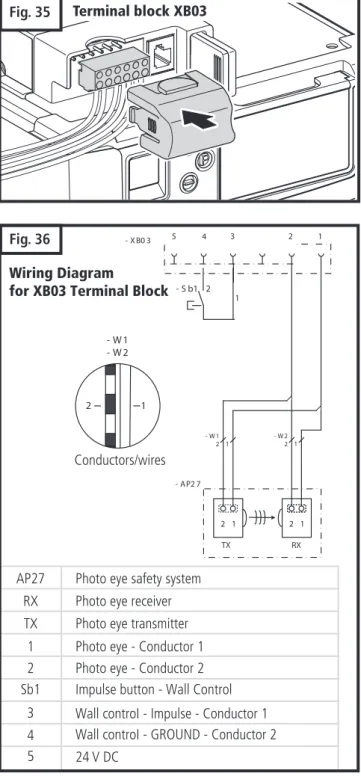
Attach 2-conductor wire to the screw terminal on back of control panel. See Fig. 32 (Back). White wire attaches to terminal #3 screw, white wire with color stripes attaches to terminal #4 screw.
Position wall control panel onto wall in desired location. Mark hole location on wall.
Drill 1/16” pilot holes into wall.
Insert and tighten screws to secure control panel to wall. Make sure wiring is routed out from behind control through one of the cutouts to avoid pinching the wires.
If mounting to drywall instead of wood, drill 3/16” pilot holes and use anchors provided. If mounting to electrical box that is prewired for this purpose, mount directly to box with proper screws provided.
Fig. 32
Screw caps
4 3
To Terminal #4 Screw To Terminal #3 Screw
Fig. 32B Fig. 32A
XB03
Connection for
– Wall Control
– Photo eyes
XB72
Connection for modular antenna
XW40
Connection for
Not available
MS bus expansion module
XW81
Connection for expansion
inputs / outputs
XB03
XW40 XB72
XW81
9. CONTROL UNIT CONNECTIONS
Danger of electric shock:
Before any wiring works being, make sure that all wiring is disconnected from the power supply. During wiring make sure all wires remain disconnected from the power supply at all times.
Fig. 33
3.3.3
Fig. 35
Wiring Diagram
for XB03 Terminal Block
- X B0 3 2 1
2 1 1
TX
2 RX
- W1
2 1 - W 22 1
2 1
- W 1 - W 2
- AP2 7
4 3
1 5
- S b1 2
Wall controI - Impulse - Conductor 1 Wall controI - GROUND - Conductor 2 4
3
5 24 V DC
2 Photo eye - Conductor 2 1 Photo eye - Conductor 1 AP27 Photo eye safety system
RX Photo eye receiver TX Photo eye transmitter
Sb1 Impulse button - Wall Control
3.3.3
Fig. 36
Conductors/wires
Terminal block XB03
5 4 3 2 1
10. CONNECT TO POWER
To prevent electrocution or fire, installation and wiring must be done in accordance with local electrical and building codes. DO NOT use an extension cord. DO NOT use a 3 to 2 plug adapter. DO NOT modify or cut off the
grounding pin on the plug.
To reduce the risk of electric shock, your opener is provided with an insulated power cord with a 3-prong grounding plug. The cord must be connected to a standard grounding outlet. If there is no outlet available at the location, you must have a qualified electrician install an approved grounded outlet in this area.
Plug the operator into a properly grounded outlet (Fig. 37). The display will illuminate the word “On” and will be displayed. This indicates that the operator is ready for set up. See fig. 38A for additional display icons.
DO NOT operate or run the opener at this time.
Fig. 37
IMPORTANT:
Contact Marantec America for Replacement Power Cord
Part #102807 Model: YP-12/YC-12 Overall length 6ft. UL/CSA Recognized
UL Type: E241374: SJT 3/C 18AWG 105 C 300V VW-1 CSA 177323: SJT 3/C 18AWG 105 C 300V FT2
11. INTIAL SYSTEM SET UP
Fig. 38A
Fig. 38
For proper initial operation of the operator, two basic functions must be set using the initial system programming: Open Door Position
Close Door Position
Press and hold the “P” button for approximately 3 seconds. When illuminates, release the button. You are now ready to set or change the desired adjustment. If no buttons are pressed within 120 seconds while in programming mode, the control unit reverts back to operating mode.
TO MAKE OR CHANGE ANY ADJUSTMENT:
NOTE: If no changes are needed at any particular stage, you can keep the current information and “skip” over a specific adjust-ment by pressing the “P” button once. This is useful to know if you want to change only one setting, without changing any of the other adjustments. Simply enter the adjustment mode by pressing and holding the “P” button for approximately 2 seconds, then press and release “P” repeatedly until your particular adjustment is reached. This bypasses the unneeded adjustments, and takes you right to the adjustment you want. When your adjustment or setting is complete, simply press ”P” as many times as needed to bypass the remaining steps and exit out of the program, returning the operator to normal mode. Your new operator has automatic force learning and maximum force setting. It may be required to change force settings. If the force needs to be increased or decreased, it should be changed by one (1) increment at a time. The force should be set as low as possible, just enough to allow your unobstructed door to travel freely without reversing or stopping.
NOTE: You may exit the System Set Up at any time by pressing the button “P” for more then 5 sec. The set up programming can be terminated at any time and from any stage. To do so, press the “P” button for longer than 5 seconds.
In order to guarantee a trouble-free programming:
• The door must be in the “CLOSED” position and engaged to the drive system (rail) before programming the operator or a system reset is performed.
Overview of the control unit
Display Description
Ready for operation Door position: CLOSED Door position: OPEN
Fault message / Maintenance indicator in CLOSED door position
Photocell safety device Remote control External button
3 Status display
Battery backup system connected
12 34 5 6 7 8 90 Level indicator (Example: Level 2)
Display shows Level 2
12 34 5 6 7 8 90 Menu and parameter indicator (Displayed Menu 3, Parameter Setting 8)
Minute indicator
12 34 5 6 7 8 90
Times exceeding one minute are shown in minutes and seconds.
Example: 1.2 = 1 minute + 20 seconds = 80 seconds
Control elements 12 34 5 6 7 8 90 12 34 5 6 7 8 90
LED display
Drive the door in the OPEN direction, increase the value
Drive the door in the CLOSE direction, decrease the value
P
Start programming, andsave valuesStatus display
Display Function / Element 4
Warning time indicator (only for programmed automatic closing)
11. INITIAL SYSTEM SET UP (cont’d)
Power on
1
2
3
Operating mode
Legend:
IMPORTANT:
Upon completion of the initial set up, the operator must be cycled for two complete cycles (complete cycle comprises of one uninterrupted up activation of the system and one uninterrupted down
activation of the system).
NORMAL OPERATION
IMPORTANT:
On the first open travel activation the trolley will make contact and will rest against the rail bumper. This will appear as if the system (door) went pass the set open travel limit. However this is not the case, on the next
open travel cycle the system will recognize the set open travel limit thereafter activation of the system. Every 20 cycles the operator will performed a travel limit
check and it will function as described on “Normal Operation” note.
Programming the “OPEN” door position
The control system is in
operating mode.
P
P > 3 sec. < 10 sec.:
Start express programming.
Drive the door to the OPEN
position.
P
Save the OPEN position.
Programming the “CLOSED” door position
Drive the door to the CLOSED
position.
P
Save the CLOSED position.
Programming the remote control
Press the hand transmitter
button.
Release the hand transmitter
button.
P
Save the remote control
setting.
End express programming.
The control system is in
operating mode.
Drive the door in the OPEN direction, increase the value Drive the door in the CLOSE direction, decrease the value
Start programming, comfirm and save values The display flashes
Display lights up Ready for operation Door position: CLOSED Door position: OPEN
Photocell or closing edge safety device Remote control
External button
Fault message/Maintenance indicator in CLOSED door position
12. ADVANCED SETTINGS
1. The control system in operating mode.
2.
P
P > 10 sec.:
Start programming the advanced operator functions. Displayed starting level.
12 34 5 6 7 8 90
3. Select the level required (Example: Level 6). 1
2 34 5 6 7 8 90
4.
P
the first menu and the the level showsConfirms menu. Parameter setting blinks. setting for level parameter.
12 34 5 6 7 8 9
5. Select menu that needsadjustment (Example: Menu 4) 12 3 4 5 6 7 8 9
0
6.
P
12 34 5 6 7 8 90
7. Change parameter setting. 1
2 34 5 6 7 89
0
8.
P
Saves parameter setting andto display levels. 12 3 4 5 6 7 890
9.
Select a new level to continue, repeat steps - step 8 to make other adjustments.
12 3
4 5 6 7 89 0
or
P
P > 5 sec.:
All changed parameter settings are saved.
The control system switches to operating mode.
Advanced Settings Programming Procedure (Diagram Illustrates Setting of Level 6, Menu 4)
9
7
9
Additional operator functions can be set using the advanced operator functions. Parameters factory default settings can be restored. This programming may
only be carried out by a professional installer.
Menu 3: Intermediate OPEN Position
Set using the (+ / OPEN) and (- / CLOSE) buttons
The closing function with automatic closing is possible. Only the intermediate position that was programmed last can be used.
Menu 8: System RESET
12. ADVANCED SETTINGS (cont’d)
Level 1: Basic Functions
1 No reset 2 Reset system settings
After a system reset, all parameters are restored to the factory settings.
• All the required function in the initial set up and advanced settings must be
re-programmed if it is required.
• The operator must be activated for two (2) complete uninterrupted cycles in order
for all restored or operating parameters settings to be learned by the operator again.
General overview of the programmable functions
Level Menu Factory default setting ( )
Level 1 – Basic function Menu 3: Intermediate “OPEN Position” Menu 8: RESET
Level 2 – Operator settings
Level 5
Level 4 – Transmitter Additional Functions
Level 8
Menu 1: “OPEN” position – operator (system) force Setting 8 Menu 2: “CLOSE” position – operator (system) force Setting 8 Menu 3: “OPEN” position – operator sensitivity Setting 16 Menu 4: “CLOSE” position – operator sensitivity
Menu 2: “Intermediate “OPEN Position”
Setting 16
Menu 1: OPEN speed Menu 2: Soft run OPEN speed Menu 3: Soft run OPEN position
Menu 1: Door cycle counter Menu 2: Servicing counter Menu 3: Servicing interval Menu 4: CLOSE speed Level 6 – Variable speed
Level 7 – Maintenance and servicing
Menu 6: Soft run CLOSE speed
Menu 8: Reset maintenance and servicing Menu 9: Fault indicator
Menu 7: Force relief CLOSED door position Setting 1 - Not Active Menu 8: Soft run CLOSE position
Menu 4: Light timer Setting 16
Setting 16 Setting 7 Setting 16 Setting 7
12. ADVANCED SETTINGS (cont’d)
Menu 4: Operator Light “ON” Timer (in seconds)
5 10 15 20 25 30 35 40 50 80 100 120 150 180 255
2
Level 5: Functions overview
16
7
16
Menu 1: OPEN speed
5 6 7
7
8 9 10 11 12 13 14 15 16
Menu 2: Soft run OPEN speed
1 2 3 4 5 6
Menu 3: Soft run OPEN position
Menu 4: CLOSE speed
- - - - 5 6 7 8 9 10 11 12 13 14 15 16
- - -
-- - -
-- -
-- - - -- - -- - -
-- - - - - - - -
-5 6 7 8 9 10 11 12 13 14 15 16
Level 6: Variable Speed
Set using the (+ / OPEN) and (- / CLOSE) buttons
7
Menu 6: Soft run CLOSE speed
1 2 3 4 5 6 7
Menu 2: Intermediate OPEN Position
Set using the (+ / OPEN) and (- / CLOSE) buttons
The closing function with automatic closing is possible. Only the intermediate position that was programmed last can be used.
Level 4: Transmitter Additional Functions
16
8
8
16
Menu 1: “OPEN” position operator (system) operating force Lower Force Higher Force
1 2 3 4 5 6 7 8 9 10 11 12 13 14 15
Menu 2: “CLOSE” position operator (system) operating force Lower Force Higher Force
1 2 3 4 5 6 7 8 9 10 11 12 13 14 15
Menu 3: “OPEN” position operator sensitivity More Sensitive Less sensitive
Menu 4: “CLOSE” position operator sensitivity More Sensitive Less sensitive
OFF 2 3 4 5 6 7 8 9 10 11 12 13 14 15
OFF 2 3 4 5 6 7 8 9 10 11 12 13 14 15
16
16
16
16
Level 2: Operator settings
Slower Faster
Slower Faster
Slower Faster
12. ADVANCED SETTINGS (cont’d)
indicator showing the number of complete cycles, up to 999999.
indicator showing the number of complete cycles left up to maintenance indication. Figures shown one after the other up to the indicator
Once the counter setting is reached, it restarts count again.
point, then repeated.
Adjustment of the number of door operations to be completed before a servicing reminder is displayed. 1 OFF Default
2 100 door operations 3 500 door operations 4 1,000 door operations 5 4,000 door operations 6 5,000 door operations 7 6,000 door operations 8 7,000 door operations 9 8,000 door operations 10 9,000 door operations 11 10,000 door operations 12 15,000 door operations 13 20,000 door operations 14 30,000 door operations 15 40,000 door operations 16 50,000 door operations
The fault log for maintenance, diagnostics and servicing work is reset here.
Shows the current fault message.
(No more than 16 fault messages can be viewed).
Display the previous fault / Navigate through the list of faults Navigate through the list of faults 1 No Reset - Default Setting
2 Reset the fault log
1 Default not activated 2
3 4
Short Medium Long
Menu 1: Door cycle counter
Level 7 – Maintenance and servicing
Menu 2: Servicing counter
Menu 3: Service/Maintenance Counter Setting
Menu 8: Reset maintenance and servicing Menu 9: Fault indicator
The operator works with the supplied hand transmitter
on the basis of a pulse sequence control system.
Operating the door using the hand transmitter
1. The control system is in operating mode.
2.
1. Impulse:
The door opens and moves in the OPEN direction
3. 2. Impulse.The operator system stops.
4.
3. Impulse:
The door moves in the opposite direction (CLOSE direction).
Transmitting the code
1. Connect the hand transmitter to the programming connector
2.
Press the button on the master transmitter with active code. Keep the button pressed. The LED lights up.
3.
Press the button on the hand transmitter which is to be given a new code.
The LED
4. The LED lights up.The coding procedure is completed.
5. Remove the programming
connector.
Changing the code
1. Plug the programming connectorinto the hand transmitter.
2.
Short-circuit one of the two outer pins with the centre pin adjacent to it (e.g. using a screw driver).
3. Press the desired button on the hand transmitter. The LED
4. The LED lights up.The coding procedure is completed.
5. Remove the transmission plug.
14. TRANSMITTERS
13. TRANSMITTERS
Danger of injury due to uncontrolled operation of the door! • Operate the controls or the hand transmitter only when there are no persons or objects in the path of the door.
• Ensure that the controls and the hand transmitter are never used by children or unauthorized persons.
• Ensure that the hand transmitter cannot be operated by accident (in a trouser pocket, for example).
Danger of damage to property due to uncontrolled movement of the door!
When the door moves, the hand chain can get caught and this could result in damage (in case of ceiling-mounted supports for example)
• Ensure that there are no obstacles blocking the path of the door or the hand chain.
NOTE: For multi-button transmitters, be sure to carry out this procedure for all the buttons you desire to use.
Fig. 42
CoinBattery
Fig. 39
Fig. 40
Visor ClipFig. 41
Visor Compartment
Cover
FCC Certified: This device complies with Part 15 of the FCC rules. Operation is subject to the following two conditions: (1) this device may not cause harmful interference, and (2) this device must accept any interference received, including interference that may cause undesired operation.
Changes or modifications not expressly approved by the party responsible for compliance could void the user’s authority to operate the equipment.
10. TRANSMITTERS
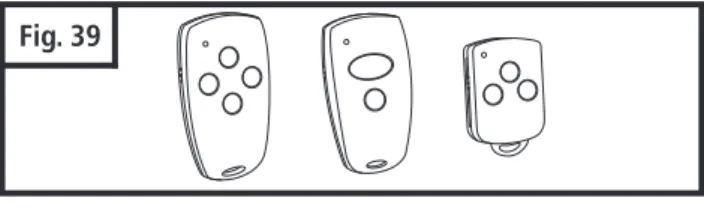
TRANSMITTERS (Fig. 39):
A family of state-of-the-art transmitters, each transmitter is custom encoded with installed battery. Offered in two styles to suit your personal preference.
Mini (2-or 4-channel)
Micro (3-channel) with keyring attachment. TRANSMITTER MOUNTING:
The transmitters can be conveniently mounted inside your car using the visor clip or on the wall using the mounting plate.
Visor Clip (Fig. 40)
Snap visor clip into transmitter. Affix assembly to visor.
NOTE: If you do not need the visor clip, install the visor compartment cover.
Mounting Plate (Fig. 41) Optional Accessory
Secure the mounting plate to area of preference using screw and anchor.
Snap the visor compartment cover.
Slide the transmitter into the mounting plate, which will hold it firmly in place.
BATTERY REPLACEMENT (Fig. 42): Open the transmitter by using small coin. Insert a 3V battery (type CR2032) as shown. Close the transmitter.
NOTE: Replace batteries with same type only.
14. OPERATION OF YOUR OPERATOR
Fig. 43
Lock/Vacation Button Light On/Off Button Illuminated Door Pushbutton
B. Wall Control Panel
15. HOMELINK
®TRANSCEIVER
Your operator can be activated via any of the following, depending on which accessories your opener system has:
Remote Control Transmitter Wall Control Panel
Keyless Entry (optional accessory) REMOTE CONTROL TRANSMITTER:
To open or close garage door, press and hold button (Transmitter has an indicator light that will illuminate). See Fig. 43A. When garage door begins to move, release button.
To stop garage door during travel, press and hold button until door stops, then release button.
To resume garage door travel after stopping, press button again. Door begins to move in the opposite direction.
Before you can use your car’s HomeLink® device to open a garage door you must transfer an active code from the transmitter to the HomeLink® Universal transceiver. (Reference - HomeLink® Manual) (See Fig. 44)
Clear memory in HomeLink® transceiver per manufacturer instructions.
Make sure the door path is clear and the door is in the line of site at all time during the set up.
Start the programming sequence by pressing the
transmitter button and the HomeLink® transceiver button on console simultaneously. Follow manufacturer
instructions to complete programing sequence. No learn button on the operator is required to be pressed.
Repeat steps above for the other channels available.
Fig. 44
Indicator Light Buttons
A. Transmitter
WALL CONTROL PANEL:
The Door Pushbutton will light when Wall Control properly connected (if it does not light up, review section 8-12 “Install Wall Control” on page 14.
To open or close garage door, press and hold Illuminated Door Pushbutton. See Fig. 44. When garage door begins to move, release button.
To stop garage door during travel, press and hold button until door stops, then release button.
To resume garage door travel after stopping it, press button again. Door begins to move in the opposite direction.
The Light On / Off button can be used to turn lights on or off.
When using the light On / Off button, the automatic timer is ignored, and the lights will remain on until the button is pressed again, or until the operator is activated and the automatic timer begins again.
The Lock/Vacation button can be used to lock out all remote control transmitters. The door can still be activated by wall control panel or keyless entry system. Press and hold Lock/Vacation button for 2-3 seconds. Release button. Illuminated Door Pushbutton will flash continuously while lock mode is active. To unlock opener, press and hold Lock/Vacation button for 2-3 seconds.
OPERATOR LIGHTS:
The amount of time that the operator light(s) are “on” can be adjusted. Please refer to level 5 menu 4 in the “Advanced Settings”
Lights will come on whenever operator is activated. The default factory setting for the light to stay “on” is 4 minutes and 15 sec., or until the Light On / Off button on the wall control panel is pressed, whichever is sooner.
Lights can be turned on and off manually as described under operation of wall control panel.
Lights will flash when the operator senses an obstruction either detected by the internal safety system or the photo eye sensors. To stop lights from flashing, remove obstruction and operate door normally. The fault light indicator will flash for the set
Important Note: If the vacation lock mode is engaged.
By pressing and holding the light button or the door activation button for one second or longer will disengaged the vacation lock mode.
NOTE: The Light On / Off button must be pressed twice, in order to turn the operator light(s) off after a door cycle (activation).
17. ALIGN AND TEST PHOTO EYE SENSORS
SAFETY TEST:
Photo eye sensors installed on opposite sides of your door opening are intended to detect a person or object in the path of the door and prevent the door from moving downward. The following steps will determine if the system is functioning properly:
Open door using the operator’s transmitter or wall control.
Place a box or other object in the path of the door so it breaks the photo eye beam. See Fig. 48.
AFTER THE SENSORS HAVE BEEN PROPERLY ALIGNED. MAKE SURE THAT THE SYSTEM OPERATION AND SAFETY TESTS OUTLINED BY THE GARAGE DOOR OPENER MANUFACTURER HAVE BEEN VERIFIED. PHOTO EYE SENSORS ALIGNMENT:
The photo eye sensors maintain an invisible, unbroken beam between each other. See Fig. 46.
NOTE:Sensor alignment must be done with the door in the closed position in order to ensure proper visibility of the sensor indicator LED.
When the photo eye system is connected to the operator and the power is on, the green light on the transmitter sensor flashes, if the sensors are not aligned. When the sensors are aligned, the green light on the transmitter sensor will turn steady. See Fig. 46.
Sensors must be installed parallel to the door plane and make
sure the sensors are facing each other.
Fig. 47
Fig. 48
Object directly in Path between Photo Eye Sensors
Obstruction Breaking Infrared Beam Photo Eye Receiver (RX) (Red Indicator LED Light “On”)
Clear Path between Photo Eye Sensors
Infrared Beam Photo Eye Receiver (RX)
(Red Indicator LED Light “On”)
Fig. 46
Photo Eye Transmitter (TX) (Green Indicator LED Light On)
Photo Eye Transmitter (TX) (Green Indicator LED Light “Flashes”) To Terminal 2
To Terminal 1 Receiver red indicator Transmitter green indicator
16. TEST SAFETY REVERSAL
The safety reversal function of your operator is an extremely important feature of your operator. Testing this function ensures the correct operation of your operator and door.
The reversal system test should be performed:
Once per month.
Anytime the travel or force limits are reset or changed.
Once the adjustments have been set and the door has been run up and down twice to “learn” the new settings, you must test the reversal system for proper operation.
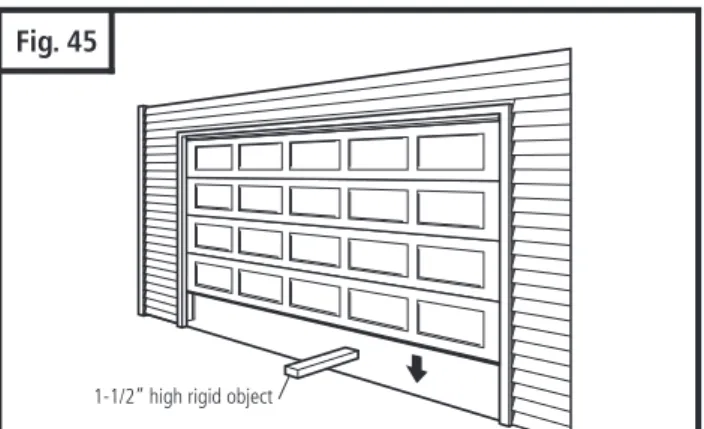
Place a 1-1/2" high rigid object (or a 2x4 board laid flat) on the floor directly in the path of the door. See Fig. 45.
Start the door in the downward direction and watch what happens.
When door contacts the object (or 2x4), it should stop, reverse, and automatically return to the fully opened position.
If the door does not reverse, reset the down travel limit so that the door travels slightly further down in the closed direction. Then, retest the unit as described above.
If the door still does not reverse, disconnect your operator and call a service person.
Fig. 45
1-1/2” high rigid object
Press and release the wall control button. The door should not move in the down direction.
If this does not happen, disconnect operator and call for service.
To reset operator, remove the obstruction and operate the door normally.
If photo eye sensors are not aligned or are damaged, door can only be closed by pressing and holding wall control button until door is fully closed.
Several important safety and instruction labels are included with your operator package. These labels must be posted inside your garage where they can be easily seen by all. We recommend installing them in the location shown in Fig. 9 on page 7. To affix the labels, peel off the protective
backing, and stick onto smooth, clean surface. If labels don’t adhere well to surface, use tacks (wood door only) or additional adhesive to securely affix in place. DO NOT PAINT OVER ANY LABELS.
18. APPLY LABELS TO INSIDE OF GARAGE
19. ATTACH
OWNER’S
MANUAL TO WALL
It is important that the manual be stored where it can be referred to later in case adjustments need to be made, and / or new controls or accessories added. Store the manual in a safe, easily accessible location. We recommend you use an envelope with an eyelet to store the manual in the garage on a nail or hook on the wall near the wall control.
20. IMPORTANT SAFETY INSTRUCTIONS
1.
READ AND FOLLOW ALL WARNINGS AND INSTRUCTIONS CAREFULLY.
2. Never let children operate or play with door controls. Keep the remote control away from children.
3. Always keep the moving door in sight and away from people and objects until it is completely closed. NO ONE SHOULD
CROSS THE PATH OF THE MOVING DOOR.
4. NEVER GO UNDER A STOPPED, PARTIALLY OPEN DOOR.
5. Test door operator monthly. The garage door MUST reverse on contact with a 1-1/2"
(40mm)high object (or a 2x4 laid
flat) on the floor. After adjusting either the force or the limit of travel, retest the door operator. Failure to adjust the
operator properly may cause severe injury or death.
6. If possible, use the emergency release only when the door is closed. Use caution when using this release with the door
open. Weak or broken springs may allow the door to fall rapidly, causing severe injury or death.
7. KEEP GARAGE DOORS PROPERLY BALANCED. See Garage Door Owner's Manual. An improperly balanced door could
cause severe injury or death. Have a qualified service person make repairs to cables, spring assemblies, and other
hardware.
8. Disconnect the electrical power to the garage door operator before making any repairs or removing the housing cover.
9.
SAVE THESE INSTRUCTIONS
for future safety, adjustment, and maintenance purposes.
TO REDUCE THE RISK OF SEVERE INJURY OR DEATH:
IMPORTANT SAFETY INSTRUCTIONS
21. TENSION ADJUSTMENT
22. RAIL LENGTH ADJUSTMENT
Your preassembled rail comes with the tension adjusted to factory specifications. There should be no need for further adjustment. However, if exposed or subjected to unusually harsh operating conditions, the tension may need to be readjusted during the life of the opener.
CHECK PROPER TENSION (Fig. 49):
Release trolley from belt or chain, then examine the setting of the tension adjustment at the header end of the rail.
Proper tension is set when the tension nut is tightened just enough so that the washer will be spaced approximately 21mm or 53/64" from the stationary rail end-stop arch.
If the gap between the washer and the rail end-stop arch is too big or too small, the tension needs to be adjusted.
ADJUST THE TENSION:
To increase the tension and tighten the belt or chain, turn the tension nut clockwise with 7/16” wrench until the washer is spaced properly from the rail end-stop arch. See Fig. 50.
Once the washer is spaced correctly, any additional tightening will overtighten the belt or chain and may cause damage to the system.
To loosen the tension, turn nut counterclockwise.
Reattach trolley.
Fig. 50
Chain Link
Chain Strap 1"
FOR PROFESSIONAL INSTALLERS ONLY
If your particular installation calls for a shorter rail than the standard length provided, it is possible to shorten the rail. NOTE: Shortening rail too much may result in door travel length reduction and door not opening fully. This depends on door size and configuration. Carefully plan all such modifications before proceeding. THIS PROCEDURE SHOULD BE PERFORMED ONLY BY A PROFESSIONAL INSTALLER FULLY FAMILIAR WITH THIS TYPE OF OPENER SYSTEM.
TO SHORTEN BELT RAIL LENGTH:
Loosen belt tension as much as possible.
Remove screws from sprocket holder and rail end-stop.
Slide belt and all rail parts out of rail from header end. See rail exploded view, Fig. 51 on p. 29, for disassembly details.
Measure and cut off excess rail from header end.
Using rail end-stop as a guide, mark and drill a 3/16" hole for rail end-stop screw.
Disassemble connector to expose free ends of belt.
Using the same measurement as the excess rail length, cut the same amount off BOTH free ends of the belt.
Reassemble belt connector, and slide all rail parts into rail from header end according to original assembly (Fig. 49).
Tension belt properly (Fig. 49).
Check rail for proper assembly and operation by manually moving trolley from end to end with trolley connected to belt.
TO SHORTEN CHAIN RIAL LENGTH:
Loosen chain tension as much as possible.
Remove screws from sprocket holder and rail end-stop.
Slide chain and all rail parts out of rail from header end. See rail exploded view, Fig. 52 on p. 29, for disassembly details.
Measure and cut off excess rail from header end by 1” increment only.
Using rail end-stop as a guide, mark and drill a 3/16" hole for rail end-stop screw.
Disassemble connector to expose free ends of chain.
Using the same measurement as the excess rail length, remove the same amount off chain links and chain straps from BOTH free ends of the chain (Fig. 50).
Reassemble two piece connector and slide chain and all rail parts into rail from header end according to original assembly (Fig. 49).
Tension chain properly (Fig. 49).
Check rail for proper assembly and operation by manually moving trolley from end to end with trolley connected to chain.