OPSEC
Check Point™ ELA (Event Logging
API) Specification
OPSEC SDK 6.0
© 2003-2006 Check Point Software Technologies Ltd.
All rights reserved. This product and related documentation are protected by copyright and distributed under licensing restricting their use, copying, distribution, and decompilation. No part of this product or related documentation may be reproduced in any form or by any means without prior written authorization of Check Point. While every precaution has been taken in the preparation of this book, Check Point assumes no responsibility for errors or omissions. This publication and features described herein are subject to change without notice.
RESTRICTED RIGHTS LEGEND:
Use, duplication, or disclosure by the government is subject to restrictions as set forth in subparagraph (c)(1)(ii) of the Rights in Technical Data and Computer Software clause at DFARS 252.227-7013 and FAR 52.227-19.
TRADEMARKS:
©2003-2006 Check Point Software Technologies Ltd. All rights reserved.
Check Point, Application Intelligence, Check Point Express, the Check Point logo, AlertAdvisor, ClusterXL, Cooperative Enforcement, ConnectControl, Connectra, CoSa, Cooperative Security Alliance, Eventia, Eventia Analyzer, FireWall-1, FireWall-1 GX, FireWall-1 SecureServer, FloodGate-1, Hacker ID, IMsecure, INSPECT, INSPECT XL, Integrity, InterSpect, IQ Engine, Open Security Extension, OPSEC, Policy Lifecycle Management, Provider-1, Safe@Home, Safe@Office, SecureClient, SecureKnowledge, SecurePlatform, SecuRemote, SecureXL Turbocard, SecureServer, SecureUpdate, SecureXL, SiteManager-1, SmartCenter, SmartCenter Pro, Smarter Security, SmartDashboard, SmartDefense, SmartLSM, SmartMap, SmartUpdate, SmartView, SmartView Monitor, SmartView Reporter, SmartView Status, SmartViewTracker, SofaWare, SSL Network Extender, Stateful Clustering, TrueVector, Turbocard, UAM, User-to-Address Mapping, UserAuthority, VPN-1, VPN-1 Accelerator Card, VPN-1 Edge, VPN-1 Pro, VPN-1 SecureClient, VPN-1 SecuRemote, VPN-1 SecureServer, VPN-1 VSX, VPN-1 XL, Web Intelligence, ZoneAlarm, ZoneAlarm Pro, Zone Labs, and the Zone Labs logo, are trademarks or registered trademarks of Check Point Software Technologies Ltd. or its affiliates. All other product names mentioned herein are trademarks or registered trademarks of their respective owners. The products described in this document are protected by U.S. Patent No. 5,606,668, 5,835,726, 6,496,935 and 6,850,943 and may be protected by other U.S. Patents, foreign patents, or pending applications.
Table of Contents
5
Contents
Preface
Who Should Use This Guide... 8
Summary of Contents ... 9
What Typographic Variations Mean ... 10
Chapter 1
Introduction
Overview ... 14
Programming Model ... 15
Threads ... 16
ELA API Overview ... 16
ELA Server Tool ... 26
Overview ... 26
Configuration... 26
Chapter 2
Client API Functions
Managing the Session ... 28
ela_new_session ... 28
ela_end_session... 28
Managing Log Entries... 30
ela_log_create ... 30
ela_log_destroy ... 30
ela_log_add_field... 31
ela_log_add_raw_field ... 32
ela_log_remove_field ... 32
ela_send_log ... 33
Managing Contexts... 34
ela_context_create ... 34
ela_context_destroy... 34
ela_ff_create ... 35
Using Log Fragments ... 36
ela_log_uid_create ... 36
ela_log_uid_destroy... 36
ela_log_set_uid... 37
Resolving Logs ... 38
ela_resinfo_create ... 38
ela_resentry_add... 40
ela_log2str ... 41
7
Preface
P
Preface
In This Chapter
Who Should Use This Guide
page 8
Summary of Contents
page 9
Who Should Use This Guide
8
Who Should Use This Guide
This document describes the Check Point Book Title.
This API specification is written for developers who write software to enhance the
network security provided by VPN-1.
It assumes that you have read the Check Point VPN-1 OPSEC API Specification.
It also assumes that you have a basic understanding and a working knowledge of
the following:
•
system and network security
•
the VPN-1 product
•
system and network administration
•
the C and/or C++ programming language
•
the Unix or Windows operating system
Summary of Contents
Preface
9
Summary of Contents
This chapter contains the following chapters:
Chapter Description
Chapter 1, “Introduction”
Introduces ELA (Event Logging API)
Specifications, which enable a third party
application to log events into SmartView Tracker.
Chapter 2, “Client API
Functions”
This chapter describes the functions provided by
the OPSEC ELA API.
What Typographic Variations Mean
10
What Typographic Variations Mean
The following table describes the typographic variations used in this book.
TABLE P-1
Typographic Conventions
Typeface or Symbol
Meaning
Example
AaBbCc123
The names of
commands,
files, and
directories;
on-screen
computer
output; code
Edit your
.login
file.
Use
ls -a
to list all files.
machine_name% You have
mail.
session = sam_new_session
(client, server);
AaBbCc123
same as above,
but with
emphasis
session = sam_new_session
(client, server);
Save
Text that
appears on an
object in a
window
Click on the
Savebutton.
<your text>
Replace the
angle brackets
and the text
they contain
with your text.
Edit the file
<FWDIR>\lib\yourfile.x
x
.
.
.
Lines of data or
code omitted
from example
line 1
line 2
.
.
.
line n
What Typographic Variations Mean
Preface
11
[item]
The item is
optional.
dir [/o]
[item1] ... [item2]
List of optional
items
dir [/o] [/w] [/s]
item1 | item2 | item3
Choose one of
the items.
copy infile1 | infile1 + infile2
|infile1 + infile2 + infile3
outfile
italic
Specific values
will be shown in
italics
one of
addnet
|
addapp
TABLE P-1
Typographic Conventions(continued)
What Typographic Variations Mean
13
Chapter
1
Introduction
In This Chapter
Overview
page 14
Programming Model
page 15
Defining an ELA Client
page 16
ELA Client Application Structure
page 16
Overview
page 26
Overview
14
Overview
Check Point’s OPSEC (Open Platform for Security) integrates and manages all
aspects of network security through an open, extensible management framework.
Third party security applications can plug into the OPSEC framework via published
application programming interfaces (APIs). Once integrated into the OPSEC
framework, all applications can be configured and managed from a central point,
utilizing a single Security Policy editor.
This document describes the ELA (Event Logging API) Specification, which enables
a third party application to log events into SmartView Tracker.
Programming Model
Chapter 1
Introduction
15
Programming Model
The ELA (Event Logging API) Specification enables third party applications to log
events in SmartView Tracker. For example, a High Availability VPN-1 application
might use ELA to notify the SmartCenter Server that there has been a failover from
one firewall to another. An anti-virus application might use ELA to log additional
information in the event of virus detection.
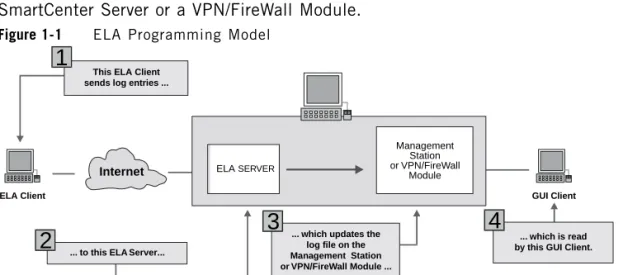
ELA ServerFigure 1-1 shows what happens when an ELA Client sends a log entry to
SmartCenter Server or a VPN/FireWall Module.
Figure 1-1
ELA Programming Model
The ELA Client builds log entries and sends them to an ELA Server running on
SmartCenter Server, inside the VPN-1 daemon (fwd), that writes the log entries to
the SmartView Tracker.
Communication between the ELA Client and the ELA Server is implemented by the
OPSEC Transport Layer.
Local Log Files
There is no ELA proxy, the log file goes directly to the firewall which either
connects to a management station or writes the log locally.
This ELA Client sends log entries ...
1
ELA Client
... to this ELA ...
2
... which updates thelog file on the Management Station or VPN/FireWall Module ...
3
GUI Client
... which is read by this GUI Client.
4
ELA Management Station or Module VPN/FireWall Internet SERVER ServerThreads
16
Threads
ELA API Multithread level is “reentrant”. This means that:
•
Multiple threads may use the ELA API concurrently.
•
Multiple threads may not share data generated by ELA API
For more information, see “
Multithreaded OPSEC Applications
” in the
Check Point
OPSEC API Specification
.
Defining an ELA Client
The steps involved in integrating an ELA Client with VPN-1 and the ELA Server fall
into three broad categories:
1. If you have installed VPN-1 you have already installed the ELA Server. The
process for installing VPN-1 is described in detail in “Installing and Configuring
VPN-1 of the
Check Point Management Guide
.
2. Writing code to build logs and send them to the ELA Server.
This requires the ELA API which is described in detail in “ELA API Overview”
on page 16.
3. For information on configuring ELA Clients and Servers, see “The OPSEC
Environment of
Check Point
OPSEC API Specification
.
ELA API Overview
The ELA Client uses the OPSEC and ELA API functions to process log events and
communicate with the ELA Server.
ELA Client Application Structure
ELA API Overview
Chapter 1
Introduction
17
Figure 1-2
ELA Client Application Structure
Once the OPSEC environment is initialized and the OPSEC Client and Server
entities are declared, a context is created for the ELA session. This context
contains information about the formats or types of log entries that the ELA Client
will be sending to the ELA Server. When the ELA session is started, the main loop
main
loop
format and send
log entry to ELA Server
initialize ELA Server entity
initialize OPSEC environment
initialize ELA Client entity
start the OPSEC session
start the main loop
create context, formats and
resolvers for log entry fields
free the OPSEC environment
free the ELA Server entity
free the ELA Client entity
destroy the context
format and send
log entry to ELA Server
ELA API Overview
18
processes log events, builds log entries according to the formats specified in the
context, and sends them to the ELA Server. The main loop is terminated by the
underlying OPSEC level. After the main loop exits, the session’s context is
destroyed and the OPSEC entities and environment are freed.
The following API functions manage the session between the ELA Client and the
ELA Server:
Log Entries
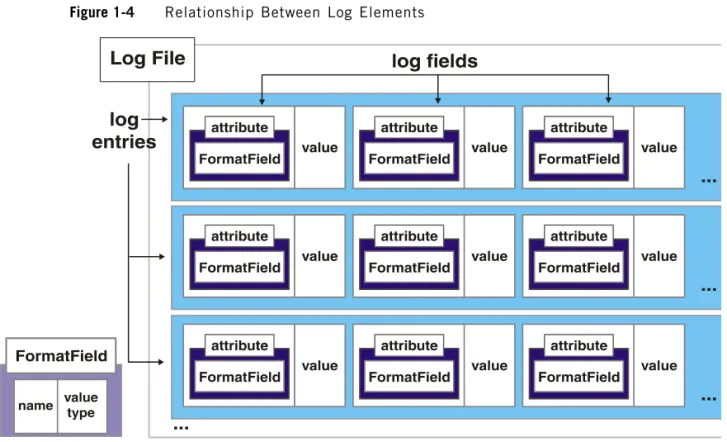
A
log entry
corresponds to a line in the VPN-1 Log File. Each log entry is made up
of several
log fields
. Before the ELA Client sends a log entry to the ELA Server, it
establishes a context for the entry so that the ELA Server will be able to process it.
This context includes information about the representation of log fields.
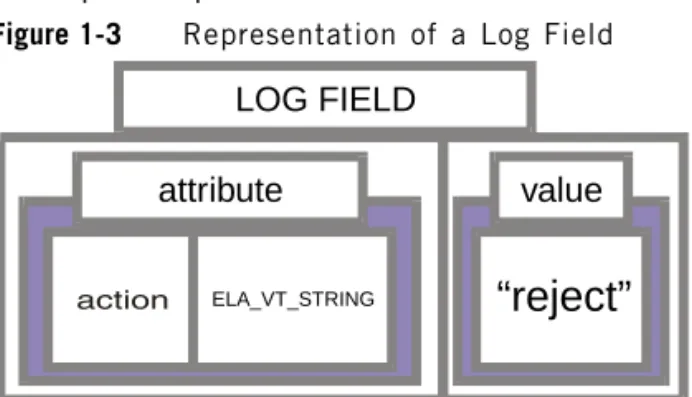
A log field has an
attribute
and a
value
. The attribute of a field specifies the field’s
name and the data type of the field’s value.
For example, the log field containing the action VPN-1 has taken for the given
attempt is represented as follows:
Figure 1-3
Representation of a Log Field
The field’s attribute is composed of its name, “action”, and its data type,
ELA_VT_STRING. The field’s value is “reject”.
Table 1-1
API functions for managing the ELA session
function name
description
See...
ela_new_session
starts the OPSEC session
page 28
ela_end_session
ends the OPSEC session
page 28
attribute
“reject”
ELA_VT_STRING
value
LOG FIELD
ELA API Overview
Chapter 1
Introduction
19
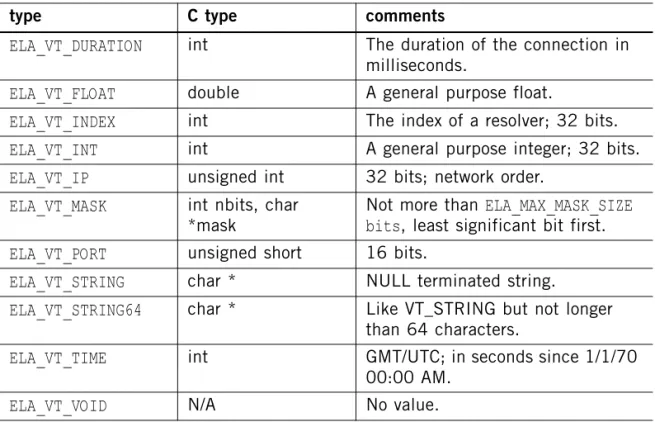
Data types and their C type equivalents are listed in Table 1-2 below:
FormatFields
enable you to predefine the attributes of a given log field. For more
information, see “Context” on page 21.
Figure 1-4 depicts the relationship between the elements of a log file.
Table 1-2
Virtual Types and corresponding C types
type
C type
comments
ELA_VT_DURATION
int
The duration of the connection in
milliseconds.
ELA_VT_FLOAT
double
A general purpose float.
ELA_VT_INDEX
int
The index of a resolver; 32 bits.
ELA_VT_INT
int
A general purpose integer; 32 bits.
ELA_VT_IP
unsigned int
32 bits; network order.
ELA_VT_MASK
int nbits, char
*mask
Not more than
ELA_MAX_MASK_SIZE
bits
, least significant bit first.
ELA_VT_PORT
unsigned short
16 bits.
ELA_VT_STRING
char *
NULL terminated string.
ELA_VT_STRING64
char *
Like VT_STRING but not longer
than 64 characters.
ELA_VT_TIME
int
GMT/UTC; in seconds since 1/1/70
00:00 AM.
ELA API Overview
20
Figure 1-4
Relationship Between Log Elements
The following API functions manage log records:
For every log to be sent to the ELA Server, a typical ELA Client might do the
following:
1. Create a log entry by calling
ela_log_create
.
Table 1-3
API functions for managing logs
function name
description
See...
ela_log_create
creates a log entry
page 30
ela_log_destroy
destroys a log entry
page 30
ela_log_add_field
adds a log field to a log entry using
FormatFields
page 31
ela_log_add_raw_fie
ld
adds a log field to a log entry without
using
FormatFields
page 32
ela_log_remove_fiel
d
removes a log field from a log entry
page 32
ela_send_log
sends a log entry to an ELA Server
page 33
ELA API Overview
Chapter 1
Introduction
21
2. Add log fields to the log entry by calling
ela_log_add_field
or
ela_log_add_raw_field
.
3. Send the log entry to the ELA Server by calling
ela_send_log
.
This is done once the
opsec_mainloop
is running.
4. Destroy the log by calling
ela_log_destroy
.
Context
Before initializing a session between the ELA Client and the ELA Server, the ELA
Client establishes a context for the session. This context must be defined before
any log entries can be created.
A context is passed to the ELA Server using
ela_new_session
.
Using
FormatFields
allows you to predefine a log field’s name and data type.
FormatFields
are stored as part of a session’s context, and make the process of
adding fields to log entries more efficient.
The
FormatFields
that are recognized by VPN-1 are listed in “Introduction” in the
FireWall-1 FormatFields.”
The following API functions manage a session’s context:
Log Fragments
The Logging System contains mechanisms which aid in reporting an event. This is
done by attaching the same log unique ID
"uid"
to all log parts (or "fragments")
thus enabling different components to send their own part of a log record. Each log
fragment is an ordinary log with a
uid
attached to it.
Using ELA APIs, the client can create a
uid
and attach it to one or more ELA log
records. Other log reading applications, such as SmartView Tracker, can then unify
all the fragments and display them as one log record. In cases where one field
Table 1-4
API functions for managing contexts
function name
description
See...
ela_context_create
creates a context for the session
page 34
ela_context_destroy
destroys the context and its objects
page 34
ela_ff_create
creates a FormatField to be used when
adding fields to a log entry
ELA API Overview
22
appears in more then one fragment, the log server uses a unification scheme to
combine those fields. Unknown fields can be unified using the last fragment's field
value.
Resolving Logs
Resolving log entries can make them easier to understand and more meaningful to
the user viewing the log. For example, the
proto
field stores the higher level IP
protocol of a connection as an integer. Resolving this value and displaying it as a
string (e.g. “tcp”) is more meaningful to the user than displaying the field’s actual
value.
Resolution information consists of a set of argument-result pairs (for example, “21
telnet”, “23 ftp”, etc.) A resolver function performs a look-up on a log field value,
e.g. 21, and returns another value, e.g. “telnet”. A well known resolver is a Domain
Name Server (DNS) which provides an IP address for a domain name in the
Internet.
Resolvers can be
chained
. That is, the resolved data output by one resolver can be
input by a second resolver. This is useful, for example, when an IP address must be
translated before it is resolved to a name.
Resolution information on the ELA Server may be richer than that on the ELA
Client. For example, the ELA Server may have more DNS information available.
Logs will be resolved according to the Server’s information.
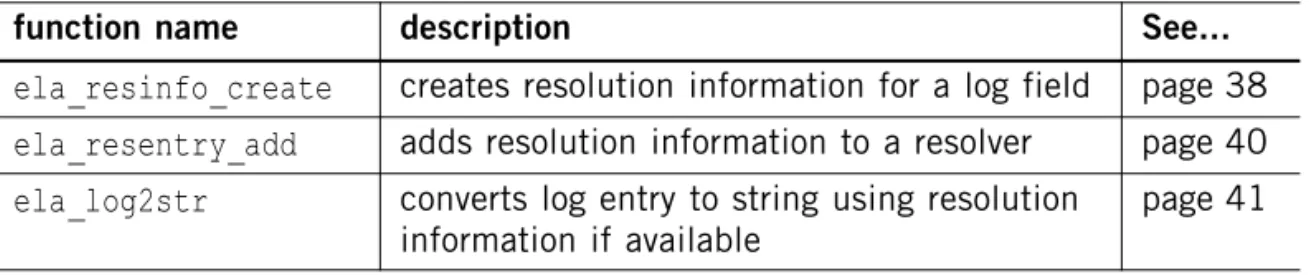
The following API functions create resolution information and resolve log entries:
Note -
After a
logswitch
operation additional fragments are considered a part of a new log
record.
Table 1-5
API functions for resolving logs
function name
description
See...
ela_resinfo_create
creates resolution information for a log field
page 38
ela_resentry_add
adds resolution information to a resolver
page 40
ela_log2str
converts log entry to string using resolution
information if available
ELA API Overview
Chapter 1
Introduction
23
Log Fields
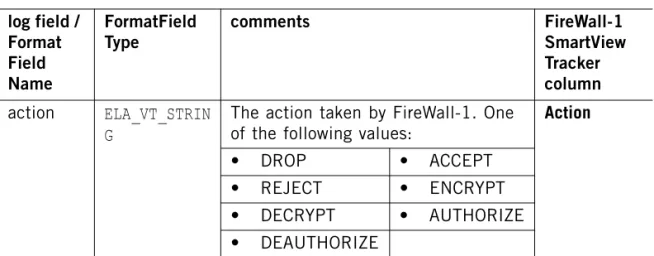
Table 1-6 lists the log fields recognized by VPN-1 and their corresponding
FormatFields
, along with the SmartView Tracker columns in which they are
displayed. The
FormatFields
for the log fields listed must be defined using
ela_ff_create
.
Note that some log fields have their own SmartView Tracker columns while others
are displayed in the
Info.column.
Note -
The connection referred to in
Table 1-6
is the one to which the log relates, not the
ELA connection.
Note -
Float and mask virtual type fields (ELA_VT_FLOAT and ELA_VT_MASK) are
maintained as string fields rather than their original type. For further reference see
Table 1-2
.
Note -
The product field is required in every ELA generated log message. It is recommended
that you enter a unique product name for each product.
Table 1-6
FireWall-1 FormatFields
log field /
Format
Field
Name
FormatField
Type
comments
FireWall-1
SmartView
Tracker
column
action
ELA_VT_STRIN
G
The action taken by FireWall-1. One
of the following values:
Action
•
DROP
•
ACCEPT
•
REJECT
•
ENCRYPT
•
DECRYPT
•
AUTHORIZE
•
DEAUTHORIZE
ELA API Overview
24
alert
ELA_VT_STRIN
G
The type of the requested alert.
Using this FormatField enables the
ELA Client to execute alert
applications.
The permitted values are:
N/A
(executes
the
requested
alert)
•
•
alert
•
snmptrap
•
useralert
•
useralert2
•
useralert3
For more information, see chapter 7 of
the
VPN-1
Management Guide
.
d_port
ELA_VT_PORT
The connection’s destination port.
Destination
Port
direction
ELA_VT_INT
The direction of the connection. One
of the following:
•
0 for INBOUND
•
1 for OUTBOUND
•
Default: INBOUND (when the
field is not included in the log
record)
Inter.
dst
ELA_VT_IP
The IP address (32-bits, in network
order) of the connection’s
destination.
Destination
if_num
ELA_VT_INT
The interface index number: a
positive integer.
Inter.
product
ELA_VT_STRIN
G
The product generating the log
message. This field is required for
each log message. The default is
“FireWall-1”.
Product
proto
ELA_VT_PROTO
The connection’s higher level protocol
(the “real” IP protocol value).
Proto.
s_port
ELA_VT_PORT
The connection’s source port.
Source Port
service
ELA_VT_STRIN
G
The connection’s service (e.g.
“telnet”).
Service
Table 1-6
FireWall-1 FormatFields (continued)
log field /
Format
Field
Name
FormatField
Type
comments
FireWall-1
SmartView
Tracker
column
ELA API Overview
Chapter 1
Introduction
25
src
ELA_VT_IP
The IP address (32-bits, in network
order) of the connection’s source.
Source
url
ELA_VT_STRIN
G
The URL related to the log message.
URL
user
ELA_VT_STRIN
G
The connection’s user (e.g. “Bob”)
User
Table 1-6
FireWall-1 FormatFields (continued)
log field /
Format
Field
Name
FormatField
Type
comments
FireWall-1
SmartView
Tracker
column
ELA Server Tool
26
ELA Server Tool
Overview
OPSEC SDK includes
ela_server
, an ELA testing tool that enables you to test an
ELA Client without VPN-1. The tool is located in the
tools/ela
directory.
ela_server
is a server that listens for communication from an ELA Client and
prints the received logs to the standard output.
Configuration
For information on configuring ELA Clients and Servers, see “Client-Server
Connection” on page 20 of
Check Point
OPSEC API Specification
.
27
Chapter
2
Client API Functions
In This Chapter
Managing the Session
page 28
Managing Log Entries
page 30
Managing Contexts
page 34
Managing the Session
28
Managing the Session
The following functions start and end the OPSEC session. The function prototypes
are defined in the file
ela_opsec.h
.
ela_new_session
ela_new_session
initializes an OPSEC session between the ELA Client and the ELA
Server. Once the session is initialized and
opsec_mainloop
is running, the ELA
Client can begin sending log entries to the ELA Server.
Prototype
OpsecSession *ela_new_session(OpsecEntity *client, OpsecEntity *server,
Ela_CONTEXT *context);
Arguments
Return Values
Pointer to new session if successful.
NULL
if error.
ela_end_session
ela_end_session
ends the OPSEC session.
Prototype
void
ela_end_session
(OpsecSession *session);
Table 2-1
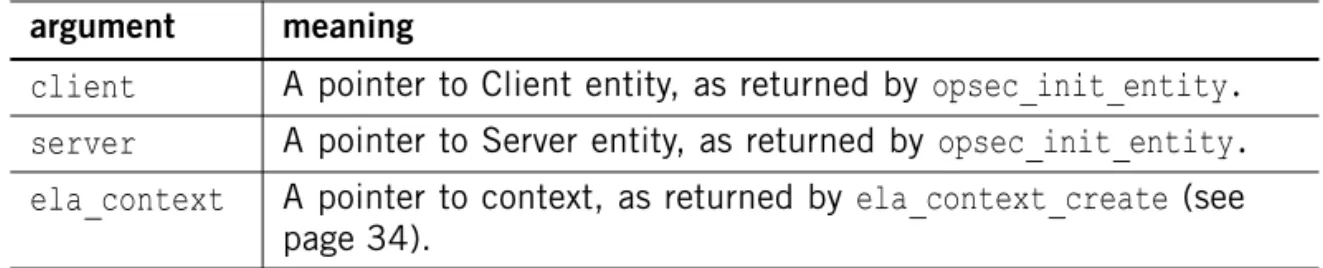
ela_new_session arguments
argument
meaning
client
A pointer to Client entity, as returned by
opsec_init_entity.
server
A pointer to Server entity, as returned by
opsec_init_entity.
ela_context
A pointer to context, as returned by
ela_context_create
(see
ela_end_session
Chapter 2
Client API Functions
29
Arguments
Return Values
None.
Table 2-2
ela_end_session arguments
argument
meaning
session
A pointer to
OpsecSession
structure, as returned by
ela_new_session.
Managing Log Entries
30
Managing Log Entries
The following functions build and send log entries. The prototype for
ela_send_log
is defined in the file
ela_opsec.h
. The prototypes for the rest of these functions are
defined in the file
ela.h
.
ela_log_create
ela_log_create
creates a log entry.
Prototype
Ela_LOG *
ela_log_create
(Ela_CONTEXT *
ela_context
);
Arguments
Return Values
Pointer to the log entry if successful.
NULL
otherwise.
ela_log_destroy
ela_log_destroy
destroys a log entry.
Prototype
void
ela_log_destroy
(Ela_LOG *
ela_log
);
Arguments
Return Values
None.
Table 2-3
ela_log_create arguments
argument
meaning
ela_context
A pointer to the context, as returned by
ela_context_create.
Table 2-4
ela_log_destroy arguments
argument
meaning
ela_log_add_field
Chapter 2
Client API Functions
31
ela_log_add_field
ela_log_add_field
adds a log field to a log entry. In contrast to
ela_log_add_raw_field
,
ela_log_add_field
uses
FormatFields
.
Prototype
int
ela_log_add_field
(Ela_LOG *
Ela_log, Ela_FF *ela_ff,
Ela_Res
info *ela_resinfo, unsigned long logfield);
Arguments
Return Values
0 if successful. Non-zero if error.
Notes
•
The field’s type must correspond to the type specified in the field’s definition
(see
“ela_context_create” on page 34
)
.
However, if a field was created with type
ELA_VT_STRING
and
ela_log_add_field
is called using a different type, the data will be converted
to a string.
•
If
ela_resinfo
is not
NULL
, then the type of the resolved data must correspond
to the type specified in the field’s definition.
However, if the field was created with type
ELA_VT_STRING
and the resolved
data is of a different type, the data will be converted to a string.
•
Using
ela_log_add_field
and predefined
FormatFields
is more efficient and
more elegant than using
ela_log_add_raw_field
.
Table 2-5
ela_log_add_field arguments
argument
meaning
ela_log
A pointer to the log entry, as returned by
ela_log_create.
ela_ff
A pointer to the FormatField, as returned by
ela_ff_create.
ela_resinfo
Resolution information—can be
NULL
(see “Resolving Logs” on
page 22).
logfield
The value of the field to be added to the log entry. In VPN-1
versions prior to NG this value can not exceed 1024 bytes.
ela_log_add_raw_field
32
ela_log_add_raw_field
ela_log_add_raw_field
adds a log field to a log entry. In contrast to
ela_log_add_field
,
ela_log_add_raw_field
does not use
FormatFields
.
Prototype
int
ela_log_add_raw_field
(Ela_LOG *
Ela_log, char *name, Ela_VtType type,
Ela_Resinfo *ela_resinfo
, unsigned long logfield);
Arguments
Return Values
0 if successful. Any other value if error.
Notes
Using
ela_log_add_field
and predefined
FormatFields
is more efficient and more
elegant than using
ela_log_add_raw_field
.
ela_log_remove_field
ela_log_remove_field
removes a log field (added by
ela_log_add_field
) from a
log entry. This function is useful when the Client needs to send slightly different
versions of the same log entry to different ELA Servers.
Prototype
void
ela_log_remove_field
(Ela_LOG *
Ela_log, Ela_FF *ela_ff
);
Table 2-6
ela_log_add_raw_field arguments
argument
meaning
ela_log
A pointer to the log entry, as returned by
ela_log_create.
name
The field’s name.
type
A field’s virtual data type (for list, see Table 1-2 on page 19).
ela_resinfo
Resolution information—can be
NULL
(see “Resolving Logs” on
page 22).
logfield
The value of the field to be added to the log entry. In VPN-1
versions prior to NG this value can not exceed 1024 bytes.
ela_send_log
Chapter 2
Client API Functions
33
Arguments
Return Values
None.
ela_send_log
ela_send_log
sends a log entry to an ELA Server.
Prototype
int
ela_send_log
(OpsecSession *session, Ela_LOG *
ela_log
);
Arguments
Return Values
0 if successful. -1 if error.
Possible reasons for an error include communication problems, log overflow,
different contexts for the specified
log
and
session
, etc.
Table 2-7
ela_log_remove_field arguments
argument
meaning
ela_log
A pointer to the log entry, as returned by
ela_log_create.
ela_ff
A pointer to a FormatField, as returned by
ela_ff_create.
Table 2-8
ela_send_log arguments
argument
meaning
session
A pointer to
OpsecSession
structure, as returned by
ela_new_session.
Managing Contexts
34
Managing Contexts
The functions described in this section manage the context for the ELA session.
The function prototypes are defined in the file
ela.h
.
ela_context_create
ela_context_create
creates a context in which
FormatFields
and log entries can
be created.
Prototype
Ela_CONTEXT *
ela_context_create
();
Arguments
None.
Return Values
Pointer to context if successful.
NULL
if error.
ela_context_destroy
ela_context_destroy
destroys a context and all the context’s objects
(
FormatFields
, log entries).
Prototype
void
ela_context_destroy
(Ela_CONTEXT *
ela_context
);
Arguments
Return Values
None.
Table 2-9
ela_context_destroy arguments
argument
meaning
ela_ff_create
Chapter 2
Client API Functions
35
ela_ff_create
ela_ff_create
creates a FormatField to be used by
ela_log_add_field
and
ela_log_remove_field
.
Prototype
Ela_FF *
ela_ff_create
(Ela_CONTEXT *
ela_context, char *name, vt_type type
);
Arguments
Return Values
Pointer to Format Field if successful.
NULL
if error.
Table 2-10
ela_ff_create arguments
argument
meaning
ela_context
A pointer to context, as returned by
ela_context_create.
name
The field’s name.
Using Log Fragments
36
Using Log Fragments
The functions described in this section manage logs as log fragments. The function
prototypes are defined in the file ela.h.
ela_log_uid_create
ela_log_uid_create
creates a new unique identifier (
uid
) to be attached to a log.
Prototype
Ela_LogUID *ela_log_uid_create();
Arguments
None.
Return Values
Pointer to the
uid
if successful.
NULL
if error.
ela_log_uid_destroy
ela_log_uid_destroy
destroy a unique identifier (
uid
).
Prototype
void ela_log_uid_destroy(Ela_LogUID *ela_uid);
Arguments
Return Values
None.
Table 2-11
ela_log_uid_destroy arguments
argument
meaning
ela_log_set_uid
Chapter 2
Client API Functions
37
ela_log_set_uid
ela_log_set_uid
attaches a
uid
to a log record which enables it to be one of many
log fragments.
Prototype
int ela_log_set_uid( Ela_Log *log, Ela_LogUID *ela_uid);
Arguments
Return Values
0 if successful. -1 if error.
Table 2-12
ela_log_set_uid arguments
argument
meaning
log
A pointer to the log entry, as returned by
ela_log_create
.
ela_uid
A pointer to the
uid
, as returned by
ela_log_uid_create.
Resolving Logs
38
Resolving Logs
The following functions resolve log entries, making them easier to understand and
more meaningful to the user. The function prototypes are defined in the file
ela.h
.
ela_resinfo_create
ela_resinfo_create
creates the resolution information used by
ela_log_add_field
.
Resolution information consists of a set of argument-result pairs (for example, “23
telnet”, “21 ftp”, etc.).
Prototype
Ela_Resinfo *
ela_resinfo_create
(Ela_CONTEXT *
ela_context, char *name,
Ela_Resinfo *
next_res,
Ela_Resinfo *
default_res,
int resolver_type,...
);
ela_resinfo_create
Chapter 2
Client API Functions
39
Arguments
Return Values
Pointer to resolution information if successful.
NULL
if error.
Notes
next_res
and
default_res
are used for chaining resolver functions. If you are not
chaining resolver functions, both arguments should be
NULL
.
If you are chaining resolver functions, create the
last
resolver function first, using
next_res =
NULL
. Now work backwards along the resolver function chain, defining
each resolver function with
next_res
pointing to the already-defined resolver
function that follows it in the chain. The first resolver function in the chain is
defined last.
Table 2-13
ela_resinfo_create arguments
argument
meaning
ela_context
A pointer to the context, as returned by
ela_context_create.
name
The name of the table used as a resolver.
next_res
A pointer to the resolver that will resolve the output of this
resolver—see“Notes”” below.
default_res
A pointer to the default resolver to be used when this resolver
is unable to perform the resolution—see“Notes”” below.
resolver_type
The type of resolver. One of the following:
value
meaning
ELA_ASSOC_RES
A table associating one
value-type pair with another.
ELA_INDEX_RES
Completely identical to
ELA_ASSOC_RES
, except for
the handling of type
ELA_VT_MASK
—in this
case, every ON bit in the
mask is resolved separately
and the results are
concatenated, delimited by
commas, and returned as a
string.
ela_resentry_add
40
Example
The code fragment below illustrates chaining resolvers.
res_name
’s resolved output will be resolved again by
login_to_name
.
login_to_name
is also specified as
res_name
’s default resolver, to be used if
res_name
is unable to resolve the data.
ela_resentry_add
ela_resentry_add
adds resolution information to a resolver.
Prototype
Ela_ResEntry *
ela_resentry_add
(Ela_CONTEXT *
ela_context,
Ela_Resinfo *
ri,
orig_type, orig_value, resolved_type, resolved_value
);
/*
* Resolves login names to full names
*/
login2name = ela_resinfo_create(ctx, "login name to full name",
NULL, NULL, ELA_ASSOC_RES);
/*
* Resolves user ids to login names
*/
res_name = ela_resinfo_create(ctx, "user-id to login name",
login2name, login2name, ELA_INDEX_RES);
ela_log2str
Chapter 2
Client API Functions
41
Arguments
Return Values
A pointer to the the new entry in the resolution table if successful.
NULL
if error.
Example
ela_resentry_add(ela_context, id2name, VT_INT, 25, VT_STRING, "Mark
McGwire");
This function call specifies that log fields of type
VT_INT
and value 25 are to be
resolved into the string “Mark McGwire”.
ela_log2str
ela_log2str
converts a log entry to a string using whatever resolution information is
available to the ELA Client.
Prototype
int
ela_log2str
(Ela_LOG *
Ela_log, char *str, int slen
);
Table 2-14
ela_resentry_add arguments
argument
meaning
ela_context
A pointer to the context, as returned by
ela_context_create.
ri
A pointer to the resolution information, as returned by
ela_resinfo_create.
orig_type
The field’s original data type (for list, see Table 1-2 on
page 19).
orig_value
The field’s original value (corresponding to
orig_type
).
resolved_typ
e
The resolved field’s data type (for list, see Table 1-2 on
page 19).
resolved_val
ue
The resolved fields’ value (corresponding to
ela_log2str
42
Arguments
Return Values
The length of
str
if successful. A negative number if error.
Example
The above example prints “name=Mark McGwire homers=70”.
Table 2-15
ela_log2str arguments
argument
meaning
ela_log
A pointer to the log entry, as returned by
ela_log_create.
str
A pointer to string of length
slen
(including the terminating
\0
).
slen
The maximum length of
str.
main(){
Ela_CONTEXT *ctx = ela_context_create();
Ela_FF
*n_ff = ela_ff_create(ctx, "name", VT_STRING64);
Ela_FF
*I_ff = ela_ff_create(ctx, "homers", VT_INT);
Ela_LOG
*a_log = ela_log_create(ctx);
char buf[1024];
ela_log_add_field(a_log, n_ff, NULL, "Mark McGwire");
ela_log_add_field(a_log, I_ff, NULL, 70);
ela_log2str(a_log, buf, sizeof(buf));
printf(buf);
43
THIRD PARTY TRADEMARKS AND COPYRIGHTS
Entrust is a registered trademark of Entrust Technologies, Inc. in the United States and other countries. Entrust’s logos and Entrust product and service names are also trademarks of Entrust Technologies, Inc. Entrust Technologies Limited is a wholly owned subsidiary of Entrust Technologies, Inc. FireWall-1 and SecuRemote incorporate certificate management technology from Entrust.
Verisign is a trademark of Verisign Inc.
The following statements refer to those portions of the software copyrighted by University of Michigan. Portions of the software copyright © 1992-1996 Regents of the University of Michigan. All rights reserved. Redistribution and use in source and binary forms are permitted provided that this notice is preserved and that due credit is given to the University of Michigan at Ann Arbor. The name of the University may not be used to endorse or promote products derived from this software without specific prior written permission. This software is provided “as is” without express or implied warranty. Copyright © Sax Software (terminal emulation only).
The following statements refer to those portions of the software copyrighted by Carnegie Mellon University.
Copyright 1997 by Carnegie Mellon University. All Rights Reserved.
Permission to use, copy, modify, and distribute this software and its documentation for any purpose and without fee is hereby granted, provided that the above copyright notice appear in all copies and that both that copyright notice and this permission notice appear in supporting documentation, and that the name of CMU not be used in advertising or publicity pertaining to distribution of the software without specific, written prior permission.CMU DISCLAIMS ALL WARRANTIES WITH REGARD TO THIS SOFTWARE, INCLUDING ALL IMPLIED WARRANTIES OF MERCHANTABILITY AND FITNESS, IN NO EVENT SHALL CMU BE LIABLE FOR ANY SPECIAL, INDIRECT OR CONSEQUENTIAL DAMAGES OR ANY DAMAGES WHATSOEVER RESULTING FROM LOSS OF USE, DATA OR PROFITS, WHETHER IN AN ACTION OF CONTRACT, NEGLIGENCE OR OTHER TORTIOUS ACTION, ARISING OUT OF OR IN CONNECTION WITH THE USE OR PERFORMANCE OF THIS SOFTWARE.
The following statements refer to those portions of the software copyrighted by The Open Group.
THE SOFTWARE IS PROVIDED "AS IS", WITHOUT WARRANTY OF ANY KIND, EXPRESS OR IMPLIED, INCLUDING BUT NOT LIMITED TO THE WARRANTIES OF MERCHANTABILITY, FITNESS FOR A PARTICULAR PURPOSE AND NONINFRINGEMENT. IN NO EVENT SHALL THE OPEN GROUP BE LIABLE FOR ANY CLAIM, DAMAGES OR OTHER LIABILITY, WHETHER IN AN ACTION OF CONTRACT, TORT OR OTHERWISE, ARISING FROM, OUT OF OR IN CONNECTION WITH THE SOFTWARE OR THE USE OR OTHER DEALINGS IN THE SOFTWARE.
The following statements refer to those portions of the software copyrighted by The OpenSSL Project. This product includes software developed by the OpenSSL Project for use in the OpenSSL Toolkit (http://www.openssl.org/).
THIS SOFTWARE IS PROVIDED BY THE OpenSSL PROJECT ``AS IS'' AND ANY * EXPRESSED OR IMPLIED WARRANTIES, INCLUDING, BUT NOT LIMITED TO, THE IMPLIED WARRANTIES OF MERCHANTABILITY AND FITNESS FOR A PARTICULAR PURPOSE ARE DISCLAIMED. IN NO EVENT SHALL THE OpenSSL PROJECT OR ITS CONTRIBUTORS BE LIABLE FOR ANY DIRECT, INDIRECT, INCIDENTAL, SPECIAL, EXEMPLARY, OR CONSEQUENTIAL DAMAGES (INCLUDING, BUT NOT LIMITED TO,
PROCUREMENT OF SUBSTITUTE GOODS OR SERVICES; LOSS OF USE, DATA, OR PROFITS; OR BUSINESS INTERRUPTION) HOWEVER CAUSED AND ON ANY THEORY OF LIABILITY, WHETHER IN CONTRACT, STRICT LIABILITY, OR TORT (INCLUDING NEGLIGENCE OR OTHERWISE) ARISING IN ANY WAY OUT OF THE USE OF THIS SOFTWARE, EVEN IF ADVISED OF THE POSSIBILITY OF SUCH DAMAGE.
The following statements refer to those portions of the software copyrighted by Eric Young. THIS SOFTWARE IS PROVIDED BY ERIC YOUNG ``AS IS'' AND ANY EXPRESS OR IMPLIED WARRANTIES, INCLUDING, BUT NOT LIMITED TO, THE IMPLIED WARRANTIES OF MERCHANTABILITY AND FITNESS FOR A PARTICULAR PURPOSE ARE DISCLAIMED. IN NO EVENT SHALL THE AUTHOR OR CONTRIBUTORS BE LIABLE FOR ANY DIRECT, INDIRECT, INCIDENTAL, SPECIAL, EXEMPLARY, OR CONSEQUENTIAL DAMAGES (INCLUDING, BUT NOT LIMITED TO, PROCUREMENT OF SUBSTITUTE GOODS OR SERVICES; LOSS OF USE, DATA, OR PROFITS; OR BUSINESS INTERRUPTION) HOWEVER CAUSED AND ON ANY THEORY OF LIABILITY, WHETHER IN CONTRACT, STRICT LIABILITY, OR TORT (INCLUDING NEGLIGENCE OR OTHERWISE) ARISING IN ANY WAY OUT OF THE USE OF THIS SOFTWARE, EVEN IF ADVISED OF THE POSSIBILITY OF SUCH DAMAGE. Copyright
©
1998The Open Group.44
The following statements refer to those portions of the software copyrighted by Jean-loup Gailly and Mark Adler Copyright (C) 1995-2002 Jean-loup Gailly and Mark Adler. This software is provided 'as-is', without any express or implied warranty. In no event will the authors be held liable for any damages arising from the use of this software. Permission is granted to anyone to use this software for any purpose, including commercial applications, and to alter it and redistribute it freely, subject to the following restrictions:
1. The origin of this software must not be misrepresented; you must not claim that you wrote the original software. If you use this software in a product, an acknowledgment in the product documentation would be appreciated but is not required.
2. Altered source versions must be plainly marked as such, and must not be misrepresented as being the original software.
3. This notice may not be removed or altered from any source distribution.
The following statements refer to those portions of the software copyrighted by the Gnu Public License. This program is free software; you can redistribute it and/or modify it under the terms of the GNU General Public License as published by the Free Software Foundation; either version 2 of the License, or (at your option) any later version. This program is distributed in the hope that it will be useful, but WITHOUT ANY WARRANTY; without even the implied warranty of MERCHANTABILITY or FITNESS FOR A PARTICULAR PURPOSE. See the GNU General Public License for more details.You should have received a copy of the GNU General Public License along with this program; if not, write to the Free Software Foundation, Inc., 675 Mass Ave, Cambridge, MA 02139, USA.
The following statements refer to those portions of the software copyrighted by Thai Open Source Software Center Ltd and Clark Cooper Copyright (c) 2001, 2002 Expat maintainers. Permission is hereby granted, free of charge, to any person obtaining a copy of this software and associated documentation files (the "Software"), to deal in the Software without restriction, including without limitation the rights to use, copy, modify, merge, publish, distribute, sublicense, and/or sell copies of the Software, and to permit persons to whom the Software is furnished to do so, subject to the following conditions: The above copyright notice and this permission notice shall be included in all copies or substantial portions of the Software. THE SOFTWARE IS PROVIDED "AS IS", WITHOUT WARRANTY OF ANY KIND, EXPRESS OR IMPLIED, INCLUDING BUT NOT LIMITED TO THE WARRANTIES OF MERCHANTABILITY, FITNESS FOR A PARTICULAR PURPOSE AND NONINFRINGEMENT. IN NO EVENT SHALL THE AUTHORS OR COPYRIGHT HOLDERS BE LIABLE FOR ANY CLAIM, DAMAGES OR OTHER LIABILITY, WHETHER IN AN ACTION OF CONTRACT, TORT OR OTHERWISE, ARISING FROM, OUT OF OR IN CONNECTION WITH THE SOFTWARE OR THE USE OR OTHER DEALINGS IN THE SOFTWARE.
GDChart is free for use in your applications and for chart generation. YOU MAY NOT re-distribute or represent the code as your own. Any re-distributions of the code MUST reference the author, and include any and all original documentation. Copyright. Bruce Verderaime. 1998, 1999, 2000, 2001. Portions copyright 1994, 1995, 1996, 1997, 1998, 1999, 2000, 2001, 2002 by Cold Spring Harbor Laboratory. Funded under Grant P41-RR02188 by the National Institutes of Health. Portions copyright 1996, 1997, 1998, 1999, 2000, 2001, 2002 by Boutell.Com, Inc. Portions relating to GD2 format copyright 1999, 2000, 2001, 2002 Philip Warner. Portions relating to PNG copyright 1999, 2000, 2001, 2002 Greg Roelofs. Portions relating to gdttf.c copyright 1999, 2000, 2001, 2002 John Ellson ([email protected]). Portions relating to gdft.c copyright 2001, 2002 John Ellson ([email protected]). Portions relating to JPEG and to color quantization copyright 2000, 2001, 2002, Doug Becker and copyright (C) 1994, 1995, 1996, 1997, 1998, 1999, 2000, 2001, 2002, Thomas G. Lane. This software is based in part on the work of the Independent JPEG Group. See the file README-JPEG.TXT for more information. Portions relating to WBMP copyright 2000, 2001, 2002 Maurice Szmurlo and Johan Van den Brande. Permission has been granted to copy, distribute and modify gd in any context without fee, including a commercial application, provided that this notice is present in user-accessible supporting documentation. This does not affect your ownership of the derived work itself, and the intent is to assure proper credit for the authors of gd, not to interfere with your productive use of gd. If you have questions, ask. "Derived works" includes all programs that utilize the library. Credit must be given in user-accessible documentation. This software is provided "AS IS." The copyright holders disclaim all warranties, either express or implied, including but not limited to implied warranties of merchantability and fitness for a particular purpose, with respect to this code and accompanying documentation. Although their code does not appear in gd 2.0.4, the authors wish to thank David Koblas, David Rowley, and Hutchison Avenue Software Corporation for their prior contributions.
Licensed under the Apache License, Version 2.0 (the "License"); you may not use this file except in compliance with the License. You may obtain a copy of the License at http://www.apache.org/licenses/LICENSE-2.0
The curl license
COPYRIGHT AND PERMISSION NOTICE
Copyright (c) 1996 - 2004, Daniel Stenberg, <[email protected]>.All rights reserved.
Permission to use, copy, modify, and distribute this software for any purpose
with or without fee is hereby granted, provided that the above copyright
Chapter 45
THE SOFTWARE IS PROVIDED "AS IS", WITHOUT WARRANTY OF ANY KIND, EXPRESS OR IMPLIED, INCLUDING BUT NOT LIMITED TO THE WARRANTIES OF MERCHANTABILITY, FITNESS FOR A PARTICULAR PURPOSE AND NONINFRINGEMENT OF THIRD PARTY RIGHTS. IN NO EVENT SHALL THE AUTHORS OR COPYRIGHT HOLDERS BE LIABLE FOR ANY CLAIM, DAMAGES OR OTHER LIABILITY, WHETHER IN AN ACTION OF CONTRACT, TORT OR OTHERWISE, ARISING FROM, OUT OF OR IN CONNECTION WITH THE SOFTWARE OR THE USE OR OTHER DEALINGS IN THE SOFTWARE.Except as contained in this notice, the name of a copyright holder shall not be used in advertising or otherwise to promote the sale, use or other dealings in this Software without prior written authorization of the copyright holder.
The PHP License, version 3.0
Copyright (c) 1999 - 2004 The PHP Group. All rights reserved.
Redistribution and use in source and binary forms, with or without modification, is permitted provided that the following conditions are met:
1. Redistributions of source code must retain the above copyright notice, this list of conditions and the following disclaimer.
2. Redistributions in binary form must reproduce the above copyright notice, this list of conditions and the following disclaimer in the documentation and/or other materials provided with the distribution.
3. The name "PHP" must not be used to endorse or promote products derived from this software without prior written permission. For written permission, please contact [email protected].
4. Products derived from this software may not be called "PHP", nor may "PHP" appear in their name, without prior written permission from [email protected]. You may indicate that your software works in conjunction with PHP by saying "Foo for PHP" instead of calling it "PHP Foo" or "phpfoo"
5. The PHP Group may publish revised and/or new versions of the license from time to time. Each version will be given a distinguishing version number. Once covered code has been published under a particular version of the license, you may always continue to use it under the terms of that version. You may also choose to use such covered code under the terms of any subsequent version of the license published by the PHP Group. No one other than the PHP Group has the right to modify the terms applicable to covered code created under this License.
6. Redistributions of any form whatsoever must retain the following acknowledgment:
"This product includes PHP, freely available from <http://www.php.net/>".
THIS SOFTWARE IS PROVIDED BY THE PHP DEVELOPMENT TEAM ``AS IS'' AND ANY EXPRESSED OR IMPLIED WARRANTIES, INCLUDING, BUT NOT LIMITED TO, THE IMPLIED WARRANTIES OF MERCHANTABILITY AND FITNESS FOR A PARTICULAR PURPOSE ARE DISCLAIMED. IN NO EVENT SHALL THE PHP DEVELOPMENT TEAM OR ITS CONTRIBUTORS BE LIABLE FOR ANY DIRECT, INDIRECT, INCIDENTAL, SPECIAL, EXEMPLARY, OR CONSEQUENTIAL DAMAGES (INCLUDING, BUT NOT LIMITED TO, PROCUREMENT OF SUBSTITUTE GOODS OR SERVICES; LOSS OF USE, DATA, OR PROFITS; OR BUSINESS INTERRUPTION) HOWEVER CAUSED AND ON ANY THEORY OF LIABILITY, WHETHER IN CONTRACT, STRICT LIABILITY, OR TORT (INCLUDING NEGLIGENCE OR OTHERWISE) ARISING IN ANY WAY OUT OF THE USE OF THIS SOFTWARE, EVEN IF ADVISED OF THE POSSIBILITY OF SUCH DAMAGE.
This software consists of voluntary contributions made by many individuals on behalf of the PHP Group. The PHP Group can be contacted via Email at [email protected].
For more information on the PHP Group and the PHP project, please see <http://www.php.net>. This product includes the Zend Engine, freely available at <http://www.zend.com>.
This product includes software written by Tim Hudson ([email protected]).
Copyright (c) 2003, Itai Tzur <[email protected]>
All rights reserved.
Redistribution and use in source and binary forms, with or without modification, are permitted provided that the following conditions are met:
Redistribution of source code must retain the above copyright notice, this list of conditions and the following disclaimer.
Neither the name of Itai Tzur nor the names of other contributors may be used to endorse or promote products derived from this software without specific prior written permission.
46
THIS SOFTWARE IS PROVIDED BY THE COPYRIGHT HOLDERS AND CONTRIBUTORS "AS IS" AND ANY EXPRESS OR IMPLIED WARRANTIES, INCLUDING, BUT NOT LIMITED TO, THE IMPLIED WARRANTIES OF MERCHANTABILITY AND FITNESS FOR A PARTICULAR PURPOSE ARE DISCLAIMED. IN NO EVENT SHALL THE COPYRIGHT OWNER OR CONTRIBUTORS BE LIABLE FOR ANY DIRECT, INDIRECT, INCIDENTAL, SPECIAL, EXEMPLARY, OR CONSEQUENTIAL DAMAGES (INCLUDING, BUT NOT LIMITED TO, PROCUREMENT OF SUBSTITUTE GOODS OR SERVICES; LOSS OF USE, DATA, OR PROFITS; OR BUSINESS
INTERRUPTION) HOWEVER CAUSED AND ON ANY THEORY OF LIABILITY, WHETHER IN CONTRACT, STRICT LIABILITY, OR TORT (INCLUDING NEGLIGENCE OR OTHERWISE) ARISING IN ANY WAY OUT OF THE USE OF THIS SOFTWARE, EVEN IF ADVISED OF THE POSSIBILITY OF SUCH DAMAGE.
Copyright (c) 1998, 1999, 2000 Thai Open Source Software Center Ltd
Permission is hereby granted, free of charge, to any person obtaining a copy of this software and associated documentation files (the "Software"), to deal in the Software without restriction, including without limitation the rights to use, copy, modify, merge, publish, distribute, sublicense, and/or sell copies of the Software, and to permit persons to whom the Software is furnished to do so, subject to the following conditions: The above copyright notice and this permission notice shall be included in all copies or substantial portions of the Software.
THE SOFTWARE IS PROVIDED "AS IS", WITHOUT WARRANTY OF ANY KIND, EXPRESS OR IMPLIED, INCLUDING BUT NOT LIMITED TO THE WARRANTIES OF MERCHANTABILITY, FITNESS FOR A PARTICULAR PURPOSE AND NONINFRINGEMENT. IN NO EVENT SHALL THE AUTHORS OR COPYRIGHT HOLDERS BE LIABLE FOR ANY CLAIM, DAMAGES OR OTHER LIABILITY, WHETHER IN AN ACTION OF CONTRACT, TORT OR OTHERWISE, ARISING FROM, OUT OF OR IN CONNECTION WITH THE SOFTWARE OR THE USE OR OTHER DEALINGS IN THE SOFTWARE.
Copyright © 2003, 2004 NextHop Technologies, Inc. All rights reserved.
Confidential Copyright Notice
Except as stated herein, none of the material provided as a part of this document may be copied, reproduced, distrib-uted, republished, downloaded, displayed, posted or transmitted in any form or by any means, including, but not lim-ited to, electronic, mechanical, photocopying, recording, or otherwise, without the prior written permission of NextHop Technologies, Inc. Permission is granted to display, copy, distribute and download the materials in this doc-ument for personal, non-commercial use only, provided you do not modify the materials and that you retain all copy-right and other proprietary notices contained in the materials unless otherwise stated. No material contained in this document may be "mirrored" on any server without written permission of NextHop. Any unauthorized use of any material contained in this document may violate copyright laws, trademark laws, the laws of privacy and publicity, and communications regulations and statutes. Permission terminates automatically if any of these terms or condi-tions are breached. Upon termination, any downloaded and printed materials must be immediately destroyed.
Trademark Notice
The trademarks, service marks, and logos (the "Trademarks") used and displayed in this document are registered and unregistered Trademarks of NextHop in the US and/or other countries. The names of actual companies and products mentioned herein may be Trademarks of their respective owners. Nothing in this document should be construed as granting, by implication, estoppel, or otherwise, any license or right to use any Trademark displayed in the document. The owners aggressively enforce their intellectual property rights to the fullest extent of the law. The Trademarks may not be used in any way, including in advertising or publicity pertaining to distribution of, or access to, materials in
this document, including use, without prior, written permission. Use of Trademarks as a "hot" link to any website is prohibited unless establishment of such a link is approved in advance in writing. Any questions concerning the use of these Trademarks should be referred to NextHop at U.S. +1 734 222 1600.
U.S. Government Restricted Rights
The material in document is provided with "RESTRICTED RIGHTS." Software and accompanying documentation are provided to the U.S. government ("Government") in a transaction subject to the Federal Acquisition Regulations with Restricted Rights. The Government's rights to use, modify, reproduce, release, perform, display or disclose are
restricted by paragraph (b)(3) of the Rights in Noncommercial Computer Software and Noncommercial Computer Soft-ware Documentation clause at DFAR 252.227-7014 (Jun 1995), and the other restrictions and terms in paragraph (g)(3)(i) of Rights in Data-General clause at FAR 52.227-14, Alternative III (Jun 87) and paragraph (c)(2) of the Commer-cial
Computer Software-Restricted Rights clause at FAR 52.227-19 (Jun 1987).
Use of the material in this document by the Government constitutes acknowledgment of NextHop's proprietary rights in them, or that of the original creator. The Contractor/Licensor is NextHop located at 1911 Landings Drive, Mountain View, California 94043. Use, duplication, or disclosure by the Government is subject to restrictions as set forth in applicable laws and regulations.