Performance Evaluation of Virtualization with
Cloud Computing
Christophe PELLETINGEAS
07013760
Submitted in partial fulfilment of
the requirements of Edinburgh Napier University
for the Degree of
MSc Advanced Networking
School of Computing
December 2010
2
Authorship Declaration
I, Christophe PELLETINGEAS, confirm that this dissertation and the work presented in it are my own achievement.
Where I have consulted the published work of others this is always clearly attributed; Where I have quoted from the work of others the source is always given. With the exception of such quotations this dissertation is entirely my own work;
I have acknowledged all main sources of help;
If my research follows on from previous work or is part of a larger collaborative research project I have made clear exactly what was done by others and what I have contributed myself;
I have read and understand the penalties associated with Academic Misconduct. I also confirm that I have obtained informed consent from all people I have involved in the work in this dissertation following the School's ethical guidelines
Signed:
Date:
3
Data Protection Declaration
Under the 1998 Data Protection Act, The University cannot disclose your grade to an unauthorised person. However, other students benefit from studying dissertations that have their grades attached.
Please sign your name below one of the options below to state your preference.
The University may make this dissertation, with indicative grade, available to others.
The University may make this dissertation available to others, but the grade may not be disclosed.
5
Abstract
Cloud computing has been the subject of many researches. Researches shows that cloud computing permit to reduce hardware cost, reduce the energy consumption and allow a more efficient use of servers. Nowadays lot of servers are used inefficiently because they are underutilized. The uses of cloud computing associate to virtualization have been a solution to the underutilisation of those servers. However the virtualization performances with cloud computing cannot offers performances equal to the native performances.
The aim of this project was to study the performances of the virtualization with cloud computing. To be able to meet this aim it has been review at first the previous researches on this area. It has been outline the different types of cloud toolkit as well as the different ways available to virtualize machines. In addition to that it has been examined open source solutions available to implement a private cloud. The findings of the literature review have been used to realize the design of the different experiments and also in the choice the tools used to implement a private cloud. In the design and the implementation it has been setup experiment to evaluate the performances of public and private cloud.
The results obtains through those experiments have outline the performances of public cloud and shows that the virtualization of Linux gives better performances than the virtualization of Windows. This is explained by the fact that Linux is using paravitualization while Windows is using HVM. The evaluation of performances on the private cloud has permitted the comparison of native performance with paravirtualization and HVM. It has been seen that paravirtualization has performances really close to the native performances contrary to HVM. Finally it has been presented the cost of the different solutions and their advantages.
6
Contents
1 INTRODUCTION ... 11
1.1 Context ... 11
1.2 Background ... 11
1.3 Aim and objectives ... 12
1.4 Thesis structure ... 12
2 TECHNOLOGIES REVIEW ... 15
2.1 Introduction ... 15
2.2 Architecture of x86 processors supporting Virtualization ... 15
2.3 Different types of virtualization ... 16
2.3.1 Full virtualization ... 16
2.3.2 Paravirtualization ... 17
2.3.3 Hardware-assisted virtualization ... 17
2.4 Architecture of Cloud Computing ... 17
2.5 Deployment of Cloud Computing ... 18
2.6 Conclusion ... 19
3 LITERATURE REVIEW ... 21
3.1 Introduction ... 21
3.2 Cloud computing ... 21
3.2.1 Standardisation of cloud computing ... 21
3.2.2 Economical impact of cloud computing ... 23
3.2.3 Obstacles and opportunities associate to cloud computing ... 24
3.2.4 Comparison of cloud toolkits ... 25
3.2.4.1 Presentation of the cloud toolkits ... 25
3.2.4.2 Open-source solution hypervisor ... 25
3.3 Virtualization ... 28
3.3.1 Differences between Virtual Machine Monitor (VMM) ... 28
3.3.2 Comparison between physical and virtualized machines... 29
3.3.3 Performances of Open Source products ... 30
3.3.4 Performances of commercial Products ... 32
3.4 Conclusion ... 32
4 DESIGN AND METHODOLOGY ... 35
4.1 Introduction ... 35
4.2 Platform Amazon (public cloud) ... 35
4.2.1 Description ... 35
7
4.2.2.1 Presentation of the system studied ... 36
4.2.2.2 Testing the CPU and memory ... 38
4.2.2.3 Testing the network ... 38
4.2.2.4 Testing the Hard Drive performances ... 39
4.3 OpenNebula platform (private cloud) ... 39
4.3.1 Measuring CPU performances in function of the number of virtual machine running on the node 41 4.3.2 Measuring network performances in function of the number of virtual machine running on the node 42 4.4 Benchmarking tools... 43
4.5 Conclusion ... 43
5 IMPLEMENTATION ... 45
5.1 Introduction ... 45
5.2 The Amazon cloud... 45
5.2.1 Connection to the Amazon cloud ... 45
5.2.2 CPU and memory test ... 45
5.2.3 Networking and hard disk tests ... 46
5.3 Implementation of a cloud using OpenSuse, OpenNebula and Xen ... 47
5.3.1 Implementation of the frontend... 47
5.3.2 Implementation of the node ... 49
5.3.3 Differences of CPU performances between native, para-virtualisation and HVM ... 50
5.4 Conclusion ... 51
6 EVALUATION ... 53
6.1 Introduction ... 53
6.2 The Amazon cloud... 53
6.3 Comparison of para-virtualization and HVM apply to the Amazon cloud. ... 55
6.3.1 Processor and memory ... 55
6.3.2 Network ... 56
6.3.3 The OpenNebula Cloud ... 58
6.4 Comparison of public and private cloud ... 62
6.5 Conclusion ... 63
7 CONCLUSION ... 65
7.1 Introduction ... 65
7.2 Meeting the objectives ... 65
7.3 Conclusion ... 66
7.4 Critical analysis ... 67
8
List of Figures
Figure 1 - Architecture of x86 processor ... 15
Figure 2 - Operation performed to implement full virtualization at the kernel level ... 16
Figure 3 - Operation performed to implement para-virtualization virtualization at the kernel level ... 17
Figure 4 - Operation performed to implement hardware-assisted virtualization at the kernel level ... 17
Figure 5 - Architecture of the cloud computing with and Email application example. (Gabrielsson et al, 2009) ... 18
Figure 6 - Table comparing different cloud toolkit solution (Schader, 2010) ... 26
Figure 7 - Architecture of the Xen Cloud Platform (XCP) (Endo, 2010) ... 26
Figure 8 – Architecture of OpenNebula (Sotomayor et al, 2009) ... 27
Figure 9 – Architecture of Eucalyptus (Endo, 2010) ... 27
Figure 10 - VMM of type I (Rosenblum et al, 2005) ... 28
Figure 11 - VMM of type II (Rosenblum et al, 2005) ... 29
Figure 12 - Architecture of the Amazon cloud (Varia, 2008) ... 36
Figure 13 - Design simplify of the Amazon EC2 implemented with Xen has hypervisor ... 37
Figure 14 – Design of the network tests ... 39
Figure 15 - Test platform implementing OpenNebula with Xen ... 40
Figure 16 - CPU performances in function of the number of virtual machine running on the node ... 41
Figure 17 - Network performances in function of the number of virtual machine running on the node ... 42
Figure 18 - Linux Script... 47
Figure 19 – CPU performances of Amazon instances compared to reel computer possessing Intel processors ... 54
Figure 20 - CPU performances of Amazon instances compared to reel computer possessing AMD processors ... 54
Figure 21 - Comparison of the performance for Integer, Floating Point, Memory and Memory Stream ... 56
Figure 22 - Performances of the loopback interface for Windows and Ubuntu into the Amazon cloud ... 56
Figure 23 - Network performance inside the Amazon cloud ... 57
Figure 24 - Network performance between Amazon and Napier ... 57
Figure 25 - Hard Disk speed on Linux ... 58
Figure 26 - Hard Disk speed on Windows ... 58
Figure 27 - Overall Geekbench score ... 58
Figure 28 - Geekbench results by categories ... 59
Figure 29 - Geekbench results with 1 core per machine... 60
Figure 30 - Geekbench results with 2 cores per machine ... 60
Figure 31 - Geekbench results with 4 cores per machine ... 61
Figure 32 - Network performance inside the prive cloud... 61
Figure 33 - Network performances from inside to outside ... 62
9
Acknowledgements
I wanted to thanks the Professor Bill Buchanan for his support, his supervision and his time. He manages to give me some credit on the Amazon cloud which has permitted me to realize my tests on it. Also I wanted to thanks Sofyane Khedim for providing me the hardware to be able to implement a private cloud and his help and support on my project. I would also like to thank Italo Madalozo for his help in the implementation of the private cloud. Additionally I want to thanks Jim Jackson for being part of the marking process.
11
1 Introduction
1.1
Context
Within Information Technologies (IT) everything is moving very fast and technologies progress in an exponential manner according to Moore's law: “The complexity for minimum component costs has increased at a rate of roughly a factor of two per year... Certainly over the short term this rate can be expected to continue, if not to increase” (Moore, 1965). It has been reported that a large majority of server are underutilised. Virtualization and also cloud computing has become the solution to increase the efficiency of servers utilisation. Dell has conducted some researches and has found that three quarters of the servers that they were managing globally were not exceeded 20 percent of processor utilisation. The processor utilisation of those servers low because only one or two applications were running on those servers (Brooks, 2008). To overcome the problem of under utilisation of server’s solutions such as virtualization and cloud computing have been deployed.
1.2
Background
Cloud computing regroups the use of different technologies such as virtualization, clustering, and so on. This technology begins to become really popular because it offers to the customers the choice to pay only for what they use. If a company needs an important computing power for few days they can buy it for few days on the cloud rather than to by machine especially for that purpose. Cloud computing has permitted to optimize server utilisation due to the use of virtualization. And with the apparition of processor with multiple cores and virtualization support few years ago virtualization has gain popularity.
Cloud computing is an on demand service able to share resources easily over the internet. It exists different models of cloud that can be used for different usages (Amrhein et al, 2009):
Public cloud – Manages by a third party service provider to offer services accessible by clients through the internet.
Private cloud – It is basically the same as public cloud but inside the company network. It loses some benefits of public cloud but it has the advantages to be more secure.
Hybrid cloud – It is a combination of public and private cloud.
Community cloud – It is a cloud shared by multiple organisations.
All of those models can implement virtualization. For implementing those different models multiple solutions exists. Eucalyptus and OpenNebula are open source solutions available for implementing cloud computing. The different solutions implementing cloud computing don't have the same structures (Peng, 2009). It can
12
be though that the management of the virtualization is different between the different solutions.
Cloud computing doesn't necessarily use virtualization. Different virtualization solution can be implemented within a cloud. The most popular solutions are Xen, Vmware and KVM. Xen and KVM are two open source solutions for virtualization contrary to Vmware which is a proprietary solution. However the utilization of virtualization within cloud computing provide the virtualization and sharing of physical resources within the cloud allow higher utilisation rates and reduce in the same time the hardware investment, save space and reduce power consumption (Kamoun, 2009). The usage of virtualization introduces a degradation of performances because it introduces additional overhead. Virtualization affects CPU usage, network, memory and storage performances as well as applications performances (Armstrong, 2007). Within virtualization great performances depend essentially of the tasks scheduling and the workload on the system. Kim et al (2009) experiment how to improve I/O performances by the scheduling of virtual machine tasks. It can be found at the fifth place “performance Unpredictability”. It is explained in the article that shared CPU and memory are pretty well managed by virtual machines rather than network and disk I/O sharing which are not. Virtualization in the cloud can meet some I/O interference between virtual machines. The scheduling tasks is an important part of the management of virtualization in cloud computing.
1.3
Aim and objectives
The aim of this project is to evaluate the performance of virtualization in cloud computing environment in terms of CPU, memory and I/O devices performances. This evaluation will outline the performance that a customer can expect for public and private cloud. To be able to meet this it has been define four objectives:
Critically review the different solutions available for cloud computing. Then it will be study the different virtualisation solutions both Open-Source and commercial that can be used with cloud computing. Finally it will be review the study about the performances of the different hypervisor.
Design scenarios to be able to measure the performances of both public and private cloud. Also to be able to test the performance of a private cloud it will be required to design the implementation of a private cloud.
Implement the different scenario to be able to evaluate the performances of public and private cloud as well as the implementation of the private cloud.
Evaluate the performance of public and private cloud to be able to give an idea of the performance that can expect a customer of each service.
1.4
Thesis structure
Chapter 1 – Introduction: This chapter provides an overview of the project presented the aims and objective to meet.
Chapter 2 – Technology review: This chapter has for aim to review the different technology present in virtualization and cloud computing. It presents the theoretical aspect of virtualization and cloud computing
13
Chapter 3 – Literature review: This chapter provide a critical analysis on the different virtualization technology available. It also does a critical analysis of the different cloud toolkit available for the cloud. It criticizes commercial solution as well as open source solutions.
Chapter 4 – Design: This chapter describe the design of the tests performed to measure virtualization performance. It also describes the design of the
implementation of the private cloud.
Chapter 5 – Implementation: The chapter gives the details of the implementation of the tests. In addition to that it presents the implementation of the private cloud. Chapter 6 – Evaluation: This chapter evaluate the results obtain during the implementation of the different experiments.
Chapter 7 – Conclusion: The chapter summarise the entire project. Also it gives a critical point of view and some recommendations for future researches.
15
2 Technologies review
2.1
Introduction
In this part it will be outline the main concept associate to cloud computing. For being able to reduce hardware cost, cloud computing uses virtualization. Virtualization technology has evolved really quickly during those past few years. Also it is particularly due to hardware progresses made by AMD and Intel. Both processors constructor have permit to improve considerably virtualisation of the Virtual Machine Monitor of type I by bringing modification to their processors. Virtualization is generally associated to cloud computing. In the following it will be presented the main evolution of processor which have permit to virtualization to be considerably improved. Then it will be outline the different types of virtualization. Finally it will be presented the general architecture of the cloud as well as the different types of deployment available.
2.2 Architecture of x86 processors supporting Virtualization
The x86 processor family has been design with 4 levels of privileges. Those levels are called rings. Ring 0 represent the most privileged and the ring 3 represent the least privileged (Intel Corporation, 1986). Ring 0 contains the most critical software which is generally the kernel of the operating system. The rest of the rings are less privileged rings. The utilisation of all the levels is not a mandatory. Also most of the time only ring 0 and ring 3 are used (Figure 1).
Figure 1 - Architecture of x86 processor
x86 processors has been built without support for visualization. In 2005 Intel and AMD have begun to modify the architecture of their x86 processors with new features to have a real support for virtualization technologies. With virtualization the hypervisor is installed on ring 0 and has the most privileged level. Also the OS will run at ring 1
16
because ring 0 is occupied by the hypervisor. To have the OS running (without having to modify the OS) on ring 1 INTEL and AMD had to modify x86 processors. Intel-VT and AMD-V processors have been build to support virtualization due to this operating system can run at ring 1 without any modification. When it comes to virtualization with VMM type II no problems about CPU architecture occurs because everything is emulated.
2.3 Different types of virtualization
It is IBM which has invented the concept of virtual machine (Creasy, 1981; Goldberg, 1974). IBM has first defined virtual machine as an isolated and fully protected copy of the physical hardware of machine (Sugerman et al, 2001). Thus virtualization refers to the virtual emulation of computing elements such as hardware, memory, storage, software, network and so on. Virtualization brings security by virtualizing software such as operating system because it permits to run the Operating System (OS) into a sandbox. Everything that happens in the sandbox has no consequences on the environment that host the virtual OS.
It improves the management of the system with no extra cost (Sugerman et al, 2001). For example the hard drive can be separate in different partition there is no need to buy multiple hard drive to achieve the same goal. The principal aims of virtualization are to increase the hardware utilisation to a maximum, decrease hardware costs by regrouping multiple machines virtualized into one physical machine, reduce energy consumption and simplify security and system management. To virtualize the hardware of the machine the use of a Virtual Machine Monitor (VMM) is required. There are three main techniques that can be used to virtualize a guest OS:
Full virtualization
Hardware-assisted virtualization
Paravirtualization
2.3.1 Full virtualization
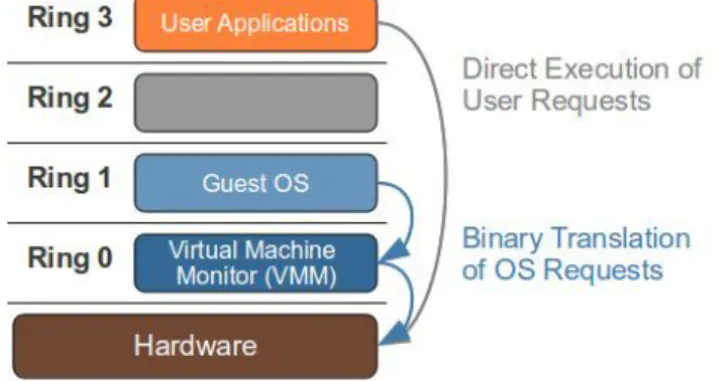
The challenge with full virtualization was to virtualize guest Operating System (OS) without any modification. Guest OS in fully virtualized environment are provided with all the services provided by physical systems which include a virtual BIOS, virtual devices as well as virtualized memory (VMware, 2007). Within this kind of virtualization the OS is not aware of being virtualized that is the reason why it does not require modification. Because the VMM runs on ring 0 (sometime the VMM can be shared with an OS in the case of VMM type II) the guest OS will run on ring 1. To allow the guest OS to run without any modification a technique called binary translation of OS requests is used (Figure 2).
17 2.3.2 Paravirtualization
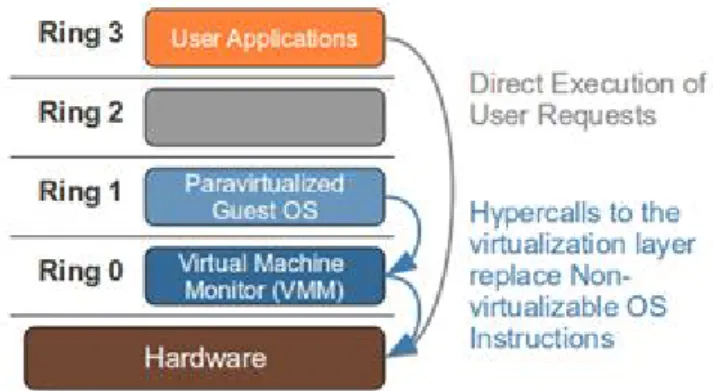
Paravirtualization is a technique used to virtualize a guest OS to allow better performance than full virtualization or hardware-assisted virtualization. With paravirtualization the guest OS is able to communicate with the hypervisor. To allow the guest OS to communicate with the hypervisor modifications of the guest OS are required to translate non-virtualizable instruction with hypercalls (Figure 3). Hypercalls are instructions that are able to communicate directly with the virtualization layer. Modification of the guest OS involves low compatibility and portability problems (VMware, 2007).
Figure 3 - Operation performed to implement para-virtualization virtualization at the kernel level
2.3.3 Hardware-assisted virtualization
Hardware-assisted virtualization has been developed to overcome the drawback of paravirtualization due to hardware modification that allow the guest OS to communicate with the VMM without modifications. Hardware types supporting this kind of virtualization are Intel Virtualization technology (Intel VT) and AMD virtualization (AMD-V). Those processors have features that trap OS requests that come from ring 1 (Figure 4). Due to that ring 0 is transformed as a virtual ring -1 and ring 1 is a virtual ring 0 where the guest OS can operate without any modifications (VMware, 2007).
Figure 4 - Operation performed to implement hardware-assisted virtualization at the kernel level
2.4
Architecture of Cloud Computing
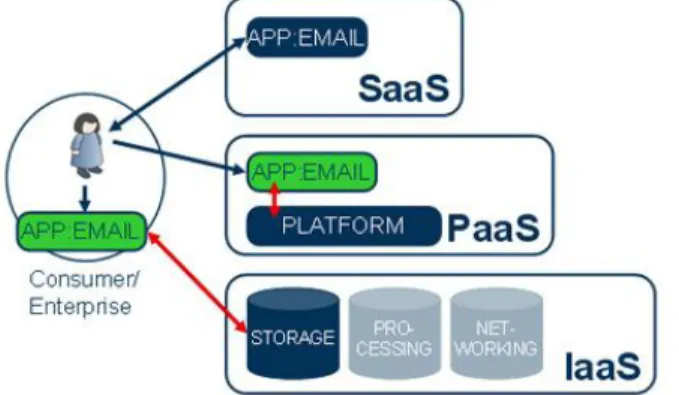
Cloud computing provide three main service models which meet different consumer requirement. The three services can be seen as a pyramidal model (Figure 5) with at the bottom the Infrastructure as a Service which provide the all infrastructure that will
18
be manage by the consumer. In the middle the Platform as a Service which provide the infrastructure as well as the platform to the consumer. So the consumers don’t have to deal with the infrastructure and can manage the platform. Finally on the top it can be found the Software as a Service which provide to the consumer a software where the consumer as no need to worry about the infrastructure or the platform which are managed by the provider.
Figure 5 - Architecture of the cloud computing with and Email application example. (Gabrielsson et al, 2009)
The Infrastructure as a Service (IaaS) allows consumers to provision resources of the cloud such as storage, network, processing, memory and other fundamental computing resources such as operating system and applications. The consumer has no control over the underlying cloud infrastructure however he is able to control operating system, storage, memory, processing, as well as application deployment and also a selected number network component such as host firewall.
Platform as a Service (PaaS) provides to the consumer the ability to deploy applications onto the cloud infrastructure. It gives the ability to provide a platform such as development platform or any other platform. In that configuration consumer has control over the deployed applications and sometimes application hosting environment configurations. However consumer has no control over the infrastructure on which rely the applications.
Software as a Service (SaaS) provides to consumers applications which run on the cloud. Due to that consumers of the hosted applications of the cloud have no need to worry about the infrastructure or the platform. Applications provided as SaaS can be accessed through many devices by a web browser. An example of Software as a service can be a web mail client. (Figure 7)
2.5
Deployment of Cloud Computing
Different deployment of the cloud can be performed depending of the services that want to be provided. It can be differentiate four types of deployment depending of the requirements:
Public cloud: This cloud infrastructure is made for the public. The resources can be access by companies as well as private customers. It makes the resources of the cloud available for anybody which wants to consume resources from it. To access resources provided by a public cloud the customers need to register with a cloud provider such as Amazon Web Services (AWS).
19
Private cloud: Private clouds are different from public cloud because it is deployed behind the firewall of the company also the infrastructure of the cloud is not managed by a third party. This solution is adopted by companies which want to manage their cloud and keep the control over their data. It is usually more secure than public cloud because it is hosted by the company and thus it is located behind the company firewalls.
Community cloud: With this configuration the cloud is shared between different organisations. It is used to support communities which share the same
concerns. The infrastructure of community cloud can be managed by the organisations or a third party.
Hybrid cloud: The infrastructure of hybrid cloud is composed of two or more clouds (public cloud, private cloud or community cloud). Each cloud remains unique entities which are linked all together. This solution allows the portability of data and applications.
2.6
Conclusion
The development of virtualization have been an important factor in the development of cloud computing also this have been permitted by the development of new x86 processors which come with support for virtualization. Para-virtualization is able to give the best performances because it is the type of virtualization with the least overhead. However with this type of virtualization it is required to modify the guest OS system to be able perform virtualization. Also the use of para-virtualization is often completed with hardware assisted virtualization to virtualize guest Operating System (OS) such as Windows. Cloud computing can be provided a different levels such as Infrastructure as a Service (IaaS), Platform as a Service (PaaS), Software as a Service (SaaS). The services provided can be deployed on different type of cloud such as public cloud, private cloud, community cloud and hybrid cloud.
21
3 Literature review
3.1
Introduction
Cloud computing is a recent technology and a lot of research are made in that domain to improve it. Also due to the relation between cloud and virtualization there are as well many researches on virtualization to enhance virtualization performances. Cloud computing is more and more popular and most of the enterprise begin to adopt it. However there are still some obstacles which can restrained the adoption of cloud services by enterprise such as the lack of standardisation, reliability associate to the cloud, the security and so on. The reason of the adoption of cloud computing by enterprise is principally for economical reasons because cloud computing allow customers to reduce their hardware cost as well as energy consumption and so on. Also there is no waste because customers only pay for what they are using. Because of the popularity of cloud computing a large number of cloud toolkits begin to appear such as OpenNebula, Eucalyptus and so on. Also those cloud toolkits are able to associate with different hypervisors such as Xen, KVM and VMware ESX.
As seen previously there are many different type of virtualization. To be able to provide the best performances cloud computing is using para-virtualization as well as hardware-assisted virtualization. Full virtualization is not used in cloud computing due to poor performances cause by its considerable overhead. Virtualization technology is not a new technology however it has regain popularity in 2005 with the apparition of AMD and Intel processors which had support for virtualization. Virtualization brings many advantages such as the improvement of security, the enhancement of the efficiency of server utilisation and so on. Also during the past few years due to the popularity of virtualization and its utilisation in the cloud computing many researches have been made. From those research lot of improvement have been made to try to obtain performances near to native performances.
In the following it will be outline in a first part the research that have been made on cloud computing. It will be explained the problems due to the lack of standardisation in the cloud as well as the economic impact that can have the usage of the cloud and the majors obstacles that can be encounter to the growth of cloud computing. Finally it will be compare different solutions of cloud toolkits. In a second part it will be compare the two different type of Virtual Machine Monitor (VMM). Then it will also be compare the native performances and virtual performances. It will end with a comparison of the different hypervisor for both commercial and open source product.
3.2
Cloud computing
3.2.1 Standardisation of cloud computing
Cloud computing is a new technology and evolve rapidly also it is difficult to match a good definition of cloud computing. Because cloud computing is an evolving
22
technology the definition is changes over the time. The U.S. Government's National Institute of Standards and Technology (NIST) tries to give an up to date definition of the cloud computing. The actual version of their definition is the version 15 in date of 10 July 2009 (Mell et al, 2009).
According to the NIST cloud computing is on demand service which shares a pool of computer resources over a network. Cloud computing matches five essential characteristics which define the main functionalities provided by the cloud, three service models which give the level of service provided and four deployment models which indicate where the cloud is deployed and who can access to it.
The main characteristics of the clouds are the following (Mell et al, 2009):
On demand self-service: Users of the cloud can manage the resources in on demand basis and they only paid for what they consume.
Broad network access: The resources provided by the cloud can be access by as any normal services through thin or thick clients such as laptop, PDA, mobile phones and so on.
Resource pooling: The cloud provider serves pool of resources over multiple customers according to the demand. Client which access the service have no knowledge of the exact location of the cloud but may be able to provide a location at higher abstraction level such as country, state, datacenter and so on.
Rapid elasticity: The resources provided by the cloud are highly scalable. Customer can rapidly scale up the resources that they need and then scale them down if there is no need to use it anymore. The scalability of the cloud gives a real modularity to the cloud. Also resources appear as infinite and customers have no need to make plan for provisioning (Armbrust et al, 2010).
Measured service: The resources provided by the cloud are controlled and optimized according to the resources capabilities. Also resources usage can be monitored control and reported to be able to provide transparency for both provider and consumer of the resources.
Because of the diversity of the cloud toolkits available and also the diversity of hypervisor there is an important problem of interoperability. The open cloud manifesto tries to establish a set of core principles for cloud providers (Open Cloud Manifesto, 2009). This manifesto is supported by over 300 companies including Novell, VMware, AMD, IBM, etc. Also the number of supporters is still growing. There are six principles that are defined by the cloud manifesto which are:
Cloud providers must work together
Cloud providers must use and adopt the existing standards
New standards need to promote innovation
Community effort should be driven by customer needs
Cloud computing standard organisations should work together
Cloud provider must not use their popularity to lock the customer to their platform
Another group called Cloud Computing Use Case group also work to brought together cloud providers and cloud consumer. The aim of this group is to define common use case scenario for cloud computing (Ahronovitz et Al, 2010). Those groups which tries to uniform cloud computing are not adopted by everybody and
23
company such as Amazon does not want to adopt them yet because Amazon locks users to their services considering the fact that migration over another cloud provider is not easy (Buyya et al, 2009).
3.2.2 Economical impact of cloud computing
From an economical point of view cloud computing is really useful because it is an on demand service. Also it permits to improve significantly the efficiency of server usage due to the utilisation of virtualisation. A great benefit of using virtualization is to reduce hardware cost because multiple machines are running on the same hardware. Virtualization can be used to reduce cost of datacenter, testing platform and so on. Weltzin et al show for example how the utilisation of the virtualization can help to reduce the cost of the test (Weltzin, 2009). According to Weltzin et al in test application virtualization can be useful for:
Produce real-time test in parallel within a user interface
Providing database logging capability while executing real-time tests
Running multiple instances of the same OS allows the isolation of applications
Software that have been written for different OSs can work on the same computer
Also virtualization helps to improve the efficiency by optimizing the utilisation of servers. Thus for reduce cost and avoid the creation of new datacenter company such as Dell have tried to find solution for having more efficiency (Brooks, 2008). Dell has conducted some researches and has found that three quarters of the servers that they were managing globally were not exceeded 20 percent of processor utilisation. The processor utilisation of those servers low because only one or two applications were running on those servers (Brooks, 2008). Due to this evaluation it has been concluded that the resources could be used more efficiently and intelligently. In this case virtualize servers that were not exceeded 20 percent of processor utilisation on one server would permit to increase the efficiency of processors utilisation. Rather to have 5 servers running at a maximum of 20 percent of processing we could have one server running five virtual servers. By this virtualization allows efficiency and cost reduction by reducing the number of physical servers. Also it involves a reduction of cost because it requires less space to store the servers and also a reduction of power consumption. For Dell virtualization has been really helpful because it has permitted to reduce the deployment of applications by 90 percent passing of a deployment of 45 days to only 4 days (Brooks, 2008). The virtualization and the improvement of the efficiency of server utilisation is not the only advantages associate to cloud computing. Also because cloud computing is an on demand service it can be use for example for a datacenter which encounter peak load few days per month. In that case the datacenter can choose to buy resources to a cloud provider for provisioning peak load. This solution can be much cheaper than buying new hardware which will be underutilized most of the time (Armbrust et al, 2010). Another example can be an unknown demand which can be present with for example a website. If a website become rapidly popular it can occurs a high demand but this demand can sometimes be temporary and see a reduction of the demand if user turn away. So it can be useful to use to resources of the cloud in that case because the resource is available directly and there is no installation and a minimum configuration required (Armbrust et al, 2010). Finally if a company needs a important computation performance for a short period of time it is sometime better to buy this resource on the cloud rather than buying a server farm to be able to perform the
24
computation task in a short period of time (Armbrust et al, 2010). Cloud computing allows customers to reduce the cost of the hardware by allowing resources on demand. Also customers of the service need to have guaranty of the good functioning of the service provided by the cloud. The Service Level Agreement brokered between the providers of cloud and the customers is the guarantees from the provider that the service will be delivered properly (Buyyaa et al, 2009).
3.2.3 Obstacles and opportunities associate to cloud computing M. Armbrust et al. (April 2010) have made a list of the top 10 obstacles to and opportunities for growth of cloud computing. To each obstacle is associate an opportunity that overcome the obstacle. Obstacles are divided in three parts:
Obstacles affecting the adoption of the cloud
Obstacles affecting the growth of the cloud
Business and policy obstacles
When it comes to the adoption of new services such as cloud computing enterprise are firstly worried about the business continuity as well as the availability of the service. Enterprise needs reliable service with high availability. However the problem with services having high reliability even small interruption of the service can become major news (Helft, 2009). The reliability and availability of cloud provider is regrouped in the Service Level Agreement (SLA). The SLA is a service contract negotiated between the customer and the service provider. For example Amazon assures an Annual Uptime Percentage of 99.95% for the service year. If the Annual Uptime Percentage drops below 99.95% Amazon engages itself to compensate customers (Amazon, 2010). Because the availability of a service can never be guaranty at 100% it is better to do not rely on only one service to avoid a single point of failure. The solution to obtain very high availability is to have multiple cloud computing providers in different geographic regions. The interoperability between cloud provider can be a major drawback to do not adopt cloud computing. Lock-in customer can be attractive for cloud provider but the fact that data or application will not be compatible from one cloud to another can be a major problem for companies. The solution to avoid data lock-in would be to standardize the cloud. The cloud manifesto tries to make to cloud uniform it by establishing a set of core principles for cloud providers (Open Cloud Manifesto, 2009). Finally concerning the obstacle affecting the adoption of the cloud there is the concern about of the security of the data. Security in the cloud needs to asset many areas such as privacy, data integrity, recovery and evaluation of legal issues (Brodkin, 2008).
Technical issues can be an obstacle to the growth of cloud computing. Armbrust et al. (April 2010) list five technical obstacles to the growth of cloud computing:
Data transfer bottlenecks
Performance Unpredictability
Scalable Storage
Scaling Quickly
Bugs in Large-Scale Distributed System
Data transfer requires a large bandwidth also according to A. Fox it would take 45 days at 20 megabytes/sec to transfer 10 terabytes from UC Berkeley to Amazon in Seattle, Washington (Fox, 2010). In addition to that comes the expensive price which
25
is of 100$ to 150$ per TB transferred over the cloud. Also it has been found that it was faster and cheaper to FexEx disks rather than using the network to transfer large quantity of information. Even if the performances concerning CPU and memory are almost equal to native performances cloud computing encounter more problems with I/O performances. To overcome this problems hardware improvement needs to be made. Another problem is the scalability of the storage. The storage need to be able to scale up and down (Greenberg et al, 2009). Also the scaling needs to be fast to respond to customers need. Because of the large scale application of the cloud when a bug occur it is really difficult to remove the errors.
The final obstacles to cloud computing are applied to policy and business. The bad usage that can make some people on the cloud can affect other users of the service. For example EC2 IP addresses can be used to make spam which can result a blacklist of those IP addresses (Krebs, 2008). It comes then the question of the legal issue of what people can do and cannot do on the cloud. Finally problems about software licensing come up. On the cloud users have to pay for the software as well as an annual maintenance fees (Armbrust et al, 2010). To overcome the licensing problem lot of open source solution are used.
3.2.4 Comparison of cloud toolkits 3.2.4.1 Presentation of the cloud toolkits
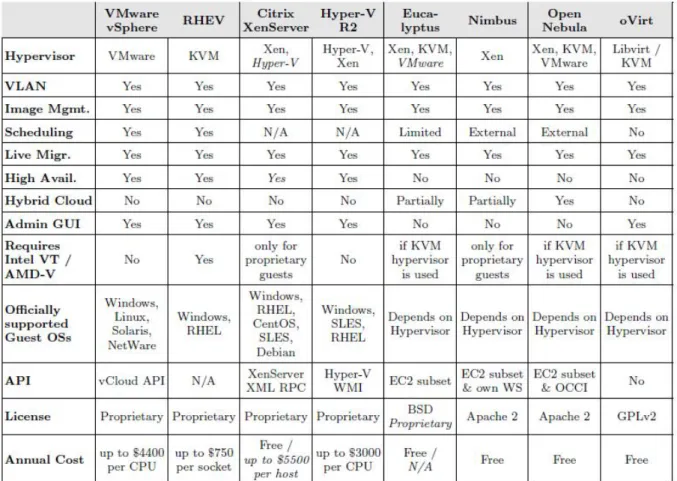
There are several toolkits that can be used to implement a private cloud. It exists commercial solutions as well as open source solutions. Among the open-source solutions there are OpenNebula, Eucalyptus, Nimbus, and so on. The commercial solutions are Hyper-V, VMware ESX, etc. The table below (Figure 6) compares the different popular toolkit that can be used to implement a cloud. Commercial as well as open-source solutions are compared. It can be observed that the open-source solution such as Eucalyptus, Nimbus, OpenNebula and oVirt seem to have more flexibility than the commercial ones. However open-source solutions suffer of a lack of documentation and are more difficult to implement. Commercial solutions offer services which are better than open-source solution because there are beneficiating of a good support. However open-source solutions are developing very quickly and tend to offers services almost as good as the commercial one. It occurs that the main advantage of commercial solutions over open-source solution is the support.
3.2.4.2 Open-source solution hypervisor
A comparison of the different characteristics and the main architectures proposed by open source solutions is made in the article “A Survey on Open-Source Cloud Computing Solution” (Endo, 2010). The Xen Cloud Platform (XCP) is a solution for infrastructure virtualization that use Xen has the hypervisor. The XCP is different from the other platforms because according to the article it does not provide the entire architecture for cloud services. However it provides a tool to deal with automatic configuration and also maintenance of the cloud platform. The architecture of the XCP (Figure 7) is composed of a master XCP host, one or more XCP host and a shared storage. The Master XCP host manages the XCP host and offers an administration interface. XCP host as their name indicate host the virtual machine which are organised in XCP resource pool and used shared storage.
26
Figure 6 - Table comparing different cloud toolkit solution (Schader, 2010)
Figure 7 - Architecture of the Xen Cloud Platform (XCP) (Endo, 2010)
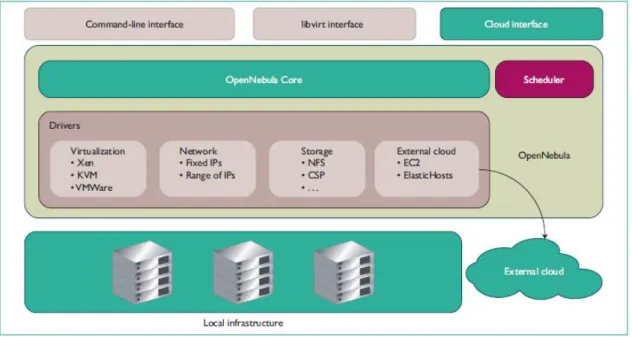
OpenNebula is another cloud toolkit which can be used to implement private, hybrid or public cloud. The architecture of OpenNebula is very flexible which give a great modularity of the toolkit (Figure 8). The modularity of OpenNebula is due to its drivers based architecture. It comprises different sets of drivers for the different utilities required by the cloud such as virtualization, network, storage and external cloud (Sotomayor et al, 2009). The OpenNebula Core is responsible of managing three different areas which are the choice of the hypervisor that will be used to virtualized hosts, the choice of the network (fixe IP or DHCP) that will be used by the virtual
27
hosts and finally the type of storage that will be used. Also the OpenNebula core will be able to deal with external cloud in the case of hybrid cloud.
Figure 8 – Architecture of OpenNebula (Sotomayor et al, 2009)
The architecture of Eucalyptus is also different from OpenNebula and XCP. The architecture of Eucalyptus is hierarchical (Figure 9). It is composed of five components:
Cloud controller (clc): is the interface that is used to interact with the cloud
such as the command to create or terminate virtual entities through the API interface.
The node controller (nc): is used to compute the elements of the cloud such
as the creation of a virtual machine.
Cluster controller (cc): is used for manages the different nodes connected to
the cloud. Also it provides traffic isolation for the cloud.
Walrus (the S3-like storage service): is a persistent storage for eucalyptus.
It uses buckets and objects to organise the data.
Storage controller (sc): is used to manage dynamics block devices that can
be used by the virtual machine for persistent storage. (It is the equivalent of EBS for the Amazon cloud)
28
Every cloud adopts different architectures to provide the same services. Depending of their architecture cloud toolkit offers more or less flexibility to users. Thus it can be seen that OpenNebula have more flexibility than others cloud toolkit because it disposed many configurable drivers. However OpenNebula seems to be more difficult to implement than Xen Cloud Platform (XCP) or Eucalyptus because XCP dispose of a tool to automate the maintenance of the cloud also Eucalyptus beneficiate of an excellent hierarchical structure (Enzo, 2010).
3.3 Virtualization
3.3.1 Differences between Virtual Machine Monitor (VMM)
Virtual Machine Monitor (VMM) is a thin software layer that is used to map virtual resources to physical resources. The resources provided by the hardware can be partitioned, shared with time sharing or emulated in software. The layer provided by the Virtual Machine Monitor has always more privileges than the guest Virtual Machine (VM) because the executions of instructions which are passed by the guest VM are managed by the VMM.
VMM can be categorized in two types (Rosenblum et al, 2005):
Type I (called Hypervisor): VMM of type I is located just above the hardware and virtualize the entire hardware. Examples of VMM of type I are VMware ESX server, Hyper-V and Xen. (Figure 10)
Type II (called Hosted system): VMM of type II runs within an Operating System (OS). Examples of VMM type II are WMware Workstation, QEMU, VirtualBox. (Figure 11)
29
Figure 11 - VMM of type II (Rosenblum et al, 2005)
VMM of type I increase security and isolation because each virtual machine has its own execution environment. With VMM of type I the hardware of the virtual machine can be either access directly through mapping or virtualized. The architecture of VMM of type II is different from the type I in which the VMM runs within an OS. By running within the OS it makes it easier to implement however it reduces the isolation (Intel Corporation, 2008).
3.3.2 Comparison between physical and virtualized machines
In the technical review it has been presented the different virtualization techniques used to virtualized machine. Full virtualization is the type of virtualization which possesses the most overhead because it requires the use of a full trap-and-emulate scheme to be able to virtualize a machine (Kloster et al, 2007). Full virtualization has an important overhead because it requires to provide an entire vitualize architecture. Paravitualization impose minimal performance overhead contrary to full virtualization (Youseff et al, 2008). With paravirtualization there is no need to make a full trap of the instructions passed form the guest OS to the hardware. However paravirtualization requires modification of the guest OS for be able to be virtualized it. The performance of paravirtualization manages to be nearly equal to native performance. To be able obtain performances close to native the OS kernel is modify to replace nonvirtualizable instruction with hypercall (VMware, 2007). Hypercall will be able to communicate directly with the hypervisor. The major problem with paravirtualization is the need to modify the guest OS to be able to perform the virtualization. Hardware assisted virtualization (also called Hardware Virtual Machine or HVM) overcome the problem of having to modify the guest OS by making the trap of instruction at the hardware level. Hardware assisted virtualization is between full virtualization and paravirtualization. The hardware assisted virtualization is become possible in 2005 with the help AMD and Intel (AMD, 2005; Uhlig et al, 2005).
A study has been made to compare HVM with native performance (Kloster et al, 2007). In this study it has been performed on both Linux (Debian 4.0) and Windows
30
(Windows XP). The HVM performance has been tested on various conditions. To realize the test many tools such as OSDB, SPECweb99, Scimark, Bashmark, Nbench, NetIO, Aim9, Kernel compile and MemoryMotion have been used. It is observed than CPU performances are near to native performance. After having tested CPU the I/O performance are tested. Also it has been decided in their experiment to simulate connection to a web server at three different rate low (16 connections), medium (50 connections) and high (84 connections). On windows with HVM it has been observe an overhead of 6.33% at low rate however at medium and high rate the throughput drop drastically. While Windows and Linux when using native machine can handle medium rate connection Windows virtualized with HVM stop having conforming connection. The performances of Debian with HVM are a way better but still far away from native performances at high rate. Disk I/O performances seems to be better than network I/O performances with an overhead of 20% to 30% on average. Finally memory performances are tested and it is outline an overhead of 75% for Debian and 85% for windows. This high overhead is due to the use of shadow page table used to virtualize the MMU. It results of this study that the performances of HVM are satisfying in term of CPU power. However the management of I/O is need to be improved. Finally the constructor AMD and Intel need to do some efforts to improve the support for MMU virtualization (Kloster et al, 2007).
A previous study about HVM had been made by VMware however this study was not comparing HVM and native performances but HVM with the VMM provided by VMware. Of this study it was already found that performance limitation on HVM was coming from the lack of MMU virtualization (Adams et al, 2006). Even if the performances in that domains of virtualization is evolving really quickly it can be observe that in one year time from 2006 to 2007 no progress at the hardware level have been made to overcome the lack of MMU virtualization. When there is not special hardware support memory and MMU virtualization are perform due to the use of Shadow Page Tables. It is only recently in 2009 that Intel and AMD have provide new processors for trying to overcome the lack of MMU virtualization (Agesen, 2009). Because of the concurrence between AMD and Intel they come with two different solutions:
The support for VMM virtualization introduced by AMD is called RVI (Rapid virtualization indexing) and the first processor to beneficiate of this technology is the quad-core Opteron (“Barcelona”) CPU.
On the other side the support for VMM virtualization of Intel is called EPT (for Extended Page Table)
Both solutions provide an overall gain of performances. However RVI and EPT suffer frequent Translation Lookaside Buffer (TLB) misses.
It has been measured performance gains of up to 42% for MMU-intensive benchmarks and up to 500% for MMU-intensive microbenchmarks for RVI. For Intel the performance measure gains of up to 48% for MMU-intensive benchmarks and up to 600% for MMU-intensive microbenchmarks (Bhatia, 2009). According to the result the performance of AMD processors are a little behind Intel performances.
3.3.3 Performances of Open Source products
The virtualization overhead involves performances depreciation rather to native performances. Research have been made to measure the overhead of the virtualization for different hypervisor such as XEN, KVM and VMware ESX (Apparao
31
et Al, 2006; Menon et Al, 2005; Jianhua et Al, 2008; Shan et Al, 2009; VMware 2007). For their researches Menon et Al have used a toolkit called Xenoprof which is a system wide statistical tool implemented specially for Xen (Menon et Al, 2005). Due to this toolkit they have managed to analyse the performances of the overhead of network I/O devices. Their study has been performed within uniprocessor as well as multiprocessor. A part of their research has been dedicated to performance debugging of Xen using Xenoprof. Those researches have permitted to correct bugs and improve by that the network performances significantly.
After the debugging part it has been focused on the network performances. It has been observed that the performance seems to be almost the same between Xen Domain0 and native performances. However if the number of interfaces increase, the receive throughput of the domain0 is significantly smaller than the native performances. This degradation of network performances is cause by an increasing CPU utilisation. Because of the overhead caused by the virtualization there are more instructions that need to be managed by the CPU. This involves more information to treat and bufferization by the CPU which cause a degradation of receive throughput compared to native performances.
After having studied the performances of the domain0 they have observe that in a guest OS the receive throughput is slower than the receive throughput of the domain0 even with only one NIC. Once again this is because of the number of instructions which is more important than the number of instructions of the domain0. Thanks to their study Manon et Al have managed to measure the overhead of the network for Xen version 2.0.3 (which is today out of date because the development of Xen is very fast and the last version stable version of Xen is the version 4.0.1). Due to their study it came out solutions to improve network performances of Xen virtualization. Manon et Al outline those performances degradation is generally caused by a CPU utilisation which is more important within virtualization because virtualization increase the number of instructions that needs to be managed by the CPU.
More recent studies compares try to compare the differences between hypervisors and especially the performances of each one according to their overhead (Jianhua et Al, 2008; VMware, 2007). Jianhua et Al compare the performances of KVM and Xen which are the two most popular Open Source hypervisor. The tools used by Jianhua et Al are different from the tools that were used by Menon et al. They are using three different benchmark tools to measure the performances: LINPACK, LMbench and Iozone. Their experiment is divided in three parts according to the specific utilisation of each tool. With LINPACK Jianhua et al have tested the processing efficiency on floating point. Different pick value has been observed over the different systems tested which are native performance, Xen and KVM. The result of this show that the processing efficiency of Xen on floating point is better than KVM because Fedora 8 virtualized with Xen have performances which represent 97.28% of the native rather than Fedora 8 virtualized with KVM represent only 83.46% of the native performances. The virtualization of Windows XP comes up with better performances than with the virtualization of fedora 8 on Xen. This is explained by the authors by the fact that Xen own fewer enhancement packages for windows XP than for fedora 8 because of that the performances of virtualized windows XP are slightly better than virtualized fedora 8.
32
After having testing the processing efficiency with LINPACK Jianhua et al have analysed memory virtualization of Xen and KVM compared to native memory performances with LMbench. It has been observed that the memory bandwidth in reading and writing of Xen are really close to native performances. However the performances of KVM are slightly slower for reading but significantly slower concerning the writing performances.
The last tool used by Jianhua et al is IOzone which is used to perform filesystem benchmark. Once again the native performances are compared to the virtualization performances of Xen and KVM. Without Intel-VT processor the performances of either Xen or KVM are around 6 or 7 times slower than the native performances. However within the Intel-VT processor the performances of Xen increase significantly because the performances are even better than native performances. However KVM does not exploit the functionalities of the Intel-VT processors and because of that does not improve his performances.
3.3.4 Performances of commercial Products
The competition between the different hypervisors have involves many studies to compare the performances of the different product to try to prove the efficiency of the product. Also XenSource have published an article comparing XenEnterprise and VMware ESX. To compare both hypervisor it has been performed test workloads (XenSource, 2007). Many tools have been used to benchmark both hypervisor. For evaluate intensive workload on the CPU SPECcpu2000 benchmark suite have been used. Passmark has been used to benchmark typical system workload. Netperf has been used to measure network performance. Also SPECjbb2005 have been used to represent performance of application server and it workload. The result obtained with SPECcpu2000 show that the results between ESX 3.0.1 and XenEnterprise 3.2 are nearly identical.
For the test perform with Passmark, Netperf and SPECjbb2005 the results are relatively equivalent again. Nothing significant can be observed between the performances of both hypervisor. This study concludes that two commercial solutions are almost at the same level of performances. Also because of the rapid development of cloud computing commercial many commercials solutions have appeared. Commercial solution of cloud computing include V-Sphere, VMware ESX, Windows Azure and many others. There are a growing business associate to cloud computing besides most of open-source solution available for cloud computing begin to develop commercial solution as well.
3.4
Conclusion
Because of the relatively recent development a lot of research are been made on cloud computing. Also each provider wants to impose its own technology which creates a lack of standardisation. To overcome this problem solutions such as the cloud manifesto try to be found. Progress have been made in the standardisation of the cloud however there are still some progress to make because providers such as Amazon still use proprietary standard which make Amazon images incompatible with others cloud providers. Even if there are still some fears about this technology the use of cloud computing is growing in IaaS, PaaS as well as SaaS.
The use of the virtualization has rapidly increased those past few years because of the benefits associate to it. Virtualization allows more security, permit to reduce the hardware cost with performances which are improving continually. Many researches
33
are made in this domain to try to improve the performances. Also by implementing new types of processors AMD and Intel have manage to boost the utilization of virtualization. Also AMD and Intel both continue to try to make progress to improve virtualization in hardware. Progress are not only made in hardware there are also progress in software such as with Xen, KVM, VMware and so on which always try to improve the performance of their hypervisor.
35
4 Design and methodology
4.1 Introduction
Cloud computing can provide services at different level such as Infrastructure as a Service (IaaS), Platform as a Service (PaaS) and Software as a Service (SaaS) (Gabrielsson et al, 2009). The infrastructure is the most fundamental part of the cloud without it the others layer of the cloud cannot exist. The performances of all services depend of the performances of the infrastructure provided by the cloud. Cloud computing performances depend of different parameters such as the CPU speed, the amount of memory, network and hard drive speed. In virtual environment the hardware is shared between virtual machines (Karger et al, 2008). To be able to have good performances machines hosting the hypervisors need to be really powerful to be able to provide the services requires for create and manage virtual machines. In this chapter it will be outline the design of a public and private cloud and the scenario that will be decided to test the performances of both public and private cloud. In a first place it will be outline the design of the performances tests of the Amazon public cloud in terms of CPU consumption, network speed and storage management. Secondly the conception of a private cloud only based on open source solutions will be designed and tested to identify the level of performances of a private cloud compare to a public one. Finally the tools used for the tests will be presented and it will be explained how they can be used to evaluate the performances of the clouds.
4.2 Platform Amazon (public cloud)
4.2.1 Description
Public cloud is a service which is provided by a third party. To define their commitment to the customers the Amazon Web Services (AWS) is using a Service Level Agreement (SLA). The SLA is an agreement between the AWS and the AWS customers where the AWS provides commitments to their customers. If the commitments are not honoured the customers can ask for compensation. Amazon with Amazon EC2 promises an Annual Uptime Percentage of at least 99,95% during the service year. If Amazon does not manage to meet this commitment customers will be eligible to receive a Service Credit equal to 10% of their bill. Indemnification of the client does not concern any performances problems (Amazon, 2010). Also Amazon keeps the right to modify the performances of the instances for the different instance types which involve a lack of flexibility for the customers.
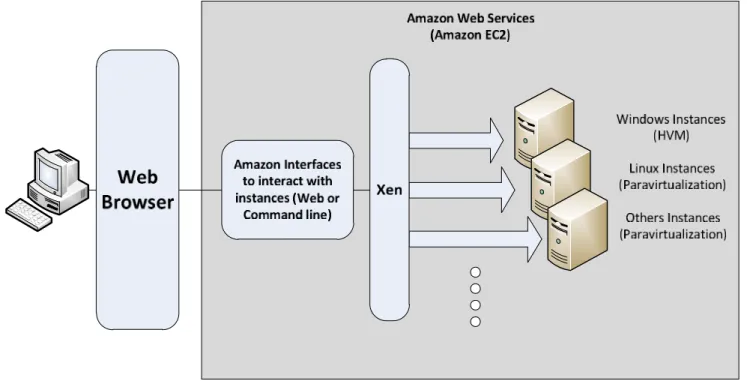
The Amazon cloud provides an Infrastructure as a Service (IaaS). This service is an on demand service access through a web interface. Within the Amazon cloud customers are able to instantiate virtual machines corresponding to their need. Amazon provides 10 different types of instances (Appendix 1) which goes from a price of $0.029 per hour for the cheapest to $2.76 per hour for the most expensive (Amazon, 2010). The service is on demand customers only pay for what they are using. The Amazon cloud is using an architecture which use Xen as hypervisor to virtualize the virtual machines (Wang et al, 2010). Also Amazon has created their own standard of images for their virtual machines called AMI. The virtualization provided by Xen can be either paravirtualization or hardware-assisted depending of the Operating System virtualize (Figure 13). In fact Linux and Unix based machine can be paravirtualized within Xen however Microsoft Windows instances cannot.
36
Thus to overcome this drawback Xen uses hardware-assisted virtualization to virtualize Windows machines. In the Xen system the hardware-assisted virtualization is called Hardware Virtual Machine (HVM). The virtualization using HVM has lower performances than paravirtualization. It will be exposed the degradation of performances that can occurs with hardware-assisted compare to the paravirtualization. The performances’ tests will permit to outline the performances that can be expected when using the Amazon cloud because differences of performances occur between paravirtulization and HVM.
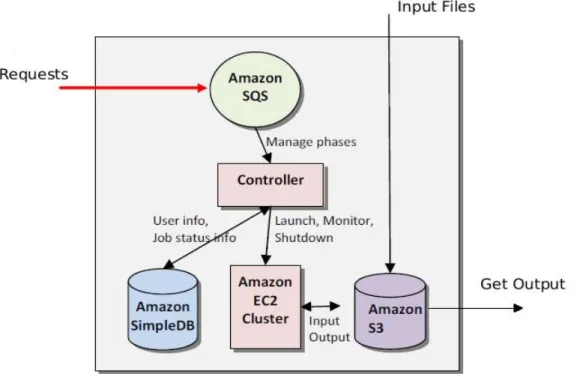
The Amazon cloud is composed of different of five principle components (Figure 12):
Amazon SQS which is used to manage durably buffering request.
A controller used to link user information to instances.
Amazon SimpleDB stores the information relatives to customers such as status, logs and so on
Amazon EC2 is used for running virtual instances
Amazon S3 acts as a bucket to store or retrieve information on the cloud.
Figure 12 - Architecture of the Amazon cloud (Varia, 2008)
4.2.2 Design of the experiment 4.2.2.1 Presentation of the system studied
As describe previously the Amazon cloud can provide different instances types such as standard, micro, high-memory, high-CPU and cluster compute instances. Each of the machines has specific characteristics which are available on the Amazon website (Amazon, 2010) or in Appendix 1. It has been decided to use only 32 bits machines for the test because those machines are the smallest ones and have the cheapest cost. For the 32 bits machines the Amazon cloud provide only three types of instances which are:
37 1. The standard instance– Small:
1.7 GB memory
1 EC2 Compute Unit (1 virtual core with 1 EC2 Compute Unit)
160 GB instance storage
32-bit platform
I/O Performance: Moderate
API name: m1.small 2. The micro instance:
613 MB memory
Up to 2 EC2 Compute Units (for short periodic bursts)
EBS storage only
32-bit or 64-bit platform
I/O Performance: Low
API name: t1.micro
3. The high-CPU instance – Medium:
1.7 GB of memory
5 EC2 Compute Units (2 virtual cores with 2.5 EC2 Compute Units each)
350 GB of instance storage
32-bit platform
I/O Performance: Moderate
API name: c1.medium
All instances of the cloud are virtualized with Xen. Figure 12 present a simplify design of the Amazon EC2 architecture.