Internet Key Exchange Security Protocol
Commands on the Cisco IOS XR Software
This module describes the Cisco IOS XR software commands used to configure the Internet Key Exchange (IKE) security protocol.
For detailed information about IKE concepts, configuration tasks, and examples, see the Implementing Internet Key Exchange Security Protocol on Cisco IOS XR Software module of Cisco IOS XR System Security Configuration Guide.
Internet Key Exchange Security Protocol Commands on the Cisco IOS XR Software accounting (IKE)
accounting (IKE)
To enable authentication, authorization, and accounting (AAA) services for all peers that connect through the ISAKMP profile, use the accounting command in ISAKMP profile configuration mode. To return to the default value, use the no form of this command.
accounting list-name no accounting
Syntax Description
Defaults The default value is no accounting.
Command Modes ISAKMP profile configuration
Command History
Usage Guidelines To use this command, you must be in a user group associated with a task group that includes the proper task IDs. If you suspect user group assignment is preventing you from using a command, contact your AAA administrator.
Task ID
Examples The following example shows how to create an accounting list:
RP/0/0/CPU0:router# configure
RP/0/0/CPU0:router(config)# crypto isakmp profile vpnprofile
RP/0/0/CPU0:router(config-isa-prof)# accounting aaalist
Related Commands
list-name Name of a client accounting list. The maximum length of characters is 127.
Release Modification
Release 3.4.0 This command was introduced. Release 3.5.0 No modification.
Release 3.6.0 No modification. Release 3.7.0 No modification. Release 3.8.0 No modification. Release 3.9.0 No modification.
Task ID Operations
crypto read, write
Command Description
Internet Key Exchange Security Protocol Commands on the Cisco IOS XR Software
acl
acl
To configure split tunneling, use the acl command in ISAKMP group configuration mode. To remove this command from your configuration and restore the default value, use the no form of this command.
acl acl-name no aclacl-name
Syntax Description
Defaults Split tunneling is not enabled; all data is sent through the Virtual Private Network (VPN) tunnel.
Command Modes ISAKMP group configuration
Command History
Usage Guidelines To use this command, you must be in a user group associated with a task group that includes the proper task IDs. If you suspect user group assignment is preventing you from using a command, contact your AAA administrator.
Use the acl command to specify which groups of ACLs represent protected subnets for split tunneling. Split tunneling is the ability to have a secure tunnel to the central site and simultaneous clear-text tunnels to the Internet.
Task ID
acl-name Specifies a group of access control list (ACL) rules that represent protected subnets for split tunneling purposes.
Release Modification
Release 3.2 This command was introduced. Release 3.3.0 No modification.
Release 3.4.0 No modification. Release 3.5.0 No modification. Release 3.6.0 No modification. Release 3.7.0 No modification. Release 3.8.0 No modification. Release 3.9.0 No modification.
Task ID Operations
Internet Key Exchange Security Protocol Commands on the Cisco IOS XR Software acl
RP/0/0/CPU0:router# configure
RP/0/0/CPU0:router(config)# crypto isakmp client configuration group cisco RP/0/0/CPU0:router(config-group)# key cisco
RP/0/0/CPU0:router(config-group)# acl group1
RP/0/0/CPU0:router(config)# access-list 199 permit ip 192.168.1.0 0.0.0.255 any
Related Commands Command Description
crypto isakmp client configuration group Specifies which group policy profile is defined. key (IKE) Specifies the Internet Key Exchange (IKE) preshared
Internet Key Exchange Security Protocol Commands on the Cisco IOS XR Software
address
address
To specify the IP address for the Rivest, Shamir, and Adelman (RSA) public key of the remote peer you manually configure, use the address command in public key configuration mode. To remove the IP address of the remote peer, use the no form of this command.
address ip-address no address ip-address
Syntax Description
Defaults No default behavior or values
Command Modes Public key configuration
Command History
Usage Guidelines To use this command, you must be in a user group associated with a task group that includes the proper task IDs. If you suspect user group assignment is preventing you from using a command, contact your AAA administrator.
Use the address command to specify the RSA public key for the IP Security (IPSec) peer you manually configure next.
When you finish specifying the RSA key, you must return to global configuration mode by entering quit at the public key configuration mode prompt.
Task ID
ip-address IP address of the remote RSA public key of the peer that you manually configure.
Release Modification
Release 3.2 This command was introduced. Release 3.3.0 No modification.
Release 3.4.0 Example was modified to support the new crypto keyring structure by using the new crypto keyring and rsa-pubkey commands.
Release 3.5.0 No modification. Release 3.6.0 No modification. Release 3.7.0 No modification. Release 3.8.0 No modification. Release 3.9.0 No modification.
Task ID Operations
Internet Key Exchange Security Protocol Commands on the Cisco IOS XR Software address
Examples The following example manually specifies the RSA public keys of an IPSec peer:
RP/0/0/CPU0:router# configure
RP/0/0/CPU0:router(config)# crypto keyring vpnkey
RP/0/0/CPU0:router(config-keyring)# rsa-pubkey name host.vpn.com RP/0/0/CPU0:router(config-pubkey)# address 10.5.5.1
RP/0/0/CPU0:router(config-pubkey)# key-string 005C300D 06092A86 4886F70D 01010105 005C300D 06092A86 4886F70D 01010105
00034B00 30480241 00C5E23B 55D6AB22 04AEF1BA A54028A6 9ACC01C5 129D99E4 64CAB820 847EDAD9 DF0B4E4C 73A05DD2 BD62A8A9 FA603DD2 E2A8A6F8 98F76E28 D58AD221 B583D7A4 71020301 0001 quit
Related Commands Command Description
key-string (IKE) Specifies the RSA public key of a remote peer.
rsa-pubkey Defines the Rivest, Shamir, and Adelman (RSA) manual key to be used for encryption or signature during IKE authentication. show crypto key pubkey-chain rsa Displays peer RSA public keys stored on your router.
Internet Key Exchange Security Protocol Commands on the Cisco IOS XR Software
authentication (IKE policy)
authentication (IKE policy)
To specify the authentication method within an Internet Key Exchange (IKE) policy, use the
authentication command in ISAKMP policy configuration mode. To reset the authentication method to the default value, use the no form of this command.
authentication {pre-share | rsa-sig | rsa-encr} no authentication {pre-share | rsa-sig | rsa-encr}
Syntax Description
Defaults RSA signatures
Command Modes ISAKMP policy configuration
Command History
Usage Guidelines To use this command, you must be in a user group associated with a task group that includes the proper task IDs. If you suspect user group assignment is preventing you from using a command, contact your AAA administrator.
IKE policies define a set of parameters during IKE negotiation. Use the authentication command to specify the authentication method in an IKE policy. If you specify preshared keys, you must also separately configure these preshared keys.
If you specify RSA encrypted nonces, you must ensure that each peer has the RSA public keys of the other peers. (See the address, rsa-pubkey, and key-string commands.)
If you specify RSA signatures, you must configure your peer routers to obtain certificates from a pre-share Specifies preshared keys as the authentication method.
rsa-sig Specifies RSA signatures as the authentication method.
rsa-encr Specifies Rivest, Shamir, and Adelman (RSA) encrypted nonces as the authentication method.
Release Modification
Release 3.2 This command was introduced. Release 3.3.0 No modification.
Release 3.4.0 No modification. Release 3.5.0 No modification. Release 3.6.0 No modification. Release 3.7.0 No modification. Release 3.8.0 No modification. Release 3.9.0 No modification.
Internet Key Exchange Security Protocol Commands on the Cisco IOS XR Software authentication (IKE policy)
Task ID
Examples The following example shows how to configure an IKE policy with preshared keys as the authentication method (and with all other parameters set to the defaults):
RP/0/0/CPU0:router# configure
RP/0/0/CPU0:router(config)# crypto isakmp policy 15
RP/0/0/CPU0:router(config-isakmp)# authentication pre-share
The following example shows how to configure an IKE policy with RSA encrypted keys as the authentication method (and with all other parameters set to the defaults):
RP/0/0/CPU0:router# configure
RP/0/0/CPU0:router(config)# crypto isakmp policy 15
RP/0/0/CPU0:router(config-isakmp)# authentication rsa-encr
The following example configures an IKE policy with RSA signatures as the authentication method (and with all other parameters set to the defaults):
RP/0/0/CPU0:router# configure
RP/0/0/CPU0:router(config)# crypto isakmp policy 15
RP/0/0/CPU0:router(config-isakmp)# authentication rsa-sig
Related Commands
Task ID Operations
crypto read, write
Command Description
address Specifies the IP address of the remote RSA public key of the remote peer you manually configure.
crypto isakmp policy Defines an IKE policy.
encryption (IKE policy) Specifies the encryption algorithm within an IKE policy.
group (IKE policy) Specifies the Diffie-Hellman group identifier within an IKE policy. hash (IKE policy) Specifies the hash algorithm within an IKE policy.
key-string (IKE) Specifies the RSA public key of a remote peer. lifetime (IKE policy) Specifies the lifetime of an IKE SA.
rsa-pubkey Defines the Rivest, Shamir, and Adelman (RSA) manual key to be used for encryption or signature during IKE authentication. show crypto isakmp policy Displays the parameters for each IKE policy.
Internet Key Exchange Security Protocol Commands on the Cisco IOS XR Software
auto-update client
auto-update client
To configure automatic update parameters for a Cisco Easy VPN remote device, use the auto-update client command in ISAKMP group configuration mode. To disable the parameters, use the no form of this command.
auto-update client {type-of-system} {url url} {rev review-version} no auto-update client {type-of-system} {url url} {rev review-version}
Syntax Description
Defaults Automatic updates cannot occur.
Command Modes ISAKMP group configuration
Command History
Usage Guidelines To use this command, you must be in a user group associated with a task group that includes the proper task IDs. If you suspect user group assignment is preventing you from using a command, contact your AAA administrator.
Table 12 lists the possible free-format strings that are used for the type-of-system argument. type-of-system Free-format string.
url url Specifies the URL in which the Cisco Easy VPN device obtains the automatic update.
rev review-version Specifies that the version number is a comma-delimited string of acceptable versions.
Release Modification
Release 3.5.0 This command was introduced. Release 3.6.0 No modification.
Release 3.7.0 No modification. Release 3.8.0 No modification. Release 3.9.0 No modification.
Table 12 Possible Free-format Strings
Free-Format String Operating System
Win Microsoft Windows
Win95 Microsoft Windows 95
Internet Key Exchange Security Protocol Commands on the Cisco IOS XR Software auto-update client
The URL is a generic way to specify the protocol, username, password, address of the server, directory, and filename. The format of a URL is as follows: protocol://username:password@server
address:port/directory/filename.
The automatic update on the remote device is triggered only if the current version of the software is earlier than the one specified in the revision string. Otherwise, the automatic update is ignored.
Task ID
Examples The following example shows that the update parameters are set for a Windows 2000 operating system, a URL of http:www.ourcompanysite.com/newclient, and version 3.0.1:
RP/0/0/CPU0:router# configure
RP/0/0/CPU0:router(config)# crypto isakmp client configuration group marketing
RP/0/0/CPU0:router(config-group)# auto-update client Win2000 url http:www.ourcompanysite.com/newclient rev 3.0.1
Related Commands
Linux Linux
Mac Macintosh
VPN3002 Cisco VPN 3002 Hardware Client
Table 12 Possible Free-format Strings (continued)
Free-Format String Operating System
Task ID Operations
crypto read, write
Command Description
banner Configures an extended authentication (Xauth) banner string under a group policy definition.
browser-proxy Applies browser-proxy parameter settings to a group. crypto ipsec server
send-update
Sends auto-update notifications any time after a Cisco Easy VPN connection is up.
crypto isakmp client configuration group
Internet Key Exchange Security Protocol Commands on the Cisco IOS XR Software
backup-server
backup-server
To specify the backup server, use the backup-server command in ISAKMP group configuration mode. To remove a backup server, use the no form of this command.
backup-server {ip-address | hostname} no backup-server {ip-address | hostname}
Syntax Description
Defaults A list of backup servers is not configured.
Command Modes ISAKMP group configuration
Command History
Usage Guidelines To use this command, you must be in a user group associated with a task group that includes the proper task IDs. If you suspect user group assignment is preventing you from using a command, contact your AAA administrator.
Note • If you have to configure more than one backup server, you have to add a backup-server command line for each.
• You can configure a maximum of 10 backup servers.
Task ID
ip-address IP address of the server. hostname Hostname of the server.
Release Modification
Release 3.4.0 This command was introduced. Release 3.5.0 No modification.
Release 3.6.0 No modification. Release 3.7.0 No modification. Release 3.8.0 No modification. Release 3.9.0 No modification.
Task ID Operations
Internet Key Exchange Security Protocol Commands on the Cisco IOS XR Software backup-server
RP/0/0/CPU0:router(config)# crypto isakmp client configuration group marketing
RP/0/0/CPU0:router(config-group)# backup-server 10.1.1.1
Related Commands Command Description crypto isakmp client
configuration group
Internet Key Exchange Security Protocol Commands on the Cisco IOS XR Software
banner
banner
To configure an extended authentication (Xauth) banner string under a group policy definition, use the banner command in ISAKMP group configuration mode. To disable the banner, use the no form of this command.
banner {banner-text} no banner {banner-text}
Syntax Description
Defaults If a banner is not configured, a banner is not displayed.
Command Modes ISAKMP group configuration
Command History
Usage Guidelines To use this command, you must be in a user group associated with a task group that includes the proper task IDs. If you suspect user group assignment is preventing you from using a command, contact your AAA administrator.
Task ID
Examples The following example shows that the banner “thequickbrowndog” is specified:
RP/0/0/CPU0:router# configure
RP/0/0/CPU0:router(config)# crypto isakmp client configuration group 216 banner quickbrowndog
banner-text Text string of the banner. Maximum number of characters is 1024.
Release Modification
Release 3.5.0 This command was introduced. Release 3.6.0 No modification.
Release 3.7.0 No modification. Release 3.8.0 No modification. Release 3.9.0 No modification.
Task ID Operations
Internet Key Exchange Security Protocol Commands on the Cisco IOS XR Software banner
Related Commands Command Description
auto-update client Configures automatic update parameters for a Cisco Easy VPN remote device.
browser-proxy Applies browser-proxy parameter settings to a group. crypto isakmp client
configuration group
Internet Key Exchange Security Protocol Commands on the Cisco IOS XR Software
browser-proxy
browser-proxy
To apply browser-proxy parameter settings to a group and to enter ISAKMP client group configuration mode, use the browser-proxy command in ISAKMP global configuration mode. To disable the parameter settings, use the no form of this command.
browser-proxy {browser-proxy-map-name} no browser-proxy {browser-proxy-map-name}
Syntax Description
Defaults Browser-proxy settings are not applied to a group.
Command Modes Global configuration
Command History
Usage Guidelines To use this command, you must be in a user group associated with a task group that includes the proper task IDs. If you suspect user group assignment is preventing you from using a command, contact your AAA administrator.
You must define the browser proxy name before you define the crypto Internet Security Association and Key Management Protocol (ISAKMP) client configuration group name. The two names must be the same
While specifying the proxy server, the proxy IP address and port number are separated with a colon. The proxy exception list is a semicolon-delimited string of IP addresses.
After enabling this command, you may specify the proxy subcommand to configure proxy parameters for your Cisco Easy VPN remote device..
Task ID
browser-proxy-map-name Name of the browser proxy.
Release Modification
Release 3.5.0 This command was introduced. Release 3.6.0 No modification.
Release 3.7.0 No modification. Release 3.8.0 No modification. Release 3.9.0 No modification.
Task ID Operations
Internet Key Exchange Security Protocol Commands on the Cisco IOS XR Software browser-proxy
Examples The following example shows that browser proxy map EZVPN is applied to the group EZVPN:
RP/0/0/CPU0:router# configure
RP/0/0/CPU0:router(config)# crypto isakmp client configuration group EZVPN
RP/0/0/CPU0:router(config-group)# browser-proxy EZVPN
Related Commands Command Description
auto-update client Configures automatic update parameters for a Cisco Easy VPN remote device.
banner Configures an extended authentication (Xauth) banner string under a group policy definition.
crypto isakmp client configuration group
Internet Key Exchange Security Protocol Commands on the Cisco IOS XR Software
clear crypto isakmp
clear crypto isakmp
To clear active Internet Key Exchange (IKE) connections, use the clear crypto isakmp command in EXEC mode.
clear crypto isakmp [connection-id]
Syntax Description
Defaults No default behavior or values
Command Modes EXEC
Command History
Usage Guidelines To use this command, you must be in a user group associated with a task group that includes the proper task IDs. If you suspect user group assignment is preventing you from using a command, contact your AAA administrator.
Note If the connection-id argument is not used, all existing IKE connections are cleared when this command is issued.
Task ID
Examples The following example shows how to clear an IKE connection between two peers connected by interfaces 172.21.114.123 and 172.21.114.67:
connection-id (Optional) Name of connection to clear. The range is from 1 to 64000.
Release Modification
Release 3.2 This command was introduced. Release 3.3.0 No modification.
Release 3.4.0 No modification.
Release 3.5.0 The range for the connection-id argument was added. Release 3.6.0 No modification.
Release 3.7.0 No modification. Release 3.8.0 No modification. Release 3.9.0 No modification.
Task ID Operations
Internet Key Exchange Security Protocol Commands on the Cisco IOS XR Software clear crypto isakmp
---- --- - ---default 172.21.114.123 172.21.114.67 QM_IDLE 1 0 default 172.0.0.2 172.0.0.1 QM_IDLE 8 0 RP/0/0/CPU0:router# configure
Enter configuration commands, one per line. End with CNTL/Z. RP/0/0/CPU0:router# clear crypto isakmp 1
RP/0/0/CPU0:router# show crypto isakmp sa
vrf dst src state conn-id nodeid ---- --- - ---default 172.0.0.2 172.0.0.1 QM_IDLE 8 0
Related Commands Command Description
Internet Key Exchange Security Protocol Commands on the Cisco IOS XR Software
clear crypto isakmp call admission statistics
clear crypto isakmp call admission statistics
To clear ISAKMP call admission statistics, use the clear crypto isakmp call admission statistics command in EXEC mode.
clear crypto isakmp call isakmp call admission statistics
Syntax Description This command has no arguments or keywords.
Defaults No default behavior or values
Command Modes EXEC
Command History
Usage Guidelines To use this command, you must be in a user group associated with a task group that includes the proper task IDs. If you suspect user group assignment is preventing you from using a command, contact your AAA administrator.
Release Modification
Release 3.4.0 This command was introduced. Release 3.5.0 No modification.
Release 3.6.0 No modification. Release 3.7.0 No modification. Release 3.8.0 No modification. Release 3.9.0 No modification.
Internet Key Exchange Security Protocol Commands on the Cisco IOS XR Software clear crypto isakmp call admission statistics
Task ID
Examples The following example shows how to clear call admission statistics:
RP/0/0/CPU0:router# clear crypto isakmp call admission statistics
Related Commands
Task ID Operations
crypto execute
Command Description
show crypto isakmp call admission statistics
Displays the configuration for Call Admission Control (CAC) to the IKE protocol.
Internet Key Exchange Security Protocol Commands on the Cisco IOS XR Software
clear crypto isakmp errors
clear crypto isakmp errors
To clear the statistics for Internet Security Association and Key Management Protocol (ISAKMP) errors, use the clear crypto isakmp errors command in EXEC mode.
clear crypto isakmp error
Syntax Description This command has no arguments or keywords.
Defaults No default behavior or values
Command Modes EXEC
Command History
Usage Guidelines To use this command, you must be in a user group associated with a task group that includes the proper task IDs. If you suspect user group assignment is preventing you from using a command, contact your AAA administrator.
Task ID
Examples The following example shows how to clear ISAKMP error statistics:
RP/0/0/CPU0:router# show crypto isakmp errors
Control Plane Errors
---ERR NO MEMORY...0
INVALID CERT...0
CRYPTO FAILURE...0
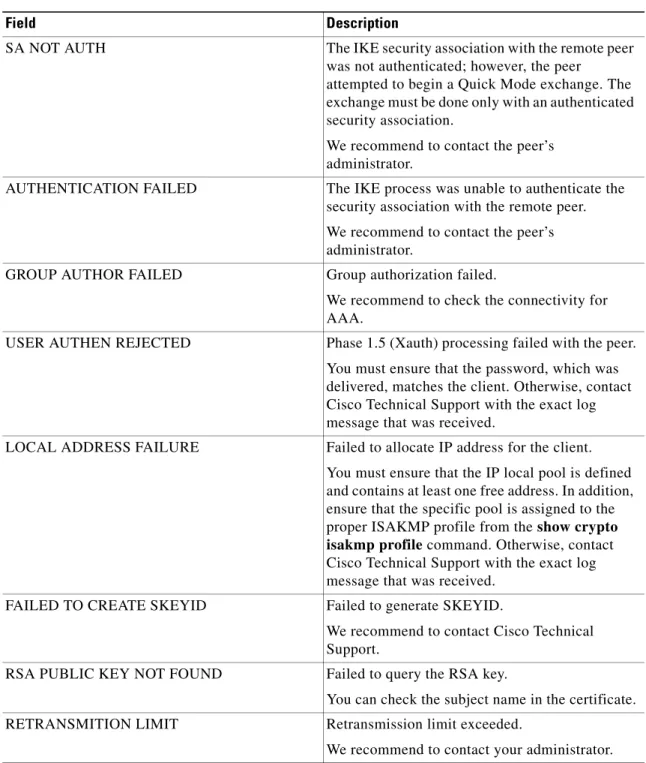
SA NOT AUTH...0
AUTHENTICATION FAILED...0
GROUP AUTHOR FAILED...0
Release Modification
Release 3.5.0 This command was introduced. Release 3.6.0 No modification.
Release 3.7.0 No modification. Release 3.8.0 No modification. Release 3.9.0 No modification.
Task ID Operations
Internet Key Exchange Security Protocol Commands on the Cisco IOS XR Software clear crypto isakmp errors
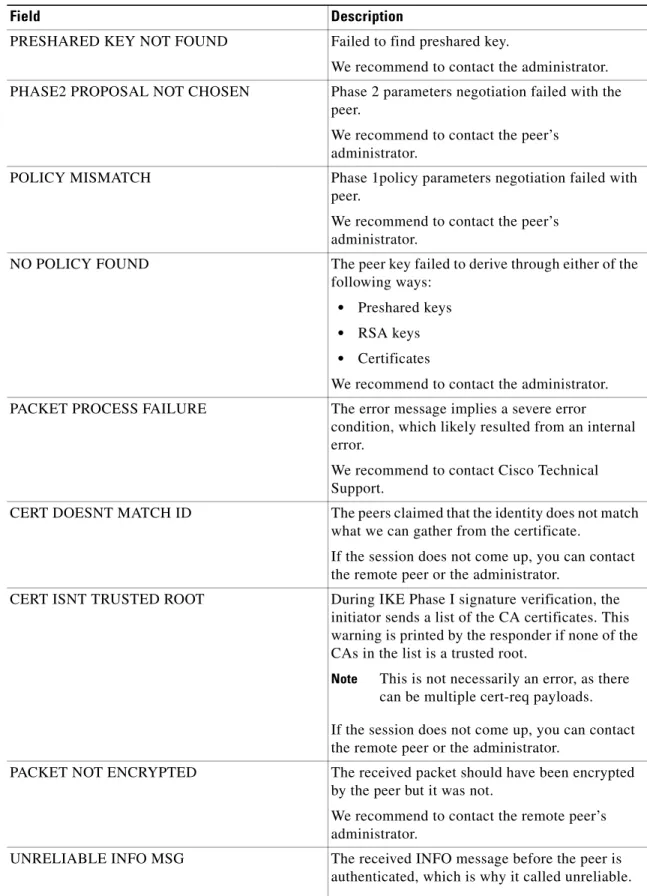
RETRANSMITION LIMIT...0 MALFORMED MESSAGE...0 QUICK MODE TIMER EXPIRED...0 KEY NOT FOUND IN PROFILE...0 PROFILE NOT FOUND...0 PRESHARED KEY NOT FOUND...0 PHASE2 PROPOSAL NOT CHOSEN...0 POLICY MISMATCH...0 NO POLICY FOUND...0 PACKET PROCESS FAILURE...0 Warnings
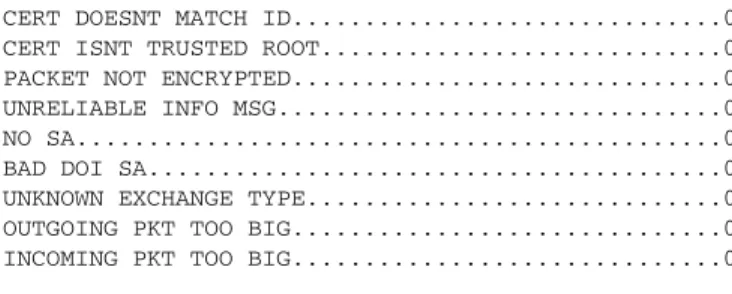
---CERT DOESNT MATCH ID...0 CERT ISNT TRUSTED ROOT...0 PACKET NOT ENCRYPTED...0 UNRELIABLE INFO MSG...0 NO SA...0 BAD DOI SA...0 UNKNOWN EXCHANGE TYPE...0 OUTGOING PKT TOO BIG...0 INCOMING PKT TOO BIG...0 Informational
---CAC DROPS...0 DEFAULT POLICY ACCEPTED...0 RP/0/0/CPU0:router# clear crypto isakmp errors
Related Commands Command Description show crypto isakmp
errors
Internet Key Exchange Security Protocol Commands on the Cisco IOS XR Software
clear crypto session
clear crypto session
To delete crypto sessions (IP Security [IPSec] and Internet Key Exchange [IKE] security associations [SAs]), use the clear crypto session command in EXEC mode.
clear crypto session [user username | group group | interface | ivrf vrf-name | local ip-address | fvrf vrf-name | remote ip-address]
Syntax Description
Defaults If the clear crypto session command is entered without any keywords, all existing sessions are deleted. The IPSec SAs are deleted first. Then, the IKE SAs are deleted. The default value for the remote port is 500.
Command Modes EXEC
Command History
Usage Guidelines To use this command, you must be in a user group associated with a task group that includes the proper task IDs. If you suspect user group assignment is preventing you from using a command, contact your AAA administrator.
To clear a specific crypto session or a subset of all the sessions, you need to provide session-specific parameters, such as local interface, local IP address, remote IP address (and port), FVRF name, or IVRF name.
user username (Optional) Specifies the name for the user.
group group (Optional) Specifies the identity name for the group. interface (Optional) Specifies the name for the interface.
ivrf vrf-name (Optional) Specifies the inside VRF (IVRF) session that is cleared. local ip-address (Optional) Clears crypto sessions for a local crypto endpoint. The
ip-address argument is the IP address of the local crypto endpoint.
fvrf vrf-name (Optional) Specifies the front door virtual routing and forwarding (FVRF) session that is cleared.
remote ip-address (Optional) Clears crypto sessions for a remote IKE peer. The ip-address argument is the IP address of the remote IKE peer.
Release Modification
Release 3.5.0 This command was introduced. Release 3.6.0 No modification.
Release 3.7.0 No modification. Release 3.8.0 No modification. Release 3.9.0 No modification.
Internet Key Exchange Security Protocol Commands on the Cisco IOS XR Software clear crypto session
Task ID
Examples The following example shows how to delete all crypto sessions:
RP/0/0/CPU0:router# clear crypto session
The following example shows that the crypto session of the FVRF named “blue” is deleted:
RP/0/0/CPU0:router# clear crypto session fvrf blue
The following example shows that the crypto session of the local endpoint 10.1.1.1 is deleted:
RP/0/0/CPU0:router# clear crypto session local 10.1.1.1
Related Commands
Task ID Operations
crypto execute
Command Description
description (ISAKMP peer)
Adds the description of an Internet Key Exchange (IKE) peer. show crypto session Displays status information for active crypto sessions.
Internet Key Exchange Security Protocol Commands on the Cisco IOS XR Software
client authentication list
client authentication list
To apply extended authentication (XAUTH) for Internet Key Exchange (IKE) interaction on the Cisco XR 12000 Series Router, use the client authentication list command in ISAKMP profile configuration mode. To remove Xauth, use the no form of this command.
client authentication list authen-list-name no client authentication list authen-list-name
Syntax Description
Defaults No default behavior or values
Command Modes ISAKMP profile configuration
Command History
Usage Guidelines To use this command, you must be in a user group associated with a task group that includes the proper task IDs. If you suspect user group assignment is preventing you from using a command, contact your AAA administrator.
XAUTH allows all Cisco IOS XR software authentication, authorization, and accounting (AAA) methods to perform user authentication in a separate phase after the IKE authentication phase-1 exchange. For user authentication, the AAA configuration list name must match the Xauth configuration list name.
Task ID
authen-list-name Username and password storage location (local or remote server) as defined in the aaa authentication command.
Release Modification
Release 3.2 This command was introduced. Release 3.3.0 No modification.
Release 3.4.0 This command is used under the crypto ISAKMP profile. Release 3.5.0 No modification.
Release 3.6.0 No modification. Release 3.7.0 No modification. Release 3.8.0 No modification. Release 3.9.0 No modification.
Task ID Operations
Internet Key Exchange Security Protocol Commands on the Cisco IOS XR Software client authentication list
Examples In the following example, AAA username and password storage location information is applied from the list0 authentication list to a profile named sample:
RP/0/0/CPU0:router# configure
RP/0/0/CPU0:router(config)# crypto isakmp profile sample
RP/0/0/CPU0:router(config-isa-prof)# client authentication list list0
Related Commands Command Description
Internet Key Exchange Security Protocol Commands on the Cisco IOS XR Software
client single-sa-per-inft
client single-sa-per-inft
To enable a single IP Security (IPSec) security association (SA) per interface, use the client
single-sa-per-inft command in Internet Security Association and Key Management Protocol (ISAKMP) profile configuration mode. To disable IPSec SAs per interface, use the no form of this command.
client single-sa-per-inft no client single-sa-per-inft
Syntax Description This command has no arguments or keywords.
Defaults No limit for the number of IPSec SAs per interface, in which the actual number is dependent on the number of remote users and sites to connect to the service-ipsec interface.
Command Modes ISAKMP profile configuration
Command History
Usage Guidelines To use this command, you must be in a user group associated with a task group that includes the proper task IDs. If you suspect user group assignment is preventing you from using a command, contact your AAA administrator.
The client single-sa-per-inft command is used to limit the number of IPSec SAs that are terminating on one service-ipsec interface to one.
The client single-sa-per-intft command is also useful to interoperate with the remote Cisco Easy VPN clients in the following cases:
• Cisco Easy VPN clients negotiate for a single IPSec SA with proxies ip any any, and use the MODECFG_IP4_ROUTE attribute to distribute routes associated with the IPSec SA. Unless the client single-sa-per-inft command is used, the remote clients can negotiate for multiple IPSec SAs with proxies that are different than ip any any.
• Multicast support is required on the service-ipsec interface.
Release Modification
Release 3.5.0 This command was introduced. Release 3.6.0 No modification.
Release 3.7.0 No modification. Release 3.8.0 No modification. Release 3.9.0 No modification.
Internet Key Exchange Security Protocol Commands on the Cisco IOS XR Software client single-sa-per-inft
Examples The following example shows how to enable multiple IPSec security associations (SAs) per interface:
RP/0/0/CPU0:router# configure
RP/0/0/CPU0:router(config)# crypto isakmp profile vpnprofile
RP/0/0/CPU0:router(config-isa-prof)# client single-sa-per-inft
Related Commands Command Description
crypto isakmp profile Defines an ISAKMP profile and audits IPSec user sessions. set interface
service-ipsec
Predefines the virtual interface when the local endpoint is the IKE responder or when it is the IKE initiator.
Internet Key Exchange Security Protocol Commands on the Cisco IOS XR Software
configuration url
configuration url
To specify on a server the URL that a Cisco Easy VPN remote device must use to get a configuration in a Mode Configuration Exchange, use the configuration url command in ISAKMP group configuration mode. To delete the URL, use the no form of this command.
configuration url {url} no configuration url {url}
Syntax Description
Defaults A Cisco Easy VPN remote device cannot request a configuration from a server in a Mode Configuration Exchange.
Command Modes ISAKMP group configuration
Command History
Usage Guidelines To use this command, you must be in a user group associated with a task group that includes the proper task IDs. If you suspect user group assignment is preventing you from using a command, contact your AAA administrator.
After the server pushes the URL to a Cisco Easy VPN remote device, the remote device downloads the content located at the URL site and applies the configuration content to its running configuration. Before this command is configured, the crypto isakmp client configuration group command must already be configured.
Task ID
url URL for the Cisco Easy VPN remote device must use to get the configuration from the server.
Release Modification
Release 3.5.0 This command was introduced. Release 3.6.0 No modification.
Release 3.7.0 No modification. Release 3.8.0 No modification. Release 3.9.0 No modification.
Task ID Operations
Internet Key Exchange Security Protocol Commands on the Cisco IOS XR Software configuration url
RP/0/0/CPU0:router(config)# crypto isakmp client configuration group group1
RP/0/0/CPU0:router(config-group)# configuration url http://10.10.8.8/easy.cfg
Related Commands crypto isakmp client configuration group
Internet Key Exchange Security Protocol Commands on the Cisco IOS XR Software
configuration version
configuration version
To specify on a server the version that a Cisco Easy VPN remote device must use to get a particular configuration in a Mode Configuration Exchange, use the configuration version command in ISAKMP group configuration mode. To delete the version number, use the no form of this command.
configuration version {version-number} no configuration version {version-number}
Syntax Description
Defaults A version number is not sent.
Command Modes ISAKMP group configuration
Command History
Usage Guidelines To use this command, you must be in a user group associated with a task group that includes the proper task IDs. If you suspect user group assignment is preventing you from using a command, contact your AAA administrator. For detailed information about user groups and task IDs, see the Configuring AAA Services on Cisco IOS XR Software module of Cisco IOS XR System Security Configuration Guide. Before this command is configured, the crypto isakmp client configuration group command must already be configured.
Task ID
Examples The following example shows that a server has specified the version number a Cisco Easy VPN remote device must use to obtain that particular configuration version:
version-number Version of the configuration. The version number is an unsigned integer in the range of 1 to 10.
Release Modification
Release 3.5.0 This command was introduced. Release 3.6.0 No modification.
Release 3.7.0 No modification. Release 3.8.0 No modification. Release 3.9.0 No modification.
Task ID Operations
Internet Key Exchange Security Protocol Commands on the Cisco IOS XR Software configuration version
Related Commands Command Description crypto isakmp client
configuration group
Internet Key Exchange Security Protocol Commands on the Cisco IOS XR Software
crypto ipsec server send-update
crypto ipsec server send-update
To send auto-update notifications any time after a Cisco Easy VPN connection is up, use the crypto ipsec server send-update command in EXEC mode. To disable auto-update notifications, use the no form of this command.
crypto ipsec server send-update {group-name} no crypto ipsec server send-update {group-name}
Syntax Description
Defaults Auto-update notifications are not sent.
Command Modes EXEC
Command History
Usage Guidelines To use this command, you must be in a user group associated with a task group that includes the proper task IDs. If you suspect user group assignment is preventing you from using a command, contact your AAA administrator.
This command is configured on a server. By configuring the command, the auto update notification is sent manually after the tunnel is up.
Task ID
Examples The following example shows that automatic update notifications are sent to GroupA:
RP/0/0/CPU0:router# crypto ipsec server send-update GroupA
Informed SA : 0
group-name Name of group, in which to send auto-update notifications.
Release Modification
Release 3.5.0 This command was introduced. Release 3.6.0 No modification.
Release 3.7.0 No modification. Release 3.8.0 No modification. Release 3.9.0 No modification.
Task ID Operations
Internet Key Exchange Security Protocol Commands on the Cisco IOS XR Software crypto ipsec server send-update
Related Commands Command Description
auto-update client Configures automatic update parameters for a Cisco Easy VPN remote device.
Internet Key Exchange Security Protocol Commands on the Cisco IOS XR Software
crypto isakmp
crypto isakmp
To globally enable Internet Key Exchange (IKE) at your peer router, use the crypto isakmp command in global configuration mode. To disable IKE at the peer, use the no form of this command.
crypto isakmp no crypto isakmp
Syntax Description This command has no arguments or keywords.
Defaults IKE is disabled.
Command Modes Global configuration
Command History
Usage Guidelines To use this command, you must be in a user group associated with a task group that includes the proper task IDs. If you suspect user group assignment is preventing you from using a command, contact your AAA administrator.
IKE need not be enabled for individual interfaces, but is enabled globally for all interfaces at the router.
Task ID
Examples The following example shows how to disable IKE at one peer:
Release Modification
Release 3.2 This command was introduced. Release 3.3.0 No modification.
Release 3.4.0 The crypto isakmp enable command was replaced with the crypto isakmp command.
Release 3.5.0 No modification. Release 3.6.0 No modification. Release 3.7.0 No modification. Release 3.8.0 No modification. Release 3.9.0 No modification.
Task ID Operations
Internet Key Exchange Security Protocol Commands on the Cisco IOS XR Software crypto isakmp call admission limit
crypto isakmp call admission limit
To deny incoming or outgoing session requests based on several metrics, use the crypto isakmp call admission limit command in global configuration mode. To disable this feature, use the no form of this command.
crypto isakmp call admission limit {cpu {total percent | ike percent} | in-negotiation-sa number | sa number}
no crypto isakmp call admission limit {cpu {total percent | ike percent} | in-negotiation-sa number | sa number}
Syntax Description
Defaults The default value for the in-negotiation-sa keyword is set to 1000 SAs.
Command Modes Global configuration
Command History
Usage Guidelines To use this command, you must be in a user group associated with a task group that includes the proper task IDs. If you suspect user group assignment is preventing you from using a command, contact your AAA administrator.
cpu Specifies the total resource limit for the CPU usage to accept new calls. total percent Specifies the maximum total CPU usage to accept new calls. The range for
the percent argument is from 1 to 100.
ike percent Specifies the maximum IKE CPU usage to accept new calls. The range for the percent argument is from 1 to 100.
in-negotiation-sa number
Specifies the maximum number of in-negotiation (embryonic) IKE security associations (SAs) that the router can establish before IKE begins rejecting new SA requests. The range for the number argument is from 1 to 100000. sa number Specifies that the maximum number of active IKE SAs that the router can establish before IKE begins rejecting new SA requests. You can configure a limit on the number of in-negotiation connects. This type of connect represents an aggressive mode IKE SA or main mode SA prior to the authentication and actual establishment. The range for the number argument is from 1 to 100000.
Release Modification
Release 3.4.0 This command was introduced. Release 3.5.0 No modification.
Release 3.6.0 No modification. Release 3.7.0 No modification. Release 3.8.0 No modification. Release 3.9.0 No modification.
Internet Key Exchange Security Protocol Commands on the Cisco IOS XR Software
crypto isakmp call admission limit
A request for an IKE SA is denied if insufficient system resources exist to handle the negotiation.
Task ID
Examples The following example shows how to use the crypto isakmp call admission limit command:
RP/0/0/CPU0:router# configure
RP/0/0/CPU0:router(config)# crypto isakmp call admission limit cpu ike 30
Related Commands
Task ID Operations
crypto read, write
Command Description
crypto ipsec profile Configures the IPSec profile. crypto isakmp policy Defines an IKE policy.
Internet Key Exchange Security Protocol Commands on the Cisco IOS XR Software crypto isakmp client configuration group
crypto isakmp client configuration group
To include the configuration of a local group profile, use the crypto isakmp client configuration group command in global configuration mode. To disable the profile for this local group, use the no form of this command.
crypto isakmp client configuration group group-name no crypto isakmp client configuration group group-name
Syntax Description
Defaults No default behavior or values
Command Modes Global configuration
Command History
Usage Guidelines To use this command, you must be in a user group associated with a task group that includes the proper task IDs. If you suspect user group assignment is preventing you from using a command, contact your AAA administrator.
The key command must be enabled if the client identifies itself with a preshared key. The following commands are available in the IKE group policy configuration mode:
• acl—Configures split tunneling. The acl-name argument specifies a group of access control list (ACL) rules that represent protected subnets for split tunneling purposes.
• key—Specifies the Internet Key Exchange (IKE) preshared key for group policy attribute definition. The key command must be enabled if the client identifies itself with a preshared key.
Use the crypto isakmp client configuration group command to enter group configuration mode.
Task ID
group-name Text string that specifies the name of a group.
Release Modification
Release 3.2 This command was introduced. Release 3.3.0 No modification.
Release 3.4.0 No modification. Release 3.5.0 No modification. Release 3.6.0 No modification. Release 3.7.0 No modification. Release 3.8.0 No modification. Release 3.9.0 No modification.
Task ID Operations
Internet Key Exchange Security Protocol Commands on the Cisco IOS XR Software
crypto isakmp client configuration group
Examples The following example shows how to include the configuration of a local group profile with the group name marketing:
RP/0/0/CPU0:router# configure
RP/0/0/CPU0:router(config)# crypto isakmp client configuration group marketing
RP/0/0/CPU0:router(config-group)#
Related Commands Command Description
acl Configures split tunneling. crypto ipsec profile Configures the IPSec profile. crypto isakmp policy Defines an IKE policy.
Internet Key Exchange Security Protocol Commands on the Cisco IOS XR Software crypto isakmp identity
crypto isakmp identity
To specify the identity used by the router when participating in the Internet Key Exchange (IKE) protocol, use the crypto isakmp identity command in global configuration mode. To reset the Internet Security Association Key Management Protocol (ISAKMP) identity to the default value (address), use the no form of this command.
crypto isakmp identity {address | hostname} no crypto isakmp identity
Syntax Description
Defaults The IP address is used for the ISAKMP identity.
Command Modes Global configuration
Command History
Usage Guidelines To use this command, you must be in a user group associated with a task group that includes the proper task IDs. If you suspect user group assignment is preventing you from using a command, contact your AAA administrator.
Use the crypto isakmp identity command to specify an ISAKMP identity either by IP address or by hostname. As a general rule, you should set all identities for peers in the same way—either by IP address or by hostname.
Set an ISAKMP identity whenever you specify preshared keys.
Use the address keyword when only one interface (and therefore only one IP address) is used by the peer for IKE negotiations, and the IP address is known.
address Sets the ISAKMP identity to the IP address of the interface that communicates to the remote peer during IKE negotiations.
hostname Sets the ISAKMP identity to the host name concatenated with the domain name (for example, myhost.example.com).
Release Modification
Release 3.2 This command was introduced. Release 3.3.0 No modification.
Release 3.4.0 Example was modified to support the new crypto keyring structure by using the new crypto keyring and pre-shared-key commands
Release 3.5.0 No modification. Release 3.6.0 No modification. Release 3.7.0 No modification. Release 3.8.0 No modification. Release 3.9.0 No modification.
Internet Key Exchange Security Protocol Commands on the Cisco IOS XR Software
crypto isakmp identity
Use the hostname keyword if more than one interface on the peer might be used for IKE negotiations, or if the IP address for the interface is unknown (such as with dynamically assigned IP addresses).
Task ID
Examples The following example shows how to use preshared keys at two peers and set both their ISAKMP identities to the IP address.
At the local peer (at 10.0.0.1), the ISAKMP identity is set and the preshared key is specified.
RP/0/0/CPU0:router(config)# crypto isakmp identity address
RP/0/0/CPU0:router(config)# crypto keyring keyring1
RP/0/0/CPU0:router(config-keyring)# pre-shared-key address 192.168.1.33 key presharedkey At the remote peer (at 192.168.1.33), the ISAKMP identity is set and the same preshared key is specified.
RP/0/0/CPU0:router(config)# crypto isakmp identity address
RP/0/0/CPU0:router(config)# crypto keyring keyring1
RP/0/0/CPU0:router(config-keyring)# pre-shared-key address 10.0.0.1 key presharedkey
Note In the preceding example, if the crypto isakmp identity command had not been performed, the ISAKMP identities would still have been set to the IP address, the default identity.
The following example shows how to use preshared keys at two peers and set both their ISAKMP identities to the host name.
At the local peer, the ISAKMP identity is set and the preshared key is specified.
RP/0/0/CPU0:router(config)# crypto isakmp identity hostname
RP/0/0/CPU0:router(config)# crypto keyring keyring1
RP/0/0/CPU0:router(config-keyring)# pre-shared-key hostname remoterouter.example.com key presharedkey
At the remote peer, the ISAKMP identity is set and the same preshared key is specified.
RP/0/0/CPU0:router(config)# crypto isakmp identity hostname
RP/0/0/CPU0:router(config)# crypto keyring keyring1
RP/0/0/CPU0:router(config-keyring)# pre-shared-key hostname localrouter.example.com key presharedkey
Related Commands
Task ID Operations
crypto read, write
Command Description
authentication (IKE policy) Specifies the authentication method within an IKE policy. crypto keyring Defines a crypto keyring during IKE authentication.
local-address (keyring) Limits the scope of an ISAKMP keyring configuration to a local termination address.
Internet Key Exchange Security Protocol Commands on the Cisco IOS XR Software crypto isakmp keepalive
crypto isakmp keepalive
To use the Internet Key Exchange (IKE) security association (SA) feature for providing a mechanism for detecting loss of connectivity between two IP Security (IPSec) peers, use the crypto isakmp keepalive command in global configuration mode. To disable this feature, use the no form of this command.
crypto isakmp keepalive seconds retry-seconds [periodic | on-demand] no crypto isakmp keepalive
Syntax Description
Defaults IKE does not send keepalive messages until specified by this command.
Command Modes Global configuration
Command History
Usage Guidelines To use this command, you must be in a user group associated with a task group that includes the proper task IDs. If you suspect user group assignment is preventing you from using a command, contact your AAA administrator.
If IKE does not receive the keepalive acknowledge message from the peer after four tries, IKE concludes that it has lost connectivity with its peer.
When using the IPSec VPN SPA on the Cisco XR 12000 Series Router platform, the DPD for both periodic or on-demand cannot coexist with the idle-timeout from the crypto ipsec security-association idle-time command. For a given ISAKMP peer, you can configure either of the functions but not both.
seconds Number of seconds between keepalive messages. The range is from 10 to 3600. retry-seconds Number of seconds between retries if keepalive fails. The range is from 2 to 60. periodic (Optional) Specifies that the keepalive messages are sent at regular intervals. on-demand (Optional) Specifies that the dead peer detection (DPD) retries are sent on
demand. Because the on-demand keyword is the default, the keyword does not appear in the sample output.
Release Modification
Release 3.2 This command was introduced. Release 3.3.0 No modification.
Release 3.4.0 The periodic and on-demand keywords were introduced through the IPSec VPN SPA.
Release 3.5.0 No modification. Release 3.6.0 No modification. Release 3.7.0 No modification. Release 3.8.0 No modification. Release 3.9.0 No modification.
Internet Key Exchange Security Protocol Commands on the Cisco IOS XR Software
crypto isakmp keepalive
Task ID
Examples The following example shows how to set the number of seconds between keepalive messages to 20 seconds, and the number of seconds between retries to 20 seconds if keepalive fails:
RP/0/0/CPU0:router# configure
RP/0/0/CPU0:router(config)# crypto isakmp keepalive 20 20 on-demand
Related Commands
Task ID Operations
crypto read, write
Command Description
Internet Key Exchange Security Protocol Commands on the Cisco IOS XR Software crypto isakmp peer
crypto isakmp peer
To enable an IP Security (IPSec) peer for Internet Key Exchange (IKE), use the crypto isakmp peer command in global configuration mode. To disable this functionality, use the no form of this command.
crypto isakmp peer {address ip-address | hostname hostname} [description line | vrf fvrf-name] no crypto isakmp peer {address ip-address | hostname hostname} [description line | vrf
vrf-name]
Syntax Description
Defaults No default behavior or values
Command Modes Global configuration
Command History
Usage Guidelines To use this command, you must be in a user group associated with a task group that includes the proper task IDs. If you suspect user group assignment is preventing you from using a command, contact your AAA administrator.
Use the crypto isakmp peer command to enter ISAKMP peer configuration mode. You can give a peer that is identified by an IP address a meaningful name or description.
Task ID
address ip-address Specifies the IP address of the peer router. hostname hostname Specifies the hostname of the peer.
description line (Optional) Specifies the IKE peer description. The maximum number of charactersyou can use to describe the peer is 80.
vrf vrf-name (Optional) Specifies the VPN routing and forwarding (VRF) routing table through which the peer is reachable. The fvrf-name argument must match the FVRF name that was defined during VPN routing and forwarding (VRF) configuration.
Release Modification
Release 3.5.0 This command was introduced. Release 3.6.0 No modification.
Release 3.7.0 No modification. Release 3.8.0 No modification. Release 3.9.0 No modification.
Task ID Operations
Internet Key Exchange Security Protocol Commands on the Cisco IOS XR Software
crypto isakmp peer
Examples The following example shows that the peer address is 40.40.40.2 and named citeA:
RP/0/0/CPU0:router# configure
RP/0/0/CPU0:router(config)# crypto isakmp peer address 40.40.40.2 RP/0/0/CPU0:router(config-isakmp-peer)# description citeA
RP/0/0/CPU0:router(config-isakmp-peer)# commit
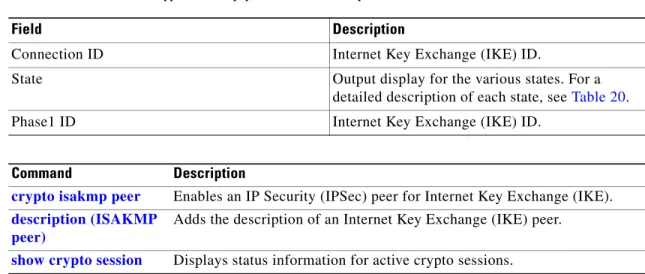
RP/0/0/CPU0:router# show crypto isakmp peers
Peer: 60.60.60.2 Port: 500 Local: 70.70.70.2 vrf: default UDP encapsulate: False
SA information: Connection ID: 2 State: QM_IDLE
Phase 1 ID: IPV4_ADDR 60.60.60.2
Peer: 40.40.40.2 Port: 500 Local: 50.50.50.2 vrf: default Description: peerA
UDP encapsulate: False SA information:
Connection ID: 1 State: QM_IDLE
Phase 1 ID: IPV4_ADDR 40.40.40.2
Related Commands Command Description description (ISAKMP
peer)
Adds the description of an Internet Key Exchange (IKE) peer. show crypto isakmp
peers
Internet Key Exchange Security Protocol Commands on the Cisco IOS XR Software crypto isakmp policy
crypto isakmp policy
To define an Internet Key Exchange (IKE) policy, use the crypto isakmp policy command in global configuration mode. To delete an IKE policy, use the no form of this command.
crypto isakmp policy priority no crypto isakmp policy priority
Syntax Description
Defaults There is a default policy, which always has the lowest priority. The default policy contains default values for the encryption, hash, authentication, Diffie-Hellman group, and lifetime parameters. (The parameter defaults are listed in the “Usage Guidelines” section.) When you create an IKE policy, the default for a particular parameter is used if no value is specified.
Command Modes Global configuration
Command History
Usage Guidelines To use this command, you must be in a user group associated with a task group that includes the proper task IDs. If you suspect user group assignment is preventing you from using a command, contact your AAA administrator.
Use the crypto isakmp policy command to specify the parameters to use during an IKE negotiation. (These parameters create the IKE security association [SA].)
The crypto isakmp policy command enters ISAKMP policy configuration mode. The following commands are available in this mode to specify the parameters in the policy:
• authentication (IKE policy) command—Specifies that the default values are Rivest, Shamir, and Adelman (RSA) signatures.
• description (IKE policy) command—Creates a description of an IKE policy.
priority Value that uniquely identifies the IKE policy and assigns a priority to the protection policy. Use an integer from 1 to 10000, with 1 being the highest priority and 10000 the lowest.
Release Modification
Release 3.2 This command was introduced. Release 3.3.0 No modification.
Release 3.4.0 No modification. Release 3.5.0 No modification. Release 3.6.0 No modification. Release 3.7.0 No modification. Release 3.8.0 No modification. Release 3.9.0 No modification.
Internet Key Exchange Security Protocol Commands on the Cisco IOS XR Software
crypto isakmp policy
• encryption (IKE policy) command— Sets the encryption algorithm for protection suite according to one of the following standards.
• group (IKE policy) command—Specifies that the default value is 768-bit Diffie-Hellman.
• hash (IKE policy) command—Specifies that the default value is SHA-1.
• lifetime (IKE policy) command—Specifies that the default value is 86,400 seconds (1 day). If you do not specify one of these commands for a policy, the default value is used for that parameter. You can configure multiple IKE policies on each peer participating in IP Security (IPSec). When the IKE negotiation begins, it tries to find a common policy configured on both peers, starting with the highest priority policies as specified on the remote peer.
Task ID
Examples The following example shows how to configure two policies for the peer:
RP/0/0/CPU0:router# configure
RP/0/0/CPU0:router(config)# crypto isakmp policy 15 RP/0/0/CPU0:router(config-isakmp)# hash md5
RP/0/0/CPU0:router(config-isakmp)# authentication rsa-sig
RP/0/0/CPU0:router(config-isakmp)# group 2 RP/0/0/CPU0:router(config-isakmp)# lifetime 5000 RP/0/0/CPU0:router(config-isakmp)# exit
RP/0/0/CPU0:router(config)# crypto isakmp policy 20
RP/0/0/CPU0:router(config-isakmp)# authentication pre-share
RP/0/0/CPU0:router(config-isakmp)# lifetime 10000 RP/0/0/CPU0:router(config-isakmp)# exit
The configuration results in the following policies:
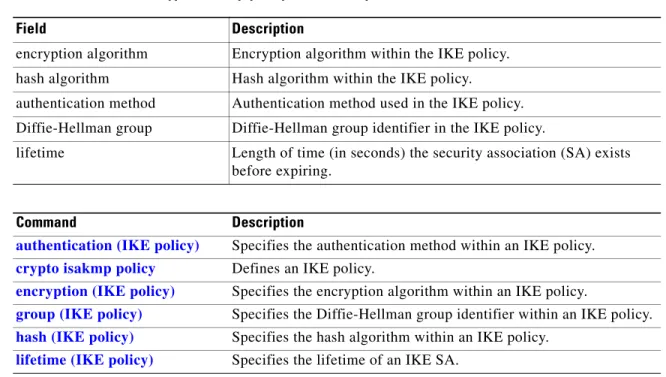
Protection suite priority 15
encryption algorithm: DES - Data Encryption Standard (56 bit keys) hash algorithm: Message Digest 5
authentication method: Rivest-Shamir-Adelman Signature Diffie-Hellman Group: #2 (1024 bit)
lifetime: 5000 seconds, no volume limit Protection suite priority 20
encryption algorithm: DES - Data Encryption Standard (56 bit keys) hash algorithm: Secure Hash Standard
authentication method: Pre-Shared Key Diffie-Hellman Group: #1 (768 bit) lifetime: 10000 seconds, no volume limit Default protection suite
encryption algorithm: DES - Data Encryption Standard (56 bit keys) hash algorithm: Secure Hash Standard
authentication method: Rivest-Shamir-Adleman Signature Diffie-Hellman Group: #1 (768 bit)
lifetime: 86400 seconds, no volume limit
IKE policy 15 is the highest priority, and the default policy is the lowest priority.
Task ID Operations
Internet Key Exchange Security Protocol Commands on the Cisco IOS XR Software crypto isakmp policy
Related Commands Command Description
authentication (IKE policy) Specifies the authentication method within an IKE policy. description (IKE policy) Specifies a description for an ISAKMP policy
encryption (IKE policy) Specifies the encryption algorithm within an IKE policy.
group (IKE policy) Specifies the Diffie-Hellman group identifier within an IKE policy. hash (IKE policy) Specifies the hash algorithm within an IKE policy.
lifetime (IKE policy) Specifies the lifetime of an IKE SA.
Internet Key Exchange Security Protocol Commands on the Cisco IOS XR Software
crypto isakmp policy-set
crypto isakmp policy-set
To define a policy set for an ISAKMP protection suite, use the crypto isakmp policy-set command in global configuration mode. To cancel a previously configured policy set, use the no variant to the command.
crypto isakmp policy-set policy-name no crypto isakmp policy-set policy-name
Syntax Description
Defaults No default behaviors or values
Command Modes Global configuration
Command History
Usage Guidelines To use this command, you must be in a user group associated with a task group that includes the proper task IDs. If you suspect user group assignment is preventing you from using a command, contact your AAA administrator.
Use of this command takes you to ISAKMP policy set configuration mode.
Task ID
Examples The following example shows how to define an ISAKMP policy set, based on the local address, to restrict users with remote access from accessing certain ISAKMP policies:
RP/0/0/CPU0:router# configure
RP/0/0/CPU0:router(config)# crypto isakmp policy-set mypolicy
RP/0/0/CPU0:router(config-isakmp-pol-set)#
policy-name Name of the policy set.
Release Modification
Release 3.6.0 This command was introduced. Release 3.7.0 No modification.
Release 3.8.0 No modification. Release 3.9.0 No modification.
Task ID Operations
Internet Key Exchange Security Protocol Commands on the Cisco IOS XR Software crypto isakmp policy-set
Related Commands Command Description description (ISAKMP
policy-set)
Description for the ISAKMP policy-set. match identity
(ISAKMP policy-set)
Creates an SVI tunnel source. When users connect to the IP identified in this step, a predefined encryption algorithm becomes operational.
policy (ISAKMP policy-set))
Internet Key Exchange Security Protocol Commands on the Cisco IOS XR Software
crypto isakmp profile
crypto isakmp profile
To define an ISAKMP profile and audit IPSec user sessions, use the crypto isakmp profile command in global configuration mode. To delete a crypto ISAKMP profile, use the no form of this command.
crypto isakmp profile local profile-name no crypto isakmp profile local profile-name
Syntax Description
Defaults No default behaviors or values
Command Modes Global configuration
Command History
Usage Guidelines To use this command, you must be in a user group associated with a task group that includes the proper task IDs. If you suspect user group assignment is preventing you from using a command, contact your AAA administrator.
The local keyword is used in the ISAKMP profile to define locally sourced or destined traffic. This traffic is decrypted or encrypted by the route processor (RP) rather than by the Cisco IPSec VPN SPA. The peers are mapped to an ISAKMP profile when their identities are matched (as given in the identification [ID] payload of the Internet Key Exchange [IKE]) against the identities defined in the ISAKMP profile. To uniquely map to an ISAKMP profile, no two ISAKMP profiles should match the same identity. If the peer identity is matched in two ISAKMP profiles, the configuration is invalid. At least one match identity command must also be defined in the ISAKMP profile for the profile to be
local Specifies that the profile is used for locally sourced or terminated traffic.
Note The local keyword is used for the ISAKMP profile to define locally sourced or destined traffic. This traffic is decrypted or encrypted by the route processor (RP).
profile-name Name of the user profile. To associate a user profile with the RADIUS server, the user profile name must be identified.
Release Modification
Release 3.4.0 This command was introduced. Release 3.5.0 No modification.
Release 3.6.0 No modification. Release 3.7.0 No modification. Release 3.8.0 No modification. Release 3.9.0 No modification.
Internet Key Exchange Security Protocol Commands on the Cisco IOS XR Software crypto isakmp profile
Task ID
Examples
The following example shows how to define an ISAKMP profile and match the peer identities on the Cisco XR 12000 Series Router with the IPSec VPN SPA installed:
RP/0/RSP00/CPU0:router# configure
RP/0/RSP00/CPU0:router(config)# crypto isakmp profile local profile1vpnprofile
RP/0/RSP00/CPU0:router(config-isa-prof)# match identity address 10.1.1.0/24group vpngroup RP/0/RSP00/CPU0:router(config-isa-prof-match)# set interface tunnelservice-ipsec 1
Task ID Operations
Internet Key Exchange Security Protocol Commands on the Cisco IOS XR Software
crypto isakmp profile
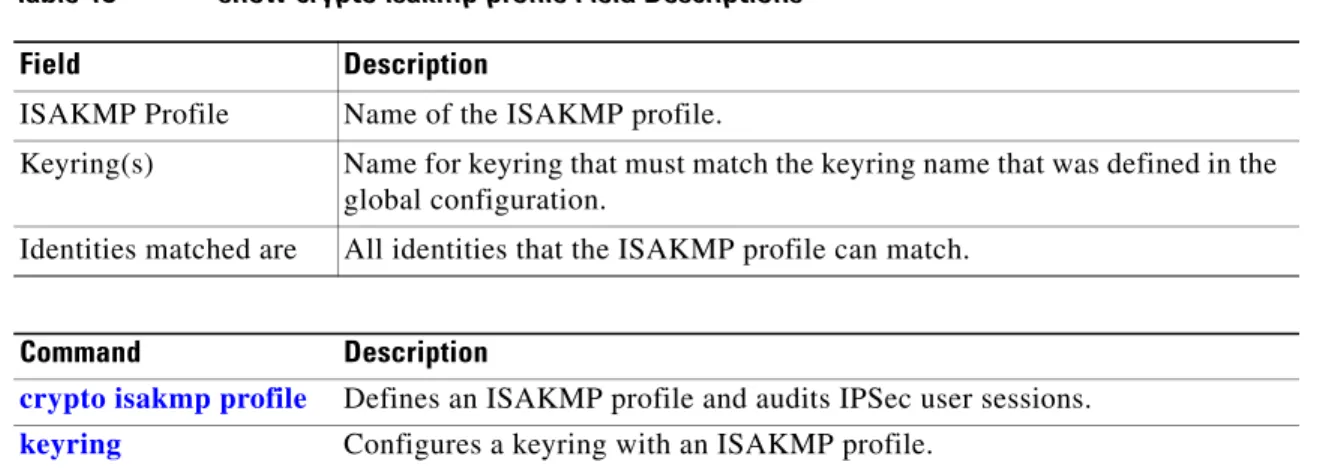
Related Commands Command Description isakmp authorization
list
Specifies the authorization list that is used for authorization for Internet Key Exchange (IKE) interaction.
keepalive (ISAKMP profile)
Lets the gateway send dead peer detection (DPD) messages to the peer. match identity
(ISAKMP policy-set)
Matches the identity of a peer in an ISAKMP profile.
self-identity Defines the identity that the local IKE uses to identify itself to the remote peer.
set interface tunnel-ipsec
Predefines the interface instance when IKE negotiates for tunnel mode IPSec service associations (SAs) for the traffic that is locally sourced or terminated.
set ipsec-profile Predefines the IPSec profile. show crypto isakmp
profile