Introduction
BIG DATA
is a term that’s been buzzing around a lot
lately, and its use is a trend that’s been increasing at a
steady pace over the past few years. It’s quite likely
you’ve also encountered the term Hadoop when hearing
about Big Data. Apache Hadoop is an open source
framework for storing extremely large amounts of data.
In the last 2–3 years, many big players in the industry
have developed their own Hadoop distributions
including Intel, Microsoft, IBM and EMC. Startups that
focus only on Hadoop, such as Cloudera and
Hortonworks, have now grown to be big players, too.
The beauty of Hadoop distributions is that they can be
customized with a wide range of feature sets that
address the specific needs of different sets of users.
When choosing where to spend its money, it’s essential
that a company find a distribution that’s flexible enough
to meet both current and future needs.
Various user groups requiring Hadoop, each with its
own diverse needs, include:
Upper management in large companies wanting to
adopt Big Data solutions.
Developers wanting to build tools for the Hadoop
Ecosystem.
Newbies learning Hadoop for the first time and
wanting a temporary or non-serious Hadoop
deployment.
For these and other types of users, we’ve studied,
analyzed and thoroughly compared the following
distribution sources:
1. Intel Distribution for Apache Hadoop (IDH)
2.Cloudera Distribution Including Apache Hadoop (CDH)
3. Hortonworks Data Platform (HDP), and
4. MapR.
In this paper, we’ll share our experiences with each
distributor, and provide both objective and subjective
assessments of their features and their performance
measures. It will help you to select the distributor that
will best serve your specific user requirements.
Visit this link
for a detailed comparison table of the
1.1 Methodology
For features comparison, each of these distributions was installed on AWS EC2 Instances (5-node cluster). We used Intel’s HiBench benchmarking utility to make performance comparisons
1.1.1 Intel HiBench
HiBench, developed and open sourced by Intel, is a benchmarking suite specifically developed for Hadoop deployments. Read more about Intel HiBench and each of its benchmark tests here.
The HiBench benchmarks used for this study include: 1. Sort
This workload sorts input data generated by the Apache
HadoopRandomTextWriter. It’s representative of real-world MapReduce jobs that transform data from one format to another.
2. WordCount
This workload counts each word’s occurrence within input data
generated by the Apache Hadoop RandomTextWriter. It’s representative of real-world MapReduce jobs that extract small amounts of key data from large data sets.
3. PageRank
This workload is an open-source implementation of the page-rank algorithm, a link-analysis algorithm used widely in web search engines. 4. Mahout Bayesian Classification
This is the typical application area of MapReduce for large-scale data mining and machine learning, e.g., in Google and Facebook platforms. Bayesian is a well-known classification algorithm for knowledge discovery and data mining, and this workload tests the naive Bayesian trainer in the Mahout open-source machine-learning library from Apache.
5. Hive Join
This workload models complex analytic queries of structured (relational) tables by computing the sum of each group over a single read-only table. 6. Hive Aggregate
This workload models complex analytic queries of structured (relational) tables by computing both the average and the sum for each group by joining two different tables.
7. Enhanced DFS IO
Tests HDFS system throughput of a Hadoop cluster. Computes the aggregated bandwidth by sampling the number of bytes read or written at fixed time intervals in each map task.
Each of these benchmarks was run three times with each distribution. We used the average values to compile our performance comparison graphs and reports.
1.1.2 EC2 Hardware and Hadoop
Configuration
The Amazon EC2 Instances used for this study had the following configuration:
EC2
H/W:
Instance
Type Arch. vCPU ECU
Memory (GiB)
Storage
(GB) Physical Cores (Per Instance)
1-Master m1.xlarge 64-bit 4 8 15 4 x 420 4 x Intel(R) Xeon(R) CPU E5-2650 0 @ 2.00GHz
4-Slaves m1.large 64-bit 2 4 7.5 2 x 420 2 x Intel(R) Xeon(R) CPU E5430 @ 2.66GHz
Each Hadoop Cluster had the following configuration: Hadoop Cluster
Configuration:
HDFS Capacity ~5 TB
NameNode 1
Secondary NameNode 1
DataNodes 5
JobTracker 1
TaskTracker 5
Notes
Five EC2 instances of this configuration were procured once. A 5-node cluster for each installed Hadoop Distribution was formed, studied and benchmarked. Each distribution was then uninstalled, followed by installation of a new distribution to be studied and benchmarked.
EC2 instances may be shared on the same hardware as other users on an AWS Cloud, however, execution times may be affected at peak hours of load on AWS EC2. To minimize these errors, we benchmarked each distribution three times. The final result is the average of the three tests. All distributions were benchmarked with out-of-the-box default Hadoop configuration settings.
1.2 Terminologies Used
The following terminologies will be used throughout this paper. IDH: Intel Distribution for Apache Hadoop
CDH: Cloudera Distribution Including Apache Hadoop HDP: Hortonworks Data Platform
2.0 Intel Distribution for Apache Hadoop
Of the Hadoop distributors mentioned here, Intel entered the market last. Based on its general features, Intel is trying hard to stay competitive and surpass other distributions by providing more and more features.
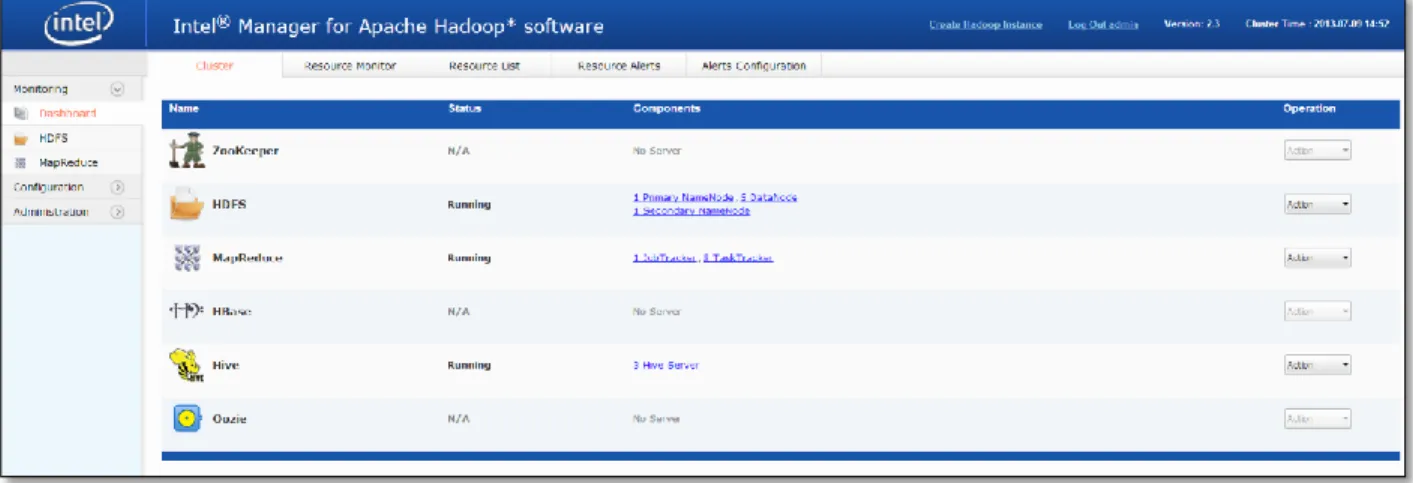
However, IDH seems a bit embryonic, especially the Intel Manager, as the user experience isn’t very fluid, especially compared to Cloudera Manager, and it includes some glitches. The glitches are, however, negligible since it performs better than the others. IDH’s interface is very easy to navigate, and its search facility is also quite easy to use. The interface is definitely better than Ambari, a management console used by HDP. IDH supports most of the tools and components in the Apache Hadoop ecosystem, such as Hive and HBase
.
Figure 1 Intel Manager Dashboard
2.1 Key Features
Intel appears to be focusing more heavily on security aspects than on performance. Its distribution is rich with security features.
This is the only distribution that supports HDFS Data encryption. Intel claims that these encryptions and decryptions have been optimized by ~14x using AES-NI instructions on certain processors from the Xeon series.
Other notable features include:
MapReduce Application Management.
Active Tuner, a tool that finds the best set of configurations for a MapReduce application.
Node and service-level memory management directly from the manager. Other distros also support service-level memory management, but the services supported are limited.
The standard version of IDH comes with limited features when compared to its commercial version.
2.2 Benchmarks
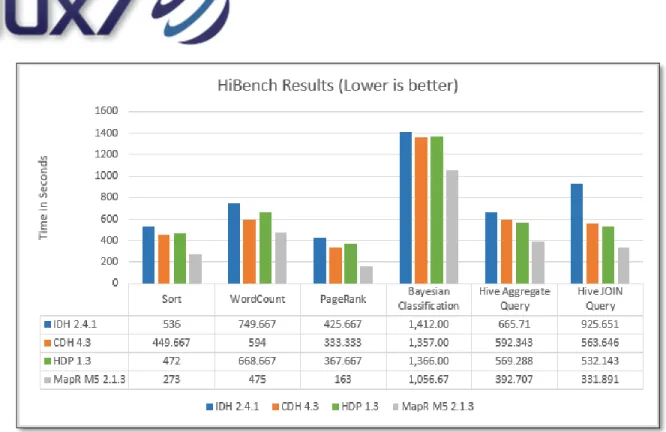
Despite the performance optimizations claimed by Intel, IDH finished last in each benchmark. HDFS Read/Write throughputs were also a bit lower than the other distributions.
Its low performance may be related to the fact that we didn’t use the same hardware upon which Intel claimed performance optimizations. Nonetheless, it performed slowly on the same hardware configuration we used to benchmark the other distributions.
We hope Intel will implement improvements in the future.
3.0 Cloudera Distribution Including Apache
Hadoop
Cloudera is the oldest and most mature of all of the distributions we compared. It tops the list when it comes to introducing innovative new tools into the Hadoop ecosystem, Cloudera quickly adapts to new Hadoop releases and implements bug fixes in its distribution, which is why it’s one of the leaders in Apache Hadoop project implementation.
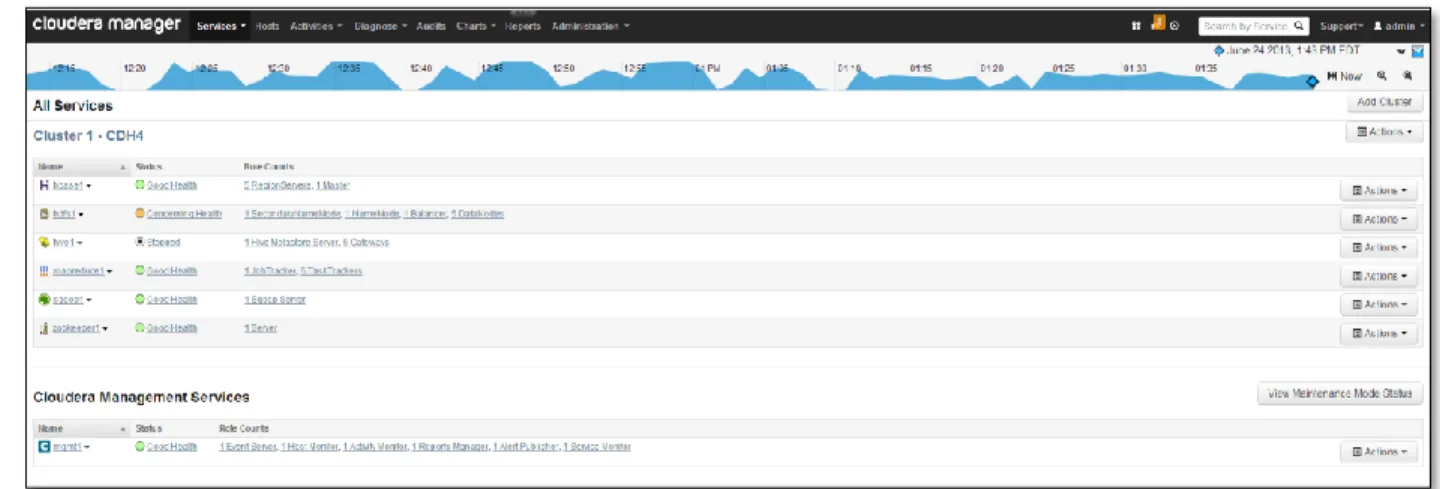
Cloudera distribution’s management console, Cloudera Manager, is smooth to implement, intuitive to use and features a rich user interface that uses all available screen space to display useful administrator information in a clean, uncluttered manner.
Figure 2 Cloudera Manager Dashboard
3.1 Key Features
This is the only distribution that supports: Multi Cluster management.
Node Templates. Groups of nodes can be created in a cluster with different sets of configurations for different groups, rather than having to use the same configuration throughout the cluster. This is particularly useful in the case of heterogeneous nodes.
Adding new services to an already running cluster.
3.2 Benchmarks
CDH performed well in our benchmarks, standing between IDH and MapR. However, the performance gap between CDH and MapR is pretty wide. The results for CDH and HDP were nearly identical.
4.0 Hortonworks Data Platform
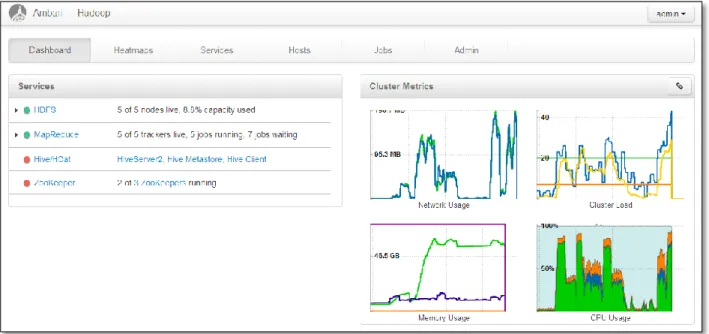
Though HDP’s core tools, such as Hadoop and Hive, appear stable, its Ambari management console is more primitive than the other distro management consoles. Apache’s project for Hadoop Cluster Management lacks many of the features found in other distros. Hortonworks/Apache needs to make considerable improvements on this front.
Figure 3 Ambari Dashboard
4.1 Key Features
HDP is the only distribution that supports the Windows platform, utilizing Windows Server for on-premise and Windows Azure in the cloud. With implementation of the Stinger project that’s now under development, Hortonworks plans to make Hive 100x faster.
4.2 Benchmarks
As mentioned before, performance for HDP and CDH was nearly the same in our benchmarks. They performed better than IDH, but worse than MapR.
5.0 MapR
The groundbreaking MapR is the most innovative of the four distributions that we’ve tested. The company has significantly modified the MapReduce framework architecture and implemented its own file system, called MapR-FS. The performance gains of these modifications aren’t only theoretical, as MapR performed ~2x times faster in several of our benchmarks than the other three distros.
Figure 4 MapR-FS Simplified Architecture
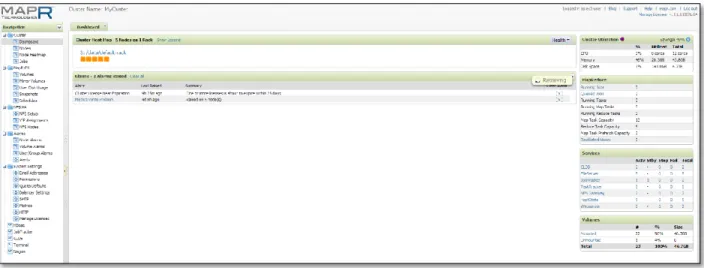
Figure 5MapR Control Center Dashboard
MapR’s management console isn’t as feature rich as Cloudera Manager.
5.1 Key Features
No NameNode architecture.
Multi Node Direct Access NFS, which allows users to mount MapR-FS over NFS and access it just like a normal file system. This allows any application to access Hadoop data in the traditional manner.
Amazon EMR and Google Cloud Platform use MapR for their Hadoop services.5.2 Benchmarks
MapR performed fastest of the four distributions in our benchmark tests. The file system throughput, both read and write, was very high, so if performance is one’s primary requirement, then MapR is the clear distribution choice.
6 Summary
Take a look at the detailed comparison report here.
Pros Cons
CDH
1. Cloudera Manager offers the most feature-rich interface of all.
2. Bundles many useful tools, such as Cloudera Impala.
1. Slower than MapR
IDH 1. Rich in security features. 1. Slowest performer in our benchmarks. HDP 1. The only distribution supporting the Windows
platform.
1. The Ambari management interface is primitive and lacks many useful features.
MapR
1. Fastest of the four tested distros.
2. Multi-node direct access NFS allows mounting Hadoop FS over NFS, so applications can directly access data like a normal file system.
1. The MapR Management Interface isn't as rich as the Cloudera Manager.
Figure 6 Micro, Web Search, M/C Learning and Data Analytics Benchmarks
APPENDIX - I
HiBench Installation and Configuration
The following are the steps to install and run a benchmark on a Hadoop Distribution using HiBench:
Configuration
1. Setup HiBench
Download HiBench-2.2 benchmark suite from https://github.com/intel-hadoop/HiBench/zipball/HiBench-2.2 2. Setup Hadoop
Before running any workload from HiBench, verify that your Hadoop framework is running correctly. 3. Setup Hive (for running Hive benchmarks)
Be sure to set up Hive properly in your cluster if you want to test hivebench. If you don’t, the benchmark will use the default Hive-0.9 release that’s included in the package.
4. Configuration for the all workloads
Set some global environment variables in the bin/hibench-config.sh file located in the root dir.
Example,
HADOOP_HOME <The Hadoop installation location>
HADOOP_CONF_DIR <The Hadoop configuration DIR, default is $HADOOP_HOME/conf>
COMPRESS_GLOBAL <Whether to enable the in/out compression for all workloads, 0 is disable, 1 is enable>
COMPRESS_CODEC_GLOBAL <The default codec used for in/out data compression>
5. Configure each workload
You can modify the conf/configure.shfile under each workload folder if it exists. All data sizes and options related to the workload are defined in this file.
6. Synchronize the time on all nodes
This is required for dfsioe, and optional for others
Running
1. Run several workloads together
Theconf/benchmarks.lstfile under the package folder defines the workloads to run when you execute
the bin/run-all.shscript under the package folder. Each line in the list file specifies one workload. You can
2. Run each workload separately
Each workload can be run separately. There are 3 different files under one workload folder.
conf/configure.sh Configuration file contains all parameters such as data size and test options.
bin/prepare*.sh Generate or copy the job input data into HDFS. bin/run*.sh Execute the workload
3. Configure the benchmark
Set your own configurations by modifyingconfigure.shif necessary. 4. Prepare data
bin/prepare.sh
(
bin/prepare-read.shfor dfsioe) to prepare input data in HDFS for running the benchmark5. Run the benchmark
APPENDIX - II
Intel Installation
Installation is a piece of cake with IDH, once all the prerequisites are met. Most of the configuration steps were automatic when adding new nodes.
Regarding uninstallation, IDH is the only distribution that provides an uninstaller. With other distros, uninstallation and cleanup must be done manually.
APPENDIX - III
CDH Installation
Installation is very easy.
A particularly useful feature of CDH is special support for installation on AWS EC2 service. The installer detects that it’s being run on an EC2 node and provides an option to follow different installation steps. These steps automatically create other EC2 nodes. All one then needs to do is to specify the count, instance type, and OS. This saves a lot of effort on EC2 when creating a large cluster, since only one installation node needs to be created. The other nodes are created and configured automatically. With other distros, one must configure each node individually and manually.
APPENDIX - IV
HDP Installation
Installation is a bit cumbersome with HDP. One needs to perform some steps manually on each node. While these steps are not many and are not difficult, they require more effort than IDH or CDH.
APPENDIX - IV
MapR Installation
Like HDP, installation is a bit cumbersome, but the installation guide provides clear, details steps to follow.
For further details contact
About Flux7 Labs
Aater Suleman, CEO Flux7 Labs offers expert advisory consulting and implementation services for optimization and management of computer systems. The principals of Flux7 have over two decades of combined experience with complex computer systems. We are based in Austin, Texas, and comprise a healthy mix of passionate geeks and dedicated experts in advanced computing. We have presented our consulting and training services to Bank of America, Sony and M.D. Anderson Cancer Center, among others. [email protected]
Ali Hussain, CTO
[email protected] +15127630077