White Paper:
Security Considerations When
Deploying Remote Access Solutions
Lantronix, 2008 Page 1
Table of Contents
Introduction ___________________________________________________________________ 2 Part I - Network Security Challenges for Remote Access ________________________________ 3
Host-Based Authentication and Access Control ____________________________________________ 3 Network-Based Access Controls ________________________________________________________ 4 Enabling Remote Access with Traditional VPNs ____________________________________________ 6 Network Transport Security ____________________________________________________________ 7 Special Considerations when Deploying Embedded Systems _________________________________ 8
Part II - The ManageLinx VIP Access Solution _________________________________________ 9
How ManageLinx Works _____________________________________________________________ 10 Using ManageLinx to Support Host-Based Authentication & Access Control ____________________ 12 Using ManageLinx to Support Network-Based Access Control _______________________________ 13 ManageLinx Support for Network Transport Security ______________________________________ 15 Security Considerations When Supporting Embedded Systems ______________________________ 16 Some Final Considerations ____________________________________________________________ 17
Introduction
Security considerations are always a major issue when deploying a remote access solution. Successful implementations must provide effective authentication and access control and care must also be taken to ensure that data is secured during transport over the network. Additional considerations arise when target devices are hosted as guests on remote networks administered by others. In such cases, particular care must be taken to ensure that your systems do not open the hosting network to outside threats. In this paper we review some of the common technologies used by security professionals when developing secure remote access solutions, along with some of the challenges faced when implementing such deployments in the real world. We will then show how the ManageLinx VIP Access solution can help address these challenges, leading to more robust, secure and capable remote access deployments.
Lantronix, 2008 Page 3
Part I - Network Security Challenges for Remote Access
Effective network security is not based upon any one technology or component; it is most successful when it is built up using a layered approach, with multiple defenses
contributing to the overall solution. In this paper we examine some of the most common components of such a layered strategy. These include:
- Host-based Authentication & Access Control - Network Based Access Control
- Enabling Remote Access with Traditional VPNs - Network Transport Security
- Special Considerations when Deploying Embedded Systems
Host-Based Authentication and Access Control
Consider the challenge of securing data gathered from a remote embedded system residing at a customer’s location.
Your first task would be to ensure you have effective host-based Authentication and Access Control mechanisms in place on the remote equipment. The goal here is to
ensure that connections to your system are only being made by authorized users and that they will be granted only those privileges appropriate to the task.
Host-based authentication and access control may be implemented using a simple local password scheme, a remote authentication protocol such as RADIUS or TACACS or by verifying security credentials against a corporate-wide directory service utilizing protocols such as LDAP or its Microsoft derivative Active Directory.
Significant Issues with Host-Based Authentication and Control
Local passwords have the advantage that they are easy to implement, but over time will prove difficult to administer for all but the smallest deployments. If you are tasked with supporting thousands of remote systems around the world, each with multiple
administrators, keeping track of all the required passwords would be a monumental task. Maintenance errors when administering such accounts, for example by failing to properly disable all appropriate accounts when staff changes occur, would be an on-going major risk factor.
A solution based upon remote authentication protocols or directory services addresses this issue, but is most effective where both the hosting network and the remote system are under the same administrative control. Support personnel attempting to operate equipment as remote guested systems (that is, in deployments where the equipment is installed onto networks administered by others) will often find that their remote systems cannot access appropriate authentication servers. This is because firewalls installed on the network hosting the directory service will block access outright or because the hosting network’s access policies block the required ports or addresses.
Network-Based Access Controls
Assuming you have your Host-Based Access Control functioning properly, your next step is to ensure that Network-Based access controls are in place and functioning. Such access control usually takes the form of a Layer 2 or Layer 3 firewall that screens out inappropriate connections before they can even reach your equipment. Here the goal is to prevent outsiders from reaching your equipment to even attempt challenging the host-level authentication and access control system.
How serious is the threat of outsiders attacking your systems? A recent study reported by the SANS Institute’s Internet Storm Center estimates that the time to infect an unpatched Windows-based computer left open to the entire Internet is now as short as four minutes – considerably shorter than the time it would take you to download the most basic of security patches needed to bring a system up to current security standards!
SANS Institute researcher Lorna Hutchinson reports that:
"While the survival time varies quite a bit across methods used, pretty much all agree that placing an unpatched Windows computer directly onto the Internet in the hope that it downloads the patches faster than it gets exploited are odds that you wouldn't bet on in Vegas.”
Of course, given the huge installed base and the sheer volume of threats, securing Windows-based systems is probably one of the more difficult scenarios you’ll face as a network security professional but threats do exist for any system connected to the network. Although rare, there exists O/S exploits for such popular embedded operating systems as Linux and VXWorks and there are also additional threats that arise, such as so-called ―Denial of Service‖ attacks, in which the attacker’s goal is not to gain access to your system, but simply to make sure your system is unavailable to you. Suffice to say – firewalls are now an integral part of any network security plan, so ensuring that they can continue to function effectively while still allowing appropriate access is available to staff when needed, is a challenge that must be accommodated in any remote access security model.
Lantronix, 2008 Page 5 Fig. 1 – The OSI Seven Layer Networking Model
How Firewalls Work
Firewalls may work at Layer 2 (also referred to as the Data Link layer in the OSI Seven Layer Networking Model) or Layer 3 (the Network layer).
Layer 2 solutions are sometimes described as ―stealth firewalls‖ – they do not appear as a router hop to the network layer, instead they provide a filtering capability on top of a
transparent bridging connection between two network end points. A Layer 2 firewall may have Access Control Lists that allow the operator to control connections to or from
specific devices or to prevent traffic for specific network protocols. For example, you may configure such a system to block IP-based traffic to a specific host while permitting Novell Netware IPX-based traffic.
Layer 3 firewalls, also known as port-based firewalls, operate at the TCP/IP layer. When setting up a Layer 3 firewall, the administrator configures Access Control Lists that enable or block connections based upon specified source and destination IP addresses and ports. Some so-called ―Layer 3/Layer 4‖ firewalls function by examining the contents of Layer 3 packets for additional information to help make their decisions.
Significant Issues with Network Layer Access Controls
The success of firewall technology in addressing external network threats did not come without a price - universal deployment of firewalls has greatly aggravated the difficulty of providing remote access to network devices.
Although effective and usually offering good performance, firewalls are complex to set up and administer and require network administrative privileges on the protected network. When setting up a Layer 3 firewall it is common practice to enable connections to a device only on those ports that you know will be used. This will often lead to problems when a new service is enabled and the required port is being blocked.
Enabling Remote Access with Traditional VPNs
The networking industry’s initial response to the growing remote access challenge was the Virtual Private Network (VPN). As its name implies, a VPN replaces dedicated leased lines, cellular links or other costly physical connections with a secure tunnel from a
remote device to the target network using an existing network connection.
Types of VPNs
There are two kinds of VPN in wide use today - IPSec VPNs (also known as Layer 2 VPNs) and SSL (or Layer 3) VPNs. Both types have issues with managing authentication credentials and do not scale well to large deployments with multiple users and thousands of locations.
IPSec VPNs from vendors such as Cisco and Juniper offer Enterprise grade solutions that are targeted at providing access to centrally administered resources for remote corporate users. Because they operate below the Network layer, they require specialized software on the remote computer, something that is often not feasible when deploying embedded systems or when functioning as a guest on multiple disparate networks.
SSL VPN solutions from vendors such as Sonicwall and Citrix offer remote access for users without centrally administered computers using technology originally intended to provide secure web access. Where dedicated clients have been developed, this solution may be extended to other applications as well, but lack of such clients is a major issue for developers of embedded systems applications running proprietary operating systems.
Significant Issues with Traditional VPNs
As with firewalls, installing and operating your own VPN requires network administrator privileges. Both IPSec and SSL VPNs are ―IT-oriented‖ solutions, used by network administrators to control access into their networks. Thus, installing a VPN at each remote location is usually not an option for enabling remote access to devices on other people’s networks. Another issue for SSL VPN solutions is the challenge of maintaining large numbers of user-level security credentials for each support technician.
A final significant issue for using VPNs to grant guest access is that once a VPN connection is established, the remote host essentially becomes another node on the remote network. This can be a problem when the goal is to grant limited access privileges to specific hosts. One solution is to group guest devices onto their own LAN, but often this is not possible when your equipment is being hosted on networks outside of your own administrative control. The result being that once connected, a single compromised guest PC is potentially capable of attacking every device on a remote LAN.
Lantronix, 2008 Page 7
Network Transport Security
Assuming you have successfully configured your Host-based and Network-based access controls and established a successful remote access capability, you will now need to consider Network Transport security. The goal of Network Transport Security is to allow applications to communicate securely across a network in a way that prevents
eavesdropping, tampering or message forgery. This is usually done through protocols that provide endpoint authentication and communications privacy over the Internet using cryptography.
There are multiple solutions that offer this capability. Secure Socket Layer (SSL) and its successor Transport Layer Security (TLS) are cryptographic protocols intended to provide secure communications for such services as web browsing, e-mail, Internet faxing, instant messaging and other data transfers. Although typically used to secure traffic for web browsers, these protocols can be used to secure any application protocol that is carried by a reliable transport mechanism such as TCP.
Secure Shell (or SSH) is another network protocol intended to provide a secure communications channel between two networked devices. SSH uses public-key cryptography to authenticate the remote computer and allow the remote computer to authenticate the user if necessary. Although originally designed as a secure replacement for telnet and other remote shell programs, SSH today is widely used to provide secure, encrypted data channels for multiple applications. To do this, it supports so-called ―network tunneling,‖ which allows an application to forward multiple connections to arbitrary TCP ports on remote devices.
Note that all these solutions provide mechanisms for the connection to negotiate the various details of a session, such as encryption algorithm, key exchange mechanism and end point authentication.
Significant Issues with Network Transport Security
Many companies today block all but a small subset of outbound service ports for their Internet connections. As with incoming port blocking for firewalls, this will often lead to problems when a new service is enabled and the required port is being blocked. Although tools exist that allow testing for open ports, they require network access to run, often leading to a ―chicken and egg‖ situation – an administrator would need to successfully enable remote access to debug problems with enabling remote access.
Another significant issue with deploying remote access solutions is managing security credentials. Public Key encryption algorithms require the sender to have access to a recipient’s Public Key and the receiving application must have a copy of its own private key to decrypt incoming data. Depending upon the encryption algorithm, some protocols require even more data to work (for example, some encryption algorithms can work with varying key length, so sender and receiver may have to negotiate both encryption method and key length in addition to having access to required keys).
Obviously if the goal is to provide secure communications over a public network, it is not possible to exchange credentials and other security parameters ―in the clear‖ without compromising the intended communication before it even starts. Thus, to be effective, real world deployments must provide for a secure out-of-band exchange mechanism before attempting communications.
Special Considerations when Deploying Embedded Systems
In a world of standardized PC operating systems and VPN solutions that require dedicated client applications, embedded systems developers face special challenges. VPN clients are often not available for less popular operating systems and some installations require specialized equipment or access to remote network hardware to change firewall or VPN settings. Administrators often fall back to expensive and hard to maintain analog phone lines or cellular links to avoid such issues, locking themselves into costly recurring usage charges.Vendors of software-based Remote Product Service (RPS) offerings have attempted to address this problem by creating dedicated software modules capable of providing remote tunneling and access capability as part of their overall solution, but there are several problems with this approach. One is cost – for large sized deployments requiring simple access, such RPS solutions can add hundreds of thousands of dollars in additional software and hardware costs to a project.
Another problem is complexity – software-based solutions still require hardware at each remote site, leading to ―Lego-like‖ projects in which administrators must buy and configure dedicated PC hardware, load and configure gateway software and then deploy such a system to each location. Remote configuration is often a difficult and error-prone exercise, with equipment returned as ―field failures‖ for nothing more than an incorrect IP address or netmask setting.
Finally, many administrators do not like to see essential network infrastructure migrating onto PC-class hardware running insecure operating systems. With multiple moving parts and much lower Mean Time Between Failure (MTBF) ratings, over the long run such approaches cannot provide the level of reliability needed for today’s networking applications.
Given all of these issues, until recently, remote device access for product monitoring, maintenance, remote diagnostics or repair was simply not a cost-effective option for many embedded system applications.
Lantronix, 2008 Page 9
Part II - The ManageLinx VIP Access Solution
The ManageLinx™ Management Platform is a M2M (Machine to Machine) remote management solution capable of providing easy yet secure remote Internet access to virtually any piece of IP-enabled equipment – even when such equipment is located behind remote firewalls or a traditional VPN. Readily adaptable to a wide range of management tasks, it is especially well suited for accessing and managing embedded systems located on remote customer networks and other situations where support staff do not have administrator privileges on the remote network.
The ManageLinx patent-pending VIP Access component provides transparent Layer 3 network access to any piece of remote equipment without specialized client software or network reconfiguration. Because it is able to work with anyTCP/IP-enabled application running on any host or operating system, ManageLinx VIP Access is particularly useful for embedded systems deployments where dedicated VPN clients or specialized
networking configuration changes are not an option.
ManageLinx is extremely easy to deploy. Its USB Flash drive-based configuration module allows completely automated configuration of network settings, security credentials and other essential parameters. This eliminates the need for skilled staff or special equipment during installation. ManageLinx works over conventional Internet connections with as little as one open port to the WAN and requires no reconfiguration of the target network’s firewall settings to enable access.
Because it can use existing Internet connections, ManageLinx VIP Access eliminates the need for dedicated analog phone lines or cellular coverage, along with their recurring line or access charges.
How ManageLinx Works
The ManageLinx remote access solution consists of three logical components.
1. The Host Controller which mediates connections between the host originating a network connection and the network.
2. The Device Controller which mediates connections between target devices and the network.
3. The Device Services Manager (DSM), a hardware appliance which serves as a management platform and acts as an intermediary to securely relay connections between Host Controller/Device Controller pairs.
An appliance called a Device Services Controller (DSC) combines the functionality of the Host Controller and Device Controller on a single hardware device.
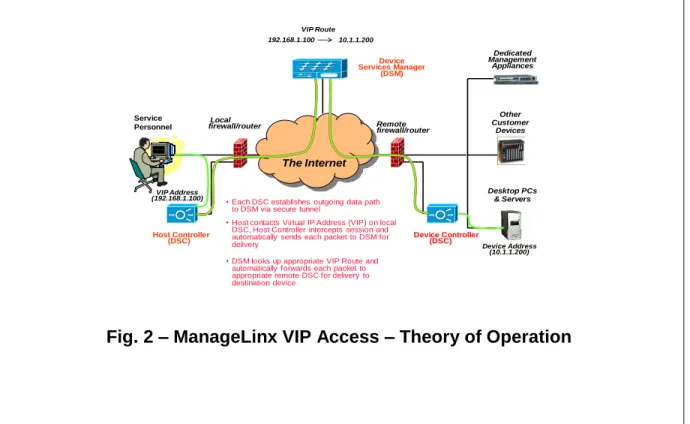
To enable network traffic, each DSC establishes a single encrypted outbound connection to the DSM from behind its firewall. Once this secure connection is established, it can be used as a tunnel to forward multiple simultaneous sessions in either direction, enabling bidirectional communications between the Host Controller and Device Controller
components of individual DSCs anywhere on the Internet (see Fig. 2).
Other Customer Devices Desktop PCs & Servers Remote firewall/router Service
Personnel firewall/routerLocal
• Each DSC establishes outgoing data path to DSM via secure tunnel
• Host contacts Virtual IP Address (VIP) on local DSC, Host Controller intercepts session and automatically sends each packet to DSM for delivery
• DSM looks up appropriate VIP Route and automatically forwards each packet to appropriate remote DSC for delivery to destination device
Dedicated Management Appliances VIP Address (192.168.1.100) Device Address (10.1.1.200) Device Controller (DSC) Host Controller (DSC) Device Services Manager (DSM) 192.168.1.100 10.1.1.200 VIP Route The Internet
Lantronix, 2008 Page 11
Operational Details
To enable the system to pass TCP/IP sessions, the ManageLinx administrator first assigns a set of VIP Addresses to each DSC that will act as a Host Controller. These addresses must be valid on the local LAN, but can be private, non-routable addresses. The ManageLinx administrator then maps a set of VIP Routes. These routes are from individual Host Controller/VIP Address pairs to individual device addresses, and must be reachable by a Device Controller on participating DSCs. Once these routes are set up, the VIP Access system can automatically receive incoming connections on a VIP Address and forward session data to the DSM for routing and delivery to the target device.
When a host wishes to establish a conventional TCP/IP session with a remote device using the ManageLinx VIP Access system, it does so by establishing a normal TCP/IP session to a local VIP Address. To do this, it must first carry out the normal SYN –
SYNACK - ACK exchange used to establish a TCP connection. This exchange is actually carried out between the originating device and the Host Controller module residing on the local DSC. Once this exchange is complete, the Host Controller begins forwarding data to the DSM. This data stream includes the information needed to properly route the packet, including the VIP Address used to establish the connection.
When the DSM receives the first packet for a new TCP session, it looks up the VIP Address and corresponding source DSC in its routing table to determine where to send the data stream. The target address and DSC are adjusted and the stream is then forwarded to the appropriate destination DSC.
Before the destination DSC can then deliver packets to the target device, it must first carry out its own SYN-SYNACK-ACK exchange with that device. Once accomplished, the Device Controller residing on the DSC begins forwarding data to the target device.
Because the target device sees the destination DSC as the source of the TCP session, all return data is automatically sent to the Device Controller’s IP address. The Device
Controller then forwards the data back to the parent DSM for eventual return to the source device.
In operation, the ManageLinx system is fully automated and completely transparent to both the originating and receiving devices.
Using ManageLinx to Support
Host-Based Authentication & Access Control
As discussed in Part I, a major goal of Host-based Security and Access Control is to provide mechanisms to enforce security policies down to the level of individual users on specific systems. Many corporate network installations do this by creating corporate Directory Services and then using these to drive enforcement of appropriate access control policies. It is very easy to deploy and operate ManageLinx to take advantage of an existing security infrastructure such as this.
One way to do this is by installing Host Controller devices onto an authorized set of one or more local LANs protected by a traditional VPN infrastructure. The VPN installation may be configured to accept inbound connections onto such a LAN only from an authorized list of support personnel and/or IP addresses, which in turn will ensure that users of the system have been authenticated before being granted access to any remote devices. You can even correlate VPN access logs and ManageLinx VIP Access logs to audit access by individual users of the system.
You can also elect to limit outbound access from LANs that provide ManageLinx access to only those IP addresses that are used by individual DSMs, plus whatever other sites your staff needs to perform their work. This may be useful in situations where you need to grant some limited IP connectivity, but because of liability or other concerns, do not wish to grant individual users full Internet access.
Ensuring access to local LDAP or Active Directory servers from remote equipment is another challenge when setting up Host-Based Authentication at remote sites. To prevent unsolicited access of your servers you may not wish to expose such systems to the public Internet. However, you would then have administrative challenges in managing your local firewalls to allow inbound access from multiple remote locations as needed from multiple sites.
If you are operating a ManageLinx VIP Access solution you can address this issue easily by configuring your remote DSCs to act as Host Controllers and mapping a VIP route from each back to directory servers accessible from your local ManageLinx access LAN. Your remote equipment can then use your directory servers to control access to all your remote devices.
Lantronix, 2008 Page 13
Using ManageLinx to Support
Network-Based Access Control
A major requirement for any remote access solution is to ensure that it provides secure access to remote devices without undermining Network-based firewall or VPN access controls. The architecture and implementation of ManageLinx takes particular care in this area.
Traditional firewalls or VPN systems typically open an entire subnet once access is granted to an incoming device. In such cases, a single infected host on the source LAN may access (and potentially infect) every device on the target LAN.
ManageLinx VIP Access addresses this issue by having the administrator grant or revoke access to individual network devices, rather than an entire LAN. In practice, this means that if a VIP Route is not set up for a specific destination device, it simply is not visible to any devices on the source LAN. This greatly increases security compared to traditional firewall or VPN installations.
Because a properly configured and operating ManageLinx system will never attempt to initiate or receive connections to or from unauthorized devices, there are several simple steps remote network administrators can use to enhance overall network security. Some techniques include:
- Because a DSC will only attempt to establish outbound network connections to known local devices and the publically accessible DSM, you may elect to
configure inter-VLAN firewalls or per-port Access Control Lists to limit outbound connections from an individual DSC’s switch port.
- Network administrators may elect to set up automated port scan or intrusion detection software to detect access attempts to any but specific permitted devices. If such access is detected, your detection software may automatically disable the corresponding switch port to protect the network.
Also note that the ManageLinx DSC component is extremely easy to set up and
administer. This greatly reduces the possibility of network misconfiguration, which in turn reduces the possibility of introducing unwanted security holes during deployment or routine maintenance. All configuration and management of a DSC is performed at the centrally managed and secure DSM, eliminating the possibility that attacks on a DSC management interface could compromise your installation or the guest network.
VDNs and VPNs
As highlighted in Part I, a VPN functions by automatically tunneling traffic from a host over the Internet and onto a target LAN. Because it maps an individual host onto a target LAN, a traditional VPN opens all devices on the target LAN to potential security attacks from a compromised guest host. Some care must therefore be taken when assigning hosts onto
an individual LAN and in setting up and maintaining inter-LAN firewalls in order to prevent compromised hosts from attacking other accessible devices.
The ManageLinx VIP Access solution addresses the problem of providing remote access in a fundamentally different way. Rather than mapping an individual host onto a single remote LAN, the ManageLinx system maps a set of remote devices, potentially on multiple remote LANs, to a set of local VIP addresses. To the user, such a collection of remote devices appears as a single set of local devices accessible directly on the local LAN.
Lantronix has coined the term Virtual Device Network (VDN) to refer to this new form of remote access and to distinguish its behavior from traditional VPNs. Some points to consider when comparing a VDN with a traditional VPN:
- Anyone with DSM administrative access privileges and the right hardware can set up a VDN
- In operation, you gain access to only the configured hosts on each remote LAN
- You need ZERO special software at either end to establish a VDN – simply
install the DSC, configure the needed VIPs and VIP Routes and you can start securely passing traffic
Because VIP Routes are used to establish access rights from a local host to a remote device, it is impossible for such a host to ever gain access to any other remote device on any of the remote LANs unless specific configuration steps are first taken by the
ManageLinx system administrator. This eliminates unwanted attacks directly from an infected host to non-participating devices, greatly reducing the possibility of unintended remote access or the possibility of accidental infection of a remote host.
Importantly, configuring a VIP route onto a remote network does not automatically allow hosts on that network to connect back to devices on the local network. If you wish to enable devices on the remote network to initiate return traffic, the corresponding return VIP address and VIP Route must first be configured on the remote DSC.
Lantronix, 2008 Page 15
ManageLinx Support for
Network Transport Security
ManageLinx enforces Network Transport Security by encrypting all network traffic that transits through the system between the parent DSM and the Host Controller and Device Controller modules. These connections, known as conduits, are capable of carrying multiple simultaneous tunneled connections between devices using a single TCP/IP session.
The ManageLinx VIP Access component uses OpenSSH v4.3/4.4 to implement conduits. OpenSSH supports numerous encryption algorithms including 3DES (also known as "Triple DES"), Blowfish, AES and Arcfour. Version 1.0 of VIP Access defaults to 128-bit AES for all conduit encryption with a 2048-bit RSA public-key for authentication.
Although the system passes traffic on port 22 (or other restricted network ports), it is still possible to restrict local network traffic on a per-port basis. This is done using port-level Access Control Lists on the switch port assigned to the DSC if local security policies on the guest network require it. Though all traffic to and from the DSM is encrypted while in transit over the Internet, traffic between the end point devices and the DSCs pass in the clear, allowing sites that need to intercept and examine outgoing network traffic to do so.
Secure Credential Exchange in ManageLinx
A key requirement of any Network Transport Security implementation is to provide a secure mechanism for key exchange—one that doesn’t compromise system integrity by passing private security credentials to a destination device ―in the clear‖.. To meet this requirement, the DSC utilizes a special patent-pending ―zero configuration‖ module capable of providing simple, secure and fully automated key exchange and management for the DSC. In addition to providing a secure key exchange mechanism, this module also provides an automated configuration capability that eliminates early field failures due to operator error or technician misconfiguration.
In operation, specialized configuration files (called ―manifest files‖) are created by the DSM to carry the required information. These files are encrypted and digitally signed using GPG encryption to ensure privacy during transport and delivery to the appropriate DSC.
Because each manifest file is signed using a secure encryption mechanism, the
ManageLinx administrator may copy such files to a remote site using the public Internet via remote file transfer or email. When a technician at the remote site receives the file, he or she simply copies the file onto an appropriate USB flash drive for subsequent
installation into the DSC.
When a USB flash drive containing a properly encrypted and signed manifest file is inserted into a DSC, its contents are automatically decrypted and verified using the system’s internal GPG key. If the manifest passes system verification checks, the contents are applied to the system. Manifest files may be used to provide system
configuration information, including the security credentials needed to establish a conduit, automated firmware updates or to provide system debugging capabilities.
Once a manifest file is read, it is digitally modified so that it cannot be reused on another DSC, avoiding the possibility of misuse or misconfiguration when setting up multiple DSCs.
Security Considerations When
Supporting Embedded Systems
Because ManageLinx VIP Access operates at the network layer and communication between VIP address and the endpoint device is fully automated, it is easy to integrate embedded devices into the system. Because there are no dedicated clients or specialized software needed to access the system, implementing network access is very
straightforward. Embedded systems programmers utilize traditional TCP/IP programming techniques – simply open a connection to the VIP address and the system will
automatically establish and manage the connection to the remote device.
Although not always seen as a security consideration, complex setup and configuration requirements pose a significant possibility of error. This, in turn, increases the possibility of additional exposure to security breaches or unauthorized access.
The DSC uses a special hardened Linux kernel with added software modules to provide VIP Access functionality. Steps taken to harden this system include removing or disabling of all unnecessary software components and blocking all unneeded network ports.
Because all configuration and maintenance are initiated either through the USB Flash interface or directly over the secure conduit from the DSM, there is no need for an administrative GUI or CLI interface on the DSC. In addition to simplifying administration, this also increases security as attackers cannot use such an interface to attempt to gain control of the DSC.
Finally, the DSC contains no moving parts, such as a fan or hard drive, which greatly increases reliability.
Lantronix, 2008 Page 17
Some Final Considerations
DSCs Are Both Multitasking and Bidirectional
A single DSC can pass traffic for multiple simultaneous TCP/IP sessions. In addition, a single DSC can function simultaneously as both a Host Controller and a Device
Controller. This means that in addition to using the system to gain remote access to specific equipment, you can also configure a DSC on a remote network to pass network traffic from your remote devices back to your centrally administered systems. This can greatly simplify administration of remote devices in large deployments. Because
ManageLinx VDNs pass traffic only for configured devices, you are assured that neither your network nor your customer’s is open to unwanted access.
Comparing ManageLinx with Traditional NAT Routers
To a device originating network traffic, the VIP address is seen as the destination
endpoint address. To the destination device, the address of the Device Controller DSC is the source endpoint address. This structure is similar in concept to the function of a NAT router, which is often used to map traffic between a single public IP address on the WAN side of the router and individual address/port combinations on a local LAN.
In both cases, the source and destination devices do not see the same IP address for each end point in a session. This can cause operational issues for certain older network protocols, such as FTP, which may send network endpoint addresses to the other end of a connection via an in-band control mechanism. If a device attempts to use this
information to establish another connection back to the sending device, the connection attempt will mostly likely fail. To avoid such problems, it is best to use ―NAT-friendly‖ protocols or avoid using in-band control mechanisms with older protocols. If you take such precautions, ManageLinx VIP Access is able to work in any deployment where you would have used a traditional NAT router.
Overcoming Limitations of NAT to Enable Bidirectional Traffic
Conventional NAT routers have enabled the continued expansion of the Internet in the face of a growing shortage of routable addresses. Because they automate the mapping of local addresses to a single public, routable address, originating a session to a device outside the local LAN is quite easy. Provided the target address is itself routable and visible on the WAN side of the router, there should be no issues.
NAT routers do have one significant drawback. Because they map connections to and from a single public address using port numbers to identify individual sessions, it is difficult to originate a session from outside the local LAN into a local, private address. Although not generally seen as an effective security mechanism, it is a significant problem if you wish to originate traffic between two NAT networks.
Because any DSC is able to function as both a Host Controller and a Device Controller, it is easy to overcome this issue. A ManageLinx administrator may choose to set up
individual VIP addresses and VIP routes in both directions between two devices. Once this is done, either device may easily originate a TCP/IP session with its peer merely by opening a connection to the corresponding VIP address. This is true even if both devices are using private, non-routable addresses. In fact, with ManageLinx it is possible for both devices to be using the same physical private IP address.
Conclusion
The ManageLinx VIP Access system is a secure, easy-to-use and cost-effective tool for providing remote access to devices behind firewalls. It is particularly well suited for use with embedded systems, or in deployment scenarios where the operator does not have administrator privileges on remote systems. Particular care has been taken to ensure the system addresses known issues with Host-Based Authentication & both Host and
Network Layer Access Control. It addresses known issues with traditional VPN solutions and uses state of the art encryption technology to provide an effective key management infrastructure and enhanced Network Layer Access Control. Because it requires no dedicated clients and has greatly simplified ease of deployment, it is particularly effective in providing remote access capability for embedded systems, or for any system where skilled network expertise is not available for deployment or maintenance.
Additional Information about the ManageLinx VIP Access solution is available at: