Session 3220
“Virtual Lab”: Bring the Hands-on Activity to Online Courses
Biwu Yang
East Carolina University
Abstract
A “Virtual Lab” has been implemented for several online courses with subject around Computer Networking Technology. The objective of this virtual lab is to provide hands-on lab activities to enhance online courses. The virtual lab consists of several computers located on campus.
Through remote control software, students can logon to these computers and perform all levels of computer network setup procedures. Several other Internet communication tools are used to provide interaction between the instructor and students. The virtual lab has been in use since the spring semester of 1998. Positive feedback from students shows that the virtual lab is an
important integrated component for these courses and the lab activities greatly enhanced their learning experience.
I. Introduction
In recent years, network based online delivery approach has been applied to many disciplines. The online delivery approach was developed to respond to the demand of distance learning. In the model of distance learning, students are far away from a campus and it is very hard for them to take on-campus courses in traditional classroom and laboratory settings. Online course delivery allows the learning to take place anytime and any place, thus makes it possible for students to obtain education without the constraints of distance or working schedule.
There are generally two methodologies used in online course delivery, namely, asynchronous and synchronous methods. With the asynchronous method, an instructor does not interact with students directly (i.e., not in a real-time mode). There are several Internet based tools available for asynchronous communication, such as email, web, FTP, mailing list, newsgroup, etc. With the synchronous method, an instructor and students interact directly in real-time mode. There are also several Internet based tools available for synchronous communication, such as IRC (Internet Relay Chat), audio/video conferencing, and whiteboard. Both methods might be used in an online course based on the need of materials to be delivered 1-2. For example, web pages and FTP site can be used to hold general course materials. Mail lists and newsgroup can be used for discussion in the class. IRC and audio/video conferencing can be used to engage real-time discussion and hold the Question/Answer session for students.
The online delivery approach makes it possible for students, who live far away from a campus and can not afford to attend the school due to their work schedule and family responsibility, to continue their education. Distance learning has several advantages compared with traditional classroom setting, particularly:
• Flexible in time
P
• Flexible in physical presence requirement.
In a typical online course setting, the materials are available 24 hours and 7 days a week. Therefore, students will be able to review the materials many times at their convenient time. While it provides opportunities for distance learning, online course delivery approach has limitations. Two major concerns are the interaction between an instructor and students and how to provide hands-on activity experiences to students. In the distance learning, it is hard for students to participate for hands-on lab activities. Although lab activities are not required for every course, for some courses, lab activities would greatly enhance students’ understanding and retaining the knowledge they have learned. With lab activities, they can practice the application of their knowledge to a situation that is close to the real world in some extent.
There have been several efforts to develop web based “virtual lab” to enhance the learning experiences 2-4. These lab activities use simulation approach to let students apply the knowledge they learned to problems and from practice students understand the theories and their
applications.
This paper describes a “Virtual Lab” that has been implemented to support online course in the area of computer networking technology. While the theory and concepts of computer
networking are delivered with asynchronous tools such as web, FTP, mailing list, and newsgroup, the online lab gives students the opportunity to practice what they have learned. This virtual lab provides the opportunity for students to practice in an environment close to the real world problems.
II. Need for Virtual Lab
In the curriculum of computer networking technology, lab based hands-on activities will benefit the learning experience because, typically, our students do not have the opportunity to get hands-on experience by themselves. To mimic a real world computer network situatihands-on, several
computers are needed to form a network and they serve as the client and server roles in the network. The exercises listed below are typically required for students to better understand and retain the knowledge:
• Setup client computer to be connected to network • Setup server computer to be connected to network • Setup username and access privilege to the server • Setup the resource sharing on the network
Although the theory behind these topics does not change much, the skill-based knowledge varies among different NOS packages as well as, in some times, among different version of the same NOS package. The hands-on experience will help students to understand the concept and practice what they learned on design and implementation of computer networks.
However, in most case, students do not have the opportunity to practice by themselves. Due to the nature of these exercises, multiple computers will be needed to form a network. In addition,
P
in order to make the experience close to the real word situation, exercise on both server computers and client computers are required. Thus, the exercises require substantial hardware equipment as well as frequent change of the settings for the equipment. Obviously, typical students can not afford to invest money to buy the necessary equipment just to practice. Students also have little chance to practice in their organization because they are production network and no one will allow someone to “play with” on the real network in fear of network crashes due to misconfiguration, which occurs commonly during the learning process.
Thus a lab setting is necessary to provide the opportunity for students to practice. In this lab, enough computers and other related hardware form a real network. Students will be able to apply the knowledge they learned to the real network in order to observe different results from various configurations.
III. Remote Access and Remote Control
The challenge in the distance learning is how to provide the lab activities to distance learning students, who are not able to attend the on campus lab. A remote accessible virtual lab is thus needed. The required functions of this lab include:
• allow students to connect remotely
• once connected, students can take control of the host computer and change the configuration • the change of configuration should be observed by the students from remote access
• ideally, the remote control operation is sufficient so that there is no need for someone on campus to intervene in order to see the results every time the configuration is changed. There is distinct difference between “remote access” and “remote control” in terms of the functionality. In “remote access”, a user can access the resources such as file folders. The resources are configured with proper privilege for such access. However, in this setting, the remote user does not control the operation of the computer. On the other hand, “remote control” allows a remote user to take the control of the computer operation. In other words, the remote computer becomes an extension of the host computer. Remote access has been used in real world to monitor production process5. In our virtual lab, however, students need to take control of the host computer operation to change the network configuration. Therefore the “remote control” function is needed.
IV. Implementation of Virtual Lab A. Hardware Setup
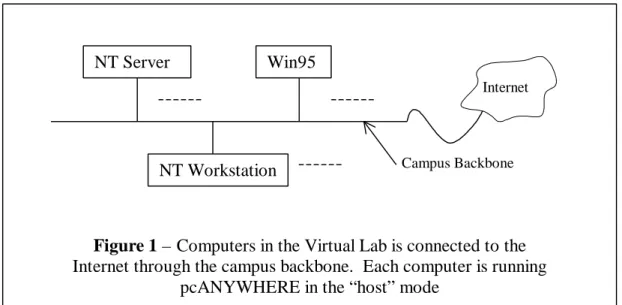
Just like any other network-based operation, there are two sides, host and client. In the virtual lab, computers on campus are “host” computers and computers students used to connect to the host computers remotely are “client” computers. As shown in Figure 1, there are several computers on campus together with other necessary hardware to make the working network. The OS (operating system) are the Microsoft Windows family, including Windows 95, Windows NT Workstation, and Windows NT Server. Each OS is installed on multiple computers so the lab activities can be organized around various network environments. For example, multiple
P
Windows 95 computers can form a peer-to-peer environment while a client/server environment can be configured with Windows NT Server. Windows NT workstation can either join the peer-to-peer environment or serve as a client to the Client/Server environment.
B. Remote Control Software
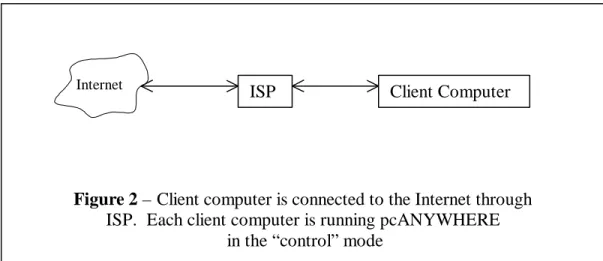
Students use their computer to connect to the host computers on campus and take the control of the host computer operation with remote control software. The remote control software selected is pcANYWHERE (from Symantec, Inc.) due to its rich feature and ease of use. A recent article on PC magazine reported a lab test and provided detail information on remote control software features and performance6. The software installed on the campus host computers is running as a “host” mode and is waiting for the outside connection. Student computers run the software as a “control mode” (client to the host) to connect to and take control of the host computer. To provide the flexibility and to reduce the connection cost, the connection type selected is network TCP/IP; thus students can make the connection once they are connected to a local ISP (Internet Service Provider) of their choice, as shown in Figure 2. Since most ISP have a monthly flat-fee-charging plan, the duration of the connection will not add extra charges. Students are required to purchase the software.
C. Manage the Virtual Lab
Due to the nature of the activities, scheduling must be carefully planned before the virtual lab is open to students. This is because the lab exercise will change the configuration of the host computers. Concurrent access to the network, even through different host computers, could lead to the misbehavior of the whole network. Therefore, the lab activities are confined in two-hour blocks. In each time block, there is only one student allowed to do the practice. A schedule was posted on the web page and students are required to select the time block that they would like to use in advance. Since the virtual lab are open 24 hours and 7 days a week, it turned out that every student was able to find the time block they could use. If a student can not finish the
Internet
NT Server Win95
NT Workstation Campus Backbone
Figure 1 – Computers in the Virtual Lab is connected to the Internet through the campus backbone. Each computer is running
pcANYWHERE in the “host” mode
P
exercise within the time block, additional time blocks that are not assigned can be used to repeat the exercise.
D. Interaction between the Instructor and Students and Among Peers
While an online virtual lab can provide 24 hours access, a major drawback is the possible lack of the communication and interaction between the instructor and the students during the lab period. It is not much the problem of lab supervision but rather help students when they have a problem in a lab exercise. In order to enhance the communication, other Internet tools are employed. For example, IRC (Internet Relay Chat) and whiteboard can be used to serve as the communication channel. There is a report of using whiteboard to hold on-line help session between TA and students3. The whiteboard technology was used because it can display the sketch and provide collaboration between a TA and a student in order to answer the questions raised by a student. In our virtual lab, however, questions can be described with words, thus IRC was chosen as the communication tool. Because IRC is text only, it requires much lower bandwidth compared with the whiteboard technology that transmits information as an image.
In order to establish a good interaction, the following plan was implemented:
• The instructor posts the schedule on the web with 2-hour block setting. The schedule is first come first serve based.
• Students sign up a time block of their choice according to the availability.
• A time is worked out that is convenient to both the instructor and an individual student to hold a “virtual office hour”. During the virtual office hour, the instructor will be available online to answer questions raised by the student. The tool used is IRC. The instructor can conduct the IRC session either from the office or right in the lab. One advantage of engaging in IRC in the lab is that the instructor will be able to observe the detail setup operation
performed by the student. V. Virtual Lab Activities
Internet ISP Client Computer
Figure 2 – Client computer is connected to the Internet through ISP. Each client computer is running pcANYWHERE
in the “control” mode
P
The lab activities are assigned and carried out during the later half of each semester. In the first half of the course, theory, concepts, and techniques were discussed. Most of time, these topics are delivered with asynchronous tools, such as web, FTP, and mailing list. Discussion was also carried out with combination of mailing list (push technology) and a newsgroup (pull
technology). Lab activities were assigned according to the progress of the topics. The following tables list several lab activities.
LAB 1: Setup Peer-to-Peer Network with Windows 95 Objective:
• learn how to setup a simple peer-to-peer network with built-in NOS functionality provided by Windows 95 and Windows NT
Workstation
• practice simple access control on shared resources
Procedures:
• access several host computers
• for each computer, enable the file and printer sharing option
• make sure each computer has the unique computer name • create several folders and set the folders to be shared • assign different access privilege for these folder, there are
three choices, open, password protected, and based on password
• connect to different host computers and check the access privilege settings
LAB 2: Setup Client/Server Network Environment Objective:
• learn how to setup a client/server network environment • distinguish between peer-to-peer and client/server environment Procedures:
• connect to the NT Server computer and get familiar with the administrative tools
• understand the PDC and BDC setup
• create user accounts and user groups for the Domain • create multiple folders to be shared on the network
• setup the access control of the folders based on the user groups and/or user accounts
• connect to Windows 95 and NT Workstation computers • change the network property settings so that these computers
can logon to the NT Domain
• make these computers login to the NT Domain and check the access control level settings
LAB 3: Setup Applications on the Network Objective:
• learn how to setup applications on the client/server network environment
Procedures:
• connect to a “host” computer with either Windows 95 or NT Workstation and login to the NT Domain with a user account of administrator’s privilege
• install an application on a shared folder on an NT Server • connect to other computers and install the application from the
server
• run the application and check the access control
P
The above three lab activities are designed to study typical LAN environment. In a next level course Internet services and applications are covered. Similarly, lab activities were assigned according to the progress of topics.
LAB 4: Setup Web Server Objective:
• learn how to install a web server • learn how to
manage the web services
Procedures:
• connect to the NT Server computer and logon with a user account of administrator’s privilege
• check the disk settings on the computer and plan the directory tree to be used with the web server
• install the web server and make sure it runs properly
• use the Manage Console to manage the web service, such as root directory security setting
• plan and implement access control and security for the whole server
LAB 5: Setup FTP Server Objective:
• in this activity, a separate FTP server will be installed • learn the fine access
control provided by this FTP server
Procedures:
• connect to the NT Server computer
• plan the directory tree to be used for the FTP service • install the FTP server and make sure it works properly • use the Control Manager to setup users and groups and the
access control based on users and groups
• FTP to the server and check the access control setting LAB 6: Setup Other Servers
Objective:
• learn how to install various other server products
• learn how to
manage these server products
Procedures:
• connect to the NT Server computer
• plan the directory tree to be used for various server products • install IRC server, NNTP (for newsgroup) server, and LADP
server (for NetMeeting)
• configure and set these services, for example, create several newsgroups on the server
• use client software to access these services
In each lab session, students need to use the remote control software (pcANYWHERE in this case) to access various host computers in the virtual lab. During the lab sessions, network property of each computer could be changed. Some of these changes require the reboot of the host computers. Students will connect to the host computer several minutes later to make sure the configuration is set correctly.
VI. Conclusion
The virtual lab has been in use since the spring semester 1998. Two courses have been offered with the virtual lab activities integrated, one course with the topics on LAN and another course
P
with the topics on WAN/Internet. These two courses were offered as distance learning courses. Students from several states in USA, as well as several on campus students, completed these courses. All those off campus students have full time job that requires them to travel from time to time. Several of them are in active duty with various military services that require them to travel to various bases overseas. With the virtual lab, they can complete the hands-on activities from anywhere as long as they can access the Internet. For example, a student completed the lab activities from Korea. He reported little problem in regard to remote control session with 28k-modem connection.
The feedback from students indicates that hands-on activities help them understand the concept and theory of computer networking. The 24-hour/7-day open lab gave them opportunity to practice in multiple sessions as needed. They reported that such hands-on experience is hard for them to obtain themselves or from the organization they work for. As for the connection, we have learned some lessons as well. One particular lesson is that the time period around 7pm to 9pm is a bad choice. The School of Education operates an ISP service under a NSF grant. The service provides local schoolteachers with the Internet connection. Therefore, around 7pm to 9pm, we would see a surge of Internet connection activities, which makes the whole campus slow down in Internet access. This situation would get improved as ECU is seeking a NSF grant to achieve T3 connection to the Internet.
VII. Future Work
While the virtual lab provides opportunity for computer network setup exercises, there are several areas that need improvement. In order to make the remote connection, the host computers must be functional. Therefore, the OS and the basic network (protocol and IP address) have been installed and configured. Thus, students have not got the chance to practice the basic installation of the OS and configure the basic network property for the host computer. Appropriate simulation software might be used to lead students through the process. In future courses, more activities should also be introduced to allow students to see how the concepts and techniques are implemented in the real world. For example, the implementation of DNS and DHCP services could be included. Most of these technologies are built upon a functional OS, thus the virtual lab with OS preinstalled will be ready to deploy them.
Currently, the virtual lab is used in the M.S. degree, the Digital Communication concentration curriculum, which is based on the online delivery approach. Similar undergraduate level curriculum is under development. We believe that this virtual lab will benefit on campus learning experience as well due to its 24-hours/7-days availability.
Bibliography
1. Bourne, John R., et al, “A Model for On-Line Learning Networks in Engineering Education”, Journal of Engineering Education, Vol. 85, No. 3, 1996, pp.253-262.
2. Bourne, John R., “Net-Learning Strategies for On-Campus and Off-Campus Network-enabled Learning”, Journal of Asynchronous Learning Networks, Vol. 2, No. 2, 1998, pp. 70-88.
3. Graham, Charles R. and Timothy N. Trick, “Java Applets Enhance Learning in a Freshman ECE Course”, Journal of Engineering Education, Vol. 87, No. 4, 1998, pp. 391-397.
4. “Virtual Immunology Lab: ELISA Assay”, http://www.hhmi.org/grants/lectures/1996/vlab/
P
5. Fulcher, Jim, “Seeing is Believing”, Manufacturing Systems, Vol. 16, No. 10, 1998, pp. 58-63
6. Rigney, Steve, et al, “You Can Get There from Here”, PC Magazine, Vol. 17, No. 15, 1998, pp. 178-205.
BIWU YANG
Biwu Yang is an Associate Professor in the Department of Industrial Technology at East Carolina University. Dr. Yang teaches courses and is involved in researches in Computer Aided Design, Data Communication, and Computer Networking. Dr. Yang received a B.E. degree in Precision Mechanical Engineering from the Shanghai University of Science and Technology in 1982 and a Ph.D. from the Department of Mechanical Engineering at University of Rhode Island in 1991.
P