Reference Architecture
Abstract
This white paper explains how to configure a collaborative video editing environment using EMC® Isilon® OneFS 7 and
FLAVOURsys Strawberry. Strawberry is an open architecture MySQL-based production media asset management solution that allows Adobe® Premiere Pro®, Adobe After Effects®, Apple® Final Cut Pro®, and Avid® video editing applications to share media files and projects via an innovative method of linking virtual files to managed assets and project metadata. February 2013
COLLABORATIVE EDITING USING EMC ISILON
AND FLAVOURSYS STRAWBERRY
EMC Isilon OneFS 7 and FLAVOURsys Strawberry V3.4
Share projects and media files from Avid Media Composer,
Adobe Premier and Final Cut Pro
Scale to over 20 PB of capacity in a single file system
organized by Strawberry
Simplified data management, robust data protection and
reduced TCO
Copyright © 2013 EMC Corporation. All Rights Reserved. EMC believes the information in this publication is accurate as of its publication date. The information is subject to change without notice.
The information in this publication is provided “as is.” EMC Corporation makes no representations or warranties of any kind with respect to the information in this publication, and
specifically disclaims implied warranties of merchantability or fitness for a particular purpose.
Use, copying, and distribution of any EMC software described in this publication requires an applicable software license.
For the most up-to-date listing of EMC product names, see EMC Corporation Trademarks on EMC.com.
EMC2, EMC, the EMC logo, Isilon, OneFS, SmartConnect, SmartPools, and SyncIQ are registered trademarks or
trademarks of EMC Corporation in the United States and other countries.
VMware is a registered trademark or trademark of VMware, Inc. in the United States and/or other jurisdictions. All other
trademarks used herein are the property of their respective owners.
Table of Contents
Reference architecture overview ... 4
Document purpose and audience ... 4
Isilon Scale-out NAS for media and entertainment applications ... 4
Introduction to FLAVOURsys Strawberry ... 5
The infrastructure challenge for media and entertainment ... 5
Solution purpose... 5
The technology solution ... 6
The solution benefits ... 6
Solution architecture ... 6
EMC Isilon cluster configuration ... 6
Strawberry configuration ... 7
EMC Isilon network configuration ... 8
Performance tuning ... 8
EMC Isilon SmartConnect zone configuration ... 10
Solution configuration ... 10
Strawberry folders on OneFS ... 10
Default NFS export ... 11
Strawberry folder structure... 12
Strawberry users ... 13 Client shares ... 14 SMB shares... 14 NFS share... 15 Conclusion ... 16 References ... 17 Appendix A... 18
Reference architecture overview
Document purpose and audience
This white paper describes a reference architecture for configuring a collaborative video editing environment using EMC® Isilon® OneFS 7 and FLAVOURsys Strawberry. Strawberry is a storage-agnostic software solution that allows users of video editing systems from Adobe®, Apple®, and Avid Technology® to collaboratively edit media
files, metadata, and project files stored on EMC Isilon scale-out Network Attached Storage (NAS). Strawberry provides post-production facilities using EMC Isilon scale-out NAS with all the benefits of project sharing, project management , and team management – all combined in one easy to use tool.
This Reference Architecture document is intended for media and entertainment professionals familiar with nonlinear editing solutions from Adobe, Apple, and Avid. Readers should have a basic understanding of network and server administration techniques. Readers should also have some familiarity with the EMC Isilon X-Series hardware and the EMC Isilon OneFS operation system. For more information, please see the EMC Isilon X-Series Product Brochure and EMC Isilon OneFS Operating System White Paper.
Isilon Scale-out NAS for media and entertainment applications
EMC® Isilon® scale-out NAS has always set the standard for addressing thechallenges of managing large, rapidly growing file-based and unstructured data sets. Isilon is an ideal storage platform for media and entertainment environments that require a storage infrastructure that is highly scalable in capacity and performance. EMC Isilon scale-out storage provides unimaginable room for media storage
needs―scaling from 18 terabytes to over 20 petabytes of capacity per cluster in a single file system and volume. EMC Isilon is a powerful yet simple scale-out NAS solution for organizations that want to invest in managing their data, not their storage. Isilon storage systems are simple to install, manage, and scale to virtually any size. Every Isilon solution can seamlessly scale on the fly, enabling you to
independently expand capacity or performance within minutes. And, unlike traditional NAS storage, our solutions stay simple no matter how much storage is added. To support demanding, large-scale content workloads for media applications, the Isilon OneFS® operating system delivers up to 100 gigabytes per second of system throughput at capacities up to 20 petabytes. EMC Isilon is the world's fastest NAS platform with the world-record performance of 1.6 million SPECsfs2008 CIFS operations per second.
To help organizations minimize costs, Isilon delivers over 80 percent utilization with a single pool of shared storage. Our industry-leading storage efficiency, combined with our simple, easy-to-manage approach, helps reduce capital expenditures as well as ongoing operating costs. You can further optimize your production workflow with EMC Isilon SmartPools™ software. SmartPools provides automated storage tiering that continually optimizes your Isilon storage environment for performance and economy using the EMC Isilon S, X, and NL family storage nodes. You can easily set policies to automatically move inactive content to more cost-effective storage, streamlining workflows for your most current data while remaining completely transparent to users and applications.
To safeguard media asset data and deliver the high availability required, Isilon is highly resilient and provides robust data protection including data backup and provisions for disaster recovery. EMC Isilon SyncIQ® software allows local and remote data replication, while providing push-button failover and failback simplicity, which will help you to increase the availability of your content.
Introduction to FLAVOURsys Strawberry
Strawberry functions as a layer on top of NAS or SAN storage, providing a storage-agnostic collaboration and management tool for Avid, Adobe and Final Cut Pro editing projects. It provides all the benefits of state-of-the-art project sharing and project management by giving users the choice of how to build the hardware infrastructure around it.
Strawberry ensures full cross-platform and multi-application compatibility. The
solution closes the gap between storage and editing applications to bring customers a truly mature post-production workflow that is unique in its usability and scalability.
The infrastructure challenge for media and entertainment
Professional video editors are looking for new collaborative editing solutions for tools like Avid Media Composer and Adobe Premier, following the disruptive changes driven by Apple Final Cut Pro (FCP) and other product-related evolutions in post-production workflows. Strawberry provides fast and secure project sharing for Avid, Adobe, and Apple FCP editing projects. Strawberry’s key functions, based on the workflow of editors everywhere, make searching, finding, sharing, and collaborating easy and intuitive.
Editors working with Avid Media Composer and Interplay have typically relied on Avid proprietary storage for project sharing and project management. Avid Technology sells a bundled solution for collaborative video editing that includes Avid ISIS IP-based storage, production asset management, and the editing application. Media professionals frustrated with the cost, complexity, limited scalability, instability, and lack of integrated standard protocol support in Avid’s storage solution now have an alternative.
Isilon’s clustered storage – the standard for scale-out file storage solutions – allows clients to seamlessly expand a shared pool of storage to hold all editing projects, while Strawberry makes them shareable and manageable for an unlimited number of users.
Solution purpose
Strawberry provides intelligent project and media management for editors, which, when applied, is invisible to the user accessing the shared storage. Regardless of how many projects are connected to one another, there are no more endless lists of bins, folders, and sub-folders to track. The only files presented are the ones users actually need.
The seamless integration of Isilon scale-out NAS and FLAVOURsys editing workflow solutions eliminates the complexity of maintaining fast-growing, dynamic storage environments for video post-production, HD, and 2K real-time workflows.
When the project has been completed, Strawberry can archive it with the click of a button and send it directly to Isilon NL-series archival storage.
The technology solution
FLAVOURsys Strawberry provides a cutting-edge advantage for video editing and content creation workflows on EMC Isilon storage. The Linux underpinnings of the Strawberry solution complement the open standards of the EMC Isilon OneFS operating system perfectly. Using open protocols like SMB, NFS, and HTTP,
Strawberry integrates with EMC Isilon to provide a web-based project management and rights management for media stored on EMC Isilon storage.
FLAVOURsys enabled workflows allow media professionals to consolidate content creation workflows on to the same, reliable, enterprise-ready storage used in transcode, archive, and content distribution workflows. By consolidating media
storage into a single, scalable cluster, storage administration work is reduced. As the cluster grows, performance and capacity are linearly scaled to accommodate
additional clients, content, and new workflows.
The solution benefits
Since the release of Apple Final Cut Pro X, many professional video editors are considering adopting editing solutions like Avid Media Composer or Adobe Premiere Pro. One obstacle to adopting Media Composer is their perception that they will have to abandon investments in open storage platforms in favor of proprietary Avid ISIS storage. This extra storage investment in Avid ISIS means less money can be spent on purchasing Media Composer licenses. With FLAVOURsys’ Strawberry, editors can now share Avid bins and projects EMC Isilon NAS, just as they would with Media Composer on Avid ISIS storage, which eliminates the need to copy and re-index files in complex Avid workflows.
When working with low-cost IT storage, customers often have trouble with different operating systems and the creative applications that they utilize. EMC Isilon has the unique ability to scale a single file system on the fly. With linear scaling, performance is increased as capacity is added, while system productivity is increased as costs are reduced. In combination with Strawberry, this clustered storage solution is not only an alternative to being locked into a vendor’s proprietary storage, but a big step ahead in performance, availability, and scalability.
Solution architecture
EMC Isilon cluster configuration
The EMC Isilon cluster used in this reference architecture is running OneFS v7.0.1.1 and firmware version 8.2. The cluster contains 5 X200 nodes and 5 X200 nodes. Each X400 node contains 34 1TB SATA drives, 2 400GB SSD drives, and 24GB of RAM. Each X200 node contains 11 1TB SATA drives, 1 200GB SSD drive, and 24GB of RAM. The X200 nodes and X400 nodes form 2 distinct disk pools within a single OneFS file system. Using the EMC Isilon SmartPools feature, the cluster is configured with a disk pool that allows you to migrate the data contained in the Workspaces and UserWorkspaces directories from the X200 to X400 disk pools for performance testing
purposes. Alternately, a disk pool policy could be created to keep files ending with .mxf on the X200 disk pool and files ending with .mov on the higher performance X400 disk pool. Any metadata in the OneFS file system may be used to configure a disk pool policy. Since OneFS is a single file system that utilizes the SmartPools feature to determine which data exists in different disk pools, the disk pool policies may be configured to run at any time without the need for downtime or copying files between volumes. For more information on SmartPools see the EMC Isilon
SmartPools Data Sheet.
Figure 1. EMC Isilon SmartPools configuration
Strawberry configuration
The following software versions of the Strawberry application and client applications are used in this reference architecture:
Strawberry install version 3.4.9 CentOS x64 version 5.8
FLAVOURsys VirtualBox VM version emc_vm1.4
The Strawberry server appliance is pre-packaged with a base CentOS Linux
installation that hosts the Strawberry services and MySQL database. The Strawberry server also contains a virtual machine that runs the Microsoft Silverlight ®-based web UI and application interface.
SERIES SERIES SERIES SERIES SERIES 5 node X200 Disk Pool 5 node X400 Disk Pool
EMC Isilon network configuration
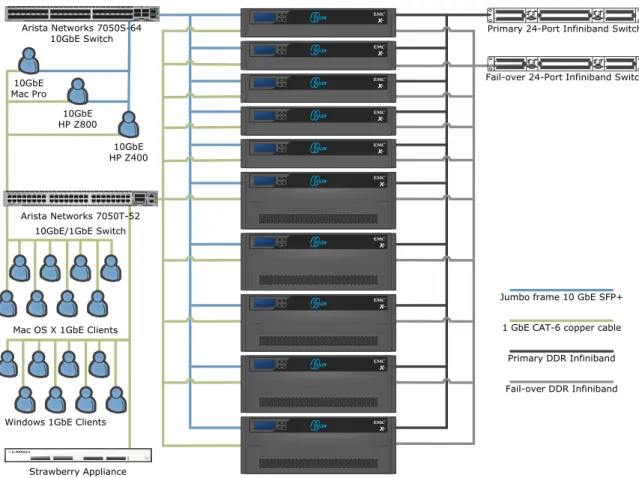
Each node in the cluster has a 1 Gigabit Ethernet connection to an Arista Networks® 7050T-52 10GbE/1GbE Ethernet switch and a 10 Gigabit connection to an Arista Networks 7050S-64 10GbE Ethernet switch. The 1 Gigabit Ethernet network runs at a standard 1500 MTU. The 1 Gigabit Ethernet network is the default network interface for all clients in the reference architecture. All Strawberry application transactions, authentication, and the default gateway utilize the 1 Gigabit Ethernet network.
Figure 2. Strawberry Network configuration
Performance tuning
The 10 Gigabit network in this reference architecture is an isolated network running jumbo frames (MTU 9000) for optimal performance in high bandwidth workflows such as uncompressed HD or 2K editing. The Arista switch does not require any
configuration in order to enable jumbo frames because the switch is configured to pass jumbo frames by default. When configuring a network that uses jumbo frames, it is important to make sure all clients on the jumbo frames subnet are configured to use the same MTU of 9000. Therefore, the jumbo frames subnet cannot be routed or in any way accessible by packets configured for a standard MTU of 1500. Clients using jumbo frames-enabled 10 Gigabit Ethernet networking must be dual-homed, with the 1 Gigabit Ethernet interface configured as the primary interface with a default gateway while the 10 Gigabit Ethernet interface is not configured with a gateway.
Primary 24-Port Infiniband Switch
Fail-over 24-Port Infiniband Switch Arista Networks 7050S-64 10GbE Switch SERIES SERIES SERIES SERIES SERIES
Mac OS X 1GbE Clients
Windows 1GbE Clients 10GbE
Mac Pro
Jumbo frame 10 GbE SFP+ 1 GbE CAT-6 copper cable Primary DDR Infiniband Fail-over DDR Infiniband 10GbE HP Z800 10GbE HP Z400 Arista Networks 7050T-52 10GbE/1GbE Switch Strawberry Appliance
The 2 primary Windows 7 workstations used in this reference architecture are the Hewlett Packard® Z800 and Z400. The integrated Broadcom® Gigabit Ethernet interface in the Z800 and Z400 has a rather small transmit and receive buffer compared to the Intel 10 Gigabit Ethernet card. The on-board Gigabit Ethernet interface is tuned to use the maximum number of receive packet descriptors by increasing all instances of the RxStdDescCnt registry key from the default value of 200 to 511. These simple performance modifications do not improve the overall throughput of SMB2 connectivity, but the latency for data buffering into the Adobe Mercury Playback Engine and Avid Media Playback engine is reduced. Video playback reliability may be degraded at extremely high data rates if the Ethernet transmit and receive buffers are not sized accordingly. Customers that do not have a 10 Gigabit Ethernet infrastructure are advised to use an Intel® Pro series server NIC in lieu of the on-board Broadcom Ethernet chipset. Please see Appendix A for the full Windows configuration details.
The 8 remaining Windows 7 clients in this reference architecture are Lenovo E31 workstations with single 3.4 Ghz Xeon E3-1245 V2 CPUs and 8GB of 1,600MHz ECC-UDIMM RAM each.
The Apple workstation in this reference architecture is a Mid 2010 Mac Pro with dual 2.66 GHz 6-Core Intel Xeon CPUs and 16GB of 1,333 MHz DDR2 RAM. The Apple workstation graphics card is an ATI Radeon HD 5770 in PCIe 2.0 x16 slot #1. The 8 remaining Mac OS X clients are Apple Mac Mini computers with quad core Intel i7 CPUS and 16GB of 1,600MHz DDR3 SDRAM each.
The Mac OS X client performance tuning in this workflow requires the creation of the file /etc/sysctl.conf. The sysctl.conf file contains the entries listed below:
net.inet.tcp.sendspace=2097152 net.inet.tcp.recvspace=2097152 net.inet.tcp.delayed_ack=2
The sendspace and recvspace sysctl settings ensure the maximum amount of data per window is used, limiting the TCP overhead and total number of network
transactions. To determine the best sendspace and recvspace buffer sizes for your network, use the following formula:
Total network bandwidth (in bytes/second) x round-trip delay (in seconds) = approximate send/receive buffer (in bytes, round to a multiple of 512)
The delayed_ack sysctl setting sets Mac OS X to use “compatibility mode” when determining when to use TCP delayed acknowledgment.
For additional information about Mac OS X performance tuning, please see the EMC Isilon support document Using Mac OS X Clients with Isilon OneFS – Resources for Integration and Configuration.
At this time, Strawberry only supports the SMB protocol for media shares when integrating Mac OS X clients with EMC Isilon storage. Mac OS X clients use a dedicated NFS export for project data. To learn more about integrating Strawberry Mac OS X clients with EMC Isilon, please contact Strawberry support at
EMC Isilon SmartConnect zone configuration
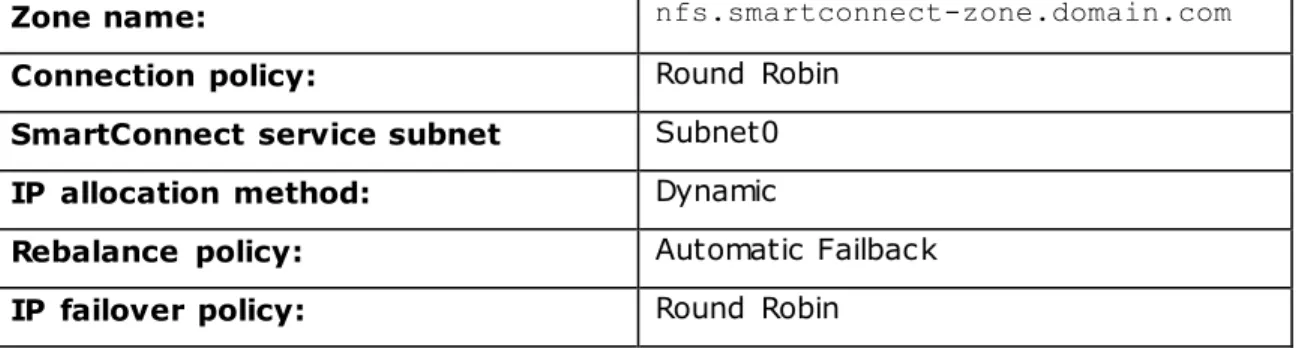
For the highest level of availability, a SmartConnect Advanc ed zone configured for dynamic IP pool addressing and NFS failover is used in the nfs.smartconnect-zone.domain.com zone. This option requires the creation of a 2nd SmartConnect zone, but ensures the Strawberry server appliance will not lose connectivity to the NFS export in the event of a network failure or EMC Isilon cluster “rolling upgrade” procedure. The dynamic IP pool is an additional range of IP addresses in the same default subnet as the static IP pool used for 1GbE SMB connectivity.
Zone name: nfs.smartconnect-zone.domain.com Connection policy: Round Robin
SmartConnect service subnet Subnet0
IP allocation method: Dynamic
Rebalance policy: Automatic Failback
IP failover policy: Round Robin
Table 1. 1GbE ext-1/2 interface NFS SmartConnect Zone Configuration
Zone name: smb.smartconnect-zone.domain.com Connection policy: Round Robin
SmartConnect service subnet Subnet0
IP allocation method: Static
Table 2. 1GbE ext-1/2 interface SMB SmartConnect Zone Configuration
Zone name:
10.smb.smartconnect-zone.domain.com
Connection policy: Round Robin
SmartConnect service subnet Subnet0 1
IP allocation method: Static
Table 3. 10gige-1/2 interface SMB SmartConnect Zone Configuration
Solution configuration
Strawberry folders on OneFS
Folder creation for the Strawberry solution is automated almost entirely by scripting. A base folder for the Strawberry managed file system must be created. The
Strawberry application will automate the creation of the remaining folder structures when it runs for the first time.
In this reference architecture, a folder called Strawberry is created via the EMC Isilon OneFS web user interface using the File System Management File System Explorer page. Under the directory/ifs/data/, the directory /ifs/data/Strawberry is created with the default UNIX permissions.
Directory name: Strawberry
User: root
Group: wheel
Permissions: Read Write Execute
User
Group
Other
Table 4. Default UNIX directory permissions
The Strawberry server appliance has a predetermined mount point that is used to manage project metadata and media files. Strawberry managed files are stored at the mount point /mh on the Strawberry server appliance. In this reference
architecture, the /mh directory on the Strawberry server appliance is the mount point for an EMC Isilon NFS export of the /ifs/data/Strawberry directory. Since the creation of Strawberry managed subfolders is an automated process, the creation of shares on EMC Isilon storage is a 2-part process. The /ifs/data/Strawberry directory is first configured as an NFS export and the remaining folders are created once /ifs/data/Strawberry is mounted as /mh on the Strawberry server appliance.
Default NFS export
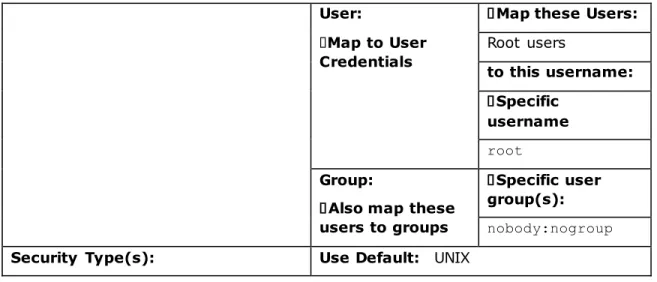
The /ifs/data/Strawberry directory is shared as an NFS export via the EMC Isilon web UI using the settings detailed in Table 2. This configuration disables the default “root squash” for a OneFS NFS export and restricts access to the NFS export to just the Strawberry server appliance. The Advanced NFS Export Settings in this reference architecture are left at the default setting
Description: Strawberry
Clients: IP address of physical Strawberry CentOS server
Directory Paths: /ifs/data/Strawberry
Permissions: Restrict access to read-only
Default: DISABLED
Mount access to sub-directories
Default: DISABLED
User:
Map to User Credentials
Map these Users:
Root users to this username: Specific username root Group:
Also map these users to groups
Specific user
group(s):
nobody:nogroup
Security Type(s): Use Default: UNIX
Table 5. NFS Export Settings
The /ifs/data/Strawberry NFS export is automatically mapped at startup to the /mh directory by entering the following line in the /etc/fstab file on the Strawberry server appliance:
nfs.smartconnect-zone.domain.com:/ifs/data/Strawberry /mh nfs defaults 0 Where nfs.smartconnect-zone.domain.com is the fully qualified domain name of the EMC Isilon SmartConnect zone name that is used in the Strawberry workflow. The /ifs/data/Strawberry NFS export is mapped to /mh on the Strawberry server with the following command from the CentOS command line interface:
mount /mh
Strawberry folder structure
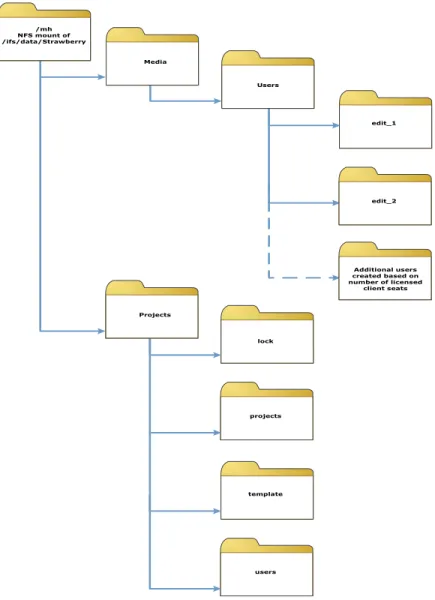
The folder structure in the /mh directory on the Strawberry server appliance is created automatically by when the Strawberry application run for the first time. The Strawberry application creates the folder structure shown in Figure 3.
Figure 3. Strawberry Directory Structure
Strawberry users
The Strawberry application does not currently support AD authentication or integration with an existing LDAP authentication source. In order to configure
authentication for shares that will be mapped to individual users, local users with the following settings must be created under Cluster Management>Access
Management>Users>System>LOCAL:System>Create: in the web UI.
User name: edit_1 Password: ***** User ID: Auto
Full Name: Strawberry edit_1 user Primary Group: No additional groups Home Directory: /ifs/home/edit_1 UNIX Shell: /sbin/nologin
Projects /mh NFS mount of /ifs/data/Strawberry lock projects Media Users edit_1 edit_2 Additional users created based on number of licensed client seats template users
Account: Enabled
Account Expiration Date: blank
Enable the account
This process must be duplicated for every user seat (edit_1, edit_2, etc.) licensed on the Strawberry appliance.
The User ID field should be allowed to auto populate. Take note of the automatically assigned User ID for every user. The User ID number is used to populate the UID file found at /ifs/data/Strawberry/projects/users/edit_1p/UID,
/ifs/data/Strawberry/projects/users/edit_2p/UID, etc.
Client shares
The Strawberry clients cannot connect to the /ifs/data/Strawberry/ NFS export due to the client restriction setting that allows only the Strawberry server appliance to mount it. The edit client edit_1, edit_2, etc., are configured to mount 2 shares from Isilon.
Windows prerequisite shares:
1. \\smb.smartconnect-zone.domain.com\projects mapped as drive letter such as P:
2. \\smb.smartconnect-zone.domain.com\media mapped as drive letter such as M: Mac OS X prerequisite shares2:
1.
nfs://nfs.smartconnect-zone.domain.com/ifs/data/Strawberry/projects/users/edit_x where edit_x is the strawberry user account edit_1, edit_2, etc.
2. smb://smb.smartconnect-zone.domain.com/media
Client shares are mapped though a management policy or by setting automount features on the Mac OS X and Windows user accounts. In Windows, the shares are automounted in this reference architecture by selecting “Reconnect at logon” in the Map Network Drive dialog. In Mac OS X, the shares are set to automount by dragging the shared drive icon to the “Login Items” section of the “Current User” in the Users and Groups Preference Pane.
The drive mappings are consistent for eac h user from project to project; however, a Strawberry server will dynamically modify the contents of the project share by creating hard links to protected project files in the edit_x project folder as the user selects one or more projects for read/write access from the server
SMB shares
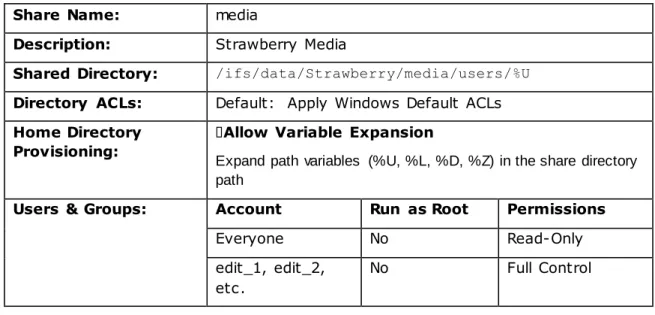
All clients connect to the path /ifs/data/Strawberry/media/users/%U to map an SMB network drive for media file ingest and playback. The %U variable sets the directory in the share to the subfolder name matching the authenticating user name. The user edit_1 will map the media SM B share with the path
/ifs/data/Strawberry/media/users/edit_1, the user edit_2 will map the media SMB share with the path /ifs/data/Strawberry/media/users/edit_2, and so on.
Share Name: media
Description: Strawberry Media
Shared Directory: /ifs/data/Strawberry/media/users/%U
Directory ACLs: Default: Apply Windows Default ACLs
Home Directory Provisioning:
Allow Variable Expansion
Expand path variables (%U, %L, %D, %Z) in the share directory path
Users & Groups: Account Run as Root Permissions
Everyone No Read-Only
edit_1, edit_2, etc.
No Full Control
Table 6. Strawberry Mac OS X & Windows Media SMB share settings.
Windows clients map an SMB share to the drive letter P: for project metadata. As with the media share, the %U path variable is used to map each user to their
corresponding directory in the folder /ifs/data/Strawberry/projects/users/. The %U path variable is followed by the suffix “p”, allowing the example user edit_2 to map the projects shares to the subfolder
/ifs/data/Strawberry/projects/users/edit_2p.
Share Name: projects
Description: Strawberry Project
Shared Directory: /ifs/data/Strawberry/projects/users/%Up
Directory ACLs: Default: Apply Windows Default ACLs
Home Directory Provisioning:
Allow Variable Expansion
Expand path variables (%U, %L, %D, %Z) in the share directory path
Users & Groups: Account Run as Root Permissions
Everyone No Read-Only
edit_1, edit_2, etc.
No Full Control
Table 7. Strawberry Windows Projects SMB share settings.
NFS share
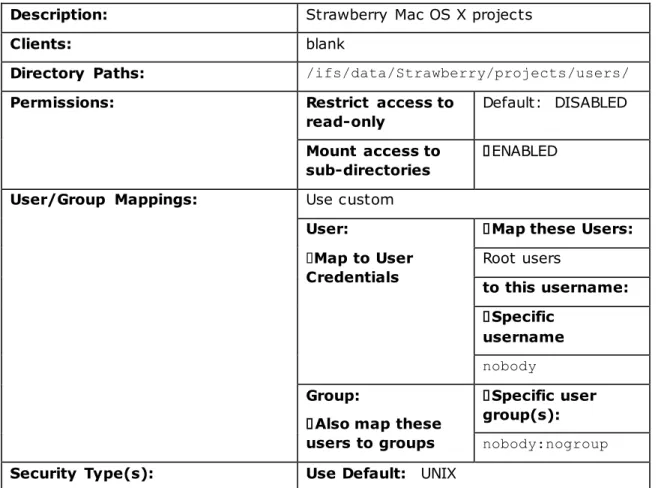
Mac OS X users map the project’s share as an NFS volume. The NFS protocol does not utilize a variable to determine the user subdirectory, so the NFS mount is configured manually. The projects share for the example Mac OS X user edit_2 is
manually mapped as
nfs://nfs.smartconnect-zone.domain.com/ifs/data/Strawberry/projects/users/edit_2.
Description: Strawberry Mac OS X projects
Clients: blank
Directory Paths: /ifs/data/Strawberry/projects/users/
Permissions: Restrict access to read-only
Default: DISABLED
Mount access to sub-directories
ENABLED
User/Group Mappings: Use custom
User:
Map to User Credentials
Map these Users:
Root users to this username: Specific username nobody Group:
Also map these
users to groups
Specific user group(s):
nobody:nogroup
Security Type(s): Use Default: UNIX
Table 8. Strawberry Mac OS X Projects NFS export settings.
For more information on cross-protocol authentication to the same directory structures in EMC Isilon OneFS, please see the document Using Mac OS X Clients with Isilon OneFS
Like the media share, the contents of each user’s project ’s share are updated by creating new hard links to Strawberry managed media based on the projects selected by each user via the Strawberry application interface.
In order to prepopulate the projects share with a templated editing project, sample settings files for a project are copied to the
/ifs/data/Strawberry/projects/template directory.
Conclusion
Strawberry is a storage-agnostic software solution that allows users of video editing systems from Adobe®, Apple®, and Avid® to collaboratively edit media file project metadata stored on SAN or NAS storage, such as EMC Isilon scale-out NAS storage, providing post-production facilities with all the benefits of project sharing, project management as well as user and team management - combined in one easy-to-use tool.
Isilon’s clustered storage – the standard for scale-out NAS – allows clients to seamless expand a shared pool of storage to hold all editing projects, while Strawberry makes them shareable and manageable.
Isilon OneFS operating system distributes all metadata and file system operations across every node in the cluster, eliminating the risk of performance degradation or file system corruption from a separate metadata controller or indexing service
tracking too many media objects. As the cluster grows, performance and capacity for new client connections increases linearly.
This reference architecture provides a validated collaborative editing solution enabled by the Strawberry asset management system and Isilon scale-out NAS storage cluster. For more information, please contact your EMC Isilon sales person.
References
EMC Isilon Video Editing Application Sizing Guide EMC Isilon X-Series Product Brochure
EMC Isilon OneFS Operating System White Paper
EMC Isilon Next Generation Storage Tiering with EMC Isilon SmartPools White Paper Using Mac OS X Clients with Isilon OneFS
Appendix A.
Windows 7 Client workstation #1 in this reference architecture is an HP Z800 with the following specifications:
BIOS version 3.54 with the following changes:
Hyper-Threading enabled
Memory Mode Interleave enabled
Runtime Power Management disabled
MWAIT-Aware OS disabled
Idle Power Savings set to Normal
“Option ROM download” feature disabled on slot #4 in support of an Intel X-520-SR2 10GbE NIC
Dual Intel 6-Core Xeon® X5650 Processors @ 2.66GHz 12MB cache 12 GB of RAM, fully interleaved on 12 x 1 GB 1,333 MHz DIMMs
NVIDIA Quadro 4000 2GB PCI-e graphics card and NVIDIA driver version 275.89 Windows Client workstation #2 in this reference architecture is an HP Z400 with the following specifications:
BIOS version 3.19 with the following changes:
Runtime Power Management disabled
MWAIT-Aware OS disabled
Idle Power Savings set to Normal
“Option ROM download” feature disabled on slot #4 in support of an Intel® X-520-SR2 10GbE NIC
Intel Xeon W3503, 2.40GHz, 4MB cache, 1066 memory, 4.8GT/s QPI processor
8 GB of 1066 MHz RAM
NVIDIA Quadro FX 3800 2GB PCI-e graphics card and NVIDIA driver version 275.89
Both Windows 7 Workstations contained the following configurations:
Intel® X-520 PCIe Gen 2 10GbE NIC and Intel® PROSet driver version 17.0.200.2 Installed in PCIe Gen2 slot #4
Jumbo Packet size set to 9014 under the X-520 advanced driver settings Set Transmit Buffers and Receive Buffers to 4096 under the X-520 advanced driver settings performance options
Microsoft Windows 7 Professional 64 bit Service Pack 1
The AD user group Domain Users is added to the local Windows 7 local Administrators group.
Under the system control panel advanced performance settings, the visual effects settings are set to “best performance”
The following software is installed on each Windows 7 workstation: Adobe Premiere Pro 6.0.3
Avid Media Composer v6.0.1 Apple QuickTime® 7.6.9