Building, Testing and Assessing
a Learning Management System
Luigi Colazzo and Andrea Molinari
University of Trento – Department of Computer and Management Science
This paper summarizes the experiences of our research group in managing the full process of building, testing and assessing a Learning Management System for an ed-ucational institution. We will show how we moved across the “make or buy” dilemma that normally educational institutions have to face when deciding to implement a support for online and distance learning activities. We will deal with this theme by referring to systems and pro-totypes developed by our research group. Specifically, we will describe our experiences in realizing systems for making didactic material available on the Internet, such as in the Learning Management Systems – LMS. This experience is based on what has been developed, tested, and put to use in some faculties of the University of Trento, where non-traditional learning environments in which students require more than the traditional face-to-face lessons are becoming ever more important. The prototypes produced are based on platform-independent technologies, and they make it possible to broaden one’s horizons, even for those students, such as lifelong learn-ers, who want freedom from time constraints and also freedom from some technological constraints that are imposed by some forms of distance education currently available on the market. Some extensions to mobile tools like PDA, tablet PC, cellular phones etc. are presented, with regard to the impact of their introduction on the LMS and, in general, on the information system of the institution.
Keywords: Learning Management System, online learn-ing, mobile education.
1. Introduction
The point of departure of our argument is the re-ality, often overlooked by authors, that to teach in a university context it is necessary to use different approaches, depending on the subject area covered. For example, teaching history of philosophy in a Humanities program is vastly different from teaching a technological disci-pline such as database management in a com-puter science course, without even considering
the content itself. In a history of philosophy course, the knowledge to transmit is generally of little importance(rarely more than
biograph-ical information on the authors and their rela-tionship to the culture of the time): what really
counts is equipping the students to engage in critical discussion on the questions raised in a philosophical debate of the past, and also to be able to recognize the influence of that debate on issues currently under discussion in philos-ophy. Diagrams and visual material are essen-tially nonexistent, while lectures are fundamen-tal, as are reading and writing.
On the other hand, in a database course the ideas to transmit are numerous and complicated; to know the essential facts and to understand the techniques of organizing a database are much more important than to develop the capacity to discuss the current research issues in database management(these are the typical topics
cov-ered in a PhD course). In this type of course
it is necessary to teach students how to inter-act with complex systems (DBMS) and with
programming languages. Consequently, some specific tools which can be used in both teach-ing environments will be of greater or lesser importance, depending on the subject taught. For example, an electronic discussion forum in the first case would be essential, while the man-agement of FAQ would be of little importance. In the second teaching situation, a discussion forum could be useful, but a high number of FAQ is indispensable. Superficially, these di-vergences can be seen merely as different ap-proaches(lectures vs. constructivism), but it is
knowledge area. A discussion forum is an ex-cellent tool within a constructivist approach to the study of a philosophical discipline, and, in-deed, this constructivist approach was already used long before now: the Socratic maieutic was, in fact, a constructivist approach.
A second issue regards the reasons why it is necessary to use electronic support tools in uni-versity teaching. The usefulness of using Inter-net to disseminate didactic material stems not only from the fact that students can take ad-vantage of this learning opportunity from a dis-tance, but also from the fact that this method works particularly well with different teach-ing and study schedules. In other words, with the exception of systems dedicated to distance learning, where flexibility in organizing study and other commitments is important for the stu-dent, it is undesirable to maintain distance be-tween teachers and students. This aspect is of fundamental importance for lifelong learning, where the educational experience goes beyond
(in time and place)the physical educational
in-stitution, in both work and personal life. In this sense, the possibilities take on a new form, the student-institution relationship changes consid-erably, the interests of the user (student) are
more diversified and less focused on the physi-cal presence of the teacher at a lesson — even a distance lesson — and are more focused instead on having a well-organized course with easy access to and retrieval of the course material. Mobile technologies like cellular phones, PDA, tablet PCs, smartphones, UMTS etc. indicate that mobile users will need different models of learning that adapt to their being in movement and to their fragmented use of time.
The validity of distance learning has been widely debated for some time, particularly within the university context1]2], starting from the early
experiences with CBL systems3]until the
ad-vent of Internet4]and the modern integrations
among various media in real-time during the lesson5]. This use of e-learning systems
dif-fers notably from the typical distance learning
(DL) situation. As a consequence, even if the
technologies used may be identical, the aims and objectives are significantly different. The underlying idea of DL is to compensate for the absence of the instructor who, for reasons of dis-tance or time, cannot be in the physical presence of the learner. Systems of DL aim to adapt to this reality by working towards four objectives:
To “virtualize” the instructor’s function(the
traditional lesson of the teacher thus be-comes a registration);
To “virtualize” the class(the students are a
“class” only in a virtual sense);
To prepare learning objects adapted for self-study and for different supports with differ-ent screen resolution, evdiffer-entually incorporat-ing the standards for creation of didactic ma-terial, such as the IMS project6], the LOM
7]and SCORM8]models, etc.
To create a feedback channel (negative =
corrections, positive=encouragement).
The issues are inherently different in traditional learning environments. The instructors and stu-dents enjoy a real and tangible relationship; technology is not used as a surrogate, but rather as an extension of communication already tak-ing place — it “overflows” into the virtual world. The situation in this case is substan-tially different from that of distance learning, for several reasons:
the instructors are “real”; the students are “real”;
study is guided and self-study represents only one portion of the overall learning ex-perience;
feedback channels are more frequent and can be both official and less formal, non-official in form and content.
In these situations an academic institution such as a university faculty is represented as an aggre-gate of the didactic processes organized by an academic institution. We deal with this aspect of the problem in this paper. We present the larger technological scenario being referred to in the paper, briefly presenting learning communities and varying communication situations in which communication technologies are merely an ex-tension of natural communication. A course, for example, constitutes a small real commu-nity that gathers for a designated period of time during which a teacher, a specific number of tutors and the learners embark on a learning process. Also regarding this notion, see 9],
and schedule, the outcome of the process is an increase in knowledge for everyone involved. In modern terms, it is no accident that the words
communityandcommunicationhave their roots in the Latin wordcommunis, meaning to work together (com) for a public good (munus). A
community that fails to communicate ceases to exist as a community. In other words, the learn-ing communities that an academic institution organizes use technology to broaden their pos-sibilities for communication and, as such, the system of e-learning becomes the means to a greater end.
To discuss these issues more deeply, we present the research and experiments conducted at the University of Trento in the last four years. First we will look at the characteristics of a client-server service, typical of the Learning Manage-ment Systems previously Manage-mentioned, which is created from scratch as an alternative to acquir-ing a system already on the market. In this con-text we analyse the importance of the project “Faculty on-line”, specifically noting the or-ganizational peculiarities that lead it to decide whether to “make” or “buy” the service. In sec-tion three, we demonstrate the necessity for this type of system to have personalized commu-nication channels for every actor in the educa-tional process. These tools have been developed principally to maintain contact with the students deciding to extend their study programme be-yond the standard time period, and who perhaps cannot participate actively in the daily life of the faculty, or for those students having interests or goals different from those of the traditional stu-dent. In the fourth section we present the sys-tem developed at the Faculty of Economics at the University of Trento as an example of what is required in building this type of educational systems. The fifth section shows the results of the assessment procedure we built in order to understand the level of satisfaction in using the system reached by all the kinds of users. Last section will be devoted to explain the exten-sions toward mobility we are implementing in the system, thus integrating a traditional LMS with all devices, tools, models and problems related with people on the move.
2. The Faculties, Central Institutions in University Education
University studies in Italy take place predomi-nantly in public institutions whose characteris-tics and organization are defined by federal law. The study programs offered by the universities are grouped by faculties, and the faculties are, therefore, the organizational structures that ma-terially combine educational offer into homo-geneous disciplines(Science, Humanities,
En-gineering, Economics, etc.). It is worth noting
that in this system the faculties are responsible only for teaching, while scientific research is organized by other entities, notably the depart-ments. The departments are designed to be the centers of research only; therefore, they have no input in the organization of courses, just as the faculties have no power to intervene in research issues and activities. In short, a person in Italy is a member of a faculty only in the role of a teacher and is a member of a department in the role of a researcher. On one hand, this situation intersects with the teaching process (a person
can run different courses in different faculties)
while on the other hand it has a definite influ-ence on the administrative management of the faculty, and, therefore, on what can be called the “back office” of a university faculty. The edu-cational system of a faculty is roughly divisible into three areas of management, these being:
management of the teaching staff, administrative area,
area of didactic management (for example,
a LMS).
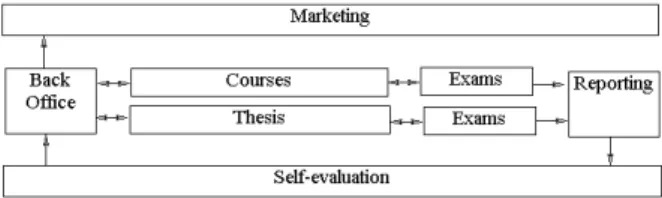
The instructional information system based on faculties assumes that these three areas are heav-ily intertwined, as shown in Figure 1.
Fig. 1.The different aspects of a Faculty-based Information System.
staff executes the decisions of the faculty com-mittee regarding educational programs, specific courses, and teachers. The personnel of the fac-ulty also take care of marketing, as well as of handling feedback information on the didactic activity so as to help the teachers to conduct self-evaluations, and also to evaluate the faculty in general. The principal responsibilities of the teachers are coursework and thesis guidance, in addition to the ongoing work of evaluating stu-dent performance(exams). It is obvious, then,
that what is traditionally considered to be didac-tic material in electronic form(Courseware)is
really part of a much larger instructional system into which it becomes integrated.
In order to solve the above problems, the Fac-ulty of Economics of the University of Trento decided to start the implementation of part of the overall picture of a Faculty-based Information System. The project took off in late 1999: we firstly established which functionalities should have been provided and if the system could have been found on the market or should have been built ex-novo. Now we will briefly discuss this last issue. At the evaluation stage, it was im-portant to investigate costs of building a system using internal resources. This was because, al-though there were strong reasons for purchasing an off-the-shelf Learning Management System, such as TopClassTM, Lotus Learning SpaceTM
or WebCTTM, there were many successful
in-stances where universities developed a system by themselves. It was evident that homegrown systems were often more tailored to a univer-sity’s specific needs. For an analysis of this, see 10] 11]. LMS are being promoted as a
means of simplifying the creation and manage-ment of instructional websites. There are many studies that seek to compare between specific courseware management tools(e.g. 12];13]),
but it seems that the efficiency and effectiveness of these tools with respect to customized Web based systems is less easy to define. Summariz-ing, we decided for the “make” alternative with the following motivations.
The cost: the systems that manage, distribute and maintain the on-line learning materials are high-cost systems that imply also other secondary costs, like adequate hardware and assistance.
The skills: LMS are complex to understand and manage, so normally some personnel
should be devoted to their management. We were not in the position to use resources for this task: the Faculty has no personnel to be used and instructed on such environments. Some specific end-user needs, in particu-lar the integration with administrative and bureaucratic functions in the perspective of an integrated Faculty-based Information sys-tem: many of the functionalities that nor-mally relate with the didactic activity of the teacher are closely related with administra-tive tasks that should be carried out in spe-cific way and time, thus constituting a big constraint for packaged systems that have no personalization features or that need a deep knowledge of personalize. Moreover, in a highly competitive market like the one involving educational institutions, having a personalized system on which we are able to perform every change and improvement we prefer, is undoubtedly a great competitive advantage.
The time: a prototype should have been ready for the second part of the academic year 2000(march 2001) with a pilot group
of teachers and students, and a beta version of the system was to be used by all the teachers and students in the first semester of 2001. This schedule was not compatible with our implementation of an LMS like the ones cited above.
For all these reasons, we decided to build the system internally, creating only what was needed. The main objectives of the project were the fol-lowing:
to allow the teacher to keep a constant re-lationship with his/her students, in the
dif-ferent ways that will be explained in the fol-lowing sections;
to allow the teacher to distribute educational material to students;
to keep the data for administrative and re-porting tasks to be performed by the teacher and by the secretary of the Faculty.
3. Functional Requirements for On-Line Courses
years14]. Courses offered through the Web are
a very common practice now in teaching 15],
offering different opportunities for interaction between teacher and student. These systems are often used to support distance learning, but in this case the objective is different. The aim, in fact, is to use electronic communication to improve the traditional way of instruction. This goal makes the following assumptions:
there is a real course that prescribes a sched-ule, meeting place, lectures or other activity
(exercises, project work, drafting and
com-pleting papers, experiments, etc.),
teachers, tutors and students interact regard-ing the coursework,
all courses have rules regarding how course-work activities must be carried out and re-garding the assessment of results,
students attend more than one course at a time and, therefore, are doing coursework in different disciplines,
teachers give lessons in different topics and at different levels, possibly in the same aca-demic period,
teachers can be assisted by a certain number of tutors.
A system that makes it possible to combine the normal channels of communication(their
exis-tence is presupposed by the system described)
with opportunities for electronic communica-tion must respect some general requirements to guarantee a certain level of effectiveness. The principal requirements are configurability, scal-ability, modularity, accessibility, usability and freedom of choice. We now offer a brief dis-cussion of each requirement.
a) Configurability: Each edition of a course has its own history. In fact, courses change in relation to the classes, time, developments in the field of study, interests of the teacher as well as the labor market. It follows that in a support sys-tem based on electronic communication, each single edition of a course should have its own virtual space (for example, the Home page of
a Database course, second semester, academic year 2001-2002). The teacher working with the
system should be able to configure every edi-tion of a course with appropriate communica-tion mechanisms. Some of these exist by default
(course syllabus, lesson schedule, etc.) while
others can be used by choice, if deemed nec-essary or useful(chat forums, video
conferenc-ing, message board, newsgroups, etc.). Also,
students need to configure their own virtual en-vironment, because not all students follow the same courses at the same time. In the end, the number of students per course is not uniform
(in Italy some university courses have hundreds
of students and others very few): a significant
change in course enrollment has important con-sequences on how electronic communication can be organized. In practical terms, for ex-ample, a teacher of 200 students would be wise to limit the use of e-mail so as to avoid spend-ing an inordinate amount of time respondspend-ing to student enquiries.
b) Scalability. In the real university context there are small faculties (with few study
pro-grams and students) and large faculties (with
several study programs and large numbers of students). In some cases the technological
support infrastructure that we have briefly de-scribed is not completely present, or the com-munication channels within the university net-work differ from those available privately to the students.
c) Modularity. A network at the university level is almost never constructed with the same components: it is more likely built over time, in layers, and with varying growth patterns and, therefore, varying capabilities. To have a monolithic system with a uniform techno-logical infrastructure is not a realistic expecta-tion, at least in the majority of cases in Europe. Moreover, the naturally occurring differences in teaching methods among diverse faculties in the same university suggest architectures con-structed with models that are duplicated on dif-ferent machines, and also distributed databases. It is worth remembering that faculties are almost always located in different buildings, and in many cases there may be more than one branch of the university or faculty, perhaps located sev-eral kilometers away.
per-sonal study, participation in scientific meetings, and, in addition, they obviously do not have ac-cess to the internal campus network from their home. The same is true for students and teach-ers, albeit for different reasons. Furthermore, electronic communication opens the door to new learning experiences, such as a course in which academics from all over the world con-tribute in different ways (through video
con-ferences, with on-line lectures in real time, with asynchronous contributions to discussions, etc).
A good system will guarantee all these at the lowest cost possible.
e) Usability. A system is obviously a failure if it is deemed unusable by the same people who should use it. The problem with these systems is particularly complex because it involves(a)the
nature of the Learning Objects used in electronic communication; (b) the most general
commu-nication environment in which the Learning Ob-jects are used; and(c)an organization of
activi-ties that guarantees correct Learning Objects at correct time for a specific learning task. The term “Learning Object” has been defined by many researchers, but the most convincing def-inition is that proposed by the IEEE Learning and Technology Standards Committee: A learn-ing object is any digital or non-digital entity that can be used, reused or referenced in technology-based teaching 16]. Differing degrees among
users of awareness and familiarity with the sys-tem, not to mention access issues, complicate the issue further. The advent of mobile devices such as PDA and cellular phones add new prob-lems to usability, due to the limitation of screen size and memory of these devices.
f) Freedom of choice. The system must pro-vide varying degrees of freedom at different lev-els. The requirements for configuration, scal-ability, and modularity partly contribute to this need, but by “freedom of choice” we refer to something more all-encompassing. Using the system must not be an obligation but rather an opportunity, both for teachers and students. Moreover, technological limits cannot be im-posed on the nature and complexity of the learn-ing objects that a teacher considers useful for a course. In this case the question is no longer ideological, but also leans toward a pragmatic evaluation of academic teaching. A look at the Italian academic system reveals that the average age of the three types of teacher, foreseen by the
national system is over 55 for full professors, around 50 for associated professors, and over 40 for research assistants. This means that only a small percentage of these teachers attended computer science courses during their own uni-versity studies. In fact, in Italy just 30 years ago, computer science courses were offered ex-clusively at the faculties of science and engi-neering. Consequently, everything that the ma-jority of Italian university teachers know about computer science has been acquired through on-going study(often self-study)during their
pro-fessional academic career. Similar observations can be made about other European realities, as made in 17], and perhaps for a large part of
higher learning, even on a global scale. Also, a Learning Object is by nature variable, rang-ing from a simple electronic text to a complex role-play in real time; this is discussed further in 18], 19], 20]. Therefore, no limits may
be imposed on the technological realization of Learning Objects.
In the next section we describe the functions of interactive On-Line Teaching System, devel-oped by our group at the Faculty of Economics, University of Trento.
4. An Interactive On-Line Teaching System
material should be freely distributed to every-one in the world, while others prefer that only their students(freely)download the educational
material. At the moment, the more restrictive vision has been adopted: the students must reg-ister in the system with their personal data and their faculty registration numbers. A new login and password is released for the registered stu-dents. The same registration procedure is made for the teacher, and it is more obvious in order to avoid that inappropriate material is loaded inside the system. There are many functions usable for each of the three actors (teachers,
students and administrative personnel). We will
briefly present the main functions.
The teacher can make use of several functions of the system. Having gained access with the login and password, the teacher selects a course in which to work. To avoid any confusion the courses are distinguished by year. After choos-ing the course, the teacher is offered different tools through which it is possible to have all the functionalities necessary to complete the tasks desired: to insert information, to update, to eliminate or to add material. Specifically, these instruments are:
the Bulletin Board, where the teacher can insert and modify information to provide no-tices and information to students enrolled in the course;
Syllabus(Figure 2), a system summarizing
the content of the lesson and allowing stu-dents to identify the material relevant for a given lesson. From this page the teacher can also add a file to the lesson(uploading it on
the server).
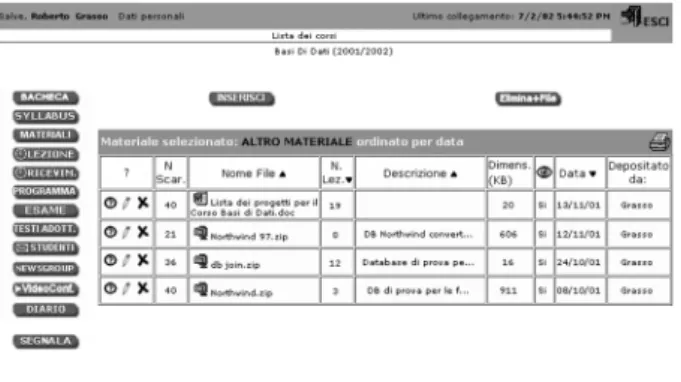
Materials, the teacher can manage any type of material in electronic format to make it
Fig. 2.Framework of the syllabus.
available to students in the course. The teacher, following a prescribed procedure, can upload files from the teacher’s computer to the server. The material is subdivided by category in a way that permits the user to find quickly the desired type of mate-rial; some typologies available are: notes, bibliographies, exercises, lists of links, for-mulas, graphics, suggested readings, com-mentaries, manuals, assignments, assign-ment solutions, etc; once an element from the list has been chosen, the user has ac-cess to the actual list of materials for that category. From here it is possible to insert, modify, or eliminate a file from that list. The teacher also has the possibility to make a file visible or not; this functionality is useful for the teacher who may or may not want to make a specific file available at any given time, as necessity dictates. (Figure 3)
Fig. 3.List of materials.
Timetable, the teacher can specify the les-son times and any changes to them, as well as office hours for meeting students;
Information on the course,it is possible to specify the course program, the exam proce-dures, the list of texts used or suggested for the course;
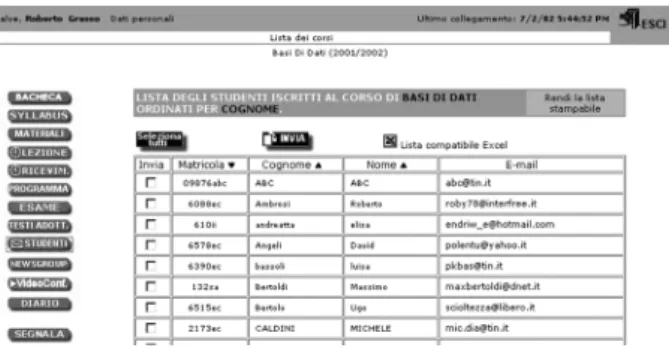
Student Mailing List, the complete list of students enrolled in the course. It is possible to use this list to send mail to some or all of the students. (Figure 4)
Diary of the lessons(Figure 5), which
Fig. 4.Teacher Area: student list, functionalities of mailing list.
generate lessons, specifying date, time, a de-scription of the lesson, and related notes;
Fig. 5.The teacher’s diary.
Video-conference (Figure 6), it is
possi-ble to have a video conference, integrat-ing a personalized version of the software NetmeetingTMinternally with the Web Brow-ser. Therefore, when the teacher accesses the video conference page, the students that are connected to the principal page of the system will automatically see a green light indicating that the teacher is on line(Figure
Fig. 6.A video conference session.
7 n.1)and available for a video conference.
The system automatically memorizes the IP adress of the teacher, thus helping the stu-dents and teacher to overcome the technical difficulties of configurating and setting up a video conference via Internet.
Newsgroupscan be created by the teacher: this function will be described in greater de-tail in the following paragraphs.
The tools available to the students are generally similar to those used by the teacher, the only difference being that those available to students are usually “read-only”. This means that the syllabus is usable only to download material from the server, and the course program is only visible to students who cannot modify it in any way. To have access to the course page, the student must register, that is, the student must choose the preferred courses from those on the list of the courses offered. These choices de-fine the study area of the student, and as such determine the courses to which the student has electronic access (Figure 7 n.3). One of the
most important features available to the student is the area called “News”(Figure 7 n.2).
Fig. 7. The principal page of the student.
This function is made available to the student every time he or she connects to the system; it shows all the documents that have been placed on the server since the last time the student connected, for all courses in which the student is enrolled(visible, as described above, in the
left-hand frame). It also shows other
unable to attend a given lesson. In the near fu-ture, this function will be implemented using mobile telephones to interact with students. Another important characteristic of the system is the Newsgroup. The validity of this tool in teaching had been widely proven. 21]22]23]
24]25]. By selecting a newsgroup, the user has
access to the list of related messages; the user can decide to insert a new message, read one, enroll in the preferred group, or simply view the messages by list rather than by thread. Each course can have more than one newsgroup. The teacher, once entered in a newsgroup that he or she has defined, is given the possibility to inter-act with the messages in different ways. As we can see(Figure 8), the messages inserted by the
teacher are shown in a different color; moreover some icons can be used to point out particularly interesting messages(FAQ, censured messages,
etc.). Other possibilities offered to the teacher
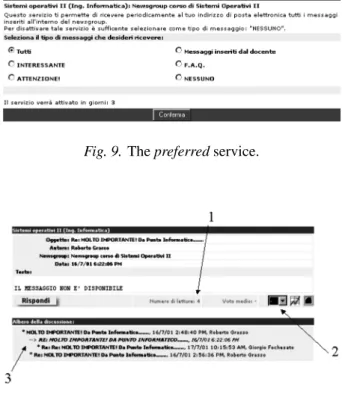
are to cancel, modify, and grade messages, as well as to moderate the entire newsgroup. The user can decide to activate the service of pre-ferred messages(Figure 9). This service makes
it possible to periodically receive at the user’s e-mail address all new messages inserted in the newsgroup.
Fig. 8.The view of the messages present in a newsgroup.
Each message, whether shown in the principal, general view (Figure 8) or in a detailed view,
shows the number of times it has been read(
Fig-ure 10 n.1). In addition, students can participate
in the discussions by giving a sort of grade to each message(Figure 10 n.2); this grade can be
seen by anybody, so that the importance of a sin-gle message can be weighed. As one can note
from Figure 10 n.3 the typical “thread” struc-ture is present also in the message composition phase, so as to give the user greater flexibility in interacting with other users. All messages are memorized in text files and not in database structures.
Fig. 9.Thepreferredservice.
Fig. 10.A single message with the options provided by the system.
5. The Results of Our Experiment
As mentioned, one of the main purposes of the project was to evaluate user satisfaction in order to understand the impact of the system on the interaction between the students and the insti-tution. To this end, we used a self-administered “Web questionnaire” with closed answers that was directed to all students enrolled in the sys-tem. Subdivided into three sections, the ques-tionnaire has 24 questions. Besides personal data(gender, year of university enrollment,
de-gree programme), the survey brought to light
some important user feedback, organized as fol-lows:
in the first section the assessment is on a 10-point scale, measuring simplicity, clarity, efficiency, and power of the systems com-pared;
in the second section the general assessment is again on a 10-point scale, measuring ma-terials and information available online, for every course the user has been enrolled in; the third and final section measures satis-faction with the efficacy and efficiency of the system as a tool supporting teaching and learning.
The survey was carried out between June and July 2002, during which 574 students completed the questionnaire. Before describing the results it is useful to underline that the group surveyed is a “narrow slice” of the university population, and not representative of the larger student body. This is true, primarily because the sample sur-veyed is from the population that voluntarily decided to enroll in the system and, secondly, because nearly 98% of this group is enrolled in the Faculty of Economics — a logical outcome, given that almost all of the e-learning courses are offered by this faculty. We cannot assert that the group surveyed is a representative sam-ple of students enrolled in or attending courses at the Faculty of Economics, because not all professors participated in the system, thereby nullifying the need for the e-learning option for their students.
We can now describe the characteristics of re-spondents, which are relatively evenly distributed between male (52.3%) and female (47.7%).
About four fifths(81.0%)attended courses
reg-ularly and nearly all (85.1%) had already
en-rolled in the system the semester before the sur-vey. Half of the survey group (50.4%)
indi-cated that they were employed, which is a rel-atively low number when compared with grad-uates from the same faculty in 2001 (84.0%
source AlmaLaurea), who declared that they
had worked while completing their university degree.
Students consulted the system frequently, at least 35% doing so at least once a day and 60% one or more times a week. The adoption of the system also led to changes in the use of Inter-net as a didactic tool. Before using our LMS, less than one third(31.5%) of respondents
in-dicated regularly using the computer to search for information for personal study, while now over four fifths(86.6%)also consult Web pages
made available by professors. The result is a full-time student in every sense of the word, who is active and takes advantage of a variety of study tools.
Unfortunately, this type of system is found lack-ing in another equally important aspect. The Italian university system is among the more flexible ones in industrialized countries, with low enrollment costs, compared with other coun-tries; moreover, attendance at lessons is not obligatory, nor are there constraints on the ex-ams methods. These facts mean that a large segment of the student population can enroll in the courses and take exams without having to attend lessons, thus being allowed to hold full-time jobs. Therefore e-learning systems are increasingly perceived as a valid alternative to support individual study for those who are un-able to attend lessons regularly, or those whose studies are to some degree penalized by work commitments. Contrary to our expectations, the number of students in this category is decidedly contained. As noted, the percentage of work-ing students is smaller than expected; moreover, only 6.5% of those who rarely or never attend lessons use the e-learning system.
use of the tool as a means to support their stud-ies. This can depend on different factors: each communication system must overcome its phys-ical limits and create its own linguistic codes that make it recognizable and meaningful. As yet, we are not able to determine to what degree this has been accomplished, however, a notable difference exists between users and non-users, where the latter group would appear to be ex-cluded from this generation of linguistic codes, hence from a form of communication. In other words, we are dealing with a system that fosters a form of social inequality in terms of access to resources.
On the other hand, we cannot in all truth assert that those using the system have made the ef-fort necessary to learn to take full advantage of what the tool offers. An interesting statistic in this regard derives from the use of the discus-sion forum, a feature offered by the tool. While one sixth of the students(18.5%)declared that
the instructor of the course/courses in which
they were enrolled had not used the discussion forum feature, only one fifth(20.2%)of the
re-maining students had used the forum, one third
(33.6%)indicated no interest in the feature and
just over one fourth (27.7%) expressed other
reasons for not using the tool. Poor ability to cooperate or communicate, or even inability to use the system because of the uncertainties re-garding its purpose: all could work together to explain these statistics. Despite these num-bers, the fact remains that as many as 82.2% of users indicated that the system was highly useful. Four fifths (81.5%) reported that the
system had helped them to clarify topics being studied; three fourths (72.0%) mentioned
be-ing better informed of the opinions of their fel-low students, and, similarly, two thirds(68.7%)
indicated that they had gained a better under-standing of the instructor’s position and 63% were more able to follow the course.
Why, then, do such a small number of students make use of the tool? We could assert that there are courses that, by their nature, simply leave little room for discussion; a formula for an econometrics function is invariable, the argu-ment would follow. But can we be sure? While the roles of teacher and student are yet to be defined, it is clear that the communication and transfer of knowledge cannot go in only one direction. Never before has the success of a
work project hinged so much on the ability of the group to work together and circulate ideas. Poor communication skills, coupled with the in-ability to take full advantage of these types of tools, in the end means exclusion.
The system passed with top marks. On an as-sessment scale from 1(poor)to 10(excellent),
the average score was 8.1. The highest scores were given to the system architecture for its simplicity of use (average score 8.5) and for
the capacity of the system(average score 8.4).
This also shows that the decision to “make” dur-ing the LMS acquisition phase did not prejudice the quality of the product or the satisfaction of the user. A score of 8.0 was given to the clar-ity of content, the responsibilclar-ity which lay in the hands of individual professors. The system was found to be largely efficient(7.6) but not
without some criticism; the fact that the eval-uator may well have included the entire uni-versity network, which, while quite good, does nonetheless reveal inefficiencies, in the assess-ment could account for this somewhat lower score.
On the whole, positive scores were also recorded for the more technical aspects of system archi-tecture. Nearly all users(97.0%)declared that
it was quite, or even very easy to locate informa-tion, and nine tenths(91.0%) indicate that the
buttons were clear and thorough. Slightly lower results were shown for the efficiency of the communication system, problems which are, as mentioned, to a larger extent due to inef-ficiencies in the university system than to the e-learning tool itself. In any case, four fifths
(81%)of respondents said that the connection
was fast and that it was easy to download mate-rial.
A different type of assessment takes place when considering the system as a tool to support di-dactic activities. While the tool proves highly satisfactory for self-study, its role as a means of communication among different actors is less clear. Four fifths(83.0%)maintain that the use
of the system led to improved individual study, even nine tenths(86.6%)affirmed that it helped
them to pass an exam, while over nine tenths
(91.9%) of respondents found the system
their communication with the instructor, while one sixth(16.1%)noted improved
communica-tion with other students(referring only to those
who joined a discussion forum). This brings us
back to the earlier problem, wherein the use of the system as a didactic support tool is highly effective, but as a system to support commu-nication is found wanting. This gap has more to do with the users than with the system it-self. On one hand, the professor may not know how to take full advantage of the tool, or is forced by other commitments to reduce the use of the system as a means of communication. At the same time, students may be overly focused on exams and perhaps unable or unwilling to work in groups, thereby not seeing the poten-tial that communication among fellow students can have, even if it is only to pass an exam. In short, the system offers numerous opportunities to those who choose to take advantage of them, as confirmed by the positive scores received. Its potential is limited only to the degree that the user fails to take advantage of it, an issue to be explored elsewhere.
6. The Future: Mobile Extensions to the System
Mobile learning, or M-learning, has been con-sidered as the future of learning or as an integral part of any other form of educational process in the future. Mobile learning is a field which bines two very promising areas — mobile com-puting and e-learning. Mobile learning could be any form of learning(studying)and teaching
that occurs in a mobile environment or through a mobile device, like cellular phones, Personal Digital Assistants (PDA), smartphones, tablet
PC etc.
Some studies show that introducing new forms of teaching(even if this means just using a
stan-dard tool for drawing on a PDA)make students
spend more time in working on that subject, comparing to other subjects. 26] The current
evolution and analyses of m-learning projects show many positive results. On the other hand, there are some doubts if this excitement is, or is not, a temporary side effect. Most of the re-searchers think(27]28])that PDAs and other
mobile devices should be seen like an exten-sion to, rather than replacement of, the exist-ing learnexist-ing tools. Moreover, not all kinds of
learning content and/or learning activities are
appropriate for mobile devices29].
In order to support the experimentation of any tool or technique of m-learning, a rather com-plex information system is necessary. Its role in-cludes distributing didactic material, user iden-tification and authorization, gathering of the data relative to the user-system interaction, pro-visioning of mobile services etc. The plat-form necessary for this objective is already in place, and we have all the skills and information needed to extend it with mobile functionalities. In this regard, e-learning systems in general, and more specifically Learning Management Sys-tem, are a vital component in the distance ed-ucational field. We have to integrate our LMS with two different classes of processes:
on one hand, processes connected with the administrative(back-office)activity of a
fac-ulty (like registering exams, programming
the teaching activity, theses management, bookkeeping of lecture hours, faculty mar-keting etc.: all such processes show impor-tant overlaps with processes managed by an LMS.
on the other hand, technology evolution has pushed toward a strong mobility of all the ac-tors, and has provided mobile devices(PDA,
pocketPC, cell-phones, smart-phones, tablet-pc) that accompany the user in his/her
ev-eryday life. Such tools can become addi-tional terminals for a LMS, because they allow all actors (students, teachers,
secre-taries, dean, tutors, administrative personnel etc.) to stay in touch with the LMS wherever
they are.
etc. are all instances of virtual communities. A LMS becomes a computer-based tool that ren-ders services to virtual communities, and must be adapted to specific needs of each particu-lar community. We already built, over sev-eral years, a community-oriented learning por-tal. Starting from this existing background, we intend to experiment with various ways to sup-port collaboration among users interconnected by mobile technologies through the already ac-tive portal based on our LMS.
Adaptation of the Learning Management Sys-tem to infomobility will need different steps: a) Extension of the traditional functions of a
learning management system to the mobile-computing needs required by the project. This will imply the creation of teacher-system-student interaction tools mainly based on SMS messages concerning the activities of these actors in the system. Moreover, the portal will provide an access point to the system’s actors, in order to download the educational material and the self-evaluation tests produced according to the objectives of the project. Besides, different structures will be created to support research activities such as forums usable via mobile technolo-gies, mailing lists for various users, manage-ment of some virtual communities(students
enrolled in a course, participants to lab exer-cises etc.).
b) Distribution of educational material
specif-ically created for the use on mobile equip-ment. This will regard both the educational material and the self-evaluation tests created in point c).
c) Integration of the self-evaluation system into
the LMS. This system will allow conducting tests on the main platforms that currently equip the most widespread PDAs on the mar-ket. These platforms will be the ones based on Symbian OS on one side(this means to
in-volve the whole cellular phones market with the biggest world producers), and, on the
other side, the platforms equipped with Win-dows CE, i.e. the PDAs that present points of contact with the Windows desktop environ-ment in terms of applications and working environment. The choice of producing self-evaluation applications for both the PDAs environments is the result of our wish to ex-tend as much as possible the experiment, and
most of all to create a self-assessment mech-anism that must be generalized as much as possible with respect to technological plat-forms, due to the extreme volatility of the market.
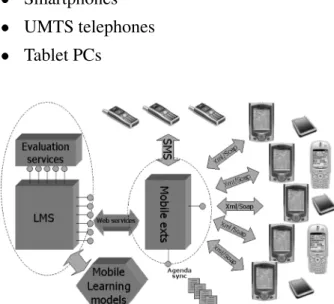
As regards the development of the systems, we decided on which devices to concentrate our development. This is a very important issue, as the market is continuously changing, with new products emerging every day. So, it is practically impossible to have a general mecha-nism for involving all possible devices currently available. We found the following devices use-ful for our experiments:
GSM/GPRS cellular phones
PDA
Smartphones UMTS telephones Tablet PCs
Fig. 11.Mobile extensions to the LMS platform.
The platforms have been already found in their main components. We will also experiment with the Palm OS, so that our experiment will cover a very large share of the market. In the first step of the project, however, the choice made on some MicrosoftTM-dependent PDAs is related mainly to the fact that most of the educational material is currently published in MicrosoftTM software tools, especially Pow-erPoint and Word. In this sense, a device equipped with MicrosoftTM operating systems
a sufficient grade of extensibility of our mo-bile platform to other PDAs, like those that are equipped with Symbian OS.
The test of the system will consist of some lessons conducted by Learning objects distri-buted by the LMS and by students and teachers utilizing PDAs, traditional viewers(like
Power-Point and Acrobat Reader)and other available
mobile devices. Part of these educational mate-rials will be available only through mobile de-vices: students will have to learn to study only on PDAs. In this way, different groups that have studied on different devices with different approaches will be available for our research: those who followed face-to-face lessons, those who studied on learning objects without fol-lowing the lessons and those who studied on mobile devices. By creating a specific and cal-ibrated set of tests, we want to verify the level of learning of the single groups, by analyzing the differences and relative motivations. The results of these tests will be matched with the results of the self-evaluation tests distributed to the students, in order to thoroughly verify the level of learning reached by the students. Re-actions of the students will also be analyzed, especially those related to problems in study-ing with a new, but limited tool like a portable device. For this purpose, a forum on the web will be specifically activated, and some tutors will be available in order to help students with practical or technical problems.
Regarding the use of specific tools available with mobile technology, the most evident prob-lem we faced in the design phase was the choice of the technology to be used to build the tools provided to the client in order to use our ser-vices. The current project provides ten differ-ent classes of services to mobile users, but in order to simplify the choice, we decided to con-centrate initially on two different services for mobile devices:
Management of SMSs sent by teachers to students or by administrative staff to teach-ers and students when particular events hap-pen(meetings, reminder of expiration dates
etc.)
Consultation of a common agenda (we call
it organizer) that will be available on the
mobile device and will keep all the impor-tant dates for the actor(mainly students and
teachers)
The first service is quite simple to build, but not so easy to manage, if the LMS that operates be-hind the scenes does not have all the information needed. The main problem was found in allow-ing the right person to send and receive SMSs, and in granting this permission inside correct boundaries, in terms of the number of SMSs sendable by the user. The second service is un-der development and is more complicated, as it involves one of the most difficult tasks to man-age inside an LMS, i.e., time manman-agement. We are currently building a system that allows stu-dents and teachers to connect with their mobile device and consult their agenda, dynamically built with all the events that could happen dur-ing a normal university activity. This implies a great effort of abstraction and integration be-tween the LMS platform and the mobile devices. We have evaluated five different alternatives to build the interaction between the PDA(the
plat-form chosen for the experiment)and the central
database. The problem is related to the way the client(the PDA)interrogates the remote server
module, requesting the update of events since last connection. These are the alternatives we evaluated and tested, from the simplest to the most complicated ones:
Using the embedded browser of the PDA to navigate through the web pages that web users will see using the traditional browser available for desktop PCs. This is the sim-plest solution, both for the users and for the development team. Only a particular attention to screen adaptation is necessary in order to concentrate the most important in-formation on the left-uppermost part of the screen and to avoid the necessity of frequent scrolling. The web page will be created us-ing device-specific tags and languages, like the .NETTMmobile toolkit, in order to
navi-gate through the data available on the server. However, we decided not to follow this so-lution as the primary one, because of the necessity for the user to be constantly con-nected to the Internet to navigate through the organizer, thus requiring permanent con-nections(like WI-FI settings)or significant
short-range connection solutions have been abandoned, as we want this service to be used outside the campus.
Using a client database application built spe-cifically for mobile devices, that interrogates the server DB through the Internet, synchro-nizing the data on the mobile device. This is a proprietary solution bounded to the back-end DB used and the availability of an In-ternet connection on the PDA that requires also quite complicated settings from the end-user perspective. However, from our tests, this solution has the advantage of dramat-ically boosting performance, thus reducing the connection times.
Synchronizing the PDA with the central data-base and the agenda of the user by using cradles and database synchronization: this solution will solve a lot of issues, but cre-ates a problem in terms of cradle availabil-ity around the campus, and especially the problem of supporting different cradles for different models of PDA.
Building a client/server application in which
the client(on the PDA)uses traditional RPC/
RMI mechanisms to invoke server methods in order to receive the data. This has the ad-vantage of requiring short-time connection to the central system and could be personal-ized to the PDA device. The disadvantage of this solution is the proprietary mechanism of communication between server and client, and also the necessity of using particular TCP/IP – UDP ports that could complicate
management of the security on the server side due to firewalls.
Building a web application that requests a web service through the use of XML/SOAP
messages to the server. This is the best solution we have found, as it provides the access in short time to the central database through the use of an open technology like XML/SOAP, will use a port that is already
opened for web access, and, finally, will guarantee extension of the client part to other PDAs, simply by creating a new client inter-face to the web service. We will, therefore, provide the agenda synchronization through a web service that will recognize the user, verify the state of his/her agenda, and will
send an XML-formatted packet of data re-garding last events in the system. The client
side of the application, specific for the de-vice, will format this data for the display: after that, the connection with the server will be closed and the navigation on the agenda will be completely off-line.
7. Conclusions and Lessons Learned
Summarizing a four years project involving more than twenty developers and analysts, and an entire faculty with more than 3.000 students and 200 teachers is quite difficult. In this paper we presented our experience in building what we, after four years, like to call a “Learning Information System” rather than a more tradi-tional “Learning Management System”. This is due to our most evident finding of the project: introducing a system that manages the educa-tional process (as a whole) of an educational
institution does not limit its effects to the most specific didactical aspects of the institution. In-troducing self-made, personalized, customized educational management system could in such situations lead to a radical change of the whole information system of the institution, which enormously amplifies the possibility of inter-action with different actors(students, teachers,
staff, tutors etc.). We followed this approach
8. Acknowledgment
We would like to thank all the collaborators and students in the Laboratory of Maieutics for helping us start and conclude this huge work despite all the difficulties of different types we encountered. Thank you once again.
References
1] ANDERSON, T., Integrating Lectures and Electronic
Course Materials, Innovations in Education and Training International, 34(1), pp. 24–31, 1997.
2] BROOK, C., OLIVER, R., Supporting The
Develop-ment Of Learning Communities In Online Settings, inProc. ED-Media 2002, Denver, CO, USA, June 24–29, 2002.
3] HELIC, D., MAURER, H., SCERBAKOV, N.,
Web-Based Training: What Do We Expect from the System, Proceedings of ICCE 2000, Taiwan, pp. 1689–1694, 2000.
4] GAINES, B. R.ANDSHAW, M., Institutional
Trans-formations to a Learning Web, in Proceedings of ED-Media/ED-Telecom, the World Conference on Educational Multimedia/Hypermedia, T. M¨uldner and T.C. Reeves (Eds.), Association for the
Ad-vancement of Computing in Education, 1997. 5] IEEE P1484.12 Learning Object Metadata Working
Group http://ltsc.ieee.org/wg12]
6] IMS Global Learning Consortium, Inc.
http://www.imsproject.org/]
7] MORRISON, G. AND MCPHEE, S., The Changing
Roles of Faculty in the Course Development Pro-cess, inProc. of ED-Media/ED-Telecom, T. M¨uldner and T. C. Reeves(Eds.), AACE, Calgary, Canada,
June 1997.
8] SMEATON, A. F., Using Hypertext for Computer
Based Learning,Computers and Education, 17(3),
pp. 173–179, 1991.
9] ADL SCORM (2001), Sharable Content
Ob-ject Reference Model Version 1.2 Specifica-tion, Advanced Distributed Learning, available at
www.adlnet.org
10] AGGARWAL, A., (Ed.) Web-based learning and teaching technologies: Opportunities and chal-lenges, Hershey, PA, USA, Idea Group Publishing, 2000.
11] MCMAHONM., LUCAJ, Courseware Management
Tools and Customised Web Pages: Rationale, Com-parisons and Evaluation, inProc. ED-Media 2001, World Conference on Educational Multimedia, Hy-permedia and Telecommunication, Tampere, Fin-land, June 25–30, 2001.
12] Infoworld Publishing Company(1998), Web -based
Training Solutions,http://wwwinfoworld.com/ cgibin/displayTC.pl?/981123comp.htm
13] PC Week (1997), Computer-based training on
the Web, http://www8.zdnet.com/pcweek/ reviews/0818/18ibt.html
14] TEARE, RICHARD, DAVIES, D. & SANDELANDS, E., The Virtual University: An Action Paradigm and Process for Workplace Learning, London, UK, Cassell Academic, 1999.
15] A’HERRANA., Integrating a course delivery platform
with information, student management and admin-istrative systems, inProc. ED-Media 2001, World Conference on Educational Multimedia, Hyperme-dia and Telecommunication, Tampere, Finland, June 25–30, 2001.
16] IEEE Learning and Technology Sandards
Com-mittee, URL: (last visit 26-02-2002) http://
ltsc.ieee.org]
17] AUFENAGER, S., Teacher Education by Hypermedia
Learning Enviroments – An Example from Ger-many,Ed-Media, 2000.
18] KOPPI, T., HODGSON, L., BAYLY, J., The Often
Miss-ing but Essential Component for Online LearnMiss-ing: a Learning Resource Catalogue,ED-Media, 2000. 19] HODGSON, L., KOPPI, L., Universitas 21 Learning
Resource Catalogue using IMS Metadata and New Classification of Learning Objects,Ed-Media, 2001. 20] WILEY, D. A., NELSON, L. M., (1998) The
fun-damental object, URL (last visit 26–02–2002)
http://wiley.ed.usu.edu/docs/fundamental .html]
21] COLLIS, B., KNEZEK, G.,(1997)Teaching and
learn-ing in the digital age-research into practice with telecommunications in educational settings Eugene, OR: International Society for Technology in Educa-tion.
22] EASTMOND, D. V., Alone but together: Adult dis-tance study through computer conferencing, New York, USA, Hampton Press, 1995.
23] HANNA, D. E., GLOWACKI-DUDKA, M., CONCEI
-CAO-RUNLEE, C., 147 Practical tips for teaching
online groups: Essentials of Web-based Education, Madison, WI, USA, Atwood Publishing, 2000. 24] HORTON, S., Web teaching guide: A practical
ap-proach to creating course Web sites, Yale Univ. Press, USA, 2000.
25] PALLOFF, R. M., PRATT, K.,Building learning com-munities in cyberspace: Effective strategies for the online classroom, San Francisco, CA, USA, Jossey-Bass, 1999.
26] DVORAK, J. D., BURCHANAN, K., Using
Technol-ogy to Create and Enhance Collaborative Learning,
27] KUKULSKA-HULME, A., Cognitive, Ergonomic and
Affective Aspects of PDA Use for Learning, Pro-ceedings of the European Workshop on Mobile and Contextual Learning, pp. 32–33, Birmingham, UK, June 2002.
28] WAYCOTT, J., SCANLON, E., JONES, A., Evaluating
the Use of PDAs as Learning and Workplace Tools: An Activity Theory Perspective, Proceedings of the European Workshop on Mobile and Contextual Learning, pp. 34–35, Birmingham, UK, June 2002. 29] KEEGAN, D., The future of learning: From eLearning to mLearning, available online at
http://learning.ericsson.net/leonardo/ thebook/book.html
Received:June, 2003
Accepted:September, 2004
Contact address:
Luigi Colazzo University of Trento Department of Computer and Management Sciences Via Inama, 5 Trento Italy e-mail:[email protected] Andrea Molinari University of Trento Department of Computer and Management Sciences Via Inama, 5 Trento Italy e-mail:[email protected]
LUIGICOLAZZOis a professor of database management, and multime-dia at the Faculty of Economics. His scientific and research interests have been in the areas of systems for information retrieval, software ar-chitectures for knowledge discovery in data base, information systems and systems to support cooperation(CSCW). Since 1989 his work has
focused on the use of hypermedia systems and Web-based systems to support the didactic activities. He is member of several professional associations including the IEEE, ACM, AACE, and AICA, Doctor Co-lazzo has authored numerous papers.