Merlin
A Continuous Integration Tool for
VisualWorks
Michael Meyer
November 23, 2005
Contents
1. Continuous Integration 3 1.1. Definition . . . 3 1.2. The benefit . . . 3 1.3. History . . . 3 1.4. Extensions . . . 4 2. Merlin 4 2.1. Buildloop . . . 4 2.2. Reports . . . 4 2.2.1. SUnit . . . 4 2.2.2. Developer Statistics . . . 5 2.3. Design . . . 5 2.3.1. Data storage . . . 5 2.3.2. Server . . . 8 2.3.3. Plugins . . . 8 2.4. Limitations . . . 8 A. Implementation of doExecute:build: 10 B. Installation 10 B.1. Environment . . . 10B.2. Setup the server . . . 10
B.3. Install the web frontend . . . 11
B.4. Initial build . . . 11
C. Commands 11 C.1. MerlinServer class . . . 11
C.2. MerlinRegistry class . . . 12
D. Additional information 12 D.1. Restoring the build hisotry . . . 12
D.2. For some classes the auxiliary information like username or timestamp is missing . . . 13
1. Continuous Integration
A common problem inSoftware development is that changes made by one person break the code of an other. These bugs are difficult to find because the problem doesn’t belong to one persons area, it’s in the interaction of the two components. These kind of bugs can stay undetected for weeks or months and the later they are detected the more difficult it becomes to fix them.
With Continuous Integration these kind of bugs can often be detected on the same day that they manifest. This makes fixing the bug a lot easier since the developers know where to look for the bug and they still know why they introduced the changes that lead to the bug.
The target of Merlin is to provide a slim Continuous Integration tool for
Smalltalk. Merlin was designed to be extendable with custom plugins. The author is of the opinion that a Continous Integration tool only offers a real surplus if all repetitive and mostly cumbersome tasks of the development process can be handled by the tool.
1. Continuous Integration
This chapter contains a short introduction to the idea and history of Continuous Inte-gration.
1.1. Definition
When talking about Continuous Integration one usually means a background service that is coupled with a Source Code Management System. The service loads a project from the Source Code Management System on a regular basis, compiles the code and runs all unit tests. These tasks should be executed as often as possible. Martin Fowler states [2] that running the tests once a day is the absolute minimum. While this may not be feasible for large projects it’s definitely true for small and medium sized projects. 1.2. The benefit
A problem that often occurs when several people work on the same project, is that the changes that one developer introduces, break the code someone else has written. With increasing project size and modular design it gets more and more difficult to detect this kind of interaction problems. For this it is necessary to have regular builds of thewhole
project and not just of the part you’re working on. 1.3. History
The idea of Continuous Integration has been around for a long time. Steve McConnell [3] recommends it as a Best practice and it is known that Microsoft has been using
Continuous Integration is also an essential part of the Extreme Programming [1] de-velopment process. But what really madeContinuous Integration interesting, especially for low budget projects, was the fact thatThoughtWorks opensourced theirContinuous Integration tool (CruiseControl).
1.4. Extensions
Most programming languages have abuild tool. Among the more popular ones are Ant
and Maven forJava andMake for C / C++. Such a tool combined with aContinuous Integration tool lets the user personalise the entire build process. Possible extensions are
• the creation of a documentation on the fly based on information in the source code,
• checking if the coding conventions have been violated and
• metrics calculation.
It is important that these kind of tasks can be easily hooked into the build loop. If the domain of the build loop is to small the effort of installing and maintaining the build loop will be bigger than the gain.
2. Merlin
Merlin is a Continuous Integration tool for VisualWorks. This chapter gives a short overview over thebuild loop and the available reports.
2.1. Buildloop
The core ofMerlin is a build loop that looks for updates of a bundle at regular intervals. If Merlin finds new code in Store it will load the code into the image. A basicMerlin
installation won’t do more than just that. Additional tasks can be added through a plugin mechanism.
2.2. Reports
At the moment there are two reports that can be hooked intoMerlin. TheSUnit report for running tests and theDeveloper Statistics report that groups the results of the SUnit report by developers.
2.2.1. SUnit
The SUnit extension collects all tests in a bundle and runs them. The developer can look at the results in a web browser. The model and the view have been separated.
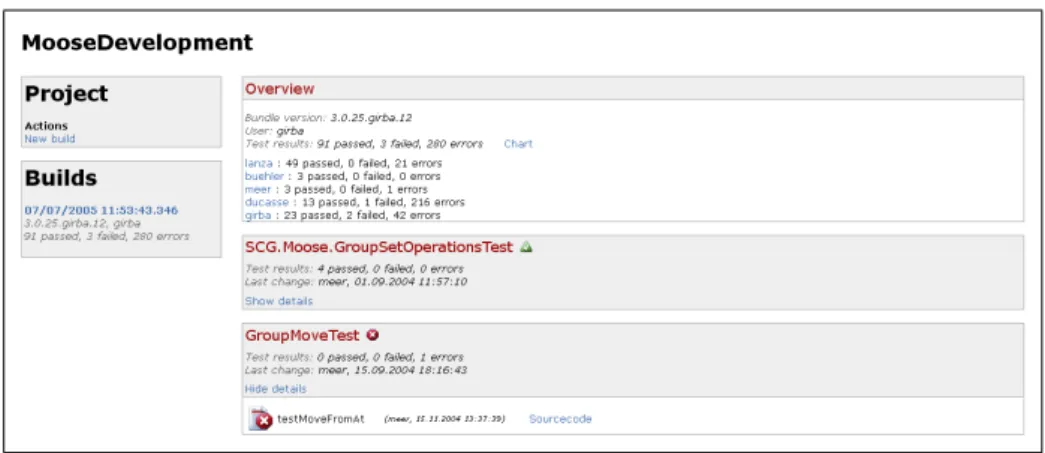
Figure 1 shows a screenshot of the web frontend. The first line (MooseDevelopment) is the name of the bundle under study. On the left hand side there is a box named
2. Merlin
“Builds”, that contains links and informations to all previous builds. The first box on the right hand side (“Overview”) contains information about the selected build. The other boxes on the right hand side represent the test results on a class level.
Figure 1: SUnit report for the MooseDevelopment bundle (Version 3.0.25.girba.12)
2.2.2. Developer Statistics
The Developer Statistics report is based on the SUnit report. This report groups the results of the SUnit report by developers.
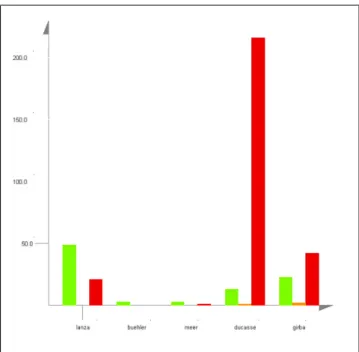
Figure 2 gives an overview over the test results on a per user basis. The y - axes shows the number of tests and the x - axes contains all users who modified or wrote a test. There are three bars for every user. The green bar indicates the number of tests that have passed, the orange bar indicates the number of tests that have failed and the red bar indicates the number of tests that threw an unexpected exception.
The report also creates a pie chart for every user. Figure 3 shows the results for the user “girba”. The values are equal to the values in figure 2.
This report is useful to check who’s tests have been broken by the modifications that a developer introduced. Like this the “blamable” developer can get in touch with the owner of the broken tests and they can discuss how they will proceed.
2.3. Design
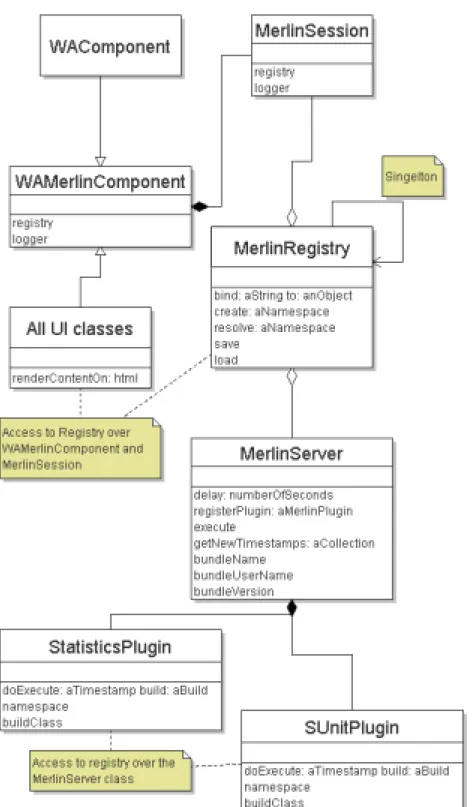
In this section we will give a short overview over Merlin’s design. Figure 4 shows an UML model of the most important Merlin classes.
2.3.1. Data storage
The most important class of Merlin is the class MerlinRegistry. The registry exists independently from thebuild loopand thefrontend and contains all data that the plugins produce. The frontend (Seaside) knows the location of the registry and will collect all needed data from there.
Figure 2: The chart shows for every developer the absolute number of broken, failed and passed tests. The green bar shows the number of passed tests, the orange bar the number of failed tests and the red bar shows the number of tests that threw an unexpected exception.
Figure 3: A chart like this is generated for every user. This chart shows the number of broken, failed and passed tests for the user girba.
2. Merlin
Figure 4: This UML diagram gives an overview on how the registry, the build loop, the reports and the Seaside frontend fit together.
2.3.2. Server
The class MerlinServer is responsible for loading the latest code from the Source Code Management System and running the plugins.
2.3.3. Plugins
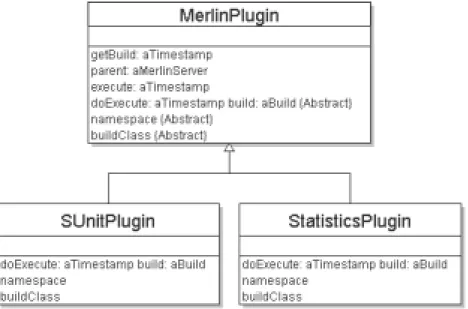
Figure 5 gives an overview over the plugin design. There is an abstract base class called
MerlinPlugin that handles basic things like registering with the server and handing out copies of the data.
A subclass needs to implement the methoddoExecute:build: on the instance side. This method contains the functionality that the plugin should have. Appendix A contains the implementation of the doExecute:build: method for the Statistics plugin.
On the class side the methods namespace and buildClass are important. The method
namespace returns a string that indicates where the results of this plugin should be stored in the registry. This makes it easy for other plugins or the web frontend to find the build results for a plugin. The method buildClass returns the name of a class. The build results for a plugin will be instances of this class. An instance of this class will be handed to the methoddoExecute:build:.
Figure 5: A plugin needs to implement the three methods doExecute:aTimestamp build: aBuild, namespace and buildClass.
2.4. Limitations
All thoughMerlinaims to be an automated build tool manual interaction is still needed at times. The reason for this is that Store can’t be scripted entirely. At the moment there is no solution for preventing Store from popping up a message box if something unexpected happens.
References
References
[1] Beck, K. : Extreme Programming Explained: Embrace Change. Addison Wesley, 2000. – ISBN 201616416
[2] Fowler, M. . Continuous Integration. http://www.martinfowler.com/articles/ continuousIntegration.html
A. Implementation of doExecute:build:
This is the implementation of the doExecute:build: method for the Statistics plugin. Basically we get the build result for the SUnit plugin from the registry and iterate over all classes and all selectors.
doExecute: timestamp build: aStatisticsBuild
"Creates a user statistic from the results of the SUnitPlugin" | aSUnitBuild |
aSUnitBuild := (self registry resolve: SUnitPlugin namespace) getBuild: timestamp. aSUnitBuild classDescriptions do:
[:aClassDescription |
aClassDescription selectors do: [:aMethodDescription | | aUserStatistic |
aUserStatistic := aStatisticsBuild userStatistics: aMethodDescription userName. aMethodDescription isPassed ifTrue: [aUserStatistic incrementPassedCount]. aMethodDescription isFailure ifTrue: [aUserStatistic incrementFailureCount]. aMethodDescription isError ifTrue: [aUserStatistic incrementErrorCount]]]. "Store the build result"
aStatisticsBuild postInit.
B. Installation
In this section we will talk about setting up Merlin for one of your projects. Merlin
consists of two parts: A domain model and a frontend based on Seaside.
B.1. Environment
First you need to load the bundle MerlinDevelopment from store. The bundle will automatically load all other prerequisites.
During the load process Seaside will ask for a username and password for the man-agement console. On all other dialog messages you should either click on “OK” or on “Yes”.
Next you need to load the latest version of the bundle that should be monitored. For exampleMooseDevelopment.
B.2. Setup the server
You need to execute the following code in order to prepare the server: | server registry |
C. Commands
registry := MerlinRegistry instance. registry reset.
StoreProvider initializeForProduction.
server := MerlinServer registry: registry bundle: ’MooseDevelopment’. server delay: 60.
server registerPlugin: SUnitPlugin new. server registerPlugin: StatisticsPlugin new. server inspect.
server start.
Your Continuous Integration server is now up and running and will check for updates every 60 seconds.
B.3. Install the web frontend
The installation of the frontend is simple. Just execute the following peace of code: WAMerlin install: ’Moose’
This will give access to the server under the following address: http://localhost:8008/seaside/go/moose
B.4. Initial build
Since the bundle you’re monitoring is up to date you need to start the first build by hand. For the initial build you can go the web application and click theStart build link.
C. Commands
There are some commands that are important while working withMerlin. This chapter gives an overview over the most important administration commands.
You have already seen some of the commands in section B.2 while setting up your build loop.
C.1. MerlinServer class
This is a list with commands that can be invoked for every day administration.
Command Description
delay: numberOfSeconds Sets the interval for the build loop
registerPlugin: aPlugin Use this command to add a plugin to the build loop execute Starts a new (unscheduled) build
start Start the build loop
If a build throws an exception there is a chance that a deadlock occurs since the failing process won’t release the semaphore. To release a semaphore one can send the message
signal to a semaphore. For example: self executeLock signal
The classMerlinServer uses the following semaphores:
Lock Description
executeLock This look is likely to fail in case of an exception pluginLock This look protects the plugins
timestampLock This look protects the timestamps
delayLock This look protects the delay setting. It is unlikely that this one will fail
C.2. MerlinRegistry class
As explained in section 2.3.1 this class is responsible for data storage. There is one method that is important for data recovery.
Command Description
load This tries to restore the build history from a binary backup file
Since this class needs to be thread safe there is a chance that a deadlock occurs. As with theMerlinServer class the semaphore can be unlocked by hand.
Lock Description
lock This look protects the build history
D. Additional information
D.1. Restoring the build hisotryBeforeMerlin starts a buildMerlin always creates a backup of the registry in a binary format. The backup can be restored with the following procedure:
1. Start a new VisualWorks image
2. Follow the instructions from section B.1 3. Execute the following code:
MerlinRegistry instance load.
D. Additional information
D.2. For some classes the auxiliary information like username or timestamp is missing