Dissecting Malicious Word, PDF Documents
1
K.Tanuja,
2CH.Praneeth,
3Dr D.Haritha
1,2,3
Dept of C.S.E, S.R.K. Institute Of Technology, Enikepadu, Krishna dist, AP, India
Abstract:Internet and computers are now a part of our daily routine life. With the development of network and information technology, E-mail has became increasingly popular and the society’s indispensable need. However, virus spreading via the E-mail is also increasing at an enormous rate. The E-mail attachment such as PDF Document, Microsoft Word Document, EXE program can spread viruses from one computer to another computer. This paper describes and analyses the various forms of the E-mail viruses via the
Microsoft Word Documents and the PDF
Documents. We describe the methodology to detect such E-mail viruses using tools such as OfficeMalscanner for Word Documents and PDF stream Dumper for PDF Documents.
1. Introduction
With the extensive use of computers, more and more people use E-mail for communication and hence paving the way for the spreading of virus through e-mail. There are various types of malware such as Worms, Trojans and malicious code. These viruses have a strong impact on the system, like, destroying data on the disk, make the computer or network running slowly, destroying the video display screen[1]. An E-mail virus is a destructive computer program and is embedded in the text by malicious code or attachments and then exploiting people’s curiosity to open e-mail. An example of the E-mail virus is “I love you”. This virus makes people to open the attachment with “I love you” as the subject, and then the receiver computer will be infected by the malicious code. Once the computer has been infected, this virus will forward the E-mail with the virus to the receiver’s address list. Another example is the “Melissa” virus in 1999. The virus sent the virus document as an e-mail message to top 50 people in the receiver’s address book. This virus contains the friendly message and the sender’s name. It also infects all the Word documents that are opened subsequently on the receiver’s machine[3].
A variety of viruses can be spread through the E-mail attachment. It contains a piece of code in an attachment document, for example, PDF documents, Microsoft Word documents and .EXE programs. This paper begins with a description and extends to the analysis of viruses in the attachments of the E-mail[2]. Section 2 describes structure of
the Microsoft Word Document and its
vulnerabilities. Section 3 describes PDF Document structure. Section 4 describes methodology to detect viruses affected Microsoft Word and PDF Documents. This Section also explores various tools available for detection of such infected files.
2. Microsoft Word Document
Microsoft Word is a word processor developed by Microsoft and can be used to type letters, reports, and other documents. It facilitates desktop publishing. The vulnerability in word document file is the presence of Macros. Generally, Macros are used for creating shortcuts to tasks performing repeatedly. Attackers make use of this feature and infect the Macros present in a document. When a word processing or spreadsheet document containing infected virus is opened, the Macro virus gets activated and infects the Normal template (Normal.dot)-a general purpose file that stores default document formatting settings. Every document opened with Word Processor refers to the Normal template, and hence gets infected with the Macro virus. Since this virus attaches itself to documents, the infection can spread if such documents are opened on other computers. These documents spread through mails by attackers [4]. In the past five years, Macro malware could be considered practically extinct. A resurgence of malicious VBA Macros has been observed – this time, not only self-replicating viruses, but simple downloader Trojan codes [3].
Macro viruses can use the
VBA SHELL command or utilize the operating system's kernel API to run any external command they want. The VBA KILL command can be used to delete files. Macro viruses modify registries, use E-mail to forward copies of itself to others, look for passwords, copy documents, and infect other programs. Macro viruses can do a lot of different damage in a lot of different ways [3].
2.1 Vulnerability in the MS-WORD in the form of Macro code:
The macro code, designed for automatic execution on opening of a Word Document, has the following structure (the order in which the individual functions appear and the name of the main function varies in the different variants):
End Sub
Sub main_code() ...End Sub
Sub Workbook_Open() Auto_Open
End Sub
The main code is either in or called from the Auto_Open() function which is invoked when a Word document is opened or Word is started. If the code in the subroutine main_code() is corrupted with virus code, automatically corrupts all the files that are opened with the Word Processor. Similarly
Workbook_Open (which is invoked when
an Excel workbook is opened) and other automacros Auto_Close (Runs each time you close document), Auto_Exec (Runs whenever you start word) corrupts the files if their code is replaced with the corrupted code [3].
Because a macro virus works using the application rather than an operating system, it can also infect non-Windows computers as well. Macro viruses are also known as script viruses and can also be embedded within web pages.
2.2 Tool to extract Macro
code-OfficeMalScanner:
OfficeMalScanner is a MS Office forensic tool to scan for malicious traces, like shellcode heuristics, PE-files or embedded OLE streams. This tool developed by Frank Boldewin which is used for extracting VB macro code from malicious office documents(word,excel).
Usage: OfficeMalScanner <PPT, DOC or XLS
file> <scan | info> <brute> <debug> Options:
scan - scans for shellcode heuristics and
encrypted PE-Files.
info - dumps OLE structures, offsets+length and
saves found VB-Macro code.
inflate - decompresses Ms Office 2007 documents,
e.g. docx, into a temp dir.
Switches: (only enabled if option "scan" was selected)
brute - enables the "brute force mode" to find
encrypted stuff.
debug - prints out disassembly resp hexoutput if a heuristic was found.
3.Portable Document Format
Portable Document Format (PDF) is a file format that is used to represent the documents in a manner independent of hardware, operating system and a running application, with which it is possible to create, view, print and exchange documents reliably and environment independently. As a kind of E-mail viruses, PDF malware is more and more popular in the Internet. PDF files bearing malicious content have been harming computer systems, and in 2010 they have been considered one of the most
dangerous threats. It is possible to embedded different types of files to attack computer, such as JAVAScript code, ActionScript code or EXE files [13 ].
3.1 PDF File Structure
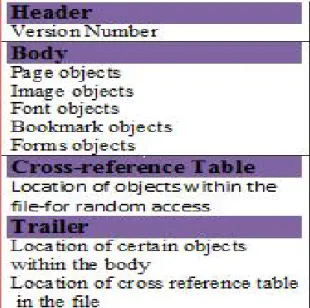
To discover new vulnerabilities we need to understand the PDF file format in detail. PDF has a lot more functions than just text; it can include images, bookmark objects and other multimedia elements. It can be password protected and can execute JavaScript, etc. The basic structure of a PDF file is presented in the figure shown below:
Figure 3(a):Structure of PDF file
Figure 3(a) Table shows structure of pdf file contents are explained below
Header is the first line of a PDF file and specifies the version number of the used PDF specification which the document uses.
Body contains text streams, images, and other multimedia elements like fonts, bookmarks and forms, etc. The Body section is used to hold the entiredocument’s data being shown to the user. Cross Reference Table contains the references to
all the objects in the document and it allows random access to objects in the file. Each object is represented by one entry in the cross reference table and is 20 bytes long.
Trailer contains the location of the cross reference table in the file. Figure 3(b) describes example code of PDF contents.
Figure 3(b):Example of PDF code
Figure 3(c):Launch function which opens command prompt
Command Prompt will be automatically opened by using the above launch action. Attackers can embed the malware in our PDF by using JavaScript because JavaScript commonly uses heap spray to exploit.
3.3 Vulnerability in Portable Document Format Adobe Acrobat is a family of application software developed by Adobe Systems in order to manage files in Portable Document Format. Adobe has released Security Bulletin which describes multiple vulnerabilities affecting Adobe Reader and Acrobat 9.2x and earlier. An attacker could exploit these vulnerabilities by convincing a user to open a specially crafted PDF file. The Adobe Reader browser plug-in that can automatically open PDF documents hosted in a website is available for multiple web browsers and operating systems. These vulnerabilities allow a remote attacker to execute malicious code, write unwanted files or folders to the file system, and can cause a denial of service or local privileges can be escalated on the
affected system as the result of a user opening a
malicious PDF document. They were 50
vulnerabilities discovered between 2008-2009 in Adobe Reader [12 ].
3.4 MetaSploit
The Metasploit Project is an open source project that provides a public resource for researching security vulnerabilities and developing code that allows a network administrator to break into his own network to identify security risks and document which vulnerabilities need to be addressed first. Metasploit offers penetration testing software and provides tools for automating the comparison of a program's vulnerability and its repaired (patched) version [13].
There are a couple of interfaces that can be used. The first option is the MSFconsole which is the hackers preferred method or most puritanical way of using Metasploit. The other more approach using Metasploit is to use Armitage.
3.4 PDF Analyzers:
There are various several tools available for analyzing malicious pdf files. Didier Stevens familiarize with pdfid, pdf-parser tools . Here in this paper we analyze with PDF Stream Dumper, PeePDF tools. PDF Stream Dumper is a tool written by David Zimmer and Peepdf by Jose Miguel Esparza that combines many open source tools that are useful to analyze malicious PDF documents. Obfuscated JavaScript, low level PDF headers and objects, and shell code can be dealt with this tools.
4. PROPOSED SOLUTION
In this section we describe the methodology for detection of virus affected word and pdf files.
4.1 Detection of Macro Virus in word using OfficeMalScanner
We propose methodology to extract macro code from Malicious Word Document.
OfficeMalscanner tool is used to extract macro code from a malicious word document.
1.Extract the file information of docx file using info command. It dumps OLE structures, offsets and length and saves found VB-Macro code.
2.Unpack the docx file using 7zip tool.
3.Use Inflate command to Decompress file.docx to locate VB code (XML files).
4.Analyze the behaviour of VB Macro codes found using Noriben tool.
4.2 Extracting VB Macro code from Microsoft office file
We detect word document “Doc4.docx” file whether it contains any macros.
Figure 4(a):Opening file Doc4.docx
In Figure 4(a) we get information of file Doc4.docx by using “info” option which describesfile size and type of file.
XML-formatted versions of Microsoft Office files, which typically have extensions such as .docx, .xlsx, and .pptx, are actually zip-compressed archives that contain several files. You can unpack the archive using tool 7zip.
Step2: Unpacking word Document (As word 2007 is XML formatted structure, it is placed in zip archive)using7zip tool
Inside the ZIP file are predefined structures of files, mostly XML files that describe the document and it's content. So it can be easily read using standard available libraries in scripting languages such as Perl.
According to Microsoft a folder is created inside the ZIP archive called "_rels". This folder contains a file named ".rels" which defines the root relationships within the package. This should be the first place to be able to parse the content of the document. Whithin the .res file you find tags that define the relationship of the document:
<Relationship Id="someID" Type="relationshipType" Target="targetPart"/>
Metadata is stored in files that contain a type of "*properties", most notable the "core-properties" and "extended-properties". These files are usually stored in the following location:
docProps/core.xml docProps/app.xml
These files then contain the actual metadata information, such as document creator, last saved by information, etc. To be able to display the metadata information it is necessary to extract and parse these documents.
Figure 4(b)XML formatted structure of word 2007. Step 3: Viewing archive file in inflate mode. When the archive file is viewed in Inflate mode, word/vbaProject.bin is located as shown in the Figure 4(c). Generally VBA macros are stored in binary OLE file within Zip archive, called vbaProject.bin
Figure 4(c)VB-Macro code found inside file. As in the Figure 4(c) word/vbaProject.bin is located. Generally VBA macros are stored in binary OLE file within Zip archive, called vbaProject.bin
When we open “this.Document” specified at
address in Figure 4(c)
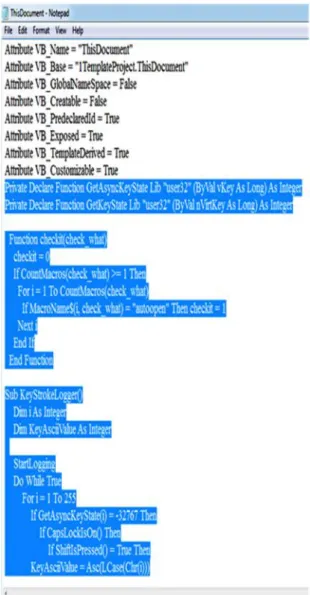
Macro code which is detected using officeMalScanner tool in “Doc4.docx” consists of Keylogger code as shown in In Figure 4(d). First lines describes structure of VBProject contains attributes and properties.Marked text is a Keylogger code.
Figure 4(d): keylogger code present in “This Document”.
4.2.1 Noriben tool
As VB-Macro was found in word document,We can analyze behaviour using Noriben tool. Noriben is a Python-based script that works in conjunction with Sysinternals Procmon to automatically collect, analyze, and report on runtime indicators of malware. In a nutshell, it allows to run malware, hit a keypress, and get a simple text report of the sample’s activities.We test for behaviour of macro virus present in Doc4.docx with Noriben tool[15] using the command “Noriben.py” working in command prompt.
Figure 4(e): A CSV file created by Noriben
Noriben a behavioural malware analysis tool which lists information of currently running processes in system and their behaviour after they executed. Figure 4(e) shows a CSV file created by Noriben tool that contains processes created (a list of present running processes) and File Activity (information of background processes whenever a particular process is being executed) .
Figure 4(f):File Activity Information
Figure 4(f) demonstrates that whenever a word document is opened a text file is opened which logs keys pressed by keyboard. Thus the infected virus details for WORD documents can be observed. 4.3 Malicious PDF Analysis
Methodology followed to analyze malicious PDF A).Create a malicious PDF file using one of the exploits present in Metasploit Framework. Steps followed for creating malicious PDF file is shown below.
1)We find appropriate exploit by searching in metasploit for one that will use the version of Adobe Readerusing “Search” option.
2)We set payload for PDF file and then set our IP Address to localhost using “LHOST” option. 3)Then generate malicious pdf file using “exploit” option.
analyze this malicious file using tools such as PDFStreamDumper , Peepdf tools
B).Next we analyze the file structure of malicious PDF and explore its contents using PeePDF tool.
C)We identify the exploit using
PDFStreamDumper tool which includes a number of signatures of known PDF exploits.
1)Load malicious PDF file in
PDFStreamDumper.
2)Next to scan the file select “Exploit Scan”Which consists of known signatures of PDF exploits. If our generated malicious PDF file is among the signatures it identifies exploit and specifies where it is present.
We analyze the above steps in detail below. A)Creating Malicious PDF file using metasploit. Step 1:We search for appropriate PDF exploit by Metasploit for one that will use the version of Adobe Reader by using “search pdf_embedded” option.
Figure 4(g) Adobe PDF exploits.
We can observe in the Figure 4(g) Metasploit listed all exploits that meets our criteria.Weexploit “exploit/windows/fileformat/adobe_pdf_embedded _exe”.
Step 2:Creating a malicious file in local host. First we need to set our payload to embed in pdf
file using ”set
payload/windows/meterpreter/reverse_tcp”.After setting payload Metasploit requires us to provide an existing pdf file where it can embed a payload.Then using LHOST option set to our IP Address.
Figure 4(h):Set LHOST to our IP Address.
We observe in Figure 4(h) we provide an existing pdf file using “set FILENAME “notice.pdf” and we set localhost to our IPAddress “set LHOST 192.168.0.100”
If all options are set then we need to do now exploit using “exploit” option.
Step 3:Malicious pdf generated
Figure 4(i):Notice.pdf file is generated.
After successfull generation of malicious pdf file
which is stored on local computer
(C:/Users/.ms4/local/notice.pdf), the next step to send malicious code to target email.Not only sending malicious pdf file to victims but also can be embedded to websites and inviting users to download it.
B)Peepdf:
analyze malicious file“notice.pdf” filewith peepdf tool. By using command peepdf.py –f notice.pdf we analyze content and structure of “notice.pdf” file.
Figure 4(j): Using Peepdf to get file information Here in this Figure 4(j) we observe 5 objects in pdf file. It displays suspicious elements in pdf file such as /openAction and Launch functions. /Launch function can launch an application. The number of possible misuses of this Launch function is quite infinite (running malicious code, steal data..). /openAction whose elements are operating actions whenever a file opened. Here suspicious code present in object 5 as it represents Launch[5].
Figure 4(k): tree and offsets commands usage to show logical and physical structure of pdf file.
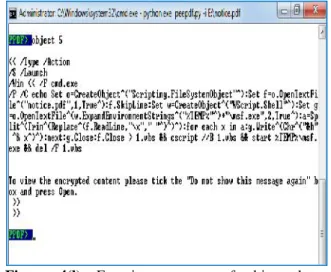
Figure 4(l): Examine contents of object that launches javascript.
Figure 4(l) includes malicious javascript code which launches cmd and exe file(msf.exe).
C) PDF STREAM DUMPER
This tool also used to analyze malicious pdf files.It has signature for exploits to compare against any pdf file you want to examine.We analyze the exploit which we created using metasploit i.e “notice.pdf” file using pdf stream dumper tool. After installing PDF Stream Dumper, load the suspicious PDF file . The tool includes a number of signatures of known PDF exploits. We can load PDF file and select “exploit scan” on the top of application interface then we find suspicious objects within the PDFfile.
Figure 4(m):After exploit scan
In Figure 4(m) Malicious pdf file shows that it contains exploit of CVE-2010-1240.This exploit is vulnerability in Acobat Reader to extract and run a malicious executable embedded in pdf.
5. Conclusion
References:
[1] S.R.Subramanya, Natraj Lakshminarasimhan.
“Computer Viruses”. IEEE
Potentials,October/November 2001.
[2]. Dai Haobing “Malicious PDF Document Analysis” 2013 .
[3] Gabor Szappanos “VBA is not dead”. Virus Bulletin 2014
[4] David Harley BA CISSP FBCS CITP, Andrew Lee .”Heuristic Analysis-Detecting Unknown virus”
[5] Darren Chi. “Microsoft Office 2000 and Securityagainst macro virus” Symantec AntiVirus Research Center Symantec Corporation
[6] T. Hassan. User-guided wrapping of pdf documents using graph matching techniques. In International Conference on Document Analysis and Recognition 2009, Proceedings, 2009.
[7] T. Hassan and R. Baumgartner. Table recognition and understanding from pdf files. In International Conference on Document Analysis and Recognition 2007, Proceedings, volume 2, pages 1143–1147, 2007
[8] M. Cova, C. Kruegel, and G. Vigna. Detection and analysis of drive-by-download attacks and malicious javascript code. In Proceedings of the 19th International World Wide Web Conference (WWW),2010
[9] T. Holz. Analyzing malicious pdf files, 2009. http:// honeyblog.org/archives/ 12-Analyzing-Malicious-PDF-Files.html.
[10]D. Stevens. PDF tools.
http://blog.didierstevens. com/programs/pdf-tools/. [11] D. Stevens. Malicious PDF documents explained. IEEE Security and Privacy, 9(1):80–82, 2011.