
Sollae Systems Co., Ltd.
http://www.sollae.co.kr
Application Note
Sending MAC Address
Function
Version 1.0 2009-09-04
Sollae Systems Co., Ltd. - 1 - http://www.sollae.co.kr
Contents
CONTENTS ... 1
-1 OVERVIEW ... 2
-1.1Overview ... 2
-1.2Using Unique ID for Serial Devices ... 2
-1.3Using IP Address of ezTCP ... 3
-1.4Using MAC Address of ezTCP ... 3
-2 DESCRIPTION ... 4
-2.1Sending MAC Address ... 4
-2.2Performance ... 5
-2.2.1 TCP Connection with Remote Host ... 5
-2.2.2 Sending MAC Address ... 5
-2.3Data Format ... 6
-3 SETTING ... 7
-3.1Products which use ezManager... 7
-3.2Products which use ezConfig ... 8
-Sollae Systems Co., Ltd. - 2 - http://www.sollae.co.kr
1
Overview
1.1
Overview
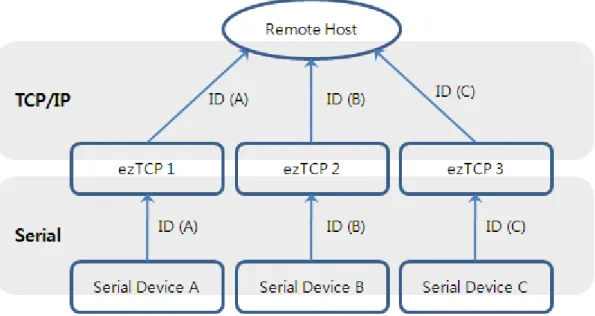
When your system contains two or more ezTCP and a server, identification for each device is needed sometimes. To solve this problem, you should choose one of following systems.
Using unique ID for serial devices Using IP address of ezTCP
Using MAC address of ezTCP
1.2
Using Unique ID for Serial Devices
If a unique ID is assigned for each serial device and it sends it, the server can identify all the data from its multiple devices. However, most of serial devices don‟t have any ID or they can not send it.
Sollae Systems Co., Ltd. - 3 - http://www.sollae.co.kr
1.3
Using IP Address of ezTCP
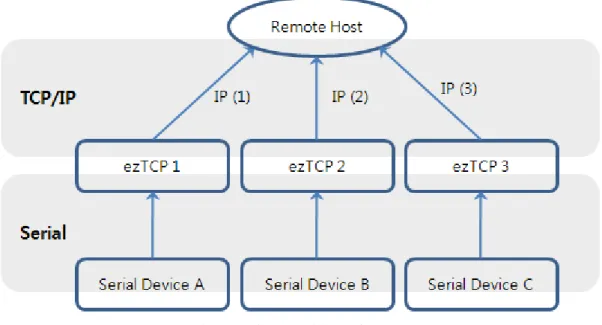
When TCP connection is established between server and ezTCP, the server can find out the IP address of ezTCP from the socket information. This lets users distinguish their devices. However, it should solve a problem if ezTCP is under network using dynamic IP address through DHCP or PPPoE.
Fig 1-2 Using IP Address of ezTCP
1.4
Using MAC Address of ezTCP
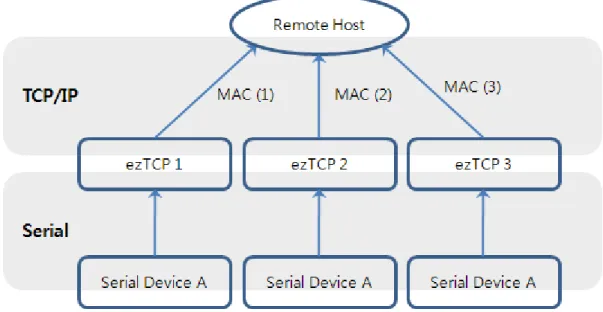
Each ezTCP has a MAC address which is independent each other. The address called hardware address and it has to be unique value. By using this MAC address, serial devices can be distinguished.
Sollae Systems Co., Ltd. - 4 - http://www.sollae.co.kr
2
Description
2.1
Sending MAC Address
One MAC address has to be assigned one network device. MAC address is formed 6 Byte in hexadecimal. Institute of Electrical and Electronics Engineers (IEEE) allocate the first 3 Bytes and the other 3 Bytes are allotted by manufacturer without duplication. So, a MAC address is for only one network device in the world.
6 Bytes of MAC address are followed.
00 30 F9 00 00 01
Company ID Serial Number
Fig 2-1 Form of a MAC Address
By using sending MAC address option, ezTCP send remote host its MAC address. Because of this, connected host (PC) can notice ezTCP‟s MAC address. Look at the figure 2-2.
Sollae Systems Co., Ltd. - 5 - http://www.sollae.co.kr
2.2
Performance
2.2.1
TCP Connection with Remote Host
This option is available on TCP modes only. There are two TCP connection modes. The one is TCP server (T2S). In this case, ezTCP wait for request packet of TCP connection opening one TCP port (Local Port). The other one is TCP client (COD). In this mode, ezTCP sends request packet of TCP connection to the remote host. The peer IP address and port should be set.
2.2.2
Sending MAC Address
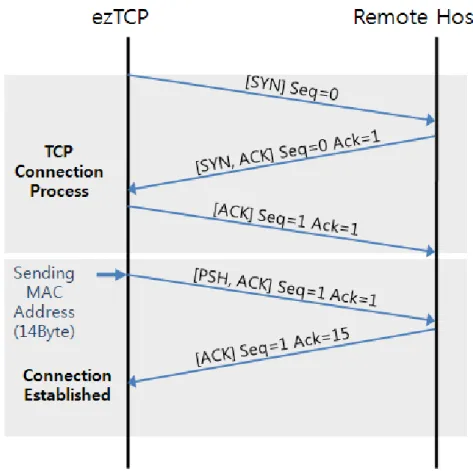
ezTCP sends its MAC address to the remote host right after the connection is established. Figure 2-3 is presenting sequence of making a TCP connection and sending MAC address as a time chart when ezTCP is set to TCP client mode.
Sollae Systems Co., Ltd. - 6 - http://www.sollae.co.kr
2.3
Data Format
6 Bytes of MAC address are presented in hexadecimal. ezTCP changes the data format to ASCII code. In addition, carriage return and line feed (<CR>, <LF>) are added in the last of the data. Therefore, total length of data is 14 Bytes.
Figure 2-4 is an example that presents MAC address as ASCII code when the MAC address is “0030f9000001”.
# 1 # 2 # 3 # 4 # 5 # 6 # 7 # 8 # 9 # 10 # 11 # 12 # 13 # 14
„0‟ „0‟ „3‟ „0‟ „f‟ „9‟ „0‟ „0‟ „0‟ „0‟ „0‟ „1‟ CR LF 0x30 0x30 0x33 0x30 0x66 0x39 0x30 0x30 0x30 0x30 0x30 0x31 0x0d 0x0a
Sollae Systems Co., Ltd. - 7 - http://www.sollae.co.kr
3
Setting
To use sending MAC address function, configuration is needed. The setting can be implemented by each configuration tool. (Except for EZL-200F)
3.1
Products which use ezManager
CSE-M32 / M73 / H20 / H21 / H25 / CIE-H10 / M10 / CSW-H80
Search ezTCP after the running ezManager. Press the [Option] tab and check the [Send MAC Address] option. Click [Write] button to store it.
Fig 3-1 [Send MAC Address] on ezManager
In case the [Send MAC Address] option is not visible, please download the latest released version of ezManager on our web site.
In case the [Send MAC Address] option is disabled, please upgrade firmware to the latest released version on your ezTCP.
Sollae Systems Co., Ltd. - 8 - http://www.sollae.co.kr
3.2
Products which use ezConfig
EZL-50L / 50M / 60L / 60M / 70 / 200LSearch ezTCP after run ezConfig. Check the [Send MAC Address] option in the option panel and store it with [Write] button.
Fig 3-2 [Send MAC Address] on ezConfig
This option will be available when the new version of firmware and ezConfig will have been released. The firmware of these products which using ezConfig will be released in a few weeks.
EZL-200F
Sending MAC address option of EZL-200F can be set by using TELNET connection or entering console mode. For the details, please refer to the document about the MAC ID function.
Sollae Systems Co., Ltd. - 9 - http://www.sollae.co.kr
4
Revision History
Date Version Comments
![Fig 3-1 [Send MAC Address] on ezManager](https://thumb-us.123doks.com/thumbv2/123dok_us/8558933.2313474/8.892.168.743.386.825/fig-send-mac-address-on-ezmanager.webp)
![Fig 3-2 [Send MAC Address] on ezConfig](https://thumb-us.123doks.com/thumbv2/123dok_us/8558933.2313474/9.892.205.775.273.673/fig-send-mac-address-on-ezconfig.webp)
