UBIR: University of Bolton Institutional Repository
Educational Cybernetics: Reports
Institute for Educational Cybernetics
2009
Cycle-3 demonstrators development and
implementation tool set
Davinia Hernández-Leo
Universitat Pompeu Fabra
Judith Schoonenboom
University Of Amsterdam
Krassen Stefanov
Amelie Louys
Ioanna Popescu
See next page for additional authors
This Report is brought to you for free and open access by the Institute for Educational Cybernetics at UBIR: University of Bolton Institutional Repository. It has been accepted for inclusion in Educational Cybernetics: Reports by an authorized administrator of UBIR: University of Bolton Institutional Repository. For more information, please [email protected].
Digital Commons Citation
Project no. 027087
TENCompetence
Building the European Network for Lifelong Competence Development
Project acronym: Integrated Project TENCompetence
Thematic Priority: 2.4.10
D4.5 Cycle-3 demonstrators development and implementation tool set
Due date of deliverable: 30-11-2008
Actual submission date: 09-01-2009
Start date of project: 01-12-2005
Duration: 4 years
Fundació Barcelona Media Universitat Pompeu Fabra
Version 1.0
Project co-funded by the European Commission within the Sixth Framework Programme (2002-2006)
Dissemination Level
PU
Public
X
PP
Restricted to other programme participants (including the Commission Services)
RE
Restricted to a group specified by the consortium (including the Commission
Services)
Building the European Network For Lifelong Competence Development
TENCompetence IST-2005-027087
Project Deliverable Report
D4.5 - Cycle-3 demonstrators development and implementation tool
set
Work package WP 4 – Pilots with the integrated system and validation of the
project
Task T. 4
Date of delivery Contractual: 30-11-2008 Actual: 09-01-2009
Code name D4.5 Version: 1.0 Draft Final
Type of milestone Report
Security
(distribution level) Public
Contributors
Pilot implementation methodology
Davinia Hernández-Leo, Judith Schoonenboom, Krassen Stefanov, Amelie Louys, Ioanna Popescu, Marcus Specht, Bas Krekels, Ruud Lemmers
Planning business demonstrators
Davinia Hernández-Leo, Krassen Stefanov, Eric Kluijfhout, Dai Griffiths, Miguel Arjona, Laurent De Clara, Bas Krekels, Alessandro Mazzetti, Eelco Herder
Authors (Partner) FBM-UPF, UvA, SU, AGORA, UNESCO-IHE, OUNL, LOGICA,
UB, Altran SDB, INSEAD, ILABS, UHANN
Contact Person Davinia Hernández-Leo
WP/Task responsible Davinia Hernández-Leo
EC Project Officer Mr. Martin Májek
Abstract
(for dissemination)
This document presents an implementation methodology for the preparation and execution of TENCompetence cycle 3
demonstrator pilots according to the infrastructure currently available. The methodology includes the description of the tasks and procedures needed to be considered from describing the training in terms of competences and selecting the usage profiles more useful for the pilot, to the evaluation of the pilot success. It also reports the plans for the business demonstrators that will be executed by Associate Partners (with support of the eight larger consortium partners) in cycle 3.
Keywords List
Pilot implementation methodology, testing and validation, cycle 3, business demonstrators, Competence Development Programmes, Integrated Infrastructure
TENCompetence Project Coordination at: Open University of the Netherlands Valkenburgerweg 177, 6419 AT Heerlen, The Netherlands
Table of contents
TABLE OF CONTENTS...1
PREFACE ...2
1. WHY A TENCOMPETENCE PILOT?... 5
1.1
T
ARGETG
ROUPS ANDP
OSSIBLEP
ILOTINGS
CENARIOS... 6
1.2
W
HY SHOULD YOU RUN A PILOT AND WHAT ARE THE CORE QUESTIONS? ...7
2. DESCRIBE YOUR TRAINING IN TERMS OF COMPETENCES...8
2.1.
T
RANSFORMATION OF THE CURRICULUM INTO COMPETENCES...8
2.2.
T
HE PROCESS OF TRANSLATING CONTENT-
BASED TRAINING INTO COMPETENCE-
BASED LEARNING...9
3. DECIDE WHICH TOOLS WILL BE USEFUL... 12
3.1
T
OOLSO
VERVIEW... 12
3.2
I
NTEGRATED USE OF THE TOOLS... 14
3.3
Q
UICK START GUIDES... 14
4. EMPLOYING USAGE PROFILES IN YOUR PILOT...15
4.1
F
OLLOWC
OURSE... 15
4.2
C
REATE COURSE... 16
4.3
P
ERSONALD
EVELOPMENTP
LAN... 16
4.4
K
NOWLEDGEM
ANAGEMENT...16
4.5
O
VERVIEW... 17
4.6
E-
PORTFOLIO... 17
4.7
C
OMPETENCE ASSESSMENT...18
4.8
M
ATCHINGC
OMPETENCES ONJ
OBP
ROFILES... 18
4.9
S
OCIALH
ELP... 19
5. SET UP A BUSINESS DEMONSTRATOR PILOT DESCRIPTION... 20
6. DEVELOP OR COLLECT UNITS OF LEARNING WITH EACH COMPETENCE ... 21
6.1
G
UIDELINES AND RECOMMENDATIONS... 21
6.2
U
NITS OF LEARNING... 22
7. SETTING UP A PILOT EVALUATION... 23
7.1
W
HAT HAPPENED IN THE PILOT?... 23
7.2
I
S THE PILOT SUCCESSFUL? ...23
7.3
D
OES THE PILOT HAVE AN EFFECT?... 24
7.4
H
OW CAN THE PILOT BE IMPROVED? ... 24
7.5
H
OW DOES THE PILOT WORK?...25
8. ACTUAL IMPLEMENTATION ...26
REFERENCES...28
APPENDIX 1: GLOSSARY ... 29
APPENDIX 2: PLANS FOR BUSINESS DEMONSTRATORS ... 30
S
UMMARY OF THE PROGRESS ACHIEVED BY EACH CONSORTIUM PARTNER... 30
E
MPOWERL
IMBURG BUSINESS DEMONSTRATOR... 33
BU
EPIQ-2
BUSINESS DEMONSTRATOR... 36
CEDEP
B
USINESSD
EMONSTRATOR...43
M
IZARM
ULTIMEDIA BUSINESS DEMONSTRATOR... 45
D
OBLEV
IA BUSINESS DEMONSTRATOR... 50
Preface
In the third cycle of the TENCompetence project, the evaluation results of cycle 2 pilots and the output of
the Aspect RTD activities in cycle 2 are again taken into account as input for this last cycle (Griffiths et
al., 2007; Moghnieh et al., 2008; Hernández-Leo et al., 2008). The cycle 3 pilots are 'business models
demonstrators', mainly involving external parties. On one hand the associate partners are expected to take
advantage of the TENCompetence concept and infrastructure and on the other hand to demonstrate its
benefits to the wider lifelong learning community.
Associate partners are invited to carry out demonstrator pilots that evidence the applicability and
sustainability of business models designed and developed to supply one or more TENCompetence
services. The demonstrators may be also organized within consortium partners’ own organizations;
together with external organizations; or with a group of professionals centered around a topic; within their
own locality, or at a national or international level.
This document presents a pilot implementation methodology, a tool intending to support associate
partners and the consortium partners assisting them (see DIP-3) in the adoption and usage of the project
results in piloting activities. The methodology has been elaborated according to the technical
Introduction
TENCompetence aims at supporting lifelong competence development by establishing a
technical and organisational infrastructure, using open-source standards-based, sustainable and
innovative technology. With this freely available infrastructure the European Union aims to
boost the ambitions of the Knowledge Society, by providing easy access to facilities that enable
the lifelong development of competences and expertise in the various occupations and fields of
knowledge.
The TENCompetence infrastructure supports the creation and management of networks of
individuals, teams and organisations in Europe who are actively involved in the various
occupations and domains of knowledge. These 'learning networks' support the lifelong
competence development of the participants from the basic levels of proficiency up to the
highest levels of excellence. The networks consist of learners, educational institutes, libraries,
publishers, domain specific vendors, employers, associations, and all others who deliver
services or products in a specific field. In the network, providers can for example make their
competence development materials available and learners can select and use competence
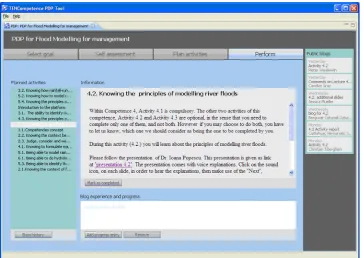
development materials (see for example Figure 1, which shows a screenshot of the PDP tool
developed in the TENCompetence project.)
Figure 1. TENCompetence PDP tool (screenshot from the Water Management
pilot)
The TENCompetence infrastructure is intended to be useful for any person, group or
organisation that has a need to develop some competences in any field. However the focus is
more on: adult persons mainly (18 years or older), formal and informal groups/teams, all kinds
of organisations in the public and private sector (among which SMEs); the development of
competences in complex domains of knowledge; formal and informal education, training,
learning and knowledge management.
provides general advice to organisations, on the basis of which they can decide whether to start
a pilot and establish their goal. How to describe training in terms of competences is covered in
Chapter 2. Chapter 3 is devoted to list the TENCompetence tools so that institutions can think
up which tools will be useful for them and why. This chapter complements Chapter 4 which
explains the TENCompetence usage profiles and how they are related to the tooling. Chapter 5
includes the template that can be completed to describe a business demonstrator pilot. Some
hints on how to develop or collect units of learning with each competence are depicted in
Chapter 6. Chapter 7 describes how to set up an evaluation of the pilot. Finally, Chapter 8
suggests the steps to follow when implementing the pilot. Appendix 1 includes a glossary with
the main concepts used in TENCompetence. The plans achieved so far regarding the business
demonstrators to be executed by associate partners are listed in Appendix 2.
Based on the experiences of the project, the several roles or profiles, which can be involved in
the preparation of business demonstrators are the following (the description of their
competences is detailed in Bitter et al, 2007):
Requirements analyst, Architectural designer,
Interface/interaction designer, System developer, Software tester, System manager, Pilot
designer and evaluator, Trainer, Public relations officer, Pedagogical expert, Learning
technology expert, Business manager, Human resource manager, Services provider
. The
following table suggests reading paths for these different stakeholders.
Chapter / Stakeholder Requirements analyst, Business manager, Human resource manager
Architectural designer,
Interface/interaction designer,
System developer, Software tester
System manager
Pilot designer and evaluator,
pedagogical expert
Learning technology expert
Services provider
1. Why a TENCompetence pilot?
*
*
*
*
2. Describe your training
in terms of competences
*
3. Think up which tools
will be useful and why
*
*
*
*
*
4. Consider the usefulness of one or more of the usage profiles for your situation
*
*
5. Set up a detailed pilot description, using the template
*
*
*
*
6. Develop or collect units of learning with each competence
*
*
*
7. Set up an evaluation of the pilot, to judge success, improve intervention and/or generate knowledge.
*
1. Why a TENCompetence pilot?
TENCompetence enables new ways of integrating personal competence development into
lifelong learning scenarios. The project is valorising and disseminating its results in a variety of
ways and works with a variety of partners on promoting new competence development models,
establishing new educational models, new standards for competence definition and exchange,
description of Learning Paths and others.
You could profit from the experiences made and the tools developed so far in TENCompetence
in various ways by establishing a pilot within a cooperation with the project.
1.
Research effects of new tools for integration of learning resources, competence
specifications, learning activities, active learning communities and others learning support
services.
2.
Bring yourself up-to-date what new technologies developed in TENCompetence could do
for you and what the actual benefits could be. Learning about the alternative approaches of
TENCompetence and the tools developed therefore which are developed under an open
source licence.
3.
Contrast your existing approaches to learning support with new ways made possible via the
interwoven services and facilities from TENCompetence and the approaches taken by the
numerous partners that already joined the partner network (June 2008 these were about 30
organisations).
4.
Understand problems of internationalisation of learning approaches. By becoming an
associated partner you have access to all planning and description of pilots based on
TENCompetence infrastructure and network. This will allow you to look at professional
development in several European and International partner pilots including Spain, Slovakia,
Bulgaria, Lithuania, UK, France, Estonia, the Netherlands, Belgium, Australia and Canada.
In order to get an idea which scenarios are supported by TENCompetence tooling you could
also use the main usage profiles developed (see Chapter 5 for a detailed description):
1.
Assess competence: assessment of competence is important in several critical business
situations ranging from a performance state analysis towards the definition of professional
development plans on all organizational levels.
2.
Conduct learning activities: The actual conducting of learning activities can be structured in
a variety of ways and available tooling can support you here in giving new structure
probably more appropriate to the actual needs of end users and the learning need.
3.
Plan route: definition and planning of individual learning routes is a core meta-cognitive
component of the learning process and can be supported on different tooling levels.
4.
Provide Support: TENCompetence enables tooling for support services on individual levels
as also on connecting in learning networks (collaboration services).
5.
Develop learning materials: While today pre-prepared learning materials are the standard to
use in TENCompetence alternative approaches like user generated content, structuring of
content based on competence taxonomies and other approaches are central.
6.
Build competence development programme: Understanding the relation between different
competences and how they can be developed is supported with different tools.
1.1 Target Groups and Possible Piloting Scenarios
In a call for cooperation for partners from TENCompetence mainly three different target groups
where differentiated, i.e. individual people, groups or teams, and organizations.
Further focus was set to individuals 18 or older, the development of complex skills, and formal
and informal forms of education, training, learning and knowledge management.
Pilots can target all of these three levels in a variety of scenarios (see Table 1) in which
TENCompetence services or tools are integrated and which are expected to demonstrate an
added value over current solutions. Example scenarios include:
Individuals gaining performance on complex skills, develop a career into a certain direction,
or other.
Groups or teams who want to share knowledge, resources, learning activities, or increase
team performance by collaboration on these various levels, groups that want to develop
competences in a team or support dedicated team members for better performance.
Organizations who want to better manage expert knowledge, train personnel on specific job
requirements, manage the explication and distribution of knowledge in communities of
practice, adapt team performance and skills, knowledge to new situations.
Table 1. TENCompetence user groups
Individual
people
· People with a need to develop some general or specific competences to perform their
job better, to solve any type of problems or to learn to cope with specific situations.
Also those with a need to improve their career, or a desire to change their jobs.
· People who want to share knowledge, skills, perspectives and views with others, e.g.
in order to develop new knowledge.
· People who need a formal degree, diploma or certificate at any time in their life.
· People who want to develop competences due to the intrinsic motivation to learn
something in a certain area. This includes people who want to develop competences to
improve their quality of life (hobbies, family life, social environment, etc.), or to get
support in something which is difficult for them.
- People who want to increase their proficiency levels
Groups or
Teams
· Groups who have to solve complex problems and tasks or have to cope with difficult
situations in which group collaboration will increase the chance of successful
performance.
· Groups who want to support new/novice members in their teams.
· Groups who want to share knowledge, skills and points of view to develop their
insights and competences in the field (e.g. research teams).
· Groups in companies who want to (or must) develop competences in order to
perform better.
Organisations
· Organisations that want to disseminate and manage new and expert knowledge
within the organisation / workplace.
· Organisations that have to train personnel to learn or fulfil specific (new, complex or
changing) job requirements.
· Organisations that produce knowledge and want to manage the exploitation,
management and dissemination of knowledge.
1.2 Why should you run a pilot and what are the core
questions?
Some core questions which you already have considered or not in your targeted piloting
scenarios are:
Do I have an explicit or implicit modelling and usage of competences in the selected
education/training scenario?
How are the competence structures related to the current main guiding structure of the
curriculum?
2. Describe your training in terms of competences
The purpose of this chapter is to give guidelines on how to move from a topic-based to
competence-based learning. This change involves several challenges that include how to
translate a content-based distribution of materials into a competence division, how to evaluate
learning, and how to configure a system following a competence-based orientation.
2.1. Transformation of the curriculum into competences
The approach which is taken within TENCompetence entails an understanding and
transformation of the content of a topic driven training into a competence development based
learning. Competences are modelled in the TENCompetence project as follows: each learning
network has a competence map which contains a series of competence profiles for roles,
functions and jobs (see Appendix 1). A competence profile, which is an instance of a certain
competence model, contains one or more competences, which must be attained, in order to meet
the demand of the profile. Moreover, each profile has several levels.
A curriculum built on competences is one of the cornerstones for educating learning
professionals. A first pitfall is to reduce the competence concept too much, without really taking
into account the attitude and/or the motivation. This limitation occurs by focusing knowledge
only in function of “can”. A second pitfall has to do with the interpretation of knowledge. In
some competences the understanding is rather insights (has insight in…, understands…), which
is also too narrow for defining a competence. As defined in Appendix 1, a Competence is
defined as the ability (´disposition´) of an actor to act effectively and efficiently upon the events
in an ecological niche (an occupation, a hobby, a market, a sport, etc.).
The first steps in setting up such a competence-based learning process involve defining learning
paths or plans composed of different activities which integrate all the different elements needed
to develop each competence.
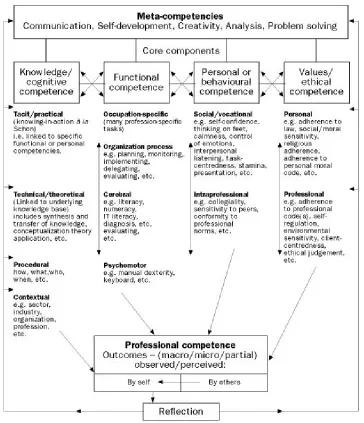
The above explained approach is based on the competences concepts introduced by Cheetham
and Chivers (Cheetham & Chivers 1996, Cheetham & Chivers 1998). The model is generic, and
it can be applied to diverse areas. However for each pilot there are specific characteristics,
contextual and subject matter requirements, which influence the transformation into
competence-based learning. The developed core-competences may have different
sub-competence structure, where some sub-sub-competences may be completely omitted (see Figure 2).
Figure 2. The Cheetham and Chivers competence model
(extracted from Cheetham & Chivers 1996)
2.2. The process of translating content-based training into
competence-based learning
Due to the specificity of content for any training, the transformation of it into competence-based
learning can be done by thorough analyzing of each component of the training in close
cooperation with the expert in the topic. The remaining part of the chapter will expand and
explain the process on an existing pilot of the TENCompetence project, the Water Management
pilot: Flood Modelling for Management (FMM).
The original Module FMM was based on a topic structure, which consisted of four related and
sequential course topics:
1.
Flood management and information technology
2.
Flood processes
Participants had to follow the topic and sequence of the sub parts.
During the design of the module so that it is based on competences, its content was
re-constructed according to the core competence model elements of Cheetham and Chivers. The
identified
Competence profile(s) were:
Basic/compulsory: Catchment modeller
Specialised: River basin modeller, Urban modeller.
These competence profiles are composed of the following c
ompetences:
Ability to identify the cause of a flood
Ability to identify the type of a flood
Ability to simulate a type of flood
Ability to interpret and evaluate the impacts of a flood
Ability to prepare and advise/communicate on possible flood prevention and mitigation
actions, including technical and ethical considerations.
The aim of the pilot was to compare what will be the performance of learners in a competence
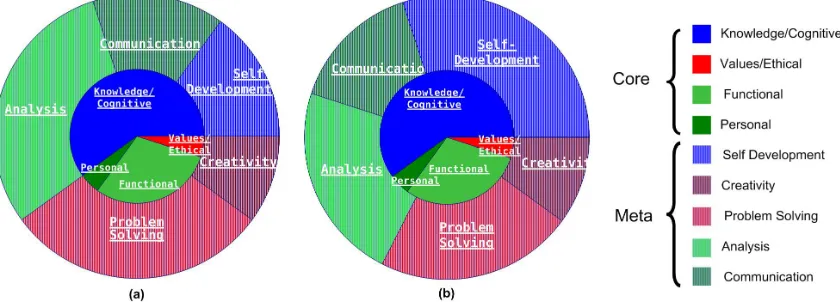
based learning orientation, if two learning paths are provided. Following the Cheetham and
Cheevers competence elements, learning paths were identified (see
Figure 3
).
As a result the FMM was setup in two runs, one where, the expert still has a major role in
proposing the competence development process (Figure 3a), and a second one, where the
learners themselves decide on their competence development plan (Figure3b).
Figure 3. Graphical representations of the competence-based training, adapted
from (Cheetham & Chivers 1996) a) Experts propose specific competence
development plans
b) Learners decide on the competence development plans to follow
The process and the steps which have to be followed, in order to transform a course, from a
content based course into a competence-based course are:
identify an expert in the area in terms of competences;
identify the competence model to be applied (e.g., Cheetham & Chivers 1996);
re-structure the content of the course, by defining the competences and sub-competences
(this will require several iterations);
implement the competence-based course in a learning environment;
run the course in test mode. That will entail that students will not only follow the
competence based learning path, but they will also give feed-back on the process of learning
and on the experience of learning itself. In many cases the environment can hamper the
process and then this should be carefully distinguished, from the process of learning;
refinement of the competence-based learning content, based on the feedback coming from
the test run.
3. Decide which tools will be useful
This chapter presents the list of tools produced by the TENCompetence project that are already
available for use. You can find details on which usage profiles the tools belong to (the profiles
are explained in Chapter 4), what type of clients they are (rich or web clients), and where the
tools can be accessed or downloaded. To fully understand the facilities of these tools, readers
are encouraged to read the quick start guide of each tool.
3.1 Tools Overview
PCM - Personal Competence Manager
(Please note, this is a proof-of-concept and expert tool only)
Usage profile(s) / use case(s): Create Course, Create Profiles, (Follow Course)
Type: rich client
Summary:
For Create Simple Course: rich client that can Create Simple Courses (containing basic
learning activities and resources), which don't require IMS Learning Design.
For Create Profiles: client capable of creating / editing competence profiles (containing
competences; the client can also create competence development plans to achieve those
competences) within a community context.
(For Follow Course): allows following simple courses (without IMS Learning Design),
which were created by the PCM itself. Learning is supported by collaboration
functionality (chat, forum and Skype). The learning is the primary goal of the Follow
Course functionality. This Follow Course functionality of the PCM should not be used
after May 2008, Learners should use the functionality offered by the PDP and SLeD
tools instead.
Status: available for use. Future extensions in the PCM client will be minimal, because
other client tools should replace the PCM. However, the services offered by the PCM
server will be extended regularly, to accommodate change requests.
Download: http://www.tencompetence.org/PCM/download.html
PDP – Personal Development Plan tool
Usage profile(s) / use case(s): PDP
Type: rich client, web client
Summary: The PDP tool enables learners to create their own personal development plans
by selecting a competence profile, stating their goal and motivation, following a
self-assessment, creating their learning plan and performing the activities in the plan (some of
them may be links to courses in the SLeD system).
Status: first version of the web client was ready in October 2008, available for testing at
http://pdp.it.fmi.uni-sofia.bg/
Download (rich client): http://hdl.handle.net/1820/1545
LearnWeb2.0
Usage profile(s) / use case(s): Share Knowledge
Type: web client
Summary: users can search / publish / comment on / rate and share resources.
ReCourse Learning Design Editor
Usage profile(s) / use case(s): Create Course
Type: rich client
Summary:
Graphical editor to create / edit full IMS Learning Designs (Units of Learning).
Units of Learning can be packaged as per IMS Content Packaging specification.
Packages can be uploaded to CopperCore server.
Offers management of "runs" and users on CopperCore server.
LD "runs" can be created from within ReCourse and populated with users.
Integration with "widgets" and widget server.
Integration with OpenDocument.net repositories.
Status: available for use at http://www.tencompetence.org/ldauthor/. Supports IMS LD
level A. Development in progress for future, extended, versions supporting Levels B and C
and improved editor UI.
Learning Design Runtime Tools
Usage profile(s) / use case(s): Follow Course
Type: web client
Summary:
An updated/extended web based Learning Design player (SLeD).
A SCORM (SCO) 1.2 service for Learning Design.
A Widget Server & Widget Service for Learning Design.
An updated/extended (APIS) QTI engine.
Features:
allows a SCO 1.2 object to be played as part of a Unit of Learning.
Widget server allows a configurable and extendable platform for adding new services
(widgets).
Widgets already created for system include chat, forum and vote tools.
Widget server can be queried from an authoring system (such as ReCourse) to
detemine which services are available.
All downloadable in one bundle, similar to the original "CCRT" CopperCore
download.
Interprets QTI2p1 tests.
Status: available for use at
http://www.tencompetence.org/ldruntime/widgetserver
Overview Tool
Usage profile(s) / use case(s): usage Profile “Overview” (exploring resources, persons and
competence profiles) in particular “connecting with relevant peers in the network community”
Type: rich and web client
Summary: provides an overview of links between people and their Competence Development
Opportunities (CDO). CDO is a broad term which includes not only traditional courses,
workshops, and reference material, but also ‘live’ resources, such as communities of practice
developed around a given competence, or experts and peer groups. Overview of available CDOs
can be provided by supporting the users in navigating through a Structured Space in which
different type of CDOs are grouped in categories.
TENTube
Usage profile(s) / use case(s): usage Profile “Overview” (exploring resources, persons and
competence profiles) in particular “connecting to competence networks through
video-enhanced navigation and game dynamics”
Type: web client
Summary: TENTube v1.0 has been released. In its current version TENTube allows to
visualise three kinds of videos (Competence Development Awareness, Competence
Development Opportunity and Competence Development Expert) and to navigate / explore
the Network represented by the users, the videos and the related tags and the connections
(e.g. ‘has seen’, ‘knows’, ‘has submitted’, ‘is inspired by’, ‘is a version of’) among them
via the embedded Network Visualisation and Navigation Tool, NVNT.
Status: the tool is available for use at
http://labs.calt.insead.edu/prototyping/Tentube/tentube.html (ask
[email protected] for access). No integration with the PCM services.
Other tools are under development (see Chapter 4).
3.2 Integrated use of the tools
To enable an integrated view of the TENCompetence tooling and even the use of external tools,
it is possible to use a third party platform as a container for the TENCompetence tools. For
example, the ELGG platform was explored as a candidate for the Digital Cinema pilot
1(see
Hernández-Leo, D., et al. 2008). Besides, the recent strategy taken in TENCompetence is to use
Liferay Portal as the portal environment for the project tooling.
3.3 Quick start guides
WP9 has coordinated the creation of “Quick start guides” for a number of tools including:
PDP tool
PCM (expert users)
ReCourse
LearnWeb 2.0.
These guides are designed to give a working overview of the tools and can be used for a variety
of training purposes including workshops and pilots. Some of these guides have been translated
to Spanish and Bulgarian according to the requirements of the pilots.
As more tools become available, WP9 will continue to produce QuickStart manuals.
The quick start guides can be found by TENCompetence partners here:
http://www.partners.tencompetence.org/mod/resource/view.php?id=33&subdir=/Quickstart_Guides
1
4. Employing usage profiles in your pilot
This chapter describes nine what we call “usage profiles”. These are scenarios for using the
TENCompetence infrastructure for a few frequently occurring purposes. The aim of the usage
profiles is to help providers in setting up their pilot, by describing the activities that are most
important in their specific usage profile. The nine usage profiles are:
Follow Course
Create Course
Personal Development Plan
Knowledge Management
Overview
e-Portfolio
Competence Assessment
Matching Competences on Job Profiles
Social Help.
Below, each profile is described, the main activities in the usage profile are listed. Throughout
all usage profiles, activities are categorized as follows:
Start
- Activities at the beginning of the main activity of the usage profile
Search and navigate –
Search for and navigate through various resources such as learning
activities, people and documents.
Preparation
- Preparatory activities by learners or designers before they perform the main
activity of the usage profile.
Execution
– Performance of the main activity of the usage profile
Collaboration
– Interaction with other people
Control learning
– Activities related to getting an overview of and reflect on the
competence development progress
Evaluation
– Rating of various resources
Contribute
– Adding various resources to the learning network.
4.1 Follow Course
In the usage profile Follow Course, a lifelong learner follows a formal training as part of their
competence development. In this scenario, the TENCompetence infrastructure is a platform
through which providers can make their courses (according to the IMS Learning Design
specification) available. Learners can search for courses that match their needs, they can register
for courses, and they can perform the activities that belong to the courses for which they have
registered.
The activities available in this usage profile are:
Start
•
The learner registers for a course
Search and navigate
•
The learner searches for a course
•
The learner searches for an activity or resource for which he or she has registered
•
The learner navigates through activities and resources
Execution
•
The learner performs activities and uses resources
•
The learner carries out assessment activities
Collaboration
•
The learner participates in forums and chats
Control learning
•
The learner marks activities as completed
•
The learner marks courses as completed
4.2 Create course
In the Create Course usage profile, a learning designer creates (according to the IMS Learning
Design specification) a course and makes it available to teachers and learners.
The activities available in this usage profile are:
Preparation
•
The learning designer creates a Unit of Learning
Contributing
•
The learning designer publishes a Unit of Learning
Execution
•
Teachers and learners gain access to and perform a Unit of Learning (see previous
usage profile)
4.3 Personal Development Plan
The Personal Development Plan is a personal environment, completely owned by the user. It is
used for creating a plan for personal competence development, following the plan and reflecting
on progress made. Learning from other learners within the PDP is not a relevant issue, yet the
plan can be shared with others.
The activities available in this usage profile are:
Planning
•
The learner creates and adapts a personal development plan (PDP)
Execution
•
The learner follows a PDP
Control learning
•
The learner reflects on their progress within the PDP
Collaboration
•
The learner is able to blog progress to other experts and learners
4.4 Knowledge Management
The usage profile Knowledge Management is directed at setting up communities to share
knowledge about various topics. The resources and discussions about the resources are at the
centre, organised per topic. Topics are clustered in topic areas.
The activities available in this usage profile are:
Search and navigate
•
The learner searches topic areas or topics
Contribute
•
The learner creates a topic area
•
The learner fills the topic area with resources
•
The learner creates topics under the topic area
•
The learner re-groups the resources to different topics
Collaboration
•
Learners discuss topics
•
A learner creates a community of people within a topic area who can view and/or edit
topics and resources
•
A learner makes his or her topic area publicly available
Evaluation
•
A learner rates resources
4.5 Overview
In the Overview usage profile, people with a learning need or specific interest try to get in
contact with other people or resources that might be relevant to them. The overview tool
provides them with an overview of relevant people and resources, by matching these to the
learner’s needs or interests.
The activities available in this usage profile are:
Search and navigate
•
The learner browses learning/knowledge networks for resources that match his or her
needs and for people who have similar interests.
Collaboration
•
The learner describes him- or herself by creating and editing their personal user profile.
•
The learner establishes a connection to other people by adding them to their contact list
and/or by involving in an introduction game.
•
The learner gets into contact with peer learners by posing a diversity of messages, such
as discussion threads in forums, chat messages, and rating resources.
Contribute
•
The learner adds resources to the learning/knowledge network.
4.6 E-portfolio
In an e-portfolio learners present acquired competences and experiences that they feel confident
about and that may hold relevant information to a specific audience, for example customers or
potential employers. E-portfolios increase the employability of learners, but also serve as
showcases, and are part of a person’s digital identity. Key features of elements making up an
e-portfolio are the competence itself and the level achieved, an explanation wrapper drawing the
connection to a presentation goal, and evidence to support the claim. Additionally, the learning
path followed to achieve the competence can be included.
The activities available in this usage profile are:
Prepare
•
The learner browses a list of competences for inclusion in one of the presentations of
their portfolio.
•
The learner creates a presentation by selecting competences, adding evidence for each
competence and adding annotations.
•
The learner edits a presentation.
•
The learner manages the various presentations in their portfolio by creating, editing,
deleting and exporting presentations.
Collaboration
4.7 Competence assessment
In the Competence Assessment usage profile, a professional/learner wants to have one or more
of his/her competences assessed by one or more individuals against a target competence profile,
be it (part of) a formal educational programme or the competence profile of a profession or a
function that (s)he wants to attain. Competence assessment is usually intensive, involving more
than one assessor. It may take place at an assessment centre.
The activities available in this usage profile are:
Start
•
The learner finds assessment providers for their selected competences
•
The assessment provider handles a request for competence assessment
•
The assessment provider provide the tests the learner has to perform
Prepare
•
The learner performs a self-assessment
•
The learner collects evidence for their acquired proficiency level
Execution
•
The learner performs competence assessment tests
•
An assessor judges evidence provided by the learner
•
An assessor judges performance in practice tests
•
A chief-assessor makes the final judgement
Collaboration
•
The learner discusses tests results with assessors
4.8 Matching Competences on Job Profiles
In Matching Competences on Job Profile, competence profiles of people are matched to job
profiles of organisations. Lifelong learners will typically use the system to explore job
opportunities and to find out which competences they need to acquire to keep qualified for their
current position or to be eligible for a new position. Organisations will use the system for:
matching current personnel and/or applicants with a job profile; composing a team that covers
the competences needed for a particular job; finding out current needs for competence
assessment programs.
The activities available in this usage profile are:
Prepare
•
The learner creates or edits their competence profile (resume)
•
The organisation creates or edits a job description profile
Collaboration
•
The learner asks a question to the organization
Start
•
The learner searches for a job matching their competence profile
Contribute
•
The organization posts a job profile.
Execute
•
The organisation matches people to their job profile
Collaboration
4.9 Social Help
The Social Help usage profile focuses on how the support of learners in a learning network by
their peers can be facilitated. Providing support solves a learner’s need and it strengthens social
ties. The system helps people to find suitable peers and to connect to them.
The activities available in this usage profile are:
Prepare
•
A learner joins or sets up a learning community, by setting up a wiki and populating it
with resources, questions and guidelines
Collaboration
•
A learner asks for help
•
Suitable peers are selected matching the support context
•
Suitable peers are invited for help
5. Set up a business demonstrator pilot description
The following template has been designed to guide consortium partners assisting associate
partners in the description of TENCompetence business demonstrators. Filling in
Table
2
will allow you to have the overall description of the pilot.
Table 2. Template for describing TENCompetence business demonstrator
Name of the business demonstrator
SHORT DESCRIPTION: Include here a short description of the business demonstrator (from 100 to 200 words aprox.) NAME AND
DESCRIPTION OF THE ASSOCIATE PARTNER
Include here the name of the associate partner and its description
USER GROUPS Describe the types of user group involved in the demonstrator (see Chapter 2) SETTING Describe the setting (e.g., workplace), mention the location of expected users, etc.
ROLES
List the different possible roles involved in the pilot from its design until its completion and the estimated number of persons that will play each role.
Possible roles are: Requirements analyst, Architectural designer, Interface/interaction designer, System developer (also of the GUI container linking to TENC tools), Software tester, System manager (also help-desk functions), Pilot designer and evaluator, Trainer, Public relations officer, Pedagogical expert, Learning technology expert (or learning designer, content developer…), Business manager, Human resource manager (competence provider, competence assessment provider), Services provider, learner, expert,
tutor/teacher/coordinator/mentor/study advisor, assessor, other (please specify)
TOOLING Indicate the TENCompetence tools (and the complementary external tooling, if applies) that will be used in the demonstrator (see Chapter 3)
USAGE PROFILES Mention which usage profiles will be used in your pilot (see Chapter 4) AIM AND
EXPECTATION OF THE
DEMONSTRATOR
Indicate the aim and expectation of the demonstrator
CONTEXT Detail the context of the pilot (elaborated description of the demonstrator)
BUSINESS MODEL Describe how client organizations and service providers cooperate in this demonstrator (see Krekels, B., et al. 2008)
RELEVANCE OF TENCOMPETENCE FOR THE
DEMONSTRATOR PILOT CONTEXT
Describe the relevance of TENCompetence for the pilot context (see Chapter 1). Specify also any problem/challenges you envisage regarding the implementation of TENCompetence in the pilot context. (For TENCompetence business demonstrators only.)
COMPETENCE PROFILES AND COMPETENCES INVOLVED
Define the competence profile(s) involved in the demonstrator (a set of Competences that define the minimum requirements for a specific function/job) and its associated competences (a Competence is defined as the ability (´disposition´) of an actor to act effectively and efficiently upon the events in an ecological niche (an occupation, a hobby, a market, a sport, etc.). In short: the ability to perform effectively in a situation.) (see Chapter 2)
TRAINING NEEDS Describe any training needs required for carrying out the demonstrator IMPLEMENTATION
PLAN
Define the implementation plan (see Chapters 6 and 8 )
EVALUATION PLAN
6. Develop or collect units of learning with each
competence
This chapter provides on one hand some basic guidelines and recommendations on how to
develop or collect units of learning with each competence and on the other hand it describes the
different resources that may be used in a pilot.
6.1 Guidelines and recommendations
Content collection
Contact with experts in the required competence profile
should be done in order to collect
material that can be used for the pilot. The material will need to be further adapted to each
competence. The expert, i.e. content/course provider, may be a teacher, a training professional, a
tutor, a mentor or any person that has experience in the competence profile at issue.
During the pilot, the users themselves have the possibility to create their activities which can be
shared and found by other users. The diversity of the content providers guarantees different
approaches to acquire a competence and the richness of the activities.
Content adaptation: new material and existing material
a) The content needs to be
adapted to the specificities of self-training
so that each user
can follow and go through the personal learning path easily and in an autonomous way. Indeed,
the users may be studying at home or isolated from other users and may not have an expert to
help them through. Therefore, the material needs to be user friendly in order to make it possible
for the user to do the activities without the support of an expert. Though, the system allows the
users to communicate between them and share information through the use of chat, blogs, etc.
Example from the Ágora Pilot: if an activity includes exercises of English grammar in a word
document, it is necessary to also include the answers in another document so that the user can
make an auto-assessment. In addition, there is also the possibility to submit the users’ answers
to an expert for their assessment which is not the typical case in the lifelong learning scenario.
b)
The collected content needs to be
adapted to each competence.
Some resources may be appropriate to several competences. In this case, there is a need to adapt
the resources to each competence. There is also the possibility of adding the same activity to
several contents although this practice should be avoided as it may lead to misunderstandings
when the competences belong to the same competence profile.
In case the competence profiles are used in different user groups, the competences may be
shared and/or include the same activities.
6.2 Units of learning
Units of Learning (UoL)
In case you need to provide guided courses with a
Personnel Development Plan
you may be
interested in creating UoLs compliant with IMS Learning Design specification (LD).
ReCourse
is used in order to create UoLs and
SLeD
for their execution (see Chapter 3).
A UoL can be seen as a general name for a course, a workshop, a lesson, etc that can be
instantiated and reused many times for different persons and settings in an online environment.
The Learning Design is used to plan and develop UoLs and
enables the creation of a complete,
abstract and portable description of the pedagogical approach taken in a course, which can be
realized by a conforming system. It can model multi-role teaching learning processes and
supports personalization of learning routes
(Koper & Olivier, 2004)
.
With this type of resources the user is guided step by step through the activity. We found that it
is especially useful and efficient for the users which are not familiar with computer technologies
as they need more assistance.
Other (simple) activities
Several resources can be used to develop a competence, i.e. pdf, hot potatoes (auto-assessment
activity), word documents, web links, etc.
For instance, Ágora users have shown greater interest for the
interactive activities
, in which
they have the possibility to learn and practice at the same time rather than an activity in which
the computer is being used only to provide instructions or theoretical concepts and the users
have to note down the information to be able to fulfill the activity
2. The material should be as
interactive as possible
3.
There can be several options to develop a competence, i.e. different materials that enable a user
to acquire the same competence. In this sense, the users can choose the options which suit them
best. We have noted that some users like to go through the different options in order to better
understand the issue.
2
In this sense, the Ágora users who were doing grammar exercises which were presented in a Word
document got a bit confused as they had to write down the answers on a paper as it is not possible to enter
them directly into the system. Thereafter, they would have to see the correct answers in another
document. To summarise, the learners completed the activities more easily and with more interest, when
there were less steps/clicks to do.
3
An example of interactive activity would be:
7. Setting up a pilot evaluation
In evaluating a pilot, we distinguish between three steps:
1.
Set up evaluation plan
a.
What do you want to know?
b.
How are you going to measure what you want to know?
c.
How are you going to analyse your data?
2.
Execute evaluation plan
3.
Discuss and report results
This section discusses the first step of the process of setting up an evaluation plan. The kind of
evaluation activities that you will perform are most strongly influenced by what you want to
know. We distinguish five things you might want to know, corresponding to five goals of pilot
evaluation:
1.
What happened in the pilot?
2.
Is the pilot successful?
3.
Does the pilot have an effect?
4.
How can the pilot be improved?
5.
How does the pilot work?
Sometimes, evaluators may want to perform a pilot evaluation with more than one goal, or even
with all five goals. However, it is often preferable to focus on only one or two of these goals, to
keep the evaluation manageable.
For each of these five goals, the way in which data for the evaluation are collected and analysed
is different. Below, for each of the five goals separately, a scenario for evaluation is presented.
Note that this document cannot be a comprehensive introduction to pilot evaluation. We refer
the reader to (
Griffiths, et al. 2007)
for further details.
7.1 What happened in the pilot?
What happened in the pilot? is the most basic question, but it is often an important one. An
answer to this question is important to pilot coordinators and to those who fund pilots. A
description of the pilot can also be very useful to people who want to start a pilot themselves,
and are looking for examples.
To answer this question, a detailed description of the pilot is set up. This can be done by asking
pilot coordinators, but an analysis of relevant pilot documents and interviews with learners can
also be part of the strategy of data collection. It will often be handy to use a template for data
collection, such as the one described in Chapter 5. The task of the describer is to make a
detailed, informative and useful summary of the information. To enhance the accuracy of the
description it is advisable that one asks the pilot coordinator and others involved in the pilot for
their feedback.
7.2 Is the pilot successful?
Number of people reached, i.e. number of people who start with the pilot
Effort on pilot activities put in by participants, if needed separately for different activities
(e.g. time spent on learning activities, number of posts in the forum, number of chats,
amount of knowledge exchange)
Extent to which pilot tools have been used in pilot activities
Number or percentage of people (successfully) finishing the pilot
(Gain in) level of competence development or gain reached by pilot participants
Satisfaction with the pilot among participants
Wish to continue competence development after the pilot among participants
In this evaluation data collection is typically done using questionnaires and sometimes analysis
of log files for data on effort spent, possible supplemented by interviews with participants. Most
criteria will be measured after the pilot, some at the start of the pilot. A few criteria require
comparison between the situation before and after the pilot, e.g. a gain in level of competence
development. Data analysis is straightforward: the outcomes of the questionnaires and
interviews are compared to the criterion, and if they exceed the criterion, the pilot can be
considered a success with respect to that criterion.
7.3 Does the pilot have an effect?
For replication of the pilot elsewhere it is important to know whether the pilot has had an effect.
The basic question is whether the outcomes of the pilot would have been the same if the
participants had not followed the pilot. The effects concerned are often changes in a construct
that involves a state, cognition, attitudes or behavior of participants, for example participants
have acquired knowledge and skills by following the pilot, or the unemployment among
participants decreases.
This type of evaluation involves both measuring what changes occurred in the construct
involved during the pilot, and what changes would have occurred if the pilot had not been there.
The construct involved is always defined beforehand. For measuring the changes during the
pilot, the construct (e.g. level of competence development) is measured both before and after the
pilot. Measuring what would have happened if the pilot had not been there is not easy, and
requires hard thinking of the pilot evaluator. Sometimes, the change in the construct, say level
of competence development, with the pilot participants is compared to the change in the
competence development with a group of people who are comparable to the pilot group, but
who do not follow the pilot, a so-called ‘control group’. Additional measures such as asking the
pilot for the effect that the pilot has had on them, can be used. In this evaluation data collection
is typically done using questionnaires, sometimes supplemented by interviews with participants.
Data analysis consists of comparing the results of what happened during the pilot to the results
of what would have happened if the pilot would not have been there, and see whether the results
differ considerably (‘statistically significant’).
7.4 How can the pilot be improved?
One important function of piloting a specific programme or intervention is to see how it works
out in practice. The information on what went well and what went wrong can be used in further
improving the programme. The focus in this evaluation is on the process of the pilot (‘what
happened’), in combination with a judgement of aspects of this process as good or bad.
For this type of evaluation, the experiences of participants are very informative, thus interviews
with participants, but also with pilot coordinators and developers, are of high value. Information
on what went well and wrong during the pilot can be gathered in several ways:
Participant characteristics such as age, gender and education should be recorded, to get an
impression for whom the pilot works well or not.
by analysing log files of activities during the pilot.
7.5 How does the pilot work?
8. Actual implementation
Each pilot should be described using the template introduced in Chapter 5. The elements
considered in the template aim at guiding the set-up of a pilot. One of these elements is the
implementation plan. This chapter describes some basic guidelines and recommendations on
how to deploy and monitor the actual pilot implementation plan.
Table 3. Tasks of interest when implementing pilots
(for each task you should be able to estimate the time to implement)
Task name
What to look for during the implementation
DESIGN THE TRAINING SESSIONS
You should consult all stakeholders involved in order to have a clear picture about the needs, trainee availability, trainers and consultants’ plans and vision, any time or context constraints, etc.
As the result you should have a plan about the training methodology, training goals, time schedule, detailed session plans, etc.
PREPARE THE EXACT COMPETENCE DEVELOPMENT PLAN
You should start with the competence standards and descriptions related to the business demonstrator unit, after that to come up with the main competence profiles related to the main target user groups and usage scenarios, and according to the main goals, to develop at least one specific competence development plan related to each competence profile (see Chapter 2).
As the result, you should have all competence development plans described in details using the TENCompetence model and paradigm (plan as a set of activities, for each activity as a set of appropriate resources, see Appendix 1).
DEVELOP THE ACTIVITIES AND RESOURCES
After you have the competence development plans, you are ready to compile, find and identify all appropriate resources. You need to follow the competence development plan description, and to develop the resources most useful for the related activities, stated goals, etc. (see Chapter 6).
As a result, you should have all resources developed, described using the metadata scheme chosen, and placed in the chosen file storage or digital repository.
RECRUIT PARTICIPANTS Once you know what tools you will use (see Chapter 3), and what information regarding users’ log-in, tracking of their progress and evaluation of their results will be needed, you should prepare all the configuration tasks and information in advance, and to inform all participants about their account names, passwords (if applies) and other relevant information.
Main result: all users are registered and ready to use all the tools needed.
PREPARE ALL THE NEEDED RESOURCES ON THE SERVERS
Before the start of the every user group pilot training you should be sure that all competence development plans, learning activities and learning resources are put inside the main servers to be used, using the available TENCompetence tools, and made available to users through the planned TENCompetence end users tools.
Main result: all competence development plans, activities, resources, forums and other resources are available from the servers used through the planned tools to be used.
SET UP THE HELP DESK Help desk should be set up and made available to the users. The support should be provided through the mixed team involving competence development experts,
TENCompetence tools experts and system administrators responsible for the TENCompetence servers involved.
Main output: help desk set up (team recruited, made available for the well specified and feasible time period).
PREPARE THE EVALUATION INSTRUMENTS
Each pilot demonstrator includes specific evaluation plan (see Chapter 5 and 7). In this plan all the needed instruments should be described (questionnaires, tests, interviews, etc.), so for the implementation we need just to prepare all the needed instruments, to choose the media to be used (paper form, audio recording, computer-based tests) and to organise the use of the instruments when it is appropriate.
Main result: all needed evaluation instruments prepared and ready to be used.
PREPARE ALL THE MONITORING TOOLS
During the implementation of the pilot, we need to monitor the progress and take notes about how every step from the implementation plan was performed, what problems were faced, how they were resolved, etc. We can use various tools for the monitoring of the implementation (project management tools, checklists, execution tables, etc.) Main result: All monitoring tools chosen, prepared and used (filled in).
START THE PILOT This is usually done according to the plan.
The main result: all logging, monitoring and evaluation information started to be collected.
PERFORM ALL THE NEEDED ACTIVITIES,
LOGGING ACTIVITIES AND EVALUATION ACTIVITIES
later use.
EXPECTED END OF THE PILOT
According to the plan.
ANALYSIS AND REPORTING
Usually performed according to the evaluation plan and chosen methodology, using all the accumulated and stored information (see Chapter 7)
Main result: Evaluation results analysis, Implementation report, Monitoring report, etc.
After we finished the implementation, we can start the report documenting the deployment
procedure. This description should report how all the planned activities were implemented,
where they digressed from the plan, were the results close to what was expected, how each
individual problem was solved, etc.
Additionally, details like how the registration / enrolment of participants was performed, actual
number of participants and their general characteristics, workload of learners, dates of actual
implementation, any training performed, description of the systems used, example screenshots
and figures, problems in the implementation encountered, should be given. Especially important
is to present various monitoring examples illustrating how the implementation was carried out
(like video, logs from systems, screenshots, etc.).
References
Bitter, M., et al (2007) “D9.1 TENCompetence Training Roadmap” Retrieved November, 2008, from
http://dspace.ou.nl/handle/1820/879
Cheetham, G. & Chivers, G. (1996) “Towards a holistic model of professional competence”, Journal of
European Industrial Training, 20(5), 20-30.
Cheetham, G. & Chivers, G. (1998) “The reflective (and competent) practitioner: a model of professional
competence which seeks to harmonise the reflective practitioner and competence-based approaches”,
Journal of European Industrial Training, 22 (7), 267-276.
Griffiths, D., et al (2007) “TENCompetence D4.1 Pilot evaluation plan” Retrieved November, 2008, from
http://dspace.ou.nl/handle/1820/684
Hernández-Leo, D., et al (2008) “D4.3 Implementation and evaluation plan of Cycle 2 pilots” Retrieved
November, 2008, http://dspace.ou.nl/handle/1820/1310
Koper, R., et al (2008) “TENCompetence D2.2 Updated use case models and underlying vision
documents
and
pedagogical
model
definitions”
Retrieved
November,
2008,
from
http://dspace.ou.nl/handle/1820/1152
Koper, R, & Oliver, B. (2004). Representing the Learning Design of Units of Learning.
Educational
Technology & Society,
7 (3), 97-111.
Krekels, B., et al (2008) “TENCompetence ID10.2 Critical use cases and potential business model
outlines” Retrieved November, 2008, from http://dspace.ou.nl/handle/1820/1410
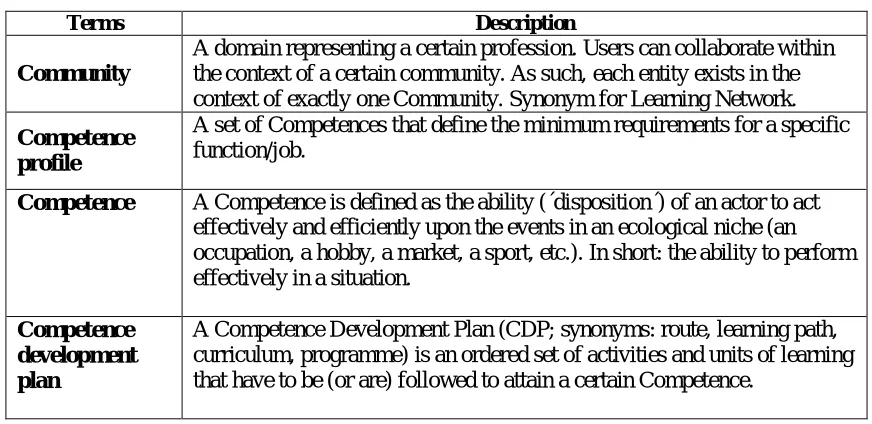
Appendix 1: Glossary
Table 4. TENCompetence glossary
Terms
Description
Community
A domain representing a certain profession. Users can collaborate within
the context of a certain community. As such, each entity exists in the
context of exactly one Community. Synonym for Learning Network.
Competence
profile
A set of Competences that define the minimum requirements for a specific
function/job.
Competence
A Competence is defined as the ability (´disposition´) of an actor to act
effectively and efficiently upon the events in an ecological niche (an
occupation, a hobby, a market, a sport, etc.). In short: the ability to perform
effectively in a situation.
Competence
development
plan
Appendix 2: Plans for business demonstrators
This appendix reports the plans achieved so far around the implementation of business
demonstrators by associate partners (with the support of the larger TENCompetence consortium
partners).
Summary of the progress achieved by each consortium partner
OUNL
o
The OUNL together with public and private sector partners from the Limburg region -
the Empower Limburg consortium
- is preparing a business demonstrator to
improve
mobility of middle managers between its partners
. The
PDP
tool will be used in this
demonstrator, together with
experimental procedures on how to define shared
competence profiles between organizations
(see Table 5).
SU
o
Bulgarian SME
EPIQ Electronic Assembly
(user organization, associate partner) and
associate partner
Technical University Sofia
(supporting the supply of TENC services)
•
Competence development of
engineers and sp