Herbert Schildtis the world’s leading
Java
2:
The Complete Reference,
Fifth Edition
Herbert Schildt
McGraw-Hill/Osborne
written permission of the publisher.
0-07-222858-X
The material in this eBook also appears in the print version of this title: 0-07-222420-7
All trademarks are trademarks of their respective owners. Rather than put a trademark symbol after every occur-rence of a trademarked name, we use names in an editorial fashion only, and to the benefit of the trademark owner, with no intention of infringement of the trademark. Where such designations appear in this book, they have been printed with initial caps.
McGraw-Hill eBooks are available at special quantity discounts to use as premiums and sales promotions, or for use in corporate training programs. For more information, please contact George Hoare, Special Sales, at [email protected] or (212) 904-4069.
TERMS OF USE
This is a copyrighted work and The McGraw-Hill Companies, Inc. (“McGraw-Hill”) and its licensors reserve all rights in and to the work. Use of this work is subject to these terms. Except as permitted under the Copyright Act of 1976 and the right to store and retrieve one copy of the work, you may not decompile, disassemble, reverse engineer, reproduce, modify, create derivative works based upon, transmit, distribute, disseminate, sell, publish or sublicense the work or any part of it without McGraw-Hill’s prior consent. You may use the work for your own noncommercial and personal use; any other use of the work is strictly prohibited. Your right to use the work may be terminated if you fail to comply with these terms.
THE WORK IS PROVIDED “AS IS”. McGRAW-HILL AND ITS LICENSORS MAKE NO GUARANTEES OR WARRANTIES AS TO THE ACCURACY, ADEQUACY OR COMPLETENESS OF OR RESULTS TO BE OBTAINED FROM USING THE WORK, INCLUDING ANY INFORMATION THAT CAN BE ACCESSED THROUGH THE WORK VIA HYPERLINK OR OTHERWISE, AND EXPRESSLY DISCLAIM ANY WAR-RANTY, EXPRESS OR IMPLIED, INCLUDING BUT NOT LIMITED TO IMPLIED WARRANTIES OF MERCHANTABILITY OR FITNESS FOR A PARTICULAR PURPOSE. McGraw-Hill and its licensors do not warrant or guarantee that the functions contained in the work will meet your requirements or that its operation will be uninterrupted or error free. Neither McGraw-Hill nor its licensors shall be liable to you or anyone else for any inaccuracy, error or omission, regardless of cause, in the work or for any damages resulting therefrom. McGraw-Hill has no responsibility for the content of any information accessed through the work. Under no cir-cumstances shall McGraw-Hill and/or its licensors be liable for any indirect, incidental, special, punitive, conse-quential or similar damages that result from the use of or inability to use the work, even if any of them has been advised of the possibility of such damages. This limitation of liability shall apply to any claim or cause whatso-ever whether such claim or cause arises in contract, tort or otherwise.
We hope you enjoy this McGraw-Hill eBook! If you d like
and websites, please
click here
.
Contents at a Glance
Part I The Java Language
1 The Genesis of Java . . . 3
2 An Overview of Java . . . 17
3 Data Types, Variables, and Arrays . . . 41
4 Operators . . . 73
5 Control Statements . . . 99
6 Introducing Classes . . . 129
7 A Closer Look at Methods and Classes . . . 155
8 Inheritance . . . 189
9 Packages and Interfaces . . . 223
10 Exception Handling . . . 249
11 Multithreaded Programming . . . 273
12 I/O, Applets, and Other Topics . . . 313
Part II The Java Library
13 String Handling . . . 347
14 Exploring java.lang . . . 379
15 java.util Part 1: The Collections Framework . . . 439
16 java.util Part 2: More Utility Classes . . . 505
17 Input/Output: Exploring java.io . . . 537
18 Networking . . . 587
19 The Applet Class . . . 627
20 Event Handling . . . 653
21 Introducing the AWT: Working with Windows, Graphics, and Text . . . 687
22 Using AWT Controls, Layout Managers, and Menus . . . 735
23 Images . . . 799
24 New I/O, Regular Expressions, and Other Packages . . . 843
Part III Software Development Using Java 25 Java Beans . . . 885
26 A Tour of Swing . . . 921
27 Servlets . . . 949
28 Migrating from C++ to Java . . . 981
Part IV Applying Java 29 The DynamicBillboard Applet . . . 1011
30 ImageMenu: An Image-Based Web Menu . . . 1047
31 The Lavatron Applet: A Sports Arena Display . . . 1057
32 Scrabblet: A Multiplayer Word Game . . . 1069
A Using Java’s Documentation Comments . . . 1133
Contents
Preface . . . xxv
Part I The Java Language 1 The Genesis of Java . . . 3
Java’s Lineage . . . 4
The Birth of Modern Programming: C . . . 4
The Need for C++ . . . 6
The Stage Is Set for Java . . . 7
The Creation of Java . . . 7
The C# Connection . . . 9
Why Java Is Important to the Internet . . . 9
Java Applets and Applications . . . 10
Security . . . 10
Portability . . . 11
Java’s Magic: The Bytecode . . . 11
The Java Buzzwords . . . 12
Simple . . . 13
Object-Oriented . . . 13
Robust . . . 13
Multithreaded . . . 14
Architecture-Neutral . . . 14
Interpreted and High Performance . . . 14
Distributed . . . 15
Dynamic . . . 15
The Continuing Revolution . . . 15
2 An Overview of Java . . . 17
Object-Oriented Programming . . . 18
Two Paradigms . . . 18
Abstraction . . . 18
The Three OOP Principles . . . 19
A First Simple Program . . . 25
Entering the Program . . . 25
Compiling the Program . . . 26
A Closer Look at the First Sample Program . . . 27
A Second Short Program . . . 29
Two Control Statements . . . 31
The if Statement . . . 31
The for Loop . . . 33
Using Blocks of Code . . . 35
Lexical Issues . . . 37
Whitespace . . . 37
Identifiers . . . 37
Literals . . . 37
Comments . . . 38
Separators . . . 38
The Java Keywords . . . 38
The Java Class Libraries . . . 39
3 Data Types, Variables, and Arrays . . . 41
Java Is a Strongly Typed Language . . . 42
The Simple Types . . . 42
Integers . . . 43
byte . . . 44
short . . . 44
int . . . 44
long . . . 45
Floating-Point Types . . . 45
float . . . 46
double . . . 46
Characters . . . 47
Booleans . . . 48
A Closer Look at Literals . . . 50
Integer Literals . . . 50
Floating-Point Literals . . . 50
Character Literals . . . 51
String Literals . . . 52
Variables . . . 52
Declaring a Variable . . . 52
Dynamic Initialization . . . 53
The Scope and Lifetime of Variables . . . 54
Type Conversion and Casting . . . 57
Java’s Automatic Conversions . . . 57
Casting Incompatible Types . . . 57
Automatic Type Promotion in Expressions . . . 59
The Type Promotion Rules . . . 60
Arrays . . . 61
One-Dimensional Arrays . . . 61
Multidimensional Arrays . . . 64
Alternative Array Declaration Syntax . . . 70
A Few Words About Strings . . . 70
A Note to C/C++ Programmers About Pointers . . . 71
4 Operators . . . 73
Arithmetic Operators . . . 74
The Basic Arithmetic Operators . . . 74
The Modulus Operator . . . 76
Arithmetic Assignment Operators . . . 76
Increment and Decrement . . . 78
The Bitwise Operators . . . 80
The Bitwise Logical Operators . . . 82
The Left Shift . . . 84
The Right Shift . . . 86
The Unsigned Right Shift . . . 87
Bitwise Operator Assignments . . . 89
Relational Operators . . . 90
Boolean Logical Operators . . . 92
Short-Circuit Logical Operators . . . 93
The Assignment Operator . . . 94
The ? Operator . . . 95
Operator Precedence . . . 96
Using Parentheses . . . 96
5 Control Statements . . . 99
Java’s Selection Statements . . . 100
if . . . 100
switch . . . 104
Iteration Statements . . . 109
while . . . 109
do-while . . . 111
for . . . 114
Some for Loop Variations . . . 117
Jump Statements . . . 119
Using break . . . 120
Using continue . . . 124
return . . . 126
6 Introducing Classes . . . 129
Class Fundamentals . . . 130
The General Form of a Class . . . 130
A Simple Class . . . 131
Declaring Objects . . . 134
A Closer Look at new . . . 136
Assigning Object Reference Variables . . . 137
Introducing Methods . . . 138
Adding a Method to the Box Class . . . 138
Returning a Value . . . 140
Adding a Method That Takes Parameters . . . 142
Constructors . . . 145
Parameterized Constructors . . . 147
The this Keyword . . . 149
Instance Variable Hiding . . . 149
Garbage Collection . . . 150
The finalize( ) Method . . . 150
A Stack Class . . . 151
7 A Closer Look at Methods and Classes . . . 155
Overloading Methods . . . 156
Overloading Constructors . . . 159
Using Objects as Parameters . . . 162
A Closer Look at Argument Passing . . . 165
Returning Objects . . . 168
Recursion . . . 169
Introducing Access Control . . . 172
Understanding static . . . 176
Introducing final . . . 178
Arrays Revisited . . . 179
Introducing Nested and Inner Classes . . . 181
Exploring the String Class . . . 185
Using Command-Line Arguments . . . 188
8 Inheritance . . . 189
Inheritance Basics . . . 190
Member Access and Inheritance . . . 192
A More Practical Example . . . 193
A Superclass Variable Can Reference a Subclass Object . . . 196
Using super . . . 197
Using super to Call Superclass Constructors . . . 197
Creating a Multilevel Hierarchy . . . 203
When Constructors Are Called . . . 207
Method Overriding . . . 208
Dynamic Method Dispatch . . . 211
Why Overridden Methods? . . . 213
Applying Method Overriding . . . 214
Using Abstract Classes . . . 216
Using final with Inheritance . . . 219
Using final to Prevent Overriding . . . 219
Using final to Prevent Inheritance . . . 220
The Object Class . . . 220
9 Packages and Interfaces . . . 223
Packages . . . 224
Defining a Package . . . 225
Finding Packages and CLASSPATH . . . 226
A Short Package Example . . . 226
Access Protection . . . 227
An Access Example . . . 229
Importing Packages . . . 232
Interfaces . . . 235
Defining an Interface . . . 235
Implementing Interfaces . . . 236
Applying Interfaces . . . 239
Variables in Interfaces . . . 243
Interfaces Can Be Extended . . . 246
10 Exception Handling . . . 249
Exception-Handling Fundamentals . . . 250
Exception Types . . . 251
Uncaught Exceptions . . . 251
Using try and catch . . . 253
Displaying a Description of an Exception . . . 254
Multiple catch Clauses . . . 255
Nested try Statements . . . 257
throw . . . 260
throws . . . 261
finally . . . 263
Java’s Built-in Exceptions . . . 265
Creating Your Own Exception Subclasses . . . 267
Chained Exceptions . . . 269
Using Exceptions . . . 271
11 Multithreaded Programming . . . 273
The Java Thread Model . . . 275
Thread Priorities . . . 275
Messaging . . . 276
The Thread Class and the Runnable Interface . . . 277
The Main Thread . . . 277
Creating a Thread . . . 280
Implementing Runnable . . . 280
Extending Thread . . . 282
Choosing an Approach . . . 284
Creating Multiple Threads . . . 284
Using isAlive( ) and join( ) . . . 286
Thread Priorities . . . 289
Synchronization . . . 292
Using Synchronized Methods . . . 292
The synchronized Statement . . . 295
Interthread Communication . . . 297
Deadlock . . . 302
Suspending, Resuming, and Stopping Threads . . . 305
Suspending, Resuming, and Stopping Threads Using Java 1.1 and Earlier . . . 305
Suspending, Resuming, and Stopping Threads Using Java 2 . . . 308
Using Multithreading . . . 311
12 I/O, Applets, and Other Topics . . . 313
I/O Basics . . . 314
Streams . . . 314
Byte Streams and Character Streams . . . 315
The Predefined Streams . . . 318
Reading Console Input . . . 318
Reading Characters . . . 319
Reading Strings . . . 320
Writing Console Output . . . 322
The PrintWriter Class . . . 323
Reading and Writing Files . . . 324
Applet Fundamentals . . . 328
The transient and volatile Modifiers . . . 331
Using instanceof . . . 332
strictfp . . . 335
Native Methods . . . 335
Problems with Native Methods . . . 340
Using assert . . . 340
Assertion Enabling and Disabling Options . . . 343
Part II The Java Library 13 String Handling . . . 347
The String Constructors . . . 348
Special String Operations . . . 351
String Literals . . . 351
String Concatenation . . . 352
String Concatenation with Other Data Types . . . 352
String Conversion and toString( ) . . . 353
Character Extraction . . . 355
charAt( ) . . . 355
getChars( ) . . . 355
getBytes( ) . . . 356
toCharArray( ) . . . 356
String Comparison . . . 356
equals( ) and equalsIgnoreCase( ) . . . 357
regionMatches( ) . . . 358
startsWith( ) and endsWith( ) . . . 358
equals( ) Versus == . . . 359
compareTo( ) . . . 359
Searching Strings . . . 361
Modifying a String . . . 363
substring( ) . . . 363
concat( ) . . . 364
replace( ) . . . 364
trim( ) . . . 365
Data Conversion Using valueOf( ) . . . 366
Changing the Case of Characters Within a String . . . 367
String Methods Added by Java 2, Version 1.4 . . . 368
StringBuffer . . . 369
StringBuffer Constructors . . . 369
length( ) and capacity( ) . . . 369
ensureCapacity( ) . . . 370
setLength( ) . . . 370
charAt( ) and setCharAt( ) . . . 371
getChars( ) . . . 371
append( ) . . . 372
insert( ) . . . 373
reverse( ) . . . 373
delete( ) and deleteCharAt( ) . . . 374
replace( ) . . . 375
substring( ) . . . 375
StringBuffer Methods Added by Java 2, Version 1.4 . . . 376
14 Exploring java.lang . . . 379
Simple Type Wrappers . . . 380
Number . . . 381
Double and Float . . . 381
Byte, Short, Integer, and Long . . . 387
Character . . . 397
Boolean . . . 401
Void . . . 402
Runtime . . . 403
Memory Management . . . 405
Executing Other Programs . . . 406
System . . . 407
Using currentTimeMillis( ) to Time Program Execution . . . 410
Using arraycopy( ) . . . 411
Environment Properties . . . 412
Object . . . 412
Using clone( ) and the Cloneable Interface . . . 412
Class . . . 416
ClassLoader . . . 419
Math . . . 420
Transcendental Functions . . . 420
Exponential Functions . . . 420
Rounding Functions . . . 421
Miscellaneous Math Methods . . . 422
StrictMath . . . 422
Compiler . . . 423
Thread, ThreadGroup, and Runnable . . . 423
The Runnable Interface . . . 423
Thread . . . 423
ThreadGroup . . . 426
ThreadLocal and InheritableThreadLocal . . . 432
Package . . . 432
RuntimePermission . . . 434
Throwable . . . 434
SecurityManager . . . 434
StackTraceElement . . . 435
The CharSequence Interface . . . 436
The Comparable Interface . . . 436
The java.lang.ref and java.lang.reflect Packages . . . 437
java.lang.ref . . . 437
java.lang.reflect . . . 437
15 java.util Part 1: The Collections Framework . . . 439
Collections Overview . . . 441
The Collection Interfaces . . . 442
The Collection Interface . . . 443
The List Interface . . . 445
The Set Interface . . . 447
The SortedSet Interface . . . 447
The Collection Classes . . . 448
The ArrayList Class . . . 449
The LinkedList Class . . . 452
The HashSet Class . . . 454
The LinkedHashSet Class . . . 456
The TreeSet Class . . . 456
Accessing a Collection via an Iterator . . . 457
Storing User-Defined Classes in Collections . . . 460
The RandomAccess Interface . . . 462
Working with Maps . . . 462
The Map Interfaces . . . 462
The Map Classes . . . 466
Comparators . . . 471
Using a Comparator . . . 472
The Collection Algorithms . . . 475
Arrays . . . 480
The Legacy Classes and Interfaces . . . 484
The Enumeration Interface . . . 484
Vector . . . 485
Stack . . . 490
Dictionary . . . 492
Hashtable . . . 494
Properties . . . 498
Using store( ) and load( ) . . . 502
Collections Summary . . . 504
16 java.util Part 2: More Utility Classes . . . 505
StringTokenizer . . . 506
BitSet . . . 508
Date . . . 512
Date Comparison . . . 514
Calendar . . . 514
GregorianCalendar . . . 519
TimeZone . . . 521
SimpleTimeZone . . . 522
Locale . . . 523
Random . . . 524
Observable . . . 527
The Observer Interface . . . 528
An Observer Example . . . 528
Timer and TimerTask . . . 531
Currency . . . 534
The java.util.zip Package . . . 536
The java.util.jar Package . . . 536
17 Input/Output: Exploring java.io . . . 537
The Java I/O Classes and Interfaces . . . 538
File . . . 539
Directories . . . 542
Using FilenameFilter . . . 543
The listFiles( ) Alternative . . . 544
Creating Directories . . . 545
The Stream Classes . . . 545
InputStream . . . 546
OutputStream . . . 547
FileInputStream . . . 548
FileOutputStream . . . 550
ByteArrayInputStream . . . 552
ByteArrayOutputStream . . . 553
Filtered Byte Streams . . . 555
Buffered Byte Streams . . . 555
SequenceInputStream . . . 559
PrintStream . . . 561
RandomAccessFile . . . 561
The Character Streams . . . 562
Reader . . . 562
Writer . . . 562
FileReader . . . 562
FileWriter . . . 565
CharArrayReader . . . 566
CharArrayWriter . . . 567
BufferedReader . . . 569
BufferedWriter . . . 570
PushbackReader . . . 571
PrintWriter . . . 572
Using Stream I/O . . . 572
Improving wc( ) Using a StreamTokenizer . . . 574
Serialization . . . 577
Serializable . . . 577
Externalizable . . . 578
ObjectOutput . . . 578
ObjectOutputStream . . . 579
ObjectInput . . . 580
ObjectInputStream . . . 581
A Serialization Example . . . 583
Stream Benefits . . . 585
18 Networking . . . 587
Networking Basics . . . 588
Socket Overview . . . 588
Client/Server . . . 589
Reserved Sockets . . . 589
Proxy Servers . . . 590
Internet Addressing . . . 590
Java and the Net . . . 591
The Networking Classes and Interfaces . . . 592
InetAddress . . . 592
Factory Methods . . . 593
Instance Methods . . . 594
TCP/IP Client Sockets . . . 594
URL . . . 597
Format . . . 597
URLConnection . . . 599
TCP/IP Server Sockets . . . 601
A Caching Proxy HTTP Server . . . 602
Source Code . . . 602
Datagrams . . . 623
DatagramPacket . . . 624
Datagram Server and Client . . . 624
Inet4Address and Inet6Address . . . 626
The URI Class . . . 626
19 The Applet Class . . . 627
Applet Basics . . . 628
The Applet Class . . . 629
Applet Architecture . . . 632
An Applet Skeleton . . . 632
Applet Initialization and Termination . . . 634
Overriding update( ) . . . 635
Simple Applet Display Methods . . . 636
Requesting Repainting . . . 638
A Simple Banner Applet . . . 639
Using the Status Window . . . 642
The HTML APPLET Tag . . . 643
Passing Parameters to Applets . . . 644
Improving the Banner Applet . . . 647
getDocumentBase( ) and getCodeBase( ) . . . 648
AppletContext and showDocument( ) . . . 649
The AudioClip Interface . . . 651
The AppletStub Interface . . . 652
Outputting to the Console . . . 652
20 Event Handling . . . 653
Two Event Handling Mechanisms . . . 654
The Delegation Event Model . . . 654
Events . . . 655
Event Sources . . . 655
Event Listeners . . . 656
Event Classes . . . 656
The ActionEvent Class . . . 658
The AdjustmentEvent Class . . . 659
The ComponentEvent Class . . . 660
The ContainerEvent Class . . . 660
The FocusEvent Class . . . 661
The InputEvent Class . . . 661
The ItemEvent Class . . . 662
The KeyEvent Class . . . 663
The MouseWheelEvent Class . . . 665
The TextEvent Class . . . 666
The WindowEvent Class . . . 667
Sources of Events . . . 668
Event Listener Interfaces . . . 669
The ActionListener Interface . . . 670
The AdjustmentListener Interface . . . 670
The ComponentListener Interface . . . 670
The ContainerListener Interface . . . 670
The FocusListener Interface . . . 670
The ItemListener Interface . . . 671
The KeyListener Interface . . . 671
The MouseListener Interface . . . 671
The MouseMotionListener Interface . . . 671
The MouseWheelListener Interface . . . 672
The TextListener Interface . . . 672
The WindowFocusListener Interface . . . 672
The WindowListener Interface . . . 672
Using the Delegation Event Model . . . 673
Handling Mouse Events . . . 673
Handling Keyboard Events . . . 676
Adapter Classes . . . 680
Inner Classes . . . 682
Anonymous Inner Classes . . . 684
21 Introducing the AWT: Working with Windows, Graphics, and Text . . . 687
AWT Classes . . . 688
Window Fundamentals . . . 691
Component . . . 691
Container . . . 692
Panel . . . 692
Window . . . 693
Frame . . . 693
Canvas . . . 693
Working with Frame Windows . . . 693
Setting the Window’s Dimensions . . . 694
Hiding and Showing a Window . . . 694
Setting a Window’s Title . . . 694
Closing a Frame Window . . . 694
Creating a Frame Window in an Applet . . . 695
Handling Events in a Frame Window . . . 697
Creating a Windowed Program . . . 702
Displaying Information Within a Window . . . 704
Working with Graphics . . . 705
Drawing Lines . . . 705
Drawing Rectangles . . . 706
Drawing Arcs . . . 709
Drawing Polygons . . . 710
Sizing Graphics . . . 711
Working with Color . . . 712
Color Methods . . . 713
Setting the Current Graphics Color . . . 714
A Color Demonstration Applet . . . 714
Setting the Paint Mode . . . 715
Working with Fonts . . . 717
Determining the Available Fonts . . . 719
Creating and Selecting a Font . . . 720
Obtaining Font Information . . . 722
Managing Text Output Using FontMetrics . . . 723
Displaying Multiple Lines of Text . . . 725
Centering Text . . . 727
Multiline Text Alignment . . . 728
Exploring Text and Graphics . . . 733
22 Using AWT Controls, Layout Managers, and Menus . . . 735
Control Fundamentals . . . 736
Adding and Removing Controls . . . 736
Responding to Controls . . . 737
Labels . . . 737
Using Buttons . . . 739
Handling Buttons . . . 739
Applying Check Boxes . . . 743
Handling Check Boxes . . . 743
CheckboxGroup . . . 745
Choice Controls . . . 748
Handling Choice Lists . . . 748
Using Lists . . . 751
Handling Lists . . . 752
Managing Scroll Bars . . . 754
Handling Scroll Bars . . . 756
Using a TextField . . . 758
Handling a TextField . . . 759
Using a TextArea . . . 761
Understanding Layout Managers . . . 763
FlowLayout . . . 764
BorderLayout . . . 766
Using Insets . . . 768
GridLayout . . . 770
CardLayout . . . 772
Menu Bars and Menus . . . 775
Dialog Boxes . . . 782
FileDialog . . . 788
Handling Events by Extending AWT Components . . . 790
Extending Button . . . 792
Extending a Check Box Group . . . 794 Extending Choice . . . 795 Extending List . . . 795 Extending Scrollbar . . . 797 Exploring the Controls, Menus, and Layout Managers . . . 798
23 Images . . . 799
File Formats . . . 800 Image Fundamentals: Creating, Loading, and Displaying . . . 801 Creating an Image Object . . . 801 Loading an Image . . . 801 Displaying an Image . . . 802 ImageObserver . . . 803 ImageObserver Example . . . 805 Double Buffering . . . 807 MediaTracker . . . 811 ImageProducer . . . 815 MemoryImageSource . . . 815 ImageConsumer . . . 817 PixelGrabber . . . 818 ImageFilter . . . 821 CropImageFilter . . . 821 RGBImageFilter . . . 823 Cell Animation . . . 837 Additional Imaging Classes . . . 840
24 New I/O, Regular Expressions, and Other Packages . . . 843
Part III
Software Development Using Java
25 Java Beans . . . 885
What Is a Java Bean? . . . 886 Advantages of Java Beans . . . 887 Application Builder Tools . . . 887 Using the Bean Developer Kit (BDK) . . . 888 Installing the BDK . . . 888 Starting the BDK . . . 889 Using the BDK . . . 889 JAR Files . . . 891 Manifest Files . . . 892 The JAR Utility . . . 892 Introspection . . . 894 Design Patterns for Properties . . . 894 Design Patterns for Events . . . 896 Methods . . . 897 Developing a Simple Bean Using the BDK . . . 897 Create a New Bean . . . 898 Using Bound Properties . . . 902 Steps . . . 902 Using the BeanInfo Interface . . . 903 Constrained Properties . . . 905 Persistence . . . 905 Customizers . . . 906 The Java Beans API . . . 906 Using Bean Builder . . . 911 Building a Simple Bean Builder Application . . . 913
26 A Tour of Swing . . . 921
JApplet . . . 923 Icons and Labels . . . 923 Text Fields . . . 925 Buttons . . . 927 The JButton Class . . . 927 Check Boxes . . . 930 Radio Buttons . . . 932 Combo Boxes . . . 934 Tabbed Panes . . . 936 Scroll Panes . . . 939 Trees . . . 941 Tables . . . 946 Exploring Swing . . . 948
27 Servlets . . . 949
The Life Cycle of a Servlet . . . 951 Using Tomcat For Servlet Development . . . 951 A Simple Servlet . . . 953 Create and Compile the Servlet Source Code . . . 953 Start Tomcat . . . 954 Start a Web Browser and Request the Servlet . . . 954 The Servlet API . . . 954 The javax.servlet Package . . . 955 The Servlet Interface . . . 955 The ServletConfig Interface . . . 956 The ServletContext Interface . . . 957 The ServletRequest Interface . . . 957 The ServletResponse Interface . . . 957 The SingleThreadModel Interface . . . 957 The GenericServlet Class . . . 960 The ServletInputStream Class . . . 960 The ServletOutputStream Class . . . 960 The Servlet Exception Classes . . . 960 Reading Servlet Parameters . . . 960 The javax.servlet.http Package . . . 962 The HttpServletRequest Interface . . . 963 The HttpServletResponse Interface . . . 965 The HttpSession Interface . . . 966 The HttpSessionBindingListener Interface . . . 967 The Cookie Class . . . 967 The HttpServlet Class . . . 969 The HttpSessionEvent Class . . . 970 The HttpSessionBindingEvent Class . . . 971 Handling HTTP Requests and Responses . . . 971 Handling HTTP GET Requests . . . 971 Handling HTTP POST Requests . . . 973 Using Cookies . . . 975 Session Tracking . . . 977 Security Issues . . . 979
28 Migrating from C++ to Java . . . 981
Part IV
Applying Java
29 The DynamicBillboard Applet . . . 1011
The APPLET Tag . . . 1012 Source Code Overview . . . 1014 DynamicBillboard.java . . . 1014 BillData.java . . . 1022 BillTransition.java . . . 1024 ColumnTransition.java . . . 1026 FadeTransition.java . . . 1029 SmashTransition.java . . . 1033 TearTransition.java . . . 1036 UnrollTransition.java . . . 1040 Dynamic Code . . . 1044
30 ImageMenu: An Image-Based Web Menu . . . 1047
The Source Image . . . 1049 The APPLET Tag . . . 1050 The Methods . . . 1051 init( ) . . . 1051 update( ) . . . 1051 lateInit( ) . . . 1051 paint( ) . . . 1051 mouseExited( ) . . . 1052 mouseDragged( ) . . . 1052 mouseMoved( ) . . . 1052 mouseReleased( ) . . . 1053 The Code . . . 1053 Summary . . . 1056
31 The Lavatron Applet: A Sports Arena Display . . . 1057
How Lavatron Works . . . 1059 The Source Code . . . 1060 The APPLET Tag . . . 1060 Lavatron.java . . . 1060 IntHash( ) . . . 1065 Hot Lava . . . 1067
32 Scrabblet: A Multiplayer Word Game . . . 1069
Board.java . . . 1091 Bag.java . . . 1109 Letter.java . . . 1111 ServerConnection.java . . . 1117 The Server Code . . . 1123 Server.java . . . 1123 ClientConnection.java . . . 1127 Enhancing Scrabblet . . . 1131
A Using Java’s Documentation Comments . . . 1133
The javadoc Tags . . . 1134 @author . . . 1135 @deprecated . . . 1135 {@docRoot} . . . 1135 @exception . . . 1135 {@inheritDoc} . . . 1136 {@link} . . . 1136 {@linkplain} . . . 1136 @param . . . 1136 @return . . . 1136 @see . . . 1136 @serial . . . 1137 @serialData . . . 1137 @serialField . . . 1137 @since . . . 1137 @throws . . . 1138 {@value} . . . 1138 @version . . . 1138 The General Form of a Documentation Comment . . . 1138 What javadoc Outputs . . . 1138 An Example that Uses Documentation Comments . . . 1139
Preface
T
he past few years document the following fact: The Web has irrevocably recast the face of computing and programmers unwilling to master its environment will be left behind.The preceding is a strong statement. It is also true. More and more, applications must interface to the Web. It no longer matters much what the application is, near universal Web access is dragging, pushing, and coaxing programmers to program for the online world, and Java is the language that many will use to do it. Frankly, fluency in Java is no longer an option for the professional programmer, it is a requirement. This book will help you acquire it.
Aside from being the preeminent language of the Internet, Java is important for another reason: it has altered the course of computer language development. Many of the features first mainstreamed by Java are now finding their way into other languages. For example, the new C# language is strongly influenced by Java. Knowledge of Java opens the door to the latest innovations in programming. Put directly, Java is one of the world’s most important computer languages.
A Book for All Programmers
To use this book does not require any previous programming experience. However, if you come from a C/C++ background, then you will be able to advance a bit more rapidly. As most readers will know, Java is similar, in form and spirit, to C/C++. Thus, knowledge of those langauges helps, but is not necessary. Even if you have never programmed before, you can learn to program in Java using this book.
What’s Inside
This book covers all aspects of the Java programming language. Part 1 presents an in-depth tutorial of the Java language. It begins with the basics, including such things as data types, control statements, and classes. Part 1 also discusses Java’s
exception-handling mechanism, multithreading subsystem, packages, and interfaces. Part 2 examines the standard Java library. As you will learn, much of Java’s power is found in its library. Topics include strings, I/O, networking, the standard utilities, the Collections Framework, applets, GUI-based controls, and imaging.
Part 3 looks at some issues relating to the Java development environment, including an overview of Java Beans, Servlets, and Swing.
Part 4 presents a number of high-powered Java applets that serve as extended examples of the way Java can be applied. The final applet, called Scrabblet, is a complete, multiuser networked game. It shows how to handle some of the toughest issues involved in Web-based programming.
What’s New in the Fifth Edition
The differences between this and the previous editions of this book mostly involve those features added by Java 2, version 1.4. Of the many new features found in version 1.4, perhaps the most important are theassertkeyword, the channel-based I/O subsystem, chained exceptions, and networking enhancements. This fifth edition has been fully updated to reflect those and other additions. New features are clearly noted in the text, as are features added by previous releases.
This fifth edition also updates and restores the Sevlets chapter. Previously this chapter relied upon the now out-dated JSDK (Java Servlets Developers Kit) to develop and test servlets. It now uses Apache Tomcat, which is the currently recommended tool.
Don’t Forget: Code on the Web
Special Thanks
Special thanks to Patrick Naughton. Patrick was one of the creators of the Java language. He also helped write the first edition of this book. For example, much of the material in chapters 17, 18, 23, 29, 30, 31, and 32 was initially provided by Patrick. His insights, expertise, and energy contributed greatly to the success of this book.
Thanks also go to Joe O'Neil for providing the initial drafts for chapters 24, 25, 26, and 27. Joe has helped on several of my books and, as always, his efforts are appreciated.
For Further Study
Java 2: The Complete Referenceis your gateway to the Herb Schildt series of programming books. Here are some others that you will find of interest:
To learn more about Java programming, we recommend the following: Java 2: A Beginner's Guide
Java 2 Programmer's Reference
To learn about C++, you will find these books especially helpful: C++: The Complete Reference
C++: A Beginner's Guide
Teach Yourself C++
C++ From the Ground Up
STL Programming From the Ground Up
To learn about C#, we suggest the following Schildt books: C#: A Beginner's Guide
C#: The Complete Reference
If you want to learn more about the C language, the foundation of all modern programming, then the following titles will be of interest:
C: The Complete Reference
Teach Yourself C
Chapter 1
The Genesis of Java
W
hen the chronicle of computer languages is written, the following will be said: B led to C, C evolved into C++, and C++ set the stage for Java. To understand Java is to understand the reasons that drove its creation, the forces that shaped it, and the legacy that it inherits. Like the successful computer languages that came before, Java is a blend of the best elements of its rich heritage combined with the innovative concepts required by its unique environment. While the remaining chapters of this book describe the practical aspects of Java—including its syntax, libraries, and applications—in this chapter, you will learn how and why Java came about, and what makes it so important.Although Java has become inseparably linked with the online environment of the Internet, it is important to remember that Java is first and foremost a programming language. Computer language innovation and development occurs for two fundamental reasons:
■ To adapt to changing environments and uses
■ To implement refinements and improvements in the art of programming
As you will see, the creation of Java was driven by both elements in nearly equal measure.
Java’s Lineage
Java is related to C++, which is a direct descendent of C. Much of the character of Java is inherited from these two languages. From C, Java derives its syntax. Many of Java’s object-oriented features were influenced by C++. In fact, several of Java’s defining characteristics come from—or are responses to—its predecessors. Moreover, the creation of Java was deeply rooted in the process of refinement and adaptation that has been occurring in computer programming languages for the past three decades. For these reasons, this section reviews the sequence of events and forces that led up to Java. As you will see, each innovation in language design was driven by the need to solve a fundamental problem that the preceding languages could not solve. Java is no exception.
The Birth of Modern Programming: C
The C language shook the computer world. Its impact should not be underestimated, because it fundamentally changed the way programming was approached and thought about. The creation of C was a direct result of the need for a structured, efficient, high-level language that could replace assembly code when creating systems programs. As you probably know, when a computer language is designed, trade-offs are often made, such as the following:
■ Ease-of-use versus power
■ Safety versus efficiency
Prior to C, programmers usually had to choose between languages that optimized one set of traits or the other. For example, although FORTRAN could be used to write fairly efficient programs for scientific applications, it was not very good for systems code. And while BASIC was easy to learn, it wasn’t very powerful, and its lack of structure made its usefulness questionable for large programs. Assembly language can be used to produce highly efficient programs, but it is not easy to learn or use effectively. Further, debugging assembly code can be quite difficult.
Another compounding problem was that early computer languages such as BASIC, COBOL, and FORTRAN were not designed around structured principles. Instead, they relied upon the GOTO as a primary means of program control. As a result, programs written using these languages tended to produce “spaghetti code”—a mass of tangled jumps and conditional branches that make a program virtually impossible to
understand. While languages like Pascal are structured, they were not designed for efficiency, and failed to include certain features necessary to make them applicable to a wide range of programs. (Specifically, given the standard dialects of Pascal available at the time, it was not practical to consider using Pascal for systems-level code.)
So, just prior to the invention of C, no one language had reconciled the conflicting attributes that had dogged earlier efforts. Yet the need for such a language was pressing. By the early 1970s, the computer revolution was beginning to take hold, and the demand for software was rapidly outpacing programmers’ ability to produce it. A great deal of effort was being expended in academic circles in an attempt to create a better computer language. But, and perhaps most importantly, a secondary force was beginning to be felt. Computer hardware was finally becoming common enough that a critical mass was being reached. No longer were computers kept behind locked doors. For the first time, programmers were gaining virtually unlimited access to their machines. This allowed the freedom to experiment. It also allowed programmers to begin to create their own tools. On the eve of C’s creation, the stage was set for a quantum leap forward in computer languages.
Invented and first implemented by Dennis Ritchie on a DEC PDP-11 running the UNIX operating system, C was the result of a development process that started with an older language called BCPL, developed by Martin Richards. BCPL influenced a language called B, invented by Ken Thompson, which led to the development of C in the 1970s. For many years, the de facto standard for C was the one supplied with the UNIX operating system and described inThe C Programming Languageby Brian Kernighan and Dennis Ritchie (Prentice-Hall, 1978). C was formally standardized in December 1989, when the American National Standards Institute (ANSI) standard for C was adopted.
The creation of C is considered by many to have marked the beginning of the modern age of computer languages. It successfully synthesized the conflicting attributes that had so troubled earlier languages. The result was a powerful, efficient, structured language that was relatively easy to learn. It also included one other, nearly intangible aspect: it was aprogrammer’slanguage. Prior to the invention of C, computer languages were generally designed either as academic exercises or by bureaucratic committees. C is different. It was designed, implemented, and developed by real,
THE
JAVA
working programmers, reflecting the way that they approached the job of programming. Its features were honed, tested, thought about, and rethought by the people who actually used the language. The result was a language that programmers liked to use. Indeed, C quickly attracted many followers who had a near-religious zeal for it. As such, it found wide and rapid acceptance in the programmer community. In short, C is a language designed by and for programmers. As you will see, Java has inherited this legacy.
The Need for C++
During the late 1970s and early 1980s, C became the dominant computer programming language, and it is still widely used today. Since C is a successful and useful language, you might ask why a need for something else existed. The answer iscomplexity. Throughout the history of programming, the increasing complexity of programs has driven the need for better ways to manage that complexity. C++ is a response to that need. To better understand why managing program complexity is fundamental to the creation of C++, consider the following.
Approaches to programming have changed dramatically since the invention of the computer. For example, when computers were first invented, programming was done by manually toggling in the binary machine instructions by use of the front panel. As long as programs were just a few hundred instructions long, this approach worked. As programs grew, assembly language was invented so that a programmer could deal with larger, increasingly complex programs by using symbolic representations of the machine instructions. As programs continued to grow, high-level languages were introduced that gave the programmer more tools with which to handle complexity.
The first widespread language was, of course, FORTRAN. While FORTRAN was an impressive first step, it is hardly a language that encourages clear and easy-to-understand programs. The 1960s gave birth tostructured programming.This is the method of programming championed by languages such as C. The use of structured languages enabled programmers to write, for the first time, moderately complex programs fairly easily. However, even with structured programming methods, once a project reaches a certain size, its complexity exceeds what a programmer can manage. By the early 1980s, many projects were pushing the structured approach past its limits. To solve this problem, a new way to program was invented, calledobject-oriented programming(OOP). Object-oriented programming is discussed in detail later in this book, but here is a brief definition: OOP is a programming methodology that helps organize complex programs through the use of inheritance, encapsulation, and polymorphism.
THE
JAVA
LANGUAGE
C++ was invented by Bjarne Stroustrup in 1979, while he was working at Bell Laboratories in Murray Hill, New Jersey. Stroustrup initially called the new language “C with Classes.” However, in 1983, the name was changed to C++. C++ extends C by adding object-oriented features. Because C++ is built upon the foundation of C, it includes all of C’s features, attributes, and benefits. This is a crucial reason for the success of C++ as a language. The invention of C++ was not an attempt to create a completely new programming language. Instead, it was an enhancement to an already highly successful one.
The Stage Is Set for Java
By the end of the 1980s and the early 1990s, object-oriented programming using C++ took hold. Indeed, for a brief moment it seemed as if programmers had finally found the perfect language. Because C++ blended the high efficiency and stylistic elements of C with the object-oriented paradigm, it was a language that could be used to create a wide range of programs. However, just as in the past, forces were brewing that would, once again, drive computer language evolution forward. Within a few years, the World Wide Web and the Internet would reach critical mass. This event would precipitate another revolution in programming.
The Creation of Java
Java was conceived by James Gosling, Patrick Naughton, Chris Warth, Ed Frank, and Mike Sheridan at Sun Microsystems, Inc. in 1991. It took 18 months to develop the first working version. This language was initially called “Oak” but was renamed “Java” in 1995. Between the initial implementation of Oak in the fall of 1992 and the public announcement of Java in the spring of 1995, many more people contributed to the design and evolution of the language. Bill Joy, Arthur van Hoff, Jonathan Payne, Frank Yellin, and Tim Lindholm were key contributors to the maturing of the original prototype.
About the time that the details of Java were being worked out, a second, and ultimately more important, factor was emerging that would play a crucial role in the future of Java. This second force was, of course, the World Wide Web. Had the Web not taken shape at about the same time that Java was being implemented, Java might have remained a useful but obscure language for programming consumer electronics. However, with the emergence of the World Wide Web, Java was propelled to the forefront of computer language design, because the Web, too, demanded portable programs.
Most programmers learn early in their careers that portable programs are as elusive as they are desirable. While the quest for a way to create efficient, portable (platform-independent) programs is nearly as old as the discipline of programming itself, it had taken a back seat to other, more pressing problems. Further, because much of the computer world had divided itself into the three competing camps of Intel, Macintosh, and UNIX, most programmers stayed within their fortified boundaries, and the urgent need for portable code was reduced. However, with the advent of the Internet and the Web, the old problem of portability returned with a vengeance. After all, the Internet consists of a diverse, distributed universe populated with many types of computers, operating systems, and CPUs. Even though many types of platforms are attached to the Internet, users would like them all to be able to run the same program. What was once an irritating but low-priority problem had become a high-profile necessity.
By 1993, it became obvious to members of the Java design team that the problems of portability frequently encountered when creating code for embedded controllers are also found when attempting to create code for the Internet. In fact, the same problem that Java was initially designed to solve on a small scale could also be applied to the Internet on a large scale. This realization caused the focus of Java to switch from consumer electronics to Internet programming. So, while the desire for an architecture-neutral programming language provided the initial spark, the Internet ultimately led to Java’s large-scale success.
Because of the similarities between Java and C++, it is tempting to think of Java as simply the “Internet version of C++.” However, to do so would be a large mistake. Java has significant practical and philosophical differences. While it is true that Java was influenced by C++, it is not an enhanced version of C++. For example, Java is neither upwardly nor downwardly compatible with C++. Of course, the similarities with C++ are significant, and if you are a C++ programmer, then you will feel right at home with Java. One other point: Java was not designed to replace C++. Java was designed to solve a certain set of problems. C++ was designed to solve a different set of problems. Both will coexist for many years to come.
As mentioned at the start of this chapter, computer languages evolve for two reasons: to adapt to changes in environment and to implement advances in the art of programming. The environmental change that prompted Java was the need for platform-independent programs destined for distribution on the Internet. However, Java also embodies changes in the way that people approach the writing of programs. Specifically, Java enhances and refines the object-oriented paradigm used by C++. Thus, Java is not a language that exists in isolation. Rather, it is part of an ongoing process begun many years ago. This fact alone is enough to ensure Java a place in computer language history. Java is to Internet programming what C was to systems programming: a revolutionary force that changed the world.
The C# Connection
The reach and power of Java continues to be felt in the world of computer language development. Many of its innovative features, constructs, and concepts have become part of the baseline for any new language. The success of Java is simply too important to ignore.
Perhaps the most important example of Java’s influence is C#. Recently created by Microsoft to support the .NET Framework, C# is closely related to Java. For example, both share the same general C++-style syntax, support distributed programming, and utilize the same object model. There are, of course, differences between Java and C#, but the overall “look and feel” of these languages is very similar. This “cross-pollination” from Java to C# is the strongest testimonial to date that Java redefined the way we think about and use a computer language.
Why Java Is Important to the Internet
The Internet helped catapult Java to the forefront of programming, and Java, in turn, has had a profound effect on the Internet. The reason for this is quite simple: Java expands the universe of objects that can move about freely in cyberspace. In a network, two very broad categories of objects are transmitted between the server and your personal computer: passive information and dynamic, active programs. For example,
THE
JAVA
when you read your e-mail, you are viewing passive data. Even when you download a program, the program’s code is still only passive data until you execute it. However, a second type of object can be transmitted to your computer: a dynamic, self-executing program. Such a program is an active agent on the client computer, yet is initiated by the server. For example, a program might be provided by the server to display properly the data that the server is sending.
As desirable as dynamic, networked programs are, they also present serious problems in the areas of security and portability. Prior to Java, cyberspace was
effectively closed to half the entities that now live there. As you will see, Java addresses those concerns and, by doing so, has opened the door to an exciting new form of program: the applet.
Java Applets and Applications
Java can be used to create two types of programs: applications and applets. An applicationis a program that runs on your computer, under the operating system of that computer. That is, an application created by Java is more or less like one created using C or C++. When used to create applications, Java is not much different from any other computer language. Rather, it is Java’s ability to create applets that makes it important. Anappletis an application designed to be transmitted over the Internet and executed by a Java-compatible Web browser. An applet is actually a tiny Java program, dynamically downloaded across the network, just like an image, sound file, or video clip. The important difference is that an applet is anintelligent program, not just an animation or media file. In other words, an applet is a program that can react to user input and dynamically change—not just run the same animation or sound over and over.
As exciting as applets are, they would be nothing more than wishful thinking if Java were not able to address the two fundamental problems associated with them: security and portability. Before continuing, let’s define what these two terms mean relative to the Internet.
Security
As you are likely aware, every time that you download a “normal” program, you are risking a viral infection. Prior to Java, most users did not download executable programs frequently, and those who did scanned them for viruses prior to execution. Even so, most users still worried about the possibility of infecting their systems with a virus. In addition to viruses, another type of malicious program exists that must be guarded against. This type of program can gather private information, such as credit card numbers, bank account balances, and passwords, by searching the contents of your computer’s local file system. Java answers both of these concerns by providing a “firewall” between a networked application and your computer.
access to other parts of the computer. (You will see how this is accomplished shortly.) The ability to download applets with confidence that no harm will be done and that no security will be breached is considered by many to be the single most important aspect of Java.
Portability
As discussed earlier, many types of computers and operating systems are in use throughout the world—and many are connected to the Internet. For programs to be dynamically downloaded to all the various types of platforms connected to the Internet, some means of generating portable executable code is needed. As you will soon see, the same mechanism that helps ensure security also helps create portability. Indeed, Java’s solution to these two problems is both elegant and efficient.
Java’s Magic: The Bytecode
The key that allows Java to solve both the security and the portability problems just described is that the output of a Java compiler is not executable code. Rather, it is bytecode.Bytecodeis a highly optimized set of instructions designed to be executed by the Java run-time system, which is called theJava Virtual Machine(JVM). That is, in its standard form, the JVM is aninterpreter for bytecode.This may come as a bit of a surprise. As you know, C++ is compiled to executable code. In fact, most modern languages are designed to be compiled, not interpreted—mostly because of performance concerns. However, the fact that a Java program is executed by the JVM helps solve the major problems associated with downloading programs over the Internet. Here is why.
Translating a Java program into bytecode helps makes it much easier to run a program in a wide variety of environments. The reason is straightforward: only the JVM needs to be implemented for each platform. Once the run-time package exists for a given system, any Java program can run on it. Remember, although the details of the JVM will differ from platform to platform, all interpret the same Java bytecode. If a Java program were compiled to native code, then different versions of the same program would have to exist for each type of CPU connected to the Internet. This is, of course, not a feasible solution. Thus, the interpretation of bytecode is the easiest way to create truly portable programs.
The fact that a Java program is interpreted also helps to make it secure. Because the execution of every Java program is under the control of the JVM, the JVM can contain the program and prevent it from generating side effects outside of the system. As you will see, safety is also enhanced by certain restrictions that exist in the Java language.
When a program is interpreted, it generally runs substantially slower than it would run if compiled to executable code. However, with Java, the differential between the two is not so great. The use of bytecode enables the Java run-time system to execute programs much faster than you might expect.
THE
JAVA
Although Java was designed for interpretation, there is technically nothing about Java that prevents on-the-fly compilation of bytecode into native code. Along these lines, Sun supplies its Just In Time (JIT) compiler for bytecode, which is included in the Java 2 release. When the JIT compiler is part of the JVM, it compiles bytecode into executable code in real time, on a piece-by-piece, demand basis. It is important to understand that it is not possible to compile an entire Java program into executable code all at once, because Java performs various run-time checks that can be done only at run time. Instead, the JIT compiles code as it is needed, during execution. However, the just-in-time approach still yields a significant performance boost. Even when dynamic compilation is applied to bytecode, the portability and safety features still apply, because the run-time system (which performs the compilation) still is in charge of the execution environment. Whether your Java program is actually interpreted in the traditional way or compiled on-the-fly, its functionality is the same.
The Java Buzzwords
No discussion of the genesis of Java is complete without a look at the Java buzzwords. Although the fundamental forces that necessitated the invention of Java are portability and security, other factors also played an important role in molding the final form of the language. The key considerations were summed up by the Java team in the following list of buzzwords:
■ Simple
■ Secure
■ Portable
■ Object-oriented
■ Robust
■ Multithreaded
■ Architecture-neutral
■ Interpreted
■ High performance
■ Distributed
■ Dynamic
THE
JAVA
LANGUAGE
Simple
Java was designed to be easy for the professional programmer to learn and use effectively. Assuming that you have some programming experience, you will not find Java hard to master. If you already understand the basic concepts of object-oriented programming, learning Java will be even easier. Best of all, if you are an experienced C++ programmer, moving to Java will require very little effort. Because Java inherits the C/C++ syntax and many of the object-oriented features of C++, most programmers have little trouble learning Java. Also, some of the more confusing concepts from C++ are either left out of Java or implemented in a cleaner, more approachable manner.
Beyond its similarities with C/C++, Java has another attribute that makes it easy to learn: it makes an effort not to havesurprisingfeatures. In Java, there are a small number of clearly defined ways to accomplish a given task.
Object-Oriented
Although influenced by its predecessors, Java was not designed to be source-code compatible with any other language. This allowed the Java team the freedom to design with a blank slate. One outcome of this was a clean, usable, pragmatic approach to objects. Borrowing liberally from many seminal object-software environments of the last few decades, Java manages to strike a balance between the purist’s “everything is an object” paradigm and the pragmatist’s “stay out of my way” model. The object model in Java is simple and easy to extend, while simple types, such as integers, are kept as high-performance nonobjects.
Robust
The multiplatformed environment of the Web places extraordinary demands on a program, because the program must execute reliably in a variety of systems. Thus, the ability to create robust programs was given a high priority in the design of Java. To gain reliability, Java restricts you in a few key areas, to force you to find your mistakes early in program development. At the same time, Java frees you from having to worry about many of the most common causes of programming errors. Because Java is a strictly typed language, it checks your code at compile time. However, it also checks your code at run time. In fact, many hard-to-track-down bugs that often turn up in hard-to-reproduce run-time situations are simply impossible to create in Java. Knowing that what you have written will behave in a predictable way under diverse conditions is a key feature of Java.
task in traditional programming environments. For example, in C/C++, the programmer must manually allocate and free all dynamic memory. This sometimes leads to problems, because programmers will either forget to free memory that has been previously allocated or, worse, try to free some memory that another part of their code is still using. Java virtually eliminates these problems by managing memory allocation and deallocation for you. (In fact, deallocation is completely automatic, because Java provides garbage collection for unused objects.) Exceptional conditions in traditional environments often arise in situations such as division by zero or “file not found,” and they must be managed with clumsy and hard-to-read constructs. Java helps in this area by providing object-oriented exception handling. In a well-written Java program, all run-time errors can—and should—be managed by your program.
Multithreaded
Java was designed to meet the real-world requirement of creating interactive,
networked programs. To accomplish this, Java supports multithreaded programming, which allows you to write programs that do many things simultaneously. The Java run-time system comes with an elegant yet sophisticated solution for multiprocess synchronization that enables you to construct smoothly running interactive systems. Java’s easy-to-use approach to multithreading allows you to think about the specific behavior of your program, not the multitasking subsystem.
Architecture-Neutral
A central issue for the Java designers was that of code longevity and portability. One of the main problems facing programmers is that no guarantee exists that if you write a program today, it will run tomorrow—even on the same machine. Operating system upgrades, processor upgrades, and changes in core system resources can all combine to make a program malfunction. The Java designers made several hard decisions in the Java language and the Java Virtual Machine in an attempt to alter this situation. Their goal was “write once; run anywhere, any time, forever.” To a great extent, this goal was accomplished.
Interpreted and High Performance
Distributed
Java is designed for the distributed environment of the Internet, because it handles TCP/IP protocols. In fact, accessing a resource using a URL is not much different from accessing a file. The original version of Java (Oak) included features for intra-address-space messaging. This allowed objects on two different computers to execute procedures remotely. Java revived these interfaces in a package calledRemote Method Invocation(RMI). This feature brings an unparalleled level of abstraction to client/ server programming.
Dynamic
Java programs carry with them substantial amounts of run-time type information that is used to verify and resolve accesses to objects at run time. This makes it possible to dynamically link code in a safe and expedient manner. This is crucial to the robustness of the applet environment, in which small fragments of bytecode may be dynamically updated on a running system.
The Continuing Revolution
The initial release of Java was nothing short of revolutionary, but it did not mark the end of Java’s era of rapid innovation. Unlike most other software systems that usually settle into a pattern of small, incremental improvements, Java continued to evolve at an explosive pace. Soon after the release of Java 1.0, the designers of Java had already created Java 1.1. The features added by Java 1.1 were more significant and substantial than the increase in the minor revision number would have you think. Java 1.1 added many new library elements, redefined the way events are handled by applets, and reconfigured many features of the 1.0 library. It also deprecated (rendered obsolete) several features originally defined by Java 1.0. Thus, Java 1.1 both added and subtracted attributes from its original specification.
The next major release of Java was Java 2. Java 2 was a watershed event, marking the beginning of the “modern age” of this rapidly evolving language! The first release of Java 2 carried the version number 1.2. It may seem odd that the first release of Java 2 used the 1.2 version number. The reason is that it originally referred to the version of the Java libraries, but it was generalized to refer to the entire release, itself. Java 2 added support for a number of new features, such as Swing and the Collections framework, and it enhanced the Java Virtual Machine and various programming tools. Java 2 also contained a few deprecations. The most important affected theThreadclass in which the methodssuspend( ),resume( ), andstop( )were deprecated.
The next release of Java was Java 2, version 1.3. This version of Java was the first major upgrade to the original Java 2 release. For the most part it added to existing functionality and “tightened up” the development environment. In general, programs written for version 1.2 and those written for version 1.3 are source-code compatible. Although version 1.3 contained a smaller set of changes than the preceding three major releases, it was nevertheless important.
THE
JAVA
The current release of Java is Java 2, version 1.4. This release contains several important upgrades, enhancements, and additions. For example, it adds the new keywordassert, chained exceptions, and a channel-based I/O subsystem. It also makes changes to the Collections Framework and the networking classes. In addition, numerous small changes are made throughout. Despite the significant number of new features, version 1.4 maintains nearly 100 percent source-code compatibility with prior versions.
Chapter 2
An Overview of Java
L
ike all other computer languages, the elements of Java do not exist in isolation. Rather, they work together to form the language as a whole. However, this interrelatedness can make it difficult to describe one aspect of Java without involving several others. Often a discussion of one feature implies prior knowledge of another. For this reason, this chapter presents a quick overview of several key features of Java. The material described here will give you a foothold that will allow you to write and understand simple programs. Most of the topics discussed will be examined in greater detail in the remaining chapters of Part 1.Object-Oriented Programming
Object-oriented programming is at the core of Java. In fact, all Java programs are object-oriented—this isn’t an option the way that it is in C++, for example. OOP is so integral to Java that you must understand its basic principles before you can write even simple Java programs. Therefore, this chapter begins with a discussion of the theoretical aspects of OOP.
Two Paradigms
As you know, all computer programs consist of two elements: code and data. Furthermore, a program can be conceptually organized around its code or around its data. That is, some programs are written around “what is happening” and others are written around “who is being affected.” These are the two paradigms that govern how a program is constructed. The first way is called theprocess-oriented model.This approach characterizes a program as a series of linear steps (that is, code). The process-oriented model can be thought of ascode acting on data.Procedural languages such as C employ this model to considerable success. However, as mentioned in Chapter 1, problems with this approach appear as programs grow larger and more complex.
To manage increasing complexity, the second approach, calledobject-oriented programming,was conceived. Object-oriented programming organizes a program around its data (that is, objects) and a set of well-defined interfaces to that data. An object-oriented program can be characterized asdata controlling access to code.As you will see, by switching the controlling entity to data, you can achieve several organizational benefits.
Abstraction
A powerful way to manage abstraction is through the use of hierarchical classifications. This allows you to layer the semantics of complex systems, breaking them into more manageable pieces. From the outside, the car is a single object. Once inside, you see that the car consists of several subsystems: steering, brakes, sound system, seat belts, heating, cellular phone, and so on. In turn, each of these subsystems is made up of more specialized units. For instance, the sound system consists of a radio, a CD player, and/or a tape player. The point is that you manage the complexity of the car (or any other complex system) through the use of hierarchical abstractions.
Hierarchical abstractions of complex systems can also be applied to computer programs. The data from a traditional process-oriented program can be transformed by abstraction into its component objects. A sequence of process steps can become a collection of messages between these objects. Thus, each of these objects describes its own unique behavior. You can treat these objects as concrete entities that respond to messages telling them todo something.This is the essence of object-oriented programming.
Object-oriented concepts form the heart of Java just as they form the basis for human understanding. It is important that you understand how these concepts translate into programs. As you will see, object-oriented programming is a powerful and natural paradigm for creating programs that survive the inevitable changes accompanying the life cycle of any major software project, including conception, growth, and aging. For example, once you have well-defined objects and clean, reliable interfaces to those objects, you can gracefully decommission or replace parts of an older system without fear.
The Three OOP Principles
All object-oriented programming languages provide mechanisms that help you implement the object-oriented model. They are encapsulation, inheritance, and polymorphism. Let’s take a look at these concepts now.
Encapsulation
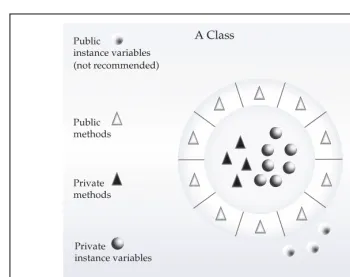
Encapsulationis the mechanism that binds together code and the data it manipulates, and keeps both safe from outside interference and misuse. One way to think about encapsulation is as a protective wrapper that prevents the code and data from being arbitrarily accessed by other code defined outside the wrapper. Access to the code and data inside the wrapper is tightly controlled through a well-defined interface. To relate this to the real world, consider the automatic transmission on an automobile. It encapsulates hundreds of bits of information about your engine, such as how much you are accelerating, the pitch of the surface you are on, and the position of the shift lever. You, as the user, have only one method of affecting this complex encapsulation: by moving the gear-shift lever. You can’t affect the transmission by using the turn signal or windshield wipers, for example. Thus, the gear-shift lever is a well-defined (indeed, unique) interface to the transmission. Further, what occurs inside the transmission does not affect objects outside the transmission. For example, shifting gears does not turn on the headlights! Because an automatic transmission is encapsulated, dozens of car
THE
JAVA
manufacturers can implement one in any way they please. However, from the driver’s point of view, they all work the same. This same idea can be applied to programming. The powe