ABSTRACT
RAMACHANDRAN, ASHWIN. Intelligent Context-Sensitive Help for Dynamic User and Environment Contexts. (Under the direction of R. Michael Young).
The problem of providing help for complex application interfaces has been a source of interest for a
number of researcher efforts. As the computational power of computers increases, typical applications not
only increase in functionality but also in the degree of interaction with the computational environment in
which they reside. There are powerful software tools available today used for both specialized and
non-specialized tasks that are often used by novice users who attempt tasks without significant training or
knowledge of the application’s interface. These kinds of applications are diverse and complicated in the
variety of functionality they provide, often interacting with other applications on the user’s system. With
current platforms (Windows, Macintosh, Linux etc) providing extensive multi-tasking facilities, interaction
with these applications is sometimes affected by the context of the environment itself (e.g., application
windows being minimized, maximized or obscured by those of other applications). The interdependencies
between applications and their environments increase the difficulty of providing effective context-sensitive
help when building an application’s help documentation. The purpose of this research is to create an
Intelligent Help System, which incorporates these interactions and affecting factors when providing help.
The SmartAidè system, which was developed as part of this effort, works on the premise that the user has a
goal when interacting with the application. This document will provide a detailed overview of the
architecture of the system along with the underlying design decisions. The system was then evaluated
against traditional application help documentation to test its effectiveness. The results and analysis of this
INTELLIGENT CONTEXT-SENSITIVE HELP FOR
DYNAMIC USER AND ENVIRONMENT CONTEXTS
by
ASHWIN RAMACHANDRAN
A thesis submitted to the Graduate Faculty of North Carolina State University
in partial fulfillment of the requirements for the Degree of
Master of Science
COMPUTER SCIENCE
Raleigh
2004
APPROVED BY
BIOGRAPHY
Ashwin Ramachandran was born in Mumbai, India on May 20th, 1980. He completed his studies from L.D.
College of Engineering, Ahmedabad, India in 2001. After finishing his undergraduate studies, he was then
interested in gaining industry experience and worked for Larsen & Toubro until June 2002. Ashwin joined
the MS program in Computer Science in Fall, 2002. His focus during graduate studies has been towards
application of AI techniques for enhancing usability of complex application interfaces. After graduating, he
ACKNOWLEDGEMENTS
I would first like to thank my parents Mr. Balakrishnan Ramachandran and Mrs. Valli Ramachandran, for
their immense support, advice and unconditional love. Without them holding my hand it would have been
impossible to sustain and emerge from the various pressures of graduate school. I am also deeply thankful
to my advisor, Dr. Michael Young, who gave me the opportunity to pursue a topic of my interest and
patiently guided me through my first steps in research. His kind words and encouragement especially
during the periods I could not get any results kept me motivated to explore new ways of approaching the
problem at hand. A sincere thanks also goes to Craig Allen who worked tirelessly and often under heavy
workload in the last couple of months on the implementation of SmartAidè. I would also like to thank my
committee members, Dr. James Lester and Dr. Robert St. Amant for taking time out to meet with me and
give me helpful comments for my work.
There are several people who made being here away from my family, easier to survive. I would like to
thank Arnav, Ashish, Imran, Kuldip, Madhup, Piyush, Sameer and Sandeep who have always been the best
of friends. They have been there during my best moments and have supported me through the most testing
of times.
Finally, I would like to thank all the people at Blackbaud for having understood and waited patiently as I
TABLE OF CONTENTS
LIST OF TABLES ……….… vi
LIST OF FIGURES ………... vii
1. INTRODUCTION ……….. 1
1.1. Need for Intelligent Help………. 1
1.2. Intelligent Help System (IHS) Background………. 3
1.3. Thesis Goal………..… 4
1.4. Outline………..……… 5
2. LITERATURE RESEARCH AND RELATED WORK ……… 6
2.1. Literature Research ………..………... 6
2.1.1. Intelligent User Interfaces……….. 6
2.1.2. Planning………..………... 8
2.2. Related Work ………...…... 9
3. ABOUT SMARTAIDÈ ……….………. 12
3.1. The Role of SmartAidè ………... 12
3.2. Systems and Applications being used ………. 13
3.2.1. The Macintosh System……….……….. 14
3.2.2. iTunes……….………..……….. 15
3.2.3. Finder………. 16
3.2.4. The Mimesis System……….. 17
3.3. SmartAidè Architecture………... 18
3.3.1. Mimesis Components……… 19
3.3.2. Client Side Components……… 21
3.4. Design Decisions……….. 25
3.4.1. Integrated, Separated or Divorced………. 25
3.4.2. Active vs. Passive……….. 26
3.4.3. “Show and Tell” – Supporting the help text with demonstration……….. 26
3.4.3. Planning………. 27
4. EXAMPLE SCENARIO ………...………. 28
5. EVALUATION ………...………... 38
5.1. Hypothesis……… 38
5.2. Experiment Design………... 38
5.3. Results and Analysis……… 42
6. CONCLUSIONS AND FUTURE WORK……….. 48
6.2. Future Work ……….. 48
LIST OF TABLES
5.1 Table indicating task-times and number of times help was accessed ………. 43
5.2 Average times for the tasks using non-context sensitive help and SmartAidè……… 43
5.3 Average number of times help was sought for each task ………... 44
5.4 Average times to achieve the sub-tasks that had more than 20% help requests ………. 46
LIST OF FIGURES
2.1 Intelligent User Interfaces’ two major fields of research……… 6
3.1 High-level view of SmartAidè’s help generation process ………. 12
3.2 Macintosh Environment ………. 14
3.3 The iTunes application interface ……… 15
3.4 The Finder application interface ………..……….. 16
3.5 The Mimesis System ……….. 17
3.6 SmartAidè architecture ………... 19
3.7 The Mimesis narrative plan ……… 20
3.8 DPOCL Plan operator ………. 21
3.9 Action class example ……….. 23
3.10 Execution DAG examples ……….. 24
4.1 SmartAidè startup ………..………. 28
4.2 The complete plan for the example scenario ……….. 29
4.3 Step 1 ………...……….. 30
4.4 Step 2 ………...……….. 31
4.5 Step 3 ………...……….. 32
4.6 Step 4 ………...……….. 33
4.7 Step 5 ………...……….. 34
4.8 Step 6 ………...……….. 35
4.9 Step 7 ………...……….. 36
4.10 Step 8 ………...……….. 37
5.1 Pre-evaluation questionnaire ………. 39
5.2 The tasks defined for the subjects to perform using iTunes and Finder ……… 40
5.3 Pre-evaluation questionnaire ……….
41-42 5.4 Pie-chart breakup of the method of help most used ………..………. 42
5.5 Task difficulty rated by the subjects in the post-evaluation questionnaire ……… 44
5.6 Breakup of percentage of help-requests for each individual sub-tasks that make up the tasks ……… 45
1. INTRODUCTION
1.1 The need for intelligent help
If we look at the use of computers in the last fifty years we can distinguish two trends. The first trend is the
increasing use of computers for a growing range of purposes. Ever since the introduction of the first
(electronic) computers in the 1940s, the number of computer users has been growing. Before 1970
computers were regarded mainly as scientific tools and only specialized programmers were able to perform
calculations on a computer. With the introduction of the PC in the 1980s this changed drastically. Many
people could now afford to buy a computer. In addition, PCs used the (relatively) easy to use command-line
and graphical interfaces, so it became much easier to learn how to use a computer. With this a new range of
computer applications was developed: word-processors, spread sheets, desktop publishers and computer
games. The rise of the Internet and ICT industry during the 1990s further stimulated computer usage [39].
People with similar interests from all over the world joined in virtual communities and, with the appearance
of laptop computers, people were not limited to computer use at home or work but could work anywhere
they wanted. Nowadays millions of people are using computers in many different locations and situations.
People with a Personal Digital Assistant (PDA) or Internet-capable mobile phone can be connected to
anyone, anywhere at anytime.
The second trend that runs parallel to this is the increasing complexity of computer programs and their
interfaces. With the doubling of computing power every eighteen months predicted by Moore's law,
program developers can afford to put more and more functionality into a computer program. If we look at
the latest version of Microsoft Word for example, no normal computer user makes use of all its functions,
not only because there are so many options and settings, but also because people do not know how to use
them or even do not know they exist. The two developments described above justify the need for good
human-computer interfaces. Many computer users are experiencing problems and most of these problems
are related to the interface. The encountered problems vary from confusing menu choices and
incomprehensible error messages to unnatural (rigid) interaction. Not only beginners, the elderly, or people
with disabilities are having trouble, but experienced computer users often bump into problems as well. We
need computer interfaces that can understand and help people and explain to them how to use the available
functions. We need to make sure that computers and other computerized devices remain accessible for
everyone.
Powerful software tools are available for many specialist expert tasks such as statistical analyses. Much of
this software will be used by non-experts. They will try to perform tasks with the system almost
immediately, even if they do not know how to do the task: this is known as the production paradox [7]. All
information needed at a certain moment and, after that, they have to use this information for their task
execution. These activities are troublesome; moreover, non-experts will hardly use “screen-manuals”
according to the production paradox. It might be more effective to integrate the help into the task execution
of the user. The system should take the initiative to present knowledge the user is lacking. The knowledge
presentation should come at the right moment and only refer to information that is relevant in the current
context.
Intelligent user interfaces are being proposed as a means to make systems individualized or personalized,
thereby increasing the system's flexibility and appeal [16]. However, this is extremely difficult in systems
that serve the needs of large and diverse user populations. Intelligent help has been found to be one of the
significant ways of providing better support to the users.
A "help" system aids a user in performing a specific task [14]. Help is very similar to tutoring, but the main
objective for a help system is to get something done, and not to make the user learn something. Another
difference is that many tutoring systems will lay out specific tasks for the user to do, in order to diagnose
his or her misconceptions. A help system must act upon whatever information it can gather from the user's
own choice of interactions with the system. Intelligent help systems may help users when they are
accidentally involved in erroneous situations or have no clue how to go about performing a task. In
addition, they may inform the users about useful functionality of the system that these users are not aware
of.
The role of context sensitivity is central to the efficacy of the help system. It implies adaptability to the
current user individual characteristics, that is his/her general knowledge and skills, motivations and
objectives [4]. Adaptable systems attempt to implement access methods or information selection support
tailored to the actual needs of users, to their motivations and/or skills, using 'static' contextual knowledge
Context sensitivity also includes sensitivity to the actual current goals and needs of the user. This
‘dynamic’ knowledge proves useful for solving many problems encountered by novice users; for instance,
error recognition and correction may be facilitated by comparing the actual state of the system with the
state that should be reached to fulfill the user's current goal [40]. This example brings out the usefulness of
continuous awareness to the current state of the system for ensuring ‘dynamic’ context sensitivity. In
particular, such contextual knowledge is necessary for generating help messages consistent with the system
1.2 Intelligent Help System (IHS) Background
The problem of providing help for complex interfaces has traditionally been addressed by the research on
adaptive help systems (more often called Intelligent Help Systems, IHSs). The goal of IHSs is to provide
personalized help to a user working with a complex interface, by diagnosing errors and suboptimal user
behavior, identifying missing pieces of knowledge about the interface, and providing on-demand help to
extend the user’s knowledge of the interface [4, 40]. The area of IHSs has been well investigated. The first
wave of research on intelligent help was initiated when UNIX systems, with their complicated interface,
were distributed widely in universities and came to the workplaces of many computer-naive users. Due to
this fact, almost all-early research on intelligent help systems was focused on UNIX and its utilities [4, 18,
24]. The appearance of ‘friendly’ WIMP interfaces created a pause in IHS research, but in just a few years
even these interfaces had reached the level of complexity where intelligent help is really important. The
current second wave of research on IHSs investigates useful ways of providing intelligent help in modern
application systems [9, 13]. Probably, a third wave will be created by advanced WWW applications.
Traditionally, IHSs are divided into two classes: active and passive help systems. In a passive help system,
it is the user who initiates the next help session by asking for help. An active help system initiates the help
session itself. ‘Passive-active’ and ‘Static-adaptive’ are two different dimensions of classification. A
well-known example of active but non-adaptive help is ‘did you know’ (DYK) help, which offers users random
pieces of knowledge (called hints) during their work. A number of modern applications (like Microsoft
Word) usually suggest DYK help at the beginning of a session. Adaptive passive-help systems support
users by suggesting the next piece of knowledge to be learned by the user when help is requested. The main
problem for these systems is how to decide what to say. The suggested piece of knowledge has to be
relevant to the user’s current goal. To determine what is relevant, IHSs track the user's goals and the user’s
knowledge about the interface. This information about the user is stored in the user model [8,28]. The user
model is often initialized through a short interview with a user and then kept updated through automatic
user modeling. IHS researchers have investigated a number of effective techniques of automatic user
modeling. Most of them are variants of two basic technologies that were tried in the very first IHS projects
[24, 45]:
1) Tracking the user’s actions to understand which commands and concepts are known to the user and
which are not.
2) Using task models to deduce the goal of the user.
The first technology is reasonably simple. The system just records all used commands and parameters,
assuming that ‘used’ means ‘known’. The second technology is much more complicated; it is based on plan
model. To identify missing pieces of knowledge, the system
1) Infers the user's goal from an observed sequence of commands,
2) Tries to find a more efficient sequence of commands to achieve this goal,
3) Identifies knowledge elements required to build this more efficient sequence
Adaptive active help systems make all decisions that adaptive passive help systems make plus one more
decision: when to interrupt the user’s work and suggest help. The problem of when to interrupt is older than
IHSs themselves. This problem is known in the area of Intelligent Tutoring Systems (ITSs) as the problem
of coaching [6, 12], and here IHSs apply the ideas developed by earlier ITSs [3]. The secret of good
coaching is not to interrupt the user's work in each situation when the user makes an error or demonstrates
suboptimal behavior and the system has something to say about it. A good coach will interrupt the user
only if the work situation is relevant for correcting the user or suggesting a new piece of knowledge.
Usually, a set of heuristic rules (mostly domain-dependent) is used to determine whether the situation is
relevant.
1.3 Thesis Goal
Applications today on all platforms (Windows, Macintosh, Linux etc) are diverse not only in the variety of
functionality they provide but also in their interactions with other applications in the system. This
cross-application interaction not only increases complexity but also increases the amount of knowledge required
by the user to interact with these applications. These applications are also dictated by the objects and
occurrences in the environment in which they reside, such as being minimized, maximized, having variable
window sizes and possible obscuring by other windows. Providing help for the range of situations the users
might find themselves is hard to do with the traditional help documentation that is provided with the
applications.
There are three main goals of this research:
1) Design a knowledge model and representation to encompass the application’s various states, including
modeling its environment and its interactions with another application.
2) Devise a method of providing help through the use of planning techniques that not only relates to the
current task-context of the user but also the current state of the application environment.
3) Evaluate the resulting implementation to analyze the performance of the help system against traditional
help documentation provided.
We have developed a tool called SmartAidè that focuses on the concept of “Show and Tell” for providing
actual execution of the actions to get from the current context to the context of the task the user needs to
perform. It records the effects of user actions on the interface but does not make any assumptions about the
goal he is trying to achieve. The tool works on the premise that the user has a goal in mind when requesting
help and provides information about their goals through a dialogue box. This eliminates the need for the
system to have a complex task model to determine user goals by tracking their interactions. Through the
use of planning, the system uses the representation of the actions and states to achieve an action sequence
that will take the application from its current state to achieve the goal of the user. A more detailed
description about the architecture is given in Section 3.3.
1.4 Outline
Section 2.1 gives a overview of the areas of research associated with this work. Section 2.2 will then
discuss some of the related work in the field of IHS. Section 3 then goes into the details of role of
SmartAidè, its architecture and its design decisions. Section 4 walks the reader through an example
scenario where SmartAidè provides help. Section 5 discusses an empirical evaluation method to measure
the effectiveness of SmartAidè against application help text, followed by conclusions and directions
2. LITERATURE RESEARCH AND RELATED WORK
2.1. Literature Research
This thesis draws its inspiration from two areas of research – Intelligent Help Systems and Planning.
Intelligent Help Systems forms one of the application areas of Intelligent User Interfaces (IUIs). Section 3.1
explains what IUIs are, including examples of the different intelligent techniques used in IUIs and
examples of the possible application areas for IUIs.
In order to be able to provide support to the user for the applications, SmartAidè records the effect of the
user actions on the interface. Using the goal provided by the user, it builds an action sequence from the
current application state to the user goal state using an artificial intelligence technique called Planning.
Section 3.2 provides an overview about planning.
2.1.1. Intelligent User Interfaces
Users today have access to more information than ever before. Interfaces through which the users interact
with all this information tend to become very complex. It can also happen that there is a limited amount of
time in which a task needs to be achieved, and it is nearly impossible to achieve tasks quickly with certain
interfaces. Or you can have a certain application, which is used by completely different users with different
needs. But all these users however have to use exactly the same interface. Another possibility is that the
domain in which the application is used changes. All the above situations are examples of when regular
interfaces can become too complex or inflexible. To help users in these kinds of situations intelligent user
interfaces were born.
INTELLIGENT INTERFACES
ARTIFICIAL INTELLIGENCE
HUMAN – COMPUTER INTERACTION
Figure 2.1. Intelligent User Interfaces’ two major fields of research [21]
The research area of intelligent user interfaces is at the boundary of a large amount of different research
areas. The two most important of these research areas are Artificial Intelligence (AI) and Human-Computer
do intelligent actions. In HCI computer interfaces are designed that leverage off a human user to aid the
user in the execution of intelligent actions. An IUI should be able to do intelligent actions and to leverage
off the human user’s intelligence. In other words, IUIs are human-machine interfaces that aim to improve
the efficiency, effectiveness, and naturalness of human-machine interaction by representing, reasoning and
acting on models of the user, domain, task, discourse, or media [25]. In the following paragraphs a few of
the “intelligent” techniques that enable an intelligent user interface to improve human-machine interaction
are describes.
The most important property of IUIs is that they are designed to improve communication between the user
and machine. Below we give a list of several types of techniques that are being used today in intelligent
user interfaces:
• Intelligent input technology uses innovative techniques to get input from a user. These techniques
include natural language (speech recognition and dialogue systems), gesture tracking and recognition,
facial expression recognition, gaze tracking and lip reading;
• User modeling covers techniques that allow a system to maintain or infer knowledge about a user
based on the received input;
• User adaptivity includes all techniques that allow the human-machine interaction to be adapted to
different users and different usage situations;
• Explanation generation covers all techniques that allow a system to explain its results to a user (e.g.
information visualization, or tactile feedback in a virtual reality environment).
Other important properties of IUIs are personalization and flexibility of use. To achieve personalization,
IUIs often include a representation of a user. These user models log data about the user’s behavior,
knowledge, and abilities. New knowledge about the user can be inferred based on the input and interaction
history of the user with the system. In order to be flexible many IUIs use adaptation or learning. Adaptation
can occur based on the stored knowledge in a user model or by make new inferences using current input.
Learning occurs when stored knowledge is changed to reflect new encountered situations or reflect new
data. Because of the difficulties involved in creating IUIs and the amount of knowledge engineering that is
needed, most IUIs focus on a specific method of interaction (e.g. speech) or on a particular narrow
application domain.
The main application area for intelligent interfaces is in those situations where knowledge about how to
certain actions itself or suggesting certain actions to the user. A couple of applications areas that involve a
lot of situations like the one mentioned above are information filtering, intelligent tutoring and intelligent
help.
• Information filtering aims to find a structure in the available information. This structure can be used to
aid users in finding the information that is useful to them.
• Tutors are programs that teach a user how a certain computer program works or how a certain real-life
task has to be accomplishes. Intelligent tutors can infer the user’s understanding of the program from
his performance on specific tasks. Based on this model of the user’s understanding, the tutor can give
the user advice on how to improve his performance.
• An intelligent help system is very similar to the intelligent tutor. Only a help system does not try to
teach the user, but helps the user get a certain task done. A help system lets users plot their own course
through the program.
2.1.2. Planning
Automated plan generation techniques have been widely investigated and used in the field of artificial
intelligence. Planning is a technique for solving problems that can be represented as having an Initial State,
a Goal State and a set of operators that describe valid actions in the world. The planning algorithm
represents the process of searching for a state of the world that satisfies the goal by applying a number of
operators from the initial state. This process can be represented as a graph-search of all the possible
connections between nodes representing the world-state after each operation. The initial and goal state are
collections of predicates stating the information about the world. A plan operator is represented by:
• A precondition list • An effect list
• A set of constraints on the operator
Formally, a plan P is a tuple <S, C> where S is a set of steps and C is a constraint tuple of sets of
constraints on S. Minimally, C contains a set of ordering constraints O that define a partial temporal
ordering on the execution order of steps in S. Given a planning problem, the ultimate aim of the planning
algorithm is to come up with a sequence of ground operators such that by application of these from the
A planning problem P (A, D, I, G) is a 4-tuple, where A is the set of operators, D is the finite set of objects,
I is the initial state of the system and G is the goal state of the system. The solution to the planning problem
is a plan: a tuple <S, O, L, B> where S are the steps, O are ordering constrains on the elements of S, L are
causal links representing the causal structure of the plan, and B are binding constraints on the variables in
S. Causal links are triples <Si, e, Sj>, where Si and Sj are parts of S. c is a result of Si and also a
pre-condition for Sj. Typically, the ordering constrains only induce a partial ordering, so the set of solutions are
all linearization of S consistent with O.
Given both the set of objects from the planning instance and the operators from the planning domain, the
complete set of actions that are possible in this planning problem can be derived by performing all possible
substitutions on all operators. A complete plan is defined as a set of ordered actions (a1; a2; a3;…;an). When
these actions are applied in order an(an-1(…a3(a2(a1(I)))…)), the following conditions hold. Before the
application of each action ai, ai's preconditions are true in the current state, and after the application of the
final action, the goal state G is true.
The Mimesis narrative planner uses DPOCL [44] as the planning algorithm for generating the help
sequence. A DPOCL plan contains elements composed from five central types. First, they contain steps
representing the plan's actions. Ordering constraints define a partial temporal order over the steps in a
DPOCL plan, indicating the order the steps must be executed in. Hierarchical structure in a DPOCL plan is
represented by decomposition links: a decomposition link connects an abstract step to each of the steps in
its immediate sub-plan. Finally, DPOCL plans contain causal links between pairs of steps. A causal link
connects one step to another just when the first step has an effect that is used in the plan to establish a
precondition of the second step.
The hierarchical structure supports action decompositions for abstract action specifications. A hierarchical
approach has a number of potential benefits. First, it may lead to improved performance due to the
reduction in amount of search needed, second, it is easier to encode domain knowledge as a set of abstract
and primitive actions, which allows for re-use of primitive actions and finally it supports interleaved
planning and execution.
2.2. Related Work
Research that explores generation of context-sensitive help can be roughly categorized into three groups
based on the method used for help generation: Interface Design Models, Task Models and Planning.
The method of generating help through the association of help text with the modules of the application
method involves utilizing explicit knowledge representations about application actions and the data models
developed during the interface design time. H3’s [26]method of help-generation involves determining the
user-context and using standard templates with pre- and post-conditions of the selected interface object to
generate help texts. The emphasis of this method is to substantially reduce the effort of developers in
writing help for applications by generating help text using the interface design model, which could be later
edited. This is useful in providing help, related to user-context with links to related topics as determined
through dependencies in the modules of the model. However this method does not provide task-oriented
help i.e. show a user what tasks to perform to achieve his/her desired goal. CARTOONIST [35]provides
context-sensitive animated task-oriented help by building a knowledge base that contains information about
the system-specific actions and the application-domain specific actions, during design time. The system
then draws a mapping between the two based on pre and post-conditions. Generating help involves
mapping the user task to a specific action within the application domain and using the mapping to create
the tasks required for performing the action. Most application systems however today have several
alternative approaches to performing a task. The knowledge model of [26]did not take alternative scenarios
into consideration if one set of tasks did not have their pre-conditions valid for execution. The problem in
general of exploiting knowledge at design time to provide support, is that up until now only very few
real-world applications have been developed on the basis of such user-interface development systems.
Integrating these approaches into present day applications is not possible.
Help generation using Task Models involved representing the system as a set of hierarchical system tasks
as perceived by the user. This knowledge model enabled generation of task-oriented help. Interactive
Systems Workbench [31] is a system where designers could build this hierarchy along with a set of
temporal constraints to define the order in which tasks occurred in a system. The hierarchy consists of
abstract tasks (tasks which consists of a set of sub-tasks) at the top of the hierarchy and broke them down
until the granularity was a set of basic tasks at the bottom of the hierarchy. The pre and post-conditions of
the task were represented in this hierarchy. Whenever help for performing a task was requested by the user,
the hierarchy is traversed to find a way from the root to the task to be performed, and the help text is
generated by concatenating pre-written text with the parameters of all the intermediate tasks to be
performed. HyPlan [15] is a system where the knowledge base consists of pre-compiled action plans
describing various complex tasks, and associations with their respective help topics. User context is gauged
by recording the current user activities and then matching them to the action plans in the knowledge base.
The help topics related to the matching action plans were then displayed to the user. Using task models
involves modeling the interface design space, which for even simple interfaces is large and dependent on
many variables. Also present day applications have interfaces to other applications and their environment.
Hence task-modeling might become complicated in these scenarios. Determining user-context and their
Planning techniques has been explored by researchers for advisory systems and help systems. Fischer [14]
developed an active help system, ACTIVIST, which recognizes what the user is doing and evaluates how
the goal is achieved. These tasks form the heart of the active help system, and are accomplished by “plan
specialists”. A plan specialist in ACTIVIST is an automaton, which recognizes a particular plan, and an
expert that knows the optimal plan for that goal. Finin [13] also provided active help in his WIZARD
system. WIZARD employed a “bad plan” catalog, similar to Burton’s bug library [6], which reduced the
problem to matching user behavior to items in the catalog. User modeling research, especially related to
adaptive user interfaces, came to be actively integrated with planning techniques for intelligent help
generation. [10] describes a system where action graphs are constructed with the nodes in the action graph
storing both the action information and the expertise-level of the user to perform that action. The nodes also
contain help-text associated with the action. Help is provided by determining the user expertise by the
actions he performs, determining the task-context he is performing and matching it to the action graph
commensurate with his expertise. Planning and user modeling techniques have been employed in research
into Intelligent Tutorial Systems (ITSs). COMET [12] is a system where plans are generated from the
knowledge base to derive explanations for how to perform equipment maintenance and repair. The planner
uses the knowledge source to determine what content to display depending upon the task being performed
by the user. STEVE [33]is an animated agent that inhabits a virtual world with a user and provides training
to the student by deriving action sequences from partial-order plans, to perform domain tasks. These plans
are flexible enough to adjust to the state of the interface and allow the agent to adapt if an unexpected
change occurs. MIMESIS [42] supports the dynamic generation of interactive narrative sequences, through
the use of partial order plans to achieve a specific set of goals within the virtual environment and
maintaining the coherence of these plans as they execute in the face of unanticipated user activity.
Among the current commercially available applications with integrated context-sensitive help, the Office
Assistant and the Macintosh Balloon Help have been widely documented. The Office Assistant is a
derivative of the Lumière project [17]. The Lumière project centered on harnessing probability and utility
to provide assistance to computer software users. Bayesian user models were employed to infer the user’s
need by considering a their background, actions and queries. But being an active system that intervened
during the user’s task, it was noticed that it hindered the users as they gained more experience with the
application and required less assistance. The Macintosh Balloon Help system allows the user to get help
about various objects in the screen and their purpose. The user can point the mouse at a particular object on
the screen and a balloon pops up providing information about that object. However this kind of help is
3. ABOUT SmartAidè
3.1. The Role of SmartAidè
Current GUI environments (Windows, Macintosh etc.) provide the user with a rich arena in which he has
access to a wide variety of application software. Such a system provides the ideal setting for building a help
environment. Due to its uniform design and constraints provided, these environments allow a situation
where the user can predict effects of actions performed on elements of the interface.
The SmartAidè system takes advantage of the Macintosh environment to provide help to two interacting
applications – the iTunes music player application, and the Finder application. The iTunes application
described in section 4.2.2, is the digital music player application that allows the user to play music encoded
in various digital formats. These music files are stored in the file system of the Macintosh accessible by the
Finder application, described in section 4.2.3. To look for music files or import or export song lists, the
iTunes interacts with the Finder to allow users to decide where they would like to store this information.
SmartAidè embodies a methodology where the application environment context influences the help
generation as much as the intended user goal. The system works on the principle that the sequence of user
interactions translates into some task they are trying to achieve. Hence the system uses planning for
building and driving its action sequences. Along with the user goal, the system builds a representation of
the current context of the application by recording the state of all objects affected in the application world
based on the interactions of the user. The current context and the user goal form the planning problem
specification. Our efforts were focused along using the Mimesis Narrative planner to generate the action
sequences. However, due to constraints of time, for the empirical evaluation, we employed a version of
SmartAidè that used a plan database, which consisted of pre-compiled action plans derived from planning
problem specifications in different contexts using Longbow. These plans were used to drive the animation
[20] and display of step-by-step instructions within the application environment. Currently, work continues
on connecting SmartAidè to Mimesis as mentioned in section 6.2.
APPLICATION
Actions
SMARTAIDÈ
Help Request Action
Execution
Help Text
MIMESIS CLIENT
Interactions
USER
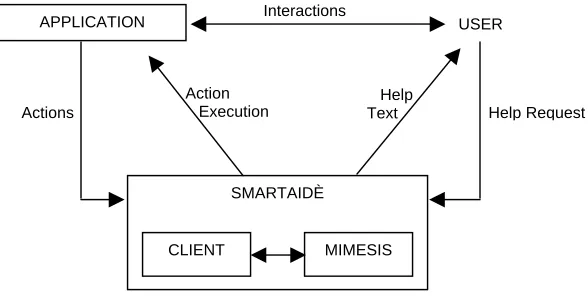
Figure 3.1. High-level view of SmartAidè help generation process
Whenever the user requests help, the help dialog is displayed allowing the user to specify his/her intended
goal. This help request is associated with a goal state of the user. Both the current context and the goal
states are stored in a form recognizable to the planner. These states are then sent to the planner, which has a
representation of all actions with their associated pre- and post-conditions. Using the current context, the
planner then performs a search over the domain of actions and builds an action sequence that will enable
the state of the application to proceed from the current scenario to the goal scenario. The generation of help
is a combination of describing the help associated with the action and actually performing the action by
moving the mouse and interacting with the various objects in the application. The help text is displayed in
the same help dialog through which the users specified their help request. This method is analogous to
social interactions between humans where one person provides information to the other person without
drawing inferences or the underlying intentions of the person asking for the information for e.g. asking for
directions. SmartAidè makes no assumptions about the reason or the intention of the user during his
sequence of interactions or while providing help. The system also does not provide any explanations about
why actions were being executed the way they were, while providing help. The system does not attempt to
tutor the user but only gets the task done allowing the user to infer the underlying causal relationships
between the actions.
The SmartAidè tool was built in such a way that it places no restrictions on the way a particular user goal
needs to be achieved. This way the users can either discover the different ways of getting their task
achieved through their various experiences with using the help system. This helps build user preferences
and helps determine the knowledge the user has of the application. This information could be encoded into
a user model, something that has not been incorporated into the current architecture. Modeling the user
would enable the tool to provide help tuned to both the preferred interaction sequence of the user and the
3.2. Systems and Applications being used
This section provides a brief overview of the Macintosh system, the iTunes application, the Finder
applications and the Mimesis system.
3.2.1. The Macintosh System
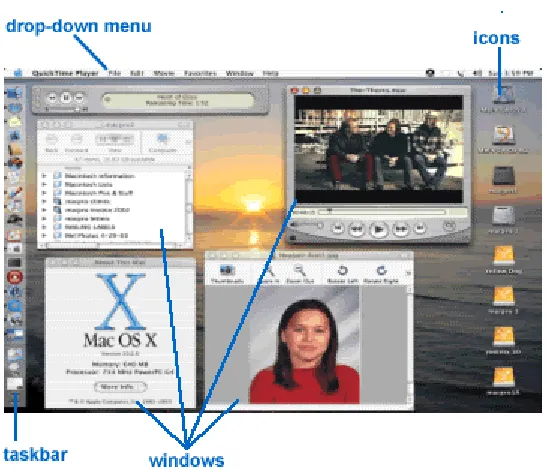
Figure 3.2. The Macintosh environment
The Macintosh computer uses a graphics-based operating system with a user-friendly interface with easy
access to files. All files and directories, or folders, appear as icons on the Desktop. The Desktop is the
screen that appears after the Macintosh system loads up. Some permanent fixtures on the Desktop are the
Macintosh HD and Trash. Floppy disks, zip disks, CDs, etc. that you have inserted also appear on the
Desktop. Icons are small pictures representing a file, folder or application, and are usually associated with
the item's name. There are also drop-down menus located on the top of the screen that enables application
or system associated commands. Examples of a menu would be 'File' or 'Edit'. The mouse is an integral part
of the user interface, although many operations can also be performed with the keyboard.
Navigation on a Macintosh computer can be achieved using the keyboard or the mouse. On the screen, the
user can see a pointer or cursor, usually in the shape of an arrow. Moving the mouse (up, down, left, right)
will cause the pointer on the screen to move in the same direction on the screen. The Macintosh mouse is
Application and files can be used through windows, which appear on the desktop. Multiple applications are
opened in multiple windows but the user can only use one window at a time, called the 'active' window.
While you can have many application programs open at once, only one of them can be active at a time.
Window sizes are variable and can be changed by the user. A window can cover the whole screen when it
is “maximized” or hidden when it is minimized. The Macintosh has a taskbar that provides links to
applications and also provides links to the currently open windows.
3.2.2. iTunes
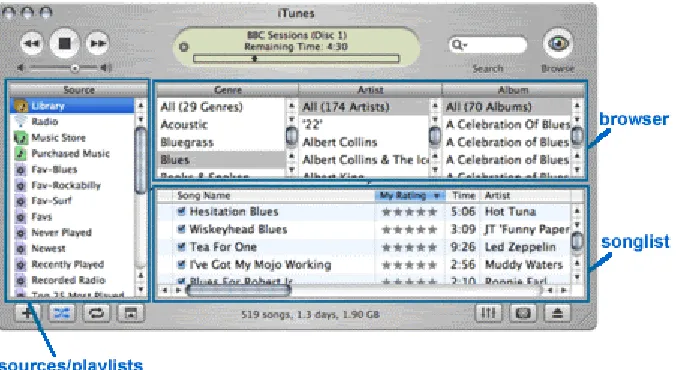
Figure 3.3. The iTunes application interface
iTunes is the digital music player application offered with all Macintosh systems. It offers a flexible,
personalized interface, with which one can listen to a specific artist, genre or eras of music. ITunes also
provides facilities for creating, adjusting, storing, and naming the digital music files. The Music Library
helps you organize the music files into categories called ‘playlists’. Sorting and finding artists, albums,
genres, etc are all important functions of the Music Library. The application also allows the user to burn
CDs and transfer playlists to external devices such as MP3 players.
Figure 3.3 above shows the iTunes application window. This window is divided into three windows that
could be made visible or invisible depending on the user’s preference.
• The Sources/Playlist: This pane is primarily made up of the users’ playlists, but also lists Radio,
and the iTunes Music Store.
• The Browser: For any list of songs the user happens to be viewing, the Browser breaks the view
• The Songlist: This is the list of songs contained in the source (folder/hard-drive, network
folder/drive) the user has selected, and the items selected in the browser.
Playlists are lists of songs (or other audio files) that the user can create to organize his/her library or burn a
CD. Playlists can include songs or spoken word files from the library, or radio stations. Adding a song to a
playlist does not remove it from the library; it places a pointer (or reference) to the file in the playlist. Any
radio stations in the playlist will tune in when the user is connected to the Internet and the user selects the
playlist. Playlists are of two types: a standard playlist or a smart playlist. Standard playlists are created
manually and are not automatically updated as the library changes. Smart Playlists are created based on
certain criteria chosen by the user, and can be automatically updated as the library changes.
3.2.3. Finder
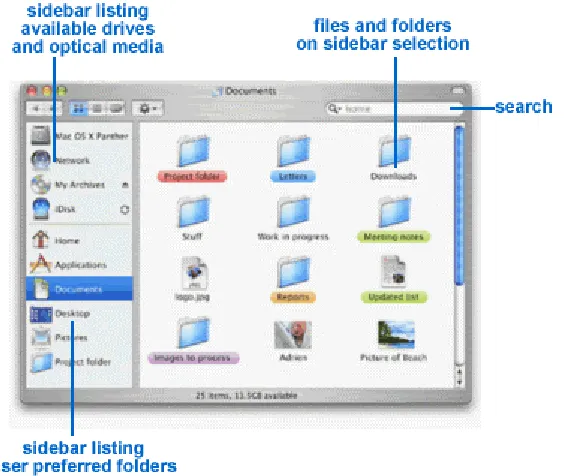
Figure 3.4. The Finder application interface
The Finder application helps in navigating and organizing files and folders on the system. Figure 3.4 shows
a typical view of the Finder. The organization is visible on the sidebar, in the left-hand pane of every open
window. This sidebar lists hard drives, network volumes, optical media and other accessible volumes at the
top. Clicking on any of the items listed will display the files and folders available in the particular media.
DVDs, FireWire and USB hard drives and flash memory cards. The sidebar can be customized with the
user’s favorite folders by dragging them to the lower section of the sidebar. These favorite folders provide
convenient shortcuts to get to current projects and a quick way to copy files. The Finder is integrated with
almost all applications when the “Open File” or “Save File” commands are activated within the application.
The Finder also allows the user to open a file/folder on a network server.
Searching for files and folders is achieved as the users watch the results as they type and refine search
terms. And they can specify search locations through a popup menu, which lets them choose
“Everywhere,” “Local Disks,” “Home”, or “Selection.”
The Action menu gives the user access to contextual Finder commands based on the current selection such
as label files, or move items to the trash. The Action menu also gives the user a handy way to get more
information about a file. If the users have a two-button mouse, they can also right-click on an item to bring
up the menu, or hold down the control key while clicking on an item with a one-button mouse.
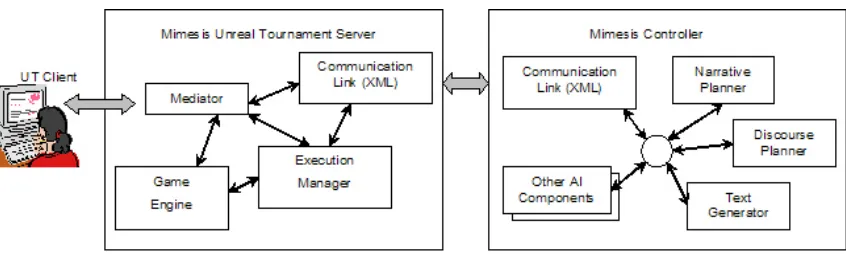
3.2.4 The MIMESIS System
Figure 3.5. The Mimesis system
The Mimesis system integrates a suite of intelligent control tools with a number of virtual world
environments ranging from Java-based games running on PDAs and cell phones to commercial 3D game
engines like Unreal Tournament 2003 (UT). While these virtual worlds are well-suited as engines for
building conventional interactive environments, the representation of the worlds that they model do not
typically match well with those used by AI researchers. Most virtual worlds' internal representations are
procedural - they do not utilize any formal or declarative model of the characters, setting or the actions of
the stories that take place within them. Consequently, direct integration of intelligent software components
is difficult. To facilitate this integration, Mimesis defines a multi-agent architecture in which default
modified) so that low-level control of the virtual environment is performed by the environment's engine and
high-level reasoning about narrative structure and user interaction is performed collectively by a suite of
intelligent agents (called Mimesis Components).
Mimesis acts as a story generator, determining the narrative elements of the user’s experience within the
virtual world. Collectively the agents operating with Mimesis are responsible for both the generation of a
story (in the form of a plan characterizing all physical and communicative actions that are to be performed
within the environment) and the maintenance of a coherent narrative experience in the face of unanticipated
user activity. The process of constructing a narrative experience involves a number of specialized
functions, including reasoning about the actions of individual characters, generating any dialog used by the
characters or narration to be provided by the system, creating cinematic camera control directives to convey
the action that will unfold in the story, etc. To facilitate the integration of corresponding special-purpose
reasoning components, the Mimesis architecture is highly modularized. Individual components within the
MC run as distinct processes distributed across a network; the processes communicate with one another via
a well-defined TCP-based message-passing protocol. Developers extending Mimesis to provide new
functionality wrap their code within a message-passing shell that requires only a minimal amount of
customization.
While the MC architecture contains a number of intelligent components, one of these is central to the
creation of SmartAidè’s action sequence. The narrative planner is responsible for determining all actions
that need to occur within the application environment to achieve the intended goal of the user. Additional
components, such as a text generation system (used to create custom dialog and narration), a user model
and an HTTP server are also included in the Mimesis system. A more detailed description of the narrative
planner is provided in Section 3.3.1.
3.3. SmartAidè Architecture
Mimesis uses a client/server architecture where high-level reasoning about the plan structure and the user
interaction is performed by the intelligent control elements on the server side while the client side performs
the low-level control of the application/game using the plan structures generated. Communication is
achieved through the use of XML encoded messages between the communication modules of the client and
Mimesis server. This enables developers and researchers use Mimesis as a testbed for applications on
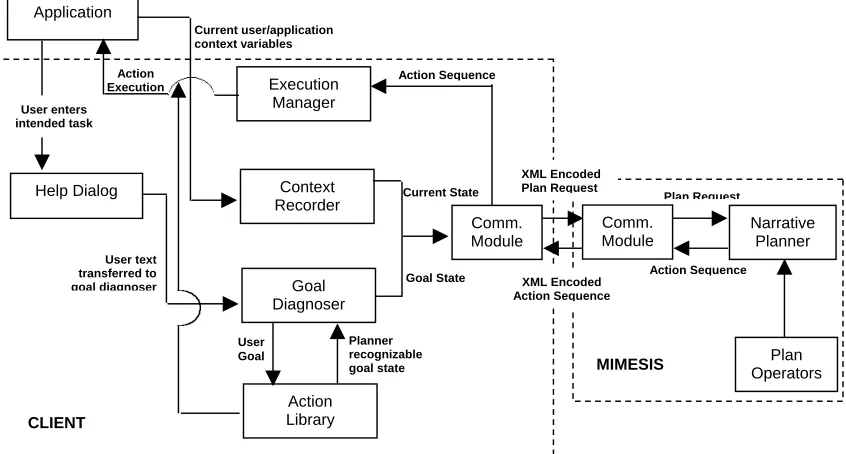
different platforms using its various intelligent components. Figure 3.6 shows the various components on
the client side and the components being used in Mimesis. Section 3.2.4 provides a brief introduction to
Application Help Dialog Execution Manager Context Recorder Goal Diagnoser Action Library Plan Operators User enters intended task User text transferred to goal diagnoser Action Execution Action Sequence Current State Comm. Module Goal State MIMESIS User Goal Planner recognizable goal state CLIENT Current user/application context variables XML Encoded Plan Request XML Encoded Action Sequence Plan Request Action Sequence Comm. Module Narrative Planner
Figure 3.6. SmartAidè architecture
3.3.1. Mimesis components
Mimesis Narrative Planner
The MimesisNarrative planner is responsible for handling plan requests initiated by the game engine. A
plan request contains three elements. First, it contains an encoding of all relevant aspects of the current
application state. Second, it names one of a set of pre-defined libraries of actions that can be used by the
story planner to compose action sequences. Finally, it contains a set of goals for the plan, which is a listing
of conditions in the application environment that must be true at the time that the plan ends its execution.
The story planner responds to the plan request by creating a story world plan, a data structure that specifies
the actions of the characters in the game and the system-controlled objects that will execute over time to
4. ShowViewOptions (editMenu, optionsButton) 5. Goal
State
At (mouse, editButton)
Visible (editMenu) Visible (optionsButton)
At (mouse, optionsButton)
3. MouseMove (editMenu, optionsButton) 2. OpenEditMenu (titleBar, editButton)
Visible (editMenu) Enabled (editMenu) MouseAt (titleBar) 0. Current
Application State
1. MouseMove (titleBar, editButton)
Visible (optionsWindow)
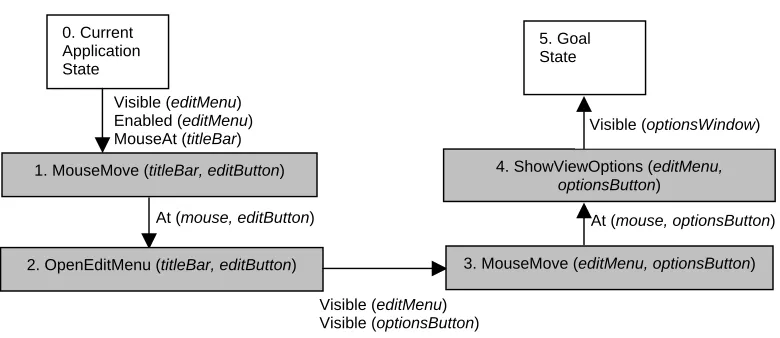
Figure 3.7. A Mimesis narrative plan. Gray rectangles represent actions and are labeled with an integer reference number, the actions’ names and a specification of the actions’ arguments. Arrows indicate causal links connecting two steps when an effect of one step establishes a condition in the application environment needed by one of the preconditions of a subsequent step. Each causal link is labeled with the relevant world state condition. Temporal ordering is roughly indicated by left-to-right spatial ordering. The white box in the upper left indicates the game’s current state description, and the box in the upper right indicates the current planning problem’s goal state.
This plan involves displaying the view options dialog for changing the number of visible columns. Step 1) Move the mouse from its current position at the titlebar to the edit menu button. Step 2) Click the edit-menu button to display the edit-menu. Step 3) Move the mouse from the edit-menu button to the View Options button in the menu. Step 4) Click the View Options to open the View Options window.
Mimesis’s DPOCL plan algorithm uses refinement search [19] as a model for its plan reasoning process.
Refinement search is a general characterization of the planning process as search through a space of plans.
A refinement-planning algorithm represents the space of plans that it searches using a directed graph; each
node in the graph is a (possibly partial) plan. An arc from one node to the next indicates that the second
node is a refinement of the first (that is, the plan associated with the second node is constructed by
repairing some flaw present in the plan associated with the first node). In typical refinement search
algorithms, the root node of the plan space graph is the empty plan containing just the initial state
description and the list of goals that together specify the planning problem. Nodes in the interior of the
graph correspond to partial plans and leaf nodes in the graph are identified with completed plans (solutions
to the planning problem) or plans that cannot be further refined due for instance, to inconsistencies within
the plans that the algorithm cannot resolve. In Mimesis, the initial planning problem for DPOCL is created
using the specifications of the current and goal states taken from the plan request from the client. The
approach to plan generation as search facilitates the creation of plans tailored not just to the particular state
of the application environment at planning time, but to preferences for certain types of action structure.
Search control rules can be defined that direct search towards (or away from) plans that use certain objects,
Plan Operator Library
The plan operator library contains declarative representations of actions that can be performed within the
application. This representation models under what circumstances an action can be executed and how the
action alters the world state – without explicitly stating how the action performs its tasks.
Operator ShowViewOptions (?ACTIVE-WINDOW ?EDIT-MENU ?VIEW-OPTIONS-MENU)
Preconditions:
(is-iTunes ?ACTIVE-WINDOW) (is-iTunes ?FULL-PLAYER) (is-visible ?EDIT-MENU)
(is-visible ?VIEW-OPTIONS-BUTTON) (is-enabled ?VIEW-OPTIONS-BUTTON) Effects:
(is-ViewOptions ?ACTIVE-WINDOW)
Figure 3.8. A DPOCL plan operator for displaying the View Options dialog used in the plan in Figure 3.7. In this operator, the Preconditions ensure that a) the current active window is the iTunes window b) iTunes is in full-player mode c) the Edit menu is visible, d) the View Options menu item is visible, e) the View Options menu item is enabled. The Effects of the action specify that the View options dialog box is open and is the currently active window.
The narrative planner in Mimesis uses a declarative representation in which an action is represented using
two main elements: its preconditions and its effects. An action’s preconditions are a set of predicates
describing those conditions of the application state that must hold in order for the action to execute
correctly. An action’s effects are a set of predicates capturing all changes to the world state made by the
action once it successfully executes. Figure 3.8 shows an example plan operator. A plan would consist of a
sequence of actions drawn from search of this plan operator library specified in the plan request.
3.3.2 Client side components
Goal Diagnoser
SmartAidè makes no assumptions about the goals of the users based on their interactions with the
application. Whenever the user requests help, the Help Dialog is displayed, where they can type in their
goal or the task they intend to achieve. The Goal Diagnoser translates the user input into planner
recognizable goal state. The Goal Diagnoser focuses on the global context of the user help request and
associates with a planner recognizable goal state using the definitions in the Action Library. In the current
version of the implementation, The Help Dialog displays a menu representing the set of actions modeled in
planner recognizable goal state. Future versions of the system will look at incorporating a more natural way
of interaction, when the user seeks help.
Context Recorder
Knowing what a user is doing within the application is a very crucial part of the help giving process. The
help system needs a way to identify and represent the effect of the user's actions on the interface, so that the
planner can get an accurate description of the current application environment state. In the Macintosh
environment, there are a finite number of 'objects', to which a user has access. When the application is
loaded up, the states of all the elements in the interface are recorded. As the user interacts with these
objects, the effects of these interactions are recorded and the state of the object itself is updated. In addition,
SmartAidè assumes that, for the application that it supports, there always exists an equivalent set of menu
actions for each hot-key sequence, which is initiated by the user. Thus, the Context-Recorder also translates
the hot-key sequence to the elements within the interface. The representation of the current state is always
stored in a format recognizable to the planner. The state of the application with respect to the environment
is recorded using the internal Macintosh representation, which stores information about active windows,
window sizes and their states (minimized or maximized).
Action Library
The Action Library stores information about the primitive actions that can be performed within the
application environment. The action library stores a pointer to the action class definition of the action and
the help text associated with the action. In order to ensure that every step in a plan can be executed within
the application, the developer must create one action class for every action operator in the plan library. The
implementation of each action class is responsible for preserving the semantics of the action operator
defined in the planner’s action library. To this end, the Mimesis client API’s abstract “Action” class defines
class ShowViewOptions extends Action;
var Window activeWindow; var int precondResult; var int effectsResult;
function int CheckPreconds() {
if activeWindow.window not “iTunes”
return 0;
if activeWindow.title.menuOption[1].enabled = 0
return 1;
if activeWindow.title.menuOption[1].options[9].enabled = 0
return 2;
else
return –1;
}
function int CheckEffects() {
if activeWindow.window not “View Options”
return 0;
else
return –1;
}
function void Body() {
activeWindow.title.menuOption[1].options[9].mouseClick(); set activeWindow.window = “View Options”;
}
state Executing { Begin:
precondResult = CheckPreconds(); if (precondResult != -1) {
reportPrecondFailure(precondResult); gotoState(‘Idle’); }
Body();
effectsResult = CheckEffects(); if (effectsResult != -1) {
reportEffectFailure(effectsResult); gotoState(‘Idle’); }
reportActionSuccess(); }
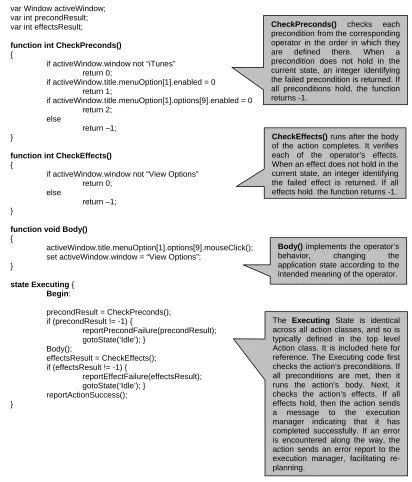
The Executing State is identical across all action classes, and so is typically defined in the top level Action class. It is included here for reference. The Executing code first checks the action’s preconditions. If all preconditions are met, then it runs the action’s body. Next, it checks the action’s effects. If all effects hold, then the action sends a message to the execution manager indicating that it has completed successfully. If an error is encountered along the way, the action sends an error report to the execution manager, facilitating re-planning.
Body() implements the operator’s behavior, changing the application state according to the intended meaning of the operator. CheckEffects() runs after the body of the action completes. It verifies each of the operator’s effects. When an effect does not hold in the current state, an integer identifying the failed effect is returned. If all effects hold, the function returns -1. CheckPreconds() checks each precondition from the corresponding operator in the order in which they are defined there. When a precondition does not hold in the current state, an integer identifying the failed precondition is returned. If all preconditions hold, the function returns -1.
Figure 3.9. An example of the ShowViewOptions action shown in the plan in Figure 3.8
An action’s CheckPreconds() function is responsible for verifying that the conditions described in the
is responsible for changing the state of the world in accordance with the meaning of the action operator.
The CheckEffects() function verifies that the conditions described in the operator’s effects have actually
been obtained in the world immediately after its execution.
The Executing() function is an abstract function defined only in the parent action class. This function,
shared by all action classes, first calls the action’s CheckPreconds(). If one of the action’s preconditions is
not met, then the Executing() function stops execution and sends a failure message to the Execution
Manager. Otherwise, the function calls the action’s Body() and then calls the action’s CheckEffects()
function. If one of the action’s effects does not hold, the function halts execution and reports this condition
to the Execution Manager. Otherwise, if no problems were encountered, the Executing() function reports
that the action has completed successfully. An example of an action class has been shown in Figure 3.9.
The Execution Manager initiates the execution of each action and extracts the associated help text for
display as the action is being executed.
Execution Manager
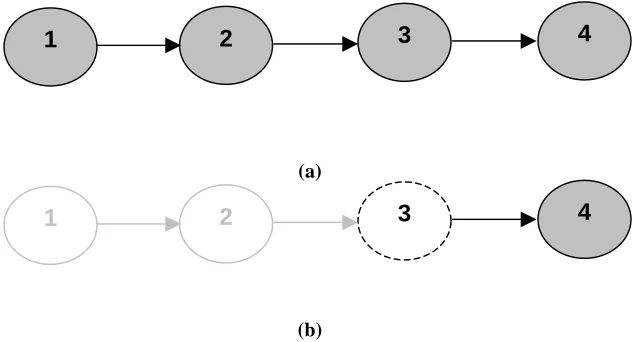
In order to control and monitor the order of execution for the actions within the narrative plan, the
Execution Manager builds a Directed Acyclic Graph (DAG) that represents the order in which the actions
need to be executed to achieve the user goal. The nodes in the DAG represent primitive actions and arcs
between two nodes indicate temporal dependencies between the two actions’ execution. An example
execution DAG for the plan from Figure 3.10 prior to any plan execution is shown in Figure 3.10 (a).
4
3
2
1
(a)
4
3
2
1
(b)
To execute the plan, the Execution Manager removes the minimal elements of the DAG (those actions that
have no temporal dependencies upon other actions) and sends an XML description of each action and its
parameters to the client on the user’s machine. Using a pre-defined translation scheme, the client translates
the action description into a function call with pointers to the appropriate system objects that make up the
action’s arguments.
This function is responsible for the correct implementation of the action characterized by the declarative
representation used by the Mimesis planner. As each of the client-side actions execute, they first check the
relevant system state to verify that their preconditions hold. Next, they perform their main task, changing
the world according to their intended semantics. Finally, they re-check their post-conditions, validating
that their execution has correctly changed the system state. If an error is encountered in this process (e.g.,
the user has altered the system state so that one of the action’s pre-conditions no longer holds at the time
the action is executed), an error message is sent by the function back to the Execution Manager. Should the
function execute correctly, a termination message is sent back to the Execution Manager, indicating that the
temporal dependencies in the execution DAG can be updated and new actions initiated for execution.
3.4. Design Decisions
3.4.1 Integrated, Separated or Divorced
Researchers have further classified IHS as being one of three types, namely, divorced, separated, or
integrated, with regard to the application for which help is intended. A divorced system knows nothing
about the application for which it is giving help. Conventional help systems, such as, those seen in today's
Windows applications can be considered as divorced [38]. The systems give help when asked for, but the
help is generally large chunks of pre-stored text. No user adaptation of the system and modification of help
take place. Separated help systems are similar to integrated help systems, but are not built into the
application. Communication between application and help system can occur and the system can adapt to a
user, because it has knowledge about user's actions [38]. With this adaptation comes modification of help
text, and some form of intelligence can be associated with its actions.
Integrated help systems provide perhaps the best answer for building a help system [38]. The help system is
part of the application and can therefore have total access to all the knowledge it needs to adapt to a user
and provide the best help. In this project the goal is to be able to make the architecture either separated or
integrated based on the decision of the designer. SmartAidè’s dual action representation model allows for
![Figure 2.1. Intelligent User Interfaces’ two major fields of research [21]](https://thumb-us.123doks.com/thumbv2/123dok_us/1522405.1186604/14.612.161.450.536.625/figure-intelligent-user-interfaces-two-major-fields-research.webp)