Implementation of SDK Development with
Applications for Printer, VFD and Barcode
Reader on ARM Platform
Gaurav Kumar1, Prerna Paliwal2M. Tech Student, Dept. of VLSI and Embedded System, Ganpat University, Kherva, Mehsana, India1
Technical Associate, Dept. of Embedded System, eiTRA, Umiya campus, Ahmedabad, India2
ABSTRACT:This paper gives the overview of developing and understanding the benefits of a SDK for an ARM based
platform. Basically SDK provides: Script for environment settings, Sys-root for embedded and native development tools and Source code of demo applications (if required). Detailed instructions for installing the SDK on Linux based host system are presented in this paper. It also describes the build environment, APIs and tools available for application development on ARM board terminal. Creating a simple web-application, sample application for a) printer b) barcode reader c) VFD d) playing media files using gstreamer pipeline, which offers user to access board peripherals.
KEYWORDS: SDK, Sysroot, Application development, APIs, VFD, Printer, Barcode scanner.
I. INTRODUCTION
The objective of this paper is to understand the use of SDK and firmware for generic ARM board platform which offers users to use attached and supported peripheral. It provides a platform and SDK for further developing the products using it. Features provided by this platform is like Printer, tamper detection, HDMI interface, VFD (vacuum florescent display), barcode reader and gstreamer pipeline architecture support. Moreover, the Google chrome feature is also supported for web designing. It shall have Linux operating system running on iMX6 processor and have kernel drivers built for specific peripherals. Various application modules can be developed as per the application demand.
II. RELATED WORK
A. SDK Features:
The SDK sysroot native components include cross-compiler tool chain, host setup script, signing application, signing scripts etc. which are required on user host system for application build, signing and packaging.The SDK sysroot for embedded components include cross-compiled binaries, libraries and headers of below listed packages for application development.
Tools for embedded cross development, Barcode library SNAPI, Printer library, Gstreamer, Alsa library, Vacuum Fluorescent Display, HDMI.
B. SDK Functionality:
ARM board SDK usage and functionality is described in following work flow diagram for accessing the application and key generation.
C. Installation and working of SDK:
For installing SDK user shall execute SDK script. Use the following command: $ sh<SDK script name.sh>
Fig.1 Work Flow Diagram
III.APPLICATION DEVELOPMENT
A. Printer:
Printer has a USB interface with the ARM board. I have used a thermal printer which comes under non-impact types of printer.
The printer offers functionalities like
Printing the ticket (image), feeding blank lines to the paper and cutting the paper.
Upgrading firmware and retrieving firmware version.
Re-initialization of printer after disconnect the USB and re-connect it.
Fig.2 Process flow diagram of printer application
Following flow charts Fig.3 shows the flow of printer functionalities and broader view of initialization API.
B. Vacuum Florescent Display (VFD):
VFD has a USB interface with the ARM board. The VFD is a 2 line LED display to display the text messages. VFD supports many international character sets and code sets.
The VFD library provides functionalities like:
Initialize: Initialize the VFD device for using.
Status: To get current connection status of VFD device.
Send command: Send the command using an application to pilot the VFD device. The command for driving
VFD device.
De-initialize: De-initialize the VFD device after using.
Following flow charts Fig.4 shows the flow of VFD functionalities and broader view of send data API.
Fig.4 Flow diagram of VFD application
C. Barcode Reader/Scanner:
Barcode reader interface is provided by SNAPI library. The barcode reader on the platform supported these following types of the barcode:EAN, UPC, CODE 39, CODE128, CODE93, CODABAR, Code FDJ, PDF417, MicroPDF417, DATAMATRIX, QR, and AZTEC.
The Barcode Readerlibrary (SNAPI) provides functionalities like:
Read barcode, Capture video images, Aiming Pattern On/Off, Firmware Upgradation, Snapshot images.
D. ALSA Library
In this platform terminal audio API support is provided by ALSA library. Third party developers can use ALSA library API and ALSA utilities available on terminal. [1]
The ALSA library provides functionalities like:
Ex.:$ aplay <filename.ext>//To play a media file.
ALSA utility arecord can be used for recording audio files.
Ex.: $ arecord <filename.ext>//To record sound in a given file name.
ALSA utility amixer can be used for audio configurations like volume.
Ex.: $ amixer set ‘Left DAC’ <percentage 0-100> //To control the volume.
IV.GSTREAMER 1.0
GStreamer is a development framework for creating applications like media players, video editors, streaming media broadcasters etc. Media players can easily be built on top of GStreamer especially when using the high-level object called playbin. [2]
Playbin is an element that can be created using the standard GStreamer API. Playbin plugin can be used as to play allkind of media files without adding audio/video decoders and audio/video converters or sink. GStreamer's development framework makes it possible to write any type of streaming multimedia application.
By making pipeline for playing media files as audio/video, user can play any media files by using the pipeline on the command line of Linux operating system.
Fig. 5 Gstreamer Pipeline for Ogg player [2]
V. NETWORK CONFIGURATION
A. Ethernet and Wi-Fi Configuration:
There is an NIC interface available on the platform to user for IP configuration of Ethernet. User will have two options to configure IP address, DHCP and Static.
For Ethernet, If user selects option to configure static IP, user can set IP address and manually configure with providing some other network parameters like sub net mask, Default Gateway, Primary DNS and Secondary DNS. User can also configure dynamic IP by selecting DHCP. Same as the Ethernet, there is an interface available to user for IP configuration of Wi-Fi (DHCP and static).User can discover available WiFi networks and select one of the available network(s) or manually configure the Wi-Fi network with providing network name (SSID), password for Wi-Fi access. User can configure static IP of Wi-Fi by setting IP address, sub net mask, default Gateway, primary DNS and secondary DNS. User can also configure dynamic IP of Wi-Fi by selecting DHCP. Moreover, user can refresh the list of available Wi-Fi networks. User can configure both IPv4 and IPv6 address for Ethernet and Wi-Fi.
User will have access to virtual keyboard to enter alpha numeric input required for the network configuration. The whole configuration is managed by “tinfo” utility. By using it user can set up whole network configuration by setting the parameters. “tinfo” used to assign values for : IPv4, IPv6 address, Passphrase, wlan mode, ssid, security.
$ tinfo –g (get parameters)
$ tinfo –s<parameter> -v <value>
(WLAN_MODE is 1 for static IP)
Example: tinfo–sWLAN_IPV4_ADDRESS –v<IP_Address>
“wpa_supplicant” is responsible for making login requests to a wireless network. It handles passing the login and encryption credentials to the authentication server.Uses to connect with wireless network having WPA and WPA2 security.
$ sudowpa_supplicant –B –Dwext –i wlan0 –c /etc/wpa_supplicant.conf
B. Verification and performance measurement:
In network performance, measure certain parameters which plays a major role for defining the quality of the network. [3]
The following measures are often considered important:
Bandwidth commonly measured in bits/second is the maximum rate that information can be transferred.
Throughput is the actual rate that information is transferred.
Latency the delay between the sender and the receiver decoding it.
Jitter variation in packet delay at the receiver of the information
Error rate the number of corrupted bits expressed as a percentage or fraction of the total sent.
Network performance is measured by “iperf” tool. It is an open source tool, which determine every parameter mentioned above. Perform network throughput tests by using following command on terminal.
$ iperf –su (on remote pc).
$ iperf -c <ip_address_pc> -r -u -t 2 -b <bandwidth>[4]
“ethtool utility” used to view and change the ethernetdevice parameters.“ethtool” output displays ethernetcard properties such as speed, duplex and the link detection status.
$ethtool -s eth0 speed 100 autoneg off (-s for setting speed, duplex mode )
VI. RESULTS
A. Performance of Ethernet:
--- 1 M BANDWIDTHTIMES
[3] 0.0- 2.0 sec 247 KBytes 1.00 Mbits/sec 0.146 ms 0/ 172 (0%) [4] 0.0- 2.0 sec 245 KBytes 994 Kbits/sec 0.004 ms 1/ 172 (0.58%) --- 2 M bandwidthtimes
[3] 0.0- 2.0 sec 491 KBytes 2.00 Mbits/sec 0.136 ms 0/ 342 (0%) [4] 0.0- 2.0 sec 490 KBytes 1.99 Mbits/sec 0.004 ms 1/ 341 (0.29%) --- 3 M bandwidthtimes
[3] 0.0- 2.0 sec 734 KBytes 2.99 Mbits/sec 0.067 ms 1/ 512 (0.2%) [4] 0.0- 2.0 sec 734 KBytes 2.99 Mbits/sec 0.003 ms 1/ 511 (0.2%)
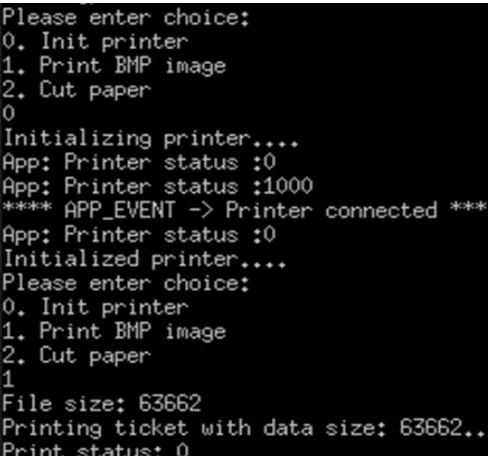
B. Printer:
Fig. 6Result of printer application for printing image
C. VFD:
Fig. 7Result ofVFD, displaying text on VFD device
D. Barcode reader/scanner:
VI. CONCLUSION
According to the current trends,Multi-core processor architectures like “ARM” resolve a number of issues related to power dissipation, the frequency wall etc. However, the adoption of such platforms poses to build number of new products. This paper presents an overview of SDK for cross-compilation and application development for such platform that may leads to acquire numerous practical applications.
REFERENCES
1. ALSA library commands aplay, amixer, arecord, Available: http://linuxcommand.org/man_pages/aplay1.html. 2. Gstreamer open source framework, Documentation. Available: http://gstreamer.freedesktop.org/documentation
3. Network performance measure. Available: https://en.wikipedia.org/wiki/Network_performance
4. Iperf, how to test network speed, performance and bandwidth. Available: http://www.slashroot.in/iperf-how-test-network-speedperformancebandwidth
5. Ethtool_command for Linux OS platform, Available : http://linux.about.com/od/commands/l/blcmdl8_ethtool.html
6. WimTaymans, Steve Baker, Andy Wingo, Ronald S. Bultje, and Stefan Kost “Gstreamer open source multi-media framework” validate 1.8.1stable release (binaries), 2016-04-20.
7. Klein, Deanna, and AleksandarGubic. "Responsive website design for higher education utilizing mobile centric features." Online Journal of International Institute for Applied Knowledge Management 2.1 (2014).
8. Symbol Native Application Programming Interface (SNAPI), programmer guide 72E-71370-01Revision A, March 2016. 9. wpa supplicant. (2016, March 18). In Wikipedia, the Free Encyclopedia. Retrieved 18:06, May 4, 2016,
from https://en.wikipedia.org/w/index.php?title=Wpa_supplicant&oldid=710762215
BIOGRAPHY
Gaurav Kumar, pursuing Master of Technology in VLSI and Embedded System from Ganpat
University, Gujarat, India and also working as a Project Intern (Internship) in eInfochipsPvt. Ltd. Ahmedabad, India.He has received Bachelor of Engineering degree in 2013 from VICT, GTU, Gujarat, India. He has successfully completed his project training in Sahajanand laser Tech. Ltd, Gandhinagar, India (2013).
Prerna Paliwal, is working in eiTRA, Umiya campus, Ahmedabad, India since 2.5 years as a Technical Associate in
![Fig. 5 Gstreamer Pipeline for Ogg player [2]](https://thumb-us.123doks.com/thumbv2/123dok_us/1441837.1176624/5.595.167.468.393.515/fig-gstreamer-pipeline-for-ogg-player.webp)