ISSN(Online): 2320-9801
ISSN (Print): 2320-9798
I
nternational
J
ournal of
I
nnovative
R
esearch in
C
omputer
and
C
ommunication
E
ngineering
(An ISO 3297: 2007 Certified Organization)
Vol. 4, Issue 3, March 2016
Secured Internet Banking Using
Fingerprint Authentication
Priyanka Mahajan1, Supriya Malekar2, Anuja More3 , Amol Wairagade4, Prof. B. Mahalakshmi5
Department of Computer Engineering, Pimpri Chinchwad College of Engineering, Pune, Savitribai Phule Pune University, Pune, India.
ABSTRACT: Nowadays, the banking and financial systems have been totally changed due to the environment
and globalization changes and competition of business services . Internet Banking or Web Banking or Online banking is used to describe banking transactions through internet application. Online Banking means user can get connected to his bank’s website by using his personal computer system and web browser. But there are many security problems like fraudulent websites, fake emails from banks, capturing user IDs and passwords, hacking personal bank accounts and steal money etc. Nowadays Online banking mostly works using username, password and OTP which is not more secure. To overcome these problems, our system gives a solution with a Fingerprint biometric of user. Our system mainly focuses on the objective to provide security for online transaction and to ensure that valid user should always get access to his account without any inconvenience.
KEYWORDS: Secure Internet banking, Finger print recognition, Banking transaction, Fingerprint matching, Minutiae, Ridges, Bifurcation, Thinning, Thresholding.
I. INTRODUCTION
Nowadays Online Banking Transaction is increasing everywhere in the world. Users are using their ATM cards, Credit cards, Debit Cards, etc. for making Online Payment for various types of purchase of goods or bill payments. Users use their Username, Password, Card number, CVV, etc. for making Online Transactions. After User enters these details he gets a One Time Password (OTP) on his registered Mobile number. When user enters this OTP correctly then and only then the transaction gets preceded successfully. But nowadays Hackers can easily Hack the users Bank Account and get the details of his Username, Password and Mobile number. So he can easily misuse with the users Account. So security is very much important aspect while performing Online Transactions. We need to make the transaction more secure so that the only User can access his Account and no one else.[2]
Therefore, there should be strong authentication provided for the Online Transaction process. Our system provides this authentication by using the biometrics of the User. The biometrics is in the form of Fingerprint of the user. In our system along with the Username and Password of the User he needs to provide his fingerprint biometric for the transaction. For this the bank initially stores all the user details along with his fingerprint. Our system will check for the biometrics of the user and match it with the original biometrics stored in the bank's Database. If a valid match is found then only the user is Authenticated and treated as valid. Otherwise even if there is a small mismatch in the fingerprint the user is not allowed to access the Bank Account. Our system mainly focuses on the objective to provide security for online transaction and to see that the valid User should always get access to his account without any inconvenience.
II. MOTIVATION
ISSN(Online): 2320-9801
ISSN (Print): 2320-9798
I
nternational
J
ournal of
I
nnovative
R
esearch in
C
omputer
and
C
ommunication
E
ngineering
(An ISO 3297: 2007 Certified Organization)
Vol. 4, Issue 3, March 2016
III. LITERATURESURVEY
Types of Biometrics :
There are two types of biometrics: behavioral and physical.
Behavioral biometrics: Mostly used for verification.
Speaker Recognition - Analyzing vocal behavior. Signature- Analyzing signature dynamics.
Keystroke - Measuring the time spacing of typed words
Physical biometrics: Used for either identification or verification. Fingerprint - Analyzing fingertip patterns.
Facial Recognition - Measuring facial characteristics. Hand Geometry - Measuring the shape of the hand.
Iris recognition - Analyzing features of colored ring of the eye. Retinal Scan - Analyzing blood vessels in the eye.
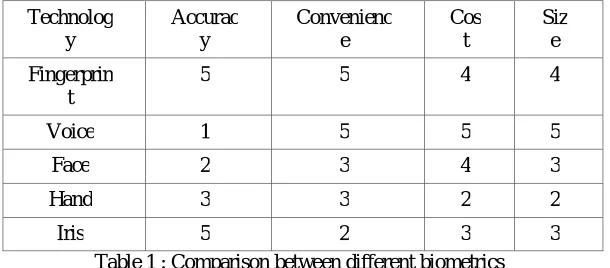
In our system we will prefer to use the fingerprint biometric as it is the most ancient method used to identify a person. Table below shows fingerprint versus other biometric technologies where it is ranked as 1(worst) – 5(best).[2] Technolog y Accurac y Convenienc e Cos t Siz e Fingerprin t
5 5 4 4
Voice 1 5 5 5
Face 2 3 4 3
Hand 3 3 2 2
Iris 5 2 3 3
Table 1 : Comparison between different biometrics
Advantages of using Fingerprint Biometric
1. Universality–Fingerprint is universally available with every individual. Only some rare people do not have fingers.
2. Uniqueness–Each individual has a unique fingerprint. No two people have same fingerprint patterns.
3. Permanence–Fingerprint remains permanently with the user right from the development of seven months fetus
until the person dies.
4. Biometrics cannot be forgotton, lost, duplicated or stolen. 5. It is more secure as it cannot be shared or used by others.
6. No need to remember passwords or any PINs.
7. Physical human characteristics are very much difficult to forge than passwords, security codes, or even some encryption keys.
8. Biometrics gives the promise of fast, easy-to-use, accurate, reliable, and less expensive authentication for many applications.
Disadvantages
1. Biometric systems must be able to accommodate changes to the biometric over time which may be caused by
ageing, illness or injury.
ISSN(Online): 2320-9801
ISSN (Print): 2320-9798
I
nternational
J
ournal of
I
nnovative
R
esearch in
C
omputer
and
C
ommunication
E
ngineering
(An ISO 3297: 2007 Certified Organization)
Vol. 4, Issue 3, March 2016
EXISTING SYSTEM [1]
Figure 1 – Existing system flowchart
In the existing system the banking transactions are done by online using the username and password. After entering the amount the system sends an One time Password(OTP) on the registered mobile number and then after entering the correct OTP the transaction is processed successfully. But it is not much secure as the OTP can be stolen or changed by anyone if our mobile is hacked or stolen. Thus, we need a more secure method for making our online transactions. Therefore, we use a fingerprint biometric for identification of the user.
IV. PROPOSED SYSTEM
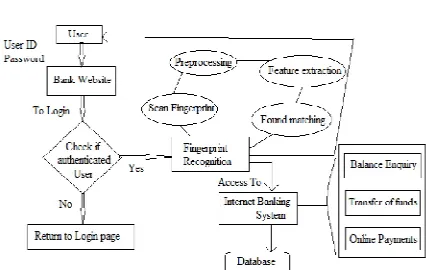
Figure 2 – Fingerprint biometric system.
The above shown Figure 2 represents the system for making online banking transaction using a fingerprint biometric. The system first takes Username and password from the user and checks if they are correct. After successful login the system asks for the fingerprint of the user. After scanning the fingerprint the minutiae features are extracted from it and stored in form of template and matching is done further. The process contains four main steps as follows[3] :
1. Image Acquisition.
2. Image Preprocessing.
3. Minutiae extraction.
4. Minutiae Matching.
1. Image Acquisition.
ISSN(Online): 2320-9801
ISSN (Print): 2320-9798
I
nternational
J
ournal of
I
nnovative
R
esearch in
C
omputer
and
C
ommunication
E
ngineering
(An ISO 3297: 2007 Certified Organization)
Vol. 4, Issue 3, March 2016
An off-line image is obtained by smearing ink on the fingertip and creating an impression of fingertip on the paper using ink. A live-scan image, is acquired by sensing tip of finger directly, using a sensor. Live-scan is done with the help of sensors. There are three types of sensors used. They are optical sensors, ultrasonic sensors and capacitance sensors. Our system uses Optical sensor (Fingerprint scanner).
2. Image Preprocessing
1) Image Binarization
Fingerprint Image binarization is to transform the 8-bit gray fingerprint image to a 1-bit image in which 0-value is for ridges and 1-value is for non-ridge areas also called as furrows. Algorithmic steps are as follows :
1. Divide the image into 4*4 regions.
2. Calculate the average of pixel values in the first 4*4 region.
3. Threshold the leftmost region of 4*2 by using average pixel values calculated in stage2.
4. Move the 4*4 operation window by 2 pixels to the right. If right edge of the image is reached, then move
the window 4 pixels up and return to the left edge.
5. Repeat stage 2 to stage 4 until the entire image is processed by RAT (Regional average thresholding).
2) Image Thinning
Thinning is the process to reduce the pixel value to 1 pixel width. It follows the following steps :
1. The image is read from bottom left to the right side line by line and the algorithm always tries to find any of black pixels in the original image . Because it is obvious that any of black pixels may be constituent of ridge. 2. The algorithm finds out (x,y) location of the first black pixel which is not processed yet in the original binary image.
3. A black pixel is inserted into thinned image at (x,y) location (gray pixels) and the black pixel is removed from the original binary image at the location.
3) Image Refining
There are many small unwanted portions that are unnecessary for further processing, but these portions if exist may lead to incorrect minutiae detection. These portions usually consist of around 20 to 25 pixels. It is a heuristic approach to decide the number of pixels.
The idea behind refining is to remove all the connected components which have equal to or less than 20 pixels. To remove these first we have to find out all the connected components present in the image. We find all the connected components and then we removed those portions which consists of less than or equal to 20 pixels.
In this manner we perform Refining of the image.
3. Minutiae extraction
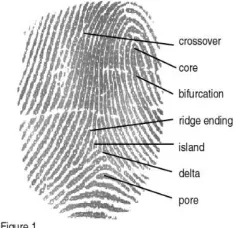
Figure 3 : Minutiae points Minutiae are of various types as follows:
1. Ridge ending
2. Core
3. Crossovers
ISSN(Online): 2320-9801
ISSN (Print): 2320-9798
I
nternational
J
ournal of
I
nnovative
R
esearch in
C
omputer
and
C
ommunication
E
ngineering
(An ISO 3297: 2007 Certified Organization)
Vol. 4, Issue 3, March 2016
5. Delta
6. Pore
7. Bifurcation
Our system mainly focuses on the ridges and bifurcations.[5]
Pattern recognition algorithm using Crossing Number method
The steps followed for pattern recognition are :
1. Let (x,y) denote a pixel on the ridge for which we need to check values.
2. N0 , N1 , …...,N7 denote its neighbours.
3. Then the pixel (x,y) is a ridge Ending if :
4. Ridge Bifurcation if :
Crossing Number is calculated by checking the 8-neighbours of each central pixel (p) in order to determine the count of all the crossover occurrences in the image.
0 1 0
0 1 0
1 0 1
Bifurcation Ridge Termination
Figure 4: Crossing Number Method
For a 3x3 window :
1. If p=1 and has only 1 one-value neighbor, then the central pixel is considered as a ridge ending.
2. If p=1 and has exactly 3 one-value neighbors, then the central pixel is a ridge branch i.e. for a pixel P, if Cn(P) = = 1 it’s a ridge end and if Cn(P) = = 3 it’s a ridge bifurcation.
(CN being the number of 1-valued neighboring pixels)
4. Minutiae Matching
Minutiae matching is required to check whether the input image is same as that stored in the bank database. Minutiae matching can be done using different techniques as Point matching i.e. the matching is done by comparing pixel by pixel. One pixel from the input image is taken and compared with one pixel from the reference image, Segment Creation The minutiae points extracted from the stage II are connected with each other using segments. The distance between each segment is calculated for both query and reference images. Take two minutiae points at a time. Mark a ray from both these points. Calculate angle from upper ray to the left of segment, this angle is α and calculate angle from lower ray to right of segmrnt, this angle is β. Both images match
if they are less than some tolerance value.
We are using the tree based matching method[4]. This method gives more accuracy for finding the minutiae points and matching two fingerprints. It has Two phases in order to produce a matching score.
0 0 0
0 1 0
ISSN(Online): 2320-9801
ISSN (Print): 2320-9798
I
nternational
J
ournal of
I
nnovative
R
esearch in
C
omputer
and
C
ommunication
E
ngineering
(An ISO 3297: 2007 Certified Organization)
Vol. 4, Issue 3, March 2016
Tree based Matching
Phase 1 - Finding common minutiae point set.
N1 and N2 are two images. N1 is the Base image stored in the database and N2 is the current input image given by
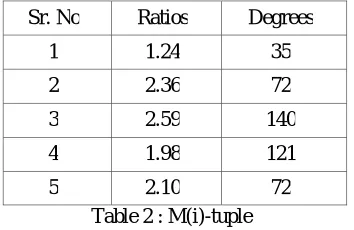
the user. M is common minutiae points from both the images. 'M(i)-tuple' to represent information about minutiae is calculated. Two types of Images having two types of minutiae Base Minutiae(BM) and Input Minutiae(IM).
1. M(i)- tuple for BM
N1 minutiae points in set N of minutiae points.
M(i)-tuple [i= 1 to Ni ] is calculated as follows :
Step 1 - 5 nearest points are found using Euclidean distance formula from ith point to other.
Step 2 - If i1, i2, i3, i4 & i5 are the points then : Calculate (i-i1), (i-i2), (i-i3), (i-i4) & (i-i5). Find 10 ratios as (i-i1):(i-i2), (i-i1):(i-i3)...so on.
Using formula :(a-b):(a-c)=Max{(a-b),(a-c)}/Min{(a-b),(a-c)}
Step 3- Calculate Angle between 'bac' or 'cab' at a.
Extend any one of the edges (i – i1) or (i – i2) beyond point ‘i’. Here, the extended edge is (i – i1).
The angle formed by (i1 – i –extended line) will be 180 degrees always, since it is only an extension. The remaining 180 degrees is split into two angles, Angle 2 which is (Extended line – i –i2), while the other angle is the one that we want which is angle (i1 - i - i2) or (i2 - i – i1).
2.M(i)- tuple for IM
Same calculations are done for the Input image given by the user. Here N2 represents the input image
having N minutiae points.
Sr. No Ratios Degrees
1 1.24 35
2 2.36 72
3 2.59 140
4 1.98 121
5 2.10 72
Table 2 : M(i)-tuple
Phase 2 – Matching phase
The matching phase of this algorithm has two functions as follows. (1) Separates the Candidate Common Points List into two lists,
(a) Confirmed Common Points List and (b) Spurious / Unconfirmed Point List.
(2) Uses the Confirmed Common Points List to generate a Matching Score between the Base and the Input image.
Finding confirmed common points list
ISSN(Online): 2320-9801
ISSN (Print): 2320-9798
I
nternational
J
ournal of
I
nnovative
R
esearch in
C
omputer
and
C
ommunication
E
ngineering
(An ISO 3297: 2007 Certified Organization)
Vol. 4, Issue 3, March 2016
vakue is lower, the order is lower, the origin point is order 0, the next is order 1) and when two points have the same Y value, the point with the lower X value is given the lower order.
If C (N) is the given number of points in the Confirmed Common Points List and N is the Maximum Number of points in the base, input images, then C (N) >= (N/2). If it is true, then the two images are said to be the same, else a negative score is displayed.
V. RESULTS
1. Main page contains two panels as Admin and User Login for the bank.
2. User Login
User registration
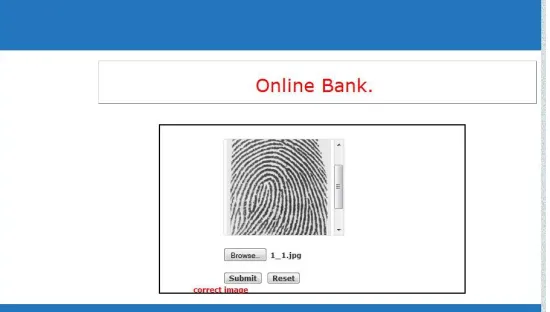
User first needs to register for the online bank account if he already has a account in the Bank. He needs to fill up his personal details as Username, Password, Email ID, Contact number, security question, etc. Alongwith this information user needs to give his fingerprint which is stored in the database.
Figure 5 : User registration
Image Enhancement
Fingerprint is captured using a scanner and further given for pre-processing. System checks whether the input image given is correct or not.
ISSN(Online): 2320-9801
ISSN (Print): 2320-9798
I
nternational
J
ournal of
I
nnovative
R
esearch in
C
omputer
and
C
ommunication
E
ngineering
(An ISO 3297: 2007 Certified Organization)
Vol. 4, Issue 3, March 2016
Image Preprocessing
When the user uploads his fingerprint, image preprocessing is done on that image in three steps as shown below in the figures :
Figure 7 : Captured image turned to grayscale
Figure 8: Binarized image
ISSN(Online): 2320-9801
ISSN (Print): 2320-9798
I
nternational
J
ournal of
I
nnovative
R
esearch in
C
omputer
and
C
ommunication
E
ngineering
(An ISO 3297: 2007 Certified Organization)
Vol. 4, Issue 3, March 2016
Figure 10 : Refined image
3.Successful User Login
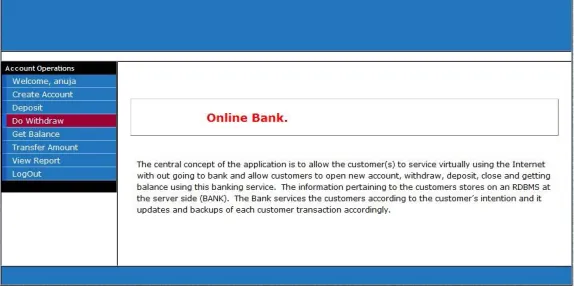
If username and password are correct and the fingerprint given as input matches with that stored in the database then successful user login takes place. User can then make transactions as transfer money, check balance, etc.
Figure 11 : User’s home page after successful login
4.Admin Login
ISSN(Online): 2320-9801
ISSN (Print): 2320-9798
I
nternational
J
ournal of
I
nnovative
R
esearch in
C
omputer
and
C
ommunication
E
ngineering
(An ISO 3297: 2007 Certified Organization)
Vol. 4, Issue 3, March 2016
VI. CONCLUSION
We have implemented a system for providing strong authentication for online banking transactions using fingerprint biometrics. It describes in brief about the enhancement, extraction and matching of fingerprint images. It contains the details of types of biometrics, its advantages over password/key authentication. It briefs about the image pre-processing techniques. The Crossing Number method has been used for feature extraction of minutiae. This method is able to detect accurately all valid bifurcations and ridge endings from the thinned image. For matching purpose an alignment-based matching algorithm is studied. In this, input minutiae are aligned with the template by estimating the parameters between an input and a template. The input which satisfies the matching score is declared as a matched fingerprint with the template.
VII. FUTURE SCOPE
1. Nowadays everyone is using Internet on mobiles. So we can develop an android App for scanning the fingerprint
biometric.
2. We can use our inbuilt mobile camera for capturing fingerprint image and build up algorithms for improving the image enhancement.
VIII. APPLICATIONS
1. Can be used to make Online transaction for banking applications.
2. Can be used to prevent unauthorized access to ATMs, cellular phones, smart cards, desktop PCs, workstations,
and computer networks.
REFERENCES
[1] R. Priya, V. Tamilselvi, G.P.Rameshkumar, “A Novel algorithm for Secure Internet Banking with finger print recognition”, International Conference on Embedded Systems - (ICES 2014).
[2] Catalin LUPU, Vasile-Gheorghita GAITAN and Valeriu LUPU, “Security enhancement of internet banking applications by using multimodal biometrics”, IEEE 13th International Symposium on Machine Intelligence and Informatics, January 2015.
[3] Verginia Espinosa, “Minutiae detection algorithm for fingerprint recognition”, IEEE AESS Systems Magazine, 2002.
[4] Abinandhan Chandrasekaran and Dr.Bhavani Thuraisingham,”Fingerprint Matching Algorithm Based on Tree Comparison using Ratios of Relational Distances”,Second International Conference on Availability, Reliability and Security.
[5] Hossein Jadidoleslamy, “DESIGNING A NOVEL APPROACH FOR FINGERPRINT BIOMETRIC DETECTION : BASED ON MINUTIAE EXTRACTION”, International Journal on Bioinformatics & Biosciences (IJBB) Vol.2, No.4, December 2012.
[6] Aliaa A.A. Youssif, Morshed U. Chowdhury , Sid Ray and Howida Youssry Nafaa, “Fingerprint Recognition System Using Hybrid Matching Techniques”, 6th IEEE/ACIS International Conference on Computer and Information Science (ICIS 2012).
[7] Shashi Kumar D R, Kiran Kumar K, K B Raja, R. K Chhotaray, Sabyasachi Pattnaik, “Hybrid Fingerprint Matching using Block Filter and Strength Factors”, 2010 Second International Conference on Computer Engineering and Applications.
[8] Om Preeti Chaurasia, “An Approach to Fingerprint Image PreProcessing”, I.J. Image, Graphics and Signal Processing, 2012, 6, 29-35, Published Online July 2012 in MECS (http://www.mecs-press.org/), DOI: 10.5815/ijigsp.2012.06.05.
[9] Bellamkonda sivaiah, Talasila Vamsidhar, Kotha Hari Chandana, “An Efficient Approach for Fingerprint Recognition by Matching Minutiae Pairings”, International Journal of Advanced Research in Computer Science and Software Engineering, Volume 5, Issue 2, February 2015, ISSN:2277 128X.