555-233-503
Comcode 108596354
Issue 2
December 1999
Release 8
Every effort was made to ensure that the information in this book was complete and accurate at the time of printing. However, information is subject to change.
Your Responsibility for Your System’s Security
Toll fraud is the unauthorized use of your telecommunications system by an unauthorized party, for example, persons other than your com-pany’s employees, agents, subcontractors, or persons working on your company’s behalf. Note that there may be a risk of toll fraud associated with your telecommunications system and, if toll fraud occurs, it can result in substantial additional charges for your telecommunications services.
You and your system manager are responsible for the security of your system, such as programming and configuring your equipment to pre-vent unauthorized use. The system manager is also responsible for reading all installation, instruction, and system administration docu-ments provided with this product in order to fully understand the fea-tures that can introduce risk of toll fraud and the steps that can be taken to reduce that risk. Lucent Technologies does not warrant that this product is immune from or will prevent unauthorized use of com-mon-carrier telecommunication services or facilities accessed through or connected to it. Lucent Technologies will not be responsible for any charges that result from such unauthorized use.
Lucent Technologies Fraud Intervention
If you suspect that you are being victimized by toll fraud and you need technical support or assistance, call Technical Service Center Toll Fraud Intervention Hotline at 1 800 643-2353.
Federal Communications Commission Statement
Part 15: Class A Statement. This equipment has been tested and found to comply with the limits for a Class A digital device, pursuant to Part 15 of the FCC Rules. These limits are designed to provide reasonable protection against harmful interference when the equipment is operated in a commercial environment. This equipment generates, uses, and can radiate radio-frequency energy and, if not installed and used in accor-dance with the instructions, may cause harmful interference to radio communications. Operation of this equipment in a residential area is likely to cause harmful interference, in which case the user will be required to correct the interference at his own expense.
Part 68: Network Registration Number. This equipment is registered with the FCC in accordance with Part 68 of the FCC Rules. It is identi-fied by FCC registration number AS593M-13283-MF-E.
Part 68: Answer-Supervision Signaling. Allowing this equipment to be operated in a manner that does not provide proper answer-supervision signaling is in violation of Part 68 Rules. This equipment returns answer-supervision signals to the public switched network when:
• Answered by the called station • Answered by the attendant
• Routed to a recorded announcement that can be administered by the CPE user
This equipment returns answer-supervision signals on all DID calls forwarded back to the public switched telephone network. Permissible exceptions include when a call is unanswered, a busy tone is received, and a reorder tone is received
Canadian Department of Communications (DOC) Interference Information
This digital apparatus does not exceed the Class A limits for radio noise emissions set out in the radio interference regulations of the Canadian Department of Communications.
European Union Declaration of Conformity
The “CE” mark affixed to the DEFINITY® equipment described in this book indicates that the equipment conforms to the following Euro-pean Union (EU) Directives:
Electromagnetic Compatibility (89/336/EEC) Low Voltage (73/23/EEC)
Telecommunications Terminal Equipment (TTE) i-CTR3 BRI and i-CTR4 PRI
For more information on standards compliance, contact your local dis-tributor.
Trademarks
See the Preface of this document for a list of applicable trademarks and registered trademarks.
Ordering Information
Call: Lucent Technologies BCS Publications Center
Voice 1 800 457-1235 International Voice 317 322-6416 Fax 1 800 457-1764 International Fax 317 322-6699 Write: Lucent Technologies BCS Publications Center
P.O. Box 4100
Crawfordville, IN 47933 Order: Document No. 555-233-503
Comcode 108596354 Issue 2, December 1999
You can be placed on a Standing Order list for this and other docu-ments you may need. Standing order will enable you to automatically receive updated versions of individual documents or document sets, billed to account information that you provide. For more information on standing orders, or to be put on a list to receive future issues of this document, contact the Lucent Technologies Publications Center. Lucent Technologies National Customer Care Center
Lucent Technologies provides a telephone number for you to use to report problems or to ask questions about your call center. The support telephone number is 1-800-242-2121. For technical support, customers outside the United States should call their Lucent Technologies Repre-sentative or Distributor.
European Union Declaration of Conformity
Lucent Technologies Business Communications Systems declares that the equipment specified in this document conforms to the referenced European Union (EU) Directives and Harmonized Standards listed below:
EMC Directive89/336/EEC Low Voltage Directive73/23/EEC
The “CE” mark affixed to the equipment means that it conforms to the above Directives. Heritage Statement
Lucent Technologies—formed as a result of AT&T’s planned restruc-turing—designs, builds, and delivers a wide range of public and private networks, communication systems and software, consumer and busi-ness telephone systems, and microelectronics components. The world-renowned Bell Laboratories is the research and development arm for the company.
Comments
To comment on this document, return the comment card at the front of the document.
Acknowledgment
Contents
Contents iii
Preface — About This Document xi
■ Overview xi
■ Contents and Organization of the Guide xi
■ Audience xii
■ Reason for Reissue xii
■ How to Use this Document xiii
■ Conventions Used in this Document xiii
■ Trademarks xiv
■ Related Documents xiv
Administration Documents xiv
Installation, Upgrades, and Maintenance
Documents xvi
Call Center Documents xviii
End Users xviii
■ How to Get Help xix
■ How to Make Comments About
This Document xix
1
Automatic Call Distribution (ACD)Basics — Overview and Exercises 1-1
■ Introduction 1-1
Exercises to Test Your Knowledge of ACD 1-2
■ ACD Terminology 1-2
■ Switches and Switch Features 1-6
What a Switch Does 1-6
■ What the ACD Does 1-8
Things to Know Before You Start 1-9
Automatic-In Processing of ACD Calls 1-9
DID Processing of ACD Calls 1-9
■ Split Queues 1-9
Split Queue Call Processing 1-10
Announcements for Calls in a Split Queue 1-11
Answer Supervision and Abandoned Calls 1-12
Night Service for the DEFNITY ECS and
DEFINITY Generic 3 1-15
■ Distributing and Handling Calls 1-16
How Calls are Distributed to Agents 1-16
How Agents Handle Calls 1-18
■ ACD and Call Management Systems
— BCMS, CMS R2 and CentreVu CMS 1-28
Basic Call Management System (BCMS) 1-29
CentreVu Call Management System (CMS) 1-29
■ ACD Measurement 1-30
Assigning CentreVu CMS Measurement
of the ACD 1-30
Switch Features that Affect CentreVu CMS Data 1-31
■ Exercise 1 — Automatic Call Distribution (ACD) 1-37
■ Exercise 1 Evaluation — Automatic
Call Distribution (ACD) 1-38
■ Exercise 2 — Automatic Call Distribution (ACD) 1-39
■ Exercise 2 Evaluation — Automatic
Call Distribution (ACD) 1-40
■ Exercise 3 — Automatic Call Distribution (ACD) 1-41
■ Exercise 3 Evaluation — Automatic
Call Distribution (ACD) 1-42
■ Exercise 4 — The ACD Agent and ACD Trunk States 1-43
■ Exercise 4 Evaluation — The ACD
Agent and ACD Trunk States 1-44
■ Exercise 5 — BCMS and CentreVu CMS 1-45
■ Exercise 5 Evaluation — BCMS and CentreVu CMS 1-46
2
DEFINITY Call Center Capacities forACD Software and Related Features 2-1
■ Introduction 2-1
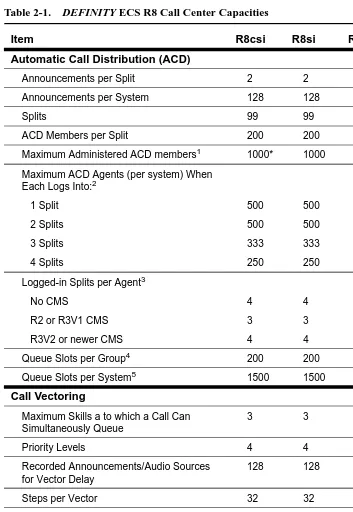
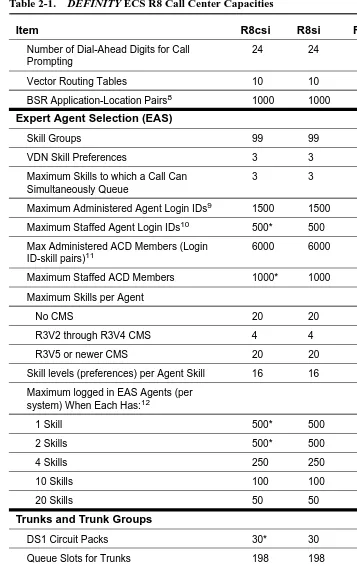
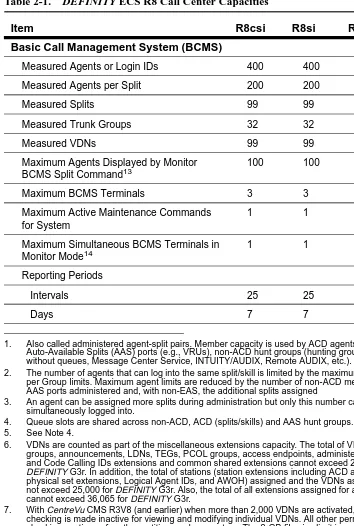
■ DEFINITY ECS R8 Capacities 2-2
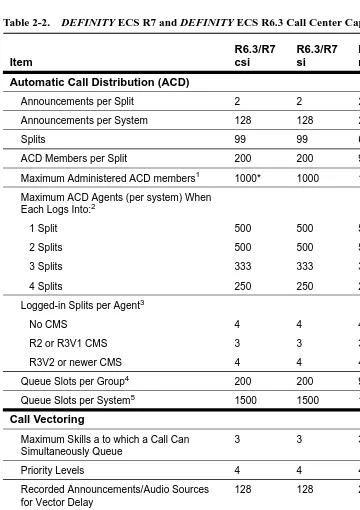
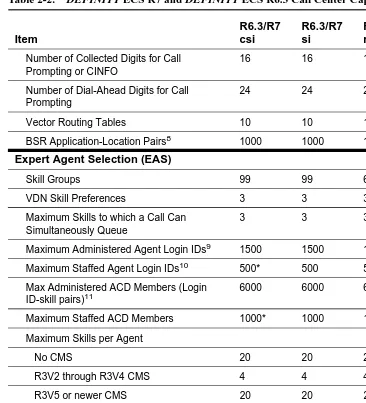
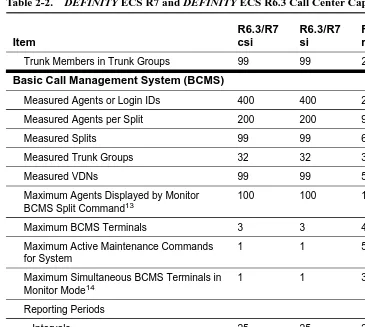
■ DEFINITY ECS R7 and DEFINITY ECS
R6.3 Capacities 2-6
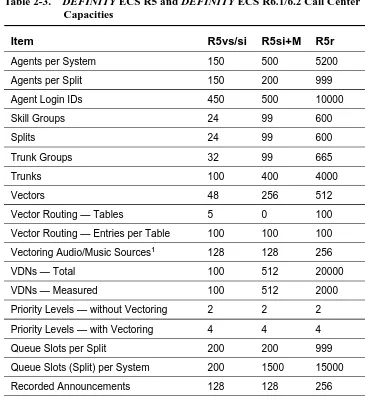
■ DEFINITY ECS R5 and DEFINITY ECS
R6.1 and DEFINITY ECS R6.2 Capacities 2-10
■ DEFINITY G3V2, DEFINITY G3V3, and
DEFINITY G3V4 Switch Capacities 2-12
■ DEFINITY G3V1 Switch Capacities 2-14
■ Measured Extensions and Multiple
Splits on a Non-EAS Switch 2-17
On DEFINITY G1 and DEFINITY G3 Switches 2-17
When Assignments Exceed Capacity 2-17
Assignments are Not Logins 2-17
■ Measured and Unmeasured Trunks 2-18
System Requirements 2-18
Measured vs. Unmeasured Trunks 2-18
Determining Available Measured Trunks 2-18
3
G3V4 ECS ACD Call Center Features 3-1■ Introduction 3-1
■ Feature-Related Information 3-1
■ List of Call Center Features 3-2
■ Abandoned Call Search 3-4
How to Administer Abandoned Call Search 3-4
Considerations 3-5
■ Add/Remove Skills 3-6
How to Administer Add/Remove Skills 3-6
Considerations 3-6
Interactions 3-7
■ Agent Call Handling 3-8
How to Administer Agent Call Handling 3-8
Detailed Description 3-10
Expanded Technical Information 3-16
Considerations 3-18
Interactions 3-20
■ Auto-Available Split 3-22
How to Administer AAS 3-22
Detailed Description 3-22
Considerations 3-23
Interactions 3-23
■ Automatic Call Distribution 3-25
How to Administer ACD 3-27
Detailed Description 3-28
Interactions 3-37
■ Basic Call Management System 3-41
How to Administer BCMS 3-42
Interactions 3-43
■ Best Service Routing 3-44
Benefits of Best Service Routing 3-44
Before You Start Using BSR 3-46
How to Administer BSR 3-47
Detailed Description 3-49
Interactions 3-53
■ Call Management System 3-56
How to Administer the G3V4/CMS Interface 3-56
Considerations 3-57
■ Call Prompting 3-58
How to Administer Call Prompting 3-58
Considerations 3-59
Interactions 3-59
■ Call Vectoring 3-61
How to Administer Call Vectoring 3-61
Interactions 3-63
■ CentreVu Advocate 3-69
How to Administer CentreVu Advocate 3-71
Considerations 3-72
Interactions 3-76
■ Expert Agent Selection 3-78
How to Administer EAS 3-78
Detailed Description 3-81
Considerations 3-83
Interactions 3-83
■ Inbound Call Management 3-86
How to Administer ICM 3-86
Detailed Description 3-88
Considerations 3-92
Interactions 3-92
Interactions 3-93
User-to-User Information Transport 3-93
Administering User-to-User Information Transport 3-94
Determining User Information Needs 3-96
Considerations 3-97
Troubleshooting 3-97
■ Intraflow and Interflow 3-99
Intraflow 3-99
Interflow 3-99
How to Administer Intraflow and Interflow 3-100
Detailed Description 3-100
Considerations 3-101
Interactions 3-101
■ Look-Ahead Interflow 3-102
How to Administer Look-Ahead Interflow 3-102
Considerations 3-103
Interactions 3-104
■ Multiple Call Handling 3-108
How to Administer MCH 3-108
Detailed Description 3-108
Considerations 3-111
Interactions 3-112
■ Queue Status Indications 3-114
How to Administer Queue Status Indications 3-114
Detailed Description 3-115
Interactions 3-115
■ Reason Codes 3-116
How to Administer Reason Codes 3-116
Detailed Description 3-117
Considerations 3-118
Interactions 3-119
■ Redirection on No Answer 3-120
How to Administer RONA 3-120
Detailed Description 3-121
Interactions 3-125
■ Service Observing 3-133
How to Administer Service Observing 3-133
Detailed Description 3-134
Service Observing Indicators 3-137
Considerations 3-142
Interactions 3-144
■ Universal Call ID 3-148
What is UCID’s Purpose? 3-148
What Does UCID Look Like? 3-148
How Does UCID Work? 3-148
How are UCIDs Tracked? 3-150
Interactions 3-157
Before You Start 3-157
How to Administer Universal Call ID 3-159
Considerations 3-162
Troubleshooting 3-162
■ VDN in a Coverage Path 3-163
How to Administer VICP 3-163
Considerations 3-163
Interactions 3-164
■ VDN of Origin Announcement 3-168
How to Administer VOA 3-168
Detailed Description 3-168
Considerations 3-169
Interactions 3-171
■ Voice Response Integration 3-174
How to Administer VRI 3-174
Detailed Description 3-175
Interactions 3-177
■ VuStats 3-182
How to Administer VuStats 3-183
Detailed description 3-189
Considerations 3-206
4
G3V4 ECS ACD Call Center Forms 4-1■ Introduction 4-1
■ List Call Center Forms 4-1
■ Agent LoginID 4-2
Administration Commands 4-2
Form Instructions 4-2
Implementation Notes 4-6
■ Best Service Routing (BSR) Application Plan 4-7
Administration Commands 4-7
Form Instructions 4-7
■ BCMS/VuStats Login ID 4-10
Administration Commands 4-10
Form Instructions 4-10
Implementation Notes 4-11
■ Call Center System Parameters 4-12
■ Call Vector 4-17
Administration Commands 4-17
Form Instructions 4-17
■ Reason Code Names 4-21
Administration Commands 4-21
Form Instructions 4-21
■ SIT Treatment for Call Classification 4-22
Administration Commands 4-22
Form Instructions 4-22
■ Vector Directory Number 4-24
Administration Commands 4-24
Form Instructions 4-24
Implementation Notes 4-28
■ Vector Routing Table 4-30
Administration Commands 4-30
Form Instructions 4-30
■ VuStats Display Format 4-32
Administration Commands 4-32
Form Instructions 4-32
A
Recorded Announcements A-1■ Introduction A-1
■ How to Administer Recorded Announcement A-2
■ Recorded Announcement Types A-3
Analog Line A-3
DS1 A-3
Auxiliary Trunk A-4
Integrated A-4
■ When to Use Recorded Announcements A-5
■ About Barge-in A-6
What Happens When You Use Barge-in A-6
■ Integrated Announcements and
Announcements Recorded on External Devices A-7
Single Integrated Announcement Boards A-7
Multiple Integrated Announcement Circuit Packs A-8
Compression Rates A-8
■ Procedures for Recorded Announcements A-9
■ Recorded Announcements, the ACD,
and Other Call Center Features A-10
■ Recorded Announcements and Automatic Wakeup A-10
GL
Glossary and Abbreviations GL-1Preface — About This Document
Overview
This document describes the DEFINITY Enterprise Communications Server (ECS) Release 8 (R8) ACD feature. For details about what is new in the DEFINITYECS R8, see the DEFINITY Enterprise Communications Server (ECS) Release 8 (R8) Change Description.
DEFINITYECS is a family of cost-effective digital communication systems. These systems:
n Route voice and data information between various endpoints (telephones, terminals, computers)
n Provide highly robust networking capabilities
n Include an extensive set of standard features: attendant consoles, voice processing interface, call coverage, DS1 (T1 and E1) connectivity, hospitality support, recorded announcement, and trunk-to-trunk transfer
n Provide flexibility and allow for the addition of optional features and/or upgrades to the system as business needs change
Contents and Organization of the
Guide
This document is organized into chapters by subject. Features are in alphabetical order within each chapter. Pertinent forms follow the features. Basic features and forms are presented in a chapter with the same title.
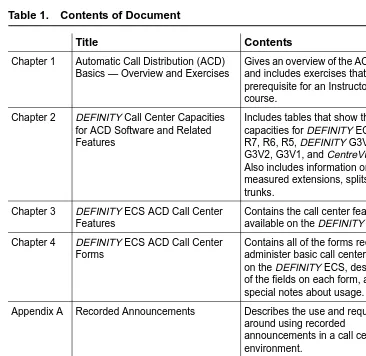
The following table gives a brief description of each chapter and appendix in this book.
Audience
This document is intended for the DEFINITYECS system administrators and managers, end-users interested in information about specific features, and Lucent Technologies support personnel responsible for planning, designing, configuring, selling, and supporting the system.
Table 1. Contents of Document
Title Contents
Chapter 1 Automatic Call Distribution (ACD) Basics — Overview and Exercises
Gives an overview of the ACD feature and includes exercises that are prerequisite for an Instructor-led course.
Chapter 2 DEFINITY Call Center Capacities for ACD Software and Related Features
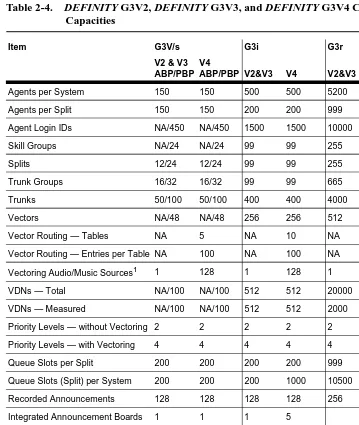
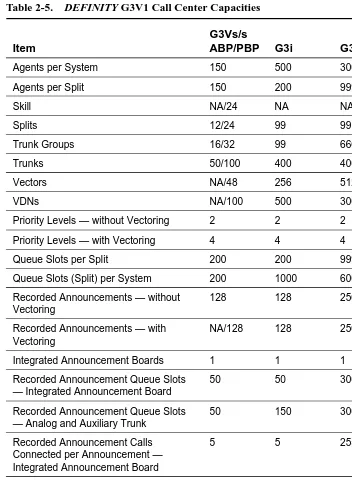
Includes tables that show the switch capacities for DEFINITY ECS R8, R7, R6, R5, DEFINITY G3V4, G3V3, G3V2, G3V1, and CentreVu CMS. Also includes information on measured extensions, splits, and trunks.
Chapter 3 DEFINITY ECS ACD Call Center Features
Contains the call center features available on the DEFINITY ECS Chapter 4 DEFINITY ECS ACD Call Center
Forms
Contains all of the forms required to administer basic call center features on the DEFINITY ECS, descriptions of the fields on each form, and special notes about usage.
Appendix A Recorded Announcements Describes the use and requirements
around using recorded
announcements in a call center environment.
Glossary Provides a glossary and list of
abbreviations for this and other related DEFINITY ECS documents
Reason for Reissue
This document is updated to include DEFINITYECS Release 8 information. It also now includes the information that formerly resided in the CentreVu Call
Management System Administration Guide in the ACD Basics appendix and in the Global Learning Solutions ACD Basics precourse material (BTC504S).
How to Use this Document
This document is designed to be used as a reference document. If you are interested in information about a particular feature, use the index or table of contents to locate the page number where the feature is described. Forms also can be located this way. They are listed alphabetically in each chapter in the table of contents. The title that appears on the form is the form name.
Conventions Used in this Document
This document uses the following conventions:
NOTE:
Draws attention to information that you must heed.
!
CAUTION:
Denotes possible harm to software, possible loss of data, or possible service interruptions.
!
WARNING:
Denotes possible harm to hardware or equipment.
!
SECURITY ALERT:
Trademarks
The following trademarked names may be used in this document. n AUDIX® is a registered trademark of Lucent Technologies. n BCMS Vu® is a registered trademark of Lucent Technologies. n Callmaster® is a registered trademark of Lucent Technologies. n CentreVu® is a registered trademark of Lucent Technologies. n Conversant® is a registered trademark of Lucent Technologies. n DEFINITY® is a registered trademark of Lucent Technologies. n INFORMIX® is a registered trademark of Informix Software, Inc.
n Microsoft®, MS®, MS-DOS®, and Windows® are registered trademarks of Microsoft Corporation.
n NetWare®, Novell®, OPEN LOOK®, and UnixWare® are registered trademarks of Novell, Inc.
n Solaris® is a registered trademark and SolsticeTM is a trademark of Sun Microsystems, Inc.
n UNIX® is a registered trademark of Novell, Inc. in the United States and other countries, licensed exclusively through X/Open Corporation.
n X Window SystemTM is a trademark and product of the Massachusetts Institute of Technology.
When used in this book, these trademark and registered trademark product names are shown in italics. If the name is used in a block of text that already incorporates italics, then the appropriate symbol is included in the call-out.
Related Documents
The following documents may include information related to the DEFINITYECS ACD feature.
Administration Documents
The primary audience for these documents consists of DEFINITYECS administrators who work for external customers and for Lucent’s dealers. The satisfaction and needs of our external customers is the primary focus for the documentation.
DEFINITYECS Release 8 —Administrator’s Guide, 555-233-502, Issue 2
DEFINITYSystem’s Little Instruction Book for basic administration, 555-230-727, Issue 5
Provides step-by-step procedures for performing basic switch administration tasks. Includes managing phones, managing features, and routing outgoing calls.
DEFINITY System’s Little Instruction Book for advanced administration,555-233-712, Issue 2
Provides step-by-step procedures for adding trunks, adding hunt groups, writing vectors and recording announcements.
DEFINITYSystem’s Little Instruction Book for basic diagnostics, 555-230-713, Issue 2
Provides step-by-step procedures for baselining your system, solving common problems, reading alarms and errors, using features to troubleshoot your system, and contacting Lucent.
DEFINITYECS Release 8 — Overview, 555-230-024, Issue 8
Provides a brief description of the features available with DEFINITYECS R8. This book does not provide a general overview of the switch nor of basic telephony.
DEFINITYECS Release 8 —Reports, 555-230-511, Issue 6
Provides detailed descriptions of the measurement, status, security, and recent change history reports available in the system and is intended for administrators who validate traffic reports and evaluate system performance. Includes corrective actions for potential problems.
DEFINITYECS Release 8 — System Description, 555-230-211, Issue 5
Provides hardware descriptions, system parameters, lists of hardware required to use features, system configurations, and environmental requirements.
DEFINITYECS What’s New in R8, 555-233-752, Issue 1
Installation, Upgrades, and Maintenance
Documents
Lucent technicians, design center employees, and customer self-maintainers are the primary audiences for these documents.
DEFINITYECS Release 8 — Administration for Network Connectivity, 555-233-501, Issue 2
Describes the main types of switch-to-switch connections that use Overlan hardware and software, and the procedures required to administer these connections.
DEFINITYECS Release 8 — ATM Installation, Upgrades, and Administration, 555-233-106, Issue 1
Step-by-step instructions for how to install, upgrade, and administer ATM switches. DEFINITYECS Release 8 — Installation and Maintenance for Survivable Remote EPN, 555-233-102, Issue 3
Describes how to install, cable, test, and perform maintenance on a Survivable Remote Expansion Port Network (SREPN). Provides power, ground, and fiber connections. DEFINITYECS Release 8 — Installation and Test for Multi-Carrier Cabinets, 555-230-112, Issue 7
Provides procedures and information for hardware installation and initial testing of multi-carrier cabinets.
DEFINITYECS Release 8 — Installation and Test for Single-Carrier Cabinets, 555-230-894, Issue 5
Provides procedures and information for hardware installation and initial testing of single-carrier cabinets.
DEFINITY ECS Release 8 — Installation for Adjuncts and Peripherals, 555-230-125, Issue 6
Provides procedures and information for hardware installation and initial testing of ECS adjunct and peripheral systems and equipment.
DEFINITYECS Release 8 — Installation, Upgrades and Additions for Compact Modular Cabinets, 555-230-128, Issue 5
DEFINITYECS Release 8 — Maintenance for R8r, 555-230-126, Issue 5
Provides detailed descriptions of the procedures for monitoring, testing, troubleshooting, and maintaining the R8r ECS. Included are maintenance commands, step-by-step trouble-clearing procedures, the procedures for using all tests, and explanations of the system’s error codes.
DEFINITYECS Release 8 — Maintenance for R8si, 555-233-105, Issue 2
Provides detailed descriptions of the procedures for monitoring, testing, troubleshooting, and maintaining the R8si ECS. Included are maintenance commands, step-by-step trouble-clearing procedures, the procedures for using tests, and explanations of the system’s error codes.
DEFINITYECS Release 8 — Maintenance for R8csi (Compact Modular Cabinets), 555-204-129, Issue 5
Provides detailed descriptions of the procedures for monitoring, testing, troubleshooting, and maintaining the R8csi ECS. Included are maintenance commands, step-by-step trouble-clearing procedures, the procedures for using all tests, and explanations of the system’s error codes.
DEFINITYECS Release 8 — Upgrades and Additions for R8r, 555-230-121, Issue 6
Provides procedures for an installation technician to convert DEFINITY Communications System or DEFINITYECS to DEFINITYECS Release 8. Includes upgrade considerations, lists of required hardware, and step-by-step upgrade procedures. Also includes procedures to add control carriers, switch node carriers, port carriers, circuit packs, auxiliary cabinets, and other equipment.
DEFINITYECS Release 8 — Upgrades and Additions for R8si, 555-233-104, Issue 2
Provides procedures for an installation technician to upgrade an existing
Call Center Documents
These documents are issued for DEFINITYECS Call Center applications. The intended audience is DEFINITYECS administrators.
DEFINITYECS Release 8 — Call Vectoring/EAS Guide, 585-230-521, Issue 4
Provides information on how to write, use, and troubleshoot vectors, which are command sequences that process telephone calls in an Automatic Call Distribution (ACD)
environment.
DEFINITYECS Release 8 —Guide to ACD Call Centers, 555-233-503, Issue 2
Provides feature descriptions and some implementation guidance for call center features. DEFINITYECS — Basic Call Management System (BCMS) Operations, 555-230-706, Issue 2
Provides information on the use of the BCMS feature for ACD reporting.
End Users
The primary audience for these documents consists of people who use the phones and attendant consoles.
DEFINITYECS Console Operations, 555-230-700, Issue 5
Provides operating instructions for the attendant console. Included are descriptions of the console control keys and functions, call-handling procedures, basic system
troubleshooting information, and routine maintenance procedures.
DEFINITYECS Release 8 — Console Operations Quick Reference, 555-230-890, Issue 4
Provides operating instructions for the attendant console. Included are descriptions of the console control keys and functions, call handling, basic system-troubleshooting
How to Get Help
For those times when you need additional help, the following help services are available. You may need to purchase an extended service agreement to use some of these help services. See your Lucent Technologies representative for more information.
n Lucent Technologies Centers of Excellence — Asia/Pacific
65-872-8686
— Western Europe/Middle East/South Africa 441-252-391-889
— Central/Eastern Europe 361-270-5160
— Central/Latin America/Caribbean 1-303-538-4666
— North America 1-800-248-1111 n DEFINITYHelpline
1-800-225-7585
n Lucent Technologies Toll Fraud Intervention 1-800-643-2353
n Lucent Technologies National Customer Care Center Support Line 1-800-242-2121
n Lucent Technologies Corporate Security 1-800-822-9009
How to Make Comments About
This Document
We provide reader comment cards at the back of this document. While we have tried to make this document fit your needs, we are interested in your suggestions for improving it and urge you to complete and return a reader comment card. If the reader comment cards have been removed from this document, please send your comments to:
Lucent Technologies Global Learning Solutions Room 22-2H15
1
Automatic Call Distribution (ACD)
Basics — Overview and Exercises
NOTE:
This chapter provides knowledge that is prerequisite to attending an Instructor-led Training (ILT) course.
Introduction
This chapter gives an overview of the Automatic Call Distribution (ACD) feature. It describes basic ACD capabilities for the following Lucent Technologies switches:
n DEFINITY Enterprise Communications Server n DEFINITY Communications System Generic 3.
This chapter addresses ACD terminology, switches and switch features, split queues, distributing and handling calls, ACD measurement, ACD capacities, and engineering guidelines.
n ACD terminology define common terms that are used throughout this book. n The Switches and Switch Features section defines switches and ACDs and
explains how the following features work: trunks, trunk groups, and extensions; automatic-in processing; switch attendant; and Direct Inward Dialing (DID) processing.
n Split Queues defines a split queue and explains how to set up call processing to a split, including announcements for calls in a split queue; answer supervision and abandoned calls, intraflow and interflow, and night service for the ECS and Generic 3.
n ACD Measurement describes how CentreVu CMS collects measured data on splits/skills, extensions, trunks, trunk groups, VDNs, and vectors. This section also includes switch features that affect CMS data, such as Hold, Conference, Transfer, Multiple Call Handling, and so forth.
n ACD Capacities contains capacity tables for DEFINITY ECS, Generic 3 switches, and CentreVu CMS. It also discusses measured extensions and multiple splits on a non-EAS switch and measured and unmeasured trunks.
n Engineering Guidelines presents ACD agent and trunk engineering guidelines for determining the number of agents and trunks required for an ACD. It contains examples and tables of average service times.
Exercises to Test Your Knowledge of ACD
At the end of the chapter are a series of exercises that you can use to demonstrate your knowledge of the information presented in this chapter.
In most cases you should be able to complete this chapter and the associated exercises in one hour.
All of the exercises that you need to complete to be ready for the Instructor-led Training are found in this chapter. Prior to completing the exercises, you should read the chapter, as it introduces the concepts and skills associated with the ACD, and provides instruction on their application.
It is important that you attempt to complete each Exercise. Even if you make mistakes, when you check your answers you’ll see how you should have responded and better understand the concept presented.
ACD Terminology
The following terms will provide general familiarity with the ACD environment.
Agent An agent is a person assigned to one or more splits/skills and handles calls to/from an extension in those splits/skills. Agent In Multiple
Splits/Skills
Depending on the ACD software, an agent can be a member of multiple splits/skills.
Agent State Agent state is a term or code that represents the current availability status of an agent. The term agent state also
Call Distribution Methods
The ACD can distribute calls to agents in a split/skill in one of four ways:
— Circular Hunting (Generic 2 only) — Direct (linear) Hunting
— EAD (Expert Agent Distribution)
— UCD (Uniform Call Distribution) and EUCD (Enhanced Uniform Call Distribution) or MIA
CMS Call Management System.
CMS is an adjunct (basic software package or optional enhanced software package) that collects call data from a switch resident ACD. CMS provides call management performance recording and reporting. It can also be used to perform some ACD
administration. CMS allows users to determine how well their customers are being served and how efficient their call management operation is.
EAS Expert Agent Selection.
An optional feature available with Generic 3 and Generic 2.2 that uses Call Vectoring and ACD in the switch to route incoming calls to the correct agent on the first try based on skills.
Hunt Groups A group of trunks/agents selected to work together to provide specific routing of special purpose calls.
Queues (split/skill and/or attendant)
If calls cannot be answered immediately, they are routed to a call collection point (split/skill queue or attendant queue) where calls are held until a split/skill agent or attendant can answer them. Calls are ordered as they arrive and they are served in that order. Depending on the time delay in answering the call,
announcements, music, or prepared messages may be employed until the call is answered.
Skill An ability given to an agent to meet a specific customer requirement or a call center business requirement.
Split A group of extensions/agents that can receive standard calls and/or special purpose calls from one or more trunk groups.
Trunk Group A group of similarly administered trunks carrying calls to the switch. An ACD has its own pre-assigned trunk groups.
Trunk state A term or code that represents the current status of a particular trunk.
Call Prompting Call Prompting is a call management method that uses specialized call vector commands to provide flexible handling of incoming calls based on information collected from the caller. One example would be where the caller receives an announcement and is then prompted to select (via dialed number selection) a department or an option that was listed in the announcement.
Call Vectoring Call Vectoring is an optional software package that allows processing of incoming calls according to a programmed set of commands. Call Vectoring provides a flexible service allowing direct calls to specific and/or unique call treatments.
Intraflow Intraflow is used when a split’s/skill’s queue is heavily loaded or when a call arrives after normal work hours. Intraflow involves redirecting a call to a destination within the local switch network (the same switch system).
Interflow Interflow is used when a split’s/skill’s queue is heavily loaded or when a call arrives after normal work hours.
Interflow redirects a call to a destination outside the local switch network (a different switch system).
LAI Look Ahead Interflow.
LAI allows users to balance the call work load between multiple call centers on separate switching systems. LAI uses ISDN to allow multiple switches to communicate and interflow when appropriate.
MCT Malicious Call Trace.
MCT allows an agent to notify a predefined party a malicious caller is on the line. It also involves enabling a recording device to record the call.
Night Service Night Service is used when a call arrives after normal work hours. The call can be redirected to another destination such as another split/skill, an extension, the attendant, an announcement with forced disconnect, or a message center. Night Service can take one of three forms:
— Hunt Group (Split/Skill) Night Service — Trunk Group Night Service
— System Night Service
Priority Queue The priority queue is a segment of a split's/skill's queue from which calls are taken first.
Service Observing Service observing is a feature used to train new agents and observe in-progress calls. The observer (split/skill supervisor) can toggle between a listen-only mode or a listen/talk mode during calls in progress.
Split/Skill Administration
Split/Skill Supervisor A split/skill supervisor is assigned to monitor/manage each split/skill and split/skill queue to accomplish specific split/skill objectives. A supervisor can assist agents on ACD calls, be involved in agent training, and control call intra/interflow.
Threshold A threshold is a point in time or criteria that determines a certain action by the system. For example, the number of calls in queue or the time calls spend in queue determines specific call treatments, or you can set the number of rings prior to announcements or call answers.
Call Center A call center provides a centralized location where a group of agents or company representatives communicate with customers via incoming or outgoing calls.
CAS Centralized Attendant Service.
CAS is a system feature used when more than one switch is employed. CAS is an attendant or group of attendants that handles the calls for all switches in that particular network.
DID Direct Inward Dialing.
DID is a process involving calls coming into the switch from the CO. The switch than routes the calls directly to the appropriate extension (as identified by the last four digits).
DNIS Dialed Number Identification Service.
DNIS is a feature of the 800 number service that sends the dialed digits to the called destination. This can be used with a display voice terminal to indicate the type of call to an agent. For example, the call by its destination can be classified as a certain type of call or caller (e.g., a Gold Card caller) depending on a product or service the destination number is associated with.
Extensions Voice terminals connected to a PBX/switch via telephone lines are referred as extensions. Extensions is also the term used to define the 3, 4, or 5 digit numbers used to identify the voice terminal to the PBX/switch software for call routing purposes.
Leave Word Calling Leave Word Calling is a system feature that allows messages to be stored for any ACD split/skill and allows for retrieval by a covering user of that split/skill or a system wide message retriever.
QDN Queue Directory Number.
QDN is an associated extension number of a split. It is not normally dialed to reach a split. The split can be accessed by dialing the QDN. The QDN is also referred to as a split group extension.
Switches and Switch Features
This section defines switches and ACDs and explains how they work. The section contains the following topics:
n Trunks, trunk groups, and extensions n Automatic-in processing definition n The attendant
n Switch with attendant and extensions
n Direct Inward Dialing processing with an example n Automatic-in processing of ACD calls
n DID processing of ACD calls n Call processing on an ACD switch.
What a Switch Does
A switch is an electronic device that processes incoming, outgoing, and internal calls and connects them to the proper destinations. The telephone company switch in your local area is called a Central Office (CO). A switch owned by a company or organization processes incoming, outgoing, and internal calls. Throughout this chapter, the term switch is used to refer to a company or organization’s switch.
Trunks, Trunk Groups, and Extensions
Incoming calls to a company first pass through the CO. The CO sends calls to the company switch over trunks (telephone lines that carry calls between two switches, between a CO and a switch, or between a CO and a phone).
The CO receives dialed digits from the caller, processes the digits, and seizes a trunk that is assigned those digits. After the CO seizes a trunk, it sends a continuing transmission to the destination phone or switch, and no other calls can be sent over that trunk until the current call disconnects.
The switches previously listed, in addition to connecting incoming calls to the proper destinations, are also like private COs for company employees. That is, employee phones are connected to a switch by telephone lines called extensions. Extensions are then assigned 3- 4- or 5-digit numbers within the switch software, and these numbers become the employee phone numbers for internal (intra-company) calls.
Automatic-In Processing
Automatic-in processing is one type of call processing. With automatic-in processing, the CO processes all of the digits of an incoming call. The CO then seizes a trunk from the trunk group, but since processing is complete, the call connects directly to a destination identified in the switch software. That destination can be a phone, a queue (in which callers wait to be answered in the order in which their call was received), or special treatment like an announcement.
Switch Attendant
Incoming calls can also go to a switch attendant. A switch attendant is a person who manually routes calls to their proper destinations using an attendant console (which is like a call switchboard). Normally an attendant serves as an internal operator who transfers calls to the proper extensions. Often, a switch will have more than one attendant, and all of the switch’s attendants will answer calls directed to the attendant queue, which holds calls until an attendant is available. The attendant queue receives internal calls made from employee extensions, and also receives incoming calls through DID processing and automatic-in processing. Attendant call handling varies, depending on the company’s needs. However, if the attendant has an automatic-in number, it will normally be the number published in the phone book, and the DID number will most likely be used by off-site employees who know only the attendant’s extension number.
Centralized Attendant Service (CAS) is a switch feature that enables attendants to be consolidated at one private-network location. The attended location is called the CAS main and each unattended location is called a CAS branch. At branch locations, calls requiring attendant services route by way of Release Link Trunks to the main location.
Direct Inward Dialing Processing
With Direct Inward Dialing (DID) processing, incoming trunks do not connect the CO directly to an employee’s phone; instead, the incoming trunks are pooled by the switch, and this pool of trunks is then shared by employee phones. Extension numbers may serve as the final digits of employee phone numbers for incoming calls. That is the CO may assign a 2- 3- or 4- digit prefix to a trunk group. Then, when a 7-digit employee phone number is dialed, the call is processed as follows:
1. The CO processes the prefix of the dialed number, and then seizes a trunk in the trunk group that is assigned that prefix.
2. The CO passes the remaining digits of the dialed number to the switch.
DID Processing Example
As an example of DID processing, say that Employee A has the external phone number 538-1000 and the extension number 1000. Employee B has the phone number 538-9999 and the extension number 9999. The steps in completing calls to Employees A and B might be as follows:
1. Employee A’s client dials 538-1000.
2. The CO serving Employee A’s company identifies the digits 538 (the common prefix for all phone numbers to that company) and seizes Trunk 1 in the trunk group assigned the digits 538.
3. The CO passes the digits 1000 to the switch at Employee A’s company.
4. The switch identifies the digits 1000 as Employee A’s extension number and sends the call to Employee A’s extension.
5. Employee A’s phone rings and Employee A answers. 6. Meanwhile, Employee B’s client dials 538-9999.
7. The CO identifies the digits 538 and seizes Trunk 2 in the trunk group assigned the digits 538.
8. The CO passes the digits 9999 to the switch.
9. The switch identifies the digits 9999 as Employee B’s extension number and sends the call to Employee B’s extension.
10. Employee B’s phone rings and Employee B answers.
While Employees A and B continue to talk, Trunks 1 and 2 in the 538 trunk group will not accept any more calls, so another call beginning with the digits 538 will seize yet another trunk in the trunk group.
What the ACD Does
Automatic Call Distribution (ACD) is a switch software feature that processes high-volume incoming, outgoing, and internal calls and distributes them to groups of extensions called hunt groups or splits. The switch also sends information about the operation of the ACD to the CentreVu CMS which stores and formats the data and produces real-time and historical reports on ACD activity. For more detailed information about ACD, read the feature description in the product documentation that came with your switch.
Things to Know Before You Start
A voice response port or a person who answers ACD calls is called an agent. Companies that operate high-volume call-answering centers, for example, a catalogue sales center, a reservations center, or a customer service center, use the ACD feature to process incoming calls and distribute them to agents. In addition to agents, each ACD split can be assigned a split supervisor. The split supervisor uses various switch and CentreVu CMS features to monitor split and agent performance and to provide assistance if necessary. Maintaining trunks from the CO to the switch and hiring agents to answer calls costs money. However, if customers who call to purchase goods or services have difficulty reaching an agent and, therefore, stop trying to get through, the call center loses revenue. Call center management needs, therefore, to determine how many trunks and agents are necessary to minimize costs and maximize the ability of customers to purchase goods or services. Management can then set up and maintain the ACD accordingly.
Automatic-In Processing of ACD Calls
Through switch administration, each automatic-in trunk group is assigned to an ACD split. All calls that come in on an automatic-in trunk group are directed to the assigned split. Then the ACD software distributes the calls to the agent extensions assigned to the split according to the assigned call distribution method (described later).
DID Processing of ACD Calls
Generic 3 enables you to dial directly to various extensions such as a VDN, a hunt group, an agent, or a login ID. Each extension can be assigned to a split as a DID extension. For DID processing, trunk groups are not assigned to the split. The creation of associated extensions is sufficient to send calls arriving over DID trunk groups to the appropriate split. Each split can receive incoming calls through DID processing, automatic- in processing, or both. Automatic-in trunk groups carry calls only to the split, whereas DID trunk groups carry calls to any extension identified in the switch software, not just a split.
Split Queues
This section defines a split queue and explains how to up call processing to a split. The section contains the following topics:
n Split queue call processing
n Announcements for calls in a split queue n Answer supervision and abandoned calls n Intraflow and interflow
Split Queue Call Processing
A split queue is a holding area for calls waiting to be answered, usually in the order in which they were received. When a call is put into queue, the caller may hear one or more delay announcements, music, and/or silence, depending on the treatment assigned for the split. (Treatment of calls in queue is assigned through switch administration.)
Things to Know Before You Start
Calls enter the queue at the bottom and move toward the top or head of the queue. After a call reaches the head of the queue, it connects to the next available agent.
For the DEFINITY ECS and Generic 3 switches with the Call Vectoring feature, all call treatment including routing, queuing, announcements, and music is specified by call vectors. When a call arrives at a split, the ACD software checks to see if an agent is available to handle the call. If an agent is not available (that is, all agents are busy), the call enters the split’s queue.
For the DEFINITY ECS and Generic 3 switches, calls queue only if no agents are available, a queue is assigned to the split, and the queue is not full. If the queue is full, the caller hears a busy tone or the call goes to coverage. If the split is vector controlled, then this step will fail. Furthermore, if no agents are logged into the split or if all agents are in AUX work mode (described later), calls do not queue.
Priority and Normal Split Queues
Each split can have two queues: a normal queue and a priority queue. A split always has a normal queue and can also be assigned a priority queue. The ACD distributes all calls in the priority queue before it distributes any calls in the normal queue. Therefore, the priority queue, if one exists, must be empty before the ACD distributes calls in the normal queue.
For the DEFINITY ECS and Generic 3, priority queuing may be assigned in the Class of Restriction (COR) associated with the split extension number. A split may also be assigned Priority Queuing on Intraflow, which means that calls to that split, if rerouted to another local split, will enter the destination split’s priority queue.
Split Queue Size for ECS and Generic 3
Announcements for Calls in a Split Queue
When a call enters a split queue, the caller hears ringing until the call is connected to an agent or an announcement. Depending on the treatment assigned to a split, the caller may hear one or two announcements, music, or silence. An announcement is a recorded message that provides information such as the destination the call has reached or a company’s business hours, or it tries to persuade the caller to stay on the line.
Things to Know Before You Start
Announcements and delay time are assigned to splits through switch administration. Delay time is the amount of time a call will wait in queue before receiving an
announcement. If a call connects to an agent before the delay time expires, the caller does not hear the announcement. If a call connects to an agent while an announcement is playing, the announcement stops. After the first announcement plays, the caller hears music or silence until the second announcement plays or the call connects to an agent. The type of caller feedback (music or silence) is also assigned to a split through switch administration.
For the DEFINITY ECS and Generic 3 switches with the Call Vectoring feature, announcement capabilities are more flexible than those described in this section. See Chapter 3, Call Vectoring and
Related ECS/G3 Features
The DEFINITY ECS and the Generic 3 switch support both internal and external announcement devices.
The announcement delay time can be from 0 to 99 seconds. A 0-second delay time causes a forced announcement, which means callers always hear the entire first announcement, whether an agent is available or not. A second announcement can be administered to recur each time the announcement delay time expires.
Rules for Generic 3 Announcements
If a Generic 3 announcement queue is full, the system will continue to try every 10 seconds to connect a call to the proper announcement until the call connects to an agent, connects to an announcement, or enters the announcement queue.
The following rules apply to Generic 3 announcements:
n Calls directly entering a split queue always receive a forced first announcement if assigned. The caller also hears first and second delay announcements if
administered and delay intervals are met.
n Calls that reach a split by way of Call Forwarding from another split (Interflow) or station do receive delay first and second announcements if administered and the delay intervals are met.
Announcement Queuing
External and internal announcement units are available. The number of calls that can be queued to an announcement depends on the size of the switch/ECS you have. The capacity tables in the DEFINITY Feature Description manual have details for each switch/ECS model. Queuing for internal announcements is quite different. Internal announcements are delivered by a 16-channel announcement board, and a call receives an announcement only when it connects to one of the 16 announcement channels. Therefore, all calls wait in a single queue to access a channel on the announcement board regardless of the split announcement they are waiting to receive. The same announcement can be delivered over multiple channels. Announcements are delivered on demand, so a call that connects to a channel receives an announcement immediately and does not have to wait for the announcement to finish and start again.
Answer Supervision and Abandoned Calls
Answer supervision is a signal sent by the switch to the serving Central Office (CO). This signal tells the CO that an incoming call has been answered and that the CO should begin tracking toll charges for the call (if they apply). Answer supervision is sent immediately before a call connects to an agent’s voice terminal, to music, or to an announcement.
Abandoned Calls
An abandoned call is a call that reaches a call center, but does not connect to an agent because the caller hangs up. A call can abandon while in queue or while ringing at an agent position. Abandoned calls represent lost sales or lost good will. Adequate split staffing and effective use of announcements can reduce the number of abandoned calls. Splits should be staffed so that calls do not have to wait in queue for an unreasonable amount of time, and announcements can be used to persuade the caller to wait until someone answers the call.
Abandoned Call Search
With Abandoned Call Search, the switch checks the incoming trunk before delivering an ACD call to an agent. If the trunk is on-hook at the CO (the call has been abandoned), the switch releases the trunk and does not deliver the call. If a call is still in progress on the trunk, the switch delivers the call to an agent.
Intraflow and Interflow
Intraflow and interflow allows you to redirect ACD calls to another split or other local or remote destinations. Redirecting calls to a local destination is called intraflow. Redirecting calls to a destination outside the switch is called interflow.
Things to Know Before You Start
Intraflow and interflow are set up differently for the DEFINITY ECS, Generic 3 switch. If Call Vectoring is active on the DEFINITY ECS or Generic 3 switch, redirection of calls differs significantly from the following intraflow/interflow descriptions. See Chapter 3, Call Vectoring and Related ECS/G3 Features.
DEFINITY ECS and DEFINITY Generic 3
As many as three intraflow destinations OR one interflow destination can be established for a split through switch administration. Intraflow uses the Call Coverage feature to redirect ACD calls to a coverage path that contains one, two, or three of the following internal destinations:
n An extension
n An ACD split (including AUDIX ® ®and Message Center splits) or Hunt Group.
The term “Hunt Group” refers to groups of extensions that receive distributed calls. The term “split” refers to a hunt group that is measured by CentreVu CMS. n An attendant group
n An announcement followed by a forced disconnect.
Call Forwarding and ACD splits can be set up to intraflow calls unconditionally. Interflow destinations are the same as those listed above for intraflow (plus the CAS attendant), except interflow sends calls to destinations outside the switch.
Setting Up Splits
Splits can also be set up to intraflow calls when one or all of the following criteria are met: n Don’t Answer
Calls redirect if not answered within the assigned Don’t Answer Interval (1 to 99 ringing cycles).
n Busy
Calls redirect when the split’s queue is full; that is, when the number of calls in queue equals the administered queue length.
n No Agents Staffed or All Agents in AUX Mode
Call redirect if there are no agents staffed or if all agents are in the AUX work mode.
Assigning Queue Status
If an intraflow destination has a queue, that queue may be assigned an inflow threshold. The inflow threshold, which is established through switch administration, is the length of time the oldest call in queue has waited. Once the inflow threshold is reached, that queue does not accept intraflowed calls and the switch tries the next administered destination. Through switch administration, a split can be assigned Priority Queuing on Intraflow which allows intraflowed calls to enter the priority queue at the destination split.
Types of Calls for a Split
The following types of intraflow/interflow can be used for a split:
n Don’t Answer Time Interval intraflow (using the Call Coverage feature) n Busy intraflow (using the Call Coverage feature)
n Unconditional intraflow (using the Call Forwarding-All feature).
When calls are intraflowed using the Call Coverage feature, CentreVu CMS only reports inflowed and outflowed calls if the call queues to the original split. For example, a call that covers using the busy criterion will not be recorded as in/outflowed since it could not queue to the original split. Calls that queue before covering using the Don’t Answer criteria are recorded as in/outflowed calls.
Setting Up Intraflow/Interflow
redirect the call to the next destination. Thus, when unconditional and conditional intraflow are used together, the conditional intraflow criteria are applied to the forwarded-to destination, not to the original split.
This combination of unconditional and conditional intraflow allows Dialed Number Identification Service (DNIS) numbers to appear on agent display voice terminals. In this case, the DNIS number is actually a dummy split extension (that is, the split extension has no assigned agent extensions). The intraflow destinations are the real splits (with staffed agents). With such a configuration, CentreVu CMS will count incoming calls for the DNIS number (that redirected via unconditional intraflow to real splits) as outflows. CentreVu CMS will also count the calls to the destination splits as ACD calls and inflowed calls. And regardless of the split where calls actually connect to agents, the agents will see the DNIS (dummy split) number on their display terminals.
The intraflow criteria and destinations are assigned through switch administration. Console permissions and the Call Forwarding dial access code are also assigned through switch administration. Unconditional intraflow or interflow can be activated by entering the Call Forwarding dial access code from a station with console permission, the split’s extension, and the interflow or intraflow destination number.
For the DEFINITY ECS and Generic 3, the split supervisor cannot establish conditional intraflow from a voice terminal. Furthermore, CentreVu CMS cannot be used to set up or activate intraflow/interflow.
Night Service for the DEFNITY ECS and
DEFINITY Generic 3
The DEFINITY ECS and Generic 3 switch offer an alternative form of call routing called Night Service. Night Service redirects all calls to one of the following internal
destinations: n An ACD split n An extension n An attendant group
n An announcement with forced disconnect.
Night service is available for a hunt group, a trunk group, or a system. These types of night service are explained below.
Hunt Group Night Service
Trunk Group Night Service
Trunk Group Night Service redirects all calls arriving over a split’s assigned trunk groups to an internal destination. The Night Service destination for the trunk group and the voice terminal button used to activate the feature are assigned through switch administration. Trunk Group Night Service by itself does not guarantee that all calls to a split will be redirected. Calls from local extensions and DID calls will still connect to the split. Trunk Group Night Service and Hunt Group Night Service can both be active at the same time. If the Trunk Group Night Service is active, its destination will be used for calls that come in over the trunk group even if they go to a split that has a Hunt Group Night Service destination assigned.
System Night Service
System Night Service redirects all calls arriving over all trunk groups to the Night Service destination. System Night Service overrides any Hunt Group Night Service set up for an individual split. If Trunk Group Night Service is active for a particular trunk group, System
Night Service does not affect that trunk group. When any type of Night Service becomes effective, calls already in a split’s queue are not redirected. To avoid dissatisfied callers, agents should continue to staff the split until the queue is empty.
Distributing and Handling Calls
This section describes how calls are distributed to agents and how agents handle the calls. The section contains the following topics:
n How calls are distributed to agents n How agents handle calls
n Split supervisor voice terminal buttons.
How Calls are Distributed to Agents
ACD calls are delivered to agents according to the type of call distribution (also known as hunting) that is assigned to the split/skill. This section explains the different types of call distribution.
The following types of call distribution can be assigned to a split/skill through switch administration:
n Direct n Circular
The following descriptions of ACD call distribution assume that the Multiple Call Handling (MCH) feature is not assigned. Agent availability is different for splits assigned the MCH feature.
Some types of call distribution are not available with some versions of switch software.
Direct
ACD software searches for an available agent in the order that extensions were assigned to the split (through switch administration), starting with the first extension assigned to the split. This type of call distribution is most useful when management wants the most effective or most experienced agents to handle more calls. Agents are rank-ordered from most to least effective and then are assigned to the split in that order. Direct call
distribution is called Direct Department Calling (DDC) for the DEFINITY ECS and Generic 3 switches. For the DEFINITY ECS and Generic 3 switches that have the Expert Agent Selection feature, DDC cannot be assigned to skills. However, Expert Agent Distribution (EAD) can be used to ensure that the most expert agent available receives the call.
Circular
ACD software searches for an available agent in the order that extensions were assigned to the split, starting with the agent after the agent who handled the last ACD call. This type of call distribution provides a balanced workload. Circular distribution is not available on the DEFINITY ECS or on Generic 3 switches.
Most Idle Agent (Uniform Call Distribution)
ACD software searches for the agent extension that has been idle (waiting) the longest and distributes the call to that extension if the agent is available to handle an ACD call. This type of call distribution, which is sometimes called “true ACD”, ensures a high degree of equity in agent workloads even when call-handling times vary. For the DEFINITY ECS and Generic 3, MIA distribution is called Uniform Call Distribution (UCD).
ACD software determines which agent extension has been idle the longest by maintaining an ordered list (queue) of agents who are eligible to receive the next ACD call. Eligible agents enter the queue at the bottom and move toward the top (also called the head of the queue). The agent at the top of the eligible-agent queue (the agent who has been in queue the longest) receives the next ACD call unless the agent is not available at the time the call is to be distributed. If the agent at the top of the queue is not available, the ACD software checks the availability of the next agent in queue until an available agent is found.
DEFINITY ECS and DEFINITY Generic 3
When an agent completes an ACD call, the agent is added to the bottom of the
on AUXIN or AUXOUT extension calls from the available state, or on an ACD call for another split or skill (unless the “MIA across splits/skills” option is turned on). Agents in ACW are in eligible agent queues on G3 switches. You can choose whether these agents are or are not in the eligible-agent queues for the DEFINITY ECS.
An agent is marked as unavailable to take an ACD call if the agent: n is in ACW,
n is on an AUXIN or AUXOUT extension call from the available state, or n is on an ACD call for another split or skill.
The agent remains in queue moving toward the top of the queue. Agents in multiple splits or with multiple skills enter multiple eligible-agent queues. The agents’ progress in each queue is independent of any activity in other queues. Agents in the AUX state are not in the eligible- agent queue.
Expert Agent Distribution (EAD)
Expert Agent Distribution is only available with the DEFINITY ECS or the Generic 3 (Version 2 or later) switches that have the Expert Agent Selection feature. This method of call distribution adds a layer of processing on top of the Most Idle Agent distribution call processing, described in the preceding paragraphs.
Call Distribution for the DEFINITY ECS with EAS
This additional layer of processing sorts the agents in the eligible-agent queue into multiple queues based on skill level. Agents with the skill assigned at higher-priority levels will appear in the eligible-agent queue ahead of agents with the skill assigned at lower-priority levels. The call will be delivered to the most idle most expert agent available, rather than to the most idle agent.
Call Distribution for the DEFINITY G3V2 or later with EAS
For Generic 3 Version 2, Version 3, and Version 4 switches with EAS, the additional layer of call processing sorts the agents in the eligible-agent queue into primary and secondary skill groups, in effect, creating two eligible-agent queues for each skill. ACD software searches for an available agent extension in the primary skill group before searching the secondary skill group. An ACD call will only be distributed to an available agent in the secondary skill group if no agents are available in the primary skill group. Other aspects of MIA call distribution work the same as described above.
How Agents Handle Calls
Things to Know Before You Start
The capability of a voice terminal to receive EXT-IN calls or to make EXT-OUT calls can be restricted through switch administration. The following descriptions of agent call handling assume that the Multiple Call Handling (MCH) feature is not assigned. Agent availability and call handling are different for splits assigned the MCH feature.
ACD calls are distributed only to available agent extensions. To be considered available, an agent must first staff an agent extension and then select a call-answering mode (automatic in or manual in).
Staffing Agent Extension on the DEFINITY
ECS/DEFINITY G3 Without EAS
To staff an agent extension on the DEFINITY ECS or the Generic 3 switch without the EAS feature, an agent must dial a login access code or press the LOGIN button on the agent’s voice terminal. The agent must then dial a split number and a login ID. The login ID length, the login dial access code, and, if desired, the LOGIN button are assigned through switch administration. The split number may also be assigned to the LOGIN button or to another voice terminal button.
Staffing Multiple Splits
An agent can log in from any extension assigned to a split. For the DEFINITY ECS and the Generic 3 switch, an agent can log into as many as three splits. To the switch and CentreVu CMS, each login counts toward the maximum number of agent members that can be measured. That is, if four agents are each logged into three splits, the agent member count is 12.
Agent Login
Agent login lets ACD (and CMS) know an extension is active and logged into the system (AUX work mode). Pressing the login button and then following the appropriate system login procedure makes the extension staffed in AUXWORK. This procedure varies with the type system you have.
Agent Logout
Agent logout lets ACD (and CMS) know an extension is no longer active.
Agent Request for Supervisor Assistance
Agent States and Call Answering Modes
Agent State is the current status of an agent. Work modes are the work function(s) the agent is performing at a given time.
When the agent is engaged in an ACD call, the agent is in the ACD agent state.
After staffing an extension, the agent is in the auxiliary work (AUX-WORK) mode, which is considered non-ACD work.
MANUAL-IN versus AUTO-IN
In AUX-WORK mode, the agent is not yet available to receive ACD calls. To become available for ACD calls, the agent must press the MANUAL-IN or AUTO-IN button to select a call answering mode.
Table 1-1. Manual-In vs. Auto-In
MANUAL-IN The MANUAL-IN button tells the ACD that the agent extension is available for an ACD call. The ACD then distributes a call to the agent according to the established call distribution method. When the call ends, the agent automatically enters the After-Call-Work (ACW) state. While in ACW, the agent is not available to receive ACD calls. When ACW ends, the agent presses MANUAL-IN to receive another ACD call. The manual-in mode is most effective if an agent must perform call-related tasks after finishing each ACD call. MANUAL-IN dial access codes and voice terminal buttons are assigned through switch administration.
Ringing versus Zip Tone for Incoming Calls
When a call arrives at a voice terminal, the agent may hear ringing or zip tone (beeping), depending on how the voice terminal is administered. Ringing is recommended when an agent answers calls using the handset. When a call connects to the agent’s voice terminal, the voice terminal rings, and the agent picks up the handset to answer the call.
Zip tone is recommended when the agent uses a headset to answer calls. (Zip tone can also be used with a handset, but the agent must hold the handset and listen for the zip tone.) When a call connects to an agent’s voice terminal, the agent hears one burst of zip tone for calls dialed directly to the split (or agent extension on the DEFINITY ECS and the Generic 3 switch) and, without pushing any buttons, the agent greets the caller.
Ringing (called “manual answer” in switch administration) or zip tone (called “automatic answer” in switch administration) is established on a per-voice terminal basis through switch administration.
Auxiliary Work (AUXWORK) and After-Call- Work (ACW)
AUXWORK The agent is involved in non-ACD work, is on break, in a meeting or at lunch. CMS recognizes the extension as staffed but does not want ACD to route calls there for an extended time. AUX-IN implies that the extension received an extension-in call while in AUX. AUX-OUT implies that the agent place